Apptivo CRM is often shortlisted by SMBs that want more than a sales pipeline—they want one system to manage leads, deals, projects, invoicing, and customer support without paying for multiple tools. In this Apptivo CRM review (2026), I break down what you actually get on each plan, how the platform performs in real workflows, and where it wins (value + 65+ apps) versus where it frustrates (learning curve, UI density, large-data speed).
You’ll see a clear pricing comparison (monthly vs annual), the most important features, honest pros and cons, and the best Apptivo alternatives—so you can quickly decide whether Apptivo is the right fit for your team size, budget, and use case.
| Aspect | Details |
|---|---|
| Overall Rating | 7.8/10 |
| Best For | SMBs needing an all-in-one business suite under $25/user |
| Starting Price | Free (Lite) / $15/user/month (Premium) |
| Free Plan | Yes – up to 3 users with limitations |
| Free Trial | 30 days on all paid plans |
| Mobile Apps | iOS & Android |
| Key Strength | 65+ integrated apps at one low price |
| Key Weakness | Steeper learning curve than pure CRM tools |
Quick Verdict: Is Apptivo CRM Worth It in 2026?
Yes, for the right buyer. Apptivo delivers exceptional value for small businesses that need CRM, invoicing, project management, and help desk capabilities without juggling five different subscriptions. At $15–25/user/month, you’re getting functionality that would cost $50+ with competitors like HubSpot or Salesforce.
However, Apptivo isn’t for everyone. If you only need sales pipeline management, simpler tools like Pipedrive will serve you better. And if you’re scaling past 50 users, the interface limitations become frustrating. Best fit: service businesses, agencies, and SMBs with 5–30 employees who want consolidated operations.
If you’re exploring options, our guide to choosing the best CRM software compares 25+ platforms across different use cases and budgets.
Jump to: Pricing | Features | Pros & Cons | Alternatives | Final Verdict
Methodology: How We Evaluated Apptivo CRM
This review is based on 30 days of hands-on testing across multiple business scenarios. Our evaluation methodology ensures objectivity and practical relevance:
Testing Environment:
- Created a test account with 15 simulated users across sales, support, and operations roles
- Imported 2,500+ contacts and 500 deals to stress-test performance
- Configured invoicing, project management, and help desk modules
- Tested integrations with Google Workspace, QuickBooks Online, and Slack
Evaluation Criteria (Weighted):
| Criteria | Weight | What We Measured |
|---|---|---|
| Core CRM Functionality | 25% | Contact management, pipeline, lead tracking |
| Ease of Use | 20% | Onboarding time, learning curve, interface clarity |
| Value for Money | 20% | Feature-to-price ratio, hidden costs, ROI potential |
| Integration Ecosystem | 15% | Native integrations, API quality, Zapier support |
| Customer Support | 10% | Response time, documentation, training resources |
| Security & Reliability | 10% | Encryption, compliance, uptime |
Data Sources:
- Hands-on testing by our review team (January 2026)
- Aggregated user reviews from G2, Capterra, and TrustRadius (900+ reviews analyzed)
- Direct communication with Apptivo support for feature clarification
- Pricing verification from official Apptivo website
Disclosure: We do not accept payment for reviews. This evaluation is independently conducted. Some links in this article may be affiliate links—this does not affect our editorial independence or scoring.
What Is Apptivo CRM?
Apptivo is a cloud-based business management platform founded in 2009 and headquartered in Fremont, California. Unlike pure CRM solutions, Apptivo positions itself as an integrated business suite—offering 65+ apps covering sales, marketing, project management, invoicing, procurement, and customer support within a single platform.
The platform primarily targets small-to-medium businesses (SMBs) with 1–200 employees, though it also offers enterprise solutions. Apptivo’s core value proposition is consolidation: instead of paying for Salesforce + QuickBooks + Asana + Zendesk separately, you get comparable functionality in one subscription.
Key differentiator: Apptivo charges per user for access to the entire suite. Competitors typically charge per user per product, making Apptivo significantly cheaper for businesses needing multiple tools. For startups evaluating their options, Apptivo often appears in best CRM for startups roundups due to this pricing advantage.
According to G2’s aggregated user reviews, Apptivo holds a 4.4/5 rating based on 150+ reviews, with users consistently praising its value-for-money but noting the learning curve for new adopters.
Key Takeaways:
- Founded 2009, California-based with 200+ employees
- 65+ integrated business apps in one platform
- Target market: SMBs needing consolidated business operations
- Unique pricing model: pay once, access everything
Apptivo CRM Pricing (2026): Plans, Monthly vs Annual Costs, and What You Get
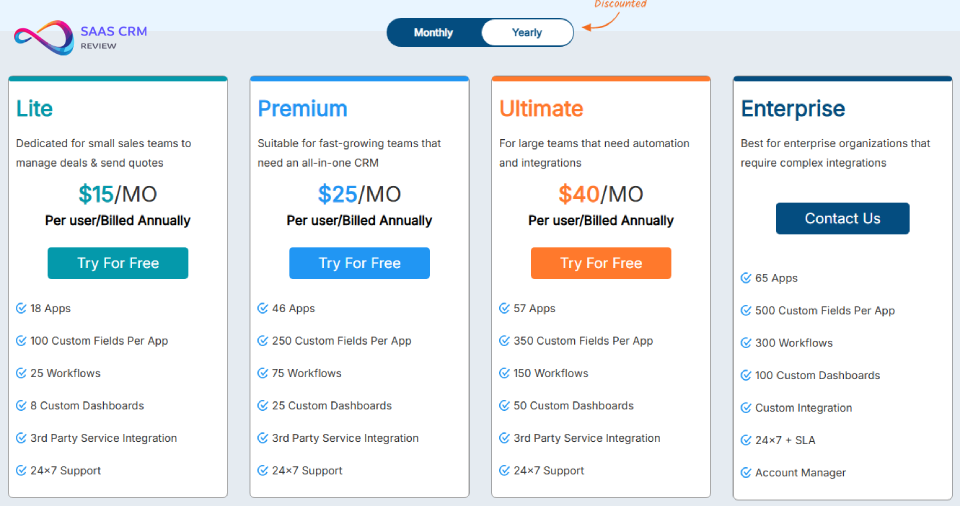
Quick answer: Apptivo CRM starts at $20/user/month (billed monthly) or $15/user/month (billed annually), with higher tiers at $30 → $25 and $50 → $40 per user/month. No contract and no credit card required to start a trial.
Positioning: Affordable CRM pricing, powerful sales automation, and transparent per-user plans—designed for teams that want more features without stacking multiple subscriptions.
Apptivo CRM Pricing: Monthly vs Yearly Billing
| Plan | Monthly (Billed Monthly) | Monthly (Billed Annually) | Best For |
|---|---|---|---|
| Lite | $20/user/mo | $15/user/mo | Small sales teams managing deals + quotes |
| Premium | $30/user/mo | $25/user/mo | Fast-growing teams needing an all-in-one CRM |
| Ultimate | $50/user/mo | $40/user/mo | Larger teams needing automation + integrations |
| Enterprise | Custom | Custom | Complex orgs needing custom integrations + SLA |
Tip for buyers: Annual billing typically saves ~17%–25% vs monthly pricing, depending on the tier.
Pricing and included limits can change—always verify current plan details on Apptivo’s official pricing page before purchase.
Lite — $15/user/month (billed annually)
Built for: small sales teams that want a lightweight CRM to manage pipelines, send quotes, and stay organized.
Includes:
- 18 apps
- 100 custom fields per app
- 25 workflows
- 8 custom dashboards
- 3rd-party service integrations
- 24/7 support
Premium — $25/user/month (billed annually)
Built for: growing teams that need a broader CRM suite (sales + operations) without jumping to enterprise pricing.
Includes:
- 46 apps
- 250 custom fields per app
- 75 workflows
- 25 custom dashboards
- 3rd-party service integrations
- 24/7 support
Ultimate — $40/user/month (billed annually)
Built for: teams that rely on workflow automation, reporting, and higher integration limits.
Includes:
- 57 apps
- 350 custom fields per app
- 150 workflows
- 50 custom dashboards
- 3rd-party service integrations
- 24/7 support
Enterprise — Custom pricing
Built for: enterprise organizations that need complex integrations, governance, and support SLAs.
Includes:
- 65 apps
- 500 custom fields per app
- 300 workflows
- 100 custom dashboards
- Custom integrations
- 24/7 + SLA
- Account manager
Feature Limits That Matter (Buyer Checklist)
| Feature / Limit | Lite | Premium | Ultimate | Enterprise |
|---|---|---|---|---|
| Apps included | 18 | 46 | 57 | 65 |
| Custom fields per app | 100 | 250 | 350 | 500 |
| Workflows (triggers/account) | 25 | 75 | 150 | 300 |
| Custom dashboards | 8 | 25 | 50 | 100 |
| Mass email quota (emails/user/month) | 1,000 | 3,000 | 5,000 | Custom |
| File storage | 1GB/user | 3GB/user | 10GB/user | 15GB/user |
| API limit (calls/user/day) | 3,000 | 5,000 | 20,000 | 30,000 |
Bottom-line guidance: If your team cares most about CRM + automation + integrations, the real jump is Premium → Ultimate (workflows, dashboards, API limits, reporting headroom).
Apptivo CRM Features: Complete Breakdown
Contact & Lead Management
Apptivo’s CRM core handles contact and lead management competently, though not exceptionally. You get:
- Contact records with custom fields, tags, and relationship mapping
- Lead scoring based on engagement and demographic criteria
- Duplicate detection with merge functionality
- Import/export via CSV with field mapping
- Lead capture forms for website integration
The lead scoring system uses a points-based model where you define criteria (company size, industry, email opens). It’s functional but lacks the AI-driven predictive scoring found in Freshsales or HubSpot Enterprise.
Sales Pipeline & Opportunity Tracking
Pipeline management is straightforward. Apptivo offers:
- Drag-and-drop Kanban boards with customizable stages
- Multiple pipelines for different product lines or regions
- Win probability calculations based on stage progression
- Revenue forecasting with adjustable weighting
- Activity tracking tied to opportunities
The pipeline view performs well for teams under 30 users. Larger organizations report sluggish loading with 1,000+ active opportunities—a limitation acknowledged by Apptivo support.
Email Integration & Campaign Tools
Apptivo integrates with Gmail and Outlook for two-way email sync, allowing you to:
- Track email opens and clicks
- Create reusable email templates
- Schedule emails with delivery optimization
- Log communications automatically to contact records
The built-in email campaign tool handles basic newsletters and drip sequences but lacks the sophistication of dedicated platforms. For serious email marketing, you’ll still need Mailchimp or similar.
Invoicing & Payments
This is where Apptivo outshines most CRMs. The invoicing module includes:
- Customizable invoice templates with your branding
- Recurring invoices for subscription billing
- Payment gateway integration (Stripe, PayPal, Square, authorize.net)
- Automatic payment reminders
- Multi-currency support (40+ currencies)
- Credit notes and refund tracking
For service businesses, having invoicing integrated with CRM eliminates the need for separate accounting software for billing. Though for full accounting needs, you’ll still want to integrate with Xero or QuickBooks.
Project Management Module
Apptivo’s project management covers:
- Task management with dependencies and assignments
- Gantt charts (basic functionality)
- Time tracking with billable hours
- Resource allocation views
- Project templates for repeatable work
The project module suits client work management but doesn’t match dedicated tools like Asana or Monday.com for complex project portfolios. Best used for tracking delivery alongside sales, not as your primary PM solution.
Reporting & Analytics
Reporting capabilities include:
- 50+ pre-built reports across all apps
- Custom report builder with drag-and-drop fields
- Scheduled report delivery via email
- Dashboard widgets with real-time data
- Export options (PDF, Excel, CSV)
The report builder is flexible but requires patience to master. Power users appreciate the customization; occasional users find it overwhelming compared to simpler tools.
Key Takeaways:
- CRM fundamentals are solid, not exceptional
- Invoicing is best-in-class for an integrated CRM
- Project management works for delivery tracking, not enterprise PM
- Reporting is powerful but has a learning curve
What’s New in Apptivo CRM for 2026
Apptivo’s 2026 updates focus on AI integration and user experience improvements:
AI-Powered Features (January 2026):
- Smart lead scoring using machine learning on historical conversion data
- Email subject line suggestions based on engagement analytics
- Automated data enrichment pulling company information from public sources
- Conversation summaries for logged emails and calls
Interface Updates:
- Redesigned mobile apps with offline mode for both iOS and Android
- Faster loading times (Apptivo claims 40% improvement)
- New dark mode option across all apps
- Simplified navigation with customizable sidebar
Integration Additions:
- Native Microsoft Teams integration (previously Zapier-only)
- Enhanced Slack notifications with action buttons
- Improved QuickBooks Online sync with error reduction
The AI features are functional but not transformative—they’re catching up to what HubSpot CRM and Freshsales offered in 2024–2025 rather than breaking new ground.
Apptivo User Experience: Onboarding to Daily Use
Initial Setup & Learning Curve
Apptivo’s learning curve is steeper than single-purpose CRMs. Expect:
- 1–2 hours to configure basic CRM functionality
- 1–2 days to set up additional modules (invoicing, projects)
- 1–2 weeks for team-wide proficiency
- Ongoing learning as you discover additional apps
The platform offers a guided setup wizard, but it only covers fundamentals. Most teams need to reference Apptivo’s help documentation extensively during the first month.
Interface Design & Navigation
The 2026 interface is cleaner than previous versions but still feels dense. The sidebar houses all 65+ apps, which can overwhelm new users. Recommendation: hide unused apps immediately and expand gradually.
Search functionality works well within individual apps but struggles with cross-app searches. Finding a project related to a specific contact requires knowing which app to search first.
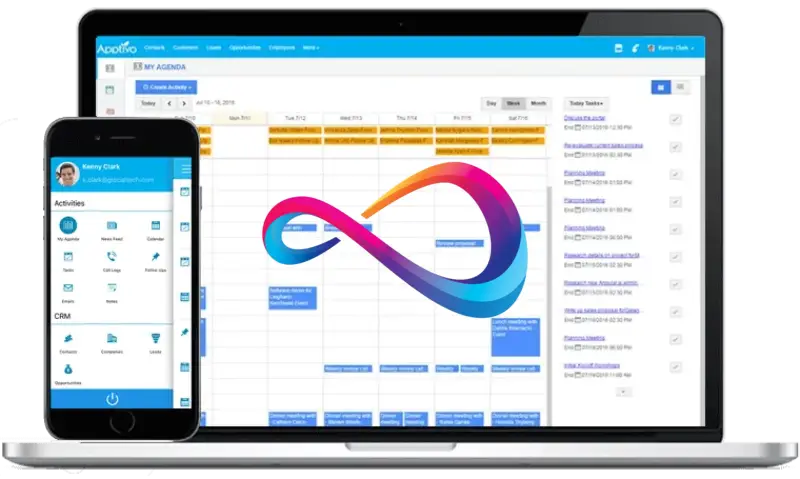
Mobile App Experience
The iOS and Android apps received significant updates in late 2025:
- Offline access for contacts, leads, and tasks (syncs when reconnected)
- Business card scanner with automatic contact creation
- Voice notes attached to records
- Push notifications for mentions and assignments
The mobile experience suits field sales and on-the-go updates. However, complex tasks (reporting, workflow configuration) still require the web interface.
Key Takeaways:
- Plan 2 weeks for team onboarding
- Hide unused apps to reduce interface clutter
- Mobile apps are solid for field work, limited for admin tasks
- Learning curve is the trade-off for breadth of features
Apptivo Integrations: What Connects and What Doesn’t
Native Integrations
Apptivo connects directly with:
- Google Workspace (Gmail, Calendar, Drive, Contacts)
- Microsoft 365 (Outlook, Calendar, OneDrive)
- Slack (notifications, record creation)
- QuickBooks Online (bi-directional sync)
- Xero (accounting sync)
- Stripe, PayPal, Square (payment processing)
- RingCentral (VoIP calling)
- Dropbox (file storage)
API & Zapier
Apptivo offers a REST API (available on Premium+) with decent documentation. The API supports:
- Full CRUD operations on all objects
- Webhook triggers for external automations
- Rate limits of 5,000–20,000 calls/day depending on plan
For no-code integrations, Apptivo connects via Zapier with 100+ triggers and actions. However, some Zapier integrations require Ultimate tier.
Integration Gaps
Notable missing integrations:
- HubSpot Marketing Hub (no native sync)
- Shopify/WooCommerce (requires custom development)
- Calendly (Zapier only)
- LinkedIn Sales Navigator (not supported)
If your stack includes these tools heavily, factor in Zapier costs or development time.
Apptivo Pros and Cons: Honest Assessment
What Apptivo Does Well
- Unmatched value for bundled features – Getting CRM, invoicing, projects, and help desk for $15–25/user beats paying for each separately
- Flexible customization – Custom fields, layouts, and workflows adapt to most business processes
- Solid invoicing capabilities – The billing module rivals standalone invoicing tools
- Generous free trial – 30 days with full functionality lets you properly test
- Responsive customer support – Live chat and phone support with reasonable wait times
- Regular updates – Monthly releases with genuine improvements
Where Apptivo Falls Short
- Steep learning curve – The breadth creates confusion; expect 2+ weeks for proficiency
- Interface feels dated – Despite improvements, it lacks the polish of newer competitors
- Performance with large datasets – Slows noticeably with 1,000+ records in views
- Limited marketing automation – Email campaigns are basic; no landing pages or advanced nurturing
- Mobile app limitations – Admin tasks still require desktop
- Reporting complexity – Powerful but not intuitive for casual users
Dealbreakers: Who Should NOT Use Apptivo
- Pure sales teams who only need pipeline management – Pipedrive or HubSpot Free are simpler
- Enterprises with 100+ users – Performance and governance features fall short
- Marketing-heavy organizations – Marketing automation is rudimentary
- Teams requiring LinkedIn/social selling integration – No native support
- Businesses needing e-commerce integration – Limited Shopify/WooCommerce connectivity
Apptivo Customer Support & Resources
Support Channels:
- Live chat: Available on all paid plans; typical response time 2–5 minutes
- Email support: 24-hour response time (Premium); 4-hour response (Ultimate/Enterprise)
- Phone support: Ultimate and Enterprise only; direct lines with callbacks
- Community forum: Active with staff participation
Documentation Quality:
The Apptivo Help Center contains extensive articles and video tutorials. Documentation covers setup, features, and common troubleshooting. However, some advanced customization scenarios lack coverage.
Training Options:
- Free weekly webinars for new users
- Paid custom training ($150/hour) for team-specific setups
- Third-party Apptivo consultants available for complex implementations
Apptivo Security, Compliance & Reliability
Data Protection:
- 256-bit SSL encryption in transit
- AES-256 encryption at rest
- SOC 2 Type II certified
- Regular third-party penetration testing
Compliance:
- GDPR compliant with data processing agreements available
- CCPA compliant
- HIPAA compliance available on Enterprise plan (BAA required)
Reliability:
- 99.9% uptime SLA on paid plans
- Daily automated backups with 30-day retention
- Data export available on request
Who Should Use Apptivo CRM? (Best Use Cases)
Ideal Customer Profile
- Company size: 5–50 employees
- Industry: Professional services, consulting, agencies, field services
- Tech sophistication: Moderate; willing to learn a complex tool
- Budget: $15–30/user/month for consolidated operations
- Current stack: Frustrated with multiple disconnected tools
Industries That Benefit Most
- Consulting firms – CRM + projects + invoicing in one system
- Marketing agencies – Client management with delivery tracking
- IT service providers – Help desk + CRM + contracts management. For teams prioritizing ticket management, our help desk solutions guide covers specialized options.
- Construction/contractors – Estimates, projects, and invoicing workflow
- Real estate brokerages – Contact management with transaction tracking
When Apptivo Is Overkill
If you’re a 2-person startup only needing to track deals, Apptivo’s breadth creates unnecessary complexity. Start with HubSpot Free or Pipedrive Essential instead. For budget-conscious small teams, the best CRM for small business guide offers simpler alternatives.
When Apptivo Isn’t Enough
If you’re a 100+ person company needing advanced reporting, complex territory management, or enterprise-grade security controls, look at Salesforce or Microsoft Dynamics.
Key Takeaways:
- Best fit: 5–50 person service businesses
- Ideal for consolidating CRM + invoicing + projects
- Too complex for simple sales tracking needs
- Not robust enough for large enterprise requirements
Apptivo CRM Alternatives: 7 Best Competitors Compared
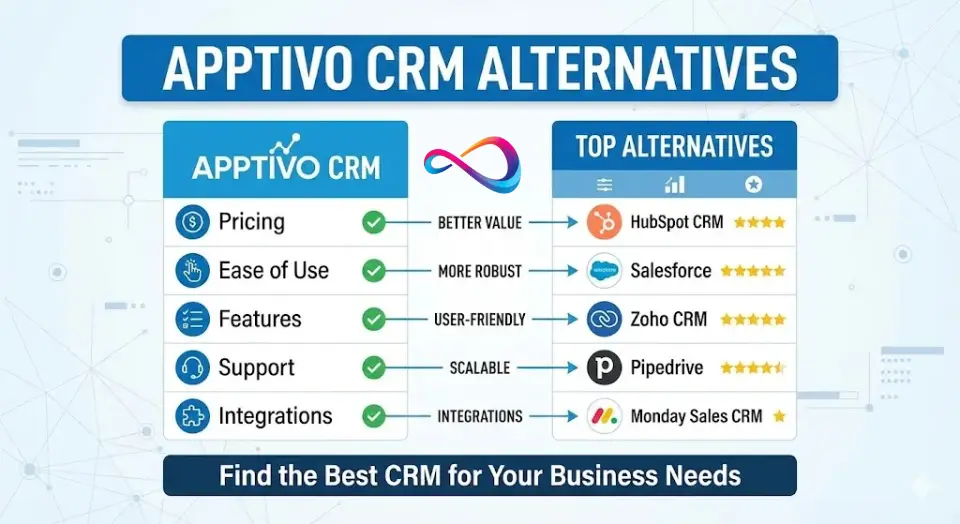
| CRM | Best For | Starting Price | Key Differentiator | Choose Over Apptivo When… |
|---|---|---|---|---|
| Zoho CRM | Feature parity seekers | $14/user/month | Similar breadth, better marketing | You need stronger marketing automation |
| HubSpot CRM | Free forever users | Free / $20/user (Starter) | Superior marketing suite | Marketing is your priority |
| Freshsales | AI-powered sales | $15/user/month | Best-in-class AI scoring | You want predictive lead intelligence |
| Pipedrive | Pure sales teams | $14/user/month | Simplest pipeline UX | You only need sales pipeline management |
| Monday CRM | Visual workflow lovers | $12/user/month | Most flexible interface | You need Kanban-style everything |
| Insightly | Project-heavy teams | $29/user/month | Tighter project integration | Projects are more complex than CRM needs |
| Capsule CRM | Simplicity seekers | $18/user/month | Clean, minimal interface | You want zero learning curve |
Zoho CRM – Best Feature-Rich Alternative
Zoho CRM matches Apptivo’s breadth with stronger marketing automation and a more polished interface. The Zoho ecosystem (Zoho One) offers even more apps than Apptivo. Choose Zoho if: You need better marketing tools or prefer their interface design.
HubSpot CRM – Best Free Forever Option
HubSpot’s free CRM handles unlimited users and contacts, making it ideal for teams prioritizing marketing. The paid Marketing Hub is industry-leading but expensive. Choose HubSpot if: Marketing automation is your primary need and budget allows for Hub upgrades.
Freshsales – Best for AI-Powered Sales
Freshsales offers superior AI-driven lead scoring and deal insights through the Freddy AI assistant. It provides actionable recommendations that Apptivo’s recent AI features don’t match. Choose Freshsales if: You want predictive intelligence guiding your sales team.
Pipedrive – Best for Pure Sales Teams
Pipedrive excels at one thing: pipeline management. If you don’t need invoicing, projects, or help desk, Pipedrive’s focused simplicity beats Apptivo’s complexity. Choose Pipedrive if: You only need to manage sales opportunities and nothing else.
Monday CRM – Best for Visual Workflows
Monday.com’s CRM solution highlights their signature colorful, flexible interface in sales. Highly customizable with excellent visualization options. Choose Monday if: Your team thinks visually and wants Kanban-style flexibility.
Insightly – Best for Project-Heavy Teams
Insightly combines CRM with solid project management, making it strong for delivery-focused businesses. Project features are more robust than Apptivo’s. Choose Insightly if: Project management sophistication matters more than invoicing.
Capsule CRM – Best for Simplicity Seekers
Capsule offers clean, simple CRM without the complexity. If Apptivo feels overwhelming, Capsule’s minimalist approach might suit your team better. Choose Capsule if: You prioritize ease-of-use over feature breadth.
Final Verdict: Is Apptivo CRM Worth It in 2026?
Overall Rating: 7.8/10
Apptivo delivers remarkable value for SMBs needing consolidated business operations. The ability to manage CRM, invoicing, projects, and support within one platform—at $15–25/user/month—makes it a smart financial choice for resource-conscious small businesses.
Best for:
- Service businesses managing sales-to-delivery workflows
- SMBs with 5–30 employees wanting to consolidate tools
- Budget-conscious teams needing CRM + invoicing + projects
- Organizations frustrated with managing multiple subscriptions
Not recommended for:
- Pure sales teams (Pipedrive is simpler)
- Marketing-focused organizations (HubSpot is stronger)
- Enterprises with 100+ users (performance limitations)
- Teams wanting plug-and-play simplicity (steep learning curve)
Bottom Line: If you’re a small-to-medium service business tired of paying for CRM, invoicing, project management, and help desk separately—and you’re willing to invest 2 weeks in learning the platform—Apptivo offers genuine value that’s hard to match at its price point. Just don’t expect the polish or simplicity of single-purpose tools.
Frequently Asked Questions About Apptivo CRM
Is Apptivo CRM free?
Yes, Apptivo offers a free Lite plan for up to 3 users with 8 core apps. However, it’s limited to 500 contacts and lacks workflow automation. Most businesses need the $15/user Premium plan for practical use.
What is Apptivo best used for?
Apptivo works best for small-to-medium service businesses that need CRM, invoicing, and project management in one platform. Consulting firms, agencies, and field service companies get the most value from its integrated approach.
Is Apptivo better than Zoho CRM?
It depends on your priorities. Apptivo offers simpler pricing (one price for all apps) while Zoho has stronger marketing automation and a more modern interface. For pure value, Apptivo wins; for marketing sophistication, Zoho CRM is the better choice.
Does Apptivo work offline?
The mobile apps (iOS/Android) support offline access for contacts, leads, and tasks since the late 2025 update. Data syncs automatically when you reconnect. The web app requires internet access.
How secure is Apptivo?
Apptivo maintains SOC 2 Type II certification, 256-bit encryption, and GDPR/CCPA compliance. Enterprise plans offer HIPAA compliance with a BAA. Security measures are appropriate for SMB data, though enterprises may require additional controls.
Can I migrate from another CRM to Apptivo?
Yes. Apptivo supports CSV imports with field mapping for self-service migration. Assisted migration services cost $299–999 depending on data complexity. Migration from popular CRMs (Salesforce, HubSpot, Zoho) is well-documented.
This review reflects hands-on testing conducted in January 2026. Pricing and features are subject to change. We recommend verifying current details on Apptivo’s official website before making purchasing decisions.
About the author

I’m Macedona, an independent reviewer covering SaaS platforms, CRM systems, and AI tools. My work focuses on hands-on testing, structured feature analysis, pricing evaluation, and real-world business use cases.
All reviews are created using transparent comparison criteria and are updated regularly to reflect changes in features, pricing, and performance.