

Most Google Workspace buying mistakes are not about price. They come from two beliefs the vendor’s own documentation contradicts.
The first is that each user is boxed into a personal storage allowance. The second is that the entry plan cuts meetings off after an hour.
Neither is true, and both push teams onto a tier they did not need.
My verdict after running this suite as the production email and document stack for saascrmreview.com: Business Standard is the plan most teams should buy. Business Plus earns its price only against a named requirement: Vault, 500-person meetings, advanced endpoint management, the preset data-protection rules, or a larger pooled storage contribution.
If your work lives in complex spreadsheets or offline documents, Microsoft 365 is the better purchase. I would say so before you sign anything.
In This Article (23 sections)
Quick Verdict
| Decision Factor | Answer |
|---|---|
| Best for | Teams that draft, review and approve documents together in a browser |
| Not ideal for | Excel-dependent finance work, offline-heavy roles |
| Free plan or trial | No free tier. A 14-day trial is offered |
| Setup difficulty | Low, once DNS access is in hand |
| Main strength | Storage is pooled across the organisation, not rationed per person |
| Main limitation | Business editions stop at 300 users, and the deepest controls sit on Enterprise |
| Starting price | $7 per user per month on annual commitment for Business Starter |
| Practical plan | Business Standard at $14 per user per month on annual commitment |
| Best alternative | Microsoft 365 Business Basic at $7.00 per user per month, paid yearly |
Source: official Google Workspace pricing page and the Microsoft 365 business plans page, rates checked September 4, 2026.
The Scorecard
Six categories carry first-hand or documented evidence today, so six are scored. The scorecard grows as further tests complete.
| Category | Weight | Score | What the score rests on |
|---|---|---|---|
| Real-time collaboration | 25 percent | 9.5/10 | Hands-on: suggesting mode plus comment threads replaced document review by email outright |
| Email on a custom domain | 20 percent | 9.0/10 | Hands-on: domain verification and MX routing worked as documented; the friction is registrar DNS, which is outside the product |
| Storage model and headroom | 15 percent | 9.0/10 | Documented: pooling often lets a heavy user draw well past the nominal per-licence amount without an immediate suite-wide upgrade |
| AI in the editors | 15 percent | 7.5/10 | Hands-on: reliable turning one described condition into a Sheets formula, unreliable on multi-step logic, and gated at Business Standard |
| Pricing transparency and value | 15 percent | 8.0/10 | Documented: every Business rate is published, but the introductory offer’s twenty-user and twelve-month conditions cost it a point |
| Plan-gate clarity | 10 percent | 6.5/10 | Documented: the gates are published, and two of the most quoted ones are widely reported wrong, including in this article’s previous version |
| Overall | 100 percent | 8.5/10 | Weighted mean of the six scores above |
The weighted calculation, in full:
- Collaboration, 9.5 at 25 percent, contributes 2.375
- Email on a custom domain, 9.0 at 20 percent, contributes 1.80
- Storage model, 9.0 at 15 percent, contributes 1.35
- AI in the editors, 7.5 at 15 percent, contributes 1.125
- Pricing transparency, 8.0 at 15 percent, contributes 1.20
- Plan-gate clarity, 6.5 at 10 percent, contributes 0.65
Those six contributions add to 8.5.
Which Plan, in Four Questions
Work down this list and stop at the first yes. It is the same logic as the gate table below, in the order a buyer meets it.
- Do you need only custom-domain email and straightforward document work? Business Starter.
- Do you need meeting recording, adaptive audio, or Gemini inside Docs, Sheets, Slides, Meet and Chat? Business Standard.
- Do you need Vault, advanced endpoint management, or the preset Security advisor data protection rules? Business Plus.
- Do you need DLP rules of your own design, Context-Aware Access, or more than 300 users? Enterprise.
Methodology: How This Review Was Done
This review rests on Google’s official pricing page, its administrator knowledge base, the Google Meet help centre, and the vendor pricing page of every competitor named. Pricing, plan gates and participant limits were checked on September 4, 2026.
Hands-on work ran on a paid Business Plus subscription used for saascrmreview.com, in Chrome on macOS. It covered Gmail on a custom domain including verification and MX records, plus daily document work in Docs, Sheets and Slides with Gemini enabled.
Every plan was assessed against the same buyer criteria: real cost at the seat count a team actually runs, which capability unlocks at which tier, storage and meeting limits, administrative overhead, and the point at which the next tier stops being optional.
Claims that could not be traced to Google’s own documentation were dropped rather than softened. Introductory offers are stated separately from standard rates, with their conditions and duration attached.
Each category above is scored against the same rubric. Ten means the capability works as documented and carries no gate a buyer would be surprised by.
Eight means it works with a documented constraint worth planning around, and six means the capability is real but its limits or its gates are easy to misread. Below six means the constraint changes which product a buyer should choose.
Weights follow how much of the purchase each category decides, which is why collaboration and email carry nearly half of the total between them.
What This Review Tested
| Area | Setup | Result | Limitation of the test |
|---|---|---|---|
| Custom domain and mail routing | Own domain, Business Plus, Chrome on macOS | Verification record then MX routing, both as documented | One domain, one registrar |
| Docs, Sheets and Slides collaboration | Same account, multi-editor documents | Suggesting mode and comment threads replaced review by email | One team’s working style |
| Gemini formula generation in Sheets | Same account, described conditions | Correct on single-condition formulas, unreliable on multi-step logic | Checked by hand each time, not measured |
Every other area in this review rests on Google’s published documentation, cited at the point of the claim.
Three evidence classes appear in the article and each is labelled where it is used. Hands-on finding means it was done on the account above. Official documentation means Google states it and the page is linked beside the claim. User-review pattern means it comes from independent review platforms and has not been reproduced here.
What Is Google Workspace?
Google Workspace is Google’s subscription bundle for organisations. It carries Gmail on your own domain, Drive storage, the Docs, Sheets and Slides editors, Meet for video, Chat for messaging, Calendar, and Gemini across those surfaces.
It is sold as a per-seat subscription in four Business and Enterprise tiers, and administered from one console.
The distinction from a free Gmail account is not storage size. It is control: your domain, your admin policies, your retention rules, and no advertising.
| Free Gmail | Business Starter | |
|---|---|---|
| Mailbox address | yourname@gmail.com | yourname@yourcompany.com |
| Who administers the account | The individual who opened it | An administrator, from the Admin console |
| Storage | 15 GB tied to one person | 30 GB per licence, contributed to an organisation pool |
| Leaver handling | The account leaves with the person | The administrator transfers or suspends it |
| Advertising | Present in the free product | None in a paid Workspace mailbox |
Source: official Google Workspace pricing page and Google’s Business edition comparison, checked September 4, 2026.
What Buyers Need to Know in 2026
Three current facts undo comparisons that are still circulating.
Microsoft 365 Business Basic lists at 7.00 dollars a user a month paid yearly, level with the Google entry tier rather than below it.
Copilot now arrives inside the Business Standard and Business Premium SKUs rather than only as a separate add-on.
Google is running a first-year offer on the two lower Business tiers, and its conditions are tighter than the badge: new customers only, the first twenty users, twelve months. Promotional terms vary by region and session, so confirm yours at checkout.
The plan gates are where the stale advice concentrates. Security advisor for data protection sits on Business Plus, and longer group calls sit on Business Starter. Both are still widely written the other way round.
The Three Problems Google Workspace Solves Well
Three things in this suite are worth paying for, and none of them is the feature list. They are business email that needs no mail server, document work that never forks into competing copies, and a storage model most buyers read backwards.
Each one is covered below with the plan gate that applies to it.
Email on Your Own Domain Without Running Mail Infrastructure
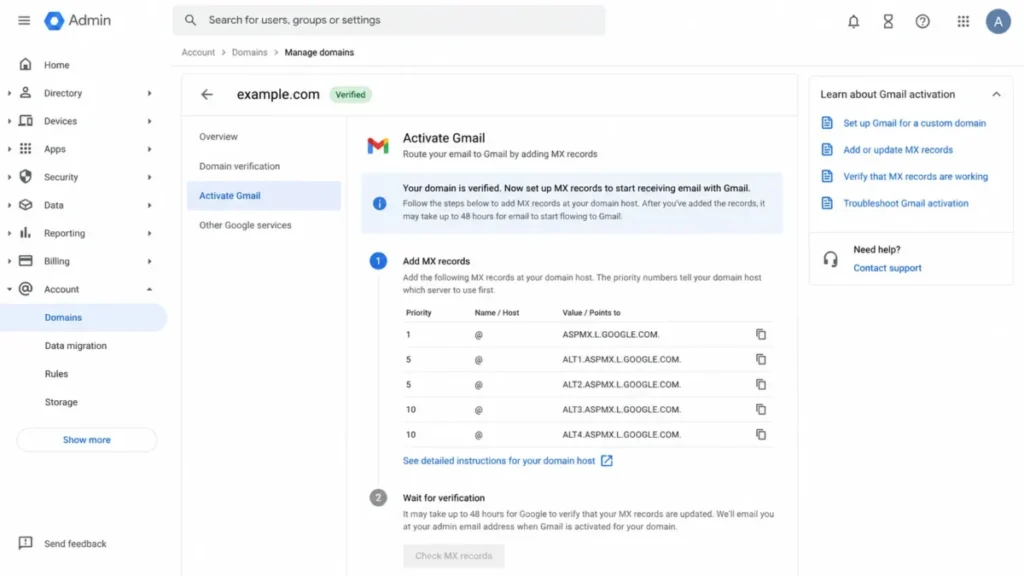
Getting professional email working is where most small organisations lose a week. Workspace collapses that into a domain verification record and a set of MX records.
Hands-on finding: On September 4, 2026 I re-checked domain and mail routing on the Business Plus account behind saascrmreview.com. The sequence is the same one Google walks a new administrator through: prove the domain with a TXT record, point MX at Google, then create users.
The friction is not Google’s console. It is DNS propagation at the registrar, which sits outside the vendor’s control and outside any support commitment.
Budget an afternoon for it, and schedule the MX cutover when nobody is waiting on inbound mail.
One gate is worth knowing here. Nothing about custom-domain email is tier-restricted, so Business Starter carries the same domain email, the same account controls and the same absence of ads as Business Plus.
Paying more for better email is not a reason to move up a tier.
Document Work That Never Forks Into Three Versions
The editors are the reason most teams stay. Several people work in one file, edits are attributed, and version history is automatic rather than a discipline somebody has to enforce.
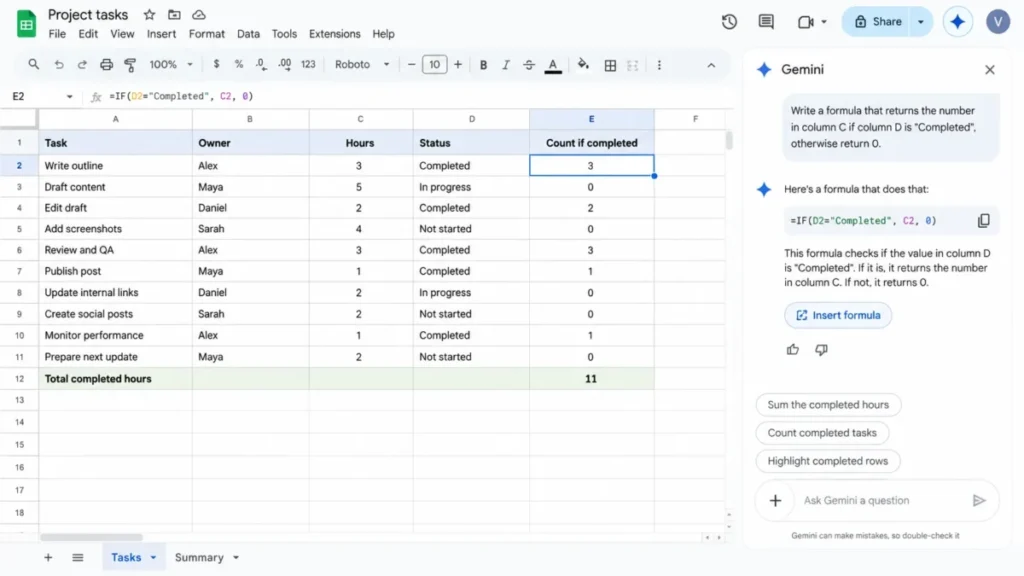
Hands-on finding: Through daily use of Docs, Sheets and Slides on the Business Plus account, the feature that changed my process most was not the AI. It was suggesting mode plus comment threads replacing the review email entirely.
Gemini in Sheets earns its place on one specific job, turning a described condition into a working formula. It is shaky enough on multi-step logic that I check every formula it writes before trusting a number that depends on it.
That is the useful summary of Gemini on this suite in 2026. It saves typing time, and it does not remove the need to check what it produced.
Storage You Buy Once as a Pool
This is where the vendor’s documentation and the usual summary of it part company, and the difference changes the purchase.
Storage on Workspace is pooled across the organisation. Google’s storage documentation for administrators states it directly.
Pooled storage is shared storage for all your users. Each user’s licence adds to the organisation’s pool, and users can therefore use more than the storage included in their own licence.
The per-user figure is a contribution rate, not a personal ceiling.
The arithmetic that follows is why it matters. Ten seats on Business Standard do not give ten people 2 TB each in ten separate boxes; they give the organisation 20 TB in one pool.
A designer sitting on 6 TB of source files is inside the rules as long as the pool holds. Administrators can set per-user storage limits when they want to ration it deliberately.
contributes 2 TB
20 TB total
using 6 TB
each contributes 2 TB
using 40 GB
optional per-user cap
Two practical consequences follow. A team with one storage-heavy role does not need to upgrade everyone to cover that person.
And a small team on Business Starter, where thirty gigabytes per licence sounds alarming, actually holds 300 GB across ten seats. That is comfortable for text and spreadsheets and tight for video.
The Two Problems Google Workspace Creates
Two problems are worth knowing before signing. The first is that the plan gate a buyer expects is rarely the plan gate that exists, because the official documentation puts the paywall somewhere other than the sales pitch does.
That carries a direct workflow consequence: a team upgrades for a supported feature it already had, and still meets the limitation that actually blocks it. Since the gates decide the bill, I recommend reading the table below before choosing a tier, and choosing on the documented capability your team will use rather than on the tier name.
The second problem is a ceiling rather than a gate, and it decides whether this suite fits your work at all.
The Plan Gates Are Not Where Buyers Expect Them
The upgrade pressure a buyer feels is not where the real gates sit. Meeting length is the clearest example.
The sixty-minute cut-off that gets attributed to Business Starter is the limit on personal, unpaid Google accounts with three or more participants.
Google’s premium Meet features list marks longer group calls as available on Business Starter and on every paid edition above it.
So meeting duration is not an upgrade reason. Recording and adaptive audio are, and both arrive at Business Standard.
These are the gates that do decide something. Read it as a shopping list: find the capability you need, and the row tells you the cheapest tier that carries it.
| Capability you need | Lowest tier that carries it | Annual rate at that tier |
|---|---|---|
| Up to 100 Meet participants | Business Starter | $7 per user per month |
| Gemini in Gmail and Vids | Business Starter | $7 per user per month |
| Up to 150 Meet participants | Business Standard | $14 per user per month |
| Meeting recording | Business Standard | $14 per user per month |
| Adaptive audio | Business Standard | $14 per user per month |
| Gemini in Docs, Sheets, Slides, Meet and Chat | Business Standard | $14 per user per month |
| Up to 500 Meet participants | Business Plus | $22 per user per month |
| Attendance tracking | Business Plus | $22 per user per month |
| Vault for eDiscovery | Business Plus | $22 per user per month |
| Advanced endpoint management | Business Plus | $22 per user per month |
| Security advisor data protection, the preset DLP rules | Business Plus | $22 per user per month |
| Live streaming | Enterprise | Contact sales |
| DLP rules customised beyond the presets | Enterprise | Contact sales |
| Context-Aware Access | Enterprise | Contact sales |
| 1,000 Meet participants | Enterprise Plus | Contact sales |
Source: official Google pricing page for the rates, and its participant and length limits page for the Meet rows.
Vault, endpoint management and Context-Aware Access availability from Google’s Business edition comparison.
Security advisor editions from Google’s Security advisor for data protection page, both checked September 4, 2026.
Read that table as a buyer and the product changes shape. The step from Starter to Standard buys recording, adaptive audio and Gemini inside the editors.
The step to Plus buys Vault and attendance reports. Nothing above that is purchasable on a Business tier at any price.
Official documentation: the data protection line is the one most often reported wrongly, including in the previous version of this review. Business Plus does carry DLP: Google lists Security advisor for data protection on Frontline Plus, Business Plus, Enterprise Standard and Enterprise Plus, and states that its data protection rules are used for data loss prevention.
What Business Plus does not carry is the customised rule set. Security advisor works from preset categories of sensitive data, and Enterprise is where an administrator writes rules beyond those defaults.
So the honest gate is narrower than the usual claim. A small regulated team that needs preset protection against sharing personal, financial or health data externally can buy Business Plus. A team that needs its own rule logic, or Context-Aware Access, is an Enterprise conversation regardless of headcount.
The Ceiling on Spreadsheets and Offline Work
Sheets holds ten million cells. Excel holds over seventeen billion per worksheet.
For most business work that difference never surfaces. For financial modelling it surfaces on day one.
There is no VBA equivalent either. Automation runs through Apps Script in JavaScript, and pivot table behaviour is thinner than Excel’s.
Offline is the second ceiling, and it has two separate mechanisms that most reviews collapse into one.
Docs, Sheets and Slides go offline in the browser. Google’s offline documentation requires Chrome or Edge, the Google Docs Offline extension installed and turned on, and the file marked “Available offline” beforehand. Drive for desktop is not required for that.
Ordinary Drive files are the other mechanism, and there the behaviour depends on the sync mode. A streamed file needs to be marked for offline use; a mirrored file already has a local copy.
Either way the preparation happens before the connection drops. A laptop that leaves for a flight without it is a laptop with no documents on it.
Both are the boundary of the product rather than a fault in it. A buyer whose work sits on the far side of that boundary should read the Microsoft 365 comparison below before choosing.
Google Workspace Pricing Reality
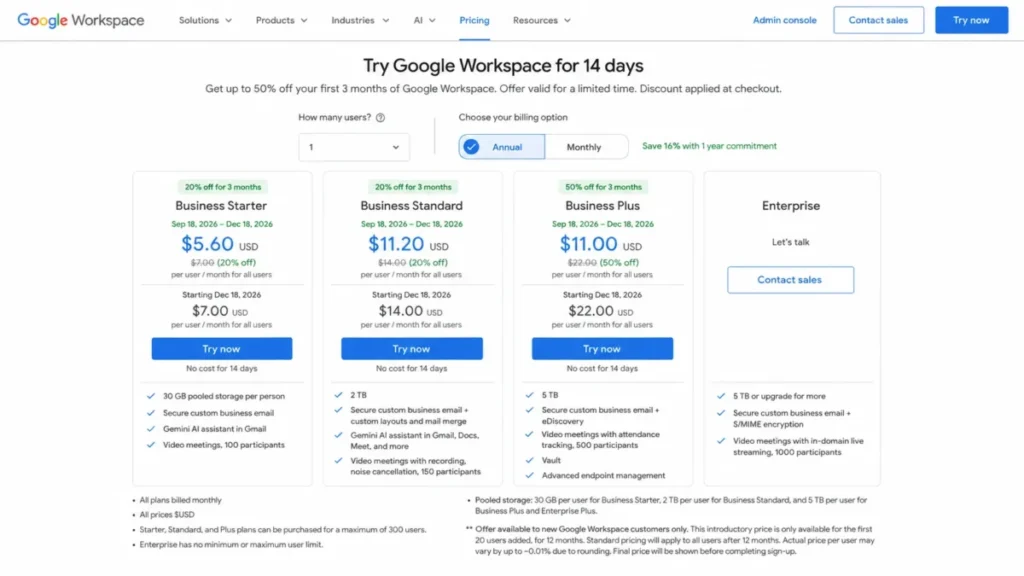
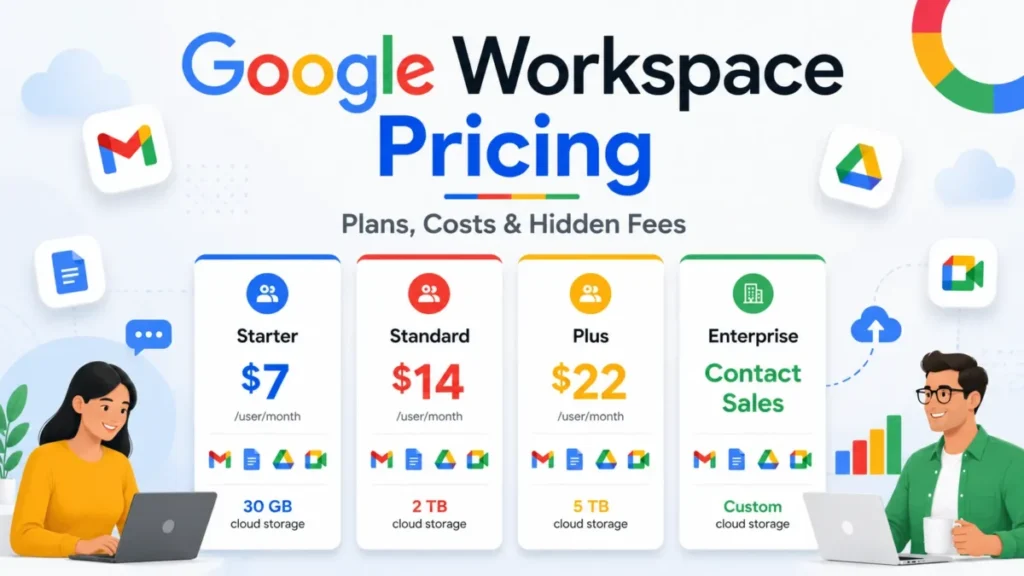
Google publishes four Business and Enterprise tiers. Three carry a visible per-seat rate and the fourth is a sales conversation.
| Plan | Annual commitment | Flexible monthly | Pooled storage per licence | What arrives at this tier |
|---|---|---|---|---|
| Business Starter | $7 per user per month | $8.40 per user per month | 30 GB | Custom-domain email, Drive, editors, Gemini in Gmail and Vids |
| Business Standard | $14 per user per month | $16.80 per user per month | 2 TB | Recording, adaptive audio, Gemini across Docs, Sheets, Slides, Meet and Chat |
| Business Plus | $22 per user per month | $26.40 per user per month | 5 TB | Vault eDiscovery, attendance tracking, advanced endpoint management |
| Enterprise | Contact sales | Contact sales | 5 TB and negotiable | Customised DLP rules, Context-Aware Access, live streaming |
Source: official Google Workspace pricing page, covering rates, billing options and the 300-user cap on Business editions, checked September 4, 2026.
On narrow screens this table uses a pinned-label horizontal scroll, with the plan name held in view.
The Annual Discount Is Sixteen Percent, Not Twenty
The flexible rate is exactly twenty percent above the annual rate, and that tempts everyone into writing that annual saves twenty percent. It does not.
Moving from 8.40 dollars down to 7.00 dollars is a saving of just under seventeen percent, and Google’s own annual billing toggle reads “Save 16% with 1 year commitment”.
The direction of the calculation changes the number.
The practical consequence is the seat lock. An annual commitment fixes the seat count for the whole term.
Ten annual seats on Business Standard cost 1,680 dollars for the year whether or not three people leave in March. The same ten seats on flexible billing cost 2,016 dollars a year and release a seat the month it is removed.
The cleanest way to decide is in seat-months rather than percentages. Ten annual Standard seats cost 1,680 dollars, and at the flexible rate of 16.80 dollars a seat-month that same budget buys 100 seat-months.
Twelve months of ten flexible seats would be 120 seat-months. So annual only wins if the team actually consumes more than 100 of those 120, which is an average of about 8.3 seats held across the year.
Put in hiring terms: if you expect to average fewer than roughly eight and a third of your ten seats over the next twelve months, flexible is cheaper despite the higher headline rate. If headcount is stable or growing, take the commitment.
The Introductory Offer Has Conditions Worth Reading
Google was running a first-year promotion when this review was checked on September 4, 2026, and its fine print is more restrictive than the headline. The standard price is unchanged underneath it, and each discounted seat renews at the full rate once the offer period ends.
One warning before you budget from the numbers below. Google’s pricing page serves promotional terms dynamically, so the discount, its duration and the plans it covers can differ by region and by session.
Treat the figures here as what one US session showed on the date given. Confirm the rate and the duration on your own checkout screen before signing. The standard rates in the table above are stable. The offer around them is not.
| Plan | Introductory rate | Standard rate after the offer |
|---|---|---|
| Business Starter | $3.50 per user per month, 50% off for 12 months | $7 per user per month |
| Business Standard | $8.40 per user per month, 40% off for 12 months | $14 per user per month |
| Business Plus | Not part of the offer | $22 per user per month |
Source: official Google Workspace pricing page, introductory rates, their duration and their conditions, re-verified on the publish date: 2026-09-04.
Three conditions sit under that offer on Google’s own page. It is open to new Google Workspace customers only.
It applies to the first twenty users added and no further. And it runs for twelve months, after which standard pricing applies to every user.
That third condition is the one that damages budgets. A twelve-person team signing at the Standard introductory rate pays 1,209.60 dollars in year one and 2,016 dollars in year two for the same service, a rise of 806.40 dollars with no change in usage.
Build the second year into the business case, not the first.
Text fallback for the chart above: twelve Business Standard seats cost 1,209.60 dollars in year one at the introductory rate against 2,016 dollars in year two at the standard rate.
The difference is 806.40 dollars for the same service.
There is one more trap in these numbers. The Business Standard introductory rate of 8.40 dollars is identical to the Business Starter flexible rate, so a fast comparison of two quotes can put a discounted middle tier against a full-price entry tier without anyone noticing.
What Ten Seats Actually Cost
Standard annual pricing, no introductory rate, ten users for twelve months:
- Business Starter: 840 dollars a year
- Business Standard: 1,680 dollars a year
- Business Plus: 2,640 dollars a year
The gap between Standard and Plus at ten seats is 960 dollars a year. That is the price of Vault, attendance tracking and advanced endpoint management.
If none of the three is a stated requirement, it is 960 dollars for capability nobody will open. If eDiscovery is a compliance obligation, it is cheap.
Across the seat counts most teams actually run, at standard annual rates, the yearly cost in dollars:
| Seats | Business Starter | Business Standard | Business Plus |
|---|---|---|---|
| 1 | 84 | 168 | 264 |
| 5 | 420 | 840 | 1,320 |
| 10 | 840 | 1,680 | 2,640 |
| 25 | 2,100 | 4,200 | 6,600 |
| 50 | 4,200 | 8,400 | 13,200 |
| 100 | 8,400 | 16,800 | 26,400 |
Derived from the standard annual rates in the pricing table above, which were checked on the official Google Workspace pricing page on September 4, 2026. Business editions stop at 300 users.
For a fuller cost breakdown by team size, including the add-on and storage questions this section does not cover, see the Google Workspace pricing guide.
The Practical Plan
Business Standard, for most teams. It is the tier where recording, adaptive audio and Gemini across Docs, Sheets, Slides, Meet and Chat arrive, and where pooled storage becomes generous enough for many office-based teams.
Starter is defensible for a small team doing text and spreadsheet work with no recorded meetings. Plus is a compliance purchase rather than a productivity one.
Key Features and Their Plan Gates
Each feature below carries the same three lines: what it does, where its plan gate sits, and the limitation that survives every tier.
Gmail on Your Domain
What it does: business email on your own domain, with Google’s spam filtering, confidential mode for expiring messages, and search that handles operators such as from: and has:attachment.
Plan gate: none. Every Business tier carries it.
Limitation: labels are not folders. One message can carry several labels and lives in a single conversation view, which is more flexible than a folder tree and genuinely disorienting for a fortnight if the team is arriving from Outlook.
Plan for that fortnight rather than arguing with it.
Docs, Sheets and Slides
What they do: browser editors with simultaneous editing, comment threads, suggesting mode, and automatic version history that restores to any earlier state.
Plan gate: the editors are on every tier. Gemini inside them is not, and arrives at Business Standard.
Limitation: Docs supports footnotes but not endnotes, and a complex Word document loses some formatting on import. Docs also has no equivalent of the Word-style document mail-merge workflow.
Personalised email mail merge is a different matter and is native. Google’s mail merge announcement lists it for Business Standard, Business Plus, Enterprise Standard and Enterprise Plus.
It runs from a Google Sheet and needs no third-party add-on.
Sheets stops at ten million cells and slows noticeably on very large datasets. Teams whose spreadsheet work is the business should look at the Smartsheet review for structured work management, or stay on Excel.
Drive and Pooled Storage
What it does: shared cloud storage with granular sharing permissions, optional expiry on shared links, content-based search, and a desktop client for offline access to synced files.
Plan gate: the storage figure, not the feature set. Thirty gigabytes per licence on Starter, 2 TB on Standard, 5 TB on Plus, all pooled organisation-wide.
Limitation: the desktop client asks you to choose how files live locally, and the choice matters more than most teams expect.
Google’s documentation on streaming and mirroring describes streaming as files “primarily stored in the cloud”, available offline only when specifically made so. Mirrored files “will always be stored on your computer and in the cloud”.
Streaming keeps local disks small; mirroring is what Google points to for working “even without an internet connection”. A team editing large video or high-resolution assets wants mirroring on those folders, and wants the disk space that implies. Teams whose whole day is multi-gigabyte media may still get more from the Dropbox review on that one job.
Google Meet
What it does: video meetings tied into Calendar and Gmail, with recording and adaptive audio from Business Standard upward.
Plan gate: participants and features, never duration. One hundred participants on Starter, 150 on Standard, 500 on Plus.
Limitation: it is built for internal meetings and it shows on external calls, where guests hit joining friction that dedicated platforms spent years removing.
Organisations running client calls all day are better served by the Zoom Workplace review, and Microsoft-centric organisations by the Microsoft Teams review. A wider set sits in the best video conferencing software guide.
Google Chat and Spaces
What it does: direct messages, group chats, and Spaces as persistent project rooms with Drive file sharing and light task tracking.
Plan gate: included on every tier. Gemini summarisation in Chat arrives at Standard.
Limitation: this is the thinnest component in the bundle. Threading, integrations and workflow depth trail the dedicated platforms in the best team collaboration tools category, and a team that lives in chat notices within a month.
Gemini Across the Suite
What it does: drafting in Gmail, content generation in Docs, formula generation in Sheets, meeting notes in Meet, summarisation in Chat, and video generation in Vids.
Plan gate: this one surprises people. Business Starter is not excluded from AI, because Google’s Business edition comparison lists Gemini in Gmail, including help me write, suggested replies and proofreading, alongside the Vids capabilities such as avatars, voiceover and image generation.
What Starter does not get is Gemini inside Docs, Sheets, Slides, Meet and Chat. Those arrive at Business Standard.
Limitation: output quality varies by task in a way no tier changes. For document analysis with source citations, the NotebookLM review handles grounded research on uploaded material better than the general assistant does.
Ease of Use and Setup
Setup difficulty is low, with one dependency that is not Google’s. The console walks through domain verification, MX records, user creation and security defaults in a linear flow, and CSV import handles bulk user creation.
The dependency is registrar access. If the person who controls DNS is a former contractor nobody can reach, that is the project, and no amount of console polish will help.
The learning curve is not the admin console. It is Gmail’s labels for Outlook migrants and the absence of a familiar desktop application for Office users.
Both are habit costs, they land in week one, and they are the most common reason a trial gets judged badly before the product has been evaluated fairly.
The 14-day trial is short for that reason. Two weeks is enough to test mail routing and collaborative editing, and not enough for a team to stop resenting labels.
Run the trial with a small group that has agreed to persist past the irritation.
The 30 and 90 Day Adoption Check
Two checkpoints tell you whether the purchase is working, and neither is about features.
At thirty days, the test is whether attachments have stopped moving by email. If people are still mailing documents to each other instead of sharing links, the suite is being used as webmail with expensive storage attached.
The fix at that point is a rule, not a tier. Ban attachments for internal review and the behaviour changes inside a fortnight.
At ninety days, the test is whether anyone has hit a wall that has a plan name on it. A blocked recording, a meeting turning away the 101st participant, or a legal request that Vault would have answered are all real upgrade signals.
If nothing has hit a wall by ninety days, the tier is right and no amount of vendor prompting should move it.
What Breaks First as the Team Grows
Every suite has a first failure point, and on Workspace it is rarely storage.
Shared drive sprawl comes first. Files accumulate in personal drives rather than shared drives, and the day somebody leaves, their documents leave with their account unless an administrator transfers them. The mitigation is structural: shared drives from day one, personal drives for drafts only.
External sharing is the second. Link sharing is easy enough that it happens without thought, and the admin controls that constrain it are the ones nobody configures during a rushed setup.
Third is the guest question. Collaborators outside the domain do not consume a licence for viewing and commenting, which is generous, and it also means external access is not visible on the invoice where a finance team would notice it.
Fourth is the Enterprise wall. A company approaching 300 users, or one that needs DLP rules written beyond the Security advisor presets, moves from published pricing to a negotiation, and that transition is a budgeting event rather than a feature upgrade.
All four are worth reviewing at the six-month mark, while changing them is still cheap and before anyone has built a habit around the wrong default.
Integrations and Ecosystem
Calendar and Drive are the two hooks nearly every business application supports, and that ubiquity is the practical value of the ecosystem.
Project tools such as the Teamwork review and task managers such as the Todoist app attach to Calendar and Drive without custom work. Design files from the Figma review embed into Docs and share through Drive.
The administrative question worth asking early is not whether an integration exists. It is who is allowed to install it.
Marketplace installation and third-party access controls sit in the admin console. An organisation that leaves them open has delegated data access decisions to whoever clicks first.
Automation, AI, and Reporting
Automation runs through Apps Script, which is JavaScript, and through the Marketplace. There is no visual automation builder comparable to a modern project platform, so anything beyond a scheduled script becomes a developer task or a third-party tool.
Reporting is administrative rather than analytical. It covers account activity, security posture, storage consumption and app usage, reported from the console.
That answers “who has access to what” well. It does not answer “how is the team performing”, and it is not trying to.
AI capability by tier is covered in the Gemini section above, and the boundary is Business Standard. One reporting consequence is worth stating once: nothing Gemini produces is auditable output, so treat its results as drafts, formulas included.
Security, Support, and Admin Controls
Every Business tier carries user management and two-step verification enforcement. Advanced endpoint management arrives at Business Plus alongside Vault, which is the eDiscovery and retention tool a legal hold requires.
Security advisor for data protection arrives at Business Plus as well, which is the point most reviews get wrong. Context-Aware Access and customised DLP rules stay on Enterprise.
Google publishes its compliance position on its Cloud compliance centre, which lists SOC 1, SOC 2 and SOC 3, ISO/IEC 27001, 27017, 27018 and 27701, GDPR, HIPAA and FedRAMP.
Healthcare buyers should treat the HIPAA question carefully, because it is widely misreported. Google’s HIPAA compliance documentation states that customers subject to HIPAA who wish to use the covered services must enter a Business Associate Amendment with Google, and it attaches no edition restriction to that requirement.
What genuinely differs by tier is the tooling around protected data. Retention and legal hold arrive with Vault at Business Plus, alongside the preset Security advisor protection rules, and customised DLP rules at Enterprise.
If a specific edition requirement matters to your compliance position, get it in writing from Google sales rather than from any review, this one included.
The security features that actually drive a tier decision:
| Security capability | Lowest tier that carries it | What it actually gives you |
|---|---|---|
| Two-step verification enforcement | Business Starter | Enforced 2SV across the domain |
| Enforced SSL connections | Business Starter | No plaintext connections to Google services |
| Basic endpoint management | Business Starter | Basic mobile and computer management |
| Single data-at-rest region policy | Business Standard | One region policy for the whole organisation |
| Advanced endpoint management | Business Plus | Advanced mobile management, Windows device management, zero-touch Android enrolment |
| Session length control | Business Plus | A maximum session length for Google services |
| Secure LDAP | Business Plus | LDAP-based apps authenticate against Google |
| Vault | Business Plus | eDiscovery, retention and legal hold |
| Security advisor data protection | Business Plus | Preset DLP rules over personal, financial and health data in Drive and Gmail |
| DLP rules customised beyond the presets | Enterprise | Rules an administrator writes |
| Context-Aware Access | Enterprise | Access conditioned on device and network posture |
Source: official Google Business edition comparison for every row, and the Security advisor for data protection page for the preset-rule editions, checked September 4, 2026.
Privacy Controls Worth Checking Before You Buy
Two of the privacy questions buyers ask are answered by the tier, not by the vendor’s privacy policy.
The first is where data rests. A single data-at-rest region policy for the whole organisation arrives at Business Standard, so a Starter customer has no region control at all.
The second is who can reach the data inside your own domain. Session length control and Secure LDAP arrive at Business Plus, and Context-Aware Access, which conditions access on device and network posture, stays on Enterprise.
The advertising question is simpler: a paid Workspace mailbox carries no ads, which is the clearest separation from a free Gmail account.
Official documentation: support does not scale with the Business tier, which surprises buyers who assume it does. Google’s edition comparison lists Standard Support on Business Starter, Business Standard and Business Plus alike.
Google’s support offerings page describes Standard Support as included with the licence, with 24/7 access and a four-hour target response on a P1 case. Enhanced Support brings that to one hour, and Premium Support to fifteen minutes with a named technical account manager.
Business Standard and Business Plus can buy Enhanced Support. Enterprise includes it: Google’s Enterprise editions page describes the entitlement as “Enhanced support” with “faster response times, priority 24/7 support, and premium support is available as an upgrade”.
So a team buying Business Plus for support speed is buying the wrong thing. Inside the Business range the upgrade that changes response time is the support contract, not the edition.
What Existing Users Say
Two independent review platforms carry enough volume to read as a pattern rather than as anecdote. The G2 review page shows 4.6 out of 5 across 48,204 reviews.
The Capterra review page shows 4.7 out of 5 across 17,684 reviews.
Capterra also breaks that out: ease of use at 4.6, customer service at 4.3. Both platforms checked September 4, 2026.
The gap between those two sub-ratings is the useful signal, and it matches the shape of the complaints below.
Where user sentiment matches what this review found. Real-time collaboration and the integration between Gmail, Drive, Docs and Calendar are the most repeated praise on both platforms, which is the same conclusion the hands-on pass reached. Spreadsheet performance on large datasets is the most repeated technical complaint, phrased on G2 as Sheets becoming “a little slow when handling very large sales datasets”, which lines up with the documented ten-million-cell ceiling. Offline reliability appears on both platforms as a recurring frustration, and the two-mechanism setup described earlier is why.
Complaints this review could not independently reproduce. Support responsiveness is the loudest of them.
One G2 reviewer puts it as getting help from a human being “incredibly difficult unless you are a massive enterprise client”, and the Capterra customer-service sub-rating sits well below its overall score. That is a real pattern in the sentiment, and it is not something a single account can confirm or refute, so it stays labelled as user sentiment until a support test runs.
Billing escalation as headcount grows, Drive becoming cluttered at organisational scale, and calendar sync bugs across devices are the other recurring complaints. None of the three was exercised in this review’s own scope.
User-review pattern, not a finding: the three paragraphs above summarise other people’s reviews. They are the weakest evidence class in this article, below the hands-on findings and below Google’s own documentation, and they are labelled that way deliberately.
Google Workspace Limitations
- Business editions stop at 300 users. Above that, Enterprise is the only path, and Enterprise pricing is a negotiation rather than a published rate.
- Customised DLP rules and Context-Aware Access are unavailable below Enterprise. Business Plus carries the preset Security advisor protection rules, so the wall is narrower than it is usually described, but a team that needs its own rule logic still faces an Enterprise conversation whatever its headcount.
- Spreadsheet ceiling. Ten million cells, no VBA, thinner pivot behaviour. This is a hard boundary for finance and analytics work.
- Offline requires preparation, in two different places. Editor files need the Google Docs Offline extension in Chrome or Edge and the file marked available offline; ordinary Drive files depend on whether Drive for desktop is streaming or mirroring them.
- Chat is the weakest component. It is adequate rather than competitive, and teams that work primarily in chat feel it quickly.
- The introductory discount covers only the first twenty users, for twelve months. Year two costs materially more for the same service.
Pros and Cons
| Pros | Cons |
|---|---|
| Storage is pooled organisation-wide, so one heavy user does not force a suite-wide upgrade | Business editions are capped at 300 users |
| Collaborative editing removes version conflicts without any process discipline | Sheets stops at ten million cells and has no VBA equivalent |
| Gemini appears on every tier, with the editor-integrated set arriving at Business Standard | Offline needs preparation in two places, the editor extension and the Drive sync mode |
| Google’s admin setup ran as a linear flow in this review’s own setup pass | Gmail’s label model costs Outlook migrants a fortnight of friction |
| Broadly consistent browser experience across major desktop operating systems | Customised DLP rules and Context-Aware Access require Enterprise |
| Meeting length is not tier-gated, so Starter suits meeting-heavy small teams | Chat is thinner than the dedicated collaboration platforms it sits beside |
Source: official Google Workspace pricing page for the 300-user cap and tier rates, and Google’s Business edition comparison for the plan gates, checked September 4, 2026.
Who Should Use Google Workspace
Small teams that write and review together. The editors and the pooled storage do more for a ten-person team than any feature Microsoft keeps behind a higher tier.
Organisations with mixed operating systems. The browser experience is broadly consistent across macOS, Windows, Linux and ChromeOS, which removes a support burden that Office-centric shops carry permanently.
Teams with one storage-heavy role. Pooled storage means the designer sitting on six terabytes is funded by everyone’s licences rather than by upgrading everyone.
Companies where administration should be somebody’s small job. Domain setup and user creation ran as one linear flow in this review’s own pass, which matters in an organisation with no dedicated IT staff.
Who Should Avoid Google Workspace
Finance and analytics teams. The Excel gap is real, it is structural, and no tier closes it.
Roles that work offline routinely. Editor files can be prepared for offline use in Chrome, and Drive files depend on the sync mode, but both need setting up before the connection goes. Field staff and anyone on unreliable connectivity are better served by native desktop applications.
Organisations over 300 users that want published pricing. The Business cap forces an Enterprise negotiation.
Teams that need DLP rules of their own design. Business Plus covers the preset categories through Security advisor, so plenty of regulated teams are fine there. A team whose compliance officer writes the rules is not, and that is an Enterprise purchase.
Teams whose real need is project tracking. A document suite is the wrong purchase for that job, and the best project management software guide covers the right one.
Google Workspace Alternatives
Two products replace Google Workspace as a suite. Everything else in this category replaces one job inside it.
| Alternative | Choose it if | Published entry pricing |
|---|---|---|
| Microsoft 365 | Excel, offline work or the Microsoft ecosystem is central | Business Basic at $7.00 per user per month, paid yearly |
| Zoho Workplace | Cost per seat is the binding constraint | Workplace Standard at US$3 per user per month billed annually |
Source: official Microsoft 365 business plans page and Zoho Workplace pricing page, checked September 4, 2026.
Microsoft 365
The comparison most buyers arrive with is out of date. Microsoft 365 Business Basic is 7.00 dollars per user per month paid yearly.
That is level with the Google Workspace entry tier rather than a dollar below it, which is how the comparison is usually written.
Microsoft also lists a Business Basic without Teams at 5.40 dollars per user per month, and Apps for business at 10.00 dollars per user per month.
The AI comparison has moved further. Microsoft 365 Copilot for business is now listed from 18.00 dollars per user per month paid yearly, reduced from a listed 21.00 dollars, or 25.20 dollars on monthly billing.
Microsoft also sells Business Standard with Copilot at 23.50 dollars and Business Premium with Copilot at 32.00 dollars per user per month paid yearly. Copilot now arrives inside the mainstream business plans rather than only as a separate purchase.
That reshapes the honest version of the AI argument. “Gemini is included and Copilot costs thirty dollars extra” was true once and is not the 2026 position.
The remaining distinction is what each assistant reaches on each tier. On that basis Google gives more away lower down, because Gemini appears at Business Starter while Microsoft’s Copilot-inclusive plans start above twenty dollars a seat.
Where Microsoft still wins outright: Excel, PowerPoint, offline reliability, and any organisation already standardised on Windows and Active Directory. For a finance team those decide the purchase on their own.
Read the decision by need rather than by feature count:
| Your need | Better fit | Why |
|---|---|---|
| Several people editing one document at once | Google Workspace | Version history is automatic and suggesting mode replaces the review email, with no process for anyone to enforce |
| Financial modelling and heavy spreadsheets | Microsoft 365 | Sheets stops at ten million cells and has no VBA equivalent, so the ceiling is structural rather than a setting |
| Working offline as a normal state | Microsoft 365 | Workspace offline needs the editor extension plus files marked in advance, or Drive for desktop mirroring; the Office apps are native |
| A mixed macOS, Windows, Linux and ChromeOS fleet | Google Workspace | The browser is the client, so there is one support surface instead of several |
| Administration without dedicated IT staff | Not settled here | Google’s setup ran as a linear flow in this review’s own pass; the Microsoft console was not tested, so this row is a note rather than a verdict |
| AI at the entry tier | Google Workspace | Gemini reaches Business Starter, while Microsoft’s Copilot-inclusive plans start above twenty dollars a seat |
| Storage that one heavy user can draw on | Google Workspace | Storage is pooled organisation-wide rather than capped per person |
| Rules-based data-loss policies written in house | Microsoft 365 or Google Enterprise | Google’s Business Plus offers preset Security advisor rules only; custom rule logic is an Enterprise purchase |
The row that decides most purchases is the second one. A finance team should stop reading here and buy Microsoft.
Zoho Workplace
Zoho Workplace is the credible budget alternative, and it is the one that drops out of most shortlists before anyone checks its rates. Zoho’s published Workplace rates put Workplace Standard at US$3 per user per month billed annually or US$4 monthly, and Workplace Professional at US$6 annually or US$7 monthly.
Zoho also publishes a free Mail tier for up to five users with 5 GB of mail storage, and a mail-only Mail Lite plan at US$1 per user per month.
The trade is capability and ecosystem depth rather than honesty about price. Storage is smaller and structured differently, allocated as mail storage plus team storage rather than one pooled figure, and the editors are less mature under heavy concurrent editing.
For an organisation already running the Zoho CRM review, the integration argument is strong enough to take seriously.
When the Real Need Is Not a Suite
A meaningful share of teams evaluating Workspace are solving a project-tracking or knowledge problem instead, and no document suite is the right answer to either.
If work is not getting tracked, start with the best project management software guide. If knowledge is scattered across drives, the best knowledge base software guide is the right shelf.
Final Verdict: Is Google Workspace Worth It?
Yes, for teams whose work is written, reviewed and approved collaboratively, and who are not dependent on Excel or on working offline without preparing for it.
Buy Business Standard on the annual commitment. That is where recording, adaptive audio and the Workspace-integrated Gemini feature set arrive, and where storage stops being a consideration.
Buy Business Starter instead if the team is small, the documents are simple and nobody records meetings. It is a more serious option than most reviews allow, because the sixty-minute meeting limit that supposedly cripples it does not exist on paid plans.
Buy Business Plus against a named requirement, and there are six of them: Vault for eDiscovery and legal hold, advanced endpoint management, meetings up to 500 participants, attendance tracking, the preset Security advisor data-protection rules, or the larger pooled storage contribution.
If none of those six is on your list, the ten-seat gap set out above buys nothing your team will ever open.
Choose Microsoft 365 if Excel is central, if offline work is routine, or if the organisation already runs on Microsoft. The entry price is now level, so the decision rests on capability rather than cost.
Before renewal, be able to answer one question. Has anyone opened Vault, or hit a storage limit, in the last twelve months?
If the answer is no to both, the tier is wrong and there is money on the table.
Frequently Asked Questions
These are the questions the body above leaves open, in the order buyers tend to ask them.
Is there a free Google Workspace plan?
No. A 14-day trial is available, and the cheapest paid entry is the Business Starter rate in the pricing table above.
Personal Gmail stays free, and it carries no custom domain, no admin controls and no organisational storage pool.
Does Business Starter cut meetings off after sixty minutes?
No. Longer group calls are available on Business Starter and every paid edition above it.
The sixty-minute limit applies to personal, unpaid Google accounts in meetings with three or more participants.
If I buy ten Business Standard seats, does each person get 2 TB?
Not as a personal ceiling. The ten licences create a 20 TB pool shared across the organisation, and one person can use more than 2 TB of it while others use less.
Administrators can set per-user limits when deliberate rationing is wanted.
Can I get data loss prevention on Business Plus?
Yes, in its preset form. Google lists Security advisor for data protection on Business Plus and states that its rules are used for data loss prevention, covering categories such as personal, financial and health data.
What Business Plus does not give you is the ability to write rules beyond those presets, and Context-Aware Access remains Enterprise-only.
How long does the introductory discount last?
Twelve months, for new customers only, and only for the first twenty users added.
Standard pricing then applies to every user, so budget year two at the full rate.
Should I take the annual commitment or flexible billing?
Annual saves sixteen percent and locks the seat count for the term. Flexible costs a fifth more per seat and releases a seat the month it is removed.
Decide it in seat-months: ten annual Standard seats buy 100 flexible seat-months, against the 120 a full year at ten seats would use, so flexible wins below an average of about 8.3 seats held.
A team expecting to shrink by more than roughly one seat in six inside a year should price flexible before committing.
What is the fastest way to judge the trial fairly?
Route mail first, then run one real document review with several people in the file at once. Two weeks is enough to evaluate both.
It is not enough for Outlook migrants to stop resenting Gmail’s labels, so judge the mail interface on habit cost rather than on first impressions.




Thank you, your article is very detailed.