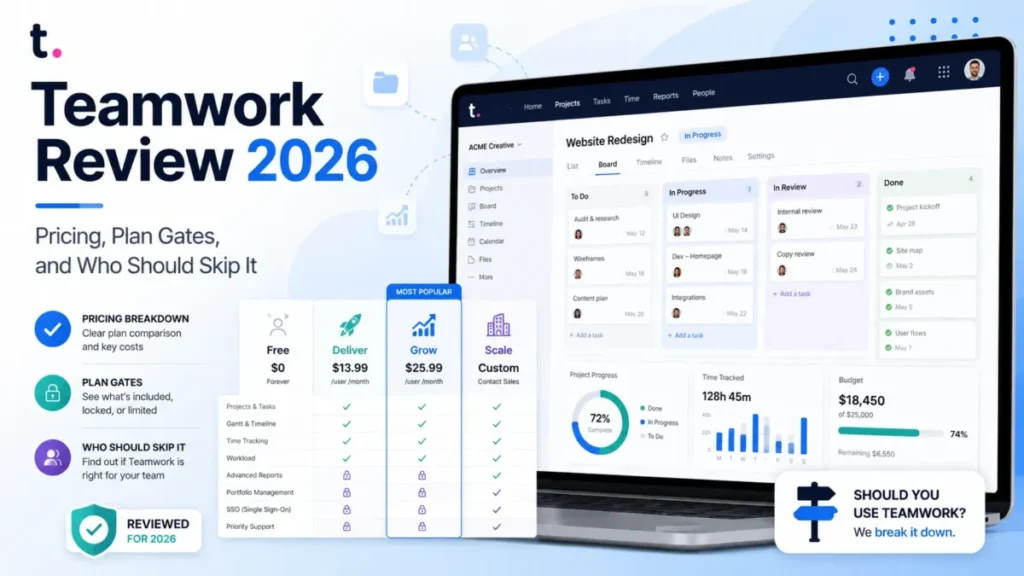
Teamwork.com earns its price when client work has to carry a margin, not just a task list. For most agencies and consultancies between 10 and 50 people, the plan that carries the real workflow is Accelerate at $24.99 per user/month billed yearly, not the $9.99 Basics tier that headlines the ads.
This Teamwork review is built around one question: which plan does your workflow force you onto, and what does that cost in year one. If you want the wider category view first, the roundup of project management software for client work sets the field.
The free plan is real but small, capped at 5 users and 5 projects. Prices, caps, and plan gates below were verified against Teamwork.com’s own pricing and comparison pages on August 6, 2026.
In This Article (18 sections)
Quick Verdict
| Category | Verdict |
|---|---|
| Best for | 10 to 50 person agencies and IT service firms that bill time and need capacity, budgets, and client access in one system |
| Not ideal for | Internal-only teams that never invoice a client and want a light task tracker |
| Starting price | $0 Free, then $9.99 per user/ |
| Best practical plan | Accelerate at $24.99 per user/ |
| Free plan and trial | Free plan capped at 5 users and 5 projects; 14-day trial with no credit card |
| Setup difficulty | Medium to high, with vendor onboarding priced from free to $7,500 |
| Main strength | Time, capacity, budgets, and client access sit in the same platform as delivery |
| Main limitation | Timesheet approval and cost or fixed-fee budgets require the sales-quoted Optimize plan |
| Best alternative | Asana for cross-functional work orchestration, ClickUp for breadth at lower cost |
Every figure above comes from the official Teamwork.com pricing page and its plan comparison, checked August 6, 2026.
Teamwork Review 2026: Verdict
Teamwork.com is a professional services platform wearing project management clothes. Buy it when utilization, billable time, and project profitability are the numbers your leadership argues about in a QBR.
Skip it when none of those numbers exist yet. The client fields, proofs, rate cards, and budget objects are overhead for a team that only needs boards and due dates.
The plan math decides most of these purchases. Basics at $9.99 per user/month covers project delivery, client organization, and billable time tracking, but it stops before timesheets, workload capacity, smart intake forms, and critical path.
Accelerate is the honest floor for a billing agency. Optimize, which is sales-quoted, is the floor for anyone who needs a manager to approve timesheets before an invoice goes out.
I would not budget from the sticker price alone here. Implementation packages run from free self-led onboarding to $7,500, and usage-based AI credits are scheduled to launch in September 2026 with no published price yet.
Teamwork Pros and Cons
| Pros | Cons |
|---|---|
| Billable time, retainers, and time budgets sit inside the delivery tool, so utilization is not a spreadsheet job | Timesheet approval starts on Optimize, which has no public price |
| Client users and collaborators are free seat types, so client access does not consume paid licenses | Free external roles cannot open the Automation Center at all |
| Project, storage, automation, and proof caps are published per plan, so the upgrade trigger is predictable | Basics is capped at 300 projects and 20 proofs per month, which a busy creative team burns through |
| Desktop and mobile apps, role permissions, two-factor authentication, and SOC 2 compliance are included on every plan, including Free | Single sign-on and advanced access policies are Enterprise-only |
| Native importers exist for Asana, monday.com, Basecamp, Wrike, and others | Those importers drop board stages, custom fields, most dependencies, recurrence, and historical activity |
| Onboarding services are priced publicly instead of quoted case by case | Onboarding for a large business runs 6 to 12 weeks, and AI credit pricing after September 2026 is undisclosed |
Each item above traces to the official pricing page and plan comparison or to the help-center pages cited in the sections below, checked August 6, 2026.
What Is Teamwork.com?
Teamwork.com positions itself as an AI-powered platform for running client projects, resources, time, budgets, and financial performance in one system. The company sells to agencies, IT service firms, consultants, accounting practices, and other professional services teams.
The practical difference from a generic work tracker is the object model. Work is organized by client, time is billable or non-billable, budgets carry rates, and approvals run through proofs.
That model rewards teams that already think in utilization and rate cards. It punishes teams that do not, because the fields exist whether or not anyone maintains them, and a stale rate card produces confident but wrong margin reporting.
Teamwork also sells Desk for tickets and Chat for messaging, plus CRM integration paths into the same projects. The review below covers the projects platform, which is what the pricing page sells.
How We Researched and Evaluated Teamwork
This analysis is based on Teamwork.com’s official pricing page, its current plan comparison, help-center documentation for automations, importers and exports, the developer API guides, the published security page, the implementation services page, and labeled review-platform sentiment. Pricing, plan caps, and feature gates were checked on August 6, 2026.
Teamwork was assessed against the same buyer-focused criteria used for every platform on this site: real cost at team size, plan gates that block a named workflow, documented limits and failure behavior, migration fidelity, admin and security controls, and support terms.
Greater weight was given to the factors that change a purchase decision rather than a demo impression: the plan a workflow forces you onto, first-year cost including onboarding, what breaks at scale, and what a team loses when it leaves.
Claims that could not be verified from official sources were excluded or labeled as unknown. Review-platform ratings are presented as platform-reported sentiment, never as measured product performance, and vendor statements are attributed to the vendor.
Teamwork Pricing and Total Cost
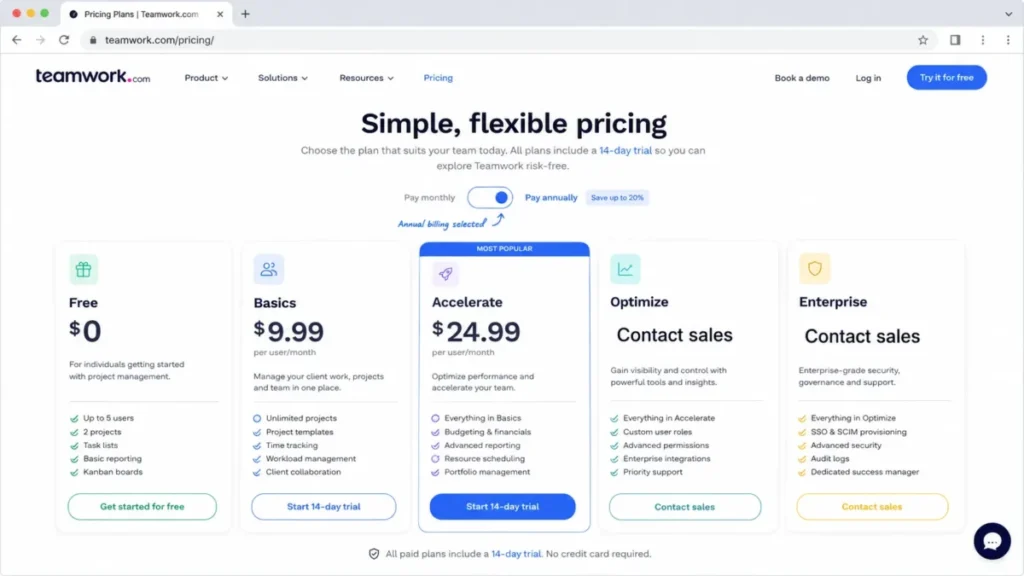
Teamwork.com publishes five plans. Two carry public per-seat prices, and two require a sales conversation.
| Plan | Price (per user/ | Best for | Key limits and seat rule | Worth it? |
|---|---|---|---|---|
| Free | $0 | Evaluation and very small delivery | Max 5 users, 5 projects, 100 MB storage, 100 automations, 2 templates, 5 proofs/ | Good for a trial, not for ongoing client work |
| Basics | $9.99 | Small teams delivering projects and tracking billable time | Min 3 users, 300 projects, 100 GB, 5,000 automations, 20 proofs/ | Good if you never need timesheets or capacity planning |
| Accelerate | $24.99 | Growing teams automating work and planning capacity | Min 5 users, 600 projects, 250 GB, 20,000 automations, no timesheet approval | Best practical plan for billing agencies |
| Optimize | Contact sales | Services firms managing cost, fixed fee, and profitability | Seats quoted, unlimited projects, 500 GB, 100,000 automations | Only when approvals and cost budgets are non-negotiable |
| Enterprise | Contact sales | Complex firms needing SSO and advanced control | Seats quoted, unlimited projects, 1,000 GB, dedicated success manager | Only when identity governance and priority support are required |
Prices and caps in the table come from the official pricing page and plan comparison, checked August 6, 2026. That page shows a 29% saving for annual billing and does not publish a monthly list price, so treat monthly cost as a quote item.
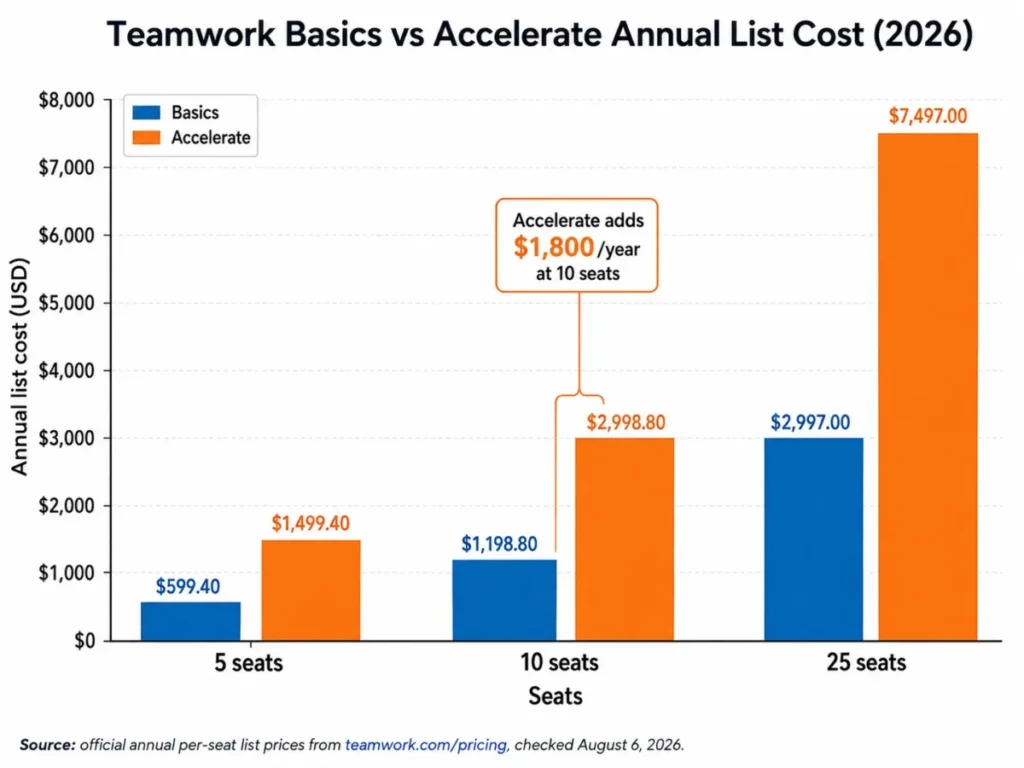
Annual cost at 5, 10, and 25 seats
Teamwork prices per seat, so the gap between the two public plans widens fast.
| Paid seats | Basics per year | Accelerate per year | Annual gap |
|---|---|---|---|
| 5 | $599.40 | $1,499.40 | $900.00 |
| 10 | $1,198.80 | $2,998.80 | $1,800.00 |
| 25 | $2,997.00 | $7,497.00 | $4,500.00 |
Each figure multiplies the annual per-seat list price on the official pricing page by seats and 12 months, for example $24.99 x 10 x 12 = $2,998.80. Taxes, negotiated discounts, future AI credits, and internal labor are excluded.
The costs that do not appear on the plan card
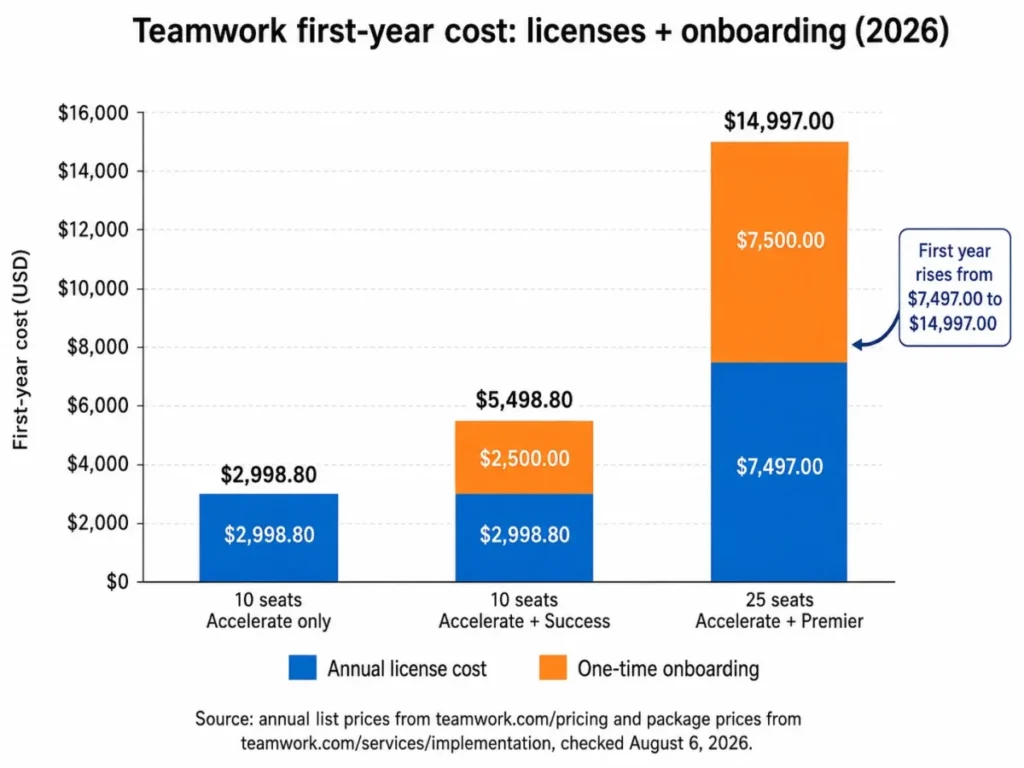
Onboarding is the first one. Teamwork.com sells Power Sessions from $250 per hour, a Success package at $2,500, and a Premier package at $7,500, alongside a free self-led Getting Started path.
Success includes four customer success milestone sessions and assisted imports of clients, projects, tasks, and time logs. Premier adds weekly calls across a 6 to 12 week rollout, guided configuration, bespoke imports, and custom API scripting.
Those packages change the first-year number more than most buyers expect.
| First-year scenario | License | Onboarding | First-year total |
|---|---|---|---|
| 10 seats on Accelerate, self-led onboarding | $2,998.80 | $0 | $2,998.80 |
| 10 seats on Accelerate plus Success | $2,998.80 | $2,500 | $5,498.80 |
| 25 seats on Accelerate plus Premier | $7,497.00 | $7,500 | $14,997.00 |
Package prices come from the official implementation services page, checked August 6, 2026, combined with the annual license figures above.
The second unlisted cost is artificial intelligence. TeamworkAI is included in paid plans for an introductory period, and the pricing page states that usage-based AI credits launch in September 2026.
No credit price, included allowance, rollover rule, or overage mechanic is published yet. Any team planning to lean on AI summaries, the project wizard, or the AI teammates should treat post-September spend as an open line item and ask for it in writing before signing an annual term.
The third is the seat floor. Basics requires a minimum of 3 users and Accelerate a minimum of 5, so a three-person studio on Accelerate still pays for five seats.
Where Each Teamwork Plan Stops Working
The plan comparison publishes hard numbers, which makes upgrade triggers unusually easy to predict.
| Gate | Free | Basics | Accelerate | Optimize | Enterprise |
|---|---|---|---|---|---|
| Projects | 5 | 300 | 600 | Unlimited | Unlimited |
| File storage | 100 MB | 100 GB | 250 GB | 500 GB | 1,000 GB |
| Automations | 100 | 5,000 | 20,000 | 100,000 | 100,000 |
| Project templates | 2 | Unlimited | Unlimited | Unlimited | Unlimited |
| Proofs | 5 per month | 20 per month | Unlimited | Unlimited | Unlimited |
| Critical path | No | No | Yes | Yes | Yes |
| Smart intake forms | No | No | Yes | Yes | Yes |
| Timesheets and reminders | No | No | Yes | Yes | Yes |
| Timesheet approval | No | No | No | Yes | Yes |
| Budgets | No | No | Time budgets and retainers | Cost, expense, fixed fee, multi-currency | Same as Optimize |
| Invoicing | No | No | Basic invoices from logged time | Margin, tax, and discounts | Margin, tax, and discounts |
| Formula fields | No | No | No | Yes | Yes |
| API rate limit | 150 req/ | 150 req/ | 150 req/ | 300 req/ | 500 req/ |
| Single sign-on | No | No | No | No | Yes |
| Desktop and mobile apps | Yes | Yes | Yes | Yes | Yes |
Every row above is taken from the official plan comparison published on the pricing page, checked August 6, 2026.
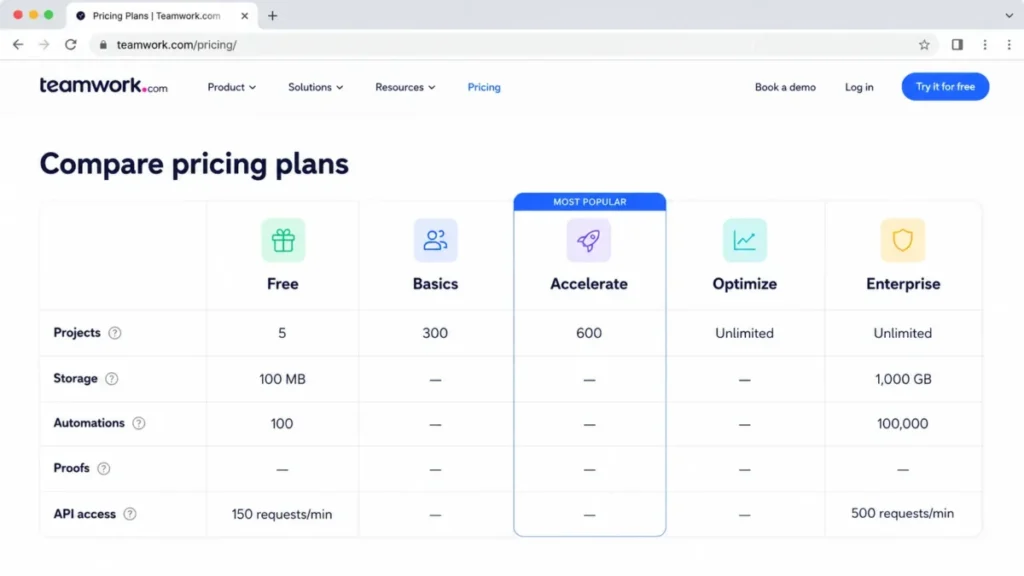
Four gates cause most of the plan changes I would expect in a client-service team. In each case the official documentation names the supported feature, and the operating consequence lands on a specific team rather than on the company in general.
Proofs are the first. A creative agency running client review cycles burns 20 approvals a month quickly, and unlimited proofs start on Accelerate.
Timesheets are the second. Basics tracks billable time, but the timesheet view and the reminders that push people to log it begin on Accelerate.
Approval is the third, and it is the one that surprises finance. Reviewing and approving timesheets before invoicing is an Optimize feature, so a firm with a “no unapproved hours on an invoice” policy is buying a quoted plan whether it planned to or not.
Financial depth is the fourth. Accelerate handles time budgets, retainers, and basic invoices, while cost and expense budgets, fixed-fee work, multiple currencies, quotes, and invoices with margin, tax, and discounts all sit on Optimize.
Free deserves one line of its own. With 5 projects, 5 users, 100 MB of storage, and 2 templates, it is an evaluation environment, not a plan a client-service business runs on.
My recommendation for this section is blunt: shortlist the plan that clears your hardest gate, then treat every cheaper tier as a workaround you will pay for in admin time.
Core Client-Work Workflows
Four workflows carry the platform. Each is described from official documentation and the published plan comparison, with the plan it requires and the constraint that comes with it.
Running a client project end to end
Projects are created blank or from a template, assigned to a client company, then worked in List, Board, Table, or Gantt view with time logged against tasks. Milestones, subtasks, tags, and dependencies are available from Free upward.
The gate is scale, not capability. Free allows 2 templates and 5 projects, which stops reusable client delivery almost immediately, and critical path for schedule risk starts on Accelerate.
Taking in client requests
Smart intake forms map submitted requests into project data so work arrives structured instead of arriving in an inbox. Forms are an Accelerate feature.
Basics teams have to run intake through email or a third-party form and create the work manually. That is the single most common reason I would move an agency off Basics.
Time, budgets, and invoices
Time is logged by timer or manual entry, then rolled into timesheets, compared against budgets, and converted into invoices. Accelerate covers time budgets, retainers, and basic invoices built from logged time.
Optimize is where the finance controls live: timesheet approval, cost and expense budgets, fixed-fee tracking, multi-currency, and invoices that include margin, tax, and discounts. A regulated or audit-sensitive billing process starts at Optimize, not Accelerate.
Planning capacity and utilization
Workload planning, live capacity views, and utilization targets begin on Accelerate. Optimize adds tentative project modeling, scheduling by role or skill, and revenue, cost, and profitability insight.
The practical consequence for a 30-person consultancy is that the resourcing conversation and the profitability conversation sit on different plans. If the same meeting covers both, budget for the quote.
Client and collaborator access
Client users and collaborators are separate license types from standard paid users, and the license documentation describes them as free but restricted. Standard users consume the paid seats.
That page still uses older plan names, so I would confirm the current client-user project ceiling in writing before designing a client portal around it. The restriction documented without ambiguity is automation access, covered next.
Automation and API Limits
Automation allowances scale from 100 on Free to 5,000 on Basics, 20,000 on Accelerate, and 100,000 on Optimize and Enterprise. Teamwork does not publish the reset cadence or the exact behavior at exhaustion, so treat both as questions for support rather than assumptions.
Volume is the easy part. The failure behavior is what changes operations.
According to Teamwork’s automation permissions documentation, client users and collaborators cannot access the Automation Center at all, although eligible actions they take can still fire existing rules. Bulk edits do not always trigger automations, and a rule that fails three consecutive times because of permissions is deactivated, with an email sent to its creator.
Ownership matters more than most buyers expect. Time-based rules run in the creator’s timezone and depend on the creator keeping the permissions the rule needs, per Teamwork’s automation setup guide.
The operational fix is simple and worth writing into your admin policy. Create automations under a stable administrator account rather than a delivery manager who might change teams, and add a monthly check for deactivated rules.
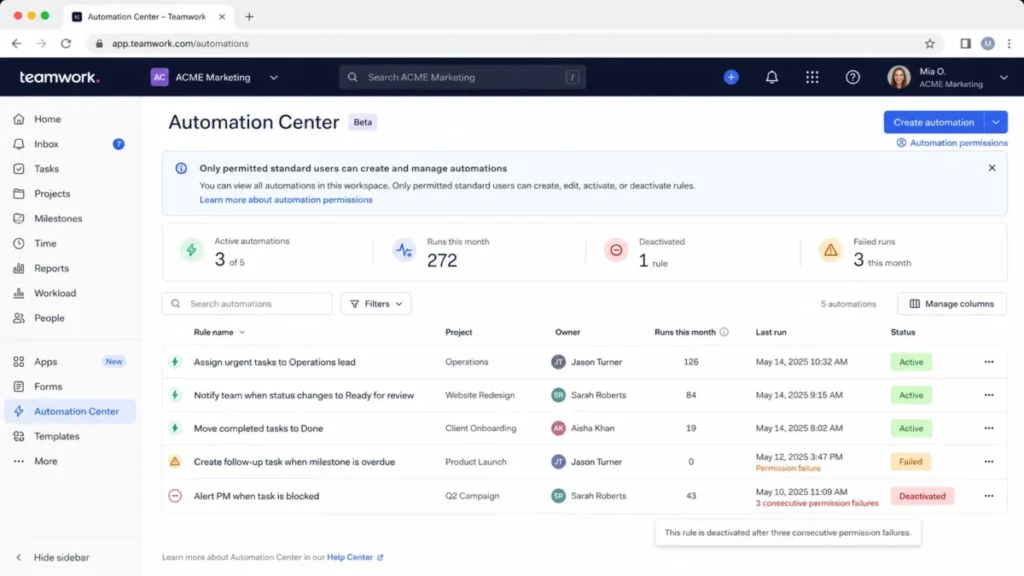
The API side has two numbers that matter for integration design. The pricing comparison lists 150 requests per minute on Free, Basics, and Accelerate, 300 on Optimize, and 500 on Enterprise.
There is a documentation mismatch worth flagging before an engineer sizes anything. Teamwork’s API rate limit guide still describes limits against the retired Grow and Scale plan names, and it returns HTTP 429 with a 60-second reset when a limit is exceeded. Confirm your contracted rate against the plan comparison and your order form rather than the developer page.
Bulk extraction has its own ceiling. The API paging guide sets a maximum of 50,000 records per request and directs larger pulls to date-based continuation. A reporting or warehouse sync therefore needs incremental design from day one rather than a nightly full export.
API access also stays bounded by the calling user’s permissions and the subscription’s feature access, so a service account that cannot see a project cannot extract it. If you are new to this kind of integration planning, the primer on what an API is covers the vocabulary.
Ease of Use and Setup
Setup difficulty is medium to high, and the reason is density rather than complexity in any single screen. Clients, rates, budgets, proofs, workload, and permissions are all configurable, and each one is a decision someone has to own before rollout.
Review-platform feedback repeats the same theme, which is covered in more detail below: capability is praised, navigation depth is not. A team arriving from a lightweight board tool should expect training, not discovery.
Desktop and mobile apps, role-based permissions, two-factor authentication, and free expert training are included on every plan, including Free. Mobile parity is a different question, and platform reviewers repeatedly describe the mobile experience as less smooth than desktop for detailed work.
A 30/90-day adoption check keeps the rollout honest. By day 30, every active client should exist as a client record with a rate applied and time logging above 90% for billable staff.
By day 90, at least one budget should be tracking against real logged hours, and at least one intake form or automation should be running without an admin nudging it. If those are not true, the problem is process ownership rather than the platform, and adding Optimize will not fix it.
Onboarding, Import, Export, and Migration Risk
Teamwork.com publishes native importers for Asana, monday.com, Basecamp, Wrike, and other tools, and the marketing language describes a one-click project import. The help documentation is more precise, and the gaps are the part that costs time.
| Source | What the importer carries | What it does not carry |
|---|---|---|
| Asana | Tasks, subtasks, assignees, dates, descriptions, comments, files | Board stages, custom fields, most dependencies, recurrence, historical activity; inline images become placeholders |
| monday.com | Projects and work items, up to 1,000 projects shown in the picker | Workflow stage mapping, custom fields, most dependencies, recurrence semantics, historical activity |
| Basecamp | Projects, people, and content, with version-specific handling | Post-import changes survive an update but not a reimport; Basecamp Classic requires deleting a project before reimporting it |
| Wrike | Projects, tasks, and content | Board stage mapping, automatic invitations for imported users, historical activity |
The omissions above are documented in the official importer guides for Asana and monday.com. The same pattern appears in the guides for Basecamp and Wrike, all checked August 6, 2026.
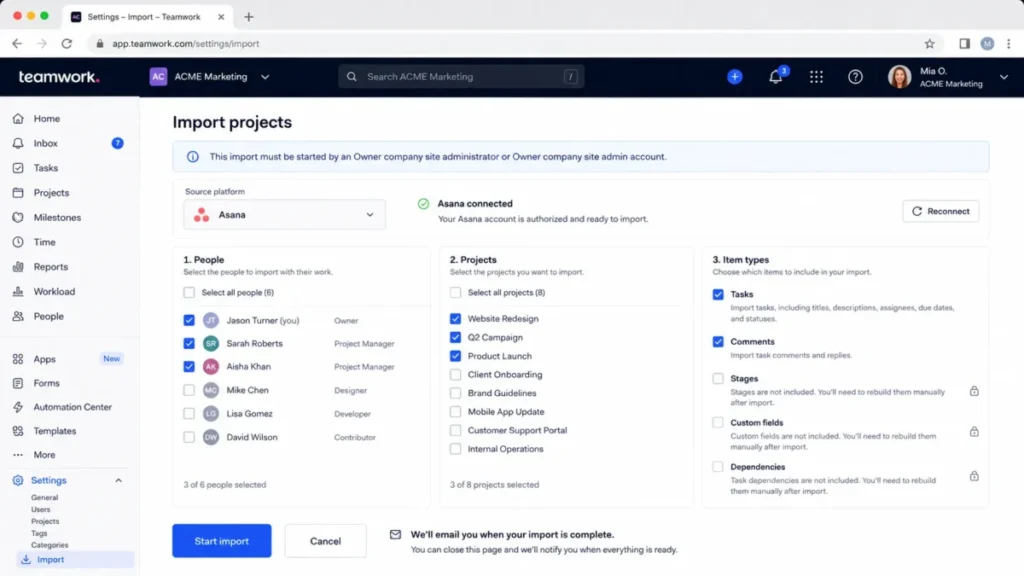
Reimport is the risk that bites after go-live. A reimport overwrites previously imported content along with changes made since, while an update adds only new items, so a team that has already started working in Teamwork can lose edits by rerunning the wrong action.
User imports carry a quieter version of the same problem. CSV and vCard imports match on email address, so changing an email or user ID creates a new user instead of updating the existing one, which produces duplicate people and split time records.
The exit path deserves attention before signing, not after. A project Gantt exports to Microsoft Project XML or GanttProject GAN and prints to PDF, and project activity exports to Excel, though collaborators cannot run that export.
None of the reviewed documentation proves a single account-wide export that captures every object, permission, automation, and attachment in one archive. Treat leaving as a multi-artifact project and validate object by object before canceling, the same discipline covered in the CRM migration planning checklist.
For the migration itself, match the onboarding package to the source system rather than to team size. Self-led Getting Started fits a clean single-source move, Success fits a straightforward multi-client import, and Premier is what a heavily customized Wrike or monday.com workspace with scripted API migration needs.
The wider rollout sequence, including who owns configuration decisions, is covered in the implementation planning guide.
Security, Support, and Integrations
Teamwork.com publishes ISO/IEC 27001:2022 and SOC 2 Type 2 certification statements, states that it runs on AWS infrastructure in United States and European Union regions, describes limited staff access to customer data, and sets a 99.9% uptime goal.
| Claim | Evidence type | Buyer action |
|---|---|---|
| ISO/ | Vendor statement on the official security page | Request the current report or certificate during procurement |
| AWS hosting in US and EU regions | Vendor statement | Confirm your tenant region in the order form |
| 99.9% uptime | Stated goal, not measured performance | Ask whether a contractual SLA with credits exists |
| Two-factor authentication and SOC 2 compliance on every plan | Pricing page inclusion list | Verify against your plan before rollout |
| Single sign-on and advanced access policies | Enterprise plan feature | Budget for Enterprise if identity governance is mandatory |
These statements come from the official Teamwork.com security page and the pricing-page inclusion list, checked August 6, 2026.
Support tiers follow the plan. Enterprise advertises a dedicated success manager, priority support, expert technical and implementation support, and 10 hours of technical services for API work, data migration, and integrations.
Public first-response and resolution targets were not verified in the reviewed pages. Ask for the support schedule as an attachment to the order form rather than assuming a tier name implies a response time.
The integrations directory states 150 or more integrations plus one MCP server for connecting a language model to Teamwork data. Catalog size and integration depth are different things, and the plan gates prove it: HubSpot and QuickBooks connections sit on Accelerate, while Salesforce and NetSuite are Optimize features.
Before buying on integration count, name the three connections your revenue workflow depends on and confirm each one’s plan and direction. A one-way sync that lands data in the wrong system is a reporting problem you will inherit in month two.
What Users Report on Review Platforms
Review-platform feedback is presented here as sentiment, not as measured performance. Ratings below are the aggregates those platforms displayed when their listings were checked on August 6, 2026.
Overall sentiment on Capterra’s Teamwork listing is broadly positive, with recurring visible concerns about learning curve, per-seat value, visibility of product updates, mobile smoothness, and approval permissions. Some entries there carry vendor-referred or incentivized labels, which is worth noticing before treating any aggregate as neutral.
The pattern on TrustRadius reviews of Teamwork is similar. Feature depth and the native apps draw praise, while interface density, time tracking that is harder to reach than expected, and comment handling draw repeated criticism.
A search-visible G2 review snippet describes too many places to click and difficulty locating tasks. One snippet is an individual opinion rather than a trend, and it is included only because it repeats the density theme visible on the other two platforms.
The sentiment supports the documentation-based finding in the setup section rather than challenging it: the platform is capable and dense, and the cost of that density is training time. It does not validate or contradict any pricing, limit, or feature-gate claim in this Teamwork review, because a review is never a source for those.
Teamwork Limitations
Six limitations shaped the verdict in this Teamwork review, and none of them is a dealbreaker on its own.
Approval sits behind a quote. Timesheet review and approval require Optimize, which has no public price, so a firm with an approval policy cannot budget from the published numbers at all.
Financial depth splits across two plans. Time budgets and retainers on Accelerate look sufficient until someone asks for cost tracking, fixed-fee margin, or a second currency, and all three are Optimize features.
Automations fail quietly in one specific way. Bulk edits do not reliably fire rules, and three consecutive permission failures deactivate a rule with only an email to its creator, which is easy to miss in a busy inbox.
Migration is lossy by design. Board stages, custom fields, most dependencies, recurrence, and historical activity do not survive the native importers, so a complex source workspace requires manual rebuild time that no plan upgrade removes.
The exit is fragmented. Individual Gantt and activity exports are documented, but no reviewed page proves a complete account-wide archive of every object, permission, automation, and attachment.
AI pricing is an open variable. Included AI is introductory, and usage-based credits arrive in September 2026 without published economics.
Buyer risk ledger
| Risk | Who feels it | Mitigation |
|---|---|---|
| Plan underestimated at purchase | Finance and operations leads | Map approval, cost budget, and currency needs before choosing between Accelerate and Optimize |
| Automation silently deactivated | Delivery managers relying on routing rules | Own automations from a stable admin account and audit rule status monthly |
| Migration rebuild time | Implementation owner | Pilot one representative client project and reconcile object counts before bulk import |
| AI spend after September 2026 | Budget owner | Get credit pricing, allowance, and overage terms in writing before an annual commitment |
| Exit friction at renewal | Anyone evaluating a switch | Run an export inventory while the subscription is still active |
Who Should Buy Teamwork and Who Should Skip It
Who should buy it
A 10 to 50 person marketing or creative agency with recurring client projects, billable hours, proof cycles, and capacity planning gets the most from Accelerate. Client access, proofs, workload, and invoicing from logged time all land in one place.
A 20 to 100 person IT services firm or consultancy that reports on utilization and project profitability is the second strong fit, though the profitability half of that requirement points at Optimize.
A 3 to 10 person client-service studio that needs project delivery, client organization, and billable time tracking, but not timesheets or workload controls, is a legitimate Basics buyer. At the 3-seat minimum that is $359.64 per year.
An accounting or professional services team with retainer clients fits Accelerate well, because retainers and time budgets are native rather than bolted on.
Who should skip it
Internal-only teams that never bill a client should skip it. The client, rate, proof, and budget layers add configuration and training cost with no return, and a lighter tracker from the best project management tools for small teams shortlist will be adopted faster.
Teams that need a highly visual, endlessly configurable board with many custom views should look elsewhere. Teamwork is opinionated about client work, and that opinion is the product.
Organizations migrating a heavily customized workspace on a hard deadline should either delay or budget for Premier onboarding. Rebuilding stages, custom fields, and dependencies by hand is the default outcome, not the exception.
Buyers who cannot get an Optimize quote before the decision date should skip it for now if approvals or cost budgets are mandatory. Committing to Accelerate and discovering the gate afterwards is the expensive version of this purchase.
Anyone whose integration plan depends on high-volume API extraction should resolve the rate-limit and paging design first. A nightly full sync is not what this API is shaped for.
Teamwork Alternatives
| Alternative | Better for | Why choose it instead |
|---|---|---|
| Asana | Cross-functional work orchestration | Broad task and project coordination when time, budgets, and invoicing already live in finance systems |
| monday.com | Visual, configurable workflows | Highly customizable boards and views when client profitability is not the center of gravity |
| ClickUp | Breadth at lower cost | Wide feature coverage and many views for teams that want one tool for everything |
| Basecamp | Simplicity and flat pricing | Straightforward communication and project spaces without rate cards or utilization reporting |
| Wrike | Enterprise work management | Cross-department governance and proofing at larger scale |
Pricing for these tools changes on its own schedule and is not reproduced here; check each vendor’s current page or the linked reviews before comparing cost.
Asana is the default alternative for teams whose work is not billed by the hour. The Asana review covers where its reporting stops and which plan its own gates sit on.
monday.com wins on visual flexibility and loses on opinionated client-work structure. The monday.com review has the plan detail.
ClickUp is the value play when breadth matters more than depth in any one area. The ClickUp review covers the trade-offs that come with that breadth.
Basecamp suits teams that want less software, not more. The Basecamp review explains who that suits.
Wrike is the closer competitor for larger organizations with formal proofing and governance needs. The Wrike review covers its admin depth.
Final Verdict: Is Teamwork Worth It?
Teamwork.com is worth it for client-service teams that bill time and need delivery, capacity, and money in one system. For a 10-person agency that is $2,998.80 a year on Accelerate before onboarding, and the alternative is usually three tools plus a spreadsheet.
It is not worth it for internal teams, for buyers who want a light tracker, or for organizations that need timesheet approval and cost budgets but cannot get an Optimize quote in time.
Choose Basics if you deliver client projects, track billable time, and can live without timesheets, forms, workload planning, and critical path. Choose Accelerate if any of those five describe how the team already works.
Choose Optimize when a manager must approve hours before invoicing, or when cost, fixed-fee, or multi-currency budgets are part of the reporting pack. Choose Enterprise when single sign-on and advanced access policies are a security requirement rather than a preference.
Choose Asana or ClickUp instead when the work is not billed by the hour, and choose Basecamp when the goal is less software rather than better margin reporting.
Two questions belong in the buying conversation before signing. Ask for the Optimize quote even if you plan to start on Accelerate, and ask for TeamworkAI credit pricing in writing, because the September 2026 change lands inside a normal annual term.
That is this Teamwork review in one line: buy the plan your billing policy forces you onto, not the one in the ad.
Frequently Asked Questions
How much does Teamwork.com cost in 2026?
Teamwork has a free plan at $0, Basics at $9.99 per user/month billed yearly with a 3-seat minimum, and Accelerate at $24.99 per user/month billed yearly with a 5-seat minimum, while Optimize and Enterprise are quoted by sales. Ten Accelerate seats cost $2,998.80 a year at list price, checked on the official pricing page on August 6, 2026.
Does Teamwork have a free plan?
Yes, and it is a permanent plan rather than a trial, capped at 5 users and 5 projects with 100 MB of file storage, 100 automations, 2 project templates, and 5 proofs a month. That is enough to evaluate the product or run a very small workload, not enough to operate a client-service business.
What is the difference between Teamwork Basics and Accelerate?
Basics covers project delivery, client organization, unlimited templates, and billable time tracking, capped at 300 projects and 20 proofs a month, so most agencies hit its ceiling on intake and timesheets rather than on project count. Accelerate adds smart intake forms, critical path, timesheets and reminders, workload planning, time budgets, retainers, invoicing from logged time, unlimited proofs, and 20,000 automations, for $1,800 more a year at 10 seats.
Which Teamwork plan do I need to approve timesheets?
Optimize, which is quoted by sales rather than listed publicly. Accelerate lets people log time and use timesheets, but reviewing and approving them before invoicing starts on Optimize, so a billing policy that requires manager sign-off should trigger a quote request at the start of the evaluation.
Is Teamwork good for agencies?
Yes, if the agency bills by time or fixed fee and cares about utilization, because client records, proofs, billable rates, retainers, and capacity planning are native rather than add-ons. Agencies that only need a shared board and due dates will find the extra structure a burden instead of a benefit.
Can Teamwork import from Asana or monday.com?
Yes, both have native importers, but do not plan on a lossless move. The documentation states that board or workflow stages, custom fields, most dependencies, recurrence, and historical activity are not carried across, and the monday.com importer displays a maximum of 1,000 projects, so budget rebuild time and pilot one project first.
Is Teamwork SOC 2 compliant?
Teamwork.com publishes SOC 2 Type 2 and ISO/IEC 27001:2022 certification statements on its security page and lists SOC 2 compliance as included on every plan, so request the current report during procurement instead of treating the badge as proof. The same page states AWS hosting in US and EU regions and a 99.9% uptime goal rather than a measured figure.
What are Teamwork’s biggest limitations?
Four of them change decisions: timesheet approval and cost or fixed-fee budgets require the quoted Optimize plan, native importers drop stages, custom fields and most dependencies, automations deactivate after three consecutive permission failures, and no documented single export captures the whole account. Add AI credit pricing, which is unpublished ahead of the September 2026 launch.
Is Teamwork worth it compared to Asana or ClickUp?
No, unless client-work economics are the point, because Asana and ClickUp cover general work management well and are easier starting points for internal teams. Teamwork earns the premium when billable time, retainers, capacity, and project profitability need to sit in the same platform as the delivery work.
Can we export everything before we cancel?
Not in one action, based on the documentation available: a project Gantt exports to Microsoft Project XML or GanttProject GAN, project activity exports to Excel, and other objects come out separately, with collaborators blocked from the activity export. Run an export inventory object by object while the subscription is still active rather than during the cancellation window.