Apptivo prices CRM like an entry-level tool and sells it like a business suite. The decision risk sits in the comparison table, where every plan publishes a hard ceiling on workflows, storage, custom fields, reports, dashboards, and daily API calls.
The short version: Apptivo CRM belongs on the shortlist for 5- to 15-person consulting, agency, field-service, and professional-services teams that want CRM, invoicing, projects, and a help desk on one subscription. Premium at $25 per user per month on annual billing is the plan that fits most of them, based on the official pricing table checked on August 3, 2026.
Teams shopping mainly for a modern interface, a deep native integration marketplace, or proven offline mobile access will get further with a different tool. If you are still framing the category, what CRM software does and our best CRM for small business shortlist cover the ground before plan-level detail matters.
In This Article (19 sections)
Quick Verdict: Apptivo CRM at a Glance
| Decision point | Apptivo CRM |
|---|---|
| Best for | 5- to 15-person service, consulting, agency, and field teams wanting CRM plus invoicing, projects, and help desk on one bill |
| Not ideal for | Interface-first buyers, marketplace-driven RevOps teams, and regulated buyers needing current audit evidence before signature |
| Starting price | $20 per user per month on Lite, or $15 per user per month billed annually |
| Practical plan | Premium at $30 monthly, or $25 per user per month billed annually |
| Free plan and trial | No free plan appears on the current pricing cards; a 14-day trial of the Ultimate plan is advertised with no credit card required |
| Setup difficulty | Moderate to high. Independent reviewers repeatedly cite a learning curve and configuration effort |
| Main strength | Suite breadth and customization depth at a low per-seat price |
| Main limitation | Published plan caps with undisclosed behavior once a cap is reached |
| Best alternative | Zoho CRM for suite breadth with a broader marketplace, Pipedrive for pipeline-only simplicity |
Source: Apptivo pricing, plan cards and comparison table, checked August 3, 2026.
How We Researched and Evaluated Apptivo
This review draws on Apptivo’s official pricing page, product and integration documentation, professional services page, data security page, privacy policy, terms, and public FAQ. Prices and published plan limits were checked on August 3, 2026.
Each area was assessed against the same buyer-focused criteria: total cost at real team sizes, plan-gated capacity, documented workflows, migration effort, integration prerequisites, support access, and security evidence.
Greater weight was given to the factors that decide late-stage purchases: published ceilings, upgrade triggers, contract terms, and implementation cost. Vendor positioning language carried no weight in the assessment.
Claims that could not be traced to an official page or a labeled third-party source were excluded. Where a current official page disagrees with older coverage, the current page is treated as canonical and the conflict is reported in the relevant section.
What Apptivo CRM Is
Apptivo CRM is the sales side of a wider cloud application suite operated by Apptivo Inc., covering leads, contacts, customers, and opportunities alongside apps for invoicing, projects, field service, and support.
The plan you buy decides how much of that suite you get. The official cards list 18 apps on Lite, 46 on Premium, 57 on Ultimate, and 65 on Enterprise, so the CRM is sold as one slice of an app count rather than as a standalone product.
That framing matters for buyers replacing three or four tools at once. It matters much less for a team that only wants a pipeline, because the apps beyond CRM are the main thing the higher tiers are selling.
The Three Problems Apptivo Solves
Three buying problems show up repeatedly in service businesses, and Apptivo answers all three at a price most CRM vendors charge for pipeline alone. Each one below is tied to what the official plan evidence actually supports.
A stack held together by separate invoicing and delivery tools
Service businesses usually run a CRM for pipeline, a second tool for quotes and invoices, and a third for project delivery. Apptivo’s positioning is that those records live in one account, with the customer view connecting sales, billing, and delivery data.
For a 10-person consultancy, the practical gain is not feature depth. It is one vendor, one login model, and one place where a closed opportunity turns into a project and an invoice.
Record structures that do not match how the team sells
Apptivo publishes custom-field ceilings by plan: 100 per app on Lite, 250 on Premium, 350 on Ultimate, and 500 on Enterprise. Custom views follow the same ladder at 25, 100, 200, and 400.
Those numbers are generous relative to the price, and they are the reason customization shows up as a recurring strength in independent coverage. A Gartner Peer Insights reviewer writing on December 4, 2025 praised customization and lead and opportunity tracking while describing some tools as harder to learn and reporting as limited.
Support access on the cheapest paid plan
Every paid tier, including Lite, is listed with 24/7 email and chat support plus 24/5 phone support. Enterprise adds SLA-backed support and an account manager.
Phone access on the cheapest paid tier is unusual at this price point, and both Forbes Advisor and TechRadar name support as a strength.
Response-time targets are a separate question, and no public SLA schedule states them.
The Three Problems Apptivo Creates
Every consolidation decision buys new problems along with the savings. These are the three that decide whether an Apptivo subscription survives its first renewal.
Capacity ceilings arrive before feature ceilings
Most CRM buyers plan upgrades around features. Apptivo’s comparison table forces a different calculation, because workflows, storage, reports, dashboards, and API calls each carry a number that can run out while the feature set still fits.
A Premium team with 80 active workflow configurations hits the 75-workflow ceiling and pays $15 more per user per month for Ultimate, without gaining a single feature it was missing.
An interface that needs a training budget
The recurring criticism across independent coverage is consistent: TechRadar’s 2026 review describes a dated interface and a learning curve, Forbes Advisor lists a learning curve and performance complaints, and TrustRadius themes include dashboard and email friction in older detailed reviews.
Treat older criticism as historical rather than as a current measurement. The pattern still matters, because a team that will not invest configuration and training time gets a worse result from Apptivo than from a simpler pipeline tool.
Evidence gaps that procurement will find
Apptivo’s data security page states SSAE 18 SOC 2 Type II and GDPR-aligned practices, Google Kubernetes Engine hosting, and vulnerability scanning. The same public page carries dated audit references, including a 2021 audit and a planned 2022 audit.
That gap is not evidence of a problem. It is a reason to request the current report and bridge letter before a security review, rather than treating the page as sufficient.
Apptivo Pricing and Total Cost
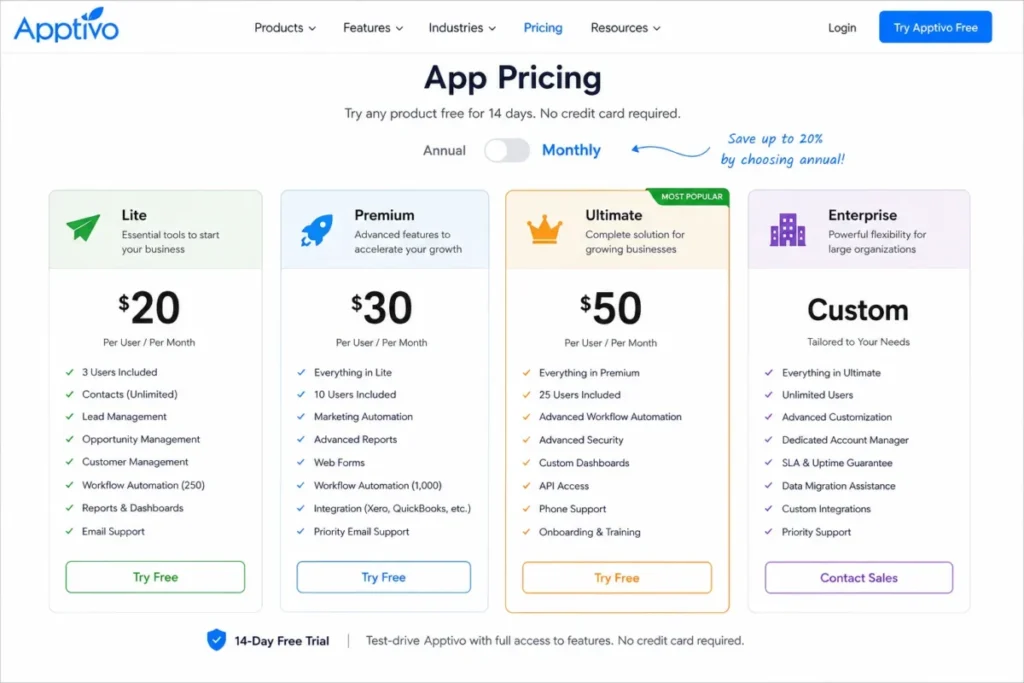
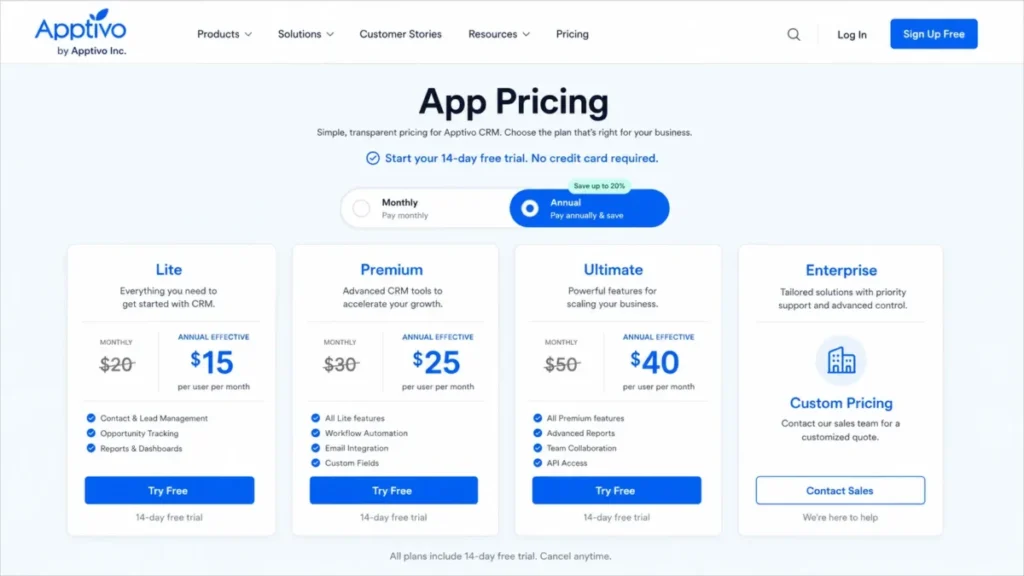
Apptivo publishes four US tiers in USD. Prices below were checked against the official pricing page on August 3, 2026.
| Plan | Monthly | Billed annually | Apps included | Positioned for |
|---|---|---|---|---|
| Lite | $20 per user/ | $15 per user/ | 18 | Small teams with basic pipeline needs |
| Premium | $30 per user/ | $25 per user/ | 46 | Service teams needing automation and reporting |
| Ultimate | $50 per user/ | $40 per user/ | 57 | Automation- and integration-heavy operations |
| Enterprise | Custom quote | Custom quote | 65 | Buyers needing SLA, white labeling, or dedicated options |
Source: Apptivo pricing plans, US list pricing, checked August 3, 2026.
On mobile, read this table and every wide table below with a pinned label column and horizontal scroll rather than a stacked layout.
Annual billing saves $60 per seat per year on Lite, $60 on Premium, and $120 on Ultimate against paying the monthly rate for twelve months. Those figures come from the published rates: ($20 – $15) x 12 = 60, ($30 – $25) x 12 = 60, and ($50 – $40) x 12 = 120.
What Apptivo costs a whole team for a year
Per-seat pricing hides the number finance has to approve. These totals use the official rates only, with no taxes, onboarding, migration, add-ons, or third-party services included.
| Seats | Plan | Monthly billing, 12 months | Annual billing | Saved by prepaying |
|---|---|---|---|---|
| 5 | Lite | $1,200 | $900 | $300 |
| 5 | Premium | $1,800 | $1,500 | $300 |
| 5 | Ultimate | $3,000 | $2,400 | $600 |
| 10 | Premium | $3,600 | $3,000 | $600 |
| 10 | Ultimate | $6,000 | $4,800 | $1,200 |
| 25 | Premium | $9,000 | $7,500 | $1,500 |
| 25 | Ultimate | $15,000 | $12,000 | $3,000 |
Source: calculated from Apptivo’s published monthly and annual rates, checked August 3, 2026.
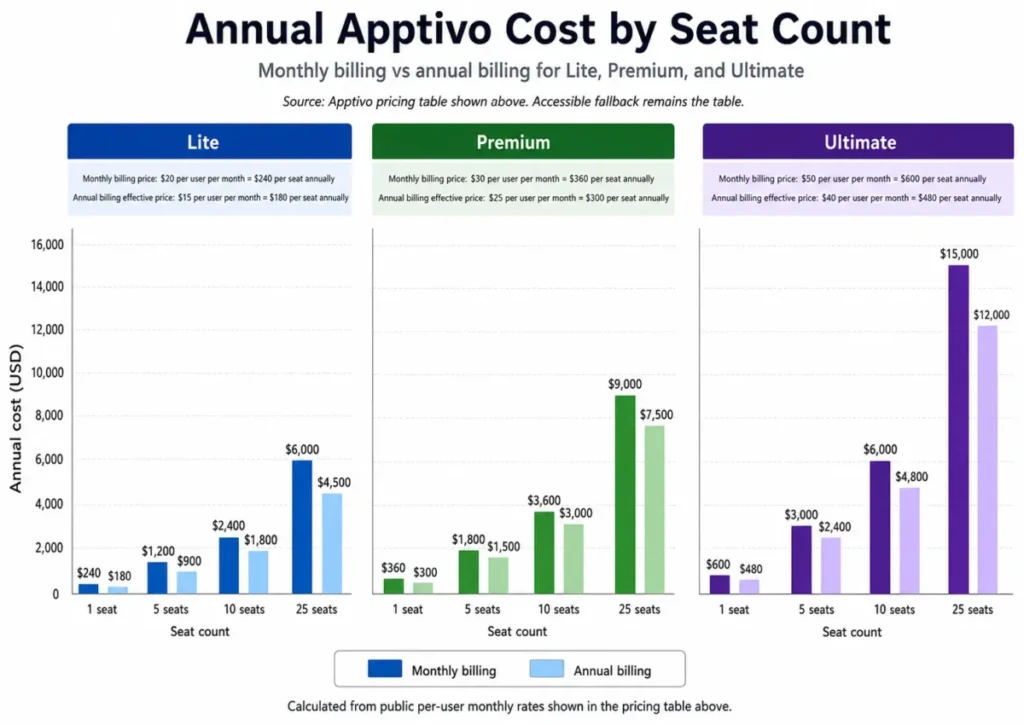
A 10-person team on Premium is a $3,000 annual line item on prepayment. That is the number to compare against alternatives, not the $25 headline.
The costs that sit outside the plan price
Apptivo’s professional services page lists Quick Start as 60-minute sessions starting at $125, with implementation and data migration quoted per project. No total project price is published, so treat setup as an open line in the budget until a scoped quote exists.
Two contract terms deserve attention before prepaying. Subscriptions run monthly or yearly with no long-term contract and no cancellation fee, but annual payments are not refunded after cancellation.
The terms also state that fees exclude applicable taxes and that connected third-party services can carry separate charges.
The public FAQ adds three billing mechanics worth knowing: a failed payment can lead to a downgrade after seven days, employees added mid-cycle are billed on the next cycle, and mid-cycle prorated refunds are not offered.
The free-plan and trial claims to ignore
Several ranking pages still describe a free Apptivo Starter plan. The current official cards checked on August 3, 2026 show only paid Lite, Premium, Ultimate, and Enterprise tiers, so a free tier cannot be confirmed against that page and should not anchor a budget.
The trial is 14 days on the Ultimate plan with no credit card required, per the current pricing page. Third-party pages stating a 30-day trial are out of date.
Which Apptivo Plan Should You Choose?
Start from workload, not from the feature list. Count active workflows, custom reports, dashboards, custom fields per app, stored files per user, and daily API calls, then buy the plan whose ceilings clear those counts with headroom.
Because each supported feature is metered rather than granted outright, the operating consequence for a growing team is a plan gate that triggers on counts instead of capability. If the counts sit close to a ceiling, choose the next tier up, since the official pricing table and the official documentation state the ceiling but not the behavior at it.
| Team profile | Plan that fits | Why |
|---|---|---|
| 1 to 5 people, basic pipeline, light automation | Lite | 25 workflows, 5 reports, 8 dashboards, and 1 GB per user cover simple selling |
| 5 to 15 people, consulting, agency, or professional services | Premium | 46 apps, 75 workflows, 25 reports, 25 dashboards, 250 fields per app, and 3 GB per user |
| 10 to 50 people, automation- or integration-heavy | Ultimate | 150 workflows, 50 reports, 50 dashboards, 10 GB per user, and 20,000 daily API calls |
| Any size needing SLA, white labeling, or dedicated options | Enterprise | Custom integrations, dedicated-instance options, training, and an account manager |
Source: Apptivo plan comparison table, checked August 3, 2026.
Premium is the practical default for the middle cohort because the jump from Lite is capacity, not badges. Lite triples to Premium on workflows, moves storage from 1 GB to 3 GB per user, and lifts custom reports from 5 to 25.
Upgrade triggers to write into the evaluation
| Upgrade path | Trigger |
|---|---|
| Lite to Premium | More than 25 workflows, 1 GB per user, 3,000 daily API calls, 100 custom fields per app, 5 reports, or 8 dashboards |
| Premium to Ultimate | More than 75 workflows, 3 GB per user, 5,000 daily API calls, 250 custom fields per app, 25 reports, or 25 dashboards |
| Ultimate to Enterprise | More than 150 workflows, 10 GB per user, 20,000 daily API calls, or a requirement for custom integrations, white labeling, an account manager, or SLA-backed support |
| Any plan to professional services | The internal team has no time or expertise for configuration, migration validation, and launch governance |
Source: Apptivo plan limits and Enterprise capabilities, checked August 3, 2026.
Only commit to annual billing after the trial confirms those counts. Prepayment is not refunded after cancellation, so the discount is worth taking second, not first.
Key Features and Plan Gates
| Capability | Lite | Premium | Ultimate | Enterprise |
|---|---|---|---|---|
| Apps included | 18 | 46 | 57 | 65 |
| Workflows | 25 | 75 | 150 | 300 |
| Sales-stage automations | 15 | 30 | 50 | 100 |
| Custom reports | 5 | 25 | 50 | 100 |
| Custom dashboards | 8 | 25 | 50 | 100 |
| API calls per user per day | 3,000 | 5,000 | 20,000 | 30,000 |
| Support | 24/7 email and chat, 24/5 phone | Same | Same | Adds SLA-backed support and an account manager |
Source: Apptivo plan comparison, checked August 3, 2026.
Lead and opportunity management
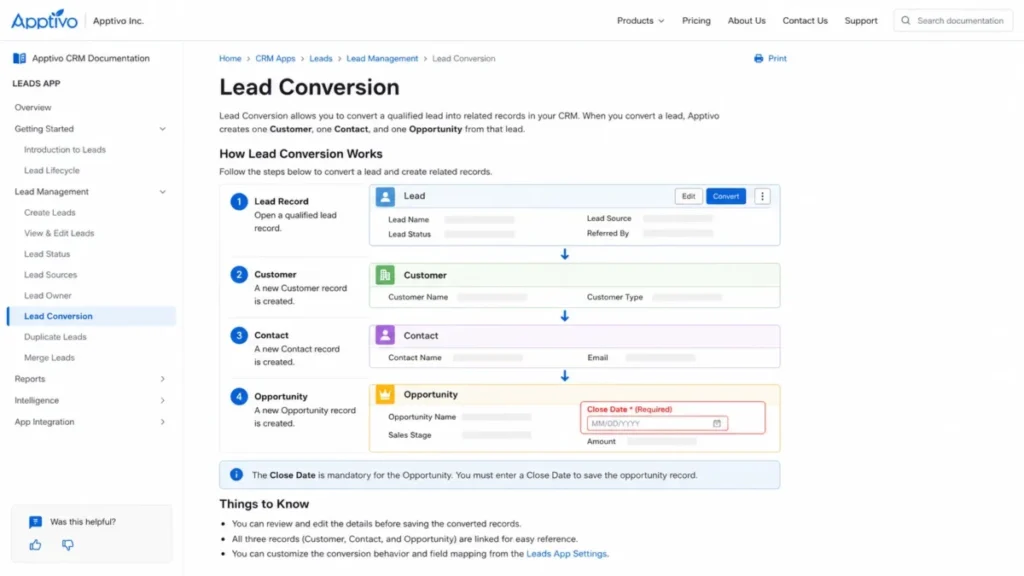
Leads, contacts, customers, and opportunities are the core objects, and the documented conversion path turns a qualified lead into all three record types at once. The Gartner reviewer quoted earlier named lead and opportunity tracking as a strength.
The plan gate here is not the pipeline itself. It is how many custom views, fields, and stage automations you can build around it.
Customization and custom fields
Custom fields run 100, 250, 350, and 500 per app across the four tiers, with custom views at 25, 100, 200, and 400 and summary dashboards on the same ladder. Customization is the most consistently praised part of Apptivo across TrustRadius themes and independent editorial coverage.
The trade-off is time. Deep configurability on a low-cost plan means the setup work moves to your team unless you buy services.
Reporting and dashboards
Reporting is metered, not merely included. Lite allows 5 custom reports and 8 dashboards, Premium 25 and 25, Ultimate 50 and 50, and Enterprise 100 and 100.
Count the reports the team runs before choosing Lite. A finance-facing service business usually needs more than five within the first quarter, and the December 2025 Gartner review described reporting as limited even where the counts fit.
Workflow automation
Workflows are capped at 25, 75, 150, and 300 configurations, and sales-stage automations at 15, 30, 50, and 100. Both are counted objects rather than usage volumes.
What happens at the ceiling is not disclosed on the pricing page. No public statement covers warnings, queuing, blocking, or purchasable overage, so plan for headroom rather than assuming a soft limit.
Email volume
The comparison table lists monthly email quotas of 1,000, 3,000, and 5,000 per user per month in the higher plan columns. The Lite value is not legible in the same table, so treat the Lite quota as unconfirmed and confirm it with the vendor if outbound email matters.
Apptivo is not the tool to replace a campaign platform. Forbes Advisor lists limited email marketing as a weakness, and the published quotas support that read.
Documented Apptivo Workflows
The four workflows below are reconstructed from Apptivo’s official documentation, and each one carries the friction the documentation does not resolve.
Import or export contacts as CSV
The Contacts documentation routes CSV movement through the Contacts list, the More menu, and the Import or Export option, with field mapping for imports.
What the page does not resolve is duplicate handling, attachment behavior, validation errors, rollback, and recovery. Run a small synthetic batch in a non-production environment before touching production records.
Convert a qualified lead
Apptivo’s lead conversion documentation describes selecting a lead, clicking Convert, then creating or skipping the customer and contact records and supplying opportunity details including a mandatory close date. Standard and custom lead fields carry into the new records.
Duplicate resolution, validation failure, and record recovery are not documented. For a team migrating a messy lead list, that is the single riskiest unknown in the CRM.
Connect Microsoft 365
The Office 365 integration page documents Outlook email, calendar synchronization, OneDrive sharing, and Azure employee creation. It requires a Microsoft 365 account, an eligible paid Apptivo plan, and the Outlook add-on where Outlook functionality is needed.
Sync direction, conflict handling, throttling, error recovery, and the add-on price are not stated. Pilot one synthetic user and one calendar before an organization-wide rollout, and treat CRM integration prerequisites as part of the implementation estimate.
Read and write data through the REST API
The REST API uses HTTP, JSON, and SSL and supports read and write operations against supported objects. Capacity is governed by the plan ladder of 3,000, 5,000, 20,000, and 30,000 calls per user per day.
Reset times, rate-limit headers, warning thresholds, retry guidance, and overage purchasing are not published. Build client-side counters and conservative throttling into any integration rather than relying on vendor-side backoff, and if the concept is new to the team, what a REST API is is the right starting point.
Limits, Hidden Costs, and Disqualifiers
| Published limit | Lite | Premium | Ultimate | Enterprise |
|---|---|---|---|---|
| Workflows | 25 | 75 | 150 | 300 |
| File storage per user | 1 GB | 3 GB | 10 GB | 15 GB |
| API calls per user per day | 3,000 | 5,000 | 20,000 | 30,000 |
| Custom fields per app | 100 | 250 | 350 | 500 |
| Custom reports | 5 | 25 | 50 | 100 |
| Custom dashboards | 8 | 25 | 50 | 100 |
| Custom views | 25 | 100 | 200 | 400 |
| Summary dashboards | 25 | 100 | 200 | 400 |
| Monthly emails per user | Not legible in the published table | 1,000 | 3,000 | 5,000 |
Source: Apptivo published plan limits, comparison table, checked August 3, 2026.
The limitations buyers hit first
Every number above is published. What is not published is the behavior at the number: no warning threshold, queuing rule, blocking rule, deletion policy, reset timing, or purchasable overage price appears on the pricing page for most of these caps.
That asymmetry is the most under-discussed thing about buying Apptivo. A cap you can plan around is a budgeting exercise, while a cap with unknown enforcement is an operational risk that only shows up in production.
There is one more limit that shapes the whole project. Apptivo’s documentation for creating CRM objects caps CSV imports at 5,000 records per batch for leads, contacts, customers, and opportunities.
Who should walk away
- Teams whose primary requirement is a modern, low-training interface. The learning-curve criticism is too consistent across Gartner, Forbes Advisor, TechRadar, and TrustRadius to dismiss.
- Teams buying primarily for advanced built-in AI. Nothing in the official evidence checked here establishes a mature AI package.
- RevOps teams that need a broad, documented native integration marketplace. TechRadar names a limited third-party marketplace as a weakness.
- Regulated buyers who need a current SOC 2 report, HIPAA coverage, SSO, SCIM, or a data-residency commitment confirmed before signature.
- Field teams that require proven offline mobile access, which the official mobile page does not address.
- Organizations unwilling to fund configuration, migration validation, and adoption work.
Integrations, API, Mobile, and Security
Integration breadth is where Apptivo’s documentation is thinnest relative to its positioning. Microsoft 365 and the REST API are documented in detail, but no public inventory separates native connectors from partner-built ones, so verify each connector you depend on during the trial.
The API ladder is the part that changes plan economics. An integration pushing 6,000 calls per user per day sits above Premium’s 5,000-call allowance and forces Ultimate at $40 per user per month on annual billing, purely on throughput.
Mobile
Apptivo advertises iOS and Android apps covering CRM, invoices, field service, estimates, help desk, activities, customer view, and lead conversions, with synchronization between web and mobile.
App-store sentiment is more mixed than the feature list suggests. The Google Play listing showed a 3.8 rating from 165 reviews at the check date, with praise for support and customization alongside complaints about repeated logouts and failed downloads.
Offline behavior is the gap that matters for field teams, and the official mobile page does not address it. Make it the first thing a field pilot tests.
Security and privacy
Apptivo states that its program includes SSAE 18 SOC 2 Type II and GDPR-aligned practices, Google Kubernetes Engine hosting, and vulnerability scanning, and that customers own their data, can delete it, and that deleted information is later cleared from rolling backups.
The privacy policy references the EU-US Data Privacy Framework with its UK and Swiss extensions and describes access, correction, and deletion rights. Older Privacy Shield wording still appears on the security page, so use the privacy policy as the current statement.
Treat all of this as attributed vendor claims, because the public security page carries dated audit references and no current report is published. Ask for the SOC 2 report, the bridge letter, and written answers on SSO, SCIM, residency, and any HIPAA requirement before a legal review.
Migration and Implementation
Migration effort is a batching exercise, and the arithmetic is fixed. With a 5,000-record cap per CSV batch, 12,000 contacts is three batches, 9,000 leads is two, and each object needs its own mapping test, its own validation pass, and its own reconciliation count.
| Migration element | Status in official evidence | What the buyer must do |
|---|---|---|
| Leads, contacts, customers, opportunities | Named in import documentation and services scope | Split into batches of 5,000 or fewer and reconcile counts per batch |
| Employees | Named in the services scope | Confirm role and permission mapping in writing |
| Notes, activities, emails, attachments | Not addressed in the checked pages | Ask for written scope before signing a migration quote |
| Duplicate detection, merge rules, rollback | Not addressed in the checked pages | Test with synthetic data in a non-production environment first |
| Automations and custom-object relationships | Not addressed in the checked pages | Rebuild manually and budget the hours |
Source: Apptivo CSV import documentation and the professional services page, checked August 3, 2026.
Named core objects are not the same as a complete migration. Our CRM migration guide covers the reconciliation discipline that prevents a silent data gap in month two.
The implementation timeline is where the official evidence contradicts itself. The pricing FAQ presents both a 6-to-8-week range and a 3-to-6-week range, so no single duration can be quoted.
Require a scoped timeline in writing alongside the quote, and pair it with a CRM implementation checklist so the deliverables are defined before the invoice.
Ease of Use, Support, and Adoption Risk
| Support element | Lite | Premium | Ultimate | Enterprise |
|---|---|---|---|---|
| Email and chat | 24/7 | 24/7 | 24/7 | 24/7 |
| Phone | 24/5 | 24/5 | 24/5 | 24/5 |
| SLA-backed support | Not included | Not included | Not included | Included |
| Account manager | Not included | Not included | Not included | Included |
| Published response targets | Not disclosed | Not disclosed | Not disclosed | Not disclosed |
Source: Apptivo support inclusions by plan, checked August 3, 2026.
Support access and contractual response time are different purchases. Praise for Apptivo’s support in Forbes Advisor, TechRadar, and app-store reviews is real sentiment, and it is not a substitute for a severity-based response target you can hold a vendor to.
Adoption is the risk that decides whether this subscription survives renewal. After 30 days, the pipeline should hold real opportunities with owners and close dates, one documented workflow should run without manual patching, and the contact import should reconcile to the source count.
After 90 days, the reports finance asked for should exist inside the plan’s report ceiling, and the team should be building records in Apptivo rather than in a parallel spreadsheet. If either is missing at day 90, the problem is configuration and training, not the plan tier, and buying Ultimate will not fix it.
Apptivo Pros and Cons
Read the balance with the price attached: Lite is $15 and Premium $25 per user per month on annual billing, per the official pricing page checked August 3, 2026.
| Pros | Cons |
|---|---|
| Low entry cost for a suite that includes invoicing, projects, and help desk | Published caps on workflows, storage, reports, dashboards, and API calls with undisclosed behavior at the ceiling |
| Suite breadth of 46 apps on Premium, covering invoicing, projects, and help desk alongside CRM | Consistent learning-curve and dated-interface criticism across Gartner, Forbes Advisor, TechRadar, and TrustRadius |
| Deep customization with 250 custom fields per app and 100 custom views on Premium | No complete public inventory separating native from partner integrations |
| 24/7 email and chat plus 24/5 phone support on every paid tier | Setup cost is open-ended, since implementation and migration are quoted per project |
| Documented REST API with a clear per-plan daily allowance | Security evidence is a vendor statement supported by dated audit references |
| 14-day Ultimate trial with no credit card required | Annual prepayment is not refunded after cancellation |
Who Should Use Apptivo CRM
- 5- to 15-person consulting, agency, and professional-services teams. Premium at $25 per user per month billed annually covers CRM, invoicing, projects, and support in one subscription, which is the exact consolidation these teams usually want.
- Owner-led teams of 1 to 5 running a simple pipeline. Lite at $15 per user per month works when 25 workflows, 5 reports, 8 dashboards, and 1 GB per user genuinely cover the workload.
- Operations teams that customize heavily. The custom-field and custom-view ceilings are unusually high for the price, and configuration is where Apptivo repays effort.
- Field-service businesses already committed to a pilot. The mobile app covers field service, estimates, and activities, provided the pilot tests connectivity behavior first.
- Microsoft-centric sales teams willing to validate prerequisites. The Office 365 workflows are documented, but the paid-plan requirement and Outlook add-on belong in the rollout plan.
Who Should Avoid Apptivo CRM
- Interface-first buyers. If adoption depends on a modern, low-training UI, the repeated usability criticism makes this the wrong starting point.
- Marketing-led teams needing outbound email at volume. Published quotas of 1,000 to 5,000 emails per user per month, plus the limited email-marketing criticism, point to a separate campaign tool.
- RevOps teams that buy on marketplace depth. Without a documented native connector inventory, integration governance becomes your problem.
- Regulated buyers on a deadline. Current SOC 2 evidence, HIPAA coverage, SSO, SCIM, and residency all need vendor confirmation that the public pages do not provide.
- Teams that want a zero-configuration launch. Apptivo rewards setup work, which is precisely what a team without admin capacity cannot give it.
Best Apptivo Alternatives
| Alternative | Choose it when | Where Apptivo still wins |
|---|---|---|
| Zoho CRM | You want suite breadth plus a deeper integration ecosystem and more mature reporting | Simpler plan ladder and lower entry price per seat |
| HubSpot CRM | Sales and marketing must run on one record model with strong onboarding content | Cost predictability at 10 to 25 seats |
| Pipedrive | The requirement is pipeline discipline, not a business suite | Invoicing, projects, and help desk in the same subscription |
| Less Annoying CRM | A very small team needs the shortest possible path to a working CRM | Customization depth and API access |
Verify current pricing on each vendor’s own page before comparing totals, since none of the figures above are Apptivo’s to publish.
1. Zoho CRM
Zoho is the closest structural match to Apptivo: a low-cost CRM sitting inside a much larger business suite, sold on breadth rather than on a single workflow.
The differences that decide the shortlist are marketplace depth and reporting maturity, which are the two areas where Apptivo draws the most consistent criticism from Gartner reviewers, TechRadar, and Forbes Advisor. Zoho also carries a heavier admin surface, so the configuration burden does not disappear when you switch.
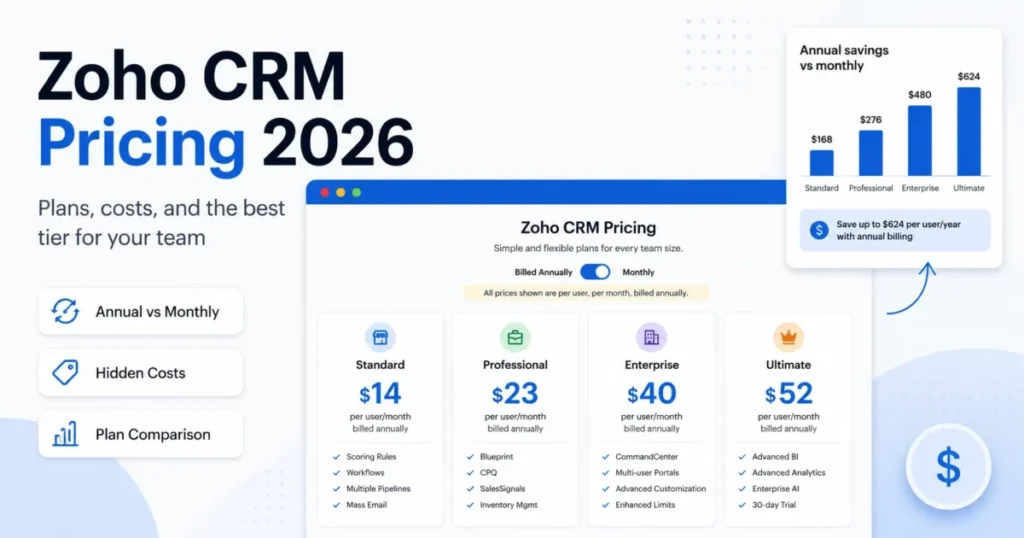
Our Zoho CRM review covers where the suite logic holds up and where it fragments across products, and Zoho CRM pricing sets out the tier ladder that decides the real per-seat cost.
Choose Zoho when integration breadth and reporting depth decide the purchase. Choose Apptivo when invoicing, projects, and field service inside the same subscription matter more than marketplace size, and when the plan ceilings comfortably clear your counts.
2. HubSpot CRM
HubSpot answers the criticism Apptivo keeps attracting. Interface quality, onboarding material, and the shared sales-and-marketing record model are its strongest arguments, and adoption risk is the thing they reduce.
The trade is cost predictability. Seat tiers and contact-based pricing escalate in a way Apptivo’s flat per-user ladder does not, which is exactly what the HubSpot CRM review digs into.
Choose HubSpot when adoption speed decides whether the project survives. Choose Apptivo when a 10-seat annual budget of $3,000 is the constraint that cannot move.
3. Pipedrive
Pipedrive solves one problem and refuses the rest, which is why pipeline-only buyers reach value faster with it. The Pipedrive CRM review sets out where its automation ceilings appear.
Choose Pipedrive when nobody on the team wants to configure a suite. Choose Apptivo when the same subscription has to cover quoting, delivery, and support tickets.
4. Less Annoying CRM
For a 2- to 5-person team, the shortest path to a working CRM usually beats the most capable one, and the Less Annoying CRM review explains the trade it makes deliberately.
Choose it when simplicity is the requirement, not a compromise.
Final Verdict: Is Apptivo CRM Worth It in 2026?
Apptivo is worth buying for a specific buyer: a 5- to 15-person service, consulting, agency, or field team that wants CRM plus invoicing, projects, and support on one bill, and that has the admin capacity to configure it. For that team, Premium at $25 per user per month billed annually is the right plan, and $1,500 a year at five seats or $3,000 at ten seats is a defensible line item.
Buy Lite only when 25 workflows, 5 reports, 8 dashboards, and 1 GB per user cover the real workload. Move to Ultimate when workflow, storage, report, or API counts cross Premium’s ceilings, and treat Enterprise as a quote conversation rather than a price comparison.
Do not buy Apptivo on the interface, on the AI story, or on marketplace depth, because the evidence does not support any of those as strengths. Do not prepay annually before the 14-day Ultimate trial confirms your workflow, report, dashboard, storage, and API counts, since annual payments are not refunded after cancellation.
The renewal question to answer before next year’s invoice is simple. Did the team stay inside its plan ceilings without a surprise upgrade, and does the reporting the business runs on live in Apptivo rather than in a spreadsheet beside it?
Apptivo CRM FAQ
The questions below are the ones that change a purchase decision, answered from the official pricing, documentation, security, and terms pages checked on August 3, 2026.
How much does Apptivo cost per user?
Apptivo lists Lite at $20 per user per month, Premium at $30, and Ultimate at $50 on monthly billing. Annual billing drops those to $15, $25, and $40 per user per month.
Enterprise is quoted individually. Prices were checked against the official pricing page on August 3, 2026, and exclude applicable taxes.
Does Apptivo have a free plan in 2026?
The current official pricing cards show four paid tiers and no free plan.
Several third-party pages still describe a free Starter plan, and that claim cannot be confirmed against the pricing page checked on August 3, 2026. A 14-day trial of the Ultimate plan with no credit card required is the free entry point Apptivo advertises.
Which Apptivo plan is best for a 10-person team?
Premium fits most 10-person service teams, at $3,000 a year on annual billing. It provides 46 apps, 75 workflows, 25 custom reports, 25 dashboards, 250 custom fields per app, 3 GB of storage per user, and 5,000 API calls per user per day.
Move to Ultimate only when one of those counts is exceeded.
Is Apptivo easy to use?
Independent coverage points the other way. Forbes Advisor and TechRadar both cite a learning curve and a dated interface, and a December 2025 Gartner Peer Insights reviewer described some tools as harder to learn.
Budget configuration and training time, and treat a fast, zero-setup launch as unlikely for a team without admin capacity.
Can Apptivo import data from another CRM?
Yes, through CSV import for leads, contacts, customers, and opportunities, capped at 5,000 records per batch. Larger datasets are split into multiple batches with mapping and reconciliation for each one.
Handling of notes, activities, emails, attachments, duplicates, and rollback is not documented, so confirm that scope in writing before committing to a migration.
Does Apptivo integrate with Outlook and Microsoft 365?
Apptivo documents Outlook email, calendar synchronization, OneDrive sharing, and Azure employee creation. The integration requires a Microsoft 365 account, an eligible paid Apptivo plan, and the Outlook add-on where Outlook functionality is used.
Sync conflict handling and the add-on price are not published, so pilot one user before a full rollout.
What are Apptivo’s API limits?
The published allowance is 3,000 calls per user per day on Lite, 5,000 on Premium, 20,000 on Ultimate, and 30,000 on Enterprise. The REST API uses HTTP, JSON, and SSL for read and write operations.
Reset timing, rate-limit headers, retry guidance, and any overage option are not published, so build throttling and counters on the client side.
Is Apptivo SOC 2 compliant?
Apptivo states that its security program includes SSAE 18 SOC 2 Type II and GDPR-aligned practices, with Google Kubernetes Engine hosting and vulnerability scanning.
The public security page carries dated audit references, and no current report is published there. Request the current report and bridge letter directly before a compliance review.
What happens if I cancel an annual Apptivo subscription?
Apptivo advertises monthly and yearly billing with no long-term contract and no cancellation fee, but annual payments are not refunded after cancellation. The public FAQ also states that a failed payment can lead to a downgrade after seven days and that mid-cycle prorated refunds are not provided.
Validate the plan during the trial before prepaying a year.
What are the best Apptivo alternatives?
Zoho CRM is the closest suite competitor with a broader marketplace, HubSpot CRM leads on interface and onboarding, Pipedrive suits teams that only need a pipeline, and Less Annoying CRM fits very small teams that want the shortest setup. Compare each on current published pricing, since plan structures differ substantially from Apptivo’s per-user model.