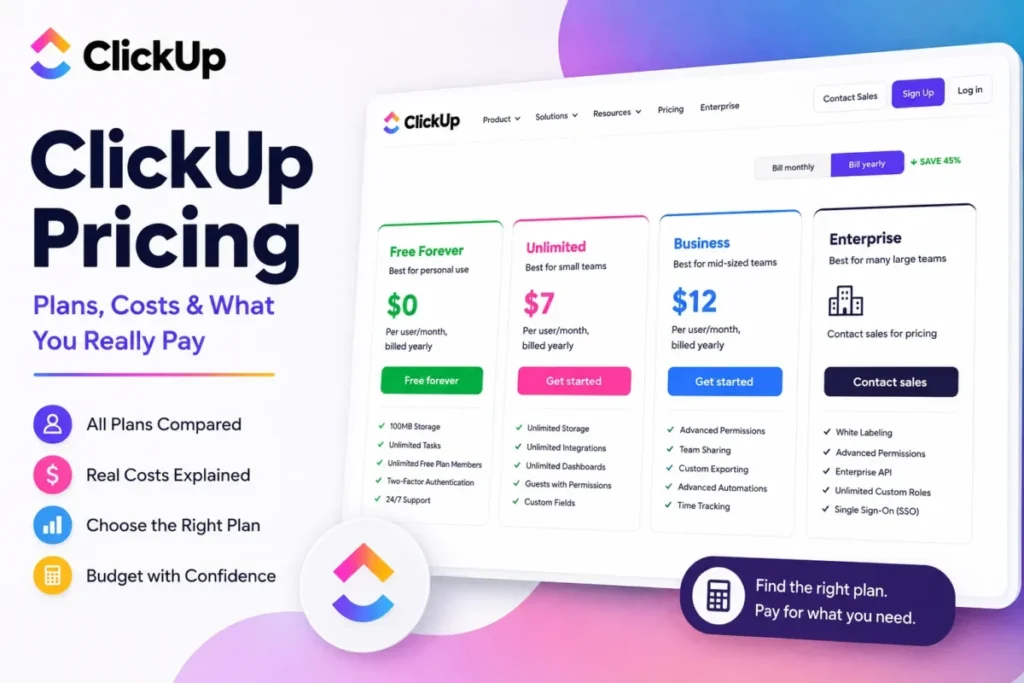
ClickUp’s advertised entry point is $7 per user per month on annual billing. That number is accurate, and it is also the least useful figure in this whole guide.
The gap between the sticker price and the invoice comes from four places. The plan applies to the entire Workspace rather than to individuals, and some collaborators you think of as free guests are billed as members.
Several usage allowances are also consumed permanently rather than monthly, and the AI add-on is charged across the Workspace instead of to the people who asked for it.
Treat what follows as a budget document rather than a plan tour. If you are shortlisting against other project management software, the question that matters is not which tier looks cheapest, but which tier your workflow will still fit inside twelve months from now.
Every figure below comes from ClickUp’s own pricing page, Help Center and developer documentation, for the US market in USD.
In This Article (17 sections)
Quick Pricing Verdict
| Question | Answer |
|---|---|
| Starting paid price | $7 per user/ |
| Free plan | Yes, Free Forever at $0 with 60MB storage |
| Best plan for most teams | Business at $12 per user/ |
| Plan to avoid | Unlimited for any reporting-heavy or multi-list team, because several of its allowances never reset |
| Biggest hidden cost | Brain AI at $9 per user/ |
| Cheapest usable tier for a 10-seat team | Unlimited at $840/ |
| Best alternative if too expensive | Trello Standard at $5 per user/ |
| Pricing verified | 2026-08-24, US, USD |
ClickUp Plans Compared
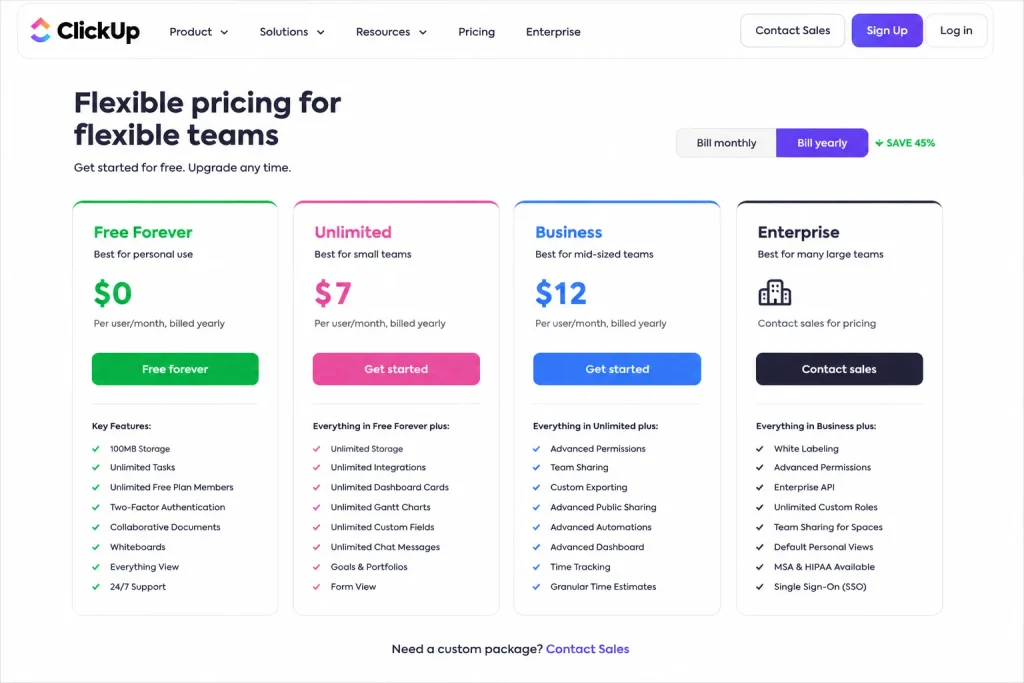
ClickUp publishes four plans on its pricing page and documents a fifth in its Help Center. The public page lists Free Forever at $0, Unlimited at $7 and Business at $12 per user per month on yearly billing, with Enterprise sold by quote.
| Plan | Annual rate | Monthly rate | Billing basis | Storage | Best for |
|---|---|---|---|---|---|
| Free Forever | $0 | $0 | Per user | 60MB | Solo users and trials |
| Unlimited | $7/user/mo | $10/ | Per paid user | Unlimited | Task-centric teams under 1,000 Actions/ |
| Business | $12/ | $19/ | Per paid user | Unlimited | Reporting, webhooks, private views |
| Business Plus | Not published | Not published | Per paid user | Unlimited | API and automation scaling |
| Enterprise | Custom quote | Custom quote | Per paid user | Unlimited | Governance and compliance requirements |
Source: ClickUp official pricing page, US market, USD. Business Plus is documented in the Help Center but carries no published rate.
The Business Plus problem
Business Plus is real. ClickUp’s Help Center lists it between Business and Enterprise and gives it distinct Automation, API, reporting and administration limits that appear nowhere else in the ladder.
Its current US price does not appear on the public pricing page, which displays four plan cards rather than five.
That matters because Business Plus is the tier that solves three of the most common scaling problems in this product: the 5,000-Action ceiling, the 100-request-per-minute API ceiling, and the 40-use scheduled-report ceiling. A buyer comparing only the public page will price a jump from Business straight to Enterprise that they may not need.
Third-party guides carry figures for it, and none of them resolves to a current official ClickUp page. If Business Plus is on your shortlist, request the number from ClickUp sales against your exact seat count and hold the quote next to the Business annual rate before deciding.
What Each ClickUp Plan Includes
Each plan below is described by what it removes rather than what it adds, because the ceilings are what force a tier change. Every price is the per-user rate on annual billing unless stated otherwise.
Free Forever ($0)
Free Forever gives unlimited tasks and members with 60MB of storage. The ceilings are the point: 5 active Automations, 100 Automation Actions per month, 60 Dashboard uses, 60 Custom Field uses, 1 Form view, 3 Whiteboards, and no Tasks in Multiple Lists at all.
Avoid it if you plan to run any recurring automated process. One hundred Actions per month is roughly three per day, which a single intake rule consumes inside a week.
Unlimited ($7 annual, $10 monthly)
Unlimited buys unlimited storage, unlimited integrations, 500 active Automations and 1,000 Automation Actions per month. It is the correct answer for a small team whose work is genuinely task-centric.
The name is the trap. Unlimited caps Dashboard uses at 100, Tasks and Subtasks in Multiple Lists at 30 combined uses, List and Table exports at 5 uses, Map view at 5 uses, and Mind Map at 40 uses.
Avoid it if your team builds Dashboards routinely, exports views for clients, or organises work across multiple Lists.
Business ($12 annual, $19 monthly)
Business removes the Dashboard cap, removes the Multiple Lists cap, removes the export cap, and lifts monthly Automation Actions to 5,000 with unlimited active Automations. It also switches on private views, which Free and Unlimited do not offer at all.
This is the tier most teams end up on, and the reason is almost always reporting or automation volume rather than headcount.
Avoid it if your integration workload needs more than 100 API requests per minute, or if you need more than 40 scheduled-report uses, because neither of those improves at this tier.
Business Plus (price not published)
Business Plus raises monthly Automation Actions to 25,000, raises the API ceiling to 1,000 requests per minute per token, makes scheduled-report uses unlimited, and adds Custom Fields by task type plus owner-restricted Custom Field role permissions.
Avoid budgeting for it from a public number, because there is not one.
Enterprise (custom quote)
Enterprise carries 250,000 monthly Automation Actions and 10,000 API requests per minute per token. ClickUp states it holds SOC 1 Type 2, SOC 2 Type 2, SOC 3, ISO 27001:2022, ISO 27017:2015, ISO 27018:2019, ISO 27701:2019 and ISO 42001 certifications, and lists GDPR, HIPAA and PCI compliance.
Treat those as vendor-published claims that your security team should request evidence for during procurement, not as an independent audit.
Avoid a custom quote conversation unless you can name the specific governance, throughput, or residency requirement that a lower tier fails.
Feature Gates: What You Actually Get by Plan
| Capability | Free Forever | Unlimited | Business | Business Plus | Enterprise |
|---|---|---|---|---|---|
| Storage | 60MB | Unlimited | Unlimited | Unlimited | Unlimited |
| Active Automations | 5 | 500 | Unlimited | Unlimited | Unlimited |
| Automation Actions/ | 100 | 1,000 | 5,000 | 25,000 | 250,000 |
| Dashboard uses | 60 | 100 | Unlimited | Unlimited | Unlimited |
| Scheduled report uses | 40 | 40 | 40 | Unlimited | Unlimited |
| Tasks in Multiple Lists | Not offered | 30 combined uses | Unlimited | Unlimited | Unlimited |
| List/ | Not offered | 5 uses | Unlimited | Unlimited | Unlimited |
| Custom Field uses | 60 | Unlimited | Unlimited | Unlimited | Unlimited |
| Custom Fields by task type | Not offered | Not offered | Not offered | Yes | Yes |
| Private views | Not offered | Not offered | Yes | Yes | Yes |
| Whiteboards | 3 | 10 | Unlimited | Unlimited | Unlimited |
| API requests/ | 100 | 100 | 100 | 1,000 | 10,000 |
| Included guest seats (10 members) | Not applicable | 23 | 55 | 55 | 55 |
Sources: ClickUp Help Center limit documentation for Automations, Dashboards and Tasks. Also Views, Custom Fields and developer rate limits. Guest-seat figures come from ClickUp’s published allowance formula.
Read that table by column rather than by row. Free to Unlimited is a storage and integration upgrade.
Unlimited to Business is a reporting and workflow-structure upgrade. Business to Business Plus is a throughput upgrade, and nothing about it is visible in the public price list.
ClickUp Usage Limits
This is the section that changes plan decisions, and it is the one most pricing pages skip.
ClickUp’s Help Center states plainly that feature usage limits do not reset, and that reaching a limit on your current plan requires a Workspace upgrade to keep using that feature. These are lifetime allowances, not monthly ones.
The allowances you spend permanently
Dashboard uses are capped at 60 on Free Forever and 100 on Unlimited, and these uses do not reset. A team that builds and discards Dashboards while learning the product can burn a meaningful share of a lifetime allowance in a single onboarding week.
Tasks and Subtasks in Multiple Lists are limited to 30 combined uses on Unlimited, and those uses do not reset when the tasks are deleted. Deleting the task does not give the use back.
List and Table exports run out after 5 uses on Unlimited, which is the single cheapest way for an agency to discover it is on the wrong plan. Five client exports is one month of work.
Scheduled Dashboard reports are capped at 40 uses on Free, Unlimited and Business alike, and become unlimited only on Business Plus. Paying the Business premium does not solve recurring reporting.
Automation is capacity, not a checkbox
Automation limits have two separate dimensions, and plan tables that print a tick mark hide both.
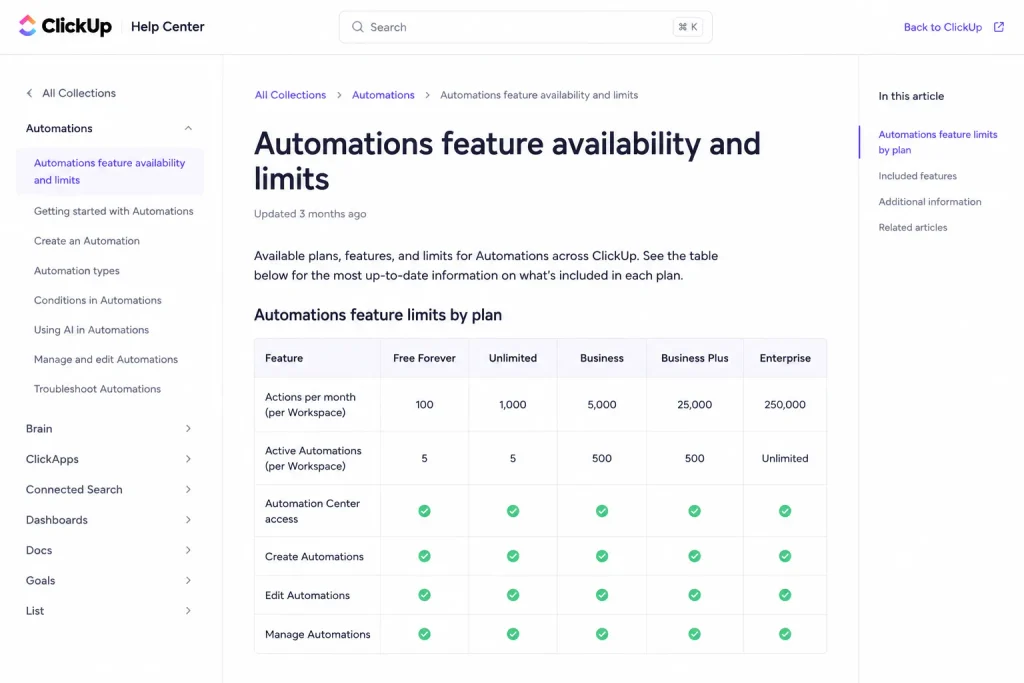
Active Automations are the rules you have switched on: 5 on Free, 500 on Unlimited, unlimited on Business and above. Automation Actions are the executions those rules perform, and they are capped monthly at 100, 1,000, 5,000, 25,000 and 250,000 across the five tiers.
Actions reset on the first of every month in Pacific time. ClickUp sends usage alerts at 90% and 100%, and once the ceiling is passed, your Workspace’s Automations are paused for the remainder of that month.
Do the arithmetic before you pick a tier. A three-action intake rule on Unlimited’s 1,000 monthly Actions supports about 333 triggering tasks per month, which is roughly 11 a day across a full month.
The same rule on Business supports about 1,666 tasks per month.
That is the real Unlimited-to-Business trigger for an operations team, and it has nothing to do with how many people are on the Workspace.
The reporting trap nobody prices
Scheduled reports are also counted as active Automations and contribute to your monthly Automations usage. One reporting workflow therefore draws down two separate allowances at once.
A team that has sized its Automation capacity purely from task-driven rules will hit the ceiling earlier than its own forecast predicts, and the Automations that pause are the operational ones.
API throughput sets a floor that pricing pages never mention
Free Forever, Unlimited and Business all share the same ceiling of 100 requests per minute per token, rising to 1,000 on Business Plus and 10,000 on Enterprise. Requests above the limit return HTTP 429.
For a team running a nightly sync or a custom integration, that single line can set the minimum viable tier higher than any user-facing feature does. Paying more for Business buys you nothing here.
Hidden Costs and Add-ons
None of the costs below appears on the plan cards, and each one changes the invoice rather than the advertised rate. They are ordered by how much they typically move a mid-sized team’s total.
The Workspace-wide plan rule multiplies every upgrade
ClickUp states that it is not possible for users to be on different plans in one Workspace. Per-user pricing tables imply you could put two managers on Business and leave everyone else on Unlimited, and you cannot.
One person needing private views moves the whole Workspace to Business. At 25 seats that single requirement costs $1,500 per year in incremental spend, not $60.
Guests are not automatically free
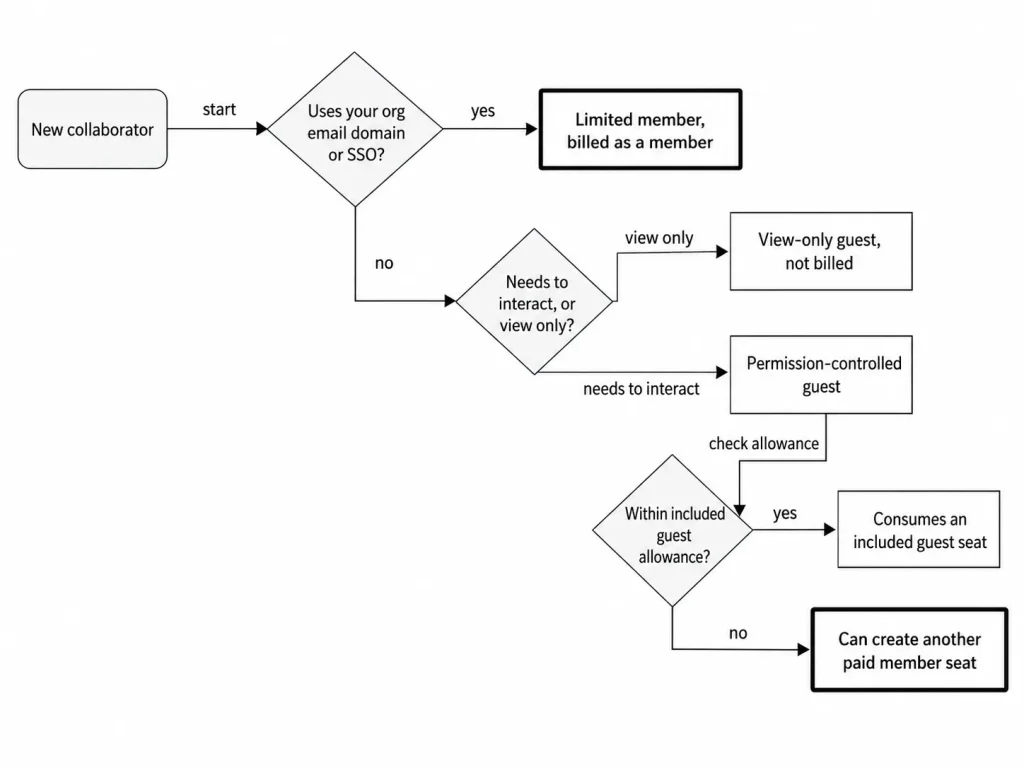
ClickUp has two guest types. View-only guests come from outside your organisation and can only view content.
Permission-controlled guests also come from outside your organisation, can interact with specific content, and consume an included allowance.
That allowance starts at 5 permission-controlled guest seats for a one-member Workspace on Unlimited and adds 2 per additional paid member. On Business, Business Plus and Enterprise it starts at 10 and adds 5 per additional paid member.
For a 10-member Workspace, the arithmetic gives 23 included guest seats on Unlimited and 55 on Business. Exceeding the allowance can create another paid member seat.
Internal collaborators cannot be kept as guests
This is the rule that produces the most surprising invoices. ClickUp states that people who use your organisation’s email domain or SSO cannot be added as guests, and that anyone previously added that way is converted to the limited member role.
Limited members are charged the same subscription fee as members.
So the part-time bookkeeper on your company domain who only needs to see two Lists is a full paid seat. The external contractor on their own domain, doing more work, can be a free view-only guest.
Cost follows domain and permission level, not workload.
Open seats keep billing after the person leaves
Removing a paid member during a billing cycle leaves an open seat. ClickUp’s add-on documentation states that you have an open seat if you have removed a member during your billing cycle.
You are then charged for that seat when you purchase Brain AI, because a new member can fill it.
Audit open seats before any Workspace-wide add-on purchase. Buying AI the week after three people leave means paying for three empty desks.
AI is a Workspace multiplier, not a per-person choice
ClickUp displays Brain AI at $9 per user per month and Everything AI at $28 per user per month. Talk to Text is $9 per user per month and AI Notetaker starts at $12 for 60 hours per month.
AI Super Credits are sold at $10 per 10,000 credits, which works out to $0.001 per credit.
Brain AI and Everything AI are both displayed against higher struck-through figures, $18 and $68 respectively, which presents them as promotional rates. ClickUp publishes no end date and no standard price or renewal price beside either figure.
AI add-on pricing re-verified on the publish date: 2026-08-24. Get the renewal rate in writing before you build a multi-year budget on the discounted number, because nothing on the page commits ClickUp to holding it.
The pricing is only half the story. Brain AI is purchased per Workspace, the fee applies to all members of your Workspace, and open seats are charged too.
You cannot buy it for the two people who asked for it. On a 10-member Business Workspace, Brain AI adds $1,080 per year on top of $1,440, which is a 75% increase in core spend and an effective $21 per seat per month.
Automation capacity beyond the plan ceiling
ClickUp documents that additional Automation Actions can be purchased for a monthly fee on the Business Plus and Enterprise plans. It does not publish the pack sizes or prices on either the add-ons article or the dedicated purchase article.
Several pricing guides circulate specific pack prices for this. None of them resolves to a current official ClickUp page, so those figures stay out of this guide rather than into your budget as facts.
Ask ClickUp for the pack sizes and prices in writing if automation volume is central to your case, and note that the capability is gated to Business Plus and above regardless of price.
Proration cuts both ways
Add-on charges are prorated to match the time left in your billing cycle. ClickUp’s own worked example is a $400 annual add-on with six months remaining, billed at $200.
Cancelling an add-on cancels auto-renewal while the features run to the end of the paid period. Paid plan subscriptions renew automatically, and a full refund can be requested within 30 days of purchasing your first paid plan subscription.
That 30-day window is the practical trial for a paid tier. Use it to run your real automation volume, not a demo Workspace.
Total Cost by Team Size
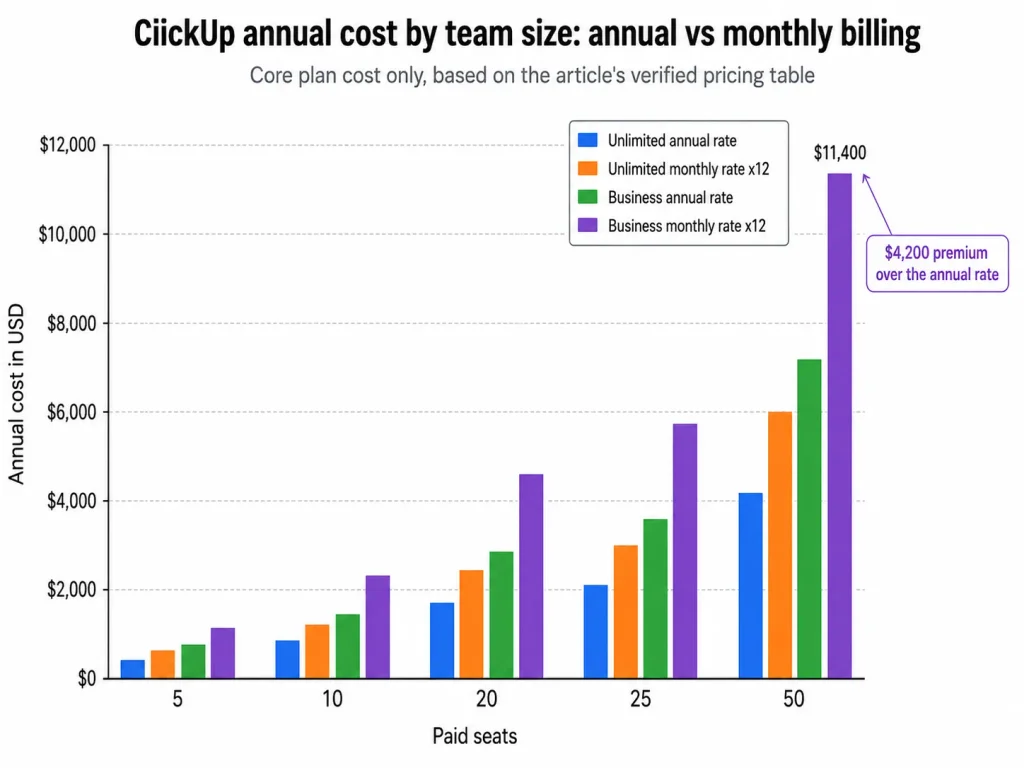
These are editorial calculations from ClickUp’s published per-user rates, not quoted vendor totals. The monthly-rate column shows what carrying the monthly rate for twelve consecutive months costs, which is not the same thing as an annual plan.
| Paid seats | Unlimited, annual rate | Unlimited, monthly rate x12 | Business, annual rate | Business, monthly rate x12 |
|---|---|---|---|---|
| 5 | $420 | $600 | $720 | $1,140 |
| 10 | $840 | $1,200 | $1,440 | $2,280 |
| 20 | $1,680 | $2,400 | $2,880 | $4,560 |
| 25 | $2,100 | $3,000 | $3,600 | $5,700 |
| 50 | $4,200 | $6,000 | $7,200 | $11,400 |
Source: calculated by SaaS CRM Review from the $7, $10, $12 and $19 per-user rates on the official ClickUp pricing page. These are editorial totals, not vendor-quoted annual contracts.
Billable seats are not the same as headcount
The table above assumes every paid seat is an active full member. Real invoices rarely work that way, so model this instead:
Billable core seats = paid members + internal limited members + guest-seat overflow + open paid seats.
An agency with 10 internal staff on Unlimited gets 23 included permission-controlled guest seats. Give 30 client contacts comment access and 7 of them fall outside the allowance.
Move that same agency to Business and the allowance rises to 55, which absorbs all 30. The Business upgrade costs $600 more per year at 10 seats and may still be cheaper than the seats the Unlimited overflow creates.
Add AI before you sign, not after
| Configuration, 10 paid seats | Annual cost |
|---|---|
| Unlimited, annual rate | $840 |
| Business, annual rate | $1,440 |
| Business plus Brain AI | $2,520 |
| Business plus Everything AI | $4,800 |
The Everything AI row is the number to take into a budget conversation. At $40 effective per seat per month, ClickUp stops being the cheap option in its category and starts competing with tools priced three times higher.
Monthly vs Annual Billing: The Real Savings Math
Carrying the monthly rate for a full year costs $36 more per user on Unlimited and $84 more per user on Business than the annual effective rate. Both figures are simple arithmetic from the two published prices.
At 50 seats that gap is $1,800 per year on Unlimited and $4,200 per year on Business.
The monthly rate is not a trap, though. It is priced flexibility, and it is the correct choice in two situations: when seat count is genuinely volatile, and when you are still verifying that a tier’s automation and reporting ceilings fit your workflow.
The safer sequence is to run the first 30 days on monthly billing, push real automation volume through it, then convert to annual once the Action forecast holds. Committing annually to Unlimited and discovering the 1,000-Action ceiling in month two is the expensive version of this decision.
Which ClickUp Plan Should You Choose?
Pick by workflow threshold, not by company size. A five-person operations team can need a higher tier than a thirty-person team that only tracks tasks.
Read the table below as a chain rather than a grid. The plan price sets the floor, and a feature gate decides whether that plan can do the work at all.
Your usage and team size then decide how long it lasts, and the upgrade trigger is the specific threshold that ends it. Only then does the total cost mean anything.
| Cohort | Plan | Annual cost, 10 seats | The threshold that decides it |
|---|---|---|---|
| Solo or evaluation | Free Forever | $0 | Stays under 100 Actions/ |
| Small task-centric team | Unlimited | $840 | Stays under 1,000 Actions/ |
| Reporting or client-facing team | Business | $1,440 | Needs unlimited Dashboards, exports, or private views |
| Automation-heavy operations | Business | $1,440 | Needs 1,000 to 5,000 Actions/ |
| Integration-heavy engineering | Business Plus | Not published | Needs more than 100 API requests/ |
| Governed enterprise | Enterprise | Custom quote | Needs SAML, SCIM, audit controls, or 250,000 Actions/ |
Solo users and evaluations. Free Forever is genuinely usable for a single person tracking work. The 60MB storage cap is what ends it, usually the first time someone attaches a design file.
Two to ten people doing task work. Unlimited at $840 per year for 10 seats is the right answer, with one condition: forecast your monthly Actions first and confirm you are comfortably under 1,000.
Client-facing and reporting teams. Go straight to Business. Five lifetime exports and 100 lifetime Dashboard uses are not enough for anyone who reports to clients or executives, and discovering that after annual commitment means paying twice.
Operations teams running real automation. Business is the floor. If your forecast approaches 5,000 monthly Actions, price Business Plus before you build, because Automations pausing mid-month is an operational incident, not a billing inconvenience.
Engineering teams building integrations. Your ceiling is the API, not the interface. If your nightly sync needs more than 100 requests per minute, what an API is matters more to this decision than any feature comparison, and Business Plus becomes your entry tier rather than an upgrade.
Which ClickUp Plan Should You Avoid?
Avoid Unlimited if you report or export. The 5 export uses and 100 Dashboard uses do not reset, and neither does the 30-use Multiple Lists allowance. A team that exhausts these in month one has bought twelve months of a plan it cannot use as intended, and the only remedy is the upgrade it was trying to avoid.
The exception is a team whose reporting genuinely lives elsewhere. If your executives read a spreadsheet you maintain by hand, Unlimited holds up fine.
Avoid Business if API throughput is your constraint. Business costs 71% more than Unlimited per seat and gives you exactly the same 100 requests per minute. Engineering-led teams that need throughput should compare a Business Plus quote against alternatives like Jira pricing before assuming ClickUp is the cheaper path.
Avoid Free Forever for any team of three or more. Five active Automations and 100 monthly Actions cannot support shared work, and the 60 Dashboard uses will be gone before the team agrees on a workflow.
Migration Costs Nobody Budgets For
ClickUp charges nothing for imports, which is not the same as migration being free.
The Asana importer does not automatically bring across freestanding tasks, nested subtasks, tasks shared between projects, recurring tasks, or private tasks. @mentions do not import at all.
Each of those has a documented workaround, and every workaround is manual labour by someone on your team. Nested subtasks in particular have to be moved into parent tasks by hand after the import runs.
The same page warns that inviting people during the import can incur charges. A migration that maps 40 Asana users into ClickUp can create 40 paid seats before anyone has logged in.
Inventory recurring tasks and cross-project tasks before starting, decide which ones actually need to survive, and treat the rest as a chance to delete work nobody was doing. The discipline that makes CRM migration planning survivable applies here without modification.
ClickUp Pricing vs Competitors
All competitor figures below are per-user annual-billing rates checked on their official pricing pages on 2026-08-24, for the US market in USD.
| Product | Entry paid plan | Practical tier | Practical tier rate | 10-user annual cost |
|---|---|---|---|---|
| ClickUp | Unlimited, $7 | Business | $12/ | $1,440 |
| Asana | Starter, $10.99 | Starter | $10.99/ | $1,318.80 |
| monday.com Work Management | Basic, $9 | Standard | $12/ | $1,440 |
| Trello | Standard, $5 | Premium | $10/ | $1,200 |
| Notion | Plus, $10 | Business | $20/ | Not calculated |
Sources: official pricing pages for ClickUp, Asana, monday.com, Trello and Notion, all checked 2026-08-24, US/USD, annual billing.
ClickUp’s Business tier lands at the same $12 as monday.com’s Standard plan and slightly above Asana Starter at $10.99 on annual billing. Trello Standard at $5 and Premium at $10 undercut all of them, which is the honest trade: Trello does less. What ClickUp and Asana each cost by team size is worked out in my ClickUp vs Asana pricing comparison.
Notion’s pricing page lists Plus at $10 and Business at $20 per member per month while advertising yearly savings, without separating the annual and monthly rates cleanly enough to calculate a reliable annual total. That row stays uncalculated rather than resting on an ambiguous input.
Check Notion pricing directly if it is on your shortlist.
The per-seat comparison is not where ClickUp wins or loses. It wins on breadth per dollar at the Business tier, and it loses on predictability, because none of these competitors ties a lifetime Dashboard allowance or a Workspace-wide AI charge to that headline rate.
Asana Advanced at $24.99 per user per month is more than double ClickUp Business. If your reason for looking at Asana is reporting depth, ClickUp Business is the cheaper way to get unlimited Dashboards, and the comparison is worth running against Asana pricing at your actual seat count.
Is ClickUp Worth the Price?
Worth it if your team needs unlimited Dashboards, private views, cross-List task organisation and moderate automation, and you can commit annually. Business at $1,440 per year for 10 seats delivers more included capability per dollar than any comparable tier in this list.
Worth it if you are replacing three tools. The breadth argument is real when it retires separate spend on docs, whiteboards and reporting.
Not worth it if your constraint is API throughput. Paying the Business premium buys zero additional requests per minute, and the tier that fixes it has no public price.
Not worth it if you want AI for a subset of your team. The Workspace-wide charge means a 10-person team pays $1,080 per year so that two people can use Brain AI.
Not worth it if your work is genuinely board-based. Trello Premium at $1,200 per year for 10 seats does that job, and the difference buys nothing you will use.
The condition that flips the verdict is automation volume. Below roughly 1,000 monthly Actions, ClickUp is one of the cheaper credible options in this category.
Above 5,000, it becomes a tier conversation with an unpublished price attached, and that is a materially weaker buying position.
How to Avoid Overpaying for ClickUp
- Forecast monthly Automation Actions before choosing a tier. Count triggering events per month and multiply by actions per rule. That number, not headcount, tells you whether Unlimited survives the year.
- Audit who is actually on your email domain. Anyone on it becomes a billed limited member, so map your collaborator list against the domain rule before inviting a single person.
- Use view-only guest access where the work genuinely allows it. External stakeholders who only need to read cost nothing and do not consume the permission-controlled allowance.
- Clear open seats before buying any Workspace-wide add-on. An open seat left by a departure is billed for AI as though it were occupied.
- Price AI as a Workspace line item from the first budget draft. Model paid members plus open seats at the displayed per-user rate, then decide whether the capability justifies the multiplied total.
- Run the 30-day refund window as a real load test. Push production automation volume, build the Dashboards you actually need, and export a client report before the window closes.
- Get the Business Plus quote in writing if throughput matters. Ask for the per-user price and the Automation Action pack pricing together, then compare the total against Business plus a workaround.
The Call
Choose Unlimited at $7 per user per month on annual billing if your team stays under 1,000 monthly Automation Actions and does not depend on recurring Dashboards or exports. Choose Business at $12 if any of those three thresholds is already true.
Pick the billing cadence second. Run 30 days monthly, push real automation volume through it, then convert to annual once the Action forecast holds.
Before you sign, estimate the team cost from billable seats rather than headcount, decide whether Brain AI is worth its Workspace-wide charge, and write down the one threshold that will trigger your next upgrade. If you cannot name that threshold, you are not finished sizing the plan.
How This Analysis Was Built
This analysis is based on ClickUp’s official pricing page, Help Center feature-limit documentation, developer rate-limit documentation, add-on billing documentation, and the official security page. Plan prices and usage limits were verified on 2026-08-24 for the US market in USD.
Each plan was assessed against the same buyer-focused criteria: billing basis and cadence, seat-role treatment, feature gates, non-resetting usage allowances, automation and API throughput, add-on structure, and total cost at realistic seat counts.
Greater weight was given to factors that change a purchase decision: the allowances that cannot be replenished, the rules that convert a collaborator into a billed seat, and the thresholds that force a tier change. Marketing positioning and promotional presentation did not influence the assessment.
Claims that could not be verified against an official source were excluded rather than estimated. Competitor rates were taken from each vendor’s own pricing page on the same date, and displayed promotional prices are labelled separately from standard pricing.
FAQ
These are the questions the sections above leave open, mostly about billing mechanics rather than features.
Can different users in one ClickUp Workspace be on different plans?
No. ClickUp states it is not possible for users to be on different plans in one Workspace, so a single person’s requirement for a Business-only capability moves every paid seat in that Workspace to Business.
Do ClickUp guests cost extra?
It depends on their domain and their permission level. External view-only guests are free, and external permission-controlled guests consume an included allowance of 5 plus 2 per additional member on Unlimited, or 10 plus 5 on Business and above.
Anyone on your organisation’s email domain or SSO becomes a limited member charged the same fee as a member.
Does ClickUp Unlimited mean every feature is unlimited?
No. Unlimited caps Dashboard uses at 100, Tasks and Subtasks in Multiple Lists at 30 combined uses, List and Table exports at 5 uses, Map view at 5 uses, and monthly Automation Actions at 1,000.
Several of those allowances never reset, so the plan name describes storage and integrations rather than universal usage.
What happens when a ClickUp usage limit is reached?
For non-resetting feature allowances, existing data stays in place and further use of that capability requires a Workspace upgrade. For monthly Automation Actions, ClickUp alerts at 90% and 100%, then pauses your Workspace’s Automations for the remainder of the month.
Is ClickUp Brain included in the plan price?
No. Brain AI is a separate add-on displayed at $9 per user per month, purchased per Workspace, with the fee applying to all members including open seats.
How much does ClickUp Business Plus cost?
ClickUp does not publish a Business Plus price on its public pricing page, and no current official US figure appears on the plan documentation either. Request it from ClickUp sales against your seat count, and evaluate it on the four capabilities it actually adds: 25,000 monthly Automation Actions, 1,000 API requests per minute, unlimited scheduled-report uses, and Custom Fields by task type.
Does ClickUp offer refunds?
ClickUp documents that paid plan subscriptions renew automatically and that a full refund can be requested within 30 days of purchasing a first paid plan subscription. Mid-cycle additions and add-ons are prorated to the time remaining in the billing cycle.
What is the cheapest usable ClickUp plan for a 10-person team?
Unlimited at $840 per year, provided the team stays under 1,000 monthly Automation Actions, does not depend on recurring exports or Dashboards, and works within 23 included permission-controlled guest seats. Cross any one of those thresholds and Business at $1,440 becomes the cheaper plan in practice, because the alternative is an upgrade mid-term.
Teams weighing this against a dedicated sales tool should also check monday CRM pricing, which starts higher but bundles pipeline-specific workflows.