Zoho CRM lists Standard at $14 and Enterprise at $40 per user per month. Four of the ten alternatives priced here open lower, and three of the four carry a catch: HubSpot’s $7 is promotional against a $20 standard price, Close’s $9 is single-user, and monday’s $12 needs three seats.
Only Freshsales at $9 undercuts Zoho cleanly. So the switch is rarely about the sticker price.
It is about what that price stops buying once the team grows past five people and someone has to own the configuration.
Most buyers reach for Zoho CRM alternatives at a specific breakpoint: the second admin leaves, the Blueprint process nobody documented starts blocking deals, or a leader asks for a forecast that the current edition does not produce.
This guide ranks ten replacements by the reason you are leaving, then prices each one at the plan a ten-person sales team can deploy on day one, not the plan on the pricing banner. Every recommendation also names the migration work the vendor will not mention.
Pricing below was checked against official pages on 2026-07-16. If you are still shortlisting broadly, our best CRM software options cover the wider market.
In This Article (13 sections)
Quick Verdict: Best Zoho CRM Alternatives by Switching Trigger
| If you are leaving Zoho CRM because… | Best alternative | Why |
|---|---|---|
| You want sales, marketing, and service on one platform | HubSpot Sales Hub | Connected customer platform with a free entry point for up to 2 users |
| Reps will not use the interface | Pipedrive | Minimalist visual pipeline built around deal and activity execution |
| Calling and email should be built in, cheaply | Freshsales | Built-in chat, email, and phone from the $9 Growth plan |
| You need enterprise objects, governance, and extensibility | Salesforce Agentforce Sales | Deepest custom architecture, permissions, and add-on catalog |
| Sales work has to connect to operations and delivery boards | monday CRM | Visual boards linking pipelines to cross-functional work |
| Your team lives on the phone and SMS | Close | Calling, email, SMS, and higher-tier dialing in one outbound CRM |
| Everything already happens in Gmail | Copper CRM | Google Workspace and Gmail-native record management |
| Closed-won deals become delivery projects | Insightly CRM | Native project management tied to opportunity records |
| You sell on relationships, not process | Nimble | One plan, contact enrichment, and browser-based prospecting |
| You need nurture, appointments, and payments bundled | Keap | Packaged lifecycle automation for service businesses |
Ranking is not the same as fit. HubSpot Sales Hub is the strongest overall replacement for a growing team that wants one platform, but a five-person outbound crew that just wants to dial faster is better served by Close at $35 per user per month than by a $900 monthly HubSpot Professional bill.
Two of these picks carry a hard floor that summary tables routinely omit. monday CRM sells in blocks of three seats, and Keap starts at $299 per month regardless of how few users you have.
Why Teams Look for Zoho CRM Alternatives
Zoho Corporation ships a lot of CRM for the money, which is exactly why the exit reasons are rarely financial. They cluster around configuration debt, plan gates, and the gap between what the platform can do and what a small team can maintain.
Below are the switching triggers the evidence supports. Understanding what CRM software does at a category level matters less here than knowing which of these five triggers is yours, because the trigger picks the replacement.
Configuration outgrew the admin. Zoho CRM’s official feature comparison spans custom modules, layouts, Blueprint process control, custom functions, approval flows, and portals. That breadth is a strength for a team with a dedicated administrator and a liability for a team where the sales manager configures the CRM between calls.
The feature you want is gated, not missing. Advanced Zia capabilities, sandbox, custom functions, field encryption, portals, and stronger administration concentrate in Enterprise at $40 and Ultimate at $52 per user per month. Buyers frequently conclude the product is weak when the accurate conclusion is that their edition is.
Rep adoption stalled. Independent editorial review of Zoho CRM identifies broad functionality and competitive value alongside capabilities restricted to higher tiers, and 2026 competitor content repeatedly frames Zoho as complex for teams prioritizing fast adoption. That is a review pattern rather than a universal fact, but it is a consistent one.
Support responsiveness became a risk. Paid editions include Classic support, with faster and more dedicated assistance sold as separate paid options. A team that hits a production issue on Standard has a different support experience than one on a paid support plan, and the exact entitlement varies by edition and region.
The ecosystem stopped fitting. Zoho CRM connects natively across Zoho Books, Desk, Campaigns, and Analytics plus Google Workspace and Microsoft 365. When a company standardizes on a different stack, the suite advantage inverts into a suite mismatch.
Communications live outside the CRM. Multichannel selling in Zoho is configurable rather than packaged, so teams paying separately for a dialer and an SMS tool start pricing CRMs that include both.
Zoho CRM Pricing and Feature Gates: What You Are Actually Leaving

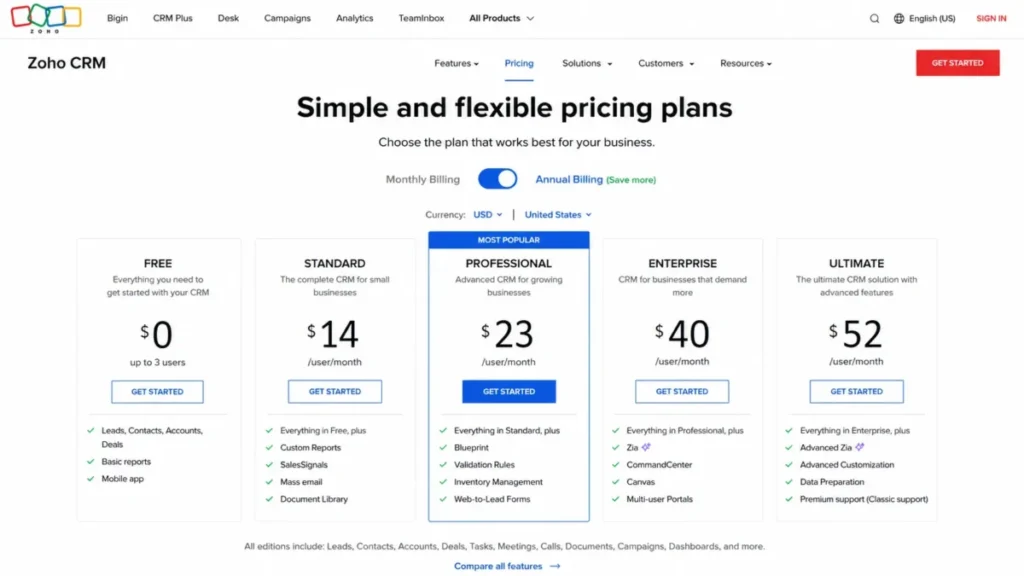
Before comparing replacements, price the thing you have. The official Zoho CRM pricing page confirms the edition structure and the Free plan, though it rendered regional currency during research, so the US figures below come from a same-day independent US-dollar cross-check.
Source: official Zoho CRM pricing page and official feature comparison page. Checked: 2026-07-16.
| Zoho CRM edition | Price (per user/ | What it covers |
|---|---|---|
| Free | $0 for up to 3 users | Basic leads, contacts, accounts, deals, limited workflow, reporting, mobile |
| Standard | $14 | Core sales automation and reporting |
| Professional | $23 | Expanded process, inventory, reports, and automation |
| Enterprise | $40 | Advanced Zia, sandbox, custom functions, approval, portals, field encryption |
| Ultimate | $52 | Highest analytics and usage allowances |
Verify the USD total in Zoho’s own checkout before you budget, because currency, tax, and promotional presentation vary by account location. For a fuller tier-by-tier breakdown, see our Zoho CRM pricing guide.
Zoho CRM strengths and limitations
| Real strengths | Real limitations |
|---|---|
| Professional at $23 per user/ | Advanced Zia, sandbox, custom functions, portals, and field encryption sit at Enterprise or Ultimate |
| Custom modules, Blueprint, and Deluge functions model unusual sales processes without a partner | Configuration breadth raises administration and training load for teams without a CRM owner |
| Native depth across Zoho Books, Desk, Campaigns, and Analytics | Module exports do not carry configuration, so a migration is a rebuild, not a copy |
| Free edition for up to 3 users covers a genuine starter workflow | Data backup delivers records and attachments in separate ZIP folders |
| Documented API V8 with published limits | API credits run on a rolling 24-hour window that constrains bulk jobs |
The honest read is that Zoho CRM is rarely the wrong product and frequently the wrong edition. Our full Zoho CRM review covers where the platform holds up.
Here is the buyer risk that decides this whole article. Every dollar you save on a cheaper replacement is spent once on migration and again on the workflows you rebuild, so a $9 CRM that forces a Blueprint redesign is not a $9 CRM.
Best Zoho CRM Alternatives for Small Teams (1-10 Users)
Under ten seats, the binding constraint is not budget. It is that nobody on the team has four hours a week to own a CRM, which is why our best CRM for small business picks weight adoption over configurability.
Pipedrive: Best for Fast Sales Adoption

Pipedrive is the strongest Zoho CRM alternative for teams leaving because reps quietly stopped updating records. It solves adoption by refusing to be a suite.
The official Pipedrive pricing page lists Lite, Growth, Premium, and Ultimate with a 14-day trial, and it geolocated currency during research. The US figures come from a same-day independent US-dollar cross-check: Lite $14, Growth $39, Premium $59, and Ultimate $79 per user per month billed annually, checked 2026-07-16.
The practical tier for most switchers is Growth at $39, not Lite at $14, because entry-level email handling is limited and automation depth is where a Zoho refugee expects parity. At ten seats that is $390 per month, roughly $160 more than Zoho Professional at $230.
What Pipedrive does better than Zoho CRM is force a single question onto the screen: what is the next activity on this deal. Independent editorial review identifies the visual pipeline, straightforward automation, and mobile usability as its strengths, and those are adoption levers rather than feature-list wins.
The tradeoff is real and it is structural. Native marketing automation is narrower than Zoho’s, lead generation runs through the paid LeadBooster add-on, and there is no permanent free plan to fall back on.
| Pros | Cons |
|---|---|
| Drag-and-drop pipeline that reps update without training | No permanent free plan, so evaluation ends at 14 days |
| Growth at $39 covers workflow automation and forecasting | Lite at $14 has limited email handling for a real sales team |
| Activity-first model surfaces stalled deals immediately | LeadBooster costs extra on Growth, while the current Premium plan includes lead generation and routing. |
| Mature marketplace integrations for a narrow core product | Native marketing automation is thinner than Zoho’s suite |
- Best for:
- Three-to-30-person sales teams with no CRM administrator
- Deal-led B2B motions where activity discipline is the problem
- Budgets that tolerate $39 per seat to fix adoption
- Avoid if:
- You need Zoho-style suite breadth in one native platform
- You depend on custom modules or Blueprint-style process control
Migration difficulty: Low to medium. Contacts, organizations, deals, activities, notes, and custom fields map cleanly; custom modules, Blueprint, portals, and Deluge functions do not.
- Verdict:
- choose Pipedrive if the thing you are buying is rep behavior, and read the Pipedrive CRM review before you assume Growth is enough.
Freshsales: Best for Built-In Communications on a Budget

Freshsales earns rank three on a single number. The official Freshsales pricing page, checked 2026-07-16, lists Growth at $9 per user per month billed annually with built-in chat, email, and phone included.
At standard, non-promotional pricing, that is the cheapest team-capable plan here with calling in the box. Close matches the $9 headline but caps Solo at one user, and HubSpot only reaches $7 on a promotional display against a $20 standard price.
At ten seats, Growth is $90 per month. Zoho Professional at $230 and Pipedrive Growth at $390 both cost more for less packaged communication.
The catch shows up the moment requirements get serious. Pro at $39 adds Freddy AI, territories, sequences, multiple pipelines, advanced workflows, and custom reports, and Enterprise at $59 adds sandbox, audit logging, and field-level controls.
So the honest framing is that Freshsales is a $9 CRM for a team that needs pipelines and calls, and a $39 CRM for a team that needs the things a Zoho Professional user already has. At ten seats, Pro lands at $390 per month, level with Pipedrive Growth.
The Freshworks interface is simpler than Zoho’s and lifecycle stages give a cleaner default model than Zoho’s lead-to-deal conversion. Custom process depth is the thing you give up.
| Pros | Cons |
|---|---|
| Built-in phone, email, and chat at $9 per user/ | Freddy AI scoring and sequences require Pro at $39 |
| Kanban records and lifecycle stages reduce setup decisions | Custom reports are gated above Growth |
| Territory management available on Pro without an add-on | Sandbox and audit logs require Enterprise at $59 |
| Ten-seat Growth cost of $90/ | Telephony usage charges sit outside the seat price |
- Best for:
- Five-to-50-person teams replacing a CRM plus a separate dialer
- Budget-constrained switchers who still want native multichannel selling
- Managers who want lifecycle stages instead of custom process design
- Avoid if:
- You need sandbox or audit logging without paying $59 per seat
- Your Zoho account leans on custom functions or portals
- Migration difficulty:
- Medium. Standard records and pipelines transfer conceptually, but Zoho process logic, custom functions, and specialized modules need redesign.
- Verdict:
- choose Freshsales when communications belong inside the CRM and the budget is the constraint. Our Freshsales evaluation breaks down where Growth runs out.
Close: Best for High-Volume Outbound Calling

Close is the pick for a team whose CRM problem is throughput. The official Close pricing page lists Solo at $9, Essentials at $35, Growth at $99, and Scale at $139 per user per month with annual billing, and calling, email, and SMS are part of the product rather than an integration.
Solo is a trap for teams. It is limited to one user and 10,000 leads and includes no workflows, so the real team entry point is Essentials at $35, which is $350 per month at ten seats.
Growth at $99 is where advanced automation and higher-tier dialing capability sit, and that is $990 per month at ten seats. Against Zoho Professional at $230, you are paying roughly $760 per month for dialer consolidation and outbound tooling.
AI credit allowances increase by plan with additional credits available, so a heavy AI workflow is a usage decision rather than a flat cost.
| Pros | Cons |
|---|---|
| Calling, email, and SMS included rather than integrated | Solo at $9 has no workflows and caps at 10,000 leads |
| Essentials at $35 gives a real team entry point | Predictive dialing and advanced automation start at Growth ($99) |
| Power and predictive dialing available on higher tiers | AI credits are consumed, not unlimited |
| Multiple pipelines and team visibility without suite overhead | No inventory, service, or Zoho-style suite modules |
- Best for:
- Two-to-30-person outbound teams measured on dials and connects
- Sales orgs replacing a CRM plus a telephony stack
- Motions where speed to next call is the metric
- Avoid if:
- Your pipeline is relationship-led rather than volume-led
- You need Zoho’s custom modules, inventory, or portal features
- Migration difficulty:
- Low to medium for leads and activity data. Higher if the Zoho account carries custom modules, inventory, or suite workflows.
- Verdict:
- choose Close when the dialer is the product and the CRM is the wrapper, as our Close CRM review sets out.
Nimble: Best for Relationship Prospecting

Nimble replaces process with context. The official Nimble pricing page lists one plan at $24.90 per seat per month billed annually or $29.90 monthly, with a 14-day trial, so there is no tier puzzle to solve.
The allowances are the decision. Each license includes 25,000 contacts, 2 GB of storage per seat, and 1,000 emails per month, and web forms, web chat, and higher email volumes are separately priced additions.
At ten seats that is $249 per month, close to Copper Basic and above Zoho Professional. You are paying for contact enrichment, Nimble Prospector, and Microsoft 365 or Google Workspace context rather than for automation depth.
| Pros | Cons |
|---|---|
| One plan at $24.90 per seat removes tier-gate risk | 1,000 emails per license per month caps real outreach |
| 25,000 contacts included per license | 2 GB storage per seat is tight for attachment-heavy accounts |
| Contact enrichment and browser prospecting are native | No Zoho-equivalent process automation or custom modules |
| Works across Microsoft 365 and Google Workspace | Web forms and web chat are paid additions |
- Best for:
- One-to-20-person consultants, agencies, recruiters, and advisors
- Relationship selling where context beats pipeline stages
- Avoid if:
- Outreach volume exceeds 1,000 emails per license per month
- You need reporting or automation anywhere near Zoho Professional
- Migration difficulty:
- Low for contacts, companies, notes, and pipeline records. High if the Zoho account carries custom modules, automation, inventory, or portals.
- Verdict:
- choose Nimble when the CRM’s job is remembering people, not routing processes. The Nimble CRM review covers the allowance ceilings.
Keap: Best for Service-Business Lifecycle Automation

Keap starts at $299 per month and includes two users. A ten-user team would pay at least $611 per month after adding eight additional users at $39 each, before contact-based scaling and required implementation services.
The comparison only makes sense if you count what it replaces. Keap bundles CRM, visual automation, email marketing, appointments, invoicing, payments, and lead capture, so the fair benchmark is Zoho CRM plus Campaigns plus Bookings plus Books, not Zoho CRM alone.
Scaling is contact-based rather than seat-based, implementation services are part of the model, and canceling an annual contract early carries a $299 early-termination fee.
| Pros | Cons |
|---|---|
| CRM, nurture, appointments, invoicing, and payments in one platform | $299 per month floor regardless of team size |
| Contact-based pricing suits small teams with large lists | Contact growth, not seat growth, drives the bill |
| Visual automation built for follow-up-heavy service work | Implementation assistance is expected, not optional |
| Payments and invoicing remove a separate billing tool | $299 early-termination fee on annual contracts |
- Best for:
- Two-to-15-person high-ticket service businesses
- Owners consolidating four tools into one lifecycle platform
- Avoid if:
- You only need pipeline management, where $299 buys far less than Zoho
- You cannot commit to an annual term
- Migration difficulty:
- Medium to high. Records move, but campaigns, forms, appointments, payment workflows, tags, and follow-up logic are rebuilt with implementation assistance.
- Verdict:
- choose Keap only when the automation replaces revenue tools, not when it replaces a pipeline. The Keap CRM review has the fuller picture.
Best Zoho CRM Alternatives for Growing Teams (10-50 Users)
Between ten and fifty seats the failure mode changes. The question stops being whether reps log activity and starts being whether leadership trusts the forecast, which is where plan gates and onboarding fees start deciding the budget.
HubSpot Sales Hub: Best Overall Zoho CRM Alternative

HubSpot Sales Hub takes rank one because it answers the one exit reason no Zoho edition upgrade can fix: the team wants sales, marketing, service, content, and customer data to behave like one system instead of an integrated suite.
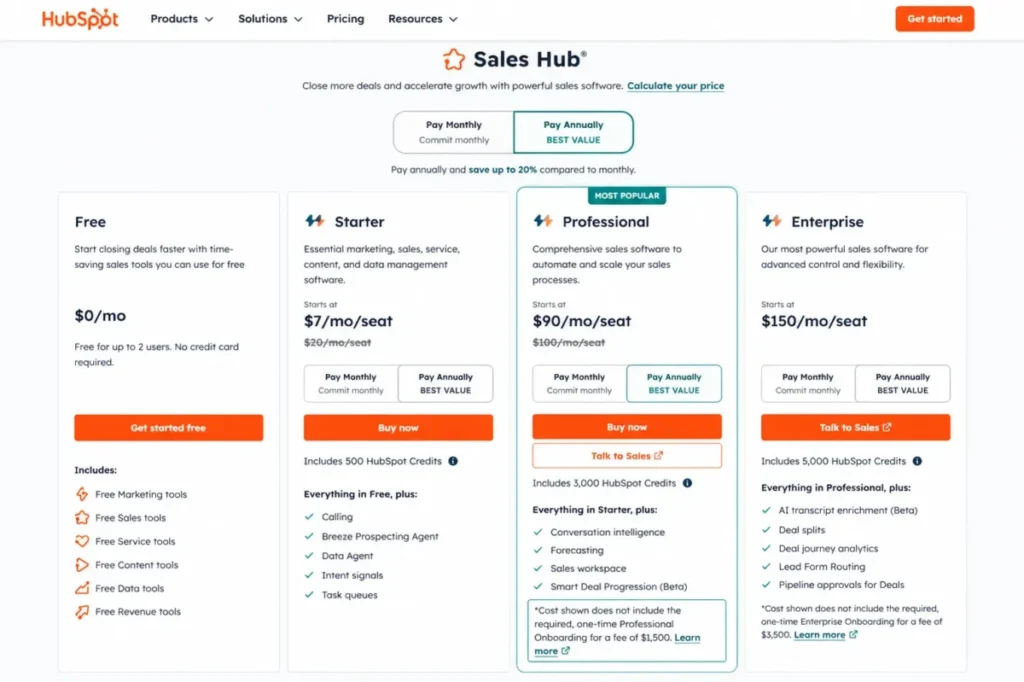
The official HubSpot Sales Hub pricing page lists Free for up to 2 users, Starter displayed from $7 per seat per month under the current annual or promotional presentation, Professional from $90, and Enterprise from $150.
The same page also shows $20 per seat per month on monthly billing, and that $20 is the standard price baseline against the $7 promotional display. Re-verified on the publish date: 2026-07-16.
Professional carries a required one-time onboarding fee of $1,500. That single line reorders the whole comparison.
Run the first-year math at ten seats. Professional is $900 per month, or $10,800 for the year, plus $1,500 onboarding, which lands at $12,300 against $2,760 for Zoho Professional at ten seats.
You are paying roughly 4.5x for platform consolidation, and that is the trade being made.
Starter at $7 per seat is $70 per month at ten seats and looks like a bargain against Zoho Standard at $140. It is a genuine option for a team that needs pipelines, email tracking, and meeting scheduling, and it is not the plan a Zoho Professional refugee lands on, because scalable automation and stronger sales controls sit at Professional.
Plan features also consume HubSpot Credits, and advanced sequence and lead-scoring allowances vary by tier. Budget the credits before you budget the seats.
The migration is medium difficulty and the reason is specific. Contacts, companies, deals, and activities map well, while Zoho custom modules, Blueprint, Deluge functions, reports, permissions, and data relationships require design and validation.
| Pros | Cons |
|---|---|
| Free CRM for up to 2 users with no time limit | Professional at $90 per seat plus a required $1,500 onboarding fee |
| One customer platform across sales, marketing, service, and content | Starter pricing is promotional or billing-dependent and needs live verification |
| Sequences, lead scoring, calling, and Breeze AI in a single stack | HubSpot Credits meter AI and some plan features |
| Strongest option when marketing and sales must share one data model | Multi-Hub deployments compound the per-seat cost quickly |
- Best for:
- Five-to-50-person inbound or product-led growth teams
- Companies consolidating marketing and sales onto one data model
- Buyers who will use Professional, not just admire the free tier
- Avoid if:
- Your budget was built around Zoho Professional at $23 per seat
- You only need a pipeline and will never use the marketing side
Migration difficulty: Medium.
- Verdict:
- choose HubSpot when the reason for leaving is architecture rather than price. Our HubSpot Sales Hub review goes deeper on the Professional jump.
monday CRM: Best for Cross-Functional Workflows

monday CRM wins a narrow but common case: sales is one board in a business that also runs onboarding, delivery, and marketing operations on boards.
The official monday.com pricing page presents roughly $12 Basic, $17 Standard, and $28 Pro per seat per month on annual billing, with Enterprise custom. The page is dynamic and spans multiple monday products, so confirm the CRM product tab and the live price before purchase.
The floor matters more than the price. A current independent cross-check confirms a three-seat minimum purchase, which makes the real entry commitment $36 per month at Basic rather than $12, and disqualifies monday CRM outright for a solo operator.
The practical tier for a sales team is Pro at $28, because email integration, automations, mass email, sequences, forecasting, analytics, lead scoring, and enterprise security are distributed across tiers. Ten seats at Pro is $280 per month, which sits within $50 of Zoho Professional at $230.
That is the argument. For roughly Zoho money you get pipelines connected to operational boards, and you give up conventional CRM reporting maturity and pay AI and automation on credit-style allowances at the lower tiers.
| Pros | Cons |
|---|---|
| Ten-seat Pro cost of $280/ | Three-seat minimum blocks solo and two-person buyers |
| Boards connect sales records to delivery and ops workflows | Automation allowances are limited on lower tiers |
| Two-way email, forecasting, and lead scoring on higher tiers | Credit-based AI economics rather than flat inclusion |
| Highly visual customization without Deluge-style scripting | CRM reporting is less mature than Zoho’s for complex sales orgs |
- Best for:
- Three-to-100-person teams where sales is one process among several
- Ops-led companies that already think in boards
- Avoid if:
- You are a solo founder or two-person team facing the three-seat floor
- You need Zoho-grade sales reporting out of the box
- Migration difficulty:
- Medium. Flexible boards make field mapping easy and make relational records, Blueprint, functions, permissions, and reporting a deliberate rebuild.
- Verdict:
- choose monday CRM when the CRM has to be part of a wider work system. The monday.com review covers the board model in detail.
Copper CRM: Best for Google Workspace Teams

Copper is the answer to one question: what if the CRM lived inside Gmail. For a team that runs on Google Workspace, Google Calendar, and Google Drive, that is worth paying for.
The official Copper pricing page lists Basic at $23, Professional at $59, and Business at $99 per seat per month paid annually.
Basic is capped at 2,500 contacts and lacks several advanced workflow, reporting, bulk-email, API, email-series, multicurrency, and administration capabilities. So the practical tier for a real sales team is Professional at $59, which is $590 per month at ten seats against Zoho Professional’s $230.
You are paying roughly $360 more per month for the ecosystem fit. That is defensible when reps live in Gmail and indefensible when they do not.
| Pros | Cons |
|---|---|
| Gmail and Google Workspace integration reps do not fight | Basic caps at 2,500 contacts |
| Professional at $59 covers workflows, reporting, and bulk email | Ten-seat Professional cost is $590/ |
| Project management and contact enrichment included | API and SSO access are gated to higher tiers |
| Task automation matches the Google-native calendar flow | Non-Google processes map poorly out of Zoho |
- Best for:
- Three-to-50-person relationship-driven teams standardized on Google Workspace
- Agencies and services firms where Gmail is the system of record
- Avoid if:
- Your team runs on Microsoft 365
- Contact volume passes 2,500 while the budget stays at Basic
- Migration difficulty:
- Medium. Standard records are straightforward; custom modules, complex reports, and advanced workflow logic are not.
- Verdict:
- choose Copper if Gmail adoption is the whole problem, and see the Copper CRM review for the tier gates.
Insightly CRM: Best for Sales-to-Delivery Handoff

Insightly matters to one buyer: the company where a closed-won deal immediately becomes an implementation project, and the sales context has to travel with it.
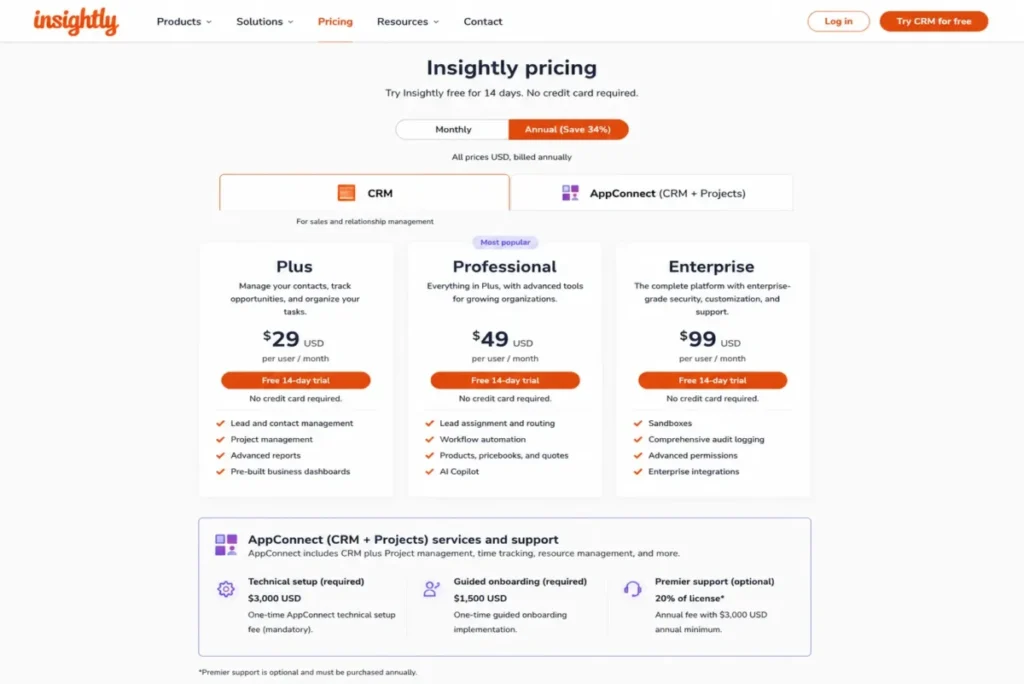
The official Insightly pricing page lists standalone CRM at Plus $29, Professional $49, and Enterprise $99 per user per month billed annually with a 14-day trial. Ten seats at Professional is $490 per month.
The number nobody publishes is what happens when you deploy the suite. That same official pricing page attaches a required $3,000 AppConnect technical setup, $1,500 guided onboarding, and premier support at 20% of license with a $3,000 annual minimum to the specified bundle configurations.
That is up to $7,500 in first-year non-license cost before a single record moves. Standalone CRM avoids it; a marketing, service, and AppConnect deployment does not.
| Pros | Cons |
|---|---|
| Native project management tied to opportunity records | Suite configurations carry a required $3,000 AppConnect technical setup |
| Professional at $49 covers workflow, reporting, and dashboards | Guided onboarding adds $1,500 where specified |
| Relationship linking suits services and manufacturing accounts | Premier support runs 20% of license with a $3,000 annual minimum |
| 14-day trial on standalone CRM | Standalone CRM at $29 is above Zoho Professional at $23 for less breadth |
- Best for:
- Five-to-100-person professional services, implementation, and delivery teams
- Companies where post-sale work is the real workflow
- Avoid if:
- You want the suite but not the required setup and support charges
- Your business has no post-sale project layer
- Migration difficulty:
- Medium standalone, high for a full suite deployment with AppConnect and complex mapping.
- Verdict:
- choose Insightly for delivery continuity, and price the services line before you sign. The Insightly CRM review covers the standalone case.
Best Zoho CRM Alternatives for Enterprise (50+ Users)
Above fifty seats the CRM stops being a tool and becomes an integration and governance program. Only one product on this list is built for that from the ground up, and the head-to-head is covered in our Zoho CRM vs Salesforce comparison.
Salesforce Agentforce Sales: Best for Enterprise Extensibility
Salesforce is the correct answer when the constraint is what the platform can be made to do, and the wrong answer when the constraint is who will do it.
The official Salesforce Sales pricing page lists Free Suite at $0, Starter Suite at $25, Pro Suite at $100, Enterprise at $175, Unlimited at $350, and Agentforce 1 Sales at $550 per user per month, with a 30-day trial.
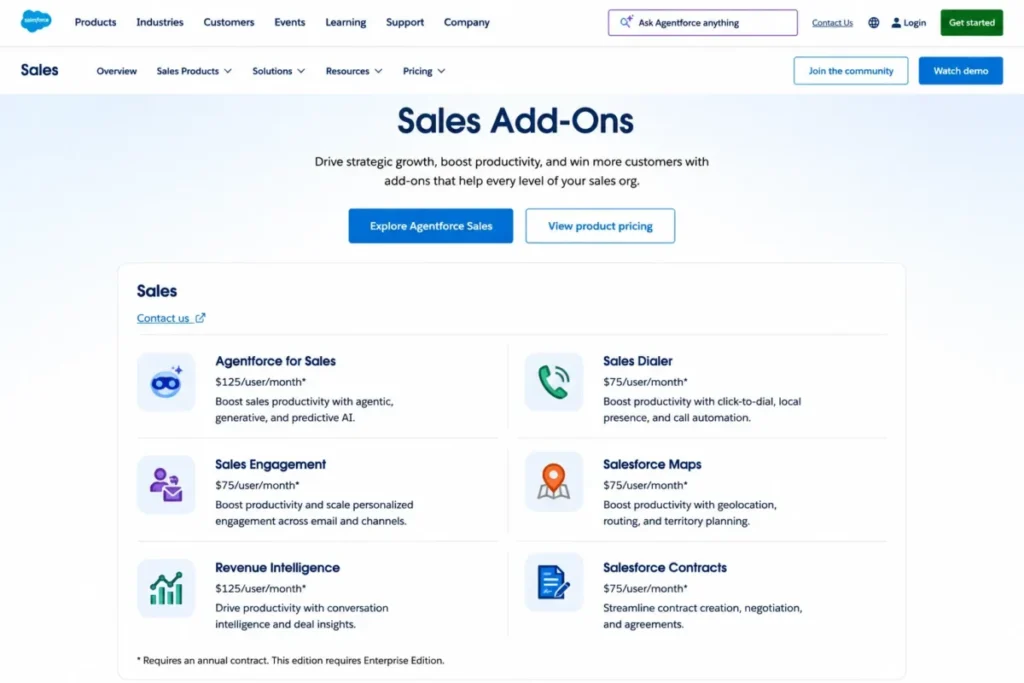
The list price is the beginning of the conversation. The official Salesforce add-on pricing page publishes separately priced additions including Agentforce for Sales, Sales Dialer, Sales Engagement, Salesforce Maps, Revenue Intelligence, and Salesforce Contracts, and several of those cover functions a Zoho Enterprise buyer already treats as included.
Price it honestly at scale. Fifty seats of Enterprise at $175 is $8,750 per month, against $2,000 per month for fifty seats of Zoho Enterprise at $40, before a single add-on, implementation hour, or partner invoice.
Migration is high difficulty and data mapping is the smallest part of it. Security model, objects, automation, analytics, integrations, testing, training, and change management are the workstreams that consume the timeline.
| Pros | Cons |
|---|---|
| Deepest custom object, permission, and extensibility model | Enterprise at $175 per user/ |
| Free Suite at $0 and a 30-day trial for evaluation | Dialer, sales engagement, maps, and revenue intelligence are paid add-ons |
| AppExchange ecosystem and mature enterprise integrations | Implementation capacity is a prerequisite, not a nice-to-have |
| Agentforce AI available across the sales workflow | Most real deployments require a configuration-specific quote |
- Best for:
- Fifty-to-500-plus-person organizations with dedicated CRM administration
- Complex forecasting, custom data models, and global sales process
- Buyers with budget for implementation and partner services
- Avoid if:
- You have no admin capacity and no implementation budget
- You expect the base license to cover dialing and sales engagement
- Migration difficulty:
- High.
- Verdict:
- choose Salesforce when extensibility is a requirement rather than an aspiration, as the Salesforce CRM review explains.
Which mid-market picks scale past 50 seats
HubSpot Enterprise at $150 and Freshsales Enterprise at $59 both carry the governance features a 50-seat org asks for, including sandbox, audit logging, and field-level controls on the Freshsales side. Neither matches Salesforce on custom architecture, and both are cheaper than Salesforce Enterprise at $175.
monday CRM offers a custom Enterprise tier, which means the price stops being comparable at this size. Treat any product that requires a quote as unpriced until the quote arrives.
Full Feature and Pricing Matrix
The number that decides most shortlists is not the starting price. It is the lowest plan a ten-person sales team can run on without a workaround, so both are shown.
| Product | Starting price ($/user/ | Lowest usable plan for a 10-person sales team | 10-user cost ($/month) | Free plan | Trial |
|---|---|---|---|---|---|
| Zoho CRM | $14 (Standard) | Professional at $23 | $230 | Yes, up to 3 users | Yes |
| HubSpot Sales Hub | $7 (Starter, promotional/ | Professional at $90 | $900 plus $1,500 one-time onboarding | Yes, up to 2 users | Yes |
| Pipedrive | $14 (Lite) | Growth at $39 | $390 | Not offered | 14 days |
| Freshsales | $9 (Growth) | Growth at $9, or Pro at $39 for AI, sequences, and custom reports | $90, or $390 on Pro | Not published | Yes |
| Salesforce Agentforce Sales | $25 (Starter Suite) | Pro Suite at $100, Enterprise at $175 for custom objects | $1,000, or $1,750 on Enterprise | Yes, Free Suite at $0 | 30 days |
| monday CRM | $12 (Basic, 3-seat minimum) | Pro at $28 | $280 | Not published | Yes |
| Close | $9 (Solo, 1 user only) | Essentials at $35, Growth at $99 for workflows and dialing | $350, or $990 on Growth | Not published | Yes |
| Copper CRM | $23 (Basic) | Professional at $59 | $590 | Not published | Yes |
| Insightly CRM | $29 (Plus) | Professional at $49 | $490 | Not published | 14 days |
| Nimble | $24.90 (single plan) | Single plan at $24.90 | $249 | Not published | 14 days |
| Keap | $299/ | $299/ | At least $611/ | Not published | Yes |
Source: the official pricing page of each vendor, linked in that product’s section above. Checked: 2026-07-16, and prices change without notice.
The Zoho CRM and Pipedrive official pages rendered regional currency during research, so their US figures come from same-day independent US-dollar cross-checks and must be confirmed in each vendor’s checkout. HubSpot’s $7 Starter display is promotional or billing-dependent against a $20 monthly standard price, and any product listed as Enterprise quote only is unpriced until the quote arrives.
Read that table as a spread rather than a ranking. Freshsales Growth at $90 per month and HubSpot Professional at $900 per month are both credible answers to “replace Zoho,” and the 10x gap between them is entirely a question of what you need the platform to do beyond pipelines.
Feature gate comparison
| Product | Automation available from | Custom reports available from | AI model | Built-in calling | API access | Contact or volume limit |
|---|---|---|---|---|---|---|
| Zoho CRM | Standard ($14), deeper process at Professional ($23) | Professional ($23), advanced at Enterprise ($40) | Zia; advanced capabilities at Enterprise/ | Configurable multichannel | Documented API V8, rolling 24-hour credits | Allowances rise by edition |
| HubSpot Sales Hub | Scalable automation at Professional ($90) | Professional ($90) | Breeze AI metered by HubSpot Credits | Included in Sales Hub, tier not verified | Available | Credit and tier-based allowances |
| Pipedrive | Growth ($39) | Growth ($39) and above | Pulse AI | Not the native focus | Available | Not published |
| Freshsales | Basic workflows at Growth ($9), advanced at Pro ($39) | Pro ($39) | Freddy AI at Pro ($39) | Yes, from Growth ($9) | Available | Telephony usage charged separately |
| Salesforce Agentforce Sales | Pro Suite ($100) and above | Enterprise ($175) for full custom architecture | Agentforce; Agentforce for Sales is a paid add-on | Sales Dialer is a paid add-on | Available | Enterprise quote only |
| monday CRM | Standard ($17), higher allowances at Pro ($28) | Pro ($28) | Credit-based AI allowances | Not offered natively | Available | Automation allowances by tier |
| Close | Essentials ($35); Solo ($9) has none | Growth ($99) | AI credits by plan | Yes, dialing depth at Growth ($99) | Available | Solo capped at 10,000 leads |
| Copper CRM | Professional ($59) | Professional ($59) | Not published | Not offered natively | Higher tiers only | Basic capped at 2,500 contacts |
| Insightly CRM | Professional ($49) | Professional ($49) | Not published | Not offered natively | AppConnect for integration automation | Enterprise quote only for suite |
| Nimble | Single plan ($24.90) | Single plan ($24.90) | Not published | Not offered natively | Available | 25,000 contacts, 2 GB/seat, 1,000 emails/ |
| Keap | Included from $299/ | Included from $299/ | Not published | Business phone functionality | Available | Contact-based scaling |
Three patterns fall out of that grid. Communications are included at Freshsales and Close and priced separately at Salesforce, custom reporting sits above the advertised entry plan in nine of the eleven rows, and AI is a metered resource at HubSpot, monday CRM, and Close rather than a flat inclusion.
The two exceptions prove the point rather than break it. Nimble and Keap sell a single plan, so there is no tier for reporting to hide behind.
Hidden costs that never appear in the sticker price
| Product | Non-license cost exposure | When it applies |
|---|---|---|
| HubSpot Sales Hub | $1,500 one-time Professional onboarding; HubSpot Credits for AI and some plan features | Any Professional deployment |
| Salesforce | Sales Dialer, Sales Engagement, Salesforce Maps, Revenue Intelligence, Agentforce for Sales, Salesforce Contracts | When base editions lack a function you assumed was included |
| Insightly CRM | $3,000 AppConnect technical setup; $1,500 guided onboarding; premier support at 20% of license with a $3,000 annual minimum | Specified suite and AppConnect configurations |
| Keap | Implementation services; $299 early-termination fee on annual contracts | Annual contracts and every real deployment |
| monday CRM | Three-seat purchase minimum; credit-based AI and automation allowances | Every purchase, including solo buyers |
| Close | AI credits above the plan allowance; telephony usage | High-volume outbound |
| Nimble | Web forms, web chat, and email volume above 1,000 per license per month | Outreach-heavy teams |
| Zoho CRM | Additional data backup purchases after included allowances; paid support tiers above Classic | Migration season and production support |
That last row is the one Zoho customers discover on the way out. Requesting the complete backup you need to leave is itself a metered action once the included allowance is used.
How to Choose the Right Zoho CRM Alternative
Six questions settle this faster than any feature grid. Answer them in order, because the first three eliminate more products than the last three.
1. Is the problem the product or the edition? If the missing capability is advanced Zia, sandbox, custom functions, or field encryption, those sit at Zoho Enterprise at $40, and upgrading costs less than migrating.
2. Who owns the CRM after go-live? No owner points to Pipedrive, Freshsales, or Nimble; a dedicated admin makes Salesforce or HubSpot Professional viable.
3. What is the real seat count in twelve months? Ten seats at Freshsales Pro is $390 per month and fifty seats is $1,950, while fifty seats of Salesforce Enterprise is $8,750, so growth assumptions change the ranking more than features do.
4. What are you consolidating? Replacing a dialer points to Freshsales or Close; replacing a marketing platform points to HubSpot; replacing project software points to Insightly or monday CRM.
5. Where does your team already work? Gmail-native teams get more adoption from Copper at $59 than from a cheaper CRM they open twice a day.
6. How much of your Zoho account is custom? Count custom modules, Blueprint processes, and Deluge functions, because each one is a design task in the destination, not an import row.
Stay, upgrade, simplify, or switch
| Your situation | Do this | Why |
|---|---|---|
| The feature you need is at a higher Zoho edition | Upgrade | Zoho Enterprise at $40 costs less than a migration plus rebuild |
| Reps ignore the CRM but the data model is sound | Simplify first | Layout and process cleanup is cheaper than replatforming |
| The CRM fits but the ecosystem does not | Switch | Ecosystem mismatch does not resolve with configuration |
| Adoption failed and the config is unmaintained | Switch to a simpler product | Rebuilding complexity in a new tool reproduces the failure |
| You are mid-quarter with no owner assigned | Delay | A migration without an owner becomes two systems |
Our CRM implementation guide covers the ownership question in more depth, because that is the variable that decides whether any of this works.
Which Zoho CRM Alternative Should You Avoid?
| Avoid | If | Because |
|---|---|---|
| HubSpot Sales Hub | Your budget was built around $23 per seat | Professional is $900/ |
| Pipedrive | You need Zoho-style suite breadth natively | Marketing automation is narrower and LeadBooster is a paid add-on |
| Freshsales | You need sandbox or audit logging on a small budget | Those sit at Enterprise ($59), not Growth ($9) |
| Salesforce | You have no admin capacity or implementation budget | Extensibility becomes unmaintained configuration debt |
| monday CRM | You are a solo founder or a two-person team | The three-seat minimum makes the entry cost $36/ |
| Close | Your motion is relationship-led, not volume-led | You pay for dialing infrastructure you will not use |
| Copper CRM | Your team runs on Microsoft 365 | The Gmail-native advantage is the entire value proposition |
| Insightly CRM | You want the suite but not the required services | Suite configurations carry up to $7,500 in first-year setup and support |
| Nimble | Outreach exceeds 1,000 emails per license per month | Volume additions erase the one-plan simplicity |
| Keap | You only need pipeline management | $299/ |
None of these are product defects. Each one is a buyer mismatch, and mismatches are what make second migrations happen eighteen months after the first.
Migration Complexity by Alternative
Migration difficulty here is an editorial estimate based on data model complexity, workflow rebuild effort, integration requirements, and setup depth. No timeline is promised, because no timeline was tested.
| Alternative | Difficulty | Main risk | What has to be rebuilt |
|---|---|---|---|
| Pipedrive | Low to medium | Custom modules have no equivalent home | Blueprint logic, custom functions, portals |
| Close | Low to medium | Suite features have no destination | Inventory, service workflows, custom modules |
| Nimble | Low | Automation and reporting depth is lost | Workflows, custom reports, custom modules |
| Freshsales | Medium | Process logic redesign | Blueprint, custom functions, specialized modules |
| HubSpot Sales Hub | Medium | Object and relationship design | Custom modules, Blueprint, reports, permissions |
| monday CRM | Medium | Relational records become boards | Blueprint, functions, permissions, reporting |
| Copper CRM | Medium | Non-Google processes map poorly | Complex reports, advanced workflow logic |
| Insightly CRM | Medium standalone, high for suite | AppConnect and multi-product mapping | Marketing, service, integration automation |
| Keap | Medium to high | Campaign and payment logic rebuild | Campaigns, forms, appointments, payment flows, tags |
| Salesforce | High | Data mapping is the smallest workstream | Security model, objects, automation, analytics, integrations |
What Zoho CRM exports, and what it does not
The official Zoho CRM export documentation is specific, and it does not describe a one-click migration. Zoho CRM exports modules, subforms, notes, custom views, and selected records through CSV or XLSX, with constraints on fields, lookups, criteria, and selected records.
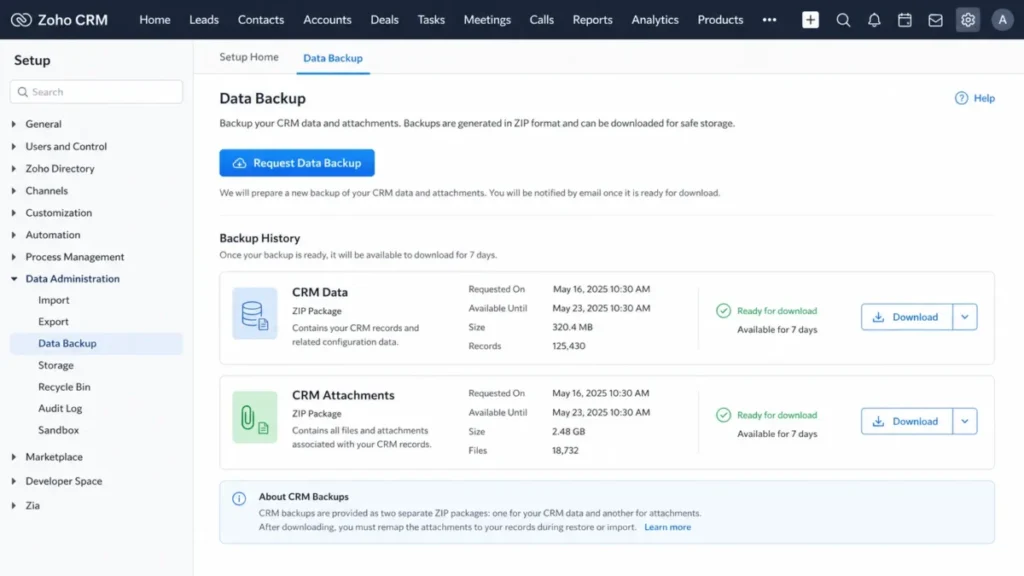
Export history covers the previous 60 days and completed downloads remain available for seven days. A complete data export runs through a separate Request Data Backup workflow rather than the module export.
The backup detail is the one that costs teams their history. The official Zoho CRM data-backup documentation states that complete backups group CRM data and CRM attachments into separate ZIP folders, and additional backup purchases apply once the included allowance is exhausted.
Preserve record IDs before you import anything, and test attachment remapping on a sample before you accept the migration. Keep the source backup until acceptance testing passes, because the seven-day download window is not an archive.
The migration artifact inventory
None of the ten pages ranking for this query at the 2026-07-16 SERP check breaks migration down past a contact export. Here is the inventory, marked by what happens to each artifact.
| Artifact | Action | Note |
|---|---|---|
| Module records (leads, contacts, accounts, deals) | Export | CSV or XLSX with field and criteria constraints |
| Subforms | Export | Supported in module export |
| Notes | Export | Exportable, but verify completeness against the record count |
| Custom views | Export | Definitions do not carry to the destination |
| Attachments | Export and remap | Delivered in a separate ZIP folder from the data |
| Lookup relationships | Rebuild and validate | Record IDs must be preserved to reconnect them |
| Custom fields and field types | Rebuild | Type mismatches are the most common silent data loss |
| Layouts and validation rules | Rebuild | No export path |
| Formula fields | Rebuild | Destination syntax differs |
| Workflows | Rebuild and test | No export path |
| Blueprint processes | Rebuild and test | Not portable in any form |
| Custom functions (Deluge) | Rebuild | Rewrite in the destination’s automation model |
| Reports and dashboards | Rebuild | Rebuild against the new schema, not the old one |
| Roles, profiles, permissions | Rebuild and validate | Test with a real non-admin account |
| Integrations and webhooks | Reconnect | Re-authorize and re-map every endpoint |
| Complete backup | Archive | Retain until acceptance testing passes |
Count the rebuild rows. That count, not the seat price, is your migration budget.
API limits that slow a bulk migration
The official Zoho CRM API V8 documentation states that API credits run in a rolling 24-hour window. Insert, update, and upsert calls support up to 100 records per call, and add or remove tag operations support up to 500 records per call.
Batch to those limits, monitor credit consumption during the job, and test with production-like volumes rather than a 50-record sample. A migration that runs fine on a sample and throttles on the real dataset is the classic way a cutover weekend becomes a cutover month.
A parallel-run plan beats a single cutover
Run this sequence rather than a weekend switch. Inventory the artifacts above, clean the data, take the complete backup, run a pilot export, map and preserve record IDs, test the import, rebuild automation, validate permissions with a non-admin account, train a pilot group, run both systems in parallel, reconcile the deltas, cut over, and retain the archive.
The parallel run is the part teams skip and the part that protects live deals. Our CRM migration guide covers the sequencing in more detail.
Here is the 30/90-day test for whether it worked. At 30 days, every open deal has a next activity and the pipeline total reconciles with the Zoho export; at 90 days, leadership is running the forecast from the new system and nobody is checking the old one.
When to Stay with Zoho CRM
Vendor-authored alternative pages have no reason to write this section, which is exactly why it is the most useful one here.
Stay if the gap is a plan gate. Advanced Zia, sandbox, custom functions, portals, and field encryption are Enterprise and Ultimate features at $40 and $52, and paying $17 more per seat beats a migration plus a rebuild.
Stay if you run on Zoho apps. Native depth across Zoho Books, Desk, Campaigns, and Analytics is not something a standalone CRM replaces, and unwinding it multiplies the project.
Stay if the custom model is load-bearing. Every custom module, Blueprint process, and Deluge function on the inventory above is a design task somewhere else, and complex Zoho accounts pay the highest switching cost in the market.
Stay if the real problem is data hygiene or unclear stages. No CRM fixes undefined sales stages, and any replacement inherits the same discipline you already practise.
Stay if nobody owns the migration. A project without an owner ends with two systems and one source of confusion.
Switch when the ecosystem is wrong, when adoption failed and the configuration is unmaintained, when you need packaged communications rather than configured ones, when post-sale delivery has to live in the CRM, or when the platform architecture, not the edition, is the constraint. If you are weighing the simplest version of that decision, the Pipedrive vs Zoho CRM comparison is the cleanest test case.
Final Verdict: Best Zoho CRM Alternative for Most Teams
HubSpot Sales Hub is the best Zoho CRM alternative for most teams that have decided to leave, because the exit reason an edition upgrade cannot solve is architectural: the suite never behaved like one platform. That verdict comes with a price tag: $900 per month at ten seats on Professional plus a $1,500 one-time onboarding fee, against $230 per month for Zoho Professional at the same seat count.
If that number kills it, the ranking changes and the HubSpot vs Zoho CRM comparison is the next thing to read.
| Buyer type | Pick | Cost at 10 seats |
|---|---|---|
| Best free entry point | HubSpot Sales Hub Free (2 users) or Salesforce Free Suite | $0 |
| Best value replacement | Freshsales Growth | $90/ |
| Best for rep adoption | Pipedrive Growth | $390/ |
| Best enterprise | Salesforce Enterprise | $1,750/ |
| Best simple one-plan option | Nimble | $249/ |
| Best cross-functional | monday CRM Pro | $280/ |
The stay-versus-switch signal is blunt. If you can name the Zoho edition that solves your problem, upgrade instead of migrating: Professional to Enterprise costs $17 more per seat, while the cheapest alternative that matches Enterprise on sandbox, audit logging, and field-level controls is Freshsales Enterprise at $59, or $36 more per seat than staying.
If you cannot name it, and the reason is architecture, ecosystem, or a failed implementation nobody will rescue, then switch, and budget the rebuild rows before the seat price.
The renewal question to hold onto: twelve months from now, can you point to the specific workflow that only works because you switched? If the answer is no, the migration was a reorganization, not an upgrade.
Frequently Asked Questions
Is there a better CRM than Zoho?
Yes, if you define better by fit rather than features. HubSpot Sales Hub is better for one connected platform, Pipedrive is better for rep adoption, Freshsales is better for built-in calling at $9 per user per month, and Salesforce is better for enterprise extensibility.
On price-to-capability, Zoho CRM Professional at $23 is still hard to beat.
What is the best alternative to Zoho CRM?
HubSpot Sales Hub for most teams that want sales, marketing, and service on one customer platform. It costs $90 per seat per month on Professional plus a required $1,500 one-time onboarding fee, so it is the best alternative for teams leaving over architecture, not teams leaving over price.
Freshsales at $9 is the better value answer.
Is HubSpot better than Zoho CRM?
For platform coherence, yes. For budget, no.
HubSpot Professional runs $900 per month at ten seats plus $1,500 onboarding, against $230 per month for Zoho Professional. Buy HubSpot when marketing and sales must share one data model, and stay on Zoho when the pipeline is the whole requirement.
Is Pipedrive better than Zoho CRM?
Only on adoption. Pipedrive Growth at $39 per user per month gives reps a visual pipeline they update without training, and interface complexity is a recurring Zoho complaint in current review patterns.
Zoho beats it on suite breadth, custom modules, and native marketing tooling, and Pipedrive has no permanent free plan to soften the switch.
What is the cheapest Zoho CRM alternative?
Freshsales Growth at $9 per user per month billed annually, which is $90 per month for ten seats and includes built-in chat, email, and phone. Close Solo is also $9 but is limited to one user, 10,000 leads, and no workflows.
Of the eleven CRMs compared here, Nimble’s single plan at $24.90 is the cheapest that carries no tier gates at all.
Does Zoho CRM have a free plan, and do the alternatives?
Zoho CRM offers a free edition for up to three users. HubSpot Sales Hub is free for up to two users, and Salesforce publishes a Free Suite at $0.
Pipedrive, Copper, Insightly, Nimble, Close, and Keap do not publish free plans, though most offer trials of 14 to 30 days.
Can I export all my data out of Zoho CRM?
Module exports cover records, subforms, notes, and custom views through CSV or XLSX, with field, lookup, and criteria constraints. A complete export runs through the separate Request Data Backup workflow.
Export history covers 60 days and completed downloads stay available for seven days, so download promptly and archive it yourself.
Will my notes and attachments survive the move?
Notes export with the module data. Attachments do not travel with them: Zoho’s complete backup delivers CRM data and CRM attachments in separate ZIP folders, so files arrive detached from the records they belong to.
Preserve record IDs, test the remapping on a sample, and keep the source backup until acceptance testing passes.
Should I just stay on Zoho and upgrade instead?
No, unless you can name the edition that fixes your problem. Advanced Zia, sandbox, custom functions, portals, and field encryption sit at Enterprise ($40) and Ultimate ($52).
If that is your gap, upgrading costs $17 more per seat than Professional and skips the entire rebuild. If the gap is architecture or ecosystem, upgrading changes nothing.
Which Zoho CRM alternative has built-in calling?
Freshsales includes phone from the $9 Growth plan, and Close builds calling, email, and SMS into every team tier from Essentials at $35. Salesforce sells Sales Dialer as a paid add-on rather than including it.
monday CRM, Copper, Insightly, and Nimble do not offer native calling, so budget a separate telephony tool.