Most freelancers do not lose clients because they picked the wrong CRM feature. They lose clients because a proposal sat unsent, an invoice slipped a week, or a warm lead never got a follow-up.
The best CRM for freelancers in 2026 is the one that closes those gaps for the way you earn, not the one with the longest feature list. That single decision splits into two very different buying paths, and picking the wrong path is what creates app sprawl or a tool you abandon by month two.
For solo service freelancers who need lead capture, proposals, contracts, invoices, scheduling, and payments in one place, HoneyBook is the safest starting point. Deal-driven consultants who sell through a pipeline are better served by a sales CRM like Pipedrive or a free HubSpot foundation, while freelancers who win work through referrals and LinkedIn should look at folk instead.
I ranked these ten tools by freelancer fit first, then by pricing honesty, plan gates, and what breaks as you add help.
This guide separates true freelancer clientflow platforms from sales CRMs, then prices each at one, three, and five seats so you can budget before you hire a virtual assistant. Every price here was checked on the official pricing page on July 7, 2026, with caveats kept where a vendor renders prices dynamically.
If you want the wider category context first, see how these picks sit inside the best CRM software overall for teams and solo operators.
In This Article (23 sections)
Quick Verdict: Best CRM for Freelancers by Use Case
Here is the fast answer before the detail, so you can jump straight to the tool that matches your revenue workflow.
| Use case | Best pick | Why it fits |
|---|---|---|
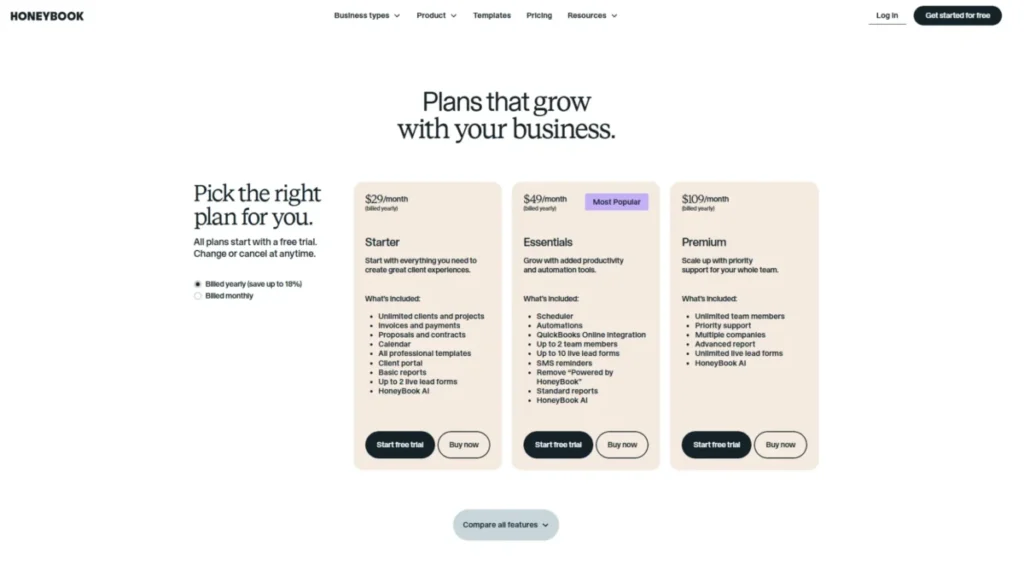
| Best overall for service freelancers | HoneyBook | Lead-to-payment clientflow in one tool, from $29/mo (annual) |
| Best for proposals, contracts, and admin | Bonsai | Freelance admin suite with tax and accounting basics |
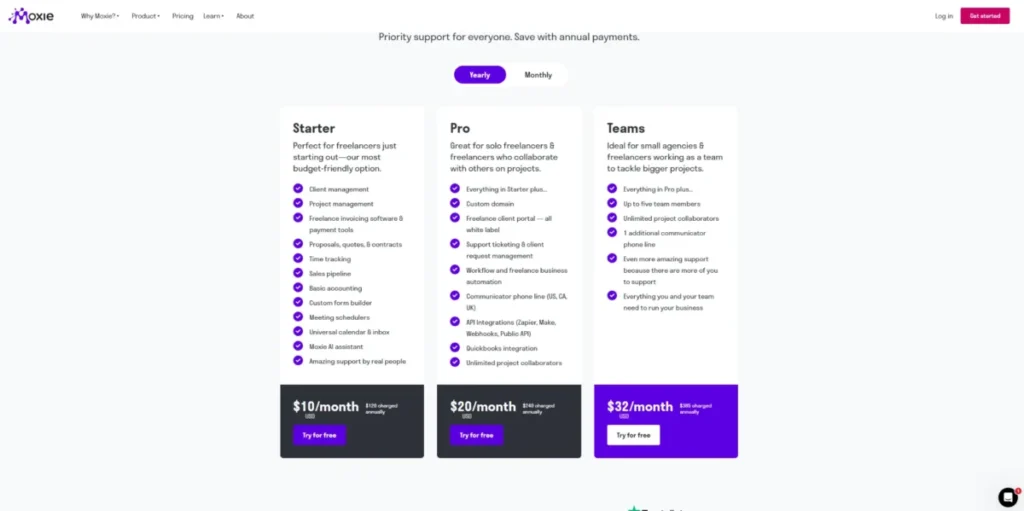
| Best value all-in-one | Moxie | Broad feature set from $12/ |
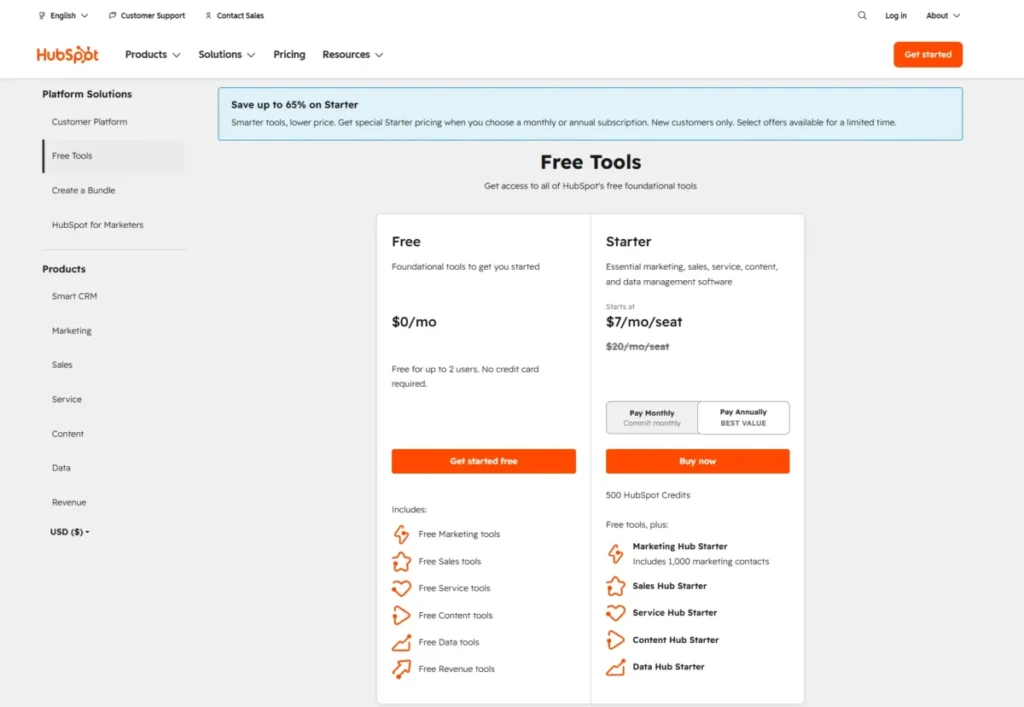
| Best free CRM foundation | HubSpot CRM | Free Tools for up to 2 users and 1,000 contacts |
| Best sales pipeline for deal-driven work | Pipedrive | Structured pipeline for freelancers who sell like B2B reps |
| Best budget customizable CRM | Zoho CRM | Free forever for 3 users, deep customization to grow into |
| Best for follow-up discipline | OnePageCRM | Next-action model that forces the next step, from $9.95/mo |
| Best simple CRM with light projects | Capsule CRM | Contacts, opportunities, and light project tracking |
| Best low-admin CRM | Less Annoying CRM | One price of $15/ |
| Best for relationship-led outreach | folk | LinkedIn and referral workflow, not billing |
The pattern in this table is the whole point: the top three are freelance operations suites that run your money workflow, and the rest are CRMs that manage relationships or pipelines but leave billing to another app. Choose from the top group if you want one login for the client lifecycle, and from the lower group if you already have invoicing you like and only need contact and deal discipline.
How I Chose and Ranked These CRMs
I evaluated these ten tools as a CRM buying analyst at SaaS CRM Review, based on official product pages, official pricing pages, help and security documentation, App Store listings where relevant, and third-party review patterns from sources like TechRadar, G2, and Capterra. No hands-on trial testing was performed for this guide, so every claim here is documentation-based and third-party-validated, not a personal usage test.
Pricing was verified on each vendor’s official pricing page on July 7, 2026. Two prices carry a live-verification caveat: Pipedrive and Zoho render paid US pricing in ways that did not extract cleanly, so I lean on high-confidence 2026 review data.
The ranking weighs solo-freelancer fit first, then client lifecycle coverage, pricing transparency, CRM depth, payment and document workflow, automation gates, integrations, mobile availability, support, and evidence-backed limitations. I did not rank tools by brand popularity or affiliate payout, and I demoted any tool where the entry price hides the plan you would need.
Best CRM for Freelancers at a Glance
This table lines up all ten tools on the facts that decide most freelancer purchases: entry price, whether there is a real free plan, and the single job each tool is built for.
| CRM | Entry price (checked Jul 7, 2026) | Free plan | Built for |
|---|---|---|---|
| HoneyBook | From $29/mo (annual) | Trial only | Full clientflow for service pros |
| Bonsai | $15/ | Trial only | Freelance admin and contracts |
| Moxie | $12/ | 14-day trial | Affordable all-in-one operations |
| HubSpot CRM | Free; Starter from $20/ | Yes (2 users) | Sales pipeline that can grow |
| Pipedrive | From about $14/ | Trial only | Deal-driven sales pipeline |
| Zoho CRM | Free for 3 users; paid tiers vary by region | Yes (3 users) | Budget customizable CRM |
| OnePageCRM | From $9.95/mo | Trial only | Follow-up discipline |
| Capsule CRM | Starter ~$18/ | Yes (2 users) | Simple CRM with light projects |
| Less Annoying CRM | $15/ | Trial only | Low-admin contact management |
| folk | Standard $30/ | Yes | Relationship-led outreach |
Pricing for Pipedrive and Zoho should be confirmed on the live US pricing page before purchase because vendor pages may render dynamically by region.
Read this table as two shopping carts, not ten equal options. The tools with “clientflow” or “admin” in the last column replace a proposal, contract, and invoicing stack, while the pipeline and contact tools assume you keep billing somewhere else.
A freelancer who buys HubSpot expecting built-in contracts and payments, or buys HoneyBook expecting deep sales forecasting, has bought the wrong cart.
Clientflow Suites: Lead-to-Payment in One Tool
These three run your whole money workflow: capture the lead, send the proposal, sign the contract, invoice, and collect payment. They are the right pick when you want one login for the client lifecycle instead of stitching four apps together.
1. HoneyBook: Best Overall for Service Freelancers

HoneyBook is the best CRM for freelancers who sell a service and need the paperwork and payments to move without a second tool. It positions itself as an AI-powered client relationship platform covering proposals, contracts, invoices, payments, scheduling, and project tracking in one place.
- Starting price:
- from $29/month billed annually, as checked on the official pricing page on July 7, 2026. Verify the monthly toggle before you commit, because monthly billing usually costs more than the annual rate shown.
- Practical tier:
- most solo freelancers need at least the plan that includes automations, since automations are gated to the Essentials and Premium tiers in HoneyBook’s help content. If your reason for buying is automatic follow-ups and reminders, budget for that tier, not the entry price.
Free plan or trial: trial only, no permanent free plan verified.
What it does well:
- Runs lead capture, proposals, contracts, invoices, and payments as one connected flow, so a signed proposal can trigger an invoice.
- Includes scheduling and project tracking that fit photographers, designers, and event pros.
- Offers a mobile app for managing files and payments between client meetings.
Where it falls short:
- Third-party review patterns describe HoneyBook as weaker as a traditional sales CRM, with limited lead scoring and forecasting.
- The entry price does not include automations, so the advertised number understates the working budget for many buyers.
- Avoid if:
- you run an outbound sales motion and need pipeline forecasting, territory logic, or deal scoring more than you need contracts and invoices.
- Setup difficulty:
- Low to Medium. Templates shorten setup, but building your proposal-to-invoice flow takes an afternoon.
- Hidden costs:
- payment collection runs through the platform, so review processing fees and payout timing before you route billing through it.
Verdict: choose HoneyBook if your income depends on turning inquiries into signed, paid projects and you want that entire path in one tool.
2. Bonsai: Best for Proposals, Contracts, and Freelance Admin

Bonsai is the best fit for freelancers who want CRM-style client management plus the business admin most CRMs ignore, including time tracking, accounting basics, and tax-oriented tools. It is a freelance operations suite first and a contact database second.
- Starting price:
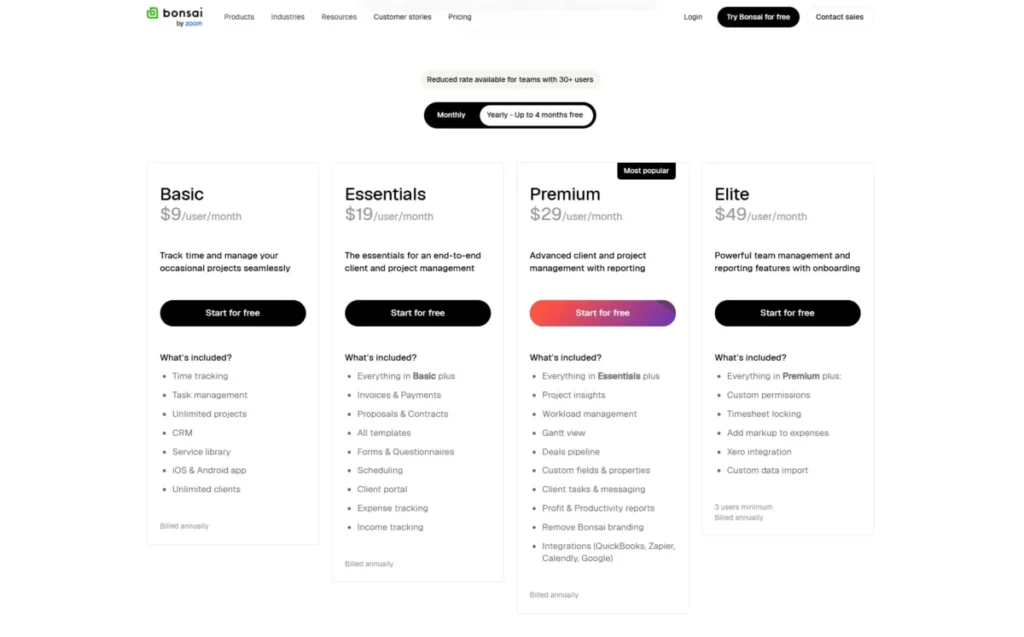
- Basic is $15/month monthly or $9/month billed yearly, per the official pricing page checked July 7, 2026. Higher tiers run Essentials at $25 or $19, Premium at $39 or $29, and Elite at $59 or $49.
- Practical tier:
- freelancers who want the full admin stack usually land on Essentials or Premium, where more advanced business management is unlocked. Treat Basic as a proposals-and-invoicing starter, not the finished workflow.
Free plan or trial: no permanent free plan verified. Check for a current trial on the pricing page.
What it does well:
- Combines proposals, contracts, invoicing, payments, time tracking, and a client portal so you can retire several separate apps.
- Adds accounting and tax-oriented admin that solo freelancers otherwise handle in spreadsheets.
- Supports Zapier and offers mobile apps, backed by a public trust page for security posture.
Where it falls short:
- Review patterns flag price sensitivity as you climb tiers, plus support and payout concerns worth checking against your cash-flow needs.
- Third-party comparisons note client-portal white-label limits, which matters if you present a fully branded portal to corporate clients.
- Avoid if:
- you are deal-driven and need deep sales pipeline analytics, or you require a fully white-labeled client portal experience.
- Setup difficulty:
- Medium. There are more modules to configure than a pure CRM, which is the tradeoff for one-app coverage.
- Hidden costs:
- advanced business workflow sits on higher tiers, so the real budget is the plan that carries the modules you use.
- Verdict:
- choose Bonsai if you want your contracts, invoices, and light bookkeeping under one roof and you are willing to pay up a tier for the full admin flow.
3. Moxie: Best Value All-in-One

Moxie is the best value pick for freelancers who want broad all-in-one coverage without a premium price. Its Starter plan opens the door cheaply, and the feature list runs unusually wide for the money.
- Starting price:
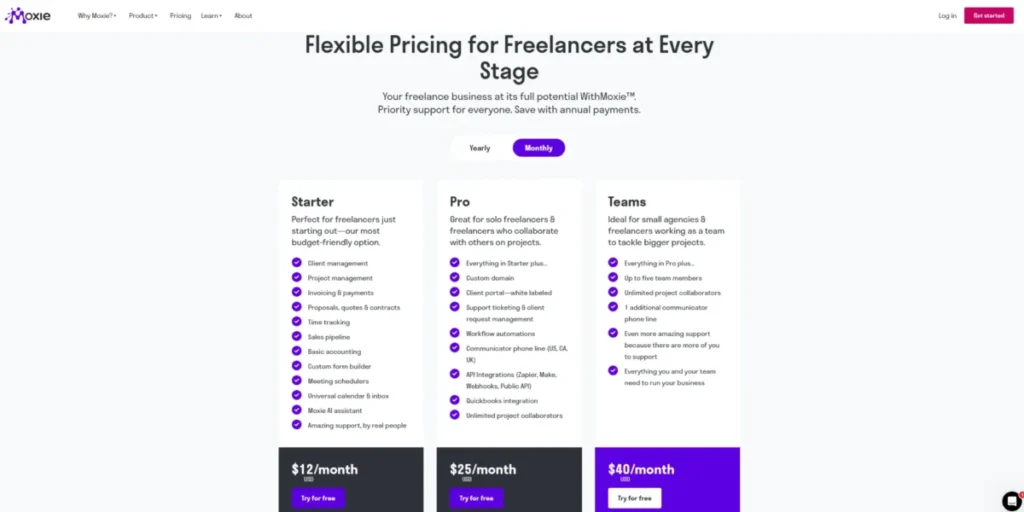
- Starter is $12/month monthly or $10/month billed yearly, with a 14-day trial, per the official pricing page checked July 7, 2026. Pro is $25 or $20 and Teams is $40 or $32.
- Practical tier:
- the honest practical tier is Pro, not Starter. Pro is where Moxie adds a custom domain, a white-label client portal, workflow automation, API integrations, Zapier, Make, Webhooks, QuickBooks, the communicator phone line for the US, Canada, and UK, and unlimited project collaborators.
Free plan or trial: 14-day trial, no permanent free plan verified.
What it does well:
- Bundles client management, a sales pipeline, proposals, contracts, invoicing, payments, project management, time tracking, forms, schedulers, a universal calendar and inbox, and an AI assistant.
- Lets you add unlimited project collaborators on Pro, so a subcontractor or client can join a project without buying a full seat.
- Keeps pricing transparent and freelancer-friendly, with mobile support for field work.
Where it falls short:
- The features most people buy Moxie for, automation, API, white-label portal, communicator, and QuickBooks, sit on Pro, not Starter.
- The Teams plan supports up to five members, so a growing micro-agency hits a defined ceiling.
- Avoid if:
- you need enterprise CRM depth, large team structures, or phone-line support outside the supported countries.
- Setup difficulty:
- Medium. The breadth that makes Moxie good value also means more to configure at first.
- Hidden costs:
- the jump from Starter to Pro is the real budget line, since Starter alone leaves out automation and integrations.
- Verdict:
- choose Moxie if you want the widest freelancer toolkit for the lowest realistic price and you plan to run it on Pro.
Sales-Pipeline CRMs for Deal-Driven Freelancers
These three treat your work like a series of deals, not a series of projects. They win for consultants, fractional operators, and outbound sellers, but they leave contracts, invoices, and payments to another app.
4. HubSpot CRM: Best Free CRM Foundation

HubSpot CRM is the best free starting point for freelancers who run outbound sales or consulting pipelines and may grow into a broader customer platform. The free tier is usable on its own, not a stripped trial.
- Starting price:
- Free Tools is $0/month for up to two users and up to 1,000 contacts, and Starter begins at $7/month/seat billed annually or $20/month/seat monthly, per the official pricing page checked July 7, 2026. You can read the full plan detail in this HubSpot CRM review and the tier math in the HubSpot pricing breakdown.
- Practical tier:
- many freelancers stay free longer here than anywhere else on this list. The upgrade trigger is automation, reporting depth, or a second hub, and that is where cost and complexity climb.
Free plan or trial: yes, a genuine free plan for up to two users.
What it does well:
- Delivers contact management, pipeline tracking, email tools, meetings, and quotes at no cost, backed by a large integration ecosystem.
- Publishes a SOC 2 Type 2 security posture, which helps freelancers working with corporate clients.
- Scales into marketing, sales, and service hubs if the freelance business becomes an agency.
Where it falls short:
- It is a sales CRM, not a freelance operations suite, so proposals-as-contracts, invoicing, and payments are not the native job.
- Costs and complexity escalate once you need automation, reporting, or multiple hubs, so the free plan can flatter the real spend.
- Avoid if:
- you mainly need proposals, contracts, invoices, and a client portal and do not want to assemble hubs and integrations.
- Setup difficulty:
- Low to start, Medium once you add automation and reporting.
- Hidden costs:
- hub add-ons and higher tiers are the budget risk, not the entry seat price.
Verdict: choose HubSpot if you sell through a pipeline, want a free base, and can accept that billing lives in a separate tool.
5. Pipedrive: Best Sales Pipeline for Deal-Driven Freelancers

Pipedrive is the best pure sales-pipeline CRM for freelancers whose work looks like B2B selling, such as fractional operators, brokers, and high-ticket consultants. Its visual pipeline is the product, and it does that one job cleanly.
- Starting price:
- 2026 review data lists Lite from $14/user/month billed yearly. See the plan detail in this Pipedrive CRM review and the Pipedrive pricing guide.
- Practical tier:
- the plan structure runs Lite, Growth, Premium, and Ultimate, and deal, lead, and report limits vary by tier. Freelancers who need reporting and automation usually move past Lite quickly.
Free plan or trial: no free plan. A 14-day trial is noted in official and review evidence.
What it does well:
- Gives the clearest visual pipeline on this list, with lead and deal tracking, sales automation, email sync, and 500-plus integrations.
- Publishes strong security evidence, including GDPR, SOC 2, SOC 3, ISO 27001, and ISO 27701.
- Offers mobile access built around the pipeline for sellers on the move.
Where it falls short:
- There is no built-in contract, invoice, or client-portal workflow, so it is not a freelance operations suite.
- Add-ons such as lead generation and campaigns can raise the real cost above the headline seat price.
- Avoid if:
- you want contracts, invoices, or full freelance operations rather than sales management.
- Setup difficulty:
- Low to Medium. The pipeline is intuitive, but automation and reporting take configuration.
- Hidden costs:
- paid add-ons and higher tiers, plus no free plan, so budget from the tier that carries your reports.
Verdict: choose Pipedrive if your freelance work is sales, and pair it with a separate invoicing tool.
6. Zoho CRM: Best Budget Customizable CRM

Zoho CRM is the best budget pick for freelancers who want real CRM depth and room to customize as they grow. It rewards buyers who are willing to configure, and it starts free for up to three users.
- Starting price:
- a Free forever plan for three users is confirmed on the official pricing page. The Zoho CRM review and Zoho CRM pricing pages carry the tier detail.
- Practical tier:
- the free plan covers leads, contacts, deals, workflows, reports, mobile, and API limits, which is enough for many solo users. Advanced AI, process management, inventory, predictive intelligence, and advanced reporting are higher-tier features.
Free plan or trial: yes, free forever for up to three users.
What it does well:
- Offers customizable pipelines, workflows, reports, and API access at a low entry point.
- Includes Zia AI for generative help across modules, reports, and workflows, and publishes SOC 2 Type 2 compliance.
- Scales into a broader Zoho ecosystem if your needs expand.
Where it falls short:
- Review patterns cite a learning curve and a cluttered interface, plus mixed support experiences.
- The setup effort that makes Zoho flexible also makes it slower to adopt than a clientflow suite.
- Avoid if:
- you want the simplest setup or a polished proposal-contract-invoice flow without configuring a CRM.
- Setup difficulty:
- Medium to High, driven by customization and interface depth.
- Hidden costs:
- the features many buyers expect, advanced AI and reporting, sit on higher tiers, so the free plan can understate the eventual spend.
Verdict: choose Zoho if you want the most customizable CRM for the least money and you accept a steeper setup.
Low-Admin CRMs for Follow-Up Discipline
These three exist to keep you in front of contacts without becoming a second job. They handle contacts, tasks, and follow-ups well, and they deliberately skip billing and portals.
7. OnePageCRM: Best for Follow-Up Discipline

OnePageCRM is the best pick for freelancers who lose deals by forgetting the next step. Its next-action model turns your contact list into a to-do list, which is a different discipline than a pipeline board.
- Starting price:
- from $9.95/month, with the official pricing page stating unlimited records and zero paid add-ons, checked July 7, 2026. Confirm whether the price is per user and check the monthly-to-annual toggle before you buy.
- Practical tier:
- all plans include full email sync and some automation per the official pricing page, so the entry plan is genuinely usable. Higher plans add more business capability if you need it.
Free plan or trial: trial reported by third-party sources. No permanent free plan verified.
What it does well:
- Forces a next action on every contact, which fixes the most common freelancer failure of dropped follow-ups.
- Includes full email sync, custom templates, simple automation, goals, and mobile apps.
- Advertises unlimited records and no paid add-ons, which keeps pricing predictable.
Where it falls short:
- It is not a freelance operations suite, so you still need invoicing, proposals, and contracts elsewhere.
- Reporting and project features are lighter than in a full CRM or clientflow tool.
- Avoid if:
- you want built-in contracts, invoices, payments, or a client portal.
- Setup difficulty:
- Low. The next-action model is quick to grasp.
- Hidden costs:
- minimal, given the no-add-ons promise, but confirm per-user pricing at your seat count.
Verdict: choose OnePageCRM if your main problem is follow-through and you already have billing handled.
8. Capsule CRM: Best Simple CRM With Light Projects

Capsule CRM is the best pick for freelancers who want a clean contact and opportunity CRM with light project tracking on top. It sits between a bare contact list and a heavy platform.
- Starting price:
- 2026 review data identifies a free plan for two users and 250 contacts, with Starter around $18/user/month. The Capsule CRM review covers the plan gates in detail.
- Practical tier:
- most solo freelancers start free and move to Starter when they pass the contact cap or want more pipelines. Automation and multiple pipelines are associated with higher tiers in review data.
Free plan or trial: yes, a free plan for two users and 250 contacts.
What it does well:
- Combines contacts, opportunities, projects, and tasks with familiar integrations like Google, Microsoft, Mailchimp, QuickBooks, Xero, and Zapier.
- Adds a Gmail add-on and Outlook add-in for logging without leaving the inbox.
- Keeps the interface simple, which suits nontechnical buyers.
Where it falls short:
- Support is email-centered per official support and review evidence, which slows help for urgent issues.
- Reporting and marketing depth are lighter than in larger CRMs.
- Avoid if:
- you need native marketing depth, advanced reporting, or phone and live-chat support.
- Setup difficulty:
- Low. The layout is approachable for first-time CRM users.
- Hidden costs:
- automation and multiple pipelines push you to higher tiers, so map your pipeline needs before choosing Starter.
Verdict: choose Capsule if you want a simple CRM that also tracks delivery, and you can live with email-first support.
9. Less Annoying CRM: Best Low-Admin CRM

Less Annoying CRM is the best pick for freelancers who want a CRM that never becomes another platform to manage. Its whole design goal is to stay out of your way.
- Starting price:
- $15/user/month on a single tier, with no contracts, no upgrade fees, and free support, per the official site checked July 7, 2026. The Less Annoying CRM review confirms the one-price model.
- Practical tier:
- there is only one tier, which removes plan-gate guesswork entirely. What you see is what you pay.
Free plan or trial: a trial is reported by third-party sources, and there is no permanent free plan.
What it does well:
- Offers contacts, pipelines, tasks, custom fields, a calendar, email logging, permissions, and mobile access at one flat price.
- Includes phone and email support at no extra cost, which is rare at this price.
- Removes feature-gate confusion because there are no tiers to compare.
Where it falls short:
- It lacks built-in invoicing, contracts, advanced automation, AI, and deep analytics per third-party review evidence.
- It is a CRM, not a freelance business suite, so admin work lives elsewhere.
- Avoid if:
- you need invoicing, contracts, marketing automation, AI, or advanced analytics inside the CRM.
- Setup difficulty:
- Low. One tier and a simple layout make onboarding fast.
- Hidden costs:
- none of note, which is the point of the single-price model.
Verdict: choose Less Annoying CRM if you want dependable contact management with human support and zero platform overhead.
Relationship-Led CRM for Warm Networks
One tool on this list is built for a different motion entirely: winning work through relationships rather than pipelines or projects.
10. folk: Best for Relationship-Led Outreach
folk is the best pick for freelancers who land clients through referrals, LinkedIn, and warm-network follow-up. It manages relationships and outreach, not invoices, so it is a category of its own here.
- Starting price:
- Standard is $30/member/month monthly or $24/member/month billed annually, and a free plan appears on the official pricing page checked July 7, 2026. Treat the official page as the source of truth, since some third-party pages show older pricing.
- Practical tier:
- Standard suits most solo relationship-led freelancers, while Premium adds custom objects and Deals, email sequences, workspace roles, dashboards, API access, more credits, and full interaction history.
Free plan or trial: yes, a free plan is shown on the pricing page.
What it does well:
- Handles contact management, pipeline management, email campaigns, and contact enrichment with a LinkedIn extension for capturing connections.
- Syncs email, calendar, and WhatsApp, with AI assistants and Magic fields to reduce manual entry.
- Connects to 5,000-plus integrations for a network-driven workflow.
Where it falls short:
- API access and advanced workspace and deal features are Premium-gated.
- It is not a billing or contracts platform, so it does not run the money side of freelancing.
- Avoid if:
- you need proposals, contracts, invoices, payments, or project delivery inside the CRM.
- Setup difficulty:
- Low to Medium. Importing contacts and connecting LinkedIn is quick, and building sequences takes more setup.
- Hidden costs:
- per-member pricing adds up if you collaborate, and API access requires Premium.
Verdict: choose folk if most of your work comes from relationships and you keep billing in a separate tool.
Pricing and Cost at Scale
Entry prices are written for one person, but freelancers add a virtual assistant, a subcontractor, or a partner sooner than they expect. This table shows the monthly cost at one, three, and five seats using each vendor’s official entry math, with caveats where the price is per account.
| CRM | 1 seat | 3 seats | 5 seats | Billing basis |
|---|---|---|---|---|
| HoneyBook | From $29/mo (annual) | Account plan; team seats on higher tiers | Account plan; unlimited team members on Premium | Per account, not per seat |
| Bonsai | $15/mo ($9 yearly) | Higher tier for team seats | Higher tier for team seats | Per account, team seats on upper tiers |
| Moxie | $12/mo (Starter) | Teams $40/mo (up to 5) | Teams $40/mo (up to 5) | Per account; Teams caps at 5 |
| HubSpot CRM | $0 free (or $20 Starter) | $60/mo (Starter monthly) | $100/mo (Starter monthly) | Per seat |
| Pipedrive | ~$14/ | ~$42/mo | ~$70/mo | Per user, yearly billing |
| Zoho CRM | $0 (free, up to 3) | $0 (free covers 3) | Paid tier | Free to 3 users, then paid |
| OnePageCRM | $9.95/ | $29.85/mo | $49.75/mo | Per user, yearly billing |
| Capsule CRM | $18/ | ~$54/mo | ~$90/mo | Per user |
| Less Annoying CRM | $15/ | $45/mo | $75/mo | Per user, flat |
| folk | $30/ | $90/mo ($72 yearly) | $150/mo ($120 yearly) | Per member |
The cheapest one-seat price rarely predicts the five-seat bill. Per-member tools like folk and per-user tools like Pipedrive and Capsule climb fastest as you add help, while account-based suites like HoneyBook and Moxie change shape rather than simply multiplying, and Moxie caps a small team at five on one Teams plan.
If you expect to add an assistant within a year, price the three-seat column now and treat it as your real budget, not the solo headline.
Pipedrive, Zoho CRM, Capsule CRM, OnePageCRM and HoneyBook prices and seat terms were re-checked on the vendors’ official pricing pages on September 26, 2026: Pipedrive, Zoho CRM, Capsule CRM, OnePageCRM and HoneyBook. Less Annoying CRM’s security details were checked on its official security page the same day.
Budget pressure point: for HoneyBook, Bonsai, and Moxie, the practical budget is not the entry price but the tier that unlocks automation and portals, which is Essentials or Premium on Bonsai and Pro on Moxie. I would not budget from the entry price alone on any clientflow suite.
Hidden Costs and Collaborator Seats
The entry price is rarely the real bill, because two costs hide behind it: the tier that carries your must-have feature, and the seat you buy when you add help. Both catch freelancers who budgeted from the headline number.
On the clientflow suites, the hidden cost is the second tier. HoneyBook gates automations to Essentials and Premium, Bonsai puts advanced admin on Essentials and up, and Moxie holds automation, API, the white-label portal, QuickBooks, and the communicator on Pro.
On the sales and relationship tools, the hidden cost is add-ons and per-seat math. Pipedrive can add lead-generation and campaign add-ons, HubSpot escalates through hubs and higher tiers, and folk gates API access and Deals to Premium.
Collaborator seats are the second trap, and they work differently by tool. Moxie is the standout here because Pro includes unlimited project collaborators, so a subcontractor or client can join a project without a paid seat, while its Teams plan still caps a full team at five members.
Per-user and per-member tools charge for every helper you add. Pipedrive, Capsule, Less Annoying CRM, and HubSpot bill per seat, and folk bills per member, so a virtual assistant or partner adds a full recurring line to the bill.
Before you buy, ask one question: will my assistant, subcontractor, or client need a paid seat, or can they join as a collaborator. That answer, more than the entry price, sets your real 12-month cost.
Feature Gate Comparison
Automation, client portals, and API access are the three gates that catch freelancers after they buy. This table shows where each capability opens, so the entry plan does not surprise you.
| CRM | Automation opens at | Client portal | API access |
|---|---|---|---|
| HoneyBook | Essentials / Premium | Yes, native | Not a core freelancer draw |
| Bonsai | Higher tiers | Yes (white-label limited) | Zapier supported |
| Moxie | Pro | Pro (white-label) | Pro |
| HubSpot CRM | Paid tiers | No native client portal | Available, plan-dependent |
| Pipedrive | Varies by tier | No | Yes |
| Zoho CRM | Higher tiers | No native freelancer portal | Free plan has API limits |
| OnePageCRM | Some on all plans | No | Yes |
| Capsule CRM | Higher tiers | No | Yes |
| Less Annoying CRM | Not a focus | No | Limited |
| folk | Sequences on Premium | No | Premium |
The lesson is to buy for the plan that carries your gated feature, not the plan on the pricing headline. If automation is the reason you are buying, HoneyBook, Bonsai, Moxie, and folk all push it above their entry tier, so the working price is the second tier, not the first.
Freelancer Workflow Coverage: Lead to Payment
The real freelancer question is not “does it have a pipeline” but “can it take me from lead to signed contract to paid invoice.” This matrix shows how far each tool carries that flow before you need a second app.
| CRM | Lead capture | Proposal | Contract | Invoice | Payment | Client portal |
|---|---|---|---|---|---|---|
| HoneyBook | Yes | Yes | Yes | Yes | Yes | Yes |
| Bonsai | Yes | Yes | Yes | Yes | Yes | Yes (white-label limited) |
| Moxie | Yes | Yes | Yes | Yes | Yes | Yes (Pro) |
| HubSpot CRM | Yes | Quotes only | No | No | Not native | No |
| Pipedrive | Yes | No | No | No | No | No |
| Zoho CRM | Yes | No native | No | Separate Zoho app | No | No |
| OnePageCRM | Yes | No | No | No | No | No |
| Capsule CRM | Yes | No | No | No | No | No |
| Less Annoying CRM | Yes | No | No | No | No | No |
| folk | Yes | No | No | No | No | No |
Only the top three carry the full row, which is the clearest evidence for the clientflow-versus-CRM split. If your income depends on contracts and invoices moving without you re-keying data, the bottom seven leave that job to another tool, and that is a cost and a failure point, not a detail.
Integrations: Native, Zapier, and API
Integration logo walls hide the part that matters: whether a connection is native, runs through Zapier, or needs API access on a higher plan. This table sorts the ten tools by connection type so you do not discover a Zapier tax after buying.
| CRM | Native highlights | Zapier / Make | API access |
|---|---|---|---|
| HoneyBook | QuickBooks | Zapier | Not a core freelancer draw |
| Bonsai | Accounting, payments | Zapier | Varies by plan |
| Moxie | QuickBooks | Zapier, Make, Webhooks | Pro |
| HubSpot CRM | Large native ecosystem | Zapier | Plan-dependent |
| Pipedrive | 500-plus integrations | Zapier | Yes |
| Zoho CRM | Zoho ecosystem | Zapier | Free plan has limits |
| OnePageCRM | Google, Outlook, Mailchimp, QuickBooks, Xero | Zapier | Yes, plus Webhooks |
| Capsule CRM | Google, Microsoft, QuickBooks, Xero, Mailchimp | Zapier | Yes |
| Less Annoying CRM | Fewer native connectors | Limited | Limited |
| folk | 5,000-plus integrations, LinkedIn extension | Yes | Premium |
A native QuickBooks or Xero link matters most for accounting sync, so freelancers who bill inside the CRM should confirm the accounting connection is native, not a Zapier bridge that can break. If your automation depends on API access, price the tier that includes it, since Moxie and folk both gate the API above their entry plan.
Support Channels That Answer
Support quality can outweigh features for a solo operator with no ops team behind them. This matrix compares how you can reach each vendor when billing, setup, or a workflow breaks.
| CRM | Email / help center | Chat or phone | Support note |
|---|---|---|---|
| HoneyBook | Yes | In-app | Review patterns describe variable support |
| Bonsai | Yes | Limited | Review patterns flag support concerns |
| Moxie | Yes | Help center | Documentation-led support |
| HubSpot CRM | Yes | Higher tiers add channels | Community and help center on free |
| Pipedrive | Yes | Chat by tier | Channel depth rises with plan |
| Zoho CRM | Yes | Multi-channel | Review patterns note support delays |
| OnePageCRM | Yes | Help center | Action-focused documentation |
| Capsule CRM | Yes | Email-centered | Official and review evidence show email focus |
| Less Annoying CRM | Yes | Phone and email | Free support included at one price |
| folk | Yes | Help center | Documentation-led support |
Less Annoying CRM stands out for including phone and email support at its single price, while Capsule leans on email, which slows help on an urgent billing issue. If you are nontechnical and cannot afford a two-day wait, weight live-support access as heavily as features.
Security and Client Data
Freelancers store contracts, payment records, and contact details, so security evidence is a buyer signal, not a formality. This table lists only the compliance and trust evidence each vendor publicly documents, and flags where public evidence was thin.
| CRM | Public security evidence |
|---|---|
| HoneyBook | Security page; less public compliance detail captured |
| Bonsai | Public Trust Center |
| Moxie | Verify trust or security page before corporate use |
| HubSpot CRM | SOC 2 Type 2 reporting |
| Pipedrive | GDPR, SOC 2, SOC 3, ISO 27001, ISO 27701 |
| Zoho CRM | SOC 2 Type 2, compliance page |
| OnePageCRM | Security page and vulnerability disclosure |
| Capsule CRM | GDPR, security and data-protection page |
| Less Annoying CRM | Security center, GDPR, and data breach notification plan |
| folk | Verify security page before corporate use |
Do not assume every tool carries the same compliance, because it does not. Freelancers handling corporate or regulated client data should shortlist Pipedrive, HubSpot, or Zoho on evidence strength, and ask any vendor with thin public documentation for its current security page before storing sensitive files.
Which CRM Fits Your Type of Freelance Work
Freelancer CRM needs vary more by workflow than by business size. This grid maps the ten tools to the way you earn, so a photographer and an outbound consultant do not end up with the same recommendation.
| Freelancer type | Best fit | Why |
|---|---|---|
| Service creatives (photo, design, events) | HoneyBook | Proposal-to-payment flow with scheduling |
| Admin-heavy solo pros | Bonsai | Contracts, invoices, time tracking, tax basics |
| Value-seeking all-rounders | Moxie | Widest toolkit for the lowest realistic price |
| Outbound consultants | HubSpot or Pipedrive | Pipeline-first selling with strong reporting |
| Budget-conscious customizers | Zoho CRM | Free for 3 users, deep customization |
| Follow-up-driven freelancers | OnePageCRM | Next-action model that forces the step |
| Simple-CRM users with projects | Capsule CRM | Contacts plus light delivery tracking |
| Low-admin, nontechnical users | Less Annoying CRM | One price, human support, no tiers |
| Referral and LinkedIn sellers | folk | Relationship memory and outreach sequences |
| Growing micro-agencies | Moxie or HubSpot | Collaborators or seat-based scaling |
Match the row to your main revenue motion, not to a feature you might use once. A referral-led freelancer who buys an invoice-first suite will underuse it, and a creative who buys a pipeline CRM will still be chasing signatures in email.
Switch-or-stay lens: if your current stack already handles invoicing well and only your follow-ups slip, stay on your billing tool and add OnePageCRM or Less Annoying CRM rather than migrating everything into a clientflow suite. Switch fully only when app-hopping between proposal, contract, and invoice tools is costing you signed work.
Sales CRM vs Freelancer Suite: Which Job Are You Solving?
This is the decision that most freelancer CRM articles blur, and getting it wrong is the top cause of buyer regret. A sales CRM manages leads and deals, while a freelancer suite runs proposals, contracts, invoices, and payments.
Sales CRMs on this list, HubSpot, Pipedrive, and Zoho, are built for pipeline selling. They shine when your work resembles B2B sales with multiple touches before a deal closes, and they expect billing to live elsewhere.
Freelancer suites, HoneyBook, Bonsai, and Moxie, are built for the service client lifecycle. They shine when the job is turning an inquiry into a signed, paid project, and they fold contracts and payments into the same flow.
The relationship and low-admin tools, folk, OnePageCRM, Capsule, and Less Annoying CRM, solve a narrower job: keeping contacts warm and follow-ups on time. They are the right answer when your billing is already solved and your only gap is discipline.
If you can name your main job in one sentence, that sentence points to a category, and the category points to two or three tools instead of ten. Understanding what CRM software does versus what a clientflow suite does makes this split obvious.
Best Free CRM for Freelancers
Three tools here offer a real free plan: HubSpot CRM, Zoho CRM, and folk, with Capsule adding a free tier for two users and 250 contacts. A free plan is genuinely useful, but each one has an upgrade trigger you should see coming.
| Free CRM | Free plan limit | What forces an upgrade |
|---|---|---|
| HubSpot CRM | 2 users, 1,000 contacts | Automation, reporting depth, or a second hub |
| Zoho CRM | 3 users, core CRM | Advanced AI, process management, reporting |
| folk | Free tier on pricing page | Deals, sequences, API, more credits (Premium) |
| Capsule CRM | 2 users, 250 contacts | Contact cap, automation, multiple pipelines |
A free plan is a real answer for a solo freelancer with a small contact list and no automation needs. It stops being enough the moment you want automatic follow-ups, deeper reports, or more contacts than the cap, which is exactly when the paid tier arrives.
For a wider set of no-cost options across the category, compare these against the best free CRM software picks.
Free plan trap to watch: HubSpot’s free tier is generous on contacts but gates automation, so a freelancer who buys “free” for auto follow-ups will find the feature behind a paid tier. Zoho’s free plan is strong on customization but thin on advanced reporting, and folk’s free tier holds back Deals and sequences.
Setup and Migration: What to Check Before You Import
Setup difficulty runs Low for OnePageCRM, Capsule, and Less Annoying CRM, Low to Medium for HoneyBook, HubSpot, and Pipedrive, and Medium to High for Bonsai, Moxie, and Zoho as you configure their broader modules. The heavier the suite, the more the first afternoon costs you.
Migration is the risk most freelancers underrate, because a CRM decision creates switching cost the day you import. Before you move client data, check that the new tool can carry the records you cannot afford to lose.
Use this checklist before you import:
- Contacts and companies, with custom fields preserved.
- Email history and logged conversations.
- Invoices, contracts, and payment records if you use a clientflow suite.
- Proposal and portal files.
- Automation rules you will need to rebuild.
- Notes and tags that hold your context.
Do not assume export formats match. Confirm what each tool exports and imports before you commit, since a clean exit later depends on a clean import now, and I would test a small batch before moving everything.
30/90-day adoption test: after 30 days, your live clients should exist in the CRM with next actions set, and one full lead-to-invoice or lead-to-deal cycle should have run inside the tool. After 90 days, your follow-ups should be on time without you remembering them manually, and your reporting or invoicing should be trustworthy enough that you stop double-checking in a spreadsheet.
If either checkpoint fails, the problem is usually adoption and data hygiene, not the feature list.
Which CRM Freelancers Should Avoid
No tool here is bad, but each is the wrong buy for a specific freelancer. The fastest way to a refund request is buying against your own workflow.
Avoid HoneyBook, Bonsai, or Moxie if you are a pure outbound seller who needs forecasting and lead scoring more than contracts and invoices. You will pay for admin modules you never open.
Avoid HubSpot, Pipedrive, or Zoho if your real need is proposals, contracts, and payments, because you will end up bolting a second billing app onto a sales CRM. Zoho in particular asks for configuration time that a busy solo creative rarely has.
Avoid folk, OnePageCRM, Capsule, and Less Annoying CRM if you expected built-in invoicing or a client portal, since none of them run the money side. They are relationship and follow-up tools, and asking them to bill clients is asking the wrong job of the right tool.
What breaks first: on the low-admin tools, the first thing to break as you grow is billing, because you are still invoicing outside the CRM. On the clientflow suites, the first thing to break is sales reporting, because they are not pipeline forecasting engines.
How to Choose the Right Freelancer CRM
Work through these steps in order, and the field of ten narrows to two or three fast.
- Name your main job in one sentence: close service projects, sell deals, or keep a warm network. That sentence picks your category.
- Decide whether you need billing inside the CRM. If yes, look at HoneyBook, Bonsai, or Moxie. If no, a sales or relationship CRM is cheaper and simpler.
- Set your real seat count for the next year, not today, and price the three-seat column so an assistant does not blow the budget.
- Find the tier that unlocks your must-have gate, usually automation or a client portal, and treat that tier as the price.
- Check the free-plan trap. If you plan to rely on a free tier, confirm it includes the one feature you cannot work without.
- Verify the exit. Confirm the tool exports contacts, history, and financial records so you are not locked in.
- Run a two-week trial with one real client cycle before you migrate everything.
Renewal question to answer before you commit: at renewal, will you be able to point to signed work, on-time follow-ups, or reporting you trust that the CRM produced? If you cannot answer yes, the tool is a cost, not an asset, and the fix is adoption before features.
Common Mistakes Freelancers Make Choosing a CRM
These are the errors that turn a good tool into a wasted subscription.
Buying on the entry price. The advertised number rarely includes automation or portals, so the working budget is the second tier on most clientflow suites.
Confusing a sales CRM with a freelancer suite. Pipeline tools do not send contracts or collect payments, and clientflow tools do not forecast deals.
Ignoring seat economics. A per-user or per-member tool that is cheap solo can triple when you add help, so price for the team you will have.
Trusting built-in payments blindly. Before routing billing through a CRM, review payment processing fees, payout timing, and dispute support, because your cash flow depends on it.
Treating AI as the deciding factor. AI features range from assistants to enrichment to sequences, and they are a bonus, not a reason to overpay unless they save time on follow-ups, reporting, or data entry.
Skipping the migration check. Freelancers fear lock-in but rarely verify export before importing, which is the moment to check it, not later.
Final Verdict
The best CRM for freelancers in 2026 depends on the job you are solving, and for most service freelancers that job is turning inquiries into signed, paid projects. HoneyBook wins overall because it runs that entire lead-to-payment flow in one tool, with the honest caveat that automations sit above the entry price and it is not a sales-forecasting CRM.
If you want the same clientflow with more business admin, Bonsai is the pick, and Moxie is the value choice when you run it on Pro. Deal-driven consultants should choose Pipedrive for a clean pipeline or start free on HubSpot, and budget-focused customizers should take Zoho’s free three-user plan and grow into it.
Follow-up-driven freelancers who already invoice elsewhere get the most from OnePageCRM or Less Annoying CRM, Capsule fits simple CRM plus light projects, and folk is the answer when your clients come from referrals and LinkedIn. Match the tool to your revenue motion, price the three-seat column, and buy the tier that carries your must-have gate.
That is how a freelancer picks a CRM that earns its subscription instead of becoming another tab you ignore. For buyers who are running a two or three-person shop, weigh these against the best CRM for small business shortlist before you decide.
FAQ
What is the best CRM for freelancers?
For most service freelancers, HoneyBook is the best CRM in 2026 because it covers lead capture, proposals, contracts, invoices, scheduling, and payments in one flow from $29/month billed annually. Deal-driven consultants are better served by Pipedrive or a free HubSpot plan, and referral-led freelancers by folk.
Do freelancers need a CRM?
Freelancers benefit from a CRM once dropped follow-ups, unsigned proposals, or late invoices start costing income. A solo freelancer with a handful of clients can start on a free plan, while a busy service pro usually needs a clientflow suite that also handles contracts and payments.
What is the best free CRM for freelancers?
HubSpot CRM offers the strongest free foundation, with Free Tools for up to two users and 1,000 contacts, followed by Zoho CRM’s free plan for three users and folk’s free tier. Each free plan gates automation or reporting, so confirm the free tier includes the feature you rely on.
Is HoneyBook a CRM?
HoneyBook is a client relationship and clientflow platform, which covers CRM functions like contacts and lead tracking plus proposals, contracts, invoices, and payments. It is stronger as a service-freelancer operations suite than as a traditional sales CRM with forecasting.
Is HubSpot good for freelancers?
HubSpot is a good fit for freelancers who sell through a pipeline or expect to grow into a broader platform, and its free plan for two users is genuinely usable. It is a weaker fit if you mainly need proposals, contracts, and payments, since those are not native and billing lives in another tool.
What CRM includes invoices and contracts?
HoneyBook, Bonsai, and Moxie include invoices and contracts as part of a freelancer clientflow, so you can move from proposal to signed contract to paid invoice in one tool. Sales CRMs like Pipedrive and relationship tools like folk do not, and expect billing to live elsewhere.
What is the simplest CRM for a one-person business?
Less Annoying CRM is the simplest, with a single $15/user/month tier, no plan gates, and human support, and OnePageCRM is a close second for follow-up discipline. Both keep admin low by leaving invoicing and contracts to separate tools.
Which CRM is best for freelance consultants?
Consultants who sell through a pipeline are best served by Pipedrive or HubSpot for structured deal management, while consultants who need proposals and invoices in one place fit HoneyBook or Bonsai. The split depends on whether your work looks more like sales or more like service delivery.
Can freelancers use Pipedrive?
Yes, freelancers whose work resembles B2B sales can use Pipedrive effectively for a visual pipeline, lead tracking, and automation. It does not include contracts, invoices, or a client portal, so pair it with a separate billing tool.
Is Zoho CRM good for solopreneurs?
Zoho CRM suits budget-conscious solopreneurs who want a free plan for up to three users and deep customization to grow into. The tradeoff is a steeper learning curve and a busier interface than a clientflow suite, so it rewards buyers willing to configure.