Zoho Books is worth it for a 1-15 person US business that invoices clients and pays vendors, provided you budget for Professional at $40 per organization a month, billed annually, once vendor bills enter the picture. The Free plan costs $0 only while yearly revenue stays at or under $50K, and it has no bank feeds. This Zoho Books review shows which plan each workflow needs, what 1, 3, 5 and 7 users pay a year, and the limit behind each upgrade.
Quick verdict
Zoho Books is worth a trial for a small US business; the plan you choose decides whether it fits.
- Worth it for: a 1-15 person team that wants invoices, bank reconciliation, vendor bills and 1099s in one app, priced per organization rather than per user.
- Skip it if: you need warehouses or Shopify and will not pay for Elite, or you want automatic bank feeds for $0.
- Main strength: Standard includes 3 users and Professional 5, and the user add-on costs $2.50 per user a month, billed annually.
- Biggest limit: bank feeds start on Standard and vendor bills on Professional, so the two cheapest plans cover little of accounts payable.
- Price basis: $0 to $240 per organization a month billed annually, or $20 to $275 billed monthly, exclusive of local taxes.
In This Article (13 sections)
Zoho Books at a Glance
- Category: cloud accounting software, US edition
- Best for: small US businesses that invoice clients and pay vendors
- Starting price: Standard, with 3 users, at $15 per organization a month, billed annually
- Free plan: yes, while revenue for the financial year stays at or under $50K, for 1 user and 1 accountant
- Trial: 14 days on the paid plans
- Main limitation: bank feeds start on Standard, vendor bills on Professional
The Free plan is real, but its revenue test and 1,000-invoice yearly cap mean a growing freelancer can outgrow $0 without hiring anyone.
Zoho Books Pros and Cons
Pros
- Pricing per organization includes 3 users on Standard and 5 on Professional, so a small team pays one plan price instead of a fee per seat
- The Free plan allows 1,000 invoices a year for owners whose revenue stays under the Free threshold
- Sales and use tax tracking and 1099-MISC and 1099-NEC e-filing start on Standard, which suits US businesses that pay contractors
- A native Zoho CRM sync moves contacts, accounts, products and transactions, which saves Zoho CRM teams a separate connector
- A free migration consultation and a step-by-step migration guide help a business move its existing books into Zoho Books
Cons
- Free has no bank feeds, so a Free user imports statements by hand until paying for Standard
- Vendor bills need Professional; Standard records expenses only
- Warehouses, serial tracking and Shopify (up to 2 stores) need Elite, the fifth of six plans
- Outgoing Zapier actions need Premium, a real gate for teams whose other apps sit outside Zoho
- Standard stops at 3 included users, so a fourth person is a paid add-on
The downsides of Zoho Books are mostly plan gates rather than missing features, so the real question is which job sits behind which plan.
Zoho Books Features
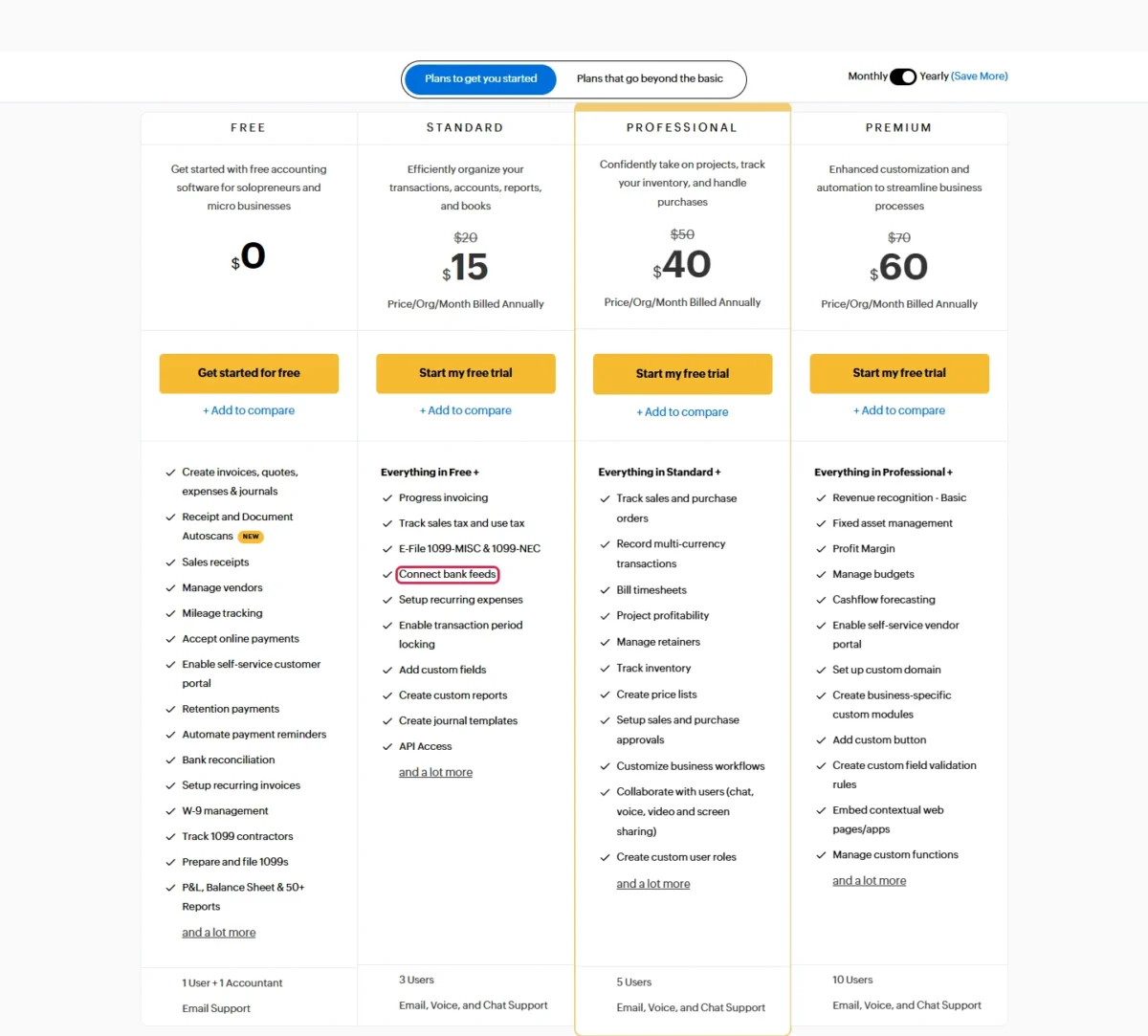
Invoicing, expenses and bank reconciliation work on every plan; bank feeds start on Standard; bills, inventory and projects start on Professional; and full inventory with online sales channels starts on Elite, per the plan comparison page.
Invoicing, payments and the Free plan
Free is Zoho’s plan for solopreneurs and micro businesses: quotes, invoices, recurring invoices, payment reminders, online payments and a self-service customer portal are all included at $0, up to 1,000 invoices a year.
Its stated limits are revenue at or under $50K for the financial year, 1 user and 1 accountant, and that 1,000-invoice cap. Progress invoicing, which lets a contractor bill a job in stages, starts on Standard.
For an owner who only sends invoices and never reconciles a bank account, Zoho Invoice, the invoicing-only app, is the narrower tool to compare.
Bank feeds and reconciliation
Zoho Books connects bank feeds on Standard and up; on Free you import statements yourself. The Free plan still reconciles those imports and applies transaction rules that categorize repeat entries, while “Connect bank feeds” sits in the Standard column.
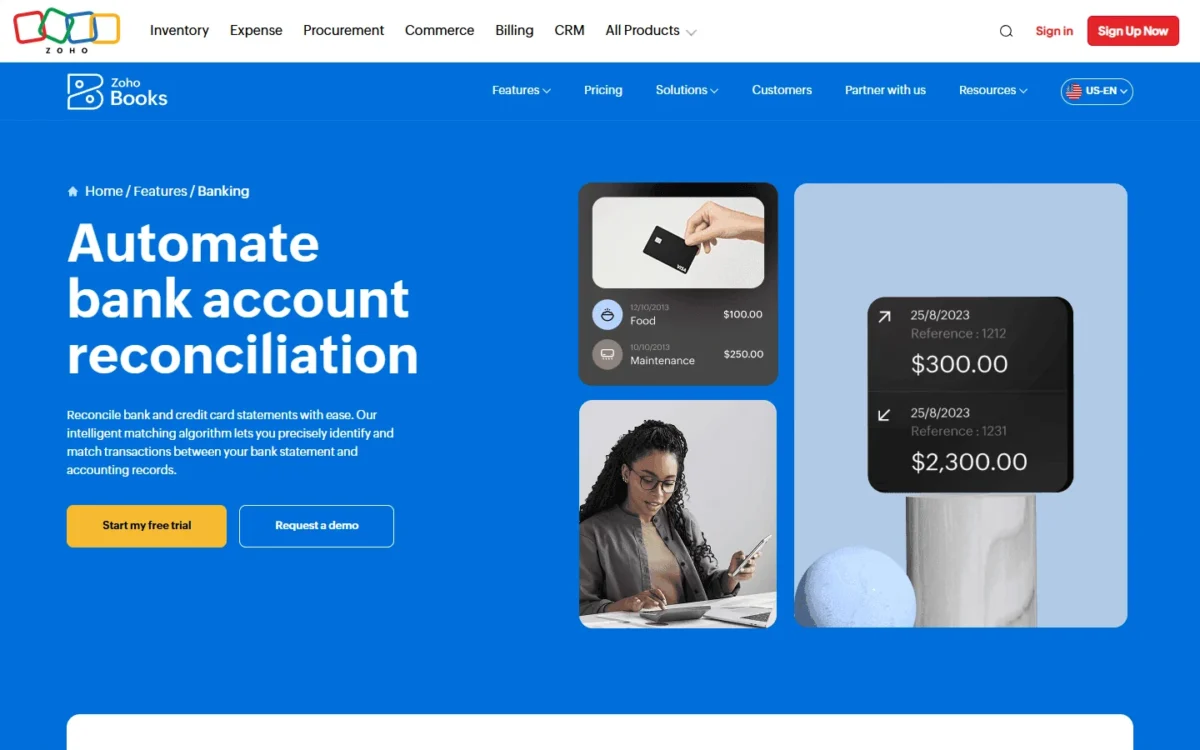
Manual import takes CSV, TSV, XLS, OFX, QIF and CAMT.053 files, and the reconciliation matching suggests a best match for each statement line. For one checking account and one card, a monthly import is a chore, not a blocker. With three accounts and daily card spend, Standard is the first upgrade I would make.
The Zoho pages I read do not list the US banks that connect directly, so link your own bank during the trial.
Bills, inventory and projects
Vendor bills, purchase and sales orders, multi-currency transactions, inventory tracking, price lists, billable timesheets and project profitability all start on Professional. Professional costs $40 per organization a month, billed annually.
Standard records expenses but not bills, so a business that pays suppliers on terms needs Professional from day one. The same holds for a Standard buyer who invoices foreign clients in their own currency.
A service firm stops there. A product seller faces a bigger step: warehouses, serial and batch tracking, shipping labels, Etsy, eBay and Amazon channels and up to 2 Shopify stores need Elite at $120 a month billed annually, which adds ($120 – $40) x 12 = $960 a year over Professional. Before paying that, compare the standalone Zoho Inventory app.
US sales tax and 1099s
US contractor paperwork starts on Free: W-9 management, 1099 contractor tracking and 1099 preparation are part of the $0 plan. Standard adds sales and use tax tracking and e-filing of 1099-MISC and 1099-NEC forms. Zoho Books also generates sales tax liability reports. For automated rates, Zoho Books integrates with Avalara AvaTax.
So a business that pays a dozen contractors gets 1099 e-filing on the entry paid plan; no higher plan is needed for year-end forms.
Automation, customization and integrations
Zoho Books comes with 70+ built-in reports. Custom fields and custom reports start on Standard, with 10 custom reports there, 25 on Professional, 50 on Premium and unlimited on Elite and Ultimate. Professional adds custom workflows and user roles, Premium adds custom modules and custom functions, and Elite adds Blueprints.
The native Zoho CRM integration syncs contacts, accounts, products and transactions, so a team already selling in Zoho CRM keeps books and pipeline in step; my Zoho CRM review covers that side. Zapier connects Zoho Books with more than 500 apps, but outgoing Zapier actions need Premium, while incoming actions work on every plan.
API usage runs from 2,000 requests a day on Standard to 10,000 on Premium and above, a cap that matters to a team syncing its own app or online store through the API. A business whose other apps sit outside Zoho should budget for Premium if it wants Zoho Books to trigger them.
Zoho Books Ease of Use
Zoho helps with setup in three ways: a 14-day trial, a free migration consultation and a step-by-step migration guide. Zoho Books runs in the browser with no installation, with native apps for desktop, mobile, tablet and smartwatch and more than 25 interface languages.
G2 reviewers put the average implementation time at 1 month, based on 330 user reviews on G2’s reviews page, checked November 2026. That is a reviewer average, not a promise for your business.
Owners moving off spreadsheets may want a primer on what accounting software does first. The trial settles fit: import one bank statement, send one invoice to yourself and enter one vendor bill.
Zoho Books Pricing
Zoho Books has six plans priced per organization, from Free at $0 to Ultimate at $240 per organization a month, billed annually. Beyond the included users, the Zoho Books user add-on costs $2.50 per user a month billed annually, or $3 per user a month on monthly billing.
Because the price covers the organization, a 3-person team on Standard pays $15 x 12 = $180 a year on annual billing; paying month to month costs $20 x 12 = $240, $60 more for the same plan.
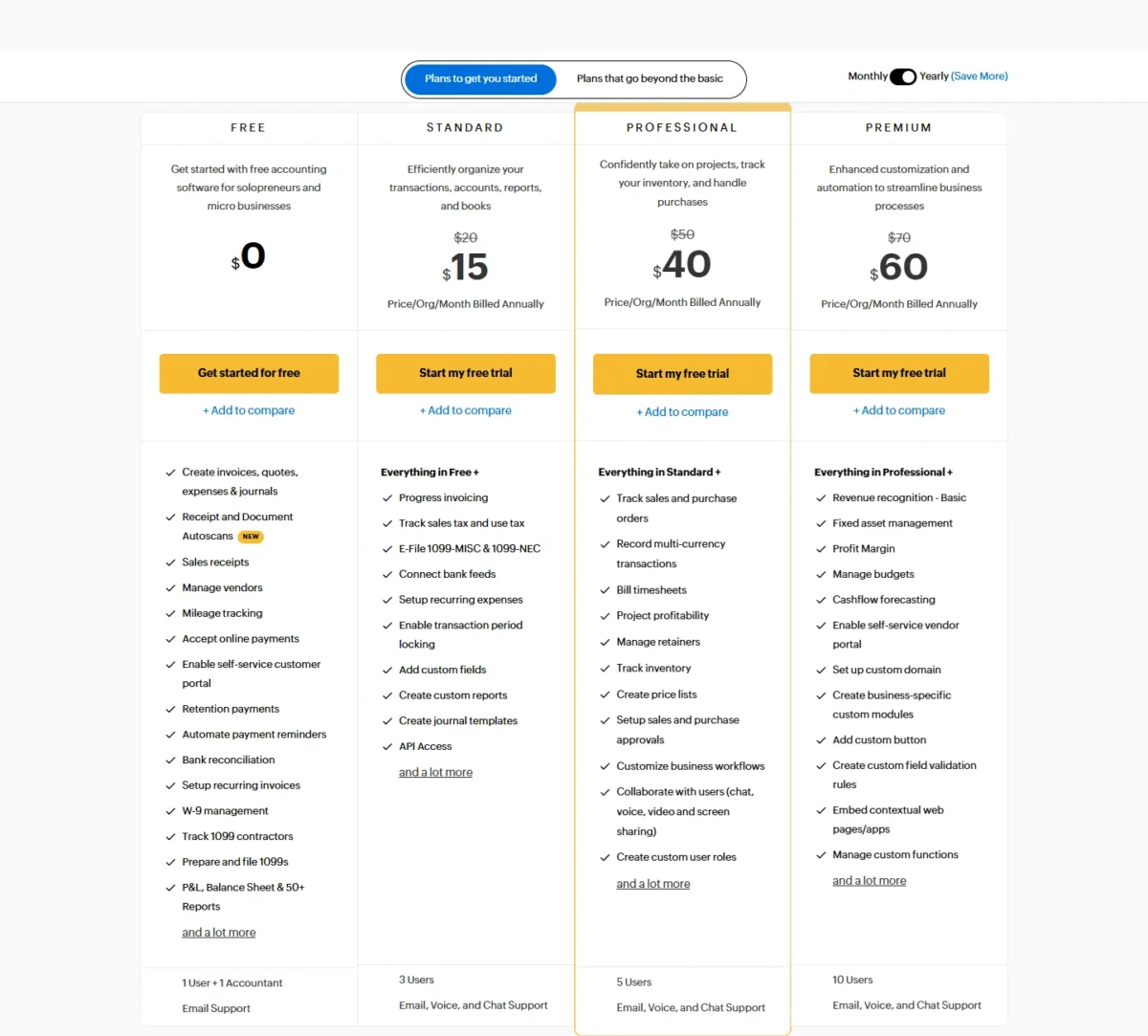
| Plan | Per org/ | Per org/ | Users | Key limit |
|---|---|---|---|---|
| Free | $0 | $0 | 1 + 1 accountant | Revenue at or under $50K; 1,000 invoices a year; no bank feeds |
| Standard | $15 | $20 | 3 | No vendor bills |
| Professional | $40 | $50 | 5 | No budgets or custom modules |
| Premium | $60 | $70 | 10 | No warehouses or Shopify |
| Elite | $120 | $150 | 10 | No advanced analytics |
| Ultimate | $240 | $275 | 15 | Costs twice Elite |
Sources: Zoho Books pricing page (Monthly and Yearly views) and plan comparison, US edition in US dollars, prices exclusive of local taxes, checked Nov 2026.
Standard fits a team that invoices, reconciles and files 1099s, with 3 users included and more through the user add-on; Professional fits any team that pays vendor bills. The limit that forces most upgrades is that feature, not a seat count, and the next section prices each step.
Included receipt autoscans run 50 a month on Free, 200 on Standard and Professional, and 1,000 on Premium and above, so the autoscan pack matters most to a Free or Standard user who scans every receipt. Other add-ons on annual billing are 50 extra document autoscans for $8 a month, $10 per location a month, expense claims at $7 per active user a month and BillPay at $59 a month. Free takes only the autoscan add-on.
For every plan and add-on in more depth, see my Zoho Books pricing guide.
There is no contract, and you can cancel at any time. To see these prices against the rest of the category, my picks of accounting software for small business set them side by side by business type.
What Forces a Zoho Books Upgrade?
A feature, not a head count, is what usually moves a business up a plan. The table lists each trigger next to the yearly cost after the move, on annual billing.
| Trigger | Move | Yearly cost after the move |
|---|---|---|
| Revenue above $50K, more than 1,000 invoices a year, a second user or bank feeds | Free to Standard | $15 x 12 = $180 |
| Vendor bills, purchase orders, multi-currency transactions, inventory tracking or billable timesheets | Standard to Professional | $40 x 12 = $480 |
| Budgets, cash flow forecasting, fixed assets, a vendor portal or custom modules | Professional to Premium | $60 x 12 = $720 |
| Warehouses, serial or batch tracking, Shopify or Etsy, eBay and Amazon channels | Premium to Elite | $120 x 12 = $1,440 |
| Advanced analytics, KPI tracking and 50+ prebuilt visualizations | Elite to Ultimate | $240 x 12 = $2,880 |
Sources: Zoho Books pricing page and plan comparison, checked Nov 2026.
Seats alone rarely justify a move, because the user add-on costs $2.50 per user a month, billed annually:
| Team | Workflow | Plan | Yearly cost, billed annually |
|---|---|---|---|
| 1 user | Invoices only, revenue at or under $50K | Free | $0 |
| 1 user | Wants bank feeds | Standard | $15 x 12 = $180 |
| 3 users | Invoices, bank feeds, 1099s | Standard | $15 x 12 = $180 |
| 5 users | No vendor bills | Standard + 2 users | $15 + 2 x $2.50 = $20 a month; $20 x 12 = $240 |
| 5 users | Pays vendor bills | Professional | $40 x 12 = $480 |
| 7 users | Pays vendor bills | Professional + 2 users | $40 + 2 x $2.50 = $45 a month; $45 x 12 = $540 |
| 7 users | Needs budgets or forecasting | Premium | $60 x 12 = $720 |
Sources: Zoho Books pricing page, plan prices and user add-on, checked Nov 2026.
The 7-user rows carry the lesson: Professional with two add-on users costs $720 – $540 = $180 a year less than Premium, so I would stay on Professional until the team needs budgets, forecasting or custom modules. Lower down, a 5-person team without vendor bills pays half on Standard what Professional costs.
Support and Security
Free comes with email support, and every paid plan adds voice and chat, Monday to Friday, 9 am to 9 pm ET. A Free user stuck on a reconciliation waits for an email reply, so a team that wants a phone call needs Standard.
Zoho states that Zoho Books uses two-factor authentication and SSL encryption to secure transactions. Zoho’s company-wide security whitepaper says sensitive customer data at rest is encrypted with 256-bit AES.
Who Should Use Zoho Books?
Zoho Books fits a small US business whose workflow lines up with one plan’s gates: Free for a solo owner under the revenue line, Standard for bank feeds and 1099 e-filing, Professional for vendor bills. It fits poorly when the job you need sits two plans up, because Professional to Elite triples the monthly price.
Best for
- A solo owner under $50K in revenue who sends up to 1,000 invoices a year (Free)
- A 2-5 person service firm that pays vendor bills and bills time (Professional)
- A team already selling in Zoho CRM, which syncs contacts, products and transactions natively
- A US business that files 1099s for contractors on a budget (Standard)
Not ideal for
- A business that wants automatic bank feeds for $0, since feeds start on Standard
- A product seller who needs warehouses or Shopify (up to 2 stores) and will not pay for Elite
- A non-Zoho stack that needs Zoho Books to trigger Zapier actions below Premium
- A freelancer who only sends invoices, for whom Zoho Invoice, the invoicing-only app, is the narrower tool
Zoho Books vs Competitors
Standard includes 3 users, so a 3-person team pays $15 x 12 = $180 a year for Zoho Books on annual billing, the lowest total of these four in the math below. QuickBooks Online and FreshBooks tie users to the plan or charge per extra person, and Xero’s cheapest plan caps invoices and bills.
| Software | Best for | Starting price | Key difference | Main trade-off |
|---|---|---|---|---|
| Zoho Books | 1-15 person teams on a budget | $15 per organization a month billed annually (Standard) | Priced per organization, 3-15 users included | Vendor bills only from Professional ($40) |
| QuickBooks Online | Businesses whose accountant works in QuickBooks | $0 Free (2 invoices a month); Simple Start $38 a month | Users set by plan: 1 on Simple Start, 3 on Essentials | 3 users need Essentials at $85 a month |
| Xero | Teams that add users often | $27 a month (Early) | No per-user license fees | Early: 20 invoices and 5 bills |
| FreshBooks | Service businesses that bill clients | $23 a month (Lite) | Built around client billing; Lite covers 5 clients | Team members cost $11 a month per user |
Sources: Zoho Books pricing, QuickBooks Online pricing, Xero US pricing and FreshBooks pricing, checked Nov 2026.
For three users, QuickBooks Online Essentials, the first QuickBooks plan with 3 users, lists $85 a month before its promotion: $85 x 12 = $1,020 a year, against $180 on Zoho Books Standard.
Xero Early is $27 x 12 = $324 a year with no per-user fees, but a business that sends more than 20 invoices moves to Growing at $59 a month. FreshBooks Lite with two added team members comes to $23 + 2 x $11 = $45 a month, and $45 x 12 = $540 a year.
The feature sets differ, so price is not the whole story. If QuickBooks and Xero are both still on your list, see how QuickBooks and Xero compare on plans and limits.
Best Zoho Books Alternatives
Each rival answers a different reason to leave Zoho Books. QuickBooks Online suits a business whose accountant already works in QuickBooks, since Simple Start includes access for 2 accountants. Xero suits a team that adds people often, because it charges no per-user license fees. FreshBooks suits a service business built around client billing, with Plus covering 50 billable clients.
If QuickBooks Online and FreshBooks are the two left on your shortlist, read my QuickBooks vs FreshBooks comparison before you decide.
How I Evaluated Zoho Books
This review rests on pages read on November 4, 2026: Zoho’s US pricing page in both billing views, the plan comparison, features, banking, integrations, migration, company and security pages, and the QuickBooks Online, Xero and FreshBooks pricing pages.
The plan facts come from those official pages, and the cost math, upgrade triggers and plan-fit calls are my analysis. The Zoho pages I read do not list which US banks connect directly or say how the Free plan’s revenue threshold is checked. This review gives no score: the verdict is in words.
FAQ
Is Zoho Books really free?
Yes, with conditions. The Free plan stays free indefinitely while revenue for the financial year does not exceed $50K, for 1 user plus 1 accountant. It includes 50 receipt autoscans a month and email support only, and it accepts no add-ons except extra autoscans.
Is Zoho an Indian or Chinese company?
Zoho’s company timeline ties it to the US and India, not China. It traces Zoho to AdventNet, born in New Jersey in 1996, records a move to a campus in Chennai, India, and lists US offices in Pleasanton, California and Austin.
Can Zoho Books run payroll?
Not on its own. Zoho Books handles payroll through integrations with Zoho Payroll and SurePayroll; the SurePayroll link pays employees and automates payroll journal entries in Zoho Books. Budget for the payroll service’s own price on top of your Zoho Books plan.
Zoho Books Review: Final Verdict
Yes, Zoho Books is worth signing up for if you run a 1-15 person US business and want per-organization pricing: start the 14-day trial on the plan your workflow needs, Standard for bank feeds and 1099 e-filing or Professional for vendor bills. Its biggest trade-offs are the Elite price for warehouses and Shopify and the Premium gate on outgoing Zapier actions.
Pick QuickBooks Online when your accountant works there, or Xero when your head count changes month to month. Before you pay, connect your bank in the trial, and if you plan to stay on Free, confirm your revenue stays under its threshold.