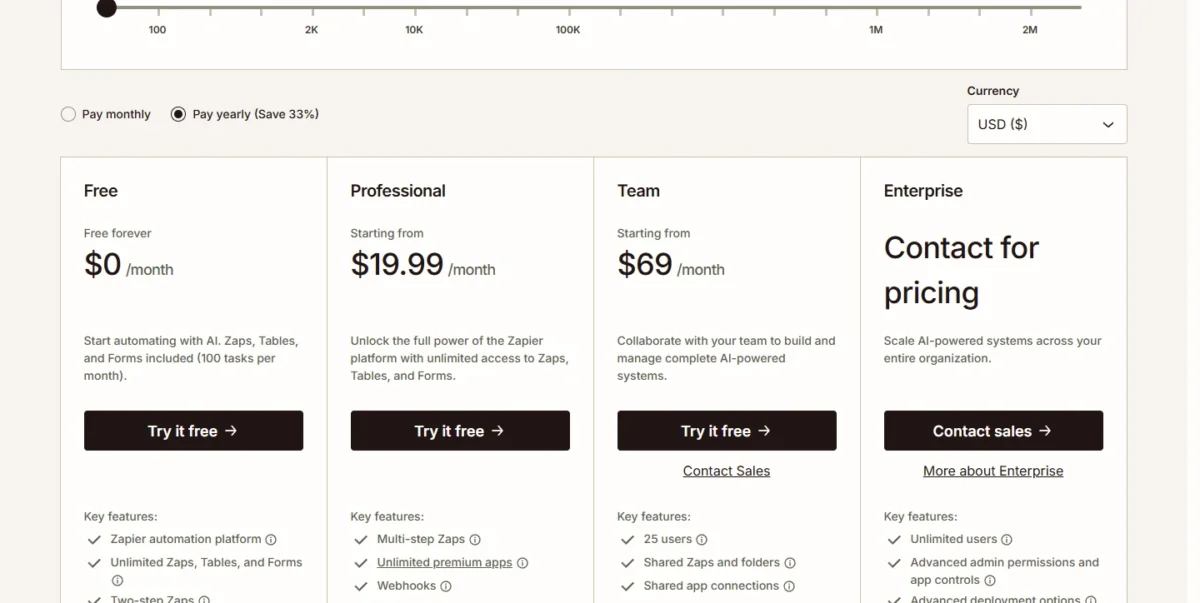
Zapier pricing starts with Free at $0 for 100 tasks a month; Professional costs $19.99 per month billed annually, or $29.99 billed monthly, for 750 tasks. Team starts at $69 per month billed annually, or $103.50 billed monthly, for 2,000 tasks and up to 25 users, and Enterprise is quoted by sales.
Your Zapier cost depends on the task tier, not the number of users from 2 to 25: Professional and Team are priced per account by task tier, though a second user moves the account from Professional to Team. Below are every tier’s price on both billings, yearly totals for one to 12 users, and the overage rules. From December 1, 2026, Next Gen Zaps and the Zapier SDK start using tasks too.
Quick pricing answer
Zapier has four plans: Free ($0, 100 tasks a month), Professional (from $19.99 per month billed annually for 750 tasks), Team (from $69 per month billed annually for 2,000 tasks and up to 25 users) and Enterprise (contact for pricing). Monthly billing raises those starting prices to $29.99 and $103.50.
New accounts get a 14-day Professional trial with no credit card. One builder should buy Professional at the tier their task count needs; two to 25 people who share Zaps should buy Team, whose price does not change with the number of users.
The caveat: tasks past your tier bill at a higher, unpublished rate until usage reaches 3x the tier, and then Zaps pause. Checked November 2026, USD.
In This Article (14 sections)
Zapier Pricing at a Glance
Professional and Team are priced per account by task tier, not per user: Free and Professional hold one user, Team up to 25 and Enterprise an unlimited number.
| Plan | Monthly billing | Annual billing | Best for | Main limitation |
|---|---|---|---|---|
| Free | $0 | $0 | One person running a two-step Zap | 100 tasks a month, 15-minute polling |
| Professional | From $29.99 per month (750 tasks) | From $19.99 per month (750 tasks) | One builder running multi-step Zaps | One user; live chat from the 2,000-task tier |
| Team | From $103.50 per month (2,000 tasks) | From $69 per month (2,000 tasks) | 2 to 25 people who share Zaps | Starts at 2,000 tasks; 25 users at most |
| Enterprise | Contact for pricing | Contact for pricing | Unlimited users and admin controls | No published price |
Sources: Zapier plans and pricing page, checked November 2026.
Those starting prices cover only the smallest tier. Your bill is the row that holds your monthly task count:
| Tasks a month | Professional, monthly billing | Professional, annual billing | Team, monthly billing | Team, annual billing | Team premium, annual billing |
|---|---|---|---|---|---|
| 750 | $29.99 | $19.99 | Starts at 2,000 | Starts at 2,000 | Starts at 2,000 |
| 1,500 | $58.50 | $39 | Starts at 2,000 | Starts at 2,000 | Starts at 2,000 |
| 2,000 | $73.50 | $49 | $103.50 | $69 | $69 – $49 = $20 |
| 5,000 | $133.50 | $89 | $178.50 | $119 | $119 – $89 = $30 |
| 10,000 | $193.50 | $129 | $253.50 | $169 | $169 – $129 = $40 |
| 20,000 | $283.50 | $189 | $373.50 | $249 | $249 – $189 = $60 |
| 50,000 | $433.50 | $289 | $598.50 | $399 | $399 – $289 = $110 |
| 100,000 | $733.50 | $489 | $898.50 | $599 | $599 – $489 = $110 |
Sources: Zapier plans and pricing page, each tier read on Pay monthly and Pay yearly, checked November 2026.
These are the US-dollar prices zapier.com showed on November 4, 2026, per account per month; an annual figure is the monthly equivalent of a plan billed yearly.
Zapier Pricing Plans Explained
Free is a test bed, Professional is the plan for one builder, Team buys sharing for up to 25 people, and Enterprise buys governance; each step from Free to Professional to Team also shortens how often Zaps check for new data.
| Feature | Free | Professional | Team | Enterprise |
|---|---|---|---|---|
| Users | 1 | 1 | 25 | Unlimited |
| Zap steps | Two-step | Multi-step | Multi-step | Multi-step |
| Polling time | 15 min | 2 min | 1 min | 1 min |
| Tables records | 2,500 | 100,000 | 500,000 per account | Contact sales |
| Code runtime per step | 1 second | 30 seconds | 30 seconds | 2 minutes |
Sources: Zapier plans and pricing page, feature comparison, checked November 2026.
Free
Free costs $0 for 100 tasks a month, with two-step Zaps (one trigger, one action), 15-minute polling and one user. At one task per run, that is about three runs a day: enough for one low-traffic handoff, such as a form entry copied into a spreadsheet. A second action, a premium app (paid plans only) or a 101st task ends it.
Professional
Professional costs $19.99 per month billed annually at 750 tasks. It adds multi-step Zaps, webhooks and unlimited premium apps, still for one user, with 2-minute polling.
The tier matters more than the plan. On annual billing, Professional 2,000 costs $49 – $39 = $10 a month more than Professional 1,500, and it is the first tier with live chat support. If you expect 1,200 to 2,000 tasks, take 2,000: $10 x 12 = $120 a year buys 500 tasks of headroom and faster help. Professional cannot add a second user at any tier, so people, not volume, force the next upgrade.
Team
Team costs $69 per month billed annually ($103.50 billed monthly) for 2,000 tasks, and that one price covers up to 25 users. It adds shared Zaps and folders, shared app connections, SAML SSO, 1-minute polling and priority support, and admins can export task usage per member as a CSV.
The premium over Professional at the same tier is the price of sharing, and it grows with volume: $69 – $49 = $20 a month at 2,000 tasks, but $249 – $189 = $60 at 20,000, both billed annually. Skip Team if one person builds every Zap; for two or three builders, it is the only Zapier plan below Enterprise that lets them work in one account.
Enterprise
Enterprise is quoted only. It adds unlimited users, annual task limits, advanced admin permissions and app controls, observability, and a Technical Account Manager at a set threshold or as an add-on. The Zapier Enterprise page lists SAML 2.0 with SCIM, SOC 2 Type II and SOC 3, and GDPR and CCPA compliance.
How Zapier Counts Tasks (and What a Task Costs)
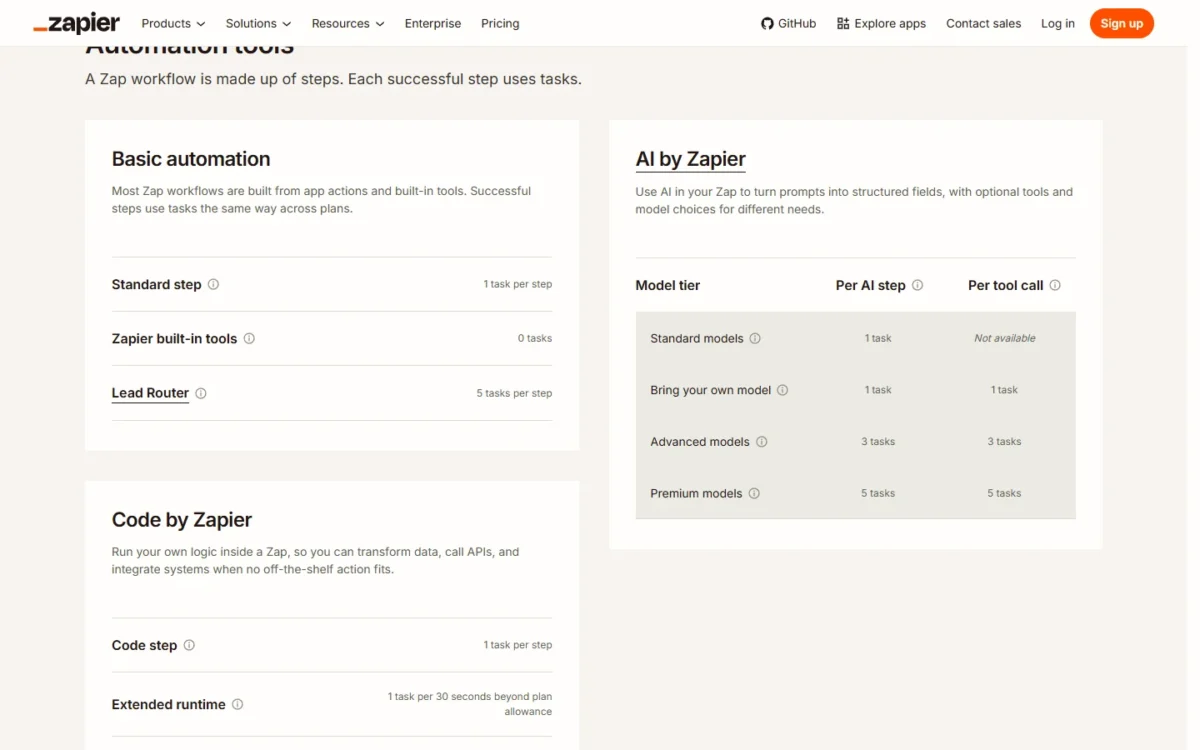
One task is one successful action step, so a Zap with a trigger and three actions uses 3 tasks per run. Triggers, polling, Filter, Paths, Formatter, Delay, Looping, Tables, Forms, editor tests and steps that error use none, under Zapier’s task usage rules.
To estimate a month, count the action steps in each of your marketing automation workflows and multiply by its runs. Some steps use more than one task:
- AI by Zapier: 1 task per AI step on a standard model or your own model, 3 on an advanced model, 5 on a premium model
- Zapier MCP: 2 tasks per successful tool call
- Lead Router: 5 tasks per lead routed
- Code by Zapier: 1 task per run, plus 1 task per 30 seconds beyond the plan’s runtime
The cost of a task falls steeply as the tier rises:
| Tasks a month | Professional, price per thousand tasks | Team, price per thousand tasks |
|---|---|---|
| 750 | $19.99 / 750 x 1,000 = $26.65 | Starts at 2,000 |
| 2,000 | $49 / 2,000 x 1,000 = $24.50 | $69 / 2,000 x 1,000 = $34.50 |
| 5,000 | $89 / 5,000 x 1,000 = $17.80 | $119 / 5,000 x 1,000 = $23.80 |
| 20,000 | $189 / 20,000 x 1,000 = $9.45 | $249 / 20,000 x 1,000 = $12.45 |
| 100,000 | $489 / 100,000 x 1,000 = $4.89 | $599 / 100,000 x 1,000 = $5.99 |
Sources: Zapier plans and pricing page, annual billing view, checked November 2026.
Every higher tier still costs more per month, so a falling price per thousand tasks helps only a buyer near a tier line, such as the $49 – $39 = $10 step from Professional 1,500 to 2,000, billed annually. Team’s extra money pays for sharing, not tasks.
Take an illustrative lead Zap: a form trigger and four actions (CRM record, Slack alert, email list, follow-up task), running 300 times a month. Four actions x 300 runs = 1,200 tasks, which sits in the 1,200 to 2,000 band where my rule above picks Professional 2,000.
Professional 2,000 costs $49 per month billed annually.
Add one advanced-model AI step to score each lead and each run uses 4 + 3 = 7 tasks, so 7 x 300 = 2,100 tasks: past the 2,000 tier, which means Professional 5,000 at $89 per month billed annually or overage every month. A standard model keeps each run at 4 + 1 = 5 tasks, and 5 x 300 = 1,500 tasks sits at the 1,500 tier’s limit, so the same rule still points to Professional 2,000.
Recount in December: from December 1, 2026, Next Gen Zaps use tasks at Classic Zap rates with at least 1 task per successful run, and the SDK outside a Next Gen Zap uses 1 task per action, fetch call and inbox-lease trigger.
Does Zapier Have a Free Plan or Trial?
Yes, both: Free stays at $0 with 100 tasks a month and two-step Zaps, and every new account starts with a 14-day trial of Professional that needs no credit card.
Use the trial to measure, not to explore: run your real multi-step Zaps for two weeks, read the Task Usage page and double the figure for a first tier estimate. A Team or Enterprise trial goes through Zapier’s sales team.
Monthly vs Annual Zapier Pricing
Annual billing takes 33% off every paid tier: Professional 750 costs $19.99 x 12 = $239.88 for the year, against $29.99 x 12 = $359.88 paid month to month, a $120 difference.
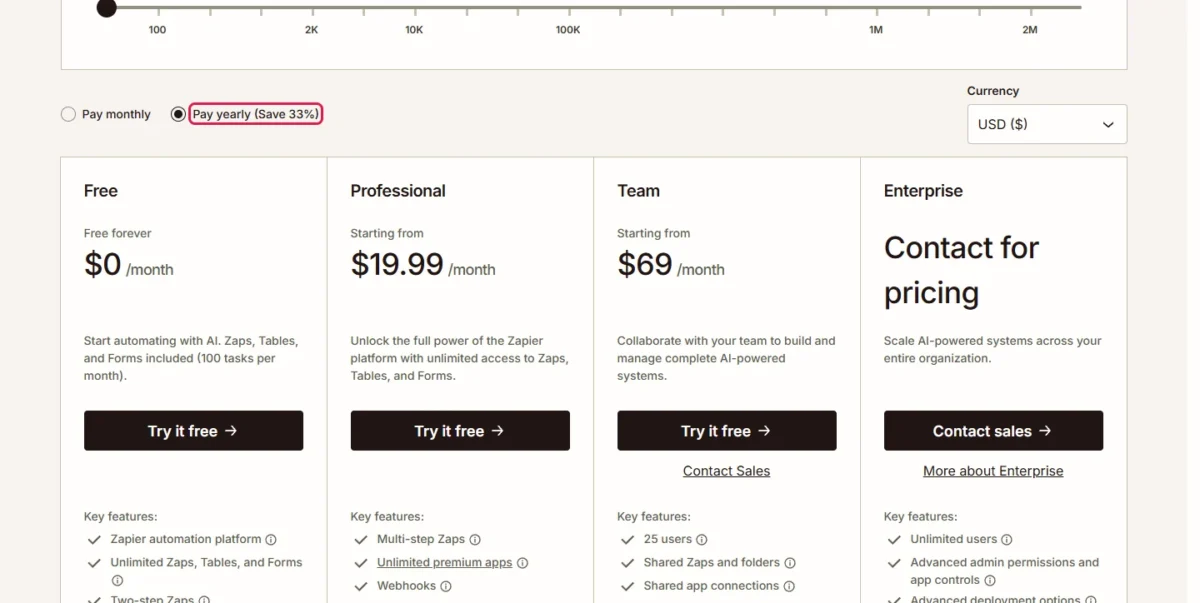
| Plan and tier | Monthly billing | Annual billing | 12 months, billed monthly | 12 months, billed annually | Saving |
|---|---|---|---|---|---|
| Professional 750 | $29.99 | $19.99 | $29.99 x 12 = $359.88 | $19.99 x 12 = $239.88 | $359.88 – $239.88 = $120 |
| Professional 2,000 | $73.50 | $49 | $73.50 x 12 = $882 | $49 x 12 = $588 | $882 – $588 = $294 |
| Team 2,000 | $103.50 | $69 | $103.50 x 12 = $1,242 | $69 x 12 = $828 | $1,242 – $828 = $414 |
Sources: Zapier plans and pricing page, Pay monthly and Pay yearly views, checked November 2026.
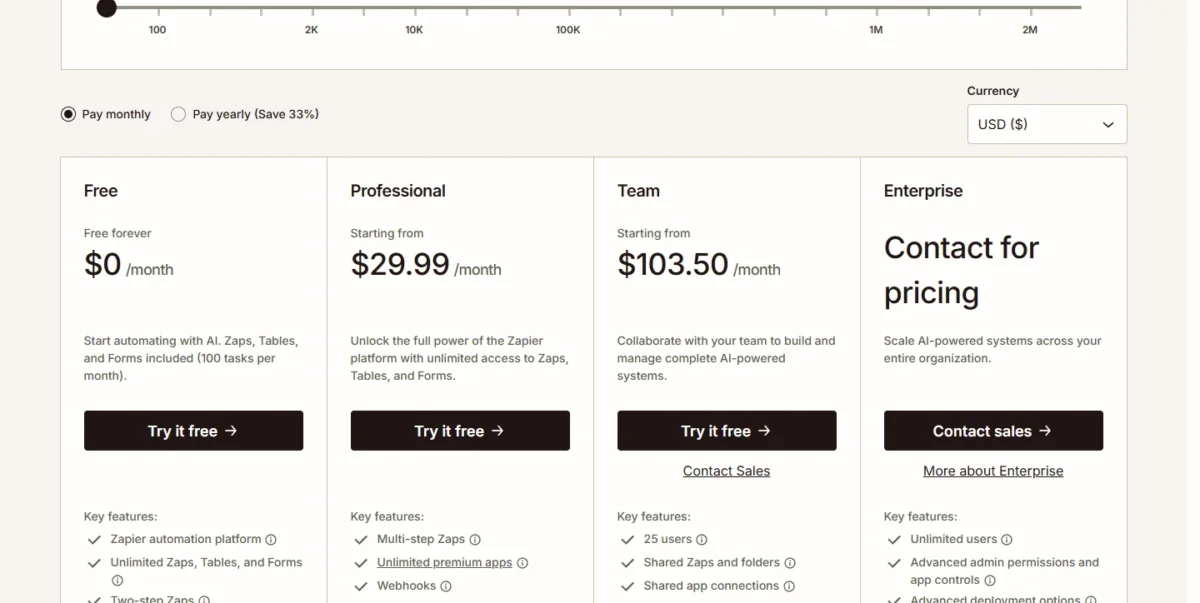
Commit only once the tier is settled. Moving up mid-year comes with a per-day credit, but a downgrade waits for the end of the billing cycle, and switching from annual back to monthly drops the discount, as Zapier’s plan-change help page explains. My rule: pay monthly for a month or two after the trial, then go annual.
Additional Zapier Costs to Consider
Four things push a Zapier bill past the plan price: pay-per-task overage, steps that use several tasks, extended code runtime, and the separate Agents and Chatbots plans.
| Cost type | When it applies | Pricing basis | Notes |
|---|---|---|---|
| Pay-per-task overage | After the plan’s task limit | A higher per-task rate, shown in Billing settings | Stops at 3x the task limit, then Zaps pause |
| Multi-task steps | AI steps, MCP tool calls, Lead Router | Advanced AI 3 tasks, premium 5, MCP 2, Lead Router 5 per lead | Standard AI model uses 1 task |
| Extended code runtime | A code step runs past its included runtime | 1 task per 30 seconds beyond the allowance | Enabled per code step |
| Zapier Agents Pro | Beyond Agents Free’s 400 activities | $400 billed annually | 1,500 activities a month |
| Zapier Chatbots Pro or Advanced | More than 2 chatbots, or embedding on your site | $160 or $800 billed annually | Up to 5 or 20 chatbots |
| Technical Account Manager | Enterprise | Included at a set threshold or as an add-on | No published price |
Sources: Zapier task usage rates, pay-per-task billing help and the Zapier plans and pricing page, checked November 2026.
Pricing note
Pay-per-task is on by default for accounts that joined after January 2024, so a busy month keeps running. It stops at 3x the task limit: on Professional 750, 750 + 1,500 = 2,250 tasks, after which Zaps pause until the next usage period. On Professional and Team, only the account owner can turn it off.
Zapier does not publish the overage rate. If overage shows up two months running, move up a tier, because a task inside the plan always costs less than an overage task.
How Much Does Zapier Cost for Your Team?
Take two illustrative cases with invented task counts: a solo builder whose Zaps run 600 tasks a month, and five people who share 4,000.
Professional 750 costs $19.99 and Team 5,000 costs $119 per month, both billed annually.
The solo builder pays $19.99 x 12 = $239.88 a year; the team pays $119 x 12 = $1,428.
Zapier cost calculator
This calculator needs JavaScript. The scenario table below gives the same estimate for typical workloads.
Enter what you need. The calculator prices it on every plan at list prices and names the cheapest plan that covers it.
- List prices in USD from Zapier’s official pricing pages, checked Nov 4, 2026. Tax and regional prices are not included.
- 12-month figures are 12 times the monthly cost at the billing you choose.
- A planning estimate at list prices, not a quote.
Enter your users, your billing choice and your monthly step mix (standard actions, advanced or premium AI steps, MCP tool calls, Lead Router leads). The calculator converts them into tasks and shows every tier side by side with the cheapest one that covers the month. It leaves out overage, tax and the Agents and Chatbots plans.
The table below prices four illustrative cases; the task counts are invented inputs, not usage data. The first solo builder runs 600 tasks a month and the second runs 1,800, then five users share 4,000 tasks and twelve users share 15,000.
| Team size | Plan | Billing | Monthly equivalent | Annual total | Assumptions |
|---|---|---|---|---|---|
| 1 user, lower volume | Professional 750 | Annual | $19.99 | $19.99 x 12 = $239.88 | Billed monthly: $29.99 x 12 = $359.88 |
| 1 user, higher volume | Professional 2,000 | Annual | $49 | $49 x 12 = $588 | Billed monthly: $73.50 x 12 = $882 |
| 5 users, 4,000 tasks | Team 5,000 | Annual | $119 | $119 x 12 = $1,428 | One account price; billed monthly: $178.50 x 12 = $2,142 |
| 12 users, 15,000 tasks | Team 20,000 | Annual | $249 | $249 x 12 = $2,988 | One account price; billed monthly: $373.50 x 12 = $4,482 |
Sources: illustrative example task counts; prices from the Zapier plans and pricing page, checked November 2026; totals exclude overage, add-on plans, tax and discounts.
In this example, twelve people pay $2,988 – $1,428 = $1,560 more a year than five, all of it for the larger task tier, none for the extra users.
Which Zapier Plan Should You Choose?
Pick Free for one two-step Zap under 100 tasks a month, Professional for one builder, Team once a second person must share Zaps or you need SAML SSO, and Enterprise for more than 25 users, SCIM or annual task limits.
| Your needs | Plan to consider | Why | Main limitation |
|---|---|---|---|
| One two-step Zap, under 100 tasks a month | Free | $0, no upgrade needed | 15-minute polling, no premium apps |
| One builder, multi-step Zaps, under 750 tasks | Professional 750 | $19.99 per month billed annually | One user, no live chat |
| One builder at 750 to 1,200 tasks | Professional 1,500 | $39 per month billed annually | One user, no live chat |
| One builder at 1,200 to 2,000 tasks | Professional 2,000 | $49 against $39 for 1,500, billed annually, with live chat | One user |
| 2 to 25 people who share Zaps or need SAML SSO | Team at your pooled tier | One account price from $69 per month billed annually | Starts at 2,000 tasks |
| Spiky volume | One tier lower, pay-per-task on | Overage covers peaks up to 3x the tier | Higher, unpublished task rate |
| More than 25 users, SCIM or annual task limits | Enterprise | Unlimited users, annual task limits | Contact for pricing |
Sources: Zapier plans and pricing page, checked November 2026.
Is Zapier Worth the Price?
Zapier is worth its price for a team whose Zaps connect many of its 9,000+ apps and run in the low thousands of tasks a month; it is poor value for steady, high-volume steps that only copy records from one app to another.
Volume is what you pay for as you grow: on Professional, billed annually, the price per thousand tasks falls from $49 / 2,000 x 1,000 = $24.50 at the 2,000 tier to $489 / 100,000 x 1,000 = $4.89 at 100,000. At 50,000 tasks, Professional costs $289 per month billed annually and Team $399, money that mostly buys volume.
- Skip it if:
- your Zaps run tens of thousands of simple, single-app steps a month; price the Zapier alternatives linked in the next section before you commit.
Price is one part of the decision; my full Zapier review weighs where the product fits beyond its plans.
Is There a Cheaper Way to Pay for Zapier?
Yes. Five changes inside Zapier cut the bill before you shop elsewhere:
- Bill annually once your tier is settled, for 33% off.
- Size the tier to a measured month, and take 2,000 tasks over 1,500 near the line.
- Move logic into tools that use no tasks: Filter, Paths, Formatter, Tables and Forms.
- Use standard AI models for simple classification or extraction: 1 task per AI step instead of 3 or 5.
- Apply for the 15% nonprofit discount if your organization qualifies.
If the bill is still too high, the gap is structural, and the Zapier alternatives compared by price show which tools meter automation differently.
For one of those rivals in depth, my Make review explains how its plans are built.
Billing, Discounts and Cancellation
Zapier publishes two discounts: 33% for annual billing, and 15% for nonprofits on a single paid plan, excluding pay-per-task charges. A US nonprofit applies through the Zapier nonprofit page with its 501(c)(3) letter.
An upgrade takes effect at once and resets the billing date and task count. Zapier’s pricing FAQ says you can cancel at any time and keep the paid plan until that cycle ends; confirm the refund terms with Zapier before an annual commitment.
How I Verified Zapier Pricing
I read zapier.com/pricing on November 4, 2026 (pricing region US, currency USD), moving the task selector through eight tiers from 750 to 100,000 tasks on both Pay monthly and Pay yearly. Task rules come from Zapier’s help pages and its task usage rates page.
Prices are quoted as printed. Yearly totals multiply the monthly list price by the months in a year, and the price per thousand tasks divides the monthly price by the tier’s task count; those figures, the invented lead Zap and the plan picks are my calculations and judgment. Zapier does not publish its pay-per-task rate or an Enterprise price.
Frequently Asked Questions
Does Zapier charge for MCP?
Yes. Every account pays 2 tasks from its plan quota for each successful MCP tool call, and a failed call costs nothing. From December 1, 2026, calls to free By Zapier apps such as Tables and Forms stop counting, while AI by Zapier tool calls count at AI by Zapier’s own rate.
Do triggers or failed steps use tasks?
No. Triggers never use tasks, nor do the polls behind them: a Zap that checks an app every two minutes polls 30 times an hour, or 30 x 24 x 30 = 21,600 times in a 30-day month, all without using a task. Two exceptions catch people out: a search step set to continue when nothing is found uses 1 task, and replaying a whole Zap run charges again for steps that had succeeded.
Do Zapier Agents use my tasks?
No. Zapier Agents draw on a separate activity quota: 400 activities a month on Agents Free and 1,500 on Agents Pro. On a Team account everyone shares one pool of Agents activities, so one busy agent can drain it for the rest.
Final Pricing Verdict
Start one builder on Professional at the tier the 14-day trial says you need, bill annually once that tier holds, and take 2,000 tasks over 1,500 when you are close. Move to Team the day a second person must share Zaps or you need SAML SSO: at $69 per month billed annually for up to 25 users, the tier is the whole bill.
Keep Free for a single two-step Zap, and save the Enterprise call for more than 25 users, SCIM or annual task limits. If steady, simple volume pushes you into the highest tiers, price an alternative before you renew.