


For most small creators, the cheapest finished AI video comes from drafting on a low-cost model and paying premium rates only for the keeper. This list of the best value AI video generators ranks 10 tools on what one kept clip costs and on how clearly each plan’s credit rules protect that spend.
It is for solo creators and small teams about to pay for, or upgrade, a credit plan. Google Flow has the cheapest paid entry, Higgsfield the clearest credit rules, Vidu the cheapest full-render clip, Luma the cheapest drafts and InVideo AI a free editing pass.
I built the ranking from each vendor’s pricing, help and terms pages, read in October 2026, and did the per-clip arithmetic myself.
Quick verdict
The trade-off behind every pick: a cheap clip stays cheap only if the model lands your shot in few takes, and no vendor publishes that number.
- Lowest entry price: Google Flow, through Google AI Plus at $4.99 a month plus 50 free Flow credits a day.
- Clearest credit rules: Higgsfield, which shows each job’s cost on the Generate button and returns most failed generations.
- Cheapest full-render clip: Vidu, $10 x 10 / 800 = $0.125 for a 5-second Q4 clip at 540P on Standard.
- Cheapest drafts: Luma, where Ray3.14 Draft costs 4 credits per second against 80 at 1080p.
- Free editing pass: InVideo AI, where manual timeline editing and export use no credits.
- Credits that survive a quiet month: Runway Max, or HeyGen for avatar video.

Higgsfield
Best for: predictable credit spend across many models
The Generate button shows each job’s total cost, and most failed generations return their credits.
Limit: Unlimited works only on higgsfield.ai, for set periods

Google Flow
Best for: the lowest entry price
Google AI Plus costs $4.99 a month, and every account gets 50 Flow credits a day.
Limit: one request may create 2 billed videos

Vidu
Best for: low-cost short clips at 540P
Q4 at 540P costs 2 credits per second on paid plans, so Standard’s 800 credits buy 80 five-second clips.
Limit: the per-second rate is listed for 540P only

InVideo AI
Best for: editing passes that cost no credits
Manual timeline editing and export use no credits; AI assistance and AI generation do.
Limit: Basic has no Seedance 2.5 access
| Software | Best for | Entry paid plan | Cost of one clip | Unused plan credits | Key limitation |
|---|---|---|---|---|---|
| Higgsfield | Predictable credit spend across many models | Starter, $15 a month, 200 credits | $49 x 7 / 1,000 = $0.34 (Kling 3.0, 720p, 5 s, Plus billed monthly) | Expire each billing period | Unlimited only on the website |
| Google Flow | The lowest entry price | Google AI Plus, $4.99 a month, 200 credits plus 50 a day | $19.99 x 12 / 1,000 = $0.24 (Omni Flash, 720p, 8 s, Google AI Pro) | Do not roll over | One request may bill 2 videos |
| Luma | Drafting cheaply before the final render | Plus, $30 a month, 10,000 credits | $30 x 100 / 10,000 = $0.30 (Ray3.14, 720p, 5 s) | Not listed | Veo 3.1 at 140 credits per second |
| Vidu | Low-cost short clips at 540P | Standard, $10 billed monthly, 800 credits | $10 x 10 / 800 = $0.125 (Q4, 540P, 5 s) | Not listed | Rate listed for 540P only |
| Pika | Budgeting retakes before you subscribe | Starter, $10 billed monthly, 900 credits | $10 x 33 / 900 = $0.37 (Wan 3.0, 720p, 5 s); Creator is $35 | Do not roll over | Free has no commercial license |
| Runway | Heavy solo creators who need rollover | Standard, $15 billed monthly, 625 credits | $15 x 60 / 625 = $1.44 (Gen-4.5, 5 s); Max is $95 | Roll over one month on Max | Standard and Pro reset each cycle |
| InVideo AI | Editing passes that cost no credits | Basic, $9 per seat billed monthly, 190 credits | $30 x 56 / 1,000 = $1.68 (Seedance 2.5, 720p, 5 s, Pro) | Do not roll over | Basic has no Seedance 2.5 |
| PixVerse | Off-peak volume on PixVerse models | Standard, $8 a month billed yearly as $96; Off-Peak needs Pro, $24 a month billed yearly as $288 | Not published on the pricing page | Expire every 30 days | Off-Peak discount starts on Pro, PixVerse models only |
| HeyGen | Talking-head videos with rollover credits | Creator, $29 a month | Not published on the pricing page | Roll over one more month | No per-video credit rate |
| Kling AI | High-volume buyers who budget per credit | Standard, $6.99 first month, then $8.8 a month | Not published on the membership page | Covered in the membership page FAQ | First-month price applies once |
Sources: Higgsfield, Google AI plans, Flow credits, Luma, Vidu, Pika, Runway, InVideo AI, PixVerse, HeyGen, Kling AI, checked October 2026.
In This Article (19 sections)
Why AI Video Credits Run Out in a Few Days
AI video credits run out fast because you pay per generation, not per video you keep. Google Flow’s costs are per generation, not per request, and Higgsfield charges each output of a batch. Each retake, extra output, second of length, resolution step, premium model and AI edit draws on one balance, and most monthly allowances expire at renewal.
| What drains credits | How vendors bill it | Example from a vendor page |
|---|---|---|
| Retakes and batch outputs | Each output is a separate charge | Higgsfield charges each output of a batch of 2, 3 or 4; Google Flow says one request may generate 2 videos; Kling AI allows 4 videos per generation |
| Clip length | Per second, or per generation of set length | Runway’s Gen-4.5 uses 12 credits per second; InVideo AI bills credits per second times duration |
| Resolution | Each step up multiplies the rate | Luma’s Ray3.14 costs 20 credits per second at 720p and 80 at 1080p |
| Premium models | Flagship models cost several times more | Google Flow charges 100 credits for an 8-second Veo 3.1 Quality video and 12 for Gemini Omni Flash at 720p |
| Editing passes | AI edits are billed like generations | Google Flow charges 40 credits for an Omni Flash edit; InVideo AI’s manual timeline edits cost nothing |
| Expiry | Unused credits vanish on a schedule | Google Flow’s daily credits do not roll over; PixVerse’s daily credits expire when the day ends |
Sources: Higgsfield credits help, Flow credits, Kling AI, Runway, InVideo AI credits help, Luma, PixVerse, checked October 2026.
The drains stack. A batch of four 5-second Seedance 2.0 outputs at 1080p on Higgsfield uses about 4 x 60 = 240 credits, almost a quarter of Plus’s 1,000 a month.
How to Calculate the Cost of a Finished AI Video
The cost of a finished AI video is the cost per clip, times the shots in the video, times the takes each kept shot needs. Cost per clip is the plan price times the credits one clip uses, divided by the credits the plan includes.
- Cost per clip = plan price x credits per clip / plan credits
- Cost per finished video = cost per clip x shots x takes per kept shot
Take an illustrative 30-second video built from six 5-second shots, where each kept shot needs three takes. That is 6 x 3 = 18 generations, or 18 x 5 = 90 seconds generated for 30 seconds kept.
At an illustrative $0.30 a clip, the video comes to 18 x $0.30 = $5.40. At an illustrative $1.40 a clip, it comes to 18 x $1.40 = $25.20.
Takes per kept shot is the one input only you can supply. The table gives the rest, plus how many clips each plan’s monthly credits buy.
| Tool | Plan, price and credits | Model, resolution, length | Credits per clip | Cost per clip | Clips a month |
|---|---|---|---|---|---|
| Higgsfield | Plus, $49 billed monthly, 1,000 credits | Kling 3.0, 720p, 5 s | About 7 | $49 x 7 / 1,000 = $0.34 | 1,000 / 7 = about 142 |
| Higgsfield | Plus, $49 billed monthly, 1,000 credits | Seedance 2.0, 1080p, 5 s | About 60 | $49 x 60 / 1,000 = $2.94 | 1,000 / 60 = about 16 |
| Google Flow | Google AI Pro, $19.99 a month, 1,000 credits plus 50 a day | Gemini Omni Flash, 720p, 8 s | 12 | $19.99 x 12 / 1,000 = $0.24 | 1,000 / 12 = about 83, plus 4 a day |
| Google Flow | Google AI Pro, $19.99 a month, 1,000 credits plus 50 a day | Veo 3.1 Quality, 8 s | 100 | $19.99 x 100 / 1,000 = $2.00 | 1,000 / 100 = 10 |
| Luma | Plus, $30 a month, 10,000 credits | Ray3.14, 720p, 5 s | 20 x 5 = 100 | $30 x 100 / 10,000 = $0.30 | 10,000 / 100 = 100 |
| Luma | Plus, $30 a month, 10,000 credits | Ray3.14 Draft, 5 s | 4 x 5 = 20 | $30 x 20 / 10,000 = $0.06 | 10,000 / 20 = 500 |
| Vidu | Standard, $10 billed monthly, 800 credits | Q4, 540P, 5 s | 2 x 5 = 10 | $10 x 10 / 800 = $0.125 | 800 / 10 = 80 |
| Pika | Starter, $10 billed monthly, 900 credits | Wan 3.0, 720p, 5 s | 33 | $10 x 33 / 900 = $0.37 | 900 / 33 = about 27 |
| Runway | Standard, $15 billed monthly, 625 credits | Gen-4.5, 5 s | 60 | $15 x 60 / 625 = $1.44 | 625 / 60 = about 10 |
| InVideo AI | Pro, $30 per seat billed monthly, 1,000 credits | Seedance 2.5, 720p, 5 s | About 56 | $30 x 56 / 1,000 = $1.68 | 1,000 / 56 = about 17 |
Sources: Higgsfield, Google AI plans, Flow credits, Luma, Vidu, Pika, Runway, InVideo AI, checked October 2026.
PixVerse, HeyGen and Kling AI have no row: their pricing pages list no credits per clip. Higgsfield and InVideo AI print their rates as approximate (~) figures.
A row that looks cheap stays cheap only while the credits are still in your account.
Do AI Video Credits Roll Over? Credit Rules Compared
No, not on most plans: unused monthly credits expire at renewal. The exceptions are Runway Max (up to one month of rollover), HeyGen (one more month on monthly billing, until renewal on annual) and credits you buy as top-ups.
| Tool | Plan credits | Bought or bonus credits | Failed generation | Cost shown before generating |
|---|---|---|---|---|
| Higgsfield | Expire at the end of each billing period | Add-on credits valid 90 days | Most return credits automatically | Yes, on the Generate button |
| Google Flow | Monthly and daily credits do not roll over | AI credits may expire as set at purchase | Not listed | A cost list under Settings in the prompt box |
| Pika | Refresh each period, no rollover | Top-ups expire 365 days after purchase | Not listed | Not listed |
| Runway | Standard and Pro reset each cycle; Max rolls up to one month over | Purchased credits never expire | Not listed | Not listed |
| InVideo AI | Reset monthly, no rollover | Extra credits valid up to 12 months, or until the subscription ends | Not listed | Not listed |
| PixVerse | Membership credits expire every 30 days; daily credits at day’s end | Bonus credits never expire | Not listed | Not listed |
| HeyGen | One more month on monthly billing; until renewal on annual | Not listed | Not listed | Not listed |
Sources: Higgsfield terms, Higgsfield credits help, Flow credits, Pika, Runway, InVideo AI credits help, PixVerse, HeyGen, checked October 2026.
Luma’s and Vidu’s pricing pages print rates instead: Luma’s Ray3.14 Draft costs 4 credits per second. Vidu’s paid plans run its Q4 model at 540P for 2 credits per second, and its FAQ carries a “Can I Get a Refund?” question.
Kling AI covers credit validity in a membership-page FAQ.
Higgsfield’s row is filled in all four columns, and its help page lists what drains a balance.
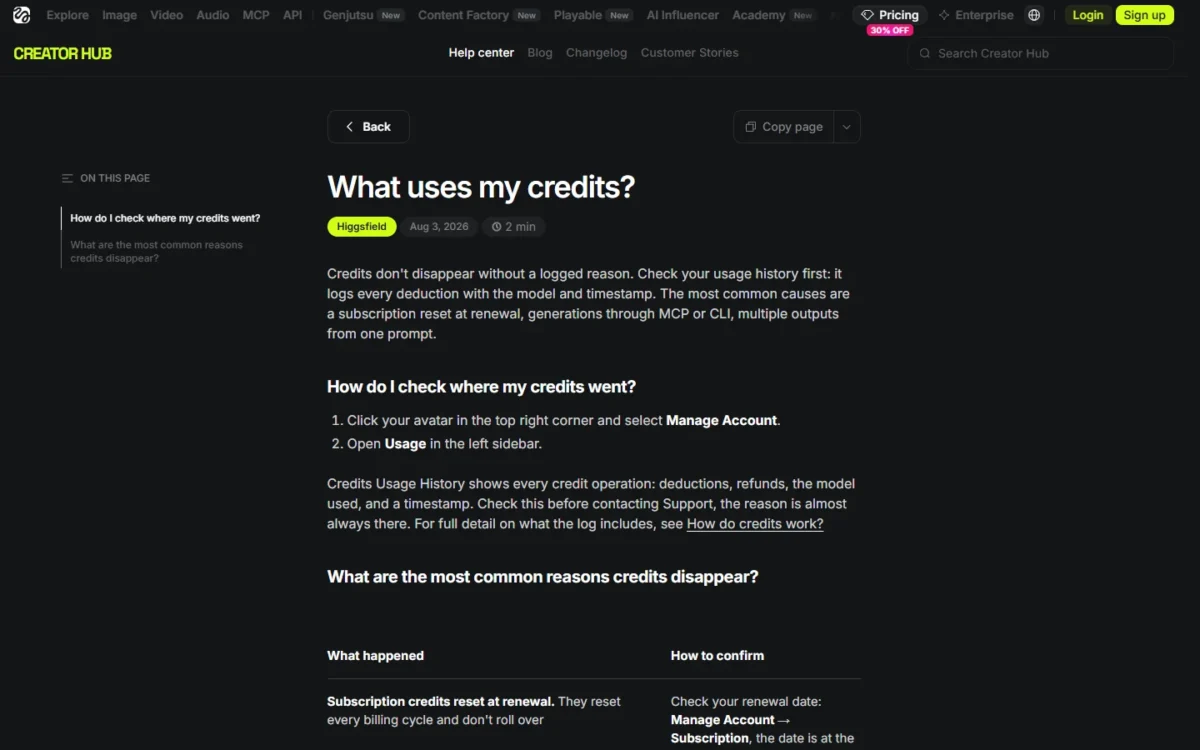
Refunds are narrow: Higgsfield’s terms allow a request within seven days of the initial purchase if no credits were used, and PixVerse says credit packs are non-refundable.
How I Chose These Tools
I ranked the picks below on two things weighed together: what one kept clip costs, and how clearly each plan’s credit rules protect that spend. If output quality matters more to you than cost, my ranking of the best AI video generators by output quality covers that question.
Every pick had to print a US-dollar price and a credit allowance on the vendor’s own page. The criteria:
- Cost per clip on the plan that runs the model
- Credit rules: rollover, expiry, failed-generation returns, cost shown before generating
- Cheap drafting paths: draft or low-resolution rates, daily or off-peak credits
- Entry price and the credits it buys
- Premium-model access and its rate
- Editing and finishing cost
The first two carry the order together, because a cheap clip loses its value when failed jobs and unused credits vanish under rules you cannot read. That is why Vidu’s $0.125 clip sits at #4: its rate covers 540P only.
| Software | Cost per clip published | Draft or low-res rate | Free daily credits | Plan credits roll over | Failed generations returned |
|---|---|---|---|---|---|
| Higgsfield | Yes | Yes (480p rates) | Not listed | No | Yes (most) |
| Google Flow | Yes | Yes (360p) | Yes, 50 a day | No | Not listed |
| Luma | Yes | Yes (Draft) | Not listed | Not listed | Not listed |
| Vidu | Yes (540P only) | Yes (540P) | Not listed | Not listed | Not listed |
| Pika | Yes | Not listed | Not listed | No | Not listed |
| Runway | Yes | Not listed | Not listed | Max | Not listed |
| InVideo AI | Yes | Yes (Draft) | Not listed | No | Not listed |
| PixVerse | Not listed | Preview Mode | Yes, 60 a day on paid plans | No | Not listed |
| HeyGen | Not listed | Not listed | Not listed | Creator and Pro | Not listed |
| Kling AI | Not listed | Not listed | Yes, for subscribers | Covered in its FAQ | Not listed |
Sources: the vendor pages under the tables above, including Higgsfield and Flow credits, checked October 2026.
Speed appears only as queue rules: Higgsfield’s Unlimited runs in a standard queue, Google Flow can block non-subscribers’ videos at peak hours, and Vidu sells a faster channel.
Vendors publish credits per second, not how many takes their model needs to land your shot. Run a short shot list through Flow’s 50 daily credits, Runway’s 125 one-time credits or HeyGen’s 3 free videos, and count takes per keeper before you pay.
1. Higgsfield: Best for Predictable Credit Spend Across Many Models

- Best for: creators who switch between Kling, Seedance, Veo and other models in one project
- Entry plan: Starter, $15 a month, 200 credits
- Plan the job needs: Plus, $49 billed monthly, 1,000 credits
Higgsfield is my pick for creators who want to know what a job costs before they press the button. Its help center spells out the rules: the cost appears on the Generate button, most failed generations return credits, and subscription credits expire each period. The trade-off is Unlimited, which is model-specific, time-boxed and web-only.
Batch size is where Higgsfield credits usually leak. Set it to 2, 3 or 4 and each output is charged, but the Generate button shows the batch total first. For a creator testing variations of one shot, that preview turns a surprise charge into a decision.
Model range is the second reason. Kling 3.0 at 720p costs about 7 credits per 5-second clip, which is $49 x 7 / 1,000 = $0.34 on Plus billed monthly.
The same Kling clip on Luma Plus, at 30 credits per second, costs $30 x 150 / 10,000 = $0.45. A Gen-4.5 clip on Runway Standard costs $15 x 60 / 625 = $1.44, so a Kling-heavy workflow belongs here.
That is why Higgsfield ranks above Google Flow and Luma. Each tool’s per-clip figure comes with its own clip:
- Higgsfield Plus, billed monthly: $49 x 7 / 1,000 = $0.34 for a 5-second Kling 3.0 clip at 720p.
- Google AI Pro: $19.99 x 12 / 1,000 = $0.24 for an 8-second Omni Flash clip at 720p.
- Luma Plus: $30 x 100 / 10,000 = $0.30 for a 5-second Ray3.14 clip at 720p.
The clips differ in model and length, so I rank on credit rules. Higgsfield’s pages show a job’s cost on the Generate button before it runs and return credits for most failed generations.
Automation is the trap for agencies. Jobs sent through MCP, the CLI, Canvas or Supercomputer are always charged in credits, even on models that are Unlimited on the web. Usage history logs every deduction and refund, so a dropped balance is easy to trace.
Plus is the plan I would start on: $49 billed monthly for 1,000 credits, and the page says annual billing saves $120 a year on it. Add-on credits last 90 days.
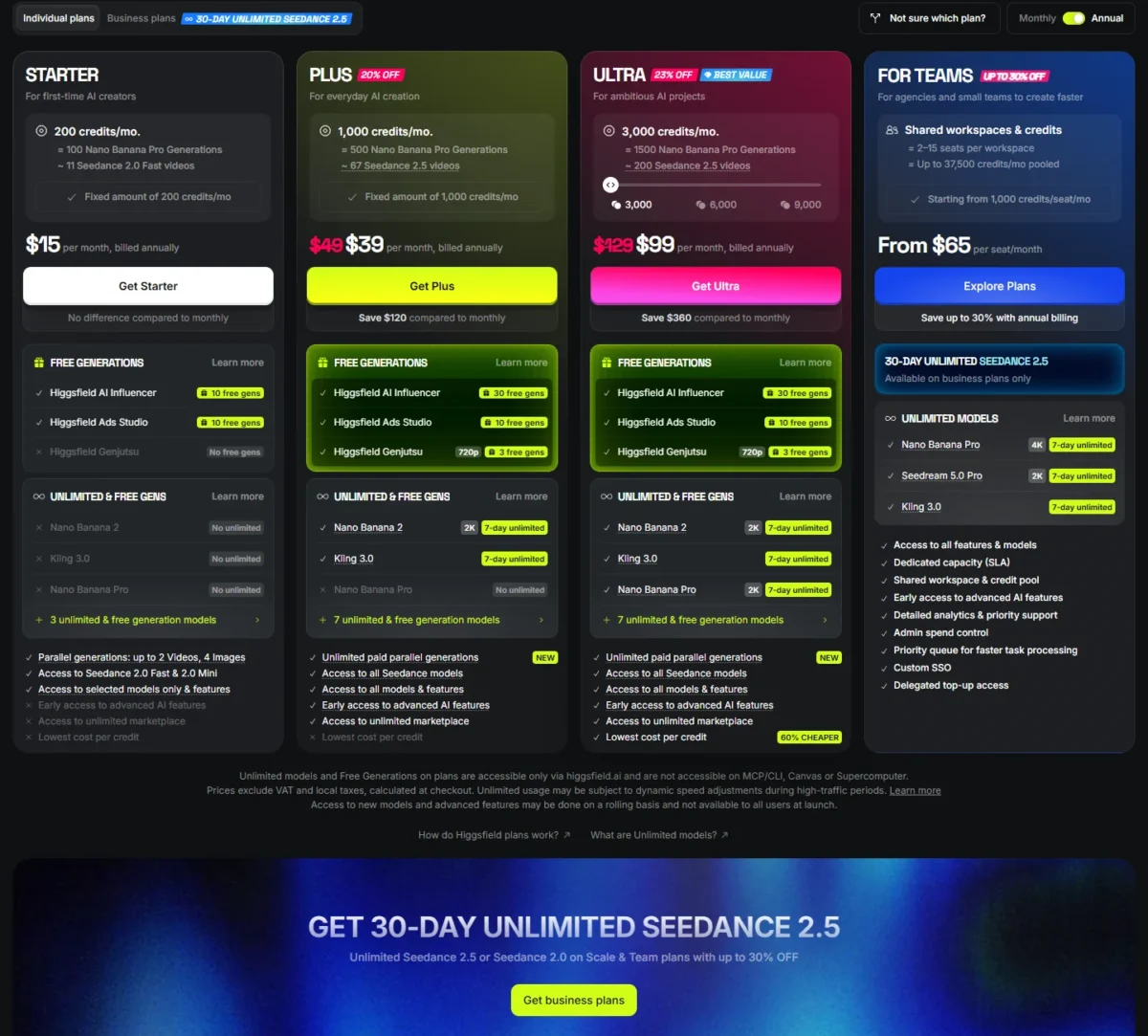
| Plan | Billed monthly | Credits a month | Unlimited models |
|---|---|---|---|
| Starter | $15 a month | 200 | None |
| Plus | $49 a month | 1,000 | 7-day Kling 3.0 and Nano Banana 2 |
| Ultra | $129 a month | 3,000 | 7-day Kling 3.0, Nano Banana 2 and Nano Banana Pro |
Sources: Higgsfield pricing, Unlimited models help, Higgsfield terms, checked October 2026.
Pros
- The Generate button shows a batch’s total cost before you confirm
- Most failed generations return credits automatically
- Kling 3.0 at 720p costs about 7 credits per 5-second clip
Cons
- Subscription credits expire each billing period; add-on credits after 90 days
- MCP, CLI, Canvas and Supercomputer jobs always deduct credits
- Unlimited jobs run in the standard queue
- Skip it if:
- you need unused credits to survive a quiet month, because Runway Max rolls one month over and HeyGen rolls credits over on Creator.
For the studio tools beyond the credit rules, my Higgsfield review has the full picture.
2. Google Flow: Best for the Lowest Entry Price

- Best for: Google users who want the cheapest paid door into AI video
- Entry plan: Google AI Plus, $4.99 a month, 200 Flow credits a month
- Plan the job needs: Google AI Pro, $19.99 a month, 1,000 Flow credits a month
- Free plan: 50 Flow credits a day, with or without a subscription
Google Flow is where I would start on a tight budget: the paid entry is small, and free daily credits let you rehearse a shot list first. The catch is the billing unit, since costs are per generation and one request may produce 2 videos.
Everyone gets 50 Flow credits a day, and unused daily credits do not roll over. At 12 credits per 8-second Omni Flash clip at 720p, a day covers four clips. If you plan to stay unpaid, my guide to what each free AI video plan allows compares those allowances.
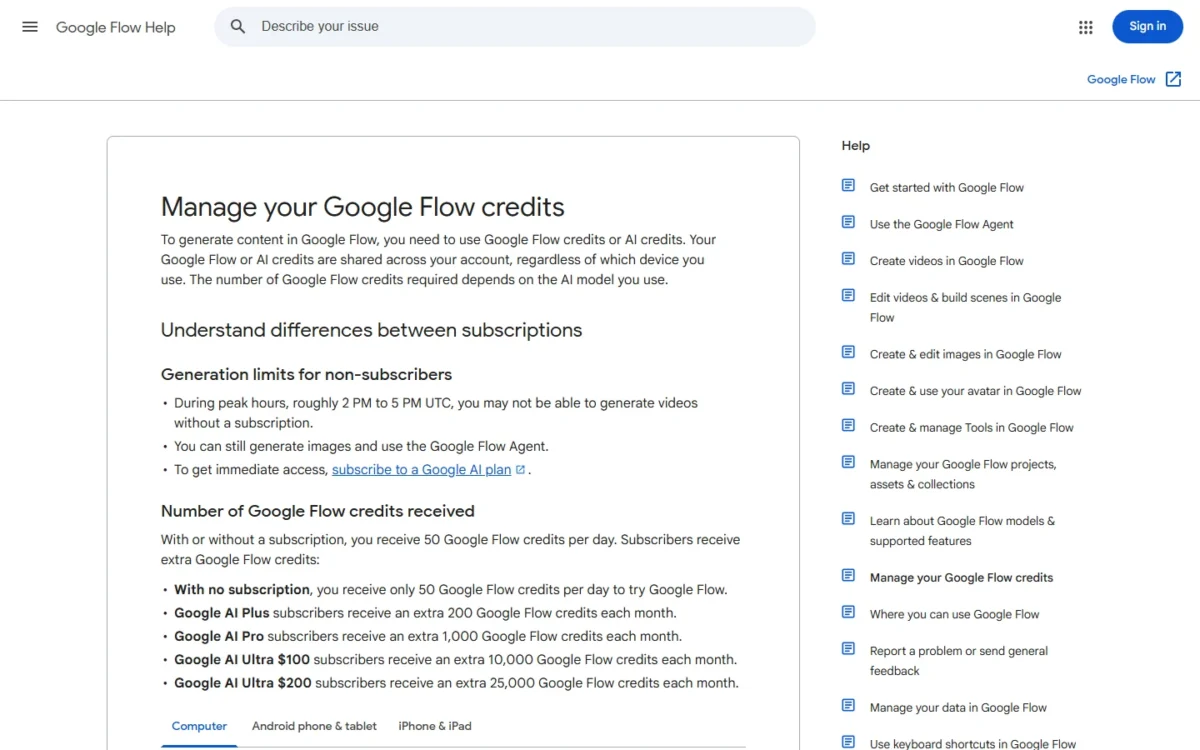
Model choice moves the bill more than plan choice. On Google AI Pro, a Veo 3.1 Quality clip costs $19.99 x 100 / 1,000 = $2.00, against $19.99 x 12 / 1,000 = $0.24 for Omni Flash at 720p.
Google AI Pro at $19.99 a month is the plan for regular video work: 1,000 Flow credits a month on top of the daily 50, none of which roll over.

| Plan | Price | Flow credits | Key limit |
|---|---|---|---|
| Free | $0 | 50 a day | Videos may be unavailable at peak hours |
| Google AI Plus | $4.99 a month | 200 a month plus 50 a day | No rollover |
| Google AI Pro | $19.99 a month | 1,000 a month plus 50 a day | No rollover |
| Google AI Ultra | $99.99 or $199.99 a month | 10,000 or 25,000 a month | 4K upscaling costs 50 credits |
Sources: Google AI plans, Flow credits, checked October 2026.
Pros
- The $4.99 Google AI Plus plan also carries Gemini features and cloud storage
- 50 free Flow credits a day for every account
- 1080p upscaling costs 0 credits for subscribers
Cons
- One request may create 2 billed generations
- Veo 3.1 Quality costs 100 credits per 8-second video
- Non-subscribers may be unable to generate videos at peak hours
- Skip it if:
- you need Kling or Seedance at a printed per-clip rate, which Higgsfield and Luma publish. My list of Google Flow alternatives covers that move.
For the studio itself, beyond the credit math, see my Google Flow review.
3. Luma: Best for Drafting Cheaply Before the Final Render
- Best for: creators who retake a shot many times and render only the keeper
- Entry plan: Plus, $30 a month or $300 billed yearly, 10,000 credits
- Standout feature: Ray3.14 Draft at 4 credits per second
- Commercial use: listed on Plus
If you retake a shot many times before keeping one, Luma’s rate card rewards that habit better than a low entry price would. The gap between the take you discard and the take you publish is 20-fold on Ray3.14. The trade-off is a $30 entry and no published rule on rollover or failed jobs.
On Plus, a 5-second Draft costs $30 x 20 / 10,000 = $0.06. That makes blocking out camera moves in Draft close to free, and leaves the budget for the final render.
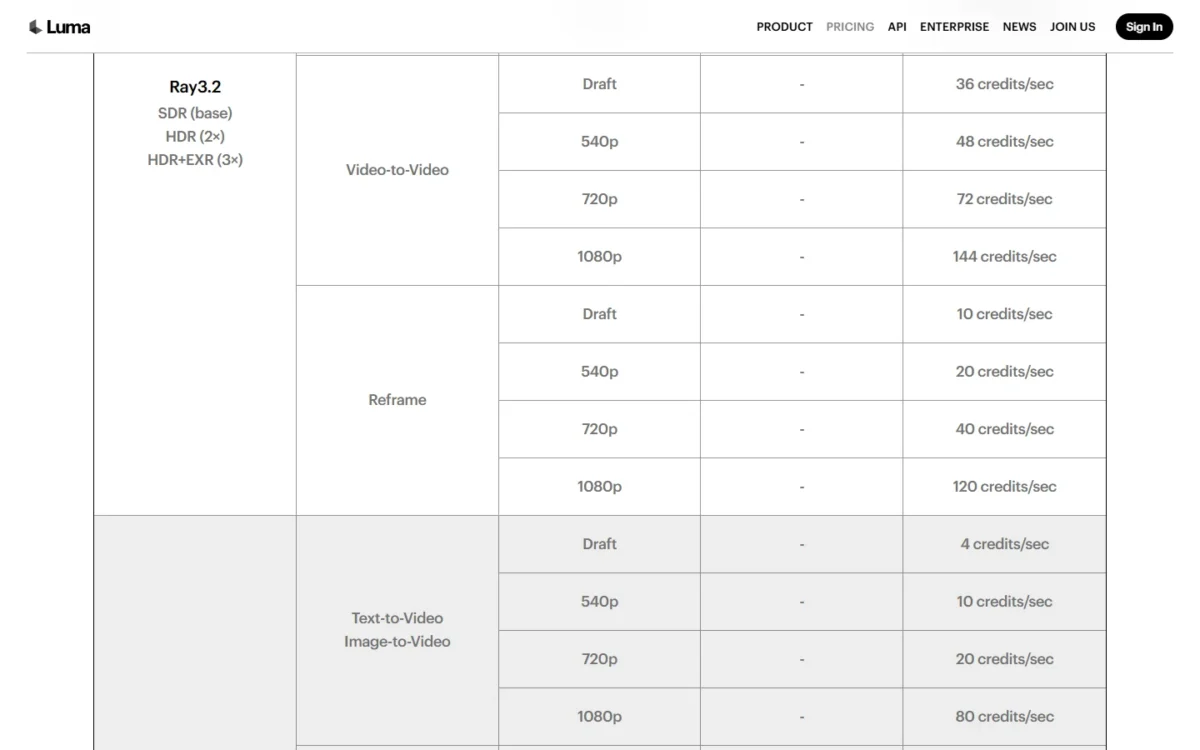
Upscaling changes the finish. A 720p take plus Luma’s 1080p upscale is 20 + 10 = 30 credits per second, well under the 80 of a native 1080p render.
Veo is where Luma’s value ends. Five seconds of Veo 3.1 on Plus costs $30 x 700 / 10,000 = $2.10. An 8-second Veo 3.1 Quality clip on Google AI Pro costs $19.99 x 100 / 1,000 = $2.00, so Veo work belongs in Google Flow.
Plus costs $30 a month, or $300 billed yearly, for 10,000 credits, and lists commercial use.
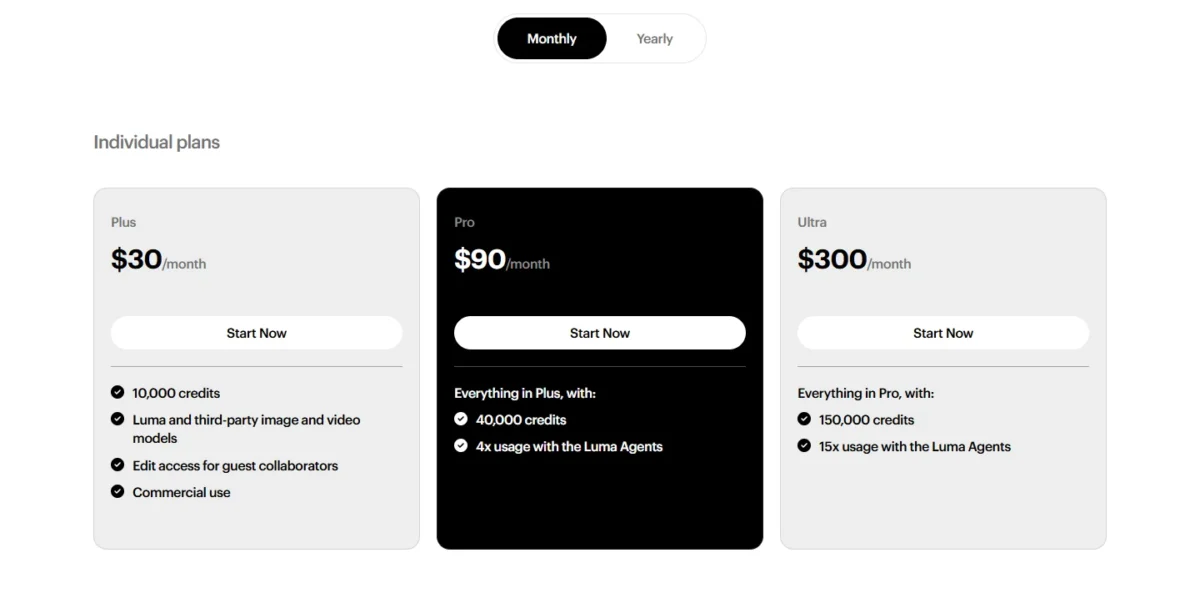
| Plan | Monthly | Billed yearly | Credits |
|---|---|---|---|
| Plus | $30 a month | $300 a year | 10,000 |
| Pro | $90 a month | $900 a year | 40,000 |
| Ultra | $300 a month | $3,000 a year | 150,000 |
Sources: Luma pricing, checked October 2026.
Pros
- Ray3.14 Draft runs at a twentieth of the 1080p rate
- A printed rate for each model and resolution
- A 720p take plus upscale costs less than a native 1080p render
Cons
- No plan below $30 a month
- Veo 3.1 costs 140 credits per second, 280 with audio
- Rollover and failed-generation rules are not listed
- Skip it if:
- your budget is under $30 a month; Vidu Standard or Google AI Plus gets you generating for less.
4. Vidu: Best for Low-Cost Short Clips at 540P

- Best for: social shorts where 540P is enough
- Entry plan: Standard, $10 billed monthly or $99 billed yearly, 800 credits a month
- Rate: Vidu Q4 at 540P, 2 credits per second on paid plans and 4 on Free
- Clip length: 3 to 16 seconds
- Commercial use: listed on paid plans
Vidu suits a creator who posts short clips often and values volume over resolution. Its Standard plan gives the lowest full-render clip cost in my table, at $10 x 10 / 800 = $0.125 for a 5-second Q4 clip at 540P; only Luma’s Draft costs less. Its weak spot: Vidu lists the Q4 rate for 540P only.
Vidu prints a price per 100 credits on each plan card, as Kling AI does. Unlike Kling AI’s membership page, it also prints credits per second, so a buyer can price a clip before subscribing.
Standard costs $10 billed monthly for 800 credits a month. Check the in-app cost before you generate above 540P.
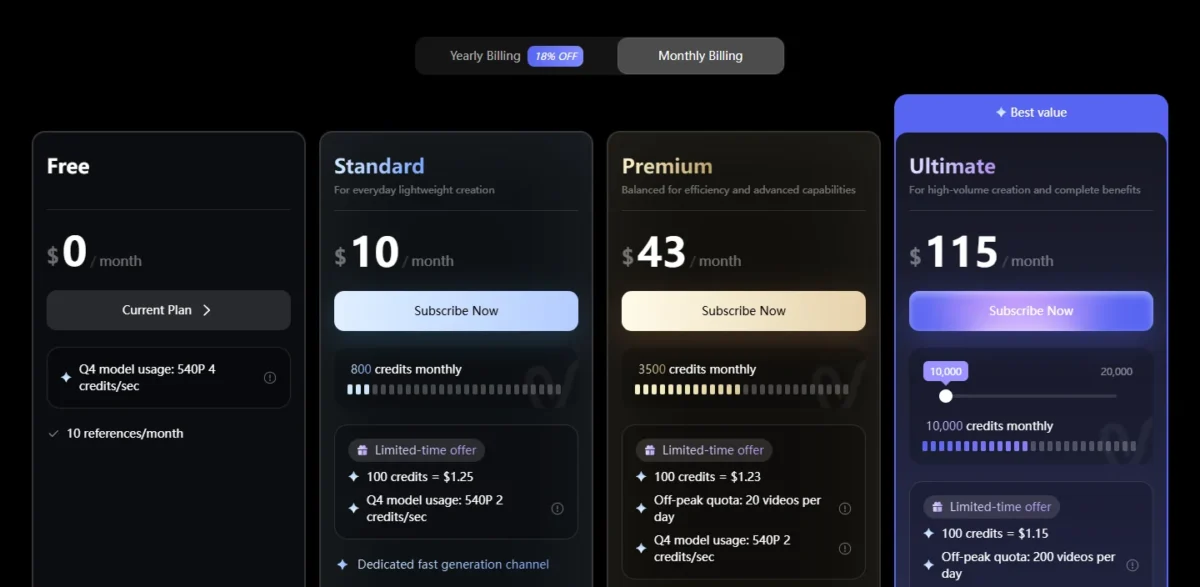
| Plan | Monthly billing | Credits a month | Off-peak quota |
|---|---|---|---|
| Free | $0 | Not listed | Not listed |
| Standard | $10 a month | 800 | Not listed |
| Premium | $43 a month | 3,500 | 20 videos a day |
| Ultimate | $115 a month as a limited-time offer; $230 a month in the plan table | 10,000 on the offer card | 200 videos a day |
Sources: Vidu pricing, monthly and yearly billing views, checked October 2026.
Pros
- Q4 at 540P costs 2 credits per second on paid plans
- Credits per second are printed, so a clip can be priced before paying
- Clips run from 3 to 16 seconds
Cons
- Only the 540P rate is listed
- Ultimate’s $115 is a limited-time offer; the plan table lists $230
- The off-peak quota starts on Premium, at $43 billed monthly
- Skip it if:
- you need 1080p prices before you pay; Luma prints the rate for every resolution.
5. Pika: Best for Budgeting Retakes Before You Subscribe

- Best for: social creators who want the retake budget settled before paying
- Entry plan: Starter, $10 billed monthly, 900 credits
- Standout feature: a plan finder that adds room for reshoots
- Free plan: 0 credits a month, packs only, no commercial license
- Integrations: MCP on pika.art/mcp, which top-up credits also cover
Pika answers the question most buyers skip: how many takes will this month really hold? On Pika’s pricing page, the plan finder’s “Leave room for extra takes” option adds 25% to your estimate. The trade-off is model choice, which swings the cost of a clip almost fourfold.
The finder’s default shows the method. Twelve Seedance 2.5 videos and 20 images come to 2,030 credits with the takes allowance included, which fits Creator’s 3,150.
Model choice decides what Starter buys. Its 900 credits make 27 Wan 3.0 clips or 7 Seedance 2.5 clips at 720p, so pick the model per shot, not per project.
Credit counts mislead across vendors. InVideo AI charges about 56 credits for that Seedance 2.5 clip and Pika 122. Yet Pika Starter’s clip costs $10 x 122 / 900 = $1.36 against $30 x 56 / 1,000 = $1.68 on InVideo AI Pro.
Starter costs $10 billed monthly for 900 credits; Creator, at $35, fits the finder’s default month. Plan credits do not roll over, and top-ups last 365 days.
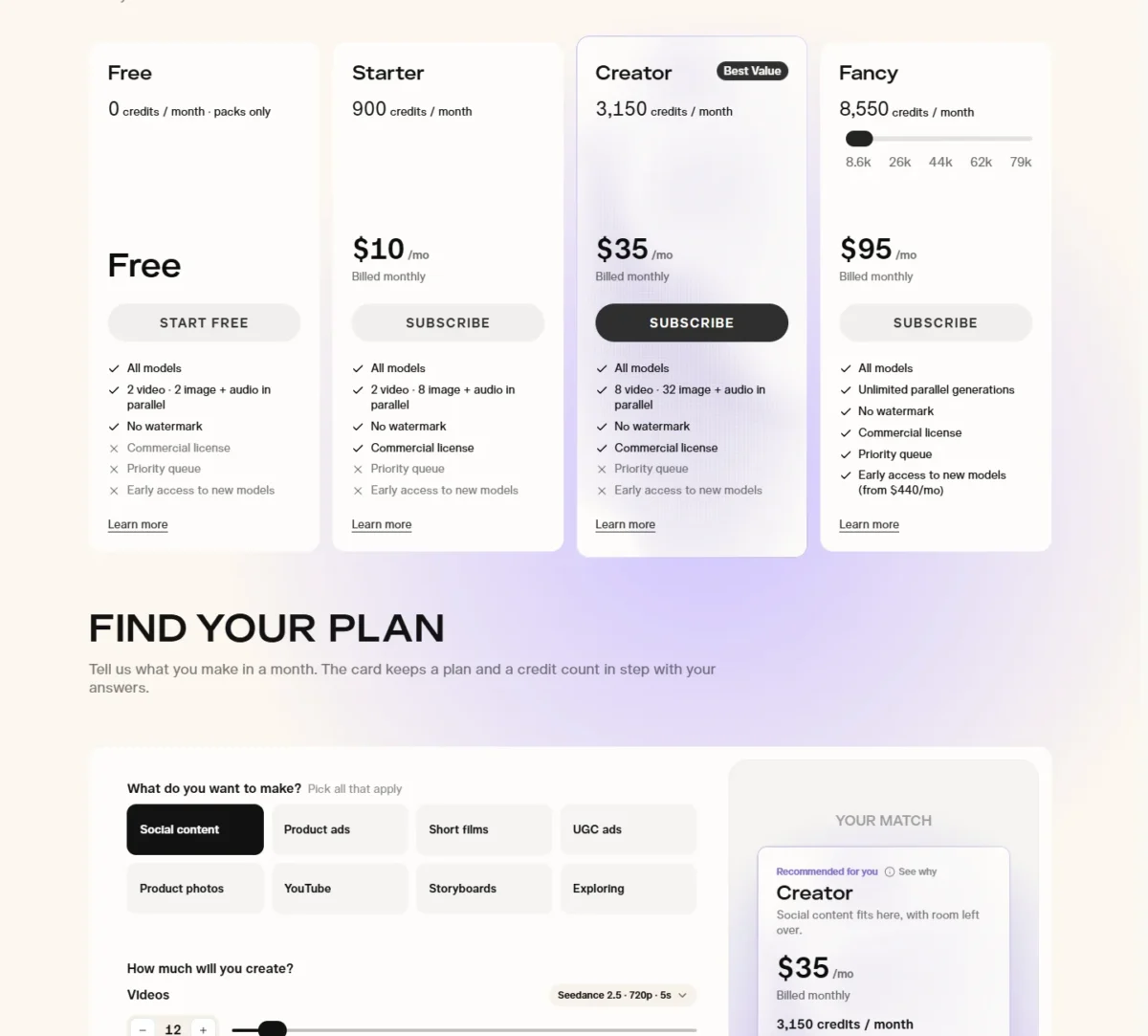
| Plan | Billed monthly | Credits a month | Commercial license |
|---|---|---|---|
| Free | $0 | 0, packs only | No |
| Starter | $10 | 900 | Yes |
| Creator | $35 | 3,150 | Yes |
| Fancy | $95 to $880 | 8,550 and up | Yes |
Sources: Pika pricing, checked October 2026.
Pros
- The plan finder adds an allowance for extra takes
- Credits per generation are printed for each model
- Top-ups last 365 days
Cons
- Free has no monthly credits and no commercial license
- Seedance 2.5 costs 122 credits per 5-second clip
- Top-ups do not work with the API or the iOS app
- Skip it if:
- you want unused plan credits to survive a slow month; Runway Max rolls one month over.
6. Runway: Best for Heavy Solo Creators Who Need Rollover
- Best for: heavy solo creators and filmmakers with uneven months
- Entry plan: Standard, $15 billed monthly or $12 a month billed annually, 625 credits
- Plan the job needs: Max, $95 billed monthly or $76 a month billed annually, 9,500 credits
- Free plan: 125 one-time credits that do not expire
- Integrations: Runway MCP on Pro and Max
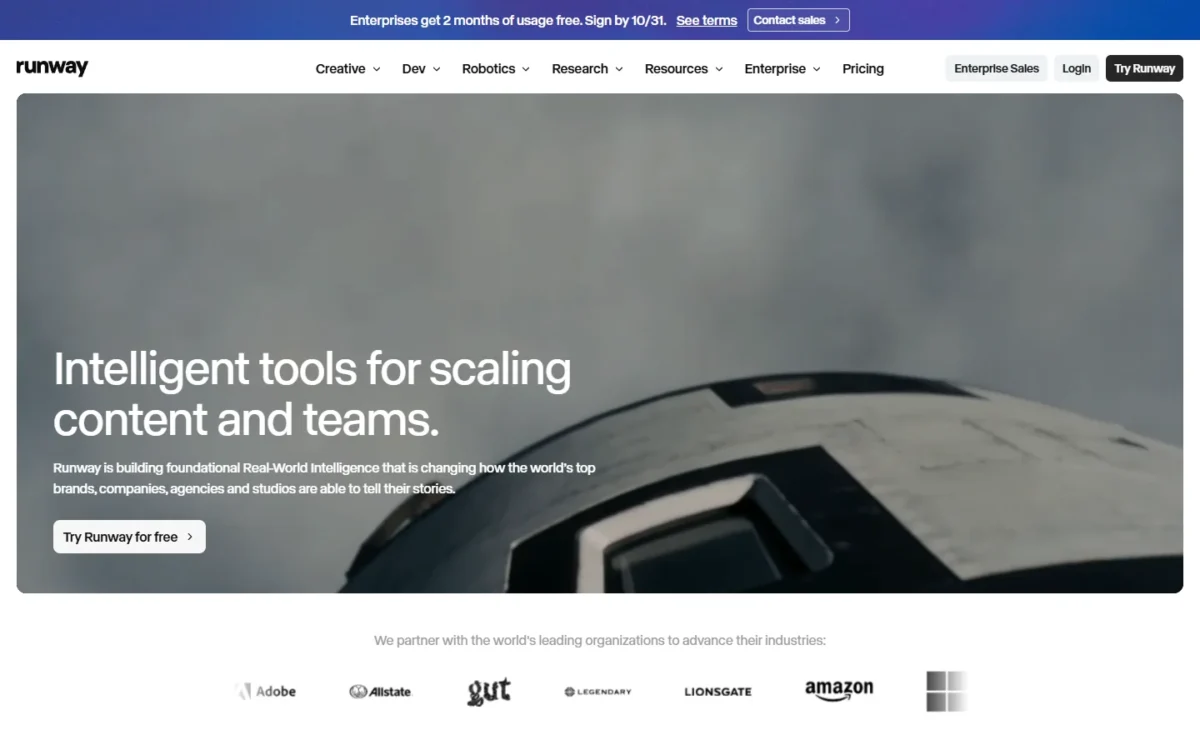
Runway is dear per clip on its entry plan and good value only at the top, where unused credits stop vanishing. Max rolls up to one month of credits forward, and purchased credits never expire.
Rollover is the feature you pay for. On Standard and Pro, monthly credits reset within 24 hours of the billing date; on Max, a skipped week of production keeps its budget.
The plan you pick changes the clip price. Gen-4.5 costs $15 x 60 / 625 = $1.44 per 5-second clip on Standard and $95 x 60 / 9,500 = $0.60 on Max.
Pro and Max add unlimited 4K video upscaling and Runway MCP.
If you are choosing between Runway and Google’s studio, my Google Flow vs Runway comparison weighs the two on price.
Standard’s 625 credits equal 52 seconds of Gen-4.5, by Runway’s own count. Max at $95 billed monthly is the plan the rollover job needs.

| Plan | Billed monthly | Billed annually | Credits a month | Rollover |
|---|---|---|---|---|
| Standard | $15 a month | $12 a month | 625 | No |
| Pro | $35 a month | $28 a month | 2,250 | No |
| Max | $95 a month | $76 a month | 9,500 | Up to one month |
Sources: Runway pricing, monthly and annual views, checked October 2026.
Pros
- Max rolls up to one month of unused credits over
- Purchased credits never expire
- Unlimited 4K video upscaling on Pro and Max
Cons
- Gen-4.5 at 60 credits per 5 seconds is dear on Standard’s 625 credits
- Standard and Pro credits reset each billing cycle
- Extra credits come in a 1,000-credit minimum
- Skip it if:
- you need fewer than 625 credits a month; Vidu Standard or Google AI Plus costs less to start.
7. InVideo AI: Best for Editing Passes That Cost No Credits
- Best for: marketers who assemble and edit finished videos
- Entry plan: Basic, $9 per seat billed monthly, 190 credits, no Seedance 2.5
- Plan the job needs: Pro, $30 per seat billed monthly or $15 billed annually, 1,000 credits
- Standout feature: manual timeline editing and export cost no credits
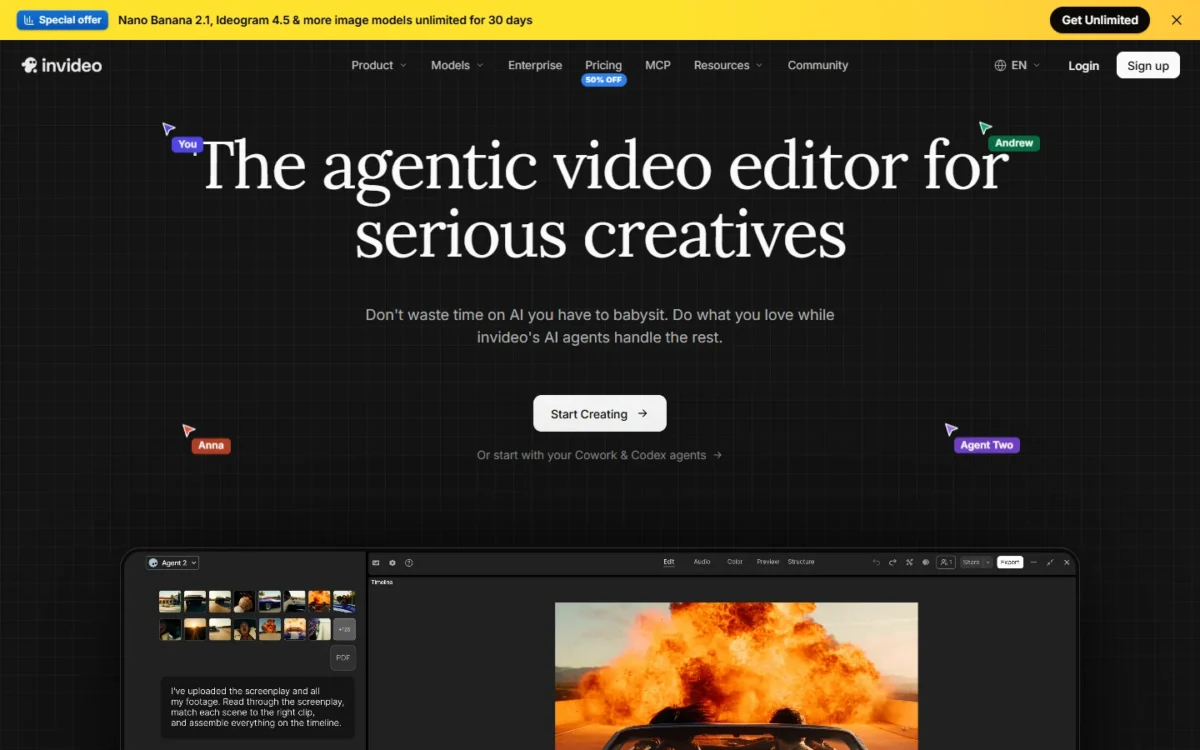
When the product is a finished, edited video rather than a raw clip, InVideo AI removes one whole cost line. Manual timeline editing and export cost no credits, so credits go only to generation and AI help. Basic, though, has no Seedance 2.5, and plan credits do not roll over.
The free edit pass matters most for ads and explainers built from many clips. You trim, split and rearrange by hand without a charge, where Google Flow bills 40 credits for an Omni Flash edit.
Seedance 2.5 has a draft tier here. On Pro, a 5-second Draft costs $30 x 24.5 / 1,000 = $0.74, so draft the motion and render only the version the client approves.
Guest seats make Pro a small-team plan: it adds 10 guest seats with 190 credits each at no charge.
Pro at $30 per seat billed monthly is the plan the job needs, since Basic lacks Seedance 2.5. Extra credits last up to 12 months, or until the subscription ends.

| Plan | Billed monthly, per seat | Billed annually, per seat | Credits a month | Seedance 2.5 |
|---|---|---|---|---|
| Basic | $9 | $4 | 190 | No access |
| Pro | $30 | $15 | 1,000 | Full access |
| Ultra | $72 first month, then $80 | $40 | 3,000 | Full access |
Sources: InVideo AI pricing, monthly and annual views, and InVideo AI credits help, checked October 2026.
Pros
- Trimming, splitting and rearranging clips by hand costs no credits
- Seedance 2.5 Draft at about 24.5 credits per 5 seconds
- Pro adds 10 free guest seats with 190 credits each
Cons
- Basic has no access to Seedance 2.5 or Seedance 2.0
- Ultra’s $72 first month renews at $80
- Seedance 2.5 at 720p costs more per clip on Pro than on Pika Starter
- Skip it if:
- you only need raw clips to edit elsewhere; Vidu or Luma price the clip itself for less.
8. PixVerse: Best for Off-Peak Volume on PixVerse Models
- Best for: high-volume creators on PixVerse’s own models
- Entry plan: Standard, $8 a month billed yearly as $96, 1,200 credits every 30 days plus 60 a day
- Plan the job needs: Pro, $24 a month billed yearly as $288, 6,000 credits every 30 days
- Free plan: Basic, 60 initial credits and 30 a day, up to 540P
- Standout feature: Off-Peak Mode discounts on PixVerse models
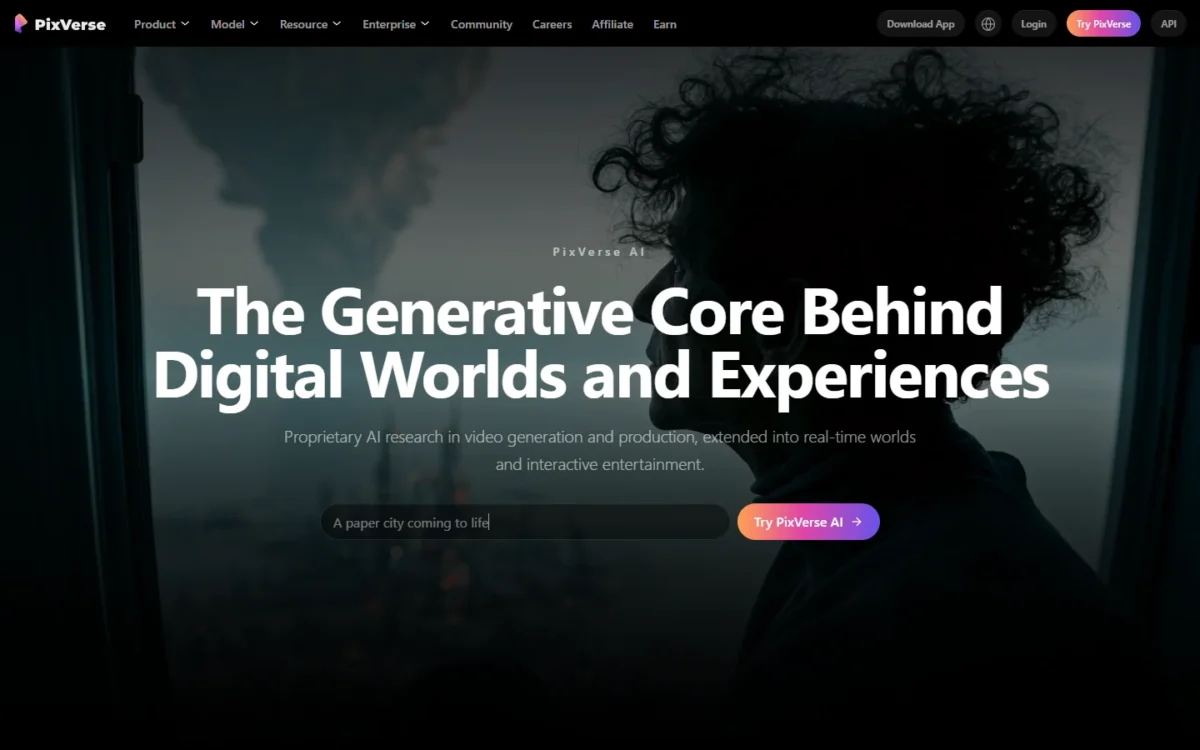
PixVerse rewards creators who can wait for quiet hours. Off-Peak Mode cuts credits by 30% on Pro and 50% on Premium, and Ultra generates free off-peak, all on PixVerse’s own models. The off-peak job therefore needs at least Pro, which costs $24 a month billed yearly as $288.
The catch is that the subscribe page prints no credits per clip, so the discount applies to a price you cannot read in advance.
The off-peak design differs from Vidu’s. Vidu Premium gives a quota of 20 off-peak videos a day, while PixVerse takes a percentage off PixVerse-model generations made in Off-Peak Mode, so the saving grows with volume instead of stopping at a quota.
Preview Mode saves 20% on every paid plan, which fits a draft-then-final habit. The 60 daily credits on paid plans expire at the end of each day, so spend them on those previews.
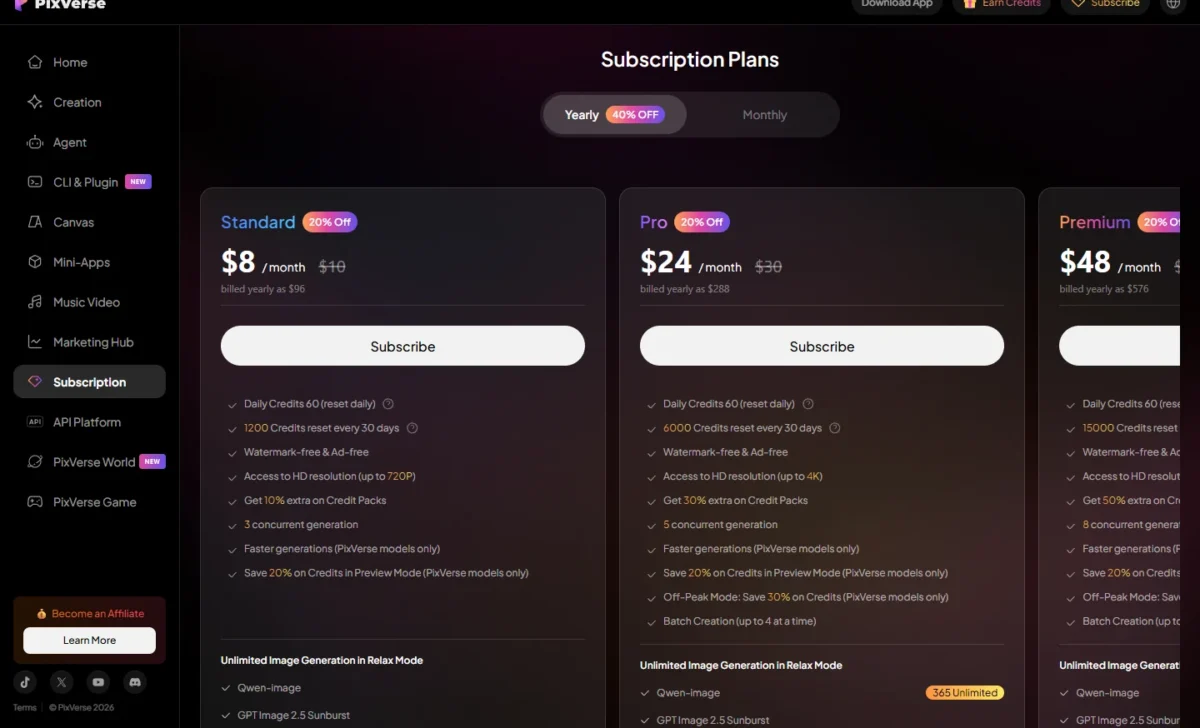
Pro is the plan the off-peak job needs: $24 a month billed yearly as $288, for 6,000 credits, 4K and third-party models. Standard costs $8 a month billed as $96, but the Off-Peak discount starts on Pro.
| Plan | Billed yearly | Credits every 30 days | Daily credits | Max resolution |
|---|---|---|---|---|
| Basic | $0 | 60 initial | 30 | 540P |
| Standard | $8 a month ($96 a year) | 1,200 | 60 | 720P |
| Pro | $24 a month ($288 a year) | 6,000 | 60 | 4K |
| Premium | $48 a month ($576 a year) | 15,000 | 60 | 4K |
Sources: PixVerse plans, yearly billing view, checked October 2026.
Pros
- Off-Peak Mode saves 30% on Pro and 50% on Premium, free on Ultra
- Preview Mode saves 20% on every paid plan
- Bonus credits from purchases never expire
Cons
- Credits per clip are not printed on the subscribe page
- Membership credits expire every 30 days
- Standard tops out at 720P
- Skip it if:
- you want third-party models at a printed rate; Luma prints every model’s rate.
9. HeyGen: Best for Talking-Head Videos With Rollover Credits

- Best for: teams making talking-head, avatar and translated videos
- Entry plan: Creator, $29 a month or $24 a month billed annually, with a monthly credit allocation
- Free plan: up to 3 videos a month, 1 minute each
- Video length: up to 30 minutes per video on Creator and Pro
HeyGen is on this list for a different job: presenter and avatar video, where minutes of output matter more than 5-second clips. Creator allows 30-minute videos and rolls unused credits over a month on monthly billing. What HeyGen does not publish is a per-video credit rate, so a video’s cost is unknown until you make it.
Rollover is the value case. Monthly subscribers’ unused credits roll over for one more month, and annual subscribers’ credits accumulate until renewal. Runway offers rollover only on its $95 Max plan; HeyGen offers it from the $29 Creator plan.
Length is the second case. Vidu’s clips run 3 to 16 seconds, while HeyGen allows 30 minutes per video on Creator, which suits YouTube explainers and training videos.
Creator costs $29 a month, or $24 a month if paid annually; Pro starts at $49 a month for 1,000 credits, and 4K export starts on Pro.
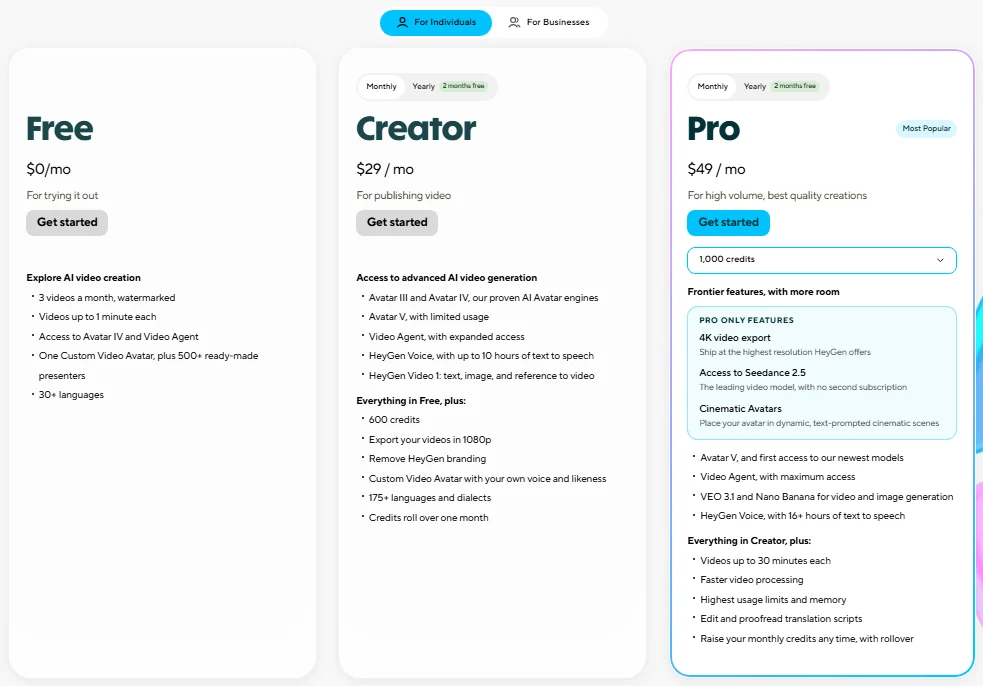
| Plan | Price | Max video length | Export |
|---|---|---|---|
| Free | $0, 3 videos a month | 1 minute | Not listed |
| Creator | $29 a month, or $24 a month annually | 30 minutes | Up to 1080P |
| Pro | From $49 a month | 30 minutes | Up to 4K |
Sources: HeyGen pricing, checked October 2026.
Pros
- Unused credits roll over one month on monthly billing, to renewal on annual
- Videos up to 30 minutes on Creator
- 175 languages and dialects on Creator and Pro
Cons
- No per-video credit rate is published
- 4K export starts on Pro
- Credits are lost after cancellation
- Skip it if:
- you need cinematic b-roll rather than a presenter; Higgsfield or Luma price those clips per second.
10. Kling AI: Best for High-Volume Buyers Who Budget per Credit
- Best for: buyers who already use Kling and plan to buy credits in bulk
- Entry plan: Standard, $6.99 for the first month, then $8.8 a month, 660 credits
- Volume plan: Ultra+, $402 for the first month, then $544.99 a month, 57,000 credits
- Free plan: Basic, $0
Kling AI makes sense for buyers who already want Kling and plan to buy a lot of it. The membership page prints a price per 100 credits for every tier, falling from $1.06 on Standard to $0.71 on Ultra+. The weakness for a value shopper is that the page prints no credits per clip.
Those per-credit prices match the first-month offer, not the renewal. Standard’s printed $6.99 x 100 / 660 = $1.06 becomes $8.8 x 100 / 660 = $1.33 at renewal, and Ultra+’s $0.71 becomes $544.99 x 100 / 57,000 = $0.96. Budget on the renewal number.
A buyer who wants Kling at a printed per-clip rate can get it elsewhere on this list. Higgsfield prices Kling 3.0 at 720p at about 7 credits per 5 seconds, and Luma at 30 credits per second without audio.
The first-purchase offer is available once, so the second column is the price you pay from month two.

| Plan | First month | Then, per month | Credits a month | Printed per 100 credits |
|---|---|---|---|---|
| Standard | $6.99 | $8.8 | 660 | $1.06 |
| Pro | $25.99 | $32.56 | 3,000 | $0.87 |
| Premier | $135 | $181.99 | 18,000 | $0.75 |
| Ultra+ | $402 | $544.99 | 57,000 | $0.71 |
Sources: Kling AI membership plans, monthly view, checked October 2026.
Pros
- A price per 100 credits is printed for every tier
- Daily free credits for subscribers
- Commercial use on paid plans
Cons
- Credits per clip are not on the membership page
- Printed per-credit prices reflect the first-month offer
- Ultra+ renews at $544.99 a month after a $402 first month
- Skip it if:
- you want a per-clip price before paying; Higgsfield prints Kling 3.0’s rate per 5-second clip.
How to Spend Fewer Credits per Finished Video
You spend fewer credits per finished video by cutting the generations you throw away, not by buying a bigger plan:
- Set batch size to 1 until a prompt works. Higgsfield charges each output of a batch, and Kling AI’s paid plans make up to 4 videos per generation.
- Draft cheap, render the keeper. Luma’s Ray3.14 Draft costs 4 credits per second against 80 at 1080p; InVideo AI’s Seedance 2.5 Draft costs about 24.5 credits per 5 seconds.
- Generate at 720p and upscale the winner. Google Flow’s 1080p upscale costs 0 credits for subscribers, and Runway includes unlimited 4K upscaling on Pro and Max.
- Generate when it is cheaper. PixVerse’s Off-Peak Mode saves 30% to 100% on its own models from Pro up, and Vidu Premium includes 20 off-peak videos a day.
- Edit by hand where it is free. InVideo AI’s manual timeline editing costs nothing.
- Buy top-ups with long validity. Runway’s purchased credits never expire, Pika’s last 365 days, InVideo AI’s up to 12 months and Higgsfield’s 90 days.
- Lock the shot before you pay for motion. Tighter prompts cut retakes, so start from tested AI video prompts by shot and style.
Starting from a still also fixes the first frame before you pay for movement. My list of image-to-video generators covers the tools built for that route.
How to Choose the Best Value AI Video Generator
Choose by the job first, then by volume. The table below matches each priority to one pick, and the Clips a month column of my cost table shows what each plan’s credits buy.
Divide that count by your takes per kept shot: at three takes, Vidu Standard’s 80 clips make about 26 keepers and Higgsfield Plus’s 142 Kling clips about 47. Pick the plan whose count covers your month.
| Your priority | Pick | Reason | Trade-off |
|---|---|---|---|
| Cheapest paid entry | Google Flow | Google AI Plus is $4.99 a month, plus 50 free credits a day | One request may bill 2 videos |
| Many models with clear rules | Higgsfield | Cost shows on the Generate button; most failed jobs return credits | Credits expire each period |
| Many retakes before a keeper | Luma | Ray3.14 Draft costs 4 credits per second against 80 at 1080p | Plans start at $30 a month |
| Short social clips on $10 | Vidu | Q4 at 540P costs 2 credits per second | Rate listed for 540P only |
| A retake budget before paying | Pika | The plan finder adds room for reshoots | Free has no commercial license |
| Credits that must not expire | Runway | Max rolls one month over; bought credits never expire | Max is $95 billed monthly |
| Edit-heavy assembly | InVideo AI | Manual timeline editing costs no credits | Basic lacks Seedance 2.5 |
| Off-peak volume | PixVerse | Off-Peak Mode saves 30% to 100% on PixVerse models | Starts on Pro, $24 a month billed yearly |
| Avatar or long videos | HeyGen | 30-minute videos and rollover credits | No per-video rate published |
| Bulk Kling credits | Kling AI | A price per 100 credits for every tier | Printed prices are first-month offers |
Sources: Google AI plans, Luma, Vidu, Runway, PixVerse, Kling AI, checked October 2026.
If AI video is one part of a wider content stack, my guide to AI tools for content creation covers the writing and image side.
If you start from a script rather than an image, my ranking of text-to-video generators covers that route.
Also Considered
- LTX Studio: the free plan’s 800 one-time credits are for personal projects only. The pricing page lists credits per plan, not per model, so no cost per clip can be computed.
- Hailuo AI: its own subscribe page showed only a “From $9.99/mo” price. Its MiniMax models are priced per clip inside Higgsfield and Luma.
- Seedance: five picks print its rate (Higgsfield, Luma, Pika, InVideo AI and Runway), so it has no section of its own.
FAQ
How much does an AI video cost?
Per clip, my cost table runs from $30 x 20 / 10,000 = $0.06 for a 5-second Luma Ray3.14 Draft, or $10 x 10 / 800 = $0.125 for a full-render Vidu Q4 clip at 540P. At the top sits $49 x 60 / 1,000 = $2.94 for a 5-second Seedance 2.0 clip at 1080p on Higgsfield Plus.
A finished video multiplies the clip price by its shots and by the takes each shot needs.
Why did my AI video credits disappear?
Usually a renewal reset, extra batch outputs or jobs run outside the website. Higgsfield’s help page names subscription resets, MCP or CLI generations and multiple outputs from one prompt as the common causes. Google Flow and PixVerse also expire unused daily credits, so check your usage log before contacting support.
Is unlimited AI video generation really unlimited?
No. On Higgsfield, Unlimited covers specific models for a set period, such as the 7-day Kling 3.0 access on Plus, and works only on higgsfield.ai. Jobs run in the standard queue under fair-use rules, access stops if the subscription ends, and MCP or CLI generations still deduct credits.
Final Verdict
The best value AI video generator is the one whose cheapest model lands your shot in the fewest takes, on a plan whose credits you use before they expire.
- $10 a month or less: Google Flow through Google AI Plus, or Vidu Standard ($10 billed monthly) for 540P social clips.
- Several models in one project: Higgsfield Plus, because every job is priced on the Generate button first.
- Heavy iteration: Luma Plus, drafting at 4 credits per second and rendering only keepers.
- Uneven months: Runway Max for cinematic work, or HeyGen Creator for presenter video.
- Finished marketing videos: InVideo AI Pro, where editing costs nothing.
- Off-peak or bulk volume: PixVerse on its own models, or Kling AI if you budget on the renewal price.
Before you subscribe, run a few of your own shots through Flow’s daily credits or Runway’s free 125. Count the takes per keeper and multiply by the cost per clip in my table.






Pingback: Higgsfield AI Pricing 2026: Plans, Yearly Costs & Calculator