The best AI writing tools in 2026 are not interchangeable. A chat assistant, a brand-voice platform, a fiction tool and an SEO engine solve different problems, and each one bills in its own way.
My short answer: start with Claude if you write long, source-heavy drafts. Choose ChatGPT for one assistant that drafts and brainstorms, and Jasper when a marketing team has to share brand voices.
Evidence basis: official pricing pages and documentation, checked October 2026.
The other seven picks each own a narrower job. Here is the whole list, one job per tool:
- Claude: long drafts, reports and research-heavy writing.
- ChatGPT: everyday drafting and brainstorming in one assistant.
- Jasper: marketing teams that share brand voices.
- Grammarly: editing and checks where you already write.
- Sudowrite: drafting fiction.
- ProWritingAid: editing a finished manuscript.
- Frase: SEO articles and content audits.
- Writesonic: tracking how AI search mentions your brand.
- QuillBot: paraphrasing and summaries on a student budget.
- Rytr: short copy for one or a few brands.
In This Article (18 sections)
Which Kind of AI Writing Tool Does Your Job Need?
The costliest mistake in this category is comparing tools that do different jobs. The ten picks fall into five kinds, and each kind bills for something different:
| Kind of tool | Picks | The job | What the bill is built on |
|---|---|---|---|
| General assistant | Claude, ChatGPT | Drafting, research, brainstorming | Plans with usage limits |
| Marketing and SEO platform | Jasper, Frase, Writesonic | On-brand content, ranked articles, AI search tracking | Seats, monthly article caps, tracked prompts |
| Short-copy generator | Rytr | Emails, meta titles, captions, calls to action | Characters on Free, then unlimited generations |
| Editor and rewriter | Grammarly, ProWritingAid, QuillBot | Checking and improving text you wrote | AI prompts, report runs, word limits |
| Credit-based writing tool | Sudowrite | Writing with a Story Bible, plus Feedback on Professional and Max | Monthly credits |
For most writers, the strongest setup is one general assistant plus one editor, not two assistants. OpenAI Plus at $20 a month, billed monthly, and Writesonic Starter at $79 a month billed annually are different purchases, not two prices for one.
Best AI Writing Tools: Quick Comparison
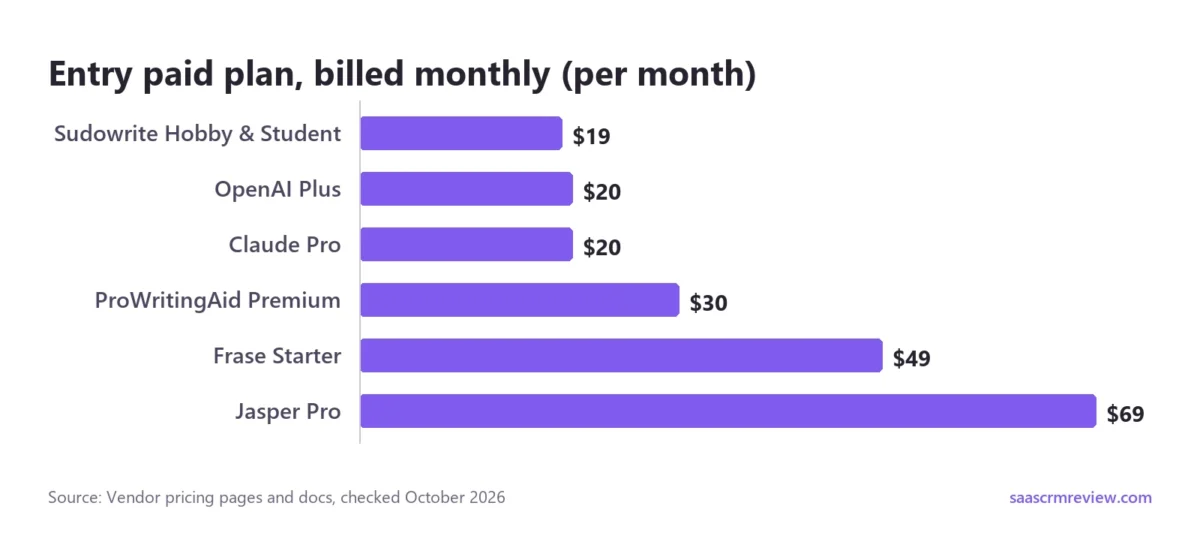
Billing basis changes the bill more than most buyers expect. Sudowrite’s Hobby & Student plan is $19 a month paid monthly or $10 a month paid annually. Skip the commitment and the same tool costs nearly twice as much.
| Tool | Best for | Entry plan, billed monthly | Entry plan, billed annually | Free option | First limit to watch |
|---|---|---|---|---|---|
| Claude | Long drafts, research | Pro: $20/mo | Pro: $17/mo ($200 up front) | Free plan | Free: up to 5 Projects, no Research |
| OpenAI Plus | Drafting and brainstorming | Plus: $20/mo | No annual Plus billing | Free version | Usage must be reasonable and policy-compliant |
| Jasper | Marketing teams, brand voice | Pro: $69/mo per seat | Pro: $59/mo per seat | 7-day Pro trial | Pro includes 1 seat, 2 Brand Voices |
| Grammarly | Editing where you already type | Not stated on page | Not stated on page | Free plan | Free: 100 AI prompts a month |
| Sudowrite | Fiction | Hobby & Student: $19/mo | Hobby & Student: $10/mo | Refund in first 7 days | 225,000 credits a month |
| ProWritingAid | Manuscript editing | Premium: $30/mo | Premium: $10/mo ($120 a year) | Free plan | Free: 10 Rephrases a day |
| Frase | SEO articles | Starter: $49/mo | Starter: $39/mo | 7-day trial, no card | Starter: 10 articles a month |
| Writesonic | AI search visibility plus articles | Annual view only | Starter: $79/mo | Free trial | Starter: 15 AI articles, 1 user |
| QuillBot | Students, paraphrasing | Annual view only | Premium: $8.33/mo | Free plan | Free: paraphrase up to 100 words |
| Rytr | Budget short-form copy | Not labeled on page | Annual plan saves 20% | Free plan | Free: 10K characters a month |
Sources: Claude pricing, OpenAI pricing page, OpenAI Plus announcement, Jasper pricing, Grammarly plans, Sudowrite plans documentation, ProWritingAid pricing, Frase pricing, Writesonic pricing, QuillBot Premium, Rytr pricing, checked October 2026.
Read the monthly column as the price of a trial month and the annual column as the real price once you commit. For ProWritingAid, the annual rate is a third of the monthly one, and that gap is hard to ignore.
Grammarly and Rytr stay out of the billing columns on purpose. Grammarly shows Pro at $12 USD with no billing period beside it.
Rytr shows Unlimited at $7.50/m and Premium at $24.16/m without tying either figure to its Yearly or Monthly toggle. I would settle the cadence at checkout before building a budget on either.
How This Ranking Was Built
I built this ranking from each vendor’s own pricing pages, announcements and documentation, read the way a buyer reads them before a purchase review. Five things decided the order:
- The writing job. Drafting, editing, fiction, SEO articles and paraphrasing are different purchases. A tool earns its spot for one job, not for a long feature list.
- Price with its billing basis. Every price carries its cadence, because several tools here charge far more month to month than on an annual plan.
- What you can try before paying. How much of the tool you can judge before you commit, and for how long.
- The first limit a paying user hits. Credits, AI prompts, article caps, seats and usage caps decide when a plan stops working.
- Team controls. Seats, shared brand voices and single sign-on, where the vendor documents them.
I did not score output quality. Models change too often for a quality score to hold, while plan gates and prices can be checked on the day you buy. The order reflects how many writers each tool fits, at a price I would defend to a finance team.
Copy.ai, Surfer and Article Forge are missing on purpose: I kept one clear pick per writing job. Jasper holds the marketing-team slot, and our Jasper vs Copy.ai comparison weighs those two directly.
1. Claude: Best for Long Drafts and Research-Heavy Writing
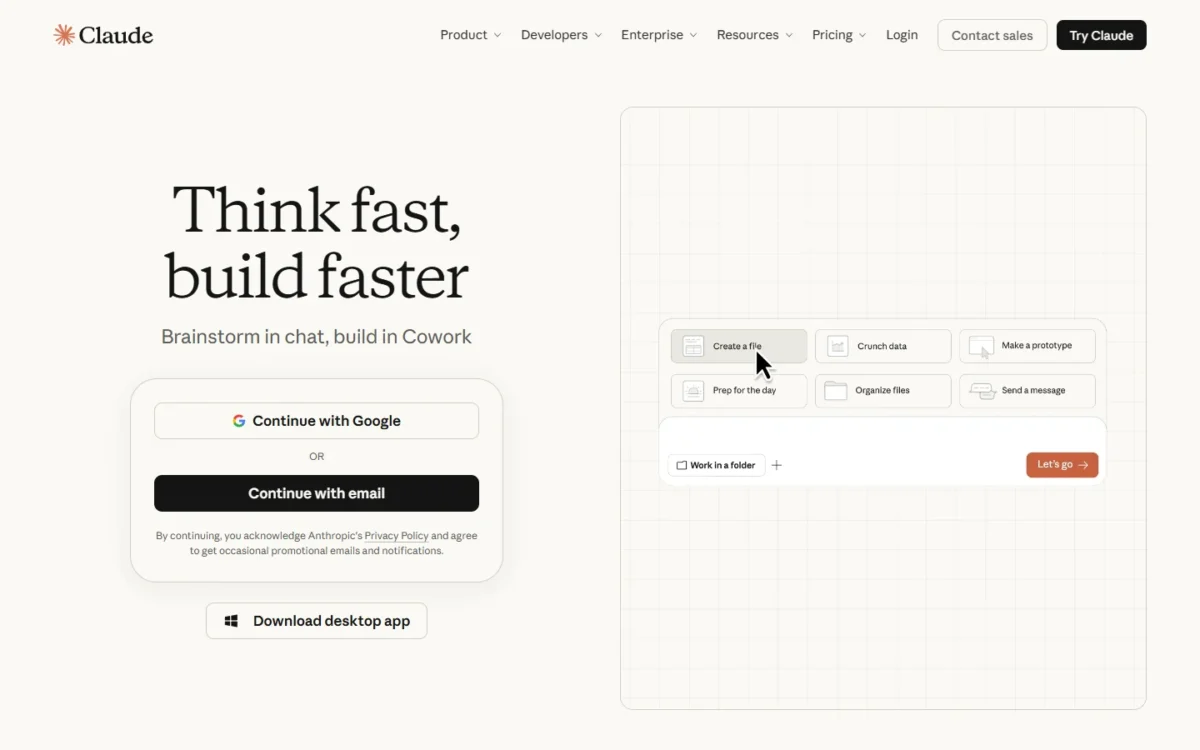
When the job is a long report built on a pile of source files, Claude is where I would start. It takes the top spot for two reasons: the free plan already works as a writing workspace, and Pro is the cheapest annual commitment of the top three.
For a writer, Projects are the feature that earns Claude its place. Free gives you up to 5, enough to keep a client’s style guide and source files in one place instead of rebuilding the context for every draft.
Free also covers web search, file creation and memory across conversations. The reason to pay is Research and more headroom, not missing basics.
- Pricing:
- Pro is $17 a month with the annual discount ($200 billed up front) or $20 billed monthly. A year of monthly billing comes to $20 x 12 months = $240, which is $40 more than the $200 annual plan.
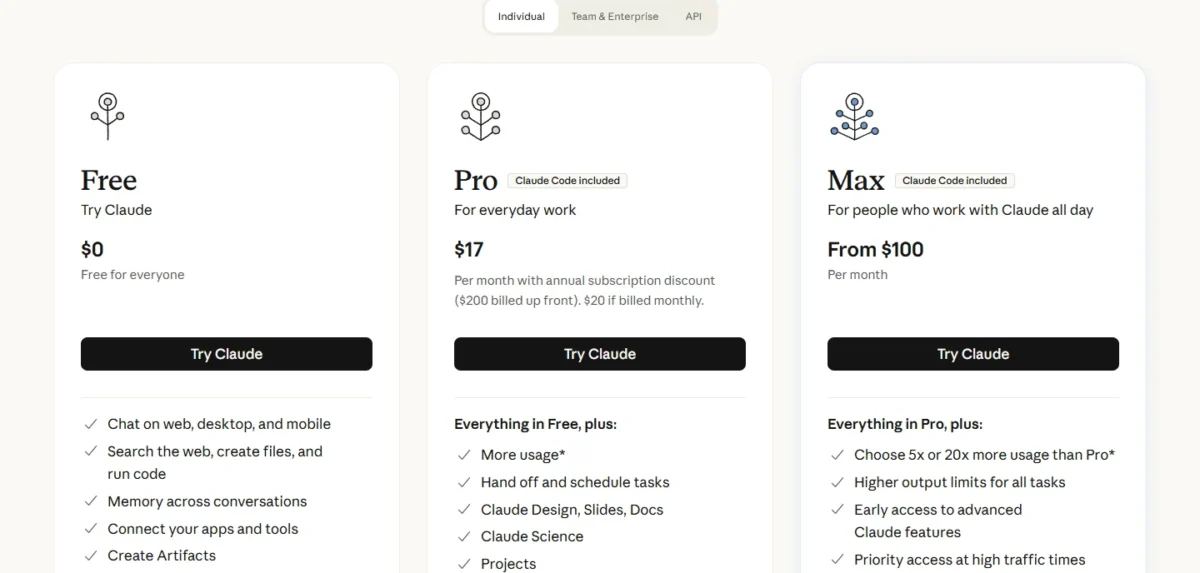
Pro adds Research, Claude Design, Slides and Docs, more Claude models and more usage. Max starts at $100 per month for 5x or 20x Pro’s usage, a plan I would reserve for someone who hits the cap every week.
For a team, a Standard seat is $20 per seat per month billed annually or $25 billed monthly. A Premium seat is $100 per seat per month billed annually, with 5x the usage of a Standard seat.
The tradeoff. Usage limits apply on every plan, with no fixed message count to plan around. A heavy drafting week can hit a cap, so I would keep deadline work on a paid plan.
Why it ranks above the next two: Claude Pro has an annual price of $17 a month. OpenAI sells Plus monthly and keeps annual plans for Business and Enterprise. Jasper Pro is $59 a month billed yearly for one seat, $42 more per month than Claude Pro’s $17.
For one writer ready to commit to a year, Claude is the cheapest of the three. If your writing overlaps with code documentation, our Codex vs Claude Code comparison covers the coding side of the Pro plan.
- Skip it if:
- shared brand-voice rules for a whole marketing team are your main need, and Jasper is where I would look first. Claude’s plans scale mainly by usage.
Pros:
- The Free plan includes web search, file creation with code execution, memory across conversations and Artifacts, so a writer can set up a first project before paying.
- Pro adds Research, Claude Design, Slides, Docs and more Claude models, at $17 a month with the annual discount ($200 billed up front) or $20 billed monthly.
- A writer who starts on monthly billing can switch to annual later, and any unused time is credited toward the first annual invoice.
Cons:
- Every plan has usage limits that reset on a rolling five-hour window, and paid plans add weekly limits. A heavy drafting week can hit a cap with no fixed message count to plan around.
- Project sharing and collaboration is not available on Free, Pro or Max, so a writer who wants an editor in the same Project needs the Team plan.
- Payments are generally non-refundable, except where Anthropic’s Consumer Terms of Service say otherwise or local law requires it. That matters most for the $200 paid up front.
2. ChatGPT: Best for Drafting and Brainstorming in One Assistant
The case for ChatGPT is breadth, not specialization. If your week mixes drafting, editing and brainstorming, one general assistant covers all three without a second subscription.
- Best for:
- writers who move between drafting, editing and brainstorming every day and want one subscription for all three.
OpenAI Plus is $20 a month and adds general access at peak times, faster response times and priority access to new features (OpenAI’s Plus announcement). Those perks matter most to a writer who works through busy hours.
The catch is billing cadence. OpenAI sells Go, Plus and Business as monthly plans and keeps annual plans for Business and Enterprise (OpenAI pricing page). A year of OpenAI Plus is $20 x 12 months = $240, with no annual Plus plan to bring it down.
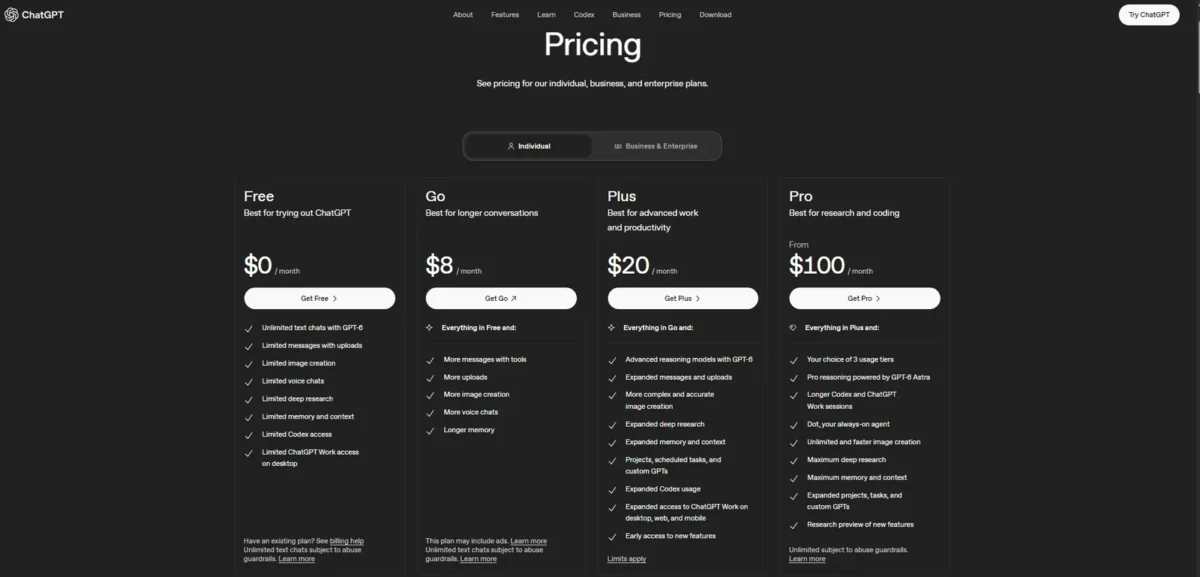
A free version of ChatGPT is open to everyone, so run your real brief there before paying. Usage must stay reasonable and within OpenAI’s policies, so a writer drafting all day should expect Chat limits, as with Claude.
Choose ChatGPT over Claude if you want one general assistant and are comfortable paying monthly. Choose Claude if you write long documents and will commit to a year for the discount.
- Skip it if:
- you want an annual plan for yourself rather than for a team. Plus is a monthly plan, and annual billing starts at Business.
Pros:
- OpenAI Plus is $20 a month, with general access during peak times, faster response times and priority access to new features.
- A free version of ChatGPT is available to everyone, so you can run the same brief there before paying for OpenAI Plus.
- Business and Enterprise have annual plans and can purchase credits for more access, so a team has a documented step up from individual use.
Cons:
- Plus is sold as a monthly plan, with annual plans for Business and Enterprise, so a year of OpenAI Plus costs $20 x 12 months = $240.
- Usage must be reasonable and comply with OpenAI’s policies, and usage refers to Chat limits, so a writer drafting all day should expect limits to apply.
3. Jasper: Best for Marketing Teams That Need Brand Voice Control
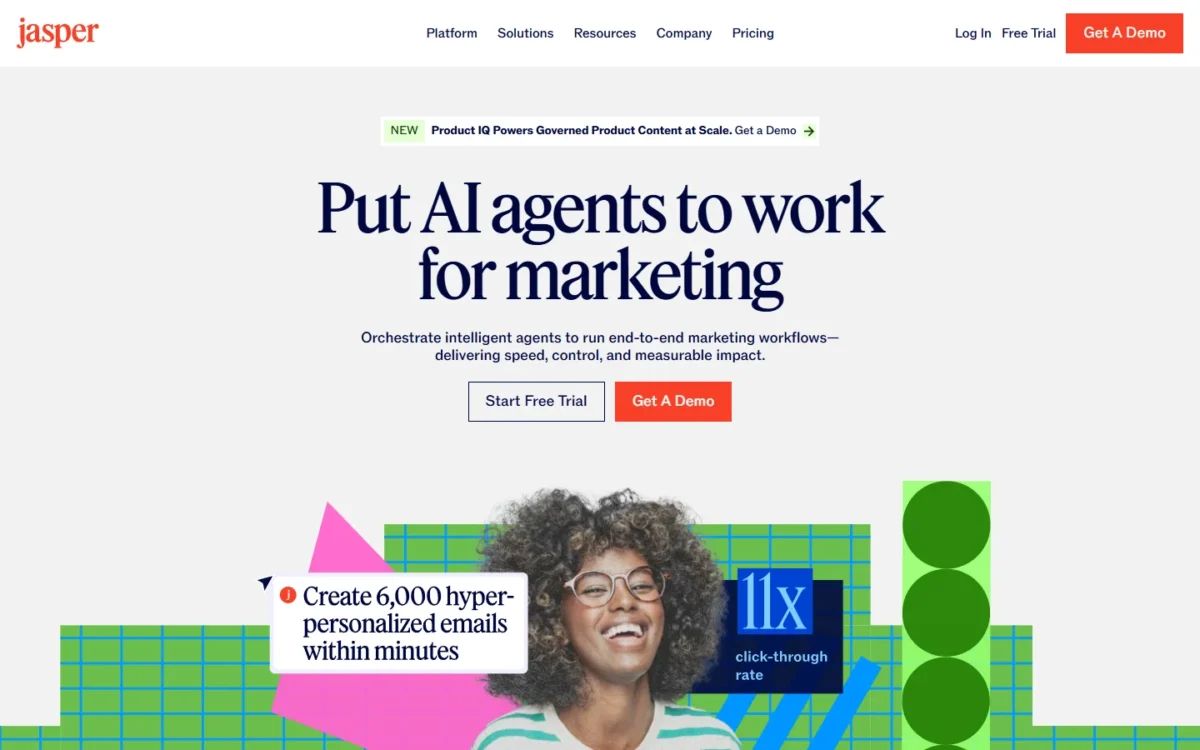
Jasper earns its price when several marketers must sound like one brand. For a solo writer with one voice, most of what the plan pays for would sit unused.
Why I picked it: Brand Voices, Knowledge assets and Audiences turn a house style into shared settings, instead of a style guide each writer reads differently. Of the tools here, it is the one built around brand governance rather than generation.
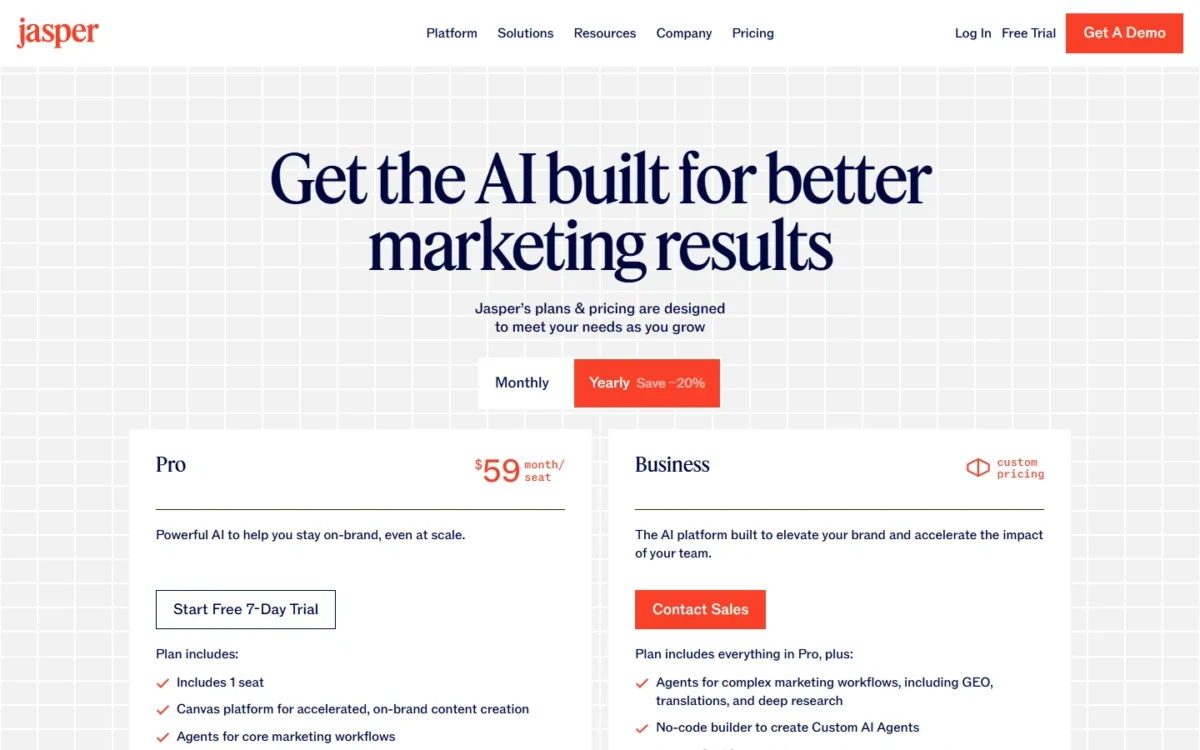
Pro comes with the Canvas workspace, agents for core marketing workflows, 2 Brand Voices, 5 Knowledge assets and 3 Audiences. Two voices cover a company and one sub-brand; an agency with many clients outgrows that quickly.
The real gate is the second seat. Pro has 1 seat, and a team that needs more users contacts sales for the custom-priced Business plan. A two-writer team cannot price Jasper from the website.
Business adds agents for GEO, translations and deep research, a no-code agent builder, Jasper Grid, unlimited Brand Voices, Knowledge and Audiences, and SSO with SAML 2.0. That is the plan a real marketing team ends up on, and its price is a sales conversation.
- Pricing:
- Pro is $59 per seat per month billed yearly or $69 billed monthly, with a 7-day free trial. One seat at $59 x 12 months = $708 a year costs more than Claude Pro ($200 a year) and ProWritingAid Premium ($120 a year) combined.
Non-profits get a 20% discount, applied after you start a trial and email Jasper’s team (Jasper’s pricing FAQ).
- Skip it if:
- you are a solo writer with one voice. You would pay for governance you do not use.
Pros:
- Pro includes the Canvas workspace and agents for core marketing workflows, plus 2 Brand Voices, 5 Knowledge assets and 3 Audiences. One seat can hold a house voice with its supporting facts.
- Pro has a 7-day free trial, and monthly billing at $69 per seat per month carries no ongoing commitment and can be canceled at any time.
- Business adds SSO with SAML 2.0, role-based access controls, an in-app AI audit log and API access for teams that outgrow one seat.
Cons:
- Pro includes 1 seat, and a second user means contacting sales about the custom-priced Business plan, so a two-writer team cannot price Jasper from the website.
- Paying $59 a month billed yearly commits you for 12 months, and Business plans also begin with a 12 month commitment.
- Some usage-based features on Business, such as the GEO Hub and Agents, run on credits alongside seat pricing, so the bill has a seat part and a credit part.
4. Grammarly: Best for Editing Wherever You Write
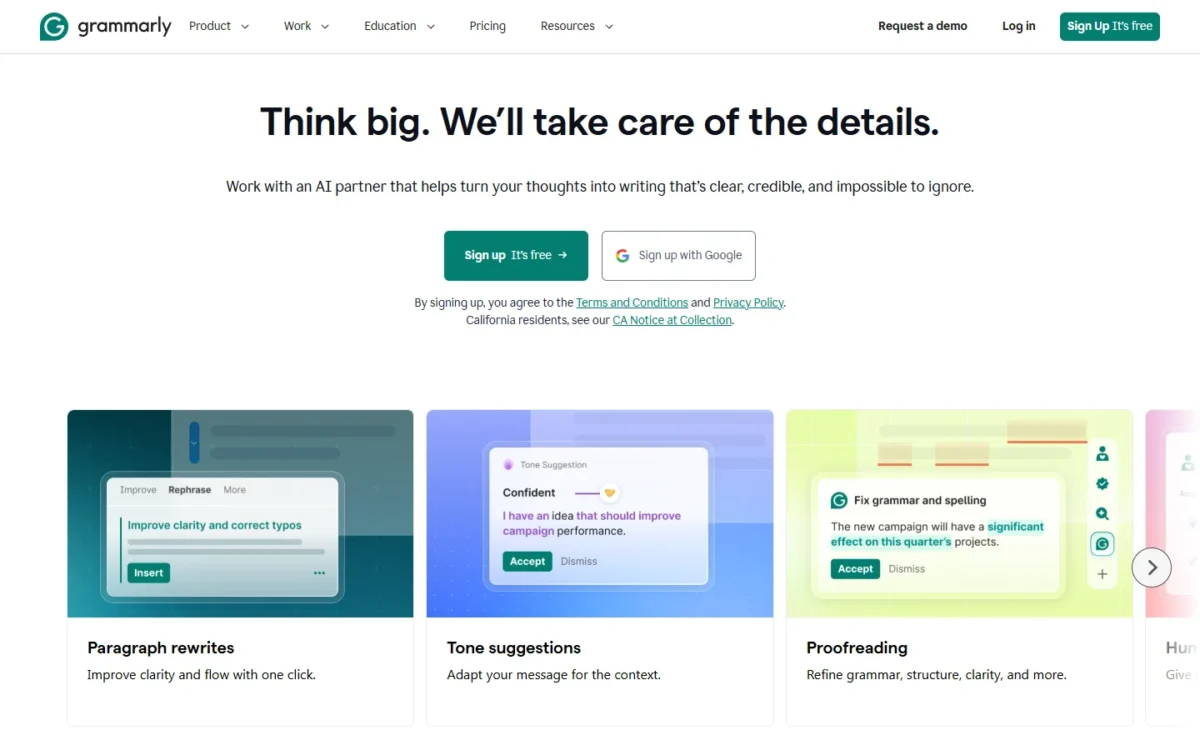
Think of Grammarly as the checking layer, not the drafting engine. It pairs with any assistant above, because its job starts after the first draft exists.
Who it suits: teams that want consistent grammar, tone and plagiarism checks in the apps they already use.
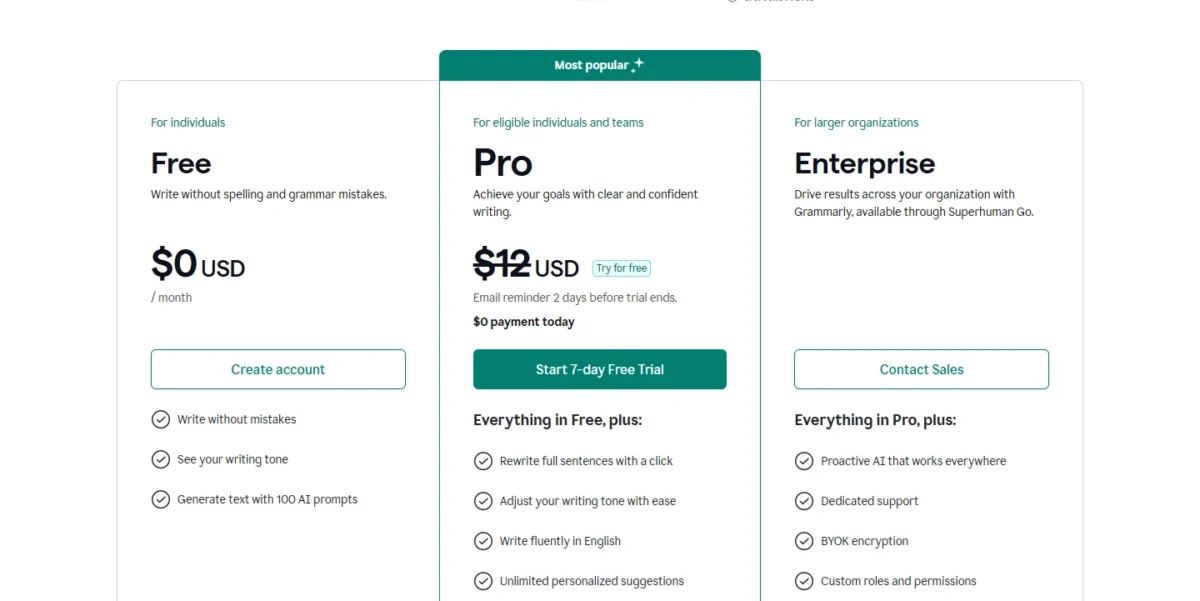
The Free plan is $0 USD per month and covers mistake checks, tone detection and 100 AI prompts. That is plenty for checking and thin for generating: 100 prompts a month is about 3 a day.
Pro is $12 USD, and Grammarly prints no billing period next to that figure, so settle the cadence at checkout. The jump from 100 to 2,000 AI prompts per member per month is the real reason to upgrade; rewrites and plagiarism checks come with it.
If all you want is cleaner sentences, Free may be enough. Pay for Pro when Grammarly starts generating text for you, not just correcting it.
Enterprise is a contact-sales plan, available through Superhuman Go, with BYOK encryption and data loss prevention on top of Pro. A team that needs either starts with a sales call, not a checkout.
- Skip it if:
- your main need is long-form generation. Free caps AI text generation at 100 prompts a month.
Pros:
- The Free plan is $0 USD per month and covers mistake checks, a view of your writing tone and 100 AI prompts, so you can judge the checks before paying.
- Pro adds full-sentence rewrites, tone adjustment, plagiarism and AI-text detection, and 2,000 AI prompts per member per month.
- Pro can be tried first, with $0 payment today and an email reminder 2 days before the trial ends.
Cons:
- The Free plan includes 100 AI prompts, so a writer who drafts with Grammarly every day reaches the cap and needs Pro.
- Pro stops at 2,000 AI prompts per member per month, and unlimited prompts start at the Enterprise tier.
- BYOK encryption, custom roles and permissions, and data loss prevention sit in Enterprise, a contact-sales plan, so a team that needs them cannot buy self-serve.
5. Sudowrite: Best for Fiction and Creative Writing
Fiction is bursty work, and Sudowrite bills for it in credits rather than seats. That suits a novelist whose usage spikes while drafting and drops during revision, as long as the plan matches the gaps between bursts.
It is the tool I would shortlist first for fiction. Story Bible and Story Smarts each have their own section in Sudowrite’s help docs, a fair sign of who the product is for.
The three tiers, from Sudowrite’s plan documentation:
- Hobby & Student: 225,000 credits, $10 per month paid annually or $19 per month paid monthly.
- Professional: 1,000,000 credits, $22 per month paid annually or $29 per month paid monthly.
- Max: 2,000,000 rollover credits, $44 per month paid annually or $59 per month paid monthly.
The billing gap is widest at the bottom. Hobby & Student paid monthly comes to $19 x 12 months = $228 a year, against $10 x 12 months = $120 paid annually.
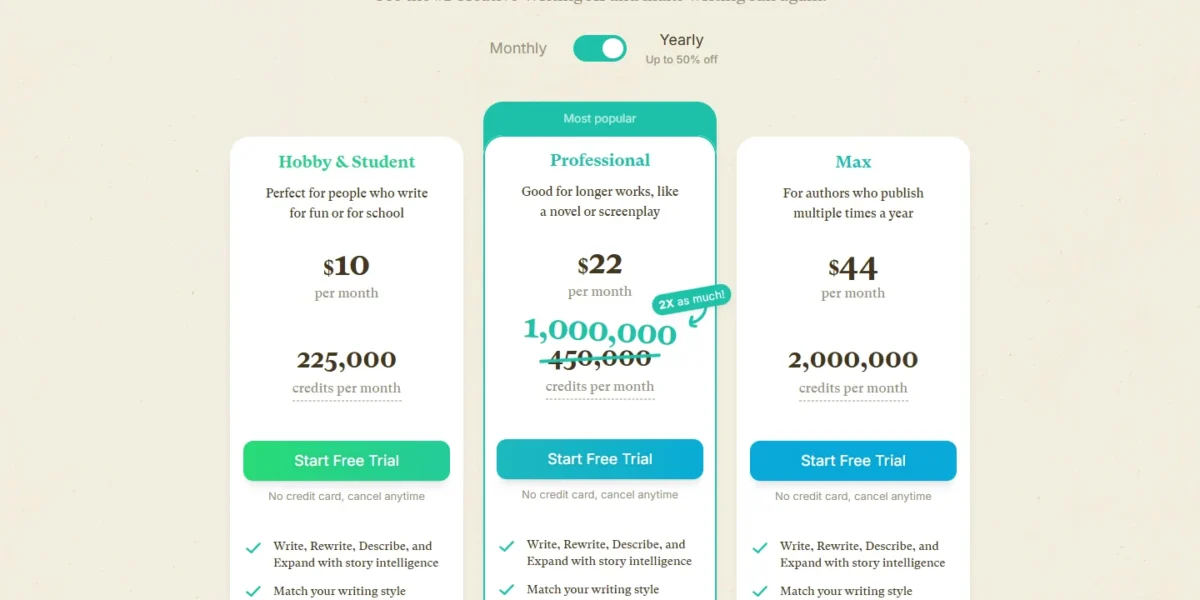
What decides the tier is not the credit count. Feedback is exclusive to Professional and Max, and only Max rolls unused credits over (Sudowrite’s credits documentation).
A novelist who drafts in bursts and rests between books should weigh Max. On the two cheaper plans, unused credits expire at each monthly refresh.
Trying it costs little. Tell Sudowrite within the first 7 days and it cancels and refunds your plan (Sudowrite’s trial page), and your documents stay accessible and exportable without an active plan.
If you remember older tier names from past roundups, the current ones are Hobby & Student, Professional and Max.
- Skip it if:
- you write nonfiction, marketing or business content. For that work, I would pick a general assistant on a flat monthly plan with usage limits.
Pros:
- Each tier includes a monthly credit allotment (225,000 credits on Hobby & Student), and credits bought on top on any plan never expire.
- Most features are available on all plans, so the tier mainly changes the monthly credits, whether they expire and a few plan-specific features such as Feedback.
- Cancel within the first 7 days and Sudowrite cancels and refunds your plan, and your documents stay accessible and exportable without an active plan.
Cons:
- Unused credits expire at the end of each monthly cycle on Hobby & Student and Professional, and rollover for up to 12 months is reserved for Max.
- Feedback is exclusive to Professional and Max, so a novelist who wants it cannot stay on Hobby & Student at $10 a month paid annually.
- Paying monthly costs $19 a month on Hobby & Student, against $10 a month paid annually.
6. ProWritingAid: Best for Manuscript Editing and Style Reports
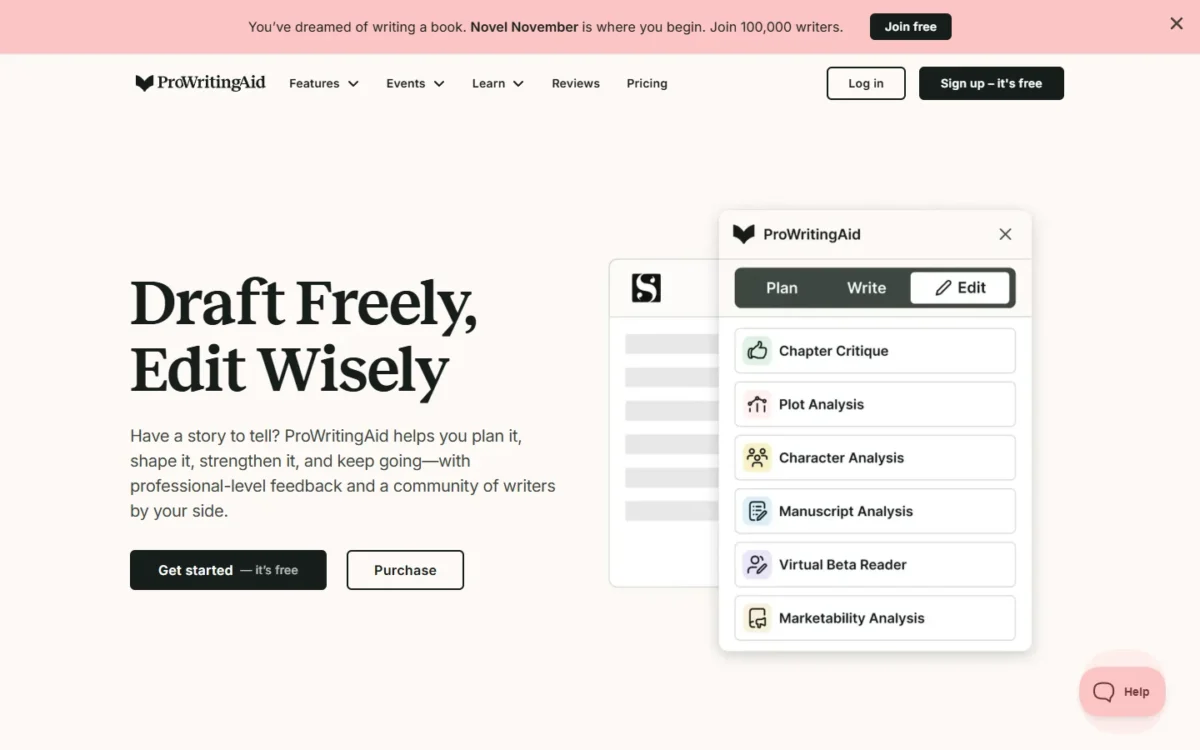
ProWritingAid starts where the drafting tools stop. You bring a finished manuscript, and its main output is editing reports and critiques.
- Best for:
- authors and long-form editors polishing a finished manuscript in English.
What matters on Premium is repetition without a meter. Line editing report runs and Rephrases are unlimited, alongside 25+ writing analysis reports, a custom style guide and 1 Chapter Critique per day. That suits a writer who re-runs reports on every revision pass.
- Pricing:
- Premium is $30.00 per month billed monthly, or $10.00 per month billed yearly at $120. Paying monthly all year costs $30 x 12 months = $360, which is $240 more than the $120 yearly bill. Monthly billing makes sense for a one-month edit and little else.
Premium Pro is $36.00 per month billed monthly, or $12.00 per month billed yearly at $144. It raises Chapter Critiques to 30 per day and adds live workshops with authors and editors.
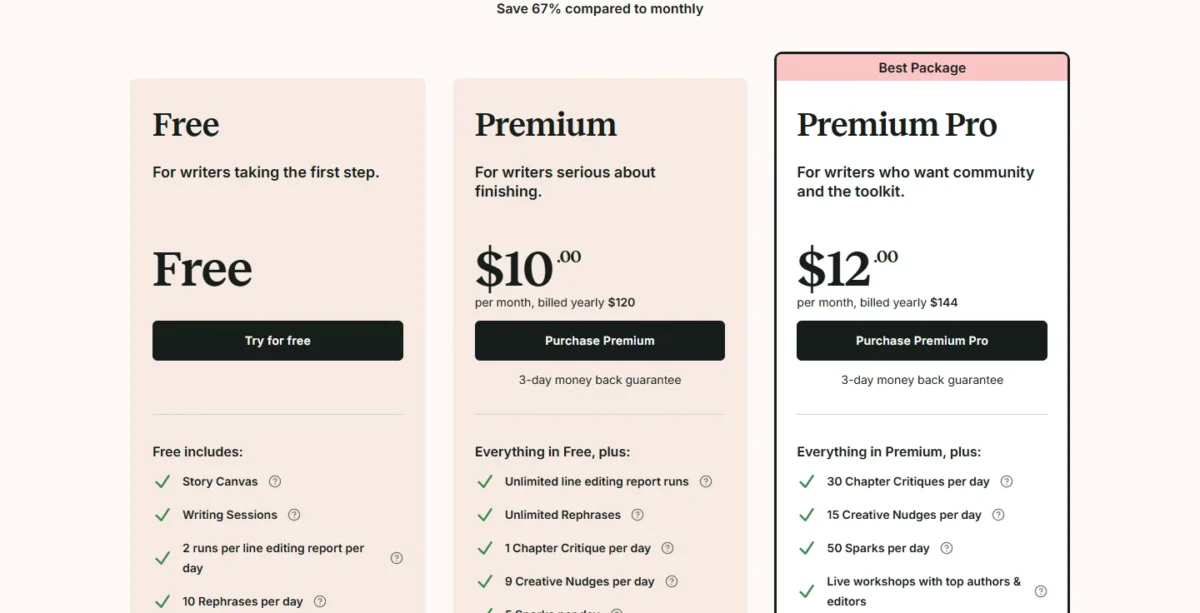
Lifetime licenses are $399.00 for Premium and $699.00 for Premium Pro, each a one-time payment. At $399, lifetime Premium equals about 3.3 years of yearly billing at $120, so it pays off only if you will still be editing with it in year four.
Watch the add-on. Whole-manuscript analysis runs on Story Credits, bought separately, with up to 40% off for Premium members and up to 65% off for Premium Pro members.
The Free plan is enough to judge fit: 2 runs per line editing report per day, 10 Rephrases per day and 3 Sparks per day.
- Skip it if:
- you write in other languages. ProWritingAid is currently only available in English.
Pros:
- Premium has unlimited line editing report runs, unlimited Rephrases, 25+ writing analysis reports and a custom style guide, which suits a writer who re-runs reports across many revision passes.
- Premium includes 1 Chapter Critique per day, and Premium Pro raises that to 30 per day.
- Lifetime licenses are a one-time payment ($399 for Premium) with no renewal charge afterward.
Cons:
- ProWritingAid is currently only available in English, so a manuscript in another language is out of scope.
- Whole-manuscript analysis runs on Story Credits that are bought separately. A full-book pass adds a cost on top of the plan price, even with the Premium and Premium Pro discounts.
- Refunds on yearly and lifetime plans must be requested within three days of purchase, monthly plans are not refundable and Story Credits purchases are nonrefundable.
7. Frase: Best for SEO Article Generation and Content Audits
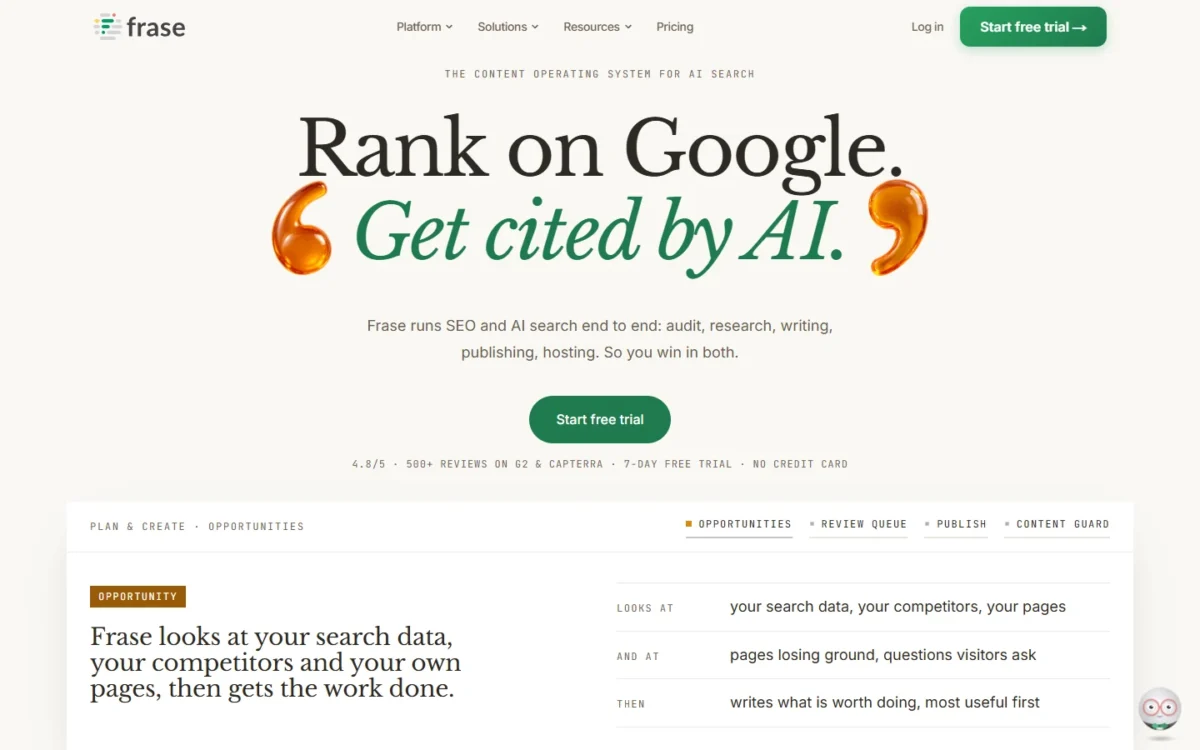
The first thing a Frase team runs out of is articles, not budget. It is built for writing that has to rank on Google and get cited by AI search, and its plans are metered to match.
- Best for:
- in-house SEO teams and agencies that plan, write, audit and refresh articles on a schedule.
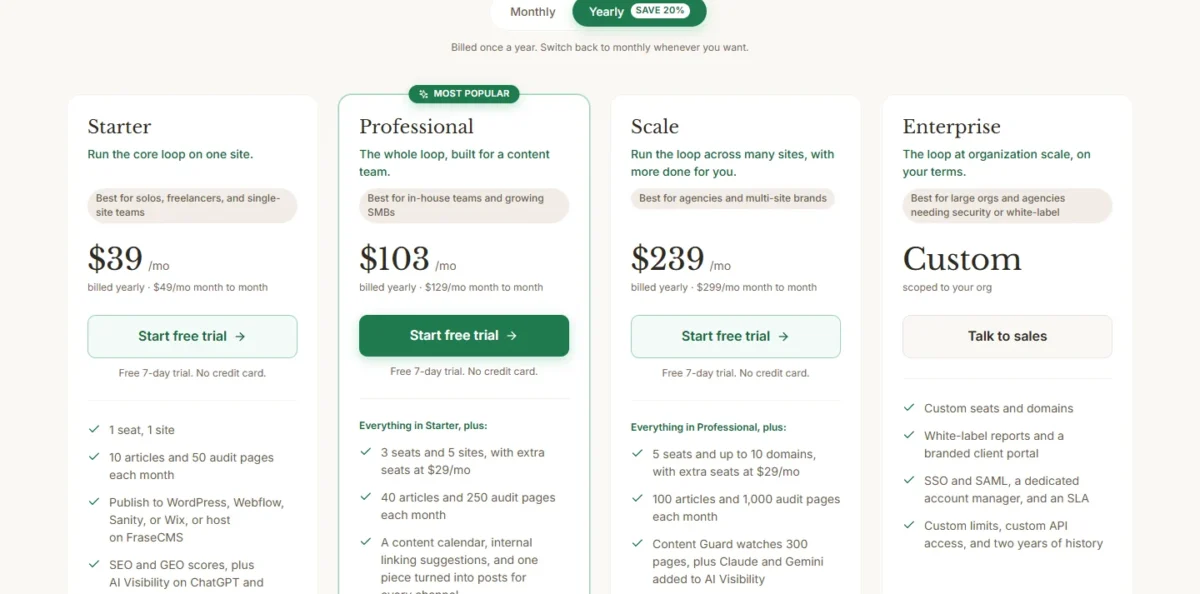
Starter, Professional and Scale each bundle a monthly quota of articles and audit pages. Finished posts publish to WordPress, Webflow, Sanity or Wix, or to FraseCMS.
| Frase plan | Billed yearly (per month) | Month to month | Seats and sites | Monthly volume |
|---|---|---|---|---|
| Starter | $39 | $49 | 1 seat, 1 site | 10 articles, 50 audit pages |
| Professional | $103 | $129 | 3 seats, 5 sites | 40 articles, 250 audit pages |
| Scale | $239 | $299 | 5 seats, up to 10 domains | 100 articles, 1,000 audit pages |
| Enterprise | Custom | Custom | Custom seats and domains | Custom limits |
Sources: Frase pricing, checked October 2026.
The step that matters is Starter to Professional: four times the articles and 3 seats, for $103 a month billed yearly.
A team publishing 3 posts a week ships about 12 a month, already past Starter’s 10. Starter then holds at its monthly limits, so the cap shows up as a stalled calendar rather than a surprise invoice.
- Pricing:
- Starter at $39 a month billed yearly is $39 x 12 months = $468 a year. For one writer on one site, that is a lot of tool. For a team that audits and refreshes pages every month, the audit pages justify it.
- Skip it if:
- your writing is not search-driven. You would pay for audits and AI visibility tracking you never open.
Pros:
- Starter bundles 10 articles and 50 audit pages a month with SEO and GEO scores and AI Visibility on ChatGPT and Google AI. Posts publish to WordPress, Webflow, Sanity or Wix, or to FraseCMS.
- Starter, Professional and Scale each offer a free 7-day trial with no credit card, so a team can run a real batch before paying.
- Starter stops at its monthly limits rather than billing overage, and pay-as-you-go on Professional and Scale is optional and off by default. A busy month does not produce a surprise invoice.
Cons:
- Starter stops at 10 articles and 50 audit pages a month on 1 seat and 1 site. A team that publishes more than 10 posts a month, or runs a second site, must move to Professional.
- Extra seats cost $29 a month each on Professional and Scale beyond the 3 and 5 seats included. A larger content team pays per head on top of the plan price.
- White-label reports, a branded client portal, and SSO and SAML are Enterprise only, so an agency that needs them has to talk to sales.
8. Writesonic: Best for Brands Tracking AI Search Visibility
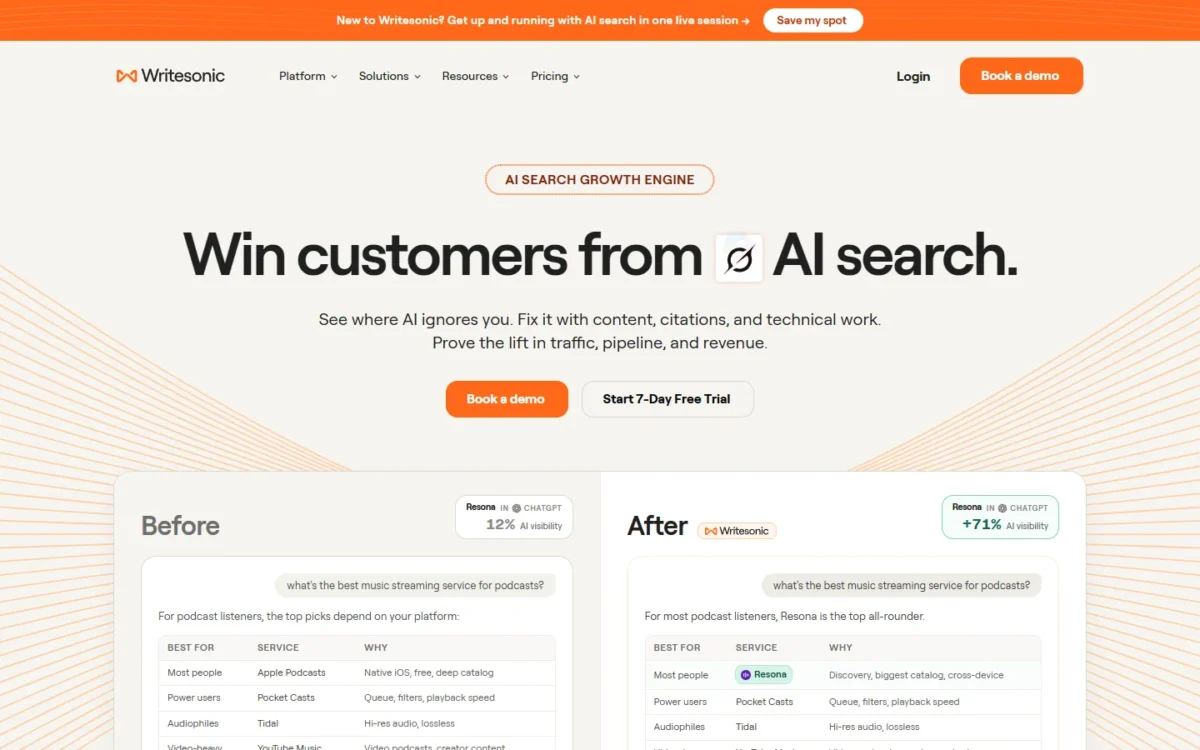
Writesonic sells itself as an AI search visibility platform, with AI articles bundled in as one part.
You are buying a monitoring tool that happens to write, not a writer that happens to monitor. Starter, Basic and Growth all track your brand across ChatGPT, Gemini and Google AI Overviews. That matters only if AI answers already shape how buyers find you.
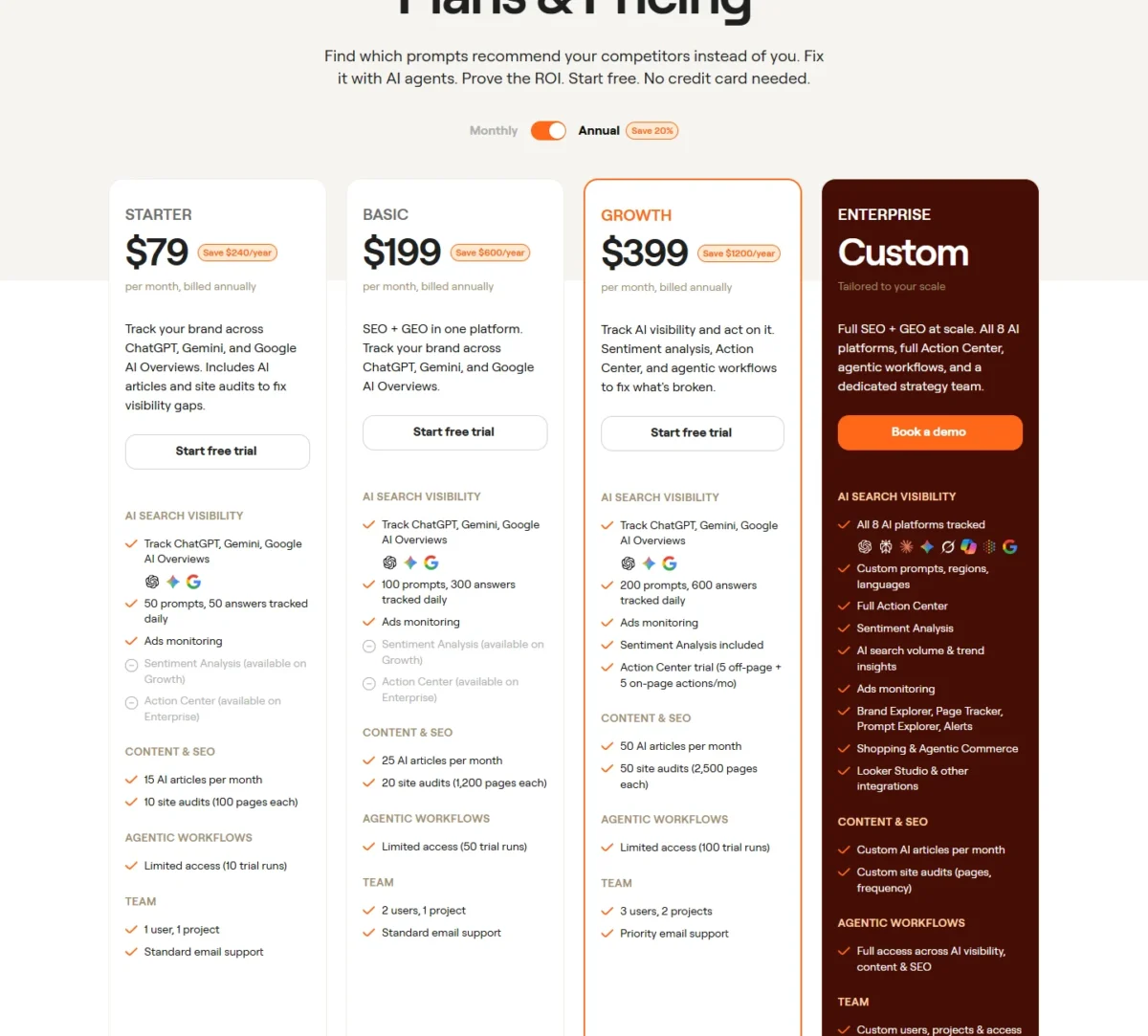
Prices are per month, billed annually, and annual billing saves 20%:
- Starter, $79: 50 prompts tracked daily, 15 AI articles per month, 10 site audits, 1 user and 1 project.
- Basic, $199: 100 prompts tracked daily, 25 AI articles per month, 20 site audits, 2 users and 1 project.
- Growth, $399: 200 prompts tracked daily, 50 AI articles per month, sentiment analysis, an Action Center trial, 3 users and 2 projects.
- Enterprise, custom: all 8 AI platforms, the full Action Center, SSO/SAML, SOC 2 Type II, HIPAA and GDPR.
Starter at $79 x 12 months = $948 a year is the highest one-writer figure in the yearly cost table below. For that, a writer gets 15 AI articles a month; the rest of the bill is visibility tracking.
Who should buy it: brands and agencies that want to monitor how AI assistants mention them and publish content to close the gaps.
If you are choosing between Writesonic and a marketing generator, our Copy.ai vs Writesonic breakdown covers that call.
- Skip it if:
- you only need a writing assistant. Starter buys visibility tracking you may not use.
Pros:
- Starter tracks a brand across ChatGPT, Gemini and Google AI Overviews and bundles 15 AI articles and 10 site audits a month in the same plan.
- Starter, Basic and Growth each come with a free trial, and no credit card is needed to start.
- Basic tracks 100 prompts daily with 2 users, and Growth tracks 200 prompts daily with 3 users, so a team has a documented step up from Starter.
Cons:
- Starter covers 1 user and 1 project, and Growth ($399 a month billed annually) is the first plan with 2 projects.
- Agentic workflows on Starter are limited access with 10 trial runs.
- Sentiment analysis starts on Growth, and the full Action Center is an Enterprise feature, with Growth getting a trial of 5 off-page and 5 on-page actions a month.
9. QuillBot: Best for Students and Paraphrasing on a Budget
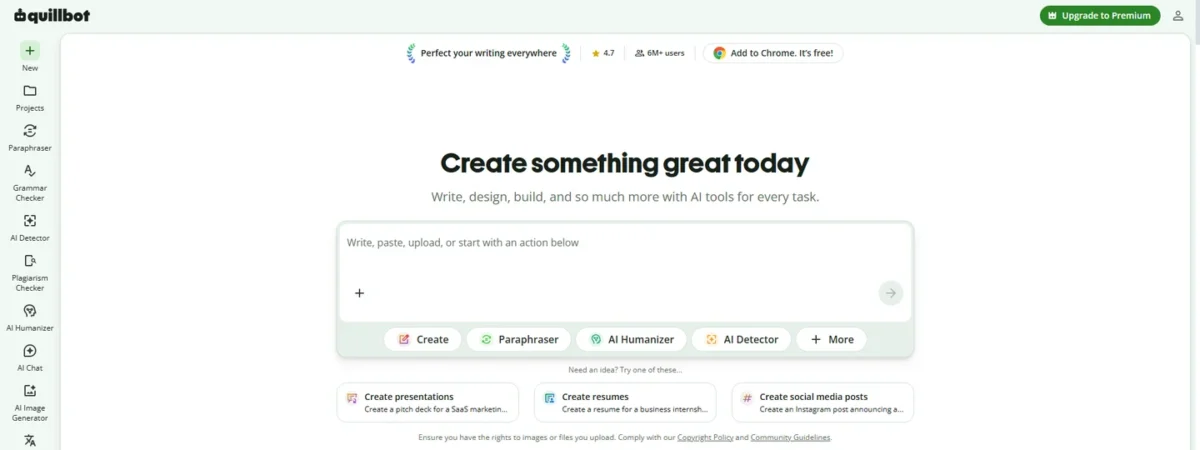
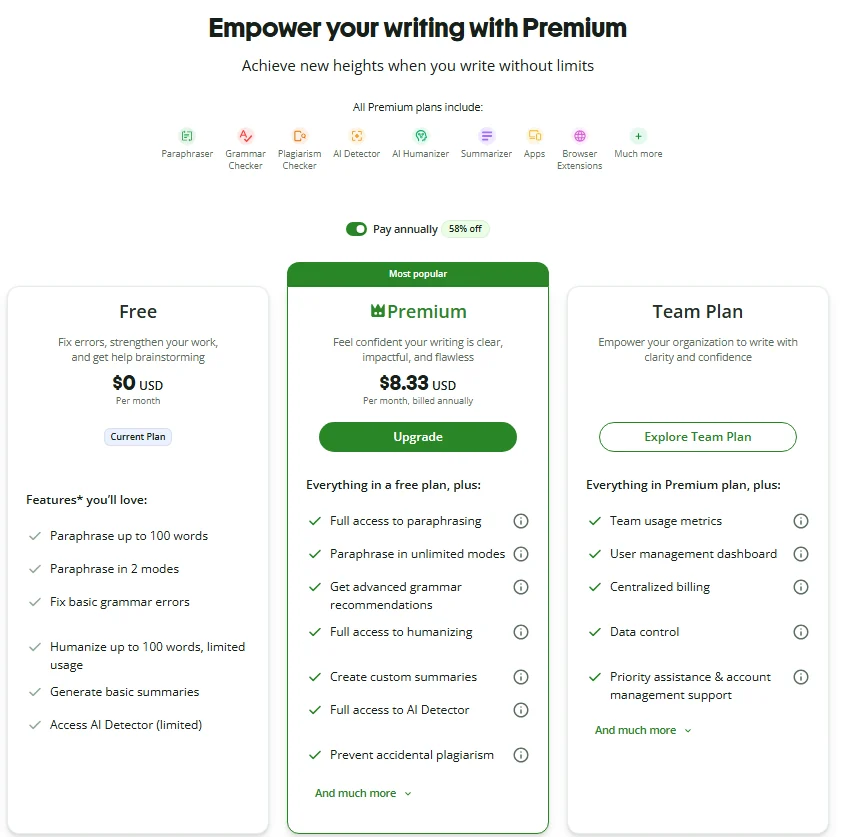
Rewriting text you already have is a different job from drafting it, and QuillBot prices that job for a student budget. Premium is $8.33 USD per month, billed annually, which is $8.33 x 12 months = $99.96 a year.
That is the lowest figure in the yearly cost table below. It buys full paraphrasing, full AI Detector and humanizer access, plagiarism checks up to 25,000 words a month and summaries up to 6,000 words.
Free paraphrases up to 100 words, humanizes up to 100 words with limited usage, gives limited AI Detector access and summarizes up to 1,200 words. That is enough to test a paragraph, not an essay.
A Team Plan adds a user management dashboard. Limits may vary across platforms, so do not assume the same caps in every app you use.
- Best for:
- students and non-native English writers who paraphrase, summarize and check their own text.
Students should check their school’s AI policy before paraphrasing anything they submit. The tool’s limits are the smaller risk.
- Skip it if:
- you need original long-form drafts. QuillBot’s plans are organized around rewriting, summarizing and checking.
Pros:
- Premium gives full paraphrasing access in unlimited modes, at $8.33 USD per month billed annually.
- Premium adds plagiarism checks up to 25,000 words a month and summaries up to 6,000 words, against 1,200 words on Free.
- Premium includes full access to the AI Detector and the humanizer, which are limited on the Free plan.
Cons:
- Free paraphrasing stops at 100 words and humanizing at 100 words with limited usage, so a full essay needs Premium.
- Premium gets higher usage for AI chat and writing rather than unlimited use, image creation has usage limits, and limits may vary across platforms.
10. Rytr: Best for Budget Short-Form Copy
Short copy is where Rytr earns its place: emails, SEO meta titles, replies to reviews and messages, post and caption ideas and calls to action. I would point a freelancer writing many small pieces for a few brands here, not someone writing a long report.
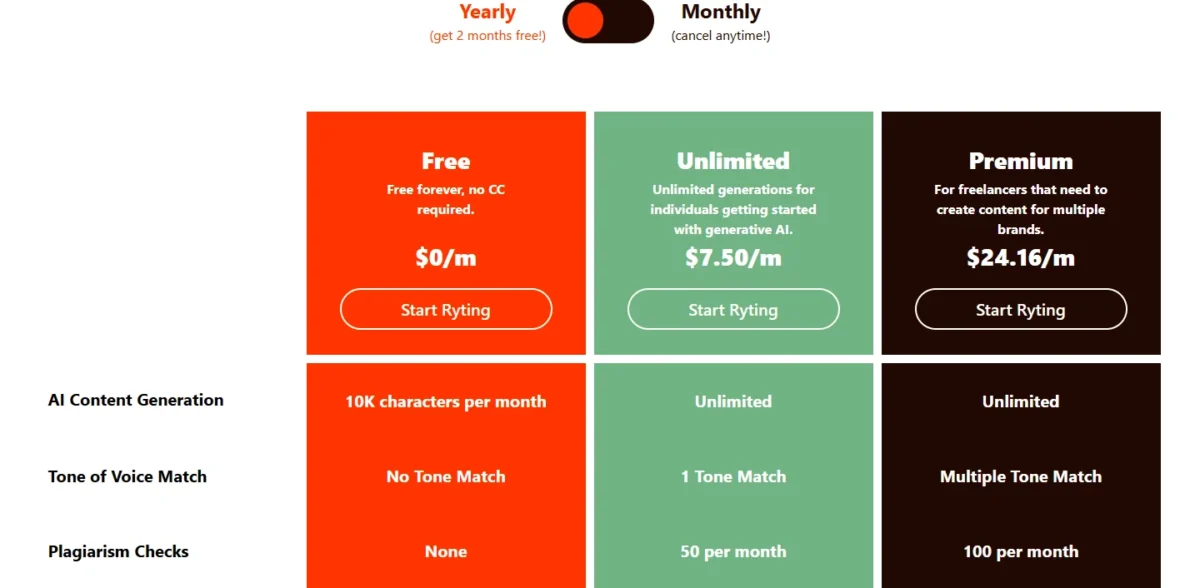
The Free plan is free forever with no credit card and allows 10K characters per month, with no plagiarism checks. Unlimited adds unlimited generations, 1 Tone Match and 50 plagiarism checks per month.
Premium adds multiple Tone Matches, 100 plagiarism checks per month and 35+ languages. Rytr aims it at freelancers creating content for multiple brands, and that is the buyer I would sell it to.
- Pricing:
- Unlimited is $7.50/m and Premium is $24.16/m, with no billing period tied to either figure. Without a stated cadence, I leave Rytr out of the yearly cost math.
The annual plan saves 20% off the total price and comes with a 12-month commitment. Content created with Rytr is owned by the user, subject to its Terms of Service.
- Skip it if:
- you write in several languages on a budget. Free and Unlimited cover 1 language, and Premium covers 35+.
Pros:
- The Free plan is free forever with no credit card required and allows 10K characters per month.
- Unlimited and Premium both come with unlimited AI content generation. Unlimited adds 1 Tone Match and 50 plagiarism checks per month, and Premium adds multiple Tone Matches and 100 checks.
- Content created with Rytr is owned by the user or the entity that generates it, subject to its Terms of Service.
Cons:
- The Free plan has no plagiarism checks and no Tone Match, so a freelancer who needs either has to move to a paid plan.
- Languages stay at 1 on Free and Unlimited, and 35+ languages arrive on Premium.
- The annual plan saves 20% off the total price but comes with a 12 month commitment.
What a Year Costs: One Writer vs a Five-Person Team
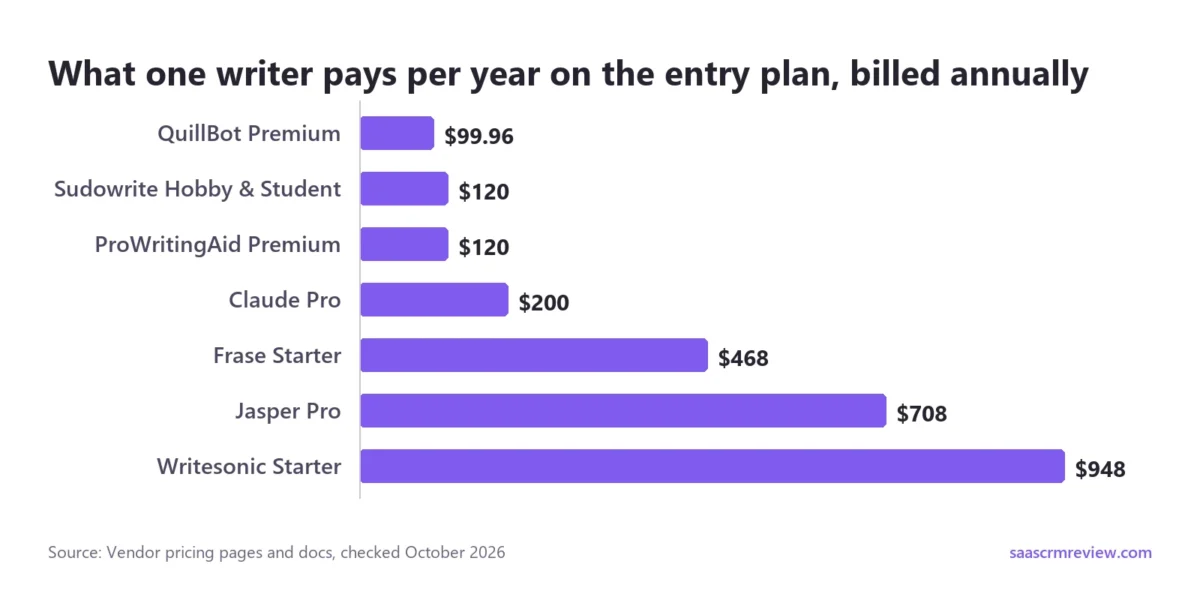
A monthly sticker hides the number that matters at renewal. Here is each entry plan as a yearly bill for one writer, with the math shown.
| Tool and plan, one writer | Billing | Annual math | Yearly cost |
|---|---|---|---|
| QuillBot Premium | Annual | $8.33 x 12 months | $99.96 |
| Sudowrite Hobby & Student | Annual | $10 x 12 months | $120 |
| ProWritingAid Premium | Annual | $10 x 12 months | $120 |
| Claude Pro | Annual | $200 billed up front | $200 |
| OpenAI Plus | Monthly only | $20 x 12 months | $240 |
| Frase Starter | Annual | $39 x 12 months | $468 |
| Jasper Pro | Annual | $59 x 12 months | $708 |
| Writesonic Starter | Annual | $79 x 12 months | $948 |
Sources: QuillBot Premium, Sudowrite plans documentation, ProWritingAid pricing, Claude pricing, OpenAI Plus announcement, OpenAI pricing page, Frase pricing, Jasper pricing, Writesonic pricing, checked October 2026.
For one writer, QuillBot Premium and ProWritingAid Premium cost $120 a year or less, while Frase, Jasper and Writesonic start at $468 a year or more. Buy those three only when their workflow features replace work someone now does by hand.
A five-person team changes the math, because seat rules start to matter:
| Tool and plan, five writers | Seat rule | Annual math | Yearly cost |
|---|---|---|---|
| Claude Team, Standard seats | Per seat | $20 x 5 seats x 12 months | $1,200 |
| Frase Scale | 5 seats included | $239 x 12 months | $2,868 |
| Jasper Business | More than 1 user needs Business | Contact sales | Not published |
Sources: Claude pricing, Frase pricing, Jasper pricing, checked October 2026.
For a five-person content team that does not live on search traffic, my pick is Claude Team for drafting plus an editing tool. Standard seats at $20 per seat per month billed annually come to $20 x 5 seats x 12 months = $1,200 a year before editing.
Add ProWritingAid or Grammarly on top, and settle Grammarly’s billing period at checkout. A search-led team should price Frase Scale first, since its $239 a month billed yearly already covers 5 seats.
Jasper cannot be priced for five writers without a sales call, which tells you who it is built for. OpenAI’s Business plan is priced per user per month and sold monthly or annually, so get a per-seat figure before comparing it with these rows.
How to Choose an AI Writer by Team Size, Budget and Workflow
Start from the job and the team size; the price follows from both.
Where most solo writers should start
Start with Claude Free and the free version of ChatGPT, and draft the same brief in both. Choose Claude Pro if your work is long documents and you will commit to a year at $17 a month ($200 up front).
Choose OpenAI Plus at $20 a month, billed monthly, if one general assistant for drafting and brainstorming is the job. Add Grammarly Free on top either way.
Marketing copy and brand voice at scale
Choose Jasper if three or more marketers write under shared brand voices and a Business quote is realistic. Choose Rytr Premium if one freelancer writes short copy for several brands, and settle its billing toggle before you budget.
If the same team also makes images, video and social posts, our ranking of AI content creation tools covers that side.
Fiction and long manuscripts
Choose Sudowrite while you are drafting, on Professional or Max if you want Feedback. Choose ProWritingAid once the draft is done and you need line editing reports and chapter critiques.
Many authors will want one of each. Sudowrite Hobby & Student ($120 a year) plus ProWritingAid Premium ($120 a year) comes to $240, about a third of one Jasper Pro seat at $708.
SEO and search visibility
Choose Frase if your team writes, audits and refreshes articles every month and wants seats bundled in. Choose Writesonic if tracking how AI platforms mention your brand is the main job and articles come second.
Students and academic writing
Choose QuillBot for paraphrasing, summaries and plagiarism checks at $99.96 a year on annual billing, and Grammarly Free for grammar and tone. Keep drafting your own arguments: the editing tools check text, and your school’s AI policy decides what you may submit.
Free vs Paid AI Writing Tools: Where Free Plans Stop
Free plans are enough to judge tone and fit, not to run a publishing calendar. Here is where each free option on this list stops:
- Claude Free: web search, memory and up to 5 Projects, but no Research.
- The free version of ChatGPT: open to everyone, and the quickest way to test a brief against Claude Free.
- Grammarly Free: spelling, grammar and tone, with 100 AI prompts a month.
- ProWritingAid Free: 2 runs per line editing report and 10 Rephrases per day.
- QuillBot Free: paraphrasing up to 100 words at a time and summaries up to 1,200 words.
- Rytr Free: 10K characters per month, no credit card.
- Jasper and Frase: 7-day free trials rather than ongoing free use.
- Writesonic: a free trial on Starter, Basic and Growth, with no credit card needed.
- Sudowrite: a refund if you cancel within the first 7 days.
My rule: use free plans to choose a tool, and pay before a deadline depends on it. For a wider set of free options, our guide to free AI content generators is the next read.
Common Mistakes When Buying an AI Writing Tool
Paying monthly after the first month
Month-to-month billing is right for a trial month and wrong for a tool you keep. ProWritingAid Premium is the clearest case: $30 x 12 months = $360 a year, against $120 billed yearly.
Sudowrite ($19 against $10 a month) and Frase ($49 against $39 a month) follow the same pattern on a smaller scale.
Buying a team platform for one writer
Jasper’s Brand Voices, Knowledge assets and Audiences pay off when several people must sound alike. For one writer, Claude Pro ($200 a year) plus ProWritingAid Premium ($120 a year) comes to $320, less than half of a $708 Jasper Pro seat.
Ignoring credits and article caps
Sudowrite meters credits, Frase caps articles per month, Grammarly Free caps AI prompts, and Claude and ChatGPT both apply usage limits. Find the cap that matches your weekly volume before you compare prices.
Treating a first draft as ready to publish
AI output is a draft whichever tool wrote it, and someone still has to fact-check and edit it. Keep your style guide and approved facts in one shared place, so every writer and every tool works from the same source.
If you have not picked a home for that, our Notion vs Confluence comparison helps you choose one.
Skipping the disclosure rules for books
Amazon’s KDP content guidelines require publishers to inform Amazon of AI-generated text, images or translations when they publish. AI-assisted editing needs no disclosure.
Read the definitions before you upload a manuscript, because the line between the two decides what you must declare.
Best AI Writing Tools FAQ
Which AI tool is best for writing?
It depends on the writing job, not on one leaderboard. For long drafts I would start with Claude Pro at $17 a month billed annually, and for one all-round assistant, OpenAI Plus at $20 a month. Claude Pro also gives at least 5x the usage of Free per five-hour session, the number that matters when Free runs out.
Which AI is better than ChatGPT for writing?
Claude is the closest alternative for long-form writing, and it costs less once you commit to a year. Pro is $200 up front, against $20 x 12 months = $240 for OpenAI Plus. Claude’s Max plan, from $100 a month, is billed monthly, so heavy users lose the annual discount there.
Is Claude or GPT better at writing?
I would not choose on model quality alone, and this guide does not score output. Decide on workflow and billing: Claude Pro adds Research at $17 a month billed annually, while OpenAI Plus costs $20 a month billed monthly. Claude Pro also brings Claude for Microsoft 365, which matters if your drafts live in Microsoft’s apps.
Is it illegal to publish a book written by AI?
On Amazon, the rule is disclosure: KDP requires you to inform Amazon of AI-generated content, even text you edited heavily afterward. Copyright is separate: the U.S. Copyright Office released Part 2 of its AI report, on copyrightability, on January 29, 2025. For a specific book, ask a lawyer.
What is the best free AI writing tool?
For drafting, start with Claude Free and the free version of ChatGPT, and run the same brief in both. Claude Free already includes Artifacts and voice mode, so it is more than a basic chat window. For short copy, Rytr Free allows 10K characters a month with no credit card required.
What is the best AI writing tool for students?
QuillBot fits most student budgets: Premium is $8.33 a month billed annually, or $99.96 a year. Free paraphrases in two built-in modes, Standard and Fluency, while Premium has 9 plus unlimited custom modes. Pair it with Grammarly Free, and check your school’s AI policy before using any tool on graded work.
What is the best AI for writing novels?
I would shortlist Sudowrite first: Hobby & Student is $10 a month paid annually with 225,000 credits, and Feedback starts on Professional. On the two cheaper plans, unused credits expire each month on the date you signed up. Once the draft is done, ProWritingAid Premium handles revision with line editing reports and a daily Chapter Critique.