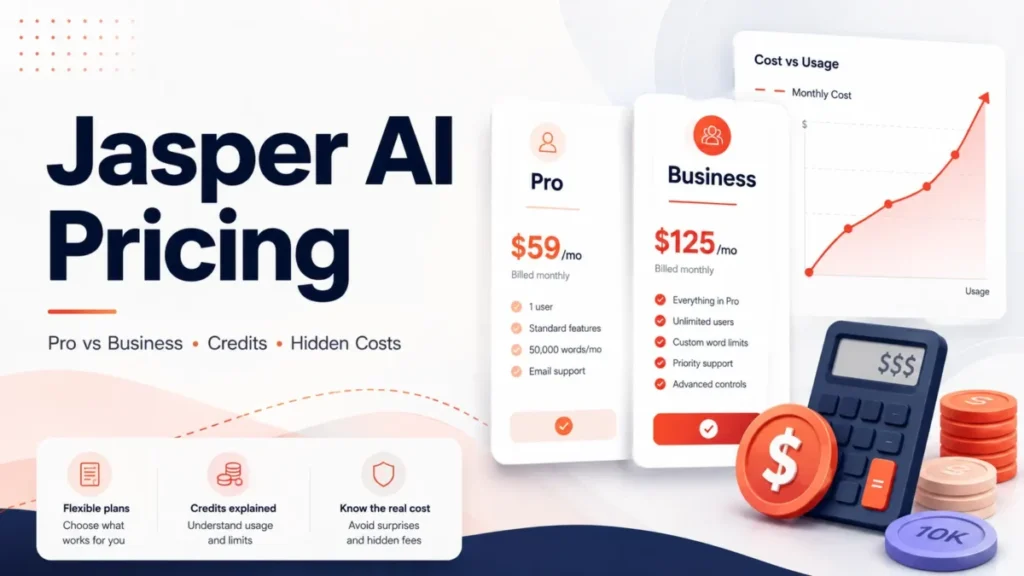
Jasper publishes one self-serve price and one sales-led price, and the gap between them is where most budgets break. The Pro plan carries a public number, while everything a real marketing team asks for sits behind a custom quote.
Treat the Pro figure as a single-seat licence, not a per-head rate you can multiply. The moment a second person needs access, or an integration needs the API, the cost model changes from a fixed subscription to a platform fee plus a usage-based credit pool with no published dollar conversion.
This guide reconstructs the full bill from Jasper’s own pricing page, help centre, rate card, and security documentation, then models what each buyer profile actually pays.
In This Article (18 sections)
Quick Pricing Verdict
| Buying question | Answer, price checked August 26, 2026 |
|---|---|
| Starting price | $69 per seat per month on monthly billing |
| Cheapest usable plan | Pro at $59 per seat per month when billed yearly |
| Free plan | None published; a 7-day trial is the only free path |
| Seats included on Pro | Exactly 1 |
| Best plan for most teams | Business, because a second seat has no self-serve path |
| Plan to avoid | Annual Pro bought before usage is stable |
| Biggest hidden cost | Business credits for Grid, agents, and API calls |
| Public Business price | Not published; custom quote with a 12-month term |
| Source: Jasper’s plan and billing FAQ page and its published credit rate card, price checked August 26, 2026. |
Two rows in that table do most of the damage. Pro includes one seat, and Business has no public number at all.
Executive Summary: What Jasper Costs at 1, 3, 10, and 20 Seats
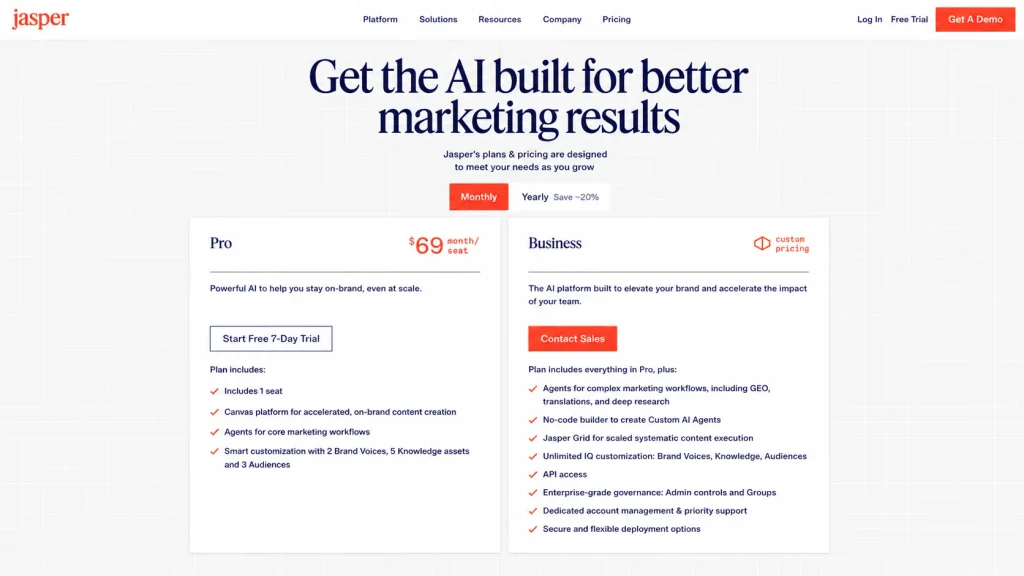
Only the single-seat case has a public answer. Jasper’s own billing FAQ routes any team larger than one person into sales.
| Team size | Plan path | Public 12-month cost |
|---|---|---|
| 1 seat | Pro, self-serve | $708 billed yearly, or $828 billed monthly |
| 3 seats | Business quote required | Not published |
| 10 seats | Business quote plus credits | Not published |
| 20 seats | Business quote plus credits | Not published |
| Source: Jasper’s published plan table and billing FAQ, price checked August 26, 2026. |
The pricing page answers the additional-user question directly, and the answer is not a seat price. It tells buyers who need more than one user on Pro to contact the sales team to customise the Business plan with additional seats.
That single sentence invalidates the arithmetic several competing pages publish. Multiplying $59 by five seats produces a number Jasper does not sell.
For a solo operator, the decision is small and reversible. For anyone else, the real work is writing a quote request that pins down the platform fee, the included credit pool, the price of an extra credit, and the renewal terms before a signature.
Line-Item Cost Breakdown: Every Billable Item
A Jasper bill can carry five separate lines, and only two of them are public.
| Cost item | How it is billed | Public figure |
|---|---|---|
| Pro subscription | Per seat, monthly or annual | $69 or $59 per month |
| Business platform fee | Custom contract, 12-month minimum | Not published |
| Included credits | Bundled with the Business platform fee | Quantity not published |
| Extra credits | Prepaid packs or pay-as-you-go overage | Dollar rate not published |
| Copyscape plagiarism add-on | Add-on to the plagiarism checker | Not published |
| Source: Jasper’s plan page and its credits-based pricing documentation. |
The credit lines are the ones finance teams miss. Jasper describes Business as a hybrid model that combines a platform fee with consumption-based billing through credits, so the quoted fee is a floor rather than a ceiling.
Prepaid credits are bought in packs and expire at contract renewal or by a specified date. Pay-as-you-go instead charges monthly for any overage above the included allowance, and it can carry a maximum monthly cap.
Those two mechanisms fail in opposite directions. Prepaid packs waste money when usage undershoots, and uncapped overage does the damage when a single large job overshoots.
Jasper Pricing Plans Compared
| Plan | Billed monthly | Billed yearly | What the price includes |
|---|---|---|---|
| Pro | $69 per seat per month | $59 per seat per month | 1 seat, 2 Brand Voices, 5 Knowledge assets, 3 Audiences |
| Business | Custom quote | Custom quote, 12-month term | Everything in Pro plus Grid, custom agents, API, admin controls, unlimited Jasper IQ assets |
| Source: Jasper’s official plan comparison, price checked August 26, 2026. |
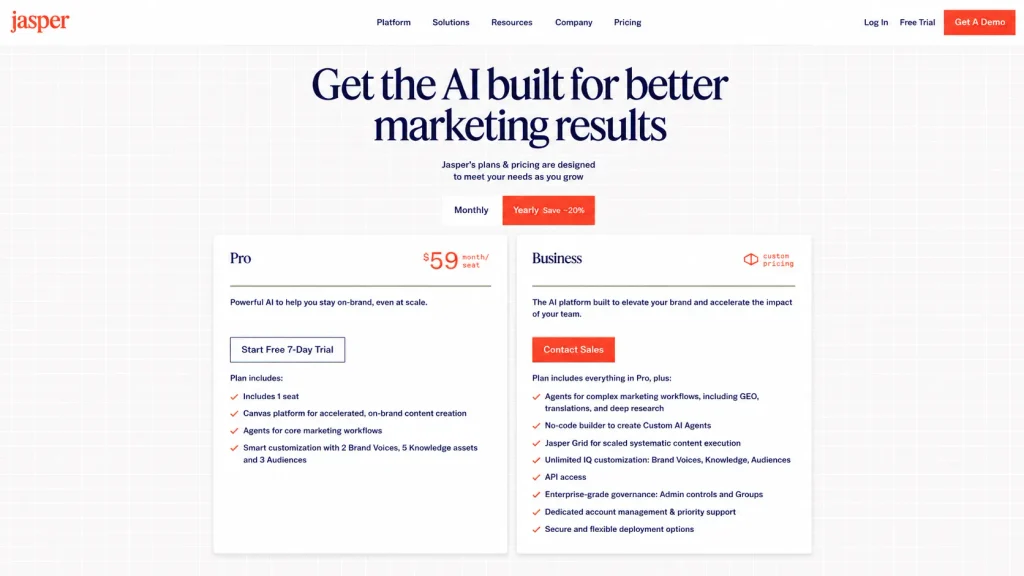
Jasper labels the yearly option as a saving of roughly 20 percent. The published numbers work out lower than that, which the annual billing section below quantifies.
The Business column is deliberately vague on the vendor’s side, and that is a negotiating fact rather than a complaint. Every item in it is a line a buyer can price separately in a quote.
What Each Jasper Plan Includes
The two plans differ less in what they can write than in how much of the brand system they hold. The included feature set below is what each price actually buys.
Pro: a single-operator licence with hard caps
Pro carries the Canvas editor, agents for core marketing workflows, image generation and editing, the browser extension, integrations, and personal usage analytics. It also includes a plagiarism checker, which Jasper describes as an add-on for Copyscape without publishing an add-on price.
The caps are the part that decides fit. Two Brand Voices, five Knowledge assets, and three Audiences are workable for one brand and restrictive for an agency running several.
Avoid Pro if any of the following is already true: a colleague needs a login, a developer needs the API, or a brand team needs formal style rules enforced in the product.
Business: a quoted platform plus a usage meter
Business adds agents for complex marketing workflows covering generative engine optimisation, translation, and deep research. It also adds a no-code builder for custom agents, Jasper Grid, unlimited Jasper IQ customisation, API access, admin controls and groups, dedicated account management, and deployment options.
It also changes the shape of the bill. Chat, agents, Studio, and Jasper IQ are described as unlimited on Business plans, while Grid rows, API and MCP calls, and advanced agent runs draw down a shared credit bank.
Avoid Business if the workload is one person writing campaign copy. The governance features carry real value only when more than one person is producing content that has to stay consistent.
Feature Gates by Plan: What Actually Forces an Upgrade
| Capability | Pro | Business |
|---|---|---|
| Seats included | 1 seat | Quoted per contract |
| API and MCP access | Not available | Included, metered in credits |
| Style Guide | Not available | Several guides, one active at a time |
| Visual Guidelines | Not available | Unlimited visual guidelines |
| Jasper Grid | Not available | Up to 1,000 rows per project |
| SSO and SCIM | Not available | SAML 2.0 with SCIM provisioning |
| Source: seat count, SSO, and SCIM from Jasper’s plan feature list; each gate from the linked help article in its own row. |
Each row is a feature gate rather than a nice-to-have, so each one is also an upgrade trigger. Jasper’s API help article states plainly that the API is limited to Business plans only, and the Style Guide article states that Pro plans do not have access.
Visual Guidelines carries the same restriction. A brand team that needs image output checked against written visual rules has no Pro path to it.
The Grid gate has one documented wrinkle worth knowing before a sales call. Grid itself is described as part of Business plan offerings with access granted by request, while the Grid History feature inside it is described as available to customers on both Business and Pro plans.
Jasper IQ caps decide multi-brand fit
| Jasper IQ asset | Pro | Business |
|---|---|---|
| Brand Voices | 2 | Unlimited |
| Knowledge assets | 5 | Unlimited |
| Audiences | 3 | Unlimited |
| Style Guide | Not available | Available |
| Source: Jasper’s Jasper IQ comparison table, checked in the same session as the plan prices. |
An agency managing four clients that each need a distinct Brand Voice exceeds Pro’s two-voice cap immediately. A single company with one brand voice, one buyer persona set, and a small library of positioning documents fits inside Pro comfortably for a year or more.
Style Guide behaves differently from the rest of Jasper IQ even after the upgrade. A workspace can hold several style guides, but only one is active at a time, which matters for teams expecting per-brand rules to apply in parallel.
Annual vs Monthly: The Real Savings Math
| Billing choice | 12-month total | What the buyer gives up |
|---|---|---|
| Monthly at $69 | $828 | Nothing; cancel at the end of any cycle |
| Yearly at $59 | $708 | A 12-month commitment with a 7-day cancellation window |
| Difference | $120 saved | Flexibility for ten months of the year |
| Source: Jasper’s published Pro rates and its annual plan documentation. |
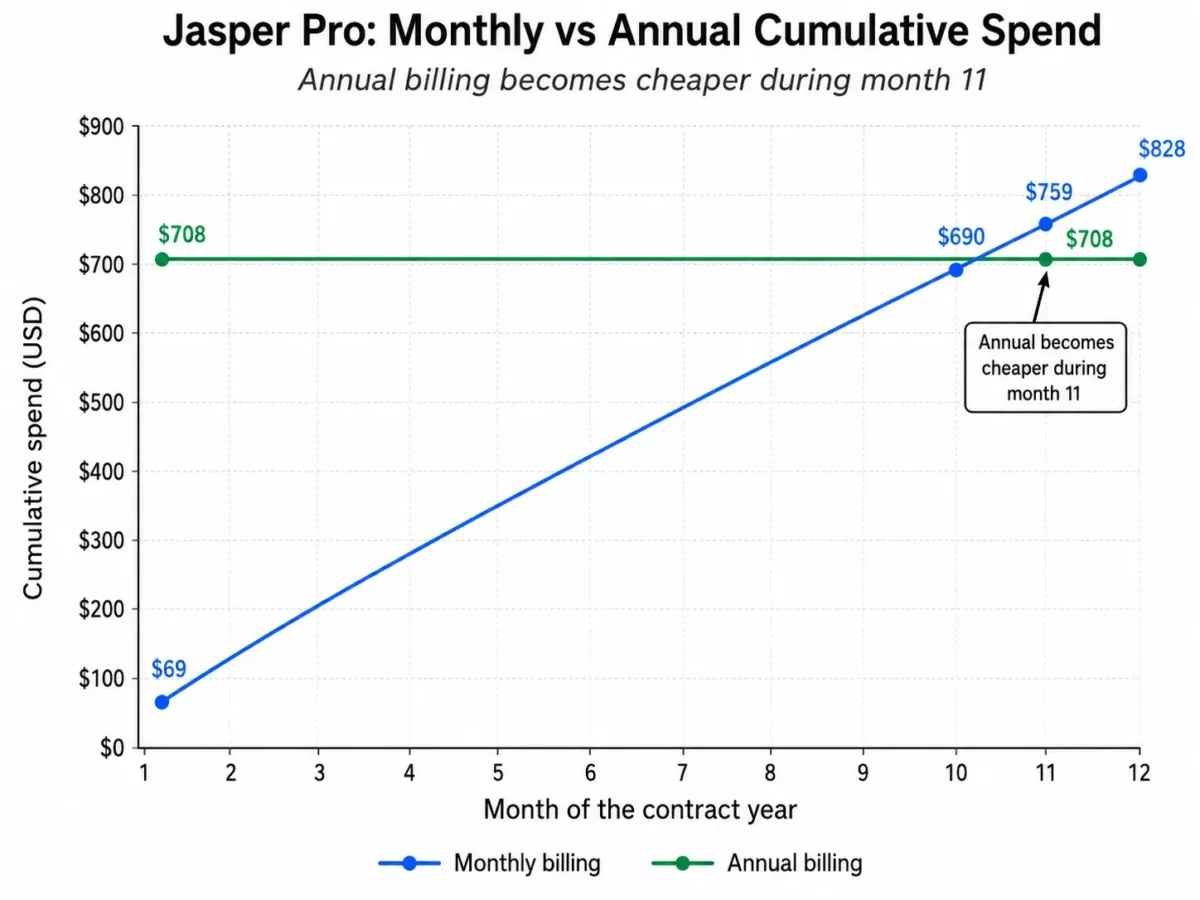
Twelve monthly payments at the published rate total $828, and twelve months at the yearly rate total $708. The saving is $120, which is 14.49 percent of the monthly-billed total rather than the 20 percent the pricing page approximates.
The break-even point matters more than the percentage. Ten monthly payments cost $690, and eleven cost $759, so the $708 annual outlay only becomes the cheaper choice during month 11.
The commitment is genuine rather than nominal. Jasper documents annual plans as one-year commitments that cannot be cancelled during the year except within a 7-day window, after which no refund is provided for unused time.
Jasper’s own annual documentation also describes the deal as two free months for paying ten months upfront. Ten months at the published monthly rate is $690, which is $18 below the $708 the annual rate actually charges, so the marketing shorthand and the published rate do not reconcile.
Buy annual Pro only after a full monthly cycle of real use. The saving is real, and $120 is a thin reason to lock a tool that a team may outgrow into a Business quote within the same year.
The Credit Layer: Jasper’s Second Bill
Credits apply to Business workspaces and sit alongside the seat-based fee. They are pooled across the whole workspace, so one bank serves every user.
| Credit-consuming action | Unit | Credits |
|---|---|---|
| Grid output | 1 row | 10 |
| Research Agent | 1 run | 40 |
| Translation Agent | 1 run | 40 |
| Optimization Agent | 1 run | 100 |
| API and MCP content generation | 1 call | 1 |
| Prompts and standard agents | 1 run | Unlimited |
| Source: Jasper’s published credit rate card, which records a rate update dated 6.9.2026. |
Two absences in that table are as informative as the numbers. Jasper’s credits documentation names generative engine optimisation runs among the credit-consuming advanced tools, yet the rate card publishes no unit rate for them.
The image API is listed as custom credit pricing rather than a fixed figure, which leaves a second Business action unpriced.
The rate card also stops short of the number a buyer needs most. It prices actions in credits and never states what a credit costs in dollars, so no public document allows a Business total cost of ownership to be calculated end to end.
What happens when the credits run out
A workspace that exhausts both prepaid and pay-as-you-go credits loses access to premium features until more credits are added. Non-credit features keep working, so the failure is partial rather than total.
Administrators can also cap individual users. A monthly per-user credit limit pauses Grid, agents, and API or MCP access for that person for the rest of the month while leaving non-credit features fully accessible, and limits reset on the first of each calendar month.
Low-balance alerts fire at 10,000, then 5,000, then 1,000, then zero credits. Those thresholds are useful for sizing: a workspace that treats 1,000 credits as an emergency signal is implicitly treating 100 Grid rows as a small buffer.
Jasper Grid as a worked credit example
Grid is the clearest place to see credit exposure, because its cost scales linearly with output rows.
| Grid job | Rows billed at 10 credits | Credits consumed |
|---|---|---|
| Validation run | First 10 rows, free for testing | 0 |
| Mid-size campaign batch | 500 rows | 5,000 |
| Full project at the row ceiling | 1,000 rows | 10,000 |
| Source: Jasper Grid documentation for the row ceiling and free test rows, with the row cost from Jasper’s rate card. |
Grid supports up to 1,000 rows per project, and larger jobs have to be split across several grids. The first 10 rows of a workflow are free for testing, which is a deliberate and useful guard rail rather than a marketing gesture.
Agent columns stack on top of the row cost. A 500-row grid that also runs the Optimization Agent on each row adds 50,000 credits to the 5,000 the rows themselves consume, taking one job from 5,000 credits to 55,000.
That is the sentence to bring to a sales call. Ask what 55,000 credits costs, and the quote stops being abstract.
The Grid scheduler shows the credit cost per run before a schedule is saved, which is the right place to catch a recurring job that quietly doubles a monthly bill. Scheduled runs cannot yet be pinned to an exact time of day or a specific weekday, so a daily schedule is the smallest recurring unit available.
Add-Ons, Overages, and the Limits Nobody Quotes
Four cost mechanisms sit outside both the plan table and the rate card.
The Copyscape plagiarism add-on is named on the plan page with no price attached. Any workflow that requires plagiarism scanning at volume should treat that as an open line item.
Fair use applies to every account regardless of plan. Jasper’s fair use policy sets outer-bound parameters without publishing the thresholds, and exceeding them can lead to throttling, limitation of access with or without warning, or additional costs set out in an order form.
That policy is what keeps the word unlimited honest in both directions. Unlimited chat and agent runs on Business are unlimited in the ordinary case, and the ceiling exists without being quantified.
Currency conversion is the quiet one. Prices are set in US dollars with an exchange rate applied at purchase by Stripe, and refunds on converted payments can land slightly above or below the original charge because of bank fees and rate movement between the two dates.
Usage reporting helps with control but not with speed. The workspace usage page covers a rolling 12 months with data available through yesterday, and its credit consumption chart appears only for workspaces on credit-based billing.
Trial, Cancellation, Pause, and Refunds
| Billing event | What happens | Deadline that matters |
|---|---|---|
| Free trial | 7 days with full access to the selected plan, card required | Cancel inside the 7 days |
| Cancellation | Takes effect at the end of the paid cycle | Any time before renewal |
| Refund | Manual, requested by email after cancelling | Within 7 days of the charge |
| Pause | 30, 60, or 90 days with no charge and no generation | Chosen at cancellation |
| Source: Jasper’s free trial, cancellation, refund, and pause documentation. |
The trial requires a credit card and converts automatically. Jasper states that trials which are not cancelled roll into a subscription and the card on file is charged once the trial expires, so the diary entry matters more than the evaluation checklist.
Refunds are the step most buyers get wrong. Cancelling stops the next charge, and it does not trigger a refund on the charge already taken.
Jasper’s refund policy is explicit that refunds are not automatic and that a customer must contact the company within seven days of the charge. Only the current subscription charge is eligible, not prior months or additional charges added to the account.
Pause is a real option with a real cost. A paused workspace is not billed and also cannot generate new content, which makes it a genuine seasonal tool and a poor substitute for a low-usage tier.
Discounts That Change the Effective Price
Jasper publishes an eligibility discount of 20 percent for people who identify as a student, teacher, military member, veteran, or nonprofit, with proof required. Discounts cannot be stacked.
The pricing page adds the practical route for nonprofits. Start a trial first, then email the company to have the discount applied, and expect a documentation request.
At the annual Pro rate, that eligibility takes the effective monthly figure below $48 and the annual outlay to roughly $566. For a qualifying solo operator, that is the cheapest legitimate path to the full Pro feature set.
Which Jasper Plan Should You Choose?
Plan choice follows team size rather than feature preference, because the plan gate that decides everything else is the seat count. Work out the total cost for the smallest team that will genuinely use Jasper, then check which upgrade trigger applies.
One marketer, one brand, steady output. Pro on monthly billing first, then annual once two or three months of real use confirm the fit. The caps of two Brand Voices, five Knowledge assets, and three Audiences will hold.
Two to five marketers sharing work. There is no self-serve answer, so the only honest recommendation is a Business quote. Ask for the seat schedule and the included credit allowance in the same document as the platform fee.
Marketing operations running batch production. Business with Grid, and a credit model built before signature rather than after the first invoice. Size the request from expected rows per month multiplied by ten, then add agent runs separately.
A developer team embedding generation in a product. Business, because the API is gated there, and content generation calls are metered at one credit each. That rate is low enough to look free and high enough to matter at a million calls.
An agency with several client brands. Business or a different tool. The Pro Brand Voice cap of two makes multi-client work impractical, and the Jasper versus Copy.ai comparison covers the seat economics of that choice in more detail.
Which Jasper Plan Should You Avoid?
Avoid annual Pro as a first purchase. The commitment runs a full year, the cancellation window is seven days, and no refund is offered for unused time after it closes.
Avoid Business without a written credit schedule. A platform fee with an unstated credit allowance and an unstated overage rate is a contract with a variable no one has priced.
Avoid sharing one login across a team because Pro includes one licensed seat and shared credentials eliminate user-level governance and attribution.
Jasper Pricing vs Competitors
| Product | Entry paid plan | Seats included | Published price |
|---|---|---|---|
| Jasper | Pro | 1 | $59 per seat per month, billed yearly |
| ChatGPT Business | Standard Seat | 2 minimum | $20 per seat per month, billed annually |
| Copy.ai | Chat | 5 | $24 per month, billed annually |
| Writesonic | Starter | 1 | $79 per month, billed annually |
| Sources: Jasper’s Pro rate, ChatGPT business pricing, Copy.ai plan pricing, and Writesonic plan pricing, all price checked August 26, 2026. |
The seat column is the comparison that matters, and it is the one most pricing pages bury. Copy.ai’s entry plan bundles five seats for $288 a year, while Jasper’s entry plan bundles one seat for $708.
ChatGPT Business starts at a two-user minimum, which puts a two-person team at $480 a year against a Jasper quote that has no public floor. Neither product does what Jasper’s brand governance layer does, and that is exactly the trade the comparison exposes.
Writesonic’s Starter plan is the closest structural match at one user and one project, and it prices higher than Jasper Pro at $79 per month on annual billing. A buyer choosing between them is choosing between brand governance and search visibility tooling rather than between two writing assistants, and the Writesonic review covers where that split lands.
For teams weighing a general assistant against a marketing platform, the ChatGPT pricing guide and the Claude pricing breakdown show how per-seat models behave once headcount grows.
Is Jasper Worth the Price?
Jasper is worth $708 a year to a single marketer who produces on-brand content weekly, needs the same voice across email, social, and web, and would otherwise spend hours re-editing generic output. The brand governance layer is the product, and it is what a cheaper writing assistant does not replace.
It is not worth the price to an occasional writer. Two Brand Voices and five Knowledge assets are wasted capacity for someone drafting a handful of posts a month.
Business is worth a quote when governance is the bottleneck rather than writing speed.These controls become more valuable as more people contribute to the same brand system.
Business is not worth a quote while the credit model is undefined. A platform fee without a credit rate is a partial price, and no buyer should sign a 12-month term against a partial price.
The security posture supports an enterprise case on its own terms. Jasper’s safety and security documentation states SOC 2 compliance, GDPR compliance, SSO and SCIM support, and encryption in transit using TLS with AES256, alongside encryption at rest.
How to Avoid Overpaying for Jasper
Run the trial against one real campaign, not a feature tour. Seven days is enough to test brand voice quality on work already scheduled, and it is not enough to explore everything.
Diary the trial end date before the first login. The card is charged automatically when the trial expires, and the refund route afterwards is manual and time-boxed.
Stay monthly until month 11. The annual plan only overtakes monthly billing during month 11, so the saving is real for committed users and worthless for uncertain ones.
Ask for four numbers in the Business quote. Platform fee, seat count and seat price, included credits, and the dollar price of an additional credit, prepaid and pay-as-you-go.
Set a pay-as-you-go cap before the first Grid run. Overage can be capped monthly, and a cap set after the first large job is a cap set too late.
Set per-user credit limits for anyone learning Grid. A limit pauses credit features for that person until the first of the next month and leaves everything else working.
Check eligibility before paying list price. Students, teachers, military members, veterans, and nonprofits can claim 20 percent, and no other discount stacks on top of it.
How This Pricing Guide Was Compiled
Every price, cap, and contract term here was read from Jasper’s own published pages. Those were the plan and billing FAQ page, the credit rate card, and the help centre articles covering annual plans, credits, the free trial, refunds, cancellation, pause, discounts, the API, Grid, Style Guide, Visual Guidelines, usage reporting, and fair use.
Prices were assessed against four criteria: what the buyer pays at list, what the plan actually includes, which capability forces the next tier, and which costs the vendor does not publish. Competitor prices come from each vendor’s own pricing page rather than a third-party summary.
Figures that Jasper does not publish are named as unpublished rather than estimated. Where the vendor’s own documents disagree, both statements appear so the buyer can raise the discrepancy directly.
All figures were verified on August 26, 2026, and pricing pages change without notice.
Frequently Asked Questions
These are the questions the sections above leave a buyer still holding.
How much does Jasper AI cost in 2026?
Jasper Pro costs $69 per seat per month on monthly billing, or $59 per seat per month billed yearly, which is $708 for the year. The Business plan is quoted individually and starts with a 12-month term.
Is there a free version of Jasper?
No permanent free tier appears on the plan page. The only free path is a 7-day trial of Pro, which requires a card and converts to a paid subscription unless it is cancelled first.
Does Jasper charge per user?
Not in a way that scales self-serve. Pro includes exactly one seat, and adding teammates means moving to a quoted Business plan rather than buying a second Pro licence.
What uses Jasper credits?
Grid output rows, API and MCP calls, and advanced agent runs such as research, translation, and optimisation. Prompts, standard agents, chat, Studio, and Jasper IQ are described as unlimited on Business plans.
How many credits does a 1,000-row Grid job use?
Ten thousand credits at the published rate of 10 credits per output row, before any agent columns are added. The first 10 rows of a workflow are free for testing.
What happens if a Jasper workspace runs out of credits?
Premium features stop until credits are added or overage settings are changed. Features that do not consume credits keep working, so the workspace is degraded rather than locked.
Does Jasper’s annual plan save the full 20 percent?
The published rates produce a saving of $120 on $828, which is 14.49 percent. Jasper describes it as roughly 20 percent, and the two figures do not match.
Can Jasper be cancelled at any time?
Monthly Pro can be cancelled at any time and access continues to the end of the paid cycle. Annual plans are one-year commitments with a 7-day cancellation window and no refund for unused time afterwards.
Does cancelling Jasper trigger a refund?
No. Refunds are manual, must be requested by email within seven days of the charge, and apply only to the current subscription charge.
When should a team upgrade from Pro to Business?
At the second seat, or at the first requirement for API access, Style Guide, Visual Guidelines, Grid, or more than two Brand Voices. Any one of those is a hard gate rather than a matter of preference.
Is Jasper worth it for a small marketing team?
For a governed multi-person workflow, yes, provided the quote states the credit economics in writing. For two people who mainly need drafting help, a cheaper multi-seat assistant covers the job, and the Copy.ai review sets out that alternative.
Where does Jasper fit against a general AI assistant?
Jasper prices brand governance, not raw generation, which is why its entry seat costs more than a general assistant seat. The Jasper AI review covers whether that governance layer earns the difference in daily use.