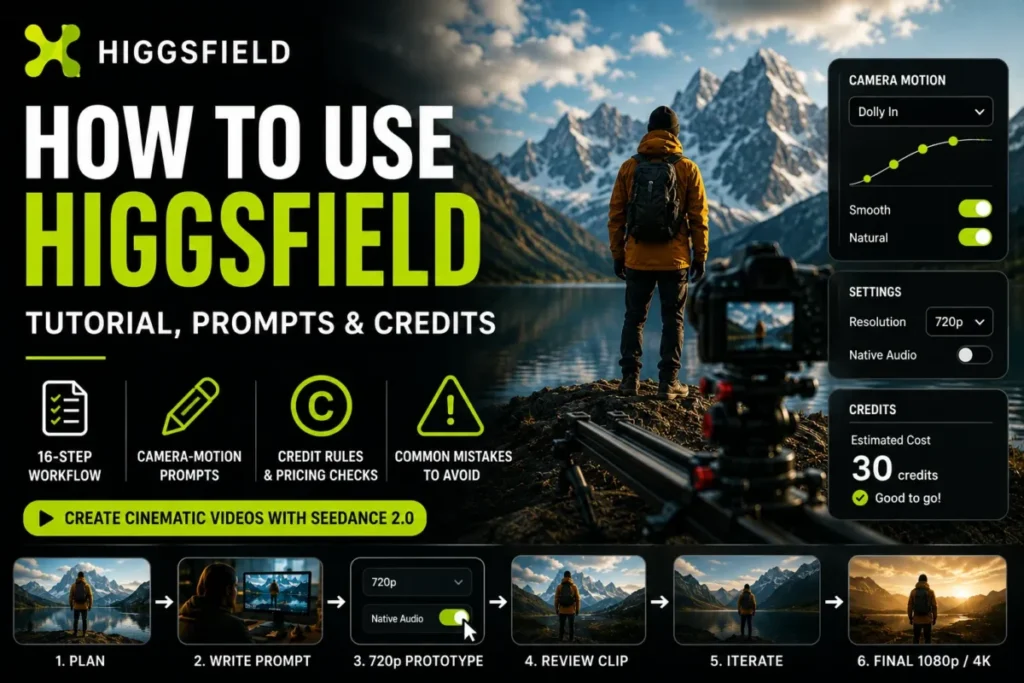
The expensive part of learning Higgsfield is not the subscription. It is the run of discarded generations you pay for while working out why the camera drifted sideways when the prompt asked for a push in.
Learning how to use Higgsfield well is mostly about controlling that cost. This Higgsfield tutorial gives you one repeatable first workflow, a copyable camera-motion prompt template, and the credit rules that decide what a mistake costs before you commit to a plan.
Higgsfield sits in the same buying conversation as the other best AI video generators, but its camera-control layer is what people arrive for. That layer only pays off when the prompt says exactly which mechanical movement the camera makes, and explicitly bans the movements it must not make.
In This Article (16 sections)
Quick Copy: The 16-Point Higgsfield First-Clip Checklist
Copy this into a note before your first generation. Each line is a decision you either make deliberately or pay for by accident.
- Write the shot in one sentence: subject, action, and the single camera move that carries it.
- Choose the generation surface: work on higgsfield.ai, not through an automated surface, if credit-free generation matters to you.
- Open the workspace: Video, then Seedance 2.0.
- Load the reference: one sharp, front-facing, well-lit reference image.
- Set the prototype resolution: 720p.
- Turn native audio off: leave it off until the prompt is locked.
- Use the documented prompt order: subject and action, setting and lighting, camera move, mood or style.
- Make the camera wording precise: replace vague wording with one exact term the model reads directly.
- Add negative constraints: list every movement the shot must not contain.
- Stay inside the reference ceiling: 9 images, 3 video clips, 3 audio files.
- Check the cost: read the credit cost on the Generate button before confirming.
- Review the whole clip: including the 5 to 8 second mark.
- Change one variable: one variable per iteration, never two.
-
Plan character consistency:
use
@characterinside one generation; save an Element when the face has to survive into the next clip. - Audit the spend: open Manage Account → Usage to confirm what each attempt cost and whether a failure was returned.
- Run the final pass: re-run the locked prompt at 1080p or 4K and add native audio only on the final pass.
How This Guide Was Built
Source: official Higgsfield help-center documentation, the Camera Controls product page, the Academy prompt bank, and the Seedance and Cinema Studio pages. All were checked on 2026-08-22, and volatile facts including credit mechanics, plan rules and billing terms were verified against those pages rather than against third-party summaries.
Every workflow instruction was assessed against the same criteria: does the documentation state the step, does it state the limit that constrains the step, and does the step change what a buyer spends or produces.
Greater weight was given to the rules that alter cost or output before purchase: credit reset timing, the surfaces where generation deducts credits, reference ceilings, resolution and audio cost drivers, and plan-level seat and concurrency limits.
Claims that the sources did not support were excluded rather than estimated. Current plan prices are treated as live data and are deferred to Higgsfield’s own pricing page rather than reproduced from a dated snapshot.
How to Use This Checklist
Step 1. Name the use case. A social cutdown, a client hero shot, and a look-development test are three different use cases with different tolerances for wasted credits, and that tolerance sets how many prototype passes you can afford.
Step 2. Separate must-haves from preferences. Native audio, importing your own footage, and holding one face across six clips are three different capabilities in Higgsfield, and two of them route you away from the workspace most tutorials point at.
Step 3. Score the fit before you subscribe. Use the weighted matrix further down, and apply the reject rule: any must-have scoring 1 or 2 kills the purchase regardless of the weighted total.
Step 4. Run the prototype pass at the cheapest usable settings. Prototype at 720p without audio, because Higgsfield’s own Seedance guidance names audio and high resolution as the two drivers of credit consumption.
Step 5. Diagnose with one variable at a time. If two things changed and the clip improved, you have a better clip and no reusable knowledge.
Step 6. Promote to final quality only once. The last pass is the only one that carries the resolution and audio cost.
Step 7. Audit the spend. Read the usage log after the session, not at the end of the month.
How to Use Higgsfield: First Workflow
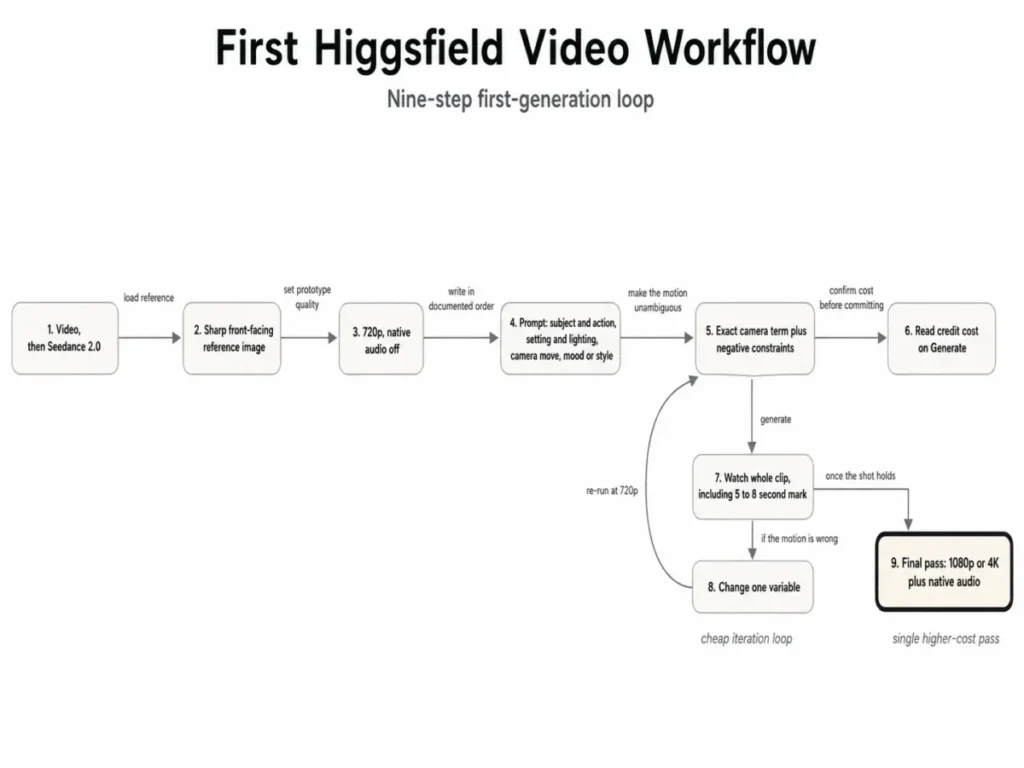
This is the Seedance half of the tutorial, and it is where most first-day credits get spent. The documented entry path for a first video is higgsfield.ai → Video → Seedance 2.0, and the documented starting point is image-to-video at 720p with a sharp, front-facing, well-lit reference image.
Those two things are the required input for the whole workflow: one reference image and one prompt. A soft or three-quarter reference gives the model less to hold onto, and every ambiguity it resolves on its own is a variable you cannot isolate later.
Write the prompt in the documented order
Seedance’s documentation is specific about sequence: subject and action first, setting and lighting second, camera move third, mood or style last. Its own worked example reads “A character walks through a crowded train station at rush hour, checking a phone, camera tracking close at shoulder height, warm overhead fluorescent light, tense and rushed.”
Leading with atmosphere is the most common beginner error, and it costs you twice. The model gets style before it gets a subject, and you lose the ability to tell whether a bad result came from the mood clause or the camera clause.
Check the cost before you commit
Higgsfield does not publish a single credit price per video. The cost of a generation depends on the model, resolution and duration, and the exact figure appears on the Generate button before you confirm.
Treat that button as the only budgeting number that is current. Any fixed cost-per-clip table you find in a third-party article is a snapshot of settings someone else chose on a date they may not have recorded.
Review the whole clip before you re-roll
Seedance’s guidance is to watch the full clip before iterating, and it flags the 5 to 8 second mark as where quality problems tend to surface. Judging a generation on its first two seconds is how a shot with a clean opening and a collapsing ending survives three iterations.
Then change one thing. The documentation says one change per iteration, and the reason is diagnostic rather than stylistic: two simultaneous edits produce a result you cannot attribute.
Reference ceilings and how they interact
A single Seedance generation accepts up to 9 images, 3 video clips and 3 audio files. Those ceilings are generous enough that most first-clip problems come from too many references rather than too few.
Every additional reference is another thing competing to define the frame. For a first prototype, one reference image is the cleaner starting condition.
Higgsfield Camera-Motion Prompt Template
Higgsfield camera prompts hold or drift on one decision: whether the prompt names a mechanism or a mood.
Higgsfield’s Camera Controls page advertises 50+ cinematic motion presets, and most tutorials stop at reprinting that list. A preset list does not tell you why “zoom in” and “dolly in” produce structurally different shots, which is the thing that actually costs you credits.
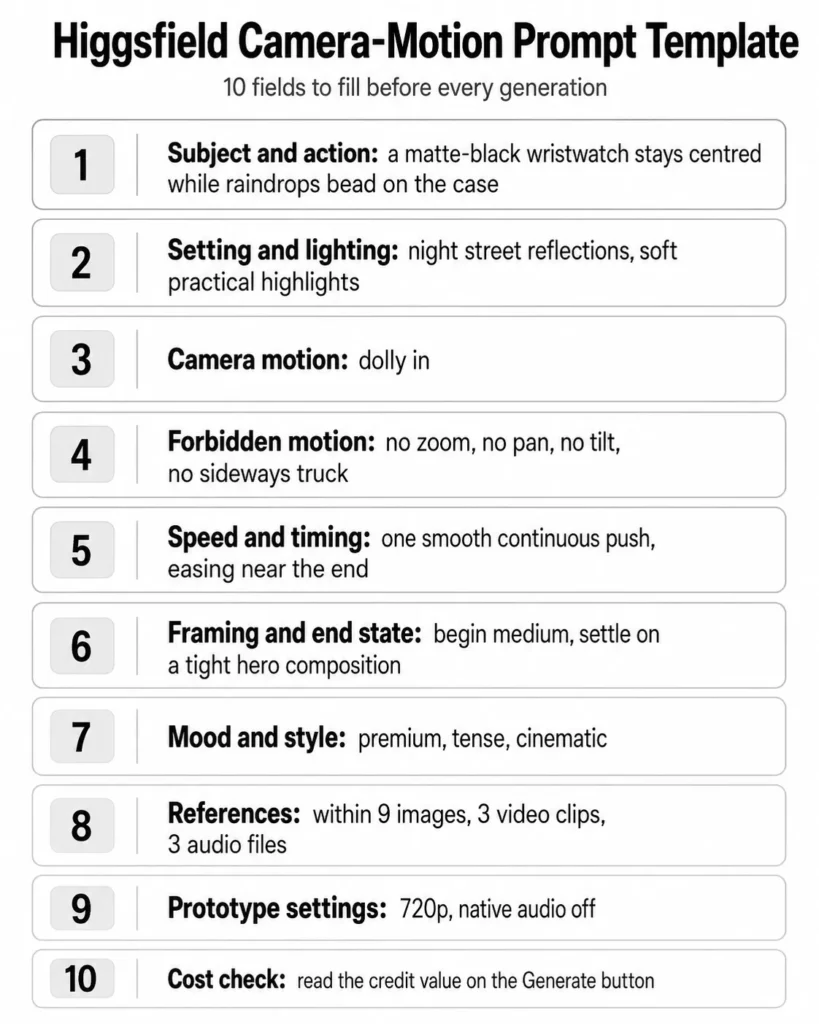
Copy the template below and adapt it to your own use case. The required input is small: one reference image and one prompt, and every field here shapes the second of those.
Each field exists because the documentation names it as something the model reads, or as something that changes what you pay.
Subject and action: [who or what is in frame, and the single primary action]
Setting and lighting: [environment, time, light sources and quality]
Camera motion:       [one exact term: dolly in / truck left / arc shot /
                      push in / pull back wide / handheld follow /
                      crane up / orbital move]
Forbidden motion:    [no zoom / no pan / no tilt / no truck / no camera travel]
Speed and timing:    [slow, constant, rapid, easing, hold at the end]
Framing and end state: [starting composition, and where the move settles]
Mood and style:      [atmosphere and look, last]
References:          [@character / @style / @motion / @audio, within
                      9 images, 3 video clips, 3 audio files]
Prototype settings:  720p, native audio off
Cost check:          read the credit value on the Generate button
What each field is for
| Field | Why it exists | What breaks without it |
|---|---|---|
| Subject and action | Documented as the first element of the prompt order | Style and camera language compete to define the frame |
| Setting and lighting | Documented as the second element | Lighting drifts between iterations, masking motion changes |
| Camera motion | Seedance reads specific movement terms directly | The model picks a generic move and you re-roll blind |
| Forbidden motion | Higgsfield’s own Academy prompts use explicit exclusions | Two movement categories blend into an unrepeatable hybrid |
| Speed and timing | Controls how the move resolves across the clip | The move completes early and the last seconds sit dead |
| Framing and end state | Defines where the motion lands | The shot ends on a composition you cannot cut to |
| Mood and style | Documented as the last element | Atmosphere overrides the physical instruction |
| References | Ceilings are 9 images, 3 video clips, 3 audio files | Extra references dilute the reference that matters |
| Prototype settings | Resolution and audio are the named cost drivers | You debug composition at final-pass prices |
| Cost check | The Generate button carries the live figure | You budget from someone else’s stale table |
Pan, truck, zoom and dolly are four different machines
This is the section that changes results fastest. Higgsfield’s Academy prompt bank describes each movement mechanically rather than stylistically, and the distinctions are not interchangeable.
Pan right is defined as rotating the camera horizontally from one fixed point, with “no sideways travel, no dolly, no truck, no arc, no slide, no zoom, no tilt.” Tilt up rotates vertically while “the camera’s position never changes.”
Zoom in is defined as optical, “a focal-length change only.” The camera position is fixed and never moves, and only the field of view changes.
Dolly in is “pure forward travel at constant speed along the axis toward the subject.” The field of view never changes, and the perspective shifts because the camera physically approaches.
That last pair is the one that wastes the most credits. A zoom magnifies a flat image and a dolly changes the geometry of the scene, so a product shot that needs the background to fall away behind the subject cannot be solved by zooming harder.
| Movement | Camera position | Optical change | Parallax you get | Useful negative constraints |
|---|---|---|---|---|
| Pan | Fixed, rotates horizontally | None | None; the frame swings | no truck, no dolly, no arc, no zoom, no tilt |
| Tilt | Fixed, rotates vertically | None | None; the frame swings | no crane rise, no pedestal, no dolly, no zoom |
| Truck | Travels sideways | None | Foreground and background separate laterally | no pan, no arc, no zoom |
| Zoom | Fixed | Focal length changes | None; the image magnifies | no dolly, no camera travel, no speed changes |
| Dolly | Travels along the axis | None | Foreground and background separate in depth | no zoom, no pan, no tilt, no truck |
Rotation and zoom keep the camera fixed. Dolly and truck physically move it through the scene.
The camera stays in the same place and rotates on its axis.
The camera stays in the same place and the lens changes focal length only.
The camera physically moves through space toward, away from, or alongside the subject.
geometry unchanged
geometry unchanged
background separate
Scene geometry remains the same.
Only framing or size in the frame changes.
Scene geometry changes.
Objects shift relative to each other.
A filled-in example and its expected output
Scenario: a premium watch reveal that needs the background to compress behind the product, not simply grow larger. The example output to aim for is a single continuous push that ends on a tight hero framing, with no lateral drift and no lens change.
Subject and action: a matte-black wristwatch stays centred while raindrops
                    bead on the case
Setting and lighting: night street reflections, soft practical highlights
                    from shop signage
Camera motion:       slow dolly in toward the watch face
Forbidden motion:    no optical zoom, no pan, no tilt, no sideways truck,
                     no handheld drift
Speed and timing:    one smooth continuous push, easing near the end
Framing and end state: begin medium, settle on a tight hero composition
Mood and style:      premium, tense, cinematic
References:          one sharp front-facing product still
Prototype settings:  720p, native audio off
Cost check:          read the credit value on the Generate button
This is a worked editorial example built from the documented prompt order and the documented movement definitions. It is a starting condition to iterate from, not a guaranteed output.
Validate the prompt before you spend
Run these six checks before you customize the template for a new use case. Each one maps to a documented rule, and each one catches a failure that would otherwise cost a generation.
- Exactly one primary camera movement appears in the prompt.
- Physical movement and optical zoom are separated whenever perspective matters.
- Resolution is 720p and native audio is off for every diagnostic pass.
- Only one meaningful variable changed since the previous attempt.
- The credit value was read on the Generate button rather than assumed.
- Cross-clip character reuse relies on a saved Element, not on
@characteralone.
One conditional rule covers most first briefs. If the shot needs the background to change behind the subject, choose a dolly or a truck; if it only needs to fill more of the frame, a zoom is the safer instruction to repeat.
How Higgsfield Credits Work
Credits are where a Higgsfield subscription stops behaving like a normal SaaS seat. Three rules do most of the damage to a budget, and none of them appears on a plan card.
Rule one: credits reset, they do not accumulate
Subscription credits reset on monthly plans with each paid renewal, and on annual plans every 30 days. Unused subscription credits do not roll over, and they expire at renewal.
Annual billing therefore buys a cheaper monthly rate, not an annual credit bank. If your production is seasonal, and you were planning to bank three quiet months before a launch, that plan does not survive contact with the reset schedule.
Credit Packs behave differently again. Credit Pack credits are valid for 90 days from purchase, each pack is a one-time purchase that does not renew, and a pack “only adds credits” without upgrading your plan or adding models and features.
Buying a pack early to lock in capacity is the version of this mistake that costs real money. Buy the pack when the campaign starts, not when you are planning it.
Three credit lifetimes running in parallel
no renewal
Rule two: free and Unlimited generation is website-only
Free and Unlimited model generations apply only on higgsfield.ai. Any generation made outside it, including through MCP, CLI, Canvas, Supercomputer and other automated tools, always deducts credits regardless of plan.
For a solo creator working in the browser, this changes nothing. For anyone planning a pipeline, it inverts the economics of the plan they were about to buy.
| Where you generate | Credit behaviour | Who this affects |
|---|---|---|
| higgsfield.ai in a browser | Eligible free and Unlimited model generations do not deduct credits | Solo creators and manual production |
| MCP | Always deducts credits | Anyone wiring Higgsfield into an agent workflow |
| CLI | Always deducts credits | Batch and scripted rendering |
| Canvas | Always deducts credits | Automated composition workflows |
| Supercomputer | Always deducts credits | High-volume rendering |
The buying consequence is direct. Size an automation plan on credit volume, not on the word Unlimited, because the surface that makes Unlimited valuable is the one automation does not use.
Rule three: resolution and audio are the levers you actually control
Higgsfield names audio and high resolution as the drivers of credit consumption, and its recommended mitigation is to prototype without audio at 720p. That is a pricing instruction wearing a workflow costume.
| Setting during iteration | Credit effect | Recommended state until the prompt is locked |
|---|---|---|
| 720p resolution | Lowest of the documented resolution options | Keep |
| 1080p or 4K | Named as a driver of higher consumption | Defer to the final pass |
| Native audio off | No audio generation cost | Keep |
| Native audio on | Named as a driver of higher consumption | Defer to the final pass |
| Duration | Named as a cost input alongside model and resolution | Keep the prototype short |
Failed generations, and the audit trail that proves it
Higgsfield documents an automatic refund for failed generations that “lands within a few minutes” and appears in the usage history. That is the normal case, and the documentation qualifies it rather than guaranteeing it.
So verify rather than assume. Your credit balance sits in the top navigation bar, Manage Account → Subscription carries the credits card, and Manage Account → Usage holds a full log of every credit operation.
Read the usage log after any session that felt expensive. A model-level log is the difference between “credits disappeared” and “the 4K pass with audio cost four times the prototype.”
Higgsfield Pricing: What to Verify Before You Pay
Higgsfield’s own plan documentation points to its live pricing page as the place current plan prices are maintained. I am not going to reproduce a numeric plan table here.
The plan card values were not exposed in the text representation of that page when this guide was checked. Dated third-party snapshots from earlier in 2026 also disagree with each other.
That is not a dodge. It is the same discipline the credit section applies to the Generate button: the live surface is the current number, and a plan table copied from an article published months earlier is a number with no checked date attached.
Open the pricing page and capture these fields before you subscribe.
| Field to verify on the live page | Why it changes the decision |
|---|---|
| Plan name and monthly price | The baseline your finance approval references |
| Annual price per month | Annual billing costs less per month on individual plans |
| Credits included per cycle | Read against your monthly clip volume, not your peak month |
| Models included at that tier | Model access is a plan-level gate, not a credit purchase |
| Unlimited model coverage | Determines whether browser work is credit-free or metered |
| Parallel generation allowance | Sets how many shots a team can run at once |
| Seat count | Business tiers are capped, not open-ended |
The four billing rules that are not on the plan card
Tax is added at checkout. The pricing page price does not include local tax, which is added at checkout based on your billing location and appears as a separate line before you confirm. Budget from the checkout total, not the card.
Renewal is date-locked. Subscriptions auto-renew on the same calendar date each month or year until cancelled, so a subscription started on the 14th bills on the 14th.
One subscription per account. Each account supports one active subscription at a time, and upgrades take effect immediately with a prorated charge. A production spike is handled by upgrading or by buying a Credit Pack, not by stacking plans.
Refund eligibility is narrower than a seven-day window. A refund on an initial purchase is available within 7 days, or as local law permits, only if no credits were used, and it carries a service fee of up to 6%. Renewals are non-refundable.
Read that last rule against the workflow in this guide. If you subscribe and immediately run six prototype generations to see whether the camera control is good enough, you have spent credits and the initial-purchase refund condition no longer applies.
Teams: seats and concurrency run out before credits do
| Plan | Seats | Parallel image generations | Parallel video generations | Queue | SSO |
|---|---|---|---|---|---|
| Team | Up to 9 | 16 | 16 | Standard | No |
| Scale | Up to 15 | 24 | 20 | Priority | Yes |
| Enterprise | Unlimited (custom) | Dedicated capacity | Dedicated capacity | Dedicated SLA | Yes |
Source: official Higgsfield business plan documentation.
A ten-person studio does not outgrow Team because it runs out of credits. It outgrows Team on the seat count, and a nine-person studio on a deadline hits the 16 parallel video generations while the credit balance still looks healthy.
Scale adds the two governance features that matter once someone else is spending: SSO, and the ability for an admin to pause a member’s spend. Enterprise adds per-user credit caps, dedicated capacity and a no-data-training clause, which is the point at which this becomes a procurement conversation rather than a subscription.
Intermediate: Keeping a Character Across Separate Clips
This is the single most common intermediate failure, and Higgsfield’s Seedance reference documentation treats it as a mechanism choice rather than a prompting skill.
| You need | Use | Scope | What goes wrong with the other option |
|---|---|---|---|
| The same face across shots inside one generation | @character reference | Holds a face consistent within a single generation | Nothing; this is what it is for |
| The same character across separate clips in a campaign | A saved Element | A reusable reference you apply to later generations | @character does not carry identity out of the generation it was used in, so each clip drifts independently |
Plan this before the first clip, not after the fourth. A six-clip sequence built on @character alone gives you six subtly different people, and the fix is to rebuild the sequence rather than to patch it.
Advanced: Which Cinema Studio Version Fits the Job
Cinema Studio is not one tool with a version number climbing upward. The versions trade capabilities against each other in Higgsfield’s official Cinema Studio documentation, and 3.5 gives up something 3.0 has.
| Version | Built around | Choose it when | Constraint to check first |
|---|---|---|---|
| 2.0 | Hero Frame First workflow and full camera rig control with sensor, lens, focal length (12-135mm) and aperture settings | Optical precision is the point of the shot | The still comes first, so the workflow is slower per clip |
| 2.5 | Up to 3 Soul Cast characters plus colour grading controls including temperature, contrast, saturation, sharpness, film grain, highlights and exposure | A multi-character scene needs a consistent grade | Character count is capped at three |
| 3.0 | Up to 9 reference images, a reasoning engine for physics-aware motion, and synchronized native audio with effects, speech and music | The deliverable needs sound generated with the picture | No external uploads; all content must be created inside the studio |
| 3.5 | Claude Chat AI Director, an Elements system for assets, and team collaboration | Several people work on one project and reuse assets | Native audio is not available in 3.5 |
The 3.0 against 3.5 decision is the one to get right. A social ad that needs synchronized speech points at 3.0, and a team building a reusable asset library points at 3.5, and picking the newer number because it is newer costs you the audio.
Two constraints route work away from Cinema Studio entirely. Version 3.0 does not accept external uploads, and the system detects real faces and protected IP, so a project that starts from client footage or an existing brand photograph belongs in the Seedance image-to-video workflow described earlier.
One clarification on the AI Director, because the name oversells it. Claude writes prompts and adjusts settings, and you review and click Generate yourself, so this is an assistant inside the approval loop rather than an agent that spends your credits unattended.
Score Higgsfield Against Your Requirements Before You Pay
Score each criterion 1 to 5, multiply by the weight, and total. The reject rule overrides the total: if any criterion you marked must-have scores 1 or 2, do not subscribe yet.
| Criterion | Weight | What a 5 looks like | What a 1 or 2 looks like |
|---|---|---|---|
| Camera-motion precision | 20% | Shots are defined by a specific mechanical move | Any plausible motion is acceptable |
| Credit headroom against monthly volume | 20% | Clip volume fits comfortably inside one reset cycle | Volume is seasonal and needs banking across months |
| Cross-clip character consistency | 15% | One or two clips, or Elements planned from the start | Long sequences with no identity plan |
| Native audio requirement | 15% | Audio added in post, or 3.0 is acceptable | Native audio required inside a 3.5 collaboration workflow |
| External asset import | 15% | Everything is generated from scratch | Client footage or brand photography must be imported into Cinema Studio |
| Seats and concurrency | 15% | Solo or under 9 people | 10 or more people, or heavy simultaneous rendering |
Decision thresholds. A weighted total of 4.0 or above supports subscribing now. Between 3.0 and 3.9, run the free-tier pass first, because Higgsfield offers limited free access rather than a trial period, and a free-tier session costs you nothing but time. Below 3.0, the requirement set is fighting the product.
Example Filled-In Checklist
The buyer. A solo motion designer producing four client clips a month, two of which feature the same presenter, with voiceover recorded separately in post.
| Criterion | Weight | Score | Weighted | Reasoning |
|---|---|---|---|---|
| Camera-motion precision | 20% | 5 | 1.00 | Client briefs specify pushes and orbits by name |
| Credit headroom | 20% | 4 | 0.80 | Four clips a month sits inside one reset cycle, with prototypes at 720p |
| Cross-clip consistency | 15% | 4 | 0.60 | Two clips share a presenter; Elements planned before clip one |
| Native audio | 15% | 5 | 0.75 | Voiceover is recorded separately, so 3.5 losing native audio costs nothing |
| External asset import | 15% | 2 | 0.30 | Client supplies product stills, marked must-have |
| Seats and concurrency | 15% | 5 | 0.75 | Solo, no parallel rendering pressure |
| Total | 100% | 4.20 |
The reject rule fires. External asset import scored 2 and was marked must-have, so the 4.20 total does not authorise the purchase on its own.
The resolution. The must-have failure is specific to Cinema Studio 3.0 and 3.5, not to Higgsfield. Routing client stills into the Seedance image-to-video workflow satisfies the requirement, the must-have re-scores, and the purchase proceeds with Elements set up before the first clip.
That is what the reject rule is for. It stopped a good weighted score from hiding a workflow that would have failed on the first client project.
Red Flags to Watch For
- Budgeting from the plan card. Local tax is added at checkout, so the approved number and the charged number differ.
- Treating annual billing as an annual credit bank. Annual-plan credits reset every 30 days and do not roll over.
- Buying a Credit Pack during planning. The 90-day clock starts at purchase, not at first use.
- Buying a Credit Pack to reach a gated model. A pack adds credits and does not upgrade the plan or add models.
- Reading the free tier as a trial. Higgsfield documents limited free access and states there is no trial period.
- Expecting a refund after a first week of testing. The initial-purchase refund requires that no credits were used.
- Planning automation around the word Unlimited. MCP, CLI, Canvas and Supercomputer always deduct credits.
- Assuming every failure is refunded. The automatic refund is the documented normal case, not an unconditional guarantee.
- Choosing Cinema Studio 3.5 for an audio deliverable. Native audio is not available in 3.5.
- Starting an asset-led project in Cinema Studio 3.0. External uploads are not accepted there.
- Sizing a team plan on credits alone. Team caps at 9 seats and 16 parallel video generations before credit volume becomes the constraint.
- Copying a price table from a dated article. Higgsfield’s own documentation treats the live pricing page as the current authority.
Common Higgsfield Mistakes and Fixes
Each row below is a common error with the prompt-level fix beside it, so you can customize the template rather than re-roll blind.
| Mistake | What you see | Fix |
|---|---|---|
| Vague camera language such as “cinematic camera movement” | Generic drift that changes between re-rolls | Use one term the model reads directly: dolly in, truck left, arc shot, push in, pull back wide, handheld follow, crane up, orbital move |
| Asking for a zoom when the shot needs a dolly | The subject grows but the background stays flat behind it | Zoom is a focal-length change with the camera fixed; write “dolly in” and add “no zoom” |
| Asking for a pan when the shot needs a truck | The frame swings instead of travelling sideways | Pan rotates from a fixed point; write “truck left” and add “no pan, no arc” |
| Two competing movements in one prompt | An unrepeatable hybrid move | Keep one primary movement and list the rest as forbidden motion |
| Changing the prompt and the reference together | The clip improves and you cannot say why | One variable per iteration, as the documentation instructs |
| Judging the clip on its opening seconds | A shot that collapses late survives several iterations | Watch the whole clip, with attention at the 5 to 8 second mark |
| Iterating at 4K with native audio on | Prototype passes cost final-pass credits | Prototype at 720p with audio off, then promote once |
Using @character for a multi-clip campaign | Each clip returns a slightly different person | Save an Element and reuse it across generations |
What to Do After You Finish the Checklist
Knowing how to use Higgsfield is not the same as knowing what to do next, so route by what actually happened on the prototype pass.
If the shot held at 720p. Re-run the identical prompt at 1080p or 4K and add native audio on that pass only, then open the usage log and record what the final pass actually cost. That figure, not a published table, is your per-clip budget for the next brief.
If the motion is still wrong after three single-variable iterations. The problem is the movement term rather than the model. Rewrite the camera line using one exact term plus explicit exclusions before spending another credit.
If the reject rule fired on a must-have. Check whether the blocker belongs to a specific workspace rather than to Higgsfield. External uploads and native audio are version-level constraints inside Cinema Studio, and the Seedance workflow answers several of them.
If credits are the binding constraint rather than capability. Compare cost structures across platforms before you upgrade a tier, because a credit model that resets every 30 days suits steady output and penalises seasonal production.
Related Resources
- Runway review for another camera-control-led generation platform.
- invideo Agent review for an agentic production workflow with a different credit structure.
FAQ
Three questions come up after the workflow and the pricing checks above, and each one changes what you do before you subscribe.
Does Higgsfield have a free trial?
No. Higgsfield’s plan documentation describes limited free access with a restricted model set and states plainly that there is no trial period.
The distinction matters because a trial normally grants temporary access to the paid experience. Free access here is a smaller product, so a free-tier session tells you whether the interface and camera language suit you, and it does not tell you how the gated models behave.
Can I get a refund if I subscribe to Higgsfield and then change my mind?
Only under three conditions together. The request has to fall within 7 days of the initial purchase, or the window local law requires, no credits can have been used, and a service fee of up to 6% applies.
Renewals are non-refundable. Running even one test generation in your first week ends the no-credits-used condition, so decide on the free tier before you subscribe rather than after.
Can I buy Higgsfield Credit Packs before I subscribe?
You can complete the purchase, but the credits stay unavailable until an active subscription exists on the account. The 90-day validity window runs from purchase.
Buying a pack ahead of a subscription therefore burns part of the window you paid for. Subscribe first, then top up when the workload actually arrives.