Viktor is worth a paid workspace for teams that already move the same information between Slack or Microsoft Teams, a CRM, a billing system, and an ad platform every week. It is the wrong purchase for anyone who needs a fixed monthly automation bill, because the plan sells credits, not seats.
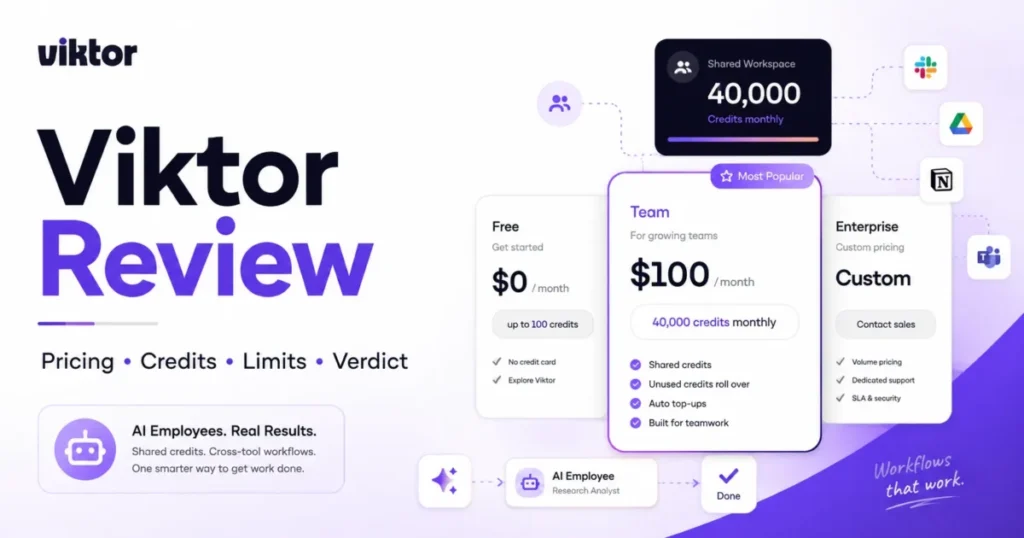
The live Team card on Viktor’s official pricing page, checked on August 9, 2026, lists $100 per month for 40,000 shared workspace credits. Several reviews still ranking on page one quote $50 and 20,000 credits, so budget from the card, not from the article you read last quarter.
This Viktor review covers the current pricing, what 40,000 credits buys against Viktor’s own published task ranges, and the integration architecture behind the 3,200+ number. It also covers the permission model for team rollout, the security posture, the developer surfaces added in late July, and the buyers who should pick something more predictable.
For a wider view of the category first, compare it against the best AI chatbots shortlist.
In This Article (19 sections)
Viktor Quick Verdict
Every row below is expanded with its evidence later in this review.
| Category | Verdict |
|---|---|
| Best for | 5 to 50 person teams that coordinate in Slack or Teams and repeatedly move data between CRM, billing, ads, and project tools |
| Not ideal for | Teams that need a fixed monthly automation cost, or a single high-volume rule-based process |
| Starting price | $0 with up to $100 in credits, no credit card |
| Best practical plan | Team at $100 per month for 40,000 shared credits, because rollover and top-ups only exist there |
| Free plan/ | Free plan with every feature and integration listed as included, credits do not expire |
| Setup difficulty | Low to start, medium to govern: install, connect tools, then decide which connections are shared |
| Main strength | One agent that acts across 27 native integrations and 3,200+ managed connectors from the chat surface a team already uses |
| Main limitation | Cost scales with delegated work and schedule frequency, not headcount, so the subscription is a floor rather than a budget |
| Best alternative | Deterministic automation such as Make or n8n when the process is stable and volume is high |
Sources: Viktor’s official pricing page and integrations page, checked August 9, 2026.
Viktor Pros and Cons
Both columns below trace to Viktor’s own pricing, product, security, and developer documentation rather than to general impressions.
| Pros | Cons |
|---|---|
| Free plan includes every feature and integration with up to $100 in credits and no credit card | Task cost is published as ranges of 100 to 300, 500 to 1,500, and 2,000 to 5,000 credits, so no workflow has a fixed price before it runs |
| Workspace pricing means a 10-person team pays the same $100 base as a 3-person team | Scheduled automations consume credits on every run, so raising a job from daily to hourly multiplies its monthly cost |
| Money movement, code pushes, and customer emails wait for explicit approval | Only 27 of the advertised 3,200+ integrations are described as native deep integrations |
| Credentials are injected at execution time by the tool gateway and never reach the model | EU data residency and audit logs sit behind Enterprise contracts, not the Team plan |
| Unused Team credits roll over, and automatic top-ups carry a monthly spend cap | Exact numeric API rate limits are not published, and extra keys do not raise a key owner’s throughput |
Every row above traces to Viktor’s pricing page, its integrations page, or its security documentation, all checked August 9, 2026.
How This Viktor Review Was Researched
This analysis is based on Viktor’s official pricing page, product and integrations pages, security documentation, developer documentation for the public API, MCP server, and compatible API, the dated changelog, and the company’s own rollout guidance. Pricing, credit allowances, and plan limits were verified on August 9, 2026.
Viktor was assessed against the same buyer-focused criteria applied to every workspace tool on this site: real cost at the team’s actual usage, plan gates, usage limits, and integration depth. The same criteria cover permission and approval controls, security posture, and the point where a cheaper path becomes the better decision.
Greater weight went to the factors that change a purchase order: credit consumption per recurring workflow, what the included allowance covers, which controls exist for capping spend, and which governance requirements force an Enterprise conversation.
Claims that could not be verified from official sources were excluded rather than softened. Reported spend figures from independent reviewers are attributed to those reviewers and separated from Viktor’s published pricing.
What Viktor Is, and What It Is Not
Viktor sells itself as an AI employee rather than an assistant, under the headline “Not a tool. A hire.”
The product page describes an agent that “lives in Slack and Microsoft Teams, connects to 3,200+ tools, and does the work”, with a claim of use by 50,000+ teams.
The practical difference from a chat assistant is execution. Instead of returning an answer for a person to act on, Viktor is documented as querying connected systems, producing the artifact, and posting it back into the channel or thread where the request started.
Setup is three steps on the official page: add Viktor to Slack or Teams, connect the CRM, drive, calendar, and analytics tools, then assign a first job. That is a genuinely low barrier compared with building the same flow in a node editor, and it is also why credit discipline becomes the governing skill.
Autonomy is bounded by design. The homepage frames it as “Autonomous, not unsupervised”, with approval buttons on anything irreversible, channel content visible only when Viktor is invited, and per-person permissions.
One disambiguation before the pricing section. This review covers the AI employee at viktor.com; VIKTOR.AI at viktor.ai is an unrelated engineering and app-building platform, and the two products share nothing but a name.
Company context, not proof of fit: Viktor announced a $75 million Series A led by Accel on May 19, 2026, per its own Series A announcement. Funding and adoption counts say the vendor will still exist at renewal.
They say nothing about whether your workflows fit inside 40,000 credits, and the return figures quoted in that post are vendor-published customer testimonials rather than independently verified results.
If the category itself is new to your team, start with what generative AI is before comparing agent products.
What Changed in Viktor Between June and August 2026
Any Viktor review written before July describes a different product surface. The dated entries below come from Viktor’s official product changelog, checked August 9, 2026.
| Date | Change | Buyer consequence |
|---|---|---|
| June 18, 2026 | Microsoft Teams general availability with channels, group chats, DMs, and native file handling | A Teams-first company is no longer excluded, and reviews calling Viktor Slack-only are stale |
| June 27, 2026 | Audit logs for Enterprise workspaces, in Settings or via the public API | Security review has a log answer, but only on Enterprise |
| July 29, 2026 | OpenAI-compatible API generally available for all workspaces | Existing OpenAI or Anthropic client code can drive Viktor runs |
| July 30, 2026 | MCP server for any MCP client, including Claude, Cursor, and the OpenAI Agents SDK | Another agent, not just a person, can delegate work to Viktor |
| August 1, 2026 | Discord support, plus Slack guest access scoped to specific people and channels | Community-led and contractor-heavy teams gain a surface and a tighter guest boundary |
| August 6, 2026 | Chat available to everyone in the Viktor web app, with renameable scheduled tasks | The “no standalone interface” criticism no longer holds |
| August 8, 2026 | Shared skills that workspace members can upload, edit, download, and trigger with slash commands | Repeatable prompts become team assets instead of personal habits |
Source: Viktor’s official changelog at https://viktor.com/changelog, checked August 9, 2026.
That is six shipping months compressed into eight weeks, and it changes two buying answers. Microsoft Teams eligibility and web access were the two most common disqualifiers in spring reviews, and both are now resolved.
Teams still deciding which chat surface a rollout should start in can work through Slack vs Microsoft Teams first, because Viktor now behaves the same in both.
The same velocity is a mild risk. A product that changed its interaction surfaces three times in six weeks will change again, so treat any feature list, including this one, as dated rather than permanent.
Viktor Pricing and Plans in August 2026
Viktor prices the workspace, not the seat. That single decision explains most of the confusion in other reviews, because a per-seat mental model produces the wrong budget in both directions.
| Plan | Price | Included credits | What it adds |
|---|---|---|---|
| Free | $0 per month | Up to $100 in credits, non-expiring | Every feature and integration listed as included, no credit card, no sales call |
| Team | $100 per month | 40,000 credits per month, shared across the workspace | Rollover of unused credits, on-demand top-ups, automatic top-ups with a monthly spend cap |
| Enterprise | Custom | Volume credit pricing | Per-user spend caps, custom billing terms, dedicated support, audit logs, EU data residency by contract |
Sources: Viktor’s official pricing page and Viktor’s security documentation, checked August 9, 2026.
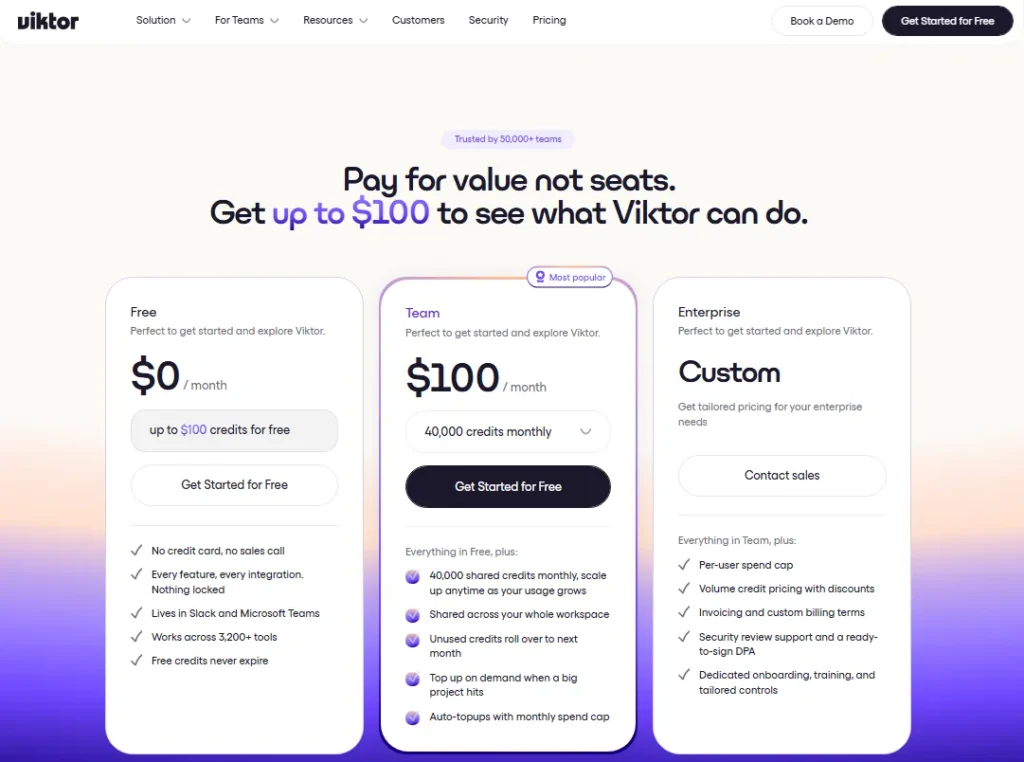
The 10-user question has an unusual answer here. Ten people on Team still pay $100 per month for the base subscription, because the 40,000 credits are pooled, so headcount changes nothing until those ten people delegate more work than three people did.
Compare that with the per-seat alternatives most teams already own. ChatGPT Team runs $25 per user per month billed annually, or $30 monthly, per OpenAI’s ChatGPT pricing page, which means Viktor’s entire $100 base is roughly four ChatGPT Team seats.
The trap is treating $100 as the monthly cost. It is the entry fee for a metered service, and the meter is the actual product decision.
How Far 40,000 Credits Actually Go
Viktor publishes three task bands: 100 to 300 credits for quick tasks, 500 to 1,500 for complex workflows, and 2,000 to 5,000 for full projects. Dividing the included Team allowance by those bands gives the only capacity model the vendor’s own numbers support.
| Workload type | Published cost per task | Tasks inside 40,000 credits | Included cost per task at base rate |
|---|---|---|---|
| Quick task, such as a thread summary with a CRM follow-up | 100 to 300 credits | About 133 to 400 | $0.25 to $0.75 |
| Complex workflow, such as a multi-system weekly report | 500 to 1,500 credits | About 26 to 80 | $1.25 to $3.75 |
| Full project, such as an investor update assembled from several systems | 2,000 to 5,000 credits | About 8 to 20 | $5.00 to $12.50 |
Calculation basis: 40,000 included Team credits divided by Viktor’s published task ranges. The per-task column applies the base-plan arithmetic of $100 divided by 40,000 credits, which equals $2.50 per 1,000 included credits. That figure describes the included allowance only and is not a verified top-up rate, which Viktor does not publish. Ranges from Viktor’s official pricing page, checked August 9, 2026.
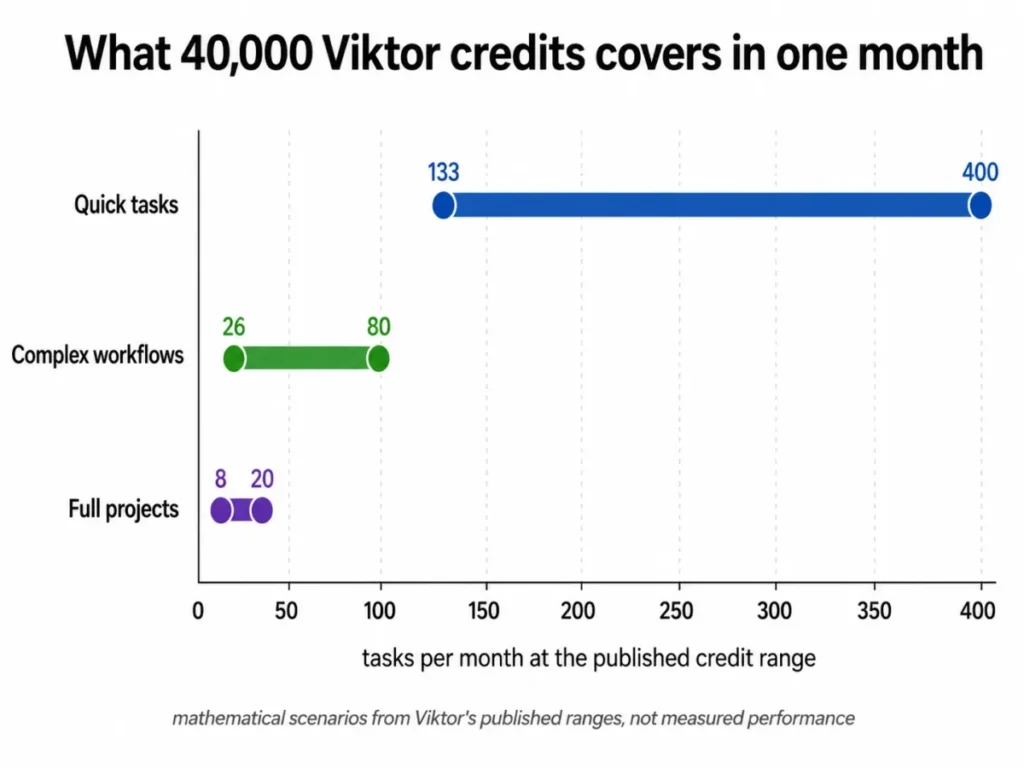
The homogeneous mix in that table is not a real month, which is why the daily view matters more. A 30-day month against 40,000 credits allows roughly 1,333 credits per day before the workspace starts drawing on rollover or top-ups.
That threshold is the number I would put on the wall during a pilot. One complex workflow at the published 500 to 1,500 band, running once each business day, consumes 11,000 to 33,000 credits a month, which is 28% to 83% of the entire included pool for a single standing job.
Raise the same job from daily to hourly across an 8-hour business day and it consumes roughly 88,000 to 264,000 credits a month. One frequency setting moves a workflow from a fraction of the plan to several times the plan.
Two independent reviewers publish their own consumption, and their numbers are useful precisely because they are not Viktor’s. Efficient App reports averaging about 9,000 credits per day with a bill around $500 to $750 a month, and Chief Marketing Dad reports roughly 300,000 credits a month at about $750 to $1,000.
Both figures are attributed reviewer experiences at their own usage levels rather than official forecasts, and both of those pages still show the older base pricing.
Those two reports land in the same band, roughly 270,000 to 300,000 credits a month, which is about seven times the included Team pool. Applying the same base-rate arithmetic, 270,000 credits at $2.50 per 1,000 comes to $675, which sits inside the reported $500 to $750 range.
The buyer conclusion is specific rather than alarming. Heavy Viktor use does not appear to trigger a punitive surcharge, and it bills like a metered utility instead.
A team delegating seven times the included work should expect a bill near seven times the base, and should confirm the current top-up rate in the billing screen before committing.
Three controls exist for keeping that honest. Automatic top-ups carry a monthly spend cap, rollover protects an underused month, and the developer public API documentation documents a credits endpoint returning the current balance, the billing period, and a burn-rate runout forecast.
Feature Gates: What You Get on Each Plan
Viktor gates far less by feature than most workspace tools, which moves the buying risk from capability to consumption and governance.
| Capability | Free | Team | Enterprise |
|---|---|---|---|
| Features and integrations | Listed as fully included | Included | Included |
| Credit supply | Up to $100 one time, non-expiring | 40,000 per month, pooled, with rollover | Volume credit pricing |
| Top-ups and spend control | Not applicable | On-demand and automatic top-ups with a monthly cap | Per-user spend caps and custom billing terms |
| Audit logs | Not available | Not available | Available in Settings and via the public API |
| EU data residency | US hosting | US hosting | Available by contract |
| Security review and DPA support | Standard documentation | Standard documentation | Dedicated support, onboarding, and training |
Sources: Viktor’s official pricing page, security documentation, and changelog, checked August 9, 2026.
The upgrade trigger from Free to Team is not a locked feature. It is the moment a pilot workflow proves useful and the introductory credits run down, which for a daily complex job arrives inside the first month.
The upgrade trigger from Team to Enterprise is governance, not volume: per-user spend caps, invoicing terms, audit logs, or EU residency. A finance team that needs a hard per-person ceiling cannot build one on Team.
The operating consequence is easy to state, because on Team the plan gate that matters is credit supply rather than capability, so the buying decision moves from features to consumption. Viktor’s official documentation keeps audit logs and EU residency on Enterprise, which is why I recommend that any team with a governance requirement price the Enterprise conversation before it standardises on Team.
Key Features and Where They Stop
Cross-tool task execution
The feature that justifies the category name is execution across connected systems from a single instruction. Viktor’s integrations page gives concrete examples, including cross-checking Stripe revenue against HubSpot data and flagging discrepancies before board meetings, and pausing Meta campaigns above a $40 cost-per-acquisition threshold before reallocating budget.
The limit is authority rather than capability. Money movement, code pushes, and customer emails wait for explicit approval in Slack, so the honest mental model is delegated work with review gates, not an unattended operator.
Scheduled automations
Recurring work is where an AI employee earns its keep, and Viktor supports standing tasks that were made renameable in the August 6 release. A weekly revenue pulse assembled from CRM, billing, and analytics data is the canonical shape.
The limit is the meter. Every run consumes credits, so cadence is a budget decision, and I would pilot any recurring job at the lowest useful frequency, read the burn-rate forecast, then increase it only when the value is visible.
Shared skills
Since August 8, 2026, workspace members can upload, edit, and download skills and trigger them with slash commands. That converts a good prompt from one person’s habit into a team asset with a predictable entry point.
The trade-off is that a shared skill invoked by more people runs more often, so a popular skill is also a rising line in the credit budget.
Four work surfaces
Viktor now operates in Slack, Microsoft Teams, Discord, and its own web app, all against the same workspace, memory, skills, and integrations. Teams that split between a Slack review style chat culture and a browser habit no longer have to choose.
Where a company standardises on Microsoft, the June 18 general availability covers channels, group chats, and DMs with native file handling, and the practical evaluation question shifts to the same credit math rather than platform support. Compare that against the shape of your own stack, since a Microsoft Teams review level of adoption usually decides which surface a rollout starts in.
Model choice
The changelog shows models arriving as options in a picker rather than as a fixed engine, including Claude Sonnet 5 on July 1 and Kimi K3 on July 29, 2026. For a buyer, the useful consequence is that model progress reaches the workspace without a migration.
The cost consequence is less comfortable. Credits represent model work, so a heavier model choice on a heavy workflow is also a pricing choice, and Viktor does not publish a per-model credit table.
Integrations: 27 Native, 3,200 Managed, and One Number That Does Not Match
The 3,200+ figure is real but flattened in most reviews. Viktor’s integrations documentation separates two very different tiers, and the distinction decides whether your decisive system is deeply supported or merely reachable.
| Connection type | Count stated | How it authenticates | What a buyer should verify |
|---|---|---|---|
| Native deep integrations | 27 | Handled by Viktor | Whether the two or three systems your workflows depend on are in this tier |
| Managed connectors | 3,200+ tools | Mostly one-click OAuth, some API keys | Whether the specific object and action you need is exposed, not just the app name |
| Custom connection | Not counted | Built from API documentation, or driven through Viktor’s browser capability | Reliability expectations, since a browser-driven path is the least stable route |
Source: Viktor’s official integrations page, checked August 9, 2026.
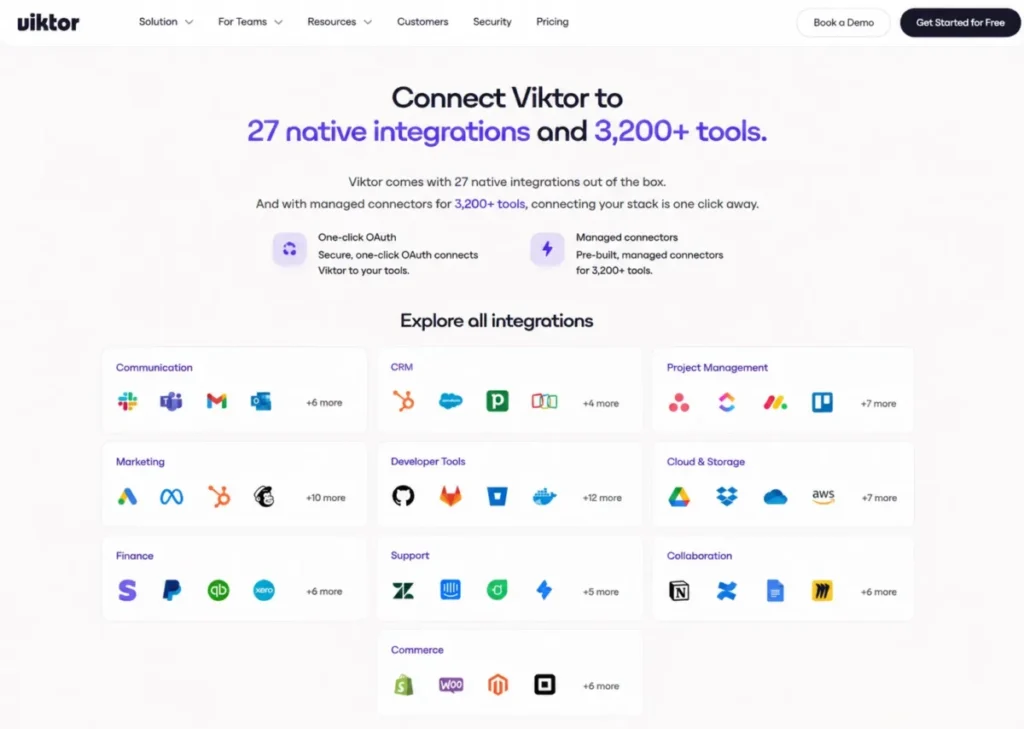
One inconsistency deserves naming. Viktor’s homepage, pricing page, and integrations page all state 3,200+ tools, while the developer documentation index states 9,000+ integrations, both observed on August 9, 2026.
Three current commercial surfaces agree on 3,200+, so that is the figure this review treats as canonical. A buyer should read the gap as a documentation lag rather than as a hidden capability, and should confirm the specific connector list during a pilot.
The deeper question is the one that decides revenue workflows: whether the agent can read and write the exact objects a team relies on, which is the same discipline behind what CRM integration demands of any connected system.
Setup, Permissions, and Team Rollout
Installation is genuinely fast, and that is exactly where teams create governance debt. The connection decision matters more than the install, because Viktor’s own rollout guidance separates shared tools from personal ones.
Team-owned systems such as the CRM, analytics, and project tracker are meant to be connected once and shared. Personal email and calendars stay scoped to the individual, which is the boundary that keeps a shared workspace from becoming a shared inbox.
Answer scoping follows the requester, not the agent. The guidance states that Viktor answers each teammate using only conversations that teammate can access, so an intern’s question does not surface CFO-level material.
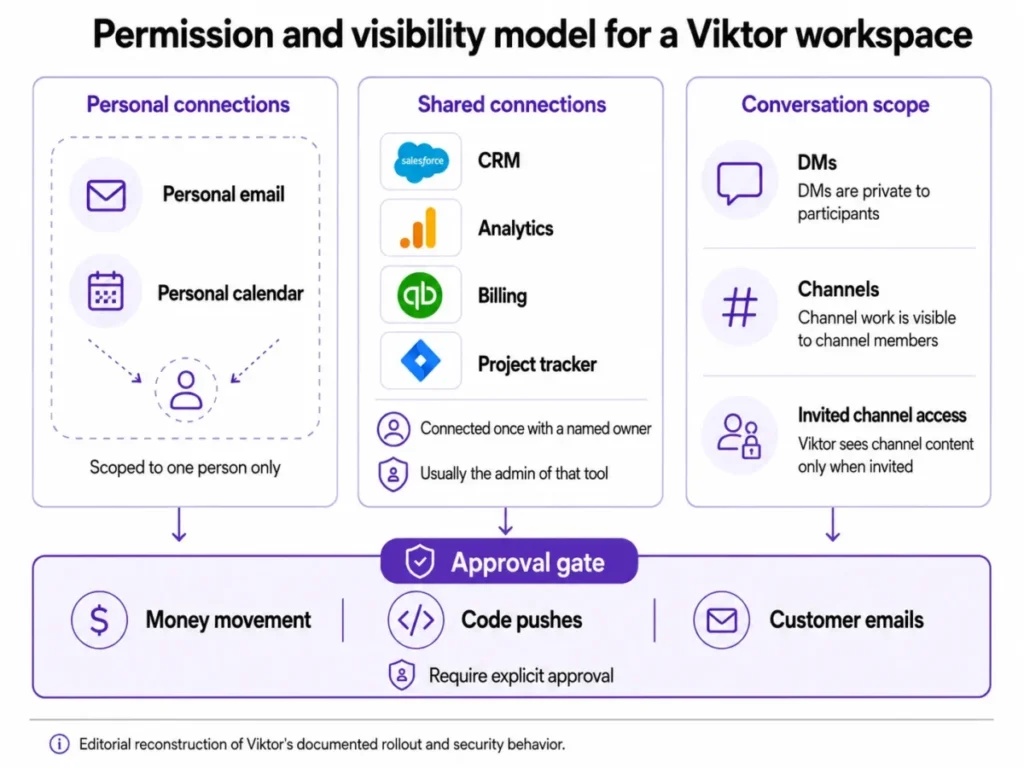
Two operational rules follow from that model. Give every shared connection a named owner, usually the person who administers the tool, so the connection survives a role change, and start the rollout with one concrete recurring task per team rather than an announcement.
The 30-day and 90-day checks are where I would judge the purchase. By day 30, at least one standing workflow should be running without a person rebuilding the prompt each week, and the credit balance should show a predictable daily rate rather than spikes.
By day 90, the burn-rate forecast should be boring, shared connections should have owners, and at least two teams should have their own standing job. If the workspace is still one enthusiast delegating ad hoc tasks at day 90, the renewal is buying a personal tool at workspace prices.
Security, Support, and Admin Controls
Viktor’s security documentation is more specific than the average AI vendor page, which makes it easier to separate certified programs from those still in progress, such as ISO 27001, listed as in progress with a controls overview available.
| Control or program | Documented status |
|---|---|
| SOC 2 | Type 1 certified with independent attestation, Type II in progress |
| GDPR and CCPA | GDPR aligned with a DPA available on request, CCPA compliant |
| CASA | Tier 3 certified, required for Google API access |
| Encryption | TLS 1.2+ in transit, AES-256 at rest, secrets in dedicated vaults |
| Single sign-on | SAML SSO across Okta inside Slack, Entra ID, Google Workspace, OneLogin, and any SAML 2.0 provider |
| Data residency | US hosting by default, EU residency available on Enterprise contracts |
| Model training | Conversations and files never enter a training set, at Viktor or its model providers |
| Credential handling | API keys and tokens injected at execution time by the tool gateway, never seen by the model |
| Admin controls | Admins can disconnect integrations, pause users, or terminate tasks instantly |
| HIPAA, FedRAMP | Not stated on the security page checked for this review |
Source: Viktor’s official security documentation, checked August 9, 2026.
The approval boundary is the part worth quoting in a security review, because it is narrow and concrete: money moves, code pushes, and customer emails wait for explicit approval in Slack. Nothing in the documentation extends that guarantee to every mutation in every connected system, so treat other write actions as configuration you must verify yourself.
Two gaps change procurement paths. A regulated buyer that needs EU residency or audit logs is on the Enterprise track from the first call, and a buyer that needs HIPAA or FedRAMP evidence should request it directly rather than reading its absence as either compliance or non-compliance.
Support tiers are the one area where the public evidence is thin. Enterprise is documented as including dedicated support, onboarding, and training, while exact response-time commitments are not published, so ask for the service terms in writing if support latency matters to a standing workflow.
Developer Access: API, MCP, and the 10-Minute Ceiling
Late July turned Viktor from a chat-surface product into something a developer can call. There are now three ways in, and picking the wrong one creates avoidable polling and state problems.
If the vocabulary here is new to the team doing the buying, start with what an API is.
| Surface | Use it when | Key constraint |
|---|---|---|
| Public API | An application needs explicit threads, runs it can poll or cancel, and downloadable file artifacts | Artifact download URLs are valid for about 15 minutes |
| MCP server | The caller is itself an AI agent, such as an MCP client in Claude, Cursor, or the OpenAI Agents SDK | Stateless sessions, and the server advertises only the tools the key’s scopes allow |
| OpenAI and Anthropic compatible API | Existing SDK code should drive Viktor without new client work | Each agent execution is capped at 10 minutes, and Chat Completions and Anthropic Messages are stateless |
Sources: Viktor’s public API, MCP server, and compatible API documentation, checked August 9, 2026.
The Public API lifecycle is documented end to end. Creating a thread queues a run and returns 202 Accepted with thread, message, and run identifiers, runs resolve to completed, requires_action, failed, cancelled, or timed_out, and results come back as Markdown, structured JSON, or file artifacts.
The requires_action state is the one to design for, because it is where an approval or decision pauses an otherwise automated pipeline. A pipeline that treats it as a failure will retry work that is only waiting for a human.
Rate limiting is documented in behavior but not in numbers. Limits apply per route and per key owner, 429 responses carry Retry-After and X-RateLimit headers, and creating more keys does not raise a key owner’s throughput.
Anyone who needs a contractual throughput figure will not find one in the published guide, so that number belongs in the Enterprise conversation. Idempotency keys are documented as preventing duplicate charges on retries, which matters more than usual when every run costs credits.
For agent-to-agent work, the MCP server documentation describes streamable HTTP with stateless sessions and 13 tools including ask_viktor, create_thread, and send_message. When a wait expires, the response returns wait_timed_out with a run ID and the client calls wait_for_run again with that same ID rather than repeating the original request.
Viktor Limitations
Task cost is a range, not a price. Published bands of 100 to 300, 500 to 1,500, and 2,000 to 5,000 credits mean the same instruction can cost three times more depending on context and model work. A fixed-cost process owner cannot forecast a month from the plan alone.
Frequency is a hidden multiplier. Scheduled automations consume credits per run, and the arithmetic above shows one complex job moving from 28% of the pool at daily cadence to several times the pool at hourly cadence.
Top-up pricing is not published. Team supports on-demand and automatic top-ups, but the unit rate is not on the public pricing page, so the marginal cost of exceeding 40,000 credits has to be confirmed in the billing screen before scaling.
Integration depth is uneven. Only 27 connections are described as native, and the rest are managed connectors, so a workflow that depends on an unusual object in a peripheral tool deserves a pilot before it becomes a standing job.
Governance features sit on Enterprise. Per-user spend caps, audit logs, and EU data residency are not Team features, which means a mid-market team with a security questionnaire often needs a sales conversation it did not budget time for.
API throughput is undocumented in numbers. Behavior, scopes, and 429 handling are all documented, but the absence of published quotas blocks any procurement process that requires a throughput commitment up front.
Who Should Use Viktor
Teams of 5 to 50 that live in Slack or Teams and run on several systems. The value comes from removing the human relay between CRM, billing, ads, and reporting, and that relay only exists at this size and above.
Founders and operations leads who personally assemble weekly numbers. A standing revenue or pipeline pulse is the single clearest fit, and it is the workflow Viktor’s own examples target most directly.
Marketing teams and agencies running multiple ad and analytics accounts. Documented examples cover campaign threshold monitoring and budget reallocation, which is data collection work that most teams still do by hand.
Engineering and technical operations teams that want both surfaces. The chat surface serves the team while the API and MCP server let internal tools delegate to the same workspace, which is unusual in this category.
Who Should Avoid Viktor
Any team that needs a fixed monthly automation bill. Usage-based credits plus undisclosed top-up rates make a hard budget ceiling impossible on Team, and finance teams that cannot tolerate variance should look at seat-priced or operation-priced tools.
Single high-volume deterministic processes. If the job is a stable rule that fires thousands of times, an agent adds reasoning cost to work that a conventional automation performs at a predictable rate.
Regulated buyers that need a certification Viktor has not published. SOC 2 Type 1, CASA Tier 3, GDPR alignment, and CCPA compliance are documented, while HIPAA and FedRAMP are not stated, and absence of a claim is not evidence either way.
Field-heavy operations with little connected software. Viktor’s advantage lives inside connected systems, so a team whose work happens off-platform will pay for coordination it does not need.
Developers who need a published throughput guarantee before signing. The public documentation describes rate-limit behavior without numeric quotas, which is a procurement blocker for some platform teams.
Viktor Alternatives
The right comparison depends on which half of Viktor’s promise a team needs: reasoning across tools, or reliable repetition.
| Alternative | Pricing basis | Choose it if |
|---|---|---|
| ChatGPT Team | $25 per user per month billed annually, $30 monthly | The need is individual research, drafting, and analysis rather than action inside business systems |
| Claude Team | $20 per seat per month billed annually, $25 monthly | The work is document-heavy or code-heavy and per-seat cost predictability matters more than autonomous execution |
| Zapier | Free at 100 tasks per month, Professional from $19.99 per month, Team at $69 per month | The process is a stable trigger-and-action chain and you want task-level cost visibility |
| Make | Free at 1,000 credits per month with 2 active scenarios, Core at $12, Pro at $21, Teams at $38 per month | You want visual control over branching logic at a low entry price |
| n8n | Starter at 20 euros per month for 2,500 executions, Pro at 50 euros for 10,000, Business at 667 euros for 40,000 | Execution-based billing or self-hosting matters, since an execution is one workflow run regardless of step count |
Each entry price above comes from that vendor’s own official pricing page, checked August 9, 2026. The sources are OpenAI’s ChatGPT pricing, Claude pricing, Zapier pricing, Make pricing, and n8n pricing.
Seat pricing and usage pricing diverge as a team grows, and that divergence decides more purchases here than feature lists do.
| Tool | Billing basis | Monthly cost at 10 users |
|---|---|---|
| Viktor Team | Workspace, 40,000 pooled credits | $100 base, plus any top-ups the workload triggers |
| ChatGPT Team | Per user | $250 billed annually, $300 billed monthly |
| Claude Team | Per seat | $200 billed annually, $250 billed monthly |
| Zapier Team | Per plan, metered by task | $69 |
| Make Teams | Per plan, metered by credit | $38 |
| n8n Pro | Per plan, metered by execution | 50 euros |
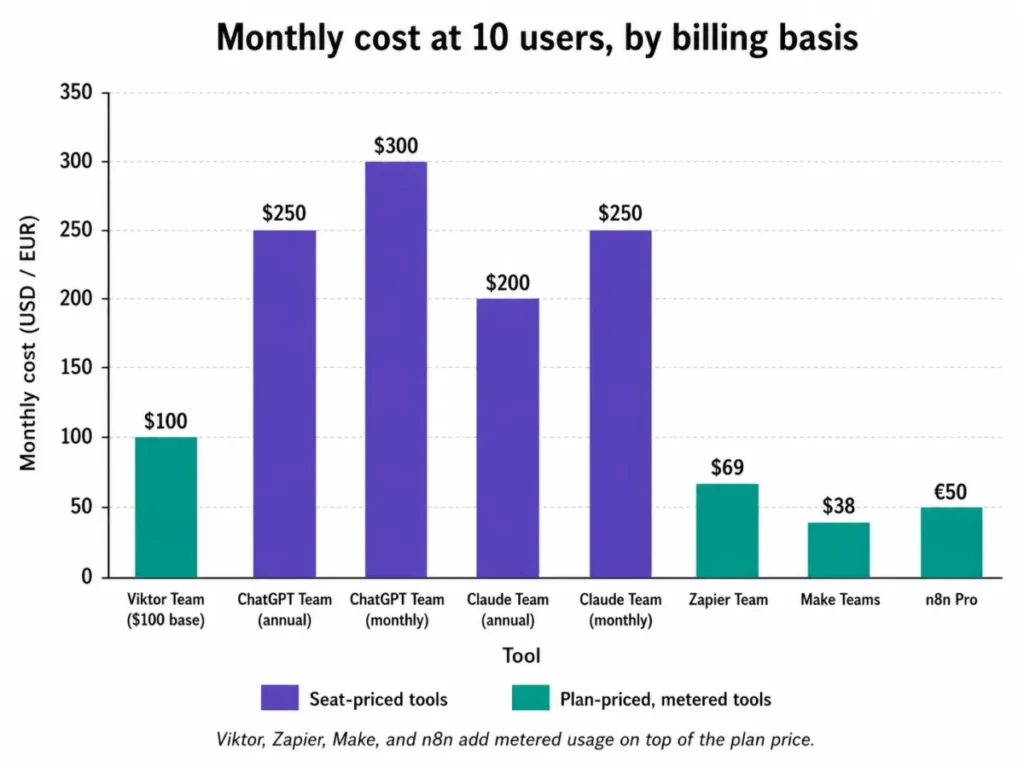
Read that table as two different risks rather than a ranking. Seat-priced tools give a predictable line that rises with hiring, while Viktor and the automation platforms hold the base cost flat and move the variability into usage.
Sources: the official pricing pages for Viktor, ChatGPT, Claude, Zapier, Make, and n8n, each checked August 9, 2026. Ten-user figures are editorial arithmetic on those published per-seat and per-plan prices, not quoted vendor packages.
ChatGPT
A general assistant answers, and Viktor acts. That difference is the whole comparison, and Viktor’s own homepage draws it explicitly against ChatGPT, Copilot, Zapier, and Claude Code.
For teams whose real need is thinking support rather than execution, the ChatGPT review covers where per-seat pricing wins.
Claude
Claude is the stronger pick when the output is a document, an analysis, or code that a person will finish, and when finance wants a flat per-seat line. The Claude review goes deeper on plan structure and where usage limits bite.
Zapier
Zapier prices by task, which makes a high-volume, stable process cheaper to forecast than an agent that reasons each time. Read the Zapier review if predictability matters more than interpretation, and accept that a Zap will not decide anything for you.
Make
Make sells credits too, but against deterministic scenarios rather than agent reasoning, and its free tier includes 1,000 credits with two active scenarios. The Make review is the better starting point for teams that want visual branching at a $12 entry price.
n8n
n8n bills per workflow execution regardless of step count and offers self-hosting on its higher plans, which appeals to teams with data-residency constraints Viktor only answers on Enterprise. The n8n review covers the self-hosted path in detail.
Final Verdict: Is Viktor Worth It?
Viktor is worth $100 per month for a 5 to 50 person team that can already name two or three recurring cross-system workflows, and that accepts a metered bill. Start on Free, run those exact workflows, and read the credit balance before and after each one.
For that buyer the practical plan is Team, because rollover, on-demand top-ups, and the capped automatic top-up are the only spend controls outside Enterprise. Set the automatic top-up cap on day one rather than after the first surprise.
For a finance-constrained buyer, or a single high-volume deterministic process, a task-priced or execution-priced tool is the better decision, and I would not try to make credits behave like a fixed subscription.
Enterprise becomes the only viable path the moment per-user spend caps, audit logs, or EU data residency appear in a requirements document. That conversation should start early, because it changes both price and timeline.
The renewal question is the one I would write down at purchase: after 90 days, can the buyer name the standing workflows Viktor owns, the credits each one costs, and the person accountable for each shared connection?
A team that can answer all three is buying an employee. A team that cannot is paying metered rates for a chat window.
FAQ
What is Viktor AI?
Viktor is an AI employee that works from Slack, Microsoft Teams, Discord, and its own web app, connects to business tools, and completes tasks rather than only answering questions. Its product page positions it as a hire rather than a tool, with approval gates on irreversible actions and per-person permissions.
How much does Viktor cost?
The Free plan is $0 and includes up to $100 in non-expiring credits with no credit card. Team is $100 per month for 40,000 shared workspace credits, with rollover and top-ups, and Enterprise is custom priced.
Those figures come from Viktor’s pricing page, verified: August 9, 2026.
Why do older Viktor reviews say $50 and 20,000 credits?
Because the plan changed. The live Team card shows $100 per month and 40,000 credits, while several ranking reviews still show the earlier $50 and 20,000 configuration.
Budget from the current card and verify it on the day of purchase.
How do Viktor credits work?
Credits represent model work and are pooled across the workspace on Team. Viktor publishes ranges of 100 to 300 credits for quick tasks, 500 to 1,500 for complex workflows, and 2,000 to 5,000 for full projects, and scheduled automations consume credits on every run.
How many tasks does 40,000 credits cover?
Using Viktor’s own ranges, the included Team allowance covers roughly 133 to 400 quick tasks, 26 to 80 complex workflows, or 8 to 20 full projects in a homogeneous month. Real mixes differ, and about 1,333 credits per day exhausts the pool in a 30-day month.
Does Viktor work with Microsoft Teams?
Yes. Microsoft Teams became generally available to all customers on June 18, 2026, with support for channels, group chats, and direct messages, plus native file handling.
Reviews describing Viktor as Slack-only predate that release.
Does Viktor have a web app?
Yes. Chat became available to everyone in the Viktor web app on August 6, 2026, running against the same workspace, memory, skills, and integrations as the chat surfaces.
Can Viktor send emails or push code without approval?
No. Viktor’s security documentation states that money moves, code pushes, and customer emails wait for explicit approval in Slack.
Other write actions in connected systems are not covered by that specific guarantee, so verify each one during setup.
Is Viktor secure enough for a security review?
It is SOC 2 Type 1 certified with Type II in progress, CASA Tier 3 certified, GDPR aligned with a DPA on request, and CCPA compliant, with TLS 1.2+ in transit and AES-256 at rest.
Audit logs and EU data residency are Enterprise-level, and HIPAA and FedRAMP are not stated on the security page.
Does Viktor have an API or MCP server?
Yes to both. The OpenAI-compatible API became generally available for all workspaces on July 29, 2026, the MCP server followed on July 30, and a separate public API handles explicit threads, pollable runs, and downloadable artifacts.
Each compatible API call is capped at 10 minutes.
Teams evaluating this alongside sales-focused agents should also weigh the best AI CRM software options, since a revenue-specific tool sometimes closes the same workflow at a fixed seat price.