Most developer tooling shortlists get decided on the wrong number. The entry price gets compared, and the plan the team will run on every day does not.
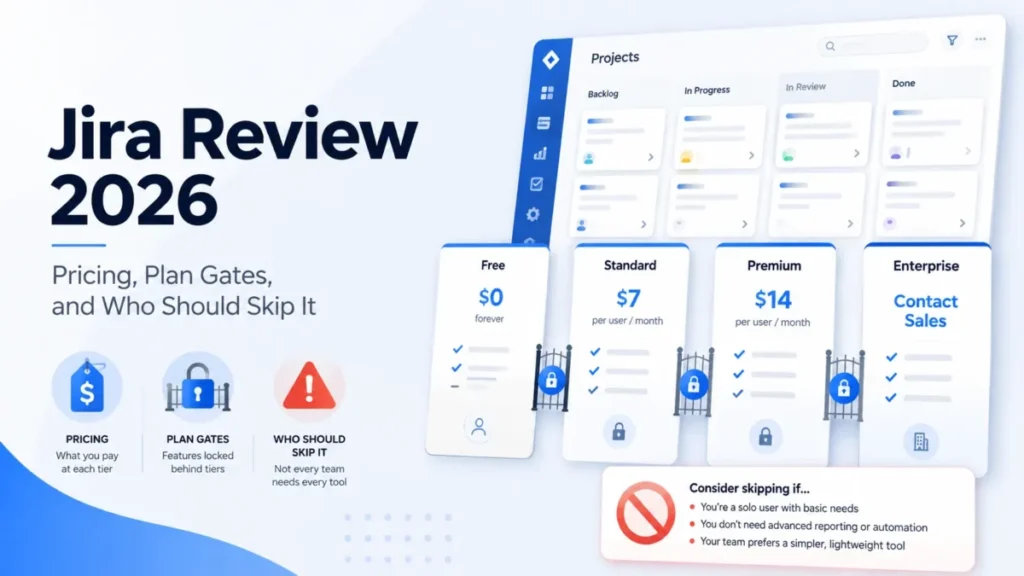
That gap decides budgets. Jira Standard is displayed at $7.91 per user per month while GitLab Premium is $29 per user per month billed annually, and those two figures are not buying the same category of product.
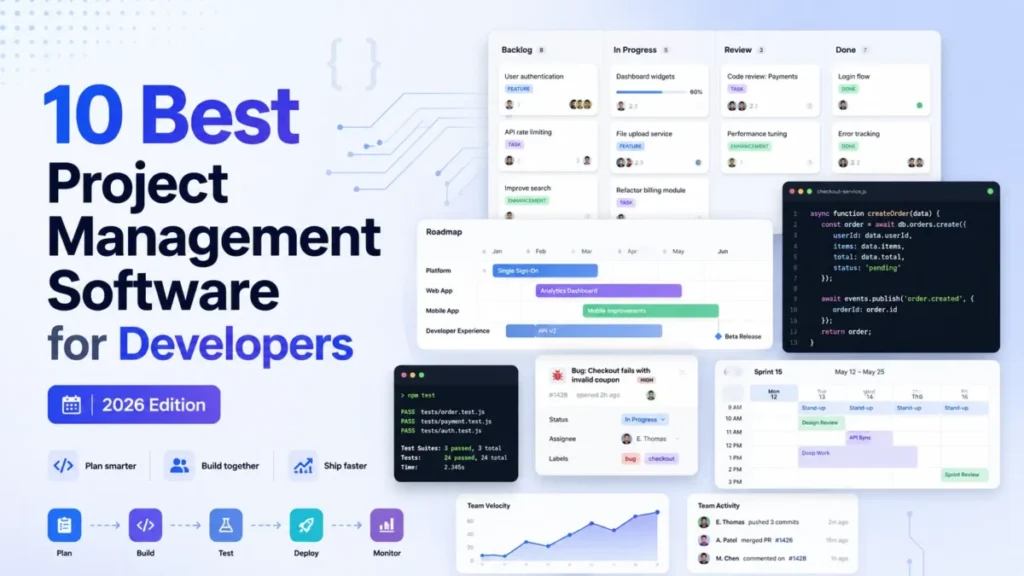
This ranking of project management software for developers is built on the numbers that survive procurement. Cost at 25 users, the plan gate that forces an upgrade, the automation quota that stops a workflow, the hard item ceiling that breaks a board, and what a migration leaves behind.
Jira takes the top position for multi-squad organizations that need governance. Linear is the stronger fit for a focused product team, and GitHub Projects is the better answer when GitHub is already the system of record.
In This Article (11 sections)
Quick verdict: the best project management software for developers by use case
| Use case | Best pick | Why it fits |
|---|---|---|
| Several squads on shared workflows and permissions | Jira | Configurable workflows, permission schemes, and a documented cross-team planning path on Premium |
| Fast product engineering with minimal administration | Linear | One opinionated model of issues, projects, cycles, and initiatives |
| GitHub is already the delivery system of record | GitHub Projects | Planning objects stay synchronized with issues and pull requests |
| A Microsoft and Azure delivery stack | Azure DevOps | Boards, Repos, Pipelines, and Artifacts share one platform |
| Engineering work that non-engineers must see | monday dev | Connected sprint, roadmap, and stakeholder boards in one workspace |
| Specs, tasks, and dashboards in a single workspace | ClickUp | Docs, sprints, time tracking, and dashboards in one hierarchy |
| Software structure without heavy administration | Shortcut | Stories, epics, iterations, and workflows on a smaller configuration surface |
| A choice between cloud and self-hosted, free for small teams | YouTrack | Cloud or on-premises deployment, free for up to 10 users |
| The lowest listed per-user price for a Scrum team | Zoho Sprints | Dedicated backlog, sprints, and agile reporting at the bottom of this price set |
| Planning inside a DevSecOps platform | GitLab | Issues, boards, merge requests, CI/CD, and security in one product |
Source: official product documentation for each pick. Jira software guide, Linear cycles, GitHub Projects overview, Azure Boards backlogs overview, monday dev getting started, ClickUp Sprints availability, Shortcut plan options guide, YouTrack feature overview, Zoho Sprints feature list, and GitLab issue boards documentation. Checked: July 30, 2026.
The three picks worth trialling first are Jira, Linear, and GitHub Projects, because they represent the three real architectures in this category: a governed planning system, a focused issue tracker, and planning that lives inside the code host. Everything else in this list is a variation on one of those three, priced differently.
Where these ten tools overlap, and where they do not
A ranked list hides the more useful question, which is whether these products compete at all. Four of them include the repository and the pipeline, and six of them do not.
| Tool | Code hosting included | CI/CD included | Cross-team planning | Non-engineering work | Free tier ceiling |
|---|---|---|---|---|---|
| Jira | Not in scope | Not in scope | By plan (Premium) | Yes | 10 users |
| Linear | Not in scope | Not in scope | Yes (initiatives) | Limited | 250 issues, 2 teams |
| GitHub Projects | Yes | Yes (Actions) | Limited | Limited | Included on Free |
| Azure DevOps | Yes (Repos) | Yes (Pipelines) | Yes (Delivery Plans) | Limited | First 5 users |
| monday dev | Not in scope | Not in scope | By plan (Pro) | Yes | None documented |
| ClickUp | Not in scope | Not in scope | Yes (portfolios) | Yes | Unlimited tasks |
| Shortcut | Not in scope | Not in scope | By plan (Business) | Limited | 10 users |
| YouTrack | Not in scope | Not in scope | Limited | Yes (knowledge base) | 10 users |
| Zoho Sprints | Not in scope | Not in scope | Limited | Limited | 3 users, 3 projects |
| GitLab | Yes | Yes | By plan (Ultimate) | Limited | 5 licensed users |
Capability columns are an editorial reading of each vendor’s documented feature scope. Free tier ceilings are vendor-stated. Source: official pricing and documentation pages. Jira plans, Linear plans, GitHub plans, Azure DevOps Services pricing, monday dev plans, ClickUp plans, Shortcut plans, YouTrack price announcement, Zoho Sprints plans, and GitLab plan pricing. Checked: July 30, 2026.
Jira, Linear, Shortcut, YouTrack, and Zoho Sprints compete head to head as planning systems that sit beside a code host. GitHub Projects, Azure DevOps, and GitLab sit in a different decision, because buying one of them settles where the repository and the pipeline live.
monday dev and ClickUp compete for a different budget line again: the one that also pays for marketing, design, and operations work.
How we evaluated project management software for developers
These rankings are based on official pricing pages, product documentation, help-center articles, and plan-limit pages for all ten tools. Pricing and plan limits were checked on July 30, 2026.
Each tool was assessed against the same buyer-focused criteria: software-delivery workflow fit, closeness to code and CI/CD, sprint and roadmap depth, administration burden, plan gates, migration risk, and cost at 25 users.
How we chose and ranked these ten tools
Greater weight was given to the factors that change a purchase order: the first tier that supports a real engineering workflow, documented usage ceilings, seat minimums, and the cost of adding people. Brand recognition and affiliate relationships did not influence the ranking.
Claims that could not be verified against an official source were excluded. Workflow descriptions follow documented product behavior, and temporary offers are separated from standard pricing.
Best project management software for developers compared
| Tool | Best-suited team | Practical tier | Where it sits in the stack | First limit that bites | Setup effort |
|---|---|---|---|---|---|
| Jira | Multi-squad engineering orgs | Standard | Beside the code host | 5,000 items in team-managed views | High |
| Linear | Focused product engineering teams | Basic | Beside the code host | 250 issues on Free | Low |
| GitHub Projects | GitHub-native teams | Team | Inside the code host | 50,000 items per project | Low to medium |
| Azure DevOps | Microsoft-centric orgs | Basic | Replaces the stack | 20 team backlogs per Delivery Plan | High |
| monday dev | Cross-functional product orgs | Standard | Beside the code host | 250 automation actions per month | Medium |
| ClickUp | Teams consolidating tools | Unlimited | Beside the code host | 1,000 automation actions per month | Medium to high |
| Shortcut | Small and growing software teams | Team | Beside the code host | One workflow on Free | Low to medium |
| YouTrack | Teams wanting deployment choice | Cloud annual | Beside the code host | No custom board templates | Medium |
| Zoho Sprints | Budget-conscious Scrum teams | Elite | Beside the code host | 3 users on Free | Low to medium |
| GitLab | DevSecOps consolidators | Premium | Replaces the stack | 5 licensed users in private Free groups | High |
Source: official plan and limit pages, one per row. Jira team-managed issue limits, Linear plan limits, GitHub project item limits, Azure DevOps delivery plan limits, monday dev plan limits, ClickUp automation limits, Shortcut plan limits, YouTrack board template limits, Zoho Sprints plan limits, and GitLab plan limits. Checked: July 30, 2026.
Setup effort in that table is an editorial assessment of the configuration surface each product exposes, not a vendor claim. The pattern behind it is simple: the tools that also own the repository and the pipeline demand the most administration, and the tools with the narrowest data model demand the least.
Cost at 25 users
Twenty-five paid users is the point where per-seat pricing stops being a rounding error and starts appearing in a budget review. The table below multiplies each product’s practical tier by 25 seats, before tax, implementation, add-ons, and consumption overages.
| Tool | Practical plan | Unit price | 10-user monthly | 25-user monthly |
|---|---|---|---|---|
| Zoho Sprints | Elite | $2.50 per user/month | $25.00 | $62.50 |
| GitHub Projects | GitHub Team | $4 per user/month | $40.00 | $100.00 |
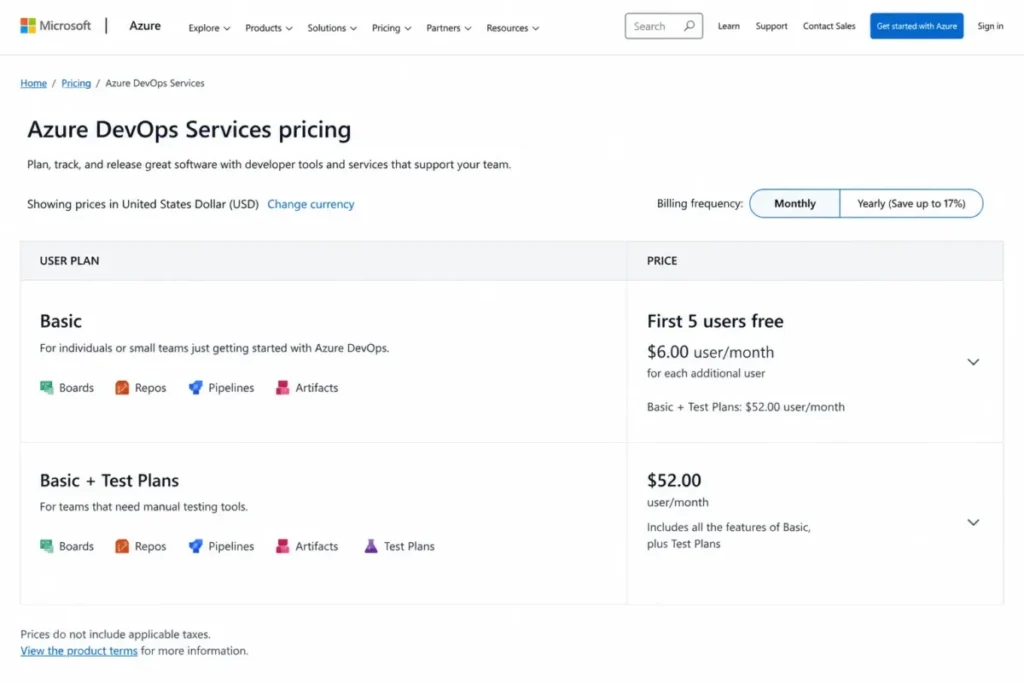
| Azure DevOps | Basic | $6 per user/month after 5 free | $30.00 | $120.00 |
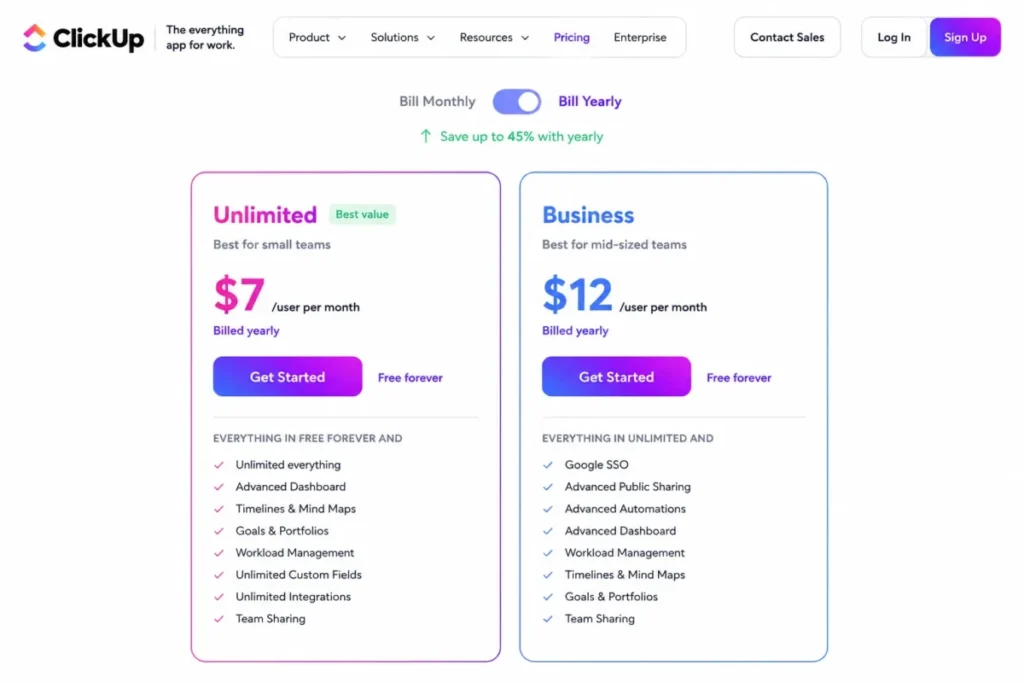
| ClickUp | Unlimited | $7 per user/month billed yearly | $70.00 | $175.00 |
| Jira | Standard | $7.91 per user/month | $79.10 | $197.75 |
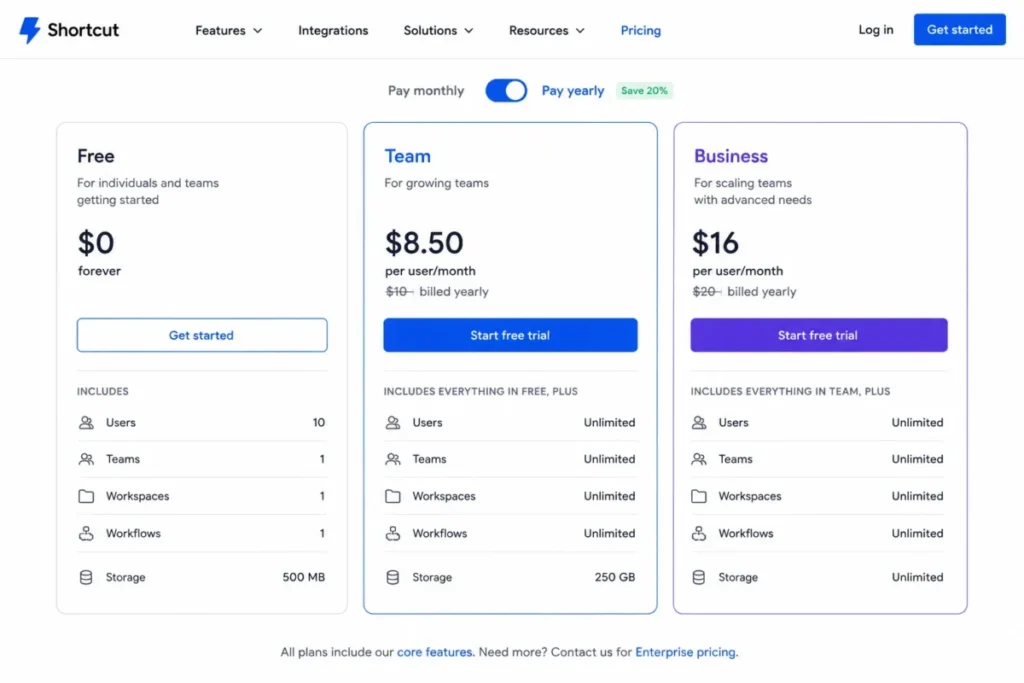
| Shortcut | Team | $8.50 per user/month billed yearly | $85.00 | $212.50 |
| Linear | Basic | $10 per user/month billed yearly | $100.00 | $250.00 |
| monday dev | Standard | $12 per seat/month billed annually | $120.00 | $300.00 |
| GitLab | Premium | $29 per user/month billed annually | $290.00 | $725.00 |
| YouTrack | Cloud annual | From $4.50 per user/month above 10 users | $0.00 | Not computed |
Source: official pricing pages. Atlassian Jira pricing, Linear pricing, GitHub pricing, Azure DevOps pricing, monday dev pricing, ClickUp pricing, Shortcut pricing, JetBrains YouTrack pricing announcement, Zoho Sprints plan comparison, and GitLab pricing. Checked: July 30, 2026.
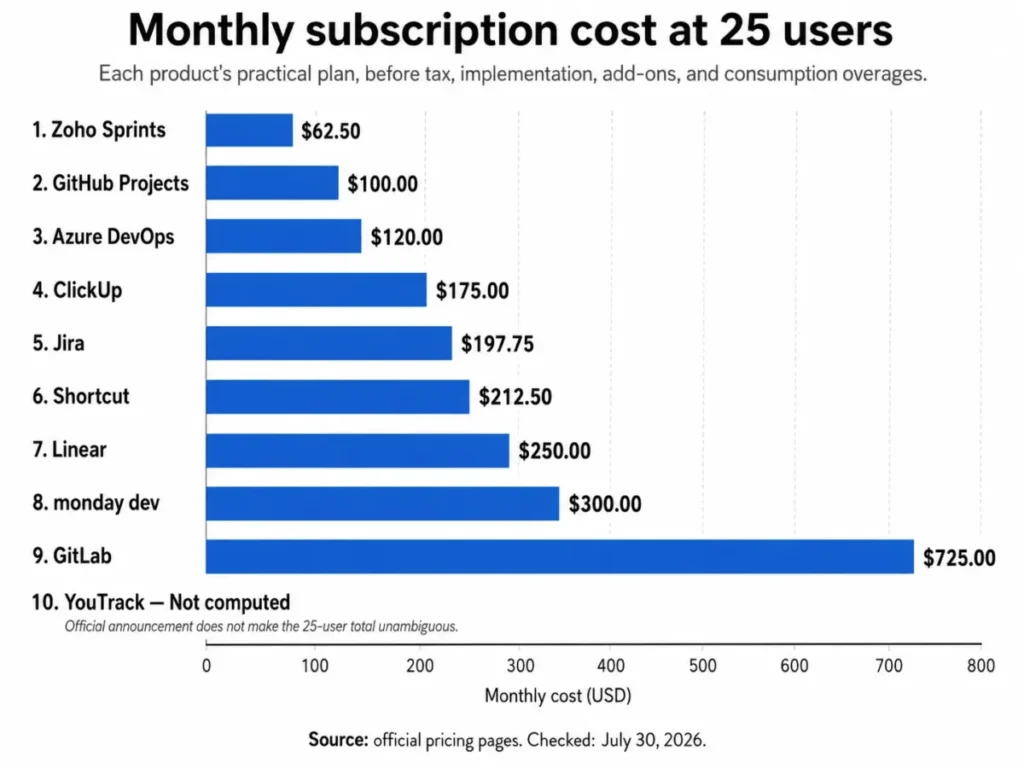
Two formulas in that table are not a straight multiplication, and both change the answer. Azure DevOps includes the first five Basic users at no charge, so 25 users bills as 20 chargeable seats at $6, and YouTrack is free up to 10 users, which makes its 10-user column $0.00 rather than a discount.
The YouTrack 25-user figure stays uncomputed on purpose. The announced annual rate starts at $4.50 per user per month for organizations above the free threshold. The announcement does not state whether every user is billed once the organization crosses 10 people or only the users above that line, and the two readings differ by roughly $270 per month at this team size.
Jira’s annual subscriptions use user-count tiers rather than a flat per-seat multiplication, so treat $197.75 as a monthly equivalent and confirm the invoice in checkout before it goes into a budget.
The seat rules that break a small-team budget
Two products in this set cannot be bought at the headline price by a very small team.
monday dev’s paid plans are shown with a three-seat minimum, which puts a floor of $36 per month on Standard even for a solo maintainer.
Zoho Sprints presents its Starter plan for organizations of 12 to 100 users, which is an odd shape for an eight-person team.
Source: official pricing pages. monday dev seat pricing and Zoho Sprints user bands.
The practical consequence is that price ranking flips at small team sizes. Zoho Sprints is the cheapest line in the 25-user table and one of the more awkward options at eight users, while YouTrack is uncomputable at 25 and free at 10.
The costs that sit outside the seat price
Four of these products bill for consumption or capability on top of the seat. GitLab sells extra compute at $10 per 1,000 minutes and extra storage at $5 per month for each 10 GiB billed annually, and its Enterprise Agile Planning add-on is $15 per user per month billed annually for eligible Ultimate customers.
Azure DevOps prices test management as a separate $52 per user per month tier, and each extra Microsoft-hosted parallel job is $40 per month against $15 for a self-hosted one. ClickUp’s AI add-on is listed at $9 per user per month, which is more than the Unlimited seat it sits on.
Source: official pricing pages. GitLab add-on pricing, Azure DevOps parallel-job pricing, and ClickUp add-on pricing.
The safer budget starts from the practical tier plus the add-ons a delivery team predictably needs, not from the seat line alone. For a 25-person GitLab team that also wants test-style governance and heavy pipelines, the seat cost is the smaller half of the invoice.
The 10 best project management tools for developers, ranked
Depth below is tiered on purpose. The three tools most buyers are choosing between get the longest treatment, and the tail of the list gets only the space its decision needs.
1. Jira: Best for governed multi-squad delivery

- Best for: Software organizations running several squads against shared workflows, permission schemes, and cross-team plans.
- Avoid if: A small engineering team wants to ship without owning issue types, workflow schemes, and permission administration.
- Starting price: Free for up to 10 users, with 100 automation runs per month and 2 GB of storage.
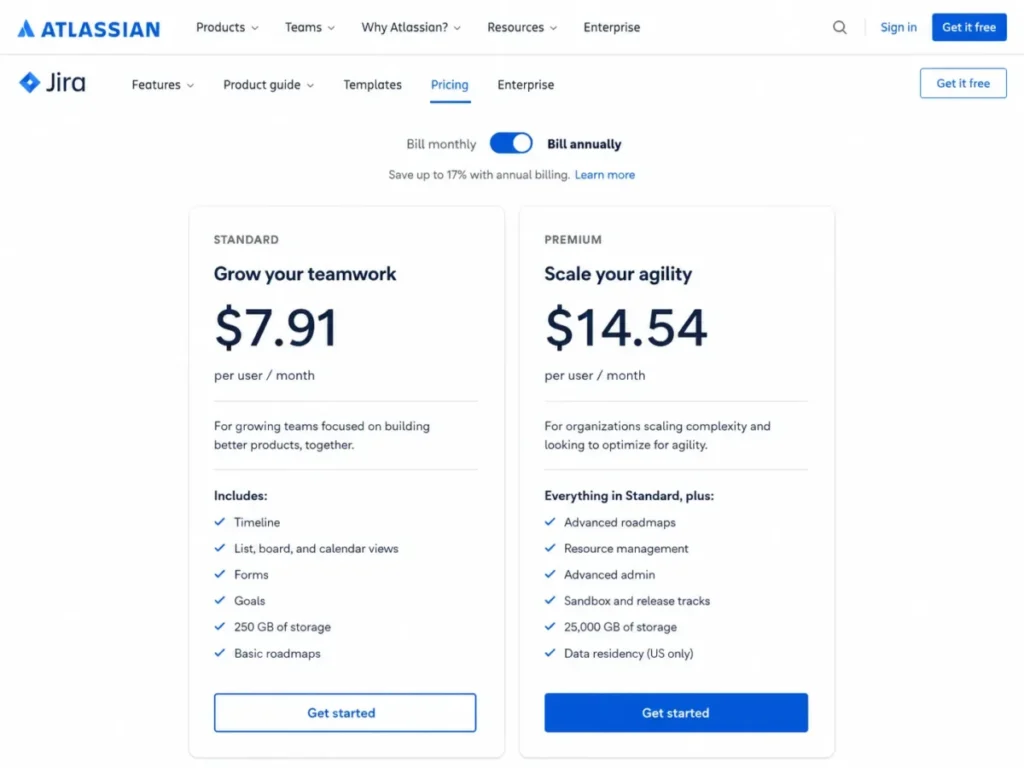
- Practical tier: Standard, displayed at $7.91 per user per month.
- Free plan: Yes, capped at 10 users with reduced permission control.
- First limit that bites: 1,700 automation rule runs per month on Standard.
- Better than Linear: Workflow, permission, and reporting configuration deep enough to encode a real governance model.
- Worse than Linear: Administration overhead, which arrives before the first sprint does.
- Setup difficulty: High, because issue types, workflows, permission schemes, and cross-project reporting all need design decisions.
- Hidden costs: The step to Premium at $14.54 per user per month, which is where cross-team planning and unlimited storage sit.
- Evidence status: Pricing, automation quotas, and the team-managed view ceiling are each documented on separate Atlassian pages.
Source: official pricing and documentation pages. Jira pricing, Atlassian automation usage limits, and issue limits in team-managed projects.
The reason Jira holds the top position is not feature count. It is that Jira is the only product here where the planning model, the permission model, and the reporting model can be shaped independently, which is what a company with four squads and one release train needs.
The documented workflow runs from backlog epics through ranking, estimation, and sprint assignment, then across configured board statuses into reports and higher-level plans. Backlog, list, board, timeline, calendar, and summary views all draw on the same work items.
Two numbers should decide the plan. Standard’s automation allowance is 1,700 rule runs per month for the whole site, which a team that auto-transitions issues on every pull-request event can spend faster than it expects. Team-managed boards, backlogs, sprints, and timelines separately display up to 5,000 work items.
The 5,000-item figure is a display ceiling rather than a storage cap, so the failure mode is a board that quietly stops showing everything rather than an error. That is worse, because nobody files a ticket about a number they did not see.
Premium is where cross-team planning and dependency management sit, and at $14.54 per user per month it is an 84 percent increase over Standard. That line is worth crossing only when a program manager is already maintaining a dependency spreadsheet by hand.
| Pros | Cons |
|---|---|
| Workflow, permission, and issue-type configuration deep enough for multi-squad governance | Administration burden scales with every custom field and status a team adds |
| Backlog, board, timeline, calendar, reports, and dashboards all read from one work-item model | Team-managed boards, backlogs, sprints, and timelines display up to 5,000 work items |
| Standard includes roles, permissions, and multi-region data residency | Cross-team planning and dependency management are positioned on Premium |
| Documented automation quota per plan rather than an undefined fair-use policy | Standard’s 1,700 monthly rule runs are a site-wide budget, not a per-user one |
More detail on the plan structure sits in the Jira review, and the tier-by-tier arithmetic is in the Jira pricing guide.
- Verdict:
- Choose Jira if two or more squads share a workflow standard and somebody is accountable for how work is administered. Skip it if that person does not exist yet.
2. Linear: Best for focused product engineering

- Best for: Product and engineering teams that want intake, cycle planning, and delivery in one model with few process variants.
- Avoid if: The organization needs many private sub-teams, guests, or heavily customized workflows on an entry plan.
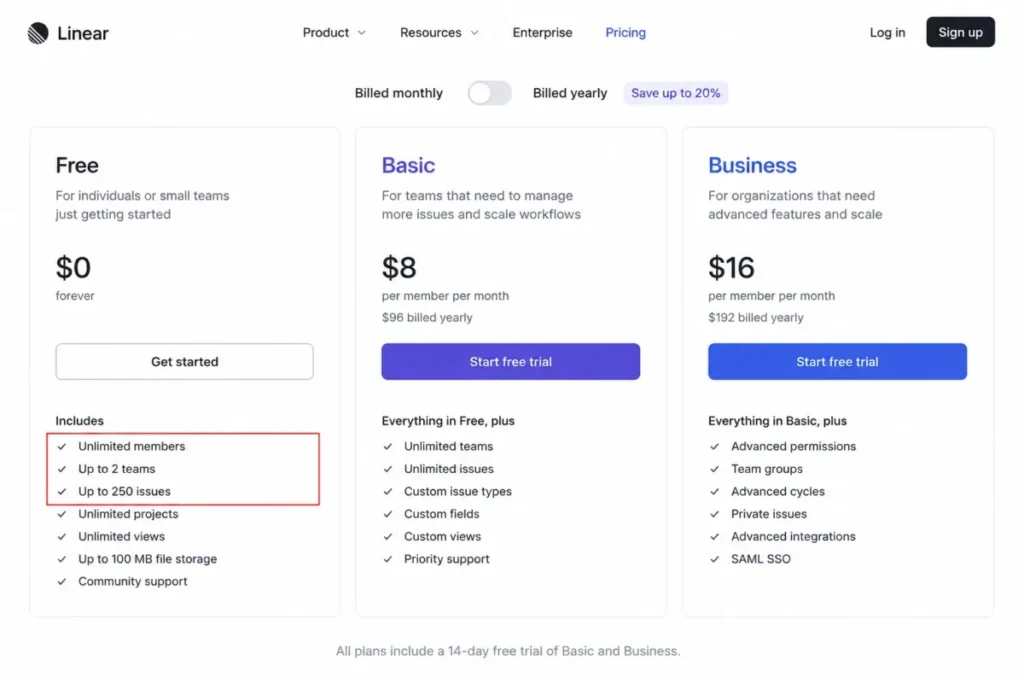
- Starting price: Free, with unlimited members but a hard cap of 250 issues and two teams.
- Practical tier: Basic at $10 per user per month billed yearly.
- Free plan: Yes, and it is a genuine plan rather than a trial, until the 250th issue.
- First limit that bites: The 250-issue cap, which a working team reaches in weeks rather than months.
- Better than Jira: Time to a working board, because the model is fixed and there is almost nothing to configure.
- Worse than Jira: Governance depth, since the same fixed model that removes setup also removes options.
- Setup difficulty: Low, provided the team accepts issues, teams, projects, and cycles as the vocabulary.
- Hidden costs: Business at $16 per user per month, which is where private teams, guests, unlimited teams, Insights, and support integrations live.
- Evidence status: Plan limits and security tiers come from the pricing page, and export behavior from the documentation.
Source: official pricing and documentation pages. Linear pricing, Linear cycles documentation, and Linear export documentation.
Linear earns second place by being opinionated on purpose. Issues, projects, cycles, initiatives, and triage are the whole vocabulary, and a team that adopts them gets a working system in an afternoon.
The documented path runs from Triage, where an incoming request is captured or imported, through team, priority, estimate, and project assignment, into a cycle. Unfinished work rolls forward when the cycle closes.
The 250-issue Free cap deserves more attention than it usually gets in comparisons. It is not a feature gate that degrades an experience, it is a wall, and the practical entry point for any real team is Basic at $10 per user per month.
The exit path is the part to check before signing. Member exports are capped by view, and a CSV export does not include attachment files even though links may remain, so a team that keeps design specs and logs as attachments should not assume a clean extraction later.
| Pros | Cons |
|---|---|
| One coherent model of issues, projects, cycles, and initiatives with almost no configuration | Free stops at 250 issues and two teams, which is a wall rather than a soft limit |
| API and webhook access are treated as core capability, not a higher-tier upsell | Private teams, guests, unlimited teams, and Insights require Business at $16 per user per month |
| Triage gives customer and support requests a documented entry point into engineering | CSV export does not include attachment files, so the exit path needs planning |
| Google SSO is shown across plans rather than reserved for the top tier | SAML, SCIM, IP controls, and audit log are Enterprise features |
The plan-by-plan detail sits in the Linear review.
- Verdict:
- Choose Linear if one to four product teams want to stop administering a tracker. Choose something else if the org chart already has private sub-teams and external guests in it.
3. GitHub Projects: Best for GitHub-native delivery

- Best for: Engineering teams whose issues, reviews, and releases already live in GitHub repositories and organizations.
- Avoid if: Finance, design, and support need to work in the same tool, or resource management matters.
- Starting price: Included on GitHub Free, with Projects available alongside Issues.
- Practical tier: GitHub Team, displayed at $4 per user per month.
- Free plan: Yes, and Projects itself is not the thing being paid for.
- First limit that bites: 50,000 items per project, counting active and archived items together.
- Better than Jira: There is no second record to reconcile, because the planning object is the issue.
- Worse than Jira: Portfolio governance and non-engineering work management, which are not what this is.
- Setup difficulty: Low for a single organization, medium once many repositories and permission boundaries are involved.
- Hidden costs: GitHub Enterprise at $21 per user per month, when identity and governance requirements arrive.
- Evidence status: Layouts and automation behavior are documented, and the item ceiling is stated in the item-management documentation.
Source: official pricing and documentation pages. GitHub pricing, About Projects, and automating Projects using Actions.
$4 per user per month for a planning layer looks like the bargain of this list, and it partly is. The more accurate framing is that GitHub Team buys repository collaboration and Projects comes with it.
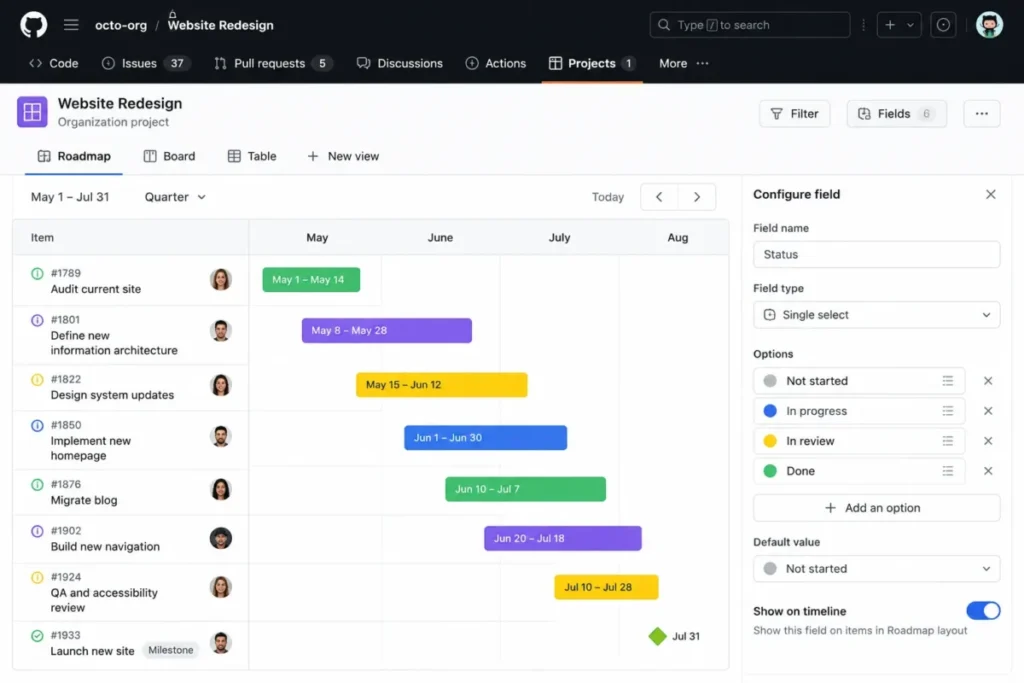
Projects supports table, board, and roadmap layouts over custom fields, with charts, status updates, and built-in workflows that update fields when an issue or pull request changes state. Because those objects are the same issues engineers already close, the planning record cannot drift from the delivery record.
The complexity that comparison articles skip is authentication. Actions workflows for Projects are repository-specific, and the default workflow token cannot reach a project, so cross-repository automation needs a GitHub App or a personal access token and a security review to go with it.
That is a real administrative cost for an organization-level project spanning fifteen repositories, and it is the reason GitHub Projects counts as low-setup only in the single-repository case. If you want the background on why token scope matters here, start with how APIs work.
The 50,000-item ceiling and 50 custom fields per project are generous enough that most teams will never see them, which makes them a genuine non-issue rather than a hidden trap.
| Pros | Cons |
|---|---|
| Planning objects are the same issues and pull requests engineers already work in | No native resource management or non-engineering portfolio view |
| Table, board, and roadmap layouts with custom fields, charts, and status updates | Actions automation is repository-specific, so multi-repository rules need duplication or a shared app |
| Built-in workflows handle common state changes without any code | The default workflow token cannot access Projects, so a GitHub App or personal access token is required |
| Included on Free, so the planning layer is not a separate line item | Governance depth follows the underlying GitHub plan rather than the project itself |
- Verdict:
- Choose GitHub Projects if GitHub is where work is reviewed and released, and accept a GitHub App as the price of clean cross-repository automation.
4. Azure DevOps: Best for Microsoft-centric delivery
- Best for: Engineering organizations invested in Microsoft and Azure that want Boards, Repos, Pipelines, and Artifacts on one platform.
- Avoid if: The team wants a light, design-led tracker, or nobody wants to own Microsoft-style project administration.
- Starting price: Free for the first five Basic users.
- Practical tier: Basic at $6 per additional user per month after those five.
- Free plan: Effectively yes, through the five included Basic users.
- First limit that bites: A Delivery Plan displays a maximum of 20 team backlogs.
- Better than GitHub Projects: Portfolio backlogs, area and iteration paths, and test management in the same product.
- Worse than GitHub Projects: Time to value, because area paths, iteration paths, and permissions must be aligned first.
- Setup difficulty: High, since projects, teams, area paths, iteration paths, repositories, and pipelines all have to agree.
- Hidden costs: Test Plans at $52 per user per month, extra Microsoft-hosted parallel jobs at $40 each, and self-hosted jobs at $15.
- Evidence status: Pricing, the Delivery Plan ceiling, and the absence of a native critical-path view are each documented by Microsoft.
Source: official pricing and documentation pages. Azure DevOps user plan pricing, team delivery plans, and Azure Boards FAQs.
The $120 per month figure for 25 users makes Azure DevOps look like the value pick in this list, and for a Microsoft shop it can be. The number to keep beside it is $52 per user per month for Basic plus Test Plans, which is the tier that any regulated or QA-heavy team ends up needing.
Azure Boards supports product, portfolio, and sprint backlogs, and the documented path links work items to commits, pull requests, and pipeline runs. That traceability is the actual product, not the board.
Two documented boundaries change fit. Delivery Plans, the cross-team timeline view, tops out at 20 team backlogs, and Azure Boards has no native critical-path view, with Microsoft pointing users toward Delivery Plans, Microsoft Project, or extensions instead.
A buyer who arrived here wanting dependency scheduling with a critical path is in the wrong category and should say so before the trial starts.
| Pros | Cons |
|---|---|
| Boards, Repos, Pipelines, and Artifacts share one platform and one work-item history | Test Plans is a separate $52 per user per month tier rather than a feature |
| The first five Basic users are included at no charge, which suits small platform teams | Delivery Plans display a maximum of 20 team backlogs |
| Portfolio, product, and sprint backlogs connect planning to code and pipeline activity | No native critical-path view, so dependency scheduling needs another tool |
| Parallel jobs are priced explicitly rather than hidden behind a fair-use policy | Area paths, iteration paths, and permissions make onboarding slow |
- Verdict:
- Choose Azure DevOps if the repository and the pipeline are moving too, and price Test Plans and parallel jobs before comparing it against a $10 tracker.
5. monday dev: Best for cross-functional product visibility

- Best for: Product organizations where design, support, and go-to-market need to see engineering status without asking an engineer.
- Avoid if: A solo maintainer or a two-person team wants to pay only for the seats in use.
- Starting price: Standard at $12 per seat per month billed annually.
- Practical tier: Standard, which is the first tier with sprint management, roadmaps, and the GitHub integration together.
- Free plan: None documented for monday dev, and paid pricing is shown with a three-seat minimum.
- First limit that bites: 250 automation actions plus 250 integration actions per month on Standard.
- Better than ClickUp: A preconfigured set of connected dev boards rather than a workspace to design from scratch.
- Worse than ClickUp: Those same connections are structural, so the layout is less free to reshape.
- Setup difficulty: Medium, and the risk is less about configuration than about keeping the connected boards intact.
- Hidden costs: Pro at $20 per seat per month for higher-level planning and capacity features.
- Evidence status: Plan gates and action quotas are documented in the monday support center, alongside the connected-board setup guidance.
Source: official pricing and documentation pages. monday dev plan pricing, available plan types on monday dev, and sprint management with monday dev.
monday dev is the only product in this list whose main risk is architectural rather than financial. It ships as a set of connected boards covering tasks, sprints, epics and roadmap, bugs, retrospectives, and a capacity board, and those connections are operational dependencies.
The support documentation is explicit that the solution can break when core boards or their links are moved, deleted, or individually duplicated outside the supported setup flow. A workspace admin tidying up folders can therefore damage sprint management without touching a single automation.
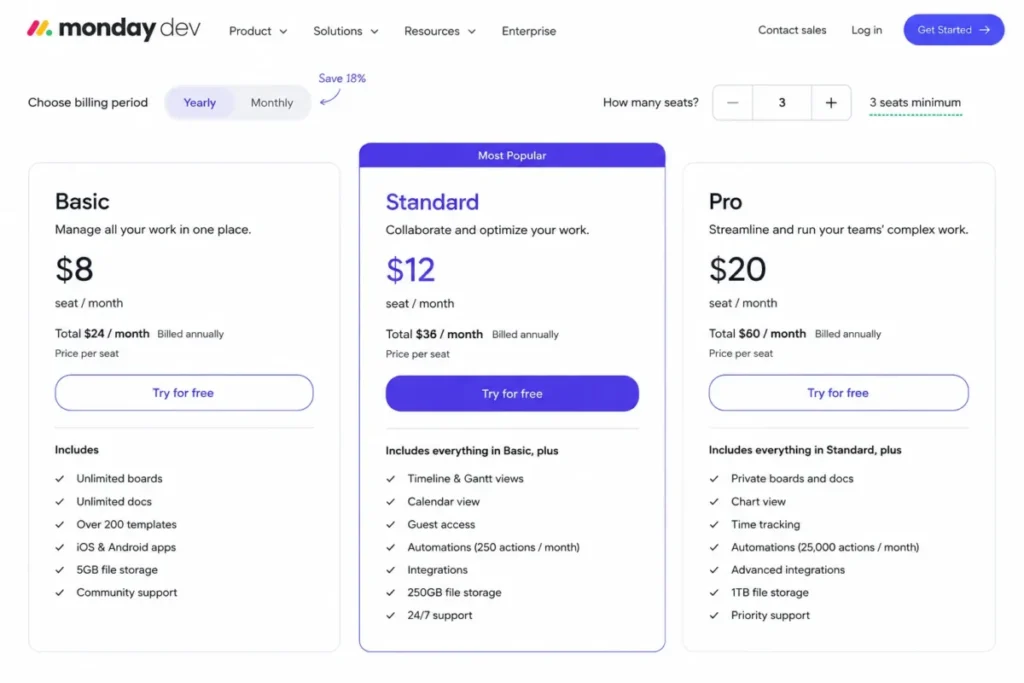
The quota to model before signing is 250 automation actions and 250 integration actions per month on Standard. A team pushing branch and pull-request events into item updates consumes integration actions on every event, and a dashboard can combine at most five boards, which constrains a single stakeholder view across many squads.
| Pros | Cons |
|---|---|
| Sprint, roadmap, bug, retrospective, and engineering-performance boards arrive preconnected | Standard caps automation at 250 actions and integrations at 250 actions per month |
| The GitHub integration links branch and pull-request events back to board items | Paid pricing carries a three-seat minimum, so the floor on Standard is $36 per month |
| Non-engineering stakeholders can read delivery status without a second tool | Each dashboard combines a maximum of five boards |
| Sprint actions and story points are built in rather than assembled from custom fields | Moving, deleting, or individually duplicating core boards can break the connected solution |
The wider workspace model is covered in the monday.com review.
- Verdict:
- Choose monday dev if delivery status has to be legible to people who will never open a repository, and write down who is allowed to restructure the solution folder.
6. ClickUp: Best for consolidating tools into one workspace

- Best for: Product-development teams that want specs, tasks, dashboards, and time tracking in a single workspace.
- Avoid if: The team wants an opinionated tracker with a narrow data model and no workspace architecture to maintain.
- Starting price: Free, with unlimited tasks and sprint management included.
- Practical tier: Unlimited at $7 per user per month billed yearly, though Business at $12 is the real engineering tier for analytics-heavy teams.
- Free plan: Yes, and unusually capable, since sprint management is not gated behind a paid plan.
- First limit that bites: 1,000 automation actions per month on Unlimited.
- Better than monday dev: Freedom to design the hierarchy, plus Docs and dashboards in the same workspace.
- Worse than monday dev: That freedom is work, and the sprint model has to be assembled rather than adopted.
- Setup difficulty: Medium to high, because Spaces, Folders, Lists, views, custom fields, roles, and automations are all decisions.
- Hidden costs: The Business step to $12 per user per month, and the AI add-on at $9 per user per month.
- Evidence status: Automation limits and sprint plan gates are documented separately from the pricing page.
Source: official pricing and documentation pages. ClickUp plan pricing, Automations feature availability and limits, and Sprints feature availability and limits.
The $7 headline is honest but incomplete for an engineering buyer. Sprint points and sprint reporting sit on Business or higher, so the team that wants velocity and burndown out of ClickUp is budgeting $12 per user per month, not $7.
The automation ceiling has the most specific consequence in this list. Unlimited allows 1,000 automation actions per month against 5,000 on Business, and when a workspace reaches its cap the automations pause for the remainder of the month.
That behavior is documented rather than inferred, and it is the reason release-critical handoffs do not belong on Unlimited. A paused automation does not queue and retry, it simply stops until the calendar rolls over.
| Pros | Cons |
|---|---|
| Sprint management is available on the Free plan rather than gated behind a paid tier | Sprint points and sprint reporting require Business or higher |
| Docs, tasks, dashboards, goals, and time tracking share one workspace hierarchy | Automations pause for the rest of the month once the action cap is reached |
| Unlimited adds Gantt, integrations, storage, custom fields, and portfolio management at $7 | Unlimited allows only 1,000 automation actions per month against 5,000 on Business |
| Enterprise adds SAML SSO, SCIM, audit logs, data residency, and enterprise API | Spaces, Folders, Lists, fields, and roles all need an architecture decision before migration |
The workspace model is unpacked further in the ClickUp review, and the tier arithmetic in the ClickUp pricing breakdown.
- Verdict:
- Choose ClickUp if it is replacing three tools rather than one, and price Business from the start if sprint analytics are part of the reason for switching.
7. Shortcut: Best for software structure without heavy administration

- Best for: Small and growing software teams that have outgrown a generic board but do not want Jira-level administration.
- Avoid if: The organization needs advanced identity controls or unlimited organizational segmentation on a lower tier.
- Starting price: Free for up to 10 users, with one team, one workspace, and one workflow.
- Practical tier: Team at $8.50 per user per month on the yearly view.
- Free plan: Yes, and it includes Kanban, roadmaps, reports, iterations, docs, and selected GitHub, Slack, and Figma integrations.
- First limit that bites: The single workflow on Free, which the second product team makes untenable.
- Better than Jira: A software-specific model of stories, epics, iterations, and workflows with far less to configure.
- Worse than Jira: Organizational segmentation, which is capped until Business.
- Setup difficulty: Low to medium for a team already fluent in stories, epics, and iterations.
- Hidden costs: Business at $12 per user per month, plus the absence of prorated refunds on paid subscriptions.
- Evidence status: Plan limits come from the pricing page, and billing behavior from the pricing and billing FAQ.
Source: official pricing and documentation pages. Shortcut pricing, Shortcut pricing and billing FAQ, and Shortcut plan options.
Shortcut’s upgrade trigger is organizational shape rather than headcount, which is unusual and worth planning around. Free supports 10 users but only one team, one workspace, and one workflow, so a nine-person company that splits into platform and product hits the wall before it hires anyone.
Team lifts that to five teams and workflows and adds work-in-progress limits, automation, and all integrations. Business removes the team, workflow, and workspace caps entirely.
One contract detail belongs in the decision rather than the footnotes: paid subscriptions do not receive prorated refunds, so an annual commitment taken during a hiring plan that does not happen is money already spent.
| Pros | Cons |
|---|---|
| Stories, epics, iterations, workflows, roadmaps, reports, and docs in one software-specific model | Free allows only one team, one workspace, and one workflow |
| The Free plan includes real integrations with GitHub, Slack, and Figma rather than a teaser | Paid subscriptions do not receive prorated refunds |
| Team adds work-in-progress limits and automation at $8.50 per user per month | SSO, SCIM, and enterprise security controls are Enterprise-only |
| Lower configuration surface than Jira for teams that still want engineering structure | Observer and attachment or storage rules vary by plan |
For teams at this size, the wider shortlist sits in project management tools for small teams.
- Verdict:
- Choose Shortcut if a second product team is on the roadmap and Jira feels like more machinery than the problem deserves.
8. YouTrack: Best for deployment choice and workflow customization

- Best for: Development teams that want configurable workflows and a real choice between cloud and self-hosted operation.
- Avoid if: Nobody on the team is willing to own JavaScript workflow scripts or a scripted import.
- Starting price: Free for up to 10 users.
- Practical tier: YouTrack Cloud on annual billing, announced from $4.50 per user per month above the free threshold.
- Free plan: Yes, and at 10 users it is the only product here with a $0 line in the 10-user column.
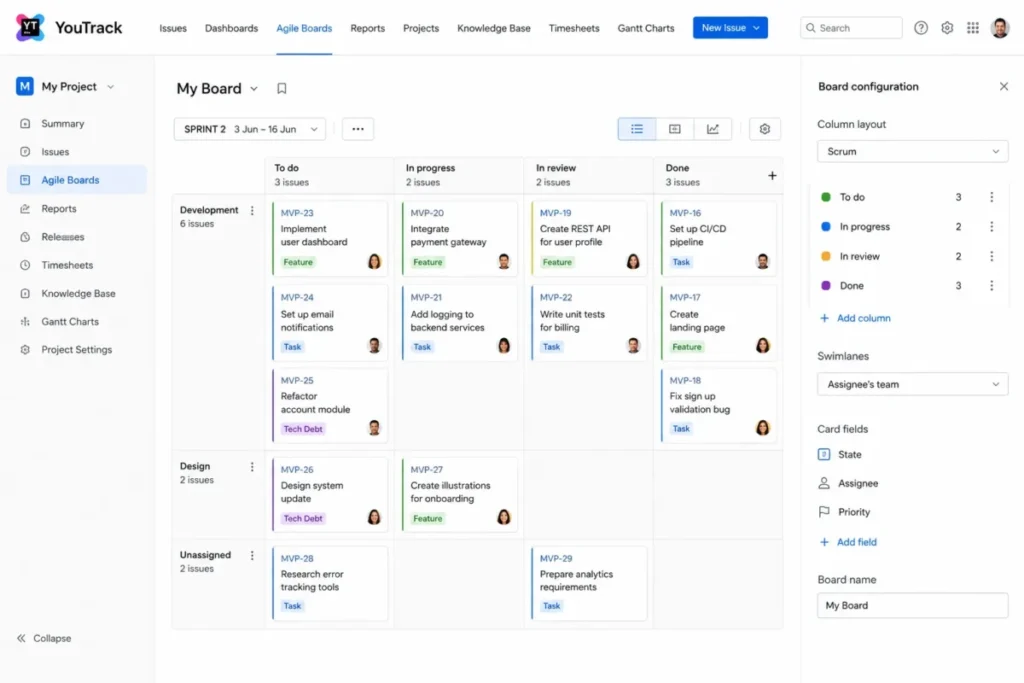
- First limit that bites: Custom agile-board templates are not supported, so board patterns cannot be packaged and reused.
- Better than Jira: Deployment flexibility, plus a no-code workflow constructor for teams that do not want to script.
- Worse than Jira: Ecosystem depth and the availability of people who already know the product.
- Setup difficulty: Medium, because custom fields, boards, and workflows reward design and punish improvisation.
- Hidden costs: Engineering time, since custom imports require JavaScript and JSON mapping when the built-in importers do not fit.
- Evidence status: Pricing comes from a JetBrains announcement rather than a live pricing table, so confirm at checkout.
Source: official pricing and documentation pages. JetBrains YouTrack pricing announcement, YouTrack features, agile board templates, and custom imports.
YouTrack is the value outlier, and the reason it sits at eight rather than three is ownership rather than capability. Workflows can be built with a no-code constructor or written in JavaScript, and that second option quietly creates a maintainer role somebody has to fill.
Two documented boundaries shape the migration plan. Built-in agile-board templates are read-only and custom templates are not supported, and custom imports require JavaScript plus JSON intermediary data when the standard importers do not cover a source system.
| Pros | Cons |
|---|---|
| Cloud or self-hosted deployment from the same product | Custom agile-board templates are not supported, so board patterns cannot be reused |
| Free for up to 10 users, which covers a whole small team at no cost | Custom imports require JavaScript and JSON mapping |
| No-code workflow constructor alongside full JavaScript workflows | The announced pricing lives in a blog post rather than a standing pricing table |
| Issue tracking, agile boards, knowledge base, and helpdesk in one product | Deep customization creates a maintainer dependency inside the team |
- Verdict:
- Choose YouTrack if a named engineer owns the workflow configuration, or if self-hosting is a requirement rather than a preference.
9. Zoho Sprints: Best for budget-conscious Scrum teams

- Best for: Scrum teams that need backlog, sprints, boards, and agile reporting at the lowest listed per-user price here.
- Avoid if: The team sits just above the three-user free tier and below the Starter plan’s stated user band.
- Starting price: Free for three users and three projects.
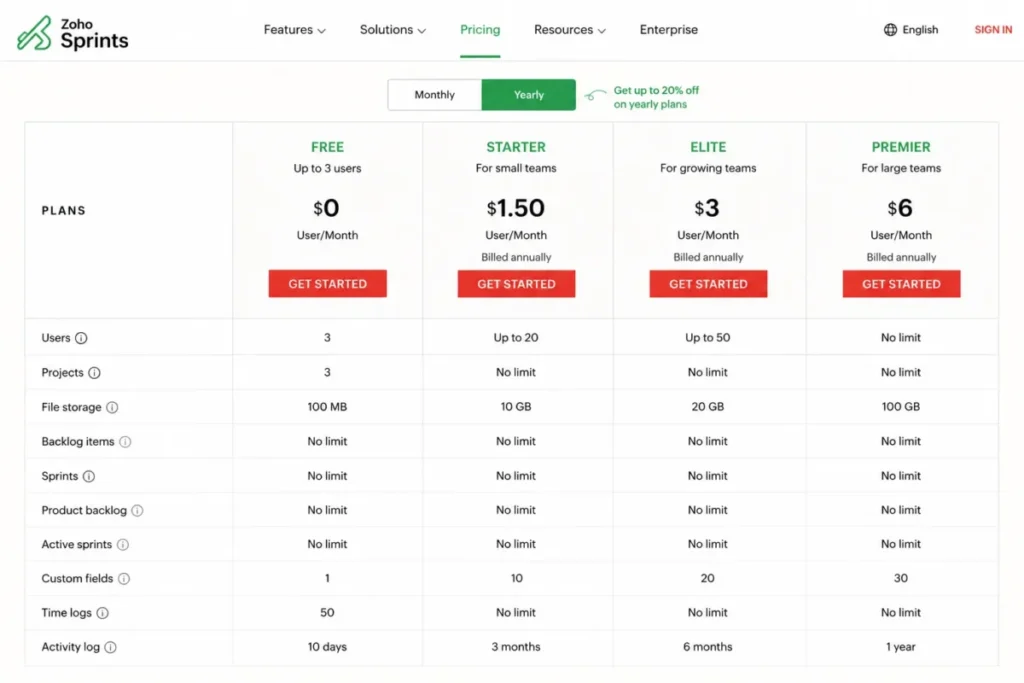
- Practical tier: Elite, listed at $2.50 per user per month.
- Free plan: Yes, but three users and three projects make it a pilot rather than a plan.
- First limit that bites: The three-user Free ceiling, followed by a Starter plan presented for organizations of 12 to 100 users.
- Better than Jira: Cost, by a wide margin, for a team that only needs Scrum ceremonies and flow metrics.
- Worse than Jira: Portfolio management and cross-team governance, which sit outside what this product sets out to do.
- Setup difficulty: Low to medium for a team already using Scrum vocabulary.
- Hidden costs: Premier at $5 per user per month, where higher-tier work-in-progress, webhook, and automation capabilities sit.
- Evidence status: Elite pricing is taken from an official Zoho Sprints comparison page, so confirm cadence and minimums at checkout.
Source: official pricing and documentation pages. Zoho Sprints pricing, Zoho Sprints plan comparison, and Zoho Sprints features.
At $62.50 per month for 25 users, Zoho Sprints is roughly a third of Jira Standard and less than a tenth of GitLab Premium. The catch is the shape of the plan ladder rather than the price.
Free covers three users and three projects, and Starter is presented for organizations of 12 to 100 users, which leaves a team of eight looking at a plan structure that was not drawn for it.
| Pros | Cons |
|---|---|
| Backlog, epics, Scrum board, releases, burndown, burnup, and velocity in a dedicated agile product | Free supports only three users and three projects |
| The lowest listed per-user price in this comparison set | Starter is presented for organizations of 12 to 100 users, which suits few small teams |
| Custom functions, APIs, webhooks, and GitLab, Azure DevOps, and Bitbucket integrations | Work-in-progress limits and some webhook and automation capabilities are higher-tier features |
| Lead time and cycle time reporting alongside the standard Scrum reports | Portfolio-level planning is thin next to the governance-oriented products here |
Teams already standardized on the vendor’s other products will recognize the account model described in the Zoho CRM review.
- Verdict:
- Choose Zoho Sprints if the requirement is Scrum ceremonies and flow metrics on a tight budget, and confirm the checkout minimum before assuming the listed rate.
10. GitLab: Best when planning is part of a platform consolidation
- Best for: Teams consolidating repository, pipeline, security, and planning into one DevSecOps platform.
- Avoid if: The purchase is only about task tracking, because the price per seat is not defensible on that basis.
- Starting price: Free, though private top-level groups are limited to five licensed users.
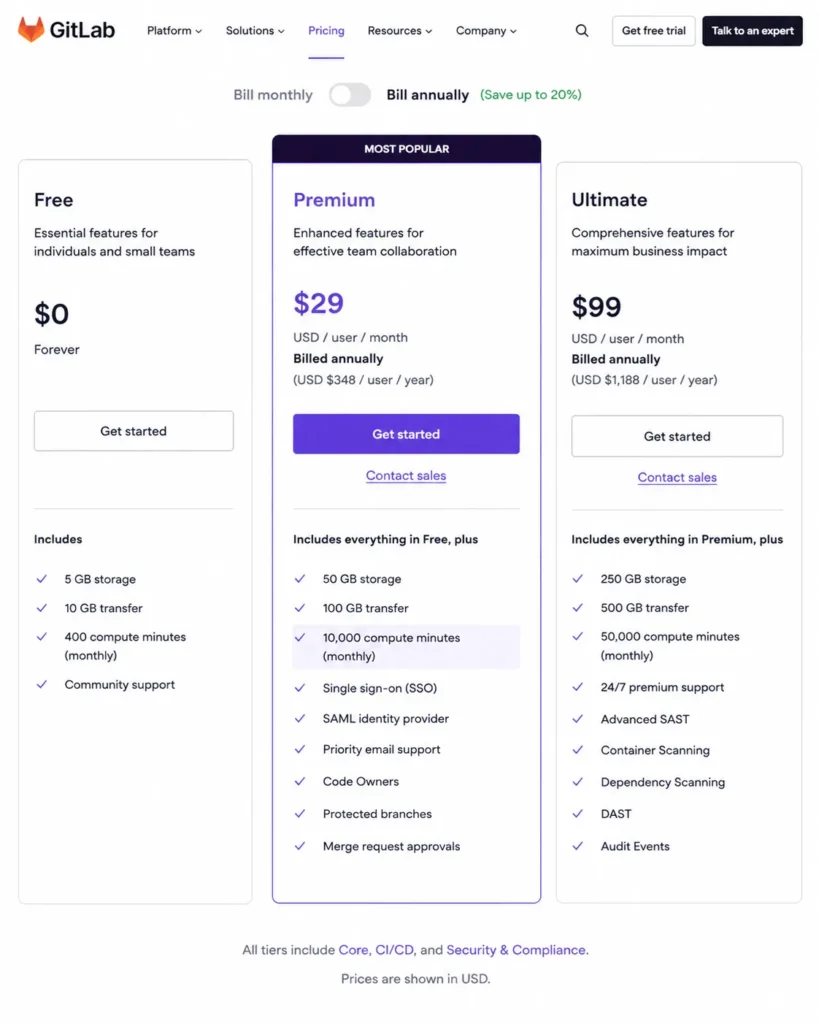
- Practical tier: Premium at $29 per user per month billed annually.
- Free plan: Yes, with 400 compute minutes and 10 GiB of storage.
- First limit that bites: The five-licensed-user cap on private Free top-level groups.
- Better than GitHub Projects: Built-in portfolio planning on the higher tiers, plus security and compliance in the same product.
- Worse than GitHub Projects: Cost, by a factor of roughly seven at the practical tier.
- Setup difficulty: High, because repositories, issues, pipelines, permissions, and security policies all migrate together.
- Hidden costs: Compute at $10 per 1,000 minutes, storage at $5 per month for each 10 GiB, and the Enterprise Agile Planning add-on at $15 per user per month.
- Evidence status: Pricing, quotas, and importer coverage are documented, though import fidelity is described per object rather than per project.
Source: official pricing and documentation pages. GitLab tier pricing, GitLab issue boards, and import and migrate to GitLab.
GitLab is last on this list for one reason, and it is not product quality. At $725 per month for 25 users it is the most expensive line in the cost table by a wide margin, and none of that premium is being paid for the issue board.
The consolidation case is real when Premium replaces a repository host, a pipeline product, a security scanner, and a planning tool at once. Priced against a tracker that sits beside an existing Git platform, the comparison is not close.
Premium includes 10,000 compute minutes and 500 GiB of storage against 400 minutes and 10 GiB on Free, and overages are purchased separately.
| Pros | Cons |
|---|---|
| Issues, boards, milestones, iterations, merge requests, CI/CD, and security in one platform | Premium is $29 per user per month billed annually, the highest practical tier here |
| Premium includes 10,000 compute minutes and 500 GiB of storage | Free private top-level groups are limited to five licensed users |
| Strategic portfolio management is available on Ultimate for organizations that need it | Compute and storage overages are separately priced add-ons |
| Work-in-progress limits and priority support come with the paid tiers | The Jira importer covers issues rather than a full-fidelity project migration |
- Verdict:
- Choose GitLab if the consolidation thesis is written down and finance has seen it. Without that thesis, this is the wrong line item.
Plan limits and upgrade triggers
Every product in this list is usable at its entry price. The question that matters is which documented ceiling forces the next payment, and how much warning a team gets before it arrives.
Feature gates by plan
| Tool | Automation available from | Sprint or agile reporting | Cross-team or portfolio planning | Identity and governance |
|---|---|---|---|---|
| Jira | Standard, at 1,700 rule runs per month | Included with reports and dashboards | Premium | Enterprise adds advanced admin, identity, and encryption |
| Linear | Included, through API and webhooks | Progress reports included | Initiatives included, unlimited teams on Business | Enterprise adds SAML, SCIM, IP controls, and audit log |
| GitHub Projects | Built-in workflows on every plan | Charts and status updates included | Not in scope | Follows the underlying GitHub plan |
| Azure DevOps | Included, through REST APIs and service hooks | Included with Boards | Delivery Plans, capped at 20 team backlogs | Microsoft identity and organization permissions |
| monday dev | Standard, at 250 automation actions per month | Agile insights on Standard | Pro | Not documented in the sources used here |
| ClickUp | Unlimited, at 1,000 actions per month | Business, for sprint points and reporting | Portfolio management on Unlimited | Enterprise adds SAML SSO, SCIM, and audit logs |
| Shortcut | Team | Reports included from Free | Business | Enterprise adds SSO and SCIM |
| YouTrack | Included, through no-code and JavaScript workflows | Board and burndown reporting included | Limited | Not documented in the sources used here |
| Zoho Sprints | Higher tiers for some automation and webhook capabilities | Burndown, burnup, velocity, lead time, and cycle time | Limited | Not documented in the sources used here |
| GitLab | Included, through CI/CD and APIs | Included with issue boards | Ultimate, plus the Agile Planning add-on | Ultimate adds advanced security and compliance |
Source: official pricing and documentation pages. Jira plan comparison, Linear plan comparison, GitHub Projects capability documentation, Azure Boards backlog documentation, monday dev plan types, ClickUp plan comparison, Shortcut plan comparison, YouTrack feature list, Zoho Sprints plan comparison, and GitLab plan comparison.
Three cells in that table say the documentation used here does not cover identity and governance in detail. That is a genuine gap rather than an absence of the feature, and a security review should ask the vendor directly rather than assume either answer.
Automation quotas and what happens at the cap
| Plan | Documented monthly allowance | Documented behavior at the cap |
|---|---|---|
| Jira Standard | 1,700 automation rule runs | Not stated on the cited page |
| Jira Premium | 1,000 rule runs per user | Not stated on the cited page |
| monday dev Standard | 250 automation actions plus 250 integration actions | Not stated on the cited page |
| ClickUp Unlimited | 1,000 automation actions | Automations pause for the remainder of the month |
| ClickUp Business | 5,000 automation actions | Automations pause for the remainder of the month |
Source: official pricing and documentation pages. Atlassian cloud automation usage, monday dev plan types documentation, and ClickUp automation limits. Checked: July 30, 2026.
The second column is the one most comparisons publish, and the third column is the one that decides whether a workflow is safe to depend on. ClickUp documents that automations pause for the rest of the month once the cap is reached, which is a specific and recoverable failure.
Jira and monday dev publish the allowance without publishing the behavior at the ceiling, and that gap should not be filled by inference. Ask the vendor whether an over-quota rule queues, throttles, or silently drops, because a release handoff built on the wrong assumption fails on the busiest week of the quarter.
Jira’s Premium quota is also worth reading twice. Standard’s 1,700 runs are a site-wide budget, while Premium’s 1,000 runs are per user, so a 25-person team moving up goes from 1,700 to 25,000 runs per month rather than losing capacity.
Hard ceilings that change the architecture
| Product and plan | Documented ceiling | What it constrains |
|---|---|---|
| Jira team-managed projects | 5,000 work items in board, backlog, sprint, and timeline views | Display, not storage |
| GitHub Projects | 50,000 items per project and 50 custom fields | A single project spanning many repositories |
| Azure DevOps Delivery Plans | 20 team backlogs per plan | Program-level timeline coverage |
| Linear Free | 250 issues and two teams | Pilot size, not paid capacity |
| Shortcut Free | One team, one workspace, and one workflow | Organizational shape rather than headcount |
| Zoho Sprints Free | Three users and three projects | Pilot size |
| GitLab Free private top-level groups | Five licensed users | Team size on the free tier |
Source: official pricing and documentation pages. Jira team-managed issue limits, adding items to a GitHub project, Azure DevOps delivery plans, Linear plan limits, Shortcut plan limits, Zoho Sprints plan limits, and GitLab plan limits.
Only two of those ceilings will ever be reached by a normal 25-person engineering organization. GitHub’s 50,000 items and Jira’s 5,000-item view limit are the ones to model, and the difference between them is a factor of ten.
An organization running four squads with a five-year backlog history should test the Jira number against real data before committing to team-managed projects. Everything else on that table is a free-tier boundary that a paid plan removes.
Migration and integration risks
Switching cost is the line item that never appears on a pricing page. Two parts of that switching cost are worth quantifying before signing a contract: what the importer carries across, and what the new automation model demands.
Setup difficulty by tool
| Tool | Setup difficulty | Why |
|---|---|---|
| Linear | Low | Fixed model of teams, projects, cycles, and issues with little to configure |
| GitHub Projects | Low to medium | Trivial in one repository, and a permissions exercise across an organization |
| Shortcut | Low to medium | Stories, epics, iterations, and workflows are familiar and the surface is small |
| Zoho Sprints | Low to medium | Scrum vocabulary maps directly onto the product |
| YouTrack | Medium | Custom fields, boards, and workflows reward a design pass first |
| monday dev | Medium | The connected boards must stay connected, which is a governance job |
| ClickUp | Medium to high | Spaces, Folders, Lists, views, fields, roles, and automations are all decisions |
| Jira | High | Issue types, workflows, permission schemes, and reporting standards need an owner |
| Azure DevOps | High | Projects, teams, area paths, iteration paths, repositories, and pipelines must align |
| GitLab | High | Repositories, issues, pipelines, permissions, and security policies migrate together |
Setup difficulty is an editorial assessment of the documented configuration surface, not a vendor rating. Source: official product documentation. monday dev sprint setup guidance, GitHub Projects automation documentation, Azure Boards backlogs overview, Zoho Sprints board documentation, and Linear import documentation.
What a migration carries across, and what it leaves behind
| Move | Documented path | What the documentation does not promise |
|---|---|---|
| Into Linear | Import assistants with defined mapping constraints | A CSV export out of Linear does not include attachment files |
| Into GitHub Projects | No import for issues that already live in GitHub | Cross-repository Actions automation has to be rebuilt per repository |
| Into YouTrack | Built-in importers for popular systems | A source system the importers do not cover needs a JavaScript and JSON custom import |
| Into GitLab | Importers documented per object type | The Jira importer covers issues rather than a full-fidelity project migration |
Source: official pricing and documentation pages. Linear data export, YouTrack custom imports, and import and migrate to GitLab. The Linear import assistants and the GitHub Actions project-automation requirement are cited earlier in this article.
The GitLab line is the one that catches teams leaving Jira. An importer that covers issues is not the same thing as a project migration, so workflow schemes, permission schemes, dashboards, and automation rules are a rebuild rather than a transfer.
Linear’s attachment behavior has the same shape from the other direction. A team that stores incident logs, design exports, and specs as attachments is storing them in a system whose documented CSV export leaves the files behind.
Two integration risks that are not integration problems
GitHub’s automation model is the first. Built-in workflows cover common state changes without any configuration. An Actions workflow that touches a project cannot use the default workflow token, so a GitHub App or a personal access token becomes permanent infrastructure with an owner and a rotation schedule.
monday dev’s connected boards are the second. The documented solution links tasks, sprints, epics, bugs, retrospectives, and a capacity board, and the support guidance is explicit that moving, deleting, or individually duplicating those core boards outside the supported setup flow can break the whole arrangement.
Neither risk shows up in a trial. Both show up in month three, which is exactly when the team has stopped keeping the old system in sync.
Which tool should your development team choose?
Work through these seven questions in order. The first one that produces a hard constraint usually decides the shortlist on its own.
- Where does the repository live, and is that moving? If GitHub or GitLab is fixed, the code-adjacent option is already ahead.
- How many teams need a separate workflow, not just a separate board? Shortcut Free and Linear Free both cap this before they cap headcount.
- What is the monthly budget at the real seat count, including the tier that carries sprint reporting?
- How many automated transitions will run per month across issues, branches, and pull requests?
- Who owns configuration after launch, and do they write code? YouTrack and Jira both assume that person exists.
- Does anyone outside engineering need to read status without being trained?
- What has to come out of the system if the decision is reversed in eighteen months?
Mapped to answers, the shortlist collapses quickly. Choose GitHub Projects if GitHub is the delivery system of record and the planning layer should not be a second database.
Choose Azure DevOps if the repository and pipeline are Microsoft-bound and test management is in scope.
Choose Jira if several squads share a governance model and an administrator is funded. Choose Linear if one to four product teams want cycle discipline with almost no administration, and Shortcut if the same is true but a second workflow is coming.
Choose monday dev if non-engineers are the audience, and ClickUp if the purchase is replacing a docs tool and a dashboard tool at once.
Choose YouTrack if self-hosting or deep workflow scripting is a requirement, and Zoho Sprints if the budget is the binding constraint. Choose GitLab only when the consolidation case covers repository, pipeline, and security spend, not just the board.
If the constraint is money rather than workflow, the wider set of free project management software is worth a look first. Teams that also need chat and document collaboration should compare team collaboration tools alongside this list.
Common mistakes when choosing developer project management software
Five patterns account for most of the regret in this category, and all five are avoidable with a spreadsheet.
Budgeting from the entry price. ClickUp at $7 becomes ClickUp at $12 the moment sprint points and sprint reporting are required, and Jira Standard becomes Jira Premium the moment cross-team planning is.
Treating an automation allowance as unlimited. A 250-action monthly quota on monday dev Standard is consumed by ordinary branch and pull-request traffic, and a paused workflow is discovered by a missed handoff rather than an alert.
Assuming the free tier scales with headcount. Shortcut Free caps teams, workspaces, and workflows at one each, and Linear Free stops at 250 issues, so both fail on organizational shape long before they fail on user count.
Skipping the export test. The time to discover that a CSV export excludes attachment files is during a trial with synthetic data, not during a migration weekend.
Buying a platform to solve a tracker problem. GitLab Premium at $725 per month for 25 users is defensible as consolidation and hard to defend as issue tracking, and the same logic applies to Azure DevOps once Test Plans enters the quote.
For teams committed to Scrum or Kanban ceremonies specifically, the narrower comparison of agile project management tools is a better second read than a broader list.
Final verdict
Jira is the pick for the widest set of software organizations, and the ranking reason is narrow. It is the only product here where the planning model, permission model, and reporting model can be shaped independently, which is what several squads sharing one release process need.
The micro-cohort that wins here is the multi-squad org with a funded administrator. Standard at $7.91 per user per month is the tier to start on, and the 1,700-run automation allowance is the plan gate that decides whether Premium becomes necessary.
That verdict flips under three conditions.
If GitHub is already the system of record, GitHub Projects at $4 per user per month removes an entire synchronization problem rather than adding a tool.
If the whole delivery stack is Microsoft, Azure DevOps at $6 per additional user after the five free ones is better value than any tracker bought separately.
And if the team is one to four product squads with no dedicated administrator, Linear at $10 per user per month buys back the time that Jira would spend on configuration. The 250-issue Free cap makes Basic the real starting point, so budget for it from day one.
For every other cohort the split is straightforward. monday dev when non-engineers are the audience, ClickUp when the purchase consolidates documents and dashboards too, and Shortcut when a second workflow is coming.
YouTrack when deployment choice matters, Zoho Sprints when price is the binding constraint, and GitLab only with a written consolidation case.
Frequently asked questions
These answers repeat the plan gates, prices, and limits sourced in the sections above, condensed for the questions buyers ask most often.
What is the best project management software for developers in 2026?
Jira is the strongest default for organizations running several engineering squads on shared workflows and permissions, at $7.91 per user per month on Standard. Linear is the better answer for one to four product teams that want cycle discipline without administration, and GitHub Projects is better again when GitHub already holds the issues, reviews, and releases.
Can GitHub Projects replace Jira?
Yes, if GitHub is already where work is reviewed and released and nobody outside engineering needs a portfolio view. Projects supports table, board, and roadmap layouts over the same issues and pull requests, so there is no second record to reconcile.
It replaces Jira badly when resource management, cross-functional workspaces, or deep permission schemes are part of the requirement.
What is the best free project management software for a developer team?
YouTrack is free for up to 10 users, which covers a whole small team rather than a pilot. Shortcut Free also allows 10 users but restricts the account to one team, one workspace, and one workflow.
Linear Free allows unlimited members but stops at 250 issues, and GitHub Projects is included on GitHub Free with no separate charge.
What is the cheapest option for a 25-person engineering team?
Zoho Sprints Elite is the lowest line at $62.50 per month for 25 users, based on a listed rate of $2.50 per user per month. Confirm the checkout minimum before assuming that rate applies.
GitHub Team follows at $100 per month.
Azure DevOps Basic lands at $120, because its first five users are included at no charge.
Is Linear better than Jira for a small team?
For one to four product teams with no dedicated administrator, usually yes. Linear’s fixed model of issues, projects, cycles, and initiatives removes the configuration work that makes Jira slow to start, and Basic costs $10 per user per month.
Jira wins back the comparison as soon as multiple squads need different workflows under one governance standard.
How much does project management software for developers cost at 25 users?
At the practical tier the spread runs from $62.50 to $725 per month before tax and add-ons.
The cheapest three lines are Zoho Sprints, GitHub Projects, and Azure DevOps, with Jira, ClickUp, and Shortcut in the middle and GitLab Premium at the top.
Add-ons change that ranking, because compute, storage, test management, and AI credits are all billed separately.
Which of these tools integrate with GitHub?
Most of them, but the depth differs in ways that matter. GitHub Projects is native to GitHub issues and pull requests, and Shortcut includes GitHub among its Free-plan integrations.
monday dev documents a GitHub integration that links branch and pull-request events to board items, while Zoho Sprints documents GitLab, Azure DevOps, and Bitbucket integrations instead.
Does Azure DevOps include project management?
Yes. Azure Boards provides product, portfolio, and sprint backlogs, boards, and Delivery Plans, and it ships alongside Repos, Pipelines, and Artifacts on the same platform.
Two limits are worth knowing: a Delivery Plan displays at most 20 team backlogs, and Azure Boards has no native critical-path view, so dependency scheduling needs Microsoft Project or an extension.
What should an engineering team check before migrating away from Jira?
Check what the target importer carries. GitLab’s Jira importer covers issues rather than a full-fidelity project migration, which means workflow schemes, permission schemes, dashboards, and automation rules are a rebuild.
Run a sample migration with synthetic data first, confirm attachment handling, and price the automation rebuild before signing an annual commitment.
Which tool stays usable when the backlog gets very large?
GitHub Projects has the most headroom of the documented ceilings here, at 50,000 items per project with 50 custom fields. Jira’s team-managed boards, backlogs, sprints, and timelines display up to 5,000 work items, which is a display ceiling rather than a storage cap.
An organization with a long backlog history should test that number against real data before committing to team-managed projects.