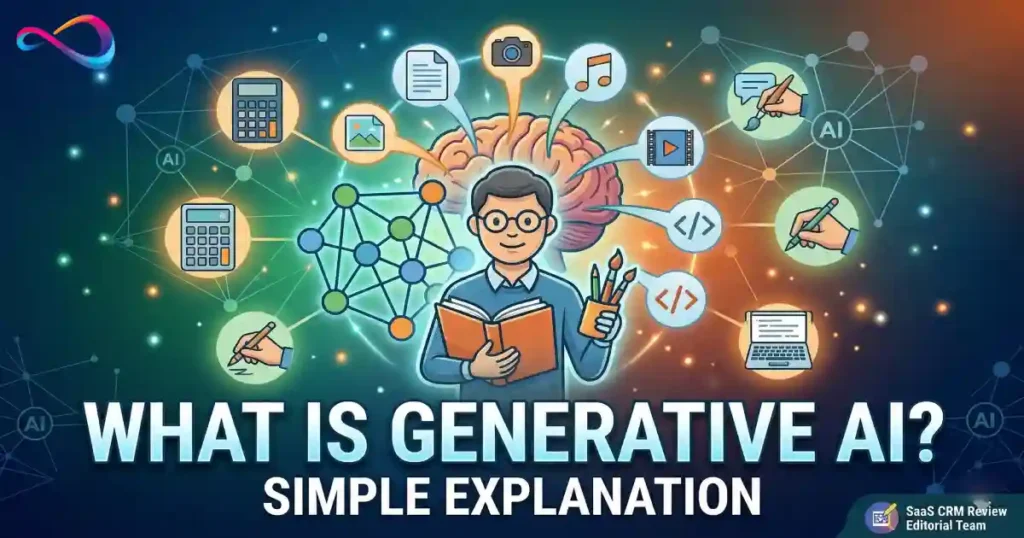
Generative AI is a type of artificial intelligence that creates new content — text, images, audio, video, or code — based on patterns it learned from massive amounts of existing data. You give it an instruction (called a prompt), and it generates something new in return: a drafted email, a realistic image, a working script, or an entire presentation outline.
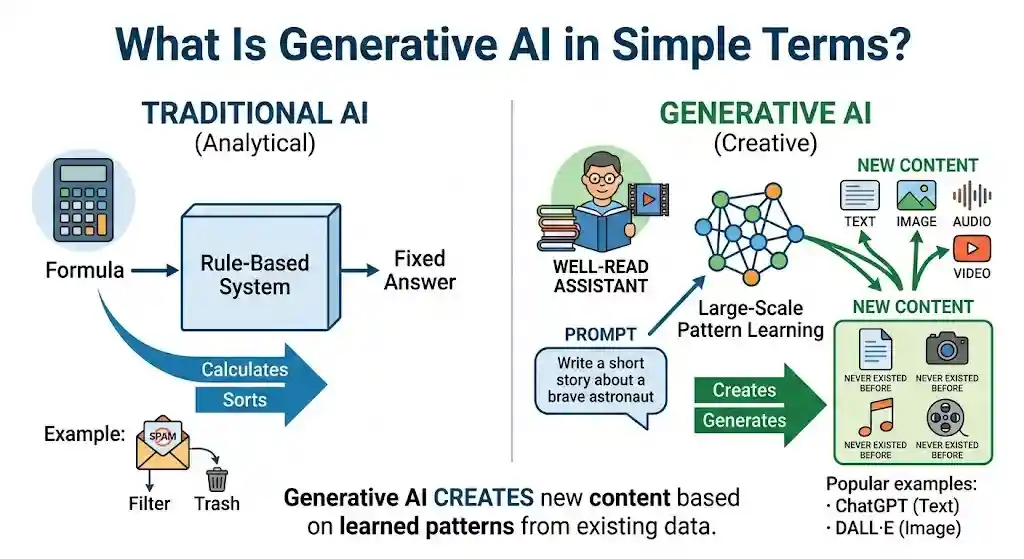
Think of it this way: traditional software is a calculator — you give it a formula, it gives you a fixed answer. Generative AI is more like a well-read assistant who has studied millions of documents, pictures, or recordings and can now produce new work on request. It doesn’t copy-paste; it creates output that resembles what it was trained on but didn’t exist before.
This article is for anyone hearing the term for the first time — or hearing it everywhere and wanting to finally understand what it means. Whether you’re a student, marketer, office worker, or business reader, this guide explains generative AI in plain English: what it is, what it can create, how it works, where it falls short, and how to use it safely.
TL;DR — Generative AI at a Glance
- Generative AI creates new content (text, images, code, audio, video) rather than simply analyzing existing data.
- It works by learning statistical patterns from massive datasets, then generating outputs that match your prompt.
- Popular tools include ChatGPT (text), DALL·E and Midjourney (images), and GitHub Copilot (code).
- It is not sentient, does not “understand” content, and can produce errors called hallucinations.
- Benefits include faster content creation, automation, and brainstorming. Risks include inaccuracy, bias, and privacy concerns.
- The best approach: treat these models as a powerful assistant that still needs human oversight.
What Is Generative AI in Simple Terms?
Generative AI is the category of artificial intelligence designed to produce new content on demand. When you type a question into ChatGPT or describe an image to Midjourney, the system generates a response that didn’t exist before — a paragraph, a picture, a code snippet.
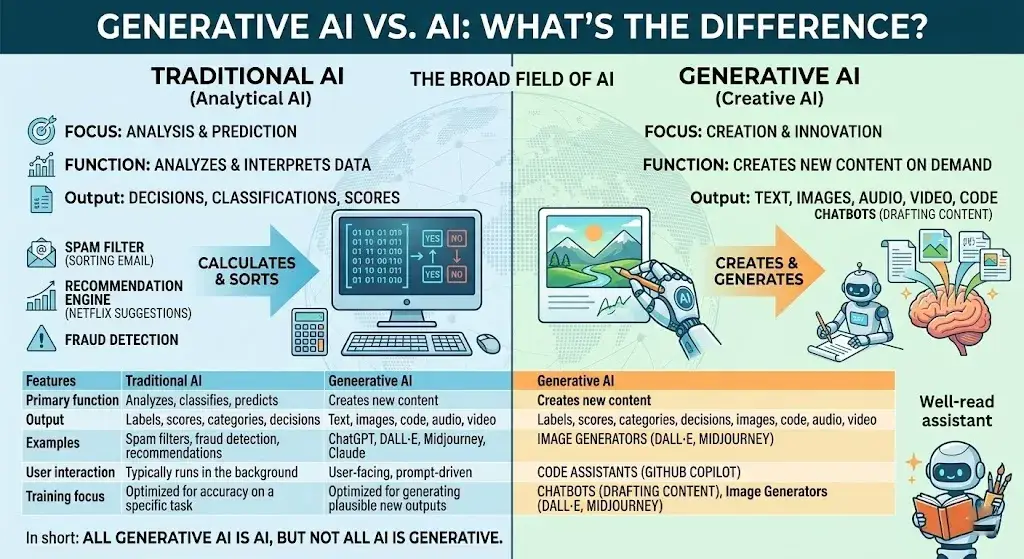
What makes it “generative” is the direction of the output. Most AI you encounter in daily life is analytical — it classifies, sorts, detects, or predicts. Your email spam filter sorts messages. Netflix’s recommendation engine predicts what you might watch. These systems analyze existing data but don’t create anything new.
Content-generating AI flips that. It takes a prompt and produces new material:
- A 500-word blog post draft
- A photorealistic image of a scene that never existed
- A working Python script
- A voiceover that sounds like natural speech
- A short video clip
In simple words: generative AI is the type of AI that makes new things, rather than just sorting or scoring what already exists.
How Does Generative AI Work?
At a high level, these systems work in three stages: they study enormous amounts of existing data, learn the underlying patterns, and then use those patterns to produce new content when you ask.
Training Data
Every generative model starts with a large dataset — called training data — that the system studies before it can generate anything. For a text-based model like GPT, this includes billions of pages of books, websites, articles, and code. For an image model like Stable Diffusion, this includes millions of images paired with descriptive captions.
The model does not memorize this data word-for-word. Instead, it extracts statistical relationships: which words tend to follow other words, which visual features tend to appear together, which code patterns solve which kinds of problems.
Pattern Learning
During training, the model adjusts millions (often billions) of internal numerical parameters to get better at predicting patterns. This process uses a structure called a neural network — a layered mathematical system loosely inspired by how neurons in the brain connect.
Most modern content-generating models use one of several architectures:
- Transformer models — the architecture behind GPT, Gemini, and Claude. Transformers excel at understanding context in sequences (like sentences) by paying “attention” to the relationships between all words simultaneously, rather than reading left to right. The original transformer architecture was introduced by Google researchers in 2017.
- Diffusion models — used in image generators like DALL·E, Stable Diffusion, and Midjourney. They work by learning to remove noise from images step by step — starting from random static and refining it into a coherent picture.
- GANs (Generative Adversarial Networks) — an older approach where two neural networks compete: one generates content, the other judges whether it’s real or fake. This competition pushes the generator to improve. GANs are still used for certain image and video tasks.
- VAEs (Variational Autoencoders) — models that compress data into a compact representation and then reconstruct it, useful for generating variations of existing images.
You don’t need to memorize these names. The key point is that the model learns patterns, not facts, which is why it can sometimes sound confident while being wrong.
Prompts and Outputs
Once trained, the model is ready for inference — the stage where you actually use it. You provide a prompt (your instruction or question), and the model generates an output based on the patterns it learned.
For a large language model (LLM) like GPT or Claude, the process works roughly like this: the model reads your prompt, calculates the most statistically likely next word, generates that word, then repeats — one token at a time — until the response is complete.
This is also where prompt engineering comes in. The way you write your prompt significantly affects output quality. A vague prompt (“write something about dogs”) produces vague results; a specific prompt (“write a 200-word product description for an organic dog food brand targeting health-conscious pet owners”) produces much more useful output.
Why Generative AI Sounds Smart
These models often produce responses that feel remarkably intelligent or even human. That’s because they have been trained on massive amounts of high-quality human writing, so they mimic human communication patterns extremely well.
But it is important to understand: the model is predicting statistically likely sequences, not reasoning from understanding. It doesn’t “know” that Paris is in France the way you do. It has learned that the tokens “Paris” and “France” appear together in certain patterns and can reproduce that relationship convincingly.
This distinction matters because it explains both the strength and the primary weakness: these AI systems can produce fluent, plausible-sounding content on nearly any topic, but they can also produce fluent, plausible-sounding content that is completely wrong.
Generative AI vs AI: What’s the Difference?
Artificial intelligence (AI) is the broad field; generative AI is one specific branch of it.
AI refers to any system designed to perform tasks that normally require human intelligence — recognizing speech, classifying images, making recommendations, driving a car. Most AI in production today is narrow AI: it excels at one specific task but cannot generalize.
Generative AI is the subset focused specifically on creating new content. Not all AI is generative, and not all generative systems qualify as “intelligent” in a general sense.
| Feature | Traditional AI | Generative AI |
|---|---|---|
| Primary function | Analyzes, classifies, predicts | Creates new content |
| Output | Labels, scores, categories, decisions | Text, images, code, audio, video |
| Examples | Spam filters, fraud detection, recommendations | ChatGPT, DALL·E, Midjourney, Claude |
| User interaction | Typically runs in the background | User-facing, prompt-driven |
| Training focus | Optimized for accuracy on a specific task | Optimized for generating plausible new outputs |
In short: all generative AI is AI, but not all AI is generative. Your car’s lane-departure warning is AI. ChatGPT drafting an email is generative AI.
Generative AI vs Machine Learning vs Deep Learning vs LLMs
One of the most common points of confusion is how generative AI relates to machine learning, deep learning, large language models, and foundation models. Here is a clean breakdown:
| Term | What It Means | Relationship to Generative AI |
|---|---|---|
| Artificial Intelligence (AI) | The broadest term — any system that mimics human intelligence | Generative AI is a subset of AI |
| Machine Learning (ML) | A method within AI where systems learn from data instead of being explicitly programmed | Most generative AI uses machine learning |
| Deep Learning | A subset of ML using multi-layered neural networks for complex pattern recognition | The engine behind modern generative AI |
| Foundation Models | Large, general-purpose models trained on broad datasets that can be adapted to many tasks | Many generative AI tools are built on foundation models |
| Large Language Models (LLMs) | A specific type of foundation model trained on text data, designed to understand and generate language | LLMs power text-based tools like ChatGPT, Gemini, and Claude |
| Multimodal AI | Models that can process and generate more than one type of data (text + images, text + audio, etc.) | Some generative systems are multimodal (e.g., GPT-4o, Gemini) |
| Agentic AI / AI Agents | Systems that plan, make decisions, and take actions autonomously across multiple steps | An emerging application layer built on top of generative models |
Think of it as nested layers: AI > Machine Learning > Deep Learning > Foundation Models > LLMs and Generative Models. Each layer is a narrower, more specific subset of the one above it.
The difference between generative AI and machine learning is scope: machine learning is the method; generative AI is one application of that method — specifically, the application focused on creating new content.
What Can Generative AI Actually Do for Everyday Users?
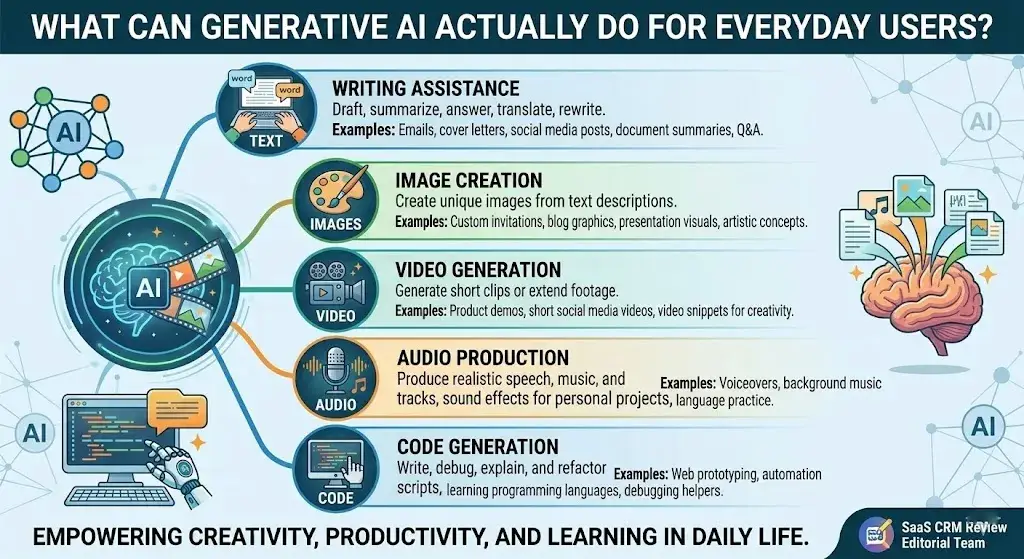
These AI systems can produce content across five main categories. Here’s what each looks like in practice.
Text
Text generation is the most widely used application. LLMs power tools like ChatGPT (OpenAI), Claude (Anthropic), Gemini (Google), and Microsoft Copilot. These can draft emails, summarize documents, answer questions conversationally, translate languages, and rewrite content in a different tone.
How does generative AI create text? It predicts the most probable next word in a sequence, one word at a time, until a coherent response is built. Quality depends heavily on the training data, model size, and the specificity of your prompt.
Images
Image generation has evolved rapidly. Tools like DALL·E (OpenAI), Midjourney, and Stable Diffusion create images from text descriptions. You type “a watercolor painting of a mountain cabin at sunset,” and the system generates a unique image matching that description. For a deeper look at how these tools compare, see our best AI image generators guide.
How does generative AI create images? Diffusion models start with random noise and progressively refine it into a coherent image, guided by the text prompt. Older approaches using GANs work differently but produce comparable results.
Video
Video generation is newer and still maturing. Tools like Runway and OpenAI’s Sora can generate short video clips from text prompts or extend existing footage. Quality and consistency are improving rapidly, though limitations remain. We cover the current landscape in our best AI video generators roundup.
Audio
These AI systems can produce realistic speech, music, and sound effects. Text-to-speech models generate natural-sounding voices, while music generation tools compose original tracks in various styles. This is the technology behind synthetic media — content that sounds or looks human-made but was generated by AI.
Code
Code generation has become one of the most practical applications. Tools like GitHub Copilot (Microsoft), Claude, and ChatGPT can write, debug, explain, and refactor code in dozens of programming languages. Developers use these tools to accelerate prototyping, automate repetitive tasks, and learn new languages faster.
Common Examples of Generative AI Tools
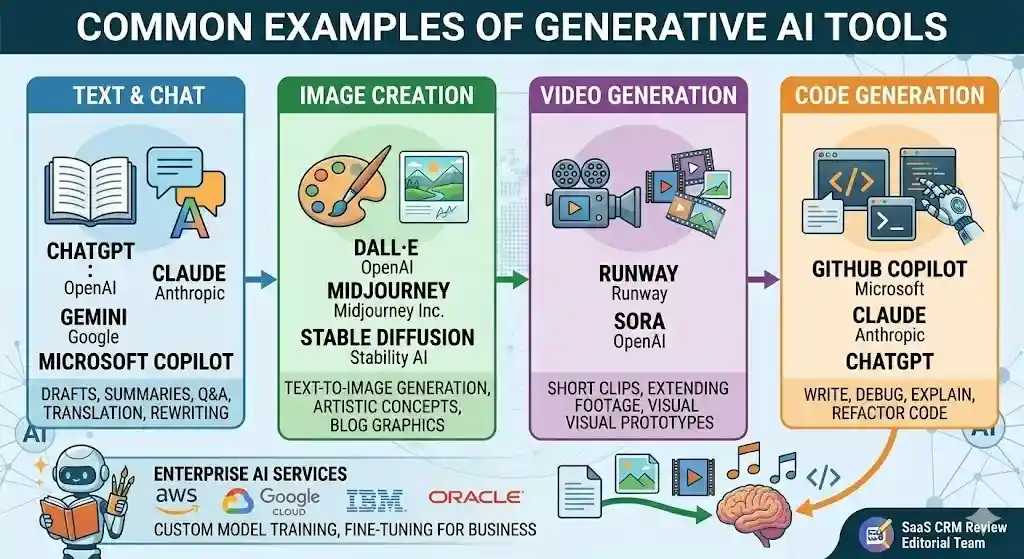
Here is a practical overview of widely used tools in this space, grouped by what they create:
| Tool | Creator | Primary Output | Notes |
|---|---|---|---|
| ChatGPT | OpenAI | Text, code, analysis | Most widely adopted general-purpose LLM tool |
| Claude | Anthropic | Text, code, analysis | Known for longer context handling and safety focus |
| Gemini | Text, images, code, multimodal | Integrated across Google products | |
| Microsoft Copilot | Microsoft | Text, code, productivity | Embedded in Microsoft 365 and Windows |
| DALL·E | OpenAI | Images | Text-to-image generation |
| Midjourney | Midjourney Inc. | Images | Popular for artistic and creative image generation |
| Stable Diffusion | Stability AI | Images | Open-source image generation model |
| Runway | Runway | Video, images | Video generation and editing |
| GitHub Copilot | Microsoft / GitHub | Code | AI-assisted coding in development environments |
Enterprise platforms from AWS, Google Cloud, IBM, and Oracle also offer generative AI services for business integration, including custom model training and fine-tuning — the process of adapting a general-purpose model to perform well on specific tasks using your own data.
For our tested recommendations on AI tools for content creation, AI chatbots, or image generators, see the linked guides.
Real-World Use Cases of Generative AI
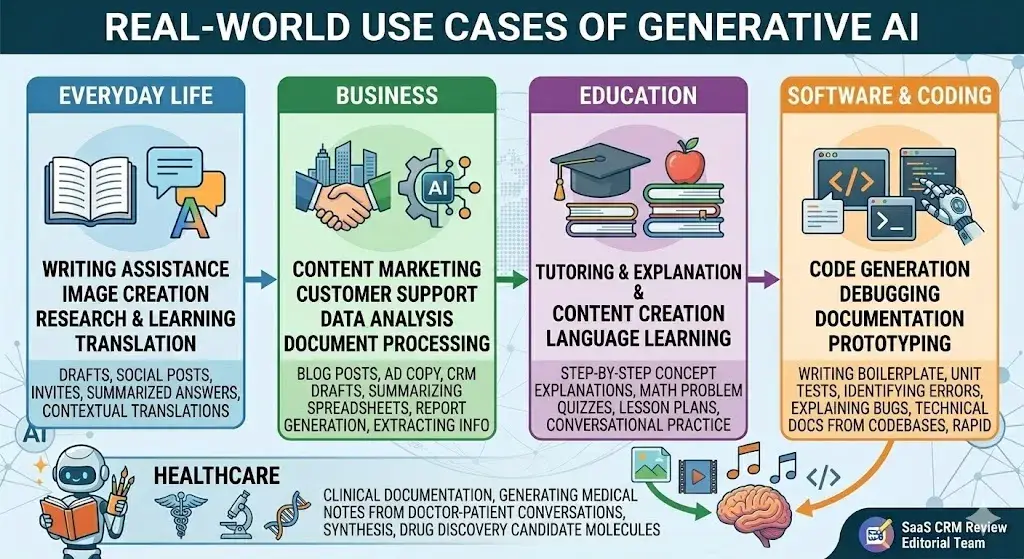
What is generative AI used for in practice? Here are concrete examples across different areas.
Everyday Life
- Writing assistance: Drafting emails, texts, and social media posts with ChatGPT or Gemini.
- Image creation: Generating custom images for invitations, social posts, or presentations.
- Research and learning: Asking questions and getting summarized answers instead of sifting through multiple links.
- Translation: Getting quick, contextual translations across languages.
Business
- Content marketing: Drafting blog posts, ad copy, product descriptions, and social content at scale.
- Customer support: Powering chatbots that handle routine inquiries with natural-sounding responses.
- Data analysis: Summarizing spreadsheets, generating reports, and spotting trends from unstructured data.
- Document processing: Extracting key information from contracts, invoices, and legal documents.
Many SaaS platforms now integrate generative AI features directly into their core workflows — from CRM tools that draft follow-up emails to project management apps that summarize meeting notes.
Education
- Tutoring and explanation: Students use AI to get step-by-step explanations of math problems, science concepts, or historical events. Study platforms like Quizlet now embed generative AI directly into flashcard creation and adaptive learning — see our Quizlet review for a hands-on look at how Q-Chat and Magic Notes work in practice.
- Content creation: Educators generate quizzes, lesson plans, and study materials.
- Language learning: AI provides conversational practice and real-time corrections.
Healthcare
- Clinical documentation: Generating draft medical notes from doctor-patient conversations.
- Research synthesis: Summarizing medical literature and research papers.
- Drug discovery: Generating candidate molecular structures for pharmaceutical research (still early-stage and requiring extensive validation).
Software and Coding
- Code generation: Writing boilerplate code, unit tests, and scripts.
- Debugging: Identifying and explaining errors in existing code.
- Documentation: Generating technical documentation from codebases.
- Prototyping: Rapidly building functional prototypes from descriptions.
Benefits of Generative AI
When used appropriately, content-generating AI offers substantial practical advantages:
- Speed. Tasks that take hours — drafting a report, creating a presentation, writing starter code — can be reduced to minutes.
- Accessibility. Non-experts can produce content, code, and designs that previously required specialized skills. A marketer can generate ad copy options. A small business owner can draft a basic contract.
- Scale. Businesses can produce personalized content, customer responses, and data summaries at a volume that would be impractical with human effort alone.
- Brainstorming and ideation. These tools work well as thinking partners — generating options, outlining approaches, and helping overcome creative blocks.
- Cost reduction. Automating routine knowledge work can significantly reduce costs for content creation, customer service, and software development.
- Enhanced learning. Students and professionals can get explanations tailored to their level, in real time, on nearly any subject.
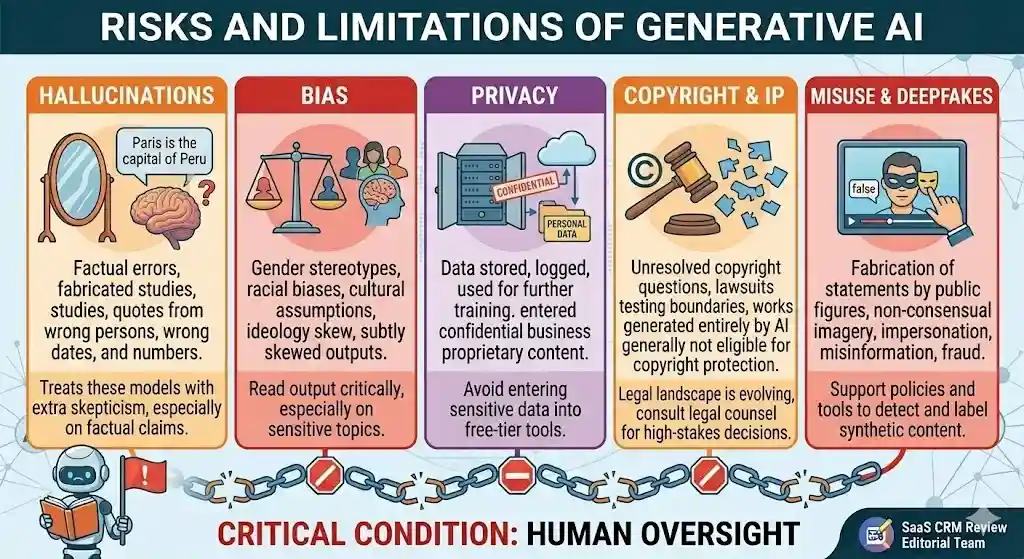
The benefits are real, but they come with a critical condition: human oversight. These tools produce better results when a knowledgeable person reviews, edits, and validates the output.
Risks and Limitations of Generative AI
No balanced explanation is complete without addressing what these models get wrong and where they create risk.
Hallucinations
Hallucination is the term for when a model produces output that sounds confident and plausible but is factually wrong. This happens because the system generates statistically likely sequences, not looking up verified facts. It may cite studies that don’t exist, attribute quotes to the wrong person, or get dates and numbers wrong.
This is the single most important limitation for users to understand. Always fact-check important claims from AI output.
Bias
These models learn from training data that reflects biases present in human-created content. Outputs can reflect gender stereotypes, racial biases, cultural assumptions, or other problematic patterns. Companies like OpenAI and Anthropic invest significant effort in reducing harmful biases, but the problem is not fully solved.
Privacy
Using AI tools often means sending data to external servers. If you enter confidential business information, personal data, or proprietary content into a commercial tool, that data may be stored, logged, or used for further training depending on the tool’s terms of service. Always review a tool’s data-handling policy before sharing sensitive information.
Copyright and IP
The legal landscape around AI-generated content and intellectual property is evolving. Key questions remain: Who owns content generated by AI? Can AI be trained on copyrighted material without permission? Several high-profile lawsuits are testing these boundaries. As of early 2026, the U.S. Copyright Office has stated that works generated entirely by AI without human creative input are generally not eligible for copyright protection, though the situation continues to develop.
Deepfakes and Misuse
These AI systems make it significantly easier to create convincing fake images, videos, and audio — commonly referred to as deepfakes. This raises serious concerns about misinformation, fraud, and harassment. Synthetic media can be used to fabricate statements by public figures, create non-consensual imagery, or impersonate individuals.
Responsible use means being aware that AI-generated content can be weaponized, and supporting policies and tools designed to detect and label synthetic content.
What Generative AI Is Not
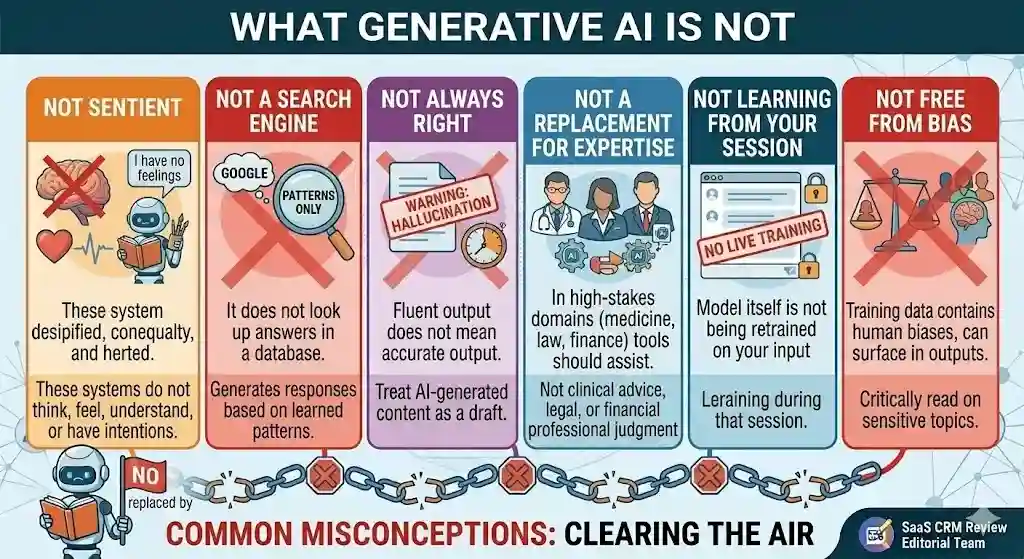
Clearing up common misconceptions:
- It is not sentient or conscious. These AI systems do not think, feel, understand, or have intentions. They process patterns.
- It is not a search engine. It does not look up answers in a database. It generates responses based on learned patterns, which is why it can produce incorrect information.
- It is not always right. Fluent output does not mean accurate output. Treat AI-generated content as a draft, not a final answer.
- It is not a replacement for human expertise. In high-stakes domains — medicine, law, finance — these tools should assist human professionals, not replace them.
- It does not “learn” from your conversations in real time (in most consumer tools). When you chat with ChatGPT or Claude, the model itself is not being retrained on your input during that session.
- It is not free from bias. Training data contains human biases, and those biases can surface in outputs.
When to Use Generative AI vs Google Search vs a Human Expert
One of the most practical questions beginners ask is: when should I use an AI chatbot, when should I just Google it, and when do I need a real person?
| Situation | Best Choice | Why |
|---|---|---|
| Quick fact lookup (today’s weather, stock price, sports score) | Google Search | Search engines pull real-time, verified data from indexed sources |
| Summarize a long article or report | Generative AI | These models excel at condensing information into clear summaries |
| Draft an email, cover letter, or social post | Generative AI | Fast first-draft generation that you then edit for voice and accuracy |
| Legal advice on a contract | Human expert | Legal nuances require licensed professional judgment; AI can hallucinate legal details |
| Brainstorm ideas for a marketing campaign | Generative AI | Good at generating many options quickly; you curate the best ones |
| Medical diagnosis or treatment plan | Human expert | Patient safety requires a licensed practitioner; AI output is not clinical advice |
| “How to fix error X in Python” | Either | Google gives Stack Overflow threads; AI gives a synthesized answer — verify both |
| Compare CRM software options for your team | Expert reviews + AI | Start with trusted review sources for verified comparisons, then use AI to summarize highlights |
The rule of thumb: use generative AI for drafting, brainstorming, and synthesizing. Use search engines for real-time facts. Use human experts when mistakes carry consequences.
5 Mistakes Beginners Make with Generative AI
Knowing what not to do is just as valuable as knowing how to use these tools. Here are the most common beginner errors:
1. Trusting the output without checking. The biggest mistake. These models produce fluent text that sounds authoritative, even when the facts are wrong. Always verify statistics, dates, names, quotes, and legal or medical claims against reliable sources.
2. Writing vague prompts and expecting great results. “Write me something about marketing” will give you generic filler. Be specific: state the audience, format, tone, length, and purpose. The better your prompt, the better the output.
3. Pasting sensitive data into free-tier tools. Free versions of most AI tools may store, log, or use your inputs for training. Never paste confidential business plans, customer data, health records, or proprietary code into a tool unless you understand its data policy.
4. Using raw AI output as a finished product. AI-generated content is a first draft. It typically needs editing for accuracy, voice, brand tone, and originality before publishing or sending. Skipping this step leads to generic or error-prone content.
5. Assuming AI is objective. These models reflect the biases in their training data. They can produce outputs that are subtly skewed by gender, culture, geography, or ideology. Read the output critically — especially on sensitive topics.
How to Tell If an AI Answer Is Trustworthy
Not all AI responses are equally reliable. Use this quick framework when evaluating output from any generative tool:
Check the claim type. Factual claims (dates, statistics, names, legal rules) are the most likely to be wrong. Structural output (outlines, summaries, code frameworks) tends to be more reliable.
Cross-reference with a primary source. If the AI cites a study, look up whether that study actually exists. If it gives a statistic, verify it against the original data source. A useful tool for this is Perplexity, which provides inline source citations alongside AI-generated answers.
Watch for hedging vs. certainty. Ironically, the more confidently an AI states a nuanced claim, the more cautious you should be. Real-world topics are rarely black-and-white, and if the response doesn’t acknowledge complexity, it may be oversimplifying.
Test with known facts. Ask the model something you already know the answer to in the same domain. If it gets basic facts wrong, treat its answers on unknown questions with extra skepticism.
Look for internal consistency. If the AI contradicts itself within the same response, that’s a strong signal of hallucination.
How to Use Generative AI Safely and Effectively
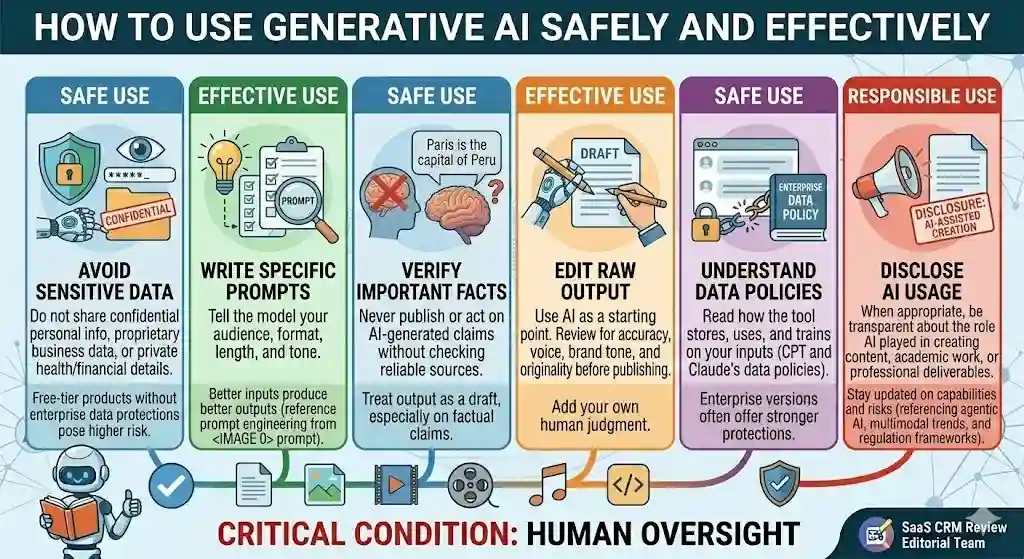
Here is practical guidance for using these tools responsibly:
- Verify important facts. Never publish or act on AI-generated claims without checking them against reliable sources. This is especially true for statistics, dates, quotes, and legal or medical information.
- Write clear, specific prompts. Better inputs produce better outputs. Tell the model your audience, format, length, and tone. Prompt engineering is a learnable skill that dramatically improves results — for a hands-on example, see our ChatGPT prompts for real estate agents, which shows how structured prompts produce better listing descriptions, emails, and social posts.
- Don’t share sensitive data. Avoid entering confidential personal information, proprietary business data, or private health/financial details — especially into free-tier products without enterprise data protections.
- Understand the tool’s data policy. Read how the tool stores, uses, and trains on your inputs. Enterprise versions of tools like ChatGPT and Claude typically offer stronger data protections than free versions. You can compare ChatGPT’s plan options and Claude’s pricing tiers for details on data handling by plan.
- Use AI as a starting point, not a final product. Treat output as a first draft. Edit, fact-check, and add your own judgment before using it for anything important.
- Disclose AI usage when appropriate. If you are creating content, academic work, or professional deliverables, be transparent about the role AI played in the process.
- Stay updated. The capabilities and risks of these systems change rapidly. What was true six months ago may no longer apply.
For enterprise use, techniques like RAG (Retrieval-Augmented Generation) — where the model is connected to a curated knowledge base to ground its responses in verified information — can significantly improve accuracy and reduce hallucinations. This approach is increasingly standard in business deployments.
Is ChatGPT Generative AI?
Yes. ChatGPT is one of the most prominent examples of generative AI. Developed by OpenAI, it is powered by the GPT family of large language models. It generates text-based responses to user prompts — drafting content, answering questions, writing code, summarizing documents, and more. You can read our full ChatGPT review for a hands-on assessment of its capabilities.
ChatGPT specifically uses a transformer-based architecture and has been fine-tuned using a combination of supervised learning and RLHF (Reinforcement Learning from Human Feedback) to produce responses that are more helpful, accurate, and safe.
Other tools in the same category include Claude (Anthropic), Gemini (Google), and Microsoft Copilot. All are generative AI products built on large language models.
The Future of Generative AI
This technology is developing quickly, and several trends are shaping where it’s heading:
- Multimodal models that process and generate text, images, audio, and video within a single system are becoming the standard. Google’s Gemini and OpenAI’s GPT-4o already operate this way.
- AI agents (agentic AI) represent the next evolution: systems that plan, reason, use tools, and take multi-step actions autonomously — not just answer one question at a time, but complete entire workflows.
- Smaller, more efficient models will bring these capabilities to mobile devices, edge computing, and applications where latency and cost matter.
- Improved accuracy and grounding through techniques like RAG, better fine-tuning, and fact-checking layers will gradually reduce hallucinations — though they are unlikely to eliminate them entirely.
- Regulation and standards are developing in the US, EU, and globally. The NIST AI Risk Management Framework and the EU AI Act are shaping how organizations deploy these systems responsibly.
The trajectory is clear: generative AI is becoming more capable, more embedded in everyday tools, and more regulated. Understanding it now puts you ahead.
Key Terms Explained
A quick-reference glossary of the technical terms used in this article:
| Term | Definition |
|---|---|
| Prompt | The text instruction or question you give to an AI model |
| Inference | The stage where a trained model generates output from your prompt |
| LLM (Large Language Model) | A large AI model trained on text data to understand and generate language (e.g., GPT, Claude, Gemini) |
| Foundation Model | A large, general-purpose model trained on broad data that can be adapted for many tasks |
| Transformer | The neural network architecture behind most modern LLMs; excels at understanding word relationships in context |
| Diffusion Model | An architecture used for image generation; progressively removes noise to form a coherent image |
| GAN (Generative Adversarial Network) | Two competing neural networks — one generates content, the other judges it — pushing quality upward |
| VAE (Variational Autoencoder) | A model that compresses data into a compact form and reconstructs it, useful for generating variations |
| Fine-tuning | Adapting a general-purpose model to a specific task or domain using additional targeted data |
| RAG (Retrieval-Augmented Generation) | A technique that connects a model to an external knowledge base to improve accuracy and reduce hallucinations |
| Hallucination | When a model generates confident-sounding but factually incorrect output |
| Prompt Engineering | The skill of writing effective prompts to get better AI output |
| Multimodal | The ability to process and generate multiple types of content (text, images, audio, video) |
| Synthetic Media | Content (images, audio, video) generated by AI that mimics human-created media |
| Deepfake | AI-generated fake images, video, or audio designed to look or sound real |
| Agentic AI | AI systems that can plan, reason, and act autonomously across multi-step workflows |
| Training Data | The dataset a model studies during training to learn patterns |
What Is Generative AI? Frequently Asked Questions
What is generative AI in simple words?
Generative AI is a type of artificial intelligence that creates new content — like text, images, or code — based on patterns it learned from large amounts of existing data.
What is generative AI for beginners?
For beginners, it is best understood as a tool that produces new content on demand when you give it instructions (prompts). Think of it as a smart assistant that drafts, designs, or codes based on what it learned from studying millions of examples.
What is generative AI and how does it work?
It studies large datasets to learn patterns, then generates new content by predicting what output best matches your prompt. Text models predict the next word in a sequence; image models refine random noise into a picture.
What is the difference between AI and generative AI?
AI is the broad field of building intelligent systems. Generative AI is the subset that focuses on creating new content. Your spam filter is AI; ChatGPT drafting an email is generative AI.
What is the difference between generative AI and machine learning?
Machine learning is the method by which computers learn from data. Generative AI is one application of machine learning — specifically the application dedicated to generating new content.
Is ChatGPT generative AI?
Yes. ChatGPT is a generative AI tool built on OpenAI’s GPT large language models. It generates text-based responses to user prompts.
What are foundation models in generative AI?
Foundation models are large, general-purpose AI models trained on broad datasets. They serve as a base that can be adapted (fine-tuned) for specific tasks. GPT, Gemini, and Claude are all built on foundation models.
What are LLMs in generative AI?
LLMs (Large Language Models) are a type of foundation model trained specifically on text data. They are the core technology behind text-based generative AI tools.
How does generative AI create images?
Most image generators use diffusion models that start with random noise and progressively refine it into a coherent image, guided by your text description. Older approaches used GANs.
What are the benefits of generative AI?
Key benefits include faster content creation, reduced costs for routine tasks, improved accessibility for non-experts, better brainstorming, and scalable personalization.
What are the risks of generative AI?
Major risks include hallucinations (factually wrong outputs), bias from training data, privacy concerns, unresolved copyright questions, and potential for misuse (deepfakes, misinformation).
How can I use generative AI safely?
Verify important facts independently, don’t share sensitive data, use clear and specific prompts, treat output as a draft, and stay informed about the tools’ data policies and limitations.
Conclusion
Generative AI is the branch of artificial intelligence that creates new content — text, images, code, audio, and video — from learned patterns. It is powered by deep learning architectures like transformers and diffusion models, and it has become accessible to virtually anyone through tools like ChatGPT, Claude, Gemini, Midjourney, and many others.
Understanding what generative AI is means understanding both its strengths and its limits. It is remarkably good at generating plausible, useful content at speed. It is not good at guaranteeing accuracy, and it is not a substitute for human judgment in high-stakes decisions.
The practical takeaway: generative AI is a powerful, imperfect tool. Learn how it works, use it with realistic expectations, verify what it produces, and stay curious as this technology continues to evolve.
Why Trust This Article
This article was written and reviewed by the editorial team at SaaS CRM Review. Our approach follows our published editorial policy and review methodology. We rely on publicly available research, official documentation from AI companies, and recognized standards bodies — not vendor marketing claims. Where we cite a tool, we link to our own hands-on review or a trustworthy external source. We do not accept payment for editorial placement.
About the author

I’m Macedona, an independent reviewer covering SaaS platforms, CRM systems, and AI tools. My work focuses on hands-on testing, structured feature analysis, pricing evaluation, and real-world business use cases.
All reviews are created using transparent comparison criteria and are updated regularly to reflect changes in features, pricing, and performance.