Pricing verified against Trello’s official pricing page and Atlassian Support documentation
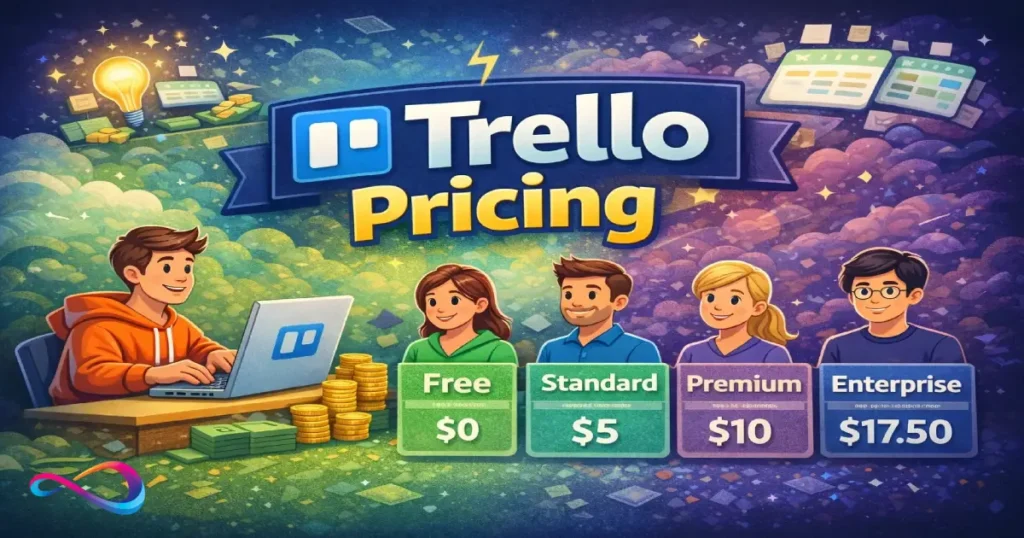
Trello pricing starts at $0 (Free) and scales to $17.50/user/month (Enterprise) — with Standard at $5 and Premium at $10 per user per month when billed annually. Picking the right plan depends on your team size, automation needs, governance requirements, and how many advanced views you actually use. This guide breaks down every tier, exposes the upgrade triggers most articles skip, and gives you a concrete framework to choose the plan that fits.
TL;DR — Which Trello plan should you pick?
- Free — Solo users and teams under 10 experimenting with Kanban boards. Enough to validate whether Trello fits your workflow.
- Standard ($5/user/mo) — Small teams (5–25) that need unlimited boards, advanced checklists, and custom fields. The sweet spot for lean startups and ops teams.
- Premium ($10/user/mo) — Teams managing multiple projects that need Timeline, Calendar, Dashboard views, AI features via Atlassian Intelligence, and real admin controls.
- Enterprise ($17.50/user/mo) — Organizations with 50+ seats that require SSO, SCIM provisioning, org-wide governance, and centralized workspace management.
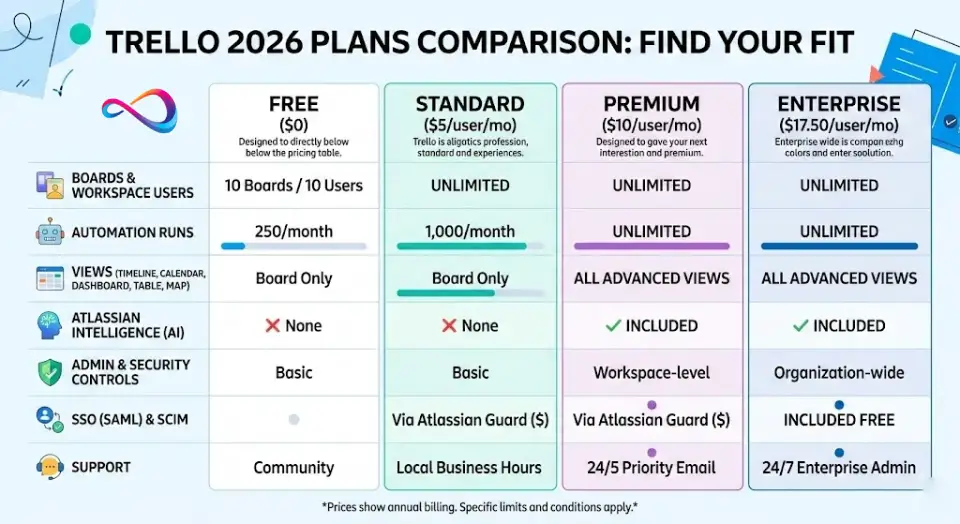
Trello Pricing Plans at a Glance (2026 Comparison Table)
| Feature | Free | Standard | Premium | Enterprise |
|---|---|---|---|---|
| Monthly price | $0 | $6/user | $12.50/user | Contact sales |
| Annual price | $0 | $5/user/mo | $10/user/mo | $17.50/user/mo |
| Best for | Solo/hobby, validation | Small teams, lean ops | Multi-project teams, managers | Large orgs, IT/compliance |
| Boards | Up to 10 per Workspace | Unlimited | Unlimited | Unlimited |
| Workspace collaborators | Up to 10 | Unlimited | Unlimited | Unlimited |
| Automation runs | 250/month | 1,000/month | Unlimited | Unlimited |
| Attachment limit | 10 MB/file | 250 MB/file | 250 MB/file | 250 MB/file |
| Views | Board only | Board only | Calendar, Timeline, Table, Dashboard, Map | Calendar, Timeline, Table, Dashboard, Map |
| AI (Atlassian Intelligence) | ✗ | ✗ | ✓ | ✓ |
| Custom fields | ✗ | ✓ | ✓ | ✓ |
| Advanced checklists | ✗ | ✓ | ✓ | ✓ |
| Admin/security controls | ✗ | ✗ | ✓ | ✓ (org-wide) |
| SSO (SAML) / SCIM | Via Guard ($) | Via Guard ($) | Via Guard ($) | Included free |
| Workspaces | 1 | 1 | 1 | Unlimited |
| Support | Community | Local business hours | 24/5 Priority | 24/7 Enterprise Admin |
| Power-Ups | Unlimited/board | Unlimited/board | Unlimited/board | Unlimited + admin controls |
Source: Trello pricing page, verified February 2026.
Breakpoints — What Forces an Upgrade
Don’t just look at features. Look at the limits that will make your current plan stop working:
- Free → Standard: You hit 10 boards, need more than 10 collaborators, want advanced checklists/custom fields, or the 250 automation runs/month cap starts blocking workflows.
- Standard → Premium: You need Timeline/Calendar/Dashboard views, more than 1,000 automation runs/month, team-level admin controls, workspace-level templates, or AI-powered content generation.
- Premium → Enterprise: You require SSO/SCIM without paying extra for Atlassian Guard, need multiple workspaces under one org, want org-wide permissions, attachment restrictions, Power-Up administration, or 24/7 support.
Quick plan selector:
- Need Timeline or Dashboard views? → Premium minimum
- Need SSO/SCIM? → Enterprise (or Premium + Atlassian Guard add-on — but Enterprise usually offers better total value)
- Under 10 people, under 10 boards? → Free works fine
- Growing team needing unlimited boards? → Standard
Trello Pricing Tiers Explained (Free vs Paid)
Free Plan — Great Start, Hard Ceiling
Who it’s for: Individuals, freelancers, side projects, or teams of ≤10 who want to try Kanban-style task management before committing.
What you get:
- Unlimited cards across up to 10 boards per Workspace
- Unlimited Power-Ups per board (this changed in 2023 — previously limited)
- 250 Workspace automation (Butler) command runs per month
- 10 MB per file attachment, unlimited storage
- Inbox for centralizing to-dos from email, Slack, and Microsoft Teams
- Planner (view-only) for calendar overview
- iOS, Android, and desktop apps
- 2-factor authentication and mobile device management (MDM)
- Custom backgrounds and stickers
If you’re a freelancer evaluating lightweight task management tools, you might also consider options like Todoist or Basecamp — both offer distinct free-tier models worth comparing.
What you miss:
- No Calendar, Timeline, Dashboard, Table, or Map views
- No advanced checklists (can’t assign members/dates to checklist items)
- No custom fields
- No AI features
- No admin/security controls beyond 2FA
- No single-board guests
- Board limit creates an artificial ceiling fast for any real team
Most common reason teams outgrow it: The 10-board cap. Once a team tries to organize anything beyond basic tasks — sprint boards, department boards, client boards — 10 boards evaporate immediately. The 10-collaborator limit is the second trigger.
Standard Plan — The Operational Baseline
Who it’s for: Growing teams (5–25 people) running day-to-day operations: marketing teams managing campaigns, startup ops tracking sprints, small agencies juggling client work.
Price: $5/user/month billed annually | $6/user/month billed monthly
What you get (beyond Free):
- Unlimited boards
- Unlimited Workspace collaborators
- Advanced checklists with assignees and due dates per item
- Custom fields for structured data on cards
- Card mirroring (sync one card across multiple boards)
- AI-powered Quick Capture from email, Slack, and Microsoft Teams
- Planner with full access (drag-and-drop scheduling)
- Collapsible lists and list colors
- 1,000 automation command runs per month
- 250 MB per file attachment
- Single-board guests
- Saved searches
What you still miss:
- No Calendar, Timeline, Dashboard, Table, or Map views
- No Atlassian Intelligence (AI content generation, grammar, brainstorming)
- No workspace-level templates or board collections
- No admin/security features (no domain-restricted invites, no member deactivation)
- No observers, no data export
- Automation capped at 1,000 runs/month
Most common reason teams outgrow it: Views. The moment a project manager needs a Timeline (Gantt-style) or Dashboard view for reporting, Standard can’t deliver. Teams doing cross-board reporting or needing admin visibility over boards always hit this wall. The 1,000 automation run cap also bites teams with more than 2–3 active automation rules.
Premium Plan — Where Trello Gets Serious
Who it’s for: Teams of 10–50+ managing multiple projects simultaneously: product teams, agencies running 5+ client boards, ops managers who need real-time dashboards, and anyone requiring admin governance.
Price: $10/user/month billed annually | $12.50/user/month billed monthly
What you get (beyond Standard):
- All advanced views: Calendar, Timeline, Table, Dashboard, and Map
- Workspace-level views: Table and Calendar across all boards
- Atlassian Intelligence (AI): Content generation, grammar correction, brainstorming, and AI-powered action item detection in card descriptions
- Unlimited automation command runs (no cap)
- Workspace-level templates
- Board collections for grouping by department or project
- Observers (read-only board access for stakeholders)
- Admin and security features: domain-restricted invites, member deactivation, command run administration
- Simple data export
- 24/5 priority email support
For teams weighing Premium against competitors at similar price points, our detailed breakdowns of Asana’s plan costs and ClickUp’s subscription tiers offer helpful side-by-side context.
What you still miss:
- No org-wide governance (can’t manage multiple Workspaces centrally)
- No org-visible boards or public board management
- SSO (SAML) available only via Atlassian Guard — a separate subscription starting at approximately $4/user/month
- No SCIM user provisioning included
- No attachment restrictions or Power-Up administration
- No 24/7 support
Most common reason teams outgrow it: Governance and SSO. When an IT team mandates SAML SSO across all Atlassian products, adding Atlassian Guard on top of Premium brings the effective cost close to Enterprise level — at which point Enterprise becomes the smarter move because it bundles Guard Standard. Organizations needing multi-workspace management or centralized Power-Up controls also graduate here.
Enterprise Plan — Centralized Control at Scale
Who it’s for: Organizations with 50+ users that need enterprise-grade security, multi-workspace governance, and dedicated support. Typical buyers: enterprise IT, procurement teams, PMOs, and compliance-sensitive organizations.
Price: $17.50/user/month billed annually ($210/user/year) at base tier. Volume discounts typically apply — the per-user cost generally decreases as seat count increases. For organizations with 250+ users, negotiated pricing is common. Contact Atlassian sales for exact quotes.
What you get (beyond Premium):
- Atlassian Guard Standard included (SAML SSO + SCIM user provisioning at no extra cost)
- Unlimited Workspaces under one organization
- Organization-wide permissions and visibility
- Organization-visible boards
- Public board management controls
- Multi-board guests
- Attachment restrictions (control file sharing)
- Power-Up administration (govern which integrations are allowed)
- 24/7 Enterprise Admin support
- Dedicated onboarding support
What to know before buying:
- Enterprise requires annual billing (no monthly option)
- Requires sales engagement — no self-serve checkout
- Volume discounts are negotiable, especially at larger seat counts
- Onboarding and rollout timelines should be factored into planning
Most common reason teams choose Enterprise: SSO/SCIM bundling and governance. When compliance mandates identity management across Atlassian products (Jira, Confluence, Trello), Enterprise consolidates costs and controls under one roof.
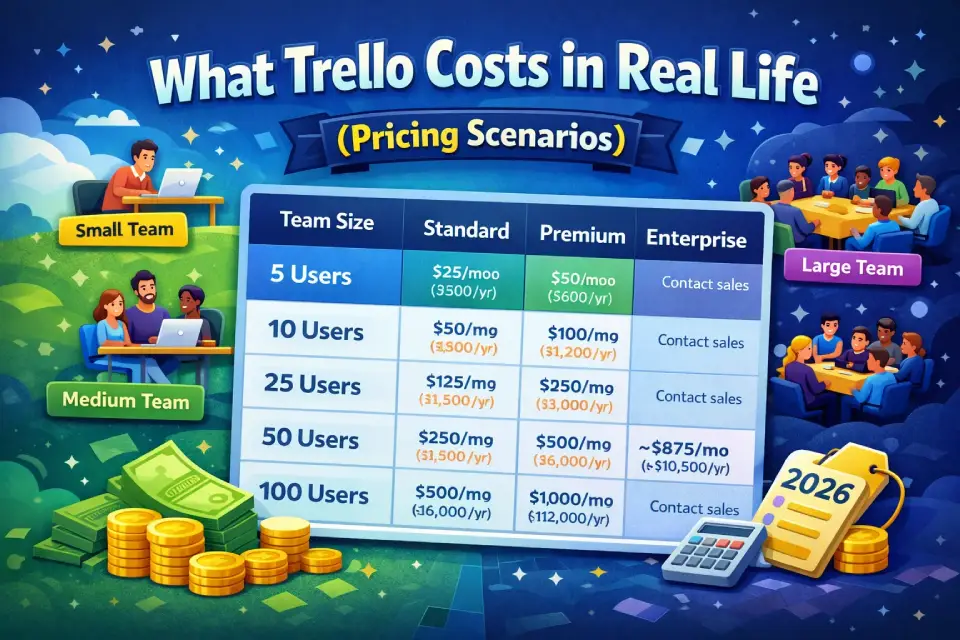
What Trello Costs in Real Life (Pricing Scenarios)
Published per-seat pricing only tells half the story. Here’s what Trello plan costs actually look like by team size, factoring in billing cycles.
Cost Scenarios by Team Size
| Team Size | Standard (Annual) | Standard (Monthly) | Premium (Annual) | Premium (Monthly) | Enterprise (Annual) |
|---|---|---|---|---|---|
| 5 users | $25/mo ($300/yr) | $30/mo ($360/yr) | $50/mo ($600/yr) | $62.50/mo ($750/yr) | Contact sales |
| 10 users | $50/mo ($600/yr) | $60/mo ($720/yr) | $100/mo ($1,200/yr) | $125/mo ($1,500/yr) | Contact sales |
| 25 users | $125/mo ($1,500/yr) | $150/mo ($1,800/yr) | $250/mo ($3,000/yr) | $312.50/mo ($3,750/yr) | Contact sales |
| 50 users | $250/mo ($3,000/yr) | $300/mo ($3,600/yr) | $500/mo ($6,000/yr) | $625/mo ($7,500/yr) | ~$875/mo ($10,500/yr) |
| 100 users | $500/mo ($6,000/yr) | $600/mo ($7,200/yr) | $1,000/mo ($12,000/yr) | $1,250/mo ($15,000/yr) | Contact sales* |
*Enterprise pricing at 100+ seats typically includes volume discounts; contact Atlassian sales for exact quotes.
Annual vs Monthly: The Decision Logic
- Annual billing saves approximately 17–20% across Standard and Premium. For a 25-person team on Premium, that’s roughly $750/year in savings.
- Choose monthly if: You’re piloting Trello, hiring rapidly and don’t know seat count, or need cancellation flexibility.
- Choose annual if: Team size is stable, budget is approved, and you’ve validated Trello fits your workflow (even a 1-month pilot on monthly billing before switching to annual is a smart play).
How to Estimate Your Trello Subscription Cost (Mini-Method)
- Count billable users. Every Workspace member and admin counts. Multi-board guests also count as paid seats. Single-board guests on Standard+ are free.
- Pick your tier. Use the decision framework below if unsure.
- Multiply: (Users × Per-user price) × 12 for annual, or × 1 for monthly.
- Add Atlassian Guard if you need SSO on Standard or Premium (approximately $4/user/month — check Atlassian Guard pricing for current rates).
- Add tax. US sales tax applies in most states; expect 5–10% depending on jurisdiction.
- Budget a 10–15% buffer for mid-year seat additions (most teams underestimate growth).
Hidden Costs and Limitations Most Reviews Skip
Trello’s sticker price is only the starting point. Several costs and constraints don’t show up on the pricing page but can meaningfully affect your total cost of ownership.
Power-Ups: Free to Add, Not Always Free to Use
Trello lets you connect unlimited Power-Ups per board on every plan. But many Power-Ups from third-party vendors (like Placker, Screenful, or advanced reporting tools) require their own paid subscriptions — sometimes $5–$15/user/month on top of your Trello plan.
Governance issue: On Premium and below, any Workspace member can add Power-Ups without approval. Only Enterprise gives you Power-Up administration to control which integrations are allowed. For regulated industries or teams with compliance requirements, this matters. Teams often end up building integration stacks using tools like Slack or Google Workspace alongside Trello, adding further complexity.
Automation Limits: The Silent Workflow Killer
- Free: 250 command runs/month. A single active Butler rule on a busy board can eat this in a week.
- Standard: 1,000 runs/month. Adequate for 2–3 simple automations, but teams with approval workflows, auto-assignments, or Slack notifications across multiple boards will hit the cap.
- Premium/Enterprise: Unlimited. This alone drives many Standard-to-Premium upgrades.
What counts as a “run”? Every time a Butler rule fires — whether a card move, due-date reminder, or notification — it counts as one command run. Multi-action rules still count as one run, but frequent triggers (like “every time a card is created”) add up fast.
Attachment and Storage Constraints
All plans offer unlimited storage, but the per-file limit matters:
- Free: 10 MB/file — insufficient for design files, video recordings, or large PDFs.
- Standard/Premium/Enterprise: 250 MB/file — workable for most use cases, but teams sharing large media or CAD files may still need external storage (Google Drive, Dropbox).
Attachments aren’t versioned. If your team needs document version control, you’ll need a linked cloud storage provider regardless of plan.
Security: The SSO/SCIM Cost Trap
This is where Trello’s pricing model gets tricky for mid-size companies:
- SAML SSO and SCIM user provisioning are available on any plan — but only through Atlassian Guard, which is a separate subscription starting at approximately $4/user/month.
- On Enterprise, Atlassian Guard Standard is included free.
- The math: Premium ($10) + Guard (~$4) ≈ $14/user/month. Enterprise = $17.50/user/month. For roughly $3.50 more per user, Enterprise gives you Guard plus unlimited workspaces, org-wide permissions, Power-Up admin, and 24/7 support.
- Bottom line: If your security team requires SSO, Enterprise almost always makes more financial sense than Premium + Guard.
Admin Time and Process Costs
Costs you won’t find on any pricing page:
- Board sprawl management: Without workspace-level templates (Premium+) or board collections, teams on Free/Standard spend admin hours organizing boards manually.
- User provisioning: Without SCIM (Enterprise or Guard add-on), adding/removing users is manual — a real cost at 50+ seats.
- Compliance overhead: Without audit logs and attachment restrictions (Enterprise only), compliance teams must use workarounds or external tools.
- Integration management: Without Power-Up administration (Enterprise only), every team member can install whatever integration they want, creating security and data-governance risks.
Total Cost of Ownership Snapshot
For a 50-person team needing SSO:
| Cost Component | Premium + Guard | Enterprise |
|---|---|---|
| Trello subscription | $6,000/yr | $10,500/yr |
| Atlassian Guard (est.) | ~$2,400/yr | $0 (included) |
| Admin overhead (est.) | Higher (manual provisioning) | Lower (SCIM + org controls) |
| Effective total | ~$8,400/yr + admin time | ~$10,500/yr, lower admin |
The gap narrows significantly once you factor in admin labor, governance controls, and 24/7 support.
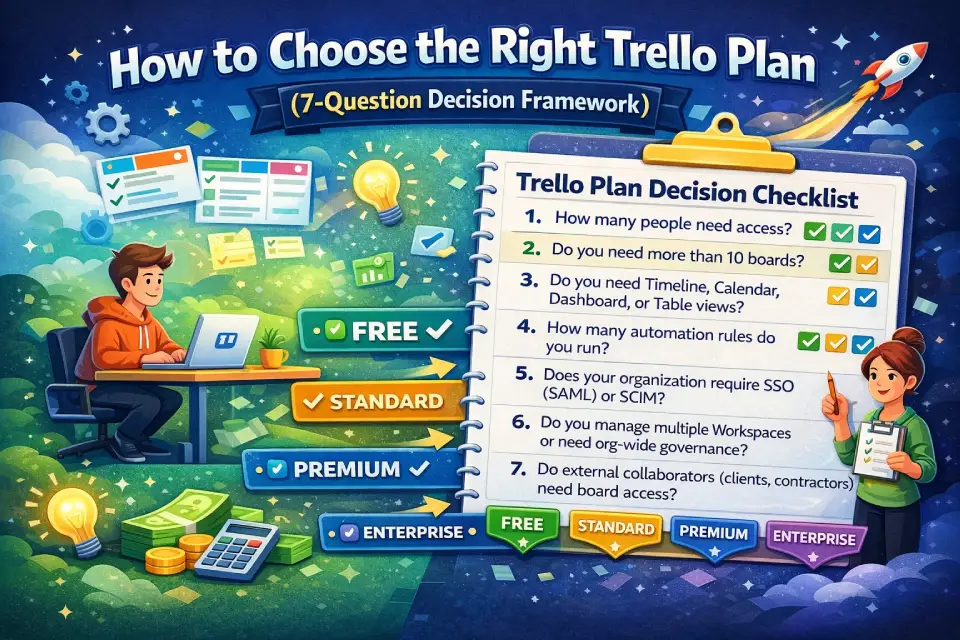
How to Choose the Right Trello Plan (7-Question Decision Framework)
Don’t start with features. Start with these seven questions:
The 7-Question Checklist
1. How many people need access?
- ≤10 → Free may work
- 11–50 → Standard or Premium
- 50+ → Premium or Enterprise
2. Do you need more than 10 boards?
- Yes → Standard minimum
3. Do you need Timeline, Calendar, Dashboard, or Table views?
- Yes → Premium minimum
4. How many automation rules do you run?
- Light (1–2 simple rules) → Standard is fine
- Moderate to heavy (3+ rules, multi-board) → Premium (unlimited runs)
5. Does your organization require SSO (SAML) or SCIM?
- Yes → Enterprise (or Premium + Atlassian Guard add-on, but Enterprise is usually better value)
6. Do you manage multiple Workspaces or need org-wide governance?
- Yes → Enterprise only
7. Do external collaborators (clients, contractors) need board access?
- Single-board guests → Standard+
- Multi-board guests → Enterprise preferred (or Standard/Premium where multi-board guests are billed as full seats)
Persona-Based Recommendations
| Persona | Recommended Plan | Why |
|---|---|---|
| Solo freelancer | Free | 10 boards and basic automation are plenty for personal task management. |
| Startup team (3–10) | Standard | Unlimited boards, custom fields, and advanced checklists cover lean ops. Upgrade to Premium only when you need views or reporting. |
| Agency (10–30, multiple clients) | Premium | Timeline and Dashboard views are essential for client reporting. Collections let you group by client. Observers let clients view without editing. |
| Mid-market ops/product team (20–50) | Premium | Admin controls, unlimited automation, and workspace views justify the step up from Standard. |
| Enterprise IT / PMO (50–500+) | Enterprise | SSO/SCIM included, org-wide governance, Power-Up controls, and volume discounts make this the only practical choice at scale. |
Agencies evaluating Trello Premium alongside collaboration-focused alternatives should also explore Teamwork’s agency-oriented feature set — it’s purpose-built for client-facing project management.
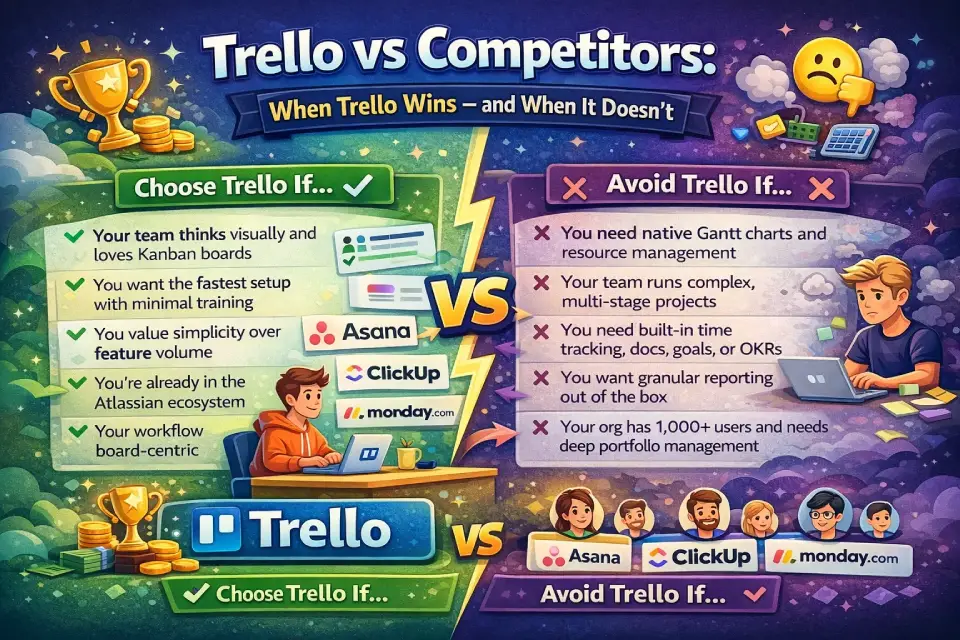
Trello vs Competitors: When Trello Wins — and When It Doesn’t
Trello is one of many work management tools. Here’s an honest comparison for the features and use cases that matter most.
Comparison Matrix
| Feature | Trello | Asana | ClickUp | monday.com | Jira |
|---|---|---|---|---|---|
| Starting paid price | $5/user/mo | $10.99/user/mo | $7/user/mo | $9/seat/mo | $7.75/user/mo |
| Free plan | Yes (10 boards) | Yes (15 users) | Yes (limited) | Yes (2 seats) | Yes (10 users) |
| Best for | Visual Kanban, simplicity | Workflows, cross-functional teams | All-in-one, power users | Marketing ops, dashboards | Software development |
| Learning curve | Very low | Low–medium | Medium–high | Low–medium | High |
| Kanban boards | ★★★★★ | ★★★★ | ★★★★ | ★★★★ | ★★★★ |
| Gantt / Timeline | Premium+ | Premium+ | Free+ | Standard+ | Premium+ |
| Automation | Butler (limited on lower tiers) | Rules (all paid tiers) | Automations (all tiers) | Automations (all tiers) | Automation (all tiers) |
| Reporting / Dashboards | Premium+ | Premium+ | Free+ | Standard+ | Standard+ |
| Native AI | Premium+ (Atlassian Intelligence) | All paid tiers | Free+ | All paid tiers | Premium+ |
| SSO included | Enterprise only | Enterprise only | Enterprise only | Enterprise only | Premium+ |
| Integrations | 200+ Power-Ups | 200+ | 1,000+ | 200+ | Atlassian Marketplace |
| Ideal team size | 1–100 | 5–500 | 5–500 | 5–500 | 10–5,000 |
For in-depth comparisons of each competitor, see our full reviews: Asana review, ClickUp review, and monday.com review. If your team leans toward software development workflows, our Jira pricing breakdown explores how Atlassian’s dev-focused tool compares on cost.
Choose Trello If…
- Your team thinks visually and loves Kanban boards
- You want the fastest setup with minimal training
- You value simplicity over feature volume — Trello does fewer things, but does them well
- You’re already in the Atlassian ecosystem (Jira, Confluence) and want seamless integration
- Your workflow is board-centric (task tracking, content pipelines, sprint planning)
- You need a tool that non-technical stakeholders can adopt immediately
Avoid Trello If…
- You need native Gantt charts and resource management as core workflows (Asana, monday.com, or ClickUp handle this better on lower tiers)
- Your team runs complex, multi-stage projects with dependencies across 50+ tasks (Trello’s project management depth is limited compared to Asana or ClickUp)
- You need built-in time tracking, docs, goals, or OKRs (ClickUp and Notion bundle these; Trello requires Power-Ups or external tools)
- You want granular reporting out of the box without Premium pricing
- Your org has 1,000+ users and needs deep portfolio management (Jira + Jira Align is better positioned)
For teams that need stronger visual collaboration alongside project tracking, Miro pairs well with Trello or can substitute for certain whiteboard-style planning workflows. Development teams exploring issue-tracking alternatives may also find Linear worth evaluating.
What Changed in Trello for 2025–2026
Several updates affect which plan makes sense:
- Trello Inbox (new): Centralizes to-dos from email, Slack, Microsoft Teams, and even Siri voice notes. Available on all plans, but AI-powered parsing (auto-extracting due dates and action items from forwarded messages) requires Standard+.
- Trello Planner (new): Calendar-style drag-and-drop scheduling integrated with Google Calendar (Outlook support expected). Full access requires Standard+; Free users get view-only.
- Mirror Cards (new): Sync a single card across multiple boards — edits update everywhere. Available on Standard+.
- Atlassian Intelligence expansion: AI features for content generation, grammar, and brainstorming are now fully available on Premium and Enterprise. Free and Standard users do not get AI.
- Refreshed UI: New navigation bar for switching between Inbox, Planner, and boards. Streamlined card-back design for faster editing.
- Quick Capture powered by AI: Standard+ feature that uses AI to parse and organize captured items from email and messaging apps.
- Enterprise rollout timing: New features typically roll out to Free/Standard/Premium first, with Enterprise access following later — plan accordingly for feature-adoption timelines.
FAQs About Trello Pricing
Is Trello free?
Yes. Trello offers a Free plan with unlimited cards, up to 10 boards per Workspace, up to 10 collaborators, unlimited Power-Ups per board, and 250 automation runs per month. It’s genuinely usable for individuals and very small teams, though the board and collaborator caps limit its viability for growing organizations.
How much does Trello cost per month?
On annual billing: Standard is $5/user/month, Premium is $10/user/month, and Enterprise is $17.50/user/month at base tier. Monthly billing is available for Standard ($6/user) and Premium ($12.50/user). Enterprise requires annual billing only.
How does Trello Enterprise billing work?
Enterprise is billed annually only. The base rate is $17.50/user/month ($210/user/year), but volume discounts typically reduce the per-user cost as seat count increases. Pricing requires a sales conversation — there’s no self-serve checkout for Enterprise. Contact Atlassian’s sales team for a custom quote.
What is Trello Premium?
Trello Premium ($10/user/month annual) is the mid-tier plan that unlocks advanced views (Timeline, Calendar, Dashboard, Table, Map), Atlassian Intelligence (AI), unlimited automation, workspace-level templates, admin/security controls, board collections, observers, and priority email support.
What’s included in Trello Standard?
Standard ($5/user/month annual) adds unlimited boards, advanced checklists with assignee/date tracking, custom fields, card mirroring, collapsible lists, AI-powered Quick Capture, 1,000 automation runs/month, 250 MB file attachments, and single-board guest access.
Does Trello have a free trial?
Yes. Trello offers a free trial of Premium for any Workspace. This lets you test all Premium features — including views, AI, and admin controls — before committing. No credit card is required to start.
Does Trello offer discounts?
Yes. Trello provides a nonprofit community discount and an education discount. Eligibility details and specific discount amounts are available through Trello’s support pages. Volume discounts also apply at the Enterprise tier for large organizations.
Is Trello worth it for small teams?
For teams under 10, the Free plan is a legitimate starting point. Standard at $5/user/month is one of the most affordable paid project management tools on the market and is worth it if you need unlimited boards and custom fields. The value proposition is strongest when your team prefers visual Kanban workflows over complex project management.
Can I use Trello Standard or Premium for just one person?
Yes. Trello Standard and Premium are designed for teams of any size, including teams of one. You create a Workspace and upgrade it — the subscription applies to that Workspace.
How are Trello users counted for billing?
Every Workspace member (normal member or admin) is a billable user. Multi-board guests — guests added to more than one board within a Workspace — are billed at the same rate as full members. Single-board guests on Standard and above are not billed.
Do I need Atlassian Guard for SSO?
On Free, Standard, and Premium plans, SAML SSO and SCIM require Atlassian Guard, which is a separate subscription (approximately $4/user/month — verify current pricing on Atlassian’s site). On Enterprise, Atlassian Guard Standard is included at no additional cost.
What happens if I exceed Trello’s automation limit?
If you hit the automation run cap (250/month on Free, 1,000/month on Standard), your automations stop firing for the remainder of the billing cycle. They resume the next month. There’s no overage fee — the rules simply pause, which can disrupt critical workflows.
Is there an on-premises version of Trello?
No. Trello is a cloud-only product. It’s accessible via web browser, desktop app, and mobile apps (iOS and Android). There is no self-hosted or on-premises deployment option.
Can I downgrade my Trello plan?
Yes. You can downgrade at any time. When you downgrade, you retain your current plan’s features until the end of the prepaid period. After that, your Workspace reverts to the lower plan’s limits (e.g., 10 boards on Free).
Which Trello plan is best for agencies?
Most agencies benefit from Premium. Timeline view is essential for client project tracking, Dashboard view provides at-a-glance reporting, board collections let you group by client, and observers allow clients to monitor progress without editing. The $10/user/month cost is justified by the operational visibility it provides.
How many boards can you have on Trello Free?
Up to 10 boards per Workspace. Each board supports unlimited cards and unlimited Power-Ups, but you cannot create an 11th board without upgrading to Standard or higher.
How many collaborators can you have on Trello Free?
Up to 10 collaborators per Workspace. This includes all members and admins. If you need more than 10 people, upgrade to Standard ($5/user/month annual) which allows unlimited collaborators.
Does Trello Premium include unlimited automation?
Yes. Trello Premium (and Enterprise) includes unlimited Workspace command runs for Butler automation. This is a major upgrade from Standard’s 1,000 runs/month cap and Free’s 250 runs/month limit.
What counts as an automation run in Trello?
Each time a Butler automation rule fires, it counts as one Workspace command run. This includes rules triggered by card moves, due-date reminders, notifications, and scheduled commands. Multi-action rules (a single trigger with multiple actions) count as one run. Runs are pooled across the entire Workspace, not per board.
Does Trello Premium vs Standard justify the price difference?
The jump from $5 to $10/user/month may seem steep, but Premium adds five advanced views, unlimited automation, AI features, admin controls, and priority support. For teams of 10+ where reporting and visibility matter, these features quickly pay for themselves in reduced admin time and better project oversight.
Final Recommendation
Here’s the bottom line on Trello plans and pricing — cut through the feature lists and focus on what matters for your team:
- Start Free if you’re exploring Trello for personal use, a side project, or a team of under 10. Move on when you hit the board or collaborator cap.
- Go Standard if you’re a small team (5–25) that needs unlimited boards, structured task tracking (custom fields, advanced checklists), and basic automation. This is the best value tier for lean teams.
- Go Premium if you manage multiple projects, need real reporting/views (Timeline, Dashboard, Calendar), want AI assistance, or require admin controls. This is where Trello becomes a genuine project management tool rather than just a task board.
- Go Enterprise if you have 50+ users and need SSO/SCIM, multi-workspace governance, Power-Up controls, or 24/7 support. The math almost always favors Enterprise over Premium + Atlassian Guard once you factor in bundled security and admin savings.
- Most teams should start with Standard and upgrade to Premium when views or automation limits become a bottleneck. Jumping straight to Premium without testing Standard first means paying double before you know which features you’ll actually use.
Ultimately, Trello pricing is competitive for what it delivers: a fast, visual, Kanban-first tool that scales from freelancer to enterprise. The key is matching your plan to your actual needs — not the feature list that looks most impressive. Use the decision framework above, estimate your real costs, and pilot before you commit annually. For teams still evaluating whether Trello is the right fit at all, our full Trello review covers features, UX, and real-world performance in depth.
Prices reflect published Trello pricing as of February 2026. Features and pricing verified against trello.com/pricing and Atlassian Support documentation. Enterprise quotes require a sales conversation with Atlassian.
“`html “`About the author

I’m Macedona, an independent reviewer covering SaaS platforms, CRM systems, and AI tools. My work focuses on hands-on testing, structured feature analysis, pricing evaluation, and real-world business use cases.
All reviews are created using transparent comparison criteria and are updated regularly to reflect changes in features, pricing, and performance.