Magic Hour, a browser platform whose features span AI text-to-video, face swap, lip sync and image tools, is worth paying for when you need watermark-free, commercial short clips from several AI video models on one credit balance. Free is 480p and watermarked, and Kling, Veo and Seedance are gated to Creator and up.
In my Free account on November 11, 2026, each 3-second 480p clip cost 72 credits, so 400 signup credits buy five. Free downloads are watermarked and personal-use only: the cheapest clean path is a $10 pack, and 720p needs Creator.

Quick verdict
- Worth it for: Magic Hour AI pays off for creators who post clean, commercial short clips from several models.
- Skip it if: you need a clip longer than the 60 seconds listed “where available”, or commercial rights without paying.
- Main strength: one never-expiring credit balance across video, face and image tools.
- Biggest limit: Free is 480p, watermarked and personal-use only; premium models and 720p need Creator.
- Price basis: packs from $10; Creator $19 billed monthly or $144 a year.
In This Article (10 sections)
What Magic Hour Is and Who It’s For
Magic Hour is a browser-based platform and API that runs AI video, image and audio tools, including hosted third-party models such as Kling, Veo and MiniMax, from one prepaid credit balance. Face swap, lip sync, talking photos and the generation models share one workspace.
The plan labels say who it is built for: Creator “for social content and everyday creation”, Pro “for professional work and frequent production”, Business “for teams, agencies, and high-volume content”. Among the AI tools for content creation I cover, it is the generalist; its “100+ tools” count is the vendor’s own.
- Category: AI video, image and audio generation platform with an API
- Best for: short social clips and face-tool content
- Starting price: a $10 credit pack, or Creator at $19 billed monthly
- Free plan: 400 signup credits, plus 100 credits a day for up to 7 lifetime claims
- Main limitation: free video downloads carry a watermark and are personal-use only
A definition says nothing about what a free account actually produces, so I measured it.
How I Tested Magic Hour: Three Text-to-Video Runs
Three 3-second 480p clips of one fixed prompt cost 72 credits each and appeared 22 to 61 seconds after the click, in my own Free account on November 11, 2026. Before the first run, My Plan showed Free Plan, 400 Total Plan Credits, Cost Free, “Past 30 days: 0 credits used”; I left the “Claim 100 daily credits” offer unclicked.
The prompt never changed: “A golden retriever runs along a sunny beach at sunset, waves rolling in behind it, slow motion, cinematic lighting.” Settings: 3 seconds, 480p, 9:16, one run each on MiniMax H3, Wan 2.2 and LTX-2.5. Everything else rests on Magic Hour’s own pricing, FAQ and terms pages read the same day.
| Model | Credits | Queue shown | Time to video | Output |
|---|---|---|---|---|
| MiniMax H3 (Audio on) | 72 | 6 people ahead, estimated 1m 45s | 32 to 39 seconds | 480 x 858 px |
| Wan 2.2 (no Audio switch) | 72 | about 34 s, estimated 31 s | about 61 seconds | 480 x 848 px |
| LTX-2.5 (Audio on) | 72 | about 8 s | about 22 seconds | 480 x 854 px, 24 fps |
Sources: my Free-plan test of November 11, 2026, one run per model, page-clock times; the 24-credit base rate on Magic Hour’s text-to-video page, checked Nov 2026.
The queue, not the model, set Free’s clock: MiniMax H3 showed “6 people ahead of you” and an estimated 1m 45s, yet the clip landed in 32 to 39 seconds, and the queue card offered “Skip the wait: Generate faster with Priority Queue”.
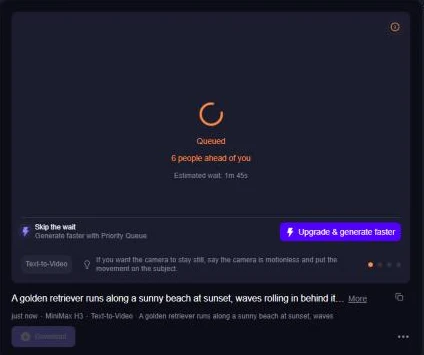
Each run took 72 off the counter, 400 to 328 to 256 to 184, and LTX-2.5’s detail panel confirmed the receipt: 3 seconds, 72 credits, 480 x 854 px, 24 frames per second. So 400 signup credits are a sampling budget of five clips, not a posting budget.
Magic Hour Features That Matter
Model choice under one balance is the feature that matters most, and the gates on models, resolution and clip length decide the plan you end up on.
One credit balance, many video models (and which ones Free opens)
No, Kling, Veo and Seedance are not on the Free plan. On November 11, 2026 the Text-to-Video picker opened MiniMax H3, Wan 2.2 and LTX-2.5 at 24 credits per second and marked twelve others Creator+, among them Kling 4.0, Seedance 2.5 and Veo 3.1; the FAQ names LTX-2.5 as the free-tier model.
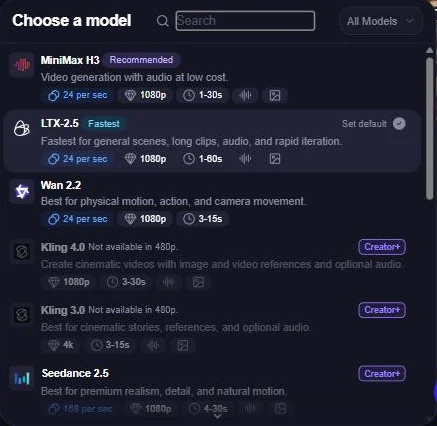
A pack does not change that: packs leave “subscription-only models, higher resolutions, faster queues, larger uploads, or greater web concurrency” locked. Durations run up to 60 seconds where available (LTX-2.5 with an eligible plan); the Free length menu stopped at 10 seconds, with 15 and longer Creator+. Image-to-Video draws on the same models and balance; my ranking of image-to-video generators matched to the job sets it against dedicated tools.
Face Swap, Lip Sync and Talking Photo
The face tools are free to try daily and paid the moment the output is for a client. Without an account you get 5 photo face swaps and 3 head swaps a day with no watermark; video and GIF swaps share 3 a day and carry one; in the dashboard a photo swap costs 10 credits.
Lip Sync gives 3 free videos a day up to 10 seconds and runs to 83 minutes in the full tool; Talking Photo is free to 3 seconds, one face per photo.
The trade-off is the rights work: the terms make you responsible for the consents the law requires for a person’s likeness.
AI image tools
Image work alone can justify a plan: Creator’s 144,000 credits equal 28,800 AI Image Generator images on the plan page, 5 credits an image, and 2,880 AI Headshot Generator images, 50 each. The headshot tool stays free at 3 a day with no watermark; if that is all you need, my list of AI headshot generators compares the dedicated tools.
API, MCP and webhooks
Yes, you can automate it: every paid plan lists “Full” API access, and API usage shares the account’s prepaid credit balance with the web app. The docs list SDKs for Python, Node.js, Go and Rust, webhooks, and an MCP server for Claude, ChatGPT, Claude Code or Codex. A tool’s web availability “does not guarantee API support”, and a developer on Creator needs no second budget.
Support, privacy and rights
Email and live chat are open to everyone; paid subscribers get priority support “typically within 3 hours during business hours (Pacific Time)”, others within 24 hours. In my account the menu listed Help Center and Contact Support beside a chat button. A technical failure returns credits; a result you dislike does not.
You own what you generate, subject to the terms, and only paying customers may use it commercially. Magic Hour states that projects are not public and that prompts, uploads and outputs are not used to train its models, and that data is encrypted in transit and at rest, with access restricted for operations and support.
My take
Pick Creator if you want any premium model, 720p or a clip past 10 seconds: the first paid tier opens all three at once. Free is worth it only when the base models already look right on your prompt.
Magic Hour Ease of Use and Setup
Every cost showed before I spent it: the Generate button read “Generate 3s Video 72”, the balance fell by 72 after each run, and locked options carry a Creator+ label in the model, resolution and length menus.

A plan change in My Plan shows the amount due, credits added and effective date before you confirm. For prompts, Magic Hour recommends being specific: name the camera motion, the action and the details of the setting, people and objects; a copy-paste prompt template gives you that structure. The button shows credits, not dollars; the next section converts them.
My take
Worth it for a solo creator on a fixed budget: you can price every clip before you make it, which matters more than the layout when each run draws on a prepaid balance.
Magic Hour Pricing
Creator costs $19 a month billed monthly or $144 a year; Pro $39 or $300 a year; Business $99 or $792 a year; and a one-time credit pack starts at 4,000 credits for $10. The page’s headline figures of $12, $25 and $66 a month are those plans’ equivalent monthly rates, charged as one upfront payment for twelve months.
The pricing page prints credit totals for yearly billing only; on monthly billing, the FAQ says the monthly allocation is added when each payment completes.
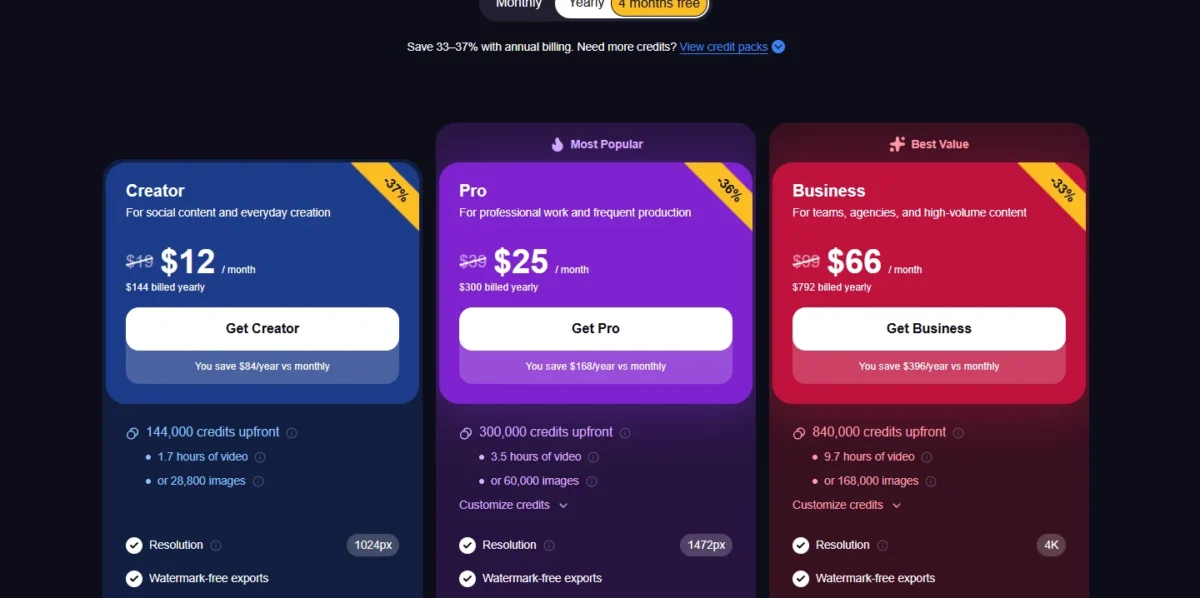
| Plan | Billed monthly | Billed yearly | Credits (yearly plan) | Resolution, generations at once | Key limit |
|---|---|---|---|---|---|
| Free | $0 | $0 | 400 at signup, plus 100 a day up to 7 claims | 480p, 1 at a time in my test | watermark on video; personal use only |
| Creator | $19 a month | $144 a year | 144,000 | 1024px, 3 | 2GB uploads |
| Pro | $39 a month | $300 a year | 300,000 | 1472px, 5 | 5GB uploads |
| Business | $99 a month | $792 a year | 840,000 | 4K, Unlimited | 10GB uploads |
| Credit pack | one-time | one-time | Small 4,000 for $10 to Max 256,000 for $480, shown 25% off | Free’s resolution and models | credits never expire; no subscription-only models, higher resolutions, faster queues or larger uploads |
Sources: Magic Hour pricing page, Magic Hour FAQ, checked Nov 2026.
The three subscriptions differ in volume, resolution and concurrency, not in features.
The Free plan and its free credits
Free goes as far as 400 + 7 x 100 = 1,100 credits, which at 72 credits a clip is 15 three-second 480p clips, or 45 seconds of video; without an account, the video tools share 3 free requests a day per network.
Every free video download carries a watermark: the Download menu in my account listed “With watermark: Free download” and “Without watermark: Subscription or credit pack”, the second locked, and the terms limit unpaid output to personal, non-commercial use. If free output is the whole point, my ranking of free AI video generators compared by their free plans sorts tools by what the free tier lets out.

What the credits buy at each resolution
Creator’s 144,000 credits buy 100 minutes of 480p video, 50 minutes at 720p or about 33 minutes at 1080p where the plan opens it: the Free app’s resolution menu priced 720p at twice the 24-credit base rate (48 per second) and 1080p at three times (72 per second).
| Plan (credits a year) | 480p, 24 a second | 720p, 48 a second | 1080p, 72 a second |
|---|---|---|---|
| Creator (144,000) | 100 minutes | 50 minutes | about 33 minutes |
| Pro (300,000) | about 208 minutes | about 104 minutes | about 69 minutes |
| Business (840,000) | about 583 minutes | about 292 minutes | about 194 minutes |
Sources: Magic Hour pricing page and text-to-video page, checked Nov 2026; 720p and 1080p rates from my Free account’s resolution menu on November 11, 2026, 1080p where the plan opens it; minutes = credits / rate / 60.

The pricing page caps Creator at 1024px while the app’s menu marked 1080p Creator+, so confirm in your own account which plan renders 1080p before paying.
Credit pack or subscription?
A pack is the cheapest clean, commercial path for a few clips at Free’s settings; a subscription wins once you need 720p or volume, because packs do not add higher resolutions. The Small pack is $10 for 4,000 credits, $0.0025 a credit, so a 480p second costs 24 x $0.0025 = $0.06. Creator yearly is $144 for 144,000 credits, $0.001 a credit and $0.024 a second, so the pack costs 2.5 times as much per second. One pack is 55 three-second clips.
Buy a pack when you post a handful of clips a month and the Free models look right; subscribe when a client asks for 720p or 1080p.
Billing traps before you upgrade
Yearly plans charge the whole year upfront, a “Start now” upgrade charges the full new price with no proration, and the refund window closes at 400 credits used. A year of monthly billing costs $19 x 12 = $228 on Creator against $144, $39 x 12 = $468 against $300 on Pro, and $99 x 12 = $1,188 against $792 on Business, so monthly only makes sense for a one-month job.
No proration on Start now
Changing plans in My Plan offers “Start now” or “Change at renewal”. Start now bills the whole price of the new plan at once and opens a fresh billing period, with nothing credited for the unused part of the old one; Change at renewal keeps the current plan until the displayed date. Mid-cycle, pick the renewal option unless the credits cannot wait.
Refunds are narrow: a subscription payment can be refunded in full for 7 days provided under 400 credits were spent since it, a pack only if none of its credits were used, and each customer gets one. At 24 a second, 400 credits is about 17 seconds of 480p video, so five 3-second clips (360 credits) keep you refundable and a sixth does not.
My take
The ladder I would follow: Free to pick a model, a $10 pack for the first commercial clips, Creator yearly once 720p or a premium model is on the brief; Pro and Business only when the minutes run out.
Magic Hour Pros and Cons
Pros
- Credits never expire, even after cancelling, so a yearly plan’s leftovers are not lost
- A $10 pack gives watermark-free, commercial output: the cheapest clean path for occasional creators
- The Generate button shows the credit cost before each run, so budget-minded users never guess
- Three models open on Free, two with an Audio switch, enough to compare on your own prompt
- Full API access on every paid plan, sharing the web balance, so developers need no separate tier
Cons
- Free downloads are watermarked and personal-use only, so a freelancer cannot ship them to a client
- Kling, Veo, Seedance and 720p carry a Creator+ label, and a credit pack does not add higher resolutions
- No seat terms are published and credential sharing is not authorized, so agencies need a quote
- A mid-cycle “Start now” upgrade charges the full new price without proration
- Free runs one generation at a time behind a shared queue, a 1m 45s estimate in my test
Worth it when the pros describe your month: a few clean clips, a model comparison, an API job. Pick a rival when the first two cons describe your client’s brief.
Who Should Use Magic Hour (and Who Should Skip It)
Who is Magic Hour for? Solo creators and marketers making short social clips and face-tool content; skip it if you need one generated clip longer than the 60 seconds Magic Hour lists “where available”, or want commercial rights without paying.
A team is the hardest case: Business is “for teams, agencies, and high-volume content”, but the pricing page publishes no seats, the FAQ offers a custom enterprise quote, and the terms say sharing account credentials is not authorized.
Best for
- An occasional creator who needs a few clean, commercial 480p clips a month, on a $10 pack
- A social creator who wants Kling, Veo or Seedance at 720p, on Creator
- A face-swap or lip-sync maker who already holds the likeness consents, on any paid plan
- A developer automating generation through the API on the same credits, from Creator up
Not ideal for
- An agency that needs per-seat control, since no seat terms are published and credential sharing is not authorized
- A long-form video maker, since clips run to 60 seconds where available
- Anyone who needs commercial use for free, since unpaid output is personal, non-commercial only
- A buyer who upgrades mid-cycle and expects proration, since Start now charges the full new price
My take
Posting three clips a week for my own channels, I would start on a Small pack and move to Creator yearly at the first 720p request. Buying for a four-person team, I would get the quote first and set it against 4 x $144 = $576 a year.
Magic Hour vs Competitors
Magic Hour is the face-tool and multi-model generalist with non-expiring credits; Runway, Higgsfield and invideo AI each win a different job.
| Software | Best for | Starting price | Key difference | Main trade-off |
|---|---|---|---|---|
| Magic Hour | Short social clips and face tools on one balance | Creator $19 billed monthly or $144 a year; packs from $10 | Unused credits never expire, even after cancelling | Free is 480p and watermarked; premium models need Creator |
| Runway | Creators who want Runway’s own Gen-4.5 beside Kling and Seedance | Runway Standard $15 a month, $36 a year less on annual billing; 625 credits a month | 625 credits equals 52 seconds of Gen-4.5; Free gives 125 one-time credits | Standard and Pro credits reset each cycle; only Max rolls over one month |
| Higgsfield | Image-plus-video creators on a monthly credit plan | Starter $15 a month billed annually, 200 credits a month | Plans include free generations and unlimited models on higgsfield.ai | Those extras do not apply on MCP or CLI |
| invideo AI | Teams that want per-seat plans | Basic list price $9 per seat a month, shown at 50% off on annual billing; 190 credits per seat a month | Pro adds 10 guest seats with 190 credits each | Unused credits do not roll over; Basic has no Seedance 2.5 |
Sources: Magic Hour pricing, Runway pricing, Higgsfield pricing, invideo AI pricing, checked Nov 2026.
Credits are not one unit across these four, so compare seconds and rights. Runway’s Standard resets its 625 monthly credits each cycle: the pick for a creator loyal to Gen-4.5, a poor one for bursts.
Higgsfield is the closest match in shape, a multi-model credit platform whose free generations only work on its own site; my Higgsfield review goes through its gates.
invideo AI is the answer for a team that needs per-seat plans, which Magic Hour does not publish; my invideo Agent review covers the Basic seat.
If none fits, my comparison of text-to-video generators widens the choice.
FAQ
Is Magic Hour AI legit?
Yes, on the evidence I have: published terms of service and a privacy policy, a stated refund policy, card payments through Stripe, and a free account that behaved as the pricing page describes in my test, charging 72 credits per 3-second clip.
Is Magic Hour AI private?
Magic Hour says your projects are not public to other users, that it does not use prompts, uploads or outputs to train AI models, and that it will not use them for marketing without explicit permission. You can delete saved assets from your account yourself.
Can I use Magic Hour videos commercially?
Only with a paid arrangement: a subscription, a credit pack or a separately agreed usage-based billing plan. Those customers may use their assets commercially, including client work, subject to the terms and the rights in their own uploads. Everyone else is limited to personal, non-commercial use.
Magic Hour AI Review: Final Verdict
How I Evaluated Magic Hour
I ran three Text-to-Video clips of one fixed prompt in my own Free account on November 11, 2026, 3 seconds at 480p on MiniMax H3, Wan 2.2 and LTX-2.5, timed on the page’s own clock; one run each, so the times show the free queue, not the models’ speed.
Every price, credit figure and plan gate comes from Magic Hour’s pricing, FAQ, text-to-video, terms and API pages read the same day, and each rival’s price from its own pricing page. Magic Hour does not publish seat terms. Output quality is yours to judge inside the 400-credit refund window.
Magic Hour AI is worth it when short clips are the job: stay free to pick a model, buy a $10 pack for your first clean commercial 480p clips, and take Creator yearly when 720p, a Creator+ model or a 15-second clip is on the brief. Credits that never expire make the pack a low-risk first step.
Pick a rival if the job is seats or length: invideo AI for a team that needs per-seat billing, Runway for a creator settled on Gen-4.5.
Before you pay, check two things in your own account: which plan the resolution menu opens 1080p on, and whether the three Free models already look right on your prompt. If they do, a pack beats every subscription on commitment.