Pricing change log:
- Feb 15, 2026: Verified Standard ($7.91/user/month) and Premium ($14.54/user/month starting rates
- Oct 2025: MQB rollout completed for monthly subscriptions
- Feb 17, 2026: Data Center 15% price increase applied
- Mar 30, 2026: Data Center new sales end date; EOL March 28, 2029
Choosing the right Jira pricing plan is one of the most consequential technology decisions your organization will make this year. While Atlassian’s subscription costs appear straightforward on the surface, the true expense—including Marketplace apps, security add-ons, and Maximum Quantity Billing rules—can quickly exceed initial estimates by 2–3x.
This guide cuts through the marketing to deliver what you actually need to know about Jira plans pricing in 2026, verified from official Atlassian sources with transparent methodology.
Who this guide is for: Teams of 10–500+ users evaluating Jira cost, procurement teams building 2026 budgets, and anyone deciding between Jira Standard vs Premium or comparing against alternatives like Asana, ClickUp, monday.com, Linear, and Wrike.
Quick Answer (30 seconds)
Jira subscription cost starts at $0 (Free for ≤10 users), $7.91/user/month (Standard), or $14.54/user/month (Premium) for monthly billing. Most teams actually pay $20–$30/user/month after adding Marketplace apps, Confluence, and Atlassian Guard.
Choose your plan by: team size (Free ≤10, Standard 10–100, Premium 100+) + need for Advanced Roadmaps, unlimited automation, or 24/7 support.
Key Takeaways
- Base pricing is deceptive: Standard lists at $7.91/user/month, but hidden costs (apps, Guard, JSM, Confluence) triple true TCO.
- Maximum Quantity Billing bites hard: Rolled out July–Oct 2025, MQB charges peak user count—no refunds for mid-cycle removals.
- Data Center is sunsetting: New sales end March 30, 2026; last chance for on-prem licenses.
Plan Comparison in 30 Seconds
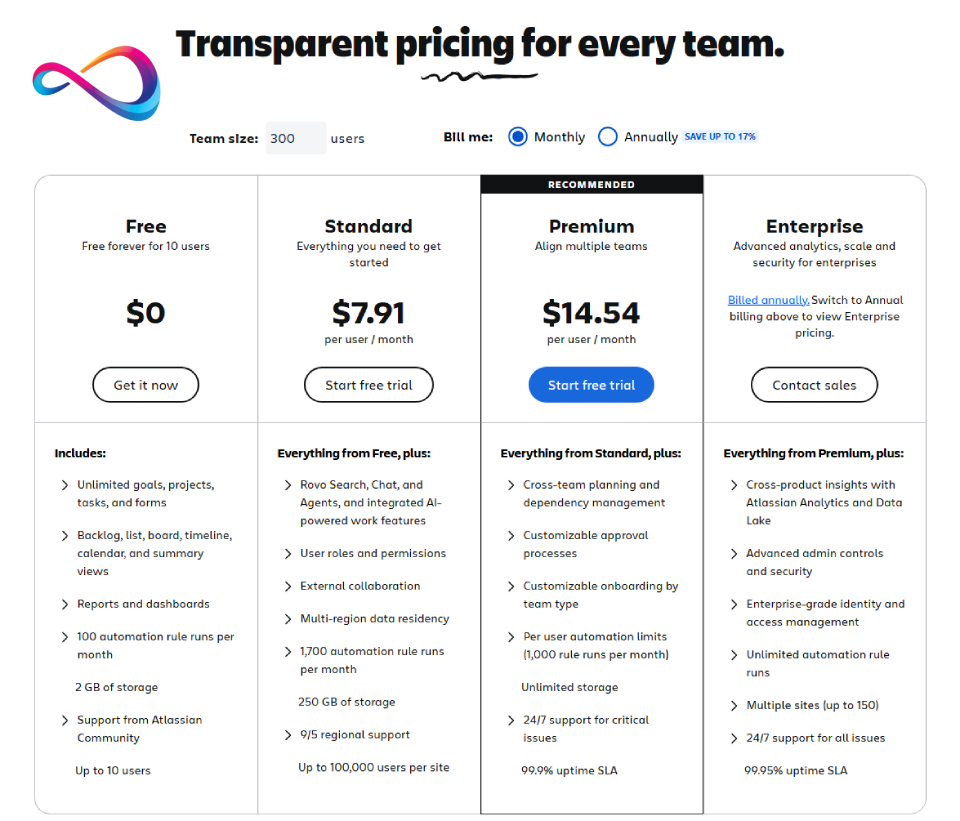
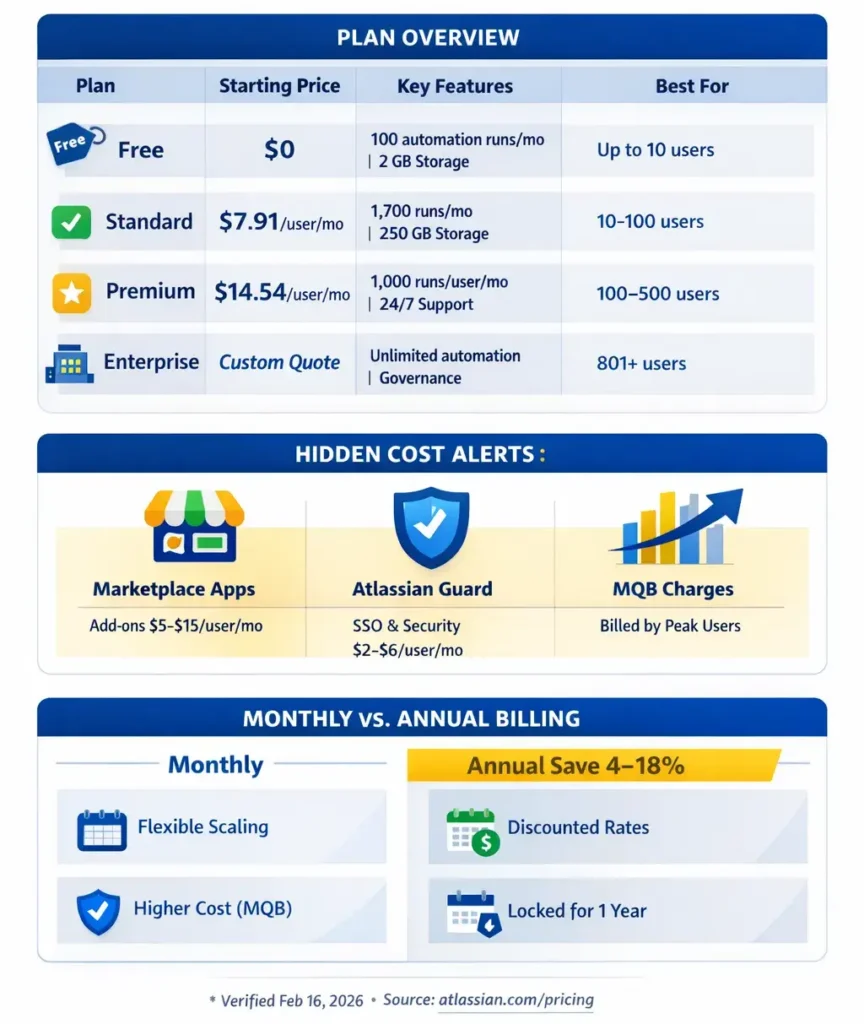
| Plan | Price (starting) | Automation | Roadmaps | SLA/Support | Storage | Best for |
|---|---|---|---|---|---|---|
| Free | $0 | 100 runs/mo | ❌ No | Community only | 2 GB | ≤10 users, testing |
| Standard | $7.91/user/mo | 1,700 runs/mo | ❌ No | 9/5 Regional | 250 GB | 10–100 users, simple workflows |
| Premium | $14.54/user/mo | 1,000 runs/user/mo | ✅ Yes | 24/7 + 99.9% SLA | Unlimited | 100–500 users, multi-team planning |
| Enterprise | Custom quote | Unlimited | ✅ Yes | 24/7 Full + CSM | Unlimited | 801+ users, governance/compliance |
Prices verified February 16, 2026 from Atlassian official pricing page. Monthly billing rates shown; annual billing typically saves 4-18% depending on tier, though Premium has tier-specific exceptions (see detailed breakdowns below).
People Mean 3 Things by “Jira Pricing”
Before we dive into Jira Software pricing (this guide’s focus), clarify which Atlassian Jira product you’re budgeting for:
| Product | Who uses it | Pricing model | This guide covers? |
|---|---|---|---|
| Jira Software | Dev teams, agile/scrum | $0–$14.54/user/mo | ✅YES (primary focus) |
| Jira Service Management (JSM) | IT helpdesk, ITSM teams | $20–$50/agent/mo | ⚠️ Covered in “Hidden Costs” section |
| Jira Work Management | Marketing, HR, ops teams | Same as Jira Software | ⚠️ Pricing aligned; workflows differ |
⚠️ Procurement mistake: Quoting “Jira pricing” for IT helpdesk? You need JSM pricing ($20–$50/agent), not Jira Software ($7.91/user). Agents ≠ users.
Decision in 60 Seconds (Yes/No Flow)
Q1: Do you have 10 or fewer users?
→ Yes: Free plan. Done.
→ No: Continue to Q2.
Q2: Do you need 24/7 support or guaranteed 99.9% uptime?
→ Yes: Premium or Enterprise.
→ No: Continue to Q3.
Q3: Do you need cross-project roadmaps (Advanced Roadmaps)?
→ Yes: Premium or Enterprise.
→ No: Continue to Q4.
Q4: Will automation exceed 1,700 runs/month (~57/day)?
→ Yes: Premium (scales to 1,000 runs/user/month).
→ No: Standard is perfect.
Q5: Do you have 800+ users or need unlimited automation/sites?
→ Yes: Enterprise.
→ No: Standard or Premium.
What Does Jira Cost for [X] Users?
Jira Standard Cost for 25 Users
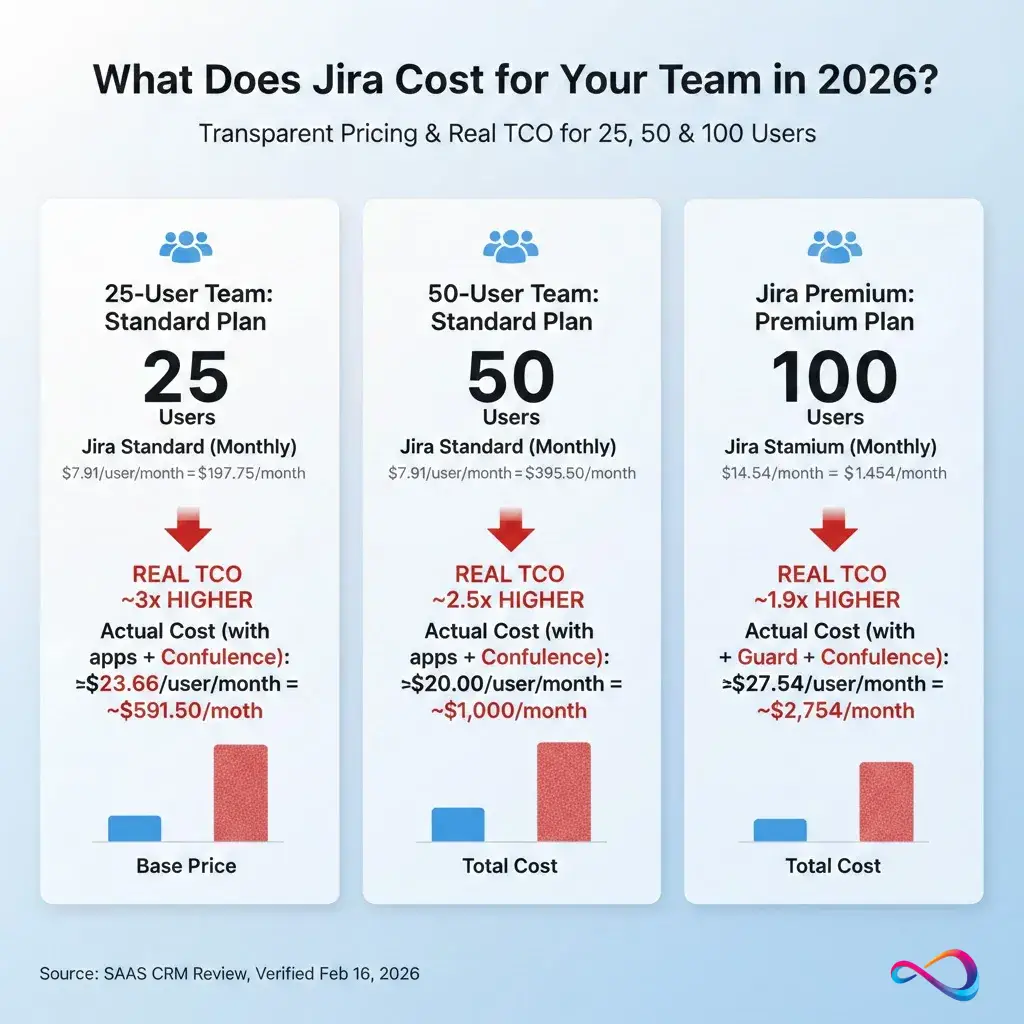
Quick answer: $197.75/month ($2,373/year monthly billing) or ~$2,038/year (annual billing) = ~$6.77/user/month effective rate.
| Billing | Monthly cost | Annual cost | Effective $/user/mo |
|---|---|---|---|
| Monthly | $197.75 | $2,373/year | $7.91 |
| Annual | ~ $170/mo | ~$2,038/year | ~$6.77 |
Real TCO warning: Add +$150–$300/month for Marketplace apps + Confluence for 25-person team.
Jira Standard Cost for 50 Users
Quick answer: $395.50/month ($4,746/year monthly billing) or ~$4,075/year (annual billing) = ~$6.79/user/month effective rate.
| Billing | Monthly cost | Annual cost | Effective $/user/mo |
|---|---|---|---|
| Monthly | $395.50 | $4,746/year | $7.91 |
| Annual | ~$340/mo | ~$4,075/year | ~$6.79 |
Real TCO warning: Expect $1,000–$1,500/month total after apps, Guard ($100), and Confluence ($287.50).
Jira Premium Cost for 100 Users
Quick answer: $1,454/month ($17,448/year monthly billing) or $18,300/year (annual billing) = $15.25/user/month effective rate.
| Billing | Monthly cost | Annual cost | Effective $/user/mo |
|---|---|---|---|
| Monthly | $1,454 | $17,448/year | $14.54 |
| Annual | ~$1,525/mo | $18,300/year (✅ verified) | $15.25 |
⚠️ TIER-SPECIFIC EXCEPTION: Premium annual is slightly MORE expensive than monthly at 100-user tier ($18,300 vs $17,448 = +$852/year) due to Atlassian’s tiered pricing structure. This anomaly only occurs at the 100-user breakpoint. Volume discounts kick in at 300+ users where annual saves ~17.5%. Recommendation: 100-user teams should stay monthly OR scale to 300+ to unlock volume savings.
Real TCO: Budget $2,500–$3,500/month including Confluence Premium ($1,100), apps ($1,000), and Guard ($200–$500).
Jira Cost for 10 Users (Free Plan)
Quick answer: $0/month. Jira Free supports up to 10 users with unlimited projects, tasks, and 2 GB storage. No credit card required.
| Plan | Monthly cost | Annual cost | Features included |
|---|---|---|---|
| Free | $0 | $0 | 10 users, 100 automation runs/month, 2 GB storage, community support |
Upgrade trigger: Once you add user #11, you must upgrade to Standard (starting $118.65/month for 15 users minimum paid tier).
Jira Standard Cost for 20 Users
Quick answer: $158.20/month ($1,898.40/year monthly billing) or ~$1,630/year (annual billing) = ~$6.79/user/month effective rate.
| Billing | Monthly cost | Annual cost | Effective $/user/mo |
|---|---|---|---|
| Monthly | $158.20 | $1,898.40/year | $7.91 |
| Annual | ~$136/mo | ~$1,630/year | ~$6.79 |
Real TCO warning: Budget $500–$800/month total after Confluence ($115) and 2-3 essential apps ($100–$200).
Jira Premium Cost for 250 Users
Quick answer: $3,635/month ($43,620/year monthly billing) or ~$36,000/year (annual billing, estimated) = ~$12/user/month effective rate.
| Billing | Monthly cost | Annual cost | Effective $/user/mo |
|---|---|---|---|
| Monthly | $3,635 | $43,620/year | $14.54 |
| Annual | ~$3,000/mo | ~$36,000/year (est.) | ~$12 |
Real TCO: Expect $5,500–$7,500/month including Confluence Premium ($2,750), apps ($1,500–$2,500), and Guard Premium ($1,250).
Jira Enterprise Cost for 500 Users
Quick answer: Custom pricing (contact sales). Industry estimates: $20–$25/user/month = $10,000–$12,500/month ($120,000–$150,000/year).
| Billing | Estimated monthly cost | Estimated annual cost | Effective $/user/mo |
|---|---|---|---|
| Annual only | ~$10,000–$12,500 | $120,000–$150,000 | $20–$25 |
Enterprise includes: Unlimited automation, up to 150 sites, Atlassian Analytics, dedicated CSM, volume discounts for multi-year contracts.
Real TCO: Budget $15,000–$20,000/month including Confluence Enterprise, Guard Premium, JSM agents, and full app stack.
Jira pricing at a glance (2026)
Pricing Examples (Verified Tiers + Estimates Clearly Labeled)
Here’s what you’ll pay for Jira Cloud in 2026. Verified pricing is from Atlassian’s official page (Feb 16, 2026). Estimated pricing is calculated based on published tier rates.
Standard Plan Pricing
| Users | Monthly total | Annual total | Effective $/user/mo (annual) | Source |
|---|---|---|---|---|
| 15 | $118.65 | ~$1,223 | ~$6.78 | Estimated (min. paid tier) |
| 25 | $197.75 | ~$2,038 | ~$6.77 | Estimated |
| 50 | $395.50 | ~$4,075 | ~$6.79 | Estimated |
| 100 | $791 | $9,050 | $7.54 | ✅Verified (Atlassian published) |
| 300 | $2,373 | $23,500 | $6.53 | ✅Verified (Atlassian published) |
| 500 | $3,955 | ~$39,167 | ~$6.53 | Estimated |
Note: Free plan covers ≤10 users. Paid tiers start at 11+ users. Annual discount ranges 4–18% depending on tier (larger teams get better volume discounts).
Discount calculation examples:
- 100 users: $9,492 (monthly × 12) vs. $9,050 (annual) = ~4.7% savings
- 300 users: $28,476 (monthly × 12) vs. $23,500 (annual) = ~17.5% savings
Premium Plan Pricing
| Users | Monthly total | Annual total | Effective $/user/mo (annual) | Source |
|---|---|---|---|---|
| 15 | $218.10 | ~$2,247 | ~$12.48 | Estimated (min. paid tier) |
| 25 | $363.50 | ~$3,745 | ~$12.48 | Estimated |
| 50 | $727 | ~$7,490 | ~$12.48 | Estimated |
| 100 | $1,454 | $18,300 | $15.25 | ✅Verified (Atlassian published) |
| 300 | $4,362 | $43,500 | $12.08 | ✅Verified (Atlassian published) |
| 500 | $7,270 | ~$72,500 | ~$12.08 | Estimated |
Note: Same Free ≤10, paid starts 11+. Premium volume discounts follow similar 4–18% range by tier.
Monthly vs Annual: When Annual Is Cheaper (and What You Give Up)
| Billing Cycle | Pros | Cons | Best for |
|---|---|---|---|
| Monthly | • Flexibility to scale up/down<br>• No upfront commitment | •4–18% more expensive (tier-dependent)<br>• Subject to Maximum Quantity Billing (MQB) | Growing teams, seasonal projects, trial periods |
| Annual | •4–18% savings (larger teams save more)<br>• Predictable budgeting<br>• No MQB surprises | • Locked in for 12 months<br>• Tier jumps can be costly | Stable headcount, established workflows |
Real-world calculation examples:
100 users (Standard):
- Monthly: $791 × 12 = $9,492/year
- Annual: $9,050/year (✅ verified)
- Savings: $442/year (4.7%)
300 users (Standard):
- Monthly: $2,373 × 12 = $28,476/year
- Annual: $23,500/year (✅ verified)
- Savings: $4,976/year (17.5%)
Key insight: Larger teams get significantly better volume discounts on annual billing. Savings range from ~5% (small teams) to 18% (enterprise tiers).
Check the official pricing calculator for your exact headcount tier.
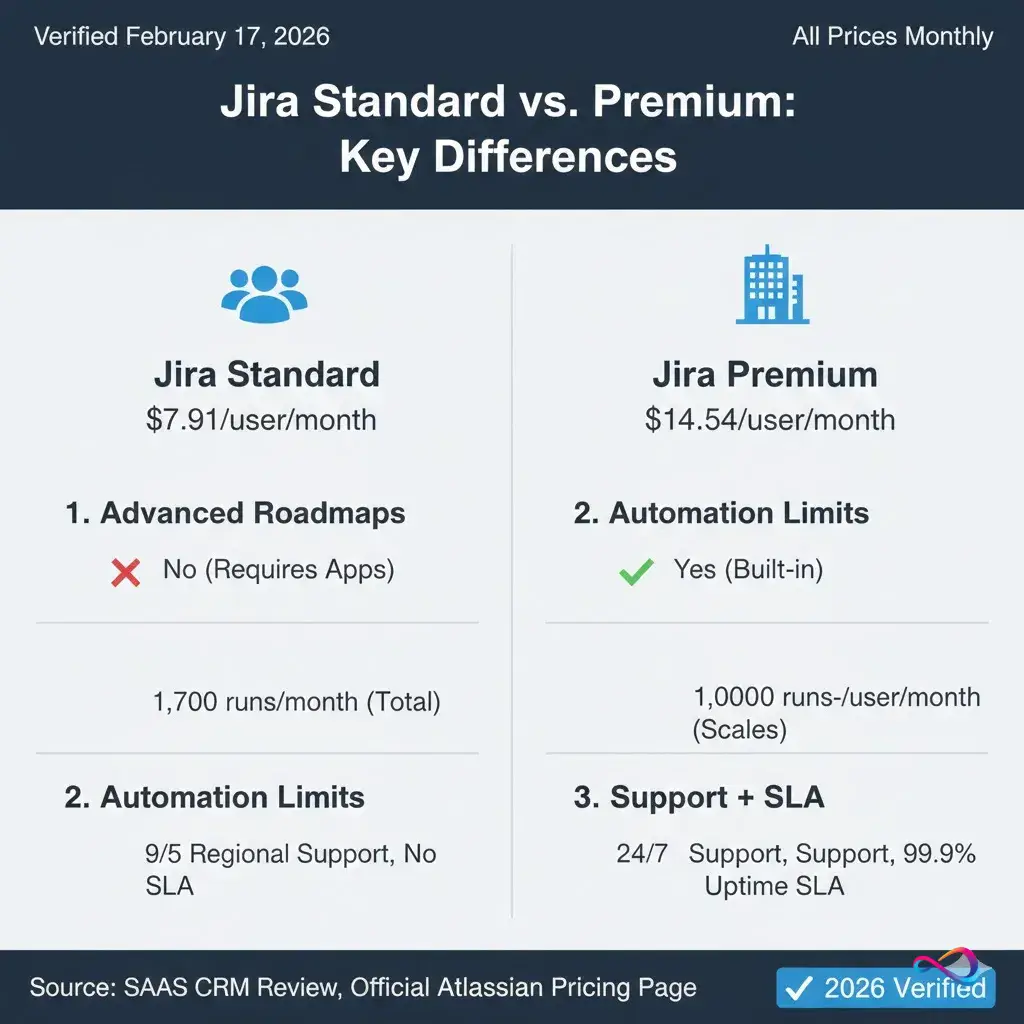
Jira Standard vs Premium (3 Key Differences)
TL;DR: Premium costs ~$6.63/user/month more. Worth it if you need Advanced Roadmaps, 24/7 support, or heavy automation.
1. Advanced Roadmaps (Premium-only)
What it is: Multi-project planning with dependencies, capacity management, and scenario modeling.
Who needs it: Teams running 3+ concurrent projects needing cross-team coordination.
Workaround cost: Third-party roadmap tools like BigPicture cost $10–$20/user/month—Premium pays for itself.
2. Automation Limits
- Standard: 1,700 runs/month (total, not per user) = ~57/day
- Premium: 1,000 runs/user/month (scales with team size)
Example: 100-user team = 100,000 runs/month on Premium vs. 1,700 on Standard.
Who needs Premium: Teams automating approvals, notifications, or issue transitions at scale.
3. Support + SLA
- Standard: 9/5 regional support, no uptime guarantee
- Premium: 24/7 support + 99.9% uptime SLA
Who needs Premium: Mission-critical workflows where downtime costs real money.
Break-even logic: If you’d spend >$6.63/user/month on apps to replicate these features, Premium is cheaper.
Real TCO per user (Calculator Tables)
These scenarios show actual monthly cost per user after adding common hidden costs:
Scenario 1: 50-User Engineering Team (Standard + Apps)
| Cost category | Provider | Per-user/mo | Total/mo |
|---|---|---|---|
| Jira Standard | Atlassian | $7.91 | $395.50 |
| Tempo Timesheets | Marketplace | $3 | $150 |
| Zephyr Scale (testing) | Marketplace | $5 | $250 |
| Atlassian Guard (SSO) | Atlassian | $2 | $100 |
| Confluence Standard | Atlassian | $5.75 | $287.50 |
| TOTAL | — | $23.66 | $1,183 |
Real cost vs. advertised: 3× higher ($23.66 vs. $7.91)
Scenario 2: 100-User Product Org (Premium + JSM)
| Cost category | Provider | Per-user/mo | Total/mo |
|---|---|---|---|
| Jira Premium (100 users) | Atlassian | $14.54 | $1,454 |
| JSM agents (10) | Atlassian | $20 × 10 agents | $200 |
| Confluence Premium | Atlassian | $11 | $1,100 |
| eazyBI reporting | Marketplace | $10 | $1,000 |
| TOTAL | — | $27.54 | $2,754 |
Real cost vs. advertised: 1.9× higher ($27.54 vs. $14.54)
Scenario 3: 300-User Enterprise (Enterprise + Full Stack)
| Cost category | Provider | Per-user/mo | Total/mo |
|---|---|---|---|
| Jira Enterprise (300 users, estimated) | Atlassian | ~$20 | ~$6,000 |
| JSM Premium (50 agents) | Atlassian | $47 × 50 | $2,350 |
| Atlassian Guard Premium | Atlassian | $5 | $1,500 |
| Confluence Enterprise | Atlassian | ~$15 | ~$4,500 |
| TOTAL | — | $48.17 | $14,350 |
Real cost vs. advertised: 2.4× higher
Enterprise pricing is custom; $20/user estimate based on industry averages. Contact Atlassian sales for exact quotes.
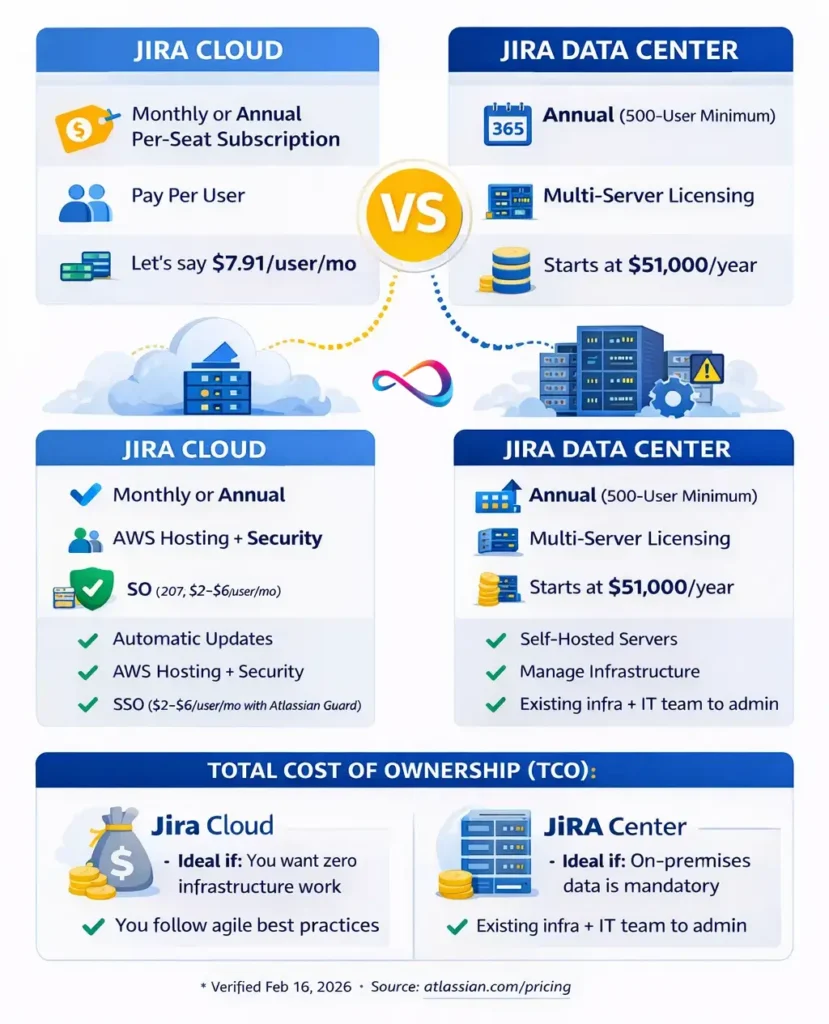
How Jira pricing works (Cloud vs Data Center)
Jira Cloud: Subscription + What You’re Paying For
Jira Cloud pricing is a per-seat SaaS subscription (starting at the rates shown above; final price varies by user count tier). You pay for:
- Seats (active users who can create/edit issues)
- Plan tier (Free/Standard/Premium/Enterprise)
- Billing cycle (monthly or annual)
What’s included:
- AWS-hosted infrastructure
- Automatic updates and security patches
- Data backups
- 99.9% uptime SLA (Premium+ only)
What’s NOT included:
- Marketplace apps
- Advanced SSO/identity (requires Atlassian Guard)
- Implementation/training services
- Multi-product licenses (JSM, Confluence)
Jira Data Center: Licensing + Infra + Admin TCO
Jira Data Center is Atlassian’s self-hosted option for compliance-sensitive environments.
⚠️ CRITICAL UPDATE: Data Center is sunsetting.
- New sales end: March 30, 2026 (60 days from now)
- End-of-life: March 28, 2029
- Last chance: Order before March 30 if you need on-prem
Pricing structure:
- Annual subscription only (no monthly)
- Starts at 500-user tier: $51,000/year for 500 users (source: Atlassian Licensing FAQ)
- 15% price increase applied February 17, 2026
- Volume discounts available for 1,000+ users
Total cost of ownership:
- License: $51k/year (500 users baseline)
- Infrastructure: servers, storage, networking
- IT/admin overhead: updates, security, backups
- Downtime risk: you own availability
When to consider Data Center:
- Regulatory mandate for on-premises data
- Existing infra + IT capacity
- Need 99.99% uptime with load balancing
⚠️ Sunset recommendation: Evaluate Cloud Enterprise or alternatives like Bitrix24 or self-hosted open-source PM tools if planning new deployments.
Maximum Quantity Billing (MQB) Explained
Maximum Quantity Billing is Atlassian’s billing model for monthly Cloud subscriptions, rolled out July 14–October 2025. It now applies to all monthly subscribers in 2026.
How it works:
- Your invoice charges the PEAK user count during the billing cycle.
- Add users mid-month: Bill increases immediately (prorated, then full price next month).
- Remove users mid-month: No credit or refund until next billing cycle.
Example:
- Start: 50 users ($7.91 × 50 = $395.50/month on Standard)
- Day 10: Add 25 users (peak = 75)
- Day 20: Remove 20 users (now 55)
- Bill this month: 75 users × $7.91 = $593.25 (charged for peak)
- Bill next month: 55 users × $7.91 = $435.05 (if no changes)
Why this matters:
- Seasonal teams get hit: Hire 10 interns for 2 weeks? You pay for them all month.
- No refunds for churn: Offboard contractors mid-month? Still charged until next cycle.
- Audit proactively: Inactive accounts count toward peak.
Mitigation strategies:
- Batch user changes at billing cycle start (Day 1–3).
- Remove inactive users before adding new ones.
- Consider annual billing—MQB only applies to monthly plans.
Source: Atlassian MQB Documentation
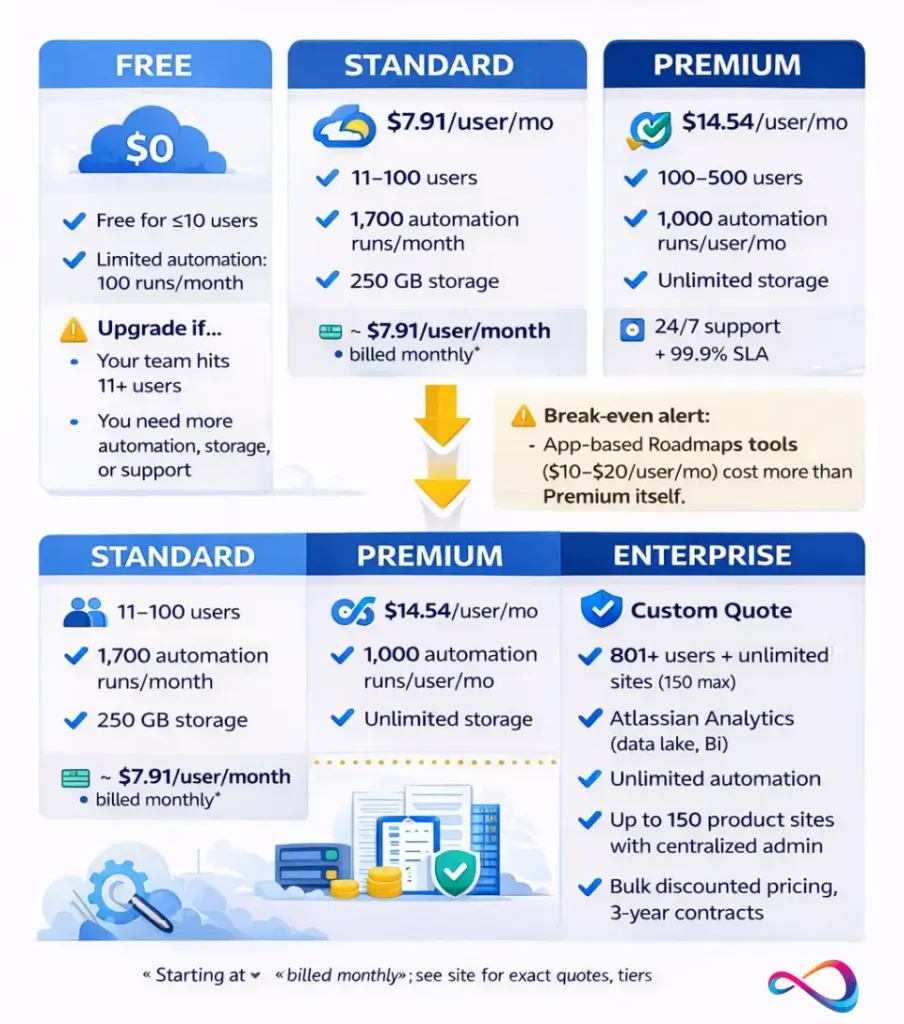
Jira Plans Explained (Features That Actually Change the Price)
Free Plan — Who It Fits, Hard Limits, Upgrade Triggers
Best for: Individuals, side projects, or teams of ≤10 users testing Jira before committing.
Price: $0 (forever, no credit card required)
You should choose this if…
- You have exactly 10 or fewer users (hard limit).
- Your workflows are basic (simple Kanban/Scrum boards).
- You can live with 2 GB total storage (~500–1,000 attachments).
Avoid if…
- You need >100 automation runs/month.
- You require support beyond community forums.
- You’re planning to grow past 10 users (forced upgrade).
Hidden costs: None at this scale.
Example scenario: A 5-person startup using Jira to manage sprints. No Marketplace apps, only Slack integration. Works until employee #11 joins—mandatory paid upgrade.
Standard Plan — Best For, What You Gain, Common Missing Pieces
Best for: Small-to-mid teams (11–100 users) with straightforward agile workflows.
Price: Starting at $7.91/user/month (monthly) | ~$75/user/year (annual, varies by tier).
You should choose this if…
- You need 9/5 regional support (not mission-critical).
- 250 GB storage is sufficient.
- 1,700 automation runs/month covers your needs.
Avoid if…
- You need 24/7 support or guaranteed SLAs.
- Automation is core (1,700 runs/month = ~57/day—easily exhausted).
- You want Advanced Roadmaps—Premium-only.
Hidden costs likely:
- Marketplace apps: Most teams add 2–4 apps. Budget +$5–$10/user/month.
- Atlassian Guard (SSO): +$2–$3/user/month for centralized identity.
Example scenario: A 40-person software team running Scrum boards. They add Tempo Timesheets ($3/user/month) and test management ($5/user/month). Real cost: $7.91 + $8 = $15.91/user/month—double base price.
Premium Plan — Who Should Pay More
Best for: Mid-to-large teams (100–500+ users) with complex workflows or compliance needs.
Price: Starting at $14.54/user/month (monthly) | ~$152/user/year (annual, varies by tier).
You should choose this if…
- You need Advanced Roadmaps (cross-project planning, dependencies).
- Automation is core (1,000 runs/user/month scales with team).
- You require 24/7 support + 99.9% uptime SLA.
Avoid if…
- Your team is <50 users and workflows are simple.
- Budget constraints prevent doubling per-seat cost.
Hidden costs likely:
- Marketplace apps: Same as Standard (+$5–$10/user/month).
- JSM: If running IT helpdesk ($20–$50/agent/month, separate from Jira Software).
- Confluence: Most Premium teams run Confluence Premium (+$11/user/month).
Example scenario: A 150-person product org needs cross-team roadmaps. Premium: $14.54 × 150 = $2,181/month. Add Confluence Premium ($1,650/month) and apps ($750/month).Total: $4,581/month ($54,972/year).
Break-even logic: Premium costs ~$6.63/user/month more than Standard. If you’d buy apps to replicate Advanced Roadmaps or automation ($5–$15/user/month), Premium is cheaper.
Enterprise Plan — Governance, Scale, Security
Best for: Orgs with 801+ users, multi-site deployments, or strict governance requirements.
Price: Custom (contact sales). Varies by user count, contract length, discounts.
You should choose this if…
- You need Atlassian Analytics (data lake, advanced BI).
- Compliance requires unlimited sites (up to 150) + centralized admin.
- Unlimited automation is mission-critical (Premium caps at 1,000/user/month).
Avoid if…
- You have <500 users and don’t need enterprise governance.
- Procurement can’t negotiate bulk/multi-year contracts.
Hidden costs:
- Implementation: $50k–$200k for enterprise rollouts.
- Training: $500–$1,500/user for change management.
- Guard Premium: Even at Enterprise, advanced identity is an add-on.
Procurement checklist:
- Security review: SOC 2, ISO 27001, HIPAA/GDPR docs
- Contract terms: 3-year for 10–15% discounts
- Renewal clauses: lock pricing or accept escalation?
- Exit strategy: data export, migration support
Hidden Costs (What Most Jira Pricing Pages Don’t Total Up)
Marketplace Apps (Time Tracking, Reporting, Test Management)
Reality check: Jira’s core is deliberately feature-light. Most teams add 2–5 Marketplace apps to fill gaps.
Common apps + 2026 pricing estimates:
| Category | App example | Cost/user/mo | Purpose |
|---|---|---|---|
| Time tracking | Tempo Timesheets | $3–$5 | Billable hours, project costing |
| Advanced reporting | eazyBI | $10–$20 | Custom dashboards, BI |
| Test management | Zephyr Scale, Xray | $5–$10 | Test cases, QA workflows |
| Workflow automation | ScriptRunner | $4–$8 | Advanced scripting, custom fields |
| Asset management | Insight | $5–$10 | IT asset tracking, CMDB |
⚠️ Hidden cost alert: App pricing is based on your max Jira user count—even if only 20% use the app. A 100-user site pays app pricing for 100 seats.
Marketplace pricing trend: App vendors may adjust pricing in response to platform changes. Budget conservatively with +10–15% buffer for Marketplace costs.
Identity/Security Add-Ons (Atlassian Guard)
Atlassian Guard monetizes security beyond basics.
Guard Standard (~$2–$3/user/month):
- SAML SSO
- Enforced 2FA
- User provisioning (SCIM)
Guard Premium (~$5–$6/user/month):
- Data residency controls
- User access reviews
- Mobile device management
Why this matters: Many orgs assume Enterprise includes full SSO. It doesn’t. Budget Guard separately.
Implementation: Admin Time, Workflow Design, Training
Internal costs often exceed license costs in year one.
Realistic budget (100-user deployment):
- Admin time: 20–40 hours (workflow setup, permissions). Cost: $2,000–$8,000.
- Training: $500–$1,000/cohort for workshops. Budget 3–5 cohorts.
- Change management: If replacing tools like Trello or Teamwork, budget 10–20% of annual license cost.
Multi-Product Reality: JSM + Confluence
Jira Software rarely exists alone.
Jira Service Management (JSM):
- IT helpdesk, customer support, ticketing.
- Pricing: $20–$50/agent/month (agents ≠ Jira users).
Confluence:
- Documentation, knowledge base, meeting notes.
- Standard: $5.75/user/month | Premium: $11/user/month.
Integration cost: These share user licensing with Jira (same site), but bill separately. A 100-user org running all three hits $25+/user/month before Marketplace apps.
MQB Cost Spike Simulator
Three real scenarios showing how Maximum Quantity Billing impacts your bill:
Scenario 1: Add Contractor for 1-Day Emergency
- Starting: 50 users (Standard)
- Day 5: Add 1 contractor to fix critical bug
- Day 6: Remove contractor
- Peak count: 51 users
- MQB result: Charged for 51 users entire month ($403.41 vs. normal $395.50)
- Overpay delta: $7.91 for 1 day of work
Lesson: For ultra-short access, use guest accounts or contractor’s own account.
Scenario 2: Ramp Team Mid-Quarter
- Starting: 75 users (Premium)
- Day 10: Hire 10 new engineers
- Day 15: Hire 5 more
- Peak count: 90 users
- MQB result: Charged for 90 users from day 15 onward ($1,308.60 vs. original $1,090.50)
- Overpay delta: $218.10 for partial month
Lesson: Batch new hires at billing cycle start (Day 1–2) to avoid paying full rate for partial work period.
Scenario 3: Offboard Team Mid-Cycle (No Credit)
- Starting: 100 users (Standard)
- Day 10: Layoff 20 users
- Peak count: 100 users
- MQB result: Charged for 100 users entire month ($791)
- No credit for 20 removed users
- Next month: Charged for 80 users ($632.80, if no changes)
Lesson: Time offboarding for Day 1 of new billing cycle to immediately realize savings.
Marketplace App Stack Budget (By Use-Case)
Budget estimates for common team types (per user/month, based on 100-user deployment):
Engineering Team Stack
Core needs: Time tracking, reporting, test management, code review integration
Recommended apps:
- Tempo Timesheets: $3–$5
- Zephyr Scale (test mgmt): $5–$10
- eazyBI (advanced reports):$10–$20
Total add-on cost: $18–$35/user/month
Combined with Jira Standard: $25.91–$42.91/user/month
QA / Test Team Stack
Core needs: Test case management, automation tracking, defect workflows
Recommended apps:
- Xray (test management): $10–$15
- ScriptRunner (workflow automation): $4–$8
Total add-on cost: $14–$23/user/month
Combined with Jira Standard: $21.91–$30.91/user/month
ITSM / Service Desk Stack
Core needs: SLA tracking, asset management, CMDB integration
Note: Most ITSM teams should evaluate Jira Service Management ($20–$50/agent/month) instead of Jira Software + apps.
If using Jira Software:
- Insight (asset management): $5–$10
- JSM integration apps: $5–$15
Total add-on cost: $10–$25/user/month
PMO / Enterprise Governance Stack
Core needs: Portfolio management, resource planning, financial tracking
Recommended apps:
- Advanced Roadmaps (included in Premium—avoid if on Standard)
- Portfolio management apps: $10–$25
- Financial tracking integrations: $5–$15
Total add-on cost: $15–$40/user/month (if on Standard)
Alternative: Upgrade to Premium ($14.54/user/month) for built-in Advanced Roadmaps.
Picking the Right Plan (Consultant-Style Decision Framework)
Decision Tree
Start here:
- Do you have ≤10 users?
- Yes: Free plan. Done.
- No: Proceed to #2.
- Do you need 24/7 support with SLAs?
- Yes: Premium or Enterprise.
- No: Proceed to #3.
- Do you need Advanced Roadmaps (multi-project planning)?
- Yes: Premium or Enterprise.
- No: Proceed to #4.
- Do you run heavy automation (>1,700 runs/month)?
- Yes: Premium (1,000 runs/user/month scales better).
- No: Standard suffices.
- Do you have 801+ users or need unlimited automation/sites?
- Yes: Enterprise.
- No: Standard or Premium.
4 Common Buyer Profiles
| Profile | Team size | Recommended plan | Annual cost (plan only)*** | Notes |
|---|---|---|---|---|
| Startup | 5–10 users | Free | $0 | Upgrade at 11 users. |
| Small team | 20–50 users | Standard | $2,000–$5,000 | Add $5–$10/user/mo for apps. |
| Mid-size | 75–150 users | Premium | $15,000–$30,000 | Budget for Confluence, JSM, 3–5 apps. |
| Enterprise | 300–1,000 users | Enterprise | $70,000+ (varies) | Negotiate multi-year for 10–15% discounts. |
Estimates based on verified annual tier pricing; actual costs vary by exact user count and contract terms.
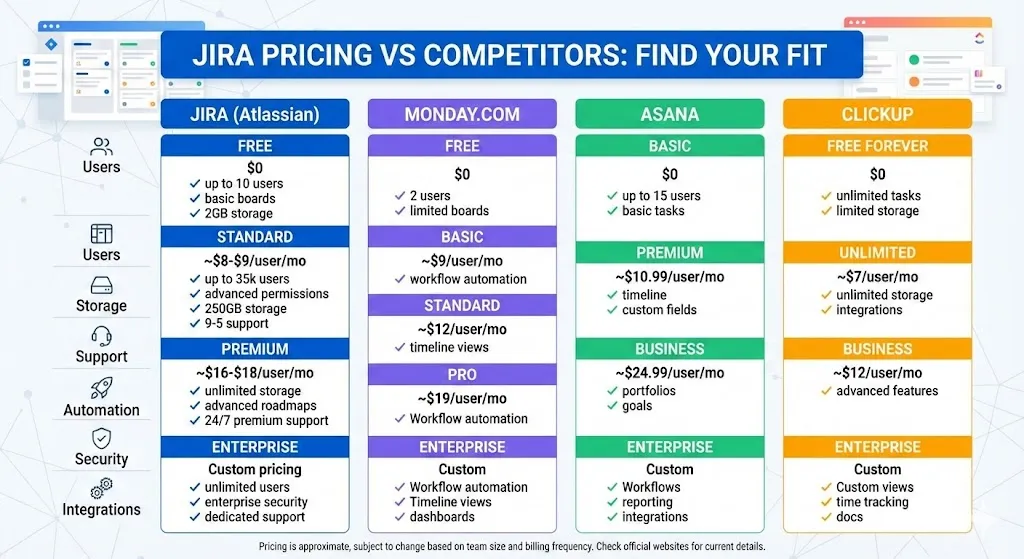
Jira Pricing vs Competitors (When Jira Is NOT the Best Value)
Comparison Table: Jira vs Top Alternatives
| Feature | Jira Standard | Asana | monday.com Pro | ClickUp Business | Linear Business |
|---|---|---|---|---|---|
| Price (per user/month, annual) | Starting $7.91 (~$6.80 annual avg) | $24.99 | $19 | $12 | $14 |
| Free plan | 10 users, 2 GB | 15 users | 2 users, 3 boards | Unlimited users, 100 MB | 250 issues |
| Storage | 250 GB | Unlimited | 100 GB | Unlimited | Unlimited |
| Support | 9/5 Regional | Priority | Email + Chat | 24/7 for Business+ | |
| Automation | 1,700 runs/month | Unlimited | 25,000 actions/month | Advanced | Built-in |
| Best for | Software teams, agile | Cross-functional PM | Visual workflows | Power users, agencies | Fast-moving eng teams |
Sources: Prices verified via official vendor sites (February 2026). Learn more about monday.com, Linear review, and Wrike for enterprise teams.
When to Choose Jira
- Running Scrum/Kanban at scale (50+ users). Jira’s agile tooling is unmatched.
- Tight integration needed with Bitbucket, Confluence, or Atlassian ecosystem.
- Technical team comfortable with customization.
When NOT to Choose Jira (Switch Signals)
- Steep learning curve is a blocker. Jira overwhelms non-technical teams.Try: Asana (simpler UI), monday.com (visual workflows), Trello (Kanban simplicity).
- Cost creep from apps. If paying $20+/user/month after apps, try: ClickUp (all-in-one at $12/user), Teamwork ($12.50/user).
- You don’t need agile-specific features. For general task management, Jira is overkill.
Try: Asana for cross-functional teams, Trello for simple boards, Miro for visual collaboration.
Dev-Adjacent Alternatives: Azure DevOps / GitHub Issues / Linear
For software teams, here’s how Jira stacks against dev-native tools:
| Tool | Price | Best for | Jira advantage | Alternative advantage |
|---|---|---|---|---|
| Azure DevOps | Free (5 users) + $6/user | Microsoft shops | Better agile boards, easier for non-devs | Tighter Azure/VS integration |
| GitHub Issues | Free (unlimited) or $4/user (Team) | GitHub-native teams | More robust workflow automation | Seamless with GitHub repos, lower cost |
| Linear | $8/user (Basic), $14/user (Business) | Fast-moving eng teams | Mature ecosystem, more integrations | Speed, elegant UX, keyboard shortcuts |
When to stick with Jira:
- You need JSM or Confluence in same ecosystem.
- Team is >100 users needing enterprise governance.
When to switch:
- Team lives in GitHub, rarely leaves repo. Use GitHub Issues.
- Want faster, cleaner UX without 1,000+ integrations. Use Linear.
- Already on Azure/Microsoft 365, want single vendor. Use Azure DevOps.
FAQs
Is Jira free?
Yes, for up to 10 users. Jira’s Free plan includes unlimited tasks, projects, messages with 2 GB storage. It’s free forever, but limits kick in on automation (100 runs/month) and support (community-only). Once you exceed 10 users, mand upgrade to paid.
How much does Jira cost per month?
It depends on plan and team size:
- Standard: Starting at $7.91/user/month (monthly billing).
- Premium: Starting at $14.54/user/month (monthly billing).
- Example (50 users, Standard): 50 × $7.91 = $395.50/month ($4,746/year monthly billing, or ~$4,075/year annual billing).
Pricing varies by user count tier—check the official pricing page for exact quotes.
What’s the difference between Jira Standard and Premium?
The big three:
- Advanced Roadmaps (Premium only): Multi-project planning, dependencies, capacity management.
- Automation limits: Standard caps at 1,700 runs/month; Premium offers 1,000 runs/user/month (scales with team).
- Support: Standard = 9/5 regional; Premium = 24/7 with 99.9% uptime SLA.
Cost difference: ~$6.63/user/month. Worth it if you’d buy Marketplace apps for roadmaps or automation ($5–$15/user/month).
What is Jira Enterprise pricing?
Enterprise is custom-priced for teams of 801+ users. Includes everything in Premium, plus:
- Atlassian Analytics (data lake, BI).
- Unlimited automation (no caps).
- Up to 150 sites (multi-tenant control).
Pricing varies by user count, contract length, negotiated terms. Contact Atlassian sales for quotes. Expect volume discounts for 1,000+ users or multi-year deals.
How does Jira billing work if you add/remove users mid-month?
Maximum Quantity Billing (MQB) applies:
- Add users mid-month: Pay immediately (prorated current cycle, then full price next month).
- Remove users mid-month: No refund or credit. Billed for peak user count during cycle. Savings apply next month only.
Example: Start with 50 users, add 20 on day 10, remove 15 on day 20. You pay for 70 users this month (the peak). Next month, pay for 55 (actual count if no changes).
Source: MQB Documentation.
Is Jira cheaper annually?
Yes—typically 4–18% cheaper, depending on team size. Larger teams get better volume discounts. Annual billing locks you in for 12 months but saves money.
Examples:
100 users (Standard):
- Monthly: $791 × 12 = $9,492/year
- Annual: $9,050/year (✅ verified)
- Savings: $442/year (4.7%)
300 users (Standard):
- Monthly: $2,373 × 12 = $28,476/year
- Annual: $23,500/year (✅ verified)
- Savings: $4,976/year (17.5%)
Trade-off: Annual = less flexibility. If headcount shrinks, you’re stuck paying for unused seats until renewal.
What are the hidden costs of Jira?
Four cost multipliers:
- Marketplace apps: +$5–$15/user/month (time tracking, reporting, test mgmt).
- Atlassian Guard (SSO/identity): +$2–$6/user/month.
- Multi-product licenses: JSM ($20–$50/agent/month), Confluence ($5.75–$11/user/month).
- Implementation/training: $2,000–$10,000 one-time (100-user deployment).
Reality: A “$7.91/user/month” Standard plan often costs $20–$30/user/month after hidden costs.
Jira vs Asana pricing—what’s better value?
Jira is cheaper for software teams:
- Jira Standard: Starting at $7.91/user/month.
- Asana Advanced: $24.99/user/month.
Asana is better value for non-technical teams:
- Simpler UI, faster onboarding.
- All features included (time tracking, goals, portfolios) without add-ons.
Break-even: If you’d need $15+/user/month in Jira apps to match Asana’s built-in features, Asana wins. If you’re also weighing monday.com, our Asana vs monday.com comparison covers pricing, automation limits, and team fit in detail.
Does Jira charge for inactive users?
Yes, by default. Jira charges for all active users in your site—even if they haven’t logged in for months. Under MQB, inactive users count toward peak.
How to avoid:
- Audit users monthly. Deactivate anyone who hasn’t logged in for 30+ days.
- Use “Deactivated” status (not “Deleted”) to preserve historical data while stopping charges.
- Set calendar reminders to review users at billing cycle start.
Jira total cost of ownership (TCO)
TCO for 100-user team over 3 years (Standard annual, including common add-ons):
| Cost category | Year 1 | Year 2 | Year 3 | 3-year total |
|---|---|---|---|---|
| Jira Standard licenses (100 users) | $9,050 | $9,050 | $9,050 | $27,150 |
| Marketplace apps (3 @ $6/user/mo avg) | $7,200 | $7,200 | $7,200 | $21,600 |
| Atlassian Guard Standard | $3,600 | $3,600 | $3,600 | $10,800 |
| Confluence Standard | $6,900 | $6,900 | $6,900 | $20,700 |
| Implementation (Year 1 only) | $5,000 | $0 | $0 | $5,000 |
| Admin overhead (20 hrs/year @ $100/hr) | $2,000 | $2,000 | $2,000 | $6,000 |
| TOTAL TCO | $33,750 | $28,750 | $28,750 | $91,250 |
Per-user TCO: $304/user/year (averaged over 3 years) = $25.33/user/month—more than 3× base Jira license.
Assumptions: Stable 100-user count; moderate Marketplace usage (3 apps); annual price increases excluded.
Best Jira plan for agile teams?
For agile teams of 20–100 users: Standard.
- Get Scrum/Kanban boards, backlogs, sprints, reports.
- 1,700 automation runs/month handles basic workflows.
Upgrade to Premium if:
- Running multiple agile teams needing cross-project roadmaps (Advanced Roadmaps).
- Relying heavily on automation (auto-assign reviewers, approval chains).
Skip Enterprise unless:
- 500+ users or needing governance/compliance features.
Jira pricing for project management teams?
For non-technical PM teams, Jira is often overkill.
Consider instead:
- Asana ($24.99/user/month): Better for cross-functional workflows, easier to learn.
- monday.com Pro ($19/user/month): Visual, flexible, great for marketing/creative teams.
- ClickUp ($12/user/month): All-in-one, budget-friendly, power users.
- Wrike (Custom pricing): Enterprise-grade for complex portfolios.
Choose Jira only if:
- PM team works closely with engineering, needs shared tooling.
- Already invested in Atlassian ecosystem (Confluence, Bitbucket).
Methodology + Sources
How We Verified Pricing
Pricing verified: February 16, 2026 via the following official sources:
- Atlassian Jira Pricing (primary source for Cloud plans)
- Maximum Quantity Billing Documentation (MQB mechanics, timeline)
- Jira Licensing FAQ (Data Center pricing, EOL dates, tiering)
What we compared:
- Jira Cloud (Free, Standard, Premium, Enterprise) for monthly and annual billing.
- User tier pricing at documented breakpoints (10, 25, 50, 100, 300, 500 users where specified).
- Jira Data Center annual licensing (500-user tier baseline).
- MQB implementation timeline (July 14–Oct 2025 rollout).
- Competitor pricing (Asana, monday.com, ClickUp, Linear, Wrike, Azure DevOps, GitHub) verified via official vendor sites.
Assumptions:
- “Starting at” pricing: All per-user monthly prices are baseline rates; actual pricing may vary by user count tier. We’ve noted verified annual totals where Atlassian publishes them (e.g., $9,050 for 100 users Standard).
- Hidden costs: Estimates based on Atlassian Marketplace app pricing and typical usage patterns for 100-user teams.
- TCO calculations: Assume 3-year retention with stable headcount, moderate Marketplace adoption (3 apps).
- Data Center: $51,000/year for 500 users verified from licensing page; subject to volume discounts.
- MQB timeline: Rolled out July 14–October 2025 per Atlassian support documentation.
Screenshots used: Pricing page snapshots (Feb 16, 2026), MQB documentation excerpt, pricing calculator examples.
Disclosure: This guide contains factual pricing information sourced from official vendor documentation. No affiliate links included. No compensation received from Atlassian or competitors.
Conclusion
Understanding Jira’s total cost in 2026 means looking beyond the per-seat sticker price. While Jira Cloud offers a genuinely free tier for small teams and competitive starting rates ($7.91/user/month for Standard, $14.54/user/month for Premium), true expenses escalate 2–3× once you factor in Marketplace apps, security add-ons like Atlassian Guard, and multi-product needs (Confluence, JSM).
Maximum Quantity Billing adds complexity for monthly subscribers—your bill now ties to peak usage, not end-of-month headcount, making proactive user management essential to avoid surprise charges. Rolled out July–October 2025, this billing model now applies throughout 2026 for monthly subscriptions.
For most teams, choosing the right Jira plan comes down to three questions:
- Do you have ≤10 users? Stick with Free.
- Do you need Advanced Roadmaps or 24/7 support? Premium is worth ~$6.63/user/month premium over Standard.
- Running enterprise-scale deployment (300+ users)? Negotiate Enterprise contract for volume discounts and unlimited automation.
But don’t default to Jira just because it’s the industry standard. For non-technical teams or those prioritizing UX over customization, alternatives like Asana, monday.com, or ClickUp often deliver better value. For dev-native teams already on GitHub, GitHub Issues or Linear may be faster and cheaper. For CRM-integrated project management, consider Zoho CRM’s project tools or Salesforce-integrated workflows.
The right tool is the one your team will actually use—and that starts with honest cost transparency. Use this guide to build your 2026 budget with confidence, knowing exactly what Jira’s license and subscription costs will run you, hidden fees included.
Glossary
| Term | Definition |
|---|---|
| Seat | A licensed user account in Jira. Active seats are billed; deactivated users are not. |
| SLA (Service Level Agreement) | Atlassian’s uptime and support response guarantees. Premium includes 99.9% uptime SLA; Standard does not. |
| Automation limits | Number of rule executions per billing cycle. Standard caps at 1,700/month; Premium offers 1,000/user/month. |
| Marketplace apps | Third-party extensions sold via Atlassian Marketplace. Priced separately, billed based on site user count. |
| Maximum Quantity Billing (MQB) | Atlassian’s monthly billing model charging based on peak user count during cycle, not end-of-month count. Rolled out July–Oct 2025; standard for monthly subscriptions in 2026. |
| Data residency | Controls over where Jira data is physically stored (e.g., US, EU, AU). Available in Premium+. |
| Advanced Roadmaps | Premium-tier feature for cross-project planning, dependencies, capacity management. |
| Atlassian Guard | Identity and security add-on for SSO, SCIM, user access controls. Priced separately from Jira licenses. |
| JSM (Jira Service Management) | Atlassian’s IT service desk and ticketing platform. Priced per agent ($20–$50/agent/month), separate from Jira Software user licensing. |
About the author

I’m Macedona, an independent reviewer covering SaaS platforms, CRM systems, and AI tools. My work focuses on hands-on testing, structured feature analysis, pricing evaluation, and real-world business use cases.
All reviews are created using transparent comparison criteria and are updated regularly to reflect changes in features, pricing, and performance.