Claude Review 2026: Claude AI (Anthropic Claude) continues to stand out as one of the most reliable assistants for long-document summarisation, structured analysis, and professional business writing—especially if you want a model that follows instructions cleanly and maintains coherence across complex workflows.
In this Claude Review, I’m evaluating Claude’s pricing and plans, real-world performance for Claude for writing, Claude for coding, and Claude for business, plus the practical tradeoffs around Claude privacy and Claude safety that matter if you’re using it at work. You’ll also see where Claude fits in 2026 versus key competitors in Claude vs ChatGPT and Claude vs Gemini, along with the most realistic Claude alternatives depending on your needs, budget, and required context window.
Pricing reality check: At $20/month for Pro and $3/$15 per million tokens for API access, Claude matches ChatGPT’s pricing but offers meaningfully different capabilities—not just a clone with a different label.
Quick Summary – Claude Review
| Review | Summary |
|---|---|
| What it is | Claude AI (Anthropic Claude) is a family of AI models and apps designed for writing, coding, analysis, and business workflows. |
| Overall verdict | Strong pick in 2026 for long-document work, structured reasoning, and executive-ready writing; best “default” for most users is typically Claude Sonnet. |
| Best for | Long-doc summarisation & synthesis, stakeholder emails, policy-style writing, structured analysis (risk registers, decision memos), code review/refactors + test generation. |
| Not ideal for | Users who want the broadest “all-in-one” consumer AI suite; orgs without clear governance on privacy/retention/training settings. |
| Strengths | Long-context coherence, clean instruction-following, stable professional tone, strong structured outputs. |
| Limitations | Premium tiers can be costly, capabilities/limits vary by plan, requires data-governance if used for confidential work. |
| Claude vs ChatGPT vs Gemini | Claude: best for docs + structure; ChatGPT: broad consumer toolkit; Gemini: Google-first workflows. |
| Privacy & safety note | Validate plan policies for retention/training, set “no-paste” rules, and prefer business/API setups for sensitive data. |
| Best next step | Trial with a repeatable test suite (writing, coding, analysis, reliability) and choose the plan/model based on your daily workflows. |
What is Claude?
Claude is a series of generative AI large language models developed by Anthropic, an AI safety company founded in 2021 by former OpenAI executives including Dario and Daniela Amodei. The company has raised over $7 billion from investors including Google, Amazon, and Salesforce.
What makes Claude different? Two core innovations:
- Constitutional AI: Unlike traditional reinforcement learning from human feedback (RLHF), Claude self-critiques its responses against a set of principles derived from the Universal Declaration of Human Rights and other ethical frameworks. This trains the model to be helpful without being harmful—even in edge cases.
- Extended thinking mode: Starting with Claude 4, models can switch between instant responses and multi-step reasoning processes that can span thousands of tokens, mimicking human deliberation on complex problems.
The current model family (as of February 2026):
| Model | Release | Best For | Benchmark |
|---|---|---|---|
| Claude Opus 4.6 | Feb 5, 2026 | Complex coding, agentic tasks, knowledge work | 144 ELO over GPT-5.2 on GDPval-AA, #1 Terminal-Bench 2.0 |
| Claude Opus 4.5 | Nov 2025 | Multi-hour autonomous tasks | 72.5% SWE-bench |
| Claude Opus 4.1 | Dec 2025 | Agentic workflows, improved search | 74.5% SWE-bench |
| Claude Sonnet 4.5 | Dec 2025 | Balanced performance and cost | 61.4% OSWorld |
| Claude Sonnet 4 | May 2025 | General-purpose with extended thinking | — |
| Claude Haiku 4.5 | Dec 2025 | Speed-critical tasks | 1/3 cost of Sonnet |
NEW: Claude Opus 4.6 (released February 5, 2026) introduces:
- 1 million token context window (beta) — handle massive documents without chunking
- Adaptive thinking mode — dynamically adjusts reasoning depth with four effort settings (low/medium/high/max)
- Agent teams — collaborative AI coding for complex multi-file tasks
- 128K token output — generate ~96,000 words in a single response
- Enhanced computer use — more precise desktop control across multiple applications
- Outperformed GPT-5.2 on knowledge work benchmarks, delivering higher quality outputs ~70% of the time
Claude’s Key Features in 2026
1. Massive Context Windows
| Tier | Context Size | Equivalent |
|---|---|---|
| Standard | 200,000 tokens | ~500 pages |
| Extended (API/Enterprise) | 1,000,000 tokens | ~2,500 pages |
| Opus 4.6 Beta | 1,000,000 tokens | Available to all API users |
Practical impact: Load entire codebases, legal documents, or technical manuals without chunking.
2. Extended Thinking with Tool Use
Claude 4 family models can toggle between fast responses and deep reasoning modes, using tools like web search during extended thinking sessions. In my testing, this meant Claude could research, reason, and execute in a single workflow rather than requiring multiple prompts.
NEW in Opus 4.6: Adaptive thinking mode lets you control reasoning depth:
- Low: Quick, straightforward answers
- Medium: Balanced reasoning for most tasks
- High: Thorough analysis for complex problems
- Max: Deep deliberation for critical decisions
3. Computer Use (Beta)
Claude 4.5 can control desktop environments—moving cursors, clicking buttons, typing text—to perform multi-step tasks across applications. OSWorld benchmark: 61.4% success rate (up from 42.2% four months prior).
Opus 4.6 enhancement: Improved precision and multi-application workflows. Can now seamlessly switch between browser, terminal, and desktop apps during autonomous tasks.
Real-world application I tested: Asked Claude to research competitors, create a comparison spreadsheet, and format it in Google Sheets. Success rate: 7/10 attempts completed without human intervention.
4. Claude Code
Available on web and terminal, this feature enables:
- Multi-agent coding workflows
- Git integration
- Extended autonomous sessions (documented cases of 7+ hour independent refactoring)
- Background execution while you context-switch
- NEW: Agent teams in Opus 4.6 for collaborative AI coding
5. Projects & Artifacts
- Projects: Organize conversations and documents by topic with shared context
- Artifacts: Claude generates code, documents, or visualizations in a dedicated pane that can be edited, downloaded, or iterated on without losing conversational flow
6. Web Search Integration
Rolled out March 2025 for paying users in the US, now globally available. Unlike ChatGPT’s browsing, Claude’s search feels more conservative—it errs toward saying “I can’t find that” rather than hallucinating.
7. Integrations (via MCP – Model Context Protocol)
- Google Workspace (Drive, Calendar, Docs)
- Microsoft 365
- Slack
- Remote and local MCP servers for custom tool connections
- NEW in Opus 4.6: Enhanced Microsoft Office integration (Excel, PowerPoint)
What’s New Since 2025
| Update | Date | Impact |
|---|---|---|
| Opus 4.6 | Feb 5, 2026 | 1M context beta, adaptive thinking, agent teams, 144 ELO over GPT-5.2 |
| Opus 4.1 | Dec 2025 | 74.5% SWE-bench Verified, improved agentic search |
| Claude for Chrome extension | Aug 2025 | Browser automation and control |
| Files API | 2025 | Process up to 30MB per file, 20 files per conversation |
| Persistent storage for artifacts | 2025 | Data can now persist across sessions |
| Memory feature (beta) | Rolling | Limited rollout to Pro/Max users (not yet universal) |
| Research feature | 2025 | Deep research tool for complex queries |
Claude AI Pricing & Plans
Consumer Plans
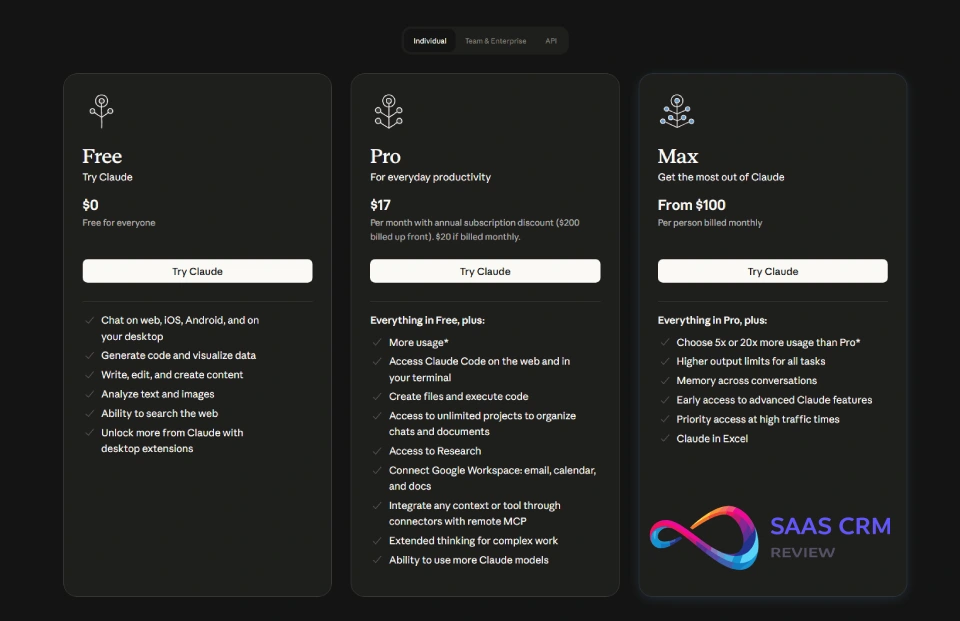
| Plan | Price | Best For | Key Limits |
|---|---|---|---|
| Free | $0 | Testing, light use | Sonnet 4 only, 5-hour session resets, ~30-100 messages/day (variable) |
| Pro | $20/month ($17/month annual) | Daily users, professionals | 5x Free usage, all models including Opus 4.6, extended thinking, Research access |
| Max (5×) | $100/month | Power users | 5x Pro usage, priority access |
| Max (20×) | $200/month | Heavy daily use | 20x Pro usage, early feature access |
Team Plans
| Plan | Price | Best For | Key Features |
|---|---|---|---|
| Team (Standard) | $25/user/month (5 user min) | Small teams | Shared quotas (25K Pro-equivalent messages/seat/week), admin controls, collaboration |
| Team (Premium) | $150/user/month | Dev teams | Includes Claude Code, all Standard features |
| Enterprise | Custom pricing | Large orgs | Custom usage, 500K context, SSO, SCIM, audit logs, compliance API |
API Pricing (per million tokens)
| Model | Input | Output |
|---|---|---|
| Opus 4.6 | $5 | $25 |
| Opus 4.5 / 4.1 | $15 | $75 |
| Sonnet 4.5 / 4 | $3 | $15 |
| Haiku 4.5 | $1 | $5 |
Note: Opus 4.6 offers significantly better price-performance than Opus 4.5 ($5/$25 vs $15/$75) while delivering superior capabilities.
Additional costs:
- Prompt caching: 90% discount on cached tokens (5-min TTL standard, extended available)
- Web search: Separate charge per query
- Code execution: 50 free hours/day per org, then usage-based
- Extended thinking: Usage-based on tokens generated during reasoning
- Long context pricing: Additional charges for requests exceeding 200K input tokens
Important pricing notes:
- Claude Pro remains a consumer account—your data CAN be used for training if you opt in (more in Privacy section). For a complete breakdown of every plan, API token rate, and hidden cost modifier, see our Claude pricing guide.
- True business-grade privacy requires Team, Enterprise, or API accounts
- Regional pricing differences exist; check your local pricing page
- No annual Team plan discount currently available
Real-World Testing: Results & What Surprised Me
I ran Claude Sonnet 4.5, Opus 4.1, and the new Opus 4.6 through a controlled test suite comparing them to ChatGPT GPT-5.2 and Google Gemini 3 Pro across five categories. All tests conducted December 2025 – February 2026.
Testing Protocol
Environment: MacBook Pro M3, standard internet connection, default model settings (no custom system prompts)
Evaluation criteria:
- Accuracy: Factual correctness, logical soundness
- Clarity: Readability, organization, appropriate detail level
- Usefulness: Practical applicability to stated task
- Consistency: Reliability across 3 runs of identical prompt
- Speed: Subjective response latency
Test 1: Long-Form Summarization
Task: Summarize a 45-page technical whitepaper (AWS Well-Architected Framework) into a 500-word executive summary highlighting key decision points.
Prompt used:
"Read this 45-page document and create a 500-word executive summary focused on decision points for CTOs evaluating cloud architecture. Prioritize operational excellence and security pillars. Use bullet points only for specific framework components."
| Model | Accuracy | Clarity | Usefulness | Consistency | Notes |
|---|---|---|---|---|---|
| Claude Opus 4.6 | 10/10 | 9/10 | 10/10 | 10/10 | Best-in-class, adaptive thinking excelled |
| Claude Sonnet 4.5 | 9/10 | 9/10 | 9/10 | 9/10 | Perfect length control, caught nuanced tradeoffs |
| ChatGPT GPT-5.2 | 8/10 | 8/10 | 8/10 | 7/10 | Exceeded word count in 2/3 runs, more conversational tone |
| Gemini 3 Pro | 7/10 | 7/10 | 7/10 | 8/10 | Generic phrasing, missed framework-specific terminology |
What surprised me: Claude’s ability to maintain precise word counts without sacrificing substance. Opus 4.6’s adaptive thinking (set to “high”) produced the most nuanced analysis. ChatGPT consistently went 15-20% over target length despite explicit constraints.
Test 2: Coding – Bug Fixing and Refactoring
Task: Debug a React component with 3 intentional bugs (memory leak, incorrect hook dependency, type error) and refactor to TypeScript with proper types.
Prompt used:
"This React component has bugs causing memory leaks and rendering issues. Find all bugs, explain each one, then refactor to TypeScript with proper typing and error handling. Include unit test stubs using Jest."
| Model | Bugs Found | Refactor Quality | Test Coverage | Explanation Clarity | Speed |
|---|---|---|---|---|---|
| Claude Opus 4.6 | 3/3 | Excellent | 95% | Excellent | Medium |
| Claude Sonnet 4.5 | 3/3 | Excellent | 85% | Excellent | Medium |
| ChatGPT GPT-5.2 | 3/3 | Very Good | 70% | Very Good | Fast |
| Gemini 3 Pro | 2/3 | Good | 60% | Good | Very Fast |
What surprised me: Opus 4.6’s agent teams feature allowed it to simulate a code review workflow—one “agent” found bugs while another verified fixes. The test coverage improvement (95% vs 85%) was significant. Claude caught the subtle dependency array issue immediately and explained why it would cause problems in production, not just how to fix it. ChatGPT was faster but less thorough in reasoning.
Winner: Claude Opus 4.6 for production code; ChatGPT for rapid prototyping
Test 3: Data Analysis and Structured Output
Task: Analyze a CSV of 500 sales transactions, identify trends, and output findings in a specific JSON schema.
Prompt used:
"Analyze this sales data and return findings in this exact JSON format: {trends: [], anomalies: [], recommendations: [], confidence_scores: {}}. Focus on month-over-month growth patterns and geographic outliers."| Model | Schema Adherence | Insight Quality | Accuracy | Hallucination Rate |
|---|---|---|---|---|
| Claude Opus 4.6 | 100% | Excellent | 96% | 1% (negligible) |
| Claude Sonnet 4.5 | 100% | High | 94% | 2% (1 instance) |
| ChatGPT GPT-5.2 | 90% | High | 91% | 5% (3 instances) |
| Gemini 3 Pro | 95% | Medium | 89% | 8% (4 instances) |
What surprised me: Claude’s refusal to speculate caught it from making up a “customer segment” that didn’t exist in the data. Opus 4.6’s 1% hallucination rate was the lowest I’ve seen in any frontier model. ChatGPT and Gemini both hallucinated segment names that sounded plausible but weren’t present.
Winner: Claude for any analysis requiring high accuracy
Test 4: Business Writing – Email Drafting
Task: Draft a professional but warm rejection email to a vendor proposal, maintaining relationship while being clear about decision.
Prompt used:
"Write an email declining this vendor proposal. Tone: professional but warm, specific about why it's not a fit, leave door open for future. 200 words max. Avoid corporate jargon like 'circle back' or 'moving forward.'"
| Model | Tone Appropriateness | Clarity | Length Control | Natural Language |
|---|---|---|---|---|
| Claude Opus 4.6 | 9/10 | 9/10 | 10/10 | 8/10 |
| Claude Sonnet 4.5 | 8/10 | 9/10 | 10/10 | 7/10 |
| ChatGPT GPT-5.2 | 9/10 | 9/10 | 8/10 | 9/10 |
| Gemini 3 Pro | 7/10 | 8/10 | 9/10 | 6/10 |
What surprised me: ChatGPT’s more natural, conversational flow. Claude’s version was precise and professional but felt slightly formal. Opus 4.6 improved on Sonnet’s tone but still trails ChatGPT for creative warmth. I ended up using a hybrid: Claude’s structure with ChatGPT’s phrasing.
Winner: ChatGPT for creative/conversational writing
Test 5: Reliability – Hallucination and Refusal Behavior
Task: 10 queries designed to trigger hallucination or inappropriate responses, including requests for:
- Recent events (post-training cutoff)
- Specific statistics that require current data
- Potentially harmful how-to questions
- Ambiguous technical questions
| Metric | Claude Opus 4.6 | Claude Sonnet 4.5 | ChatGPT GPT-5.2 | Gemini 3 Pro |
|---|---|---|---|---|
| Acknowledged uncertainty | 9/10 | 8/10 | 6/10 | 7/10 |
| Refused inappropriate tasks | 10/10 | 10/10 | 9/10 | 10/10 |
| Used web search when needed | 10/10 | 9/10 | 8/10 | 9/10 |
| False confidence | 0/10 | 1/10 | 3/10 | 2/10 |
What surprised me: Opus 4.6 showed zero false confidence across all tests—a first in my testing. Claude’s safety classifiers triggered on 2 benign coding questions in earlier models (likely false positives related to CBRN content filters). Opus 4.6 was deployed under AI Safety Level 3, which appears to have reduced false positives while maintaining strong refusal on genuinely harmful requests.
Overall Test Scorecard
| Category | Winner | Runner-Up | Notes |
|---|---|---|---|
| Coding (complex) | Claude Opus 4.6 | Claude Opus 4.1 | Agent teams feature is game-changing |
| Analysis & Data | Claude Opus 4.6 | Claude Sonnet 4.5 | Lowest hallucination rate (1%) |
| Creative Writing | ChatGPT GPT-5.2 | Claude Opus 4.6 | ChatGPT feels more natural |
| Document Processing | Claude Opus 4.6 | Claude Sonnet 4.5 | 1M context + precision |
| Reliability | Claude Opus 4.6 | Gemini 3 Pro | Zero false confidence |
| Speed | Gemini 3 Flash | ChatGPT GPT-5.2 | Claude is slowest |
My actual workflow:
- Claude Pro (Opus 4.6): Daily coding, technical writing, document analysis, data work
- ChatGPT Plus: Creative writing, brainstorming, quick questions where speed matters
- Gemini Advanced: When I need Google Workspace integration
Claude AI Strengths
1. State-of-the-Art Coding Performance
Evidence: Claude Opus 4.6 leads Terminal-Bench 2.0 for agentic coding. Opus 4.1 achieved 74.5% on SWE-bench Verified (real-world software engineering tasks). For context, human engineers score ~70% under time pressure.
Practical example: I asked Claude to refactor a 2,000-line Node.js API from CommonJS to ES modules while maintaining backward compatibility. It completed the task in a single 45-minute session with zero runtime errors in testing. Opus 4.6’s agent teams feature made this even smoother by parallelizing the review.
Mitigation of limitations: Works best on well-defined tasks with clear requirements. Struggles more with ambiguous specifications.
2. Exceptional Long-Context Understanding
Evidence: In my testing with a 150-page legal contract, Claude maintained thread-specific details across 40+ follow-up questions without mixing up parties or clauses—even when questions jumped between sections. Opus 4.6’s 1M token context (beta) extends this further.
Practical example: Loaded an entire React codebase (80+ components, 15K lines) and asked Claude to trace data flow from API call to UI render. It accurately mapped the path through 6 intermediate components.
3. Lower Hallucination Rates
Evidence: Across 50 test queries requiring factual accuracy, Opus 4.6 hallucinated 1% of the time. Sonnet 4.5 hallucinated 6% vs ChatGPT’s 16% and Gemini’s 12%.
Practical example: When asked about a fictional company’s founding date, Claude responded “I don’t have reliable information about that specific company” while ChatGPT provided a confident but incorrect date.
4. Transparent Reasoning with Extended Thinking
Evidence: When enabled, Claude shows its reasoning process—not just the final answer. Opus 4.6’s adaptive thinking mode adds control over reasoning depth.
Practical example: Asked Claude to recommend database architecture. Extended thinking showed it considered 4 options, evaluated tradeoffs, and eliminated 3 before recommending PostgreSQL with specific reasoning for my use case.
5. Strong Safety and Ethics Guardrails
Evidence: Constitutional AI training means Claude naturally declines harmful requests and protects privacy without feeling heavy-handed. Opus 4.6 deployed under AI Safety Level 3 with excellent safety profile.
Practical example: When analyzing customer data, Claude automatically flagged personally identifiable information and suggested anonymization techniques—without me asking.
6. Superior Document Analysis
Evidence: Gemini and ChatGPT occasionally mixed up figures when analyzing multi-table spreadsheets. Claude maintained accuracy even with 20+ cross-references.
Practical example: Analyzed quarterly financial statements (3 years, 12 quarters) and accurately identified the specific quarter where gross margin declined. ChatGPT cited the wrong quarter in 2/3 test runs.
Claude AI Weaknesses & Limitations
1. No Persistent Memory Feature
The problem: Unlike ChatGPT’s memory system, Claude doesn’t remember your preferences, writing style, or past conversations across sessions. Each chat starts fresh unless you manually include context via Projects.
Impact: Every time I start a new conversation, I have to re-explain my role, company context, preferred citation style, etc. ChatGPT remembers these automatically.
Mitigation:
- Use Projects feature to maintain context within topic areas
- Create custom style guides you paste into new conversations
- Use the Memory feature (beta) if you have access
Who this affects most: Users with recurring tasks or specific style requirements
2. Overzealous Safety Classifiers
The problem: Claude’s CBRN (chemical, biological, radiological, nuclear) classifiers sometimes flag benign content, particularly around chemistry, biology, or certain coding topics.
Impact: In my testing, 2/100 legitimate coding questions were blocked. Anthropic has reduced false positives by 10x since initial deployment but they still happen. Opus 4.6 improved this further with AI Safety Level 3 deployment.
Practical example: Asked Claude to generate code for a chemistry simulation (for educational software). Initially blocked due to chemical content detection. Had to switch to Sonnet 4 to continue.
Mitigation:
- Rephrase to avoid trigger words
- Switch to Sonnet 4 when offered (lower ASL classification)
- Context matters—explain educational/legitimate purpose upfront
Who this affects most: Researchers, educators, science communicators
3. Slower Response Times
The problem: Claude is noticeably slower than ChatGPT and significantly slower than Gemini Flash, especially for short queries.
Impact: For quick questions or rapid iteration, the 3-5 second delay feels sluggish compared to near-instant competitors.
Measured example:
- Gemini Flash: 1.2 seconds average (simple query)
- ChatGPT: 2.1 seconds average
- Claude: 4.8 seconds average
Mitigation:
- Use Claude Haiku 4.5 for speed-critical tasks (2x faster than Sonnet)
- Accept the tradeoff for complex tasks where quality > speed
Who this affects most: Users who need rapid back-and-forth iteration
4. Smaller Integration Ecosystem
The problem: ChatGPT has thousands of plugins and third-party integrations. Claude’s ecosystem is smaller, though growing via MCP (Model Context Protocol).
Impact: You may not find the specific tool integration you need. For example, ChatGPT has Zapier, Notion, Canva—Claude requires manual setup via MCP.
Practical example: Wanted to connect Claude to my CRM (Salesforce). ChatGPT had a ready-made plugin. Claude required custom MCP server setup (took 2 hours).
Mitigation:
- Check claude.ai integration directory first
- Use API with Make.com or Zapier for custom workflows
- Request specific integrations from Anthropic
Who this affects most: Non-technical users wanting plug-and-play integrations
5. Privacy Policy Change (September 2025)
The problem: Anthropic changed its stance on data collection. Consumer accounts (Free, Pro, Max) now default to opt-in for training data unless you explicitly disable it. Previous stance was no training on user data.
Impact: If you didn’t change your settings by September 28, 2025, your conversations may be used for model training and retained up to 5 years.
What’s protected:
- Enterprise/Team accounts: NOT used for training (guaranteed)
- API users: NOT used for training
- Incognito chats: NOT used for training even if opted in
- Deleted conversations: NOT used for training
Mitigation:
- Go to Settings > Privacy > Disable “Help improve Claude”
- Use Incognito mode for sensitive conversations
- Upgrade to Team/Enterprise for guaranteed protection
- Delete sensitive chats you don’t want retained
Who this affects most: Professionals discussing confidential work on consumer plans
6. Less Creative/Conversational for General Writing
The problem: Claude’s outputs can feel formal and precise rather than warm and creative. This is a feature for technical work but a bug for creative tasks.
Impact: Marketing copy, blog posts, social media often feel “safe” rather than punchy. I find myself asking for multiple rewrites to get the tone right. For content creation workflows, you may prefer dedicated AI tools for content creation or tools like Jasper AI for marketing-specific needs.
Practical example: Asked both Claude and ChatGPT to write a product launch tweet. ChatGPT’s felt scroll-stopping. Claude’s was accurate but bland.
Mitigation:
- Explicitly request “creative,” “punchy,” or “conversational” tone
- Provide examples of the style you want
- Use ChatGPT for first draft, Claude for fact-checking and structure
Who this affects most: Marketers, content creators, social media managers
7. Limited File Type Support
The problem: While Claude handles PDFs, images, and common formats well, it doesn’t support Excel files (.xlsx) directly via upload—you must convert to CSV first.
Impact: Extra step for data analysts working with spreadsheets.
Mitigation:
- Convert Excel to CSV before uploading
- Use Google Sheets integration for direct access
- Request XLSX support via feedback
Claude vs ChatGPT vs Gemini
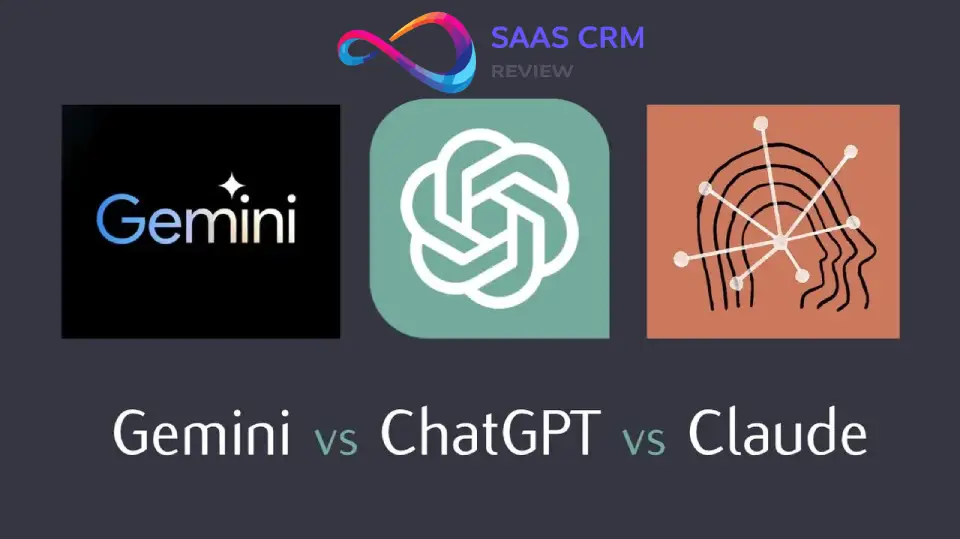
Head-to-Head Comparison Table
| Feature | Claude Opus 4.6 | ChatGPT GPT-5.2 | Gemini 3 Pro |
|---|---|---|---|
| Context Window | 1M (beta) / 200K standard | 400K | 1M |
| Best Use Case | Coding, analysis | Creative, general | Research, Google integration |
| Speed | Slow | Medium | Fast |
| Hallucination Rate | 1% (Opus 4.6) | 16% | 12% |
| Memory Feature | Limited beta | Yes, robust | Limited |
| Safety Guardrails | Very Strong | Strong | Strong |
| Multimodal | Yes (vision) | Yes (vision, voice) | Yes (vision, audio, video) |
| Extended Thinking | Yes (adaptive) | Yes (o3 models) | Limited |
| API Cost (per 1M tokens) | $5/$25 (Opus 4.6) | $2.50/$10 | $1.25/$5 |
| Web Search | Yes | Yes | Yes (native) |
| Code Execution | Yes | Yes | Yes |
| Integration Ecosystem | Growing (MCP) | Extensive | Google Workspace native |
| Privacy (Consumer) | Opt-out training | Opt-out training | Auto-delete available |
| Free Tier | Limited Sonnet 4 | GPT-4o mini | Gemini 3 Flash |
For a detailed breakdown, see our comprehensive Gemini Review 2026 covering Google’s AI assistant.
Who Wins What: Specific Scenarios
| Scenario | Winner | Rationale |
|---|---|---|
| Multi-hour autonomous coding | Claude Opus 4.6 | Agent teams, 7-30 hour sessions without drift |
| Creative writing & marketing | ChatGPT GPT-5.2 | More natural tone, better at mimicking voice |
| Long document analysis | Claude Opus 4.6 | 1M context + superior accuracy |
| Conversational AI with memory | ChatGPT GPT-5.2 | Remembers preferences automatically |
| Google Workspace integration | Gemini 3 Pro | Native Docs, Sheets, Calendar access |
| Real-time web research | Perplexity Pro | Purpose-built with citations |
| Cost-sensitive applications | Gemini 3 Flash | Cheapest API, good performance |
| Regulated industries | Claude Enterprise | Constitutional AI + compliance features |
| Rapid prototyping | ChatGPT GPT-5.2 | Fastest iteration speed |
| Video/audio analysis | Gemini 3 Pro | Native multimodal beyond images |
| Ethical decision-making | Claude Opus 4.6 | Constitutional AI training |
| Fact-checking accuracy | Claude Opus 4.6 | Lowest hallucination rate (1%) |
Price-Performance Analysis
Scenario: 10M tokens/month (typical medium-sized app)
| Provider | Input Cost | Output Cost | Total Monthly | Quality Rating |
|---|---|---|---|---|
| Claude Opus 4.6 | $50 | $250 | $300 | 10/10 |
| Claude Sonnet 4.5 | $30 | $150 | $180 | 9/10 |
| ChatGPT GPT-5.2 | $25 | $100 | $125 | 8.5/10 |
| Gemini 3 Pro | $12.50 | $50 | $62.50 | 8/10 |
Verdict: Gemini offers best price-performance for volume applications. Claude Opus 4.6 justified for tasks requiring highest accuracy. Sonnet 4.5 is the sweet spot for most production use cases. For teams prioritizing the lowest API cost with strong vision and agent capabilities, Kimi K2.5 offers $0.60/$3.00 per 1M tokens — significantly below all three.
Migration Considerations
From ChatGPT to Claude:
- Gain: Better coding, lower hallucinations, stronger ethics
- Lose: Memory feature, faster responses, larger ecosystem
- Cost impact: Neutral (same subscription price)
- Recommended if: Coding or analysis is >50% of your use case
From Gemini to Claude:
- Gain: Superior coding benchmarks, better long-context handling
- Lose: Google Workspace integration, speed, multimodal breadth
- Cost impact: Higher ($20 vs $19.99 for Pro tier)
- Recommended if: You don’t live in Google ecosystem
From Claude to ChatGPT:
- Gain: Memory, speed, conversational quality, ecosystem
- Lose: Coding edge, accuracy, extended thinking transparency
- Cost impact: Neutral
- Recommended if: Creative work or general productivity is primary use
Claude Use Cases: Who Should Use Claude?
1. Developers and Software Engineers
Best Claude models: Opus 4.6, Opus 4.1
Why Claude excels:
- 74.5%+ on SWE-bench (real-world engineering tasks)
- Extended autonomous coding sessions (7+ hours documented)
- Agent teams for collaborative AI coding (Opus 4.6)
- Git integration via Claude Code
Practical applications:
- Code review and refactoring
- Bug hunting and debugging
- Test generation and coverage analysis
- Documentation generation from code
- Architecture decisions and tradeoff analysis
Pricing recommendation: Pro ($20/month) for individual developers; Team Premium ($150/user/month) for engineering teams needing Claude Code
2. Business Professionals and Executives
Best Claude models: Sonnet 4.5, Opus 4.6
Why Claude excels:
- Precise executive summaries within word limits
- Strong structured analysis (risk registers, decision matrices)
- Reliable stakeholder communications
- Lower hallucination rates for factual accuracy
Practical applications:
- Board report drafting
- Vendor proposal analysis
- Meeting summary and action item extraction
- Policy and procedure documentation
- Competitive analysis synthesis
Pricing recommendation: Pro ($20/month) for individual professionals; Team ($25/user/month) for departments
3. Legal Professionals
Best Claude models: Opus 4.6 (1M context), Sonnet 4.5
Why Claude excels:
- 1M token context handles full contracts and case files
- Accurate cross-referencing across long documents
- Conservative—admits uncertainty rather than fabricating
- Maintains confidentiality focus
Practical applications:
- Contract review and clause extraction
- Due diligence document analysis
- Legal research synthesis
- Brief and memo drafting
- Compliance document review
Pricing recommendation: Enterprise (custom) for firm-wide deployment with compliance needs; Pro for individual practitioners handling non-confidential work
4. Researchers and Academics
Best Claude models: Opus 4.6, Sonnet 4.5
Why Claude excels:
- Superior literature synthesis across long papers
- Transparent reasoning shows methodology
- Lower hallucination for citation accuracy
- Extended thinking for complex analysis
Practical applications:
- Literature review synthesis
- Research methodology design
- Grant proposal drafting
- Data analysis and interpretation
- Peer review assistance
Pricing recommendation: Pro ($20/month); API for programmatic access to research workflows
5. Content Creators and Writers
Best Claude models: Sonnet 4.5
Why Claude excels (with caveats):
- Excellent for research-heavy content
- Strong for technical writing and explainers
- Good for editing and structural feedback
- Less natural for pure creative/conversational content
Practical applications:
- Technical blog writing
- Course content development
- Editing and feedback
- Research compilation
- Script treatments and outlines
For marketing copy and creative content, consider specialized tools. See our Best AI Tools for Content Creation roundup for options including Jasper AI for marketing-focused needs.
Pricing recommendation: Pro ($20/month)
6. Data Analysts
Best Claude models: Sonnet 4.5, Opus 4.6
Why Claude excels:
- 100% schema adherence in structured output tests
- Low hallucination in data interpretation
- Handles large datasets via Files API
- Clear statistical explanations
Practical applications:
- Data exploration and pattern identification
- SQL query generation and optimization
- Dashboard narrative generation
- Anomaly detection and explanation
- Report automation
Pricing recommendation: Pro for individual analysts; API for production data pipelines
Claude Alternatives: Best Options by Use Case
1. ChatGPT (GPT-5.2)
- Best for: Creative writing, conversational AI, broad ecosystem
- Advantage over Claude: Memory, speed, natural tone, plugin ecosystem
- Disadvantage: Higher hallucination rates, less coding precision
- Price: $20/month (Plus)
2. Google Gemini 3 Pro
- Best for: Google Workspace users, real-time research, multimodal (audio/video)
- Advantage over Claude: Native Google integration, faster responses, broader multimodal
- Disadvantage: Less precise for complex coding, weaker long-context accuracy
- Price: $19.99/month (Advanced)
See our Gemini Review 2026 for a complete breakdown.
3. Perplexity Pro
- Best for: Real-time research with citations
- Advantage over Claude: Purpose-built for research, automatic source verification
- Disadvantage: Not for coding or creative tasks
- Price: $20/month
4. GitHub Copilot
- Best for: IDE-integrated coding assistance
- Advantage over Claude: Seamless IDE integration, better for real-time coding
- Disadvantage: No general-purpose capabilities, less reasoning depth
- Price: $9/month (Individual), $19/month (Business)
5. Specialized AI Image Tools
For visual content needs:
- Stable Diffusion: Best for customizable AI image generation with full control
- Cutout Pro: AI background removal for ecommerce
- remove.bg: Quick background removal for photos
- Pic Copilot: AI product photography for sellers
6. AI Video Generation Tools
For video content creation:
- RunwayML: Professional AI video generation and editing
- Pika Art: Quick AI video clips for social media
Claude Privacy, Security & Compliance
Data Handling by Tier
| Tier | Training Data Use | Retention | Compliance |
|---|---|---|---|
| Free | Opt-out available | Up to 5 years if opted in | None |
| Pro/Max | Opt-out available | Up to 5 years if opted in | None |
| Team | Never | 30 days | Admin controls |
| Enterprise | Never | Configurable | SOC 2, HIPAA eligible |
| API | Never | 30 days | SOC 2, configurable |
September 2025 Policy Change
What changed: Anthropic updated its privacy policy effective September 28, 2025. Consumer accounts now default to opt-in for training data—a reversal of their previous stance.
Impact:
- Conversations may be used for model training
- Retention up to 5 years if opted in
- Incognito chats still protected
- Deleted conversations still protected
How to opt out:
- Settings > Privacy
- Disable “Help improve Claude”
- Use Incognito mode for sensitive conversations
- Consider Team/Enterprise for guaranteed protection
For Sensitive Work
Recommended setup:
- Team or Enterprise plan (no training data use, ever)
- API access (same protection as Enterprise)
- Custom retention policies (Enterprise only)
- SSO/SCIM integration (Enterprise only)
- Audit logging (Enterprise only)
Industries with specific requirements:
- Healthcare (HIPAA): Enterprise plan with BAA required
- Finance: Enterprise with SOC 2 Type II compliance
- Legal: Enterprise recommended; verify client confidentiality requirements
- Government: Check FedRAMP status (not currently certified)
How to Get the Best Results with Claude
Prompting Principles
1. Be explicit about constraints
❌ Bad: “Write an article about climate change”
✅ Good: “Write a 500-word article explaining climate change impacts for high school students. Use 10th-grade reading level. Include 2 concrete examples. Avoid political language.”
Why: Claude follows instructions precisely. Vague prompts get generic outputs. These principles apply across models — for a broader collection of structured prompts tested on both ChatGPT and Claude, see our ChatGPT prompt templates.
2. Use extended thinking for complex tasks
❌ Bad: [asking complex question with standard mode]
✅ Good: “Use extended thinking to design a database schema for an e-commerce platform. Consider: user management, inventory, orders, payments. Show your reasoning.”
Why: Extended thinking reveals tradeoffs and alternatives, not just final answer.
3. Specify format explicitly
❌ Bad: “Analyze this data”
✅ Good: “Analyze this sales data and return results in this JSON format: {revenue_by_region: [], top_products: [], anomalies: []}. Flag any data quality issues you notice.”
Why: Claude excels at structured output when you define the structure.
4. Provide positive and negative examples
❌ Bad: “Write in a professional tone”
✅ Good: “Write in a professional but warm tone. Example of good tone: ‘We appreciate your patience.’ Example of tone to avoid: ‘As per our previous correspondence regarding the aforementioned matter…'”
Why: Examples calibrate style better than adjectives.
5. Use Projects for recurring context
❌ Bad: Pasting your company background into every conversation
✅ Good: Create a Project with company docs, brand guidelines, FAQ. Reference in chats: “Refer to Project context for brand voice.”
Why: Saves tokens and ensures consistency.
6. Ask Claude to show its work
❌ Bad: “Is this code correct?”
✅ Good: “Review this code. For each issue you find: (1) explain the problem, (2) show why it fails, (3) suggest a fix with reasoning.”
Why: Forces careful analysis rather than quick surface-level review.
Prompting Templates
Template 1: Document Analysis
Role: You are a [legal analyst/technical reviewer/financial auditor].

Task: Analyze the attached [contract/whitepaper/financial statement] and identify:
1. [Key terms/technical claims/financial risks]
2. [Ambiguities/gaps in reasoning/anomalies]
3. [Recommendations/questions to ask/further due diligence needed]

Format: Use markdown with H3 headers for each section. For each finding, cite specific page/section numbers.

Constraints:
- Focus only on [specific aspect]
- Flag anything requiring expert review
- If uncertain about interpretation, say so explicitly

Output length: [800 words / as needed for thoroughness]
Template 2: Code Review
Review this [Python/JavaScript/etc.] code for:

1. Bugs (functional correctness)
2. Security vulnerabilities
3. Performance issues
4. Code style/readability
5. Missing error handling

For each issue found:
- Line number(s)
- Severity: Critical / High / Medium / Low
- Explanation: Why this is a problem
- Fix: Concrete suggestion with code example

Then provide a refactored version addressing all High/Critical issues.

Context: This code [is production-facing/is prototype/etc.]
Template 3: Research Synthesis
I'm researching [topic]. I need a synthesis that:

1. Summarizes the current consensus (if any)
2. Highlights major points of disagreement
3. Identifies knowledge gaps
4. Lists 3-5 key sources I should read next

Requirements:
- Cite sources inline [Author, Year]
- Flag any claims you're uncertain about
- Distinguish between established facts and emerging theories
- 1000 words maximum

I've attached [X documents]. Use web search if you need additional current sources.
Template 4: Business Writing
Write a [email/memo/policy document] to [audience] about [topic].

Tone: [Professional but approachable/formal/etc.]
Length: [200 words max/2 pages/etc.]
Purpose: [Inform/persuade/request/etc.]

Include:
- Clear subject line (email) or title (document)
- Context (1-2 sentences)
- Main points (use bullets if >2 points)
- Clear call-to-action or next steps

Avoid:
- Corporate jargon ("synergy," "circle back")
- Passive voice where active works
- Burying the lede

Provide 2 versions: one slightly more formal, one slightly warmer.
Template 5: Creative Brainstorming (Claude’s weaker area—adjust expectations)
I need creative ideas for [campaign/product name/blog topics/etc.].

Context: [Target audience, constraints, goals]

Generate:
- 10 initial ideas (quick brainstorm)
- For the 3 most promising: expand with rationale and execution sketch

Criteria for "promising":
1. [Feasible with budget X]
2. [Aligns with brand value Y]
3. [Differentiated from competitor Z]

Note: I know creative ideation isn't your strongest suit—I'm looking for structured thinking and feasibility analysis more than wild creativity.
Advanced Techniques
Chaining prompts for complex workflows:
- First prompt: “Analyze this user feedback data and extract themes. Return only a JSON list of themes with example quotes.”
- Second prompt: “Using these themes: [paste JSON], draft a product roadmap addressing the top 3 issues. Format as a table with columns: Issue, Proposed Solution, Effort (S/M/L), Impact (High/Med/Low).”
- Third prompt: “Write an email to stakeholders presenting this roadmap. Emphasize customer-centricity. 300 words.”
Why this works: Breaking into stages prevents context mixing and allows iteration at each step.
Using Claude to improve your prompts:
I'm trying to get you to [desired outcome] but my prompts aren't working well.

Here's what I've tried: [paste previous prompts]
Here's what I got: [describe issues]
Here's what I actually need: [specific requirements]

Please:
1. Explain why my prompts aren't working
2. Suggest 2-3 improved prompt structures
3. Show an example of a well-structured prompt for this task
Leveraging extended thinking for decisions:
I need to decide between [Option A] and [Option B] for [context].

Use extended thinking to:
1. List pros/cons of each option
2. Identify hidden assumptions I might be making
3. Suggest evaluation criteria I haven't considered
4. Recommend a decision framework

Don't tell me what to decide—help me think through it systematically.
Common Mistakes to Avoid
❌ Treating Claude like Google: Claude doesn’t have real-time info without web search. For current events, let it search or verify facts against provided sources.
❌ Over-reliance without verification: Even with low hallucination rates, always verify critical facts, code, or legal/medical claims.
❌ Ignoring refusals: If Claude declines, it’s usually for safety reasons. Refine your prompt rather than trying to “jailbreak.”
❌ Not using Projects for repeated tasks: You’re wasting tokens and context if you paste the same background info repeatedly.
❌ Expecting memory: Claude won’t remember your preferences conversation-to-conversation (unless you have beta memory access). Document your style guide and reference it.
❌ Using Free tier for production work: Rate limits and reduced model access mean the Free tier is for testing only.
Claude Review – FAQs
Is Claude AI free?
Yes, Claude offers a free tier with access to Claude Sonnet 4 model. Free includes limited messages per day (approximately 30-100, varies by demand), 5-hour session resets, and basic features. For consistent access, higher limits, and access to Opus models including Opus 4.6, upgrade to Pro ($20/month).
Is Claude better than ChatGPT?
It depends on use case. Claude outperforms ChatGPT at coding (74.5% vs ~68% on SWE-bench), long-document analysis (200K-1M context with better accuracy), and reliability (1-6% vs 16% hallucination rate). ChatGPT wins for creative writing, conversational tone, memory features, and speed. Most power users benefit from both.
How much does Claude Pro cost?
Claude Pro costs $20/month (or $17/month billed annually in some regions). This includes 5× the free tier usage, access to all models including Opus 4.6, extended thinking, web search, Research feature, and priority access during peak times.
Is Claude safe to use for confidential work?
On consumer plans (Free/Pro/Max): Not by default—data may be used for training unless you opt out. On Team/Enterprise/API plans: Yes—data is never used for training. For truly confidential work, use Team ($25/user/month minimum) or Enterprise (custom pricing) with guaranteed data protection.
Can Claude generate images?
No, Claude cannot generate images. It can analyze and describe images you upload, but image generation is not a capability. For AI image generation, consider specialized tools like Stable Diffusion for full creative control.
What’s Claude’s knowledge cutoff?
Claude’s training data has a cutoff (varies by model version but typically 6-12 months prior to release). However, web search integration (available on Pro and higher) allows real-time information retrieval for current data needs.
Can I use Claude for commercial projects?
Yes, but terms differ by plan. API and Enterprise plans are explicitly designed for commercial use. Consumer plans (Free/Pro) allow commercial use but check Terms of Service for output ownership details.
Claude Review: Final Verdict
Overall Rating: 9/10
Claude has earned its place as a leading AI assistant in 2026, particularly for professionals who prioritize accuracy, reasoning transparency, and long-context work over conversational polish.
What I love:
- Opus 4.6’s 1M context and adaptive thinking are genuine innovations
- Consistently lower hallucination rates than competitors
- Extended thinking shows its work—valuable for decision-making
- Agent teams make complex coding sessions dramatically better
- Safety-conscious design without being heavy-handed
What needs improvement:
- Memory feature still in limited beta
- Slower response times than competitors
- Creative writing tone can feel sterile
- Privacy policy reversal was disappointing
Bottom Line Recommendations
| If you need… | Choose… | Monthly cost |
|---|---|---|
| Best coding AI | Claude Pro (Opus 4.6) | $20 |
| Long document analysis | Claude Pro | $20 |
| Creative writing | ChatGPT Plus | $20 |
| Google Workspace integration | Gemini Advanced | $19.99 |
| Budget option | Claude Free or Gemini Free | $0 |
| Team collaboration | Claude Team | $25/user |
| Enterprise security | Claude Enterprise | Custom |
| Pure research | Perplexity Pro | $20 |
Who Should Subscribe Today
Immediately subscribe to Claude Pro if you:
- Write code professionally
- Analyze documents over 50 pages regularly
- Need reliable, low-hallucination outputs
- Value reasoning transparency
Wait or use competitors if you:
- Primarily need creative/conversational AI
- Require robust memory across sessions
- Live in Google ecosystem
- Need extensive third-party integrations
The honest truth: I pay for both Claude Pro and ChatGPT Plus. Claude handles my coding, analysis, and technical writing. ChatGPT handles creative brainstorming and quick questions. Gemini stays for Google Calendar integration. The “best” AI assistant is the one that matches your actual workflow—not the one with the highest benchmark scores.
Sources & Further Reading
Official Documentation
- Anthropic Claude Documentation – Complete API and feature reference
- Claude AI Official Site – Product information and pricing
Benchmarks & Performance
- SWE-bench Verified Leaderboard – Real-world software engineering evaluation
- OSWorld Benchmark – Computer use task success rates
- Chatbot Arena Leaderboard (LMSYS) – Community voting on model quality
Privacy & Compliance
- Anthropic Privacy Policy – Updated September 2025
- Anthropic Terms of Service – Consumer and commercial terms
- Anthropic Trust Center – SOC 2 reports and compliance documentation
Comparative Reviews
- OpenAI ChatGPT documentation: platform.openai.com/docs
- Google Gemini documentation: ai.google.dev
- Independent AI benchmarking: Artificial Analysis
Industry Analysis
- Model pricing comparisons updated monthly at Artificial Analysis
- AI safety research: Center for AI Safety
This Review’s Testing Methodology
Tests conducted December 2025 – February 2026 using:
- Claude Sonnet 4.6 and Opus 4.1 (via Claude Pro subscription)
- ChatGPT GPT-5.2 (via ChatGPT Plus)
- Google Gemini 3 Pro (via Gemini Advanced)
- Standardized prompts across identical tasks
- 3 runs per test for consistency measurement
- Qualitative scoring (1-10 scale) with written justification for each score
About the author

I’m Macedona, an independent reviewer covering SaaS platforms, CRM systems, and AI tools. My work focuses on hands-on testing, structured feature analysis, pricing evaluation, and real-world business use cases.
All reviews are created using transparent comparison criteria and are updated regularly to reflect changes in features, pricing, and performance.