The best POS system depends on what you sell: Square to start free, Shopify POS for a shop that also sells online, Toast for a restaurant, Lightspeed Retail for several stores. A POS system is the software, card processing and hardware that ring up a sale.
Every price comes from the vendor’s US pricing page, checked November 2026.
Take an illustrative shop with 200 sales and $10,000 in card sales a month. On Square Free’s printed 2.6% + 15¢, it pays 10,000 x 0.026 + 200 x 0.15 + $0 = $290 a month.
Quick verdict
For a small shop, cafe, restaurant or bar with a few locations.
Start on Square for $0 software and a printed rate; shortlist SpotOn if a restaurant cannot fund hardware upfront, and price Helcim once card sales pass $50,000 a month.
The trade-off: Clover’s prices assume a 36-month term, SpotOn’s $0 All-In has a 2-year minimum, and Toast prints no rate.

Square
Best for: small businesses starting on a free plan
A $0 plan with a printed in-person rate and a $59 card reader.
Limit: the kitchen display app needs a paid plan, and 24/7 phone support needs Premium

Shopify POS
Best for: retailers who also sell online
The store plan and the counter share one catalog and one inventory.
Limit: POS Pro adds $89 per location per month on top of the plan

Toast
Best for: full-service and quick-service restaurants
Tables, online ordering, tips and payroll from one vendor, with 24/7 support.
Limit: the processing rate is not printed and only Toast hardware runs it

Lightspeed Retail
Best for: multi-location and high-SKU stores
Purchase orders, a wholesale catalog and advanced sales and inventory reports.
Limit: one register per plan, and extra locations are a sales quote
In This Article (15 sections)
Quick Comparison: The Best POS Systems at a Glance
Ten systems, each matched to one kind of business, with prices and rates as each vendor’s US pricing page printed them in November 2026.
| Software | Best for | Starting price | Card-present rate | Contract or hardware term | Key limitation |
|---|---|---|---|---|---|
| Square | A free start for a shop or cafe | $0 per location per month; Plus $49, Premium $149 | 2.6% + 15¢ Free; 2.5% + 15¢ Plus; 2.4% + 15¢ Premium | No long-term contract | KDS app needs a paid plan |
| Shopify POS | Retailers who also sell online | Basic $39 per month billed monthly, $29 billed yearly; POS Pro $89 per location | 2.6% + 10¢ Basic; 2.5% + 10¢ Grow; 2.4% + 10¢ Advanced | Monthly or yearly; Plus on a 1- or 3-year term | 2% fee with another processor on Basic |
| Toast | Full-service and quick-service restaurants | Starter Kit $0 per month; Point of Sale from $69 per month | Not published | Toast hardware only | Rate not printed; most suites are add-ons |
| Clover | Countertop hardware on one monthly bill | Retail Basic $16 per month for 36 months, or $349 outright | 2.6% + 10¢ Basic; 2.3% + 10¢ Standard, Advanced and quick-service | 36 months, or buy the device | Basic has no inventory or loyalty |
| Lightspeed Retail | Multi-location and high-SKU stores | Basic $89 per month billed annually, $109 billed monthly | 1.5% Lightspeed Payments, as printed | Annual or monthly | Extra locations and registers are a sales quote |
| SpotOn | Restaurants that want $0 upfront hardware | All-In $0 per station per month; Essentials $55 per station | 2.79% + 20¢ All-In; 2.45% + 15¢ Essentials | All-In: 2-year minimum | Essentials needs stations and implementation upfront |
| TouchBistro | Table-service restaurants | From $69 per month | Not printed; processing extra | Not printed | KDS and online ordering are unpriced add-ons |
| Lightspeed Restaurant | Bars and multi-venue groups | Starter 69 USD, as printed | Rate not printed | Not printed | Billing period not shown |
| Helcim | Lower fees past $50,000 a month | $0 per month | Interchange + 0.40% + 8¢ in the first tier | No contract | Interchange varies, so no single rate |
| Loyverse | A free POS on your own phone or tablet | $0; add-ons $5 to $25 per store or per employee per month | Set by a third-party processor | No term printed | Reports stop at 31 days without an add-on |
Sources: Square pricing, Square fees, Shopify pricing, Shopify POS pricing, Toast pricing, Clover retail pricing, Lightspeed Retail pricing, SpotOn pricing, TouchBistro pricing, Lightspeed Restaurant pricing, Helcim pricing, Loyverse pricing, checked Nov 2026.
How I Chose These Tools
I considered the ranked picks and the systems under Also Considered, and kept those whose US pricing page prints a software price and names card payments.
I ranked them on all-in monthly cost at a stated card volume, processing model, contract length, the features each business type needs, hardware lock-in and per-location fees, from each vendor’s pricing, fee and hardware pages read in November 2026.
What Each POS Costs a Month in Card Sales for a Small Shop and a Busy Cafe
Take two illustrative businesses: a shop with 200 card sales a month at a $50 ticket (200 x $50 = $10,000) and a cafe with 2,500 sales at a $10 ticket (2,500 x $10 = $25,000), each priced at the vendor’s printed card-present rate plus the software fee.
| Software and plan | Monthly software | Card-present rate | Shop (example) | Cafe (example) | Notes |
|---|---|---|---|---|---|
| Square Free | $0 | 2.6% + 15¢ | 10,000 x 0.026 + 200 x 0.15 + $0 = $290 | 25,000 x 0.026 + 2,500 x 0.15 + $0 = $1,025 | One location; no KDS |
| Square Plus | $49 | 2.5% + 15¢ | 10,000 x 0.025 + 200 x 0.15 + $49 = $329 | 25,000 x 0.025 + 2,500 x 0.15 + $49 = $1,049 | KDS app adds $30 per device |
| Shopify Basic | $39 billed monthly | 2.6% + 10¢ | 10,000 x 0.026 + 200 x 0.10 + $39 = $319 | 25,000 x 0.026 + 2,500 x 0.10 + $39 = $939 | Shopify Payments; POS Pro adds $89 per location |
| Clover retail Basic | $16 for 36 months | 2.6% + 10¢ | 10,000 x 0.026 + 200 x 0.10 + $16 = $296 | Retail plan | Compact terminal included in the 36-month price |
| Clover quick-service Starter | $135 for 36 months | 2.3% + 10¢ | Restaurant plan | 25,000 x 0.023 + 2,500 x 0.10 + $135 = $960 | Mini terminal included in the 36-month price |
| SpotOn All-In | $0 per station | 2.79% + 20¢ | Restaurant plan | 25,000 x 0.0279 + 2,500 x 0.20 + $0 = $1,197.50 | Hardware included; 2-year minimum; processing minimums |
| SpotOn POS Essentials | $55 per station | 2.45% + 15¢ | Restaurant plan | 25,000 x 0.0245 + 2,500 x 0.15 + $55 = $1,042.50 | One station at $750 upfront, plus implementation |
| Lightspeed Retail Basic | $89 billed annually | 1.5%, as printed | 10,000 x 0.015 + $89 = $239 | Retail plan | No per-sale fee printed; 1 register |
| Helcim | $0 | Interchange + 0.40% + 8¢ | 10,000 x 0.004 + 200 x 0.08 + $0 = $56, plus interchange | 25,000 x 0.004 + 2,500 x 0.08 + $0 = $300, plus interchange | Margin only; interchange varies by card |
Sources: Square fees, Shopify pricing, Clover retail pricing, Clover quick-service pricing, SpotOn pricing, Lightspeed Retail pricing, Helcim pricing, checked Nov 2026. Illustrative volumes; Amex, keyed and online sales excluded. Toast, TouchBistro, Lightspeed Restaurant and Loyverse print no rate, so they have no row.
Rates are written as decimals in the math (2.6% = 0.026, 15¢ = 0.15).
Two break-even lines fall out of the table. Square Plus trims the rate by 0.1 points over Free, so its fee pays back only above $49 / 0.001 = $49,000 a month in card sales; Premium trims 0.2 points, so its fee pays back above $149 / 0.002 = $74,500. Below those volumes you buy Plus or Premium for features, not for the rate.
The restaurant rows show the price of $0 hardware: SpotOn’s All-In costs the cafe 25,000 x 0.0034 + 2,500 x 0.05 – $55 = $155 a month more than Essentials, which is $155 x 24 = $3,720 over the 2-year minimum, against one $750 station paid once. Helcim’s rows are margin only: the interchange on top moves with the card mix, so ask for a statement estimate before you compare it with Square.
1. Square: Best for Small Businesses Starting on a Free Plan
- Best for: a new shop, cafe or service business that wants no monthly fee
- Starting price: $0 per location per month (Free); Plus $49; Premium $149
- Free plan or trial: free plan; 30-day free trial of Plus and Premium
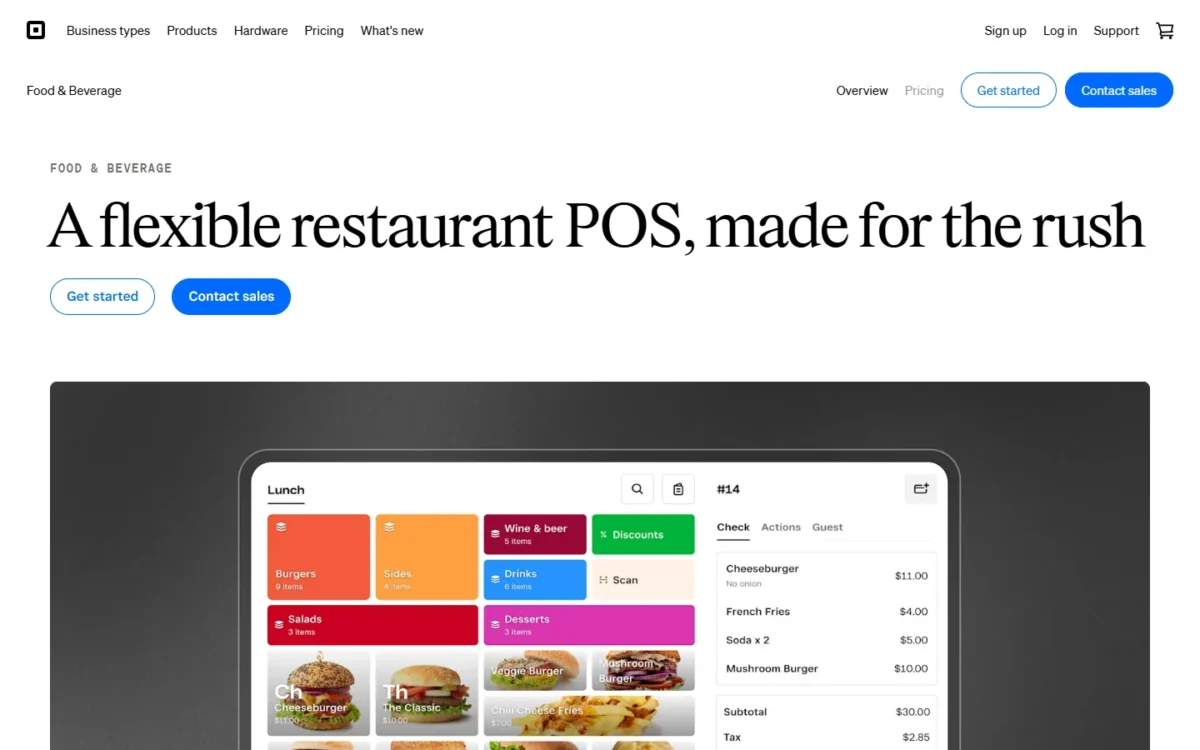
No other pick on this list lets a new business open with a $0 plan, a printed flat rate and a $59 card reader, which makes Square the lowest-risk start for an owner who does not yet know their volume. You pay for that in the rate on every tap and in phone support: weekdays 6am-6pm PT for the first 90 days on Free, weekdays on Plus, and 24/7 only on Premium.
The free plan covers a counter. Square Point of Sale includes business solutions for restaurants, retail, services and beauty in one app, so a cafe that adds a retail shelf keeps its software, and hardware is bought, not leased, from the $59 Reader to the $899 Register, with no long-term contract required.
Where Free stops is the kitchen. The Square KDS app is not available in Square Free and costs $30 per device a month on Plus, so a restaurant with two kitchen screens pays $49 + 2 x $30 = $109 a month before processing. That is where Toast’s $0 Starter Kit and Loyverse’s free kitchen display start to matter.
My take
Pick Square Free if you are opening a first counter and want your fee on the page before you sign anything; move up only when the KDS app, 24/7 phone support or your volume forces it.
Square’s software costs $0, $49 or $149 per location per month, and the plan sets the in-person rate. Online payments cost 3.3% + 30¢ on Free and 2.9% + 30¢ on Plus and Premium, and manually keyed payments 3.5% + 15¢ on every plan. Every plan, fee and hardware line is in my Square pricing guide.
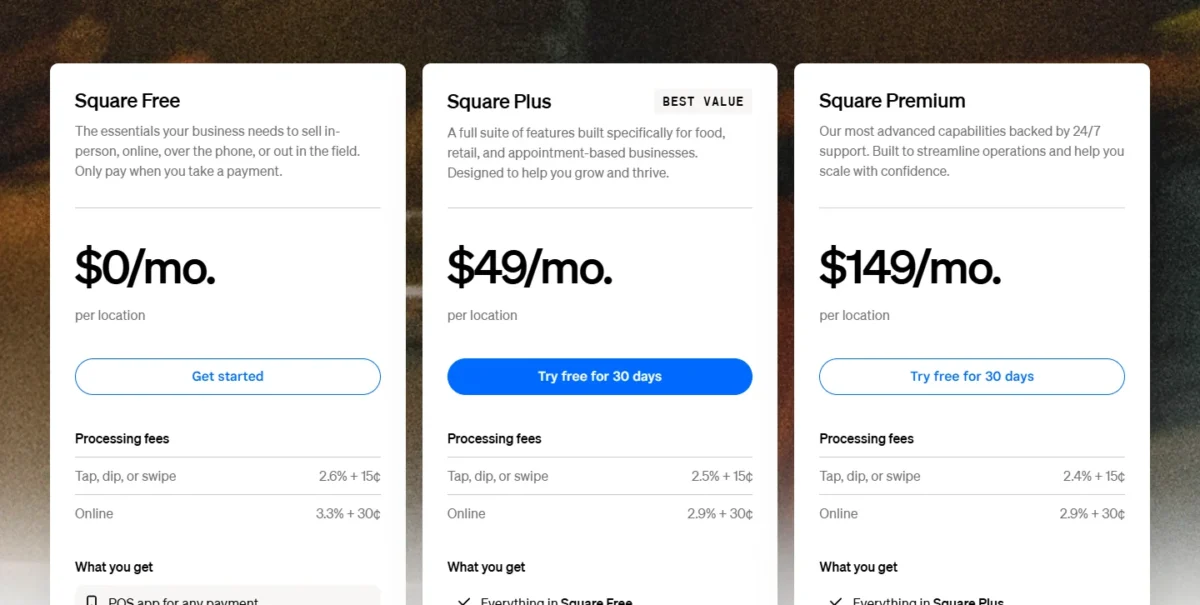
- Square Free: $0 per location, no subscription; 2.6% + 15¢ in person; no KDS app
- Square Plus: $49 per location per month; 2.5% + 15¢; KDS $30 per device; weekday phone support
- Square Premium: $149 per location per month; 2.4% + 15¢; KDS $20 per device; 24/7 phone support
Sources: Square pricing, Square fees, Square hardware, checked Nov 2026.
Pros
- A free plan, so a first location risks only the card reader
- Rates printed for every plan, in person, online and keyed
- Restaurant, retail, services and beauty modes in one app
Cons
- The KDS app is not available on the free plan and carries a per-device fee above it
- 24/7 phone support only on Premium
- The per-sale fee is higher than Clover’s and Shopify’s
- Skip it if:
- you run a full-service restaurant that needs payroll, tips and a kitchen display from one vendor (Toast bundles them), or your volume has outgrown a flat rate (Helcim’s margin drops with volume).
2. Shopify POS: Best for Retailers Who Also Sell Online
- Best for: a retailer whose web store and counter share one catalog
- Starting price: Basic $39 per month billed monthly or $29 billed yearly; POS Pro $89 per location per month
- Card-present rate: 2.6% + 10¢ Basic, 2.5% + 10¢ Grow, 2.4% + 10¢ Advanced with Shopify Payments
- Free plan or trial: 3 days free, then $1 a month for 3 months
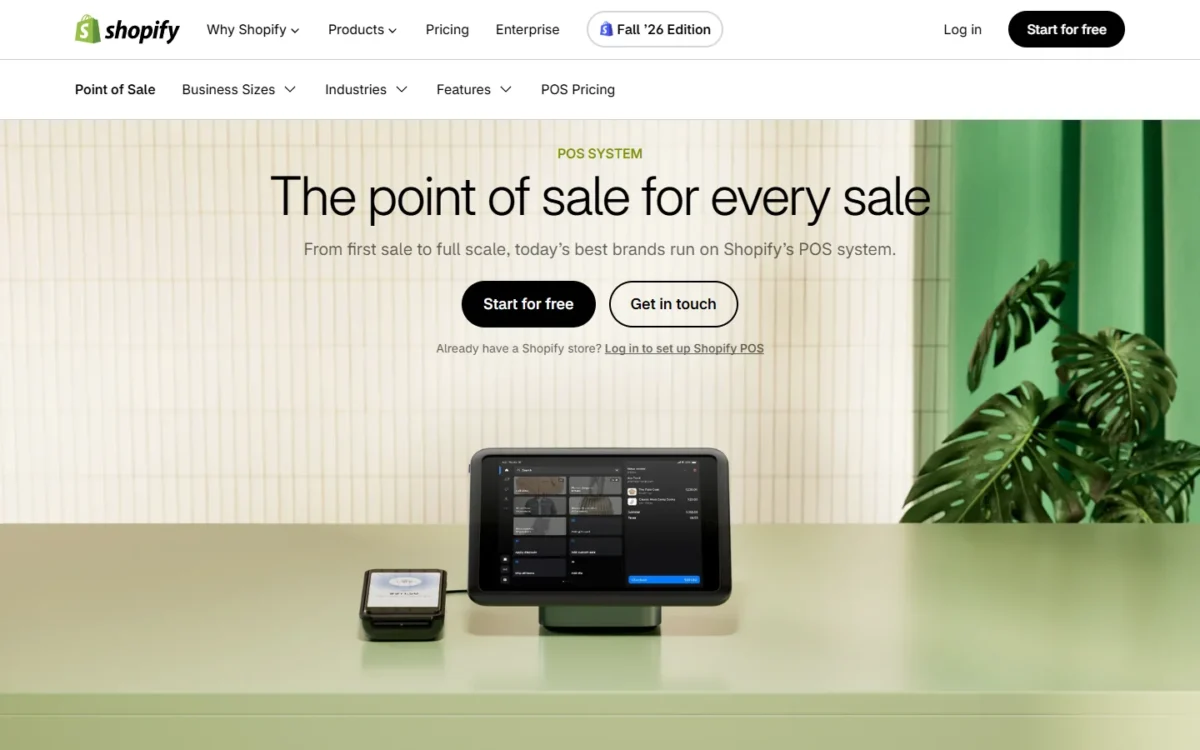
Shopify’s POS is the right retail choice when the online store is the core business and the counter is the second channel, because the plan that runs the website also runs the register. The serious retail features sit in POS Pro, on top of the plan, and that line decides the real cost.
Every paid plan includes casual in-person selling from a phone or Shopify card reader; Basic, Grow and Advanced include inventory for up to 10 locations, and Plus for 200. On Basic only limited staff can access the POS, while Grow gives unlimited POS logins, so a shop with several cashiers should check the Basic login limit before it signs.
POS Pro adds staff roles, purchase orders, returns at any location and retail reports, so a Basic store with one Pro location pays $39 + $89 = $128 a month before processing. Lightspeed Retail includes purchase orders in every plan, with extra locations quoted by sales, which wins when purchasing depth matters more than the website.
The processor is the second decision. Keep another processor and Shopify adds a third-party transaction fee of 2% on Basic, 1% on Grow and 0.6% on Advanced. On Basic at the shop’s volume, that is 10,000 x 0.02 = $200 a month for nothing in return.
Shopify POS runs on any Shopify plan, billed monthly or at a lower monthly rate when billed yearly, and a permanent store adds POS Pro per location on top. What each tier changes online is in my Shopify pricing guide.
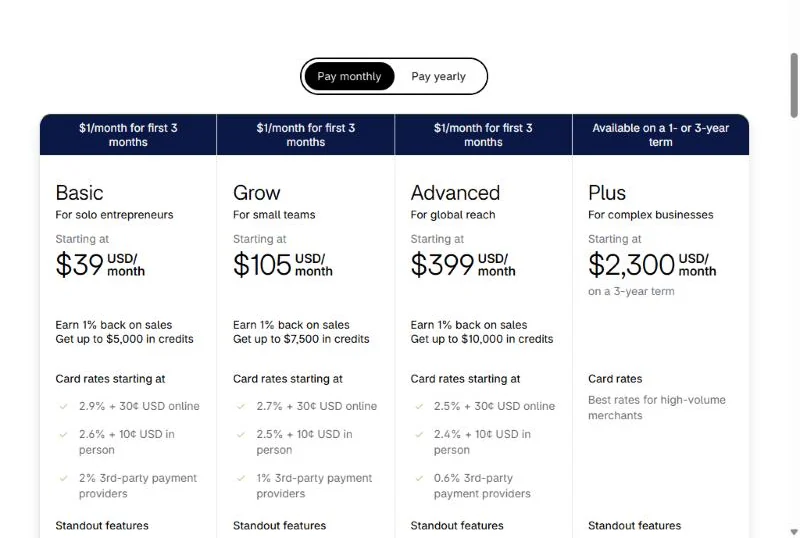
- Basic: $39 per month, or $29 per month billed yearly; limited staff can access POS; 2% fee with another processor
- Grow: $105 per month, or $89 billed yearly; unlimited POS logins; 1% fee with another processor
- Advanced: $399 per month, or $359 billed yearly; 0.6% fee with another processor
- POS Pro: $89 per location per month, billed yearly; staff roles, purchase orders, returns at any location
Sources: Shopify pricing, Shopify POS pricing, checked Nov 2026.
Pros
- One catalog and inventory for the web store and the counter, on every plan
- Unlimited POS logins from Grow, and inventory for 200 locations on Plus
- A 3-day trial and then $1 a month for 3 months to test the counter before full price
Cons
- Purchase orders and staff roles need POS Pro, billed per location
- Basic limits which staff can access the POS
- A 2%, 1% or 0.6% fee on every sale if you keep your own processor
- Skip it if:
- you sell only in person; Square’s free plan costs $0 a month where Basic costs $39.
3. Toast: Best for Full-Service and Quick-Service Restaurants

- Best for: restaurants that want tables, online ordering, tips and payroll from one vendor
- Starting price: Starter Kit $0 per month; Point of Sale from $69 per month
- Card-present rate: a flat rate, not printed on the pricing page
- Free plan or trial: Starter Kit at $0 per month with a hardware kit and no upfront cost
A restaurant buys Toast because table and order management, Toast Mobile Order & Pay, commission-free online ordering, Tips Manager and payroll come from one vendor, with 24/7/365 support. Two things are hidden: the processing rate is not printed, and the software only runs on Toast-approved hardware.
The Starter Kit is the way in for a single location: one location, up to two terminals and a hardware kit with no upfront cost. Toast calls this Pay-as-You-Go, which trades upfront hardware and installation costs for an all-in-one platform rate.
The $69 Point of Sale plan lets you choose your own Toast hardware configuration, but most of what makes Toast a platform is an add-on with its own fee: Digital Storefront Essentials for online ordering, Team Management Essentials with Tips Manager, xtraCHEF for food cost, Restaurant Management Pro for multilocation management. Price each suite in the quote, not after.
Toast’s new-restaurant bundle prices Point of Sale plus payroll essentials and basic scheduling at $69 a month plus $9 per employee, so a ten-person kitchen pays $69 + 10 x $9 = $159 a month for POS and payroll. Compare that with standalone payroll software for small businesses before you bundle.
Against SpotOn, Toast’s pricing page lists payroll and a supplier and accounting suite that SpotOn’s page does not, while SpotOn prints both of its rates on the page; against TouchBistro, Toast runs only on its own approved hardware, while TouchBistro works with a range of payment processors.
My take
Pick Toast if a server-driven dining room needs tables, tips, online ordering and payroll to talk to each other, and get the processing rate and suite fees in writing before the demo ends.
Toast prices restaurant software at $0 a month for the Starter Kit and from $69 a month for Point of Sale, with Build Your Own on custom pricing; the processing rate is not printed.
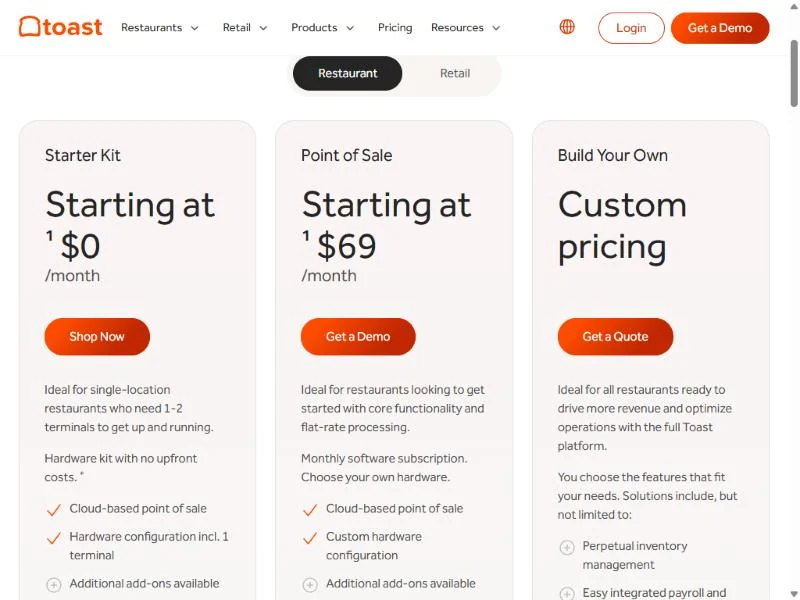
- Starter Kit: $0 per month; 1 location, up to 2 terminals; hardware kit with no upfront cost; platform rate not printed
- Point of Sale: from $69 per month; choose your own Toast hardware; suites are add-ons
Sources: Toast pricing, checked Nov 2026.
Pros
- Table and order management, Mobile Order & Pay and online ordering built for restaurants
- A $0 Starter Kit with a hardware kit and no upfront cost for one location
- 24/7/365 Toast Care and an offline mode for card payments
Cons
- The card-processing rate is not printed on the pricing page
- Software runs only on Toast-approved hardware, so a spare iPad is no backup
- Online ordering, marketing, scheduling, payroll and inventory are separate suites with separate fees
- Skip it if:
- you want your processing rate on paper before you sign (SpotOn prints it) or you run a counter cafe on a phone budget (Square’s free plan and $59 reader).
4. Clover: Best for Countertop Hardware on One Fixed Monthly Payment
- Best for: a counter shop or quick-service cafe that wants one monthly bill
- Starting price: retail Basic $16 per month for 36 months, or $349 outright
- Free plan or trial: 90 days with no SaaS fee on Essentials or Services Growth, 3/5/2026 to 12/31/2026
Clover suits an owner who would rather pay one fixed monthly amount for the terminal and software than buy hardware and pick a plan. Card fees are charged per sale on top, and its 2.3% + 10¢ on Standard and quick-service plans sits below Square’s 2.4% to 2.6% + 15¢. The price of that convenience is the 36-month term the monthly figures assume.
What Basic leaves out matters more than its price: item-level discounts, itemized returns, detailed sales reports, inventory management and loyalty are marked Not Included and arrive with Standard. A shop that tracks stock by item should compare Clover Standard, not Basic, with Square Plus.
Quick-service cafes get their own ladder with no-fee online ordering and QR-code ordering included. Starter’s per-sale fee is lower than Square Free’s, with the terminal in the price, and the cost table’s cafe row shows what that is worth at volume.
Two offers run out on December 31, 2026: a $450 statement credit with Station, Mini or Flex, which needs a 3-year contract, credit approval and $10,000 processed in the first four billing cycles, and no SaaS fee for a 90-day trial of Essentials or Services Growth for qualified merchants.
Clover prices each retail and quick-service system as a monthly payment over 36 months, or as the device price plus a monthly plan if you buy outright, with a 10¢ per-sale fee on the plans below.
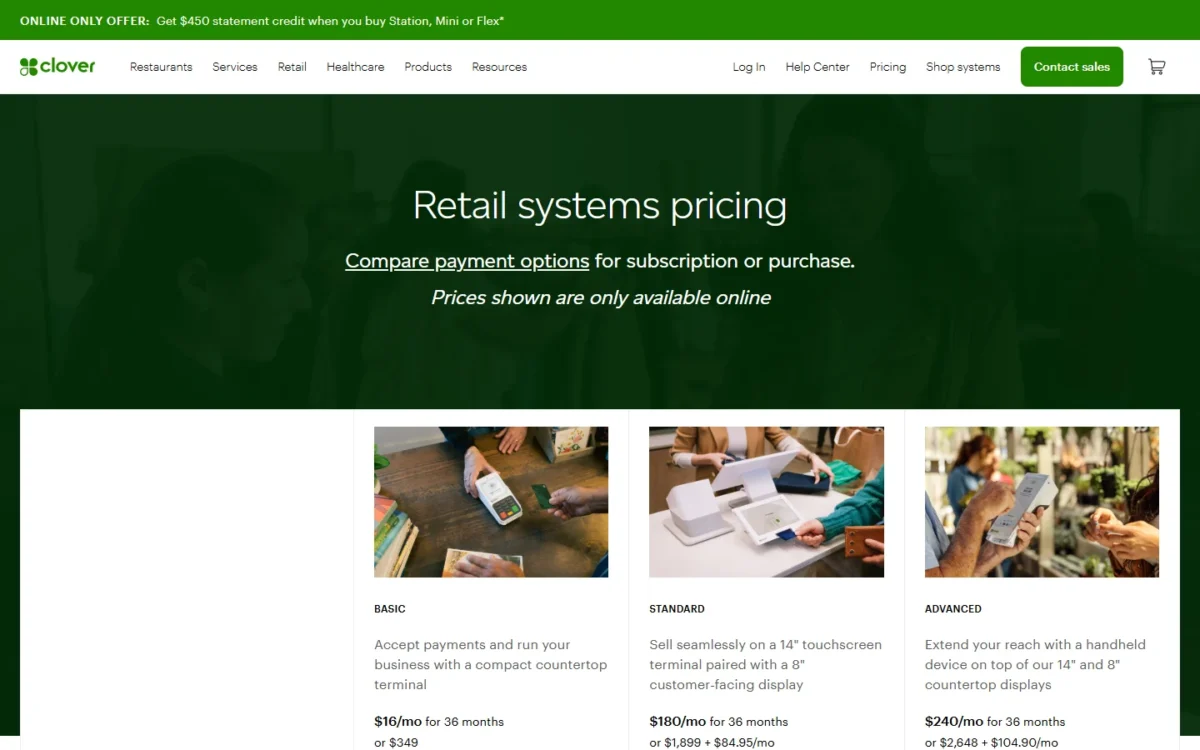
- Retail Basic: $16 per month for 36 months, or $349; 2.6% + 10¢; no inventory management or detailed reports
- Retail Standard and Advanced: $180 or $240 per month for 36 months, or the device plus a monthly plan; 2.3% + 10¢
- Quick-service Starter, Standard, Advanced: $135, $185 or $245 per month for 36 months; 2.3% + 10¢
Sources: Clover retail pricing, Clover quick-service pricing, Clover pricing, checked Nov 2026.
Pros
- Terminal and software in one monthly figure, with card fees per sale
- 2.3% + 10¢ on Standard and quick-service plans, below Square’s tap, dip or swipe rates (2.4% to 2.6% + 15¢)
- Quick-service plans include no-fee online ordering and QR-code ordering
Cons
- The monthly prices assume a 36-month subscription
- Retail Basic excludes inventory management, detailed sales reports, returns and loyalty
- The statement credit requires a 3-year contract
- Skip it if:
- you might close, move or change concept within 36 months; Square sells its Terminal outright with no long-term contract required.
5. Lightspeed Retail: Best for Multi-Location and High-SKU Stores
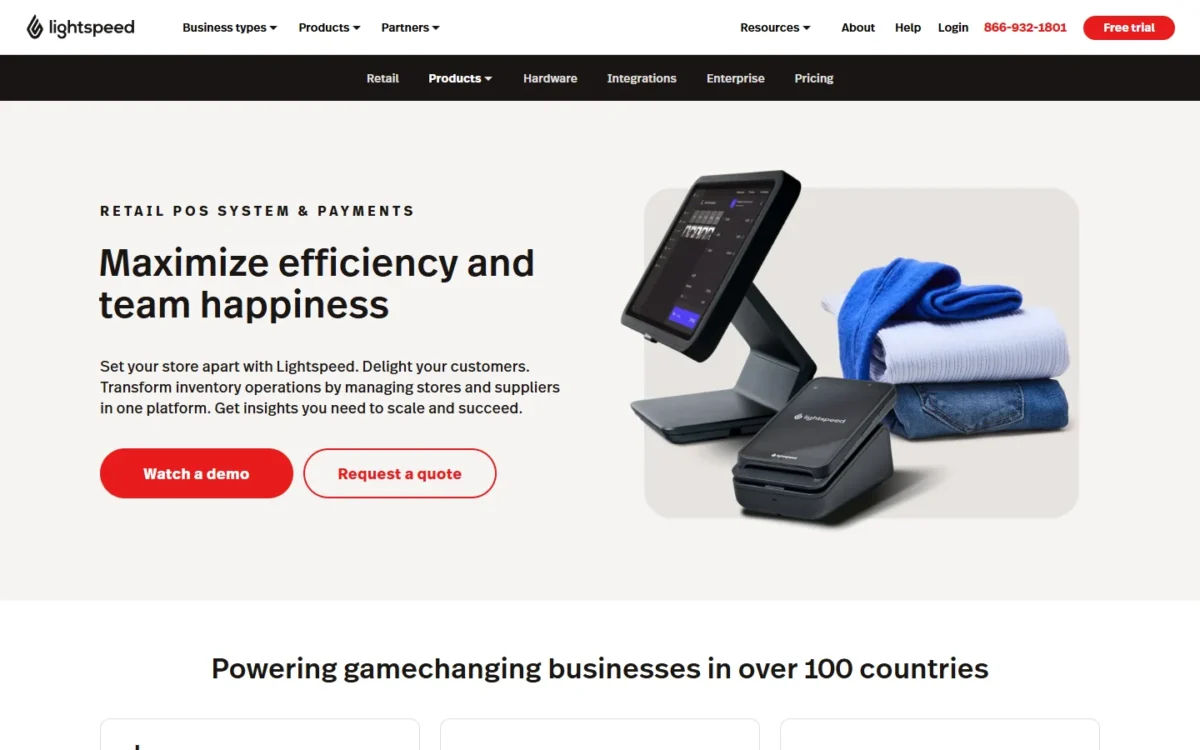
- Best for: retailers with purchase orders, supplier catalogs and more than one store
- Starting price: Basic $89 per month billed annually, or $109 billed monthly
- Card-present rate: 1.5% Lightspeed Payments card-present rate, as the pricing page prints it
- Free plan or trial: free trial offered; length not printed
Buying stock, not just selling it, is what Lightspeed Retail is built around: purchase orders, PO Sync with the NuORDER catalog of over 5 million products, Lightspeed Wholesale and landed costs sit in the plans, which is what a store with a large catalog or several locations needs. The catch: every plan includes one register, and extra locations and registers go to Contact sales.
The plans step up on inventory depth: Basic includes inventory management, purchase orders, the wholesale catalog and Lightspeed eCommerce at its Basic level, and Plus adds AI Doc Import, which turns a scanned supplier invoice into a draft purchase order. Shopify prints $89 per POS Pro location; Lightspeed makes you ask, so get the quote before you compare the two.
The rate line is unusual: a 1.5% Lightspeed Payments card-present rate on all three plans with no per-sale fee printed, the lowest retail row in my cost table. Ask in the demo whether a per-transaction fee applies. If what you need is stock control without a new register, my ranking of inventory management software by business type covers that case.
Lightspeed Retail bills Basic, Core and Plus annually or monthly, each with one register, and the annual price is the lower one; extra locations and registers are quoted by sales.
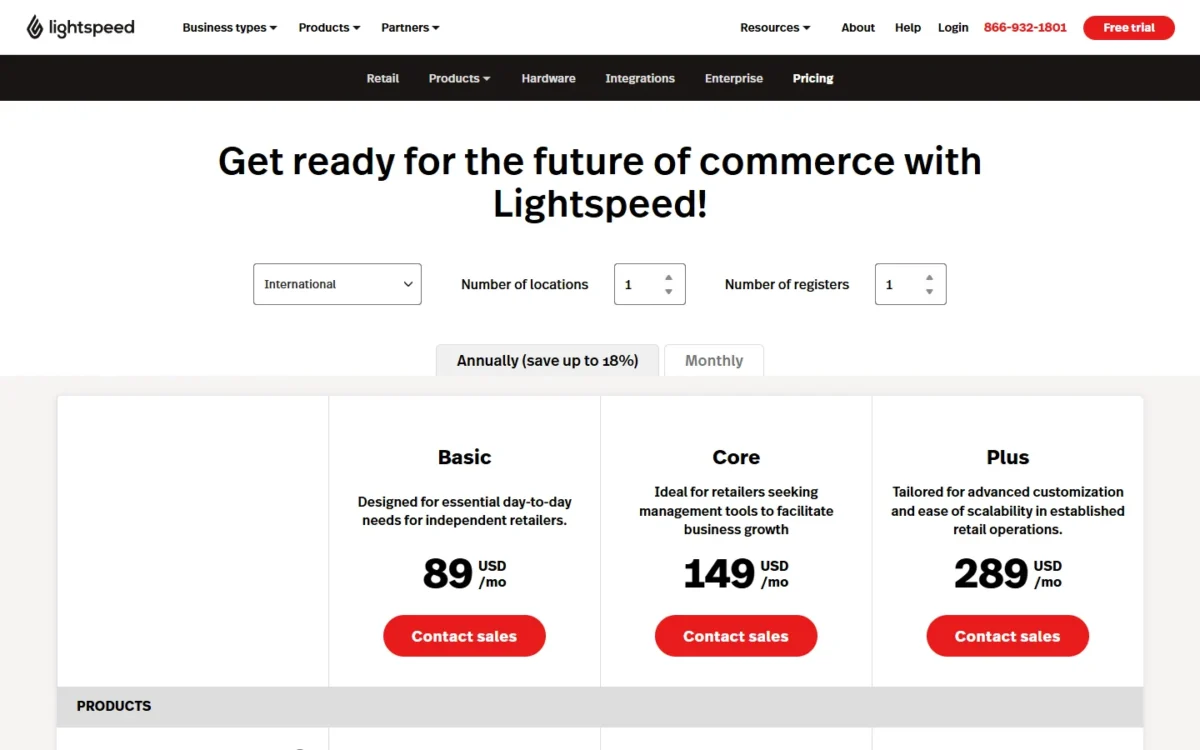
- Basic: $89 per month billed annually, or $109 billed monthly; 1 register; eCommerce Basic; AI Doc Import is an add-on
- Core: $149 per month billed annually, or $179 billed monthly; 1 register; AI Doc Import is an add-on
- Plus: $289 per month billed annually, or $339 billed monthly; 1 register; AI Doc Import included
Sources: Lightspeed Retail pricing, checked Nov 2026.
Pros
- Purchase orders and PO Sync with NuORDER on every plan
- Landed costs, custom user roles, workflows and API access for an established operation
- 24/7 chat and phone support on every plan
Cons
- One register per plan, and no printed price for more registers or locations
- AI Doc Import is an add-on below Plus
- No kitchen or table features, so a cafe inside the store needs another system
- Skip it if:
- you run one register and a very small catalog; Square Free and Shopify Basic need no sales call.
6. SpotOn: Best for Restaurants That Want $0 Upfront Hardware

- Best for: a restaurant short on cash that accepts a higher rate for included hardware
- Starting price: All-In $0 per station per month; POS Essentials $55 per station per month
- Free plan or trial: the All-In plan is $0 per station, with a higher card rate and a 2-year minimum term; no free trial listed
Opening a restaurant with no cash for terminals is the problem SpotOn’s All-In plan solves: no station fee, hardware included, and the cost recovered through a higher card rate instead. The catch: processing minimums apply and the term is two years minimum, so this is a financing decision dressed as a software plan.
Both plans include ordering, payments, table layouts, menu management, reporting and 24/7 support; Essentials adds an upfront bill for stations and implementation. At the cafe’s volume, All-In costs 25,000 x 0.0034 + 2,500 x 0.05 – $55 = $155 a month more, which repays the $750 station alone in under five months, before implementation costs, so All-In is the plan for a restaurant whose opening cash is gone, not for one that wants the cheaper total.
Online ordering is a bundle, not a line item. SpotOn’s Core Bundle adds SpotOn Order (commission-free online ordering), Profit Assist and Marketing Assist for $50 a month per location plus 0.20% of gross payment volume, capped at $200 a location. Toast sells the same idea as a Digital Storefront suite without a printed price. Hardware is SpotOn’s own, and the FAQ recommends a $300 backup router.
SpotOn prints both restaurant plans with their card-present rates: All-In with no station fee on a 2-year minimum, and POS Essentials per station month-to-month, plus hardware and implementation.
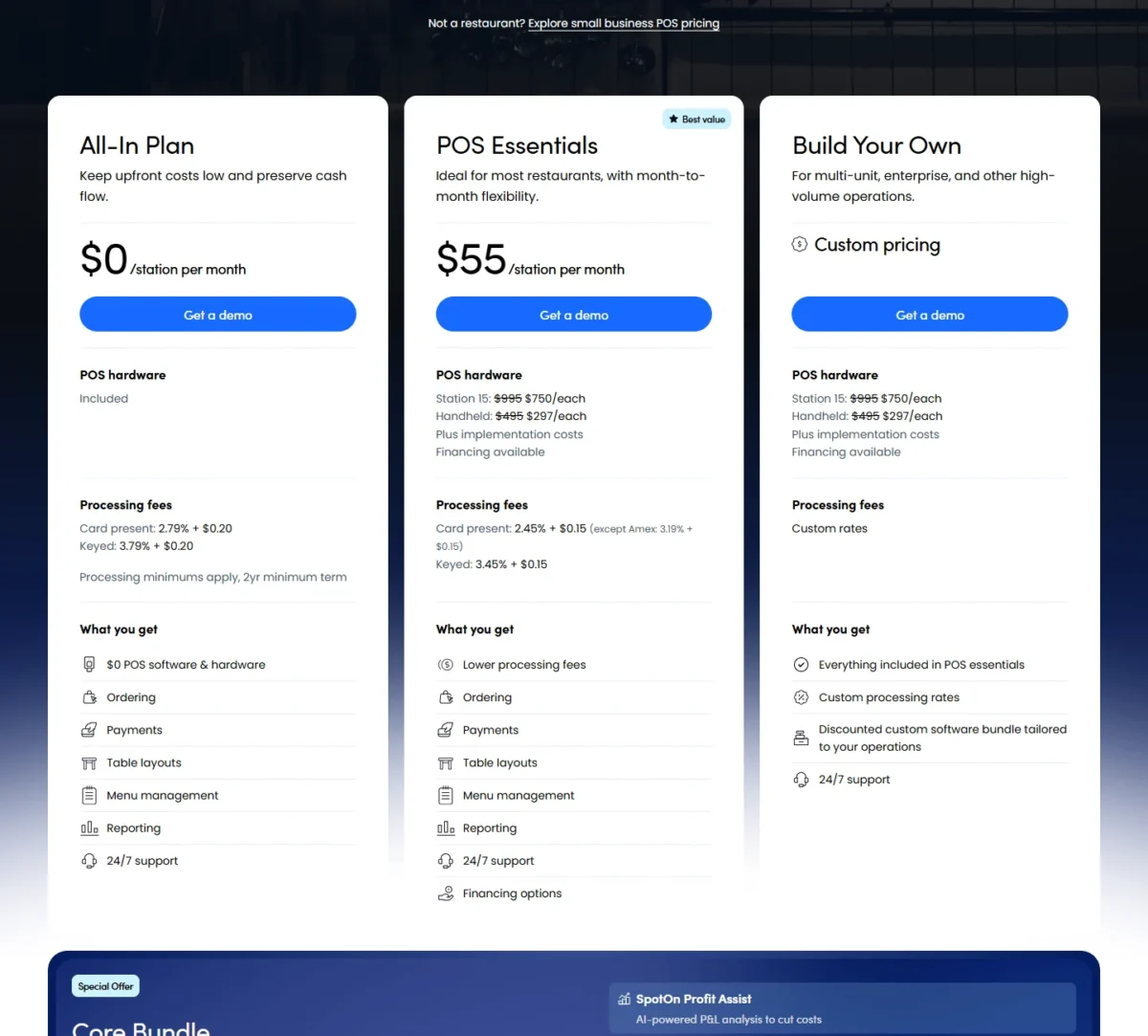
- All-In: $0 per station per month; 2.79% + 20¢, keyed 3.79% + 20¢; processing minimums; 2-year minimum term
- POS Essentials: $55 per station per month, month-to-month; 2.45% + 15¢; Station 15 $750, Handheld $297, plus implementation
- Core Bundle: $50 per month + 0.20% of GPV, capped at $200 per location; Build Your Own on custom rates
Sources: SpotOn pricing, checked Nov 2026.
Pros
- Both card rates and both plan prices printed on the page
- Hardware included with no station fee on All-In
- Commission-free online ordering with a printed cap per location on the Core Bundle
Cons
- All-In carries a 2-year minimum term and processing minimums
- Essentials needs the station price plus implementation upfront
- Proprietary hardware only, and a backup router is recommended
- Skip it if:
- you can pay $750 a station upfront and 0.34% of your card sales plus 5¢ a sale tops $55 a month (the cost table’s cafe row shows Essentials cheaper), or you want month-to-month terms on the $0 plan, which SpotOn does not offer.
7. TouchBistro: Best for Table-Service Restaurants
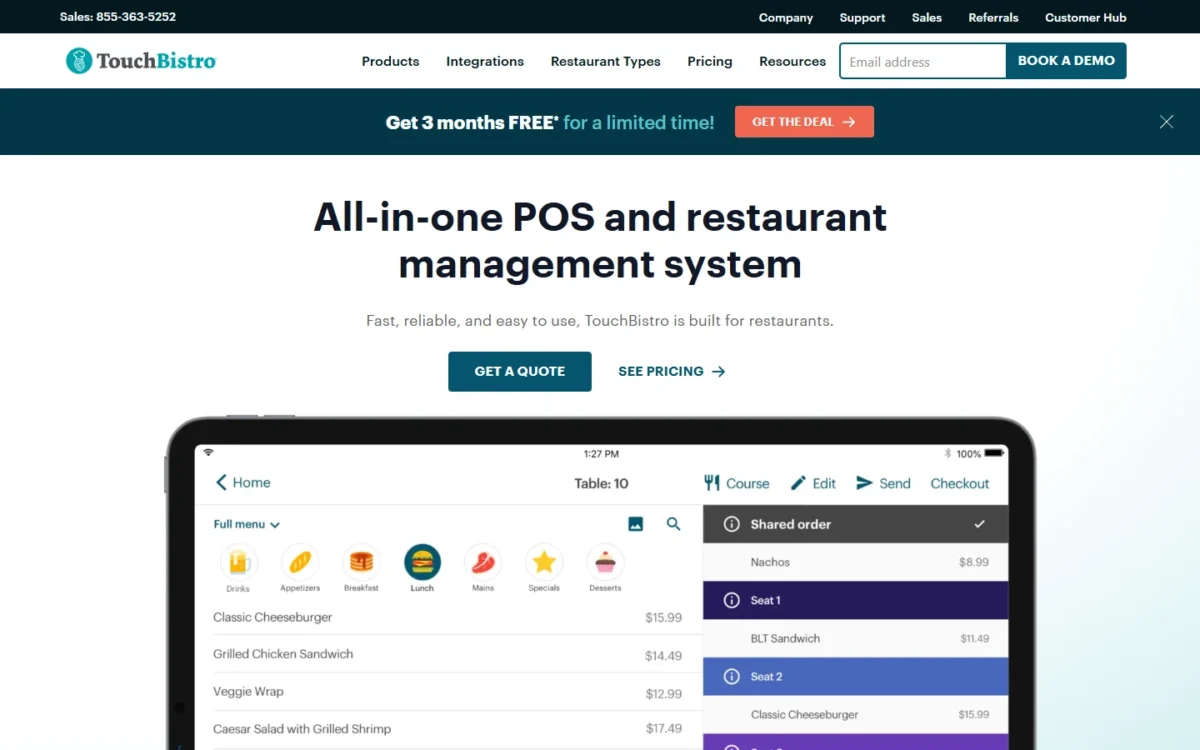
- Best for: a table-service restaurant that wants floor plans and tableside ordering in the entry plan
- Starting price: Point of Sale from $69 per month; Essentials Bundle from $119 per month with hardware
- Card-present rate: not printed; payment processing and fees are extra
- Free plan or trial: no free plan or trial on TouchBistro’s plan list
Nothing in TouchBistro’s core POS is locked behind a higher plan: menu management, floor plan and table management, tableside ordering, staff management and reporting all come with the entry plan. What you pay extra for is the kitchen display, online ordering, reservations and inventory, add-ons whose prices the page does not print, plus processing.
The Essentials Bundle adds restaurant-grade hardware and integrated payments to the same software, and venues with two or more terminals can finance hardware.
Online ordering carries no commission, which makes it the add-on most worth pricing; SpotOn prints its online-ordering bundle price and cap, TouchBistro does not. Processing is a choice too: TouchBistro works with a range of payment processors, integrated or standalone, which suits a restaurant with an existing merchant account but leaves the all-in cost to a quote. Support is 24/7 by phone and email at no extra cost.
TouchBistro prints two starting prices, and payment processing is extra on both.
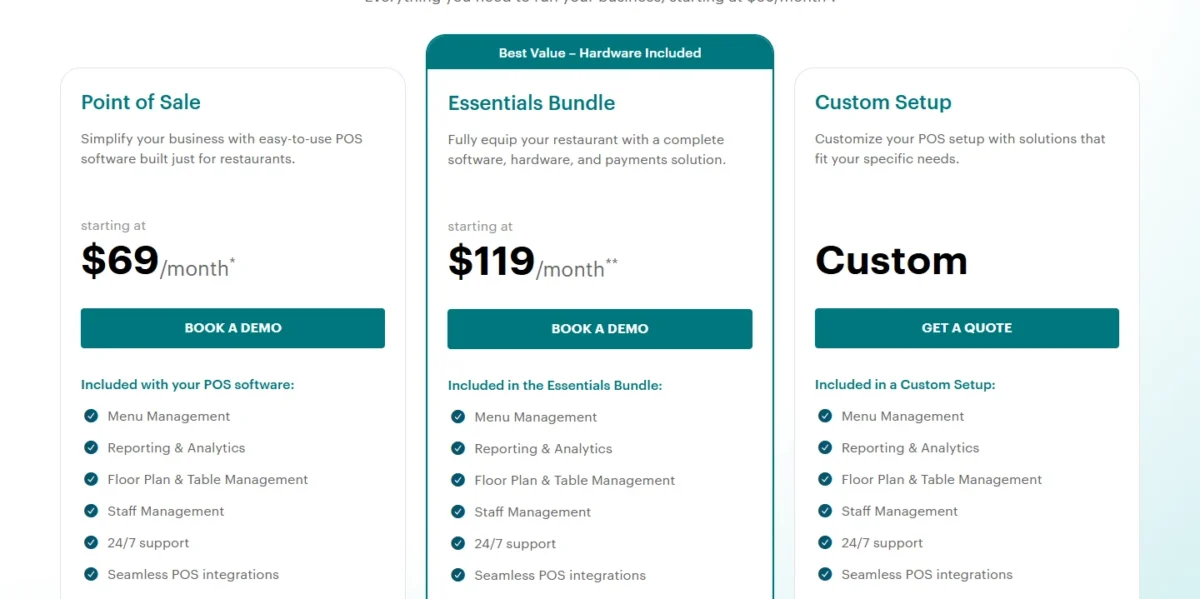
- Point of Sale: from $69 per month; hardware, processing and fees extra
- Essentials Bundle: from $119 per month; hardware and integrated payments included, processing extra
- Custom Setup: custom pricing; adds front-of-house, back-of-house and guest add-ons
Sources: TouchBistro pricing, checked Nov 2026.
Pros
- No core feature is locked behind a higher plan
- No commission on online orders through its own add-on
- Hardware financing and 24/7 phone and email support
Cons
- KDS, inventory, online ordering, reservations and loyalty are add-ons with no printed price
- The processing rate is not printed, so the all-in cost needs a quote
- No free plan or trial listed
- Skip it if:
- you need a price for every add-on before the demo; SpotOn prints its rates, hardware and online-ordering bundle on one page.
8. Lightspeed Restaurant: Best for Bars and Multi-Venue Restaurant Groups
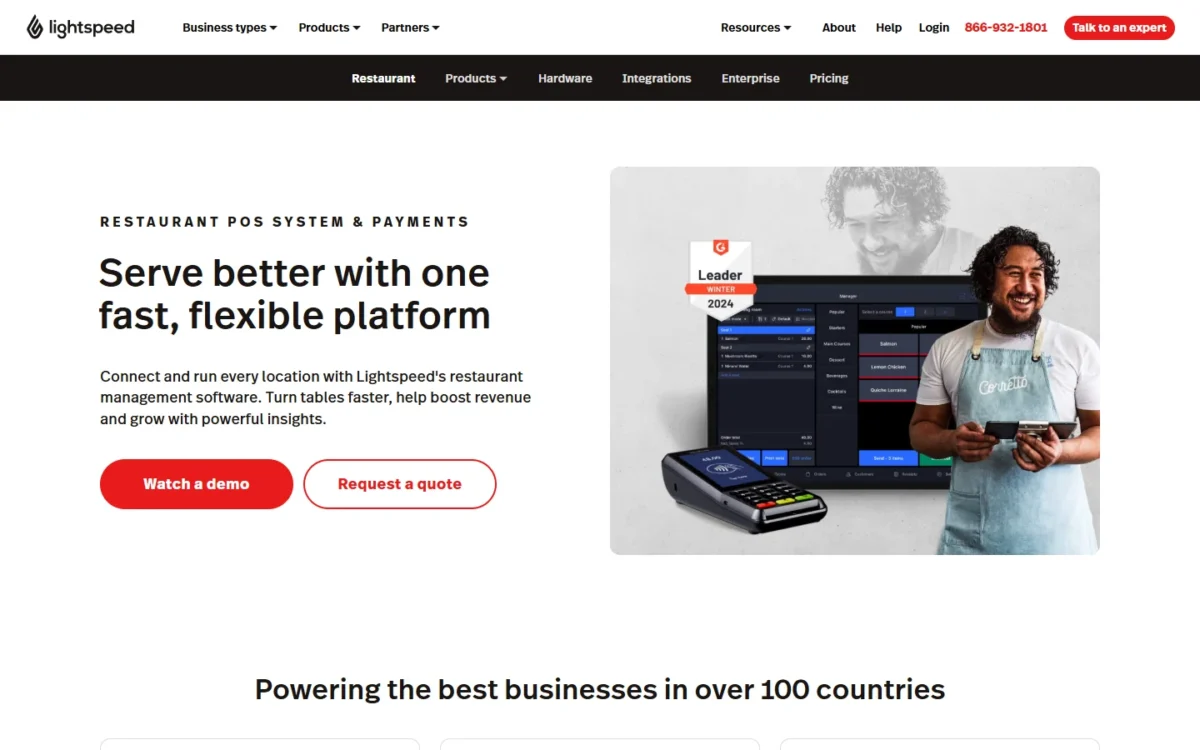
- Best for: bars, hotel outlets and groups running several venues
- Starting price: Starter 69 USD, Essential 189 USD, Premium 399 USD, as printed; Enterprise on a quote
- Card-present rate: integrated payments; rate not printed
- Free plan or trial: no free plan or trial on Lightspeed Restaurant’s plan list
Lightspeed Restaurant earns its place for the bar and the group: pre-auth bar mode, floor plans, multi-location management, multiple revenue centers for hotels and raw API access all appear on its pricing page, a different set of tools from TouchBistro’s single dining room. Budget a per-screen kitchen display fee.
The pricing page does not say whether its plan prices are per month or per year, so confirm the period before you compare Starter with Toast’s $69 a month. Integrated payments are the default on Starter and custom on Essential and Premium, which points to a negotiated rate at the higher tiers.
The feature list adds order and pay at table with QR codes, Tempo for service pacing and a Pulse mobile app for multi-site performance.
Lightspeed Restaurant prints three plan prices in USD without a billing period, Enterprise on a quote, and a Kitchen Display System at $30 per screen per month on every plan.
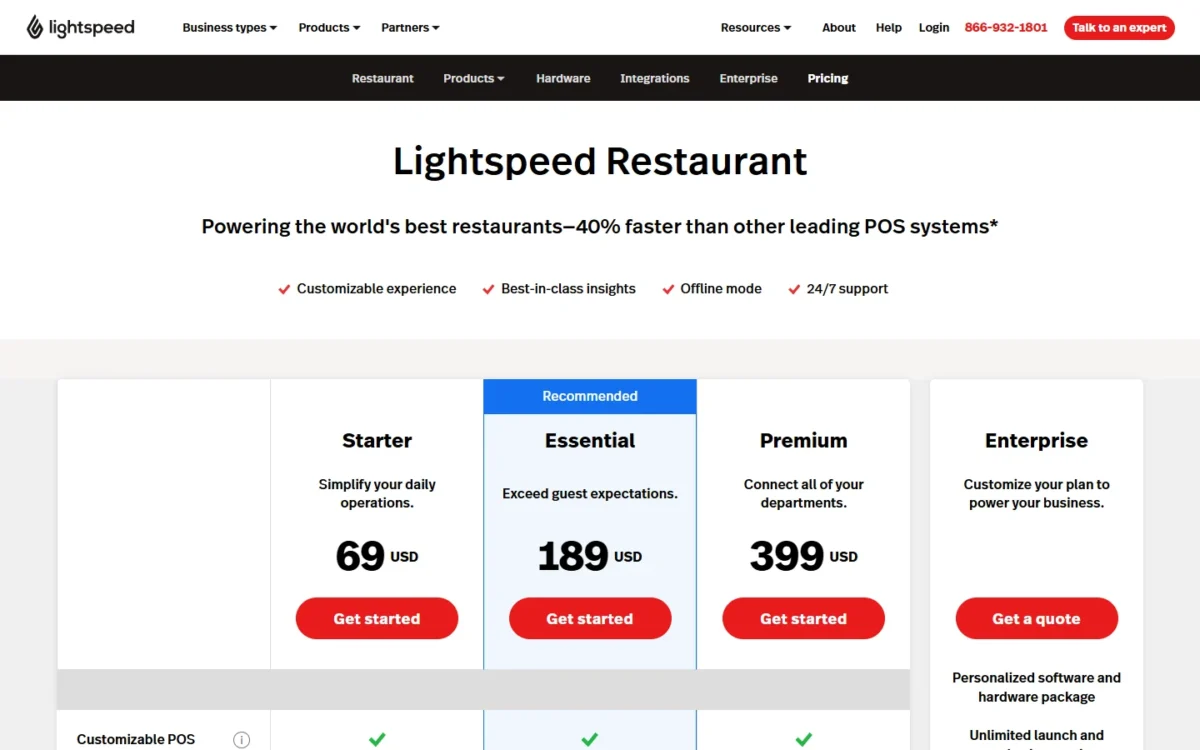
- Starter: 69 USD, as printed, period not printed; integrated payments at the default rate; Tasks and reservations are add-ons
- Essential and Premium: 189 USD and 399 USD, as printed, period not printed; custom integrated payments; Pro Services available
- Enterprise: quote; personalized software and hardware package
Sources: Lightspeed Restaurant pricing, checked Nov 2026.
Pros
- Pre-auth bar mode for tabs, with swipe-to-open and one-click closeouts
- Multi-location management and multiple revenue centers for hotels
- Raw API access and PMS, delivery and accounting integrations
Cons
- The billing period behind the plan prices is not printed
- The processing rate is not printed and turns custom above Starter
- KDS costs $30 per screen per month on every plan, and reservations are an add-on
- Skip it if:
- you run one cafe counter; Square’s free plan rings the same card with no software fee.
9. Helcim: Best for Lower Processing Costs at Higher Volume

- Best for: a business past $50,000 a month in card sales that wants its margin to fall with volume
- Starting price: $0 per month; no signup, PCI, cancellation or contract fees
- Free plan or trial: free account; no monthly fee
Cutting card fees, not running a dining room, is Helcim’s job: it prices interchange-plus, passes the card networks’ wholesale cost through and adds a margin that drops by tier, with no monthly fee, no contract and no cancellation fee. The catch is that the interchange part is not one number, so your effective rate depends on the cards your customers carry.
The tiers are the product. Helcim’s in-person margin starts at interchange + 0.40% + 8¢ and steps down through four more volume bands to interchange + 0.15% + 6¢, with the discount applied automatically from the average of your last three months.
Whether Helcim wins depends on whether interchange plus margin lands under a flat rate for your card mix, and a debit-heavy counter is where the gap opens, because US PIN-debit runs through the same interchange-plus model.
The POS side is lighter than Toast or Lightspeed: a free app for a laptop, tablet or smartphone with tipping, split payments, inventory tracking and customer records, plus unlimited users at no extra fee. Hardware is bought, not leased, and Tap to Pay on iPhone carries no hardware cost.
My take
Pick Helcim if your fee bill is the problem and your checkout is simple; keep Square until a statement shows your interchange plus Helcim’s margin beating your current flat rate. It is a processor with a POS, not a restaurant platform.
Helcim charges no monthly fee and prices processing at interchange plus a margin that falls by volume tier, with in-person and keyed or online margins printed for each tier.
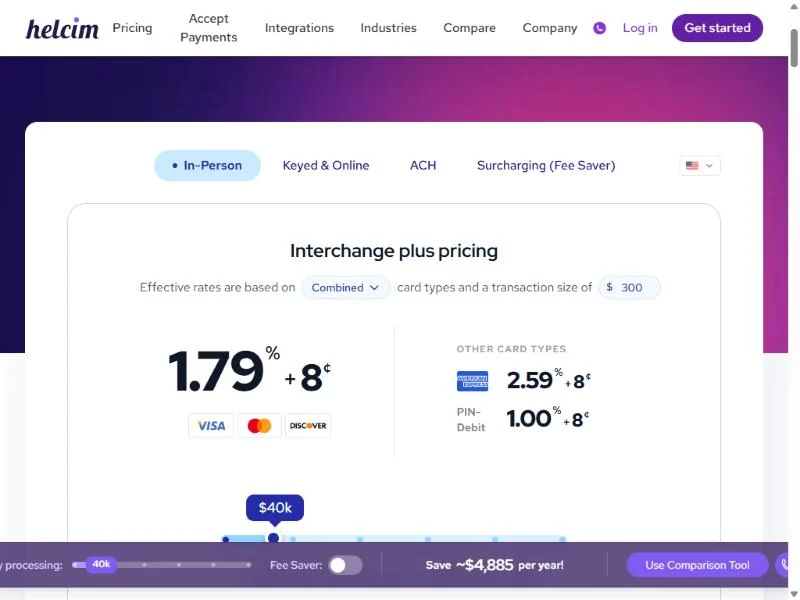
- $0-$50K a month: interchange + 0.40% + 8¢ in person; + 0.50% + 25¢ keyed and online
- $50K-$100K: + 0.35% + 7¢; + 0.45% + 20¢
- $100K-$500K: + 0.25% + 7¢; + 0.35% + 20¢
- $500K-$1M: + 0.20% + 6¢; + 0.25% + 15¢
- $1M-$5M: + 0.15% + 6¢; + 0.15% + 15¢; over $5M, contact sales
- Hardware: Card Reader $199; Smart Terminal $349 or $32 per month for 12 months; 4G data $7 per month optional; chargeback $15 if lost
Sources: Helcim pricing, Helcim point of sale, checked Nov 2026.
Pros
- No monthly, signup, PCI or cancellation fees, and no contract
- The margin falls automatically through five volume tiers
- Unlimited POS users at no extra fee, on a laptop, tablet or phone
Cons
- The interchange part is not printed as one rate
- No kitchen display, table management or restaurant features on its pages
- Below the first volume band the margin is the same for every merchant
- Skip it if:
- you need restaurant tables or a kitchen display; Toast and SpotOn build those in, and Helcim’s point-of-sale page describes neither.
10. Loyverse: Best Free POS for a Phone or Tablet

- Best for: a micro shop, kiosk or cafe that wants $0 software on a device it already owns
- Starting price: $0; paid add-ons per store or per employee
- Free plan or trial: free; each add-on has a 14-day free trial
Loyverse gives the smallest seller point of sale, essential inventory, loyalty, a kitchen display and multi-store management for free, on a phone or tablet you already own. What it does not give is a processor: card payments come from a separate company.
The kitchen display is the reason a food business should look: Square’s KDS app is not available on its free plan, while Loyverse sends orders to the kitchen in real time at no charge, which for a food truck or a two-table cafe is the difference between free software and a paid plan.
Processing is the open question. Loyverse’s pricing page prints no card rate, and its Payments menu lists several processors, so the all-in cost depends on the processor you pair with it.
My take
Pick Loyverse if software must cost nothing and you already trust a processor; it puts a kitchen display in front of a cook without a subscription. Skip it once you want one vendor to answer for both the register and the card bill.
Loyverse’s core POS is free; the three add-ons each start with a 14-day free trial and include 24/7 live chat support. A cafe with one store and three staff pays $5 + 3 x $5 = $20 a month for full history and employee tracking.
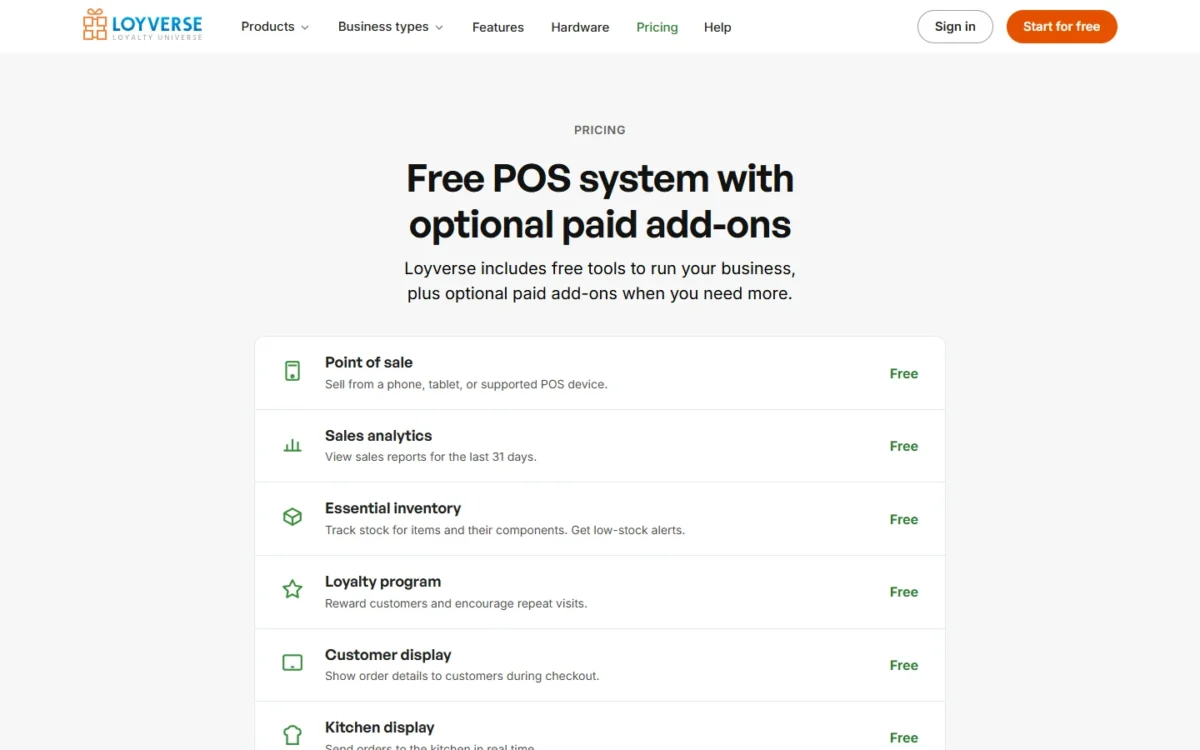
- Unlimited sales history: $5 per store per month
- Employee management: $5 per employee per month; permissions, time cards, sales by employee
- Advanced inventory: $25 per store per month; purchase orders and stock transfers
Sources: Loyverse pricing, checked Nov 2026.
Pros
- Kitchen display, loyalty, customer display and multi-store management free
- Runs on a phone or tablet you already own, with no credit card to start
- A Payments menu that lists several card processors to pair with
Cons
- Sales analytics stop at 31 days without the history add-on
- Card processing comes from a third party, with no rate printed by Loyverse
- Purchase orders and stock transfers need the advanced inventory add-on
- Skip it if:
- you want one bill for software and processing; Square gives both from one account on its free plan.
How to Choose a POS System for Your Business
Start from your business type, then price the all-in cost at your volume, then read the contract.
- Business type first. A dining room with servers needs tables, tips and a kitchen display, which shortlists Toast, SpotOn, TouchBistro and Lightspeed Restaurant; a store with stock to reorder needs purchase orders, which favors Lightspeed Retail or Shopify POS Pro.
- All-in cost at your volume, worked as in the cost table above.
- Processing model and term. Flat rates (Square, Shopify, Clover, SpotOn) are readable but fixed; interchange-plus (Helcim) falls with volume but varies by card; an unpublished rate (Toast, TouchBistro, Lightspeed Restaurant) is a quote to get in writing.
- Hardware, locations and support. Square and Helcim sell devices outright, Clover and SpotOn All-In fold them into a term, and Toast and SpotOn run only on their own devices; Square and Shopify print a per-location fee where Lightspeed Retail quotes one.
The sales that land in your books are the last check: the POS you pick should sync to the accounting software your small business already uses, and Lightspeed, Toast and Loyverse each name an accounting integration on their pages.
My take
Pick by business type first, then by cost. Pick Toast or SpotOn if servers run a dining room, and demo them side by side; pick Lightspeed Retail or Shopify POS Pro if your store writes purchase orders; pick Square Free if this is your first counter and you want no monthly fee.
| Software | Kitchen display | Table management | Online ordering | Multi-location | 24/7 phone support |
|---|---|---|---|---|---|
| Square | $30 per device on Plus, $20 on Premium; not on Free | Yes (restaurant features) | Yes | Yes, plan fee per location | Premium only |
| Shopify POS | Not listed | Not listed | Yes, the online store | Yes, POS Pro $89 per location | Plus only; 24/7 live chat on Basic and Grow, enhanced live chat on Advanced |
| Toast | Not listed on the pricing page | Yes | Add-on (Digital Storefront) | Add-on (Restaurant Management Pro) | Yes |
| Clover | Not priced on the pricing pages | Not listed | Yes, no-fee (quick-service plans) | Not listed | Yes |
| Lightspeed Retail | Not listed | Not listed | Yes, built-in eCommerce | Quoted by sales | Yes |
| SpotOn | Custom quote | Yes | Core Bundle, $50 per month + 0.20% of GPV | Build Your Own | 24/7 support (channel not stated) |
| TouchBistro | Add-on | Yes | Add-on, no commission | Not listed | Yes |
| Lightspeed Restaurant | $30 per screen per month | Yes | Yes, listed on every plan | Yes | 24/7 support (channel not stated) |
| Loyverse | Free | Not listed | Not listed | Free | 24/7 live chat with a paid add-on |
Sources: Square restaurant pricing, Shopify POS pricing, Toast pricing, Clover quick-service pricing, Lightspeed Retail pricing, SpotOn pricing, TouchBistro pricing, Lightspeed Restaurant pricing, Helcim point of sale, Loyverse pricing, checked Nov 2026.
Restaurant POS Checklist: KDS, Tables, Online Ordering and Tips
A restaurant POS needs four things, and each pick prices them differently: a kitchen display, table management, commission-free online ordering and tip handling.
- Kitchen display: Square’s KDS app is $30 per device a month on Plus and $20 on Premium, and not available on Free; Lightspeed Restaurant charges $30 per screen per month; Loyverse includes it free; TouchBistro sells it as an unpriced add-on; SpotOn names KDS monitors under its custom builds.
- Table management: Toast lists table and order management, SpotOn table layouts, TouchBistro floor plan and table management, Lightspeed Restaurant floor plans and pre-auth bar mode; Square lists tableside ordering with coursing and seat management among its restaurant features.
- Online ordering without commission: Toast’s Digital Storefront, SpotOn Order in the Core Bundle, TouchBistro’s add-on and Clover’s no-fee online ordering on quick-service plans all state no commission; Square lists a branded online ordering page among its food and beverage features.
- Tips and the team: Square lists tip pooling and commissions tracking and payroll from $35 a month plus $6 per person; Toast bundles Tips Manager in Team Management Essentials and payroll at $69 plus $9 per employee. Shift scheduling beyond the POS is a separate buy, and my ranking of employee scheduling software for restaurants covers the free options.
Read the Contract Before the Rate
- Clover: monthly prices run 36 months, and the $450 credit needs a 3-year contract
- SpotOn All-In: a 2-year minimum with processing minimums; Essentials is month-to-month
- Shopify Plus: a 1- or 3-year term
- Toast: software runs only on Toast-approved devices
- Square, Helcim and Loyverse: no term printed
Before signing, ask what happens to the hardware if you close early, whether there is a processing minimum and whether the rate changes after year one, and get the answers in writing.
Also Considered
Four systems that appear in POS searches did not make the ranking, because none prints a POS software price:
- Revel Systems: its pricing URL now lands on a Shift4 Dine page that states Revel is part of Shift4.
- Lavu: pricing depends on your configuration, number of devices and whether you activate Marty.
- SumUp: the US pricing page lists a Free tier, POS Plus and SumUp POS without POS prices.
- Epos Now: the US pricing page prints hardware offers and no software subscription price.
FAQ
Which POS system has the lowest fees?
It depends on volume. Lightspeed Retail prints 1.5% card-present on all three plans with no per-sale fee listed. Clover’s 2.3% + 10¢ on Standard and quick-service plans and Shopify’s 2.4% + 10¢ on Advanced are the lower flat rates with a per-sale fee, but each sits behind a pricier monthly plan. At higher volume Helcim’s interchange-plus margin falls by tier, and whether it undercuts a flat rate depends on your card mix.
Which POS is better than Square?
Better for a job, not overall: Toast for a restaurant that wants tables, tips, payroll and online ordering from one vendor, Shopify POS for an online retailer, Lightspeed Retail for a chain that writes purchase orders, Helcim for a high-volume business. For a first counter with no monthly fee, Square still fits.
What is the best POS system for a food truck?
A truck needs a battery-powered reader and no monthly fee. Square’s $59 Reader pairs with your phone on the free plan, and Loyverse runs free on a phone with a third-party processor, including its free kitchen display.
Can I run a POS from home on my phone?
Yes. Square Free takes payments with just your phone through Tap to Pay on iPhone or Android, and Helcim’s Tap to Pay on iPhone also carries no hardware cost. Both charge only when a card is processed, so a home-based seller pays nothing in a quiet month.
Do I need a contract to get a POS system?
It depends on the pick. Square and Helcim print no long-term contract; SpotOn All-In, Clover and Shopify Plus print the terms listed above; Toast, TouchBistro and Lightspeed Restaurant print none, so ask. Buying the device outright, as Clover’s $349 option or Square’s $299 Terminal allow, removes the hardware term.
Final Verdict: My Pick for Each Situation
- Pick Square if you are opening a first counter, cafe or service business: the hardware is the only commitment.
- Pick Shopify POS if your web store is the business, and budget for POS Pro per location.
- Pick Toast for a full-service or quick-service restaurant once the processing rate and suite fees are in writing; pick SpotOn if you want the rate printed, on Essentials when you can pay $750 a station and All-In when you cannot.
- Pick TouchBistro for a table-service room, with the add-on prices confirmed with TouchBistro.
- Pick Lightspeed Restaurant for a bar, hotel outlet or venue group, after you confirm the billing period and budget $30 per kitchen screen.
- Pick Lightspeed Retail for several stores with heavy purchasing, with the extra-location quote in hand.
- Pick Clover if you want one monthly bill for hardware and software and the location will be open in 36 months.
- Pick Helcim past $50,000 a month in card sales, once a statement shows interchange plus its margin under your flat rate.
- Pick Loyverse if software must cost nothing, paired with a processor whose rate you have read.
My take
If you are still torn, Square Free is worth it when you do not yet know your volume, because it costs nothing to leave. Whatever you pick, run the cost formula with your own volume and start a trial before the hardware order: a POS is cheap to try for a week and expensive to leave in month six.