Most teams do not compare HubSpot vs Zoho CRM because they are curious. They compare because a renewal quote arrived, a finance review flagged the sales stack, or a HubSpot Professional bill crossed a line the budget cannot defend.
That is the honest starting point, so this comparison treats it as a switching decision rather than a feature beauty contest. Both are mature CRM software platforms, and both do the core job of customer relationship management software well, so the decision turns on cost, configuration, and adoption risk rather than whether the basics work.
HubSpot Sales Hub is the stronger fit when fast adoption, a clean interface, and one connected marketing-and-sales platform matter more than license cost. Zoho CRM is the stronger fit when a cost-sensitive team with a named CRM owner needs custom modules, high automation ceilings, offline mobile access, and materially lower per-seat pricing.
Choose HubSpot if your buying tension is adoption speed and cross-team data, and you can absorb onboarding fees plus credit governance. Choose Zoho CRM if your tension is annual cost and configuration depth, and you have someone who will own the setup.
The rest of this article quantifies where that line sits, what breaks when you cross it, and what a HubSpot-to-Zoho migration costs in practice.
In This Article (24 sections)
Quick Verdict: HubSpot Sales Hub vs Zoho CRM
Prices were checked on the official US pricing pages on July 15, 2026. Winners below are per dimension, not overall, because no single product wins every buyer.
| Category | Winner | Why |
|---|---|---|
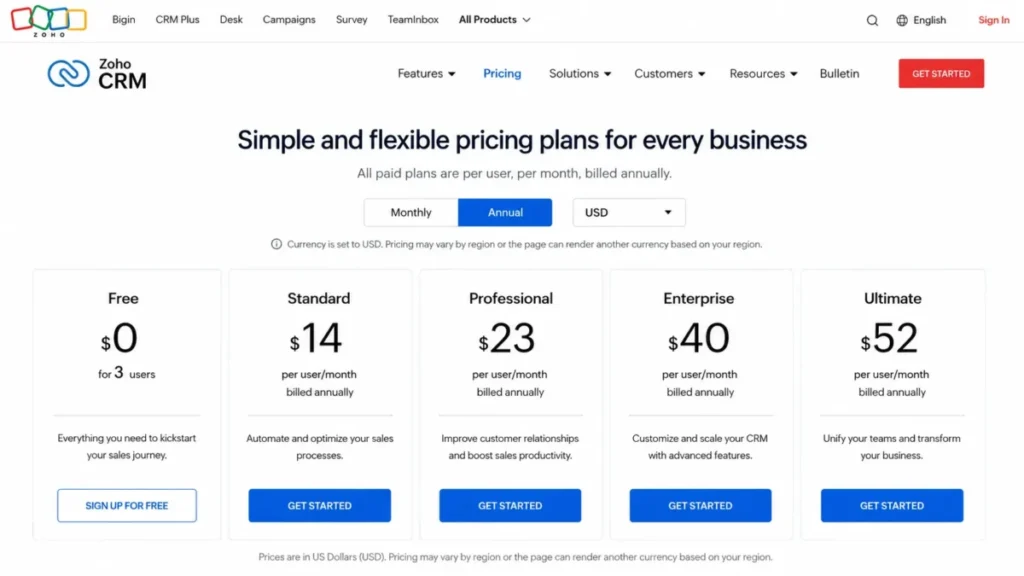
| Free plan for a 3-person team | Zoho CRM | Zoho Free covers 3 users; HubSpot Free stops at 2. |
| Paid-plan affordability | Zoho CRM | Zoho paid editions run $14 to $52 per user; HubSpot Professional starts at $90 plus a required onboarding fee. |
| Ease of adoption | HubSpot Sales Hub | Reviewer patterns consistently favor its interface and fast rollout. |
| Custom data model below enterprise | Zoho CRM | Zoho Standard includes 10 custom modules; HubSpot custom objects require Enterprise. |
| Marketing and sales continuity | HubSpot Sales Hub | Sales Hub shares one CRM foundation with HubSpot marketing, service, and content tools. |
| Automation capacity per dollar | Zoho CRM | Higher published workflow ceilings at a fraction of the license cost. |
| API capacity ceilings | Zoho CRM | Higher published maximums and defined concurrency by edition. |
| Support access simplicity | HubSpot Sales Hub | Live channels open at Starter and Professional without a seat-count minimum. |
| Mobile offline operation | Zoho CRM | Zoho documents offline records on iPad; HubSpot records need a connection. |
| Cost predictability | Zoho CRM | Transparent seat pricing versus HubSpot onboarding, credit packs, and commitment rules. |
The pattern is consistent. Zoho CRM wins the money and configuration dimensions, HubSpot wins the adoption and platform-continuity dimensions, and the deciding factor is which risk your team is less able to absorb.
How We Compared HubSpot and Zoho CRM
This comparison relies on official documentation and third-party research. No product account or live migration sits behind these findings, so every claim rests on official pricing pages, product and API documentation, billing and support policies, migration guides, and third-party review patterns from G2, Capterra, TrustRadius, TechRadar, and Zapier.
Pricing was verified in USD on the official pages on July 15, 2026. HubSpot Sales Hub figures come from the official HubSpot Sales Hub pricing page, and Zoho CRM figures come from the official Zoho CRM pricing page and pricing calculator.
Where a third-party page showed a stale price, the official page was treated as the source of record.
Source: official HubSpot Sales Hub pricing page and official Zoho CRM pricing page, both checked July 15, 2026. Every figure in this article carries that checked date, and each one should be reconfirmed on the official page before purchase.
The scope is deliberately narrow. Whether you searched for HubSpot vs Zoho CRM or the reverse phrasing, Zoho CRM vs HubSpot, the core comparison here is HubSpot Sales Hub against standalone Zoho CRM, not the full HubSpot Customer Platform against Zoho One or Zoho CRM Plus.
When an adjacent product enters the stack, such as HubSpot Marketing Hub or Zoho Campaigns, it is named separately so its cost is not folded into a CRM price.
Two limitations shape the language throughout. Interface speed, real setup hours, and support response quality cannot be reported first-hand here, and every figure below is a list rate that can change after the checked date.
Why Teams Switch Between HubSpot and Zoho CRM
The switching traffic runs mostly one direction, and the trigger is rarely a missing feature. Public discussion threads and pricing-focused comparisons show the same pattern: teams adopt HubSpot Sales Hub, grow into Professional, then react to the bill and the way marketing capability sits in separate paid Hubs.
Teams leave HubSpot for Zoho CRM to cut license cost and to gain configuration depth without paying for Enterprise. A 10-seat sales team on HubSpot Professional pays $10,800 per year in license before the required onboarding fee, while the same seat count on Zoho CRM Professional costs $2,760 per year.
That gap is the whole conversation for a finance-led review.
Teams move the other way, from a spreadsheet or a cheaper tool to HubSpot, for a different reason. They are solving adoption and marketing-to-sales handoff, and they accept a higher price to get a clean interface and one shared contact record across marketing, sales, and service.
The honest read is that these are two different buying problems. One team is defending a budget, the other is defending adoption, and the correct product follows the problem rather than the headcount.
That is why a useful HubSpot vs Zoho CRM decision starts with your operating model, not a feature scoreboard. The rest of this guide sizes the money, the limits, and the switching risk against that model.
Feature Comparison Matrix
Each row names a winner and the plan gate that drives it. Gates matter more than raw feature lists, because a feature you can only reach at Enterprise is not the same purchase as one included at Standard.
| Dimension | HubSpot Sales Hub | Zoho CRM | Winner |
|---|---|---|---|
| Free user cap | Up to 2 users | Up to 3 users | Zoho CRM |
| Deal pipelines | 1 Free, 2 Starter, 15 Pro, 100 Enterprise | Multiple pipelines from Standard | Zoho CRM (lower gate) |
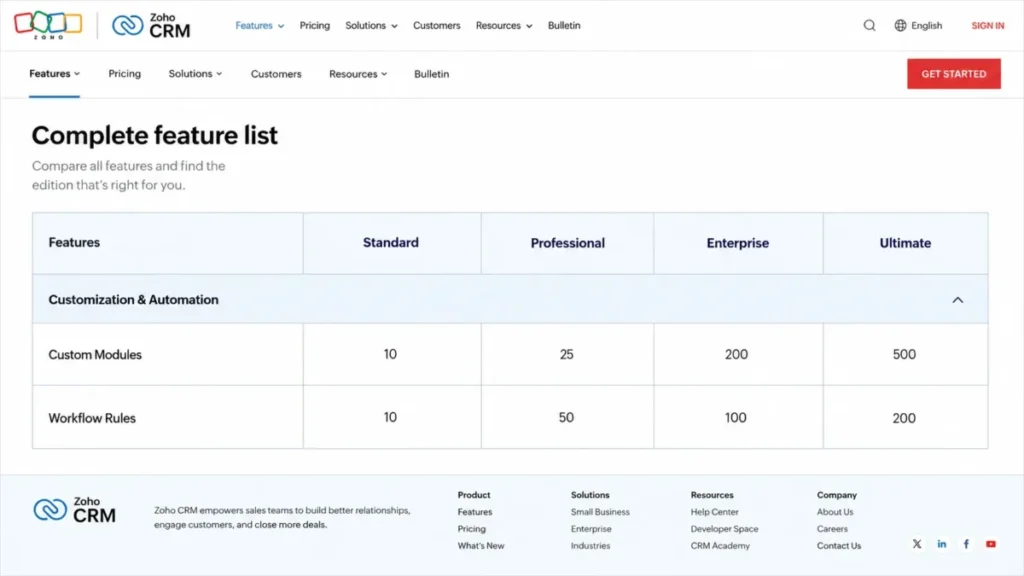
| Custom modules or objects | Custom objects at Enterprise only | 10 at Standard, 25 Pro, 200 Enterprise, 500 Ultimate | Zoho CRM |
| Sequences or cadences | Sequences require Professional | Cadences from Standard tiers | Zoho CRM (lower gate) |
| Custom reports | Professional and Enterprise | 100 at Standard, unlimited from Professional | Zoho CRM (value) |
| Workflow automation | Polished, concentrated in Pro and Enterprise | Granular ceilings, all paid tiers | Zoho CRM (capacity) |
| AI assistant | Breeze, credit-metered actions | Zia, edition-gated capabilities | Situational |
| Offline mobile records | Requires connection | Offline on iPad, syncs later | Zoho CRM |
| Interface and onboarding | Cleaner, faster adoption | Deeper, steeper learning curve | HubSpot Sales Hub |
| Marketing and service continuity | Native across HubSpot Hubs | Separate Zoho apps or bundles | HubSpot Sales Hub |
The matrix exposes the real trade. Zoho unlocks configuration and automation far earlier and far cheaper, and HubSpot answers with a lower-friction interface and a shared platform that Zoho matches only by adding more Zoho products.
Pricing at Scale: 3, 10, and 50 Users
Sticker price is where most HubSpot vs Zoho CRM comparisons stop, and it is where they mislead. The decision changes with team size, required tier, and one-time onboarding, so the numbers below model all three at the plan a real team would run.
First-year cost by team size
| Scenario | HubSpot Sales Hub | Zoho CRM | Difference |
|---|---|---|---|
| 3 users, free tier | Not possible (Free caps at 2) | $0 on Free (3 users) | Zoho covers the team |
| 10 users, first year | $12,300 (Professional, incl. $1,500 onboarding) | $2,760 (Professional, annual) | $9,540 |
| 50 users, first year | $55,500 (Professional, incl. $1,500 onboarding) | $24,000 (Enterprise, annual) | $31,500 |
The formulas are transparent, and both are drawn from the current official tiers documented in our HubSpot pricing and Zoho CRM pricing breakdowns. HubSpot Professional is $90 per seat per month billed annually, so 10 seats run $10,800 plus the required $1,500 Professional onboarding fee, and 50 seats run $54,000 plus the same fee.
Zoho CRM Professional is $23 per user per month annually, so 10 users run $2,760, and Zoho CRM Enterprise at $40 per user per month annually puts 50 users at $24,000.
Read these as license-plus-required-onboarding comparisons, not proof of identical capability. The 50-user row deliberately uses Zoho Enterprise, the higher edition, so the comparison does not cherry-pick Zoho’s cheapest plan against HubSpot’s practical tier.
HubSpot Starter: offer rate versus standard price
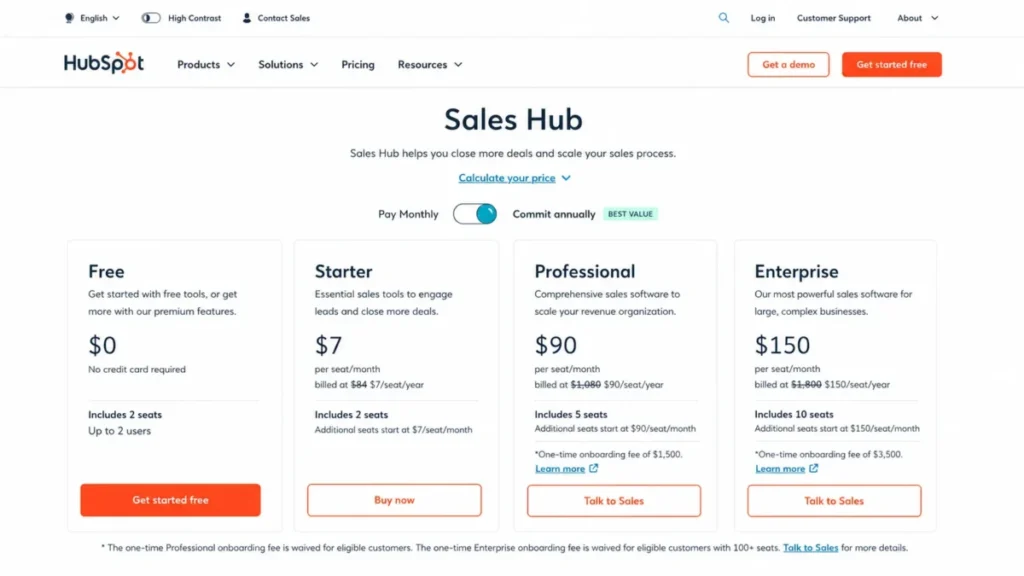
HubSpot’s entry tier needs a label that price aggregators keep dropping. On July 15, 2026 the official Sales Hub page displayed Starter at $7 per seat per month on the annual offer, shown beside a $20 per seat per month figure on the monthly option.
The tables above deliberately use the higher tiers a real automation team runs, and any budget built on that $7 line is fragile. Treat $20 as the standard price, confirm the offer’s eligibility and time boundary in checkout, and never model a multi-year budget from a discounted seat.
Pricing re-verified on publish date: 16/07/2026.
The three-user free-plan decision
For a 3-person bootstrapped team, the result is not close. Zoho CRM Free covers all 3 users with contact management, reminders, basic workflow automation, 10 custom email templates, standard reports, mobile apps, and 5,000 API calls per day.
HubSpot Free stops at 2 users, which forces a third person onto Starter or off the tool. That single seat cap is the deciding factor, and it turns a zero-cost decision into a paid one before any feature comparison begins.
Hidden costs on both sides
The headline gap shrinks once add-ons enter, and both vendors have them. On the HubSpot side, budget for the Professional or Enterprise onboarding fee, monthly HubSpot Credits that reset and can pause usage-based features, and credit packs that can auto-upgrade for the remainder of a commitment.
On the Zoho side, budget for paid support tiers, data-backup and file-storage add-ons exposed in the pricing calculator, WhatsApp message credits, and any integration that needs a separate paid Zoho license. I would not budget either tool from its entry price alone, and I would ask both vendors for a written first-year total that includes onboarding, support, and storage.
The Real Cost of Switching from HubSpot to Zoho CRM
Zoho publishes a native API migration path from HubSpot, and that is a genuine advantage over rebuilding by hand. It is not a one-click move, though, and the exceptions are where migration plans fail, so treat this like any other structured CRM migration project with a rehearsal and a rollback plan.
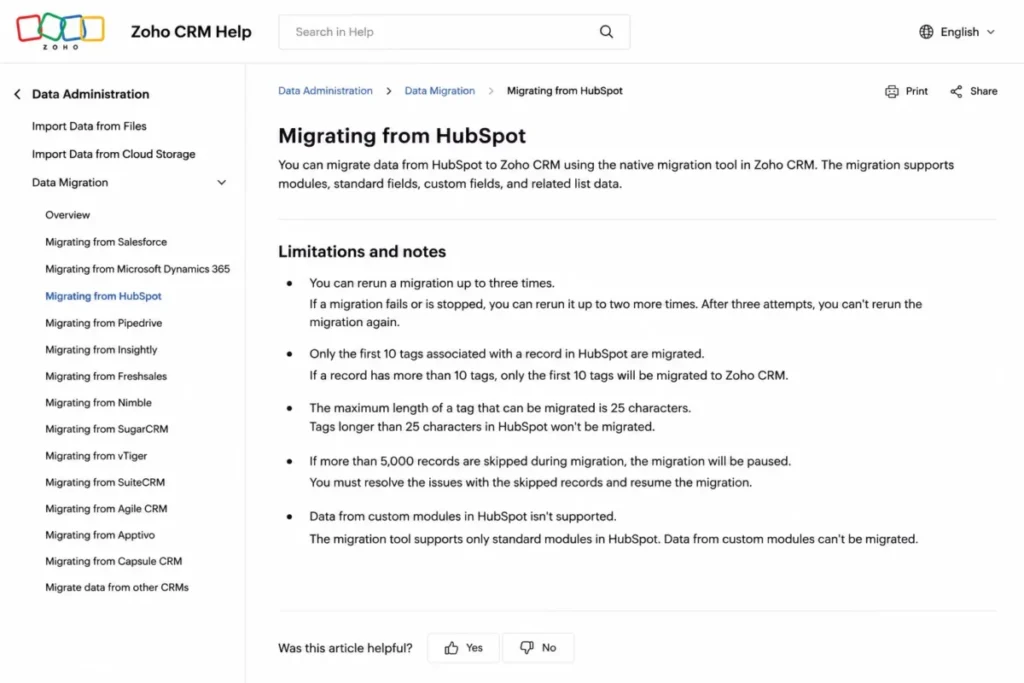
Four documented limits deserve a preflight audit, all spelled out in Zoho’s HubSpot migration documentation. The migration can be undone or rerun only three times, it migrates only the first 10 tags per record, it caps tag length at 25 characters, and it pauses when more than 5,000 records in a module are skipped.
The limit that reshapes architecture is the custom-module exclusion. Zoho’s API migration from HubSpot does not support custom modules, so any non-standard object you modeled in HubSpot has to be planned and moved separately.
Pre-migration checklist:
- Count tags per record and confirm none of the first 10 you care about exceed 25 characters.
- Inventory every HubSpot custom object and plan a separate path, because the API migration will not carry it.
- Map required fields and private-app scopes before the first run.
- Watch the skipped-record count per module and resolve causes before you pass 5,000.
- Treat the 3-rerun limit as a hard budget, so each run is a rehearsed migration, not a guess.
There is also a coexistence path, and buyers confuse it with full migration. The HubSpot for Zoho CRM extension syncs Contacts or Leads one-way or two-way, requires compatible field types, and needs mandatory Last Name and Email mapping in the relevant direction.
That extension is a Contacts-or-Leads sync, not a deal, activity, and custom-object replication layer. If your phased plan assumes both systems stay fully in step during a cutover, verify object coverage first, because the extension does not promise it.
HubSpot’s own import and export limits matter for the outbound leg of a large move. HubSpot documents plan-specific import file-size, daily row, and concurrent-import limits, plus 300 exports per rolling 24 hours and 3 simultaneous exports, so a big historical dataset moves in segments, not one job.
What You Gain and What You Lose
Switching is never a pure upgrade, so name both sides before you sign. The direction of the move changes which trade you are making.
Moving from HubSpot to Zoho CRM
You gain lower license cost, custom modules from Standard, higher automation and API ceilings, and offline mobile records on iPad. You lose HubSpot’s lower adoption friction, its shared marketing-sales-service foundation, its simpler live-support access, and the convenience of a mobile app, since HubSpot’s mobile records require a connection either way.
The risk that shows up first is governance. Zoho rewards a named CRM owner, and reviewer patterns repeatedly flag a learning curve and interface clutter for advanced configuration, so a team without an owner can lose the license savings to slow adoption and messy data.
Moving from a spreadsheet or budget tool to HubSpot
You gain fast rollout, a clean contact record shared across HubSpot tools, and support channels that open early. You lose budget predictability, because onboarding fees, credit governance, and commitment-based seat rules require active management.
The HubSpot rule that surprises finance is downside inflexibility. Seats cannot be reduced below the subscription minimum commitment, and removing a seat does not change the current invoice, so a team that may shrink next year should confirm its minimum commitment and renewal timing on the order form.
AI and Hidden Costs: HubSpot Credits vs Zoho Zia
Both products ship AI, and that is where most comparisons end and where the cost question begins. HubSpot Breeze and Zoho Zia use different monetization models, so “both have AI” hides the part that hits the budget.
HubSpot meters selected usage-based features with HubSpot Credits, and Sales Hub tiers include a monthly allotment: 500 on Starter, 3,000 on Professional, and 5,000 on Enterprise. The behavior, not the allotment, is the risk, and HubSpot’s own credits and billing documentation is worth reading before you commit.
How HubSpot Credits behave:
- Included credits reset monthly and do not roll over, so unused capacity expires.
- When credits run out, usage-based features pause unless you have added capacity.
- Buying extra capacity can trigger an automatic upgrade for the remainder of the commitment, and pay-as-you-go overages require purchasing an additional pack first.
- An auto-upgraded pack stays in effect through the contract term, which raises the committed monthly spend.
That is a real cost ratchet, and none of the 10 ranking pages reviewed for this comparison on July 15, 2026 explain it. I would treat AI-heavy automation on HubSpot as a governed budget line, not a free add-on.
Zoho gates Zia capabilities by edition instead, so predictive features, AI agents, and extended Zia sit at higher tiers rather than metering per action. Zoho also charges credits for specific channels, such as WhatsApp Business sending, so the Zoho AI cost question is mostly “which edition” plus a few channel credits rather than a monthly credit meter.
Neither model is cheaper in the abstract. HubSpot’s cost is consumption you must monitor, Zoho’s cost is the edition you must buy, and the predictable one for your team depends on whether your AI usage is steady or spiky.
Ease of Use and Setup
Reviewer patterns are consistent enough to call this dimension for HubSpot. Aggregated HubSpot Sales Hub reviews on G2, Capterra, and TrustRadius repeatedly praise the intuitive interface, centralized workflows, and quick onboarding, and that pattern is the strongest single reason marketing-led teams stay.
Zoho earns praise for customization and value, with recurring criticism that advanced settings feel cluttered and that some workflows carry a real learning period, a pattern visible across Zoho CRM reviews on G2. TechRadar’s 2026 review echoes the same split: strong value and features, offset by complex customization and uneven support.
The buying translation is what competitors miss. HubSpot lowers the cost of the first 30 days, Zoho lowers the cost of the license, and a Zoho deployment converts part of that saving into configuration and governance work that needs an owner.
By the 90-day mark, a healthy HubSpot rollout shows clean adoption and reporting with little admin effort, while a healthy Zoho rollout shows a configured data model and disciplined workflows maintained by a named administrator. If no one owns that Zoho configuration, adoption is the workflow that breaks first.
Automation and Workflow Comparison
On capacity per dollar, Zoho wins, and the published ceilings show why. Zoho documents workflow rules per module and active-rule limits by edition, which turns automation from a yes-or-no checkbox into a plan-selection input.
| Zoho edition | Rules per module | Active rules |
|---|---|---|
| Free | 10 | 5 |
| Standard | 30 | 15 |
| Professional | 80 | 40 |
| Enterprise | 125 | 75 |
| Ultimate | 150 | 100 |
HubSpot’s sales automation is polished and easier to build, but the meaningful depth (sequences, workflows, forecasting, playbooks) concentrates in Professional and Enterprise. So an automation-heavy team pays HubSpot’s higher tier to get capacity that Zoho publishes at lower editions.
The verdict splits by priority. Choose Zoho for automation capacity and cost, choose HubSpot when you want fewer people touching the automation and a faster build, and size the Zoho edition to your active-rule count before you buy.
Reporting and Analytics Comparison
Both platforms report well enough for most sales teams, so the decision is about ceilings and gates rather than whether dashboards exist. HubSpot gates custom reports behind Professional and Enterprise and publishes plan-level dashboard, custom-report, and event-query limits, so a Starter team hits reporting walls early.
Zoho includes 100 custom reports at Standard and lists unlimited reports from Professional upward, which is generous for the price. The trade is familiar by now: Zoho gives more reporting headroom cheaply, HubSpot gives cleaner out-of-the-box reporting that nontechnical users trust faster.
For reporting discipline that already exists, Zoho’s headroom is the better value. For a team that needs reporting to be obvious and low-maintenance, HubSpot earns its premium.
Integrations and Ecosystem
Raw app counts are the wrong signal here, and both vendors encourage the wrong reading with logo walls. What matters is which integrations are included, which need a higher edition, and which require a second paid license.
HubSpot offers a large App Marketplace plus public and private APIs, and its strongest integration story is internal continuity with HubSpot Marketing Hub, Service Hub, Content Hub, and Data Hub. Zoho connects natively across its own application family and through the Zoho Marketplace, but two constraints change the math.
First, Zoho CRM Marketplace extensions are edition-capped at 5, 10, 20, and 50 across Standard through Ultimate, and some extensions are unavailable on lower editions. Second, Zoho states that some third-party and Zoho-family integrations require paid licenses in both products, so an integration-dependent architecture can quietly erase part of the license saving.
| Integration path | HubSpot Sales Hub | Zoho CRM |
|---|---|---|
| Native same-vendor apps | HubSpot Marketing, Service, Content, Data | Zoho Campaigns, Desk, Books, Analytics (often separate products) |
| Marketplace extensions | Large marketplace, API-based | Edition-capped: 5 to 50 by tier |
| Second paid license risk | Lower within HubSpot Hubs | Possible for Zoho-family and some third-party apps |
| API and iPaaS | Public and private apps | APIs, functions, widgets, iPaaS |
Inventory your required integrations before you pick a Zoho edition, because the extension cap and the second-license rule can push you to Professional or Enterprise for reasons that have nothing to do with seats.
API and Developer Limits
For a high-volume integration or data-sync workload, API capacity is a hard requirement, and none of the 10 ranking pages reviewed for this comparison covers it. The two vendors use different units, so compare frameworks, not a single converted number.
HubSpot’s developer documentation sets private-app limits of 650,000 requests per day and 190 requests per 10 seconds on Professional, rising to 1 million per day on Enterprise, with paid capacity packs that add 1 million daily requests and raise burst capacity. Zoho’s API limits documentation uses rolling 24-hour credit allowances that scale by edition and user count, with published maximums of 100,000 on Standard, 3 million on Professional, 5 million on Enterprise, and unlimited on Ultimate, plus concurrency limits from 5 to 25 calls by edition.
Zoho publishes the higher ceilings, but its API credits and HubSpot’s HTTP requests are not identical units, so a credit is not a one-for-one request. For a data-heavy build, I would map your real call volume against each vendor’s framework and confirm concurrency, rather than trusting the bigger headline number.
Support, Security, and Admin Controls
Support access is easier to compare by tier and eligibility than by a star rating. HubSpot routes Free users to knowledge base and community, adds chat and email at Starter, and opens phone and callback at Professional and Enterprise, with no seat-count minimum for live channels.
Zoho includes Classic support with paid plans and sells higher response commitments. Its pricing calculator describes Premium support with 24/5 chat and phone and a three-hour maximum initial response, and Enterprise support with 24/7 chat and phone and a one-hour maximum initial response, but Enterprise support carries a minimum of 50 regular user licenses.
| Support tier | HubSpot Sales Hub | Zoho CRM |
|---|---|---|
| Entry | Free: knowledge base, community | Classic (included with paid) |
| Mid | Starter: chat, email | Premium: 24/5 chat and phone, 3-hour response target |
| Top | Pro and Enterprise: phone, callback, chat, email | Enterprise: 24/7 chat and phone, 1-hour target, 50-license minimum |
HubSpot wins on straightforward live-channel access for small teams, because the phone line does not require 50 seats. For a 50-plus organization buying Zoho Enterprise support, the two are closer, and the response targets are published rather than implied.
On security, treat this as a conditional tie rather than a winner. HubSpot’s Trust Center publishes SOC 2 Type II evidence and HIPAA attestation information with Sensitive Data configuration, and Zoho documents ISO/IEC 27001, 27017, and 27018, SOC 2 Type II-related assurance, and HIPAA-supporting field controls.
Certification is not the same as a compliant deployment. Both provide supporting controls, and the winner for regulated data depends on edition eligibility, BAA terms, field restrictions, integration scope, and your own access governance, so route this through security and legal review rather than a feature checkmark.
Migration and Setup Difficulty
Both tools can be stood up by a capable admin, but the effort profile differs. Here is how I would rate each direction.
| Task | HubSpot Sales Hub | Zoho CRM |
|---|---|---|
| Initial setup | Low | Low to Medium |
| Advanced configuration | Medium | High |
| Inbound migration from the other tool | N/A (source in this scenario) | Medium (native API path, with exceptions) |
| Data import and export throughput | Medium (segmented for large sets) | Medium |
| Ongoing admin overhead | Low | Medium to High |
HubSpot’s difficulty is mostly financial governance rather than technical setup. Zoho’s difficulty is configuration and ownership, so its total effort depends heavily on whether a named administrator maintains the data model, workflows, and integrations after launch.
Buyer Risk Ledger: What Goes Wrong After You Sign
Every CRM purchase carries risks that never appear in a feature table. Here is the ledger I would hand a buyer before either contract is signed.
| Risk | Who it hits | Consequence | Mitigation |
|---|---|---|---|
| HubSpot credit exhaustion | AI-heavy teams on Professional | Usage-based features pause mid-month or committed spend ratchets up | Cap AI actions, watch the credit meter, get overage terms in writing |
| HubSpot seat rigidity | Teams with volatile headcount | A shrinking team still pays the current invoice | Confirm the minimum commitment and renewal date on the order form |
| Zoho configuration debt | Zoho teams without an owner | Cluttered data model, low adoption, lost savings | Name a CRM administrator before go-live and budget their time |
| Zoho integration licensing | Teams leaning on Zoho-family apps | Second paid licenses erase part of the price gap | Inventory required integrations and licenses before picking an edition |
| Migration data loss | Anyone leaving HubSpot | Skipped records, dropped tags, unmigrated custom modules | Run the preflight checklist and rehearse within the 3-rerun limit |
None of these sink a deal on their own. They sink deals when a team buys on sticker price and meets the risk at renewal, which is exactly when a buyer’s bargaining power is lowest.
The cleanest way to pressure-test either choice is a 30/90-day adoption check. By day 30, reps should be logging deals without being chased and the pipeline should reflect reality, and by day 90, reporting should be trusted enough that a manager runs a forecast straight from it.
If a HubSpot rollout fails that test, the interface was not the problem, and the fix is process, not software. If a Zoho rollout fails it, the missing piece is almost always an owner for the configuration, not a missing feature.
Where HubSpot Sales Hub Wins
HubSpot’s advantages cluster around people and platform, not price. These are the scenarios where paying more is the rational choice.
| Pros | Cons |
|---|---|
| Fastest adoption for nontechnical sales reps | Professional starts at $90 per seat plus $1,500 onboarding |
| One shared CRM record across marketing, sales, and service | Custom objects locked to Enterprise |
| Live phone and callback support without a seat minimum | Monthly credits expire and can pause usage-based features |
| Cleaner default reporting nontechnical users trust | Seats cannot drop below the minimum commitment mid-term |
| Strong self-service education and ecosystem | Mobile records require a connection |
HubSpot wins when adoption speed outranks license cost, when marketing and sales must share one contact record, when nontechnical reps need a clean interface on day one, and when the buyer wants live support access at a small team size.
Where Zoho CRM Wins
Zoho’s advantages cluster around cost and configuration. These are the scenarios where the lower price is not a compromise but the better engineering decision.
| Pros | Cons |
|---|---|
| Free plan covers 3 users | Advanced setup needs a named CRM owner |
| Paid editions run $14 to $52 per user | Marketplace extensions capped by edition (5 to 50) |
| Custom modules from Standard (10, up to 500 on Ultimate) | Some integrations require a second paid license |
| High published automation and API ceilings | Enterprise support needs 50 licenses |
| Offline mobile records on iPad | Learning curve on advanced features per reviewer patterns |
Zoho wins when annual cost is the binding constraint, when the team needs custom business objects without Enterprise pricing, when automation or API capacity must scale cheaply, and when field reps need offline access on unreliable connections.
Who Should Choose HubSpot Sales Hub
Choose HubSpot Sales Hub if your team is marketing-led or content-led and needs sales and marketing on one platform. Choose it if fast adoption by nontechnical reps is the priority and the budget can absorb onboarding plus credit governance.
Choose it if you want live support access at a small team size, since phone and callback open at Professional without a 50-seat minimum. Choose it if reporting must be low-maintenance and obvious to people who will never configure a CRM.
I would pick HubSpot for a 5-to-20-person inbound company where a smoother rollout is worth more than the lowest license line. For a deeper look at the platform on its own, our HubSpot CRM review covers the Sales Hub tiers and limits in detail.
Who Should Choose Zoho CRM
Choose Zoho CRM if annual license cost is the deciding factor and you have someone to own configuration. Choose it if you need custom modules, high automation ceilings, or strong API capacity without paying for an enterprise tier.
Choose it if your reps work offline in the field, since Zoho documents offline records on iPad while HubSpot requires a connection. Choose it if you are a 3-person team that wants a real free plan, because Zoho Free covers all 3 users.
I would pick Zoho for a 10-to-50-person cost-sensitive sales operation with complex processes and a capable CRM administrator. If you want the standalone feature and limit detail, our Zoho CRM review goes tier by tier.
Who Should Avoid Both
Some teams should not force either tool. Avoid both if you need a full marketing automation platform at the CRM price, because Sales Hub is not Marketing Hub and Zoho CRM points campaign work to Zoho Campaigns, so the real stack costs more than the compared line.
Avoid both if your budget is under a few hundred dollars a month and you only need a simple pipeline, because a lighter, cheaper tool will adopt faster. Avoid both if you require guaranteed offline parity across every mobile device, since Zoho’s verified offline evidence is iPad-specific and HubSpot requires connectivity.
In those cases, look at a leaner CRM or a purpose-built tool rather than paying for capability you will not govern.
Alternatives to HubSpot and Zoho CRM
If neither fits, three alternatives cover the common exit scenarios.
| Alternative | Choose if |
|---|---|
| Pipedrive | You want a simple, sales-first pipeline with fast adoption and lower cost than HubSpot Professional. |
| Salesforce Sales Cloud | You need deep enterprise customization and an ecosystem larger than either tool, with budget to match. |
| Freshsales | You want built-in phone and AI at a mid-market price between Zoho and HubSpot. |
Each solves a specific tension. Read our Pipedrive CRM review for the simple-pipeline case, the Salesforce Sales Cloud review for enterprise depth, and the Freshsales CRM review for a middle path on price and built-in communication.
Final Verdict
There is no universal winner in HubSpot vs Zoho CRM, and any page that names one is selling you its bias. The verdict is by buyer.
For a bootstrapped 3-person team, choose Zoho CRM, because its free plan covers all 3 users and HubSpot’s stops at 2. For a marketing-led inbound company that values adoption and one shared platform, choose HubSpot Sales Hub, and treat onboarding and credits as managed budget lines.
For a cost-sensitive 10-to-50-person operation with complex processes and a CRM owner, choose Zoho CRM, where the year-one gap runs from about $9,540 at 10 seats to about $31,500 at 50. For field-sales teams with unreliable connectivity, choose Zoho for documented offline records on iPad.
For a company migrating off HubSpot, Zoho is the conditional pick: the native API path is real, but audit custom modules, tag counts, skipped records, field mappings, and the 3-rerun limit before you commit. For regulated healthcare or sensitive-data teams, call it a conditional tie and let contract terms, BAA availability, edition, and configuration decide.
The one-line version: Zoho CRM wins the money and configuration, HubSpot Sales Hub wins the adoption and platform, and you should buy for the risk your team is least able to carry.
Frequently Asked Questions
Which is better, HubSpot or Zoho CRM?
Neither wins universally. HubSpot Sales Hub is better for marketing-led teams that prioritize fast adoption and one shared platform, while Zoho CRM is better for cost-sensitive teams that need custom modules, high automation ceilings, and lower per-seat pricing.
The deciding factor is whether your bigger risk is budget or adoption.
Is Zoho CRM cheaper than HubSpot?
Yes, and the gap is large. Zoho CRM paid editions run $14 to $52 per user per month, while HubSpot Sales Hub Professional starts at $90 per seat plus a required $1,500 onboarding fee.
For 10 users in year one, Zoho Professional costs about $2,760 against roughly $12,300 for HubSpot Professional.
Can Zoho CRM replace HubSpot?
For core sales CRM, yes, and Zoho offers a native API migration from HubSpot. The catch is that the migration does not carry custom modules and limits tags and reruns, and Zoho points marketing campaigns to Zoho Campaigns rather than including a full marketing platform in the CRM price.
Which has the better free plan?
Zoho CRM, mainly on the user cap. Zoho Free supports 3 users with contact management, basic workflow automation, 10 custom email templates, standard reports, mobile apps, and 5,000 API calls per day, while HubSpot Free stops at 2 users on a single deal pipeline.
For a 3-person team, that cap alone decides it.
How much does HubSpot cost for 10 users?
HubSpot Sales Hub Professional is $90 per seat per month billed annually, so 10 seats run $10,800 per year in license. Add the required one-time $1,500 Professional onboarding fee and first-year cost reaches about $12,300, before tax, add-ons, and credit overages.
How much does Zoho CRM cost for 10 users?
Zoho CRM Professional is $23 per user per month billed annually, so 10 users cost $2,760 per year. Zoho Standard at $14 per user drops that to $1,680 if you need fewer features, and neither figure includes a mandatory onboarding fee in the core plan table.
Is HubSpot easier to use than Zoho CRM?
Reviewer patterns say yes. G2, Capterra, and TrustRadius summaries consistently praise HubSpot’s interface and fast onboarding, while Zoho earns praise for customization but recurring criticism about clutter and a learning curve.
Zoho’s flexibility is real, but it usually needs a named CRM owner to stay clean.
How hard is it to migrate from HubSpot to Zoho CRM?
It is a planned project, not one click. Zoho’s native API migration can be rerun only 3 times, migrates the first 10 tags per record, caps tag length at 25 characters, pauses after 5,000 skipped records in a module, and does not support custom modules.
Audit those items before your first run.
Which CRM has better AI, HubSpot or Zoho?
They price AI differently more than one is simply better. HubSpot Breeze meters selected features with monthly credits that can pause usage and auto-upgrade capacity, while Zoho Zia gates capabilities by edition and charges credits for channels like WhatsApp.
The more predictable choice depends on whether your AI usage is steady or spiky.
Can I keep HubSpot for marketing and use Zoho CRM for sales?
You can, with limits. The HubSpot for Zoho CRM extension syncs Contacts or Leads one-way or two-way and needs compatible field types plus mandatory Last Name and Email mapping.
It is not a full deal, activity, and custom-object sync, so confirm object coverage before you design a split stack.