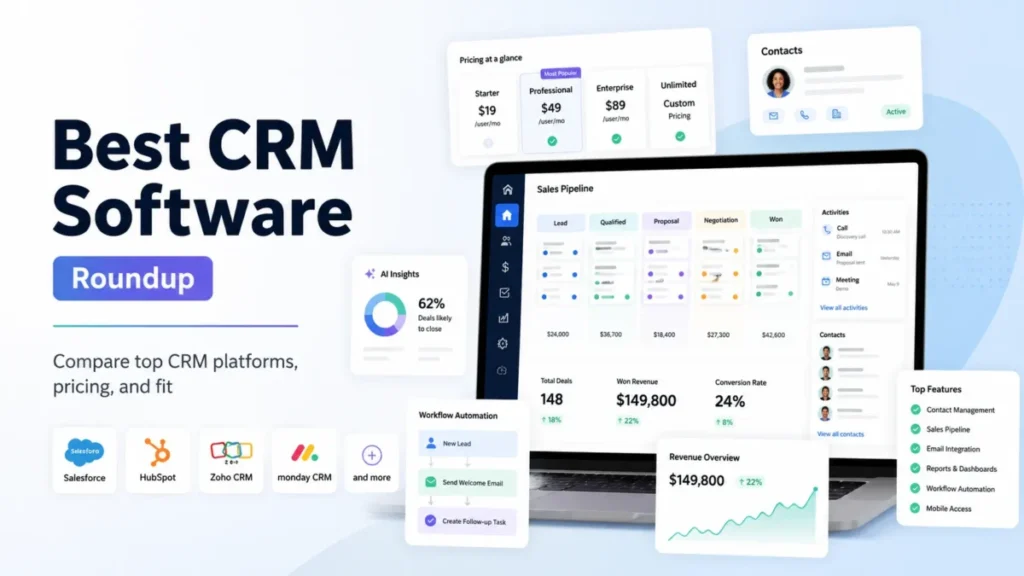
The phrase “best social media CRM” hides a category trap that costs teams real money. Three different products answer to that name, which is why picking from a best CRM software list alone will not settle it: a CRM that pulls social activity into contact records, a social media suite that manages publishing and a shared inbox, and a help desk that turns social messages into support tickets.
Buy the wrong one and the problem shows up in month two. Your sales team wants deal context, your support team wants routing, and your marketing team wants a content calendar, but the tool you picked only does one of those jobs well.
For most marketing teams that need publishing, a shared inbox, and reporting in one place, Sprout Social is the safest starting point. HubSpot Marketing Hub is the better fit when social has to feed CRM contacts and campaign attribution, Zoho Social is the value pick for teams already inside the Zoho stack, and Zendesk Suite is the right answer when the real job is customer support, not marketing.
This guide ranks ten tools using official pricing and documentation checked on 2026-07-06, then maps each one to the specific buyer it fits. No hands-on trials were run, so every claim traces back to a vendor pricing page, a help-center document, or a clearly labeled third-party cross-check.
In This Article (20 sections)
Quick Verdict: Best Social Media CRM by Use Case
Here is the short answer before the detail. Each pick below is explained in full in its ranked section.
| Use case | Best pick | Why it fits |
|---|---|---|
| Best overall for marketing teams | Sprout Social | Mature inbox, publishing, reporting, and a Salesforce path in one platform |
| Best for CRM-connected campaigns | HubSpot Marketing Hub | Social posts tie directly to contacts, deals, and attribution |
| Best value for Zoho stack users | Zoho Social | Cheapest route to CRM lead and contact handoff if you already run Zoho CRM |
| Best social inbox for lean teams | Agorapulse | Clean inbox, approvals, and Salesforce/ |
| Best for established publishing teams | Hootsuite | Broad scheduling, monitoring, and a clear enterprise upgrade path |
| Best budget agency workflow | SocialPilot | Many social accounts and client approvals at low per-plan pricing |
| Best for bundled agency workspaces | Sendible | Workspaces, approvals, and branded reports instead of pure per-seat pricing |
| Best for social customer support | Zendesk Suite | Turns social messages into tickets with routing and history |
| Best for relationship-led social selling | Nimble CRM | Contact enrichment and prospecting for LinkedIn-heavy sellers |
| Best for enterprise governance | Sprinklr Social | 30+ channels, audit trails, and granular access for global brands |
The cheapest tool on this list is rarely the right comparison point, because the plan that opens CRM integration, a usable inbox, or executive reporting usually sits one or two tiers above the advertised entry price. Read each pick against the job you actually need done, not the badge.
How We Chose and Ranked These Tools
We evaluated ten tools based on a detailed analysis of official product documentation, pricing pages, help-center articles, integration pages, and current US SERP competitors, with selected third-party reviews used only to cross-check dynamic pricing and sentiment.
Pricing was verified on 2026-07-06. We did not rank tools by brand popularity or affiliate payout.
No hands-on trial, private demo, or workflow test was performed. So this guide does not say “we tested.”
It says what official pages and documentation support, and it flags where a price needs a final visual check before you sign.
Ranking weighed five things: how well the tool matches real social CRM intent, how honest its plan gates are, how deep its CRM or ticketing integration runs, how it behaves at team scale, and who it clearly does not fit. Rank order reflects buyer fit and evidence strength, not a lab score.
One limitation matters here. Because some vendor pricing pages render dynamically or by region, the exact figures for Zoho Social, Agorapulse, and Sendible are cross-checked against high-confidence third-party sources and should be visually confirmed on the official page before purchase.
Agorapulse and Zoho Social prices and plan limits, and Sendible’s user and profile limits and annual discount, were re-checked against the vendors’ official pricing pages on September 26, 2026: Agorapulse, Zoho Social and Sendible.
The Three Jobs a Social Media CRM Actually Does
Most SERP lists mix three product categories under one keyword, which is why buyers end up comparing tools that solve different problems. Separate the jobs first, then the ranking makes sense.
Job 1: Connect social activity to CRM records. This is CRM-connected social marketing, where a social interaction becomes a contact record, a campaign touch, or an attribution data point. HubSpot Marketing Hub, Zoho Social, and Nimble CRM live here, and Sprout and Agorapulse reach into it through Salesforce and HubSpot integrations.
Job 2: Publish and manage a shared social inbox. This is the social media management suite, where the value is scheduling, approvals, monitoring, and one inbox for public and private messages. Sprout Social, Hootsuite, Agorapulse, SocialPilot, and Sendible sit here, and Sprinklr does it at enterprise scale.
Job 3: Turn social messages into support conversations. This is customer-service-first social support, where a Facebook or WhatsApp message becomes a ticket with routing, SLAs, and history. Zendesk Suite owns this job, and Sprout and Sprinklr touch it through care and routing features.
Here is the decision tree in one table.
| If your primary job is… | The category you need | Ranked picks to start with |
|---|---|---|
| Feeding social data into CRM and attribution | CRM-connected social marketing | HubSpot Marketing Hub, Zoho Social, Nimble CRM |
| Publishing, approvals, and a shared inbox | Social media management suite | Sprout Social, Hootsuite, Agorapulse, SocialPilot, Sendible |
| Routing social messages to a support team | Social customer service software | Zendesk Suite, Sprinklr Social |
Pick the row that matches how your team is organized, not the tool with the longest feature list. A support team that buys a publishing suite, or a marketing team that buys a help desk, will feel the mismatch the first time a social message needs to reach the wrong department.
Best Social Media CRM at a Glance
This side-by-side view sets the category, the practical starting tier, and the one-line reason to shortlist each tool. Prices are the annual-billing entry points where disclosed.
| Rank | Tool | Primary job | Practical entry point | Shortlist it when |
|---|---|---|---|---|
| 1 | Sprout Social | Publishing + inbox | Essentials $79/ | You want one mature marketing platform |
| 2 | HubSpot Marketing Hub | CRM-connected marketing | Professional $800/mo (social gate) | Social must feed CRM and attribution |
| 3 | Zoho Social | CRM-connected marketing | Premium tier (Zoho stack) | You already run Zoho CRM or Desk |
| 4 | Agorapulse | Publishing + inbox | Standard $79/mo | You want a clean inbox with CRM handoff |
| 5 | Hootsuite | Publishing + inbox | Standard $99/mo | You run an established publishing team |
| 6 | SocialPilot | Publishing (agency) | Essentials $25.50/mo annual | You manage many accounts on a budget |
| 7 | Sendible | Publishing (agency) | Creator ~$25/mo annual | You want bundled workspaces and reports |
| 8 | Zendesk Suite | Social support | Suite Team $55/ | Social messages must become tickets |
| 9 | Nimble CRM | CRM-connected selling | $24.90/ | You sell through LinkedIn relationships |
| 10 | Sprinklr Social | Enterprise publishing | Custom (sales-led) | You govern social across a global brand |
The gap between the advertised entry point and the plan a team actually runs is the whole story on this list. HubSpot’s social tools do not appear until a much higher tier, Sprout’s analytics can require add-ons, and Sprinklr has no public self-serve price at all, so treat the entry column as a starting line, not a budget.
The 10 Best Social Media CRM Tools in 2026
1. Sprout Social: Best Overall for Marketing Teams
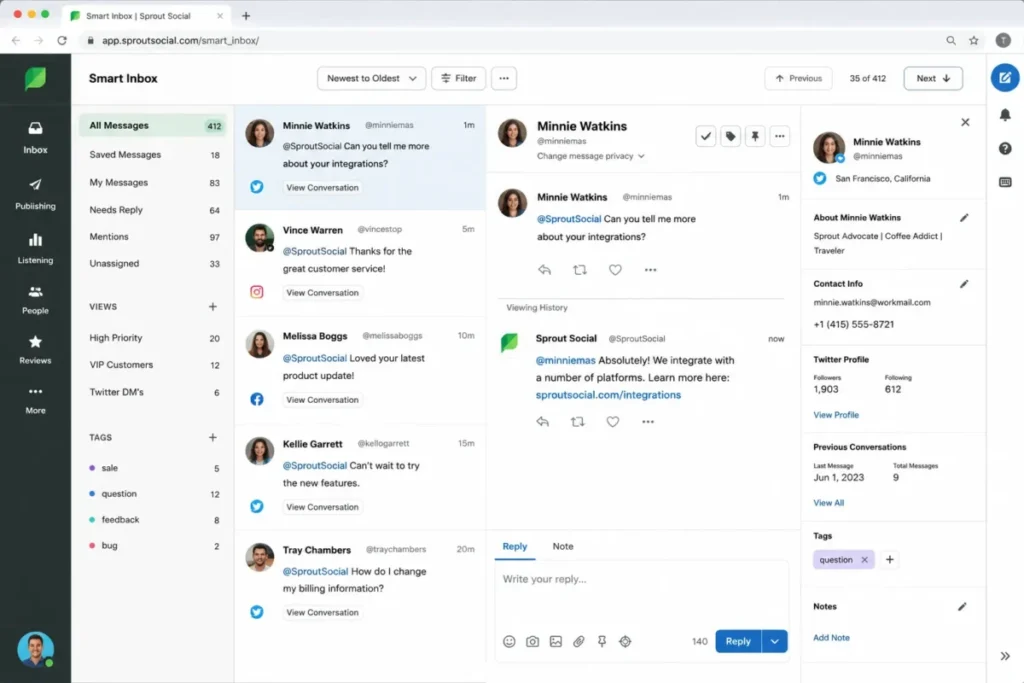
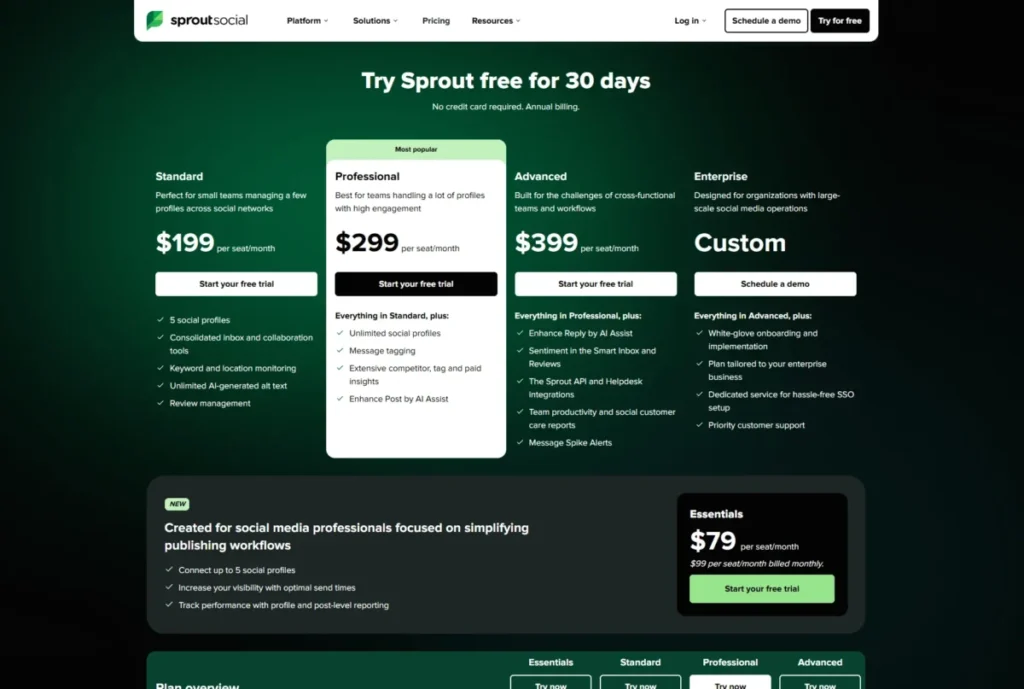
Sprout Social is the best social media CRM for marketing teams of roughly 3 to 20 users that need a mature inbox, publishing, reporting, and a governance path in one platform. It sits in the publishing-and-inbox category but reaches into CRM through its Salesforce integration.
Pricing starts at $79 per seat per month billed annually on the Essentials plan, and the official pricing page also showed $99 monthly for Essentials on 2026-07-06. Essentials includes up to 5 social profiles, which is the first gate most teams hit.
The practical tier is higher than Essentials for most buyers. Advanced and Enterprise move to unlimited profiles, and brand keywords, premium analytics, and social listening are gated or sold as add-ons, so a team that buys Sprout for its reporting can find the reporting it wanted sitting behind Social Insights or Premium Analytics.
What it does well:
- A unified inbox that pulls messages from multiple networks into one queue.
- Publishing with optimal send times and approval workflows.
- Reporting that leadership can read, plus a Salesforce integration for contact context.
Where it falls short:
- Advanced analytics and listening can require add-ons, so the base plan understates total cost.
- Per-seat pricing makes it a poor fit for very small teams chasing the lowest price.
Best for: marketing teams that live in the social inbox daily, need approvals, and want a Salesforce path as they scale.
Avoid Sprout if you only need basic scheduling for one or two profiles, or if listening and advanced analytics are non-negotiable but your budget cannot absorb the add-ons on top of the seat price.
Setup difficulty: Medium. Onboarding is straightforward, but the real work is keeping the inbox and reporting disciplined after the first month.
Choose Sprout Social if you want one platform to carry publishing, engagement, and executive reporting, and you can budget above the Essentials line.
2. HubSpot Marketing Hub: Best for CRM-Connected Social Campaigns
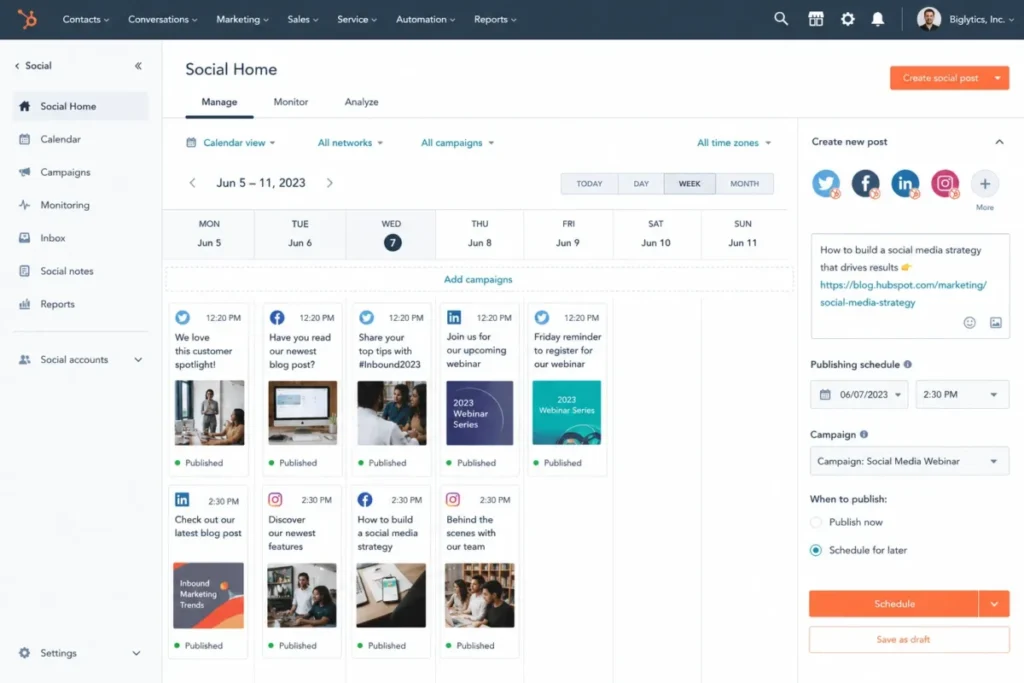
HubSpot Marketing Hub is the best pick when social posts have to connect to CRM contacts, campaigns, and attribution inside one revenue platform. It belongs firmly in the CRM-connected marketing category.
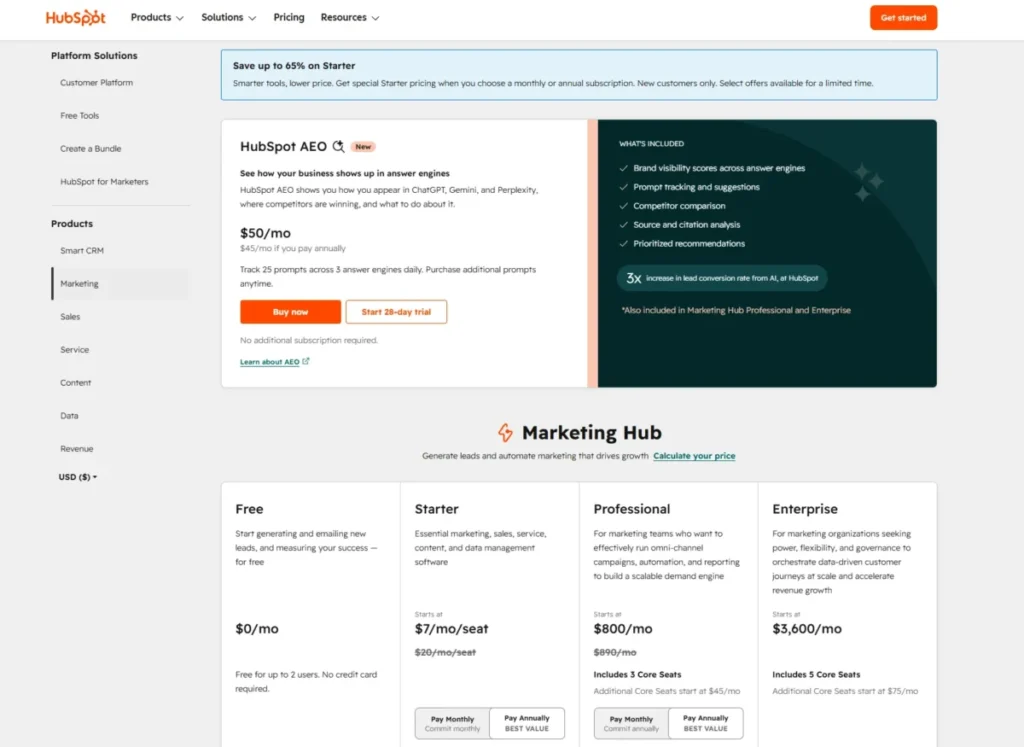
Here is the gate that trips up buyers. HubSpot offers a Free plan and a Starter plan from $7 per seat per month billed annually, but its social media tools are documented for Marketing Hub Professional and Enterprise, not the cheap Starter tier.
Professional starts at $800 per month billed annually and carries a required onboarding fee, and Enterprise starts at $3,600 per month billed annually with its own onboarding fee. Official pricing lists Professional onboarding at $3,000 and Enterprise onboarding at $7,000, so the first-year cost of running HubSpot for social is far above the Starter headline.
Connected-account limits follow the same tier logic. Professional supports up to 50 connected accounts and Enterprise up to 300, and the social networks documented include Facebook, Instagram, LinkedIn, TikTok, X, and YouTube.
What it does well:
- Social activity attaches to CRM contacts, campaigns, and reporting in one system.
- Marketing automation, email, and ads sit alongside social, so attribution is native.
- Connected-account ceilings are generous once you are on the right tier.
Where it falls short:
- The social value lives on Professional and Enterprise, so true social use costs far more than the Starter price implies.
- Required onboarding fees add thousands to the first-year bill.
Best for: teams already committed to HubSpot CRM that want social folded into a revenue platform rather than run as a standalone scheduler. Our HubSpot CRM review covers the wider platform in depth.
Avoid HubSpot Marketing Hub if you want a low-cost social scheduler or a standalone inbox, because you will be paying for a marketing platform to get the social features.
Setup difficulty: High. Professional and Enterprise carry mandatory onboarding for a reason, and the platform rewards teams that already have clean CRM data.
Choose HubSpot if social is one input to a CRM-driven revenue engine and you can defend a Professional-tier first-year budget to finance.
3. Zoho Social: Best Value for Zoho Stack Users
Zoho Social is the value pick, but the value is sharpest for teams already inside the Zoho ecosystem. Its strongest social CRM story appears when it hands leads and contacts to Zoho CRM or routes conversations into Zoho Desk.
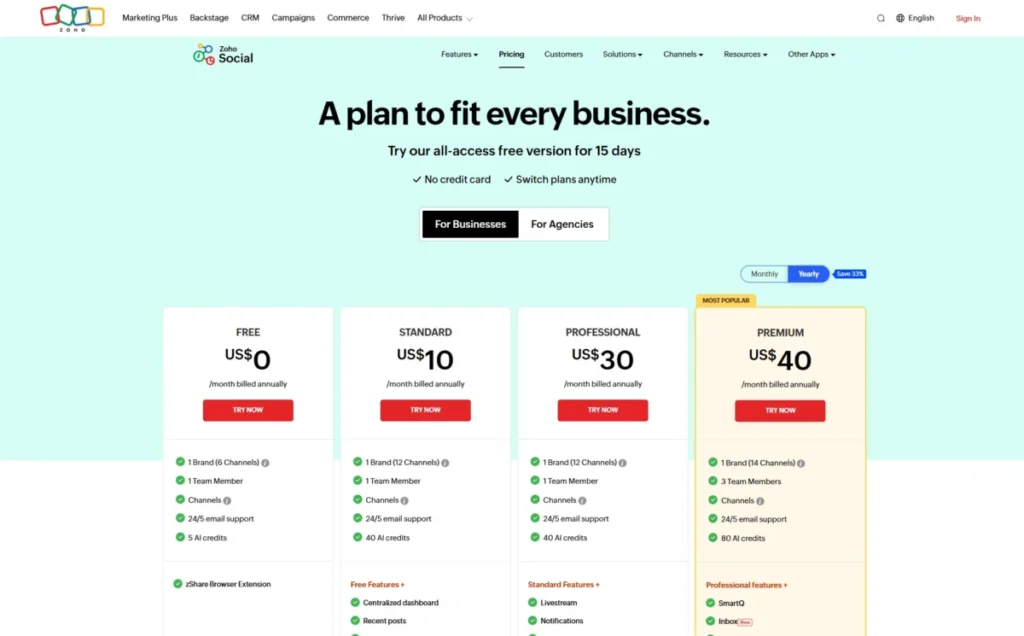
The official pricing page confirms a trial, a free fallback, plan structure, and 24/5 support, and it can render prices dynamically by region. A high-confidence 2026 cross-check listed US pricing at Standard $10 per month annually or $15 monthly, Professional $30 annually or $40 monthly, and Premium $40 annually or $65 monthly, with Agency tiers above that.
Premium is the tier that matters for CRM buyers. Its documented feature list includes the social inbox, approvals, custom reports, Zoho CRM integration, Zoho Desk integration, CRM leads and contacts, and lead generation, which is the actual handoff most “social CRM” buyers are looking for.
What it does well:
- The lowest-cost route to genuine CRM lead and contact handoff if you already run Zoho.
- SmartQ scheduling, a social inbox, and approvals at a price well under the enterprise suites.
- Custom reports and role controls on the higher plans.
Where it falls short:
- Outside the Zoho stack, the CRM advantage largely disappears and it becomes another scheduler.
- Exact US pricing can vary by region and renders dynamically, so it needs a final visual check.
Best for: small marketing teams standardized on Zoho CRM or Zoho Desk that want affordable publishing plus a real CRM handoff.
Avoid Zoho Social if you are not a Zoho shop and you need the deepest enterprise analytics, listening, or governance, because rivals do those jobs better at that budget.
Setup difficulty: Low to Medium. It is quick to start, and the deeper value depends on connecting the wider Zoho suite.
Choose Zoho Social if you already run Zoho CRM and want the cheapest credible path from social engagement to a CRM record.
4. Agorapulse: Best Social Inbox for Lean Teams
Agorapulse is the pick for lean teams that want a clean inbox, approvals, and moderation, plus a handoff to CRM without buying a full suite. It sits in the publishing-and-inbox category and reaches toward CRM through documented integrations.
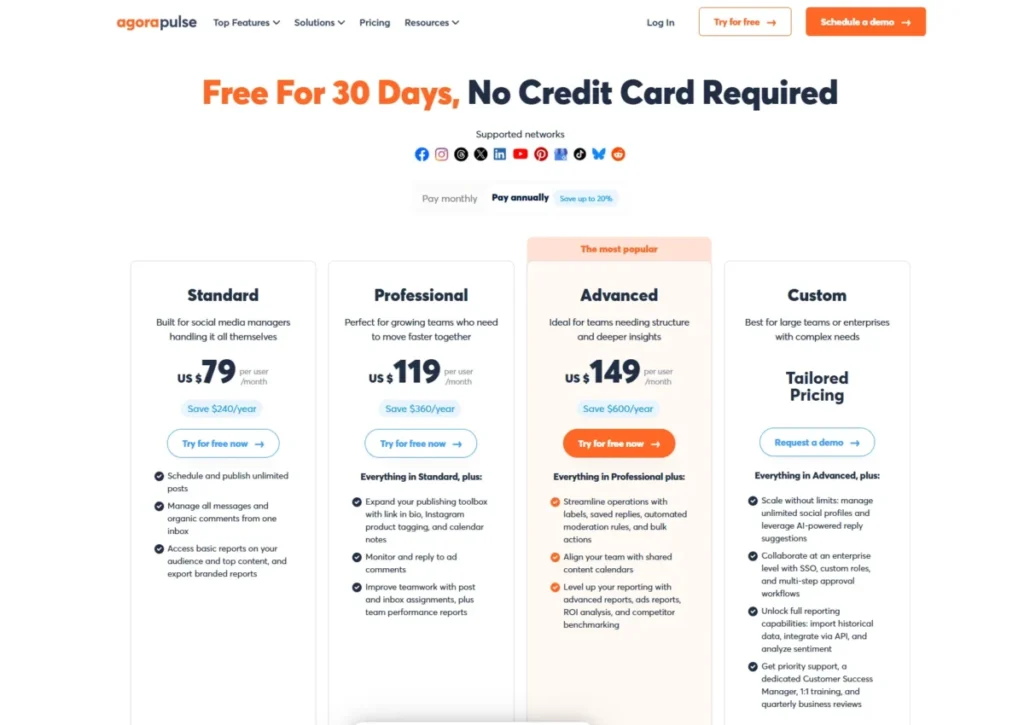
An official search result showed Standard at $79 per month and Professional at $119 per month, and a high-confidence 2026 review listed Standard at $79 annually or $99 monthly and Professional at $119 annually or $149 monthly. The official pricing page had crawler access limits, so confirm the visual price before you buy.
The reason Agorapulse earns a social CRM spot rather than a pure scheduler label is its inbox integration. An official Agorapulse tutorial references Social Inbox CRM integration with Salesforce and HubSpot, alongside automated moderation rules, which lets a lean team route social conversations to CRM owners without a heavy platform.
What it does well:
- A focused social inbox with moderation rules and approvals.
- Salesforce and HubSpot integration references that support a CRM handoff.
- ROI and ads reporting on higher tiers for teams that need attribution.
Where it falls short:
- Per-user pricing and Custom-tier gates raise the cost for larger teams that need governance.
- SSO, custom roles, and priority support live on Advanced or Custom, not the entry plans.
Best for: teams of a handful of social managers that want inbox quality and CRM handoff without enterprise overhead.
Avoid Agorapulse if you are a large enterprise that needs broad governance, SSO, and custom roles on a standard plan, because those sit behind the Custom tier.
Setup difficulty: Low to Medium. The inbox is quick to adopt, and the CRM integrations take a short configuration pass.
Choose Agorapulse if inbox quality and a light CRM handoff matter more than owning a full marketing platform.
5. Hootsuite: Best for Established Publishing Teams
Hootsuite is the pick for established publishing teams that need scheduling, an inbox, monitoring, reporting, approvals, and a clear enterprise upgrade path. It is a publishing-and-inbox platform with governance on the higher tiers.
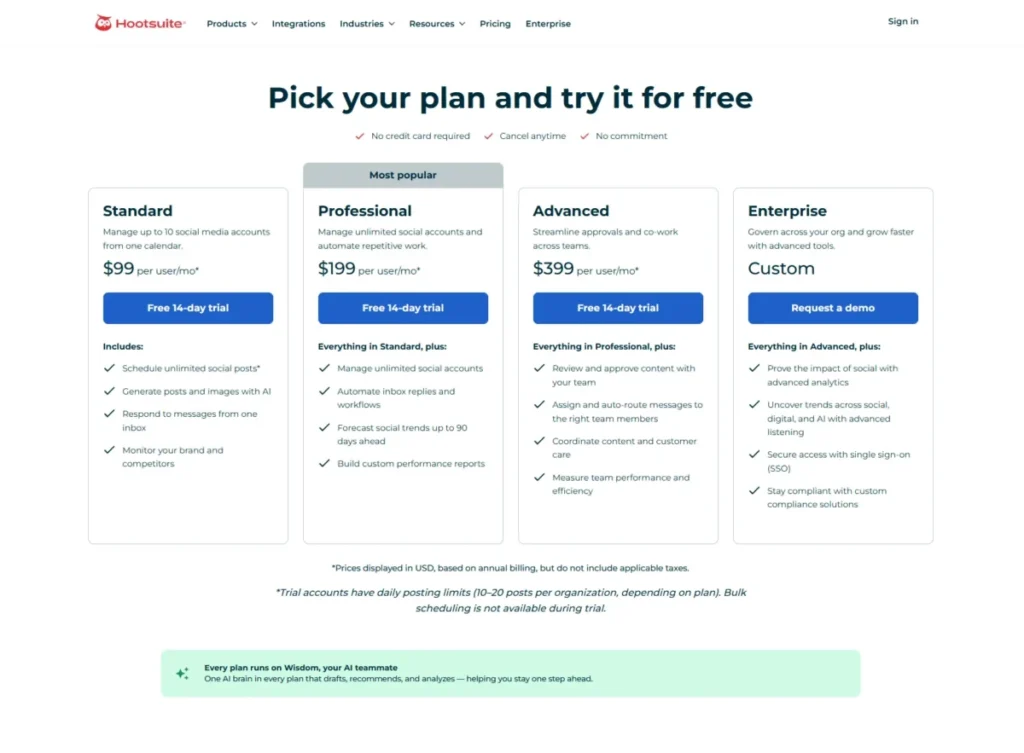
Official pricing checked on 2026-07-06 lists Standard at $99 per month, Professional at $199 per month, and Advanced at $399 per month, with Enterprise sold as custom. The official FAQ states that pricing is based on annual billing, so confirm the billing toggle before you compare it to a monthly number elsewhere.
Plan gates follow team maturity. Standard includes up to 10 social accounts, Professional and Advanced list unlimited social accounts, and Advanced and Enterprise add approvals, routing, care coordination, advanced analytics and listening, SSO, and compliance features.
One evaluation caveat is worth planning for. The official trial is a 14-day, no-credit-card trial with posting and bulk-scheduling restrictions, so you cannot fully stress the scheduling workflow during the trial and should plan your evaluation around that limit.
What it does well:
- Broad publishing and collaboration with a mature enterprise path.
- Unlimited social accounts on Professional and above.
- Automated inbox replies, custom reports, and routing as you climb tiers.
Where it falls short:
- The trial restricts posting and bulk scheduling, which limits pre-purchase testing.
- Pricing is annual-billing based, so the headline is not a month-to-month figure.
Best for: teams that already publish at volume and want one platform to grow into enterprise governance.
Avoid Hootsuite if you are a budget buyer who needs many users or accounts without an annual commitment, because the entry plan caps accounts and the value tiers assume annual billing.
Setup difficulty: Medium. The core is quick, and approvals, routing, and analytics take configuration on the higher plans.
Choose Hootsuite if you run an established social operation and want a proven platform with room to add governance later.
6. SocialPilot: Best Budget Agency and Client Workflow
SocialPilot is the budget agency pick for cost-conscious teams that manage many social accounts, client approvals, and reports at low per-plan prices. It is a publishing suite built around agency workflows rather than CRM records.
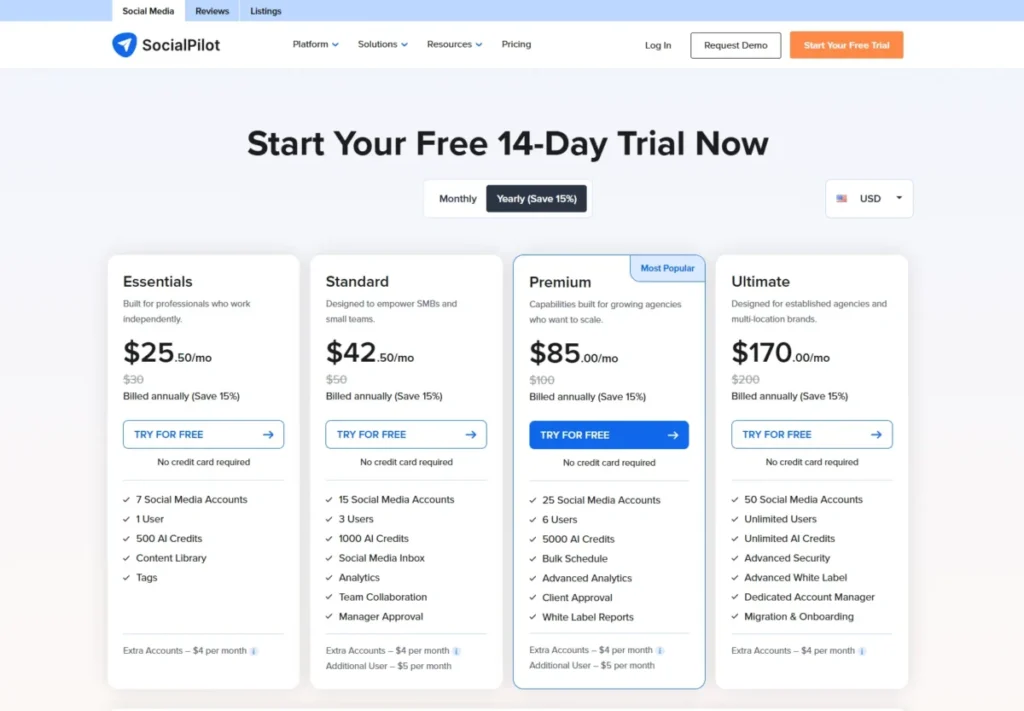
Official pricing lists Essentials at $30 monthly or $25.50 per month billed annually, Standard at $50 or $42.50, Premium at $100 or $85, and Ultimate at $200 or $170. The account and user limits are the real story: Essentials includes 7 social accounts and 1 user, Standard 15 accounts and 3 users, Premium 25 accounts and 6 users, and Ultimate 50 accounts and unlimited users.
The add-ons decide whether SocialPilot stays cheap. Extra social accounts run $4 per month and additional users $5 per month on applicable plans, while API access and SSO are reserved for Enterprise, so a growing agency should price the add-ons before assuming the entry plan holds.
What it does well:
- Many connected accounts per plan at prices well under the enterprise suites.
- Client approvals and white-label reports that fit agency delivery.
- Broad channel support including Facebook, Instagram, TikTok, X, LinkedIn, Threads, YouTube, Pinterest, Google Business, and Bluesky.
Where it falls short:
- Extra accounts and users add cost, so the cheap entry price can drift upward.
- CRM depth is weaker than CRM-native platforms, and API and SSO require Enterprise.
Best for: agencies and multi-client teams that need volume of accounts and approvals more than deep CRM records.
Avoid SocialPilot if you need native CRM records, support ticketing, or enterprise SSO and API without stepping up to Enterprise.
Setup difficulty: Low. Onboarding is fast, and the configuration work is mostly connecting accounts and client workspaces.
Choose SocialPilot if your agency needs many profiles and client approvals on a tight budget and can live without deep CRM integration.
7. Sendible: Best for Agencies Needing Bundled Users and Workspaces
Sendible is the agency pick when you want workspaces, approvals, and branded reports bundled together instead of paying purely per seat. It is a publishing suite tuned for agency collaboration.
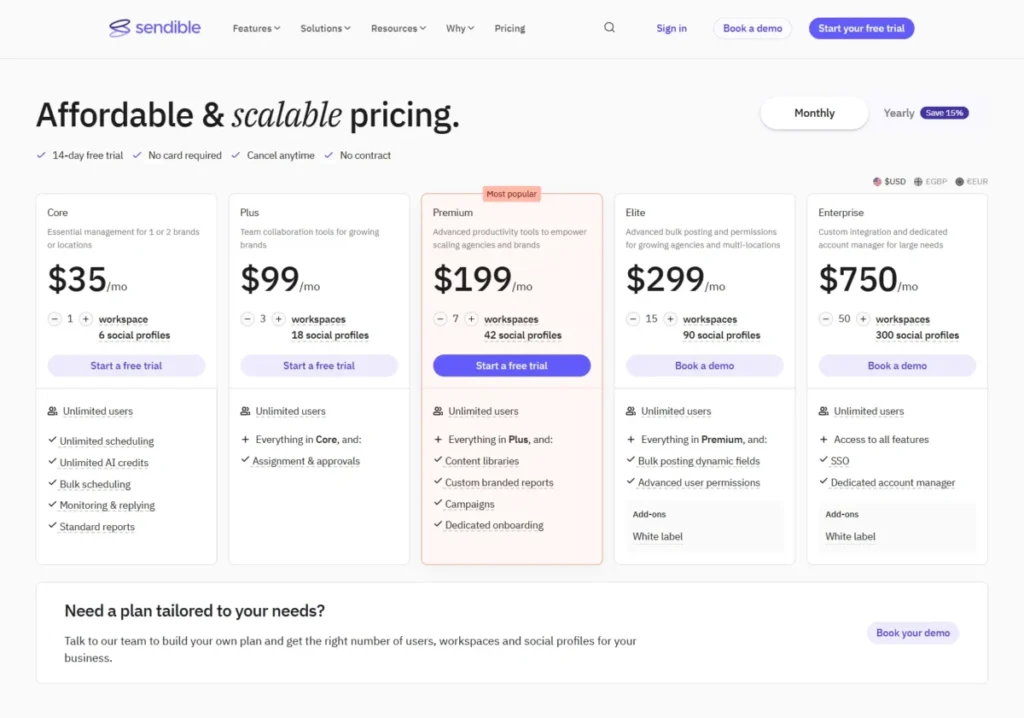
The official pricing page confirms a USD pricing page, a 14-day free trial with no credit card, no contract, and a plan structure with workspaces, approvals, branded reports, onboarding, and Enterprise options. Crawler text did not expose every numeric price, so treat the exact figures as a cross-check to confirm visually.
A high-confidence 2026 review listed Creator at $29 monthly or $25 annually, Traction at $89 or $76, Scale at $199 or $170, Advanced at $299 or $255, and Enterprise at $750 or $638, with a 15% annual saving. Use those as a guide, then verify the current plan names and prices on the official page before committing.
What it does well:
- Workspaces, approvals, and branded reports that map to agency delivery.
- Bundled collaboration rather than strict per-seat billing.
- Dedicated onboarding and a white-label add-on on higher plans.
Where it falls short:
- Exact price and plan naming need a final visual check because the page renders dynamically.
- White-label, custom integration, SSO, and a dedicated account manager are higher-tier or Enterprise motions.
Best for: agencies that prefer bundled workspaces and branded reporting over counting individual seats.
Avoid Sendible if you need fully transparent all-in pricing for white-label or enterprise integration without a sales conversation.
Setup difficulty: Medium. Workspaces and approvals reward a short setup pass to match your client structure.
Choose Sendible if your agency values workspace bundling and branded reports and you confirm the current pricing on the official page first.
8. Zendesk Suite: Best for Social Customer Support Inside a Help Desk
Zendesk Suite is the right answer when the “CRM” job is really customer support: turning social messages into tickets with routing, history, and SLAs. It is a help desk, not a publishing platform, and that distinction is the whole point.
Official pricing lists Support Team at $19 per agent per month billed yearly, Suite Team at $55 per agent per month, and Suite Professional at $115 per agent per month, with Enterprise sold through sales. Add-ons such as Copilot, Workforce, and Contact Center are listed at $50 per agent per month billed yearly.
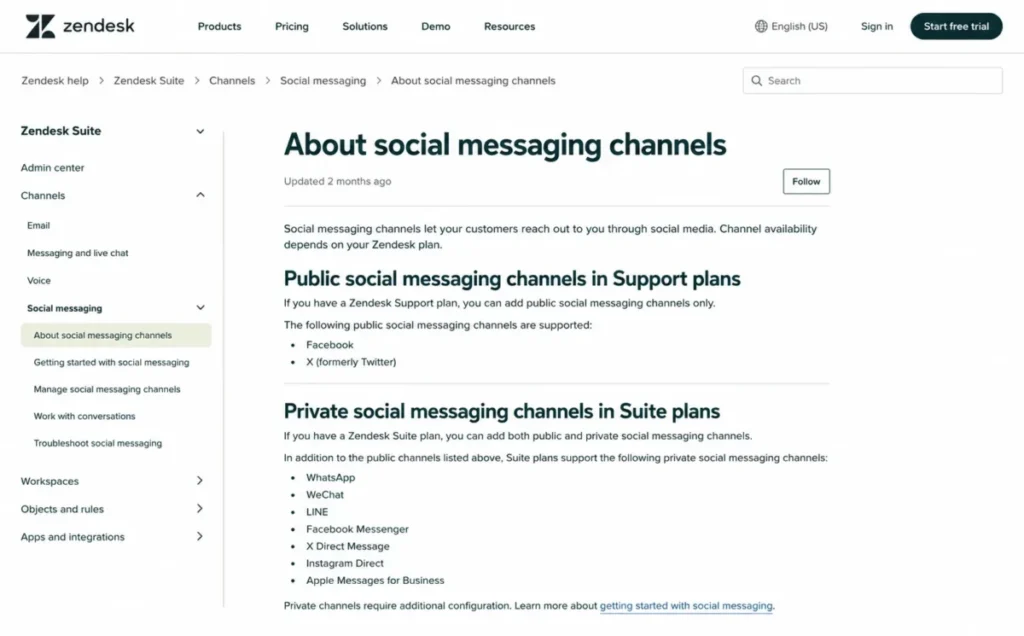
The plan gate that matters for social buyers is messaging depth. Zendesk documentation shows that Suite plans support private social messaging, while Support plans only include public social messaging for Facebook and X, so a team that needs private DMs handled as tickets should budget for Suite, not the cheaper Support tier.
The category fit is clear from Zendesk’s own positioning. Its social customer service page describes centralizing messages and mentions from channels including Messenger, X, and WhatsApp Business into support workflows and CRM integrations, which is support-first by design.
What it does well:
- Turns social messages into tickets with routing, history, and SLAs.
- Omnichannel routing, AI agents, and customer context in one help desk.
- Private social messaging on Suite for DM-heavy support.
Where it falls short:
- It is not built as a social publishing or campaign platform.
- Support-only plans limit social to public messaging, which many support teams will outgrow.
Best for: customer support teams that need Messenger, X, and WhatsApp Business messages handled as tickets. The full Zendesk review goes deeper on the help-desk core.
Avoid Zendesk Suite if you want a content calendar, campaign management, or creator-style scheduling, because that is not the job it is built for.
Setup difficulty: Medium to High. Ticketing, routing, and channel setup reward a proper implementation.
Choose Zendesk Suite if your social workload is support volume, not marketing publishing, and you need conversations to become tickets.
9. Nimble CRM: Best for Relationship-Led Social Selling
Nimble CRM is the pick for solo sellers and small B2B teams that use social context and contact enrichment to manage relationships, outreach, and prospecting. It is a relationship CRM with social enrichment, not a publishing suite, and that framing keeps expectations honest.
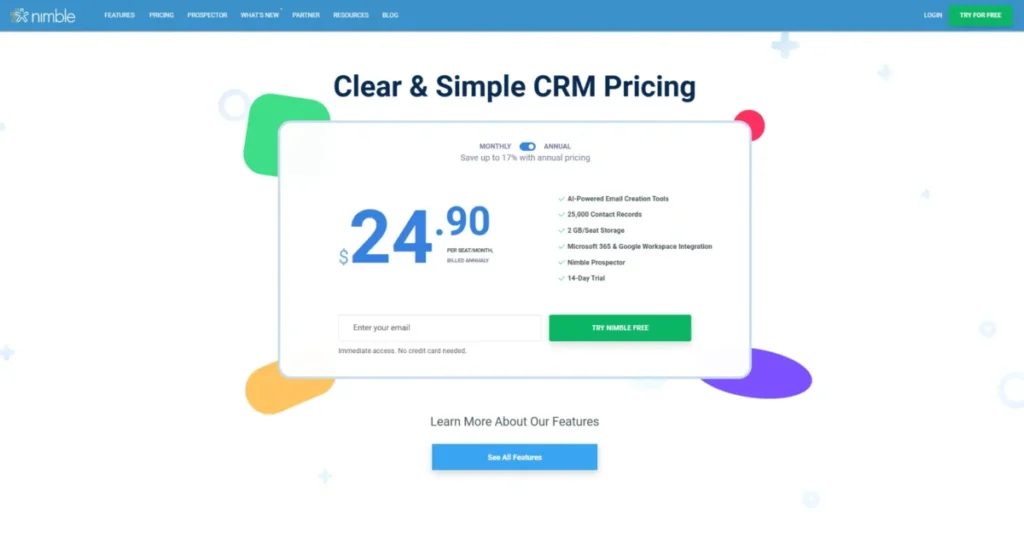
Pricing is $24.90 per seat per month billed annually or $29.90 monthly, with 25,000 contact records, 2GB of storage per seat, Microsoft 365 and Google Workspace integration, Nimble Prospector, and a 14-day trial with no credit card. That is a simple per-seat price for a contact-and-relationship engine.
The add-ons shape the real cost. Email marketing runs $15 per month company-wide, web forms and web chat run $12 per month, and group message volume can be upgraded, so a team that wants outreach at volume should add those lines to the base seat price.
What it does well:
- Contact records enriched with social context for relationship selling.
- Nimble Prospector and pipeline tools for LinkedIn-heavy outreach.
- A simple per-seat price with a clear trial.
Where it falls short:
- It is not a social publishing, inbox, or listening suite, so it does not replace a scheduler.
- Third-party reviews note limits on deep custom reporting, broader native integrations, and support compared with larger suites.
Best for: relationship-led sellers who work social signals into outreach and want a light CRM rather than a marketing platform.
Avoid Nimble if you need social publishing calendars, brand monitoring, or a full social inbox, because those are outside its design.
Setup difficulty: Low. It is quick to start, and the value is in disciplined contact and outreach habits.
Choose Nimble if your job is relationship selling through social channels and you want enrichment and prospecting over publishing.
10. Sprinklr Social: Best Enterprise and Global Governance
Sprinklr Social is the enterprise pick for large global brands that manage social across many channels with governance, audit trails, and granular access. It is the deepest governance platform on this list and the least self-serve.
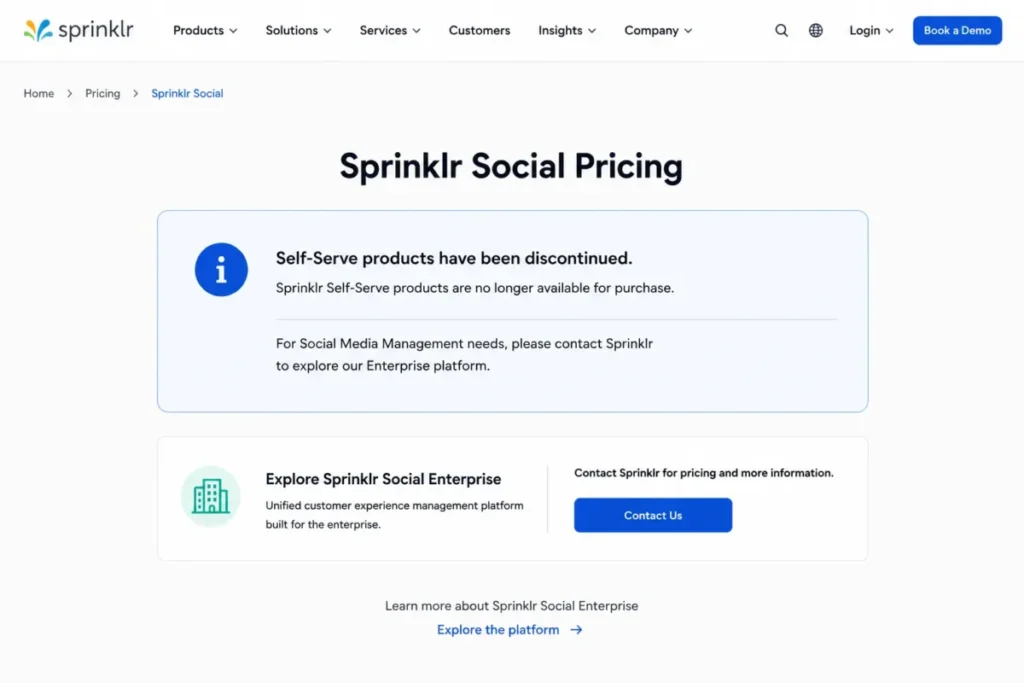
There is no public self-serve price to quote. The official pricing status page states that Self-Serve products have been discontinued and points buyers to the Enterprise platform, so treat Sprinklr as custom, sales-led pricing and ignore any older public self-serve figures you find elsewhere.
The platform scope is genuinely enterprise. Sprinklr’s product page describes enterprise social management across 30+ channels, AI in 100+ languages, governance, granular access controls, audit trails, approvals, and integrations with CRM, BI, and customer-service systems including Salesforce and Microsoft Dynamics.
What it does well:
- Enterprise governance with audit trails, granular roles, and approvals.
- Breadth across 30+ channels with AI and integration into CRM and BI.
- Global-scale workflow customization for large brands.
Where it falls short:
- No public self-serve pricing, so every buyer goes through enterprise sales.
- Overbuilt for small teams and agencies that need transparent, low-cost plans.
Best for: large multi-market brands that need to govern many social accounts safely and integrate with enterprise systems.
Avoid Sprinklr Social if you are a small team or agency that needs transparent self-serve pricing, because the buying motion assumes an enterprise contract.
Setup difficulty: High. Enterprise governance and integrations are an implementation project, not a signup.
Choose Sprinklr if you govern social at global scale and need enterprise controls and integrations that self-serve tools cannot match.
Pricing Comparison: Starting Price vs Practical Tier
Entry prices mislead on this list because the plan that opens the job you need usually sits above the headline. This table pairs the advertised start with the tier a team actually runs, using official prices where disclosed and clearly caveated cross-checks where the page is dynamic.
| Tool | Starting price (annual) | Practical tier for the job | Free plan / trial | Notable ceiling or add-on |
|---|---|---|---|---|
| Sprout Social | Essentials $79/ | Advanced/ | Trial, no public free plan | Social Insights, Premium Analytics add-ons |
| HubSpot Marketing Hub | Starter $7/seat/mo | Professional $800/mo for social tools | Free plan with limits | Onboarding $3,000 Pro, $7,000 Enterprise |
| Zoho Social | Standard ~$10/mo | Premium ~$40/mo for CRM integration | Free/ | Regional pricing |
| Agorapulse | Standard $79/mo | Advanced/ | Free plan referenced | SSO, custom roles on Custom tier |
| Hootsuite | Standard $99/mo | Professional $199/mo for unlimited accounts | 14-day trial, limited | Annual-billing basis; trial restrictions |
| SocialPilot | Essentials $25.50/mo | Premium $85/mo (25 accounts, 6 users) | Trial/ | Extra account $4/mo, extra user $5/mo |
| Sendible | Creator ~$25/mo (cross-check) | Scale ~$170/mo for agencies | 14-day trial, no card | White-label add-on, Enterprise SSO |
| Zendesk Suite | Support Team $19/ | Suite Team $55/ | Trial available | Copilot/ |
| Nimble CRM | $24.90/ | Same base plan | 14-day trial, no card | Email $15/ |
| Sprinklr Social | Custom (sales-led) | Custom enterprise | Not disclosed | Self-serve discontinued |
Compare the practical-tier column, not the starting column, when you build a budget. HubSpot’s social gate at Professional, detailed in our HubSpot pricing breakdown, and Sprinklr’s custom-only pricing sit at opposite ends of the same lesson: the number that matters is the one attached to the job you are buying, and finance will ask about the first-year total, not the headline.
Cost at Scale: What Five Seats or Twenty-Five Profiles Really Cost
Per-seat, per-profile, per-workspace, and custom models diverge sharply once a team grows. This table calculates cost only where official limits and prices are explicit, and marks the rest as verify-with-vendor rather than guessing.
| Tool | Five-seat / team scenario | Twenty-five-profile scenario | First-year note |
|---|---|---|---|
| Sprout Social | 5 seats Essentials = $395/mo annual | Needs Advanced/ | Add-on analytics can raise total |
| HubSpot Marketing Hub | Professional base $800/mo for social | 50 accounts on Professional covers 25 profiles | Add $3,000 onboarding in year one |
| Zoho Social | Brand-based; extra team members $10/ | Agency tiers for many brands | Low base, ecosystem-dependent value |
| Agorapulse | Standard $79/mo base; per-user adds | Custom tier likely; verify | Governance features push to Custom |
| Hootsuite | Standard $99/mo (10 accounts) or higher tier | Professional $199/mo (unlimited accounts) | Annual-billing basis |
| SocialPilot | Standard $42.50/mo (15 accounts, 3 users) + 2 users $10 = $52.50/mo | Premium $85/mo (25 accounts, 6 users) | Cleanest low-cost scale math |
| Sendible | Bundled workspaces/ | Scale/ | 15% annual saving |
| Zendesk Suite | 5 agents Suite Team = $275/mo annual | Not profile-based; agent-based | Add-ons $50/ |
| Nimble CRM | 5 seats = $124.50/mo annual | Not profile-based; contact-based | Email and forms add-ons optional |
| Sprinklr Social | Custom; verify with vendor | Custom; verify with vendor | Enterprise contract |
SocialPilot and Zendesk give the cleanest scale math because their limits and per-unit prices are explicit, while Sprout at 25 profiles, Agorapulse governance, Sendible plans, and Sprinklr all require a vendor quote, and the Zendesk pricing page shows how agent-based math differs again. Budget from the row that matches your real seat or profile count, and treat every “verify” cell as a question for the sales call, not a number to assume.
Agency Cost Fit: Which Tool Stays Cheap per Client
Agencies overpay when they compare entry prices instead of how a plan bundles users, clients, workspaces, and profiles. This grid compares the five agency-relevant tools on the dimensions that decide per-client cost, using disclosed limits and marking anything undisclosed as verify.
| Tool | Users at practical tier | Client / workspace model | Profiles at that tier | Approvals | White-label / branded reports |
|---|---|---|---|---|---|
| SocialPilot | 3 (Standard) to 6 (Premium) | Client management included | 15 to 25 accounts | Standard and up | White-label reports |
| Sendible | Bundled users | Workspaces bundled | 6 (entry plan) to 300 (Enterprise) | Higher plans | Branded reports; white-label add-on |
| Agorapulse | Per-user seats | Team-based, not client workspaces | 10 (Standard–Advanced) to unlimited (Custom) | Standard and up | Higher tiers |
| Sprout Social | Per seat at $79 each | No client-workspace model | 5 (Essentials) to unlimited | Higher tiers | Analytics add-ons |
| Hootsuite | Per plan (Standard 1 user) | No client-workspace model | 10 (Standard) to unlimited | Advanced and up | Advanced/ |
For an agency that adds clients every month, SocialPilot and Sendible keep the per-client cost low because they bundle users, clients, or workspaces into the plan. Sprout and Hootsuite bill per seat or per plan with no client-workspace model, so their cost climbs with client count.
Agorapulse sits between the two, with per-user pricing and a team structure rather than client workspaces. So a high-client-count agency should start with SocialPilot or Sendible, and reserve Sprout or Hootsuite for in-house brand teams that manage a few owned accounts rather than many client rosters.
Connected Profile Ceilings by Plan
“Supports all major networks” tells you nothing about how many accounts a plan allows. Connected-account ceilings often decide whether the entry plan is usable for a multi-brand or multi-location team, so here are the caps that official or high-confidence sources disclose.
| Tool | Entry-plan account ceiling | Higher-tier ceiling |
|---|---|---|
| Sprout Social | 5 social profiles (Essentials) | Unlimited profiles (Advanced/ |
| HubSpot Marketing Hub | 50 connected accounts (Professional) | 300 connected accounts (Enterprise) |
| Hootsuite | 10 social accounts (Standard) | Unlimited (Professional/ |
| SocialPilot | 7 accounts (Essentials) | 50 accounts (Ultimate) |
| Zoho Social | 14 channels in 1 brand (Standard) | Agency tiers for many brands |
A multi-location brand or agency should treat these ceilings as the first filter. Sprout’s 5-profile Essentials cap and Hootsuite’s 10-account Standard cap push multi-brand teams straight to higher tiers, while SocialPilot’s 50-account Ultimate and HubSpot’s 300-account Enterprise are the ceilings built for scale.
CRM Integration Depth: Not a Yes or No
“Integrates with CRM” hides four very different realities: a native CRM suite, a Salesforce or HubSpot connector, a support-ticketing bridge, or simple contact enrichment. Depth decides whether sales, marketing, or support can actually act on a social interaction.
| Tool | Native CRM | Salesforce integration | HubSpot integration | Ticketing / social support | Contact enrichment |
|---|---|---|---|---|---|
| Sprout Social | No | Yes | Verify | Care/ | Partial via inbox |
| HubSpot Marketing Hub | Yes (HubSpot CRM) | N/A | Native | Via Service Hub | Yes |
| Zoho Social | Zoho CRM integration | Verify | Verify | Zoho Desk integration | Yes (leads/ |
| Agorapulse | No | Yes (inbox) | Yes (inbox) | Moderation, not tickets | Partial |
| Hootsuite | No | Verify | Verify | Care coordination (higher tiers) | Partial |
| SocialPilot | No | Verify | Verify | No | No |
| Sendible | No | Verify | Verify | No | Partial |
| Zendesk Suite | No (help desk) | App ecosystem | App ecosystem | Native tickets | Customer context |
| Nimble CRM | Yes (Nimble) | Verify | Verify | No | Yes (social enrichment) |
| Sprinklr Social | No | Yes (CRM/ | Verify | Care integrations | Enterprise context |
Read this table against your team’s owner of social conversations. HubSpot, Zoho, and Nimble, covered in our Nimble CRM review, put data into a CRM record, Zendesk turns messages into tickets, and Sprout, Agorapulse, and Sprinklr hand off to a CRM without being one, so match the depth to whether sales, marketing, or support has to act on the interaction.
Feature Gate Comparison
The commodity features on every vendor page hide behind different plan tiers. This gate view shows where the capabilities that drive most buying decisions actually turn on.
| Tool | Approvals / routing | Advanced analytics / reporting | AI features | SSO / governance |
|---|---|---|---|---|
| Sprout Social | Higher tiers | Add-ons (Premium Analytics) | On plan tiers | Enterprise |
| HubSpot Marketing Hub | Professional+ | Professional+ | Professional+ | Enterprise |
| Zoho Social | Premium | Custom reports (higher plans) | On plan tiers | Higher plans |
| Agorapulse | Standard+ approvals | ROI/ | On plan tiers | Custom |
| Hootsuite | Advanced+ | Advanced/ | Standard+ (post/ | Enterprise |
| SocialPilot | Standard+ approvals | Higher plans | On plan tiers | Enterprise |
| Sendible | Higher plans | Branded reports higher plans | AI credits on plans | Enterprise |
| Zendesk Suite | Suite routing | Suite Professional+ | AI agents (add-ons) | Enterprise |
| Nimble CRM | N/A (CRM) | Limited custom reporting | N/A | N/A |
| Sprinklr Social | Enterprise | Enterprise | Enterprise AI | Enterprise |
Approvals, executive reporting, and governance are the three gates that quietly raise the practical tier. If leadership expects ROI reporting or your security team requires SSO, price the tier that opens those before you fall for a low entry number.
Reporting and ROI Depth
Leadership rarely asks for “analytics.” It asks for a report it can act on, and that specific report is gated differently across these tools.
Basic dashboards, custom reports, ROI reports, premium analytics, and social insights are not the same product.
| Tool | Basic reports | Custom / ROI reports | Premium analytics or listening |
|---|---|---|---|
| Sprout Social | Included | Higher tiers | Social Insights / Premium Analytics add-ons |
| HubSpot Marketing Hub | Professional+ | Professional+ campaign reporting | Enterprise analytics |
| Zoho Social | Included | Custom reports on higher plans | Verify |
| Agorapulse | Included | ROI and ads reports higher tiers | Higher tiers |
| Hootsuite | Included | Professional custom reports | Advanced/ |
| SocialPilot | Included | White-label reports higher plans | Higher plans |
| Sendible | Included | Branded reports higher plans | Verify |
| Zendesk Suite | Included | Suite Professional analytics | Enterprise |
If an executive social ROI report is the point of the purchase, confirm which tier produces it before you buy the entry plan. Sprout can push analytics into add-ons, Hootsuite reserves listening for its top tiers, and HubSpot ties campaign attribution to Professional, so the report you need may cost more than the seat you priced.
Enterprise Governance: SSO, Audit, and Roles
Governance is a procurement requirement, not a nice-to-have. A large brand governing many social accounts needs SSO, audit trails, custom roles, and approvals, and those controls cluster at the top of every plan ladder.
| Tool | SSO | Audit trails | Custom roles / approvals |
|---|---|---|---|
| Sprout Social | Enterprise | Enterprise | Higher tiers |
| Hootsuite | Enterprise | Enterprise compliance | Advanced/ |
| SocialPilot | Enterprise | Verify | Higher plans |
| Sendible | Enterprise | Verify | Higher plans |
| Sprinklr Social | Enterprise | Yes (audit trails) | Granular access controls |
Sprinklr is the only tool here built governance-first, with granular access and audit trails as core enterprise features. The publishing suites gate SSO and audit behind their top tiers, so an enterprise buyer should scope governance into the contract rather than assume it ships on a mid-tier plan.
Social Channel Coverage
Channel mismatch is a hard disqualifier. If your customers message you on WhatsApp or you publish on TikTok and Threads, the tool has to support those networks in the workflow you need, not just show a logo.
| Tool | Documented channel notes |
|---|---|
| HubSpot Marketing Hub | Facebook, Instagram, LinkedIn, TikTok, X, YouTube (docs) |
| SocialPilot | Facebook, Instagram, TikTok, X, LinkedIn, Threads, YouTube, Pinterest, Google Business, Bluesky |
| Zendesk Suite | Messenger, X, WhatsApp Business into support workflows |
| Sprinklr Social | 30+ channels (enterprise) |
| Others (Sprout, Hootsuite, Agorapulse, Zoho, Sendible, Nimble) | Verify specific channels on official pages |
Confirm the exact networks you depend on before you commit, because coverage is where a demo looks complete and the workflow later falls short. A support team that needs WhatsApp Business should note that Zendesk documents it, while a publisher on Threads and Bluesky should note SocialPilot’s broad list.
Setup and Migration Difficulty
Setup effort tracks the job the tool does. A publishing scheduler is quick, a governance platform is a project, and a help desk sits in between.
| Tool | Setup difficulty | Why |
|---|---|---|
| SocialPilot | Low | Connect accounts and client workspaces, minimal configuration |
| Nimble CRM | Low | Simple per-seat CRM; value is in outreach habits |
| Zoho Social | Low to Medium | Fast start; deeper value needs Zoho stack connections |
| Agorapulse | Low to Medium | Quick inbox; CRM integrations need a short pass |
| Sprout Social | Medium | Straightforward onboarding; discipline needed after month one |
| Hootsuite | Medium | Core is quick; approvals and analytics take configuration |
| Sendible | Medium | Workspaces and approvals need matching to client structure |
| Zendesk Suite | Medium to High | Ticketing, routing, and channels reward implementation |
| HubSpot Marketing Hub | High | Mandatory onboarding; rewards clean CRM data |
| Sprinklr Social | High | Enterprise governance and integrations are a project |
The tools with mandatory onboarding, HubSpot and Sprinklr, are not slower by accident: they carry it because the platform only pays off with a proper implementation. Budget the internal time, not just the license, for anything rated Medium to High.
Which Social Media CRM Tool Should You Avoid?
No tool here is bad, but several are wrong for specific buyers, and matching the mismatch to the buyer is more useful than a blanket warning.
Avoid HubSpot Marketing Hub if you only want a scheduler, because you will fund a full marketing platform to reach the social tools on Professional. Avoid Sprinklr Social if you are a small team or agency, because there is no self-serve price and the buying motion assumes an enterprise contract.
Avoid Zendesk Suite for marketing publishing, because it is a support help desk and has no content calendar. Avoid Nimble CRM if you expect publishing, listening, or a full social inbox, because it is a relationship CRM with enrichment, not a suite.
Avoid Zoho Social as a value play if you are not in the Zoho ecosystem, because the CRM advantage that makes it cheap largely disappears outside Zoho CRM and Zoho Desk.
The pattern is consistent: the risk is never the tool itself, it is buying a tool built for a different job than the one your team actually runs.
How to Choose the Right Social Media CRM
Work through these questions in order, because the first one usually eliminates half the list.
- Which of the three jobs is primary: CRM records, social publishing, or support tickets? This decides the category before any brand comparison.
- How many social profiles and seats will you need in 12 months? Match that to the connected-profile ceilings, not just today’s count.
- Which plan opens the CRM integration, inbox, or report you actually need? Price that tier, not the entry price.
- What must it integrate with: Salesforce, HubSpot, Zoho, a help desk, or a data warehouse? Check integration depth, not a logo wall.
- Does leadership expect executive ROI reporting, and which tier produces it? Reporting is often gated above the entry plan.
- Does security require SSO, audit trails, or custom roles? Governance clusters at the top of the ladder.
- What is the true first-year cost, including onboarding and add-ons? HubSpot onboarding and Sprout add-ons change the math.
After the questions, the map is simple. Marketing publishing teams start with Sprout or Hootsuite, CRM-connected teams start with HubSpot or Zoho, agencies start with SocialPilot or Sendible, support teams start with a help desk software shortlist led by Zendesk, social sellers start with Nimble, and global enterprises start with Sprinklr.
Common Mistakes When Choosing Social Media CRM Software
The same errors show up in most social CRM purchases, and each one has a fix.
Buying on the starting price is the first mistake, because the practical tier that opens CRM integration or reporting usually sits above it. Confusing categories is the second, because a support help desk and a publishing suite are not interchangeable no matter how the SERP labels them.
Ignoring connected-profile ceilings is the third, because a multi-brand team can outgrow the entry plan on day one. Skipping the add-on math is the fourth, because Sprout analytics, HubSpot onboarding, and SocialPilot extra accounts all move the total.
Assuming CRM integration is binary is the fifth, because “integrates with CRM” can mean anything from a native suite to simple enrichment. Overlooking platform API limits is the sixth, because social networks and their API terms can change what any third-party tool is allowed to do, so confirm mission-critical channels before you sign.
The seventh mistake is treating governance as an afterthought, because SSO and audit trails often force a jump to the top tier that changes the whole budget.
The Buyer Risk Ledger: What Breaks After You Sign
Vendor pages sell the demo. A buying memo names the risks that appear after the contract, so here is the ledger I would keep before signing any of these tools.
The first risk is the plan-gate surprise, where the feature that justified the purchase turns out to sit one tier up. Sprout’s premium analytics as an add-on, HubSpot’s social tools locked to Professional, and Zoho’s CRM integration reserved for Premium all fit this pattern, and the fix is to price the tier that carries your must-have feature before you commit.
The second risk is adoption drift after the first month. A social inbox looks clean in week one and clogs by week eight when nobody owns triage, so decide who owns the inbox and the CRM integration handoff before rollout, not after.
The third risk is the profile-ceiling wall. A multi-brand team on Sprout Essentials or Hootsuite Standard hits the account cap fast, which forces an unplanned tier jump, so map every brand, region, and channel account you will connect and check it against the ceiling first.
The fourth risk is first-year cost creep. HubSpot onboarding fees, SocialPilot extra-account and extra-user charges, and Sprout analytics add-ons all land after the sticker price, so build the first-year total from the practical tier plus onboarding plus add-ons, then take that number to finance.
The fifth risk is the renewal question. Before renewal, you should be able to answer whether the tool produced the reporting leadership expected, whether adoption held past 90 days, and whether the CRM or ticketing handoff actually fired, and if you cannot answer those, the switch-or-stay decision is already being made for you.
Here is the switch-or-stay rule I would apply. Switch when the current tool cannot do the primary job category at all, stay when it does the job but you are only chasing a cheaper price, and delay when the blocker is adoption discipline rather than the software, because a new tool will not fix a workflow nobody owns.
Final Verdict: Which Social Media CRM Wins
For most marketing teams that need publishing, a shared inbox, and reporting in one platform, Sprout Social is the clearest overall pick, provided you budget above the Essentials line and account for analytics add-ons.
If social has to feed CRM contacts and campaign attribution, HubSpot Marketing Hub is the better fit, as long as finance can defend the Professional-tier first-year cost with onboarding. If you already run Zoho CRM, Zoho Social is the value winner, and if the real job is customer support, Zendesk Suite is the right tool because it turns social messages into tickets.
Agorapulse wins for lean teams that want inbox quality with a CRM handoff, Hootsuite for established publishing operations, and SocialPilot or Sendible for agencies choosing between per-account volume and bundled workspaces. Nimble wins for relationship-led social sellers, and Sprinklr wins for global brands that need governance no self-serve tool can match.
Start from the job, filter by the connected-profile ceiling and the tier that opens your must-have feature, then price the first year with onboarding and add-ons included. That sequence, not the badge on the box, is what keeps you from switching tools again in six months.
FAQ
What is a social media CRM?
A social media CRM is software that connects social interactions to customer data or workflows, which can mean feeding social activity into CRM records, running publishing with a shared inbox, or turning social messages into support tickets. The three jobs are different, so the right tool depends entirely on which one your team needs.
Which CRM integrates with social media?
HubSpot integrates social publishing and reporting into its CRM on Marketing Hub Professional and Enterprise, while Zoho Social integrates with Zoho CRM and Zoho Desk on its higher plans. Nimble enriches contacts with social context, and Sprout, Agorapulse, and Sprinklr hand off to Salesforce or HubSpot without being CRMs themselves.
Is HubSpot a social CRM?
Yes, but only on the right plan, because HubSpot pairs a CRM with social publishing and reporting that are documented for Marketing Hub Professional and Enterprise rather than the Free or Starter tiers. That gate is why HubSpot costs far more for social use than its entry price suggests.
What is the difference between social CRM and social media management software?
Social media management software focuses on scheduling, a shared inbox, monitoring, and analytics, without the marketing automation and record-keeping a CRM layer adds. A social CRM adds a connection to customer records, whether that is a contact, a deal, or a support ticket, so the practical question is how deep the CRM link runs on the plan you can afford.
Can a CRM track Instagram and Facebook messages?
Yes, with the right category of tool, because a social suite like Sprout or Agorapulse pulls public and private messages into a unified inbox, while a help desk like Zendesk Suite turns private social messages into tickets on its Suite plans. Confirm whether you need public mentions, private DMs, or both before choosing.
What is the best social CRM for small businesses?
For a small business already using Zoho, Zoho Social is the value pick because it hands leads and contacts to Zoho CRM cheaply, and for a small marketing team that wants a strong inbox without a full suite, Agorapulse fits. For relationship-led sellers, Nimble is the lighter choice.
What is the best social CRM for agencies?
SocialPilot and Sendible are the agency picks, with SocialPilot bundling many accounts and client approvals at low per-plan prices and Sendible favoring workspaces and branded reports over pure per-seat billing. Price the number of accounts, users, and client workspaces you need, because that is where agency costs actually diverge.
Which social CRM is best for customer support?
Zendesk Suite is the best fit when the job is support, because it routes social messages into a ticketing system with history and SLAs. Note that private social messaging requires a Suite plan while Support-only plans are limited to public social messaging, so budget for Suite if you handle private DMs.
How much does social media CRM software cost?
It ranges from around $25 per month for entry publishing or CRM plans to $800 per month or more once you reach HubSpot’s social tier, plus onboarding, with agency and enterprise pricing climbing from there and Sprinklr custom-only. Always price the practical tier and first-year add-ons, not the advertised starting price.