

The wrong pick in this category rarely fails at the demo. It fails around month three, when marketing’s contact list outgrows the plan while sales still works deals in a separate system.
This guide ranks the 10 best sales and marketing software platforms for 2026 by verified pricing, plan gates, billing units, and realistic cost at 5, 10, and 25 seats. For this guide, “sales and marketing software” means platforms that connect customer data, campaigns, lead nurturing, pipeline execution, and revenue reporting.
It sits beside our wider best CRM software rankings, which also cover the sales-only platforms this guide excludes.
The short version: HubSpot Customer Platform is the best overall pick because every tool reads from one customer record. Freshsales Suite is the strongest lean-team alternative at $9 per user per month, and Salesforce Starter Suite is the entry point for teams on an enterprise roadmap.
There is a catch I unpack later: Several platforms use contact, email-volume, or hybrid billing, so seat price alone does not represent total cost. That difference decides your real budget more than any feature list.
In This Article (28 sections)
Quick Verdict: The Best Platform by Use Case
| Use case | Best pick | Why it fits |
|---|---|---|
| Best overall for inbound-led B2B teams | HubSpot Customer Platform | Marketing, sales, content, and service share one CRM record |
| Lean teams wanting built-in multichannel | Freshsales Suite | $9 entry includes email, phone, chat, SMS, and WhatsApp |
| Companies on an enterprise roadmap | Salesforce Starter Suite | $25 entry into the deepest ecosystem and upgrade path |
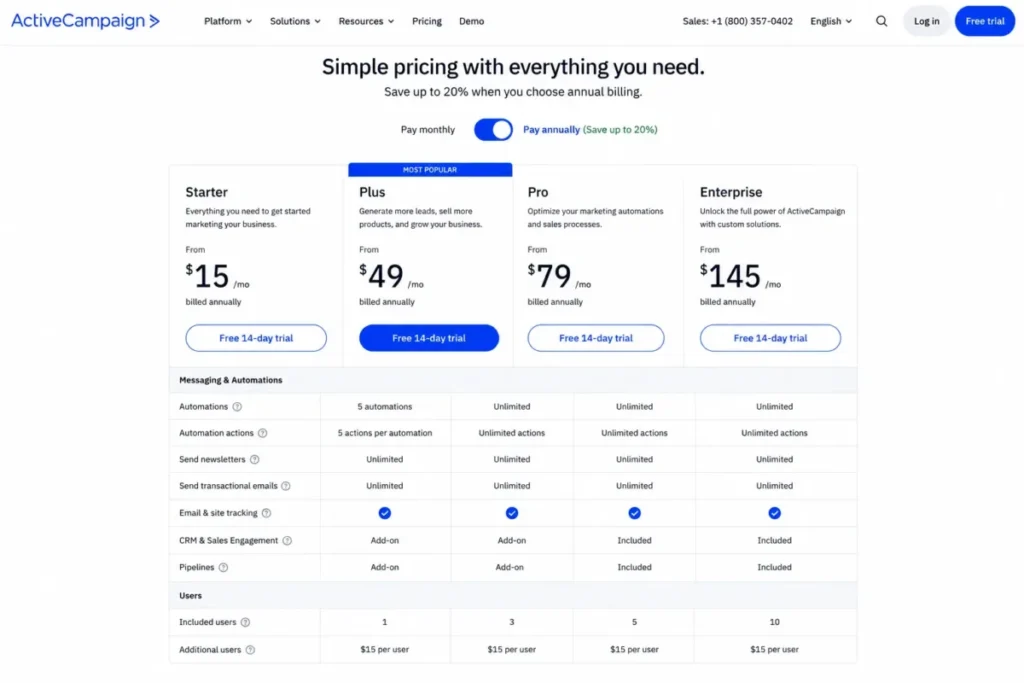
| Lifecycle automation depth | ActiveCampaign | Behavior-triggered journeys from $15 per month |
| Broad cross-department operations | Zoho CRM Plus | Sales, marketing, service, social, projects, and analytics under one vendor |
| No-code sales workflow flexibility | monday CRM | Visual boards that admins reshape without developers |
| Best value for micro-businesses | EngageBay All-in-One | Free at 250 contacts; Basic is $14.99 per user monthly |
| Service businesses with payments and booking | Keap | Automation plus appointments, invoices, SMS, and success support |
| Sales-led pipeline adoption | Pipedrive | Rep-friendly pipelines from about $14 per user monthly |
| Email-first teams adding light sales | Brevo | Free plan sends 300 emails daily; Starter is $9 monthly |
Ten winners is not a dodge: each label names a different operating model. Match your motion first, then compare prices inside that lane.
How I Chose and Ranked These Platforms
I am Macedona, the CRM buying analyst behind saascrmreview.com, and I ranked these 10 platforms from official pricing pages, product documentation, feature-comparison pages, and accessible 2026 review sentiment on G2, Capterra, and TrustRadius. All pricing was checked on July 13, 2026.
No hands-on trial, sandbox, or paid account was used for this guide. Where a vendor localizes or hides prices behind a calculator, I say so instead of guessing.
Each platform was scored on customer-data unification, pipeline management, campaign and nurture automation, reporting, integrations, administration, security gates, support tiers, implementation burden, and pricing transparency. Partnerships never influence rank order, and a weak fit gets ranked lower regardless of payout.
One honest limitation: four vendors rendered dynamic or regional pricing during research. Those figures carry a “verify at checkout” note wherever they appear.
Unified Suite or Connected Stack? Read This First
Architecture, not features, decides whether your marketing-to-sales lead handoff works without sync jobs. The ten platforms here split into four structural groups, and the group predicts your admin workload better than any demo.
| Platform | Architecture | Handoff consequence |
|---|---|---|
| HubSpot Customer Platform | Unified native suite | One record; campaign and deal data need no sync |
| Freshsales Suite | Unified native suite | Sales and marketing share contacts and lifecycle stages |
| Salesforce Starter Suite | Modular suite; advanced marketing licensed separately | Starter unifies basics; B2B automation is a second product |
| ActiveCampaign | Marketing-first with modular CRM add-ons | Deep journeys; fuller pipelines cost extra or live elsewhere |
| Zoho CRM Plus | Modular native suite of 9+ apps | One vendor, one login, but per-app configuration |
| monday CRM | Sales-first work platform | Marketing depth is thinner than dedicated suites |
| EngageBay All-in-One | Unified native suite | Small-scale unification with contact-tier ceilings |
| Keap | Unified platform for service workflows | Automation, payments, and booking in one subscription |
| Pipedrive | Sales-first CRM with add-ons | Marketing often stays on a separate platform |
| Brevo | Marketing-first with a sales layer | Email volume and sales seats bill on different units |
A unified native suite saves you the middleware bill, but it concentrates vendor risk in one renewal. A connected stack keeps best-of-breed depth and hands you the synchronization work.
The first system type owns records, deals, and pipeline; the second owns triggers, sends, and journeys. Reading up on what CRM software does clarifies which half of the job each platform natively owns.
Best Sales and Marketing Software at a Glance
| Rank | Platform | Architecture | Entry price (annual billing) | Free plan | Watch out for |
|---|---|---|---|---|---|
| 1 | HubSpot Customer Platform | Unified native suite | From $7 per seat monthly, promotional; $20 monthly reference | Yes, 2 users | Professional tier jumps to $1,300 monthly |
| 2 | Freshsales Suite | Unified native suite | $9 per user monthly | Yes, 3 users | Growth includes only 500 marketing contacts |
| 3 | Salesforce Starter Suite | Modular suite | $25 per user monthly | No; 30-day trial | Advanced marketing is a separate license |
| 4 | ActiveCampaign | Marketing-first | From $15 monthly | No; trial only | Starter caps automations at 5 actions |
| 5 | Zoho CRM Plus | Modular native suite | US price not publicly verified | No; 30-day trial | Per-app usage units add cost |
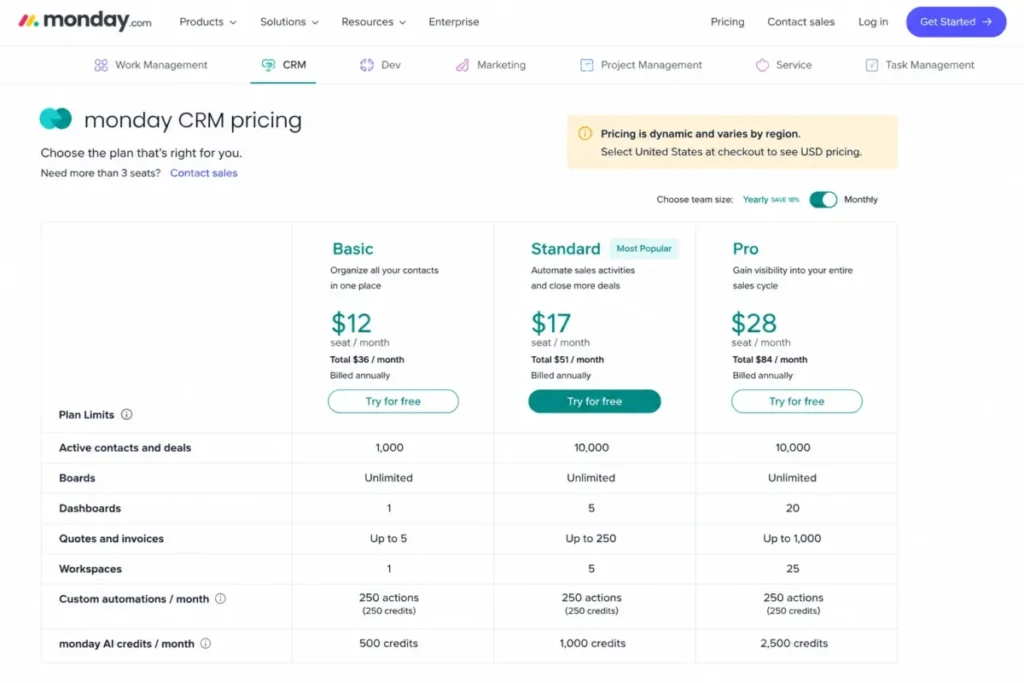
| 6 | monday CRM | Sales-first | $12 per seat monthly in US result; verify checkout | No; trial only | Basic caps 1,000 active contacts and deals |
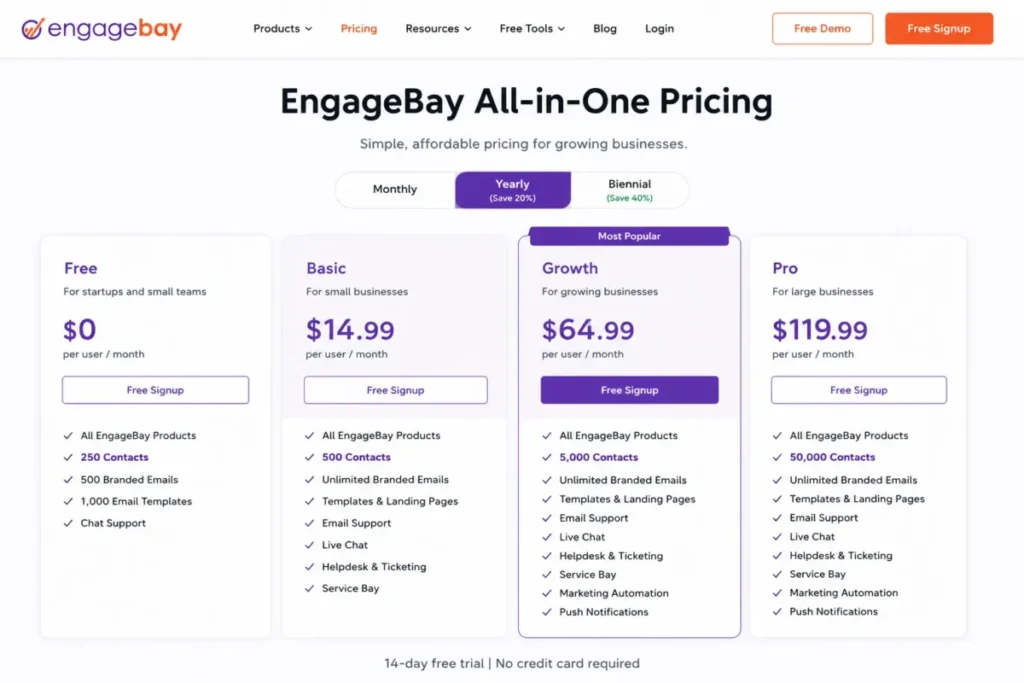
| 7 | EngageBay All-in-One | Unified native suite | $14.99 per user monthly, paid yearly | Yes, 250 contacts | Contact caps force tier jumps |
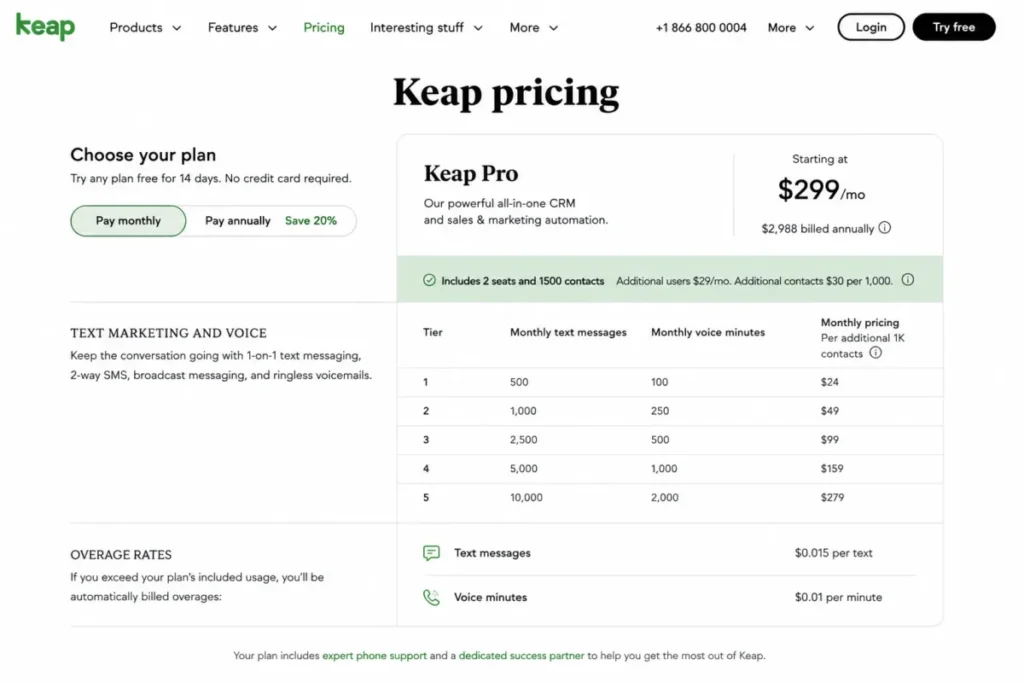
| 8 | Keap | Unified platform | $299 monthly option displayed; $2,988 billed annually | No; limited trial | SMS and voice usage bill separately |
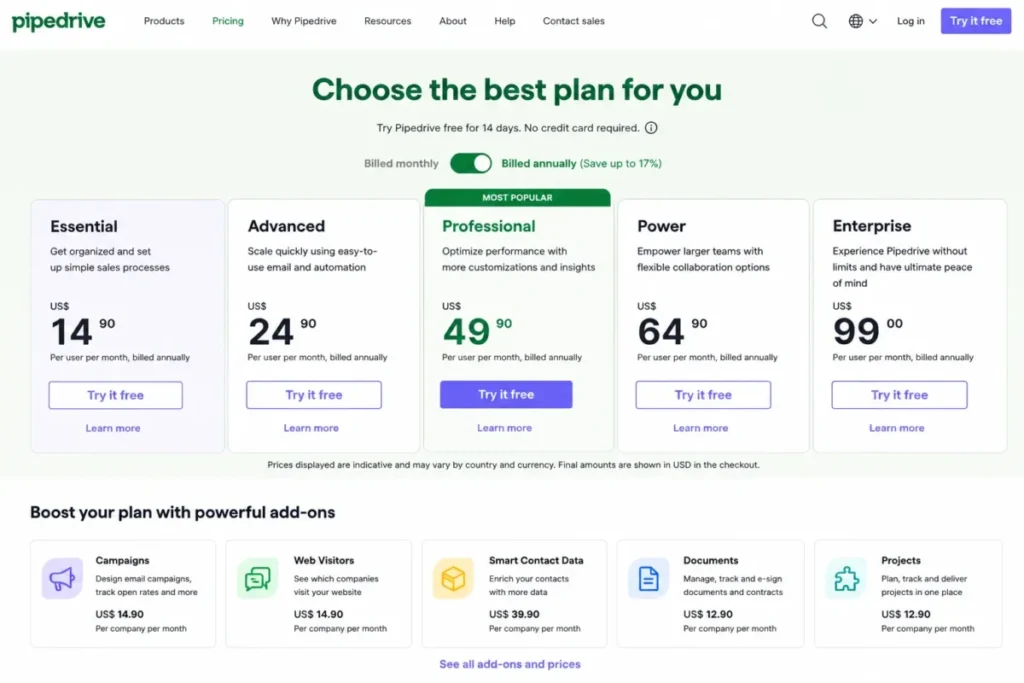
| 9 | Pipedrive | Sales-first | About $14 per user monthly; verify calculator | No; 14-day trial | Deep marketing automation is not the core product |
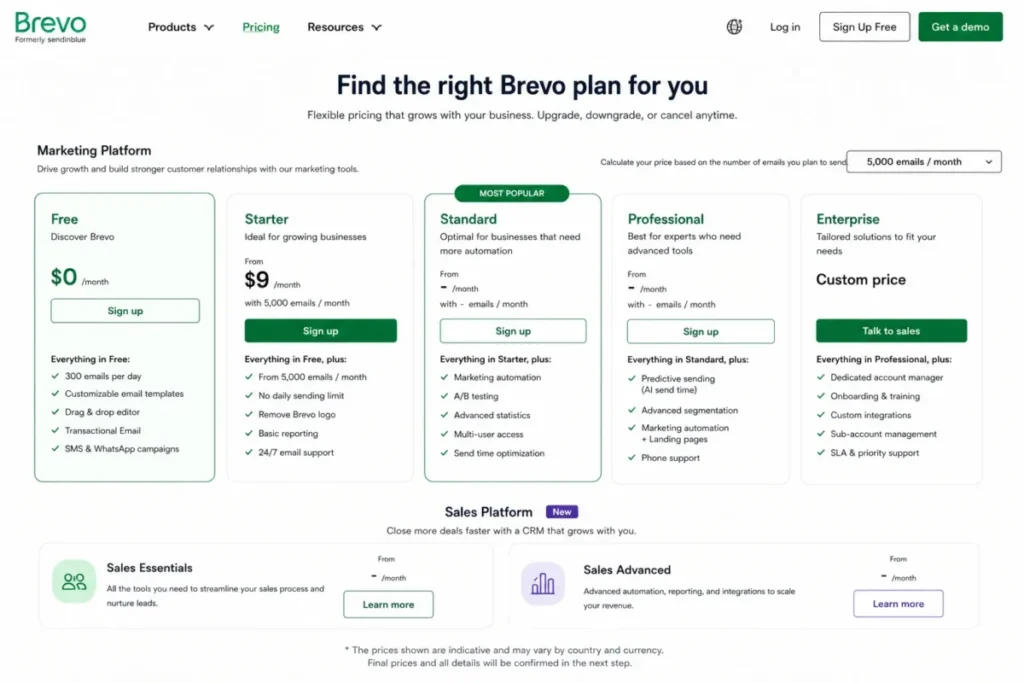
| 10 | Brevo | Marketing-first | From $9 monthly for 5,000 emails | Yes, 300 emails daily | Sales modules price separately |
Prices reflect what each official page displayed on July 13, 2026, and vendors change these without notice. Treat the entry column as a floor, not a budget.
What Each Platform Bills You For
Seat price is only one of four billing units in this category. Compare the unit that grows fastest for your business, because that unit sets your renewal bill.
| Platform | Primary billing unit | Secondary cost drivers |
|---|---|---|
| HubSpot Customer Platform | Paid seat | Marketing contact tiers, HubSpot Credits, required onboarding on Marketing Hub Professional and Enterprise |
| Freshsales Suite | User | Marketing contacts beyond 500, Freddy AI Agent sessions, CPQ add-on |
| Salesforce Starter Suite | User | Separate marketing products, documented add-ons, possible transaction fees |
| ActiveCampaign | Contact volume | Users, channel packages, Enhanced CRM add-ons |
| Zoho CRM Plus | User | Campaigns contacts, SalesIQ visitors, Survey responses, Analytics rows |
| monday CRM | Seat | Tier record limits, automation quotas, purchased AI usage |
| EngageBay All-in-One | User plus contact tier | Tier jumps at 500, 5,000, and 50,000 contacts |
| Keap | Platform subscription | Message and voice-minute tiers, overages, local numbers |
| Pipedrive | User | Tier gates and optional add-ons |
| Brevo | Email volume | Sales seats and packages, SMS credits |
If your marketable database doubles every year, a contact-billed platform inflates faster than a seat-billed one. Outbound-heavy teams with stable lists face the opposite math.
Cost at 5, 10, and 25 Seats
Entry prices hide how differently these platforms scale. The table below multiplies the lowest publicly verified tier that supports a shared sales-and-marketing workflow, on annual billing, checked July 13, 2026.
| Platform and tier basis | 5 users | 10 users | 25 users |
|---|---|---|---|
| HubSpot Starter, $20 per seat monthly reference | $100 | $200 | $500 |
| Freshsales Suite Growth, $9 per user | $45 | $90 | $225 |
| Freshsales Suite Pro, $39 per user | $195 | $390 | $975 |
| Salesforce Starter Suite, $25 per user | $125 | $250 | $625 |
| Salesforce Pro Suite, $100 per user | $500 | $1,000 | $2,500 |
| monday CRM Basic, $12 per seat in US result | $60 | $120 | $300 |
| EngageBay Basic, $14.99 per user | $74.95 | $149.90 | $374.75 |
| Pipedrive entry tier, about $14 per user | $70 | $140 | $350 |
| ActiveCampaign | Contact-billed; seat math not comparable | ||
| Zoho CRM Plus | Current US price not publicly verified | ||
| Keap | Platform quote; configuration-based | ||
| Brevo | Email-volume billed plus separate sales seats |
Monthly figures per team, before add-ons, contacts, or usage. Four platforms cannot be compared per seat at all, which is exactly why entry-price tables mislead buyers in this category.
Notice the Freshsales gap: $90 versus $390 at 10 users between Growth and Pro. The tier that holds your must-have features, not the tier in the ad, is your real budget line.
Hidden Costs and Budget Pressure Points
The advertised price stops being your budget at predictable points. This ledger lists the documented add-ons and gates that move the bill, with undisclosed values labeled instead of estimated.
| Platform | Documented budget pressure point |
|---|---|
| HubSpot Customer Platform | Professional starts at $1,300 monthly with 6 seats; Enterprise at $4,700 with 8 Core Seats. Marketing Hub Professional and Enterprise require paid onboarding. Extra HubSpot Credits cost $0.010 each, reset monthly, and never roll over |
| Freshsales Suite | 500 marketing contacts included on Growth; added contact pricing not publicly exposed. Freddy AI Agent beyond the one-time 500 sessions, CPQ, and optimization are paid add-ons |
| Salesforce Starter Suite | Pro Suite is $100 per user monthly with a required contract; Sales Enterprise is $175. Marketing Cloud Account Engagement is licensed separately, and the official page notes transaction fees can apply |
| ActiveCampaign | Enhanced CRM Pipelines and sales engagement are add-ons; contact growth raises every tier’s price |
| Zoho CRM Plus | Extra Campaigns contacts, SalesIQ visitors, Survey responses, and Analytics rows sell as add-ons; Premium and Enterprise support are paid programs |
| monday CRM | AI usage starts included, then sells as additional purchases; Standard caps 250 custom automations monthly |
| EngageBay All-in-One | Growth and Pro tiers gate marketing automation, SSO, roles, SLA, and phone support behind contact-tier jumps |
| Keap | Text and voice tiers run $24 to $279 monthly; overages are $0.015 per text and $0.01 per voice minute; a local number is $10 monthly |
| Pipedrive | Campaigns and other add-on prices render dynamically; verify in the US calculator before budgeting |
| Brevo | SMS credits bill separately; Sales Essentials and Sales Advanced price separately from marketing plans |
Budget separately for contacts, email volume, onboarding, AI usage, communications, and required add-ons. The size of that buffer depends on the platform and your growth model.
1. HubSpot Customer Platform: Best Overall

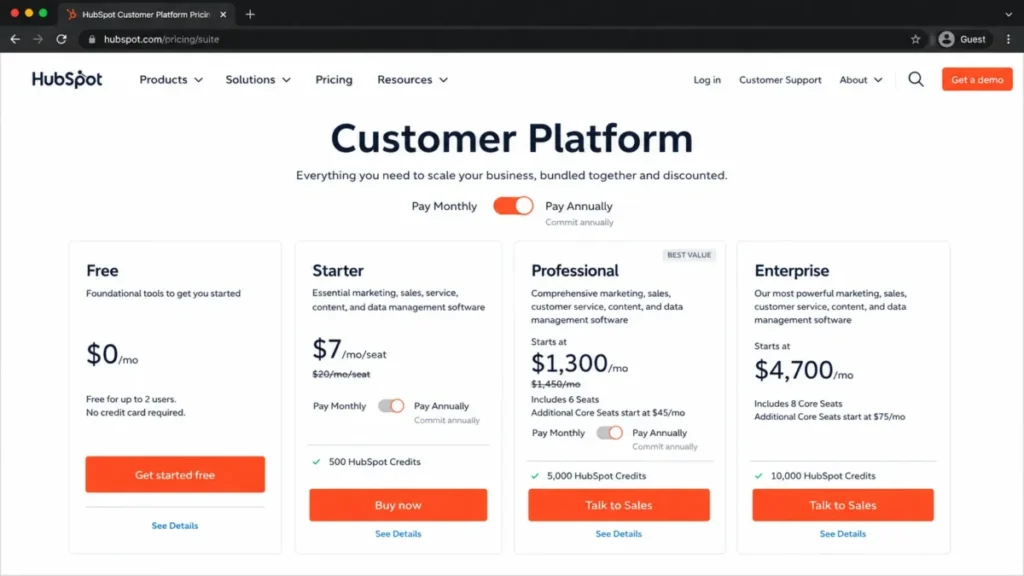
HubSpot Customer Platform bundles Smart CRM with marketing, sales, content, service, data, and revenue tools at one edition level. It ranks first because campaigns and deals read from the same record, which removes the handoff problem entirely.
- Best for:
- 5-to-50-person inbound-led B2B teams that want capture, nurture, pipeline, and attribution on one customer record.
- Not best for:
- budget-sensitive teams that need advanced marketing automation immediately but cannot absorb the Professional jump.
- Starting price:
- free tools cover 2 users and 1,000 contacts. Starter displayed from $7 per seat monthly on annual billing against a $20 monthly reference on July 13, 2026; verify the promotional checkout (HubSpot pricing page).
- Practical tier:
- Starter handles foundational email, forms, and pipelines with 500 HubSpot Credits. Advanced workflows, attribution, and governance sit in Professional at $1,300 monthly with 6 seats.
- Key strengths:
- 2,000+ marketplace integrations, Breeze AI assistants, enrichment, and native sequences beside campaigns.
Real limitation: Capterra reviewer patterns flag functionality moving behind paid tiers, and Marketing Hub Professional requires paid onboarding. My HubSpot CRM review breaks down this Starter-to-Professional cliff, the biggest budgeting event in this ranking.
| Pros | Cons |
|---|---|
| One shared record across marketing, sales, and service | Professional starts at $1,300 monthly plus required onboarding |
| Free plan runs 2 users and 1,000 contacts indefinitely | HubSpot Credits reset monthly with no rollover; extras cost $0.010 each |
| 2,000+ integrations and included Starter credits | Marketing contact tiers bill on top of seats |
- Avoid if:
- you need Professional-grade automation on a sub-$500 monthly budget.
- Setup difficulty:
- Low on Starter, High at Professional. Hidden costs: onboarding, marketing contacts, credits.
- Verdict:
- choose HubSpot Customer Platform if the team plans to grow into it; record unification is worth the cliff.
2. Freshsales Suite: Best for Lean Multichannel Teams

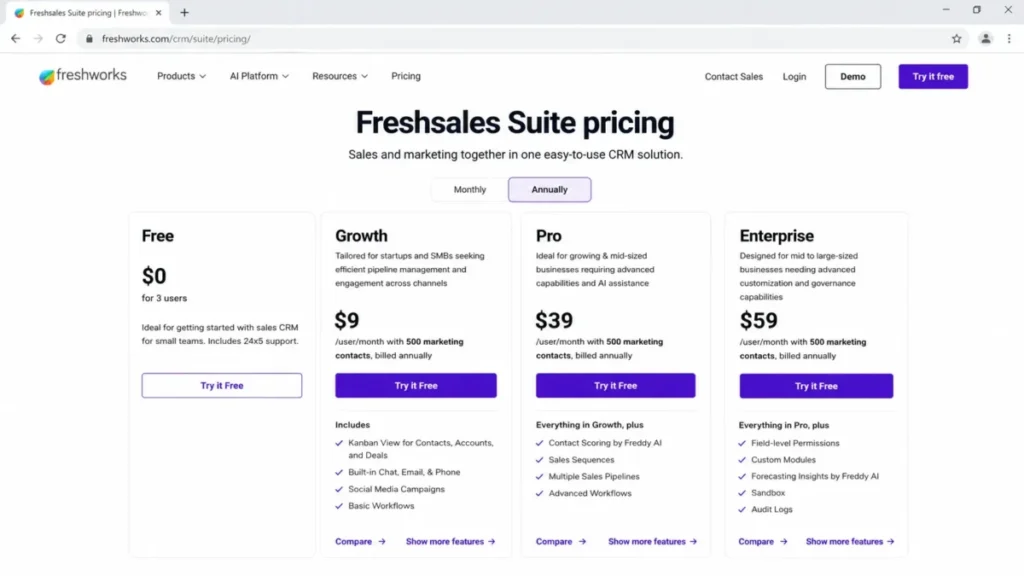
Freshsales Suite from Freshworks packs CRM, email, phone, live chat, SMS, WhatsApp, social campaigns, and landing pages into one product. It ranks second because no rival matches that channel spread at $9 per user monthly.
- Best for:
- 3-to-30-person teams that sell and market across chat, phone, and messaging without stitching tools together.
- Not best for:
- organizations with large marketing databases that need a transparent contact add-on schedule before procurement.
- Starting price:
- free for up to 3 users; Growth is $9 per user monthly with 500 marketing contacts, billed annually (Freshsales Suite pricing page).
- Practical tier:
- Pro at $39 per user monthly adds sequences, contact scoring, multiple pipelines, and advanced workflows. Enterprise at $59 adds field permissions, custom modules, sandbox, and audit logs.
- Key strengths:
- Kanban contact and deal management, Freddy AI scoring and deal insights on higher tiers, and a 21-day fully loaded trial.
Real limitation: the 500-contact marketing allowance on Growth. Your 501st marketable contact triggers an add-on whose price the pricing page does not expose, a gap my Freshsales review flags for budget approval.
| Pros | Cons |
|---|---|
| $9 entry includes 500 marketing contacts and multichannel engagement | Added marketing-contact pricing is not publicly listed |
| Native phone, SMS, WhatsApp, chat, and social campaigns | Sequences and scoring gate to the $39 Pro tier |
| Free plan covers 3 users with core CRM | Sandbox and audit logs require the $59 Enterprise tier |
- Avoid if:
- your marketable database already runs past a few thousand contacts and you need list-price certainty.
- Setup difficulty:
- Low to Medium. Hidden costs: contact add-ons, Freddy AI Agent sessions, CPQ.
- Verdict:
- the best value here for lean teams, provided you price the contact add-on before signing.
3. Salesforce Starter Suite: Best for Enterprise Roadmaps

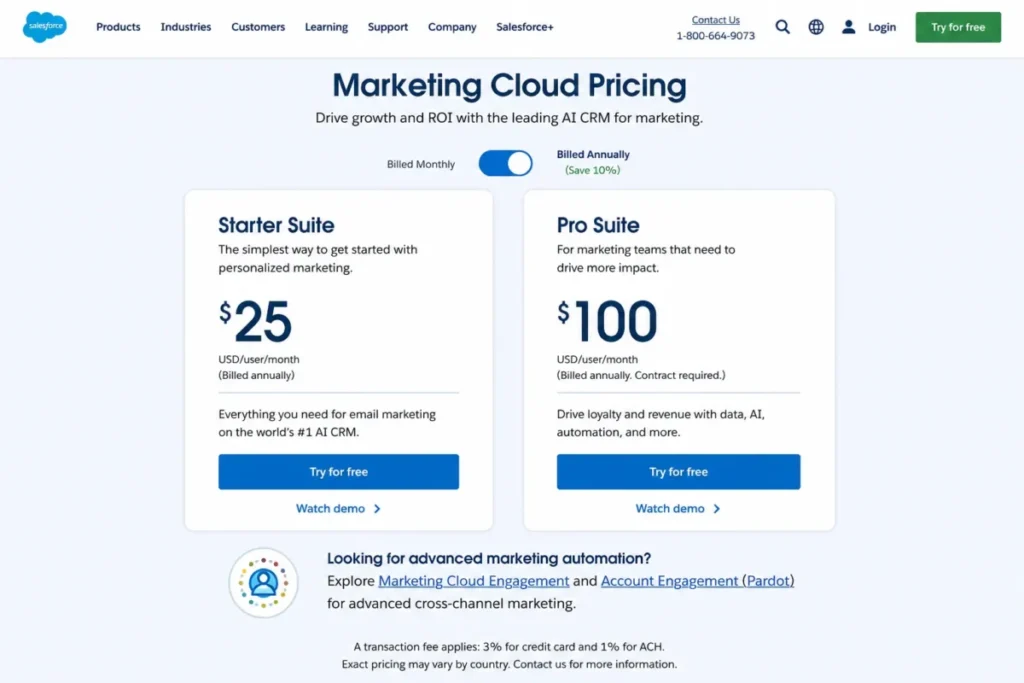
Salesforce Starter Suite gives a growing company lead, account, opportunity, and dynamic email marketing basics for $25 per user monthly. It ranks third as the entry ramp to the deepest enterprise ecosystem, not as a finished destination.
- Best for:
- 10-to-100-person companies expecting to need AppExchange depth, heavy customization, or enterprise governance within two years.
- Not best for:
- small teams wanting sophisticated B2B marketing automation and predictable pricing from the entry tier.
- Starting price:
- $25 per user monthly, billed monthly or annually; the official page notes transaction fees can apply (Salesforce marketing pricing page).
- Practical tier:
- Pro Suite at $100 per user monthly requires an annual contract. Sales Enterprise runs $175, and Marketing Cloud Account Engagement is a separate license whose edition pricing varies, so request an edition-specific quote.
- Key strengths:
- built-in sales flows and lead routing, Slack-connected conversations, and a 30-day trial with no credit card.
Real limitation: Starter does not represent a mature Salesforce stack. Advanced marketing automation, analytics, and encryption arrive as separately priced products, and my Salesforce CRM review details how administration grows with each one.
| Pros | Cons |
|---|---|
| $25 entry includes email marketing and opportunity management | B2B marketing automation is a separate Account Engagement license |
| Deepest upgrade path, partner market, and AppExchange ecosystem | Pro Suite quadruples per-seat cost to $100 with a required contract |
| 30-day free trial without a credit card | Official pricing notes transaction fees can apply |
- Avoid if:
- nobody on staff will own Salesforce administration.
- Setup difficulty:
- Medium at Starter, High beyond it. Hidden costs: add-on products, marketing licenses, transaction fees.
- Verdict:
- buy Salesforce Starter Suite for where you are going, not for what $25 buys today.
4. ActiveCampaign: Best for Lifecycle Marketing Automation

ActiveCampaign builds the deepest behavior-triggered journeys in this ranking, with visual automations, segmentation, predictive content, and attribution across more than 1,000 connected apps. It ranks fourth because the marketing engine outclasses its native sales depth.
- Best for:
- 2-to-20-person lifecycle marketing teams running triggered nurture, lead scoring, and ecommerce journeys.
- Not best for:
- sales organizations expecting a full pipeline and engagement system inside the lowest email price.
- Starting price:
- Starter begins at $15 monthly on annual billing; contact count, channels, and users move the final price (ActiveCampaign pricing page).
- Practical tier:
- Starter allows only 5 actions per automation, so real workflows need Plus or above, where actions run unlimited. Starter and Plus include 1 user, Pro includes 3, and Enterprise includes 5.
- Key strengths:
- AI-assisted automation building, predictive and conditional content on higher tiers, and attribution that ties campaigns to revenue.
Real limitation: fuller CRM functions such as Pipelines and sales engagement are Enhanced CRM add-ons. Teams needing mature sales operations either pay extra or keep a separate CRM, a tradeoff my ActiveCampaign review weighs in full.
| Pros | Cons |
|---|---|
| Strongest journey and automation builder of the ten | Starter caps every automation at 5 actions |
| 1,000+ app connections with ecommerce triggers | Pipelines and sales engagement cost extra as add-ons |
| Attribution and conversion tracking on higher tiers | Only 1 user included on Starter and Plus |
- Avoid if:
- reps need quoting, forecasting, and deep deal management natively.
- Setup difficulty:
- Medium. Hidden costs: contact growth, Enhanced CRM add-ons, channel packages.
- Verdict:
- pick ActiveCampaign when marketing sophistication drives your revenue and sales requirements stay light.
5. Zoho CRM Plus: Best for Cross-Department Coverage

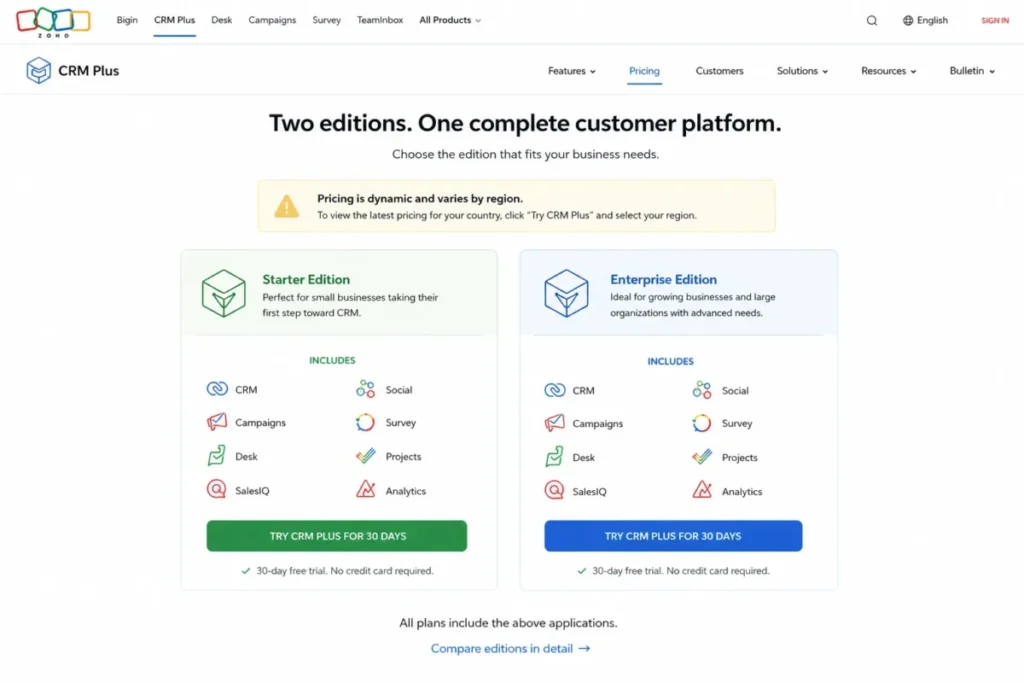
Zoho CRM Plus bundles Zoho CRM, Campaigns, Desk, SalesIQ, Social, Survey, Projects, and Analytics into one customer-operations suite. It ranks fifth for breadth no rival matches, priced against complexity no rival carries.
- Best for:
- 10-to-100-person organizations consolidating sales, marketing, support, social, and analytics under one vendor.
- Not best for:
- teams that want one simple app, few usage units, and a transparent US price on a static page.
- Starting price:
- US pricing was not safely verifiable on July 13, 2026 because the page rendered regional values (Zoho CRM Plus pricing page). The official calculator’s $57 figure carries July 2023 data, so treat it as history.
- Practical tier:
- Starter covers sales, marketing, help desk, chat, social, projects, surveys, and analytics. Enterprise adds Marketing Automation, webinars, events, and larger data and visitor limits.
- Key strengths:
- a 30-day full-feature trial with no card, paid Premium support at 24/5, and Enterprise support at 24/7 with a one-hour maximum response and dedicated technical account manager.
Real limitation: every included app carries its own units, from Campaigns contacts to SalesIQ visitors, Survey responses, and Analytics rows. Governing nine-plus apps is real work; my Zoho CRM review covers the core module.
| Pros | Cons |
|---|---|
| Widest native coverage of the ten platforms | Current US USD price requires a quote or live checkout |
| 30-day full-feature trial without a credit card | Per-app usage units create add-on costs |
| Enterprise support offers 1-hour maximum response with a dedicated manager | Premium and Enterprise support bill separately |
- Avoid if:
- no one owns multi-app administration.
- Setup difficulty:
- High. Hidden costs: app usage units, paid support tiers.
- Verdict:
- shortlist Zoho CRM Plus for consolidation savings, then demand a written US quote covering every usage unit.
6. monday CRM: Best for No-Code Sales Workflows

monday CRM turns pipelines, records, quotes, and dashboards into visual boards a nontechnical admin reshapes in minutes. It ranks sixth because that flexibility comes with hard capacity ceilings the marketing-heavy suites above it avoid.
- Best for:
- 5-to-50-person sales and account teams whose processes change often and whose admins are not developers.
- Not best for:
- database-heavy or high-automation teams likely to hit lower-tier record and automation limits.
- Starting price:
- the official US search result displayed Basic at $12 per seat monthly on annual billing and $18 monthly; the live page rendered AUD during research, so verify US checkout (monday CRM pricing page).
- Practical tier:
- Standard, because Basic caps 1,000 active contacts and deals, 1 dashboard, 5 columns per board, 20 quotes or invoices monthly, and 1 workspace. Standard lifts those to 10,000 records, 5 dashboards, 15 columns, 50 quotes, 3 workspaces, and 250 custom automations monthly.
- Key strengths:
- mass email and sequences, quotes and invoices, and monday AI with more usage purchasable.
Real limitation: Capterra reviewer patterns mention friction in email depth, segmentation, forecasting, and some mobile workflows against specialized CRM suites. My monday.com review weighs that tradeoff.
| Pros | Cons |
|---|---|
| Boards, fields, and dashboards reshape without code | Basic caps 1,000 active contacts and deals |
| Quotes, invoices, and sequences are built in | Standard allows only 250 custom automations monthly |
| Ultimate tier adds HIPAA support and multi-level permissions | Reviewers flag email and forecasting depth against CRM specialists |
- Avoid if:
- your active records already exceed 10,000 or automation volume runs hot.
- Setup difficulty:
- Low. Hidden costs: AI usage purchases, tier jumps at record limits.
- Verdict:
- choose monday CRM for adaptable process design, and confirm the record math before you commit.
7. EngageBay All-in-One: Best Value for Micro-Businesses

EngageBay All-in-One combines CRM, email marketing, sequences, landing pages, live chat, and help desk at prices no other unified suite here approaches. It ranks seventh because the value is real but bounded by contact ceilings.
- Best for:
- 1-to-10-person agencies, consultancies, and owner-led businesses replacing three or four separate subscriptions.
- Not best for:
- complex revenue organizations needing enterprise ecosystem depth, advanced analytics, or very large databases.
- Starting price:
- free for 250 contacts; Basic is $14.99 per user monthly paid yearly, with 500 contacts (EngageBay pricing page).
- Practical tier:
- Growth, which raises the cap to 5,000 contacts and opens marketing automation, A/B testing, service automation, products, and proposals. Pro reaches 50,000 contacts and adds SSO, role management, an uptime SLA, phone support, and a dedicated account manager.
- Key strengths:
- a permanently free Service Bay, promoted free migration, and lead scoring plus web forms on low tiers.
Real limitation: the upgrade ladder is contact-driven. A newsletter that grows past each threshold forces the next tier regardless of whether you need its features.
| Pros | Cons |
|---|---|
| Free plan includes CRM, email, chat, and help desk at 250 contacts | Contact caps at 500, 5,000, and 50,000 force tier jumps |
| Marketing and service automation open at the Growth tier | Ecosystem and integrations trail HubSpot, Salesforce, and Zoho |
| Pro adds SSO, SLA, phone support, and a dedicated manager | Advanced governance arrives only on the top tier |
- Avoid if:
- you expect six-figure contact volumes or deep third-party integrations.
- Setup difficulty:
- Low. Hidden costs: tier jumps as the database grows.
- Verdict:
- the strongest dollar-for-dollar pick for micro-businesses that track their contact growth honestly.
8. Keap: Best for Service Businesses With Payments and Booking

Keap, now owned by Thryv, sells one platform covering CRM, lifecycle automation, email, funnels, appointments, invoicing, payments, and texting. It ranks eighth because the bundle is deep but the entry cost towers over seat-priced rivals.
- Best for:
- 2-to-15-person coaching, consulting, and home-service businesses that follow up, book, and get paid inside one system.
- Not best for:
- early-stage teams that need a low-cost CRM or companies that already own payments and telephony.
- Starting price:
- the official page displayed a $299 monthly starting option and $2,988 billed annually; confirm users and contacts in a live quote (Keap pricing page).
- Practical tier:
- the platform plus a communication tier. Tier 1 includes 500 messages and 100 voice minutes; higher tiers run $24 to $279 monthly, with overages at $0.015 per text and $0.01 per minute.
- Key strengths:
- a dedicated customer-success manager, US phone support, and 24/7 chat on the current pricing page. Lead scoring and pipeline come standard.
Real limitation: communication usage compounds. At 10,000 texts, overage math alone adds real monthly cost, and the trial caps email sends at 25 until DKIM is configured.
| Pros | Cons |
|---|---|
| Automation, payments, booking, and texting ship in one subscription | Entry cost of $299 monthly towers over seat-priced rivals |
| Dedicated success manager and 24/7 chat included | Texts and voice minutes bill in tiers plus overages |
| Strong lifecycle automation for follow-up-driven businesses | Trial limits email sends to 25 with DKIM setup required |
- Avoid if:
- you only need contact and deal tracking.
- Setup difficulty:
- Medium, softened by included success support. Hidden costs: message tiers, overages, $10 local numbers.
- Verdict:
- justified when automated follow-up plus payments replaces several tools, as my Keap CRM review concludes; oversized otherwise.
9. Pipedrive: Best for Sales-Led Pipeline Adoption

Pipedrive remains the CRM reps stop resisting: drag-and-drop pipelines, clean activity management, and more than 500 integrations. It ranks ninth in this specific ranking only because native marketing automation is not its core product.
- Best for:
- 3-to-50-person sales-led B2B teams that win on pipeline discipline and rep adoption speed.
- Not best for:
- marketing-led organizations wanting journeys, contact-based nurture, and attribution inside the core subscription.
- Starting price:
- paid plans start at about $14 per user monthly on annual billing per the official result; plan cards render dynamically, so verify the US calculator (Pipedrive pricing page). There is no free plan, only a 14-day trial.
- Practical tier:
- whichever tier carries your automation and reporting needs, since advanced automation, lead generation, web visitor tools, and campaigns depend on tier or add-on.
- Key strengths:
- visual forecasting and activity views, email sync with templates and tracking, and AI-assisted sales features. Trial users invite coworkers, which makes piloting practical.
Real limitation: 2026 TechRadar analysis echoes what the architecture shows: deep native marketing automation is absent, so marketing keeps a separate platform. My Pipedrive CRM review rates the sales side on its own merits.
| Pros | Cons |
|---|---|
| Fastest rep adoption of any CRM in this ranking | No free plan; 14-day trial only |
| 500+ integrations plus optional add-ons | Deep marketing automation requires another platform or add-on |
| Visual pipelines, forecasting, and email tracking built in | Add-on prices render dynamically and need checkout verification |
- Avoid if:
- one budget must cover both serious marketing automation and sales.
- Setup difficulty:
- Low. Hidden costs: add-ons such as Campaigns; verify current rates.
- Verdict:
- the sales team wins with Pipedrive; just budget marketing’s stack separately.
10. Brevo: Best for Email-First Teams Adding Light Sales

Brevo prices marketing by email volume, not seats, which makes it the cheapest serious sender in this ranking. It ranks tenth because combined sales-and-marketing cost is the hardest here to normalize, not because the product is weak.
- Best for:
- 1-to-20-person ecommerce, newsletter, and service teams that live in email and need a light sales workspace.
- Not best for:
- complex B2B sales organizations needing forecasting, territories, and one combined seat price.
- Starting price:
- free forever with up to 300 email sends daily; Starter begins at $9 monthly with 5,000 emails (Brevo pricing page). Standard, Professional, and the sales packages rendered dynamically, so verify the US calculator.
- Practical tier:
- Standard, which opens unlimited multi-step marketing automations, A/B testing, advanced reporting, and send-time optimization. Sales Essentials and Sales Advanced price separately from marketing plans.
- Key strengths:
- transactional email with API, SMTP, and webhooks on every plan, plus SMS, WhatsApp, and web push channels. Enterprise adds SSO or SAML, custom objects, a dedicated IP, and CSM support.
Real limitation: the dual billing model. Email volume drives marketing cost while sales seats bill separately; my Brevo review models both sides of that bill.
| Pros | Cons |
|---|---|
| Free plan sends 300 emails daily forever | Free tier’s daily cap limits real campaign bursts |
| Transactional API, SMTP, and webhooks on all plans | Sales Essentials and Sales Advanced price separately |
| Multi-channel sends across email, SMS, WhatsApp, and push | Higher-tier prices hid dynamically during research |
- Avoid if:
- you need one predictable per-seat price covering both departments.
- Setup difficulty:
- Low for marketing, Medium with sales modules. Hidden costs: SMS credits, sales packages.
- Verdict:
- unbeatable email economics; model the sales-module quote before calling it your CRM.
Feature Gates and Automation Depth Compared
Automation is not one feature. It is a spectrum of triggers, actions, volume, and governance, and each vendor gates that spectrum at a different plan.
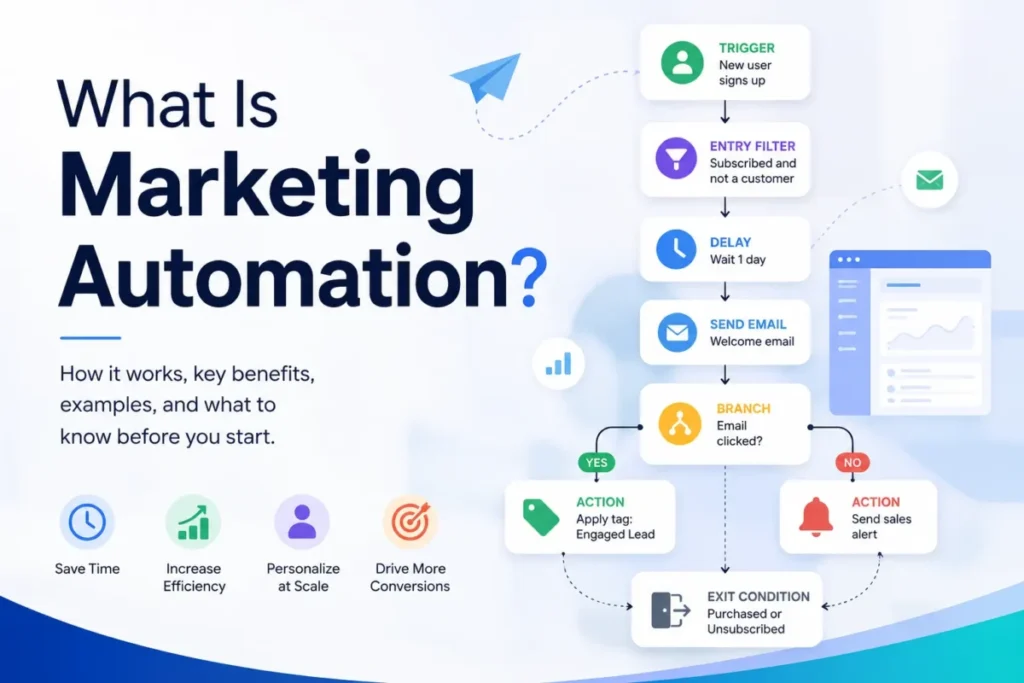
The spectrum starts with basic autoresponders and ends with multi-step journeys, scoring, and custom objects. If the terminology feels fuzzy, this primer on what marketing automation covers sorts the tiers before you compare vendors.
| Platform | Where full marketing automation lives | Documented automation limit |
|---|---|---|
| HubSpot Customer Platform | Professional edition, $1,300 monthly, or Marketing Hub Professional at $890 monthly | Starter carries foundational tools plus 500 credits |
| Freshsales Suite | Pro tier, $39 per user | Sequences, scoring, and advanced workflows gate to Pro |
| Salesforce Starter Suite | Marketing Cloud Account Engagement, separate license | Starter includes dynamic email and sales flows |
| ActiveCampaign | Plus tier and above | Starter allows 5 actions per automation |
| Zoho CRM Plus | Enterprise edition adds Marketing Automation | Starter runs Campaigns-level email |
| monday CRM | Not a full marketing automation product | Standard allows 250 custom automations monthly |
| EngageBay All-in-One | Growth tier | Free and Basic run email without full automation |
| Keap | Included in the platform subscription | Communication usage tiers apply |
| Pipedrive | Tier or add-on dependent; verify current packaging | Sales automation included; campaigns separate |
| Brevo | Standard tier for unlimited multi-step automations | Free and Starter carry lighter automation |
Read this table before the pricing one. A $9 or $15 entry plan that cannot run your actual nurture workflow is not cheaper; it is a placeholder until the forced upgrade.
Sales-side depth follows the same pattern. Multiple pipelines arrive at Freshsales Pro, quoting lives inside monday CRM and Keap, and forecasting depth belongs to Salesforce and Pipedrive tiers rather than entry plans.
Published AI Usage Limits and Costs We Could Verify
Every vendor here markets AI, but only some publish what it costs when the included allowance runs out. The documented consumption models look like this.
| Platform | Included AI allowance | Beyond the allowance |
|---|---|---|
| HubSpot Customer Platform | Credit pools by edition; Starter includes 500 HubSpot Credits | Additional credits at $0.010 each; monthly reset, no rollover |
| Freshsales Suite | Freddy AI features on Pro and Enterprise; one-time 500 Freddy AI Agent sessions on paid plans | Further agent sessions sell as an add-on |
| monday CRM | monday AI starts included | Buy more usage as needed; pack prices not itemized publicly |
| Salesforce Starter Suite | Not itemized on the Starter page | Agentforce and advanced AI are separate products or quotes |
| Others | AI-assisted features included per tier | Consumption pricing not publicly itemized |
AI credits behave like a second seat bill that finance never approved. If your team will lean on AI drafting, scoring, or agents daily, ask each vendor for the consumption schedule in writing.
Free Plans Compared: Which One Runs a Real Workflow?
“Free plan” means four different operating realities across this list. Only four platforms offer one at all, and their limits differ sharply.
| Platform | Users | Contacts or volume | What works on free |
|---|---|---|---|
| HubSpot Customer Platform | 2 | 1,000 contacts | Core CRM, basic email, forms, pipelines, no time limit |
| Freshsales Suite | 3 | Not the constraint | Core CRM and engagement basics |
| EngageBay All-in-One | Per plan | 250 contacts | CRM, email, sequences, landing pages, chat, help desk |
| Brevo | Team access | 300 email sends daily | Email campaigns, transactional API, SMTP |
Salesforce, Zoho CRM Plus, ActiveCampaign, monday CRM, Keap, and Pipedrive offer trials instead: 30 days for the first two, 14 days for Pipedrive, and a 25-email-capped trial for Keap.
A usable free plan is a pilot environment, not a discount. I would validate the marketing-to-sales handoff on HubSpot’s or EngageBay’s free tier before paying anyone for migration.
Security, Support, and Administration Gates
Compliance requirements force upgrades independently of features. This is where each vendor places its documented governance and support capabilities.
| Platform | Documented security and admin gates | Documented support tiers |
|---|---|---|
| HubSpot Customer Platform | Governance depth grows by edition | Support channels vary by plan; onboarding required on Marketing Hub Professional and Enterprise |
| Freshsales Suite | Field permissions, custom modules, sandbox, audit logs at Enterprise, $59 | Standard channels; trial is fully loaded for 21 days |
| Salesforce Starter Suite | Encryption, business units, and advanced controls sell as documented add-ons | Premium success plans are separate purchases |
| ActiveCampaign | SSO and custom objects on higher tiers | Tiered support by plan |
| Zoho CRM Plus | Larger data and visitor limits at Enterprise edition | Premium support 24/5; Enterprise support 24/7 with 1-hour maximum response and dedicated manager |
| monday CRM | Ultimate adds multi-level permissions, HIPAA support, governance | Enterprise-grade support on Ultimate |
| EngageBay All-in-One | SSO and role management at Pro | Pro adds phone support, uptime SLA, dedicated account manager |
| Keap | Platform-level administration | Dedicated success manager, US phone support, 24/7 chat included |
| Pipedrive | Security features documented on the pricing page | Support level varies by plan |
| Brevo | SSO or SAML and custom objects at Enterprise | Professional adds phone and deliverability-specialist support |
If IT requires SSO on day one, your real entry points are EngageBay Pro, Brevo Enterprise, monday CRM Ultimate, or upper tiers elsewhere. Ask the compliance question before the feature question and half this list re-ranks itself.
Setup and Migration Difficulty
Implementation burden is a cost line, not a footnote. Here is how the ten compare, based on product architecture, onboarding requirements, and documented migration support.
| Platform | Setup difficulty | Why |
|---|---|---|
| HubSpot Customer Platform | Low at Starter, High at Professional | Professional marketing tiers require paid onboarding |
| Freshsales Suite | Low to Medium | Unified data model; channels need configuration |
| Salesforce Starter Suite | Medium, then High | Starter is guided; advanced editions need admin ownership |
| ActiveCampaign | Medium | Journey design carries the workload; no setup fees at signup |
| Zoho CRM Plus | High | Nine-plus apps need ownership, data models, and permissions |
| monday CRM | Low | No-code boards and templates |
| EngageBay All-in-One | Low | Simple model plus promoted free migration |
| Keap | Medium | Bundled success manager carries the load |
| Pipedrive | Low | Fast pipeline setup; trial supports coworker invites |
| Brevo | Low for marketing, Medium with sales modules | Email setup is fast; dual billing needs modeling |
Migration help is a real differentiator: EngageBay promotes free migration, Keap bundles a success manager, and Zoho sells structured paid onboarding through its support programs. Everyone else largely expects self-service imports at entry tiers.
What Breaks First: Scale Thresholds by Platform
Every platform on this list has one threshold that forces the first budget conversation. Know yours before you sign.
| Platform | The first threshold that forces change |
|---|---|
| HubSpot Customer Platform | Needing advanced automation or attribution: Professional at $1,300 monthly |
| Freshsales Suite | The 501st marketing contact on Growth |
| Salesforce Starter Suite | Needing B2B nurture: a separate Account Engagement license |
| ActiveCampaign | The 6th action in a Starter automation |
| Zoho CRM Plus | Any single app’s usage unit: contacts, visitors, responses, or rows |
| monday CRM | The 1,001st active record on Basic, or the 251st automation on Standard |
| EngageBay All-in-One | The 251st, 501st, 5,001st, or 50,001st contact |
| Keap | The 501st text message or 101st voice minute in a month |
| Pipedrive | Marketing asking for journeys the CRM does not run natively |
| Brevo | The 301st email of the day on free, or the first multi-seat sales quote |
Map your 12-month growth against this table and the ranking personalizes itself. A platform whose threshold you will hit in month four is priced wrong for you no matter how it ranks.
Which Sales and Marketing Platform Should You Avoid?
None of these ten is a bad product, but every one is a bad fit for someone. The avoid list matters more than the awards.
Avoid HubSpot Customer Platform if your budget stops below Professional and your automation needs do not. Avoid Salesforce Starter Suite without an admin owner, and avoid Keap if you only need contact tracking, because $299 monthly buys far more machinery than that job requires.
Avoid ActiveCampaign and Brevo as your only system if sales runs complex quoting and forecasting. Avoid monday CRM past 10,000 active records, and avoid EngageBay All-in-One if contact growth will lap its 50,000 ceiling.
| Buyer risk | Who it hits | Mitigation |
|---|---|---|
| Upgrade cliff | HubSpot Starter teams needing Professional features | Model the $1,300 tier before adopting Starter |
| Contact-bill inflation | Freshsales, ActiveCampaign, EngageBay, Brevo buyers with fast list growth | Get the contact add-on schedule in writing |
| Separate marketing license | Salesforce buyers expecting suite-level nurture | Quote Account Engagement in the original budget |
| Usage-unit sprawl | Zoho CRM Plus and Keap operators | Assign an owner to track units monthly |
| Record and automation ceilings | monday CRM teams with high volume | Verify Standard limits against 12-month projections |
Every risk above is manageable when priced in advance. Each becomes a renewal-time crisis when discovered in month nine.
How to Choose Sales and Marketing Software
Run the decision in this order and most of the best sales and marketing software field eliminates itself. Feature tours come last, not first.
- Which architecture do you need: one unified record, or best-of-breed depth plus sync work?
- Which billing unit grows fastest for you: seats, contacts, sends, or usage?
- Which plan holds your must-have workflows, and what does that tier cost at 10 users?
- What does your marketable database look like in 12 months, and which threshold does it cross?
- Which security and support tier does IT or compliance require on day one?
- What must it integrate with: billing, calendar, support desk, data warehouse?
- Who owns administration, and how many hours per week can they give it?
Then apply a 30/90-day adoption test. By day 30, reps log activity without reminders and marketing sends from the new system.
By day 90, the marketing-to-sales handoff runs on lifecycle stages, not exported spreadsheets, and one report shows campaign-to-revenue flow. If you cannot picture both checkpoints passing, the tool is wrong regardless of price.
Which Platform Should You Trial First?
Follow the branch that matches your team, then trial the primary pick against the fallback.
- Need one unified record and expect to scale: HubSpot Customer Platform, fallback Freshsales Suite.
- Under $100 monthly total, multichannel selling: Freshsales Suite, fallback EngageBay All-in-One.
- Enterprise governance on the roadmap: Salesforce Starter Suite, fallback HubSpot Customer Platform.
- Marketing-led, journeys first: ActiveCampaign, fallback Brevo.
- Consolidating support, social, and projects too: Zoho CRM Plus, fallback HubSpot Customer Platform.
- Process changes monthly, no developers: monday CRM, fallback Pipedrive.
- Micro-business replacing three subscriptions: EngageBay All-in-One, fallback Brevo.
- Service business needing booking and payments: Keap, fallback HubSpot Customer Platform.
- Sales-led, adoption is the battle: Pipedrive, fallback monday CRM.
- Email-first with a light sales layer: Brevo, fallback ActiveCampaign.
Two trials beat ten demos. Pick your branch, run both systems against one real campaign and five real deals, and the decision makes itself.
Common Mistakes When Buying Sales and Marketing Software
Budgeting from the entry price is the most common error in this category. The tier that runs your real workflow is the price that matters, and the gap between them runs 2x to 4x across this list.
Trusting the label over the architecture comes second. Plenty of platforms market unified operations while licensing campaign functionality separately, so verify where automation lives before signing.
Comparing seat prices across different billing units is a silent error. A $15 contact-billed plan and a $25 seat-billed plan are not the same math at 20,000 contacts.
Treating a free plan as proof of long-term fit misleads too. Free tiers validate workflows, not economics; the thresholds table above shows where each one stops.
Skipping the compliance check wastes entire evaluations. If SSO or audit logs are mandatory, eliminate non-qualifying tiers before anyone books a demo.
Buying without an exit plan is the last one. Export paths, data ownership, and migration effort decide how expensive a wrong choice becomes, so document them before signing.
The best sales and marketing software for your team is the one whose thresholds you will not hit in year one.
Final Verdict
HubSpot Customer Platform is the best sales and marketing software for 2026 for teams that want marketing, sales, content, and service on one customer record and can grow into its tiers. The free plan makes piloting cheap, and the platform earns its rank on architecture, not marketing.
The qualifier is the cliff: advanced automation lives at $1,300 monthly, plus required onboarding on Professional marketing tiers. Teams that need that depth on a smaller budget get more automation per dollar from Freshsales Suite Pro at $39 per user or ActiveCampaign Plus.
By buyer type: lean multichannel teams take Freshsales Suite, enterprise roadmaps take Salesforce Starter Suite, marketing-led teams take ActiveCampaign, consolidators take Zoho CRM Plus, and micro-businesses take EngageBay All-in-One. Sales-led teams take Pipedrive or monday CRM, service operators take Keap, and email-first teams take Brevo.
Before you renew anything in 12 months, answer one question: does one report now show campaign-to-revenue flow without a spreadsheet in the middle?
That answer is how I, Macedona, judge at saascrmreview.com whether any platform on this page earned its keep. It is the standard I hold every vendor here against.
FAQ
What is the best sales and marketing software overall?
HubSpot Customer Platform is the best overall pick for 2026 because marketing, sales, content, and service tools share one CRM record. Free tools cover 2 users and 1,000 contacts, and Starter entry pricing displayed from $7 per seat monthly on July 13, 2026. Budget for the Professional jump to $1,300 monthly if you need advanced automation.
Can one platform run both sales and marketing?
Yes, if you pick a unified native suite and your workflows fit its plan gates. HubSpot Customer Platform, Freshsales Suite, and EngageBay All-in-One run both departments on one record. Sales-first tools like Pipedrive and marketing-first tools like ActiveCampaign still need add-ons or a second system for full coverage.
What is the difference between CRM and marketing automation?
A CRM owns customer records, deals, and pipeline execution. Marketing automation owns triggers, segmentation, sends, and nurture journeys. Some platforms include both natively, while others license one side separately: Salesforce sells Account Engagement apart from its CRM, and ActiveCampaign sells fuller pipelines as Enhanced CRM add-ons.
Is HubSpot better than Salesforce for small businesses?
For most small teams, yes. HubSpot’s free plan and Starter tier deliver working marketing and sales tools with less administration. Salesforce Starter Suite costs $25 per user and suits teams that expect to need enterprise customization, AppExchange depth, or advanced governance later. Pick by your two-year roadmap, not this month’s price.
What is the most affordable sales and marketing platform?
EngageBay All-in-One holds the value crown for micro-businesses: free at 250 contacts, then $14.99 per user monthly with 500 contacts. Freshsales Suite Growth at $9 per user with 500 marketing contacts is the strongest low-cost pick for teams that also need phone, SMS, and WhatsApp channels.
How much does sales and marketing software cost?
Verified entry pricing on July 13, 2026 ran from $0 free plans to $299 monthly for Keap. At 10 users, seat-billed options ranged from about $90 with Freshsales Suite Growth to $1,000 with Salesforce Pro Suite. Contact-billed and usage-billed platforms scale on database size instead of headcount.
Do small businesses need separate CRM and email marketing tools?
No, unless your email volume or automation needs outgrow what a unified suite includes. A 5-person team runs fine on Freshsales Suite, EngageBay All-in-One, or HubSpot’s entry tiers. Separate tools make sense once campaign sophistication demands ActiveCampaign-level journeys while sales demands deeper pipeline management than that platform carries, which is easier to judge after mapping out your sales pipeline stages.
What features should sales and marketing software include?
The minimum set: shared contact records, pipeline management, email campaigns, multi-step automation, lead scoring, and campaign-to-revenue reporting. Check where each feature sits by plan, because entry tiers frequently gate the automation and reporting you buy the platform for. Integration with your calendar, billing, and support desk belongs on the list too.
Should I pick a unified suite or a best-of-breed stack?
Pick unified if the marketing-to-sales handoff is your pain and you want one renewal, one admin, one record. Pick best-of-breed if one department needs elite depth the suites cannot match, and budget honestly for the sync layer and second subscription that choice carries.
Which free plan is truly usable for a small team?
HubSpot’s free tier is the most complete pilot: 2 users, 1,000 contacts, core CRM, email, and pipelines with no expiry. EngageBay All-in-One covers CRM, email, chat, and help desk at 250 contacts. Brevo suits email-first teams at 300 sends daily, and Freshsales Suite covers 3 users.


I do agree with all of the concepts you’ve introducedon your post. They’re really convincing and will definitely work.Nonetheless, the posts are very brief for newbies.May just you please extend them a bit from subsequent time?Thanks for the post.