

Any ChatGPT review that stops at “it is useful” skips the part that costs money: which plan carries your actual workload. Based on OpenAI’s official pricing page and Help Center documentation, checked on August 7, 2026, Plus at $20 per user per month is the plan most individual professionals should buy. Go at $8 solves volume alone, and the two Pro tiers at $100 and $200 only pay for themselves under sustained load.
Business is where the sticker price stops being the budget. It requires at least two standard seats, so the real entry cost is $50 per month, not $25.
If you are still shortlisting assistants, the best AI chatbots roundup covers the category, and the primer on what generative AI does well covers the mechanics behind every plan below.
In This Article (18 sections)
Quick Verdict
| Verdict field | Detail |
|---|---|
| Best for | Consultants, marketers, analysts, and small teams who draft, research, and analyze files every week |
| Not ideal for | Buyers who need certified factual output with no human review step |
| Starting price | $0 on Free, paid plans from $8 per user per month |
| Best practical plan | Plus at $20 per user per month |
| Free plan or trial | Free plan, permanent, with limited messages, uploads, images, research, and memory |
| Setup difficulty | Low for chat, medium for Projects and custom GPTs, high for a governed Business rollout |
| Main strength | One subscription covers writing, files, research, images, voice, and coding work |
| Main limitation | Several allowances vary by model and system conditions, so no fixed quota is published |
| Best alternative | A dedicated coding environment for developers who work inside an IDE all day |
Source: OpenAI official pricing page, https://openai.com/pricing/, and the ChatGPT Plus Help Center page, https://help.openai.com/en/articles/6950777-what-is-chatgpt-plus. Checked: 2026-08-07. Region: US, USD. Billing basis: per user, per month.
ChatGPT Pros and Cons
| Pros | Cons |
|---|---|
| One subscription covers writing, file analysis, research, images, voice, and Codex work | Message, upload, and research allowances vary by model and system conditions, so no fixed quota is published |
| Plus is the cheapest tier that opens advanced reasoning, Projects, scheduled tasks, and custom GPT creation | Go, Plus, and Pro have no annual billing, so an individual cannot trade commitment for a lower rate |
| Pro now has two usage tiers, so heavy users can enter at half the former Pro price | Business requires at least two standard seats, which doubles the entry cost for a one-person purchase |
| Business and Enterprise workspace data is not used for model training by default | A removed Business member can stay billable until the seat clears the billing cycle |
| Projects, Library, and tasks publish exact caps, so limits are checkable before purchase, not after | The cloud browser cannot sign in, use credentials, or submit payments, which rules out authenticated automation |
| Eligible nonprofits can buy Business well below the standard seat price | Selected agentic and office features draw on a workspace credit pool on top of the seat price |
What Is ChatGPT?
ChatGPT is OpenAI’s general-purpose assistant for conversation, writing, research, file work, coding, images, voice, projects, scheduled work, and team collaboration. It runs on the web, on Windows and macOS desktops, and on iOS and Android.
The naming matters more in 2026 than it did a year ago. OpenAI now separates Chat for conversational work, Work for longer multi-step deliverables, and Codex for software development, and the former agent experience is no longer available as its own mode.
That split is the first thing to check against any older review you read. A page that still recommends agent mode is describing a product that OpenAI has already retired.
Source: ChatGPT capabilities overview, https://help.openai.com/en/articles/9260256-chatgpt-capabilities-overview, ChatGPT Work and Codex documentation, https://help.openai.com/en/articles/20001275-chatgpt-work-and-codex, and the ChatGPT agent page, https://help.openai.com/en/articles/11752874-chatgpt-agent. Checked: 2026-08-07.
Methodology: How This Review Was Built
This review is built on OpenAI’s official pricing page, Help Center documentation, the business data and enterprise privacy pages, current release notes, and labeled third-party review evidence. Pricing, plan limits, and feature gates were verified on August 7, 2026.
Each plan was assessed against the same buyer criteria: workflow fit, published usage limits, feature gates, storage and file ceilings, data controls, admin governance, billing mechanics, and cost at real team sizes.
Greater weight was given to the factors that change a purchase decision, including the cheapest plan that carries the workflow, the limit that forces an upgrade, and the cost of adding seats. Vendor positioning carried no weight in the assessment.
Claims that could not be verified against a named source were excluded rather than estimated. Where OpenAI’s own documentation disagrees with itself, the exact figure is left out and the conflict is stated in the section that needs it, which follows the standing review methodology page.
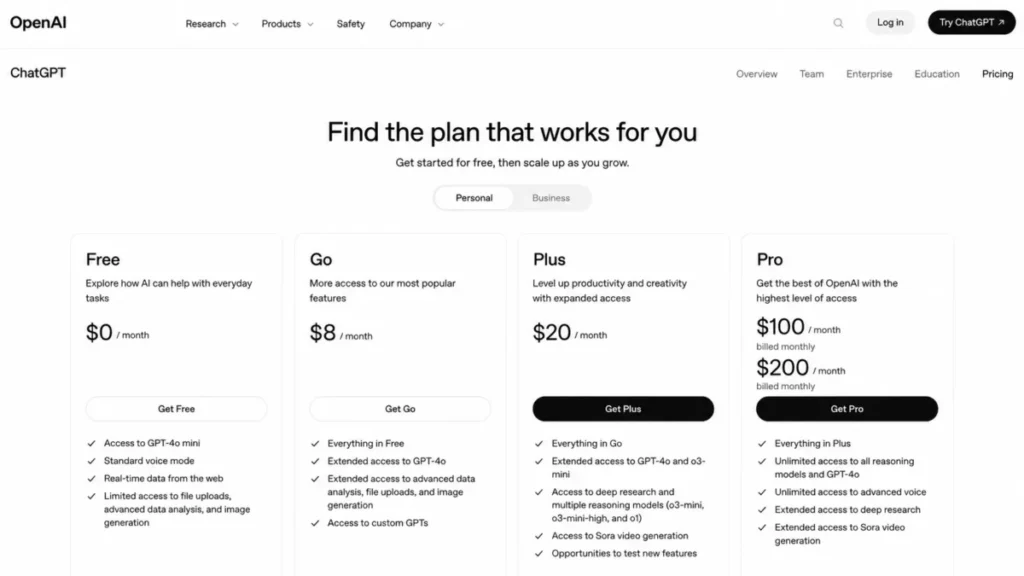
ChatGPT Pricing and Plans
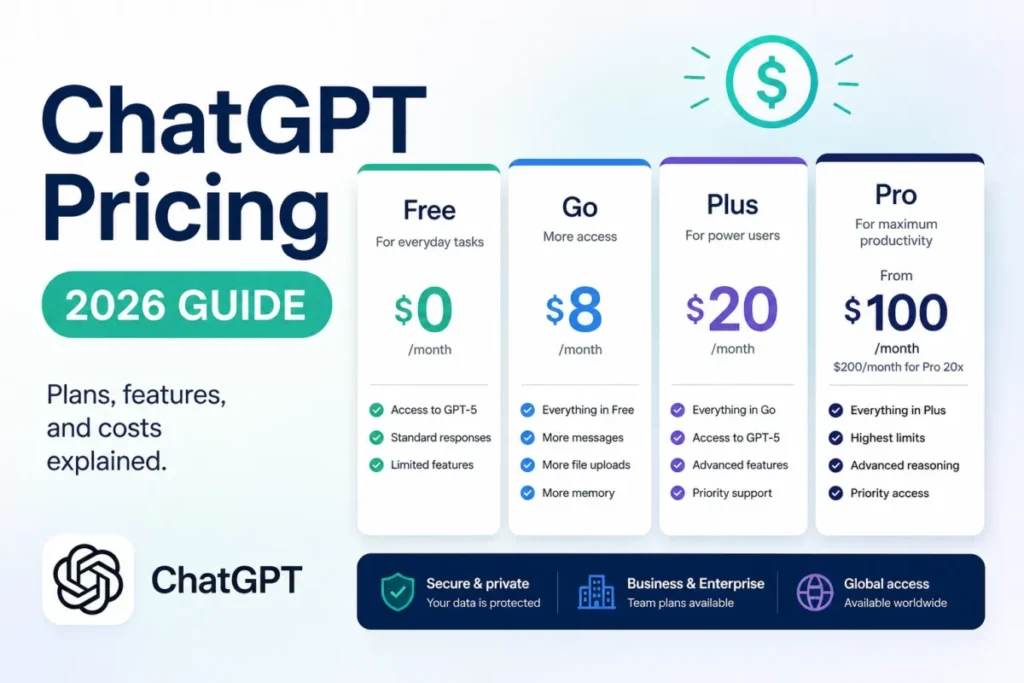
| Plan | US price | Billing | Best for | Key limit to check | Verdict |
|---|---|---|---|---|---|
| Free | $0 | Monthly | Light, occasional use | Limited messages, uploads, images, deep research, memory, and context; ads may appear | Start here and let a real limit push you |
| Go | $8 per user/ | Monthly only | Daily volume without advanced workflows | More volume than Free, but not Plus-level workflow access; ads may appear | Cheapest genuine upgrade |
| Plus | $20 per user/ | Monthly only | Individual professionals across several task types | Allowances still vary by model and system conditions | The practical plan for most buyers |
| Pro | $100 or $200 per user/ | Monthly only | Sustained heavy research, coding, or deliverable work | Both tiers share the same core capability set | Enter at $100, move up only on evidence |
| Business | $25 per seat/ | Monthly or annual | Teams of two or more that need a shared, governed workspace | Minimum two standard seats | Buy it for governance, not for privacy alone |
| Enterprise | Custom | Contract | Domain verification, SSO, SCIM, usage insights, contracted terms | No public list price | A control purchase, not a headcount purchase |
Source: OpenAI official pricing page, https://openai.com/pricing/, ChatGPT Pro tiers, https://help.openai.com/en/articles/9793128-about-chatgpt-pro-tiers, ChatGPT Business, https://help.openai.com/en/articles/8792828-what-is-chatgpt-business, and ChatGPT Enterprise, https://help.openai.com/en/articles/8265053-what-is-chatgpt-enterprise. Checked: 2026-08-07. Region: US, USD.
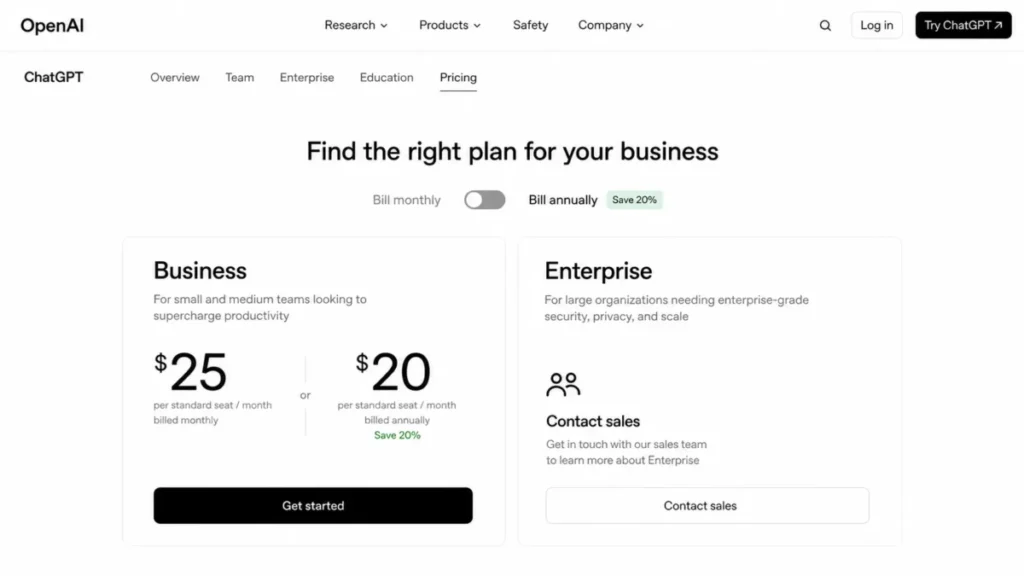
Plus is the practical plan because it is the cheapest tier that combines advanced reasoning with expanded files, deeper research, Projects, scheduled tasks, custom GPT creation, more Codex, and broader ChatGPT Work access. Everything above it buys volume, not a different product.
Pro is the clearest example. Both tiers carry the same core capability set, and the published difference is five times Plus usage at $100 against twenty times Plus usage at $200.
What ChatGPT Business Costs at 2, 5, and 10 Seats
| Business seats | Monthly billing, per year | Annual billing, per year | Difference |
|---|---|---|---|
| 2 seats (the minimum) | $600 | $480 | $120 |
| 5 seats | $1,500 | $1,200 | $300 |
| 10 seats | $3,000 | $2,400 | $600 |
Formula: seats multiplied by the per seat rate multiplied by 12 months, at $25 monthly and $20 annual. Figures exclude taxes, credit purchases, nonprofit rates, and negotiated Enterprise terms.
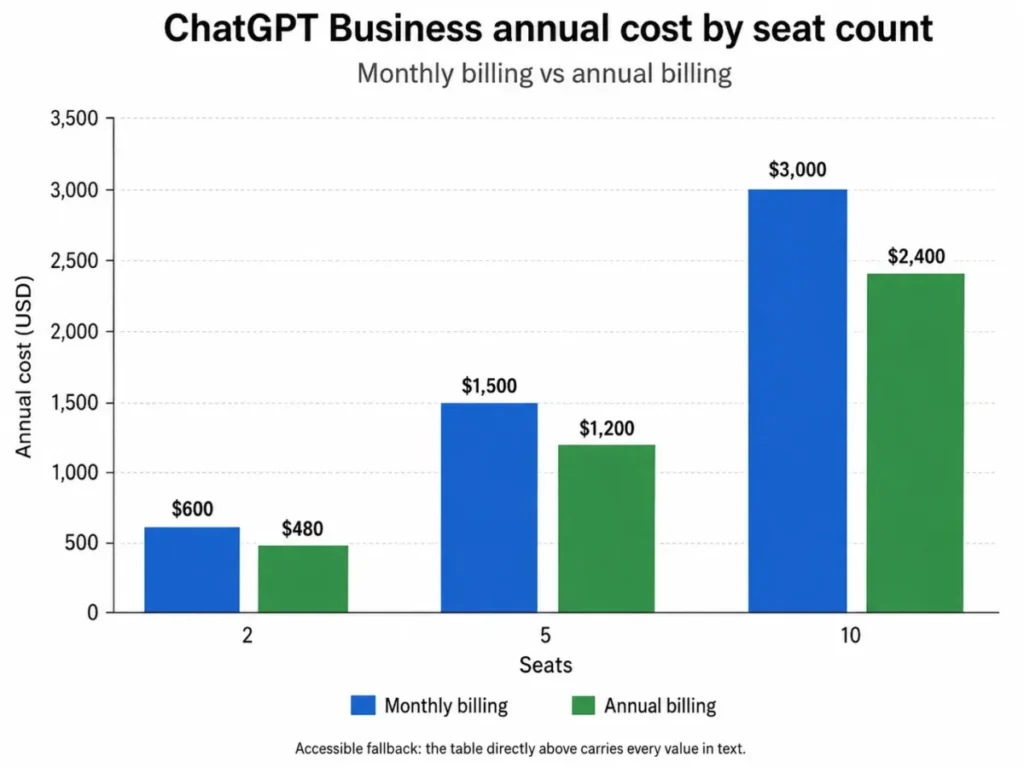
The annual saving is real but small in absolute terms until the team grows. At ten seats it is $600 a year, which is roughly the price of two extra seats, and that is the point where a finance owner should ask whether the commitment is worth the flexibility it costs.
Ten seats also sets the reference number for a per seat comparison: $250 per month on monthly billing, or $2,400 a year committed up front.
The Costs That Sit Outside the Seat Price
The ChatGPT subscription is not an API entitlement. API usage runs on a separate developer platform with its own bill, and that applies to Plus, Pro, and Business alike, so any plan to embed the model in an internal app is a second cost center.
Credits are the second line item. Once included usage is consumed, credits extend supported features, eligible users can turn on automatic top-up, purchased credits expire after 12 months, they do not roll over, and they are non-refundable except where law requires otherwise.
Business and Enterprise workspaces add a shared credit pool for selected agentic and office features, and ChatGPT for PowerPoint started drawing on it after August 6, 2026. A workspace that leans on those features needs a spend control, not just a seat count.
Seat reconciliation is the third. Removing a member does not always end the charge in the same cycle, so an admin who offboards someone should confirm the billing seat count on the next invoice instead of assuming an immediate saving.
Two smaller items round it out. Free and Go may show ads, while Plus and the plans above it are documented as ad-free.
Eligible nonprofits can buy Business at $10 per user per month, or an effective $8 per user per month billed annually. Larger eligible nonprofits can ask sales for a nonprofit rate of up to 75 percent below standard Enterprise pricing.
Source: flexible usage credits, https://help.openai.com/en/articles/12642688-using-credits-for-flexible-usage-in-chatgpt-freegopluspro-sora. ChatGPT rate card for Business, Enterprise and Edu, https://help.openai.com/en/articles/11481834-chatgpt-rate-card-business-enterpriseedu. Ads in ChatGPT, https://help.openai.com/articles/20001047-ads-in-chatgpt. OpenAI for Nonprofits, https://help.openai.com/en/articles/9359041-openai-for-nonprofits. Checked: 2026-08-07.
For a deeper plan-by-plan cost breakdown, the standing ChatGPT pricing guide tracks the same figures between reviews.
Feature Gates: What You Get on Each Plan
| Capability | Free | Go | Plus | Pro | Business and Enterprise |
|---|---|---|---|---|---|
| Advanced reasoning and expanded research | Limited | Limited | Yes | Yes, higher allowance | Yes |
| Files per project | 5 | 25 | 25 | 40 | 40 |
| Library storage | 500 MB | 4 GB | 20 GB | 100 GB | 20 GB on Business |
| Create or edit custom GPTs | No, use only | Yes, subject to workspace settings | Yes | Yes | Yes, subject to admin controls |
| Active scheduled tasks | Not available | 3 | 5 | 15 | 15 on Enterprise; the Business figure conflicts inside OpenAI’s own documentation |
| Cloud browser | No | No | Yes | Yes | Yes |
| Shared workspace, admin controls, no training on workspace data by default | No | No | No | No | Yes |
Source: Projects in ChatGPT, https://help.openai.com/en/articles/10169521-projects-in-chatgpt. File storage and Library, https://help.openai.com/en/articles/20001052-file-storage-and-library-in-chatgpt. Tasks in ChatGPT, https://help.openai.com/en/articles/10291617-tasks-in-chatgpt. GPTs in ChatGPT, https://help.openai.com/en/articles/8554407-gpts-in-chatgpt. Using cloud browser, https://help.openai.com/en/articles/20001280-using-cloud-browser-in-chatgpt. Checked: 2026-08-07.
The upgrade triggers hide in that table rather than in the price column. A Free user who wants a private custom GPT has to move to a paid plan to create or edit one, and a researcher who keeps more than five source files in a single project has already outgrown Free.
The one number missing from the table is deliberate. OpenAI’s current tasks documentation gives two different active-task caps for Business, so no single Business figure is publishable until that page is corrected.
Key Features
Projects: The Container for Recurring Work
A project holds instructions, source files, and chats together so a repeating piece of work keeps its context. Projects themselves are unlimited, which is why the per project file cap is the number that binds.
The documented flow is to create the project, set instructions that define role, sources, output format, and verification standard, upload sources in batches of no more than 10 files, then run Chat or Deep Research inside the project.
| Plan | Files per project | Files per upload batch | Shared project collaborators |
|---|---|---|---|
| Free | 5 | 10 | 5 |
| Go and Plus | 25 | 10 | 10 |
| Pro | 40 | 10 | 100 |
| Business and Enterprise | 40 | 10 | Workspace projects support up to 100 total users |
Source for the caps in this table: Projects in ChatGPT, https://help.openai.com/en/articles/10169521-projects-in-chatgpt. Checked: 2026-08-07.
There is one setup decision that cannot be undone later. An existing project cannot be converted to project-only memory, and there is no visible list of individual project memories, so the memory mode has to be chosen before sensitive context goes in.
For a client engagement with confidentiality terms, I would open a fresh project rather than reuse a general one. Retrofitting is not on the menu.
Files, Library, and Data Analysis
Uploaded files live in Library, and Library has its own storage allocation: 500 MB on Free, 4 GB on Go, 20 GB on Plus and Business, and 100 GB on Pro. Per file, ChatGPT accepts up to 512 MB, with text and document files capped at 2,000,000 tokens, spreadsheets at approximately 50 MB, and images at 20 MB.
The documented analysis path is to upload a structured file, state the question along with the relevant columns and calculation rules, then review the generated tables, charts, and explanation.
Analysts hit the spreadsheet ceiling before the storage ceiling. A 50 MB export is not a large dataset by finance standards, so anyone running warehouse-scale files needs to aggregate first and treat ChatGPT as the interpretation layer rather than the compute layer.
Source: file storage and Library in ChatGPT, https://help.openai.com/en/articles/20001052-file-storage-and-library-in-chatgpt, and data analysis with ChatGPT, https://help.openai.com/en/articles/8437071-data-analysis-with-chatgpt. Checked: 2026-08-07.
Scheduled Tasks: Useful Reminders, Not an Automation Platform
A task runs a prompt on a schedule or watches for a change and then notifies you. Created from chat or the Scheduled page, it covers recurring briefs, monitoring, and nudges.
The boundaries are sharp enough to decide the buying question on their own. The highest supported frequency is once per hour, tasks do not support Voice or GPTs, there are no webhooks, and a task created inside a project cannot read that project’s files.
That last restriction is the one that breaks the most plans. Teams who assume a daily task will summarize their project sources have to paste the source context into the task prompt instead.
Source: tasks in ChatGPT, https://help.openai.com/en/articles/10291617-tasks-in-chatgpt. Checked: 2026-08-07.
ChatGPT Work and the Cloud Browser
Work is where longer multi-step deliverables run. The documented flow is to describe the finished artifact, supply approved files and public URLs, follow progress, answer questions, and approve important actions before they take effect.
The cloud browser is the piece that buyers most often misread. At its documented initial boundary it works on public pages, it cannot use credentials, sign in, or use a password manager, it cannot submit payments, and it pauses for confirmation.
So a request like “log into the vendor portal and renew the subscription” is outside the product, not merely restricted. Cloud browser access also sits on paid plans above Go rather than on Free.
Source: ChatGPT Work and Codex, https://help.openai.com/en/articles/20001275-chatgpt-work-and-codex, and using cloud browser in ChatGPT, https://help.openai.com/en/articles/20001280-using-cloud-browser-in-chatgpt. Checked: 2026-08-07.
Custom GPTs for Repeatable Internal Tasks
Signed-in users can use GPTs, but creating or editing one requires a paid plan, and workspace settings can restrict creation or sharing inside a Business workspace.
The practical build is narrow: define the job, add instructions and approved knowledge files, enable only the capabilities the task needs, test with representative prompts, then set the smallest sharing scope that works.
Source: GPTs in ChatGPT, https://help.openai.com/en/articles/8554407-gpts-in-chatgpt. Checked: 2026-08-07. A saved prompt or a project covers the same ground when the GPT would only serve one person, which is worth knowing before a Free user builds a workflow around a feature they cannot create. The vocabulary here matters too, and the primer on prompt engineering basics covers the instruction-writing half of the job.
Ease of Use and Setup
Setup difficulty is low for chat and stays low for a single user. Anyone who can write an email can get value on day one, which is the main reason independent review evidence from G2 and TrustRadius keeps praising the interface and the breadth of tasks it covers.
The effort curve appears later, in three places: Projects with memory modes and file caps, data controls, and a governed Business rollout with identity, migration, billing, permissions, retention, and credit controls to configure.
A 30-day and 90-day adoption check keeps that honest. After 30 days, at least one recurring workflow should live inside a project with its instructions written down rather than retyped, and after 90 days a named owner should be able to show which outputs were verified before they were used.
Migration carries the sharpest edge. Merging a personal workspace into a Business workspace is irreversible, so the separation decision belongs before the merge, along with an inventory of chats, GPTs, files, tasks, and app connections.
Source: ChatGPT Business general FAQ, https://help.openai.com/en/articles/8542115-chatgpt-business-general-faq. Checked: 2026-08-07.
Integrations and Ecosystem
App and connector availability depends on the app, the plan, workspace admin controls, permissions, and rollout stage, and paid plans get broader internal-tool connection capability than Free. That is a real constraint rather than a soft one: an admin can switch off the connector a workflow depends on.
Codex sits inside the same subscription, with included access varying by plan and flexible credits extending supported usage. The cloud browser adds public-web reach on eligible paid plans, inside the sign-in and payment boundary described above.
The OpenAI API stays outside all of it, on its own platform and its own bill. Buyers evaluating ChatGPT as an integration layer for a CRM or support desk are evaluating two purchases, which is the same trap covered in the roundup of AI CRM software picks.
Source: OpenAI official pricing page, https://openai.com/pricing/, and ChatGPT Business, https://help.openai.com/en/articles/8792828-what-is-chatgpt-business. Checked: 2026-08-07.
Automation, AI, and Reporting
Reporting inside ChatGPT means generated tables, charts, and written analysis over files you supply, not a persistent BI layer. Nothing refreshes on its own unless a scheduled task regenerates it, and the task cannot reach project files.
Automation has the same shape. Work handles long-running deliverables with approval gates, Codex handles software tasks, and tasks handle cadence, but none of them fires a webhook into another system.
For a revenue operations team, that draws a clean line. ChatGPT is the analysis and drafting layer, and the system of record still needs an automation platform to move data between tools.
Security, Support, and Admin Controls
| Data control | Personal plans (Free, Go, Plus, Pro) | Business and Enterprise |
|---|---|---|
| Model training on your content | On by default, and can be turned off in settings | Workspace data is not used for training by default |
| Temporary Chat | Not used for training, no history, no memories, normally deleted within 30 days | Same behavior, under workspace policy |
| Normal chat retention | Kept until you delete them; deleted chats are scheduled for permanent deletion within 30 days, subject to stated legal and security exceptions | Same behavior, with workspace retention controls |
| Encryption | TLS 1.2 in transit and AES-256 at rest | TLS 1.2 in transit and AES-256 at rest, plus organizational controls |
| Identity and provisioning | Not applicable | Domain verification, SSO, SCIM, and usage insights on Enterprise |
| Contracted terms such as a BAA, zero data retention, invoicing, purchase orders, or net terms | Not applicable | Requires a contracted offering, typically Enterprise, rather than self-service Business |
Source: business data privacy, security, and compliance, https://openai.com/business-data/, enterprise privacy at OpenAI, https://openai.com/enterprise-privacy/, data controls FAQ, https://help.openai.com/en/articles/7730893-data-controls-faq, and chat and file retention policies, https://help.openai.com/en/articles/8983778-chat-and-file-retention-policies-in-chatgpt. Checked: 2026-08-07.
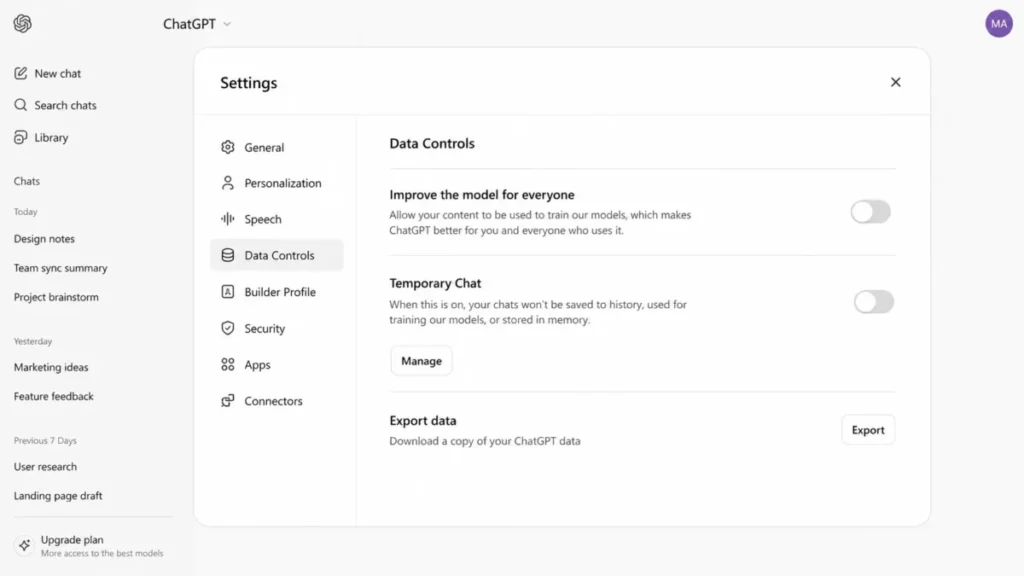
Three controls get treated as one thing and are not. Turning off training does not delete anything, deleting a chat does not remove a file saved in Library, and Temporary Chat prevents history and memory rather than acting as a retention policy.
That third gap is the one that bites. A team that deletes a sensitive conversation and believes the attached spreadsheet went with it has a governance problem it has not noticed, so Library cleanup belongs in the offboarding checklist next to seat removal.
Support runs through the Help Center and the documented support paths. Buyers who need a contracted response commitment should raise it with sales before signing rather than assume one exists.
ChatGPT Limitations
Output still needs a verification step. OpenAI states plainly that ChatGPT can produce incorrect facts, fabricated quotes or citations, and confident wrong answers. Treat it as a supervised assistant for legal, medical, financial, or compliance work, and require the responsible expert to sign off before anything ships.
Several allowances are not published as fixed numbers. Message, upload, and deep research limits vary by model, plan, and system conditions, which makes precise capacity planning impossible before purchase. Any buyer who needs a firm quota per user per day should verify it inside the live plan rather than trust a review, this one included.
Deletion and retention are separate controls. Chats persist until deleted, deleted chats are scheduled for permanent removal within 30 days subject to stated exceptions, and Library files stay until removed on their own.
Task automation stops well short of orchestration. Hourly cadence at most, no webhooks, no Voice or GPTs inside a task, and no access to project files from a project task.
The cloud browser cannot act as authenticated automation. Public pages only at its documented initial boundary, with no credentials, no sign-in, no password manager, and no payment submission.
Business billing has two soft edges. The two-seat minimum sets a floor under the cheapest team purchase, and a removed member can stay billable until the seat clears billing.
One documented limit cannot be published yet. The active-task cap for Business appears with two different values inside the same OpenAI tasks article, checked on August 7, 2026, so an automation-heavy team should confirm it in the workspace before committing.
What Changed in 2026
Four changes matter for anyone reading an older review. The former agent experience is gone, replaced by Chat, Work, Codex, and the cloud browser as separate paths.
Pro is no longer a single $200 decision, because the $100 tier arrived with five times Plus usage against the $200 tier’s twenty times. Workspace credit charging expanded, with ChatGPT for PowerPoint drawing on the pool after August 6, 2026.
Ads became part of the Free and Go experience, while paid plans above Go are documented as ad-free.
Source: ChatGPT release notes, https://help.openai.com/en/articles/6825453-chatgpt-release-notes, and about ChatGPT Pro tiers, https://help.openai.com/en/articles/9793128-about-chatgpt-pro-tiers. Checked: 2026-08-07.
Who Should Use ChatGPT?
Solo consultants, marketers, and analysts who switch task types all day. Drafting, research, file analysis, and deliverable production in one $20 subscription is hard to beat with a stack of narrow tools, and Plus carries all four.
Students and freelancers who mainly need more room than Free. Go at $8 raises messages, uploads, image creation, data analysis, and memory without asking for Plus money, provided the advanced workflows are not the reason for buying.
Two to twenty person teams that need a shared, governed workspace. Business adds centralized billing, admin controls, and a no-training-by-default posture on workspace data, which is the real reason to move off personal accounts.
High-volume researchers and developers who exhaust Plus every week. Pro at $100 is the honest entry point, and the $200 tier earns its place only when the five times allowance keeps running out.
Organizations with identity and compliance requirements. Enterprise is the fit when domain verification, SSO, SCIM, usage insights, retention controls, or contracted terms decide the purchase.
Who Should Avoid ChatGPT?
Buyers who need factual correctness certified before anyone reads it. The vendor documents the risk itself, and no plan removes it.
One-person companies buying Business purely for privacy. The two-seat minimum makes that a $50 monthly decision, and a personal plan with training turned off covers the same concern for most solo buyers.
Teams that need signed-in automation, payments, or webhooks. The documented browser and task boundaries stop at sign-in and payment, so an automation platform is the right purchase.
Developers who live inside an IDE. A dedicated coding environment with repository context is usually the better $20, with ChatGPT kept as the generalist beside it.
Buyers who need fixed, fully published allowances for every advanced feature. Several limits vary by model, plan, and system conditions, which makes a hard capacity commitment impossible on paper.
ChatGPT Alternatives
| Alternative | Better for | Why choose it instead | Trade-off to accept |
|---|---|---|---|
| A dedicated coding environment | Developers working inside a repository all day | Editor-native context and inline editing sit where the work already happens | You still need a general assistant for everything that is not code |
| Claude | Buyers who want a second assistant to cross-check drafting and analysis | Running two assistants on the same brief surfaces disagreement, which is a cheap verification step | A second subscription doubles the monthly line item |
| Gemini | Teams whose documents and permissions already live inside one office suite | A suite-native assistant inherits the permission model the admin already runs | Value depends on how much work genuinely lives in that suite |
| Perplexity | Research work where every answer must show its sources | A narrow research tool keeps the citation workflow tight | Narrow scope means a second tool for drafting, files, and images |
| A dedicated automation platform | Signed-in systems, webhooks, and deterministic runs | It does the authenticated work ChatGPT’s documented boundaries exclude | Automation platforms need engineering time to build and maintain |
The cross-check case is covered in full in the Claude review, which is the first place to look if verification is the reason you want a second tool.
Citation-first research is a different job, and the Perplexity review sets out where a narrow tool wins.
For suite-native fit, the Gemini review is the closer comparison.
None of these replaces ChatGPT for a buyer whose week spans drafting, files, research, images, and code. They replace it for a buyer whose week is one of those things, which is how my ChatGPT alternatives ranking sorts them by job.
Final Verdict: Is ChatGPT Worth It?
ChatGPT is worth paying for when your week involves several different task types and you already have a verification habit. Plus at $20 per user per month is the plan I would buy for that profile, and I would not move to Pro until Plus limits interrupt real work twice in the same month.
It is not worth paying for when you need one narrow job done perfectly, or when the output has to be right without anyone checking it.
Choose Go at $8 if the only complaint about Free is running out of room. Choose Business if two or more people need a shared workspace with admin controls and a no-training default, and go straight to Enterprise if SSO, SCIM, a BAA, zero data retention, or invoicing are on the requirements list.
The chain behind that recommendation is short. The official documentation sets out each documented capability and its plan gate. The workflow consequence of that gate lands on a specific buyer or team, and the trade-off decides whether I would recommend the plan or point that buyer elsewhere.
So the verdict is conditional: choose Plus when the documented capability set matches your week, and avoid it when a single plan gate blocks the one workflow you bought it for.
The renewal question is the one I would write down on day one: at the next renewal, can you name the workflows that live in ChatGPT, who verified their output, and what the total bill was including credits. A team that cannot answer that is paying for a habit rather than a system.
FAQ
Is ChatGPT worth paying for in 2026?
Yes, if you use it for several task types each week and verify important output. Plus at $20 per user per month covers advanced reasoning, expanded files and research, Projects, scheduled tasks, and custom GPT creation.
If you only need more messages and uploads than Free allows, Go at $8 is the cheaper answer, and Free is enough for occasional use.
How much does ChatGPT cost?
Free is $0, Go is $8 per user per month, Plus is $20 per user per month, and Pro is offered at $100 or $200 per user per month. ChatGPT Business is $25 per seat per month, or an effective $20 per seat billed annually, with a minimum of two standard seats.
Enterprise pricing is custom.
Is there a free ChatGPT plan?
Yes. The Free plan is permanent and covers light use, with limited messages, uploads, images, deep research, memory, and context, and exact allowances that vary by feature and system conditions.
Ads may appear on Free and on Go, while Plus and the plans above it are documented as ad-free.
Is ChatGPT good for a small business?
Yes, if at least two people need it. ChatGPT Business starts at two standard seats, so the cheapest genuine team purchase is $50 per month, and it adds a shared workspace, centralized billing, admin controls, and a default of no model training on workspace data.
A one-person business is usually better served by a personal plan with training turned off.
Does ChatGPT Plus include API access?
No. API usage runs on a separate OpenAI developer platform with its own billing, and the same separation applies to Business.
Paying $20 a month for Plus gives you the ChatGPT product, not an API credit balance, so any internal app or integration should be budgeted as a second cost line.
What is the difference between ChatGPT Pro at $100 and $200?
Usage, not features. Both Pro tiers carry the same core capability set, and the published difference is five times Plus usage on the $100 tier against twenty times Plus usage on the $200 tier.
Starting at $100 and moving up only when the lower allowance runs out repeatedly is the cheaper way to find your level.
How many files can a ChatGPT project hold?
Five on Free, 25 on Go and Plus, and 40 on Pro, Business, Enterprise, and Edu. You can only upload 10 files at a time regardless of the total cap, so a large source set goes in batches.
Projects themselves are unlimited, which means the per project cap is the limit that decides your plan.
Does deleting a chat delete the uploaded file too?
No, unless you also delete it from Library. Deleting a chat removes the conversation, but files saved in Library stay until you remove them separately.
If a document is sensitive, treat the Library cleanup as its own step, and use Temporary Chat when you want a conversation that leaves no history or memory behind.
What replaced ChatGPT agent mode?
OpenAI retired the former agent experience and now points users to ChatGPT Work with the cloud browser. Work handles longer multi-step deliverables with progress, questions, and approval gates, Codex handles software development, and the cloud browser handles public web pages.
Any review still recommending agent mode is describing a product that no longer exists.
Can ChatGPT log into websites and buy things for me?
No. The documented cloud browser works on public pages at its initial boundary, and it cannot use credentials, sign in, use a password manager, or submit payments, and it pauses for confirmation on important actions.
Scheduled tasks add no webhooks, so authenticated purchasing or system-to-system automation needs a dedicated automation platform.


Pingback: 11 Best AI Tools for Small Teams in 2026: Costs Compared