Intercom is worth paying for when a support team will actually run Fin on its own knowledge, route conversations through Workflows, and treat variable AI spend as a planned line item. It is poor value for a small team that mainly answers email and wants one predictable number on the invoice.
That split matters because the advertised seat price is not the bill. Seats are one component; Fin outcomes and metered channels are the other, and on a busy support desk the second one gets larger than the first.
The rest of this Intercom review works through the plan gates that force an upgrade, the four Fin outcome charges, and the real cost at one, five and ten seats.
It also covers two implementation traps most buyer guides skip: what the Zendesk importer leaves behind, and why the data region has to be settled before anyone logs in.
In This Article (18 sections)
Quick Verdict on Intercom
| Decision point | Where the evidence lands |
|---|---|
| Best for | Digital-first support teams that will deploy Fin on chat and email and need routing, multiple team inboxes and custom reports |
| Not ideal for | Low-volume email-only desks, and any team that needs a fixed monthly number |
| Entry seat price | $29 per seat each month on the Essential plan, billed annually |
| Practical plan | Advanced, because Workflows and multi-team routing start there |
| Free plan | None published; Fin can be bought alone for an existing help desk |
| Setup difficulty | Moderate for the Messenger and Help Center, higher once Workflows, regional hosting or a Zendesk import are involved |
| Main strength | Fin and the human inbox are one product, so escalation is not an integration project |
| Main limitation | Outcome-based AI billing makes the monthly total move with volume |
| Best alternative | Zendesk, for teams that want a mature ticketing core and a slower AI ramp |
Source: official Intercom pricing page and the Fin and Intercom plans documentation.
Intercom Pros and Cons
| Pros | Cons |
|---|---|
| Fin, the shared Inbox, Tickets and Workflows sit inside one product, so an AI-to-human handoff is a routing rule rather than a middleware build | Seat price plus outcome charges plus metered channels means the monthly total is variable by design |
| Fin charges on outcomes instead of seats, and a resolution the customer reopens is deducted from the bill | A successful Qualification outcome is charged at ten times the standard outcome rate |
| Advanced bundles 20 Lite seats and Expert bundles 50, which covers occasional internal collaborators | Lite seats cannot reply, cannot be assigned a conversation and cannot browse the queue, so they never replace an agent seat |
| Usage reminders and hard limits are documented controls, so AI spend can be capped instead of merely watched | Workflows are gated to Advanced with no add-on route from Essential, and every full seat in the workspace shares one plan |
| The Trust Center publishes SOC 2 Type II, ISO and HIPAA attestation material for procurement review | SAML SSO and the HIPAA BAA are Expert-only, so a governance requirement can set the plan before headcount does |
| Regional hosting covers the United States, the European Union and Australia | Regional hosting is offered to new workspaces only, and historical conversation data cannot follow a workspace into a region |
What Intercom Is in 2026
Intercom is an AI-first customer service platform built around Fin, its AI agent, plus a workspace where human agents do the rest of the job.
| Documented module | What a support team does with it |
|---|---|
| Fin AI Agent | Answers customer questions over chat and email, with train, test, deploy and analyse as its configuration stages |
| Inbox and Copilot | The human queue, plus an in-inbox assistant that drafts and summarises |
| Tickets and Workflows | Work that outlives a conversation, and the automation that routes it |
| Help Center and Knowledge Hub | Customer-facing documentation, and the content Fin answers from |
| Reporting, Outbound, Omnichannel, Apps | Measurement, proactive messaging, extra channels and the integration directory |
Source: official Intercom product documentation describing the current module set.
The naming is the thing to get straight first, because search results in 2026 use three labels for two things.
| 2026 change | What the company announced |
|---|---|
| Corporate name | Announced 2026-05-12: the company said it was changing its name to Fin, and that Intercom would live on as its customer service software platform |
| Ownership | Announced 2026-06-15: a definitive agreement for Salesforce to acquire Fin for roughly 3.6 billion dollars, with closing expected in the fourth quarter of Salesforce’s fiscal year 2027 |
Source: official announcements covering the corporate name change and the Salesforce acquisition agreement.
So Fin is the company and also the AI agent. Intercom is still the product a support team buys and logs into.
The acquisition belongs in a buyer’s risk column rather than in the verdict, because that agreement was signed and not closed. No roadmap assumption should rest on it, and an account manager is the right person to ask what happens to contract terms at renewal if the deal completes mid-term.
Review Methodology and Sources
This analysis is based on the vendor’s public pricing page, its pricing calculator, its help center, its security and compliance documentation, its migration documentation, its integration directory, and its own corporate announcements. Prices and plan limits were verified on 2026-09-05.
Intercom was assessed against the same buyer-focused criteria applied across this site: usable entry pricing, total cost at realistic volume, the plan gate behind each operational capability, admin and security controls, implementation and migration friction, and documented product limitations.
Greater weight was given to the factors that change a purchase decision instead of a demo impression. Those are the upgrade triggers, the variable-cost exposure, the governance gates, and the switching cost of leaving an existing help desk.
Claims that could not be traced to a specific official page were left out. Workflow descriptions are reconstructed from documented product behaviour, plan requirements and setup paths.
Intercom Pricing and Plans
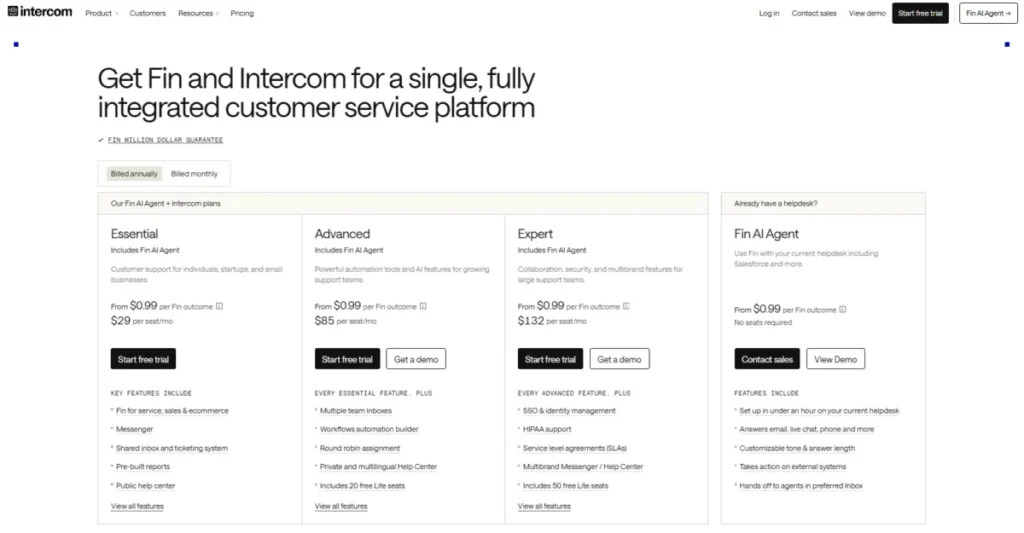
Intercom’s price has two moving parts. The plan sets the seat rate, and usage adds Fin outcomes plus any metered messaging channel on top.
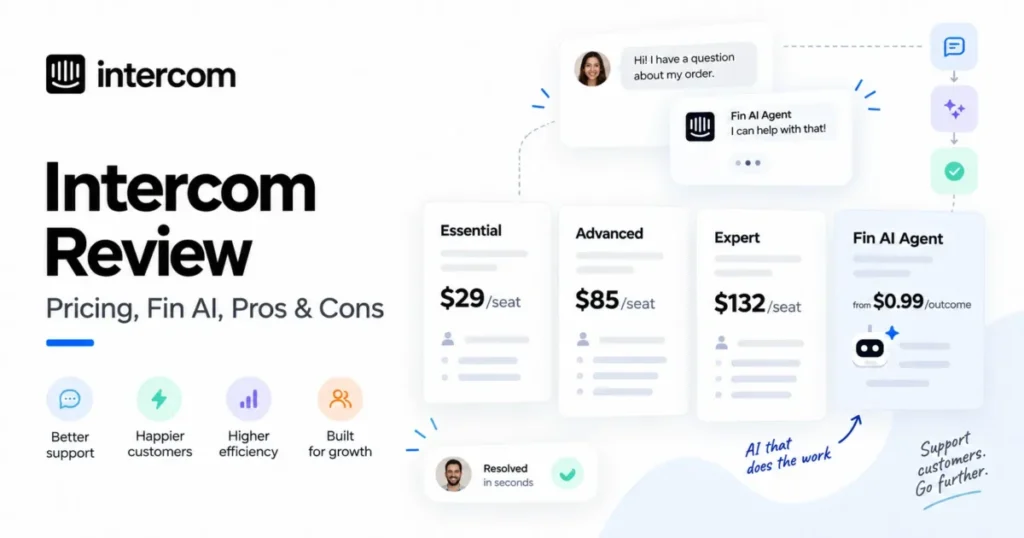
| Plan | Seat price, annual billing | Seat price, monthly billing | Lite seats included |
|---|---|---|---|
| Essential | $29 per seat each month | $39 per seat each month | None |
| Advanced | $85 per seat each month | $99 per seat each month | 20 |
| Expert | $132 per seat each month | $139 per seat each month | 50 |
Source: official Intercom seat pricing and the seats help documentation, checked 2026-09-05.
Two seat rules shape the bill before any AI usage does. Every plan starts at one minimum seat with no documented maximum, and all seats in a workspace must come from the same core plan.
That second rule is where cost optimisation dies. A workspace cannot run three Essential seats beside four Advanced seats, so a single Expert-only requirement raises the rate for every full seat, not just for the admin who needed it.
Lite seats look like the escape hatch and mostly are not. A Lite user can view their mentions and add notes to conversations and tickets, but cannot reply to conversations, cannot start outbound conversations, cannot be assigned a conversation, and cannot browse all conversations in a single list.
Read that as a stakeholder seat, not a support seat. It fits an engineer who needs to answer a tagged question and nobody who works a queue.
How Fin AI Agent Billing Works
Fin bills on outcomes, and the widely repeated figure of ninety-nine cents covers three of the four documented outcome types and not the fourth.
| Fin outcome | Charge over chat and email | What triggers the charge |
|---|---|---|
| Resolution | $0.99 | No further help is requested after the last AI answer |
| Procedure handoff | $0.99 | Fin completes a configured Procedure that ends in a handoff to a human or a workflow |
| Disqualification | $0.99 | Fin decides a prospect does not match the qualification criteria |
| Qualification | $9.99 | Fin matches a prospect to the qualification criteria and routes them |
Source: official Fin AI Agent outcome charges for Fin used with Intercom.
The gap between the third row and the fourth is the part worth pricing before launch. A support-only deployment stays close to the standard rate, while pointing Fin at lead qualification introduces a charge ten times larger per successful outcome.
Resolution counting is more careful than the headline suggests. A resolution is confirmed when the customer replies with something affirmative, and assumed when the customer leaves the conversation without asking for more help.
The reversal clause is the one to quote back at a vendor. If a customer returns to the same conversation seeking further assistance, even across billing periods, that resolution is deducted and not charged.
Intercom also documents usage reminders and hard limits for controlling outcome volume. A hard limit is what turns an open-ended AI line item into a budget a finance team can approve, and configuring one belongs in week one, before the first surprising invoice arrives.
Add-ons That Move the Bill
Three published add-ons sit outside the seat rate, and each carries a threshold instead of behaving as a flat fee.
Copilot gives every teammate 10 conversations or tickets of included usage each calendar month. Unlimited usage costs $35 per teammate each month on flexible monthly billing.
Paying up front reduces that to $29 per teammate each month on annual billing, subject to fair-use limits.
The included allowance matters more than it looks. A team where three of ten agents lean on Copilot daily and the rest touch it occasionally does not need ten paid seats of it.
Proactive Support Plus is listed at $99 per month and includes 500 messages sent each month, with additional charges once usage passes 500.
Pro starts at $99 per month for the advanced AI analysis features.
Channel costs follow the same shape. Live chat, support email, in-app chats, banners and tooltips are included on every plan, while email campaigns, SMS, WhatsApp and Phone are charged on usage.
What Intercom Costs at 1, 5 and 10 Seats
The scenarios below use the annual-billing seat rate and standard ninety-nine-cent outcomes only. They exclude Qualification outcomes, metered channels, taxes and any negotiated discount.
| Scenario | Monthly total | Annual total |
|---|---|---|
| 1 Essential seat plus 100 Fin outcomes | 128 dollars | 1,536 dollars |
| 5 Advanced seats plus 500 Fin outcomes | 920 dollars | 11,040 dollars |
| 5 Advanced seats plus 2,000 Fin outcomes | 2,405 dollars | 28,860 dollars |
| 5 Advanced seats, 2,000 outcomes, Copilot for five, Pro and Proactive Support Plus | 2,748 dollars | 32,976 dollars |
| 10 Expert seats plus 3,000 Fin outcomes | 4,290 dollars | 51,480 dollars |
| 10 Expert seats, 3,000 outcomes, Copilot for ten, Pro and Proactive Support Plus | 4,778 dollars | 57,336 dollars |
Source: derived from the official Intercom plan pricing and the documented Fin outcome rates.
Look at rows two and three. The seat component does not move at all between them, and the annual total still rises by more than seventeen thousand dollars, purely on AI volume.
Monthly cost in USD across three realistic team scenarios
Source: Calculated from Intercom’s published annual-billing seat rates and the $0.99 standard Fin outcome rate. Scenario totals exclude Qualification outcomes, metered channels, taxes, and negotiated discounts.
The chart makes the budgeting rule visible. Model the outcome volume first, then pick the seat tier, because doing it the other way round anchors the whole business case on the smaller number.
Can Fin Run Without Intercom Seats?
Yes, and for a team already invested in another help desk this is the cheaper experiment. Fin is sold separately for an existing help desk from $0.99 per outcome with no seat cost, no setup fee and no platform fee, though minimum commitments apply.
That path is worth testing before a platform migration is even scoped. A Zendesk or Salesforce team can measure Fin’s real resolution behaviour on its own content without moving a single ticket.
Feature Gates: What You Get on Each Plan
Every supported feature below is a documented capability drawn from Intercom’s official documentation, and each one sits behind a plan gate that decides what a buyer pays.
The workflow consequence is what makes the gate expensive: because routing, multi-team inboxes and custom reports all start at Advanced, the affected buyer is any support team that outgrows a single queue.
So the recommendation is conditional. If a team needs none of the Advanced-only capabilities, Essential is the honest choice, and if it needs one of them, the Advanced seat rate applies to every full seat.
Plan tables usually list capabilities. The version below lists the capability a buyer actually needs and the cheapest plan that carries it, because that is the number the budget request has to contain.
| Capability you need | Lowest plan that carries it | Seat rate at that plan, annual billing |
|---|---|---|
| Live chat, support email, in-app chats, banners, tooltips | Essential | $29 per seat each month |
| Workflows and conversation routing | Advanced | $85 per seat each month |
| Multiple team inboxes and round robin assignment | Advanced | $85 per seat each month |
| Private and multilingual Help Center, tickets portal | Advanced | $85 per seat each month |
| Custom reports | Advanced | $85 per seat each month |
| Salesforce and Marketo integrations | Advanced | $85 per seat each month |
| Regional data hosting | Advanced | $85 per seat each month |
| SSO and identity management | Expert | $132 per seat each month |
| HIPAA support and a signed BAA | Expert | $132 per seat each month |
| Service level agreements, multibrand Messenger | Expert | $132 per seat each month |
Source: official Intercom plan feature availability and the published plan seat rates.
Workflows are the gate that catches most growing teams first. They are available on Advanced and Expert only, and the documentation states plainly that they are not in Essential and that there is no add-on to access them there.
So the upgrade trigger is not headcount. It is the first day somebody says billing questions should go to a different queue than bug reports.
A clean decision flow showing the two questions that move a buyer off Essential
Source logic: Workflows, multiple team inboxes and custom reports require Advanced, while SAML SSO and a signed HIPAA BAA require Expert. The diagram also highlights that all full seats in one workspace share the same plan.
Key Features and Where They Stop
Five capabilities carry most of the buying case, and each one has a documented boundary worth knowing before a trial starts.
Fin AI Agent
Fin answers over chat and email against the knowledge a team gives it, and its configuration surface is documented as train, test, deploy and analyse. The commercial design is the interesting part: the vendor earns on outcomes, so a Fin deployment with thin knowledge produces fewer billable resolutions, not more.
The limitation is a knowledge limitation. Fin resolves what the Help Center and Knowledge Hub can answer, which makes the content backlog the real project, and the AI configuration the easy half.
Inbox, Tickets and Copilot
The Inbox is the human side of the same workspace, with Tickets for work that outlives a conversation and Copilot as the in-inbox assistant. Because Fin and the Inbox are one product, an escalation carries its context across without an integration.
Copilot is where a quiet cost sits. Ten conversations or tickets per teammate each month is a real allowance for occasional use and a small one for a busy agent, so the unlimited add-on is a per-person decision, not a workspace-wide one.
Workflows and Routing
Workflows carry conversation routing, assignment rules and the automation that keeps a multi-queue desk from collapsing into one shared pile. This is the capability that defines the practical plan.
The limitation is the gate itself. There is no partial version on Essential and no paid route to add it there, so a team that needs one routing rule pays the Advanced rate on every full seat.
Help Center and Knowledge Hub
The Help Center is both the customer-facing documentation site and Fin’s source material, and the Knowledge Hub is where that content is managed. Public Help Center capability starts on Essential.
Private and multilingual Help Centers, plus the tickets portal, start on Advanced. A company serving customers in several languages therefore reaches the Advanced gate through content requirements, long before automation forces the issue.
Reporting and Outbound
Reporting is included across plans, but custom reports begin on Advanced. Outbound messaging is included for in-app chats, banners and tooltips, while email campaigns, SMS, WhatsApp and Phone carry usage charges.
Product Tours, Surveys, Checklists and Posts sit inside the Proactive Support Plus add-on, outside the core plans. Any team planning onboarding campaigns should price that add-on and its 500-message allowance into the first-year budget.
Ease of Use and Setup
Day-to-day use of the Messenger and Inbox is the easy part of an Intercom rollout. Configuration depth is where the effort lands, and routing is the clearest example.
The documented path to team routing starts at Fin AI Agent, then Workflows, then + New workflow, then selecting the template named Route customer conversations to the right team and choosing Use this template. Channels are selected after the template loads.
Two things follow from that path. Routing lives under the Fin section, not under a separate automation product, and the whole screen is unavailable on Essential.
An Essential trial therefore cannot evaluate the capability that decides the plan.
The rollout sequence that works is knowledge first, Fin on a narrow topic second, routing third. Turning on Fin before the Help Center is trustworthy produces handoffs rather than resolutions, and handoffs are what a support team was already doing.
Integrations and Ecosystem
The official directory covers CRM, data enrichment, workflow automation, issue tracking, scheduling and marketing categories. Named apps include HubSpot, Pipedrive, Shopify and Salesforce, alongside Zapier, Stripe, Segment, GitHub, Jira, Marketo, Mailchimp, Aircall and Google Analytics.
A directory listing is not an availability guarantee, and two constraints apply on top of it. The Salesforce and Marketo integrations are Advanced-and-above capabilities, and app behaviour in a regional workspace needs separate confirmation.
Verify the two or three integrations a workflow genuinely depends on against your intended plan and region before signing. For a wider view of how this category is put together, the SaaS CRM Review help desk software comparison sorts the alternatives by architecture instead of by feature count.
Security, Support, and Admin Controls
Intercom’s Trust Center publishes a SOC 2 Type II report, ISO 27001 and ISO 27018 certificates, a HIPAA attestation report, a penetration test summary, a Cloud Security Alliance assessment and a subprocessor list. The vendor also lists ISO 27701, ISO/IEC 42001:2023, GDPR, CCPA and HDS material.
Those documents answer a procurement questionnaire. They do not tell a buyer what the product will actually enforce, and that is a separate question with a plan attached.
SAML SSO is available only on the Expert plan. Setting it up needs access to Settings, Workspace, Security inside Intercom plus administrative access to the identity provider.
Enforcement has a sequencing trap worth knowing before the change window. Disabling other login methods requires being signed in with SAML already, and any teammate who has not yet authenticated with SAML is locked out the moment other methods are turned off.
Just-in-time provisioning adds teammates on first SAML sign-in, but only while seats are available. That is a quiet dependency between the identity project and the seat budget.
HIPAA is the other Expert-only control. The business associate agreement and the HIPAA feature set are available at the Expert level only, and the documentation states that transmitting ePHI through Intercom without a signed BAA is strictly prohibited.
An attestation report is not the same thing as your own compliance. A healthcare buyer should price Expert from the first budget draft and treat the BAA as a prerequisite, not a renewal-time item.
Data Residency: Settle the Region Before Setup
Regional Data Hosting covers the United States, the European Union and Australia, and it is offered to new workspaces on the Advanced and Expert plans only. It is also excluded from the Early Stage programme.
The consequence is the part that competing reviews leave out. Direct migration of an existing workspace from one region to another is not possible, so a region change means creating a new workspace and transferring data and settings by hand.
Teammate roles, workflows and inboxes have to be recreated. Contacts, leads and company data move through CSV or the REST API, and active and historical conversation data cannot be migrated into a regional workspace at all.
That last sentence is a switching cost, not a configuration detail. A team that starts in the wrong region and discovers it in year two is choosing between abandoning its conversation history and staying where it is.
Two further caveats apply once a region is chosen. Data flowing to or from external systems may leave the region once it leaves Intercom, and not all apps are guaranteed to support regional hosting, so third-party apps need testing against the regional workspace.
A two-column comparison of choosing the region before setup versus changing it after go-live
Source logic: Regional Data Hosting is available to new workspaces on Advanced and Expert only. If the region is changed after go-live, the process requires a second workspace, manual rebuild of teammate roles, workflows and inboxes, and manual transfer of contacts, leads and companies, while historical conversation data stays behind.
Switching from Zendesk to Intercom
The self-service importer is genuinely useful and genuinely bounded. Both halves need to be in a switching business case.
| Zendesk data or behaviour | What the documented importer does |
|---|---|
| Ticket volume | Aimed at migrations of fewer than 150,000 tickets |
| Ticket selection | All tickets must be migrated; a chosen subset is not supported |
| Side conversations | Not migrated |
| Tags | Not migrated |
| Call recordings | Not migrated |
| Attachments and inline images | Up to 10 attachments and 10 inline images per ticket |
| Multiselect and lookup fields | Cannot be imported directly; the workaround converts them to text, which displays as plain text rather than a dropdown |
| Custom ticket states | Mapping custom states to custom states is not supported |
| Deleted, inactive and suspended users | Not migrated; their comments and tickets are mapped to a default user |
| A partially failed import | No partial import and no failed-record-only retry; the documented option is to start the import again |
Source: official Zendesk import documentation for tickets, users and organization data.
Three of those rows change a project plan, not just a checklist. Tags are frequently the backbone of a mature Zendesk taxonomy, and losing them means rebuilding reporting categories from scratch.
The retry behaviour is the second. A failure part-way through a large import is a restart, not a repair, which is why a staged rehearsal on a sandbox workspace is worth the extra week.
The third is field degradation. A multiselect field that becomes plain text still holds its data and no longer filters or reports like a field, so inventory the multiselect and lookup fields the team actually uses before agreeing a cutover date.
If your team is weighing the two platforms and not yet the migration mechanics, the Zendesk and Intercom head-to-head covers the feature and workflow differences in more depth.
Intercom Limitations
Total cost is variable by construction. Seats are predictable and outcomes are not, so the finance conversation is about a range until hard limits are configured.
Qualification outcomes are priced separately from support outcomes. A team that deploys Fin for lead qualification is buying a different unit economics than a team that deploys it for support.
The workspace runs one plan. A single Expert-only requirement, such as SSO, raises the seat rate across every full seat, not only for the person who needed it.
Lite seats are not a seat substitute. No replying, no outbound, no assignment and no queue view means Lite covers collaboration and nothing operational.
Regional hosting is a one-way door for new workspaces. No direct region migration and no historical conversation transfer makes the region a design decision, not a setting.
The Zendesk importer is lossy in specific, nameable ways. Tags, side conversations and call recordings do not come across, and a failed run restarts rather than resumes.
Who Should Use Intercom
Product-led SaaS support teams running chat and email in-app. The Messenger, Help Center and Fin cover the whole loop, and the AI-to-human handoff needs no integration work.
Support operations of roughly five to twenty agents with several queues. Workflows, multiple team inboxes, round robin assignment and custom reports are the reason Advanced is the practical plan for this group.
Teams that will genuinely invest in support content. Fin’s value tracks the quality of the Help Center, so a team with a maintained knowledge base gets far more out of the same spend. The SaaS CRM Review guide to choosing knowledge base software sets out what that content layer has to do.
Regulated or centrally identity-managed organisations that accept Expert pricing. SSO, the HIPAA BAA, SLAs and multibrand support are all there, and they are all on the same tier.
Existing Zendesk or Salesforce teams that want the AI agent, not the platform. Buying Fin alone for the current help desk is the low-commitment way to find out whether the automation works on your content.
Who Should Avoid Intercom
Teams that need a fixed monthly invoice. Outcome-based billing can be capped, but the model is variable by design, and a procurement process that cannot approve a range will fight it every renewal.
Low-volume email-only desks. Paying Advanced seat rates for routing that a three-person team does not need is the clearest way to overbuy here. A simpler stack from this site’s customer service software comparison will usually cost less and do the job.
Complex Zendesk environments built on tags, side conversations or custom-state parity. The documented importer does not carry those, and a migration that has to reproduce them by hand becomes a services engagement instead of a self-service import.
Any team assuming Lite seats will cover part-time agents. They will not, and a plan built on that assumption breaks in the first busy week.
Buyers who need HIPAA coverage but not Expert-tier pricing. The BAA and the HIPAA feature set are Expert-only, and there is no documented middle path.
Intercom Alternatives
| Alternative | Choose it instead when |
|---|---|
| Zendesk | Ticketing depth, a large agent roster and a slower AI ramp matter more than an in-app messenger |
| Help Scout | A small team wants shared-inbox simplicity without a workflow builder or an AI billing model |
| Freshdesk | An ITSM-adjacent or multi-department desk needs broader service management than a support inbox |
| Gorgias | The desk is ecommerce-first and order-level context inside the conversation is the priority |
Pricing for these four moves independently of Intercom’s, so check each vendor’s current rate card instead of a comparison table’s snapshot. The Zendesk review and the Help Scout review go deeper on the two closest fits.
The alternative most teams overlook is not a platform at all. Running Fin on the help desk you already own removes the migration risk entirely and still tests the thing you were actually buying.
Final Verdict: Is Intercom Worth It in 2026?
For a digital support team that will run Fin on real content and route conversations properly, Intercom is worth it, and Advanced is the plan to budget. The product is coherent in a way stitched-together stacks are not, and the AI is billed on results instead of on seats nobody uses.
For a small email-first desk, it is not worth it. The entry seat rate looks approachable and the capability that justifies the platform sits one tier above it.
The number to argue about internally is not the seat price. Model expected monthly outcomes first, add the add-ons you will actually enable, then set a hard limit before launch, ahead of the first invoice that surprises somebody.
Two decisions should be made before anyone signs. Pick the data region deliberately, because it cannot be changed later without leaving conversation history behind, and inventory the Zendesk fields and objects the importer will not carry.
The recommendation, then, is to shortlist Intercom on Advanced when Fin and routing are both in the plan, and to compare a simpler shared inbox when they are not.
If the plan is to test rather than commit, start with Fin on the existing help desk. It answers the only question that matters at a fraction of the switching cost.
FAQ
These are the questions the body above leaves partly open, answered in the order a buyer usually meets them.
How much does Intercom cost per month?
Seats start at $29 per seat each month on Essential with annual billing, rising to $85 on Advanced and $132 on Expert. Monthly billing costs more per seat, and Fin outcomes plus metered channels are charged on top of whichever rate applies.
Which Intercom plan includes Workflows?
Advanced and Expert. Workflows are not part of Essential, and the documentation states there is no add-on that unlocks them on that plan, so routing requirements force a full plan change instead of an add-on purchase.
Does every Fin outcome cost the same?
No. Resolution, Procedure handoff and Disqualification are charged at the standard rate, while a successful Qualification outcome is charged at $9.99, which is ten times higher.
Does Intercom have a free plan?
No free tier is published on the pricing page. Every plan requires at least one paid full seat, although Fin can be bought for an existing help desk with no seat cost and a minimum monthly commitment.
Is Intercom HIPAA compliant?
Intercom publishes a HIPAA attestation report and offers a business associate agreement, but only on the Expert plan. A signed BAA is required before any ePHI moves through the product, and the vendor’s own attestation does not make a customer compliant on its own.
Can I move an Intercom workspace from US hosting to the EU later?
Not directly. A region change means creating a new workspace in the target region, recreating roles, workflows and inboxes by hand, and accepting that historical conversation data does not come with it.
How hard is migrating from Zendesk to Intercom?
Straightforward for a simple desk under 150,000 tickets and awkward for a mature one. Tags, side conversations and call recordings are not migrated, custom states cannot map to custom states, and a partially failed import restarts rather than resumes.
Is Intercom better than Zendesk?
They win on different things. Intercom is stronger for in-app, AI-first support inside one product, while Zendesk is the safer choice for deep ticketing, large agent rosters and teams that want to adopt automation gradually.
For AI-specific fit, the AI customer service guide on this site compares the approaches directly.