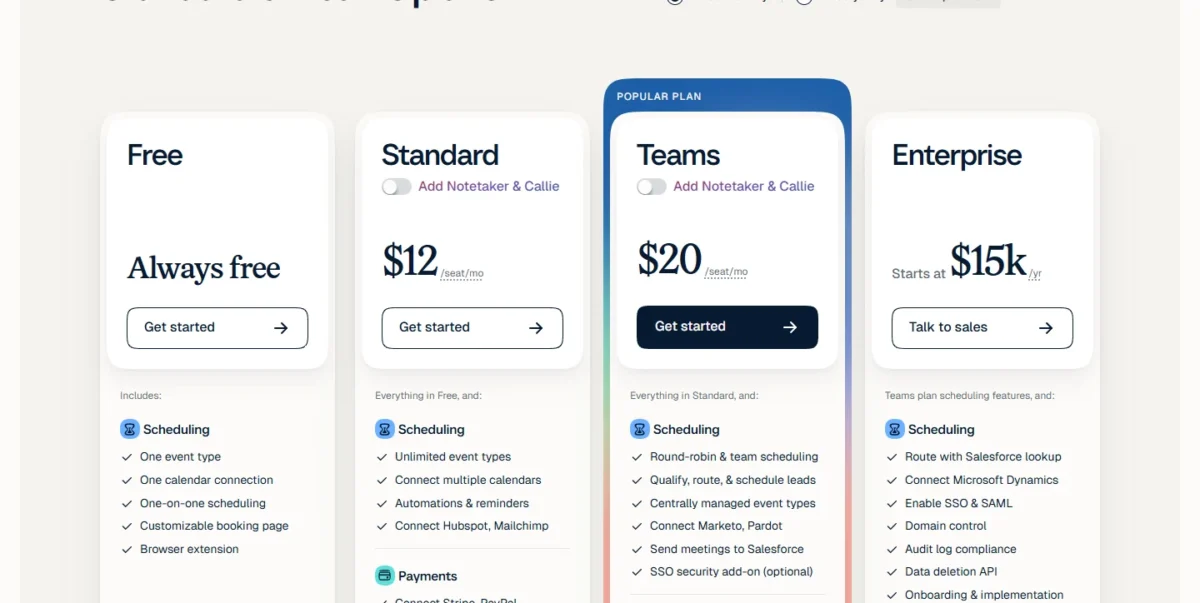
Calendly pricing starts with a Free plan for one meeting type, and each paid plan adds features on top of it. Standard costs $10 per seat per month billed yearly and adds unlimited meeting types, reminders and payment at booking.
Teams costs $16 per seat per month billed yearly and adds round robin, lead routing and the Salesforce sync. Teams Plus adds Notetaker and Callie and costs $32 per seat per month on monthly billing, and Enterprise starts at $15,000 a year.
Only the people who connect calendars and host meetings need a seat; the people who book time with them never pay.
The lower prices need yearly billing, which Calendly’s pricing page labels as saving 17% on Standard, 20% on Teams and 25% on Standard Plus and Teams Plus. A 10-person Teams account costs $16 x 10 seats x 12 months = $1,920 a year, and adding Notetaker and Callie through Teams Plus raises it to $24 x 10 x 12 = $2,880.
One meeting type keeps you on Free, several meeting types or paid bookings point to Standard, and shared leads or a Salesforce sync point to Teams. The Teams volume discount starts only at seat 31 and only on yearly billing, and Enterprise starts at 50 seats.
Quick pricing answer
- Calendly sells six plans: Free, Standard, Standard Plus, Teams, Teams Plus and Enterprise.
- Standard is the entry paid plan at $10 per seat per month billed yearly, or $12 per seat per month billed monthly.
- Free stays free for one event type and one calendar; paid plans come with a 14-day trial that drops back to Free.
- Teams, at $16 per seat per month billed yearly, is the plan for two or more hosts who share incoming leads.
- Yearly billing renews for another year unless you downgrade before the renewal date.
- Prices checked November 7, 2026, in US dollars.
In This Article (12 sections)
Calendly Pricing at a Glance
Every paid Calendly plan except Enterprise is priced per seat per month, with a monthly and a yearly rate; Enterprise is quoted per year.
| Plan | Monthly billing | Annual billing | Best for | Main limitation |
|---|---|---|---|---|
| Free | $0 | $0 | One person booking one kind of meeting | One event type, one calendar connection |
| Standard | $12 per seat per month | $10 per seat per month | Solo hosts with several meeting types or paid bookings | No round robin or lead routing |
| Standard Plus | $24 per seat per month | $18 per seat per month | Solo hosts who want AI recaps and email scheduling | No round robin; AI tools in English only |
| Teams | $20 per seat per month | $16 per seat per month (seats 1-30) | Two or more hosts sharing leads, Salesforce users | No Notetaker; SSO is an add-on without a printed price |
| Teams Plus | $32 per seat per month | $24 per seat per month (seats 1-30) | Teams that want routing plus AI recaps | $8 per seat per month more than Teams on yearly billing |
| Enterprise | Talk to sales | Starts at $15,000 per year | Organizations needing SAML SSO, SCIM and audit logs | Starts at 50 seats; USD only |
Sources: Calendly’s pricing page, billed yearly, billed monthly and Notetaker views, checked Nov 2026; Calendly plan guide, checked Nov 2026.
Price history: At every check (January 2024, January 2025, January 2026 and today), Standard cost $10 per seat a month, billed annually. Earlier prices come from archived copies of Calendly’s pricing page, and my SaaS and AI price index tracks the same entry-plan prices across other tools.
Prices were checked on November 7, 2026, as a US visitor in US dollars; the page does not state whether prices include tax.
The seat rule decides most budgets: invitees need no seat, so a five-person sales team that books hundreds of prospects still pays for five seats.
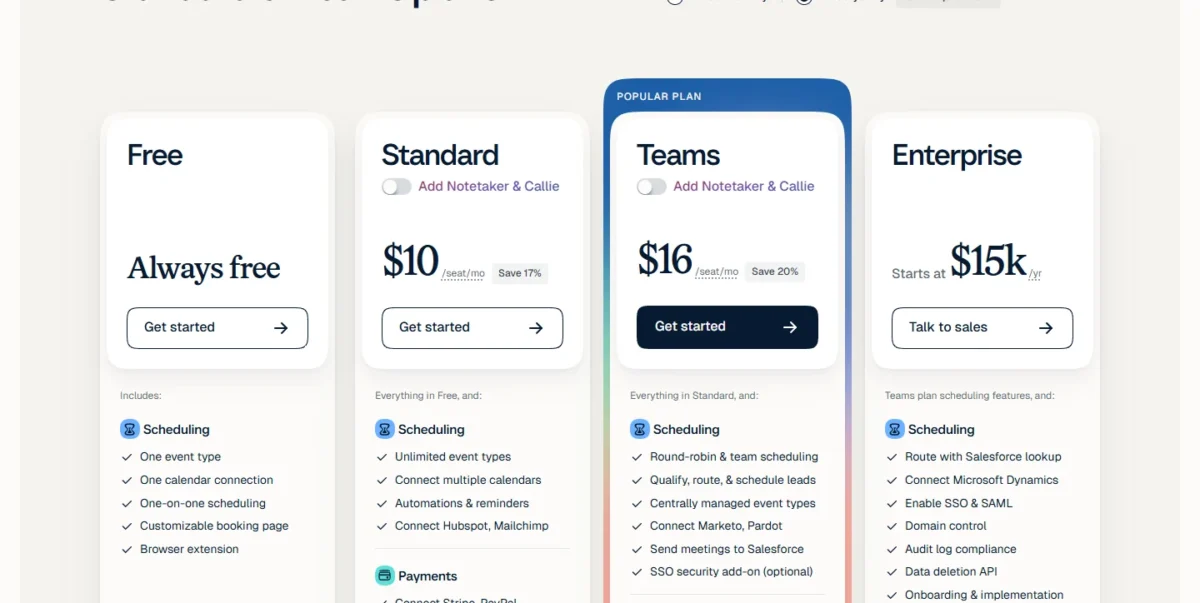
The table shows six prices but not what each step buys.
Calendly Pricing Plans Explained
Each step up removes one limit. Standard lifts Free’s one-meeting-type cap, Teams adds shared scheduling and lead routing, the two Plus plans add Notetaker and Callie, and Enterprise adds SSO, user provisioning and compliance tools from 50 seats.
Free
Free costs $0 and is labeled “Always free” for one event type, one calendar connection and one-on-one scheduling. A consultant with a single intro call can stay here; anyone who needs a second meeting type cannot.
Standard
Standard costs $10 per seat per month billed yearly ($120 a year for one seat) or $12 billed monthly, and it removes Free’s one-event-type cap. It adds unlimited event types, up to six calendars checked for conflicts, group and collective events, Automations for reminders and follow-ups, and payment collection through Stripe or PayPal.
For a coach who sells paid sessions or a recruiter running three interview formats, Standard does the job. It also connects HubSpot and Mailchimp, so a team that syncs bookings into HubSpot should add what HubSpot’s plans cost to the same budget.
The upgrade trigger is a second host who needs meetings shared out by round robin or routed by a form.
Standard Plus
Standard Plus costs $18 per seat per month billed yearly or $24 billed monthly, which is Standard plus unlimited Notetaker access and the Callie email assistant. Notetaker joins meetings on Zoom, Google Meet and Microsoft Teams and produces recaps with decisions and action items; Callie, still in Beta, schedules over email when you copy callie@calendly.com on a thread.
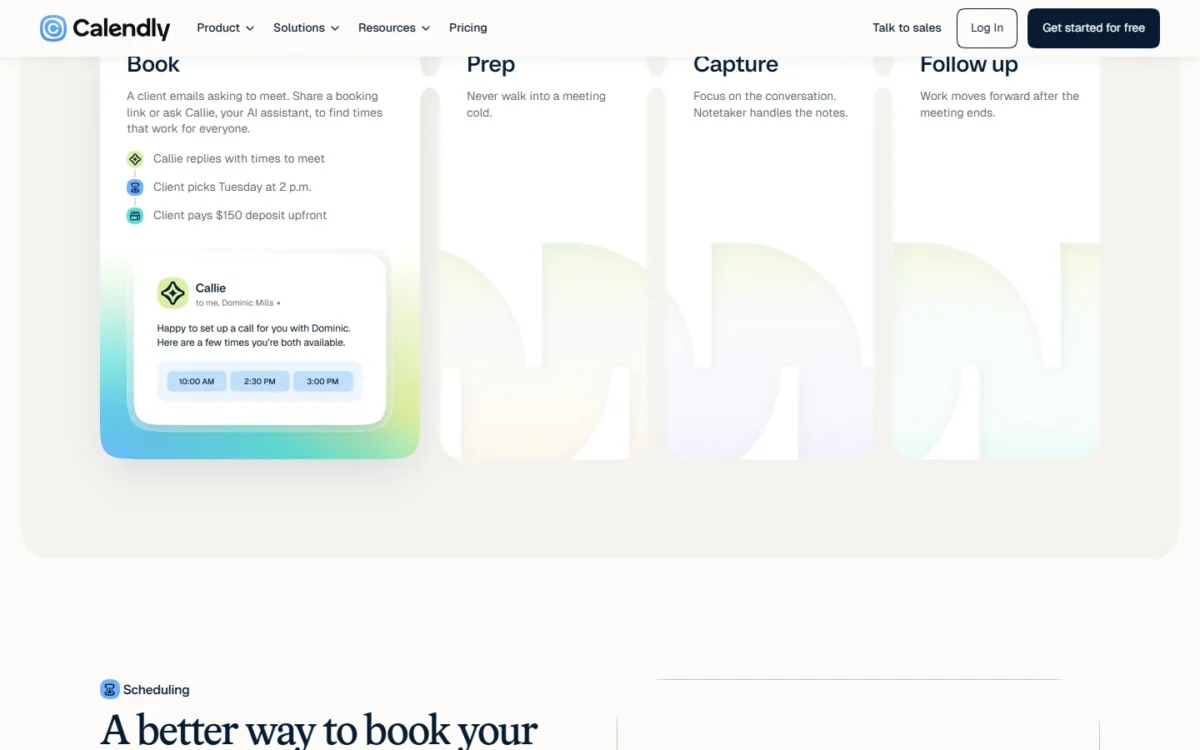
The premium over Standard is $8 per seat per month on yearly billing, $96 a year per host. Notetaker and Callie work only in English for now, so a host who meets in other languages pays for tools they cannot use.
Teams
Teams costs $16 per seat per month billed yearly for seats 1 to 30, or $20 billed monthly, and it is the plan for hosts who share incoming meetings. It adds round-robin distribution, lead routing through Calendly, Marketo, Pardot or HubSpot forms, HubSpot lookup to match known leads to their owner, centrally managed event types and admin tools.
Teams is also the first plan that sends meetings to Salesforce. A team budgeting for that sync can price the CRM side in my Salesforce pricing guide.
Single sign-on is an optional add-on on Teams, and Calendly prints no price for it. Since Enterprise starts at 50 seats, a Teams account under 50 seats that requires SSO has to get the add-on price from Calendly before it can set a budget.
My take
Going from Standard to Teams costs $16 – $10 = $6 more per seat per month on yearly billing, $72 a year per host. I would pay it the day two reps start splitting leads; solo consultants who never share bookings should stay on Standard.
Teams Plus
Teams Plus costs $24 per seat per month billed yearly or $32 billed monthly, and it adds Notetaker, Callie, shared meeting recaps and advanced admin controls to Teams. The help center sets it $8 per seat per month above Teams at every yearly volume tier.
At $96 per seat per year over Teams, Teams Plus makes sense when recaps replace a separate note-taking subscription or a manual follow-up routine. A team that already pays for a meeting recorder should price Teams with that tool first.
Enterprise
Enterprise starts at $15,000 a year and 50 seats, and it is sold in USD only. It adds SAML single sign-on, SCIM user provisioning, domain control, an audit log, a data deletion API, Salesforce lookup routing, Microsoft Dynamics 365, onboarding and dedicated account support. Notetaker and Callie are available on inquiry rather than included, and the real price comes from a sales quote.
Below all of these paid steps sits Free, and its exact limits decide when the first upgrade comes.
What Does the Calendly Free Plan Include and Limit?
Free includes one event type and one calendar connection with no end date, which is enough if you book one kind of meeting. The paid plans start with a 14-day trial that drops the account back to Free when it ends.
What Free includes, from Calendly’s plan guide:
- One event type, with unlimited meetings booked on it
- One calendar connection and basic integrations
- A customizable booking page, confirmation emails and a website embed
- The mobile app and browser extension
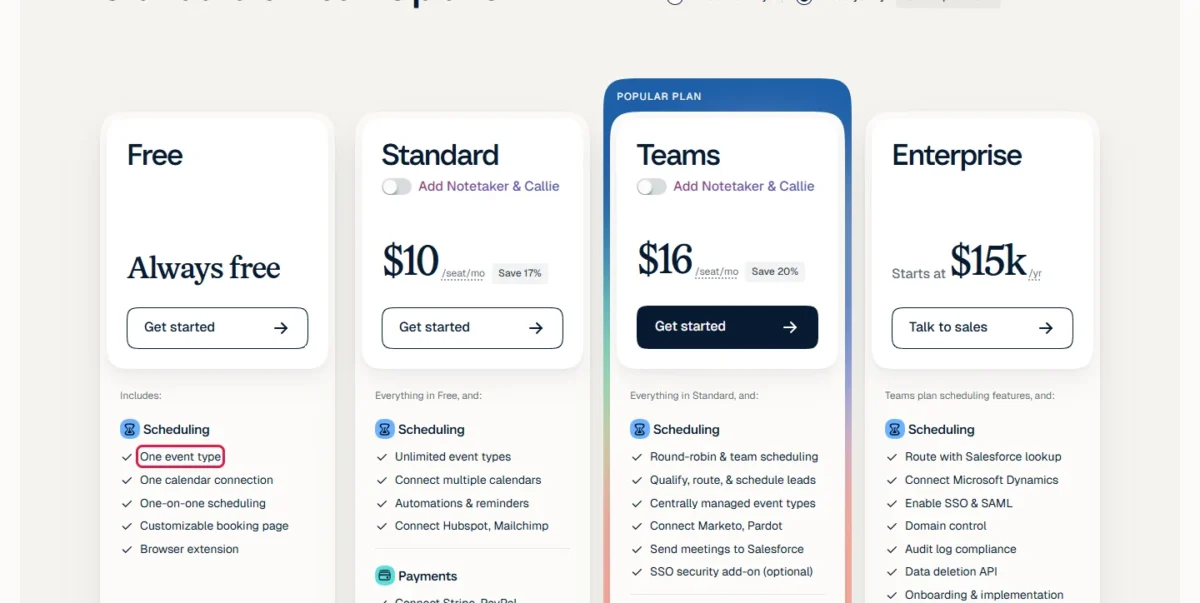
Free has no multi-person meeting types, no automated reminders, no payment collection through Stripe or PayPal and no way to remove Calendly branding. A one-person practice that needs a reminder before every client call outgrows Free on reminders alone.
Calendly lets you invite team members to the trial account at no cost, and every member moves to Free when the 14 days end.
My take
Stay on Free if one booking link covers your work. Before choosing between Standard and Teams, run the 14-day trial with the people who will share leads and check which plan features it lets you use. Pay for a Plus plan only once you know its recaps fit your calls.
Once Free is outgrown, the next cost question is whether to pay monthly or yearly.
Monthly vs Annual Calendly Pricing
Yearly billing saves $24 per seat per year on Standard, $48 on Teams, $72 on Standard Plus and $96 on Teams Plus, against paying month to month.
| Plan | Monthly billing | Annual billing | Saving per seat per year | Saving the page shows |
|---|---|---|---|---|
| Standard | $12 per seat per month | $10 per seat per month | ($12 – $10) x 12 = $24 | Save 17% |
| Standard Plus | $24 per seat per month | $18 per seat per month | ($24 – $18) x 12 = $72 | Save 25% |
| Teams | $20 per seat per month | $16 per seat per month | ($20 – $16) x 12 = $48 | Save 20% |
| Teams Plus | $32 per seat per month | $24 per seat per month | ($32 – $24) x 12 = $96 | Save 25% |
Sources: Calendly’s pricing page, billed monthly and billed yearly views, checked Nov 2026.
The saving is largest on the AI plans: a 10-seat Teams Plus account saves $96 x 10 = $960 a year by paying yearly.
You can switch from monthly to yearly yourself under Settings, then Billing, but switching from yearly back to monthly goes through Calendly’s billing team. Paid subscriptions renew for the same period unless you downgrade before the renewal date, so I would pay monthly for the first month or two of a new team rollout and switch to yearly once the seat count settles.
Additional Calendly Costs to Consider
The costs beyond the base seat are the AI upgrade, the Teams SSO add-on, Enterprise’s 50-seat floor and the payment and automation tools Calendly connects to.
| Cost type | When it applies | Pricing basis | Notes |
|---|---|---|---|
| Notetaker and Callie | You want AI recaps and email scheduling | $8 per seat per month more on yearly billing, $12 more on monthly | English only; Callie is in Beta |
| SSO security add-on | A Teams account that needs single sign-on | Not published | Optional on Teams; SAML SSO is part of Enterprise |
| Enterprise minimum | You need SCIM, domain control or an audit log | Starts at $15,000 per year | Starts at 50 seats |
| Payment collection | You take payment at booking through Stripe or PayPal | Not listed on the pricing page | Standard and above connect Stripe or PayPal; no Calendly fee is listed |
Sources: Calendly’s pricing page, checked Nov 2026.
The AI line is the one that changes a budget. On monthly billing the premium is $24 – $12 = $12 per seat on Standard Plus and $32 – $20 = $12 per seat on Teams Plus, half again what yearly buyers pay for the same tools.
Automation is the other cost that sits outside Calendly. Standard and the plans above it connect Zapier, and a team that builds booking workflows there adds that subscription to the bill; my Zapier review helps decide whether it earns its place. With every cost line named, the next question is the total for a real team.
How Much Does Calendly Cost for Your Team?
A 5-seat Teams account costs $960 a year on yearly billing, 10 seats cost $1,920 and 25 seats cost $4,800, all at $16 per seat per month.
Calendly cost calculator
This calculator needs JavaScript. The scenario table below gives the same estimate for typical workloads.
Enter what you need. The calculator prices it on every plan at list prices and names the cheapest plan that covers it.
- List prices in USD from Calendly’s official pricing pages, checked Nov 7, 2026. Tax and regional prices are not included.
- 12-month figures are 12 times the monthly cost at the billing you choose.
- A planning estimate at list prices, not a quote.
Enter your number of hosts, monthly or yearly billing, and the features you need (routing, a Salesforce sync, Notetaker and Callie), and the calculator shows the four paid plans side by side with the cheapest one that fits. It uses the 1-30 seat Teams rate, so larger teams should read the volume rows below, and it leaves out tax, the SSO add-on and Enterprise.
| Team size | Plan | Billing | Monthly equivalent | Annual total | Assumptions |
|---|---|---|---|---|---|
| 1 host | Standard | Annual | $10 x 1 = $10 | $10 x 1 x 12 = $120 | Monthly billing instead: $12 x 1 x 12 = $144 |
| 5 hosts | Teams | Annual | $16 x 5 = $80 | $16 x 5 x 12 = $960 | Shared leads with round robin |
| 10 hosts | Teams | Annual | $16 x 10 = $160 | $16 x 10 x 12 = $1,920 | Shared leads, Salesforce sync |
| 10 hosts, AI recaps | Teams Plus | Annual | $24 x 10 = $240 | $24 x 10 x 12 = $2,880 | Notetaker and Callie for every host |
| 25 hosts | Teams | Annual | $16 x 25 = $400 | $16 x 25 x 12 = $4,800 | All seats in the 1-30 tier |
| 40 hosts | Teams | Annual | 30 x $16 + 10 x $14.50 = $625 | 30 x $16 x 12 + 10 x $14.50 x 12 = $7,500 | Graduated tier: seats 31-40 at $14.50; before tax |
| 50 hosts | Teams | Annual | 30 x $16 + 20 x $14.50 = $770 | 30 x $16 x 12 + 20 x $14.50 x 12 = $9,240 | Graduated tier: seats 31-50 at $14.50; before tax |
Sources: Calendly’s pricing page, checked Nov 2026; Calendly plan guide for the tier prices, checked Nov 2026.
These totals are estimates from list prices, not quotes, and leave out tax, the SSO add-on, payment processor fees and any nonprofit discount. The gap between 10 Teams seats and 10 Teams Plus seats is the clearest number for judging the AI tools.
Teams Volume Pricing Above 30 Seats
Seats 1 to 30 stay at $16 on yearly Teams billing, and seats 31 to 50 cost $14.50, so a 40-seat account pays 30 x $16 x 12 + 10 x $14.50 x 12 = $7,500 a year rather than $16 x 40 x 12 = $7,680.
Pricing note
The tiers are graduated: only the seats above each threshold get the lower price, and only on annual plans. A team that pays monthly at $20 per seat gets no volume price at any size.
The tier saving is $16 x 10 x 12 – $14.50 x 10 x 12 = $180 a year at 40 seats, small next to the billing choice: the same 40 seats on monthly billing cost $20 x 40 x 12 = $9,600 a year. The lower tiers continue at $14.00 for seats 51 to 100 and down to $12.00 from seat 301, so the discount matters mainly for large sales floors.
Enterprise Floor vs Teams at 50 Seats
At Enterprise’s 50-seat minimum, Teams costs 30 x $16 x 12 + 20 x $14.50 x 12 = $9,240 a year and Teams Plus costs 30 x $24 x 12 + 20 x $22.50 x 12 = $14,040, while Enterprise starts at $15,000. That puts the Enterprise floor $15,000 – 30 x $16 x 12 – 20 x $14.50 x 12 = $5,760 a year above Teams before any quote, and just above Teams Plus.
For an IT team that requires SAML SSO, SCIM provisioning and an audit log, that gap is the price of those controls. A 50-person sales team without those requirements should stay on Teams.
Which Calendly Plan Should You Choose?
Choose by the first limit you hit: one meeting type keeps you on Free, a shared lead pool moves you to Teams, and SSO with an audit log at 50 or more seats moves you to Enterprise.
| Your needs | Plan to consider | Why | Main limitation |
|---|---|---|---|
| One meeting type, one calendar | Free | Costs nothing and has no end date | No reminders, payments or second event type |
| Several meeting types, reminders or paid bookings | Standard | Unlimited event types, Automations, Stripe and PayPal at $10 a seat yearly | No round robin or routing |
| A solo host who wants recaps and email scheduling | Standard Plus | Notetaker and Callie for $8 a seat more than Standard yearly | English only; Callie in Beta |
| Two or more hosts sharing leads, or a Salesforce sync | Teams | Round robin, routing forms and the Salesforce sync; the Teams plan costs $16 per seat per month billed yearly | SSO is a separately priced add-on |
| A shared-lead team that also wants AI recaps | Teams Plus | Everything in Teams plus Notetaker, Callie and advanced admin controls | $96 a seat per year more than Teams |
| 50 or more seats needing SAML SSO, SCIM and an audit log | Enterprise | The only plan with domain control and an audit log | Starts at $15,000 a year; quote required |
Sources: Calendly’s pricing page, checked Nov 2026.
My take
For a small business, the deciding question is whether leads are shared: if not, Standard; if so, Teams. I would not start a team on a Plus plan until you have checked, on a plan that includes Notetaker, that the recaps save real follow-up time.
Is Calendly Worth the Price?
Calendly is worth paying for on Standard when one host books several meeting types or takes payment at booking, and worth Teams when two or more hosts share leads. It is not worth paying for when one meeting type covers your work, because Free already does that.
At $120 a year for one Standard seat on yearly billing, the question for a solo host is whether reminders and a second meeting type are worth $10 a month; for anyone who sells sessions through Stripe or PayPal, I think they are.
The math changes at the AI step. Standard Plus adds $96 a year per host, and Notetaker’s value depends on how many calls you record and in which language.
For a sales team, the Teams step is the one to weigh: round robin, form routing and the Salesforce sync replace manual lead assignment for the gap between Standard’s $10 and Teams’ $16 per seat per month on yearly billing.
My take
Pay for Standard as soon as a second meeting type or a reminder matters, and for Teams as soon as leads are shared. Skip the Plus plans unless the recaps replace something you pay for or do by hand today.
When to Skip Calendly for an Alternative
Calendly is the wrong purchase when the job is building rotas and shifts for hourly staff, because its plans are built around meetings that invitees book. For that job, employee scheduling software for shift-based teams fits the work.
Billing, Discounts and Cancellation
Paid Calendly subscriptions renew automatically for the same period unless you downgrade before the renewal date, and to cancel you switch to the Free plan.
- A yearly plan renews for another year and a monthly plan for another month, charged to the card on file.
- A downgrade, including a switch to Free, starts at the end of the billing period, and you keep the current plan’s features until then.
- For a refund, the billing help page sends customers to Calendly’s billing team through support.
- Qualified non-profit organizations get special pricing, and nonprofit and educational organizations can get a discount on annual plans. US organizations send a 501(c)(3) determination letter or an IRS tax-exempt search screenshot and keep the account on Free until the documents are verified; Calendly does not publish the discount amount.
- Calendly accepts Visa, Mastercard, American Express, Discover, JCB and Diners Club credit and debit cards, and PayPal only from customers outside the United States.
How I Verified Calendly Pricing
I read Calendly’s pricing page as a US visitor, in US dollars, on November 7, 2026, in four views: billed yearly, billed monthly, and both again with “Add Notetaker & Callie” switched on, since the page shows the Plus prices only behind that toggle. I also read the plan guide in Calendly’s help center (updated September 1, 2026) for the Teams volume tiers, the legacy plans page and the billing help page (updated August 20, 2026).
Every price here is a published list price, per seat per month unless marked per year. The team totals are my own estimates, list price x seats x 12, not quotes. Calendly does not publish an Enterprise price beyond its starting point, a price for the Teams SSO add-on, or whether prices include tax.
Frequently Asked Questions
Can I still buy Calendly’s Professional plan?
No. Calendly stopped offering the Essentials and Professional plans to new customers in December 2024. If you are on one of them, your price and features stay the same unless you switch plans. A Professional user who relies on routing, managed events or groups should move to Teams or Teams Plus.
Do the people who book with me need a Calendly seat?
No. Seats are only for users who connect calendars and host meetings. On Teams, the pricing page adds that invitees do not need an account or a seat, so a recruiting team pays for its recruiters, never for its candidates.
Can I pay for Calendly by invoice or bank transfer?
Yes, for larger purchases. ACH or wire transfer needs a purchase of $5,000 or more, and Calendly offers invoice payment on Standard or Teams at $5,000 and on Enterprise at $15,000. On yearly Teams billing, 27 seats is the first count that reaches the $5,000 ACH minimum: $16 x 27 x 12 = $5,184.
Final Pricing Verdict
Buy Standard on yearly billing at $10 per seat per month once a solo host outgrows Free’s single meeting type, and move to Teams at $16 per seat per month the moment two or more people share leads or need the Salesforce sync. Choose the Plus plans only if Notetaker’s recaps replace a tool or a manual routine, since they add $96 per seat a year on yearly billing.
Talk to Calendly’s sales team about Enterprise only at 50 or more seats with a firm need for SAML SSO, SCIM or an audit log; without those needs, a 50-seat Teams account stays well below Enterprise’s starting price. Skip Calendly entirely if you schedule hourly staff shifts rather than meetings.