


In the Google Flow vs Runway choice, pick Google Flow if you want Google’s Veo 3.1 with native audio for the least money. Google AI Pro costs $19.99 a month and adds 1,000 monthly Flow credits to the 50 credits every user gets daily.
Pick Runway for several model families in one app (Gen-4.5, Kling 3.0, Seedance 2.5), 4K upscaling from $12 a month billed annually, or one credit pool for a team.
Evidence basis: official pricing pages and documentation from Google and Runway, checked October 2026. This comparison is documentation-based, with no hands-on generations, so it ranks no model on visual quality. How I review

In This Article (10 sections)
Google Flow or Runway: The Short Answer
In Runway vs Google Flow, neither tool is better overall: the file you must deliver decides. While 1080p is enough, Flow costs less for Veo 3.1 than Runway’s API.
Ten 8-second Quality clips use Google AI Pro’s 1,000 credits ($19.99), against $32.00 (10 x 8 x 40 x $0.01) on the API with audio.
Runway is the cheaper way to 4K files, and it adds ProRes, non-Google models and a shared team pool at a higher team price.
| Scenario | Pick | Deciding fact |
|---|---|---|
| Trying AI video before paying | Google Flow | 50 credits a day vs 125 one-time credits on Runway Free |
| Already on Google AI Pro | Google Flow | 1,000 monthly Flow credits included at $19.99/ |
| 4K on a small budget | Runway Standard | 4K upscaling at $12/ |
| A different model per shot | Runway | Gen-4.5, Aleph 2.0, Seedance 2.5 and Kling 3.0 in one balance |
| Three people, one budget | Runway Team | 6,900 credits per seat in one shared pool |
| Veo without a subscription | Runway API | veo3.1 with audio: 40 credits x $0.01 = $0.40 per second |
Sources: Google Flow pricing, Runway pricing page, Runway API pricing, checked October 2026.
If the Flow rows fit your work, my Google Flow review weighs its agent, credits and limits before you commit.
Google Flow vs Runway Features at a Glance
Google Flow is Google’s AI creative studio, sold through Google AI plans. Runway (Runway ML) is a standalone AI video app with its own credit plans.
| Tool | Free tier | Entry paid plan | Top individual plan | Video models | Upscaling on entry plan |
|---|---|---|---|---|---|
| Google Flow | 50 credits a day | Google AI Plus: $4.99/ | Google AI Ultra at $99.99/ | Veo 3.1 (Lite, Fast, Quality), Gemini Omni Flash | 1080p video |
| Runway | 125 one-time credits, watermarked videos | Standard: $12/ | Max: $76/ | Gen-4.5, Aleph 2.0, Seedance 2.5, Kling 3.0 | 4K |
Sources: Google Flow pricing, Runway pricing page, Runway Free plan details, checked October 2026.
A Flow credit and a Runway credit buy different amounts of video, so the cost section converts both into seconds. The model column differs most, because the model decides how a clip looks and sounds.
Models and Video Quality: Veo 3.1 vs Runway’s Model Menu
Flow runs Google’s own models, while Runway puts Gen-4.5 next to Kling 3.0, Seedance 2.5 and Aleph 2.0 in one credit balance. Runway suits a buyer who switches models per shot; Flow suits one who has settled on Veo.
Google says Veo 3.1 “excels in physics, realism and prompt adherence” and generates native audio. Runway’s agent produces video “with or without native audio depending on the model,” so on Runway sound is part of the model choice.
Model choice is also a price choice. On Runway, a 5-second Aleph 2.0 clip costs 140 credits against 60 for Gen-4.5. In Flow, an 8-second Veo 3.1 Quality clip costs 100 credits against 20 for Fast.
Stills will not decide it, since Nano Banana Pro images are available in both. This article ranks no model on looks, because that verdict needs generated footage, and a strong model still has to fit your shot length and editing habits.
Creative Workflow: Clip Length, Sequences and Agents
Flow generates Veo 3.1 clips of 4, 6 or 8 seconds, and up to 10 seconds with Gemini Omni Flash. Runway’s Gen-4.5 generates 5- or 10-second clips.
Flow’s free tier includes the agent, Video Extension, video-to-video editing and Scenebuilder. Scenebuilder strings clips into a sequence that downloads as one file, and how to build a scene in Google Flow walks through it.
Gemini Omni Flash edits uploaded or generated videos for 40 credits per edit, so your own footage can enter a Flow project. Flow Tools, built and remixed in plain language, are usable free; creating your own starts on Google AI Plus.
Runway’s Agent can generate multi-shot sequences. It combines the clips and audio in a Final Cut tab, where you can also trim, split and arrange generated or uploaded media (Creating with Runway Agent). Building a sequence is therefore not exclusive to Flow.
Runway runs 5, 15 or 20 parallel generations on Standard, Pro and Max and caps projects at 3, 5 and 10. The 15 on Pro suit ad work that tests many prompt variations, and Pro adds a Brand Kit and a custom voice clone.
Once a shot works, the next limit is the file you can hand a client, and that is where the plan prices split.
Resolution and Professional Delivery: Where 4K and ProRes Sit
Runway lists 4K upscaling from Standard at $12 a month billed annually, while Flow keeps 4K upscaling for Google AI Ultra at $99.99 a month. ProRes, HDR and image sequences sit on Runway Max and Team; Flow’s pricing section lists none of them.
| Delivery need | Cheapest Google Flow plan | Cheapest Runway plan |
|---|---|---|
| No visible watermark | Free (a toggle; invisible SynthID stays on every output) | Standard, $12/ |
| 4K video | Google AI Ultra, $99.99/ | Standard, $12/ |
| ProRes, HDR, image sequences | Not listed | Max, $76/ |
Sources: Google Flow credit costs, Google Flow watermark FAQ, Runway pricing page, checked October 2026.
For a freelancer who delivers 4K, that row is the decision. Runway Standard is a $144 annual commitment ($12 x 12 months), while Google AI Ultra runs $1,199.88 a year ($99.99 x 12 months).
Ultra pays off when you also use its 10,000 monthly credits, and heavy 4K users should look at Runway Pro, the first card that says unlimited 4K video upscaling.
The file you must deliver sets your plan floor; how much video that plan buys depends on credits.
Credits and Cost for a Solo Creator and a Three-Person Team
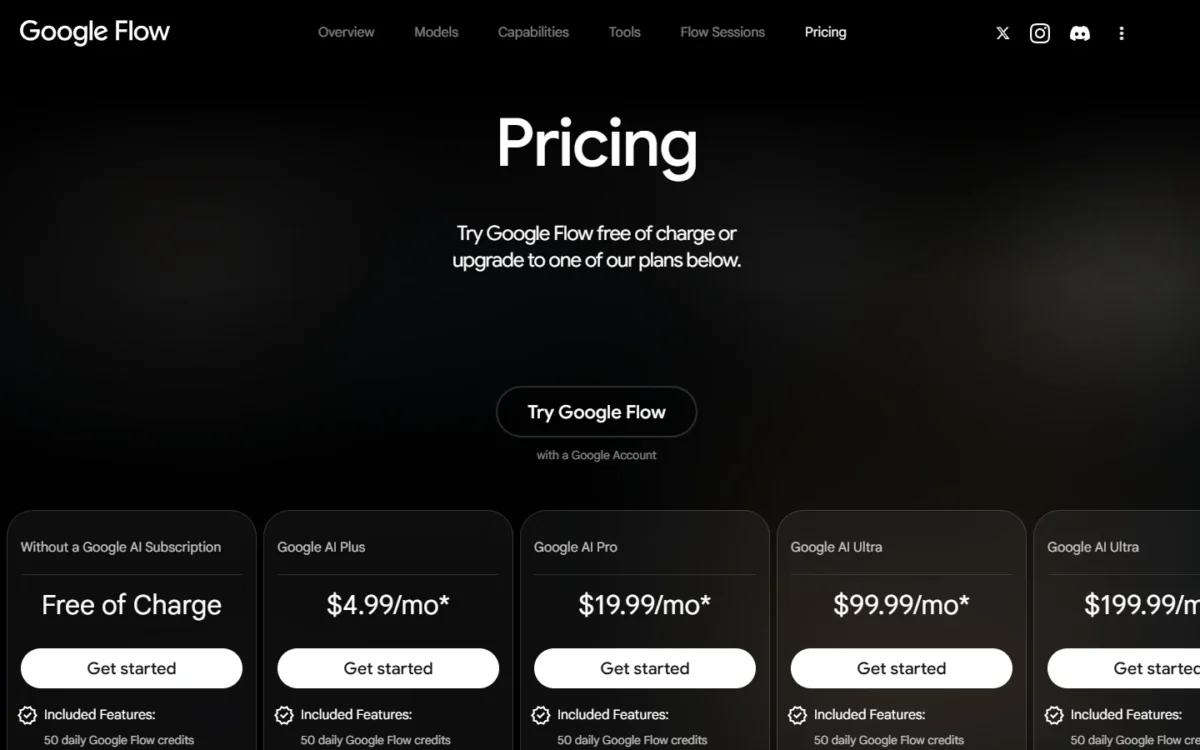
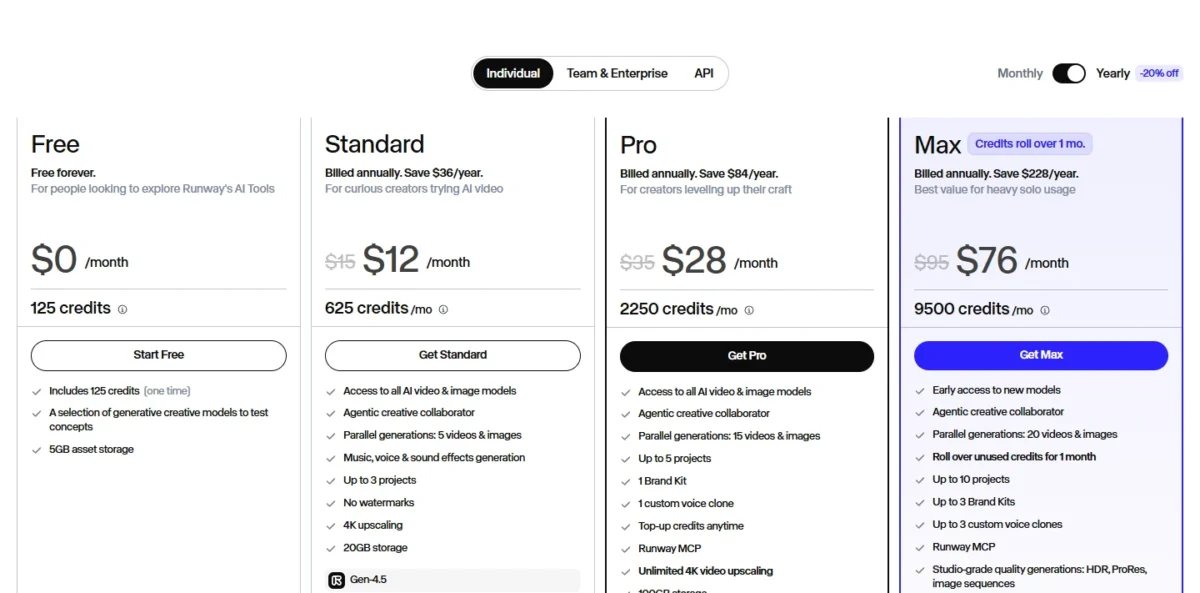
A solo creator pays $19.99 a month for Google AI Pro, or $28 a month billed annually for Runway Pro ($35 month to month). Three people pay $59.97 on Flow (3 x $19.99) against $84 on three Runway Pro accounts billed annually (3 x $28).
Google AI Pro also carries Gemini 3.1 Pro, Gemini in Gmail and Docs and 5 TB of storage, so its Flow credits cost nothing extra if you use those. If not, check whether Google AI Pro is worth it for Gemini first.
How far a month of credits goes
Flow bills Veo 3.1 per clip, and Runway bills Gen-4.5 per second. An 8-second Veo 3.1 Fast clip costs 20 credits on non-Ultra plans, the same as a 4-second one, while Gen-4.5 costs 12 credits a second.
| Plan | Price per month | Monthly credits | Video per month |
|---|---|---|---|
| Google AI Pro (Flow) | $19.99 | 1,000 | 400 s of Veo 3.1 Fast or 80 s of Quality |
| Google AI Ultra (Flow) | $99.99 | 10,000 | 8,000 s of Veo 3.1 Fast or 800 s of Quality |
| Runway Standard | $12 billed annually, $15 monthly | 625 | 52 s of Gen-4.5 |
| Runway Pro | $28 billed annually, $35 monthly | 2,250 | 187 s of Gen-4.5 |
| Runway Max | $76 billed annually, $95 monthly | 9,500 | 791 s of Gen-4.5 |
Sources: Google Flow credit costs, Runway pricing page, checked October 2026.
The Flow rows use 8-second clips from monthly credits: 20 credits per Fast clip (10 on Ultra) and 100 per Quality clip. At the Fast tier, Flow Pro buys 400 s against 187 s of Gen-4.5 on Runway Pro, more than twice the seconds.
Flow Pro also costs $8.01 less a month than Runway Pro billed annually ($28 – $19.99), or $15.01 less month to month ($35 – $19.99).
At Veo 3.1 Quality the order flips, 187 seconds of Gen-4.5 against 80, though Veo’s clips carry native audio. Flow’s 50 daily credits add two Fast clips a day, which rewards steady use over monthly batches.
Seconds generated are not seconds kept: Runway’s Standard plan guide warns that AI video can take multiple attempts. Every Flow model rate is in my page on Google Flow plans and credit costs.
Runway’s developer API sets a pay-as-you-go benchmark for Veo. Its veo3.1 model with audio uses 8 x 40 = 320 credits per 8-second clip, which costs 320 x $0.01 = $3.20.
Ten such clips cost $32.00 (10 x $3.20), while Google AI Pro covers ten 8-second Veo 3.1 Quality clips a month for $19.99.
On that basis Google AI Pro costs $12.01 less than Runway’s API (10 x $3.20 = $32.00, and $32.00 – $19.99 = $12.01). I would use the API only when Veo has to run inside your own app.
Upgrade triggers differ too: Runway Free cannot buy credits, and paid plans top up with at least 1,000 credits. My breakdown of Runway cost per clip by model shows how fast each model drains them.
Take an illustrative month of 20 clips. On Runway, 20 ten-second Gen-4.5 clips use 20 x 120 = 2,400 credits, and 2,400 – 2,250 = 150 credits more than Pro holds, so Pro needs a top-up or Max.
In Flow, 20 ten-second Gemini Omni Flash clips at 720p use 20 x 15 = 300 credits. Twenty 8-second Veo 3.1 Quality clips use 20 x 100 = 2,000 credits, twice Google AI Pro’s monthly 1,000.
Monthly cost and seconds of video at the same team size
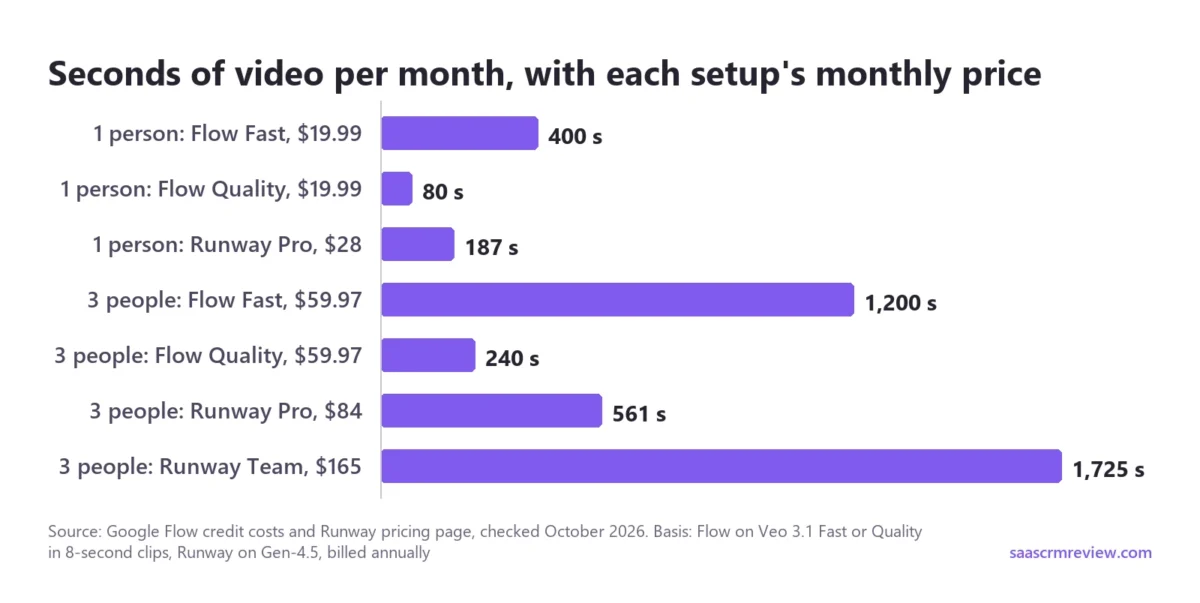
Three people buy 1,200 s of Veo 3.1 Fast for $59.97 on Flow, 561 s of Gen-4.5 for $84 on Runway Pro, or 1,725 s for $165 on Runway Team.
The Runway prices here are billed annually, and only Runway Team has one shared monthly balance.
| Setup for 3 people | Price per month | Monthly credits | Video per month (clip basis) | One shared monthly balance? |
|---|---|---|---|---|
| Flow: 3 x Google AI Pro | 3 x $19.99 = $59.97 | 3 x 1,000 = 3,000 | 3 x 400 = 1,200 s of Veo 3.1 Fast, or 3 x 80 = 240 s of Quality (8-second clips) | Per account: each subscriber gets 1,000 monthly Flow credits; AI credits can be shared with a Google One family group |
| Runway: 3 x Pro | 3 x $28 = $84 billed annually, or 3 x $35 = $105 monthly | 3 x 2,250 = 6,750 | 3 x 187 = 561 s of Gen-4.5 (12 credits a second) | No, collaborators need a Team plan |
| Runway Team, 3 seats | 3 x $55 = $165 billed annually, or 3 x $69 = $207 monthly | 3 x 6,900 = 20,700, pooled | 3 x 575 = 1,725 s of Gen-4.5, pooled (12 credits a second) | Yes |
Sources: Google Flow credits help, Runway pricing page, Runway plan guide, checked October 2026.
Three Team seats cost 3 x $55 = $165 a month billed annually, which is $165 – $84 = $81 more than three Pro accounts. That premium buys more than three times the credits per seat (6,900 against 2,250), one shared pool and shared projects.
For a team that would otherwise top up three separate Pro balances, Team is the plan to price first.
What happens to unused credits
Unused monthly credits lapse in Flow and on Runway Standard and Pro, while Runway Max and Team roll over up to one month. Flow’s 50 daily credits lapse at the end of each day.
Runway’s purchased credits and the Free plan’s 125 credits never expire. Google says purchased AI credits may expire after a period set when you buy them, so a surplus is safer on Runway.
Teams, Integrations and API Access
Runway sells a Team plan that pools 6,900 credits per seat for 2 to 9 members in one workspace, while Flow is bought per Google account. A team sharing one budget leans Runway; a Google-centric individual leans Flow.
On Team, only workspace admins buy credits, they can turn on auto refill, and Viewers are free. Flow’s team route is Google Workspace: Business Starter, Standard and Plus plans include Flow with 50 daily credits at no extra charge.
For integrations, Runway Pro and Max include Runway MCP, and Runway’s developer API bills at $0.01 per credit, completely separate from app credits. Flow’s features vary by subscription tier, web or mobile, and region, and users must be 18 or older.
Once a tool fits your work, the remaining question is what rules it out.
Who Should Skip Google Flow, and Who Should Skip Runway
Skip Flow if you need cheap 4K, one team balance or non-Google models; skip Runway if a Google AI plan you already pay for covers your shots with Veo 3.1.
Google Flow is the wrong pick if:
- you deliver 4K and will not pay $99.99 a month for Google AI Ultra;
- two or more people need one credit balance;
- you need ProRes or HDR files, which Runway lists on Max and Team.
My list of Google Flow alternatives sorts the other AI video tools by the job each fits.
Runway is the wrong pick if:
- you already pay $19.99 a month for Google AI Pro and Veo 3.1 covers your shots;
- you make occasional clips and want credits that refill daily, not 125 one-time credits that Free users cannot top up;
- your company’s Google Workspace Business plan already includes Flow.
If Pika is your other candidate, Runway vs Pika compares the two on credits per second.
If neither fits, my ranking of the best AI content creation tools widens the shortlist beyond video.
Switching Between Flow and Runway, or Using Both
Only finished files move between the two. Each tool bills in its own credits, so no balance follows you, and setups are rebuilt by hand: Flow’s Characters and custom Flow Tools, Runway’s Brand Kits and voice clones.
| What you leave behind | Leaving Google Flow | Leaving Runway |
|---|---|---|
| Finished video | Download clips, a whole project, or a Scenebuilder sequence as one file | Download assets; after a Team cancel, members keep download access as Viewers |
| Money and credits | Cancel anytime; no refunds for partial billing periods | Purchased credits never expire; a downgrade applies the unused balance to the next cycle |
Running both works best in one direction: generate in Flow, then finish in Runway. Runway’s Upscale app takes uploaded videos up to 40 seconds that were not generated in Runway, so a Flow clip can go into it.
Google AI Pro plus Runway Standard billed annually comes to $19.99 + $12 = $31.99 a month for both tools, against $99.99 for Google AI Ultra alone. Confirm Upscale app access on the Runway plan you pick before you rely on this pairing.
FAQ
What has happened to Google Flow?
Google Flow runs at flow.google.com as Google’s “AI creative studio,” with an agent, Gemini Omni video editing, custom Flow Tools and a free tier of 50 daily credits.
Google charges no credits for failed generations and recommends a desktop Chromium browser such as Chrome for the full editor.
What is Google Flow best for?
Google Flow is best for creators who want Veo 3.1 clips with native audio, above all anyone already paying for Google AI Pro, which includes 1,000 monthly Flow credits.
Its free tier already includes Text to Video, Frames to Video and Ingredients to Video, but 4K delivery needs Google AI Ultra.
What’s better than Google Flow?
Runway is the better pick than Google Flow for 4K files from $12 a month billed annually, ProRes on Max, a choice of models or one shared team pool.
Runway Pro and Max also list unlimited Topaz AI Upscale.
Can I try Google Flow and Runway for free?
Yes. Flow gives 50 credits a day, but non-subscribers may be unable to generate videos at peak hours, roughly 2 PM to 5 PM UTC.
Runway Free gives 125 one-time credits, and every video carries a Runway watermark. On a plan that includes Gen-4.5, 125 credits is two 5-second clips (2 x 60 = 120 credits).





