Most wiki software shortlists fall apart for the same reason: the number on the pricing page is not the number the team pays. Guest seats, AI question caps, version-history windows, and identity controls all sit on different plan lines.
This ranking of the best wiki software for 2026 compares ten platforms on the figures that survive a purchase order rather than a demo. Confluence leads for Jira-centric product and IT teams, Notion for cross-functional startups, and Slite for teams whose real problem is documentation that goes stale.
Every price, cap, and plan gate below was read from the vendor’s own pricing or help pages on 2026-08-05. If the goal is a customer-facing help center rather than an internal wiki, the knowledge base software shortlist is a better place to start.
In This Article (20 sections)
Quick Verdict: Best Wiki Software by Use Case
| Use case | Best pick | Why it fits |
|---|---|---|
| Product and engineering teams already on Jira | Confluence | Spaces, page permissions, and Jira work links live in one Atlassian account |
| Cross-functional startup that wants one workspace | Notion | Wiki pages, databases, connections, and sites share a single teamspace |
| Distributed team fighting stale pages | Slite | Doc ownership, verification cycles, and a knowledge management panel |
| Enterprise support and sales answers inside daily tools | Guru | Permission-aware answers with verification and centralized audit logs |
| Public or private customer help center | Document360 | Approval workflows, analytics, SEO controls, and migration services |
| Developer and API documentation | GitBook | Git sync, change requests, and API playgrounds on a published site |
| Small team that wants near-zero administration | Nuclino | Items, canvases, and list, board, table, and graph views in one workspace |
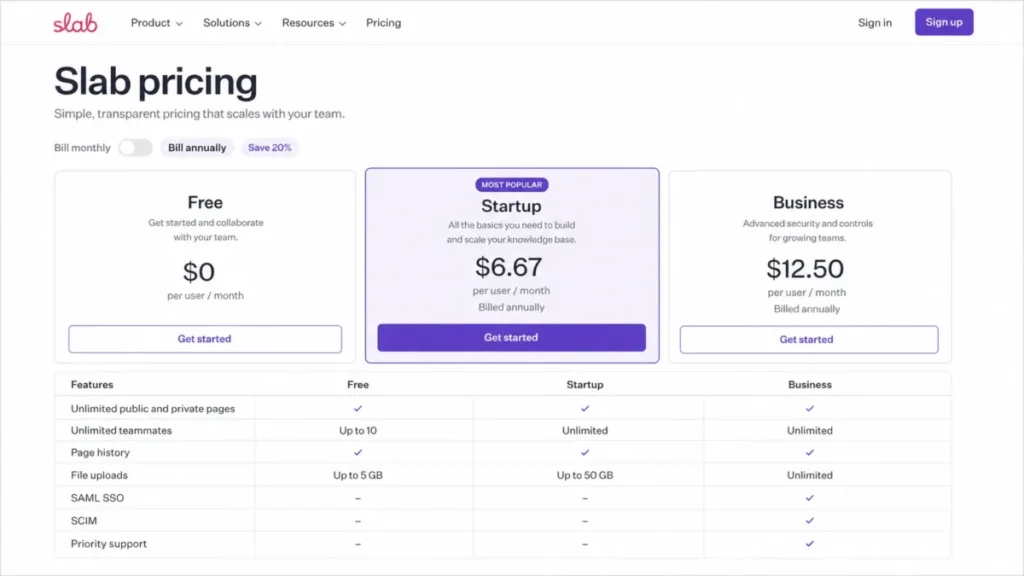
| Tightest budget, including a usable free tier | Slab | Free tier covers 10 users, and Startup is $6.67 per user/ |
| Slack-first question capture | Tettra | Slack bot, Q&A workflow, and AI answers surfaced in channels |
| Self-hosted or on-premises control | XWiki | Community edition plus extensions, granular rights, and support options |
Source: official pricing and product pages for all ten platforms, checked 2026-08-05. Region: US.
Six of these ten publish a numeric price. The other four sell through a quote, a seat minimum, or a self-managed download, which changes how long the evaluation takes before anyone can compare cost.
Which Type of Wiki Do You Actually Need?
Wiki, knowledge base, help center, and developer portal get used as synonyms, and that is where most shortlists go wrong. An internal wiki bills the people who write and read it, while a published help center bills editors and serves readers for free.
That single difference moves the cost curve more than any feature on a comparison table. A 12-person team publishing customer docs to 40,000 monthly readers has a very different bill from a 12-person team keeping runbooks private.
| Platform | Internal wiki | Customer help center | Developer docs | Self-hosted option | Price status |
|---|---|---|---|---|---|
| Confluence | Yes | Limited | Limited | Yes, Data Center | Published |
| Notion | Yes | Limited | Limited | No | Published |
| Slite | Yes | Limited | No | No | Published |
| Guru | Yes | No | No | No | Custom |
| Document360 | Yes | Yes | Conditional | Conditional | Custom |
| GitBook | Limited | Conditional | Yes | Conditional | Published |
| Nuclino | Yes | Limited | No | No | Published, not captured |
| Slab | Yes | No | No | No | Published |
| Tettra | Yes | No | No | No | Published |
| XWiki | Yes | Conditional | Conditional | Yes | Undisclosed in US dollars |
Source: official product, pricing, and help pages for each vendor, checked 2026-08-05. Cells are an editorial assessment of documented feature scope, not a vendor claim.
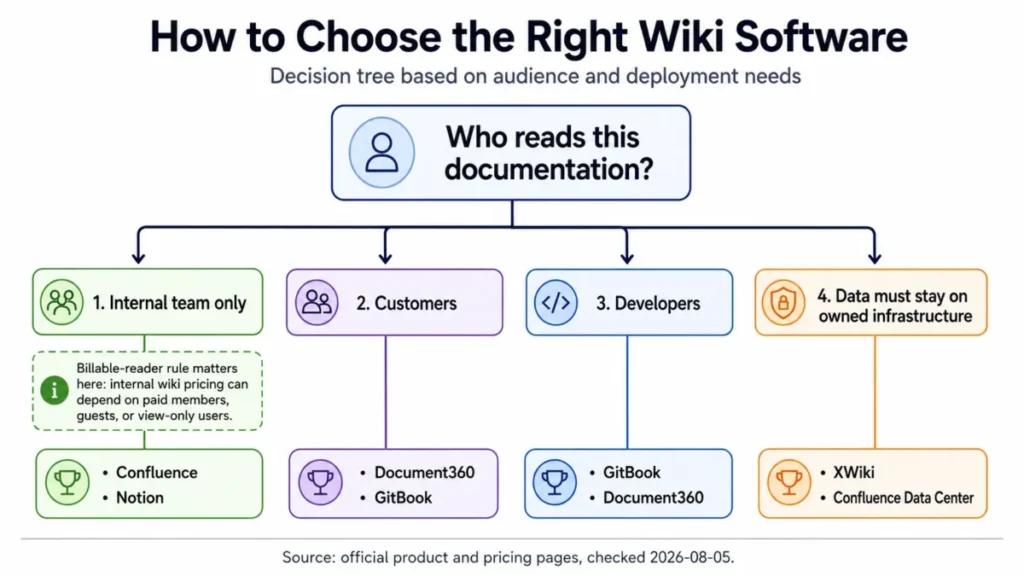
Confluence, Notion, Slite, Slab, Nuclino, and Tettra compete directly for the same internal-wiki budget, while Document360 and GitBook compete with each other for published documentation and rarely against the rest. Guru sits beside an existing wiki rather than replacing it, and XWiki competes on deployment control instead of seat price.
How We Evaluated Wiki Software: What We Compared and How We Chose
These rankings are based on official pricing pages, vendor help-center articles, and current product pages for all ten platforms. Pricing, plan caps, and feature gates were checked on 2026-08-05.
Each tool was assessed against the same buyer-focused criteria: documentation type, permission depth across spaces and pages, page ownership and review cycles, version-history retention, seat and reader definitions, identity and audit gates, AI usage limits, migration scope, deployment model, and support terms.
Greater weight was given to factors that change a purchase order rather than a demo: what the tier most teams need costs, which readers are billable, which controls sit behind an enterprise contract, and how much administration each deployment model adds. Brand recognition and affiliate relationships did not influence the ranking.
Claims that could not be verified from official evidence were excluded, and every pricing state is labeled separately as published, custom, or undisclosed.
Best Wiki Software Comparison
| Platform | Rank | Best-fit buyer | Entry price status | Deployment | First limit that bites |
|---|---|---|---|---|---|
| Confluence | 1 | Jira-centric product and IT orgs | Standard displayed at $5.42 per user/ | Cloud, plus separate Data Center | Free caps 10 users and 10 automation runs monthly |
| Notion | 2 | Startups wanting one workspace | Plus displayed at $10 per member/ | Cloud | SAML SSO and page verification sit on Business |
| Slite | 3 | Distributed teams chasing freshness | Basic $10 per member/ | Cloud | Basic caps 30 AI questions per seat monthly |
| Guru | 4 | Mid-market and enterprise answer delivery | Custom quote, 10-seat minimum | Cloud | No public number, so budgeting needs a sales call |
| Document360 | 5 | Support and product doc teams | Custom quote from six configuration inputs | Hosted, private hosting available | Larger migrations may be scoped and priced separately |
| GitBook | 6 | Developer relations and API docs | Premium $65 per site/ | Cloud, open-source publishing option | View-only app users still consume paid seats |
| Nuclino | 7 | Small teams wanting simplicity | Published, numeric amount not captured | Cloud | Free stops at 50 items and three canvases |
| Slab | 8 | Focused internal knowledge teams | Startup $6.67 per user/ | Cloud | GraphQL API, SAML SSO, and SCIM need Business |
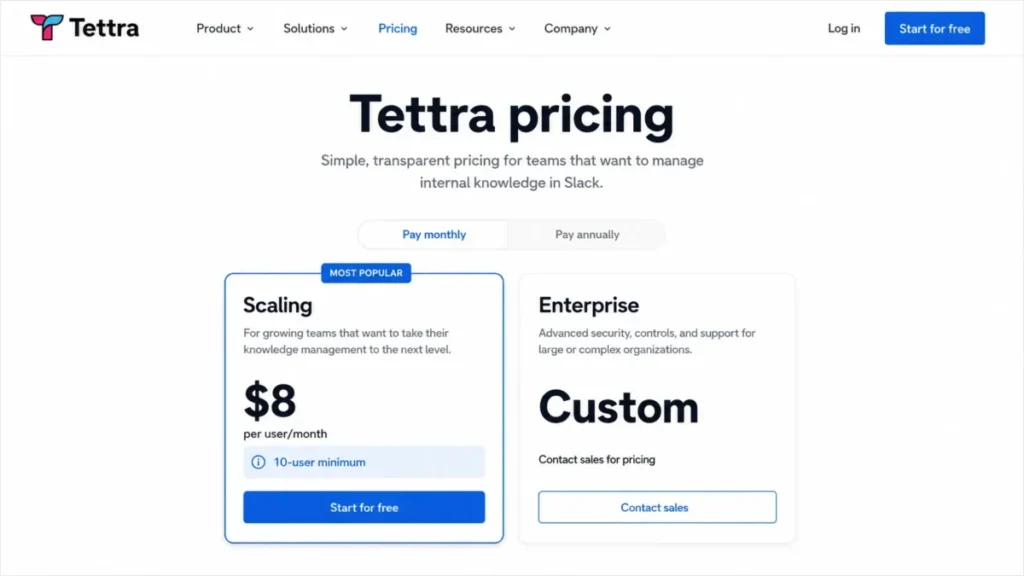
| Tettra | 9 | Slack-first teams of 10 or more | Scaling $8 per user/ | Cloud | The seat minimum sets an $80 monthly floor |
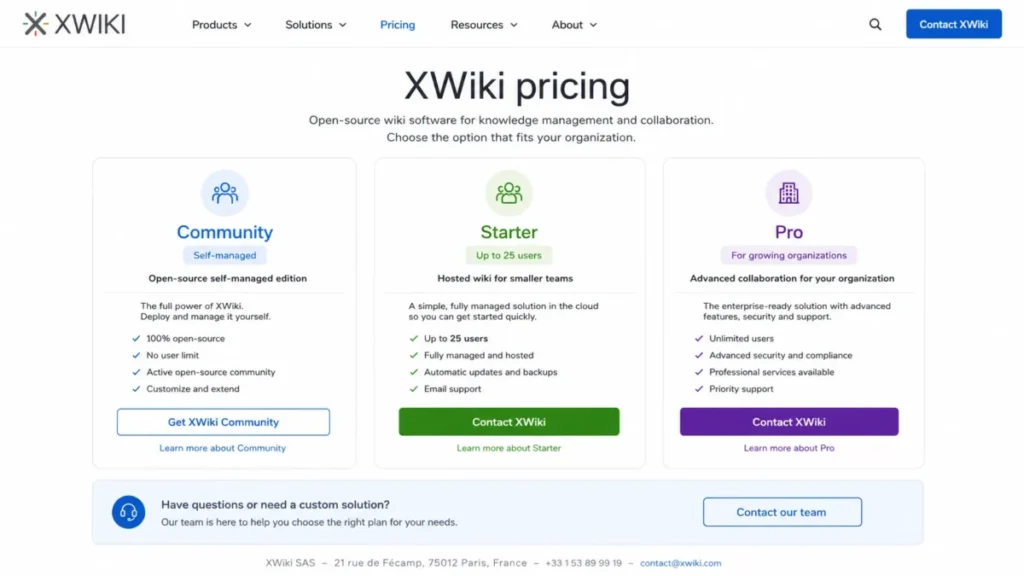
| XWiki | 10 | Open-source and on-premises buyers | No verified US-dollar amount published | Self-hosted, cloud, on-premises | Starter is capped at 25 users |
Source: official pricing pages for each vendor, plus the Guru billing guide and the XWiki cloud FAQ, checked 2026-08-05.
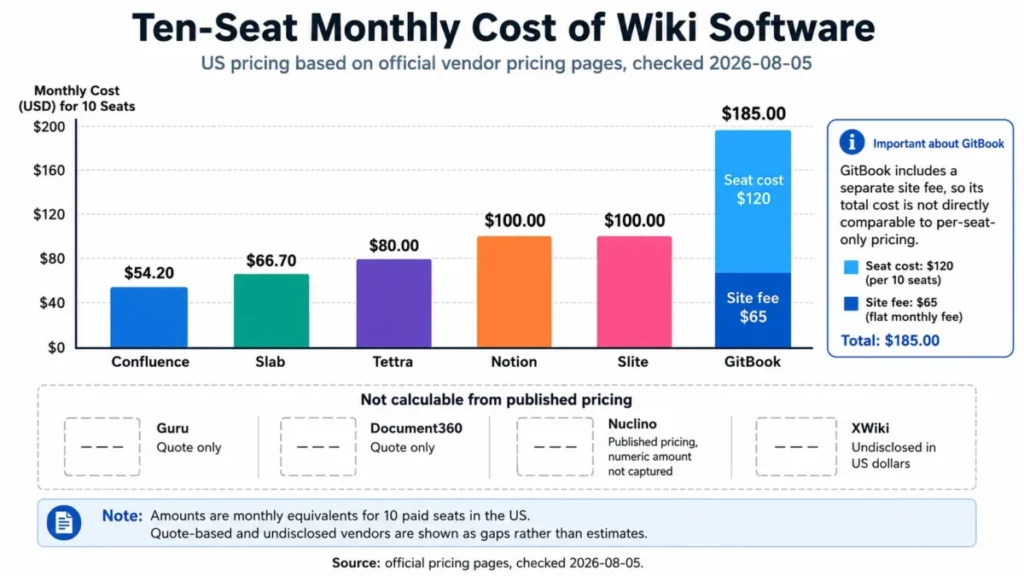
Four of the ten cannot be compared on price at all without contacting sales, and that is a scheduling cost as much as a budget one. A shortlist that mixes published and quote-only vendors will run two to three weeks longer than one that does not.
The Three Problems Every Wiki Software Buyer Faces
Ranking wiki platforms by feature count produces a list nobody can act on. Three problems decide almost every real purchase, and each platform below answers one of them better than the others.
Problem 1: The Published Price Is Not the Buying Price
Seat definitions differ more than seat prices do. Nuclino states that every user on a paid plan is billable, including guests and read-only members, and GitBook charges paid seats even for app users holding view-only permissions.
Tettra sets a 10-user minimum on its Scaling plan, so a seven-person team pays for ten. GitBook splits the bill again by charging a site fee on top of every seat, which makes a small team’s first invoice larger than the per-user figure suggests.
Notion runs the opposite model on its free tier, where up to 10 external guests are allowed but collaborative blocks are limited. Reader economics, not list price, is the number that belongs in the budget.
Problem 2: Governance Arrives One Plan Later Than Expected
SAML SSO, SCIM provisioning, and audit logs are the three controls IT will ask about, and all three sit above the entry tier on most of this list. Notion places SAML SSO and page verification on Business, Slab places SAML SSO and SCIM on Business, and Tettra reserves SSO and SCIM for Enterprise.
Slite requires Pro for OpenID SSO and advanced agent features. Guru takes the opposite approach and treats verification, governance, and centralized audit logs as core platform capability, which is a large part of why it costs a quote rather than a list price.
Version history is the quiet third control. Notion’s free team use keeps seven days of page history, Nuclino Starter keeps 30 days, Slab Free keeps 90 days, and Slab Startup extends that to 365 days.
Problem 3: Pages Rot Faster Than Search Can Hide It
Every platform here has search. Far fewer have an owner, a review cycle, and a queue of documents flagged as out of date.
Slite ships doc ownership, verification cycles, and a knowledge management panel for reviewing stale content. Notion offers page verification, but only on Business, and Slab and Guru both build verification into the core product.
A wiki without an owner per page becomes a search problem in month three and an abandoned tool in month nine. That failure mode costs more than any seat price on this page.
Wiki Platforms Built for Governed Internal Knowledge
These four answer Problem 2 and Problem 3 first. They differ on whether governance comes from structure, from flexibility, from freshness workflows, or from delivering answers inside other tools.
1. Confluence: Best for Jira-Centric Product and IT Teams

- Best for:
- product, engineering, and IT organizations already running Jira that need spaces, page-level permissions, and enterprise governance in one account.
- Avoid if:
- the team is under ten people, wants a minimal wiki, and has nobody willing to own permission schemes or marketplace apps.
- Starting price:
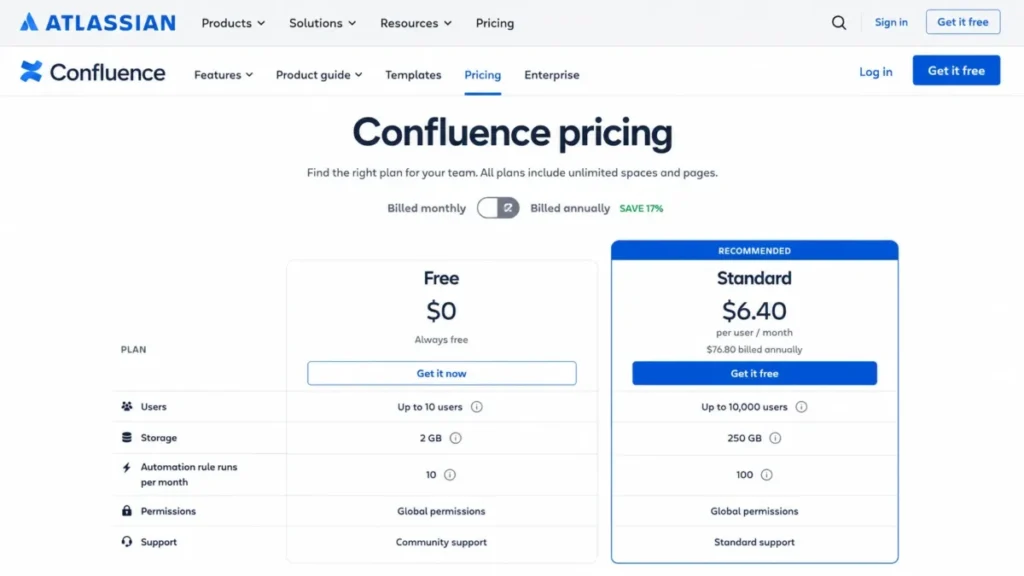
- the official page displayed Standard at $5.42 per user/month next to a monthly and annual billing selector.
- Practical tier:
- Standard, because the free tier stops at 10 users and 10 automation rule runs per month.
- Free plan:
- yes, capped at 10 users, 2 GB storage, and 10 automation rule runs per month.
- First limit that bites:
- the automation ceiling, since Standard lists 100 rule runs per month against 10 on Free.
- Better than Notion:
- permission depth across spaces and pages, plus native links between documentation and Jira work items.
- Worse than Slite:
- built-in freshness tooling, because ownership and verification cycles are not the organizing idea here.
- Setup difficulty:
- medium to high, since spaces, permission schemes, and app selection need an owner before rollout.
- Hidden costs:
- marketplace apps, storage growth against the 250 GB Standard allowance, and separate Data Center licensing if the deployment leaves cloud.
- Evidence status:
- the Standard amount and the plan caps were read from the official Confluence pricing page on 2026-08-05, which did not expose which billing toggle state produced the displayed figure.
Rank one here is about fit, not about being the cheapest line on the table. For an organization already inside Atlassian, documentation stops being a separate system and becomes another view of the same work.
Our Confluence review covers the space model and editor in more depth. The decisive number sits on Atlassian’s official Confluence pricing page, where the free tier ends at 10 users, so headcount forces the upgrade long before any feature does.
Automation is the second trigger. Ten rule runs per month is enough to test an idea and not enough to run a documentation lifecycle, which is why scheduled page review only becomes practical at the 100-run tier.
Storage is the trigger nobody budgets for. The gap between 2 GB and 250 GB sounds academic until a team starts attaching design files and recorded walkthroughs to pages.
| Pros | Cons |
|---|---|
| Space and page permissions support real governance boundaries | Free tier caps at 10 users, so growth forces a paid decision early |
| Databases, guest access, and Rovo features extend the wiki past static pages | Permission schemes need an administrator, which small teams rarely have |
| Native Jira work links keep documentation attached to delivery | Marketplace dependence adds cost and review overhead |
| Standard’s 100 monthly automation runs make scheduled reviews workable | Data Center is a separate product, not a plan toggle |
- Verdict:
- choose Confluence if Jira is already the system of record and someone will own space permissions; skip it if the wiki has to run itself.
2. Notion: Best for Cross-Functional Teams That Want One Workspace

- Best for:
- startups and cross-functional teams that want a wiki, databases, projects, and lightweight published sites inside a single workspace.
- Avoid if:
- the organization needs advanced governance on the lowest paid tier, or wants a rigid information architecture enforced by default.
- Starting price:
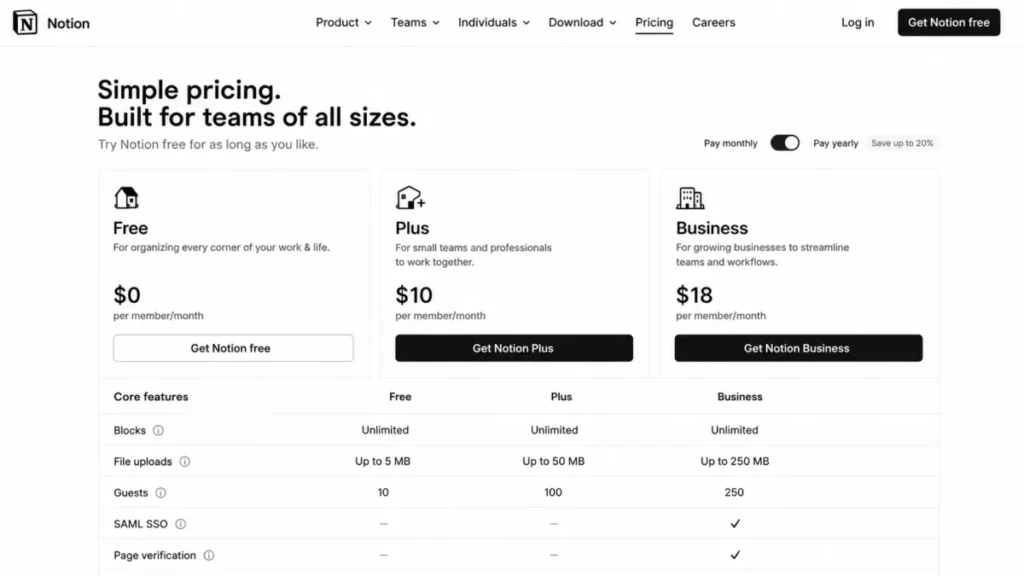
- the official US page displayed Plus at $10 per member/month with a monthly and yearly selector offering up to 20 percent yearly savings.
- Practical tier:
- Business for any team that needs SAML SSO or page verification, since both sit above Plus.
- Free plan:
- yes, with limited collaborative blocks, 5 MB uploads, seven-day page history, and up to 10 external guests.
- First limit that bites:
- seven-day page history on free team use, which is shorter than most incident reviews.
- Better than Confluence:
- speed from blank page to working teamspace, and databases that double as project tracking.
- Worse than Document360:
- published customer documentation, where analytics, approval routing, and SEO controls are purpose-built elsewhere.
- Setup difficulty:
- low to start, medium to keep tidy, because structure is a convention rather than a constraint.
- Hidden costs:
- the Business step taken for governance rather than features, plus AI usage on top of the member price.
- Evidence status:
- the Plus amount, the free-tier caps, and the Business-tier placement of SAML SSO and page verification were read from the official Notion pricing page on 2026-08-05.
Flexibility is the product and the risk. A teamspace can hold documentation, a project database, and a public page, which is why Notion wins evaluations and then drifts.
Governance is where the plan math changes. Notion’s official pricing page puts SAML SSO and page verification on the Business tier, so a security review, not a feature request, is what moves a team off Plus.
The seven-day history window on free team use deserves a second look before any pilot. Recovering a page edited two weeks ago is a paid capability, and that is usually discovered at the worst possible moment.
Our Notion review goes deeper on databases and teamspaces.
The Notion vs Confluence comparison covers the structure trade-off directly.
For budget planning, the Notion pricing guide breaks the tiers down further.
| Pros | Cons |
|---|---|
| Wiki, databases, projects, and sites share one workspace and one bill | SAML SSO is gated to Business, which raises the real governance price |
| Up to 10 external guests on free team use suits small client work | Page verification is also a Business feature, not a Plus one |
| Page verification and teamspaces add ownership when enabled | Seven-day page history on free team use is thin for audit needs |
| Connections and AI features reduce the number of side tools | Structure depends on team discipline rather than enforced hierarchy |
- Verdict:
- choose Notion if one workspace beats one hierarchy for this team; move to Business on day one if security will review the deployment.
3. Slite: Best for Teams Whose Documentation Keeps Going Stale

- Best for:
- distributed teams that treat doc ownership, verification, and knowledge freshness as the main problem rather than page count.
- Avoid if:
- the team needs unlimited AI usage, SSO, SCIM, or audit logs at the entry tier.
- Starting price:
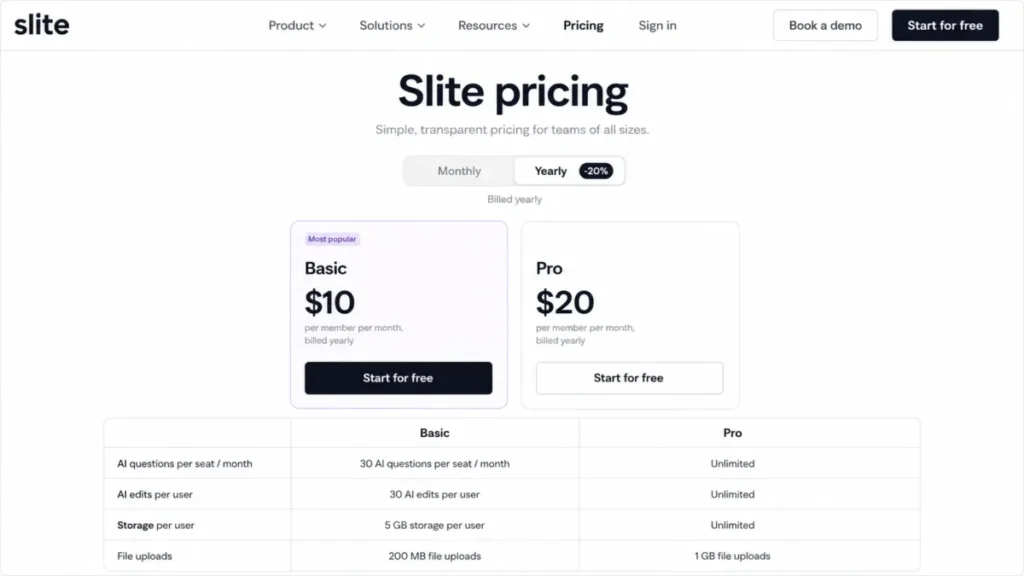
- Basic is $10 per member/month billed yearly, with Pro at $20 per member/month billed yearly and Enterprise on a custom quote.
- Practical tier:
- Pro for any team that needs OpenID SSO or the advanced agent features, which Basic does not include.
- Free plan:
- not the basis of this evaluation; the tier structure published on the pricing page starts at Basic.
- First limit that bites:
- 30 AI questions per seat per month on Basic, which a support team consumes in days.
- Better than Slab:
- knowledge maintenance, because ownership, verification cycles, and a stale-content panel are first-class.
- Worse than Confluence:
- enterprise permission depth and ecosystem breadth across a large organization.
- Setup difficulty:
- low to medium, since the structure is shallow and verification is configured per document.
- Hidden costs:
- the Pro step taken for identity rather than features, plus storage beyond 5 GB per user.
- Evidence status:
- the Basic and Pro amounts, the AI caps, the storage allowance, and the Pro placement of OpenID SSO were read from the official Slite pricing page on 2026-08-05.
Freshness is the whole pitch, and it is the right pitch. Documentation fails at review, not at creation, and Slite is one of the few platforms on this list that treats review as a scheduled job with a named owner.
The AI cap is the number to model before signing. Slite’s official pricing page lists 30 AI questions per seat per month and 30 AI edits per user on Basic, alongside 5 GB of storage per user and 200 MB file uploads.
What the official page does not document is the overflow behavior once a seat runs out of questions. That answer belongs in the sales conversation rather than in a spreadsheet assumption.
Our Slite review covers the editor and the knowledge management panel in more detail.
| Pros | Cons |
|---|---|
| Verification cycles and doc owners are core, not add-ons | Basic caps AI at 30 questions and 30 edits per user monthly |
| The knowledge management panel surfaces stale content by default | OpenID SSO requires Pro, doubling the per-member price |
| Unlimited docs with API access and public sharing at the entry tier | Storage is metered at 5 GB per user rather than pooled generously |
| Yearly billing on Basic keeps the entry cost predictable | Advanced agent features are a Pro capability |
- Verdict:
- choose Slite if stale documentation is the pain being bought away; budget for Pro from the start if identity management is in scope.
4. Guru: Best for Governed Answers Delivered Inside Existing Tools

- Best for:
- mid-market and enterprise support, sales, and operations teams that need permission-aware answers surfaced where work already happens.
- Avoid if:
- the team wants transparent self-serve per-seat pricing, or needs fewer than ten paid seats.
- Starting price:
- not published as a number; Guru describes the investment as tailored to scale, knowledge complexity, and AI maturity.
- Practical tier:
- whichever package the quote produces, since all access types carry the same seat price under the billing guide.
- Free plan:
- not the basis of a paid rollout; paid conversion carries a documented ten-seat minimum.
- First limit that bites:
- the ten-seat minimum, which sets the floor before any feature discussion starts.
- Better than Notion:
- answer delivery and governance, with verification, permission awareness, and centralized audit logs treated as core.
- Worse than Slab:
- budget predictability, because there is no published number to model against.
- Setup difficulty:
- medium to high, since value depends on connecting sources and assigning verification owners.
- Hidden costs:
- the seat floor for small teams, plus renewal exposure, since cancellation requires written notice before the renewal date.
- Evidence status:
- the pricing posture came from the official Guru pricing page and the seat minimum, uniform seat pricing, and cancellation terms from the official Guru billing guide, both checked on 2026-08-05.
Delivery is the differentiator worth paying for. Answers appear in the browser, Slack, Teams, Salesforce, Zendesk, and other tools rather than waiting for someone to open a wiki.
Two contract terms deserve a legal read before signature. The Guru subscription and billing guide documents a ten-seat minimum on paid conversion and requires written notice before renewal, which turns an administrative slip into another full term.
Pricing posture is the trade-off. Guru’s official pricing page sets expectations by scale and AI maturity rather than by a number, so a finance approval cannot be prepared before the first call.
Our Guru review covers the verification workflow, and the Guru vs Notion comparison covers the overlap question most teams ask next.
| Pros | Cons |
|---|---|
| Permission-aware answers reach staff inside Slack, Teams, and the browser | No published price, so budgeting requires a sales conversation |
| Verification and governance are platform behavior, not a top-tier gate | A ten-seat minimum excludes small teams from paid conversion |
| Centralized audit logs support security review without an add-on | Written notice before renewal creates a real contract risk |
| More than 100 integrations reduce the number of places knowledge hides | Value depends on connecting sources, which extends rollout |

- Verdict:
- choose Guru if answers must reach people inside their existing tools with permissions intact; skip it if a published price is a procurement requirement.
Wiki Platforms That Also Publish to Readers Outside the Team
Published documentation changes the economics. Readers are not seats, editors are, and the platform has to carry SEO, versioning, and approval routing that an internal wiki never needs. Both platforms earn a place here for one buyer only: the team that needs an internal wiki and a published documentation set out of the same tool. A team that only needs a customer help center is shopping in a different category.
5. Document360: Best for Internal Docs That Also Publish Externally

- Best for:
- support and product documentation teams that need public or private help centers with approval workflows, analytics, and migration services.
- Avoid if:
- the buyer needs to compare prices self-serve before agreeing to a sales conversation.
- Starting price:
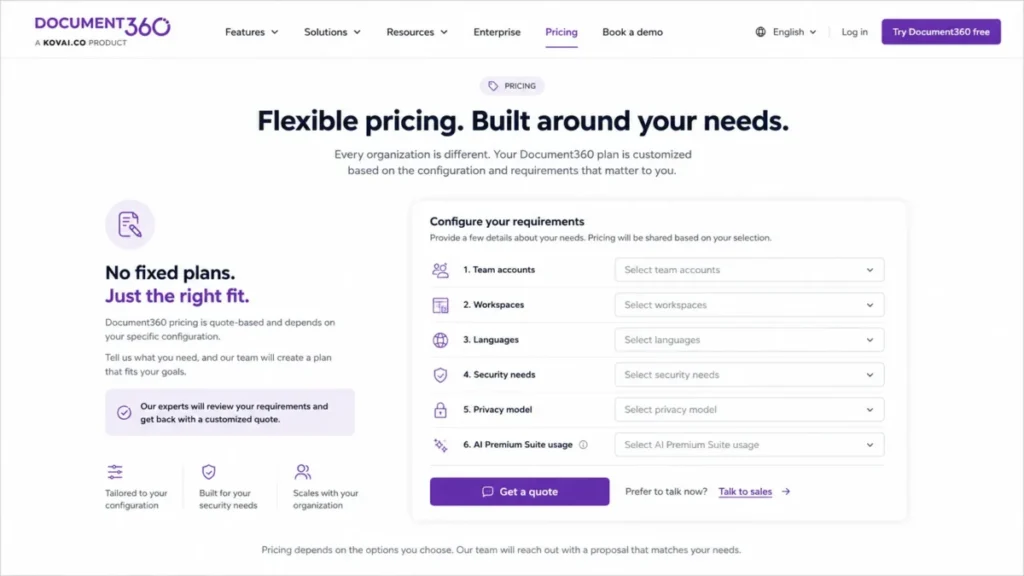
- not published as a number; the quote is built from team accounts, workspaces, languages, security needs, privacy model, and AI Premium Suite usage.
- Practical tier:
- determined by those six inputs rather than by a named plan, which is why two similar teams get different quotes.
- Free plan:
- not the basis of a production help center; the platform is sold as a configured project.
- First limit that bites:
- migration scope, since larger migrations may be scoped and priced separately from the subscription.
- Better than GitBook:
- non-technical publishing, with approval workflows, roles, SEO controls, and search analytics built for support teams.
- Worse than Notion:
- speed of first setup, because a governed help center is a project rather than a page.
- Setup difficulty:
- medium to high, since categories, roles, approval routing, and a branded site all need decisions.
- Hidden costs:
- separately scoped migration work, language expansion, and AI Premium Suite usage layered onto the base quote.
- Evidence status:
- the six quote inputs, the platform scope, and the separate migration scoping were read from the official Document360 pricing page on 2026-08-05.
Six configuration inputs is unusually honest, and unusually hard to budget. Document360’s official pricing page states that the quote depends on team accounts, workspaces, languages, security needs, privacy model, and AI usage, which means the shape of the content program determines the invoice.
Migration is the line item most teams miss. A large legacy help center can be scoped and priced separately from the subscription, so the first-year total is rarely the annual figure alone.
Our Document360 review covers the editor, approval routing, and analytics in more depth.
| Pros | Cons |
|---|---|
| Approval workflows and roles fit regulated or multi-author teams | No flat public price, so comparison requires a sales call |
| Search analytics and article feedback show which docs fail readers | Larger migrations may be scoped and charged separately |
| SSO, SCIM, and revision history are in the platform scope | Six configuration inputs make quotes hard to compare vendor to vendor |
| Public and private projects run from the same platform | Setup is a documentation project, not a same-day rollout |
- Verdict:
- choose Document360 if customers read the documentation and someone must approve it first; skip it if the requirement is an internal wiki with a published price.
6. GitBook: Best for API Reference, Not a Large Internal Audience

- Best for:
- developer relations and product teams publishing API references and technical documentation through Git workflows.
- Avoid if:
- the need is a general internal wiki, or the budget model has to be a single per-seat figure.
- Starting price:
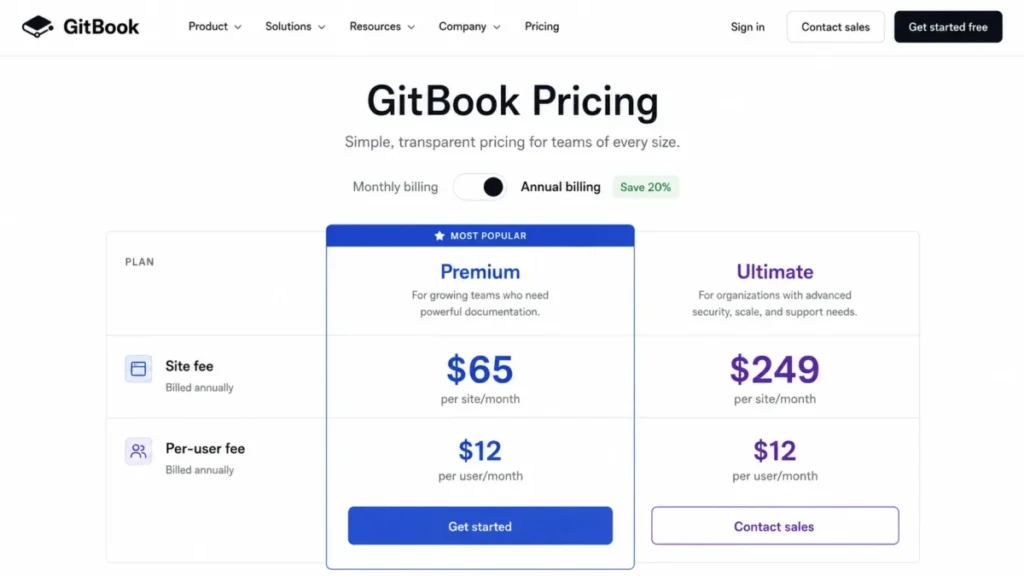
- Premium is $65 per site/month plus $12 per user/month under annual billing, and Ultimate is $249 per site/month plus the same $12 per user/month.
- Practical tier:
- Premium for one documentation site, moving to Ultimate only when the site count or governance needs grow.
- Free plan:
- not the basis of this evaluation; the published tiers combine a site fee with paid collaborator seats.
- First limit that bites:
- the seat definition, because app users holding view-only permissions still consume paid seats.
- Better than Document360:
- engineering workflow fit, with branch-based edits, change requests, and Git sync built in.
- Worse than Slite:
- internal knowledge maintenance, since the product is aimed at published output rather than doc ownership.
- Setup difficulty:
- medium, and lower for teams already comfortable with pull-request review.
- Hidden costs:
- the per-site fee stacked on seats, plus Enterprise-only migration support and Git Sync IP allowlisting.
- Evidence status:
- the Premium and Ultimate amounts, the seat rule for view-only app users, and the Enterprise-only migration and allowlisting notes were read from the official GitBook pricing page on 2026-08-05.
Two-part pricing is the detail that breaks spreadsheets. GitBook’s official pricing page charges a site fee and a seat fee, so a ten-person team on Premium pays $65 plus $120 for a monthly equivalent of $185 under annual billing.
The seat definition is the second surprise. Read-only access inside the app is not free, which makes a large internal audience expensive in a product otherwise optimized for public readers.
Migration help is gated. Teams importing a large legacy documentation set should confirm that support is included in their tier before committing to a date, because it sits at the Enterprise level.
| Pros | Cons |
|---|---|
| Git sync and change requests match how engineering already reviews work | The site fee is charged on top of every paid seat |
| API playgrounds and versioned docs suit reference material | View-only app users still require paid seats |
| Custom domains, analytics, and AI search support a public docs site | Migration support is an Enterprise-tier capability |
| Documentation imports ease a first move from an older tool | Git Sync IP allowlisting is also Enterprise-only |
- Verdict:
- choose GitBook if the documentation ships like code and the audience is mostly outside the app; skip it if most readers need in-app access.
Wiki Platforms Built for Small Teams and Low Administration
Problem 1 dominates this group. Each of the three keeps administration light, and each defines a billable user differently enough to change the invoice.
7. Nuclino: Best for Small Teams That Want Almost No Setup

- Best for:
- small product, design, and operations teams that value fast onboarding, visual linking, and a light editor over configuration depth.
- Avoid if:
- the team needs SAML SSO, audit logs, unlimited history, or non-billable guest and read-only seats on a lower tier.
- Starting price:
- the official page exposed plan names and limits, but the numeric amounts were not present in the captured page text, so no figure is asserted here.
- Practical tier:
- Starter for a paying team, with the caveat that its history window is 30 days.
- Free plan:
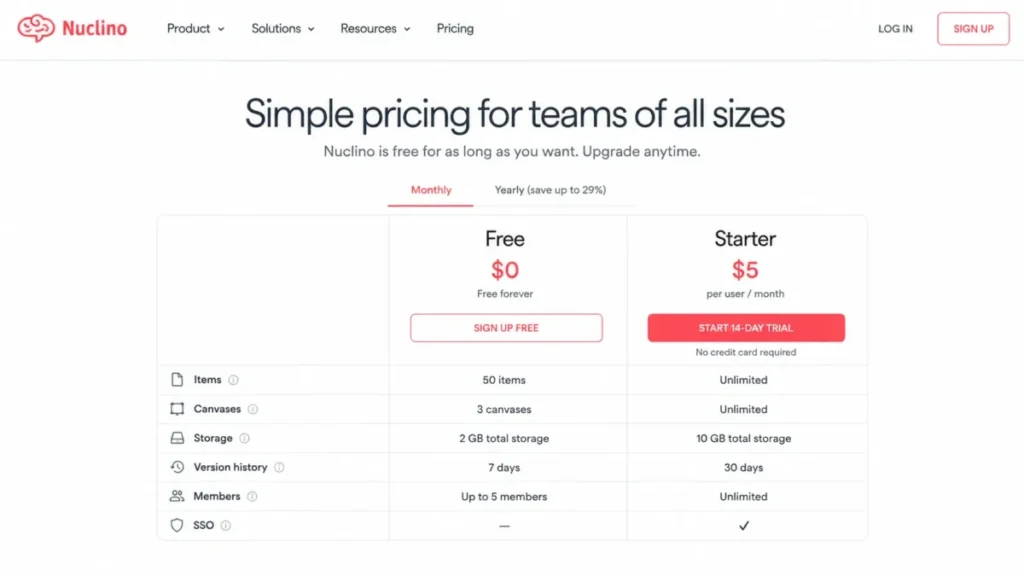
- yes, capped at 50 items, three canvases, and 2 GB of total storage.
- First limit that bites:
- the 50-item cap on Free, which a small team reaches inside a single quarter.
- Better than Slab:
- visual structure, since canvases and list, board, table, and graph views present the same content four ways.
- Worse than Confluence:
- administrative control, because permission depth and enterprise identity are not the design goal.
- Setup difficulty:
- low, and the lowest on this list for a team without an administrator.
- Hidden costs:
- every user on a paid plan is billable, including guests and read-only members.
- Evidence status:
- the plan caps, the 30-day history window, and the billable-user rule were read from the official Nuclino pricing page on 2026-08-05, which did not expose numeric plan amounts in its accessible text.
The seat rule matters more here than anywhere else on this list. Nuclino’s official pricing page confirms that every user on a paid plan counts as billable, so inviting a contractor or a read-only stakeholder is a budget decision.
Free is a genuine trial rather than a long-term tier. Fifty items and three canvases will hold a small handbook and stop there.
Our Nuclino review covers the editor and graph view in more depth.
| Pros | Cons |
|---|---|
| Fastest path from empty workspace to usable pages | Free stops at 50 items, three canvases, and 2 GB total storage |
| Canvases and graph view make relationships visible | Starter keeps only 30 days of history |
| List, board, table, and graph views cover several work styles | Guests and read-only members are billable on paid plans |
| API, apps, and integrations exist despite the light footprint | No published numeric price was captured from the pricing page text |
- Verdict:
- choose Nuclino if speed of adoption outranks control and every member will be a paying editor; skip it if a large read-only audience needs access.
8. Slab: Best for a Clean Internal Wiki at the Lowest Published Seat Price
- Best for:
- internal knowledge teams wanting a clean wiki, verification, and unified search across existing work tools.
- Avoid if:
- read-only accounts, large attachments, API access, or enterprise identity controls are required on a low tier.
- Starting price:
- Startup at $6.67 per user/month billed annually.
- Practical tier:
- Business at $12.50 per user/month for GraphQL API, SAML SSO, and SCIM.
- Free plan:
- yes, for 10 users, with 10 MB attachments and 90 days of history.
- First limit that bites:
- the identity gate, since SAML SSO and SCIM both require Business.
- Better than Tettra:
- entry price and history retention, with 365 days on Startup.
- Worse than Confluence:
- permission granularity for a large organization.
- Setup difficulty:
- low, with topics and posts instead of nested space hierarchies.
- Hidden costs:
- the Business step taken for identity and API access, plus attachment limits pushing files elsewhere.
- Evidence status:
- the Startup, Business, and Enterprise structure, the attachment and history limits, and the Business placement of GraphQL API, SAML SSO, and SCIM were read from the official Slab pricing page on 2026-08-05.
The cheapest published seat on this list belongs to Slab, and the arithmetic holds up: Slab’s official pricing page lists Startup at $6.67 per user/month billed annually, which is $66.70 a month for ten people.
Enterprise starts at 100 users, so mid-sized teams have exactly one upgrade path. Business at $12.50 nearly doubles the seat cost, and it is identity rather than features that usually forces the move.
| Pros | Cons |
|---|---|
| Lowest published entry seat price among the internal wikis here | SAML SSO and SCIM require the Business tier |
| Startup keeps 365 days of version history | GraphQL API access is also a Business capability |
| Verification and unified search reduce duplicate answers | Free attachments stop at 10 MB, and Startup at 25 MB |
| Topics and posts keep the structure obvious without admin work | Enterprise starts at 100 users, leaving one mid-market step |
- Verdict:
- choose Slab if the budget is tight and identity can wait a year; skip it if security signs off before the first import.
9. Tettra: Best for Slack-First Question Capture

- Best for:
- Slack-centric teams of at least ten people that want Q&A capture, AI answers, and a simple internal knowledge base.
- Avoid if:
- the team has fewer than ten paid users, needs a non-English admin interface, or needs SSO without an enterprise contract.
- Starting price:
- Scaling at $8 per user/month, with a ten-user minimum.
- Practical tier:
- Scaling for most teams, with Enterprise only when SSO and SCIM enter scope.
- Free plan:
- not the basis of a paid rollout; the ten-user minimum defines the entry commitment.
- First limit that bites:
- that minimum, which sets an $80 monthly floor even for a team of six.
- Better than Slab:
- capture workflow, since questions arrive in Slack and become pages with owners.
- Worse than Slite:
- depth of freshness tooling across a large document set.
- Setup difficulty:
- low, with the Slack and Google Workspace connections doing most of the work.
- Hidden costs:
- paying for unused seats below ten, and the Enterprise step required for identity management.
- Evidence status:
- the Scaling amount, the ten-user minimum, the Enterprise-only SSO and SCIM placement, and the English-only interface note were read from the official Tettra pricing page on 2026-08-05.
The floor is the story. Tettra’s official pricing page displays $8 per user/month with a ten-user minimum, so a six-person team pays $80 a month and leaves four seats unused.
Above ten people the model works well, because the capture loop starts where the question was already asked. Our Tettra review covers the Q&A workflow in more depth.
| Pros | Cons |
|---|---|
| Questions asked in Slack become owned pages instead of lost threads | The ten-user minimum creates an $80 monthly floor |
| AI answers surface in channels and direct messages | SSO and SCIM are Enterprise-only |
| Usage analytics show which answers people keep asking for | The application interface is English-only |
| API access and Google Workspace integration are included in Scaling | Depth of document governance trails the specialists here |
- Verdict:
- choose Tettra if the team already lives in Slack and has ten or more people; skip it below that headcount, where the minimum is pure waste.
Wiki Platforms Built for Self-Hosted Control
One entry answers a question the other nine cannot: what happens when the data has to stay on infrastructure the buyer controls.
10. XWiki: Best for Open-Source and On-Premises Deployments

- Best for:
- organizations needing open-source extensibility, on-premises deployment, structured applications, and paid support options.
- Avoid if:
- there is no technical administration capacity, or procurement requires a published US-dollar quote.
- Starting price:
- no verified US-dollar amount was published on the accessible official page, which directs buyers to contact XWiki for paid plans.
- Practical tier:
- above Starter for most organizations, since Starter is capped at 25 users.
- Free plan:
- yes in effect, because the Community edition is self-managed and free to run.
- First limit that bites:
- the 25-user cap on Starter, followed by the CET support window for teams in US time zones.
- Better than Confluence:
- deployment control, with on-premises hosting and granular rights under the buyer’s own governance.
- Worse than Notion:
- time to first useful page, because the platform has to be installed and configured first.
- Setup difficulty:
- high, since setup, upgrades, backups, and maintenance move to the buyer.
- Hidden costs:
- infrastructure, administration time, and higher-plan licensing for advanced migration tooling.
- Evidence status:
- the pricing posture and Starter cap came from the official XWiki pricing page, and the trial, billing-unit, and migration-plan boundaries from the official XWiki cloud FAQ, both checked on 2026-08-05.
Self-hosting is a staffing decision dressed as a licensing decision. XWiki’s official pricing page points paid buyers to a contact path rather than a US-dollar figure, so the comparison against a $5 per-seat cloud wiki has to include administrator hours.
Support hours are the second practical constraint. A CET support window works for European operations and leaves a US afternoon incident waiting until the next morning.
| Pros | Cons |
|---|---|
| Cloud, on-premises, and self-managed deployment from one codebase | No verified US-dollar amount published for paid plans |
| Extensions and structured applications go beyond page editing | Setup, upgrades, and backups become the buyer’s responsibility |
| Granular rights and authentication options satisfy strict governance | Starter is capped at 25 users |
| Professional support and migration tooling are available commercially | Support hours are CET, and advanced migration tooling sits on higher plans |
- Verdict:
- choose XWiki if data residency or extensibility outranks convenience and an administrator exists; skip it if nobody owns upgrades.
What a Wiki Costs Once Identity and Reader Access Are Settled
Entry price is the least useful number on this page. What matters is the tier a team lands on after identity, history, and reader access are settled.
| Platform | Entry tier | Practical tier trigger | Ten-seat monthly equivalent | Pricing state |
|---|---|---|---|---|
| Confluence | Standard displayed at $5.42 per user/ | Free caps at 10 users and 10 automation runs | $54.20 | Published |
| Notion | Plus displayed at $10 per member/ | SAML SSO and page verification sit on Business | $100.00 | Published |
| Slite | Basic $10 per member/ | OpenID SSO and agent features require Pro at $20 | $100.00 | Published |
| Guru | Quote only, ten-seat minimum | Seat minimum applies before any feature choice | Not calculable | Custom |
| Document360 | Quote only, six configuration inputs | Languages, security model, and AI usage move the quote | Not calculable | Custom |
| GitBook | Premium $65 per site/ | Migration support and IP allowlisting need Enterprise | $185.00 | Published |
| Nuclino | Published tiers, numeric amount not captured | Free stops at 50 items and three canvases | Not calculable | Published, not captured |
| Slab | Startup $6.67 per user/ | SAML SSO, SCIM, and GraphQL API need Business at $12.50 | $66.70 | Published |
| Tettra | Scaling $8 per user/ | SSO and SCIM require an Enterprise contract | $80.00 | Published |
| XWiki | Community edition self-managed | Starter is capped at 25 users | Not calculable | Undisclosed in US dollars |
Source: official pricing pages for all ten vendors, plus the Guru billing guide for the seat minimum, checked 2026-08-05. Region: US. Amounts are list figures and change without notice.
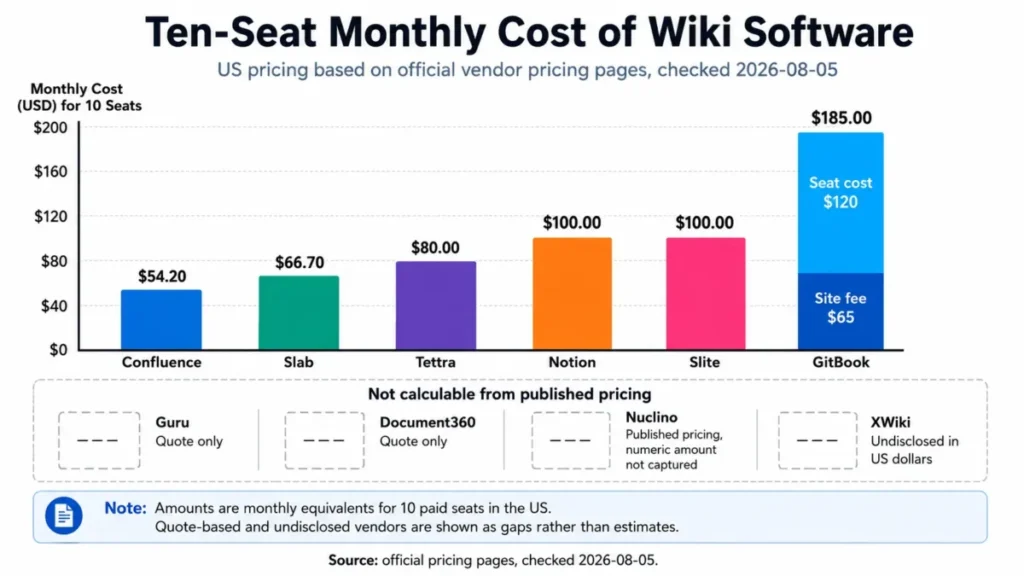
Four platforms cannot be placed on that chart at all, and pretending otherwise is how shortlists produce numbers nobody can defend in a budget review.
The Arithmetic Behind the Ten-Seat Column
Every figure above is a straight multiplication of the published rate by ten seats, with one exception that needs its own line.
- Confluence Standard: 10 users x $5.42 = $54.20 per month at the displayed rate.
- Notion Plus: 10 members x $10 = $100.00 per month at the displayed rate.
- Slite Basic: 10 members x $10 = $100.00 per month on yearly billing.
- Slab Startup: 10 users x $6.67 = $66.70 per month on annual billing.
- Tettra Scaling: 10 users x $8 = $80.00 per month, which is also the contractual floor.
- GitBook Premium: one site at $65 + (10 users x $12) = $185.00 per month on annual billing.
GitBook is the exception because the site fee is not a seat fee. A team comparing $12 against $10 elsewhere is comparing the wrong half of the invoice.
Assumptions behind all six: ten paid editors, one workspace or site, US region, and the billing cadence shown on each vendor’s page on 2026-08-05. Guru, Document360, Nuclino, and XWiki are excluded because no official numeric input was available to multiply.
Guest, Reader, and Viewer Billing Rules
The seat definition decides the invoice more often than the seat price does, and the four models below are genuinely different products from a finance perspective.
| Platform | Who counts as billable | Buyer consequence |
|---|---|---|
| Nuclino | Every user on a paid plan, including guests and read-only members | A read-only stakeholder costs the same as an editor |
| GitBook | Paid seats for app users even with view-only permissions | Internal reader access is expensive, public reader access is not |
| Notion | Members are billed; free team use allows up to 10 external guests | Guest-heavy client work fits the free tier, briefly |
| Guru | All access types carry the same seat price, with a ten-seat minimum | Occasional readers cost full price, so seat hygiene matters |
Source: official Nuclino, GitBook, and Notion pricing pages, plus the official Guru billing guide, checked 2026-08-05.
Before shortlisting, count the people who will only ever read. If that number is larger than the editor count, GitBook and Nuclino move down the list and a published help center moves up it.
Feature Gate Comparison
Feature gates decide the real price of a wiki, because the tier a team needs is set by governance rather than by editing. Cells below record only what the collected official pages state, and unknown behavior is left unknown rather than inferred.
| Platform | Identity gate | Audit or verification | AI usage limit | API access | Version history |
|---|---|---|---|---|---|
| Confluence | Not documented in the sources checked | Not documented in the sources checked | Not documented in the sources checked | Not documented in the sources checked | Not documented in the sources checked |
| Notion | SAML SSO on Business | Page verification on Business | Not documented in the sources checked | Not documented in the sources checked | Seven days on free team use |
| Slite | OpenID SSO on Pro | Verification cycles at entry tier | 30 questions and 30 edits per user monthly on Basic | Included at entry tier | Not documented in the sources checked |
| Guru | Not documented in the sources checked | Centralized audit logs described as core | Not documented in the sources checked | Not documented in the sources checked | Not documented in the sources checked |
| Document360 | SSO and SCIM in platform scope | Approval workflows in platform scope | AI Premium Suite usage is a quote input | In platform scope | Revision history in platform scope |
| GitBook | Git Sync IP allowlisting on Enterprise | Change requests at Premium | Not documented in the sources checked | Not documented in the sources checked | Version history in product scope |
| Nuclino | No SAML SSO on lower tiers | No audit logs on lower tiers | Not documented in the sources checked | API available | 30 days on Starter |
| Slab | SAML SSO and SCIM on Business | Verification in product scope | Not documented in the sources checked | GraphQL API on Business | 90 days Free, 365 days Startup |
| Tettra | SSO and SCIM on Enterprise | Usage analytics in Scaling | Not documented in the sources checked | API access in Scaling | Not documented in the sources checked |
| XWiki | Authentication options configurable | Granular rights configurable | Not documented in the sources checked | Extension-based | Not documented in the sources checked |
Source: official pricing and help pages for each vendor, checked 2026-08-05. Blank behavior is recorded as undocumented rather than assumed.
Half of this grid is honestly unknown from public pages, and that is itself a finding. Any vendor whose row is mostly undocumented should be asked to confirm identity, audit, and retention behavior in writing before a contract is signed.
Security and Administration: Where SSO, SCIM, and Audit Logs Unlock
Security review is where a $10 wiki becomes a $20 wiki. Four of these platforms move identity controls one or two tiers above the entry plan, and one treats them as a contract-only capability.
| Platform | First tier with the identity control | What that costs in practice |
|---|---|---|
| Notion | Business for SAML SSO | A step above Plus taken for security, not features |
| Slite | Pro for OpenID SSO | Doubles the per-member rate from the Basic tier |
| Slab | Business for SAML SSO and SCIM | Roughly doubles the Startup seat rate |
| Tettra | Enterprise for SSO and SCIM | Leaves the published rate entirely and becomes a quote |
Source: official Notion, Slite, Slab, and Tettra pricing pages, checked 2026-08-05.
Guru and Document360 sit outside that pattern. Guru describes centralized audit logs as core platform behavior, and Document360 lists SSO and SCIM inside its platform scope, which is part of why both sell through a quote instead of a price grid.
Ask the security team one question before the shortlist is fixed: is SSO required at go-live or at the next audit. The answer moves at least three of these platforms up or down a full tier.
AI Features and Documented Usage Limits
AI appears on almost every one of these pricing pages. Only one of them publishes a number that a buyer can plan against.
| Platform | Documented AI limit | What is not documented |
|---|---|---|
| Slite | 30 AI questions per seat and 30 AI edits per user monthly on Basic | Overflow behavior once a seat exhausts its quota |
| Document360 | AI Premium Suite usage is one of six quote inputs | The unit of usage and the price per unit |
| Guru | AI maturity is described as a pricing input | Any published quota, tier, or overage rate |
| Notion, Confluence, GitBook, Slab, Tettra, Nuclino, XWiki | No quota published in the pages checked | Whether AI usage is metered at all |
Source: official Slite, Document360, and Guru pricing pages, plus the remaining vendors’ pricing pages, checked 2026-08-05.
Slite’s 30 questions per seat is the only figure on this page that a support manager can model. Thirty questions is roughly one working day for an agent handling live tickets, which puts Pro in scope for that use case far earlier than the feature list suggests.
Nothing in the collected pages states what happens at the cap: queued, blocked, billed, or reset. Treat any assumption about overage as an open question for procurement rather than a planning input.
Version History and Recovery by Tier
Retention is the control nobody checks until an incident review needs a page from three weeks ago.
| Platform | Documented retention | Where it becomes a problem |
|---|---|---|
| Notion | Seven days on free team use | Any postmortem, audit, or dispute older than a week |
| Nuclino | 30 days on Starter | Quarterly compliance checks and long project cycles |
| Slab | 90 days on Free, 365 days on Startup | Only for multi-year record-keeping obligations |
| Others on this list | Not documented in the pages checked | Confirm retention in writing before migrating records |
Source: official Notion, Nuclino, and Slab pricing pages, checked 2026-08-05.
Seven days is the outlier that should shape a Notion pilot. A team running its incident process in a free workspace is one week away from losing the edit trail it will be asked to produce.
How Much Setup Each Wiki Needs Before the First Page
Setup effort tracks governance depth almost perfectly. The platforms that give the most control ask for the most configuration before anyone writes a page.
| Platform | Setup difficulty | Why |
|---|---|---|
| Nuclino | Low | Items and canvases need no permission design to start |
| Slab | Low | Topics and posts replace nested hierarchies |
| Tettra | Low | Slack and Google Workspace connections carry most of the setup |
| Notion | Low to medium | Fast to start, ongoing effort to keep structure honest |
| Slite | Low to medium | Shallow structure, with verification configured per document |
| GitBook | Medium | Familiar to teams already reviewing pull requests |
| Guru | Medium to high | Value depends on connecting sources and assigning verification owners |
| Document360 | Medium to high | Categories, roles, approval routing, and a branded site all need decisions |
| Confluence | Medium to high | Spaces, permission schemes, and app selection need an owner |
| XWiki | High | Installation, upgrades, backups, and maintenance sit with the buyer |
Source: editorial assessment built from the documented deployment model, permission model, and configuration scope on each vendor’s official pages, checked 2026-08-05.
The pattern is worth stating plainly: low setup and deep governance do not coexist on this list. A team that wants both is asking for a quote-based platform where the vendor absorbs the configuration work.
Migration and Switching Considerations
Migration is where wiki projects quietly fail, and none of these vendors treats it as a single feature. Import, history, permissions, attachments, and cleanup are four or five different problems.
Before committing to a platform, confirm these five items in writing:
- Whether page history migrates or only current versions land in the new system.
- Whether permissions and space or teamspace membership map across, or get rebuilt by hand.
- Whether attachments transfer, and how they count against the new storage allowance.
- Who does the cleanup on duplicate, orphaned, and outdated pages after import.
- Whether migration assistance is included in the tier being quoted.
That last point separates this list sharply. GitBook places migration support at the Enterprise level, Document360 states that larger migrations may be scoped and priced separately, and XWiki gates advanced migration tooling to higher plans.
Storage is the second migration trap. Moving an attachment-heavy Confluence space onto a plan metered at 5 GB per user, as Slite’s Basic tier is, converts a one-time import into a recurring cost.
History is the third. A team leaving a system with years of revisions and landing on a tier that keeps 30 days is not migrating the record, only the current text.
Our how to choose knowledge base software guide walks the evaluation sequence, and the knowledge base requirements template turns these five questions into something a vendor can answer on the record.
Switch or Stay
Switching wikis costs more than the difference in seat price for at least two quarters. Three conditions justify it, and everything else is usually a configuration problem in the existing tool.
- Switch when the current platform cannot enforce SSO, SCIM, or audit logging that an audit now requires.
- Switch when reader billing has made the current platform cost more than the documentation is worth.
- Switch when documentation is customer-facing and the current tool has no approval routing or publishing analytics.
- Stay, and fix ownership instead, when the complaint is that nobody can find anything.
Cloud Versus Self-Hosted Operating Burden
Open source is free to license and never free to run. XWiki’s Community edition is the only self-managed option on this list, and its real cost sits in the operations column.
A self-hosted wiki moves these responsibilities to the buyer:
- Server provisioning, capacity planning, and storage growth.
- Version upgrades, security patching, and extension compatibility testing.
- Backups, restore testing, and disaster recovery.
- Authentication integration and rights administration.
- Uptime monitoring and incident response.
The XWiki cloud FAQ documents trial, billing-unit, and migration-plan boundaries for the hosted option, which is the shorter path for teams that want the platform without the operations. Support hours run on CET, so a US team should confirm coverage expectations before treating it as a production dependency.
One honest comparison: an administrator spending four hours a month on a self-hosted wiki costs more than ten Slab Startup seats. Self-hosting earns its place on data residency, extensibility, or licensing policy, not on price.
Keeping the Wiki Trusted After Month Three
Search is not the problem. Ownership is, and the platforms that solve it do so with the same four-step loop.
Step one, assign an owner to every page that matters. A page without a named owner has nobody to ask when it goes wrong, which is where Slite, Slab, and Guru put their design effort.
Step two, set a review cycle rather than a review intention. Slite schedules verification per document, Notion offers page verification on Business, and Guru treats verification as an assignable task.
Step three, work a stale queue. Slite’s knowledge management panel exists to surface aging content, and without an equivalent view the review cycle becomes a calendar reminder nobody honors.
Step four, close the loop where the question was asked. Tettra converts Slack questions into owned pages, and Guru delivers verified answers back into Slack, Teams, and the browser so nobody has to remember the wiki exists.
Teams running documentation without these four steps end up rebuilding the wiki every 18 months. That rebuild costs far more than the tier difference this article has spent ten sections measuring.
How to Choose the Right Wiki Software
Work through these seven questions in order. The first three eliminate more candidates than any feature comparison.
Who reads, and who writes? Count editors and readers separately, because Nuclino and GitBook bill both while a published help center bills only editors.
Is the documentation internal, customer-facing, or developer-facing? Internal points to Confluence, Notion, Slite, Slab, Nuclino, or Tettra, customer-facing to Document360, and API reference material to GitBook.
When does security review happen? If SSO or SCIM is required at go-live, the practical tier is Business on Notion and Slab, Pro on Slite, and an Enterprise contract on Tettra.
What is the smallest team size the vendor will sell to? Guru and Tettra both carry a ten-seat commitment, which prices out teams of six regardless of fit.
How much history must survive? Match the retention window to the longest audit, dispute, or compliance cycle the team faces, not to the average one.
What is migrating, and who cleans it up? Get history, permissions, attachments, and cleanup ownership answered before signing, not after the import date is set.
Who administers this in 12 months? Confluence, Document360, and XWiki all assume a named administrator, and the deployment degrades quickly without one.
For teams evaluating adjacent categories at the same time, the team collaboration tools roundup and the small business collaboration software shortlist cover the overlap.
Common Mistakes When Choosing Wiki Software
Budgeting from the entry price. The practical tier on this list is one or two steps up for identity reasons, so a $10 plan is frequently a $20 plan.
Counting editors and ignoring readers. Reader billing is the single largest source of invoice surprise across these ten platforms.
Treating “supports imports” as a migration plan. Import covers current text, and history, permissions, attachments, and cleanup each need their own answer.
Assuming AI is unmetered. Only Slite publishes a usable quota, and no vendor here documents what happens when the quota runs out.
Skipping the retention question. A seven-day or 30-day history window will eventually be discovered during an incident review rather than during evaluation.
Calling open source free. Self-hosting trades licensing cost for administrator hours, backups, and upgrade testing.
Choosing a tool nobody will own. Every platform here degrades without a named owner per page, and the ones with built-in verification make that failure visible sooner.
Final Verdict
Confluence takes the top position for one micro-cohort: a product, engineering, or IT organization already inside Atlassian that needs governed documentation attached to delivery work. That cohort fit is the ranking reason, because the daily workflow already sits in Jira.
The plan gate that decides the budget is the free tier’s ten-user ceiling on the official Confluence pricing page checked on 2026-08-05. Read every entry below as a winner by scenario, so if the cohort changes, the ranking reason changes with it.
Notion is the stronger choice for a cross-functional team that would rather have one workspace than one hierarchy, provided the move to Business is budgeted from the start rather than after a security review. Slite is the better fit when the stated problem is stale documentation, because ownership and verification are the product rather than an add-on.
For published documentation, the split is clean. Document360 suits support and product teams who need approval routing and analytics, while GitBook suits engineering teams whose documentation ships through branches and change requests.
On budget, Slab at $6.67 per user/month billed annually is the lowest published entry seat here, and Tettra is the better pick above ten people who already live in Slack. Nuclino wins on speed of adoption for teams where every member is a paying editor.
Guru is the specialist worth a quote when governed answers must reach staff inside their existing tools, and XWiki is the answer when data residency or extensibility outranks convenience. Neither belongs on a shortlist assembled around a published per-seat number.
The recommendation that applies to every buyer here: pick two platforms, price the tier that clears the security review rather than the entry tier, and run an authorized pilot with real documentation before committing to an annual term.
Frequently Asked Questions
What is the best wiki software for a small business?
For a small business under ten people, Slab is the strongest starting point because Startup is $6.67 per user/month billed annually and the free tier covers 10 users with 90 days of history.
Nuclino is the alternative when setup speed matters more than retention, though every user on a paid plan is billable, including read-only members.
Is Confluence or Notion better for a company wiki?
Confluence is the better fit when Jira is already the system of record and someone will own space permissions, because permission depth and work-item links are its structural advantages.
Notion is better when a team wants documentation, databases, and projects in one workspace. Budget for Business, since SAML SSO and page verification both sit on that tier.
Which wiki software supports SSO and SCIM?
Notion offers SAML SSO on Business, Slab offers SAML SSO and SCIM on Business, Slite requires Pro for OpenID SSO, and Tettra reserves SSO and SCIM for Enterprise.
Document360 lists SSO and SCIM inside its platform scope, and XWiki exposes configurable authentication options. Confluence and GitBook identity gating was not documented in the pages collected on 2026-08-05.
How much does wiki software cost for 10 users?
At ten seats, the published rates work out to $54.20 a month for Confluence Standard, $66.70 for Slab Startup, and $80.00 for Tettra Scaling. Notion Plus and Slite Basic both land at $100.00, and GitBook Premium reaches $185.00 once its site fee is included.
Guru, Document360, Nuclino, and XWiki publish no numeric figure that can be multiplied, so their ten-seat cost requires a quote.
What is the best self-hosted wiki software?
XWiki is the only self-hosted option on this list, and it fits organizations that need on-premises deployment, granular rights, and extension-based customization.
No, unless someone owns installation, upgrades, backups, and patching. Self-hosting converts a licensing cost into an administration cost, and the accessible official page publishes no verified US-dollar figure for paid plans.
Which wiki tool is best for developer documentation?
GitBook, because Git sync, branch-based edits, change requests, and API playgrounds match how engineering already reviews work.
The cost model needs checking first. A site fee of $65 per month on Premium sits on top of $12 per user/month, and app users with view-only permissions still consume paid seats.
How do companies keep wiki pages up to date?
By assigning an owner to every page, setting a review cycle per document, working a queue of aging content, and capturing new questions where they are asked.
Slite builds all four into the product with ownership, verification cycles, and a knowledge management panel. Guru, Slab, and Notion offer verification, with Notion’s version gated to Business.
Can wiki software replace a knowledge base?
Yes, if the audience is internal and readers are already paid users of the workspace.
No, unless the tool supports approval routing, SEO controls, and publishing analytics for a customer-facing site. That is the boundary where Document360 and GitBook replace an internal wiki rather than extend it.
Which wiki software integrates best with Slack?
Tettra is built around it, turning Slack questions into owned pages and returning AI answers in channels and direct messages, though the Scaling plan carries a ten-user minimum.
Guru also delivers permission-aware answers into Slack alongside Teams, Salesforce, and Zendesk, which suits larger support and sales teams that need governance with the delivery.
How hard is it to migrate from Confluence?
Harder than the import button suggests, because history, permissions, attachments, and cleanup are four separate problems and vendors treat each differently.
GitBook places migration support at the Enterprise level, Document360 may scope larger migrations separately, and XWiki gates advanced migration tooling to higher plans. Confirm all four in writing before setting a cutover date.