An ITSM purchase rarely fails on features. It fails on the second invoice, when the entry price a buyer showed finance turns out to exclude change management, asset objects, API access or the AI agent the demo was built around.
That gap is the whole problem with the best ITSM shortlists on the first page of Google. They compare capability checklists that every vendor passes, then leave the buyer to discover the plan gates alone.
This ranking works the other way around. Every platform below is ordered by how well it serves a named buyer cohort, and every entry states the published price, the tier that carries the real workflow, the first limit that bites, and the buyer who should walk away.
Pricing and plan facts were checked against each vendor’s own page on 2026-08-05.
In This Article (15 sections)
Quick Verdict: Best ITSM Tools by Use Case
| Use case | Best pick | Why it fits |
|---|---|---|
| Global regulated enterprise service operations | ServiceNow IT Service Management | Broadest package scope across incident, change, CMDB and platform AI, with supports audit-oriented governance requirements |
| Free forever for up to 3 agents. | Jira Service Management | The only ranked platform that publishes both plan prices and usage overage rates, inside the Atlassian stack |
| Mid-market IT teams leaving a shared inbox | Freshservice | Three published tiers and a low entry price, so a first service desk can start without a sales cycle |
| Budget pick with the lowest published entry price | ManageEngine ServiceDesk Plus | Lowest published per-technician starting price in this ranking, with cloud and on-premises paths |
| Existing SolarWinds operations estates | SolarWinds Service Desk | Service desk sitting beside the operations tooling the team already runs |
| Desks buying agentic AI inside a published price | SysAid | Prebuilt AI agents and integration credits sit inside a published professional-tier price |
| Consolidating ITSM with endpoint and security work | Ivanti Neurons for ITSM | Cloud, on-premises and hybrid deployment across one Ivanti estate |
| Large BMC and Remedy estates modernizing | BMC Helix ITSM | Enterprise ServiceOps depth for organizations already standardized on BMC |
| Service teams that want unlimited end users and assets | TOPdesk | Per-agent licensing with unlimited end users, tickets and assets on every plan |
| Transparent annual budgeting without a quote | InvGate Service Management | Fixed annual entry price and published per-agent and floor pricing for every tier |
Two picks appear twice on purpose. Jira Service Management wins both the engineering cohort and the free-plan slot because one published plan table answers both questions.
How We Chose and Ranked These Tools
These rankings are based on official vendor pricing pages, official product and capability pages, and the plan tables those pages publish. Pricing, plan gates and usage limits were checked on 2026-08-05.
Each platform was assessed against the same buyer-focused criteria: ITSM and workflow breadth, ecosystem and cohort fit, pricing transparency, plan and usage limit disclosure, deployment and governance options, implementation burden, and evidence quality.
Greater weight was given to the factors that change a purchase decision rather than a feature grid. Those factors are the tier that carries the real workflow, the limit that forces an upgrade, the cost of scaling, and the buyer who should rule a platform out.
Claims that reliable evidence did not support were excluded from the ranking rather than softened. Standard pricing is reported separately from any tier that routes through a sales conversation.
Where These Ten Platforms Overlap and Where They Do Not
A ranked list hides an awkward truth: these ten products do not all chase the same buyer. Three of them publish no price at all, and two of them are bought mainly because the buyer already owns the vendor’s other tooling.
The matrix below reads capability categories against documented feature scope on each vendor’s own pages. Cells use a controlled vocabulary, and every cell is an editorial reading of published feature scope rather than a vendor score.
| Platform | Public list price | On-premises option | Change and problem on entry tier | Asset or CMDB scope on entry tier | Published usage limits |
|---|---|---|---|---|---|
| ServiceNow IT Service Management | No | Not stated on the page | No | Yes | Limited |
| Jira Service Management | Yes | Not stated on the page | Not stated on the page | Yes | Yes |
| Freshservice | Yes | Not stated on the page | No | Not stated on the page | Limited |
| ManageEngine ServiceDesk Plus | Yes | Yes | No | No | Limited |
| SolarWinds Service Desk | Yes | Not stated on the page | Yes | Yes | Yes |
| SysAid | Limited | Private AWS option on Enterprise | Yes | Yes | Yes |
| Ivanti Neurons for ITSM | No | Yes | By plan | By plan | Limited |
| BMC Helix ITSM | No | Not stated on the page | By plan | Yes | Limited |
| TOPdesk | Limited | Not stated on the page | By plan | Yes | Limited |
| InvGate Service Management | Yes | Yes, on Enterprise | No | Yes | Limited |
ServiceNow, Ivanti and BMC compete directly with each other for large regulated estates and barely compete with the rest. Jira Service Management, Freshservice, ManageEngine, SolarWinds, SysAid, TOPdesk and InvGate are the real shortlist for a mid-market desk, and a buyer comparing ServiceNow against InvGate is comparing two different purchases.
The Three Problems Every ITSM Buyer Faces
Reading ten vendor pages back to back surfaces the same three failure points, and they map cleanly onto the three groups of platforms below.
Problem one: governance the auditor will accept
Regulated estates need change control, problem management, a configuration database that reflects reality, and an audit trail nobody edits by hand. Those requirements are what push a buyer toward the platforms that price by quote.
The cost of getting this wrong is not a license fee. It is a failed audit and a remediation project that outlives the contract.
Problem two: a price finance can approve without a sales cycle
The mid-market version of the problem is the opposite. A four-person IT team needs a working desk this quarter and a number it can put in a budget line.
Published pricing is also a governance signal. A vendor that publishes plan tables, usage allowances and overage rates is a vendor whose renewal math a buyer can model in advance.
Problem three: the workflow that only exists on a higher tier
Every platform in this ranking gates something the demo made look standard. Change management, API access, a workflow builder, a sandbox or an AI agent sits one tier above the price in the headline.
That is where a shortlist built from starting prices falls apart. The practical tier, not the entry tier, is the number to budget from.
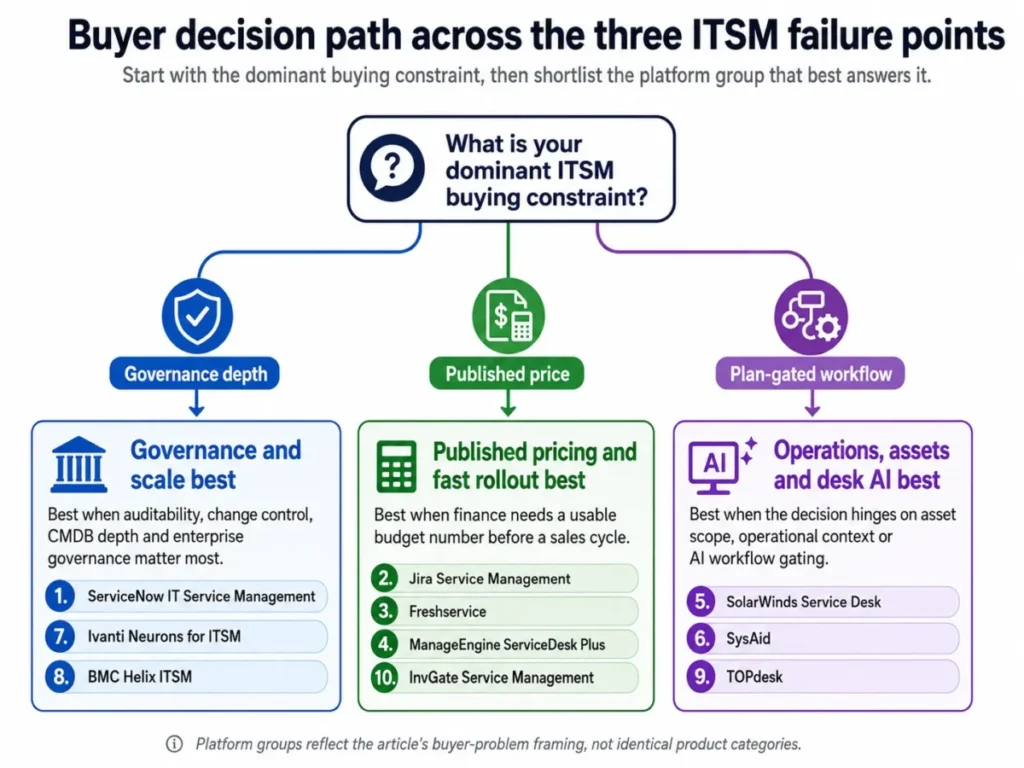
The three sections that follow group the ten platforms by the problem they answer best. Rank order still reflects the overall ranking, so the numbers jump between groups.
Platforms That Solve Governance and Scale Best
These three platforms share a commercial pattern. None of them publishes a list price, all of them expect an implementation program, and all three are bought by organizations where the service desk is one workflow inside a much larger operating model.
ServiceNow IT Service Management: best for global regulated service operations

- Best for: Global enterprises running complex, regulated, cross-functional service operations where governance depth outranks price transparency.
- Avoid if: A small IT team needs a published list price and a light rollout it can run without a systems integrator.
- Starting price: No public list price. The official ITSM pricing page presents packages and a Get Custom Quote action.
- Practical tier: ITSM Advanced, because change and problem management live there.
- Free plan: None published on the pricing page.
- First limit that bites: Change Management and Problem Management are Advanced package capabilities, so a Foundation-only purchase cannot run a change advisory board.
- Better than Ivanti: Published package composition, so a buyer can see what moves between tiers before the sales call.
- Worse than Jira Service Management: Budget modeling, because nothing on the page lets finance forecast a renewal.
- Setup difficulty: High. Catalog design, CMDB population and workflow governance are separate workstreams.
- Hidden costs: Implementation, package upgrades and platform add-ons are all resolved inside the quote rather than on the page.
- Evidence status: Package composition and the custom-quote route were read from the official ServiceNow ITSM pricing page on 2026-08-05.
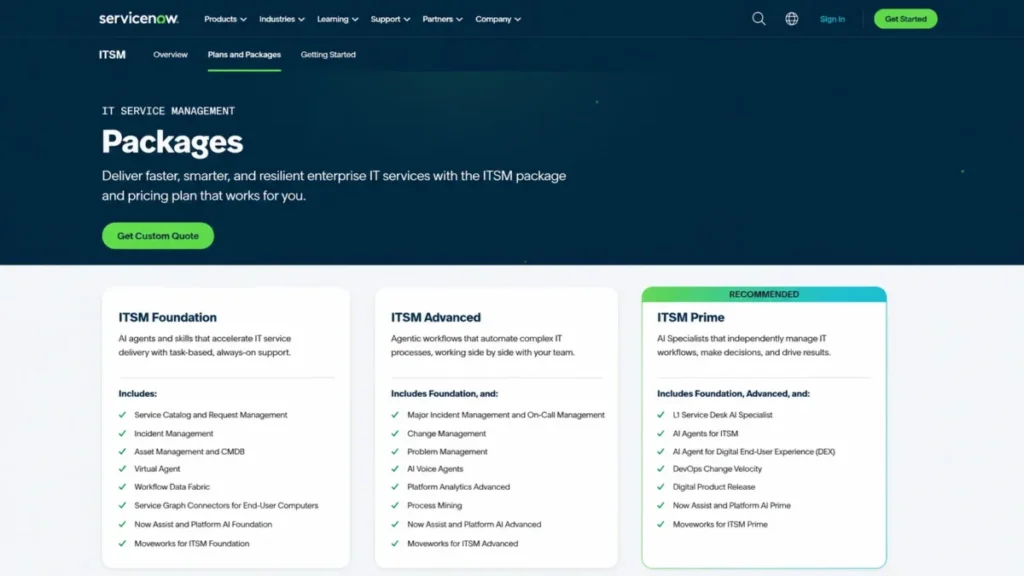
Foundation is a larger starting point than most enterprise entry packages. It carries Service Catalog and Request Management, Incident Management, Asset Management and CMDB, Virtual Agent, plus the Now Assist and Platform AI layer that ships at Foundation level.
The jump to Advanced is the one that matters for governance. Major Incident Management and On-Call Management, Change Management, Problem Management, Process Mining and the Advanced AI layer all sit above Foundation.
Prime adds the agentic layer: an L1 Service Desk AI Specialist, AI Agents for ITAM, DevOps Change Velocity and Digital Product Release. A buyer chasing autonomous L1 deflection is chasing the third package, not the first.
I would not shortlist ServiceNow on capability alone. The decision is whether the organization can staff a platform team, because the same configurability that satisfies an auditor is what can create months of rework.
| Pros | Cons |
|---|---|
| Foundation already includes asset management and CMDB rather than selling them separately | No published list price, so comparable cost modeling needs a sales cycle |
| Advanced consolidates change, problem and major incident under one governance model | Change and problem management are absent from the entry package |
| Prime packages agentic AI for L1 deflection and ITAM as named capabilities | Configuration breadth raises the implementation governance burden |
| Package composition is published even though prices are not | Wrong fit for a lean team that wants a desk running this quarter |
Source: ServiceNow official ITSM pricing page, checked 2026-08-05.
- Verdict:
- The strongest fit in this ranking when audit-grade change control, CMDB accuracy and cross-enterprise workflow matter more than a number finance can read today.
Ivanti Neurons for ITSM: best for consolidating service, endpoint and security work

- Best for: Large organizations folding ITSM into the same estate as endpoint management, patching and security operations.
- Avoid if: The buyer needs published pricing, or needs AI available on every edition and in a FedRAMP environment.
- Starting price: No public list price. The product page routes pricing through Contact Sales.
- Practical tier: Determined in the quote, since edition composition is not published as a price table.
- Free plan: None published.
- First limit that bites: AI capabilities require Ivanti Neurons for ITSM 2024.2 or later on SaaS deployments and are not available for FedRamp.
- Better than BMC Helix ITSM: Deployment freedom, with cloud, on-premises and hybrid all documented on one page.
- Worse than ServiceNow: Published package composition, which makes tier-by-tier comparison harder before a sales conversation.
- Setup difficulty: High, and higher again for a hybrid or on-premises deployment.
- Hidden costs: Deployment model, edition and version all change what a buyer receives, and none of those are priced publicly.
- Evidence status: Deployment options, the ITIL 4 process count and the AI availability boundary were read from the official Ivanti ITSM product page on 2026-08-05.
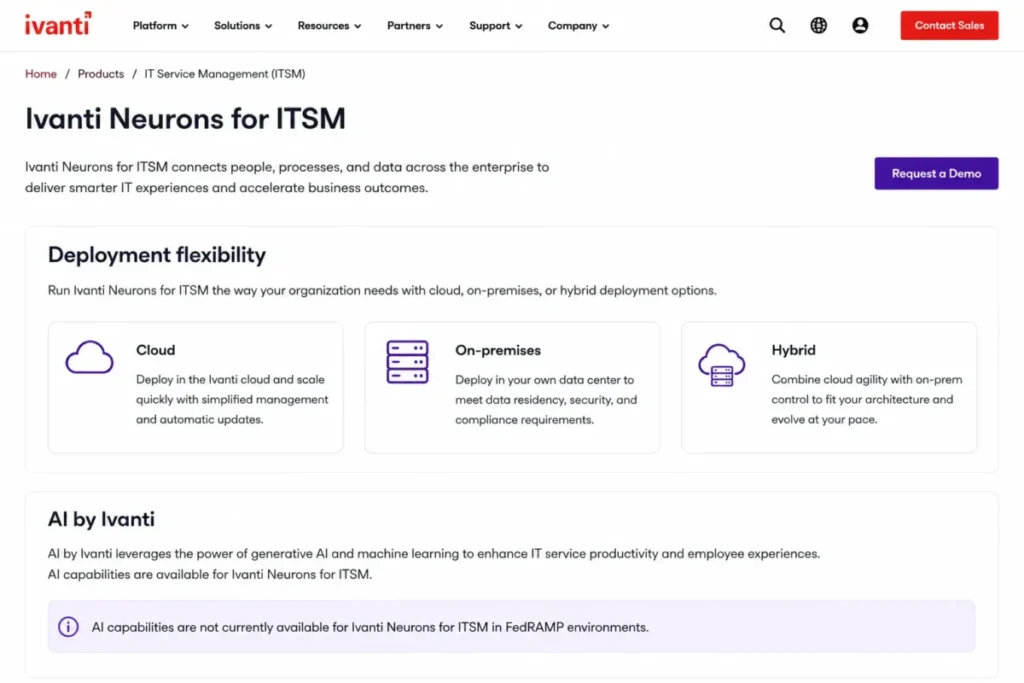
Deployment is the differentiator. The platform is built on a multi-tenant platform designed for the cloud, but it can be deployed in the cloud, on-premises or as a hybrid combination, which matters for data-residency and sovereignty requirements that rule out pure SaaS.
The ITIL alignment is stated as 14 core ITIL 4 processes, which is the kind of claim a procurement questionnaire asks for directly.
The AI boundary deserves a line in the requirements document rather than a footnote. A public-sector buyer planning an AI-assisted desk inside a FedRamp environment is planning a capability the vendor documents as unavailable there.
| Pros | Cons |
|---|---|
| Cloud, on-premises and hybrid deployment are documented on the official product page | No published price, so budget modeling depends entirely on a sales conversation |
| 14 core ITIL 4 processes give procurement a concrete alignment answer | AI is version-gated to 2024.2 or later on SaaS |
| Consolidation value is real for estates already running Ivanti endpoint tooling | AI is documented as unavailable for FedRamp deployments |
Source: Ivanti official ITSM product page, checked 2026-08-05.
- Verdict:
- A consolidation play rather than a standalone desk purchase, and the AI entitlement question belongs in the first vendor call.
BMC Helix ITSM: best for large BMC and Remedy estates modernizing

- Best for: Large organizations already standardized on BMC that are modernizing enterprise service operations rather than replacing them.
- Avoid if: A lean team wants straightforward configuration and a self-serve price.
- Starting price: No public list price. The capability page routes buyers to Contact BMC Sales and Request Pricing.
- Practical tier: Established in the quote, since the capability page describes scope rather than plan tiers.
- Free plan: None published.
- First limit that bites: Nothing on the public page lets a buyer separate included capability from separately licensed capability, so scope is set commercially.
- Better than TOPdesk: Enterprise operations depth, including multi-cloud brokering and proactive problem management.
- Worse than InvGate Service Management: Time to a defensible budget number, because there is no published figure to start from.
- Setup difficulty: High, in line with the breadth of the capability set.
- Hidden costs: Capability scope, environments and support tiers are all negotiated rather than published.
- Evidence status: Capability names and the pricing route were read from the official BMC Helix ITSM capabilities page on 2026-08-05.
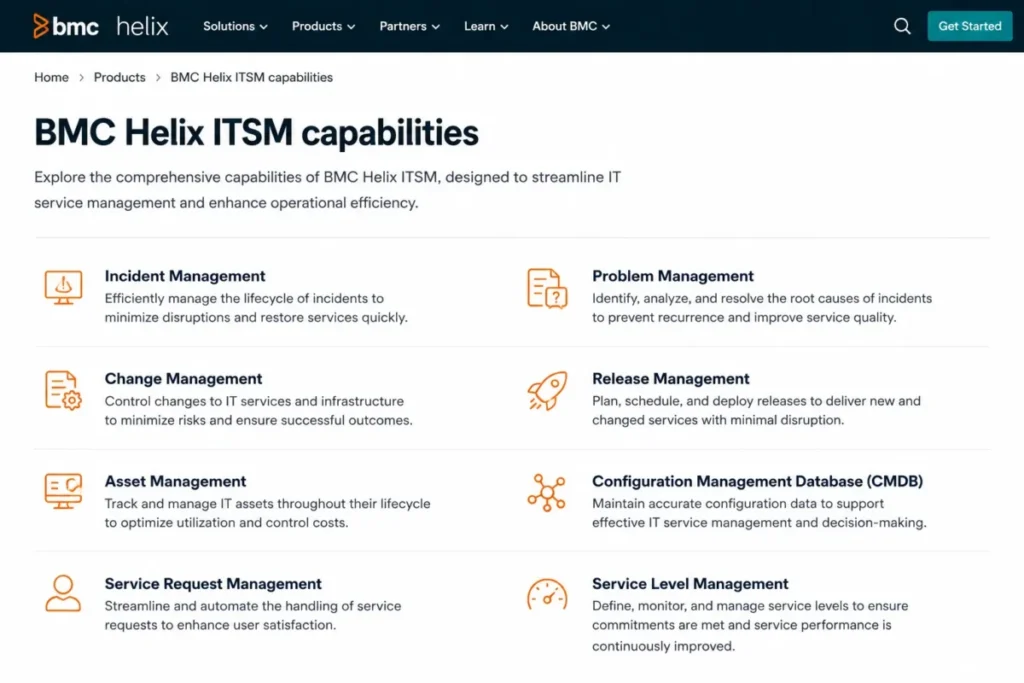
The published capability set is broad: Incident and Problem Management, Proactive Problem Management, Knowledge Management, Change Release Management, Asset Management, Configuration Management (CMDB), Service Request Management and Service Level Management.
Proactive Problem Management is the capability that distinguishes this from a ticketing tool. The platform is described as using AI to detect clusters of recurring incidents with context-aware, proactive incident matching.
For a Remedy estate, the migration question is not whether the capability exists. It is how much of the existing customisation survives, and that answer arrives in a scoping workshop rather than on a web page.
| Pros | Cons |
|---|---|
| Named capability coverage spans incident, problem, change release, asset, CMDB and service level management | No public list price and no published plan structure |
| Proactive Problem Management targets recurring incident clusters rather than single tickets | Public pages do not separate included from separately licensed capability |
| Strong continuity argument for organizations already running BMC tooling | Implementation profile is heavier than every published-price platform in this ranking |
Source: BMC Helix ITSM capabilities page, checked 2026-08-05.
- Verdict:
- A modernization path for existing BMC estates. For a greenfield mid-market desk, the platforms further down this ranking answer the same questions with a published number.
Platforms That Solve Published Pricing and Fast Rollout Best
Four platforms in this ranking publish a plan table a buyer can model against. That single difference changes the shape of the purchase, because the shortlist can be costed before anyone books a demo.
Jira Service Management: best for software and platform engineering teams

- Best for: Software, DevOps and platform-engineering teams already standardized on Jira and Confluence, where the service desk has to sit beside the delivery backlog.
- Avoid if: The desk needs advanced operations capability without per-agent and usage-based expansion costs stacking on top of each other.
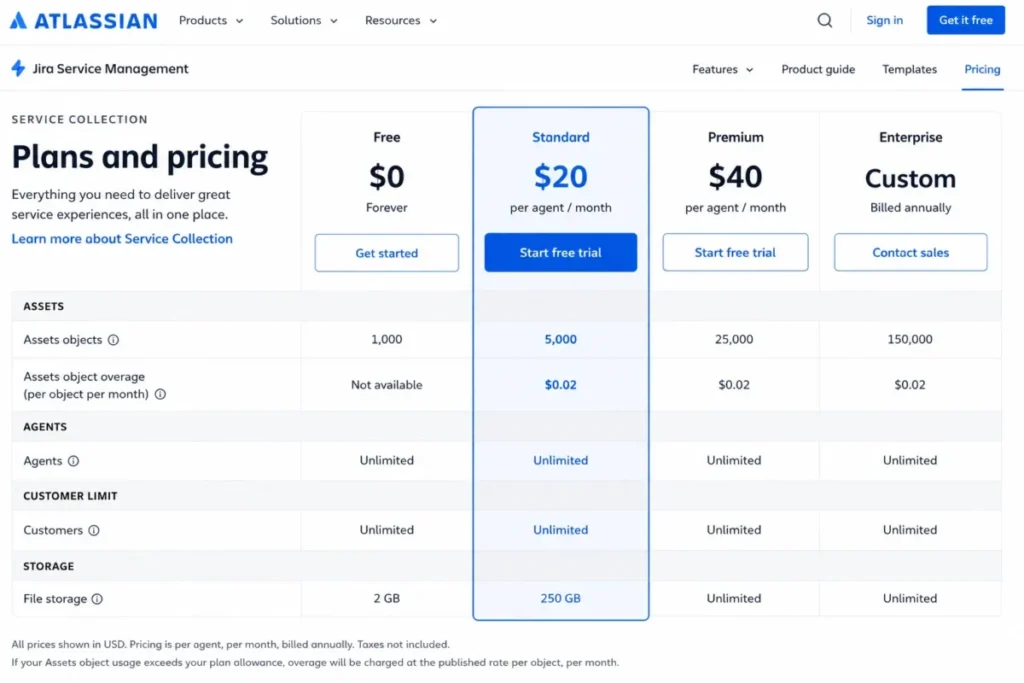
- Starting price: Standard at $20 per agent per month, with a free tier at $0 for three agents.
- Practical tier: Premium at $51.42 per agent per month, which is where the virtual agent allowance appears.
- Free plan: Yes. Free forever for 3 agents.
- First limit that bites: The Standard allowance of 5,000 Assets objects, after which overage starts at $0.02 per object per month.
- Better than Freshservice: Usage transparency, because both the included allowance and the overage rate are published.
- Worse than ServiceNow: Enterprise governance depth for a regulated estate with a large configuration database.
- Setup difficulty: Low to medium for an existing Atlassian estate, medium to high for a team arriving without one.
- Hidden costs: Assets objects above the plan allowance, and virtual agent conversations above 1,000 per month at $0.30 per assisted conversation.
- Evidence status: Plan prices, included allowances and both overage rates were read from the official Service Collection pricing page on 2026-08-05.
The pricing page is the most useful document any vendor in this ranking publishes. It states the plan price, the included Assets objects for each tier at 5,000, 50,000 and 500,000, and the rate charged when a desk exceeds them.
That matters because asset objects are the quietest cost in ITSM. A configuration database that grows with every discovered endpoint is a bill that grows with it, and a 5,000-object ceiling arrives faster than most teams expect once discovery is switched on.
The virtual agent economics work the same way. Premium and Enterprise include 1,000 Virtual Agent assisted conversations per month, and conversations beyond that start at $0.30 each.
For a team already living in Jira, the migration argument is mostly about identity and workflow reuse rather than data. The wider Jira review covers the delivery side of the same platform, and the Jira pricing breakdown walks the software plans that sit next to the service tiers.
| Pros | Cons |
|---|---|
| Published plan prices at $20 and $51.42 per agent per month | Usage-based costs sit on top of the per-agent price |
| Included Assets object allowances published for every paid tier | The virtual agent allowance only appears from Premium |
| Overage rates published rather than negotiated | Enterprise pricing still routes to a sales conversation |
| A free forever tier covers a three-agent desk | Value drops sharply for a team with no Atlassian footprint |
Source: Atlassian Service Collection pricing, checked 2026-08-05.
- Verdict:
- Choose it if the desk and the delivery backlog belong to the same people. Model the asset objects before signing, because that allowance, not the agent count, is what moves the invoice.
Freshservice: best for mid-market teams leaving a shared inbox

- Best for: Mid-market IT teams replacing a shared inbox or a spreadsheet with a cloud desk they can stand up without a systems integrator.
- Avoid if: The requirement list includes change and problem management at the entry price.
- Starting price: Starter at $19 per agent per month, billed annually.
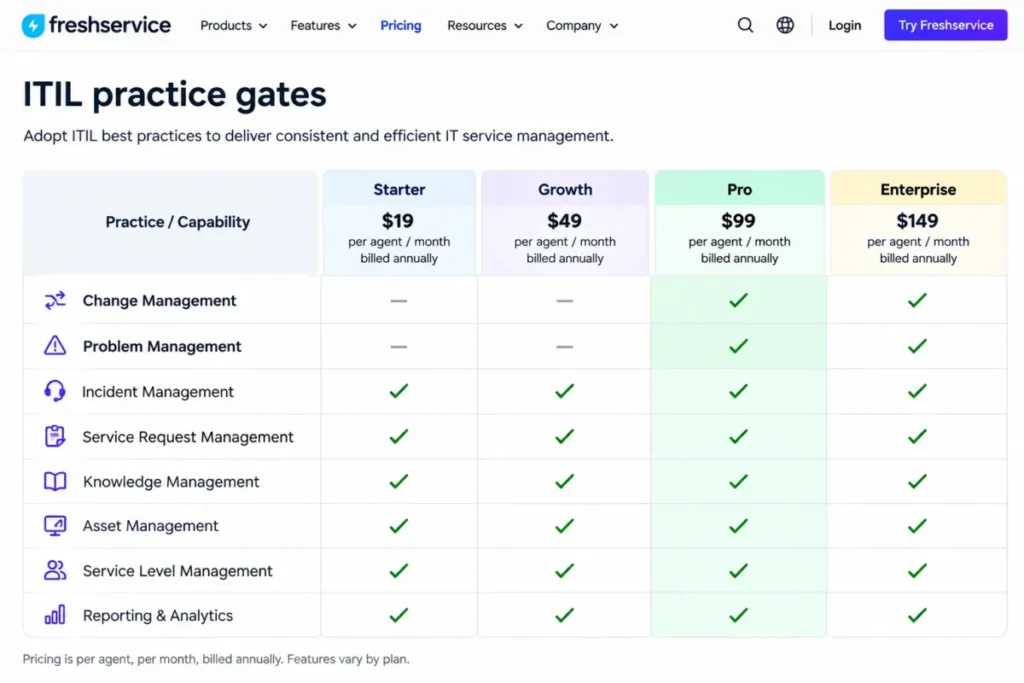
- Practical tier: Pro at $99 per agent per month, billed annually, because that is where change and problem management arrive.
- Free plan: None published. Enterprise is quoted rather than listed.
- First limit that bites: Problem Management and Change Management first appear on Pro, two tiers above the headline price.
- Better than ManageEngine ServiceDesk Plus: Published tier progression, with three visible prices rather than starting-at figures.
- Worse than Jira Service Management: Published usage economics, since allowances and overage rates are not presented the same way.
- Setup difficulty: Low to medium. Catalog and approval design is the work, not installation.
- Hidden costs: Freddy AI Copilot is listed at $29 per agent per month across plans, which lands on top of the tier price.
- Evidence status: Tier prices, the first plan carrying each ITIL practice and the AI add-on price were read from the official Freshservice pricing page on 2026-08-05.
The published tier ladder runs $19, $49 and $99 per agent per month on annual billing, with Enterprise quoted. That is unusually legible for this category, and it is the main reason this platform ranks third rather than sixth.
The gate to watch is the ITIL ladder. Service Catalog first appears on Growth, while Problem Management, Change Management, Intelligent Routing, Release Management and Workload Management first appear on Pro.
A four-person desk that budgets from the $19 tier and then discovers it needs a change advisory board has not made a small mistake. It has committed to a fivefold increase in per-agent cost.
The AI story carries its own line item. Freddy AI Copilot is offered across plans at $29 per agent per month, so an AI-assisted Growth desk lands at $78 per agent per month, within striking distance of the Pro list price without any of Pro’s workflows.
| Pros | Cons |
|---|---|
| Three published per-agent prices at $19, $49 and $99 billed annually | Change and problem management are gated to the third tier |
| Entry tier is priced for a first service desk rather than an enterprise program | Enterprise pricing is quoted rather than published |
| Feature gates are visible on the pricing page before a sales call | Freddy AI Copilot adds $29 per agent per month on top of the plan |
| Cloud rollout avoids an infrastructure workstream | Annual billing is the basis for every published price |
Source: Freshservice official pricing page, checked 2026-08-05.
- Verdict:
- The strongest published-price option for a team building its first real service desk, provided the change and problem requirement is honestly scoped before the tier is chosen.
ManageEngine ServiceDesk Plus: best for cost-conscious teams that need an on-premises path

- Best for: Cost-conscious IT teams that want both cloud and on-premises options without abandoning ITIL practice coverage.
- Avoid if: The buyer wants one bundled price and no edition analysis.
- Starting price: Standard from $13 per technician per month.
- Practical tier: Enterprise from $67 per technician per month, because change and projects live there.
- Free plan: None published on the pricing page.
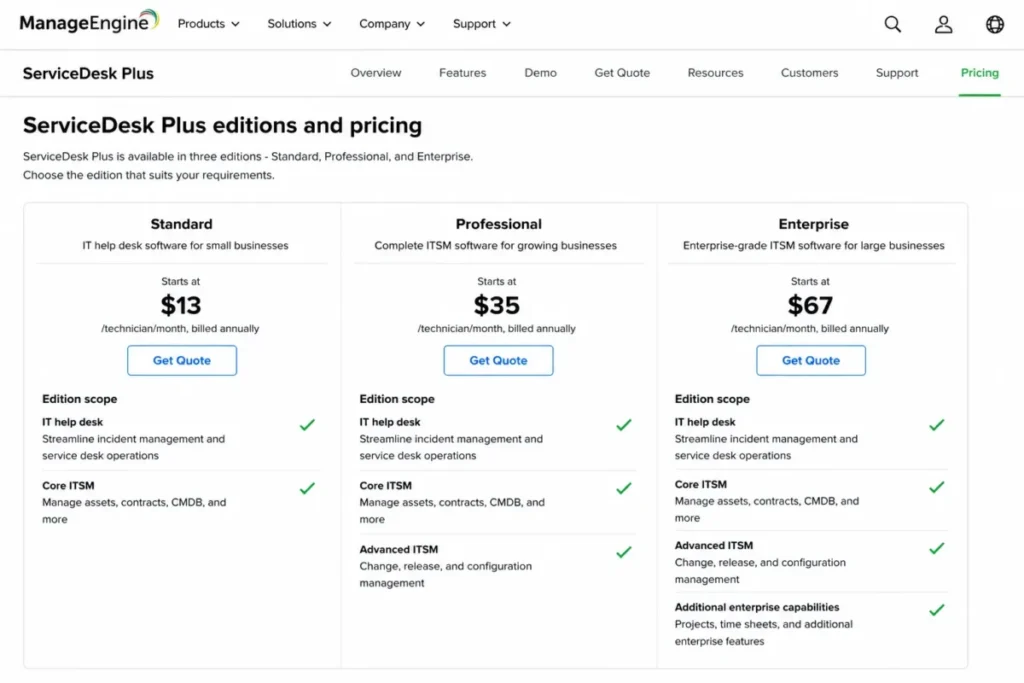
- First limit that bites: Standard covers the IT help desk only, so asset management requires Professional and change requires Enterprise.
- Better than Freshservice: Entry cost, at less than three quarters of the entry per-seat price.
- Worse than SolarWinds Service Desk: Published usage and API limits, which are absent from the edition table.
- Setup difficulty: Medium for cloud, high for on-premises where infrastructure and upgrades become the buyer’s problem.
- Hidden costs: Every published figure is a starting price, so edition and add-on composition decide the real number.
- Evidence status: Edition names, starting prices and edition scope were read from the official ServiceDesk Plus pricing page on 2026-08-05.
The edition ladder is stated in plain terms. Standard is IT help desk, Professional is IT help desk plus asset, and Enterprise is IT help desk plus asset plus change plus projects.
That is the clearest edition-to-practice mapping in this ranking, and it makes the upgrade trigger easy to predict. The moment a desk needs a configuration item history or a change calendar, the price moves from $13 to $67 per technician per month.
Deployment is the second reason to shortlist it. The product page states that ServiceDesk Plus is available both on-premises and in the cloud, with the flexibility of migration between them, and counts 14 distinct ITIL-certified practices across the ServiceDesk Plus deployment and practice scope.
That matters because data residency requirements do not care how good a SaaS roadmap looks. An on-premises path keeps a platform on the shortlist that a pure cloud desk cannot survive.
| Pros | Cons |
|---|---|
| Lowest published starting price in this ranking at $13 per technician per month | Every figure is a starting price rather than a fixed rate |
| Edition scope is mapped directly to practice coverage | Asset management requires the Professional edition |
| Cloud and on-premises deployment both remain available | Change and project management require the Enterprise edition |
Source: ManageEngine ServiceDesk Plus pricing, checked 2026-08-05.
- Verdict:
- The budget pick, and the one to shortlist when an on-premises deployment is a hard requirement rather than a preference. Normalize editions and add-ons before comparing the entry price against anything else on this page.
InvGate Service Management: best for transparent annual budgeting

- Best for: Mid-market teams that want a fixed annual number and no-code workflow progression.
- Avoid if: On-premises deployment or advanced identity controls are required below the Enterprise plan.
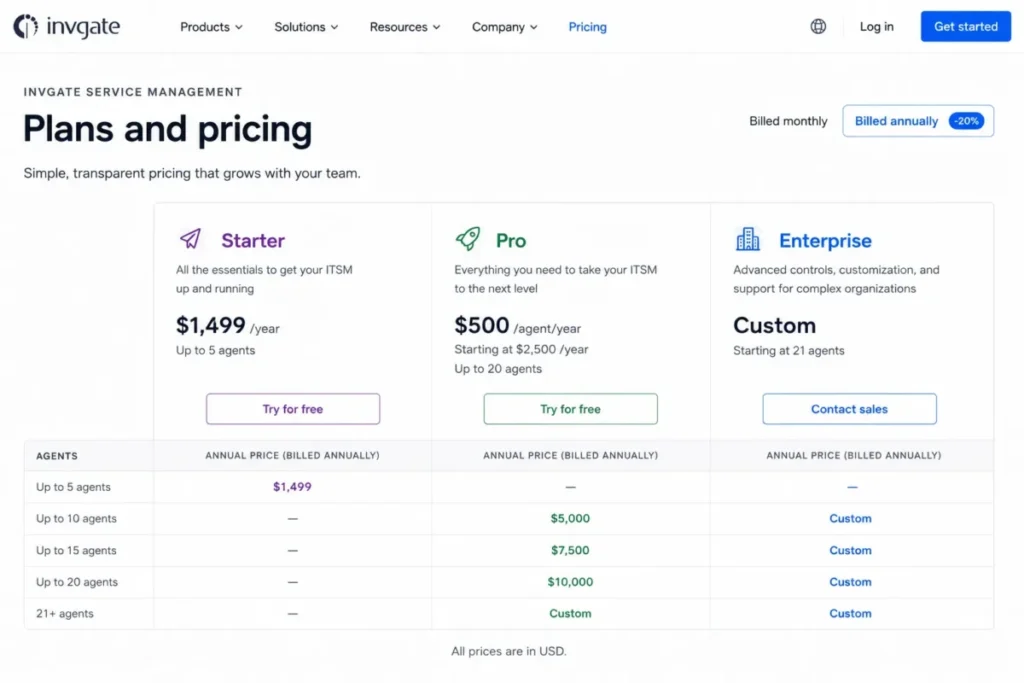
- Starting price: Starter at $1,499 per year as a fixed price for 5 agents.
- Practical tier: Pro at $500 per agent per year, starting at $2,500 per year, because the workflow builder lives there.
- Free plan: None published. Unlimited end users and approvers are included from Starter.
- First limit that bites: The workflow builder and the AI Service Agent are Pro features, so Starter cannot automate an approval chain.
- Better than TOPdesk: A published annual dollar figure a US buyer can put in a budget without a currency conversation.
- Worse than ServiceNow: Enterprise platform depth for a global program with heavy configuration.
- Setup difficulty: Low to medium, with catalog and approval design as the main work.
- Hidden costs: Moving to on-premises hosting or multiple SAML support requires Enterprise, which starts at $12,000 per year.
- Evidence status: Plan prices, agent bands and the plan that first carries the workflow builder were read from the official InvGate pricing page on 2026-08-05.
The pricing model is the least ambiguous in this ranking. Starter is a fixed $1,499 per year for 5 agents, Pro is $500 per agent per year with a $2,500 floor, and Enterprise is custom starting at $12,000 per year.
Unlimited end users and approvers from the entry plan removes the license math that makes several competitors expensive at scale. The trade is that automation is gated: the workflow builder, the AI Service Agent and the Teams and WhatsApp channels all arrive with Pro.
| Pros | Cons |
|---|---|
| Fixed annual entry price of $1,499 for 5 agents | Workflow builder and AI Service Agent are gated to Pro |
| Per-agent annual pricing published for Pro with a stated floor | On-premises hosting requires the Enterprise plan |
| Unlimited end users and approvers from the entry plan | Enterprise starts at $12,000 per year, a large step from Pro |
Source: InvGate official pricing page, checked 2026-08-05.
- Verdict:
- Choose it when a defensible annual number matters more than platform depth. It ranks tenth on scope, not on honesty.
Platforms That Solve Operations, Assets and Desk AI Best
The last group is bought for what sits around the ticket. Asset visibility, operations alignment and an AI layer that answers a request before a human sees it are the reasons these three platforms win a shortlist.
SolarWinds Service Desk: best for existing SolarWinds operations estates

- Best for: IT operations teams already running SolarWinds tooling that want the service desk aligned with the same asset and operations picture.
- Avoid if: The integration roadmap depends on API access, or asset costs need to be known before a quote.
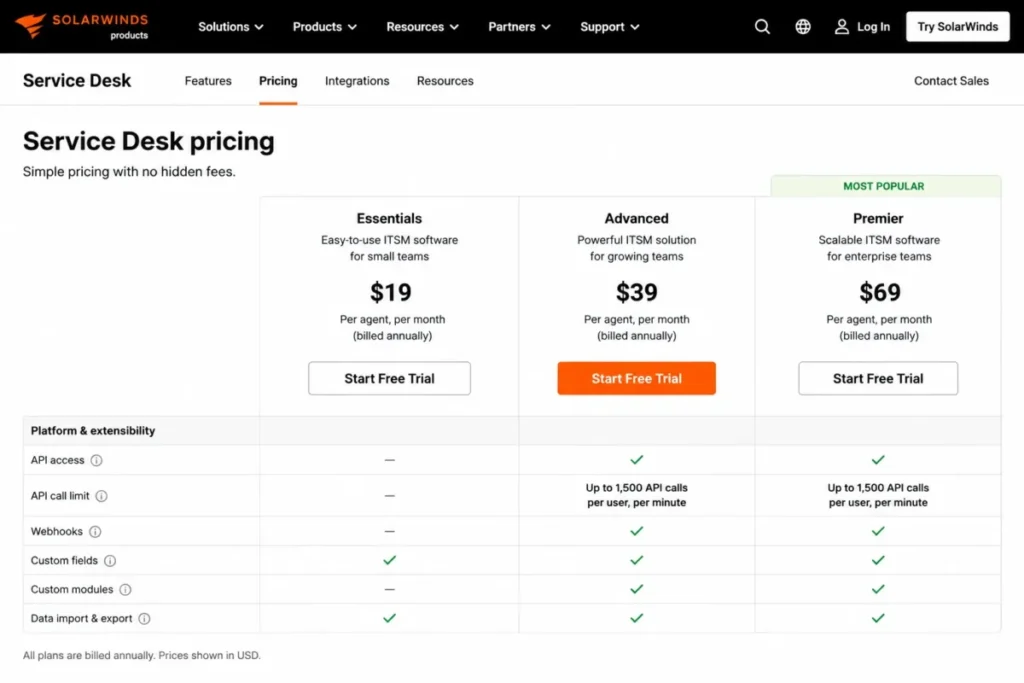
- Starting price: Essentials at $39 per month per technician, billed annually.
- Practical tier: Advanced at $99 per month per technician, billed annually, because API access starts there.
- Free plan: None published.
- First limit that bites: API access is an Advanced capability, so an Essentials desk cannot integrate programmatically.
- Better than Freshservice: Change management and CMDB scope on the entry tier rather than the third tier.
- Worse than Jira Service Management: Published usage economics, because asset pricing is stated as available upon request.
- Setup difficulty: Medium, and lower for a team that already runs SolarWinds monitoring.
- Hidden costs: Asset pricing is quoted separately for all three tiers, so the published per-technician figure is not the whole bill.
- Evidence status: Tier prices, the API access tier, the Premier API rate limit and the asset pricing statement were read from the official SolarWinds Service Desk pricing page on 2026-08-05.
Three published prices at $39, $99 and $124 per month per technician on annual billing put this in the upper half of the market. The entry tier earns some of that, because Essentials lists Incident Management, Knowledge Base, Service Portal, Asset Management, Service Catalog, Change Management and CMDB as included rows.
API access is the gate that catches integration-led buyers. It appears on Advanced, which more than doubles the entry price for a team whose main requirement is pushing tickets into another system.
Premier documents a ceiling of up to 1,500 API Calls per user per minute. That figure belongs in an architecture review, because a rate ceiling shapes an integration design in a way a feature checkbox never does.
If API design is new territory for the team, the primer on how APIs work is the right place to start.
Asset pricing is available upon request on every tier, which means the one number an asset-heavy desk most needs is the one number the page will not give.
| Pros | Cons |
|---|---|
| Three published per-technician prices at $39, $99 and $124 billed annually | API access does not appear until the Advanced tier |
| Entry tier already covers change and CMDB rather than gating them | Asset pricing is quoted rather than published on every tier |
| Premier publishes a concrete API rate ceiling | Entry price sits in the upper half of the published figures here |
Source: SolarWinds Service Desk pricing page, checked 2026-08-05.
- Verdict:
- Strong for an existing SolarWinds estate. For anyone else, price the assets and the API tier before comparing the $39 headline against a cheaper desk.
SysAid: best for desks buying agentic AI inside a published price

- Best for: Service desks that want prebuilt AI agents and integration credits inside a published professional-tier price.
- Avoid if: The team is smaller than the Enterprise minimum, or needs sandbox and advanced analytics at entry cost.
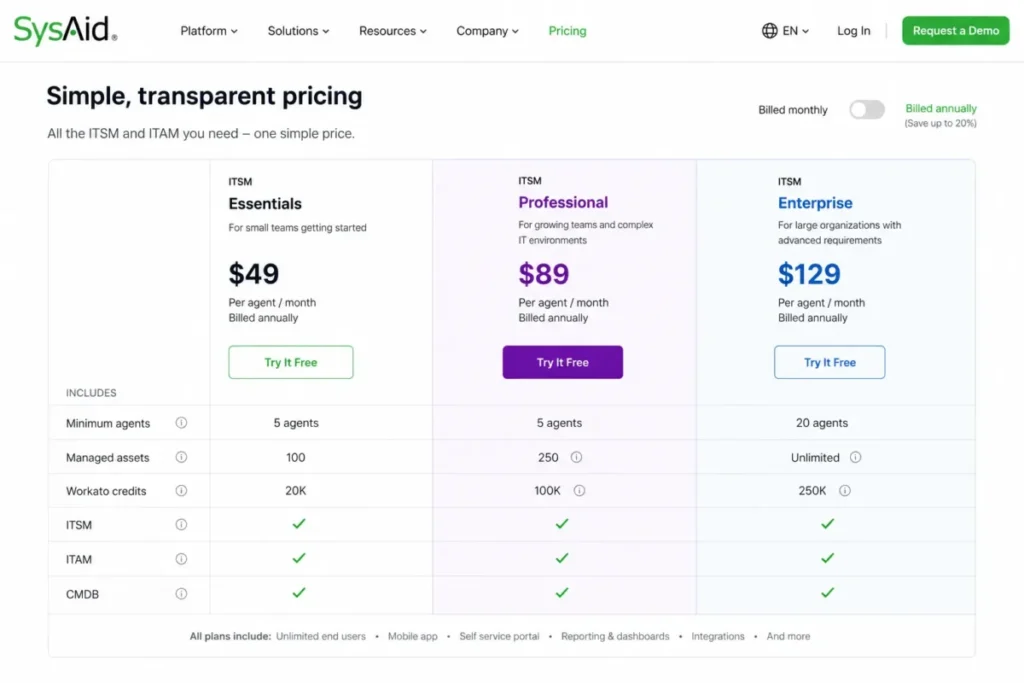
- Starting price: Professional at $89 per agent per month.
- Practical tier: Professional for most desks, with Enterprise reserved for sandbox, tailored agents and advanced analytics.
- Free plan: None published.
- First limit that bites: 250 managed assets are included, which a growing endpoint estate passes quickly.
- Better than Freshservice: AI agent inclusion, since prebuilt agents sit inside the published tier rather than beside it as an add-on.
- Worse than ManageEngine ServiceDesk Plus: Entry cost, at roughly seven times the published starting figure.
- Setup difficulty: Medium. Agent configuration and integration design carry the work.
- Hidden costs: Enterprise is custom and starts at 20 agents, so a smaller team cannot buy the sandbox at all.
- Evidence status: The Professional price, included asset count, Workato credit allowance and the Enterprise agent minimum were read from the official SysAid pricing page on 2026-08-05.
The published Professional price of $89 per agent per month is high for a mid-market desk until the inclusions are read. Professional lists incident, change, problem and request management, asset monitoring and CMDB, copilot chatbots for agents and end users, and prebuilt AI agents, alongside 250 managed assets and 100K Workato credits.
The Enterprise minimum is the constraint that decides fit. Enterprise is custom and starts at 20 agents, so a twelve-person desk that wants a sandbox environment, tailored AI agents or the Gold Service Package cannot reach them at any price.
Support tiering follows the same line. Professional documents a three-hour P1 response against one hour on Enterprise, which is a service-level difference an incident-heavy team should price before choosing the lower tier.
| Pros | Cons |
|---|---|
| Published professional-tier price at $89 per agent per month | Highest published per-agent entry price in this ranking |
| Copilot chatbots, AI automations and prebuilt AI agents sit inside the published tier | 250 managed assets is a low ceiling for a growing estate |
| Enterprise adds a sandbox, tailored AI agents and advanced analytics | Enterprise starts at 20 agents, which rules out smaller desks |
| P1 response time improves from three hours to one hour on Enterprise | Enterprise pricing is custom rather than published |
Source: SysAid official pricing page, checked 2026-08-05.
- Verdict:
- The clearest AI-inclusive price in this ranking. It stops working for a smaller team that needs the sandbox or tailored agents, because those sit on an Enterprise plan that starts at 20 agents.
TOPdesk: best for service teams that want unlimited end users and assets

- Best for: Service organizations that license by agent and want unlimited end users, tickets and assets on every plan.
- Avoid if: A US buyer needs an instant dollar comparison with no consultancy or fair-use caveats attached.
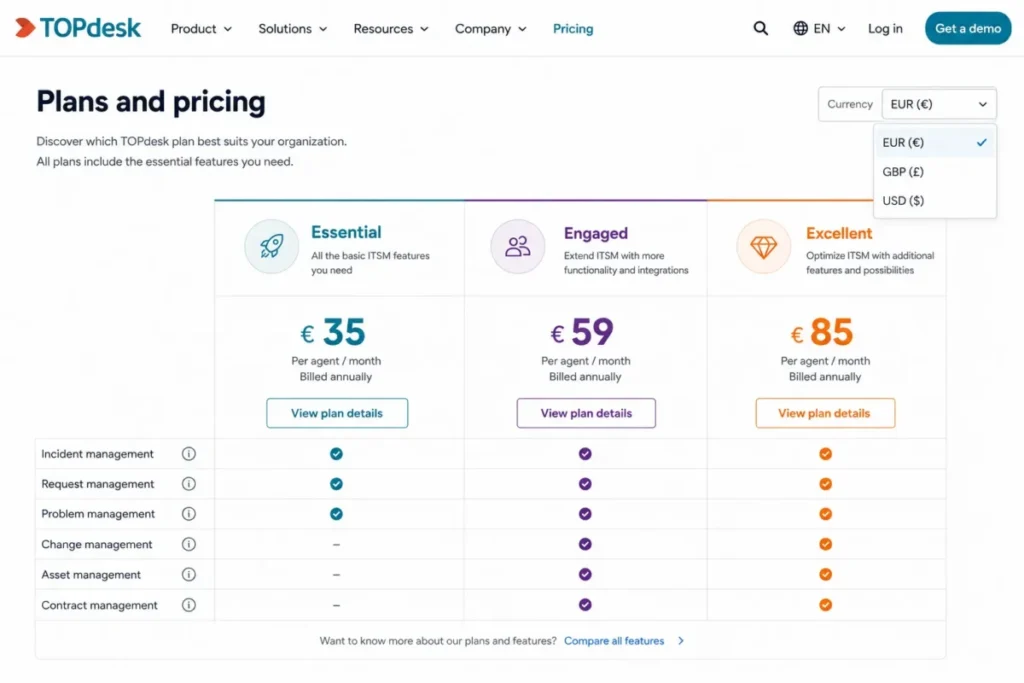
- Starting price: Essential at £51 per agent per month as rendered on the public page, with a currency switcher offering US dollars, euros and Canadian dollars.
- Practical tier: Engaged at £72 per agent per month for teams that need the middle capability band.
- Free plan: None published. End users are unlimited rather than free-tier limited.
- First limit that bites: The fair use policy, since data beyond it is charged extra.
- Better than InvGate Service Management: License scope, because unlimited assets and end users remove a counting exercise.
- Worse than Freshservice: Speed to a US dollar figure, since the default rendering is not USD.
- Setup difficulty: Medium, and higher if a consultant runs the implementation.
- Hidden costs: Implementation by a TOPdesk consultant carries a surcharge, and excess data beyond fair use is charged extra.
- Evidence status: Plan names, the per-agent model, the surcharge statement, the fair-use charge and the downgrade rule were read from the official TOPdesk pricing page on 2026-08-05.
Three plans, Essential, Engaged and Excellent, are priced per agent per month, and an agent is defined as anyone who can open and adjust tickets. The public page renders £51, £72 and £101 per agent per month by default, so a US buyer confirms the dollar figure through the currency selector or the quote route rather than reading it straight off the page.
Unlimited assets, tickets and end users are included across all plans, which is the commercial argument for a desk serving a large employee base with a small team.
Two contract terms belong in the evaluation. Implementation by one of the vendor’s consultants comes at a surcharge, and downgrades are possible only at the end of the current contract term.
| Pros | Cons |
|---|---|
| Unlimited assets, tickets and end users on every plan | Default rendering is not in US dollars |
| Per-agent definition is published rather than left to interpretation | Implementation consultancy carries a surcharge |
| Contract and downgrade rules are stated on the pricing page | Data beyond the fair use policy is charged extra |
Source: TOPdesk official pricing page, checked 2026-08-05.
- Verdict:
- A good fit when the end-user population is large and the agent count is small. Ask for the US dollar quote and the fair-use threshold in writing before comparing it with a dollar-priced competitor.
Best ITSM Software at a Glance
One table, ten platforms, ordered by rank. Read the practical tier column first, because that is the number a budget survives on.
| Platform | Cohort it wins | Published entry price | Practical tier | Deployment |
|---|---|---|---|---|
| 1. ServiceNow IT Service Management | Global regulated enterprises | Custom quote | ITSM Advanced | Not stated on the pricing page |
| 2. Jira Service Management | Engineering-led service desks | $20 per agent per month | Premium at $51.42 per agent per month | Not stated on the pricing page |
| 3. Freshservice | Mid-market first service desks | $19 per agent per month billed annually | Pro at $99 per agent per month | Not stated on the pricing page |
| 4. ManageEngine ServiceDesk Plus | Cost-conscious and on-premises buyers | From $13 per technician per month | Enterprise from $67 per technician per month | On-premises and cloud, with migration between them |
| 5. SolarWinds Service Desk | Existing SolarWinds estates | $39 per month per technician | Advanced at $99 per month per technician | Not stated on the pricing page |
| 6. SysAid | AI-forward desks | $89 per agent per month | Professional, with Enterprise from 20 agents | Private AWS instance option on Enterprise |
| 7. Ivanti Neurons for ITSM | Endpoint and security consolidation | Contact Sales | Set in the quote | Cloud, on-premises or hybrid |
| 8. BMC Helix ITSM | Large BMC estates | Request Pricing | Set in the quote | Not stated on the page |
| 9. TOPdesk | Large end-user populations | £51 per agent per month as rendered | Engaged at £72 per agent per month | Not stated on the pricing page |
| 10. InvGate Service Management | Fixed annual budgeting | $1,499 per year for 5 agents | Pro at $500 per agent per year | On-premise hosting on Enterprise |
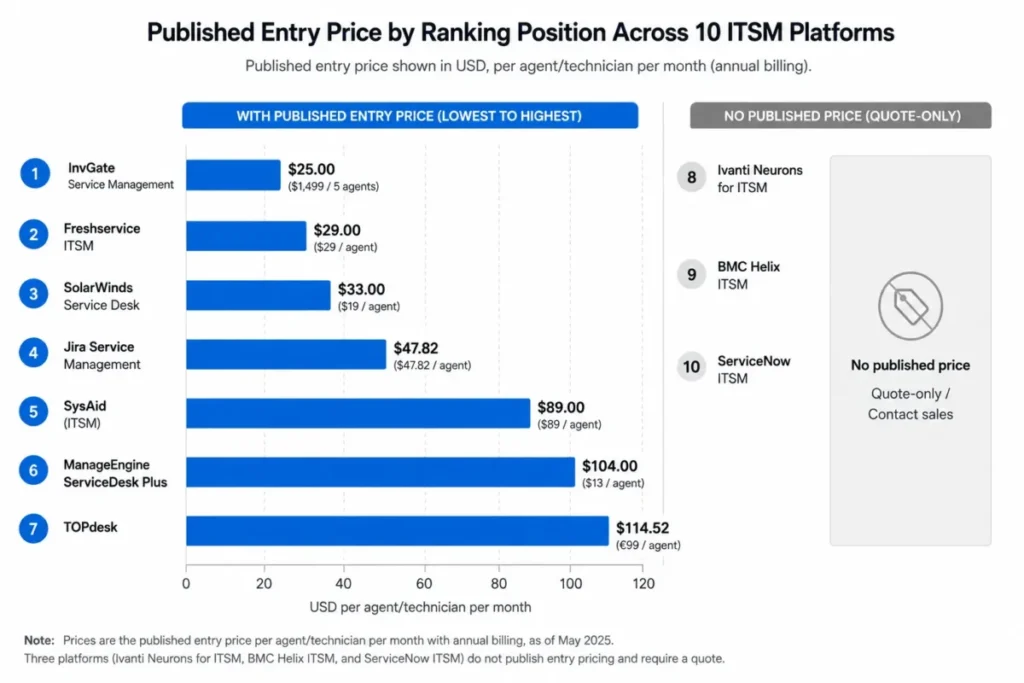
Three of the ten platforms give a buyer nothing to model against without a sales call. That is not a disqualifier for a large regulated estate, but it does mean a shortlist mixing quote-only and published-price platforms cannot be compared on cost until the quotes land.
Pricing Comparison: Entry Price Versus Practical Tier
Entry prices are a poor guide to ITSM cost because the practice a buyer needs most, change enablement, is the practice most often held back a tier.
Published per-agent and per-technician pricing
| Platform | Entry plan | Entry price | Practical tier | Practical tier price |
|---|---|---|---|---|
| Jira Service Management | Standard | $20 per agent per month | Premium | $51.42 per agent per month |
| Freshservice | Starter | $19 per agent per month billed annually | Pro | $99 per agent per month billed annually |
| ManageEngine ServiceDesk Plus | Standard | From $13 per technician per month | Enterprise | From $67 per technician per month |
| SolarWinds Service Desk | Essentials | $39 per month per technician | Advanced | $99 per month per technician |
| SysAid | Professional | $89 per agent per month | Professional | $89 per agent per month |
| TOPdesk | Essential | £51 per agent per month as rendered | Engaged | £72 per agent per month as rendered |
| InvGate Service Management | Starter | $1,499 per year for 5 agents | Pro | $500 per agent per year from $2,500 per year |
Sources: Jira Service Management plan prices, Freshservice plan prices and ManageEngine edition prices. And: SolarWinds plan prices and SysAid plan prices. Plus: TOPdesk plan prices and InvGate plan prices. All checked 2026-08-05.
The gap between the two columns is the real finding. Freshservice moves from $19 to $99 per agent per month once change and problem management are required.
SolarWinds Service Desk makes the same jump from $39 to $99 per technician per month, and the trigger there is API access rather than an ITIL practice.
Two platforms barely move. SysAid holds one published price because its Enterprise tier is quoted, and InvGate holds the same per-agent figure across its whole Pro band.
Platforms that price by quote
| Platform | What the page publishes | What the buyer must request |
|---|---|---|
| ServiceNow IT Service Management | Foundation, Advanced and Prime package composition | The price of each package and the implementation program |
| Ivanti Neurons for ITSM | Deployment options and ITIL 4 process coverage | Edition composition, per-analyst licensing and AI entitlement |
| BMC Helix ITSM | Named capability coverage across the ServiceOps set | Which capabilities are included and which are licensed separately |
Sources: ServiceNow ITSM package pricing, Ivanti ITSM pricing route and BMC Helix pricing route, all checked 2026-08-05.
A quote-only vendor is not automatically more expensive. It is automatically slower to evaluate, and that timing cost is real when a desk has a deadline.
Ask every quote-only vendor for the same five numbers. License cost at the target agent count, implementation cost, the cost of the tier that carries change management, the annual uplift at renewal, and the cost of twenty more agents in year two.
What a 25-Agent Desk Costs on Published Prices
Twenty-five agents is the size where per-seat pricing starts to hurt and where the entry tier usually stops being enough. The figures below multiply the published unit price by 25, and nothing else.
| Platform | Entry unit price | 25 agents at entry | Practical tier unit price | 25 agents at practical tier | Cadence |
|---|---|---|---|---|---|
| ManageEngine ServiceDesk Plus | From $13 | $325 | From $67 | $1,675 | Per month |
| Freshservice | $19 | $475 | $99 | $2,475 | Per month, billed annually |
| Jira Service Management | $20 | $500 | $51.42 | $1,285.50 | Per month |
| SolarWinds Service Desk | $39 | $975 | $99 | $2,475 | Per month, billed annually |
| SysAid | $89 | $2,225 | $89 | $2,225 | Per month |
| InvGate Service Management | $500 | $12,500 | $500 | $12,500 | Per year |
Sources: ManageEngine technician pricing, Freshservice per-agent pricing and Jira Service Management agent pricing. And: SolarWinds technician pricing, SysAid agent pricing and InvGate agent pricing. All checked 2026-08-05.
Read the practical column and the ranking changes shape. At entry prices the spread runs from $325 to $2,225 per month, a factor of nearly seven.
At practical tiers the three cloud desks most mid-market teams shortlist land between $1,285.50 and $2,475 per month, which is close enough that features, not price, should decide.
These figures exclude add-ons, implementation, taxes, negotiated terms and usage overages. Every one of those can move the total more than the tier choice does.
Feature Gate Comparison: What the Entry Plan Withholds
A feature gate is only interesting when it blocks a workflow the buyer already runs. The five columns below are the gates that most often force an unplanned upgrade.
| Platform | Change and problem on entry | Asset or CMDB on entry | API access | AI on entry tier | Sandbox or advanced environment |
|---|---|---|---|---|---|
| ServiceNow IT Service Management | No, both sit in Advanced | Yes, asset and CMDB in Foundation | Not publicly disclosed | Yes, Now Assist Foundation layer | Not publicly disclosed |
| Jira Service Management | Not stated on the pricing page | Yes, 5,000 Assets objects on Standard | Not publicly disclosed | No, virtual agent from Premium | Not publicly disclosed |
| Freshservice | No, both first appear on Pro | Not stated on the pricing page | Not publicly disclosed | Add-on at $29 per agent per month | Not publicly disclosed |
| ManageEngine ServiceDesk Plus | No, change requires Enterprise | No, assets require Professional | Not publicly disclosed | Yes, AI and ML listed across all editions | Not publicly disclosed |
| SolarWinds Service Desk | Yes, Change Management on Essentials | Yes, Asset Management and CMDB on Essentials | No, API access starts on Advanced | Not stated on the pricing page | Not stated on the pricing page |
| SysAid | Yes, change and problem on Professional | Yes, 250 managed assets and CMDB | Not publicly disclosed | Yes, prebuilt AI agents on Professional | Sandbox on Enterprise |
| Ivanti Neurons for ITSM | By plan | By plan | Not publicly disclosed | Version and deployment gated | Not publicly disclosed |
| BMC Helix ITSM | By plan | Yes, CMDB is a named capability | Not publicly disclosed | Agentic AI positioning published | Not publicly disclosed |
| TOPdesk | By plan | Yes, unlimited assets on every plan | Not publicly disclosed | Not publicly disclosed | Not publicly disclosed |
| InvGate Service Management | No, change management arrives with Pro | Yes, asset management from Starter | Yes, the API arrives with Pro | No, AI Service Agent from Pro | Not publicly disclosed |
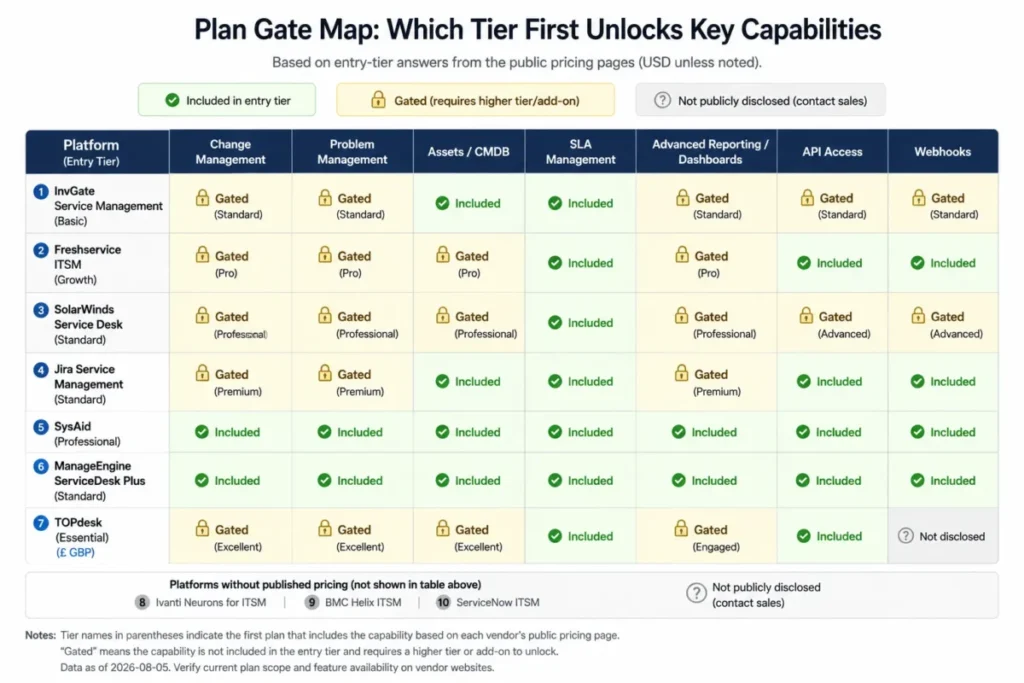
Not publicly disclosed means the public page does not answer the question. It does not mean the capability is missing, and a buyer should convert every one of those cells into a written answer during the demo.
The pattern across the table is consistent. Change enablement is the most commonly gated practice, AI is the most commonly repriced one, and API access is the gate that surprises integration-led teams most often.
Setup and Migration Difficulty
Setup difficulty here is an editorial reading of deployment model, configuration surface and documented practice breadth. It is a planning signal, not a measured result.
| Platform | Setup difficulty | What drives it |
|---|---|---|
| ServiceNow IT Service Management | High | Catalog design, CMDB population and workflow governance run as separate workstreams |
| Jira Service Management | Low to medium | Low inside an existing Atlassian estate, higher without one |
| Freshservice | Low to medium | Cloud rollout, with catalog and approval design as the real work |
| ManageEngine ServiceDesk Plus | Medium to high | Cloud is quick, on-premises adds infrastructure and upgrade ownership |
| SolarWinds Service Desk | Medium | Lower for teams already running SolarWinds operations tooling |
| SysAid | Medium | AI agent configuration and integration design carry the effort |
| Ivanti Neurons for ITSM | High | Deployment model choice and edition scoping precede any configuration |
| BMC Helix ITSM | High | Capability breadth and existing customization drive the program |
| TOPdesk | Medium | Consultant-led implementation is available at a surcharge |
| InvGate Service Management | Low to medium | No-code workflow design keeps the build inside the IT team |
Migration is the risk this table cannot score. Ticket history, asset records, attachments, user identities, approval chains and automation rules all migrate at different fidelities, and no vendor page in this ranking documents object-level behavior.
Treat that as a scoping question rather than an assumption. The same discipline applies to any records move, and the principles in this CRM migration checklist transfer directly to a service desk cutover.
Ask each vendor for an object matrix, the duplicate-handling rule, the validation report and the rollback plan before a contract is signed. A vendor that answers those four questions in writing is a vendor whose migration estimate is worth something.
How to Choose the Right ITSM Platform
Six steps, in the order that saves the most money. Most shortlists run them backwards, starting with features and finishing with cost.
Step 1. Write the practice list before the vendor list. Decide whether change enablement, problem management, a configuration database and a service catalog are day-one requirements or year-two ambitions. That single decision moves several platforms from their entry tier to a tier two or three steps up.
Step 2. Price the practical tier, never the entry tier. Take the tier that carries the practice list from step one, multiply it by the real agent count, and use that as the comparison number.
Step 3. Count the objects, not just the seats. Asset objects, managed assets, virtual agent conversations and API calls all carry ceilings, and the ceiling is what triggers the next invoice. A desk with discovery switched on will find the asset ceiling before it finds the seat ceiling.
Step 4. Decide the deployment question early. On-premises and hybrid requirements eliminate most of this ranking in one move, which makes the shortlist shorter and the evaluation faster.
Step 5. Convert every unknown into a written answer. Every cell reading Not publicly disclosed in the gate table above is a question for the demo, and the answers belong in the contract rather than in a sales deck.
Step 6. Test the exit before the entry. Ask how ticket history, assets, attachments and automation rules leave the platform, because the migration you should plan is the one out, not the one in.
If the requirement turns out to be ticket handling rather than service management, the shortlist is different. A dedicated best help desk software comparison covers that market, and the primer on what a ticketing system does is the fastest way to check which of the two problems you have.
Common Mistakes When Choosing ITSM Software
Budgeting from the starting price. Most published entry prices in this ranking stop being the right number the moment a change workflow enters the requirement list.
Treating a capability checkbox as an entitlement. Change management, AI and API access appear on most vendor pages here, and all three sit behind a plan gate somewhere in this ranking.
Ignoring the agent definition. A per-agent price means nothing until the vendor’s definition of an agent is read, because approvers, dashboard viewers and part-time technicians are counted differently by different vendors.
Buying AI as a feature rather than an entitlement. AI in this category is variously included, priced as an add-on, version-gated and unavailable in specific regulated environments.
Skipping the object ceiling. Managed assets, asset objects and conversation allowances are the usage meters that turn a fixed per-seat budget into a variable one.
Assuming migration is a data export. Ticket history moves easily, approval chains and automation rules do not, and no public page in this research documented object-level migration behavior.
Comparing a quote-only platform on capability alone. Without a price, a capability comparison flatters the platform that publishes least.
Final Verdict
ServiceNow IT Service Management takes the top position in this ranking. Its published package composition covers the widest workflow scope, from catalog and CMDB in Foundation through change, problem and major incident in Advanced to the agentic layer in Prime, and no other platform here answers a regulated enterprise’s governance question as completely.
That verdict comes with its price attached. The platform publishes no list price, expects a real implementation program, and is the wrong answer for a team that needs a working desk this quarter.
Each pick states its ranking reason, the cohort it serves, and the plan gate that decides when the entry price stops being the real number. Every figure traces to the official vendor page checked on 2026-08-05.
By buyer type, the picks separate cleanly.
Engineering-led desk inside Atlassian: Jira Service Management, and model the asset objects before the agents.
First real service desk in a mid-market IT team: Freshservice, with the change and problem requirement scoped honestly before the tier is chosen.
Tight budget or an on-premises requirement: ManageEngine ServiceDesk Plus, normalizing editions and add-ons before the comparison.
Existing SolarWinds operations estate: SolarWinds Service Desk, after pricing the asset license and the API tier.
AI-first desk that can reach the Enterprise minimum: SysAid, where the AI agents sit inside a published price rather than beside it.
Endpoint, patch and security consolidation: Ivanti Neurons for ITSM, with the AI entitlement question answered in writing first.
Existing BMC or Remedy estate: BMC Helix ITSM as a modernization path rather than a greenfield purchase.
Large end-user population, small agent team: TOPdesk, with the US dollar quote and the fair-use threshold requested up front.
Fixed annual budget with no sales cycle: InvGate Service Management, accepting that the workflow builder starts at Pro.
The honest summary is that these ten platforms split into two groups that rarely meet: three quote-only enterprise platforms and seven that publish a price. Decide the practice list, the deployment model and the agent count first, and the ranking above collapses into a shortlist of two or three within an hour.
FAQ
These are the questions buyers ask once the shortlist is down to two or three platforms.
What is the best ITSM tool in 2026?
ServiceNow IT Service Management ranks first here for global regulated enterprises, because its packages carry the widest documented workflow scope across incident, change, problem, asset management and CMDB.
For a mid-market team that needs a published price, two options lead. Those are Freshservice at $19 per agent per month and Jira Service Management at $20 per agent per month, both checked 2026-08-05.
How much does ITSM software cost?
Published entry prices in this ranking run from $13 per technician per month to $89 per agent per month, and the practical tiers that carry change management run higher again. Three vendors publish no price at all and route buyers to a quote.
At 25 agents, the published entry tiers work out between $325 and $2,225 per month, before add-ons, implementation and usage overages.
Is Jira Service Management a real ITSM tool?
Yes. Its published plan table includes asset and configuration management on the Standard tier at $20 per agent per month, with a virtual agent allowance of 1,000 assisted conversations per month appearing on Premium and Enterprise.
The practical question is not whether it qualifies, but whether a team without an Atlassian footprint gets enough value from the surrounding stack to justify it.
Which ITSM tools support on-premises deployment?
Ivanti Neurons for ITSM documents cloud, on-premises and hybrid deployment on its product page. ManageEngine ServiceDesk Plus states availability both on-premises and in the cloud, and InvGate offers on-premise hosting on its Enterprise plan.
For a data-residency requirement, that list is the shortlist, and it eliminates most cloud-only desks in one step.
Which ITSM platform includes AI without an add-on?
SysAid publishes prebuilt AI agents and 100K Workato credits inside its Professional tier at $89 per agent per month.
Freshservice takes the opposite approach and prices Freddy AI Copilot at $29 per agent per month on top of whichever plan the desk already pays for.
What is the difference between ITSM and a help desk?
A help desk resolves tickets. ITSM adds the practices around them, including change enablement, problem management, service catalog, a configuration database and service level management.
The practical test is whether the team needs a change advisory board and a configuration database. If it does not, a lighter customer service software explained primer describes the simpler option and its limits.
Which ITSM tool has the best CMDB story on the entry tier?
SolarWinds Service Desk carries change, CMDB and asset scope on its Essentials tier at $39 per month per technician, which is unusual at an entry price.
Jira Service Management includes 5,000 Assets objects on Standard, with overage starting at $0.02 per object per month once that allowance is passed.
How do ITSM licensing models differ?
Three models appear in this ranking. Per agent or per technician per month is the most common, InvGate Service Management adds a fixed annual price for a five-agent band, and the quote-only vendors license by analyst, package or capability set.
The definition of an agent matters more than the model. TOPdesk defines an agent as anyone who can open and adjust tickets, which is the kind of definition that decides whether a part-time approver needs a license.
How long does an ITSM implementation take?
No vendor page in this comparison publishes an implementation timeline, so any number a buyer is quoted belongs in the contract rather than in a slide.
The planning signal that does hold up is deployment model and configuration surface. A cloud desk with a no-code workflow builder is a different program from a quote-only platform that expects catalog design, CMDB population and governance workstreams to run in parallel.
Can a ten-person IT team use an enterprise ITSM platform?
It can, but the constraints bite in a specific order. SysAid reserves its Enterprise tier for teams starting at 20 agents, InvGate holds on-premises hosting for its Enterprise plan, and the quote-only vendors size their commercial terms around larger estates.
For a ten-person team, the better question is which platform reaches the required practice list at the lowest practical tier. That is usually a published-price cloud desk rather than an enterprise platform bought small.