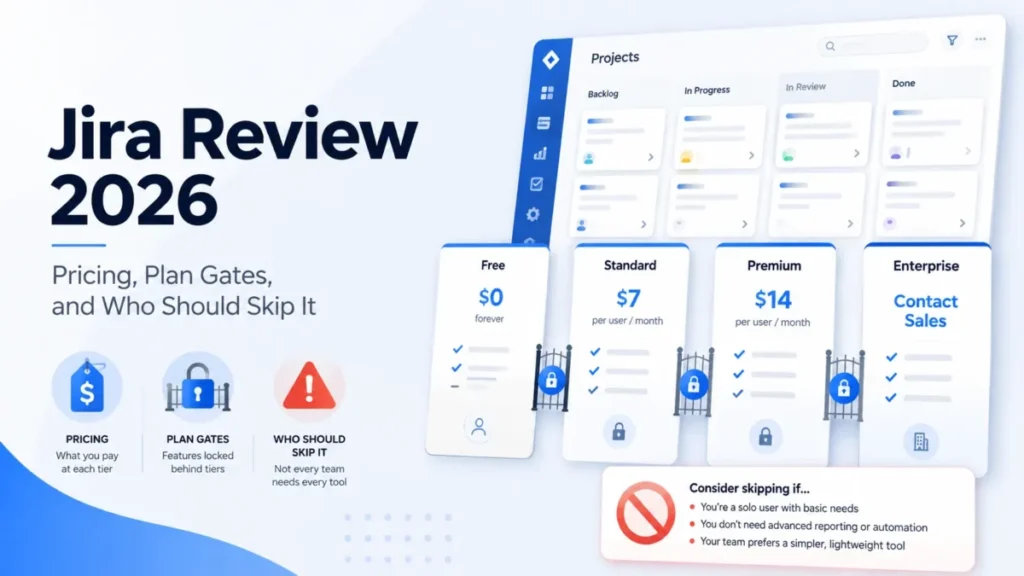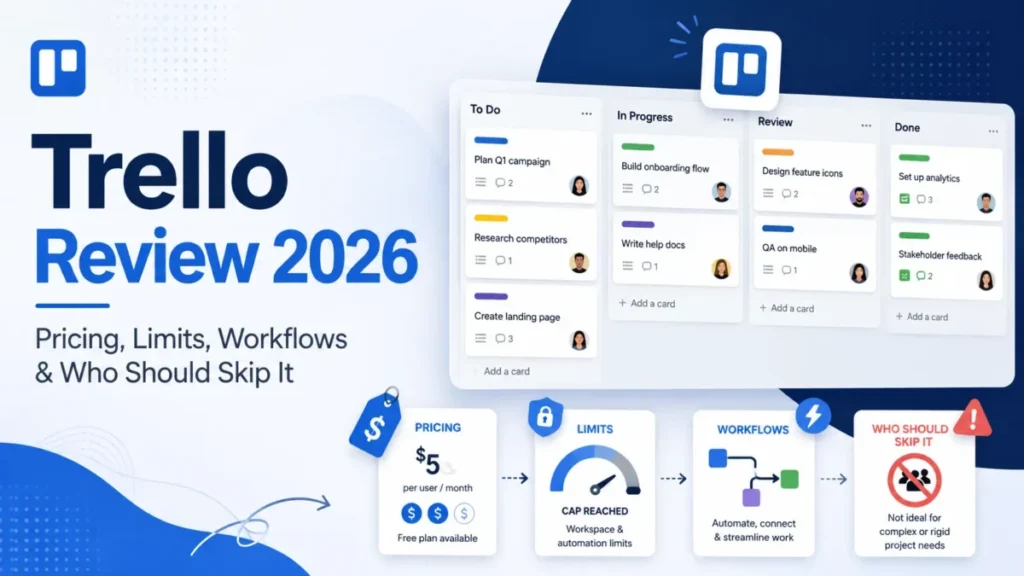
Plan limits and prices checked against each vendor’s official pricing page on July 27, 2026.
Free project management software rarely fails on features. It fails on a ceiling the marketing grid never leads with: 60MB of storage, a 2-seat cap, three boards, or 250 automation runs a month.
So this guide ranks the 10 best free project management software plans by their operating envelope: seats, projects, storage, automation, and the first event that forces a paid upgrade.
The short version: ClickUp’s Free Forever plan is the strongest start for most cross-functional teams, pairing unlimited members and tasks, provided files live elsewhere. Trello is the easier pick for simple visual work, and Jira fits software teams of up to 10.
If a paid tier is on the table too, the wider field of best project management software changes the calculus. The ranking below assumes a $0 license budget, and all ten picks have permanent free plans, not trials.
In This Article (13 sections)
Quick verdict: best free project management software by use case
| Use case | Top pick | Why it fits |
|---|---|---|
| Cross-functional teams of 3-20 | ClickUp | Unlimited members and tasks on Free Forever, with boards, calendar, Docs, and sprints |
| Simple visual Kanban, up to 10 people | Trello | 10 collaborators, 10 boards, unlimited cards, minimal training |
| Software teams up to 10 | Jira | Backlog, board, timeline, and calendar views plus reports for 10 users |
| Five-person teams that need Gantt | Zoho Projects | Gantt charts, subtasks, and 5GB storage for 5 users |
| Solo users and pairs | Asana | Unlimited tasks and projects for 1-2 people with list, board, and calendar views |
| Boutique agencies logging client time | Teamwork.com | Time logging and client organization for 5 users and 5 projects |
| Docs-plus-projects solo operators | Notion | Unlimited pages and blocks for individuals, databases with subtasks and dependencies |
| Enterprise-path sandbox | Wrike | Basic task, board, and table management with a governed upgrade path |
| Compact engineering backlogs | Linear | Unlimited members, 2 teams, 250 issues, API and webhooks |
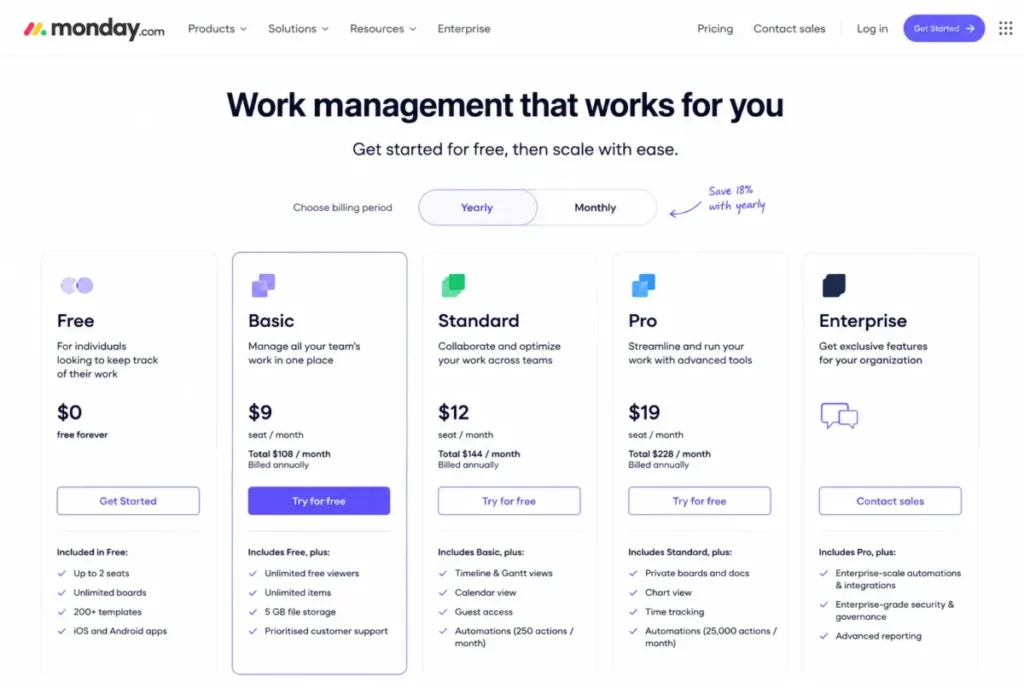
| Two-seat visual teams | monday.com Work Management | 3 boards, 3 Docs, and 200+ templates for 2 seats |
Sources: the official pricing pages of all ten vendors, including Zoho Projects plans and monday.com plans; the full set is linked under the limits matrix below. Checked July 27, 2026.
Ten tools, ten different ceilings: the right pick depends less on features than on which limit your team hits first. The sections below quantify every one of those ceilings before ranking the tools.
How we evaluated free project management software
The evaluation is limit-first: what each plan holds, and what ends it.
How we chose and ranked these 10 tools
These rankings are based on the official pricing and plan pages of all ten vendors, official plan documentation, and explicitly labeled third-party review patterns. Every plan limit was checked against the vendor’s own page on July 27, 2026.
Each tool was assessed against the same buyer-focused criteria: usable team capacity, project and task ceilings, planning views, storage, automation quotas, integrations, support level, and the severity of the first blocker.
Greater weight was given to the ceilings that end a free plan in practice, including seat caps, storage, automation quotas, and gated views. Brand popularity, marketing presentation, and affiliate relationships did not influence the order.
Claims that could not be verified from reliable evidence were excluded, and stale vendor help pages were set aside in favor of the current pricing page of record. The order is qualitative and cohort-based, so no composite scores are published.
Free-plan limits at a glance
This matrix is the core of the ranking: it normalizes what each free plan holds before it blocks the team. Read it as a buyer risk ledger, not a feature grid.
| Tool | Free seats | Work-item ceiling | Storage cap | Automation quota | First paid tier |
|---|---|---|---|---|---|
| ClickUp | Unlimited members | Unlimited tasks | 60MB total | Not the first blocker; one form on Free | Unlimited, $7 per user/ |
| Trello | 10 collaborators per Workspace | 10 boards, unlimited cards | 10MB per file | 250 command runs/ | Standard, $5 per user/ |
| Jira | 10 users | Unlimited projects and tasks | 2GB | 100 rule runs/ | Standard, $7.91 per user/ |
| Zoho Projects | 5 users | 3 projects | 5GB | 50 workflow actions/ | Premium, price not published in the opened pricing view |
| Asana | 2 users | Unlimited tasks and projects | Unlimited, 100MB per file | Automations require Starter | Starter, $10.99 per user/ |
| Teamwork.com | 5 users | 5 projects | 100MB | 100 automations | Basics, $9.99 per user/ |
| Notion | Unlimited pages and blocks for 1 member; limited at 2+ | Database items within block limits at 2+ members | 5MB per file upload | Not listed on Free | Plus, $10 per seat/ |
| Wrike | Not stated on the opened pricing page | Projects and tasks included | Not published | Not listed on Free | Team, $10 per user/ |
| Linear | Unlimited members | 250 issues, 2 teams | 10MB per file upload | Not listed on Free | Basic, $10 per user/ |
| monday.com Work Management | 2 seats | 3 boards, 3 Docs | Not published | AI features start on Basic | Basic, $9 per seat/ |
Sources: official pricing pages for ClickUp, Trello, Jira, Zoho Projects, and Asana. Also: Teamwork.com, Notion, Wrike, Linear, and monday.com. Checked July 27, 2026.
Mobile note: render this matrix with horizontal scroll and a pinned label column so the tool name stays visible.
The pattern worth noticing: the two plans with unlimited members, ClickUp and Linear, cap something else instead, storage for one and issues for the other. Every vendor caps the dimension its paid tiers monetize, which is why a team should shortlist by its scarcest resource, not by seat count alone.
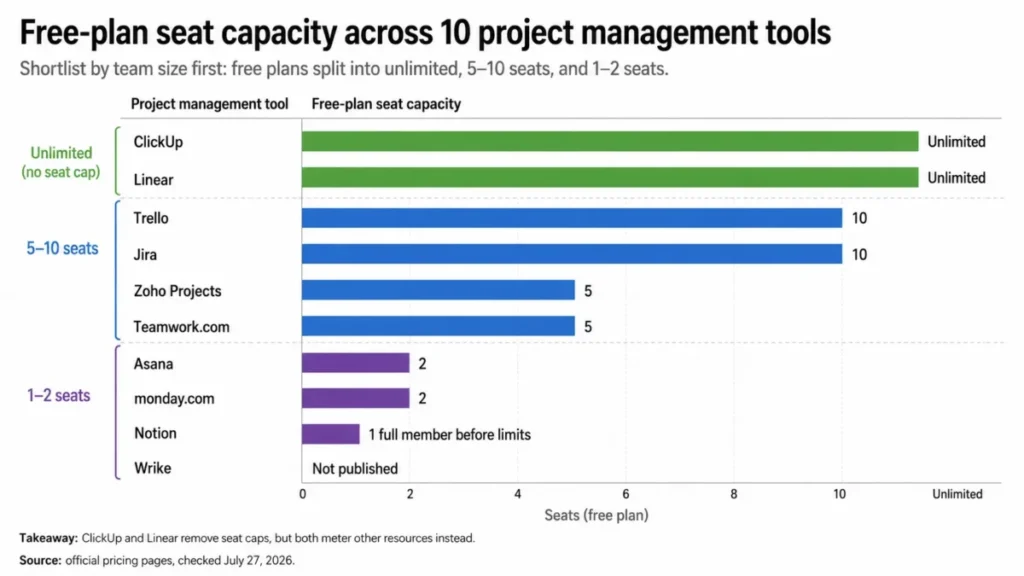
Seat counts are only half the comparison, because the unit each vendor counts also differs, and the glossary below untangles those units before any cross-tool math.
Projects, boards, teams, and issues are not the same unit
Free-tier marketing mixes units that do not convert into each other. Before comparing “3” against “10”, anchor on what each vendor counts:
- Project (Zoho Projects, Teamwork.com): a container of task lists, milestones, and files. Three projects means three concurrent client engagements or initiatives, however many tasks each holds.
- Board (Trello, monday.com): one visual workflow. A single project often needs several boards, so a 3-board cap is tighter than a 3-project cap.
- Workspace collaborator (Trello): a person, whatever their role. Guests and full members draw from the same 10-person pool.
- Issue (Jira, Linear): a single work item. Linear’s 250-issue ceiling is a task-level cap, not a project-level one, so a busy team can reach it in one quarter.
- Block (Notion): any unit of content, from a paragraph to a database row. Notion’s free tier counts blocks once a second member joins.
A 3-board limit is therefore not equivalent to a 3-project limit, and an issue cap bites faster than either. Misreading the unit is the most common reason a team migrates twice in one year.
The 10 best free project management tools
Every plan below is ranked by how much real work it holds before its first blocker, using the criteria above. Depth varies by rank and by how much a tool’s ceilings need unpacking.
1. ClickUp: best free plan for cross-functional teams of 3-20

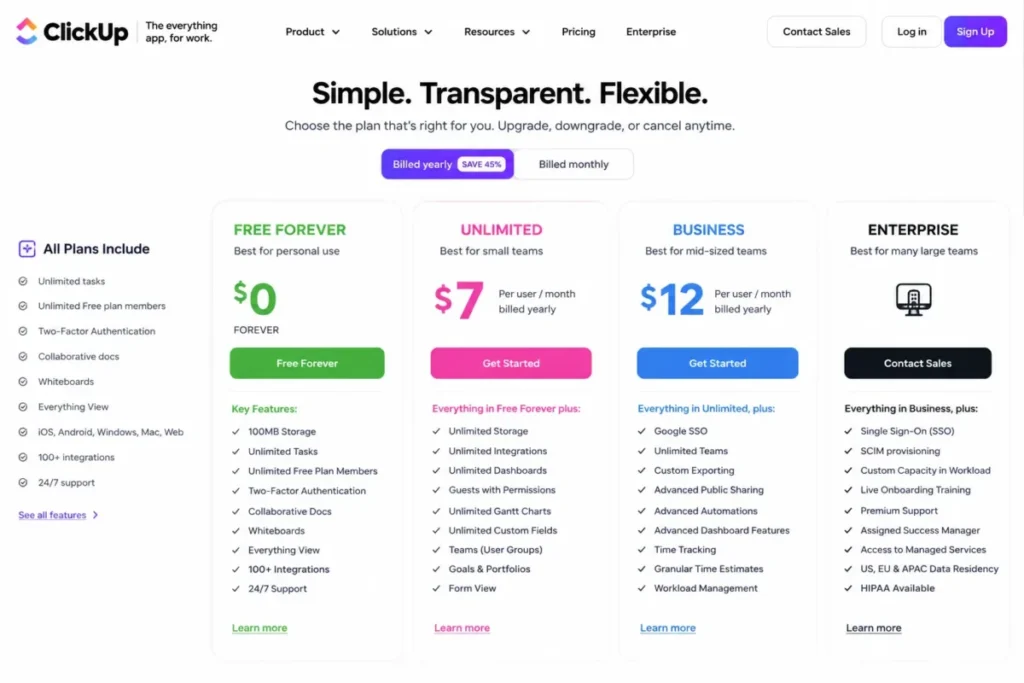
No other free plan in this ranking pairs unlimited members with unlimited tasks. ClickUp’s Free Forever plan carries a whole cross-functional team at $0, and its ceiling is storage, not seats.
That ceiling is severe: 60MB of total storage, roughly a handful of design files or a short screen recording. Teams that treat their project tool as a file repository will hit it in the first month, which is why the recommendation comes with a condition.
The rest of the envelope is unusually broad for a free tier. The official ClickUp pricing page lists Kanban boards, calendar view, collaborative Docs, sprint management, and two-factor authentication on Free Forever, checked July 27, 2026.
Based on the documented workflow, a team builds a workspace structure, adds tasks with owners and due dates, then monitors work in list, board, or calendar view. That covers product, marketing, and operations coordination without touching a paid gate.
The gates that end the free run are specific: the free plan includes one form, and unlimited Gantt charts, unlimited integrations, unlimited storage, and custom fields sit on the Unlimited plan. That tier is priced at $7 per user/month billed yearly on the ClickUp plan comparison.
G2 review patterns for ClickUp praise centralization and customization while flagging a learning curve and slower loading, so budget onboarding time before counting the savings.
| Pros | Cons |
|---|---|
| Unlimited members and unlimited tasks on Free Forever | 60MB total storage forces files into an external drive |
| Boards, calendar, collaborative Docs, and sprints in one workspace | One form on the free plan caps intake workflows |
| Two-factor authentication included at $0 | Unlimited Gantt, integrations, storage, and custom fields require the Unlimited plan |
| Cheap upgrade path at $7 per user/ | G2 reviewers recur on learning curve and slower loading |
- Best for:
- remote startup teams coordinating product, marketing, and operations in one workspace.
Avoid it if: your projects are file-heavy and you expect the free tier to double as document storage.
- Setup difficulty:
- Medium. The view and hierarchy options that reviewers praise are the same ones that create the learning curve.
First upgrade trigger: the 60MB storage ceiling, or the second intake form. Our ClickUp review breaks down what each paid tier adds beyond those two gates.
- Verdict:
- choose ClickUp if your team is bigger than any competitor’s free seat cap and your files already live in a dedicated drive.
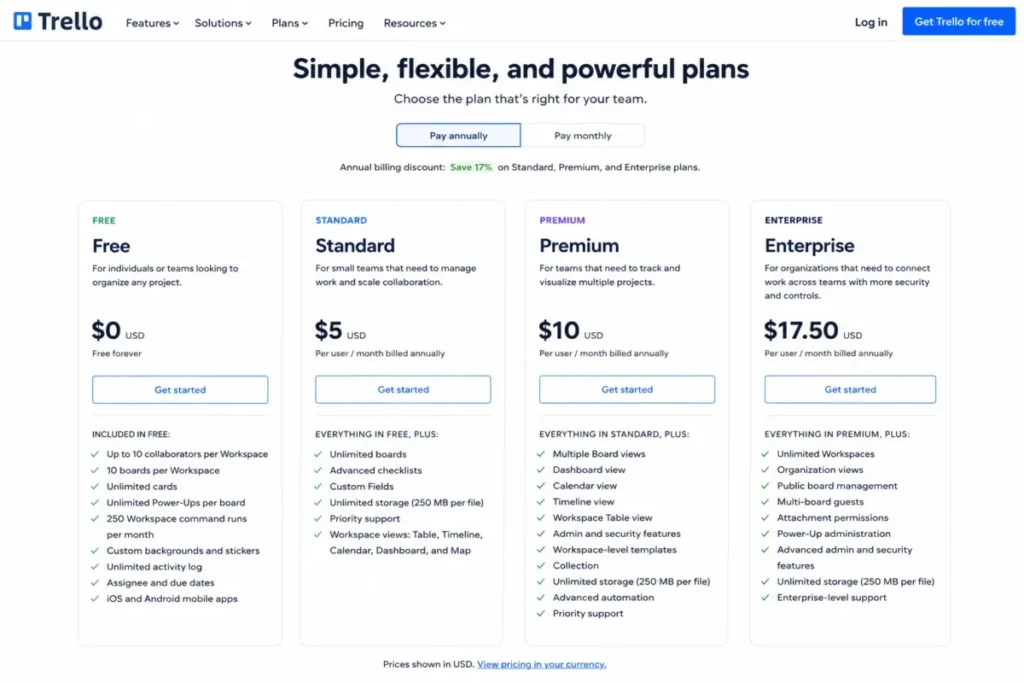
2. Trello: best free Kanban software for teams up to 10

Based on the documented workflow, Trello asks for almost nothing: create a board, define lists as workflow stages, add cards with assignees and due dates, and move cards as status changes. That is the whole operating model, and it is why adoption is Trello’s core strength.
The free Workspace holds up to 10 collaborators and 10 boards with unlimited cards, per the official Trello pricing page, checked July 27, 2026. Unlimited Power-Ups per board soften the feature gap, and the iOS and Android apps keep field teams inside the same flow.
| Pros | Cons |
|---|---|
| 10 collaborators and 10 boards free, with unlimited cards | Calendar, Timeline, Table, Dashboard, and Map views require Premium |
| Near-zero training cost; stage-based flow maps to most simple processes | 250 Workspace command runs per month caps automation early |
| Unlimited Power-Ups per board extend the free tier | 10MB per-file attachment limit blocks larger assets |
| Standard tier is the cheapest first upgrade here at $5 per user/ | G2 reviewers flag reporting and complex dependencies as weak spots |
The caps deserve a closer look than the features. The 250 monthly command runs sound generous until a busy board automates card moves and due-date nudges, and 10MB per file rules out most video or layered design assets.
The deeper constraint is structural: dependency planning, portfolio reporting, and every non-board view live on paid tiers. G2 review patterns for Trello consistently praise visual simplicity and quick onboarding while naming larger boards, reporting, and complex dependencies as pain points, which matches those plan gates.
- Best for:
- marketing, content, event, and operations teams up to 10 people running stage-based workflows.
Avoid it if: the program needs native portfolio reporting or dependency planning on the free tier.
- Setup difficulty:
- Low. Lists and cards mirror how most small teams already think.
First upgrade trigger: needing a calendar or timeline view of existing cards. The full plan-gate picture sits in our Trello review.
- Verdict:
- pick Trello if visual simplicity for up to 10 people beats analytical depth; pick Jira instead when work items need structure.
3. Jira: best free project management software for software teams up to 10

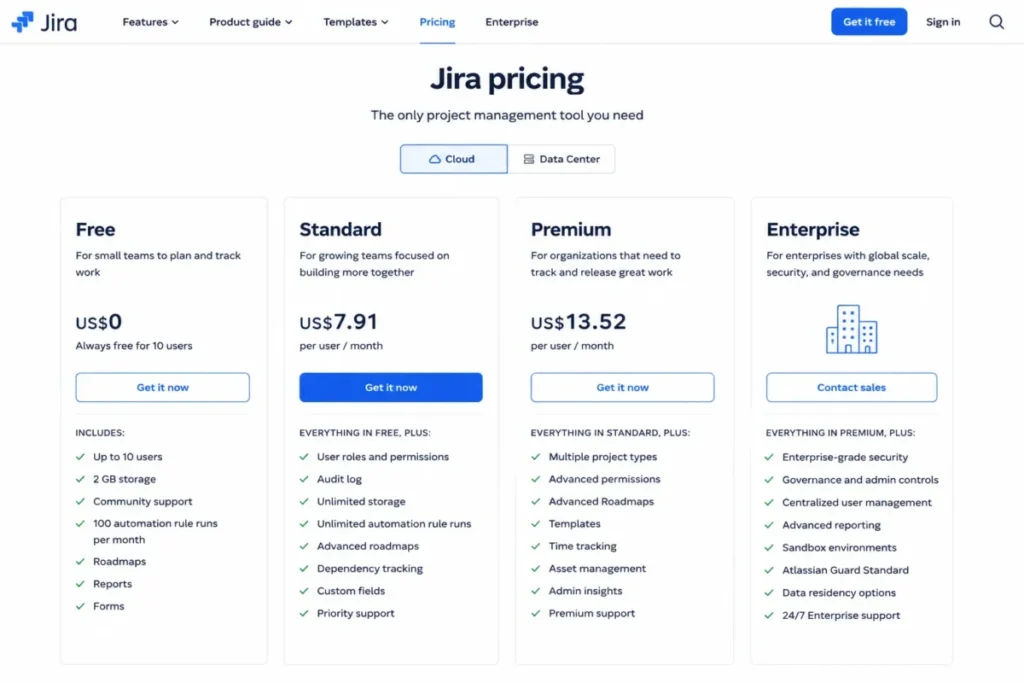
Software squads are the one cohort where the free field narrows to two names, and Jira is the fuller of the two. The free plan carries up to 10 users with unlimited goals, projects, tasks, and forms, per the official Jira pricing page, checked July 27, 2026.
View coverage is the standout. Backlog, list, board, timeline, calendar, and summary views plus reports and dashboards all sit on the free tier, which most competitors reserve for paid plans.
Based on the documented workflow, a squad creates a project, selects a workflow, fills a backlog, plans on a board, and reviews dashboards. Add 100 automation rule runs per month and 2GB of storage, and a disciplined 10-person team can run real sprints at $0.
Two limits matter more than the quotas. Free Jira has no project-level user roles and permissions, so every user effectively shares broad access, and support is community-only.
That permissions gap is a governance blocker for teams that invite clients or contractors into the workspace. If external collaborators need scoped access, budget for Standard at $7.91 per user/month, as listed on the Jira plan comparison, rather than working around it.
G2 review patterns for Jira praise flexible workflows and integrations while complexity, clutter, and learning curve recur, so the admin burden lands on whoever configures it. Our Jira review covers how that overhead grows with scheme customization.
| Pros | Cons |
|---|---|
| Backlog, board, timeline, calendar, and summary views free for 10 users | No project-level user roles and permissions on the Free plan |
| Unlimited goals, projects, tasks, and forms | Community support only, with no vendor support channel |
| Reports and dashboards included at $0 | 2GB storage and 100 automation rule runs per month |
| Apps and integrations available on Free | G2 reviewers recur on complexity, clutter, and learning curve |
- Best for:
- product and engineering squads up to 10 running Scrum or Kanban with Git-based workflows.
Avoid it if: a nontechnical team wants the lowest possible setup and administration overhead.
- Setup difficulty:
- High. Workflow and board configuration is Jira’s strength and its tax.
First upgrade trigger: granting a client or contractor scoped, project-level access.
- Verdict:
- Jira is the stronger fit when backlog and issue semantics matter more than simplicity; Linear wins when speed and a compact backlog matter more.
4. Zoho Projects: best free plan for five-person teams that need Gantt

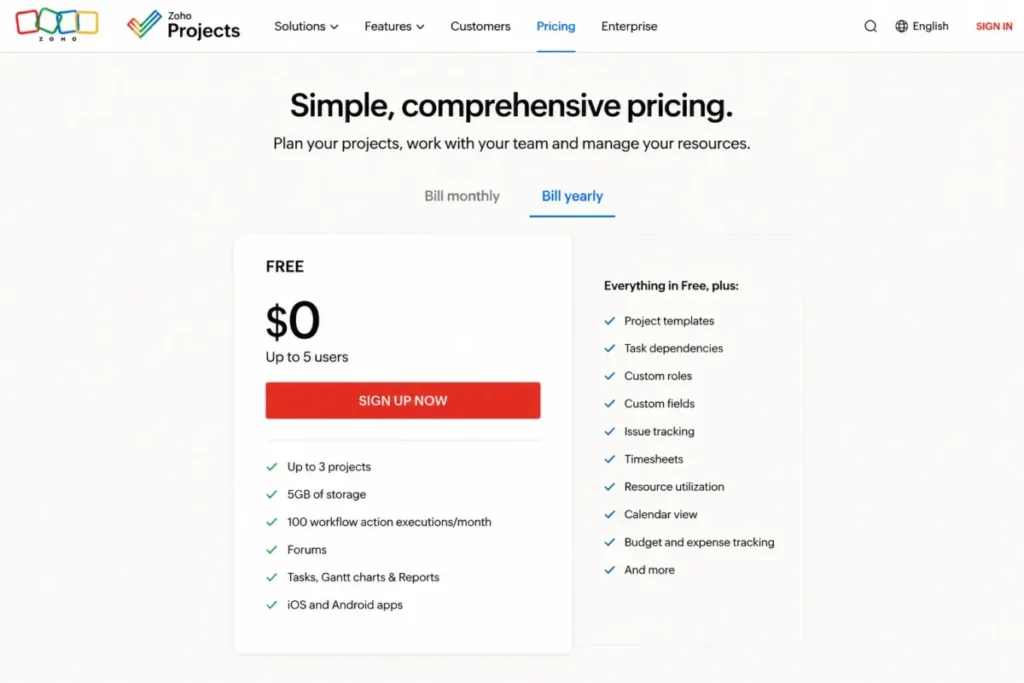
A freshness warning comes first, because it changes what other articles will tell you. An older Zoho help FAQ still describes a smaller free tier, but the current official Zoho Projects pricing page is the page of record: up to 5 users and 3 projects, checked July 27, 2026.
The same page lists 5GB of storage and 50 workflow actions per month for the free tier.
For that envelope, the planning depth is unusual. Gantt charts, subtasks, and a whiteboard sit on the free tier, so a five-person services team gets dependency-aware scheduling that Asana and Wrike reserve for paid plans.
Based on the documented workflow, a team creates one of its three projects, breaks work into tasks and subtasks, links dependencies, and monitors the schedule through Gantt. The 3-project cap is the wall: a fourth concurrent engagement means archiving, merging, or paying.
The ecosystem is the quiet differentiator, since teams already running Zoho’s stack, the one covered in our Zoho CRM review, keep projects near their customer data. G2 review patterns for Zoho Projects praise feature breadth and that ecosystem fit, while interface density and learning curve recur as complaints.
| Pros | Cons |
|---|---|
| Gantt charts and subtasks on a free plan | 3-project cap ends most agency-style usage quickly |
| 5GB storage, the deepest verified free storage in this ranking | 50 workflow action executions per month is the tightest automation quota here |
| Whiteboard included for planning sessions | Advanced templates, custom views, timesheets, and budgets require paid plans |
| Natural fit beside Zoho CRM, Books, and Analytics | G2 reviewers recur on interface density and learning curve |
- Best for:
- five-person service or operations teams already inside the Zoho ecosystem.
Avoid it if: you run more than three simultaneous projects and cannot merge them.
- Setup difficulty:
- Medium. The density that reviewers mention shows up during configuration.
First upgrade trigger: the fourth concurrent project, or a month that needs more than 50 workflow actions. The Premium price was not published in the pricing view opened for this check, so confirm it on the page before budgeting.
- Verdict:
- Zoho Projects is the stronger choice for structured, few-project teams that want Gantt at $0, provided the 3-project cap fits the pipeline.
5. Asana: best free structure for one or two people

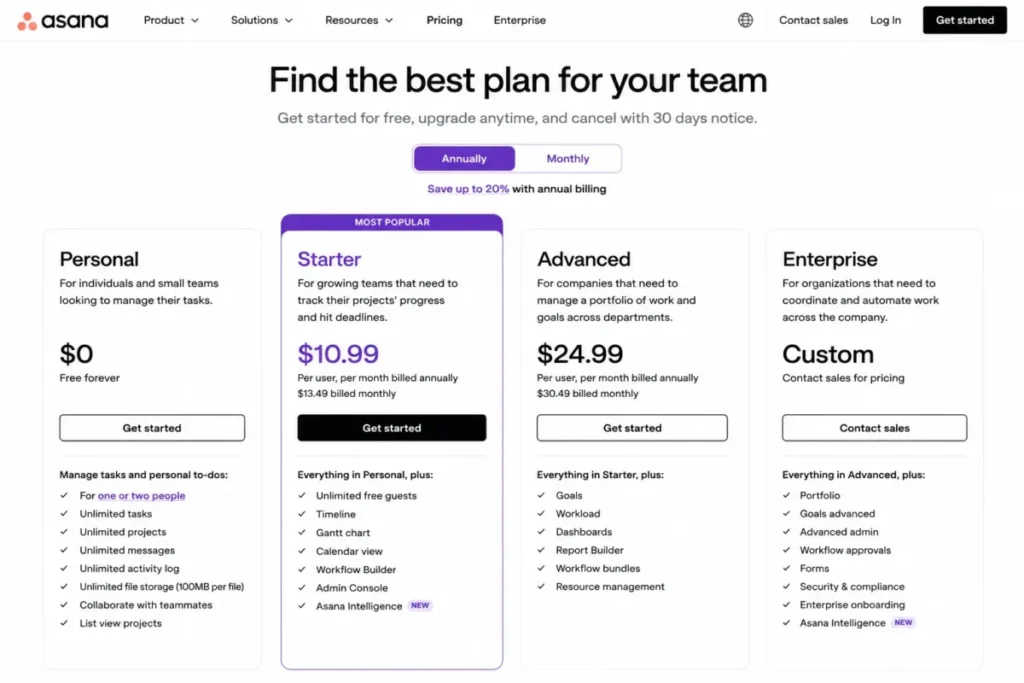
Asana’s free tier changed identity, and old articles still miss it. The Personal plan is free forever for one or two people, per the official Asana pricing page, checked July 27, 2026.
That cap moves Asana out of the team conversation: it now competes with Notion and monday.com for solo operators and pairs, not with Trello.
Inside that 2-user cap, the plan is generous where it counts. Unlimited tasks and projects, list, board, and calendar views, status updates, unlimited storage with a 100MB per-file maximum, more than 100 free integrations, and mobile apps all ship at $0.
- Best for:
- solo consultants and founder-assistant pairs who want structured work without heavy configuration.
Avoid it if: a third person needs access, or the workflow needs automation, Gantt, custom fields, or reporting without paying.
| Pros | Cons |
|---|---|
| Unlimited tasks and projects for up to 2 users | Two-user cap ends team usage before it starts |
| Unlimited storage with a 100MB per-file maximum | Timeline and Gantt require Starter |
| List, board, and calendar views plus status updates at $0 | Reporting dashboards require Starter |
| 100+ free integrations and mobile apps | Automations, forms, custom templates, and custom fields require Starter |
Everything a growing team reaches for next sits behind Starter at $10.99 per user/month billed annually, or $13.49 monthly, per the Asana plan cards. That is the steepest first-paid step in this ranking, so the free plan works best when its ceiling is understood as permanent.
G2 review patterns for Asana praise clarity and organization, while gated advanced features and the effort of moving complex task structures recur as concerns. Migration friction cuts both ways: our Asana review is the place to weigh the paid tiers before committing structure to it.
- Setup difficulty:
- Low. The documented workflow, create a project, add tasks with owners and due dates, switch views, post status updates, needs no configuration.
First upgrade trigger: the third user, full stop.
- Verdict:
- Asana Personal is the most polished free option for a pair, and the wrong free option for any team of three.
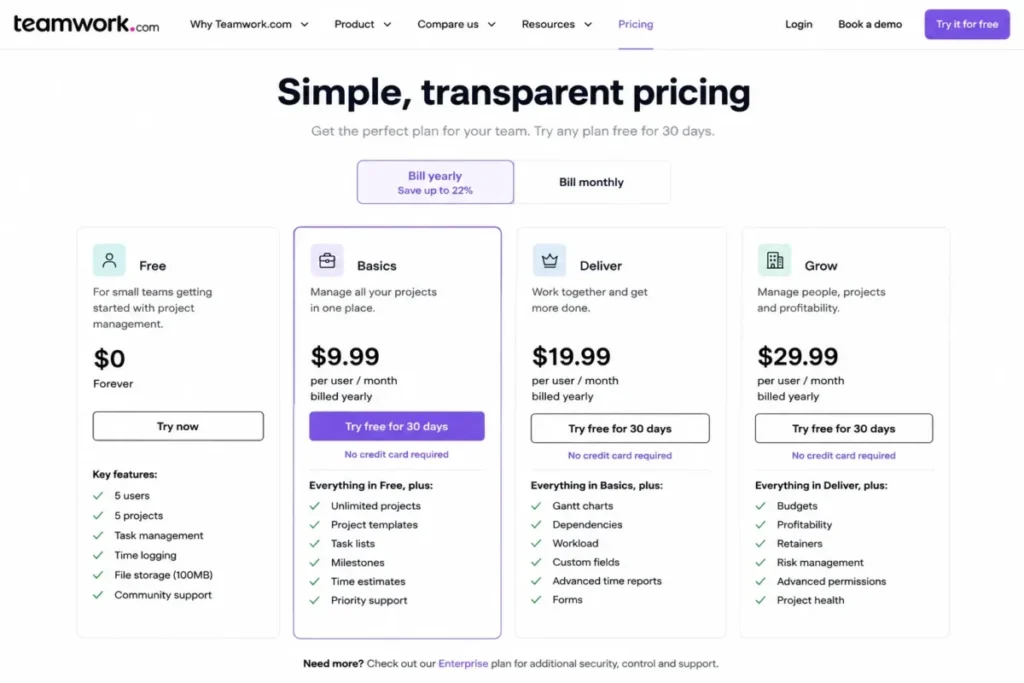
6. Teamwork.com: best free plan for boutique agencies

Client work has a requirement most free tiers skip entirely: time logging. Teamwork.com puts it on the free plan, alongside client organization, which is why it wins the agency cohort despite tight caps.
The envelope, per the official Teamwork.com pricing page, checked July 27, 2026: 5 users, 5 projects, 100MB of storage, and 100 automations, with US or EU data hosting. View coverage runs task, list, board, Gantt, and table, so scheduling client deliverables does not require a paid tier.
Based on the documented workflow, an agency creates a client and a project, builds task lists, assigns work, logs time, and reviews progress through project views. That is the minimum viable billing trail for an agency validating its process.
| Pros | Cons |
|---|---|
| Time logging and client organization on a free plan | 5-user and 5-project caps arrive fast for a growing agency |
| Task, list, board, Gantt, and table views included | 100MB storage keeps deliverable files out of the tool |
| 100 automations plus a choice of US or EU data hosting | Intake, budgeting, invoicing, capacity, and profitability features require paid plans |
| Cheap first step up at $9.99 per user/ | G2 reviewers note the feature breadth can overwhelm new users |
The caps define the exit: a sixth client project or a first profitability report pushes the account to Basics at $9.99 per user/month billed yearly, per the Teamwork.com plan cards.
G2 review patterns for Teamwork.com value the integrated delivery and time tracking while noting that breadth can overwhelm at the start.
One dated note for budget planning: the pricing page announces usage-based AI credits beginning September 2026, with amounts undisclosed as of July 27, 2026. Treat any AI usage as an unpriced variable until the vendor publishes terms; our Teamwork review tracks the paid-tier detail.
- Best for:
- boutique agencies with a handful of client projects and a need for basic time capture.
Avoid it if: you need more than five active projects or profitability reporting at $0.
- Setup difficulty:
- Medium. Client-and-project structure adds one layer beyond a plain task list.
First upgrade trigger: the sixth active client project.
- Verdict:
- Teamwork.com is the stronger free pick for client-services teams when time logging matters more than raw capacity.
7. Notion: best free docs-plus-projects workspace for solo operators

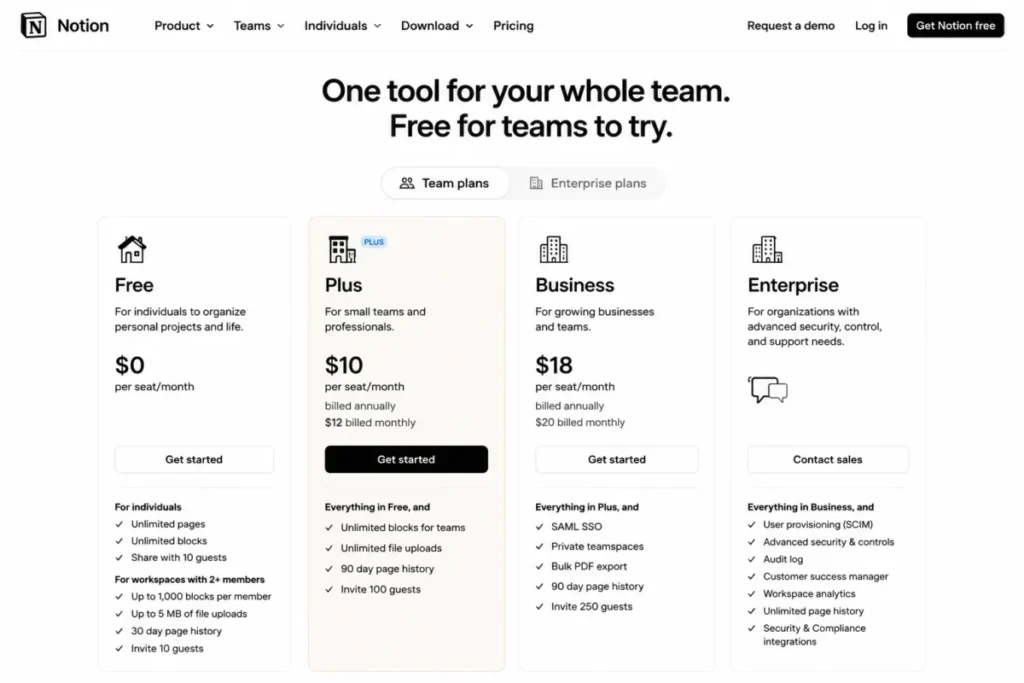
Notion’s free plan is two different products depending on head count, and most rankings blur that line. For an individual, pages and blocks are unlimited; the moment a second member joins the workspace, pages and blocks become limited, per the official Notion pricing page, checked July 27, 2026.
Read as a solo tool, the plan is deep. Databases with subtasks and dependencies, basic forms, basic sites, Notion Calendar, trial AI capabilities, and 7-day page history all ship at $0 per seat.
Based on the documented workflow, a solo operator builds a project database with status, owner, and due-date properties, switches between table and board views, and connects project pages to supporting docs. That docs-plus-projects fusion is the thing no dedicated project tool in this list replicates.
| Pros | Cons |
|---|---|
| Unlimited pages and blocks for an individual workspace | Pages and blocks become limited once a workspace has 2+ members |
| Databases with subtasks and dependencies double as a project tracker | 5MB file upload limit rules out heavier assets |
| Basic forms, basic sites, and Notion Calendar included | 7-day page history is a thin safety net for heavy editors |
| Trial AI capabilities included on Free | Project governance is less prescriptive than dedicated PM tools |
G2 review patterns for Notion praise flexibility and centralization, while disorganized setups and slow-feeling large pages or databases recur. Structure is a user responsibility here, not a product default.
- Best for:
- solo founders, creators, researchers, and consultants who want notes, docs, and project databases in one place.
Avoid it if: a multi-member team needs unrestricted collaborative blocks or files above 5MB at $0.
- Setup difficulty:
- Medium. Freedom means the schema is yours to design, and to over-design.
First upgrade trigger: the second workspace member, which starts the block limits; Plus is $10 per seat/month. Paid-tier detail sits in our Notion review.
- Verdict:
- Notion is the stronger pick when documentation is half the job; a two-person team hitting block limits is better served by Asana Personal.
8. Wrike: best free sandbox on an enterprise path

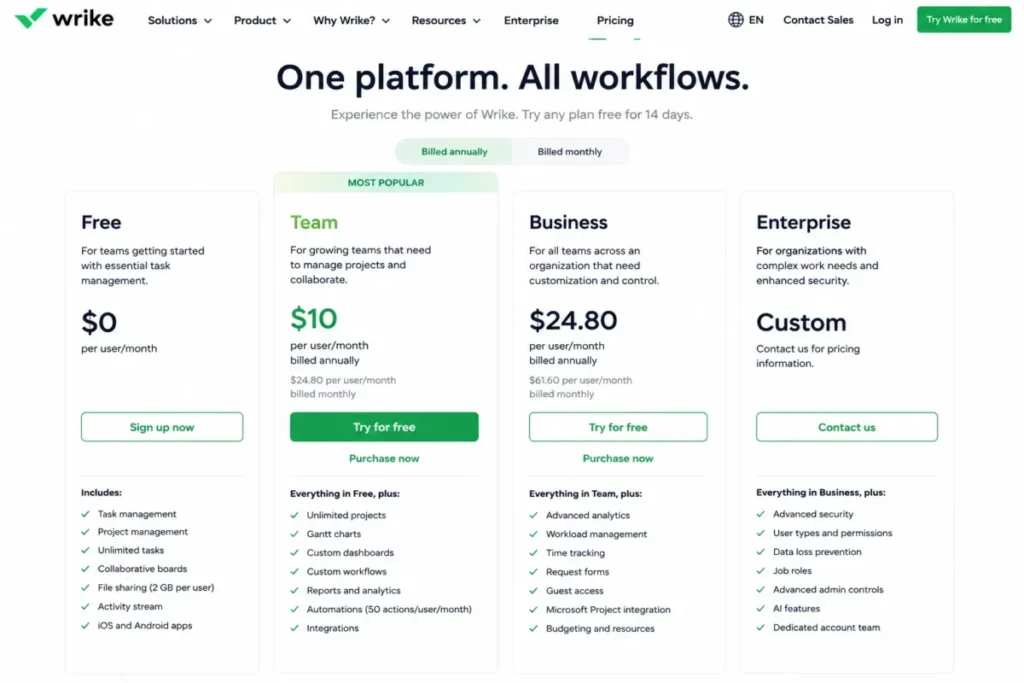
Honesty about an unknown ranks Wrike here. The official Wrike pricing page lists Free at $0 per user/month for essential task management, checked July 27, 2026.
The opened page does not state a free user cap, so this guide will not invent one.
What is verified: web, desktop, and mobile apps, project and task management, board view, table view, file attachments, and basic collaboration. Based on the documented workflow, a team creates projects and tasks, assigns ownership, and monitors work through board or table view.
What is absent defines the fit. Interactive Gantt charts and shareable dashboards sit on Team at $10 per user/month billed annually, and advanced customization plus standard integrations begin on Business.
| Pros | Cons |
|---|---|
| Task, board, and table basics free on web, desktop, and mobile | Interactive Gantt charts require the Team plan |
| Credible upgrade path into governed, enterprise-grade work management | Shareable dashboards require the Team plan |
| File attachments and basic collaboration included on Free | Advanced customization and standard integrations begin on Business |
| Familiar structure for teams testing before a paid rollout | Free user cap not stated on the opened pricing page |
G2 review patterns for Wrike praise visibility and customization on the platform overall, while setup, search, cross-space administration, and learning curve recur as friction. Those strengths mostly describe the paid product, which is the honest way to frame this free tier: a sandbox, not a destination. Deeper platform detail sits in our Wrike review.
- Best for:
- small teams trialing structured task and board workflows before a governed paid deployment.
Avoid it if: you expect Gantt, dashboards, or broad integrations at $0.
- Setup difficulty:
- Medium, based on the setup and administration friction reviewers describe.
First upgrade trigger: the first stakeholder who asks for a shareable dashboard.
- Verdict:
- choose Wrike’s free plan only if a future paid Wrike deployment is plausible; otherwise ClickUp or Trello gives more at $0.
9. Linear: best free issue tracker for compact engineering teams

Speed is the product thesis, and the reviews agree with it. G2 review patterns for Linear praise speed and clean design, with limited customization and depth for complex workflows recurring as the trade-off.
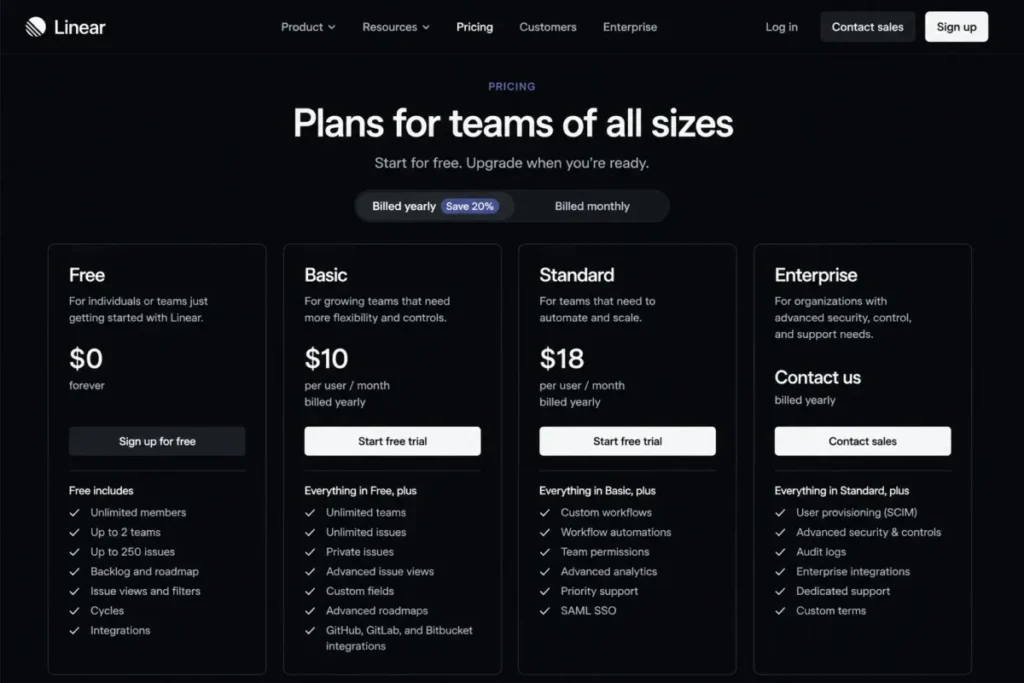
The free plan inverts the usual shape: unlimited members, but 250 issues and 2 teams, per the official Linear pricing page, checked July 27, 2026. Issues, projects, cycles, and initiatives are all present, plus API and webhook access, import and export, and 10MB file uploads.
That issue cap needs an operating policy, not just awareness. Based on the documented workflow, a team captures issues, prioritizes them, groups work into cycles or projects, and tracks progress through status changes.
In practice, a seed-stage squad that closes and archives finished issues stays under 250 for a long time, while a team that hoards a backlog cannot.
| Pros | Cons |
|---|---|
| Unlimited members on the free plan | 250-issue cap forces active backlog hygiene |
| Issues, projects, cycles, and initiatives included | 2-team cap blocks broader multi-squad structures |
| API and webhook access plus import and export at $0 | Private teams, guests, and advanced insights require paid tiers |
| Fast, focused interface per recurring G2 praise | 10MB file upload limit keeps assets external |
- Best for:
- seed-stage product and engineering teams with a compact backlog and at most two functional teams.
Avoid it if: a general business team or a complex program needs more than 250 active issues at $0.
- Setup difficulty:
- Low. The constrained model is the point, and there is little to configure.
First upgrade trigger: issue 251, or the third team; Basic is $10 per user/month billed yearly. Our Linear review covers what Business adds beyond that.
- Verdict:
- Linear is the stronger pick over Jira when speed and focus beat configurability, and the weaker one when workflows need heavy customization.
10. monday.com Work Management: best free boards for exactly two seats

The verdict leads here because the math is short: 2 seats, 3 boards, 3 Docs. monday.com’s free tier is the narrowest practical team plan in this ranking, per the official monday.com pricing page, checked July 27, 2026.
Inside those walls, the product is pleasant to use. More than 200 templates, 8 column types, iOS and Android apps, and a free-forever commitment make it a strong scratchpad for a founder pair.
Based on the documented workflow, a pair spins up a board from a template, adds items and owners, configures the available columns, and updates status as work progresses. The 8-column-type limit narrows how much structure each board can carry, and AI features start on Basic at $9 per seat/month on the annual configuration.
| Pros | Cons |
|---|---|
| 200+ templates make the first board nearly instant | 2-seat cap excludes any real team at $0 |
| Polished, visual boards praised in G2 patterns for ease of use | 3-board and 3-Doc caps compress even a pair’s workflows |
| iOS and Android apps on the free tier | Only 8 column types on the free plan |
| Free forever, not a trial | AI features start on the Basic plan |
G2 review patterns for monday.com praise customization and ease of use, while paid-plan costs and feature gates recur as concerns, which is exactly the free tier’s story. Our monday.com review covers whether the paid product justifies the jump.
- Best for:
- founder-cofounder pairs managing a few visible workflows.
Avoid it if: three or more people need access, or the workflow needs automations, native integrations, or a fourth board at $0.
- Setup difficulty:
- Low. Templates carry most of the setup.
First upgrade trigger: the third seat or the fourth board.
- Verdict:
- monday.com’s free plan suits a pair that values polish; teams of three or more get a wider envelope from every other seat-capped tool above.
Pricing comparison: free plans vs the first paid tier
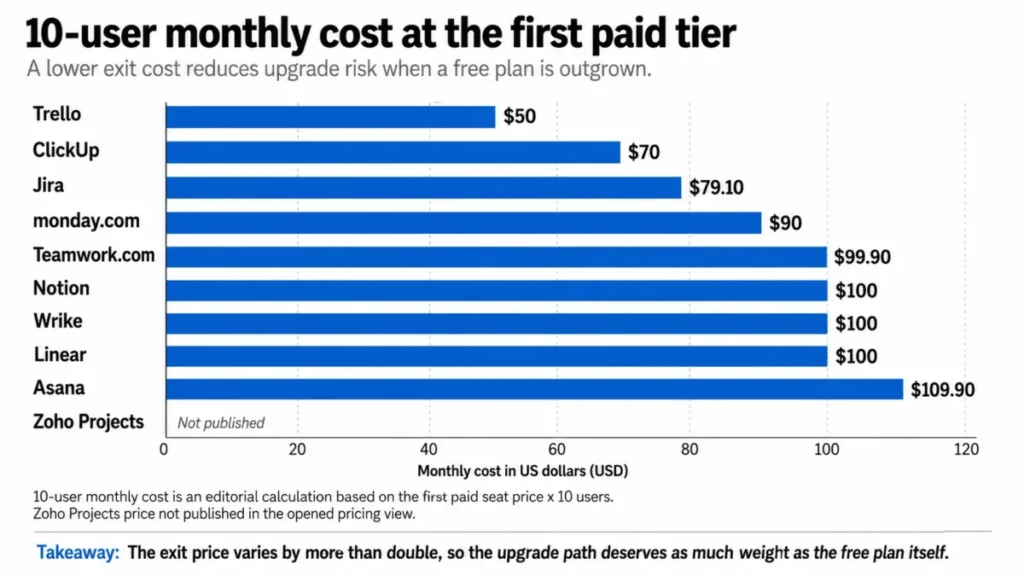
Every tool here lists its free plan at $0, so the pricing question is an exit question: what does the first meaningful upgrade cost, and at what team size. The 10-user column is an editorial calculation, seat price multiplied by 10 seats, not a vendor quote.
| Tool | Free plan | First paid tier | Seat price | 10-user monthly cost (calculated) |
|---|---|---|---|---|
| ClickUp | Free Forever | Unlimited | $7 per user/ | $70 |
| Trello | Free | Standard | $5 per user/ | $50 |
| Jira | Free | Standard | $7.91 per user/ | $79.10 |
| Zoho Projects | Free | Premium | Not published in the opened pricing view | Not calculable |
| Asana | Personal | Starter | $10.99 per user/ | $109.90 on annual billing |
| Teamwork.com | Free | Basics | $9.99 per user/ | $99.90 |
| Notion | Free | Plus | $10 per seat/ | $100 |
| Wrike | Free | Team | $10 per user/ | $100 |
| Linear | Free | Basic | $10 per user/ | $100 |
| monday.com Work Management | Free | Basic | $9 per seat/ | $90 |
Sources: official pricing pages for ClickUp plans, Trello plans, and Jira plans. More: Zoho Projects pricing and Asana plans. Also: Teamwork.com plans, Notion plans, Wrike plans, Linear plans, and monday.com Work Management plans. Checked July 27, 2026. Calculation: seat price x 10 = monthly cost, for example $7 x 10 = $70. Prices change; confirm on the vendor page before budgeting.
Mobile note: horizontal scroll with a pinned label column, keeping seat price and billing basis together.
Two readings matter. Trello has the cheapest exit at $50 a month for 10 users, so choosing it is a low-regret decision even if the free tier is outgrown, while Asana has the steepest first step, which raises the stakes of its 2-user cap.
Teams weighing ClickUp’s Unlimited tier against staying free will find the deeper plan-gate detail in our ClickUp pricing guide, including where the paid storage and integration limits sit.
The same exit logic applies down-market: the Trello pricing plans breakdown shows what Standard’s low seat price does and does not remove from the free tier’s caps.
Feature gate comparison
Feature availability, not price, is what usually ends a free plan. This table isolates the three gates buyers ask about most: dependency-aware planning views, automation, and storage.
| Tool | Gantt or timeline on Free | Automation quota on Free | Storage cap | First meaningful gate |
|---|---|---|---|---|
| ClickUp | Unlimited Gantt requires the Unlimited plan | Not the first blocker; one form on Free | 60MB total | Storage |
| Trello | Timeline requires Premium | 250 command runs/ | 10MB per file | Paid-only views |
| Jira | Timeline and calendar included | 100 rule runs/ | 2GB | Project-level roles and permissions |
| Zoho Projects | Gantt included | 50 workflow actions/ | 5GB | 3-project cap |
| Asana | Timeline and Gantt require Starter | Automations require Starter | Unlimited, 100MB per file | 2-user cap |
| Teamwork.com | Gantt included | 100 automations | 100MB | 5-project cap |
| Notion | Not listed for Free | Not listed for Free | 5MB per file upload | Block limits at 2+ members |
| Wrike | Interactive Gantt requires Team | Not listed for Free | Not published | Dashboards and Gantt |
| Linear | Not listed for Free | Not listed for Free | 10MB per file upload | 250-issue cap |
| monday.com Work Management | Not listed for Free | AI features start on Basic | Not published | 3-board cap |
Sources: the same ten official pricing pages cited under the pricing table above, checked July 27, 2026. Cells marked “Not listed” or “Not published” reflect what those pages state. Supporting documentation: Zoho Projects plan comparison and the monday.com plan documentation.
Mobile note: horizontal scroll with a pinned label column.
The Gantt column alone reorders the ranking for dependency-heavy teams: only Zoho Projects and Teamwork.com include it free, which is why both outrank shinier tools for schedule-driven work.
What an automation quota buys in practice
Automation quotas read as abstract until converted into rules. As an illustrative scenario, not a measured product test: one rule that fires once per day consumes about 30 runs in a 30-day month, since 1 x 30 = 30.
Against that scenario, Zoho’s 50 monthly workflow actions support roughly one daily rule plus a little headroom, Jira’s 100 and Teamwork.com’s 100 support about three daily rules, and Trello’s 250 command runs support about eight. A team automating card moves, reminders, and status changes across several boards will exhaust any of these quotas, which makes automation the quietest upgrade trigger in this ranking.
Setup and migration difficulty
Free plans price the license at $0 and leave setup as the real cost. These judgments synthesize each tool’s documented structure with the friction patterns recurring in its G2 reviews.
| Tool | Setup difficulty | Why |
|---|---|---|
| Trello | Low | Lists and cards, minimal configuration, quick onboarding per review patterns |
| Asana | Low | Documented workflow needs no configuration for 1-2 people |
| Linear | Low | Deliberately constrained model with little to configure |
| monday.com Work Management | Low | 200+ templates carry most of the setup |
| ClickUp | Medium | Views and hierarchy options create the learning curve reviewers describe |
| Zoho Projects | Medium | Interface density surfaces during configuration |
| Teamwork.com | Medium | Client-and-project structure adds a layer; breadth can overwhelm at first |
| Notion | Medium | The schema is user-designed, and disorganized setups recur in reviews |
| Wrike | Medium | Setup, search, and administration friction recur in reviews |
| Jira | High | Workflow, board, and scheme configuration demands an owner |
Sources: setup judgments are editorial, synthesized from the official plan pages cited above and the G2 review pages linked in each tool’s section. Representative review pages: Zoho Projects reviews on G2 and monday.com reviews on G2. Checked July 27, 2026.
Setup difficulty compounds with team size: a High-effort tool at zero license cost often costs more in admin hours than a Low-effort tool with a cheap paid seat.
Migration checklist before importing spreadsheet work
Moving from spreadsheets into any of these tools is a manual normalization project, whatever the vendor’s importer promises. Clean these seven things first, in order:
- Owners: one named owner per row; kill shared-ownership cells.
- Statuses: collapse ad-hoc status text into 4-6 canonical values that map to board columns.
- Dates: one date format, and separate start dates from due dates.
- Dependencies: record them explicitly; only Gantt-capable free tiers (Zoho Projects, Teamwork.com) can represent them natively.
- Attachments: inventory file sizes against the target’s cap before assuming files come along.
- Custom fields: list which columns must survive; on several free tiers custom fields are a paid gate.
- Archive: do not import dead rows, especially into Linear, where every imported issue spends the 250-issue budget.
Importer behavior differs by product and was not verified per tool here, so run a 20-row pilot import before committing the full dataset.
Which free plan fits your team?
Finding the best free project management software for a specific team comes down to two branches: head count first, because seat caps disqualify tools before features get a vote, and work type second.
1-2 people. Asana Personal for structured task work, Notion when documentation is half the job, monday.com Work Management when visual boards and templates matter most. All three ceilings are permanent, so pick the one whose paid exit you can live with.
3-5 people. Zoho Projects when schedules need Gantt and dependencies, Teamwork.com when client time logging pays the bills, ClickUp when the roster will keep growing. At this size the 2-seat plans are already out.
6-10 people. Trello for stage-based visual work, Jira for software delivery, ClickUp for mixed departments. Every other tool in this ranking has either a 5-seat cap or a 2-seat cap by this point.
More than 10 people. Only ClickUp and Linear remain free without a seat cap, and Linear only fits engineering-shaped work under 250 issues. For most 10-plus teams the honest comparison is ClickUp Free Forever against a cheap paid tier elsewhere.
Smaller teams weighing lightweight paid options against these free ceilings can cross-check the picks in our guide to project management tools for small teams, which covers the sub-$10 seat market these free plans feed into.
Software teams: Jira or Linear
The engineering branch deserves its own matrix, because the two candidates cap opposite resources.
| Decision dimension | Jira Free | Linear Free |
|---|---|---|
| Seats | 10 users | Unlimited members |
| Work-item ceiling | Unlimited tasks and projects | 250 issues across 2 teams |
| Views | Backlog, list, board, timeline, calendar, summary | Issues, projects, cycles, initiatives |
| Automation | 100 rule runs/ | Not listed for Free |
| Storage and files | 2GB | 10MB per file upload |
| Recurring review friction | Complexity, clutter, learning curve | Limited customization and depth |
Sources: Jira official pricing and Linear official pricing, with friction patterns from the G2 pages linked in each tool’s section, checked July 27, 2026.
Choose Jira if the team is under 10 people and needs reports, dashboards, and configurable workflows; choose Linear if headcount is above 10, the backlog stays compact, and speed matters more than configurability.
Seven questions that settle the choice
- How many people need access on day one, and how many within 12 months?
- Which limit is scarcest for your work: seats, projects, storage, issues, or automation runs?
- Do schedules need dependency-aware Gantt views on the free tier?
- Does anyone outside the company, client or contractor, need scoped access?
- How many files, and of what size, must live inside the tool?
- Who owns setup, and how many admin hours can they give it?
- What does the first paid tier cost at your projected headcount?
Answer the second question first: this list exists because teams shortlist by features and get evicted by ceilings. If two tools survive your answers, take the one with the cheaper calculated 10-user exit.
Teams whose real bottleneck is communication rather than task tracking sometimes need a chat-and-whiteboard layer instead; the picks in our roundup of free collaboration tools cover that adjacent stack.
When a free plan stops being free enough
Ten free licenses cost exactly $0 in software: 10 products x $0 = $0 per month. That number excludes everything that starts costing time the day the plan is adopted.
External storage labor. ClickUp’s 60MB, Teamwork.com’s 100MB, and Notion’s 5MB per-file caps push files into a separate drive, which means every task links out and every handoff crosses two systems.
Manual reporting. Trello, Asana, and monday.com hold reporting views behind paid tiers, so someone rebuilds status decks by hand each week.
Automation workarounds. Quotas of 50-250 runs a month mean the reminders and status updates a paid plan would automate become someone’s recurring chore.
Migration labor. Every ceiling hit under deadline converts into an unplanned migration project, with the normalization checklist above executed in a hurry.
Administration. Jira’s configuration overhead and Notion’s schema design are unpaid roles that scale with the team.
The honest budget conversation is therefore not “free versus paid” but “which ceilings does this team pay for in hours”. A five-person team spending two hours a week on workarounds should compare that cost against the $50-$110 monthly exits in the pricing table before calling the free plan cheap.
The upgrade triggers, in one place:
- ClickUp: the storage ceiling, or a second intake form
- Trello: the first calendar or timeline view
- Jira: scoped client or contractor access
- Zoho Projects: the fourth project, or the 51st monthly workflow action
- Asana: the third user
- Teamwork.com: the sixth active project
- Notion: the second workspace member
- Wrike: the first shareable dashboard
- Linear: issue 251, or the third team
- monday.com Work Management: the third seat, or the fourth board
Which free project management tool should you avoid?
None of the ten is a bad product, but four are wrong for specific buyers at $0, and one deserves a warning label.
Avoid monday.com Work Management free for any team of three or more. The 2-seat, 3-board envelope is the narrowest here, and the polish that makes it attractive does not widen it. Pairs outgrowing it face the same fork our Asana vs monday.com comparison maps for the paid tiers.
Avoid ClickUp free for file-heavy work. For creative teams whose deliverables are the files themselves, 60MB is not a limitation, it is a disqualification.
Avoid Wrike free if the free tier is the destination. With Gantt and dashboards on Team, an unstated user cap, and integrations starting on Business, it only makes sense as a staging area for a paid rollout.
Avoid Zoho Projects free for agencies with rotating clients. Three projects means three engagements, and archives are not a client-management strategy.
Avoid Asana Personal for any group of three, however attractive the interface: the 2-user cap is absolute, and the $10.99 per-seat exit is the steepest in this ranking.
Common mistakes when choosing free project management software
Shortlisting by seat count alone. ClickUp’s unlimited members hide a 60MB storage wall; Linear’s unlimited members hide a 250-issue wall. Every generous number is subsidized by a stingy one.
Treating boards, projects, and issues as the same unit. monday.com counts boards, and a 3-board cap compresses even a pair’s workflows.
Zoho Projects counts whole projects, a looser unit, while Linear counts individual issues, the tightest of the three. Convert the units before comparing the numbers.
Assuming the marketing page describes the free tier. Gantt, dashboards, and timeline views headline product pages while sitting on paid plans at Trello, Asana, and Wrike. Verify the plan column, not the product tour.
Ignoring automation quotas. At one daily rule per 30 runs, the 50-250 monthly quotas here support one to eight rules. Teams automate more than they predict.
Skipping the permissions question. Jira Free’s lack of project-level roles is invisible until a client joins the workspace, at which point it is urgent.
Adopting without an exit plan. The free plans with the widest envelopes (ClickUp, Jira) also have upgrade paths under $8 per seat, while Asana’s exit costs $10.99 per seat. Price the eviction before moving in.
Final verdict
For most teams, the best free project management software in 2026 is ClickUp Free Forever, with one condition attached: unlimited members and tasks with boards, calendar, Docs, and sprints, provided files live in an external drive and someone absorbs the learning curve.
The rest of the field wins by cohort: Trello for visual simplicity within its collaborator cap, Jira for software squads within its user cap, Zoho Projects for five-person teams that need free Gantt, and Asana for pairs.
Teamwork.com serves boutique agencies logging time, Notion serves solo docs-plus-projects work, Wrike suits teams staging a paid rollout, Linear fits compact engineering backlogs, and monday.com covers two-seat boards.
Each pick above pairs a cohort with the workflow it fits, names the plan gate or disqualifier that ends its free run, and calls a winner by scenario. Choose the widest envelope when in doubt, and avoid any plan whose disqualifier matches your daily work.
Verify the vendor’s pricing page before signup, because these envelopes move: every figure above was checked July 27, 2026 against the official pages linked throughout.
Teams assembling a fully free stack around one of these picks usually pair it with a customer database next; our ranking of the best free CRM software applies the same limit-first method to that category.
Frequently asked questions
Short answers to the questions buyers ask most, using the same plan data checked July 27, 2026.
What is the best free project management software?
ClickUp is the strongest free plan for most cross-functional teams of 3-20 because Free Forever combines unlimited members and unlimited tasks with boards, calendar, Docs, and sprints. The condition is its 60MB total storage, so file-heavy teams are better served by Trello for simplicity or Zoho Projects for storage depth.
Which free project management software has unlimited users?
Two of the ten verified plans place no cap on members: ClickUp Free Forever and Linear Free. Each caps a different resource instead, 60MB of total storage at ClickUp and 250 issues across 2 teams at Linear, so “unlimited users” holds only until the team hits the resource the vendor meters instead.
Is ClickUp free forever, for real?
Yes, if the plan’s ceilings fit your work: the tier is named Free Forever and carries unlimited members and tasks with no time limit, per the official pricing page checked July 27, 2026. The practical constraints are 60MB of total storage and one form, and unlimited Gantt, integrations, storage, and custom fields sit on the $7 Unlimited plan.
Is Trello free for teams?
Yes, if the whole Workspace fits within 10 collaborators and 10 boards. Cards are unlimited and Power-Ups are unlimited per board, which stretches the free tier further than its numbers suggest.
The catches are 250 command runs a month, a 10MB per-file attachment cap, and paid-only Calendar, Timeline, Table, Dashboard, and Map views.
How many users are free in Asana?
Two. Asana’s Personal plan is free forever for one or two people, with unlimited tasks and projects, list, board, and calendar views, and unlimited storage at a 100MB per-file maximum.
Older articles still cite bigger free teams, but the current official pricing page, checked July 27, 2026, is explicit, and the third user requires Starter.
Does monday.com have a free plan?
It does, and it is the narrowest team plan in this ranking: free forever for up to 2 seats, with 3 boards, 3 Docs, 8 column types, and 200+ templates. It suits a founder pair managing a few visible workflows, while any third person, fourth board, or AI feature moves the account to the Basic plan.
Which free project management software includes Gantt charts?
Zoho Projects and Teamwork.com include Gantt views on their free plans, and Jira includes timeline and calendar views for up to 10 users. The rest gate dependency-aware planning: Asana holds Timeline and Gantt behind Starter, Wrike holds interactive Gantt behind Team, and Trello holds Timeline behind Premium.
Which free project tool is best for software development?
Jira for squads under 10 people that want backlog, board, timeline, and summary views with reports and 100 monthly automation runs.
Linear for larger-headcount teams with compact backlogs, since it trades Jira’s configurability for speed, unlimited members, and a 250-issue ceiling. The head-to-head matrix above maps the trade in one view.
Is Notion’s free plan unlimited for a team?
No, unless the workspace has exactly one member. Individuals get unlimited pages and blocks, but the moment a second member joins, pages and blocks become limited, and every upload stays under 5MB.
A pair that wants durable free collaboration gets a wider envelope from Asana Personal, while solo docs-plus-projects work remains Notion’s home turf.
When should a team upgrade from a free project management plan?
Upgrade when a ceiling starts converting into weekly labor: files managed outside the tool, reports rebuilt by hand, automations replaced by reminders, or access denied to a client. The calculated exits in the pricing table run $50 to $109.90 a month for 10 users, which is often cheaper than the hours those workarounds consume.