Understanding Zoho CRM pricing is the first step toward choosing the right CRM without overpaying—or under-buying. Whether you’re a solo founder evaluating free options, an SMB scaling a sales team, or an enterprise that needs AI-driven orchestration and sandbox environments, this guide breaks down every plan, every cost, and every trade-off in plain language. Inside you’ll find side-by-side pricing tables, a feature-gating matrix, team-size cost scenarios, a 60-second decision flow, a Plan Fit Scorecard, and an honest look at the hidden costs most vendors won’t lead with.
This guide was built using Zoho’s official pricing page, credible third-party reviews, and buyer patterns observed across CRM deployments. No hands-on testing claims are fabricated—see How We Evaluated for full sourcing details.
⚡ Quick Answer — Zoho CRM Pricing at a Glance
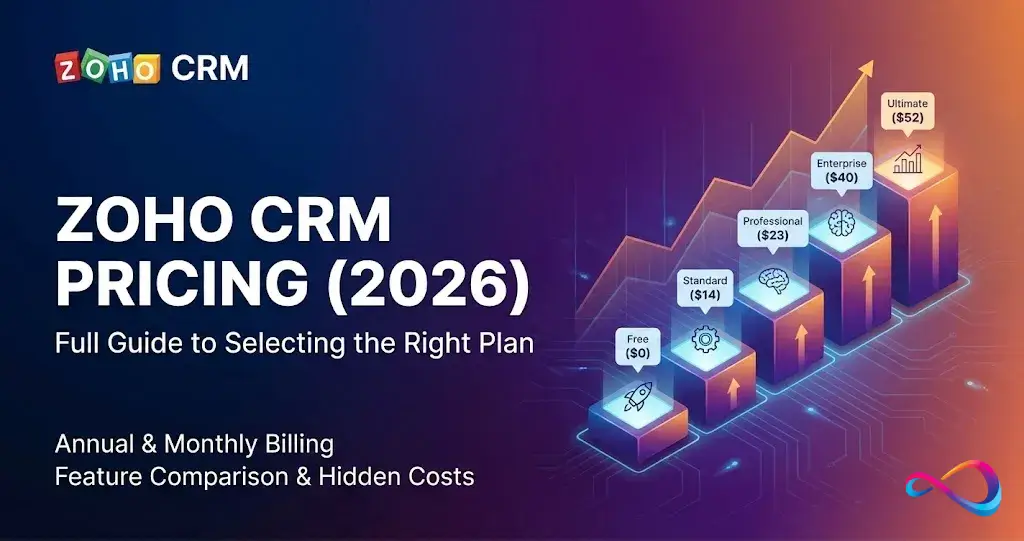
Zoho CRM plans range from $0 (Free, up to 3 users) to $52/user/month billed annually on the Ultimate tier. Here’s who each plan suits best:
| Scenario | Recommended Plan | Annual Price /user/mo |
|---|---|---|
| Solo founder or micro-team (≤3 users) | Free | $0 |
| Small team, basic automation | Standard | $14 |
| Growing SMB, quoting + process governance | Professional | $23 |
| Mid-market, needs portals + sandbox + AI | Enterprise | $40 |
| Data-heavy org, needs BI dashboards | Ultimate | $52 |
Prices: per user, per month, billed annually (USD). Monthly billing runs roughly 20–34% higher depending on tier. Always confirm current rates on Zoho’s official pricing page.
Best Plan by Use Case
If you’re evaluating Zoho CRM against other best CRM software options, this quick matrix maps your scenario to the right tier:
| Use Case | Recommended Plan | Why |
|---|---|---|
| Startup sales team (5–10 users) | Standard or Professional | Covers automation, scoring, and pipeline management without overspending |
| SMB with quoting and process governance | Professional | Blueprint + CPQ unlock guided selling and inventory management |
| Mid-market needing portals + sandbox | Enterprise | Self-service portals, sandbox testing, journey orchestration, and Zia AI |
| Data-heavy org needing BI dashboards | Ultimate | Embedded Zoho Analytics, maximum API limits, enhanced AI credits |
| Budget-constrained micro-team (≤3) | Free | Genuine CRM functionality at zero cost |
Zoho CRM Pricing in 2026 — Quick Snapshot
Here is the full Zoho CRM pricing table for the US market as of early 2026. Prices are quoted in USD, per user, per month. If you’re new to CRM platforms, our guide on what is CRM software explains the fundamentals.
Master Pricing Table
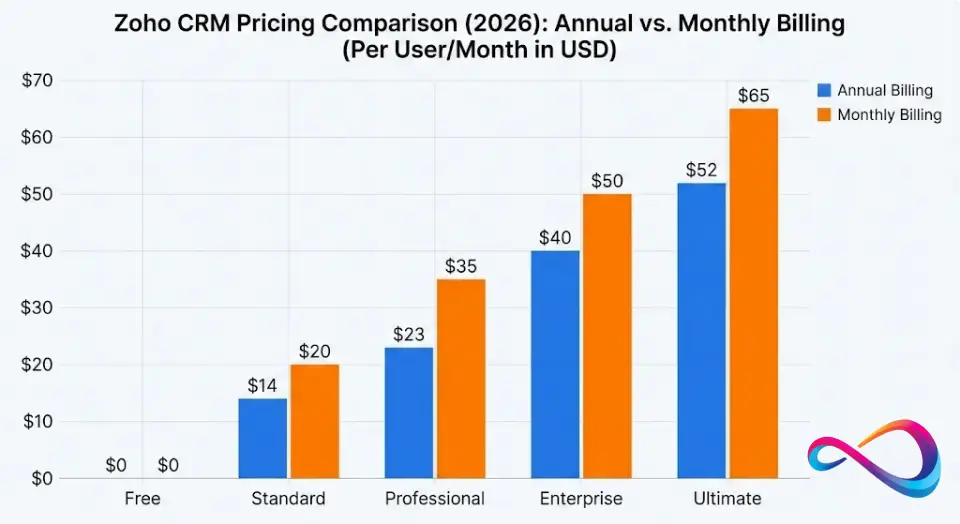
| Plan | Billed Annually | Billed Monthly | Savings (Annual vs Monthly) |
|---|---|---|---|
| Free | $0 (up to 3 users) | $0 (up to 3 users) | N/A |
| Standard | $14/user/mo | $20/user/mo | 30% |
| Professional | $23/user/mo | $35/user/mo | 34% |
| Enterprise | $40/user/mo | $50/user/mo | 20% |
| Ultimate | $52/user/mo | $65/user/mo | 20% |
Note: Prices are subject to change. Verify current rates on Zoho’s official pricing page before purchasing.
The annual billing discount is significant—especially on the Professional tier, where you save roughly $144 per user per year compared to monthly billing. For a 10-person team on Professional, that’s $1,440/year left on the table if you pay month to month.
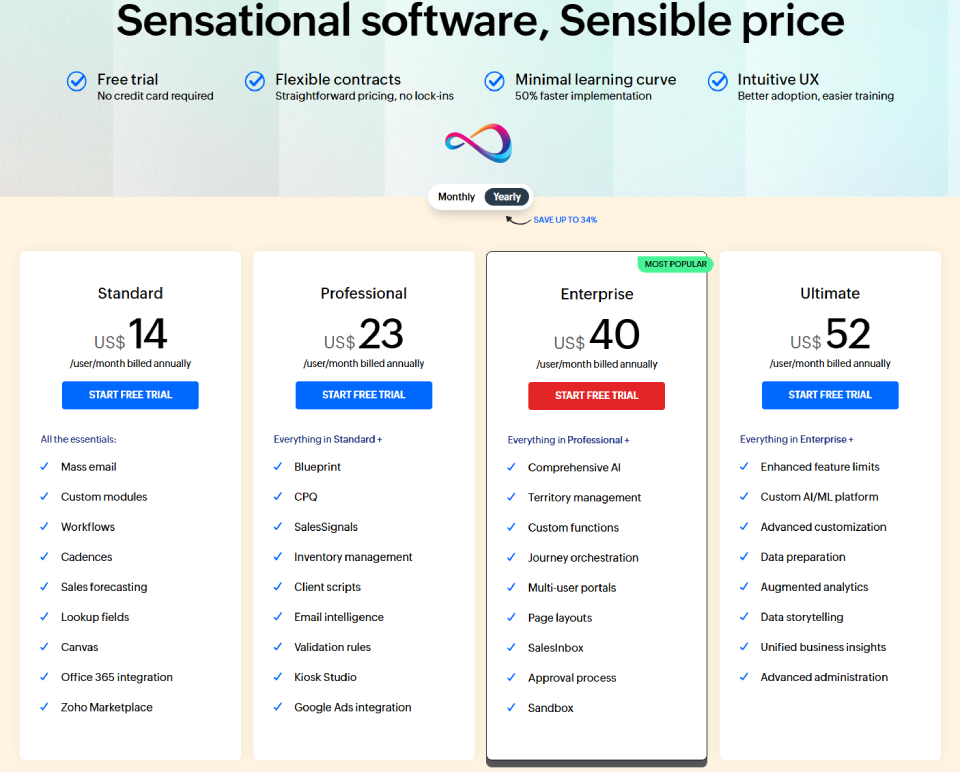
Zoho CRM Plans and Pricing Tiers (Free → Ultimate) Explained
Zoho CRM follows a per-seat licensing model across five Zoho CRM editions. Each tier unlocks a broader set of features and higher usage limits (API calls, workflow rules, custom modules, storage). This is classic feature gating—lower tiers deliberately restrict automation depth, AI capabilities, and administrative tools to steer growing teams toward higher plans.
What matters to you as a buyer: don’t pick a plan based on the sticker price alone. Pick it based on which features you’ll actually use in the next 12–18 months. The plan-by-plan breakdown below maps exactly what’s included—and excluded—at each tier. For a deeper feature-by-feature analysis, see our dedicated Zoho CRM review.
Plan-by-Plan Breakdown: What You Get
Free (3 Users): When It’s Enough
Best for: Solopreneurs, micro-teams, and anyone who wants a legitimate CRM without paying a cent. If you’re exploring no-cost options across platforms, our roundup of the best free CRM software covers the full landscape.
You get:
- Core contact, lead, and deal management
- Basic task and event tracking
- Web forms for lead capture
- Standard reports and dashboards
- 5,000 records per module
You miss:
- Workflow automation
- Sales forecasting
- Email insights and mass email
- Scoring rules
- Any integration depth beyond basics
When to upgrade: The moment you add a 4th team member, need automated follow-ups, or want any form of sales pipeline reporting beyond the basics. The Free plan is a trial disguised as a tier—it proves the UI works for your workflow, but it won’t run a growing sales operation.
Key takeaway: Free is for validation, not for scaling. Move to Standard when you outgrow 3 users or need any automation.
Standard: Baseline Automation + Reporting
Best for: Small sales teams (3–10 users) that need scoring rules, basic workflow automation, and better reporting. Teams exploring CRM options for small business often start here.
You get:
- Everything in Free
- Scoring rules (lead, deal, contact)
- Workflow rules (up to 10 per module)
- Mass email (250/day)
- Sales forecasting
- Multiple pipelines
- Email templates and insights
- Standard dashboards and charts
- 100,000 records
You miss:
- Blueprint process automation
- CPQ and inventory management
- SalesSignals (real-time customer notifications)
- Webhooks and custom functions
- Territory management
When to upgrade: When your deal flow gets complex enough that you need guided sales processes (Blueprint), quoting and inventory capabilities (CPQ), or when you’re hitting the workflow rule ceiling.
Key takeaway: Standard is the minimum viable CRM for teams that need automation. Upgrade to Professional when process governance matters.
Zoho CRM Standard plan price: $14/user/month billed annually ($20 monthly).
Professional: Blueprint, CPQ, SalesSignals, and Who Needs Them
Best for: Growing SMBs (10–30 users) with defined sales processes and quoting needs. This is often the sweet spot for CRM for sales teams looking to formalize their pipeline.
You get:
- Everything in Standard
- Blueprint — visual, guided process automation for sales stages
- SalesSignals — real-time notifications from email, calls, social, and surveys
- CPQ (Configure, Price, Quote) — product and inventory management with quotes and invoices
- Validation rules, macros, webhooks
- 30 workflow rules per module
- SalesInbox (dedicated email for salespeople)
- Google Ads integration
You miss:
- AI assistant (Zia) — predictions, anomaly detection, recommendations
- Multi-user portals (customer and vendor)
- Sandbox for testing
- Journey Orchestration (CommandCenter)
- Territory management at scale
- Custom modules beyond basics
When to upgrade: When you need AI-driven insights, customer or vendor self-service portals, or the safety of a sandbox environment before deploying changes to production.
Key takeaway: If you need Blueprint or CPQ, Professional is the minimum viable tier. Don’t overpay for Enterprise unless you need Zia AI or portals.
Zoho CRM Professional plan price: $23/user/month billed annually ($35 monthly).
Enterprise: AI, Portals, Sandbox, Orchestration for Complex Orgs
Best for: Mid-market companies and complex sales organizations (20–100+ users) that need process orchestration, AI, and self-service portals.
You get:
- Everything in Professional
- Zia AI assistant — lead and deal prediction, anomaly alerts, email sentiment, best-time-to-contact, enrichment
- Journey Orchestration (CommandCenter) — cross-functional, multi-channel customer journeys
- Sandbox — test configuration changes before deploying to production
- Multi-user portals — customer and vendor self-service
- Territory management — geo or role-based assignment rules
- Custom modules, custom buttons, and sub-forms
- Multi-currency support
- Advanced customization (page layouts, conditional rules)
- Increased limits across the board (100 workflow rules per module)
You miss:
- Enhanced feature limits (more Zia predictions, data enrichment credits)
- Zoho Analytics (BI) advanced integration — deeper cross-module analytics
- Higher API limits and storage quotas
When to upgrade: When you’re bumping into Enterprise’s API limits, need more Zia prediction credits, or want advanced BI-style analytics embedded natively.
Key takeaway: Enterprise is the inflection point—it’s where Zia AI, portals, and sandbox unlock. For most mid-market teams, this is the ceiling. Only go to Ultimate for BI or limit overflows.
Zoho CRM Enterprise pricing: $40/user/month billed annually ($50 monthly).
Ultimate: Higher Limits + Advanced Analytics/BI-Style Value
Best for: Large, data-forward enterprises that need maximum capacity, embedded BI analytics, and the highest level of AI and automation.
You get:
- Everything in Enterprise
- Zoho Analytics (BI) advanced — embedded, cross-module dashboards and data blending
- Enhanced Zia — more predictions, enrichment credits, and AI suggestions
- Highest API call limits
- Maximum storage quotas
- Enhanced data backup frequency
- Advanced admin tools and feature limits across all modules
You miss:
- This is the top tier. Anything beyond this falls into custom enterprise agreements or the CRM Plus / CRM Flex bundles.
When to upgrade: You’re already at the top. If you need marketing automation, help desk, social, and project management bundled in, look at CRM Plus or CRM Flex instead.
Key takeaway: Skip Ultimate unless you’ve validated a specific need for embedded BI analytics or are consistently hitting Enterprise-level limits.
Zoho CRM Ultimate pricing: $52/user/month billed annually ($65 monthly).
Feature-Gating Table
This table shows exactly which capabilities are gated behind each Zoho CRM pricing tier—essential for understanding what you gain (and lose) at every level.
| Feature / Capability | Free | Standard | Professional | Enterprise | Ultimate |
|---|---|---|---|---|---|
| Lead and Contact Management | ✅ | ✅ | ✅ | ✅ | ✅ |
| Workflow Automation Rules | ❌ | 10/module | 30/module | 100/module | 100+/module |
| Sales Forecasting | ❌ | ✅ | ✅ | ✅ | ✅ |
| Scoring Rules | ❌ | ✅ | ✅ | ✅ | ✅ |
| Multiple Pipelines | ❌ | ✅ | ✅ | ✅ | ✅ |
| Blueprint (Process Automation) | ❌ | ❌ | ✅ | ✅ | ✅ |
| CPQ (Quotes/Inventory) | ❌ | ❌ | ✅ | ✅ | ✅ |
| SalesSignals (Real-Time Alerts) | ❌ | ❌ | ✅ | ✅ | ✅ |
| SalesInbox | ❌ | ❌ | ✅ | ✅ | ✅ |
| Webhooks and Custom Functions | ❌ | ❌ | ✅ | ✅ | ✅ |
| Zia AI (Predictions, Sentiment) | ❌ | ❌ | ❌ | ✅ | ✅ |
| Journey Orchestration | ❌ | ❌ | ❌ | ✅ | ✅ |
| Sandbox | ❌ | ❌ | ❌ | ✅ | ✅ |
| Multi-User Portals | ❌ | ❌ | ❌ | ✅ | ✅ |
| Territory Management | ❌ | ❌ | ❌ | ✅ | ✅ |
| Custom Modules | ❌ | ❌ | Limited | ✅ | ✅ |
| Advanced Analytics / Zoho BI | ❌ | ❌ | ❌ | ❌ | ✅ |
| Enhanced Zia + Enrichment Credits | ❌ | ❌ | ❌ | ❌ | ✅ |
| Maximum API Limits | ❌ | ❌ | ❌ | ❌ | ✅ |
Upgrade Triggers: What Forces a Tier Change
Beyond features, hard limits are the most common reason teams are forced to upgrade. Here are the specific thresholds to watch:
| Trigger | Standard Limit | Professional Limit | Enterprise Limit | Ultimate Limit |
|---|---|---|---|---|
| Workflow rules per module | 10 | 30 | 100 | 100+ |
| Custom modules | ❌ | Limited | Full access | Full access |
| API calls/day | Lower tier | Moderate | Higher | Highest |
| Blueprint availability | ❌ | ✅ | ✅ | ✅ |
| Sandbox environment | ❌ | ❌ | ✅ | ✅ |
| Portal (customer/vendor) | ❌ | ❌ | ✅ | ✅ |
| Zia AI predictions | ❌ | ❌ | Available | Enhanced |
| Data enrichment credits | ❌ | ❌ | Included | Higher |
| Storage/attachments | Base | Base | Increased | Maximum |
Bottom line: If you’re running into any of these hard caps, the platform will push you to the next tier—or you’ll work around the limitation at the cost of efficiency. Check which limits you’re approaching before renewal.
Monthly vs Annual Billing: What Changes and How to Estimate TCO
Every Zoho CRM pricing plan offers two billing cycles: billed monthly and billed annually. The annual option charges you for 12 months upfront at a discounted per-user rate.
When Annual Makes Sense (Most Teams)
- You’ve used a trial or the Free plan and confirmed the product fits.
- Your team size is relatively stable for the next year.
- You want the maximum savings—up to roughly 34% off on Professional.
When Monthly Makes Sense
- You’re in a pilot phase and need flexibility to cancel.
- Your team size is fluctuating (seasonal hires, contractors).
- Cash flow matters more than savings—paying $20/user/month for Standard is easier than committing approximately $1,680 upfront for a 10-seat annual contract.
Total Cost of Ownership (TCO) Formula
The basic formula:
Total Annual Cost = Number of Seats × Per-User Monthly Price × 12
True TCO should also factor in:
- Add-on costs (support tiers, extra storage)
- Implementation and data migration time (internal hours or consultant fees)
- Training and adoption ramp-up
- Integration costs (Zoho Marketplace apps, custom API development)
Pricing Scenarios (5, 10, 50 Users) + Calculator Formula
Use these tables to quickly estimate your Zoho CRM cost based on team size.
Annual Billing Scenarios (USD)
| Plan | 5 Users/yr | 10 Users/yr | 50 Users/yr |
|---|---|---|---|
| Free | $0 (max 3 users) | N/A | N/A |
| Standard ($14/user/mo) | $840 | $1,680 | $8,400 |
| Professional ($23/user/mo) | $1,380 | $2,760 | $13,800 |
| Enterprise ($40/user/mo) | $2,400 | $4,800 | $24,000 |
| Ultimate ($52/user/mo) | $3,120 | $6,240 | $31,200 |
Monthly Billing Scenarios (USD)
| Plan | 5 Users/yr | 10 Users/yr | 50 Users/yr |
|---|---|---|---|
| Standard ($20/user/mo) | $1,200 | $2,400 | $12,000 |
| Professional ($35/user/mo) | $2,100 | $4,200 | $21,000 |
| Enterprise ($50/user/mo) | $3,000 | $6,000 | $30,000 |
| Ultimate ($65/user/mo) | $3,900 | $7,800 | $39,000 |
Cost Calculator Mini-Table
Use this simple template to estimate your total year-one investment:
| Line Item | Your Numbers | Notes |
|---|---|---|
| Seats | _ | Number of paid users |
| Plan price/user/mo | _ | From pricing table above |
| License cost/year | Seats × Price × 12 | Base CRM license |
| Year-1 buffer (15–25%) | License × 0.15 to 0.25 | Implementation, training, add-ons (range varies by org size) |
| Estimated Year-1 Total | License + Buffer | Your realistic budget |
Quick formula:
Seats × Price/user/month × 12 = Annual license costExample: 10 users on Enterprise (annual) → 10 × $40 × 12 = $4,800/year.
The difference between monthly and annual billing for 50 users on Professional? Approximately $7,200/year. Annual billing is the default recommendation for any team committed to the platform.
Add-ons, Bundles, and Hidden Costs to Watch
The sticker price is never the full story. Here are the common cost escalators every buyer should anticipate. For a detailed cost-of-ownership breakdown, Method.me’s Zoho CRM cost analysis is a useful reference.
1. CRM Plus and CRM Flex Bundles
- Zoho CRM Plus (typically around $57/user/month billed annually) bundles CRM with SalesIQ, Desk, Projects, Campaigns, Social, Survey, and Analytics. If you need three or more of those apps, the bundle is often cheaper than buying them individually.
- Zoho CRM Flex lets you pick and choose specific Zoho apps per user—useful for mixed teams where not everyone needs the full suite.
2. Storage Limits
- Each plan includes a base storage allocation. Heavy data importers, teams with large file attachments, or orgs migrating historical data may hit limits and need to purchase additional storage.
3. Support Tiers
- Classic Support (included): business-hours email support with a typical response target of around 8 hours.
- Premium Support (paid): generally 24/5 availability with faster response for critical issues and onboarding assistance.
- Enterprise Support (paid, higher): typically 24/7 coverage with a dedicated technical account manager.
- If your team operates across time zones or needs faster SLAs, budget for a higher support tier. Always verify current support SLAs directly with Zoho, as terms can change.
4. Implementation and Data Migration
- Zoho CRM is often praised for being admin-friendly, but migrating from another platform—especially Salesforce—still requires meaningful effort: data mapping, deduplication, custom field creation, and workflow re-creation.
- Typical SMB migrations can range from roughly 40 to 120+ hours depending on complexity. Enterprise-scale migrations with a consultant may take substantially longer.
5. Training and Adoption
- The platform has depth. Self-service via Zoho’s documentation and community is solid, but formal training or an internal CRM admin will accelerate adoption.
- Third-party Zoho consultants typically charge anywhere from $75 to $200+ per hour depending on specialization and complexity. Rates vary widely—get quotes before budgeting.
6. Marketplace Integrations
- Many integrations on the Zoho Marketplace are free, but premium connectors or custom API development carry costs—especially for ERP, e-commerce, or custom data warehouse integrations.
Procurement Checklist (US Market)
Before you commit to a contract, work through these procurement considerations. This is what separates a smart buy from a reactive one:
- Annual vs monthly decision: Have you validated the product with a trial or Free plan? If yes, lock in annual billing for 20–34% savings. If not, start monthly.
- Seat growth planning: Will you add users in the next 12 months? Zoho lets you add seats mid-contract, but factor growth into your budget upfront.
- Renewal strategy: Understand how Zoho handles renewals—auto-renew is typical. Calendar a review 30–60 days before renewal to reassess your plan tier.
- Support coverage: Do you operate across US time zones? If your team is distributed, consider whether Classic support meets your SLA needs or if Premium is justified.
- Security and admin needs: Do you need role-based permissions, audit logs, and field-level security? These are available in higher tiers. Sandbox (Enterprise+) is critical for orgs that can’t afford production mistakes.
- Integration complexity: How many systems need to connect to Zoho CRM? Simple integrations (Google Workspace, Slack) are straightforward. Complex integrations (ERP, custom data warehouse) may need consultant hours.
- Compliance requirements: If you need GDPR modules, data residency controls, or advanced audit trails, verify these are available in your chosen tier.
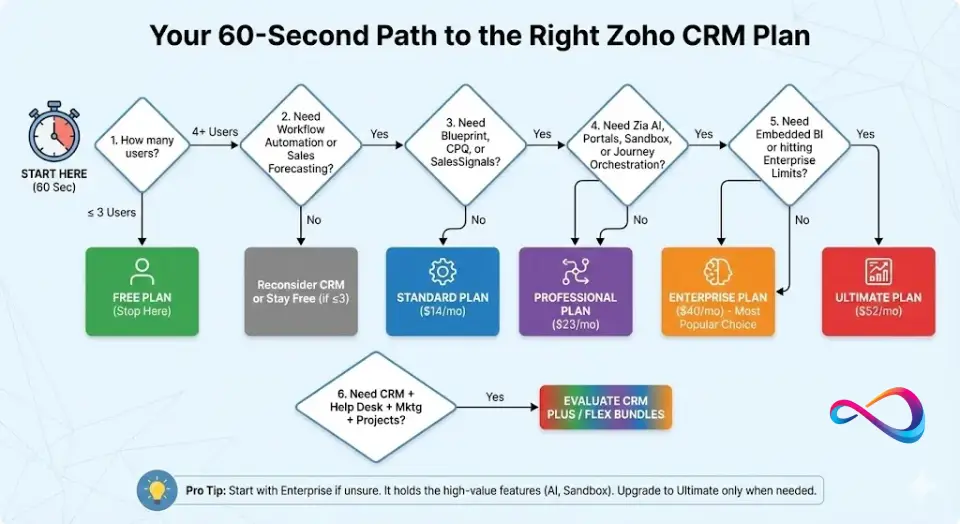
Decision Guide: Choose Your Plan in 60 Seconds
Follow this decision flow. Start at the top and take the first path that matches your situation:
Step 1: How many users?
- 3 or fewer → Free (stop here)
- 4 or more → Continue to Step 2
Step 2: Do you need workflow automation or sales forecasting?
- No → Stay on Free (if ≤3 users) or reconsider if CRM is needed yet
- Yes → Continue to Step 3
Step 3: Do you need Blueprint (guided processes), CPQ (quoting), or SalesSignals (real-time alerts)?
- No → Standard ($14/user/mo annually)
- Yes → Professional ($23/user/mo annually) — continue to Step 4
Step 4: Do you need Zia AI predictions, customer portals, sandbox, or journey orchestration?
- No → Stay on Professional
- Yes → Enterprise ($40/user/mo annually) — continue to Step 5
Step 5: Do you need embedded BI analytics or are you hitting Enterprise’s API/Zia limits?
- No → Stay on Enterprise
- Yes → Ultimate ($52/user/mo annually)
Step 6: Do you need CRM + help desk + marketing automation + project management?
- Yes → Evaluate CRM Plus or CRM Flex (separate pricing)
Pro tip: Start with Enterprise over Ultimate if you’re unsure. Enterprise includes Zia AI, sandbox, and portals—the features that drive the most value for complex teams. Upgrade to Ultimate only when you’ve validated a need for deeper BI integration or you’re hitting limits.
Plan Fit Scorecard
Rate yourself 1–5 on each dimension below, then match your total to the recommended plan. This helps you quantify your requirements instead of guessing:
| Dimension | 1 (Low) | 5 (High) | Your Score |
|---|---|---|---|
| Automation depth | Basic follow-ups | Complex multi-step workflows, Blueprint | _ |
| AI need | No AI required | Predictions, sentiment, anomaly detection | _ |
| Admin/governance | Minimal controls | Sandbox, audit logs, role-based security | _ |
| Analytics need | Basic dashboards | Cross-module BI, data blending | _ |
| Integration complexity | Email + calendar only | ERP, warehouse, custom API | _ |
| Budget sensitivity | “Whatever it takes” | Every dollar counts | _ |
Scoring Guide:
| Total Score | Recommended Plan |
|---|---|
| 6–10 | Free or Standard |
| 11–17 | Professional |
| 18–24 | Enterprise |
| 25–30 | Ultimate or CRM Plus |
This scorecard is a directional tool, not a guarantee. Use it as a starting point, then validate with a trial.
Who Zoho CRM Is Best For (and When to Pick Something Else)
Zoho CRM is best for
- Budget-conscious SMBs that want CRM depth without Salesforce-level pricing.
- Zoho ecosystem users — if you already use Zoho Books, Zoho Desk, or Zoho Projects, CRM integrates seamlessly.
- Teams that value customization — Zoho offers strong admin tools for custom modules, layouts, and automation without requiring developer resources.
- Growing companies that want a clear upgrade path from Free to Ultimate without switching platforms. Our best CRM for startups guide explores this in detail.
Consider an alternative if
- Your team is marketing-first — HubSpot CRM plus its marketing suite may be a stronger starting point.
- You need enterprise-grade ecosystem and AppExchange depth — Salesforce still leads in third-party integrations and enterprise consulting talent. See our Zoho CRM vs Salesforce comparison for the full breakdown.
- You want extreme simplicity — Pipedrive or Freshsales offer cleaner UX for teams that just want a visual pipeline and nothing more.
- Your workforce already lives in Microsoft 365 or Google Workspace and you want a CRM deeply embedded in that stack — Dynamics 365 or HubSpot may fit better.
Zoho CRM Alternatives and Comparisons
Here’s a quick “choose X if…” comparison to help you calibrate where Zoho CRM fits against its main competitors. For head-to-head detail, see our HubSpot vs Zoho CRM comparison.
| CRM | Choose it if… | Starting Price (per user/mo, annual) | Key Differentiator |
|---|---|---|---|
| Zoho CRM | You want strong features at the lowest per-seat cost with a clear upgrade path | $14 (Standard) | Best value-to-feature ratio; deep Zoho ecosystem |
| HubSpot CRM | You prioritize inbound marketing + CRM in one platform | Free — ~$20 (Starter) | Marketing-first CRM; generous free feature set |
| Salesforce Sales Cloud | You need enterprise-scale, massive AppExchange, and deep customization | ~$25 (Starter) — $165+ (Enterprise) | Market leader; unmatched third-party ecosystem |
| Pipedrive | You want the simplest visual pipeline CRM with fast setup | ~$14 (Essential) | UX-first design; minimal learning curve |
| Freshsales | You want AI-powered CRM with built-in phone and a clean interface | Free — ~$9 (Growth) | Built-in telephony; Freshworks suite integration |
| monday CRM | You want CRM layered on top of a work management platform | ~$12 (Basic) | Work OS foundation; highly visual boards |
Note: Competitor pricing is approximate and may have changed. Always verify on each vendor’s official site. For broader comparisons, see third-party breakdowns from Tech.co and Forbes Advisor.
Quick Comparison Notes
- Zoho CRM vs HubSpot CRM: HubSpot’s free tier is more generous in marketing features, but its paid tiers escalate fast—especially for sales and marketing tools. Zoho offers a more balanced cost curve for teams that need CRM depth over marketing depth.
- Zoho CRM vs Salesforce: Salesforce remains the gold standard for massive enterprises, but its per-user cost can be 2–4× Zoho’s at comparable tiers. For SMBs, Zoho typically delivers the majority of core functionality at a significantly lower cost. See our Salesforce CRM alternatives for a broader view.
- Zoho CRM vs Pipedrive: Pipedrive wins on simplicity and UX. Zoho wins on feature depth, AI, and customization. If your team is non-technical and needs a pipeline-only CRM, Pipedrive is faster to deploy.
- Zoho CRM vs Freshsales: Very close competitors. Freshsales has a slight edge in built-in telephony; Zoho has a larger ecosystem and more granular automation. See our Freshsales pricing breakdown for a cost comparison.
- Zoho CRM vs monday CRM: monday.com is ideal for teams that want a light CRM inside a broader work-management tool. Zoho is the better choice when CRM is your primary platform, not a secondary feature.
How We Evaluated
Transparency matters. Here’s how this guide was built:
- Product documentation review: We analyzed Zoho’s official pricing page, feature comparison charts, and help documentation for each plan tier.
- Third-party reviews: We cross-referenced findings with reviews from TechRadar, Forbes Advisor, and Method.me’s cost breakdown to ensure pricing accuracy and feature claims.
- Buyer pattern analysis: Based on product documentation, credible third-party reviews, and buyer patterns we see across CRM deployments, we identified the most common decision points, upgrade triggers, and cost surprises.
- No fabricated hands-on testing claims. Where we reference feature behavior, it is sourced from Zoho’s documentation and verified third-party reporting—not presented as original lab testing.
- Competitor pricing caveat: All competitor prices cited are approximate and sourced from their respective official websites at the time of publication. These may have changed since then.
Zoho CRM Pricing – FAQs
1. Does Zoho CRM have a free plan?
Yes. Zoho CRM offers a Free plan for up to 3 users. It includes basic lead, contact, and deal management with standard reports. It’s genuinely useful for solopreneurs and micro-teams but lacks workflow automation and sales forecasting.
2. How much is Zoho CRM per user?
It depends on the plan and billing cycle. Billed annually, the Zoho CRM price per user ranges from $14/month (Standard) to $52/month (Ultimate). Monthly billing adds roughly 20–34% to those rates.
3. What is the difference between Standard vs Professional vs Enterprise vs Ultimate?
Standard covers basic automation and scoring. Professional adds Blueprint, CPQ, and SalesSignals. Enterprise introduces Zia AI, portals, sandbox, and journey orchestration. Ultimate provides advanced analytics/BI integration, enhanced AI credits, and maximum usage limits. Each tier builds on the one below.
4. Is Zia AI included in all plans?
No. Zia AI is only available starting at the Enterprise tier ($40/user/month annually). Professional and below do not include AI predictions, anomaly detection, or email sentiment analysis.
5. Is Zoho CRM cheaper than HubSpot, Salesforce, or Pipedrive?
At comparable feature levels, Zoho CRM is typically among the most affordable options. It undercuts Salesforce significantly at enterprise tiers. It is competitive with Pipedrive on entry pricing and generally less expensive than HubSpot’s paid tiers once you add sales and marketing tools. Always compare on equivalent feature sets, not just base prices.
6. Can I pay monthly? Is annual billing cheaper?
Yes, every paid plan offers both monthly and annual billing. Annual billing saves roughly 20–34% depending on the tier. Professional shows the largest gap: $23 annual vs $35 monthly per user.
7. What add-ons increase Zoho CRM pricing?
Common cost increases include premium support tiers, additional data storage, CRM Plus or CRM Flex bundles, marketplace integrations, and third-party implementation or migration consulting. Always budget for these beyond the base license fee.
8. How much does Zoho CRM cost for 10 users? For 50 users?
On annual billing: 10 users on Professional = $2,760/year. 50 users on Enterprise = $24,000/year. Use the formula: Seats × Price × 12 = Annual Cost.
9. Which Zoho CRM plan is best for small businesses?
Most small businesses (5–15 users) land on Standard or Professional. Standard works if you need basic automation. Professional is the better fit if your sales process involves quoting, defined workflows (Blueprint), or you need real-time engagement alerts (SalesSignals). For a broader perspective, see our guide to the best CRM for small business.
10. What are common hidden costs with Zoho CRM?
The most common surprises are premium support upgrade fees, storage overages, implementation and migration labor (often 40–120+ hours for SMBs), training time, and the cost of premium Marketplace integrations. These can add a significant percentage to your base license spend in year one.
11. What does billed annually actually mean?
It means you pay for 12 months of service upfront in a single charge. Your per-user monthly rate is lower, but the cash outlay is higher. For example, 10 users on Standard billed annually = $14 × 10 × 12 = $1,680 upfront.
12. Can I switch plans mid-contract?
Yes. Zoho generally allows you to upgrade your plan at any time, with prorated billing for the remainder of your term. Downgrades typically take effect at your next renewal date. Check Zoho’s current policy for specifics on refunds or credits.
Conclusion
Choosing the right plan comes down to three questions: how many users do you have, what level of automation and AI do you need, and how much are you willing to pay upfront for annual savings? Zoho CRM pricing is structured to scale with you—from a genuinely free starter tier to a full-featured Ultimate plan that competes with platforms costing substantially more.
Our pragmatic recommendation:
- Start with Professional if you have a defined sales process and 5–20 users. It hits the sweet spot of automation, quoting, and real-time signals without the Enterprise price tag.
- Move to Enterprise when you need AI (Zia), self-service portals, or a sandbox.
- Skip Ultimate unless you have a validated need for embedded BI analytics or you’re consistently hitting Enterprise’s API and enrichment limits.
Next steps:
- Run a quick cost estimate using the formula:
Seats × Price × 12. - Add 15–25% for year-one implementation, support, and adoption overhead (range varies by org size).
- Start a free trial on Zoho’s pricing page to test the plan you’re considering.
- Use the Plan Fit Scorecard above to validate your tier choice with your team.
About the author

I’m Macedona, an independent reviewer covering SaaS platforms, CRM systems, and AI tools. My work focuses on hands-on testing, structured feature analysis, pricing evaluation, and real-world business use cases.
All reviews are created using transparent comparison criteria and are updated regularly to reflect changes in features, pricing, and performance.