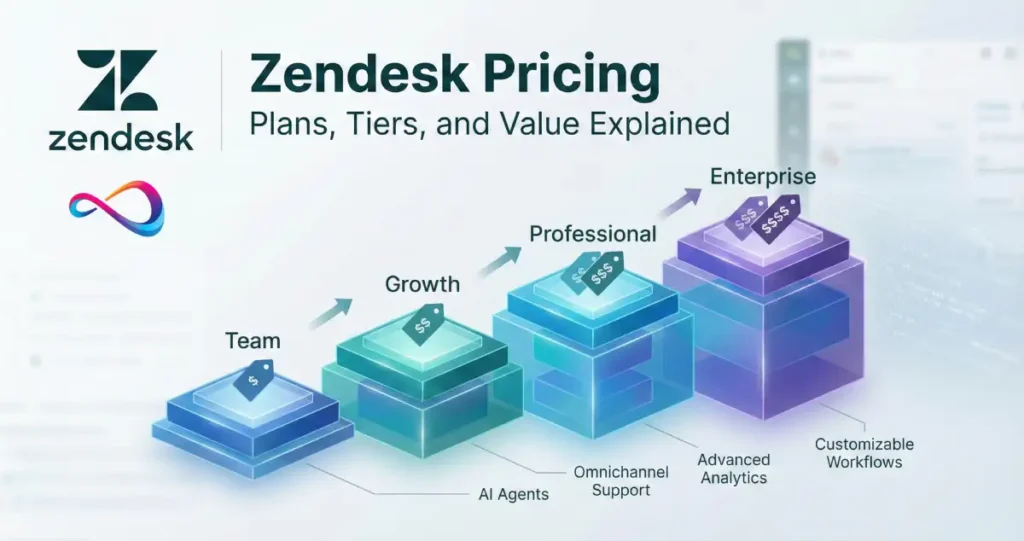
How much does Zendesk cost in 2026? Zendesk pricing ranges from $19 to $169+ per agent per month (billed annually), depending on which product track and plan tier you choose. The total cost is driven by three variables: (1) whether you’re serving customers or employees, (2) your plan tier (Team/Growth/Professional/Enterprise), and (3) which add-ons you enable—especially Zendesk Copilot at $50 per agent/month, which can double your base spend.
Critical scope lock: Zendesk sells two separate pricing tracks—Customer Service (external support) vs Employee Service (internal IT/HR). Each has its own pricing page, plan names, and feature sets. Don’t mix them. This guide covers both.
Zendesk Pricing 2026 at a Glance
Below is a snapshot of current 2026 pricing for annual billing. Monthly billing typically adds 20–30% to these rates. Enterprise tiers are quote-based.
| Product Line | Entry Tier | Mid Tiers | Top Tier | Key Add-on Driver |
|---|---|---|---|---|
| Zendesk Suite (Customer Service) | Team: $55/agent/mo | Growth: $89/agent/mo Professional: $115/agent/mo | Enterprise: $169/agent/mo | Copilot: +$50/agent/mo |
| Zendesk Support (Customer Service, email-first) | Team: $19/agent/mo | Professional: $55/agent/mo | Enterprise: $115/agent/mo | Copilot: +$50/agent/mo |
| Employee Service Suite (Internal IT/HR) | Team: $29/agent/mo | Growth: $59/agent/mo Professional: $115/agent/mo | Enterprise: Contact Sales | Advanced AI: +$50/agent/mo |
Notes:
- Prices shown are per agent, per month, billed annually (USD).
- Monthly billing typically increases costs by 20–30% compared to annual commitments.
- Enterprise tiers often require a sales quote and may include volume discounts.
- Regional pricing may vary; always validate pricing in your checkout or quote.
- Add-ons (Copilot, WFM, QA, Contact Center, Data Privacy) are purchased separately and apply per agent.
Scope Lock: Customer Service vs Employee Service (Don’t Mix These)
Zendesk operates two distinct pricing tracks. Mixing them up is the most common buying mistake.
Customer Service Track
Who it’s for: External customers contacting your support team.
Channel mix: Email, chat, messaging (WhatsApp, SMS, social), voice, help centers, community forums.
Use cases: Product support, customer success, ecommerce inquiries, SaaS onboarding.
Pricing pages: Suite plans or Support plans (email-focused).
Employee Service Track
Who it’s for: Internal employees requesting IT, HR, or workplace services.
Channel mix: Employee portal, approvals, internal ticketing, knowledge base, Slack/Teams integrations.
Use cases: IT service desk (ITSM-lite), HR case management, workplace requests, equipment provisioning.
Pricing page: Employee Service Suite plans.
Common Mistake
Plan names overlap—both tracks offer Team, Growth, Professional, and Enterprise tiers—but the products, features, and pricing pages are completely different. Always confirm which track you’re on before comparing prices.
Read more: Zendesk Review 2026: Pricing, Features, Pros/Cons & Best Alternatives
How Zendesk Pricing Works (What You’re Paying For)
Per-Agent Licensing (What Counts as an “Agent”)
Zendesk pricing is per agent, per month. An “agent” is a full user who can reply to tickets, update cases, and use the full workspace. Some plans include “light agents” (comment-only or view-only users) at no additional cost—typically for managers or stakeholders who need visibility but don’t handle cases.
Annual vs Monthly Billing (What Changes)
- Annual billing: Pay upfront or in installments for 12 months. Saves 20–30% compared to monthly.
- Monthly billing: Pay month-to-month. Higher per-agent rate but more flexibility to scale down.
Example: Suite Team is $55/agent/month (annual) or $69/agent/month (monthly).
What “Talk to Sales” Usually Means
When you see “Contact Sales” or no public price:
- Enterprise tiers require a quote.
- Volume discounts (50+ agents) may be available.
- Custom bundles (e.g., Copilot + WFM + QA pre-negotiated) can reduce add-on costs.
- Multi-year commitments unlock better rates.
Enterprise pricing is not hidden to frustrate you—it’s quote-based because it includes sandbox environments, custom roles, advanced governance, and negotiated SLAs that vary by customer.
The Real Cost Formula
Monthly Cost = (Number of Agents) × (Base Plan + Add-ons per Agent)
Annual Cost = Monthly Cost × 12 (minus any negotiated discount)
Budget reality: Add-ons often dominate total cost. A team on Suite Professional ($115/agent/mo) that enables Copilot (+$50), QA (+$35), and WFM (+$25) is actually paying $225/agent/month—nearly double the base plan.
Zendesk for Customer Service Pricing (Suite vs Support)
What “Customer Service” Means
This track is for external customer support—email, chat, messaging, phone, social, and self-service help centers. It powers omnichannel ticketing, agent workspaces, automations, SLAs, routing, and analytics.
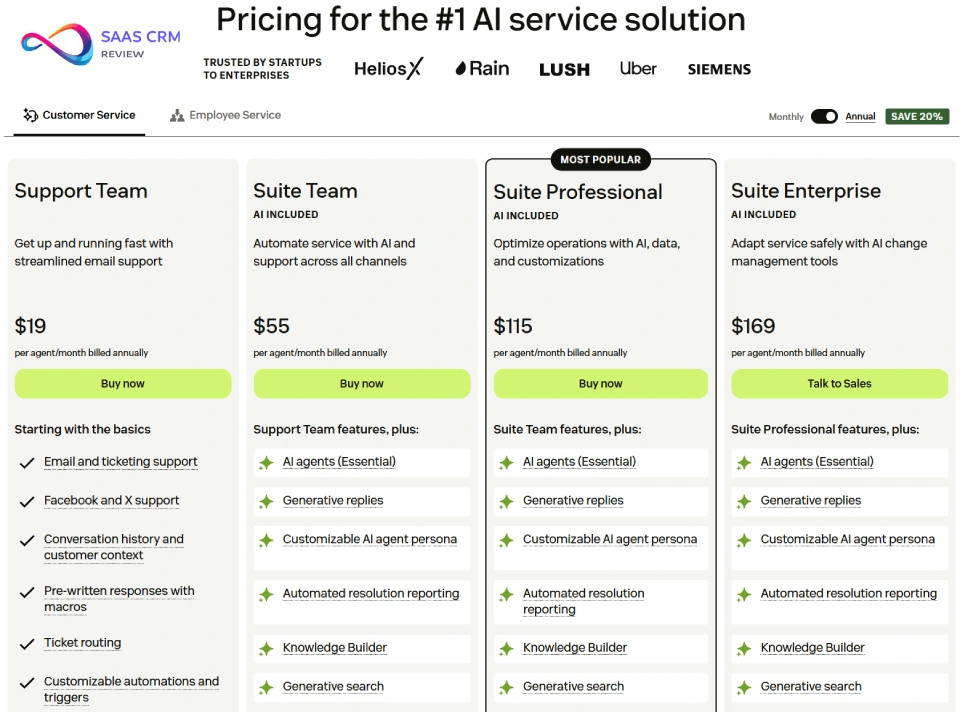
Zendesk Suite Pricing (Customer Service)
Suite bundles ticketing, messaging, chat, voice (Talk), help center, community forums, and AI features into a single plan. It’s Zendesk’s flagship omnichannel offering.
| Plan | Annual (per agent/mo) | Monthly (per agent/mo) | What You Actually Get | Best For |
|---|---|---|---|---|
| Suite Team | $55 | $69 | Ticketing, messaging (web/mobile/social), basic AI (generative replies, search), 1 help center, email & chat, integrations, basic reporting | Small teams (<10 agents) needing omnichannel basics without complex routing |
| Suite Growth | $89 | ~$112 | Team features + self-service portal, SLAs, multilingual support, up to 5 help centers, 50 light agents | Scaling teams (10–25 agents) adding SLAs and structured workflows |
| Suite Professional | $115 | $149 | Growth features + customizable real-time reporting, skills-based routing, community forums, HIPAA compliance, call recording, callback requests | Mid-market teams (25–100 agents) optimizing efficiency, routing, and voice |
| Suite Enterprise | $169 | $215+ | Professional features + up to 300 help centers, sandbox, custom agent roles, audit logs, business rule analysis, guided queues | Large teams (100+ agents) needing governance, security, compliance at scale |
Note: Enterprise often requires a quote; $169/agent/mo is the publicly listed starting point.
Suite Team — Best for Small Omnichannel Teams
Choose if:
- You have <10 agents.
- You need email, chat, social, and messaging but no complex routing.
- You’re launching omnichannel support for the first time.
- You don’t yet need SLAs or advanced reporting.
Avoid if:
- You need SLAs, approvals, or multi-queue routing (upgrade to Growth).
- You’re already handling >500 tickets/day (you’ll outgrow Team’s basic reporting).
Best for: Startups, small SaaS companies, ecommerce shops launching live chat.
Upgrade trigger: When you need SLAs, multilingual support, or a self-service portal → move to Growth.
Suite Growth — Ops Discipline (SLAs + Workflows)
Choose if:
- You have 10–25 agents.
- You need SLAs, business hours, and multilingual help centers.
- You’re scaling volume and need structured intake (forms, portals).
- You want 50 light agents for managers/stakeholders.
Avoid if:
- You need skills-based routing or advanced analytics (upgrade to Professional).
- You don’t yet enforce SLAs (Team may suffice).
Best for: Growing startups, mid-sized SaaS companies, SMBs with compliance needs.
Upgrade trigger: When you hit routing bottlenecks (agent utilization imbalance) or need custom reporting → move to Professional.
Suite Professional — Routing + Analytics ROI
Choose if:
- You have 25–100 agents.
- You need skills-based routing (language, product, expertise).
- You want customizable, real-time dashboards (Zendesk Explore).
- You’re adding voice support with call recording.
- You need HIPAA compliance.
Avoid if:
- You’re <25 agents and don’t need routing (Growth is cheaper).
- You need sandbox, custom roles, or audit logs (upgrade to Enterprise).
Best for: Mid-market companies, healthcare, financial services, complex product support.
Upgrade trigger: When you need governance features (sandbox, custom roles, audit logs) or >100 help centers → move to Enterprise.
Suite Enterprise — Governance + Security at Scale (Quote-Based)
Choose if:
- You have 100+ agents or multi-brand operations.
- You need sandbox environments for safe testing.
- You need custom agent roles, audit logs, and compliance controls.
- You require business rule analysis and visual data alerts.
Avoid if:
- You’re <50 agents (you’re overpaying for features you don’t use).
- You haven’t maxed out Professional features yet.
Best for: Enterprises, publicly traded companies, regulated industries, global brands.
Note: Always quote-based. Expect volume discounts and multi-year commitments.
Zendesk Support Pricing (Customer Service, Email-First)
Support is Zendesk’s email-first, ticketing-only product. It lacks native chat, messaging, and voice—those require add-ons or upgrades to Suite.
| Plan | Annual (per agent/mo) | Monthly (per agent/mo) | What You Get | Best For |
|---|---|---|---|---|
| Support Team | $19 | $25 | Email ticketing, social channels, basic workflows, basic analytics | Small email-only teams (<5 agents), simple support ops |
| Support Professional | $55 | $69 | Team features + CSAT surveys, SLAs, business hours, multilingual, advanced analytics | Email-focused teams (5–25 agents) needing SLAs |
| Support Enterprise | $115 | $149 | Professional features + skills-based routing, custom roles, sandbox, contextual workspaces | Large email-focused teams (25+ agents) with governance needs |
Support-only is NOT omnichannel. If you need chat, messaging, or voice, you must upgrade to Suite or buy add-ons (which often costs more than Suite).
When Support Is a Rational Choice
- You’re email-only and will stay that way (e.g., B2B enterprise support, back-office ops).
- You have stable, low ticket volume and no plans to add chat/messaging.
- You’re cost-sensitive and don’t need omnichannel.
When Support Is a False Economy
- You plan to add chat “later” → you’ll pay for chat add-ons that cost more than Suite.
- You’re already handling inquiries via social/messaging → you’re paying twice (support tool + separate messaging tool).
Zendesk for Employee Service Pricing (Employee Service Suite)
What “Employee Service” Means
This track is for internal employees—IT help desk, HR case management, workplace services. It includes employee portals, approvals, internal knowledge bases, Slack/Teams integrations, and IT asset management. Think “ITSM-lite” or “internal service desk.”
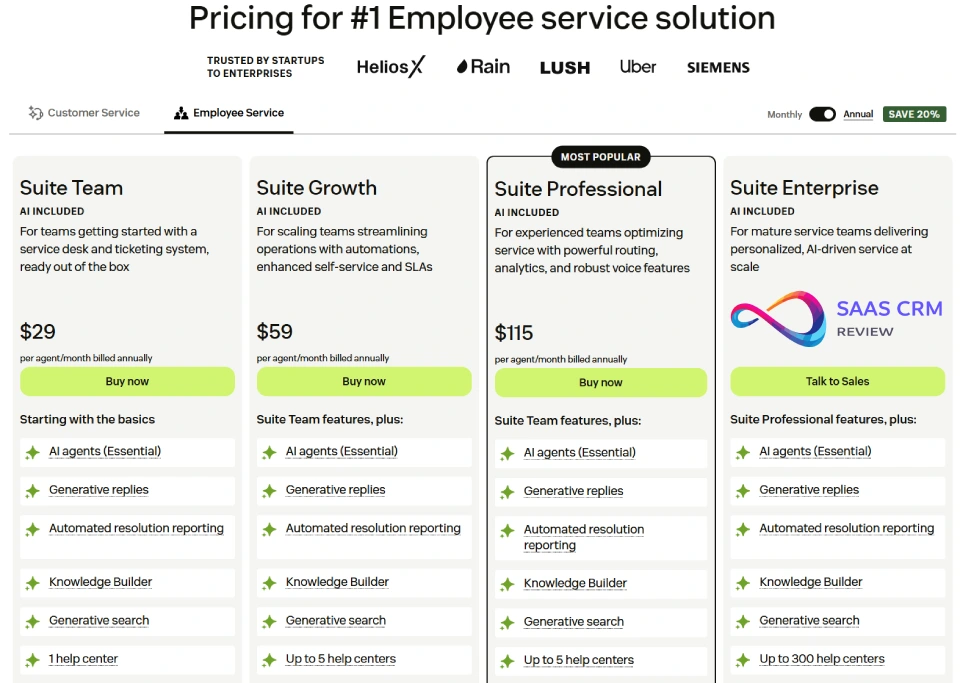
Employee Service Suite Pricing
| Plan | Annual (per agent/mo) | Monthly (per agent/mo) | What You Get | Best For |
|---|---|---|---|---|
| Team | $29 | $39 | Core AI (agents, generative replies, search), 1 help center, email/ticketing, messaging, live chat, integrations | Small internal teams (<10 agents) launching an IT/HR portal |
| Growth | $59 | $79 | Team features + up to 5 help centers, IT Asset Management (coming soon), phone support, service catalog, self-service portal, approvals, 50 light agents | Scaling IT/HR teams (10–25 agents) adding approvals and structured intake |
| Professional | $115 | $149 | Growth features + customizable real-time reporting, app/layout builders, skills-based routing, HIPAA compliance, call recording | Mature internal ops (25–100 agents) with multi-queue routing and analytics |
| Enterprise | Contact Sales | Contact Sales | Professional features + up to 300 help centers, sandbox, custom roles, audit logs, business rule analysis, guided queues | Large enterprises (100+ agents) needing governance and scale |
Note: Choosing annual billing saves approximately 20–25% compared to monthly.
Employee Service Suite Team — Launch Quickly
Choose if:
- You’re replacing email-based IT/HR requests with a ticketing portal.
- You have <10 internal service agents.
- You need basic AI (generative replies, search) and a single help center.
Avoid if:
- You need approvals, service catalogs, or asset management (upgrade to Growth).
Best for: Startups, small companies (50–200 employees), initial IT service desk pilots.
Upgrade trigger: When you need approvals (e.g., software requests, PTO workflows) or asset tracking → move to Growth.
Employee Service Suite Growth — Structured Internal Intake
Choose if:
- You have 10–25 internal service agents.
- You need approvals, service catalogs, and self-service employee portals.
- You’re managing IT assets (laptop assignments, software licenses).
- You want 50 light agents for HR/managers.
Avoid if:
- You need custom reporting or skills-based routing (upgrade to Professional).
Best for: Mid-sized companies (200–500 employees), scaling IT/HR departments.
Upgrade trigger: When you need multi-queue routing or custom dashboards → move to Professional.
Employee Service Suite Professional — Mature Internal Ops
Choose if:
- You have 25–100 internal service agents.
- You need skills-based routing (route IT vs HR vs Facilities).
- You want customizable, real-time reporting for internal SLAs.
- You need HIPAA compliance for HR cases.
Avoid if:
- You’re <25 agents and don’t need routing (Growth is cheaper).
- You need sandbox or custom roles (upgrade to Enterprise).
Best for: Mid-market companies (500–2,000 employees), mature ITSM/HR ops.
Upgrade trigger: When you need governance (sandbox, audit logs) or >100 help centers → move to Enterprise.
Employee Service Suite Enterprise — Governance at Scale (Quote)
Choose if:
- You have 100+ internal service agents or multi-region operations.
- You need sandbox, custom roles, audit logs, and compliance controls.
- You require advanced AI at scale.
Avoid if:
- You’re <50 agents (you’re overpaying).
Best for: Large enterprises (2,000+ employees), regulated industries, global IT/HR ops.
Read our full: Zendesk Sell Review 2026: Features, Pricing, Pros & Cons & Best Alternatives
Zendesk Add-ons (AI + Ops) That Change Total Cost Fast
Zendesk’s base plans provide a foundation, but add-ons often dominate total cost. The big three are Copilot (AI), Workforce Management (scheduling), and Quality Assurance (QA scoring).
Add-ons Table
| Add-on | Price Model | Who Needs It | When to Delay It |
|---|---|---|---|
| Zendesk Copilot (Advanced AI) | $50/agent/mo | Teams wanting AI-powered triage, intelligent routing, generative responses, agent assist | You’re <10 agents, your KB is weak, or you haven’t validated AI ROI yet |
| Quality Assurance (QA) | $35/agent/mo | Teams needing 100% conversation review, AI-powered scoring, coaching insights | You’re <10 agents, you don’t have QA process yet, or you’re using manual sampling |
| Workforce Management (WFM) | $25/agent/mo | Teams with >15 agents needing AI-powered forecasting, scheduling, real-time adherence | You’re <15 agents, schedule is stable, or you manually schedule with no pain |
| Workforce Engagement Bundle | $50/agent/mo (WFM + QA bundled, saves $10/agent/mo) | Teams buying both WFM and QA | You only need one of them |
| Contact Center | $50/agent/mo + usage fees | Teams needing advanced IVR trees, call routing, analytics beyond basic Talk | You have light voice volume or simple call flows |
| Advanced Data Privacy & Protection | Quote-based | GDPR/CCPA compliance, multi-region data residency, redaction, retention policies | You’re not serving EU/CA customers or don’t have compliance mandates yet |
Usage-based costs (Zendesk Talk/Contact Center):
- Phone numbers: ~$1–2/mo per number
- Inbound calls (US/Canada): ~$0.012–0.037/min
- Outbound calls (US/Canada): ~$0.022/min
- Call recording: ~$0.003/min
- Voicemail transcription: ~$0.05/min
Practical Guidance: Pilot Before Rollout (ROI Logic)
Pilot rules:
- Start with 10–20% of agents. Enable Copilot or QA for a single team or queue.
- Measure before/after: Track Average Handle Time (AHT), First Contact Resolution (FCR), QA scores, and deflection rates.
- Set 90-day ROI targets: If Copilot doesn’t reduce AHT by 10–15% or QA doesn’t improve scores by 5–10%, pause rollout.
- Fix foundations first: AI won’t fix a weak knowledge base, broken workflows, or poor agent training.
Warning: Enabling add-ons for all agents on day one without validation is the fastest way to double your Zendesk spend with no measurable ROI.
Choose the Right Zendesk Plan (2026 Decision Guide)
Step 1 — Pick the Correct Track (Customer vs Employee)
| If your users are… | Choose… |
|---|---|
| External customers (support, sales inquiries) | Customer Service track (Suite or Support) |
| Internal employees (IT, HR, workplace requests) | Employee Service track (Employee Service Suite) |
Scope checklist:
- Are requests coming from the public or from your employees?
- Do you need omnichannel (chat/messaging) or just email/portal?
- Is this external-facing support or internal service desk?
Step 2 — Pick the Base Plan (by Maturity)
For Customer Service (External Support)
| Your Situation | Choose |
|---|---|
| Email-only + stable volume, no plans to add chat/messaging | Support Team ($19/agent/mo) or Support Professional ($55/agent/mo) |
| Small team (<10 agents), need omnichannel (chat, messaging, social) | Suite Team ($55/agent/mo) |
| Scaling ops (10–25 agents), need SLAs, multilingual, portals | Suite Growth ($89/agent/mo) |
| Routing bottlenecks (25–100 agents), need skills-based routing + analytics | Suite Professional ($115/agent/mo) |
| Governance/compliance, large-scale rollout (100+ agents) | Suite Enterprise ($169+/agent/mo, quote-based) |
For Employee Service (Internal IT/HR)
| Your Situation | Choose |
|---|---|
| Launch baseline IT/HR portal, <10 agents | Employee Service Suite Team ($29/agent/mo) |
| Approvals, service catalog, asset tracking (10–25 agents) | Employee Service Suite Growth ($59/agent/mo) |
| Multi-queue routing, custom reporting (25–100 agents) | Employee Service Suite Professional ($115/agent/mo) |
| Governance at scale (100+ agents) | Employee Service Suite Enterprise (quote-based) |
Decision Shortcut Box
✅ Email-only, <10 agents, cost-sensitive → Support Team ($19/agent/mo)
✅ Small omnichannel, <10 agents → Suite Team ($55/agent/mo)
✅ Need SLAs + portals, 10–25 agents → Suite Growth ($89/agent/mo) OR Employee Service Growth ($59/agent/mo)
✅ Need routing + analytics, 25–100 agents → Suite Professional ($115/agent/mo)
✅ Governance/compliance, 100+ agents → Suite Enterprise or Employee Service Enterprise (quote)
✅ Internal IT/HR service desk → Employee Service Suite (start with Team or Growth)
✅ Want AI but unsure → Pilot Copilot with 10–20% of agents first
Upgrade Triggers (When Moving Up Pays Off)
| Trigger | Upgrade From → To |
|---|---|
| You need SLAs | Team → Growth |
| You need skills-based routing | Growth → Professional |
| You need sandbox, custom roles, audit logs | Professional → Enterprise |
| You’re adding chat/messaging to email-only | Support → Suite |
| You need approvals or asset management | Employee Service Team → Growth |
| You need multi-queue routing or custom dashboards | Employee Service Growth → Professional |
Common Buying Mistakes (Avoid These)
❌ Buying Enterprise “to future-proof” → You overpay for features you don’t use. Start with Professional and upgrade when you hit limits.
❌ Enabling add-ons everywhere without ROI proof → Pilot Copilot/QA with 10–20% of agents first. Prove ROI before full rollout.
❌ Choosing Support when you’re already omnichannel → If you’re handling chat, messaging, or social inquiries, Suite is cheaper than Support + add-ons.
❌ Expecting AI to fix weak KB/workflows → Copilot amplifies your knowledge base. If your KB is weak, AI won’t magically fix it.
What Zendesk Really Costs (3 Scenarios With Math)
Let’s model real-world costs for three team sizes.
Scenario A: 5 Agents (No AI, No Voice)
Assumptions:
- Customer Service track: Suite Team (omnichannel basics)
- Annual billing
- No add-ons (no Copilot, no WFM, no QA)
| Line Item | Cost |
|---|---|
| Suite Team | $55/agent/mo |
| Add-ons | $0 |
| Per-agent subtotal | $55/agent/mo |
| Monthly total (5 agents) | $275/mo |
| Annual total | $3,300/year |
Sensitivity: If you enable Copilot (+$50/agent/mo), cost jumps to $525/mo or $6,300/year—nearly double.
Scenario B: 25 Agents (Copilot + QA)
Assumptions:
- Customer Service track: Suite Professional (routing + analytics)
- Annual billing
- Add-ons: Copilot ($50/agent/mo) + QA ($35/agent/mo)
| Line Item | Cost |
|---|---|
| Suite Professional | $115/agent/mo |
| Copilot | $50/agent/mo |
| QA | $35/agent/mo |
| Per-agent subtotal | $200/agent/mo |
| Monthly total (25 agents) | $5,000/mo |
| Annual total | $60,000/year |
Sensitivity: Without add-ons, cost would be $2,875/mo ($34,500/year). Add-ons add $2,125/mo ($25,500/year)—74% increase.
Scenario C: 100 Agents (Copilot + QA + WFM + Contact Center + Privacy)
Assumptions:
- Customer Service track: Suite Enterprise (governance at scale)
- Annual billing
- Add-ons: Copilot ($50), QA ($35), WFM ($25), Contact Center ($50), Advanced Data Privacy (assume $15/agent/mo negotiated)
- Negotiated discount: -10% on base plan (common for 100+ agents)
| Line Item | Cost |
|---|---|
| Suite Enterprise (list $169, negotiated -10%) | $152/agent/mo |
| Copilot | $50/agent/mo |
| Workforce Engagement Bundle (QA + WFM) | $50/agent/mo (bundled, saves $10) |
| Contact Center | $50/agent/mo |
| Advanced Data Privacy (negotiated) | $15/agent/mo |
| Per-agent subtotal | $317/agent/mo |
| Monthly total (100 agents) | $31,700/mo |
| Annual total | $380,400/year |
Sensitivity:
- Without add-ons: $15,200/mo ($182,400/year)
- Add-ons add $16,500/mo ($198,000/year)—108% increase
- Negotiation matters: A 10% base discount saves $20,400/year.
Note: Enterprise is quote-based. Expect volume discounts, multi-year commitments, and custom bundles to reduce effective cost.
Hidden Costs to Budget For (TCO Checklist)
Implementation & Migration (One-Time)
| Cost Driver | Typical Range | Notes |
|---|---|---|
| Data cleanup & migration | $5,000–$50,000+ | Depends on ticket history volume, data quality, integrations |
| Workflow rebuild | $3,000–$20,000 | Custom triggers, automations, macros, routing rules |
| Training | $2,000–$10,000 | Agent onboarding, admin training, workflow documentation |
| Professional services (Zendesk or partner) | $10,000–$100,000+ | Complex migrations, custom integrations, governance setup |
Caution: Underestimating migration effort is common. Budget 10–20% of first-year license cost for implementation.
Integrations & Marketplace Apps (Ongoing)
| Integration | Typical Cost |
|---|---|
| CRM sync (Salesforce, HubSpot) | $0 (native) to $500/mo (middleware) |
| SSO/SAML | Included in Professional+ plans |
| Data warehouse (Snowflake, BigQuery) | $200–$1,000/mo (data pipeline tools) |
| Telephony (Twilio, custom carriers) | Usage-based, varies widely |
| Survey tools (CSAT, NPS) | $50–$500/mo |
| Marketplace apps (120+ apps available) | $0–$500/mo per app |
Budget reality: Teams often spend $500–$2,000/mo on integrations and marketplace apps beyond Zendesk licensing.
Admin & Governance Overhead (Ongoing)
| Cost Driver | Notes |
|---|---|
| Workflow governance | FTE time: 5–20 hrs/week for mature ops |
| Knowledge base governance | FTE time: 10–40 hrs/week (KB editor/manager) |
| Reporting discipline | FTE time: 5–10 hrs/week (analytics/BI analyst) |
| Agent training & QA | FTE time: 10–30 hrs/week (QA lead, trainer) |
Caution: Zendesk requires active administration. Budget 0.5–1 FTE for admin/ops roles per 50 agents.
Contract Risks
| Risk | Mitigation |
|---|---|
| Auto-renew clauses | Set calendar reminders 90 days before renewal |
| Seat minimums | Negotiate “true-up” clauses to add/remove seats quarterly |
| Add-on commitments | Pilot add-ons before committing to 12-month terms |
| Usage overages (Talk, automated resolutions) | Monitor usage dashboards; set budget alerts |
Hidden Cost Checklist
☑️ Implementation: Data migration, workflow rebuild, training
☑️ Integrations: CRM sync, SSO, data warehouse, telephony
☑️ Marketplace apps: CSAT, QA, reporting, analytics
☑️ Admin overhead: Workflow governance, KB maintenance, reporting
☑️ Usage-based costs: Talk minutes, automated resolutions (Copilot)
☑️ Contract risks: Auto-renew, seat minimums, add-on lock-in
Is Zendesk Worth It in 2026?
When Zendesk Is Worth the Price
✅ You’re scaling omnichannel support (25+ agents) → Zendesk’s routing, automations, and reporting save time and reduce cost per ticket.
✅ You need enterprise governance → Sandbox, custom roles, audit logs, and compliance controls are hard to find elsewhere.
✅ You value integrations & marketplace → 1,000+ integrations, mature API, and a large marketplace reduce build-vs-buy decisions.
✅ You have measurable efficiency targets → If you can prove ROI (e.g., Copilot reduces AHT by 15%, saving X hours/mo), Zendesk pays for itself.
✅ You’re consolidating tools → If Zendesk replaces 3+ tools (ticketing, chat, voice, KB), total cost may drop even if Zendesk license is higher.
✅ You need both customer + employee service → Buying both tracks from Zendesk simplifies vendor management vs mixing tools.
When Zendesk Is NOT Worth It
❌ You’re email-only, <10 agents, cost-sensitive → Freshdesk, Help Scout, or HappyFox offer better price-per-feature for simple ops.
❌ You don’t enforce workflows/SLAs → If you’re not using automations, routing, or reporting, you’re paying for features you don’t use.
❌ Add-on sprawl kills ROI → If you enable Copilot, QA, WFM, Contact Center, and privacy add-ons without proving ROI, you may overpay 2–3x base cost.
❌ You lack admin capacity → Zendesk requires active governance. If you don’t have 0.5–1 FTE for admin/ops, workflows decay and ROI drops.
❌ You’re a startup seeking simplest tool → Intercom, Help Scout, or Groove may offer faster time-to-value with less configuration.
Best-Fit by Company Stage
| Company Stage | Recommended Track + Tier | Why |
|---|---|---|
| Startup (<50 employees) | Suite Team ($55/agent/mo) OR Help Scout/Intercom (alternative) | Keep it simple; avoid over-engineering |
| Scale-up (50–200 employees) | Suite Growth ($89/agent/mo) OR Employee Service Growth ($59/agent/mo) | SLAs + portals without enterprise overhead |
| Mid-market (200–1,000 employees) | Suite Professional ($115/agent/mo) OR Employee Service Professional ($115/agent/mo) | Routing + analytics justify the cost |
| Enterprise (1,000+ employees) | Suite Enterprise (quote) OR Employee Service Enterprise (quote) | Governance, compliance, multi-brand scale |
Zendesk Alternatives (Quick Comparison)
If Zendesk pricing doesn’t fit, consider these alternatives.
| Alternative | Best For | Why It May Be Cheaper/Better | When Zendesk Still Wins |
|---|---|---|---|
| Freshdesk | Small–mid-market teams, email + chat, budget-conscious | Entry plan: $15/agent/mo (vs Zendesk $19); better price-per-feature for <25 agents | Zendesk has better routing, governance, integrations at scale |
| Intercom | Product-led growth, in-app messaging, proactive outreach | Better for product support + sales handoff; cleaner UI for SaaS | Zendesk better for traditional support ops, voice, multi-brand |
| Help Scout | Small teams (<15 agents), email-focused, simplicity | $20/agent/mo; simplest UX; no feature bloat | Zendesk better for omnichannel, routing, analytics |
| Jira Service Management | IT/DevOps teams, ITSM, incident management | Native Atlassian integrations; better for technical teams | Zendesk better for non-technical HR/workplace support |
| HappyFox | Mid-market, cost-sensitive, all-in-one | Competitive pricing; includes chat, voice, KB in base plan | Zendesk has larger marketplace, better AI roadmap |
| Salesforce Service Cloud | Enterprises already on Salesforce, omnichannel at scale | Native CRM integration; unified customer data | Zendesk easier to implement; better UX for agents |
If Switching Because of Price: 4-Step Action Plan
- Audit usage: Export your Zendesk usage (tickets/mo, agents, add-ons enabled). Identify underutilized features.
- Get competitor quotes: Request quotes from Freshdesk, Intercom, Help Scout, and Jira Service Management. Compare apples-to-apples (same agent count, features).
- Negotiate renewal: Share competitor quotes with your Zendesk account manager. Ask for volume discounts, multi-year pricing, or bundled add-ons.
- Estimate migration effort: Budget 3–6 months and 10–20% of first-year cost for migration. Migration isn’t free.
FAQ (People Also Ask)
How much does Zendesk cost in 2026?
Zendesk costs $19 to $169+ per agent per month (billed annually), depending on your product track (Customer Service vs Employee Service) and plan tier (Team, Growth, Professional, Enterprise). Add-ons like Copilot ($50/agent/mo), QA ($35/agent/mo), and WFM ($25/agent/mo) are purchased separately and can double or triple your base cost. Monthly billing typically adds 20–30% to annual rates. Enterprise plans are quote-based and often include volume discounts for 50+ agents.
What is the cheapest Zendesk plan?
The cheapest Zendesk plan is Support Team at $19 per agent per month (billed annually) or $25 per agent per month (billed monthly). This plan is email-only, with basic ticketing, social channels, workflows, and reporting. It’s suitable for small teams (<5 agents) with simple support needs. However, it lacks chat, messaging, and voice—if you need omnichannel, you must upgrade to Suite Team ($55/agent/mo annual) or buy add-ons that cost more than Suite.
Is Zendesk priced per agent?
Yes, Zendesk is priced per agent, per month. An “agent” is a full user who can reply to tickets and use the agent workspace. Some plans include “light agents” (comment-only or view-only users) at no extra cost—typically for managers or stakeholders. Light agent limits vary by plan (e.g., Suite Growth includes 50 light agents). Customers, end-users, and portal visitors are never counted as agents.
How much is Zendesk Copilot?
Zendesk Copilot (also called “Advanced AI”) costs $50 per agent per month, charged on top of your base plan. This add-on includes AI-powered intelligent triage, generative responses, agent assist, and advanced automation. It applies to every agent on your account, regardless of whether each agent actively uses Copilot features. Some teams also face usage-based costs for automated resolutions (ARs), typically $1.50–$2.00 per resolution after an included allowance.
Suite vs Support: Which is cheaper and when?
Support is cheaper upfront (Team: $19/agent/mo vs Suite Team: $55/agent/mo), but Suite is often cheaper total cost once you add chat, messaging, or voice. Support is email-only; adding chat/messaging requires expensive add-ons or upgrades that exceed Suite’s price. Choose Support if: you’re email-only forever and cost-sensitive. Choose Suite if: you need or plan to add chat, messaging, social, or voice. Suite bundles everything at a lower total cost than Support + add-ons.
Customer Service vs Employee Service: What’s the difference?
Customer Service is for external support—customers contacting your team via email, chat, messaging, phone, social, or help centers. It powers omnichannel ticketing and customer-facing workflows. Employee Service is for internal employees—IT help desk, HR case management, workplace requests via employee portals, approvals, and internal knowledge bases. They’re separate pricing tracks with different features, prices, and pages. Don’t mix them—confirm which track matches your use case before comparing prices.
How much does Zendesk cost for 10 agents?
For 10 agents on Suite Team (annual billing), Zendesk costs $550/month or $6,600/year. If you add Copilot ($50/agent/mo), cost jumps to $1,050/month or $12,600/year. For Employee Service Suite Team (internal IT/HR), cost is $290/month or $3,480/year for 10 agents. Monthly billing typically adds 20–30%; Suite Team monthly is $69/agent/mo × 10 = $690/month.
How much does Zendesk cost for 50 agents?
For 50 agents on Suite Professional (annual billing), Zendesk costs $5,750/month or $69,000/year. If you add Copilot ($50/agent/mo) + QA ($35/agent/mo) + WFM ($25/agent/mo), total cost jumps to $11,250/month or $135,000/year. At this scale, you may qualify for volume discounts (5–10% off base plan) or bundled add-on pricing. Enterprise plans are quote-based and typically cheaper per-agent for 50+ seat counts.
Can I negotiate Zendesk pricing?
Yes, Zendesk pricing is negotiable, especially for 50+ agents, multi-year commitments, or bundled add-ons. Negotiation tactics: (1) Get competitor quotes (Freshdesk, Intercom) to create leverage. (2) Commit to annual or multi-year contracts for 10–20% discounts. (3) Bundle add-ons (e.g., Copilot + WFM + QA) for reduced per-add-on cost. (4) Time renewals strategically—Zendesk offers better deals at quarter-end or year-end. (5) Ask for pilot pricing (50% off for 90 days) to validate ROI before full rollout.
What are the best Zendesk alternatives?
Best Zendesk alternatives for 2026:
- Freshdesk: Best for budget-conscious teams (<25 agents); entry plan $15/agent/mo.
- Intercom: Best for product-led SaaS, in-app messaging, proactive outreach.
- Help Scout: Best for small email-focused teams (<15 agents); simplest UX.
- Jira Service Management: Best for IT/DevOps teams, ITSM, incident management.
- HappyFox: Best for mid-market, cost-sensitive, all-in-one (chat + voice + KB included).
- Salesforce Service Cloud: Best for enterprises already on Salesforce CRM.
Compare based on agent count, feature needs (email vs omnichannel), and total cost (base + add-ons).
References
All pricing data verified as of January 2026. Prices may vary by region, currency, and promotional offers. Always validate pricing via official Zendesk checkout or sales quote.
- Zendesk Pricing (Customer Service): https://www.zendesk.com/pricing/
- Zendesk Employee Service Pricing: https://www.zendesk.com/pricing/employee-service-pricing/
- Zendesk Support Documentation (Plan Comparisons): https://support.zendesk.com/
About the author

I’m Macedona, an independent reviewer covering SaaS platforms, CRM systems, and AI tools. My work focuses on hands-on testing, structured feature analysis, pricing evaluation, and real-world business use cases.
All reviews are created using transparent comparison criteria and are updated regularly to reflect changes in features, pricing, and performance.