Squarespace is worth it for a small business that wants a polished website, client invoicing or a small shop under one subscription per site, from $19 a month billed annually ($25 billed monthly).
The catch is Basic: it takes 2% of online store sales and allows two editors. A selling business that needs discounts, shipping labels or a third editor should budget for Core at $29 a month billed annually.
This Squarespace review prices the four US plans, shows the sales volume at which each upgrade covers its own cost, and lists what to check before the 14-day trial ends.

Quick verdict
Squarespace earns its price for a business that budgets for Core; Basic only makes sense below about $6,000 a year in online sales on annual billing.
- Worth it for: service businesses, portfolios and small shops that want the site, checkout and client invoices on one bill per site
- Skip it if: you need a free plan, the lowest multi-year price, or a platform built around a large store
- Main strength: every plan sells unlimited products and services, plus courses and memberships, with hosting and SSL included
- Biggest limit: Basic charges 2% on store sales and 7% on digital content, and stops at 2 contributors
- Price basis: $19 to $99 a month per site billed annually, or $25 to $139 billed monthly, in US dollars
In This Article (12 sections)
Squarespace at a Glance
- Category: website builder with hosting, online selling and payments
- Best for: small businesses that sell services or a modest catalog
- Starting price: $19 a month per site billed annually, or $25 billed monthly
- Free plan or trial: no free plan; 14-day free trial with no credit card
- Online store fee: 2% on Basic, 0% on Core, Plus and Advanced
- Contributors: 2 on Basic, unlimited from Core
- Limit on every plan: no phone support, and no bulk export of images or videos
Squarespace is a per-site subscription with no free plan and four US plans, from $19 to $99 a month on annual billing. The two facts I would check first: the 2% store fee and the two-editor cap both disappear on Core.
Squarespace Pros and Cons
Pros
- Every plan sells unlimited products and services, plus courses and memberships, and invoices carry no transaction fee, so a service business can bill clients from Basic
- Core removes the store fee and adds unlimited contributors, JavaScript, Zapier and Mailchimp for $29 a month billed annually
- Hosting, SSL, unlimited bandwidth and sites of up to 1,000 pages come with every plan, so there is no separate hosting bill
- The 14-day trial needs no card and opens most premium features, so a team can build its pages and invite editors before paying
- Pricing is per site, not per seat: five editors on Core still pay $29 a month in total on annual billing
Cons
- No free plan, and Basic costs $25 a month on monthly billing, which hurts owners testing an idea against the free plans of Wix or WordPress.com
- Basic takes 2% of store sales and 7% of digital content sales, which costs more than the Core upgrade above $6,000 a year in store sales on annual billing
- Basic caps contributors at 2 including the owner, so a three-person team pays for Core
- No phone support: help comes by email, live chat, social channels and the app
- Images and uploaded videos cannot be exported in bulk, which slows down a move to another platform
- Basic gets 10 AI credits once rather than each month, so regular AI image work needs Core or above
So is Squarespace really good? For a business that pays for Core, yes. The biggest downside of Squarespace is that its cheapest plan carries the fees and caps, so the real entry price is Core’s.
Squarespace Features
Every Squarespace plan builds, hosts and sells; Core is where custom code, integrations and fee-free store sales start.
Templates, the editor and site limits
Every plan includes the drag-and-drop editor and Squarespace’s designer templates, with hosting, SSL and unlimited bandwidth. A site can hold up to 1,000 pages, enough for a services site with a long-running blog.
Squarespace does not print a template count. Its templates page lets you search by site topic instead, and the Blueprint AI templates place three AI-generated designs at the top of those results.
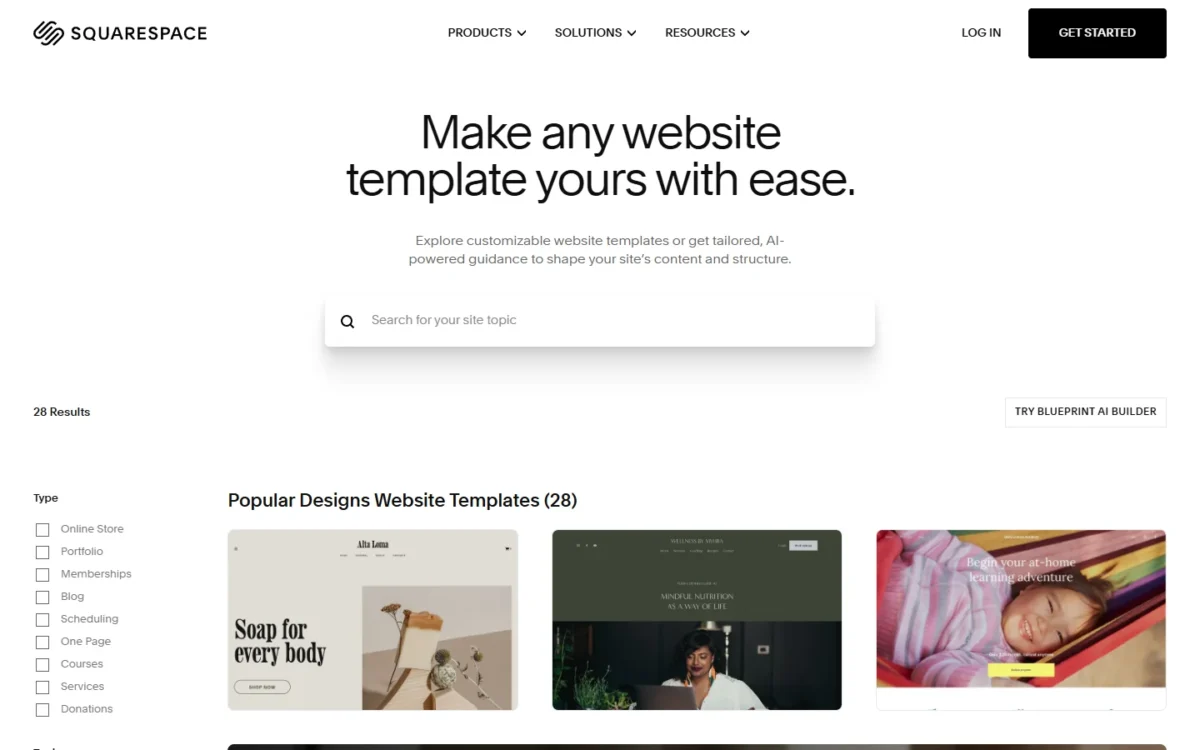
Video storage is the size limit to watch. Basic stores 30 minutes of video, Core 5 hours, Plus 50 hours and Advanced an unlimited amount, so a coach hosting course videos outgrows Basic on storage before fees.
Selling online: products, services, memberships and invoices
Every plan sells unlimited products and services, gift cards, subscriptions, courses and memberships, and takes in-person payments through Squarespace’s point of sale. Abandoned cart recovery is on every plan too.
Invoices carry no Squarespace transaction fee on any plan. A consultant who bills by invoice therefore pays only the card processing rate, even on Basic.
The gaps on Basic are the ones a growing shop notices. Discounts, payment plans, shipping labels, carrier-calculated shipping, Google Shopping listings and Commerce APIs all start at Core.
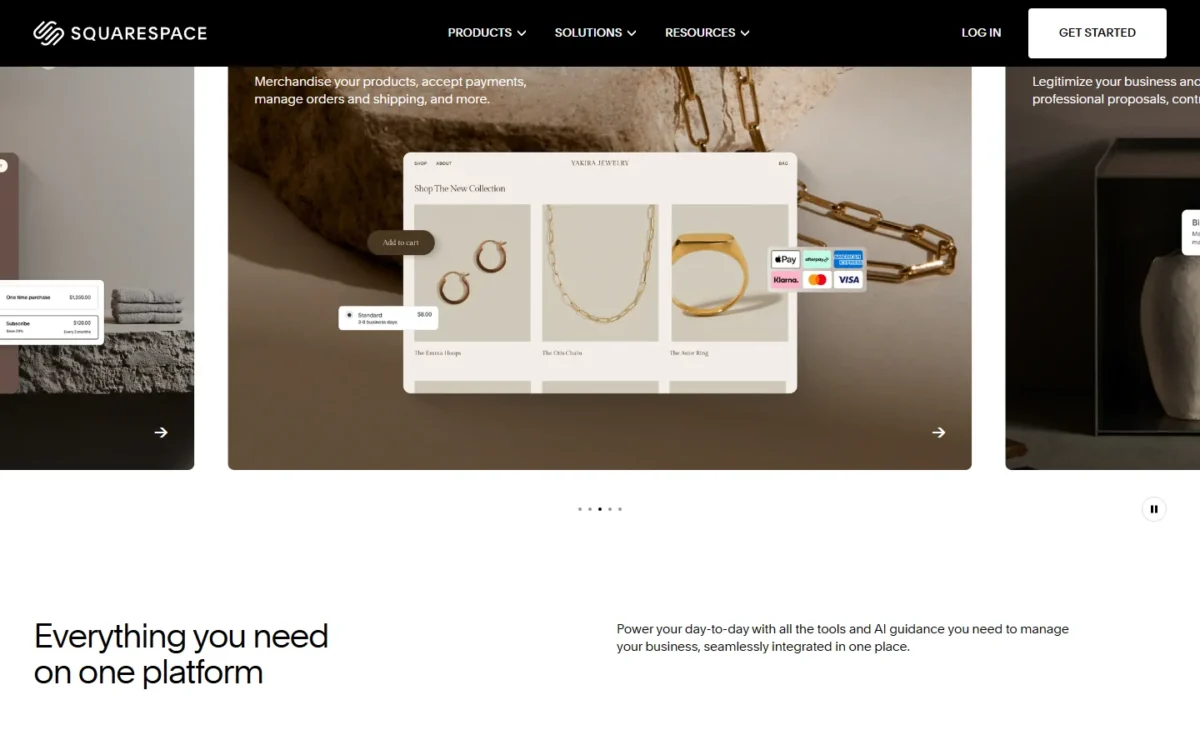
Squarespace Payments accepts major cards, Apple Pay, Klarna, Afterpay and ACH.
Squarespace AI: Blueprint builder, text and Image Studio
Squarespace AI drafts a starter site, writes copy and generates images, but how much image work you get depends on the plan’s AI credits. Blueprint AI Builder builds a custom site template step by step, generating text and images and picking style settings from your prompts.
In text blocks, blog posts and product descriptions, the AI drafts copy from a prompt or rewrites selected text with Simplify, Shorten or Lengthen. Image Studio generates images from prompts or reshoots existing product photos against a studio backdrop, and each generated image uses AI credits.
Basic gets 10 AI credits once; Core gets 20 a month, Plus 40 and Advanced 120. Squarespace does not publish how many credits one image uses, so a shop planning to reshoot a whole catalog cannot price that work in advance.
Squarespace’s own guide tells users to review every AI draft because machine-made content may not be accurate. Clarkson AI chat, which edits text, images, products and site styles from chat prompts, is still rolling out to sites in waves.
SEO and marketing tools
Every plan includes Squarespace’s SEO tools, search keyword analysis and AI Visibility prompt runs: 10 once on Basic, then 20, 40 or 120 a month on Core, Plus and Advanced. On version 7.1 sites built with Fluid Engine, Squarespace AI scans for missing SEO descriptions and image alt text and suggests both.
Marketing splits at Core. Promotional pop-ups, form and button conversion insights, ecommerce analytics and the Mailchimp integration are not on Basic.
Squarespace support does not give SEO strategy advice, so ranking work stays with the owner or a hired expert.
Custom code, integrations and email
Basic has the CSS Editor and a code block for HTML, Markdown and CSS; JavaScript, iframes and code injection start at Core. That gate catches people late: JavaScript added during the trial stays in the block on Basic but stops working, so an embedded widget built in the trial can break after you subscribe.
Core also adds the Zapier and Mailchimp integrations. If you plan to automate order and form steps, my Zapier review covers that tool.
Extensions, Squarespace’s name for third-party plugins, work on every plan. Squarespace charges nothing for them, but each provider sets its own price and handles its own support.
Core and above include one free Google Workspace Business Starter inbox for the first year. Check what Google Workspace costs after the first year before you count that inbox as free.
Squarespace Ease of Use
You can judge Squarespace’s ease of use on your own site before paying: the trial runs 14 days, extends by 7 more on request, and needs no credit card. The help center’s setup takes four steps: click Get Started, describe your site’s goal to see suggested designs, pick one, and create an account.
Blueprint AI Builder is the other route in, building a template from your prompts. Either way, the trial site stays private unless you share it by password, and search engines do not index it.
A trial site cannot take payments, send form-submission emails or create subscription products. Trial sites allow up to 5 contributors, but Basic allows 2 including the owner, so a three-person trial team has to choose Core or remove an editor.
What to settle in those 14 days:
- Build the pages you need and invite every editor who will work on the site.
- Add your products and note whether you rely on discounts, shipping labels or carrier rates, which need Core.
- List any JavaScript or iframe embed, since Basic switches it off.
- Open a support chat with a real question and judge the answer you get.
When a trial lapses, the site stays closed until you upgrade, and Squarespace tells you to pick a plan that holds every feature you set up. That makes the plan choice the next decision.
Squarespace Pricing
Squarespace costs $19, $29, $49 or $99 a month per site billed annually, or $25, $39, $65 or $139 billed monthly, for Basic, Core, Plus and Advanced. A shop selling more than $6,000 a year on annual billing should budget for Core, because Basic takes 2% of every online store sale.
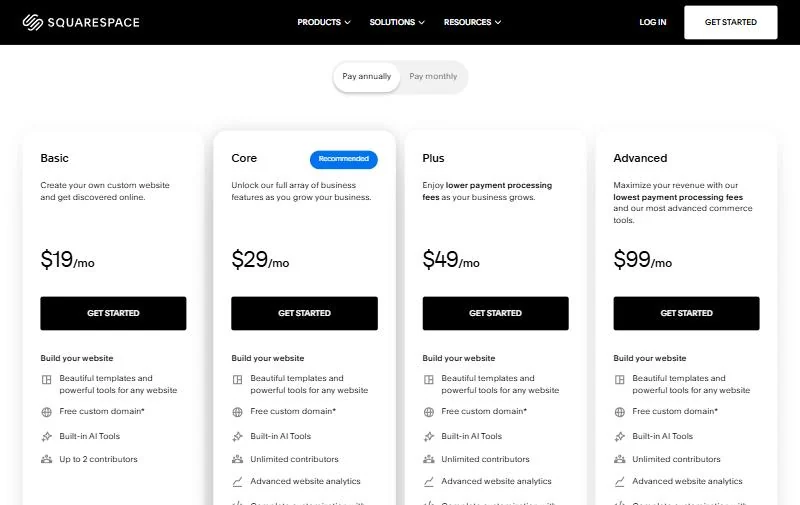
These are US prices in US dollars, as of Squarespace’s pricing page on October 22, 2026; visitors outside the US see local currencies. Each plan covers one site, so a second site is a second subscription.
| Plan | Monthly billing | Annual billing | Store / digital fee | US card rate | Key limit |
|---|---|---|---|---|---|
| Basic | $25/mo | $19/mo | 2% / 7% | 2.9% + $0.30 | 2 contributors, no JavaScript |
| Core | $39/mo | $29/mo | 0% / 5% | 2.9% + $0.30 | 5 hours of video |
| Plus | $65/mo | $49/mo | 0% / 1% | 2.7% + $0.30 | 50 hours of video |
| Advanced | $139/mo | $99/mo | 0% / 0% | 2.5% + $0.30 | Unlimited video, 120 AI credits a month |
Sources: Squarespace pricing page (US prices as of October 22, 2026), checked October 2026.
Annual billing is the better deal once you know the site will stay up. Basic costs $25 x 12 = $300 a year on monthly billing against $19 x 12 = $228 billed annually, and annual plans add a free custom domain for the first year.
The four plans replaced Personal, Business, Commerce Basic and Commerce Advanced. A page that still prices those names is describing the old lineup. For each plan’s cost, see my Squarespace pricing guide.
Fee note
The 2% and 7% are Squarespace’s own fees, charged on top of card processing. Premium cards cost 3.2% + $0.30 on every plan, and international cards add 1.5%.
The limit that forces an upgrade to Core can be a feature rather than the fee, so it is the gate I would check first: a third editor, a JavaScript embed, Zapier, discounts or shipping labels all need Core.
The fee sets the line for everyone else. Core costs $348 – $228 = $120 a year more than Basic on annual billing. Basic’s 2% store fee reaches the same $120 once a shop sells $6,000 a year ($6,000 x 2% = $120).
Basic’s digital fee is also 2 points above Core’s, so the same line holds for courses and memberships. On monthly billing the gap widens to $39 – $25 = $14 a month, so a monthly payer’s line sits above $6,000.
Plus is a narrower call. Plus costs $588 – $348 = $240 a year more than Core, and its card rate is only 0.2 points lower, which saves that much at $120,000 a year in card sales ($120,000 x 0.2% = $240).
The digital fee changes the answer for course sellers. Plus charges 1% against Core’s 5%, so it covers its extra cost at $6,000 a year in digital sales ($6,000 x 4% = $240).
Advanced costs $1,188 – $588 = $600 a year more than Plus. Its digital fee is 1 point lower, which repays that at $60,000 a year in digital sales ($60,000 x 1% = $600). Its card rate is also 0.2 points lower, but that saving repays $600 only at a card volume well above the $120,000 that Plus needs over Core.
For a team, the per-site model is the saving. Five editors on Core pay $29 a month in total on annual billing, because Squarespace bills the site, not the seats.
The plan price leaves out a domain after the first year (domain pricing varies by extension), paid extensions, Google Workspace after its free year and US sales tax, which appears at checkout. A downgrade takes effect at the end of the billing cycle, and Squarespace issues no refund for it.
Customer Support, Security and Moving Your Site
Squarespace customer support runs 24 hours a day, 7 days a week by email, live chat, X, Facebook Messenger and the mobile app, and there is no phone line. Leaving means exporting content to .xml and products and contacts to .csv, with images downloaded one at a time.
Chat starts with the Squarespace Assistant bot; typing “human” or “talk to support” asks for a person. Live chat runs in English, French, German, Spanish and Portuguese, and the contact widget promises an email reply within 12 hours when chat is unavailable.
Support will not modify custom code, give SEO strategy or tax advice, or troubleshoot third-party services beyond connecting them. A site that leans on custom code needs the Squarespace Forum or a hired Squarespace Expert.
Every plan includes SSL, and Squarespace describes its hosting as fully managed cloud hosting. It publishes no uptime figure on the pages I read; outage updates go to its status page and to @SquarespaceHelp on X.
Moving in is the easier direction. Squarespace’s importer works with content from WordPress, Blogger and Tumblr, products from Shopify, Etsy and Big Cartel, and products or contacts from a .csv file. Imports are static copies, with no sync to the old platform.
Moving out costs more work. Site content exports to an .xml file, but images and uploaded videos cannot be exported in bulk, only downloaded one image at a time from the Asset library. For a photo-heavy portfolio, keep your original files outside Squarespace from day one.
Who Should Use Squarespace?
Squarespace fits service businesses, portfolios and small shops that want one subscription for the site, checkout and invoicing, on Core once they need a third editor or fee-free store sales. It does not fit store-first sellers who want a platform built around the catalog, or owners who want a free or very cheap start.
Best for
- A consultant, coach or studio that bills clients by invoice, since invoices carry no Squarespace transaction fee on any plan
- A maker or portfolio selling a few products, where Basic’s 2% fee costs less than the Core upgrade until sales reach the break-even above
- A team of three or more editing one site, which pays $29 a month on Core, billed annually, with unlimited contributors
- A course or membership seller with steady digital sales, where Plus’s 1% fee beats Core’s 5% past the digital break-even above
Not ideal for
- Anyone who needs a free plan: Squarespace has none, while Wix and WordPress.com both have one
- A store-first seller who wants a platform built around the catalog, such as Shopify, whose Basic plan is $29 a month billed yearly
- An owner who wants to phone support during an outage, since Squarespace has no phone line
- A budget buyer happy to prepay four years, where Hostinger’s Premium plan costs $119.52 for 48 months
Squarespace vs Competitors
Squarespace’s entry price sits above WordPress.com’s and Hostinger’s and just above Wix’s, with no free plan. Shopify costs more at entry but is built for sellers whose site is mainly a store.
| Software | Best for | Starting price | Key difference | Main trade-off |
|---|---|---|---|---|
| Squarespace | Service businesses and small shops on one bill | $19/mo billed annually, $25 monthly, per site | Selling, memberships and invoices on every plan | No free plan; Basic takes 2% of store sales |
| Wix | Owners who want to start free | Free plan; Light $17/mo billed yearly | Build on a free plan before paying | Light allows 2 site collaborators |
| Shopify | Store-first sellers | Basic $29/mo billed yearly | A platform built around the store | 2% fee on Basic with a third-party payment provider |
| WordPress.com | The lowest yearly-billed entry in this table | Free plan; Personal US$4/mo billed yearly | Plugin installation from the Personal plan | Free sites show WordPress.com ads |
| Hostinger | Budget buyers who prepay | Premium $2.49/mo with $119.52 paid for 48 months | Up to 3 websites on Premium | Renews at $10.99/mo |
Sources: Squarespace pricing, Wix plans, Shopify pricing, WordPress.com pricing and Hostinger Website Builder, checked October 2026.
Wix’s entry plan costs $17 a month billed yearly against Squarespace Basic at $19, and Wix also has a free plan that lets you build before you pay. Shopify is in the table for sellers whose site is mainly a store, while WordPress.com has the lowest yearly-billed entry in this table at US$4 a month.
If Wix is your other option, read my Wix vs Squarespace comparison.
Hostinger’s Premium plan covers up to 3 websites for its 48-month prepayment, where each Squarespace site is billed separately.
Best Squarespace Alternatives
Look elsewhere if you want a free start (Wix or WordPress.com), sell mainly through a store (Shopify), or will prepay years for a low monthly figure (Hostinger). Webflow suits a designer who wants to build animations and interactions visually in its Interactions editor, with a free Starter plan and a Basic plan at $15 a month billed yearly.
My ranking of the best website builders for small business sorts these builders by the job each does best.
How I Evaluated Squarespace
This review rests on Squarespace’s own pages, read in October 2026. The prices come from its US pricing page as it stood on October 22, 2026.
The rest comes from its help-center articles on plans, selling, trials, contacting the help team, AI tools and import and export, plus its templates and Extensions pages. The rivals’ prices come from their own pricing pages, read in October 2026.
The judgments are mine, built on those facts: the break-even sales volumes, the per-site team cost and the plan-fit calls. Squarespace does not publish a template count, an Extensions count or what one AI credit buys, so none of those appears here. All prices are US prices in US dollars.
Squarespace FAQ
Is Squarespace legit?
Yes. Squarespace, Inc. runs the platform, its site carries a copyright line from 2003 to 2026, and the company says it is an ICANN-accredited registrar. Squarespace Payments, its own payment processor, works in the US, the UK, Canada and several European countries.
Can I use my own domain with Squarespace?
Yes. Any plan can connect a domain you already own or register a new one through Squarespace. Annual plans include a free custom domain for the first year; after that, the price depends on the domain extension.
Can I cancel or change my Squarespace plan anytime?
Yes. You can upgrade, downgrade or cancel at any time, and changes take effect at the end of the current billing cycle. A cancelled plan runs through the period you already paid for, so an annual plan commits you for the year.
What is better, GoDaddy or Squarespace?
Pick by the job: Squarespace’s case is selling, invoicing and memberships on one per-site bill, with no store fee from Core at $29 a month billed annually. To set GoDaddy against it, use my ranking of the best website builders for small business, linked under Best Squarespace Alternatives, which sorts builders by the job each does best.
Squarespace Review: Final Verdict
Squarespace is worth paying for if you run a service business, portfolio or small shop and will budget for Core at $29 a month billed annually. That plan removes the store fee and the two-editor cap, and adds the JavaScript, Zapier and Mailchimp access I would want on any site that is growing.
Basic suits a one- or two-person site selling under about $6,000 a year online on annual billing; above that, its 2% fee costs more than the upgrade. Skip Squarespace if you need a free plan, want the lowest multi-year price, or run a store-first business, where Wix, WordPress.com, Hostinger or Shopify fit better.
Before the trial ends, check three things: whether any feature you built needs Core, your expected yearly online sales against that break-even, and how you would get your images out if you ever leave.