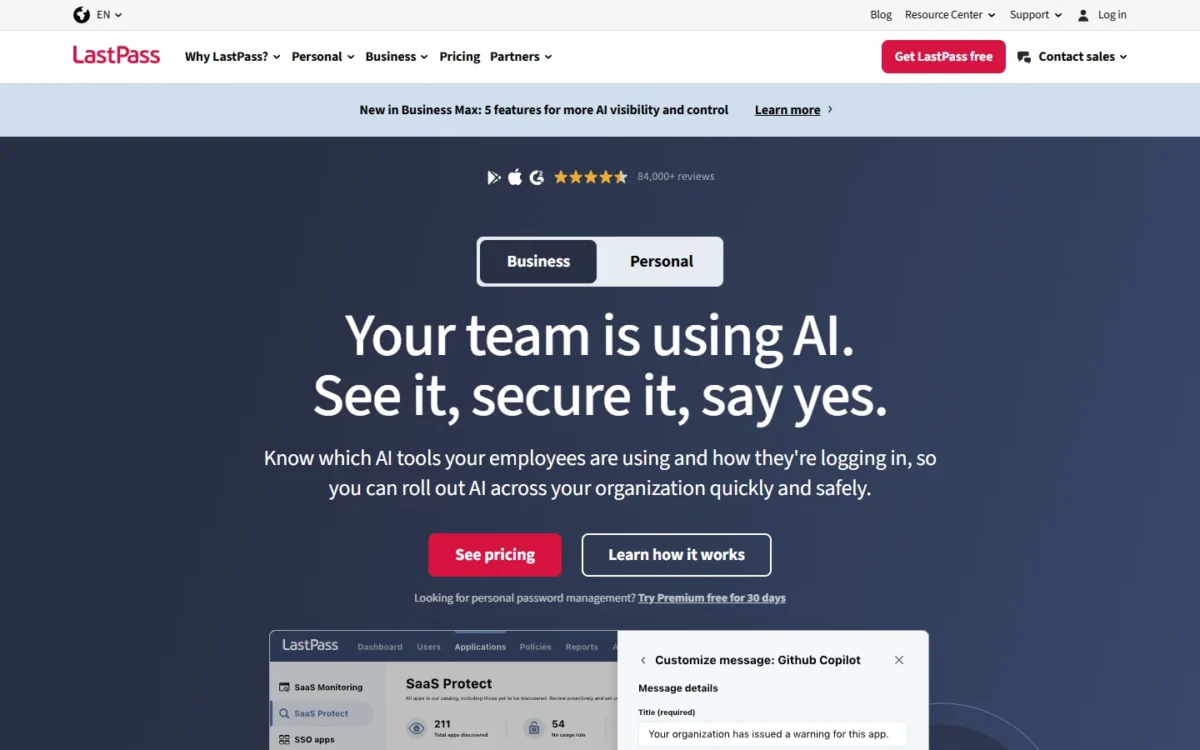
For a team, LastPass vs 1Password is a trade between seat price and security design. The deciding feature, identity-provider sign-in, comes with LastPass Business at $7 per user per month and with 1Password Business at $8.99, both billed annually. 1Password pairs each account password with a Secret Key, while LastPass’s December 2022 notice says a backup of customer vault data was copied.
Quick verdict
At November 2026 US list prices, 20 users cost $7 x 20 x 12 = $1,680 a year on LastPass and $8.99 x 20 x 12 = $2,157.60 on 1Password.
Pick LastPass if that gap decides, or if 21 to 50 people have no identity provider: Teams takes up to 50 users at $4.25 per user per month, billed annually.
Pick 1Password if your security review weighs the security incident LastPass disclosed in December 2022, or for 6 to 20 people without an identity provider: 10 users pay $299.40 a year on Teams Starter Pack against $510 on LastPass Teams.
The trade-off: 1Password costs more per seat; LastPass leaves admins a post-incident checklist.
In This Article (8 sections)
LastPass vs 1Password at a Glance
Both business password managers gate identity features at different prices and cap their entry plans at different sizes.
| Attribute | LastPass | 1Password |
|---|---|---|
| Best for | Identity-provider sign-in at the lower seat price; 21 to 50 users on an entry plan | Security reviews that weigh key design; 6 to 20 users without an identity provider |
| Entry team plan | Teams: $4.25 per user per month, billed annually, up to 50 users | Teams Starter Pack: $24.95 per month for 10 members, billed annually; up to 20 members |
| Plan with identity-provider sign-in | Business: $7 per user per month, billed annually | Business: $8.99 per user per month, billed annually |
| Free trial | 14 days, no credit card | 14 days, no credit card |
| Main strength | 100+ security policies and directory integrations on Business | A unique Secret Key for every user who signs in with an account password |
| Main limitation | A backup of customer vault data was copied in 2022 | Owners cannot use SSO sign-in; Teams Starter Pack stops at 20 members |
Sources: LastPass pricing page, LastPass Teams vs Business, LastPass Business page and 1Password business pricing, checked Nov 2026.

Key Differences: Features Compared for Teams
Four differences decide this choice for a team admin: the price of the identity tier, the size of the entry plan, the key design behind each vault, and each vendor’s disclosed incidents.
- Identity tier: identity-provider sign-in sits on Business for both, at the lower seat price on LastPass
- Entry plan size: up to 50 users on LastPass Teams; 10 members, extendable to 20, on 1Password Teams Starter Pack
- Key design: 1Password combines the account password with a Secret Key; LastPass derives the key from the master password, or from split components under federated login
- Disclosed incidents: LastPass reported two linked incidents in 2022
- 1Password’s Okta report: 1Password detected suspicious activity on its Okta instance in 2023 and concluded that no 1Password user data was accessed
The matrix names the lowest plan that lists each admin feature where the vendor ties it to a plan.
| Feature | LastPass | 1Password |
|---|---|---|
| Security policies | Teams: 25 policies; Business: 100+ policies | Custom policies, listed in the business plan comparison; no count published |
| Groups | Business | Custom groups, listed in the business plan comparison; groups provisioned from a directory on Business |
| Identity-provider sign-in | Business (federated login) | Business (Unlock with SSO) |
| Provisioning from a directory | Business (directory integrations) | Business (automated provisioning) |
| Families accounts for employees | Business | Business |
| Guest accounts | Not listed on the pricing page | 5 on Teams Starter Pack, 20 on Business |
Sources: LastPass pricing page, 1Password business pricing and 1Password Families for Business members, checked Nov 2026.
Admin console, policies and roles
LastPass publishes its policy counts by plan, 25 on Teams and 100+ on Business, while 1Password names custom policies, custom groups and role-based permissions with no number attached.
The count matters less than what sits above LastPass Teams. Groups, which apply policies and shared folders to several users at once, start at Business, along with different admin roles and advanced reporting.
1Password starts role-based permissions on Teams Starter Pack and adds expanded vault permissions and broader administration and reporting on Business.
Verdict: admin control
Depends on plan. A LastPass team that needs different rules for different departments should price Business from day one. 1Password gives role-based permissions on its entry plan. There is not enough evidence to rank policy depth, because 1Password publishes no policy count.
SSO, directory sync and offboarding
Both vendors require the Business plan to connect an identity provider such as Microsoft Entra ID, Okta or Google Workspace, and both act on a departing user from the directory side.
LastPass Business joins the two jobs. Its directory integrations cover Microsoft Active Directory, Microsoft Entra ID, Google Workspace, OneLogin and Okta. The LastPass integration with Microsoft Entra ID provisions and deprovisions accounts in real time and adds federated login, where employees open their vault with directory credentials instead of a master password.
LastPass Business can also act as the SSO provider for 3 other apps; Business Max makes that unlimited.
1Password Business splits the jobs. Unlock with SSO is an authentication method only: members sign in with their identity provider credentials, and the account password and Secret Key drop out of the sign-in. Managing users from the directory needs automated provisioning, a second integration.
Plan for three limits on the 1Password side. People in the Owners group cannot sign in with SSO, you can set up one identity provider, and the apps need an Internet connection for SSO unless you allow biometrics.
When someone leaves, deprovisioning them in the identity provider suspends their 1Password account. 1Password recommends keeping it suspended for a set time, such as a month, before deleting it, and its billing page says it does not charge for people who have been suspended.
Treat that suspension as one step of the wider leaver process, next to the items on an employee onboarding checklist. LastPass’s admin bulletin adds that sensitive shared-folder items should be rotated as employees leave.
Verdict: SSO and offboarding
Comparable at Business against Business: both federate sign-in and deprovision from the directory. LastPass has the lower seat price and serves SSO to 3 other apps. 1Password keeps Owners on account password and Secret Key and accepts one identity provider. Pick on price unless one of those caveats applies to your setup.
Credential sharing: shared folders vs vaults
LastPass shares credentials through shared folders with customizable permissions from Teams up, and 1Password shares them through vaults with role-based permissions from Teams Starter Pack up.
They differ at the edges. LastPass Business lets admins hide passwords, block copy-pasting and revoke access. 1Password counts outside collaborators into the plan as guests, 5 on Teams Starter Pack and 20 on Business.
Verdict: credential sharing
Comparable for internal sharing. 1Password includes 5 guests on Teams Starter Pack and 20 on Business. LastPass’s Business page covers sharing with external teams, but its pricing page lists no guest accounts, so a team with contractors should ask LastPass how it licenses those users before buying. On LastPass, applying shared folders to groups needs Business.
Security model and LastPass’s 2022 incidents
On published design, 1Password adds a second secret to the vault key, while LastPass rests the key on the master password or, under federated login, on split components.
1Password’s Secret Key is created on the user’s device, has 128 bits of entropy, and is combined with the account password to make the encryption key. 1Password keeps no record of it, so a brute-force attack on 1Password’s servers cannot decrypt data without it. With SSO sign-in, encrypted credentials and a device key take its place.
LastPass derives the encryption key from each user’s master password, hardened with PBKDF2 hashing, inside a zero-knowledge design with AES-256 encryption. Federated users get a 256-bit hidden master password built from two or three separately stored components.
That difference is why LastPass’s 2022 incidents matter to a buyer. LastPass reported them in three steps:
- On August 25, 2022, LastPass said an unauthorized party reached parts of its development environment through a single compromised developer account and took source code and technical information.
- On December 22, 2022, LastPass’s notice said that information was used to target another employee and reach cloud backups. LastPass said the threat actor copied account data, such as company names and email addresses, and a backup of customer vault data that held unencrypted website URLs beside encrypted usernames, passwords and secure notes.
- On March 1, 2023, LastPass’s update reported no threat-actor activity since October 26, 2022, and added that a backup of the MFA/Federation database was taken, including the K2 component used for federation.
The same update says neither incident came from a LastPass product defect or from unauthorized access to production systems. The encrypted fields stay protected by each user’s master password, which is why LastPass warned that the threat actor may try to brute-force it.
Since then, LastPass has raised PBKDF2 iterations to 600,000, up from the 100,100 its December 2022 notice cited. Its bulletin for Business administrators asks admins to:
- enforce master passwords of at least 12 characters for non-federated users
- run the user iteration counts report and move low-count users to 600,000 iterations
- keep at least one super admin who is not federated
- run the URLs in vaults report to assess exposed URLs
- under federated login, weigh how well the identity provider protects the K1 component, since the K2 component was taken, and defederate and re-federate users to rotate K1 and K2 if your risk tolerance calls for it
1Password’s disclosed incident is narrower. Its October 23, 2023 post reports suspicious activity on the Okta instance it uses for employee-facing apps and concludes that no 1Password user data was accessed. 1Password also states that it protects all vaults, URLs and data with end-to-end AES 256-bit encryption.
Verdict: security model
1Password fits better for teams whose security review or cyber-insurance questionnaire weighs key design and incident history: for accounts that sign in with the account password, 1Password keeps no record of the Secret Key, and its 2023 post reports no user data accessed. Under Unlock with SSO, encrypted credentials and a device key replace the Secret Key for members, while Owners, who cannot use SSO, keep it. LastPass remains workable for a team that uses federated login or enforces the bulletin’s settings, because the copied vault fields were encrypted.
LastPass and 1Password Pricing Compared
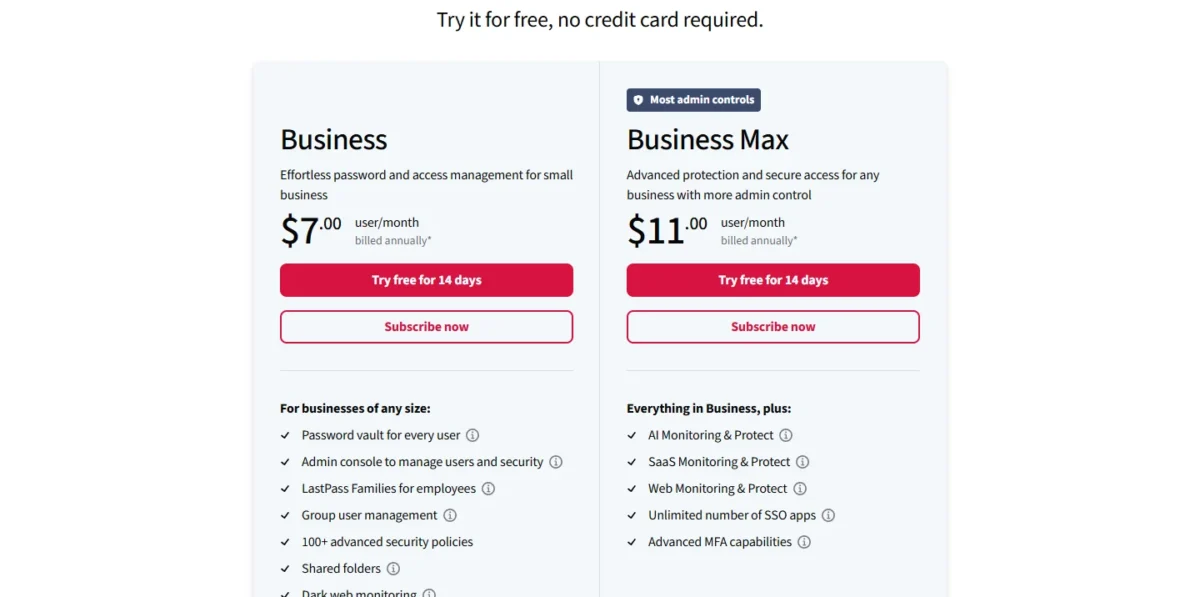
At the identity tier, LastPass Business costs $7 per user per month and 1Password Business $8.99, both billed annually. At the entry tier, 1Password Teams Starter Pack is a flat $24.95 per month for 10 members, billed annually. LastPass Teams costs $4.25 per user per month, billed annually.
| Plan tier | LastPass | 1Password |
|---|---|---|
| Entry team plan | Teams: $4.25 per user per month, billed annually | Teams Starter Pack: $24.95 per month for 10 members, billed annually ($299.40 per year); extra seats $4.99 per seat per month |
| Plan with identity-provider sign-in | Business: $7 per user per month, billed annually | Business: $8.99 per user per month, billed annually ($107.88 per user per year) |
| Minimums and caps | Teams: up to 50 users; Business: unlimited users | Teams Starter Pack: 10 users minimum, up to 20 users; Business: 1 user minimum |
Sources: LastPass Business page, LastPass pricing page, LastPass Teams vs Business and 1Password business pricing, checked Nov 2026.
These are US list prices in USD, checked on November 20, 2026. LastPass adds applicable taxes at checkout. 1Password also sells monthly billing; every 1Password price here is its annual-billing price, the same basis my 1Password pricing breakdown uses.
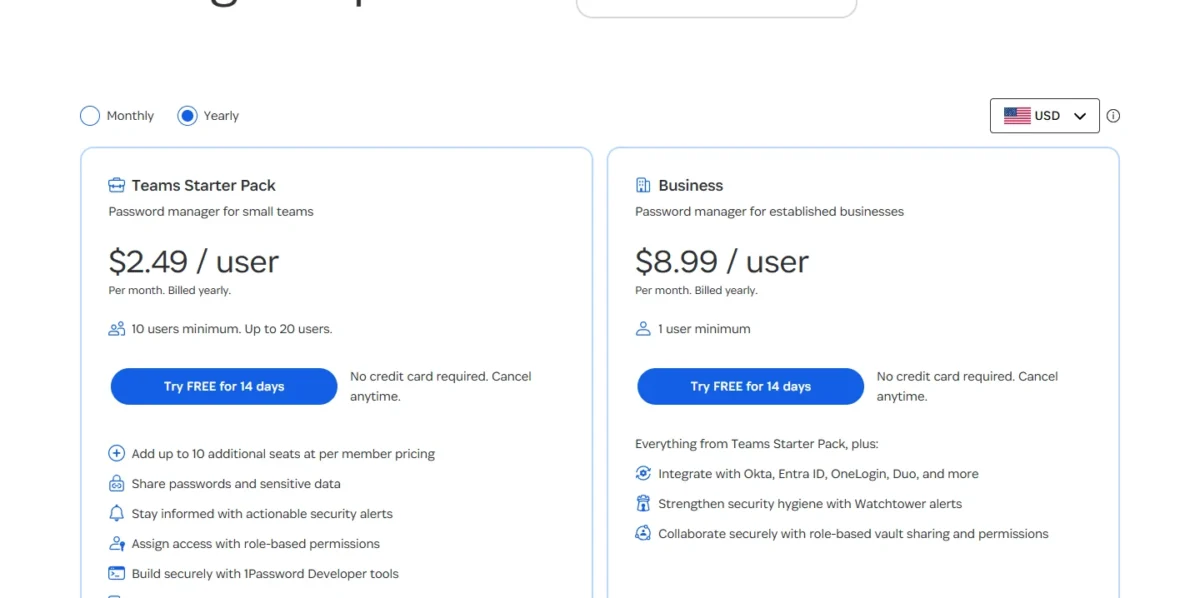
The Starter Pack’s 10-user minimum means five people pay what ten pay.
Two limits force an upgrade on 1Password. Extra seats cost $4.99 per seat per month up to 20 members, and member 21 moves everyone to Business: $8.99 x 21 x 12 = $2,265.48 a year, more than double the 20-member Starter Pack bill in the table below.
On LastPass, the trigger is a feature long before it is headcount: groups, directory integrations, federated login, SIEM integrations and Families accounts all start at Business.
Both vendors keep identity-provider sign-in off the entry plan, so a company that mandates SSO pays the Business rate for every seat. For the same pattern across a software stack, see my guide to the SaaS seat tax.
The base price leaves different things out. LastPass names two add-ons, Unlimited SSO and Advanced MFA, and sells Business Max above Business; Business Max costs $11 per user per month, billed annually. 1Password Business includes 20 guests and bills a prorated amount for each additional one.
On 1Password’s billing terms, a removed team member comes off the next monthly or annual invoice, and amounts already charged are nonrefundable.
What 5, 10, 20 and 30 users pay per year
Ten users cost $4.25 x 10 x 12 = $510 a year on LastPass Teams and $7 x 10 x 12 = $840 on LastPass Business, against $299.40 on 1Password Teams Starter Pack and $8.99 x 10 x 12 = $1,078.80 on 1Password Business. At that size the plan tier moves the bill more than the vendor does. The table applies the same formula, price x users x 12 months, to 5, 20 and 30 users.
| Team size | LastPass Teams | 1Password Teams Starter Pack | LastPass Business | 1Password Business |
|---|---|---|---|---|
| 5 users | $4.25 x 5 x 12 = $255 | $24.95 x 12 = $299.40 | $7 x 5 x 12 = $420 | $8.99 x 5 x 12 = $539.40 |
| 10 users | $4.25 x 10 x 12 = $510 | $24.95 x 12 = $299.40 | $7 x 10 x 12 = $840 | $8.99 x 10 x 12 = $1,078.80 |
| 20 users | $4.25 x 20 x 12 = $1,020 | $299.40 + $4.99 x 10 x 12 = $898.20 | $7 x 20 x 12 = $1,680 | $8.99 x 20 x 12 = $2,157.60 |
| 30 users | $4.25 x 30 x 12 = $1,530 | Not available: the plan stops at 20 members | $7 x 30 x 12 = $2,520 | $8.99 x 30 x 12 = $3,236.40 |
Sources: LastPass pricing page, LastPass Business page and 1Password business pricing, checked Nov 2026.
Assumptions: annual billing for all four plans, LastPass Teams at $4.25 per user per month, US list prices in USD, and every seat filled for 12 months. Tax, the Unlimited SSO and Advanced MFA add-ons, additional 1Password guests and volume discounts are excluded.
The identity-tier gap is $8.99 – $7 = $1.99 per user per month, so 30 people pay $1.99 x 30 x 12 = $716.40 a year more on 1Password. For that team the gap does not buy the Secret Key at sign-in, because encrypted credentials and a device key replace it for SSO members; Owners, who cannot use SSO, keep it. The gap buys the Secret Key for accounts outside SSO and 1Password’s incident record: its 2023 post reports no 1Password user data accessed.
LastPass Teams, at $4.25 per user per month, is the like-for-like rival to the Starter Pack: the lower bill for 5 people ($4.25 x 5 x 12 = $255 against $299.40) and the higher one for 6 ($4.25 x 6 x 12 = $306) through 20 ($4.25 x 20 x 12 = $1,020 against $898.20). From 21 to 50 people, only LastPass Teams still fits an entry plan.
My take
For 20 people, 1Password Business costs $2,157.60 – $1,680 = $477.60 a year more than LastPass Business. I would pay that when the company’s security review asks about a vendor’s incident history, and I would stay on LastPass Business when the team already uses federated login and has applied LastPass’s bulletin settings.
Ease of Use, Integrations and Support
Both products run on desktop, mobile and browser, and the differences an admin feels are SIEM targets, developer tools and support hours. How each behaves on your own devices is a question for the 14-day trials: save a login, share a folder or vault, and sign in through your identity provider on both before you pay.
Apps, browser extensions and daily use
1Password names its platforms: apps for macOS, iOS, watchOS, Windows, Android and Linux, and browser extensions for Chrome, Safari, Edge, Firefox and Brave. LastPass describes a browser extension plus apps for desktop, tablets, phones and watches.
A team with Linux desktops or Brave users can confirm 1Password from the published list and should check LastPass during the trial.
Both show users their password health. LastPass includes its security dashboard and dark web monitoring on Teams, Business and Business Max. 1Password’s Watchtower flags weak passwords to team members and gives admins a dashboard for password health and potential data breaches.
For sign-in, LastPass includes two-factor authentication and hardware keys such as YubiKey on all three business plans, and 1Password authenticates users with two-factor authentication, biometrics or passkeys.
SIEM, developer tools and audits
Both vendors send events to a SIEM, and they name different targets. LastPass Business integrates with Splunk and Microsoft Sentinel; 1Password streams events to Splunk, Elastic, Sumo Logic and Panther. A Sentinel shop finds its target named by LastPass, and an Elastic or Sumo Logic shop by 1Password.
Developer tools are a 1Password line item: SSH key signing, Git commit signing, a CLI and SDKs. On audits, LastPass lists SOC2 Type II, ISO 27001, SOC3 and BSI C5, and 1Password lists SOC 2 Type II certification and independent third-party audits.
Support and onboarding
Both vendors staff support around the clock. LastPass Business comes with 24/7 live, in-language support; 1Password has 24/7 support by email, forum and social media, plus phone support Monday to Friday, 9 AM to 5 PM EST.
A 5 to 50 person team should not count on a named contact from either. 1Password reserves a dedicated Customer Success Manager for organizations with 101+ users, and LastPass ties its Customer Success Manager to a Site License.
Both let you pilot first. LastPass’s 14-day Business trial has no limit on the number of seats. 1Password advises adding a user or group who can test automated provisioning before the rest of the organization.
Who Should Pick LastPass, Who Should Pick 1Password
Pick LastPass when identity-provider sign-in at $7 per user per month decides, or when 5 or fewer, or 21 to 50, people need an entry plan. Pick 1Password when your security review weighs key design and incident history, or when 6 to 20 people without an identity provider want the lower entry bill.
LastPass’s list comes first. Skip it if your security review will not accept a vendor whose vault backup was copied, whatever the price.
Pros
- Business includes federated login and directory integrations at the lower seat price
- Teams takes up to 50 users, so 21 to 50 people without an identity provider stay on the entry plan
- Policy counts are published: 25 on Teams, 100+ on Business
Cons
- A backup of customer vault data was copied in 2022, with website URLs unencrypted, so admins should work through LastPass’s bulletin
- Group policies, directory integrations, federated login and SIEM integrations all need Business
- SSO to other apps is limited to 3 on Business; more needs Business Max or the Unlimited SSO add-on
1Password’s list trades a higher seat price for its key design and a flat small-team plan. Skip it if you have 21 to 50 people, no identity provider and an entry-plan budget, because the Starter Pack ends at 20 members.
Pros
- Outside SSO sign-in, each account password is combined with a Secret Key that 1Password keeps no record of
- Teams Starter Pack is one flat bill for up to 10 members and costs less than LastPass Teams from 6 to 20 people
- The LastPass importer converts shared folders into vaults and applies their permissions
Cons
- The Business seat costs more than LastPass’s, a gap that grows with every user
- Teams Starter Pack stops at 20 members, so member 21 moves the whole team to Business
- People in the Owners group cannot sign in with SSO, and SSO accepts one identity provider
The matrix turns those lists into a pick for five priorities.
| Your priority | Better fit | Reason | Trade-off |
|---|---|---|---|
| SSO and directory sync on the smallest budget | LastPass | Business costs $7 against $8.99 per user per month, billed annually | SSO to other apps is limited to 3 |
| 21 to 50 users, no identity provider | LastPass | Teams takes up to 50 users; Teams Starter Pack stops at 20 | Teams has 25 policies and no groups |
| 6 to 20 users, no identity provider | 1Password | Teams Starter Pack costs $299.40 a year for 10 members against $510 on LastPass Teams | Identity-provider integrations are added on Business |
| Security review weighs incident history | 1Password | Secret Key design; LastPass disclosed a copied vault backup in 2022 | A higher Business seat price |
| Already on LastPass with federated login | Depends | The K2 component was taken; the bulletin leaves rotating K1 and K2 to the admin’s risk call | Staying may mean defederating and re-federating users; leaving means a migration |
Sources: LastPass pricing page and 1Password business pricing, checked Nov 2026.
My take
With an identity provider and no objection from the security review, I would take LastPass Business for its lower seat price.
Between 6 and 20 people without an identity provider, I would start on 1Password Teams Starter Pack, the lower entry bill at every size in that range.
Switching Between LastPass and 1Password
From LastPass to 1Password, the 1Password desktop app imports a LastPass account directly, and shared folders arrive as vaults with their permissions when the person importing administers the folder and may create vaults. The steps follow 1Password’s LastPass import guide.
- Prepare sign-in. A LastPass account that uses SMS for multi-factor authentication must switch to another method first, and an account that signs in with SSO needs 1Password’s import redirect URI added to the LastPass application in its identity provider.
- Import as a folder admin. In 1Password for Mac, Windows or Linux, choose Import, then LastPass. Shared folders import only for someone with administrator privileges in the folder and, in 1Password Teams or Business, the permission to create vaults.
- Check permissions. They are not imported for a person or group that does not exist in the 1Password account, or for external LastPass users.
- Rebuild what does not move. Passkeys are not imported, and one-time passwords saved in LastPass Authenticator have to be added by hand. Private folders become tags.
- Reconnect identity. Set up automated provisioning and Unlock with SSO in 1Password Business as two separate integrations.
From 1Password to LastPass, 1Password 8 exports an account to a 1PUX file or a CSV. The CSV holds Login and Password items only, exported files are not encrypted, and passkeys export only from 1Password for iOS and Android. Confirm the file format LastPass accepts in its Support Center before you export, as with any of the other 1Password alternatives.
FAQ
Is LastPass no longer trusted after the 2022 breach?
I would still trust a LastPass Business account, but only one whose Admin Console shows every user meeting the bulletin’s master-password and iteration settings. LastPass says it is more secure than before and names what changed after the breach: a move to a secure cloud platform, managed devices, an IRAP assessment and two new teams for privacy and threat intelligence.
Has 1Password ever had a security incident?
Yes. 1Password detected suspicious activity on its Okta instance on September 29, 2023 and traced it to Okta’s Support System breach. 1Password terminated the activity and found no compromise of user data or other sensitive systems. An update on October 25, 2023 added that 1Password’s Google instance was not impacted.
Do the business plans include family accounts for employees?
Yes, on the Business plan of each. LastPass gives every Business user a free family plan: a personal account plus 5 licenses to share. A member of a 1Password Business team gets a complimentary 1Password Families membership that stays active while it is linked to the business account.
Final Verdict: LastPass or 1Password?
LastPass is the lower bill for identity-provider sign-in and the roomier entry plan; 1Password fits a security review that weighs key design and incident history, and it is the lower entry bill for 6 to 20 people without an identity provider.
How I Compared LastPass and 1Password
This comparison rests on official documentation: each vendor’s own pricing, product, help and security pages, checked on November 19, 2026. I compared plan against plan, LastPass Business with 1Password Business and LastPass Teams with 1Password Teams Starter Pack, on identity-provider sign-in and provisioning, admin policies, credential sharing, security design with disclosed incidents, and yearly cost for 5 to 30 users.
Plan facts and prices are the vendors’ published statements, and the fit calls are my reasoning from them. The vendors do not publish two things on those pages: how LastPass bills seats freed by removed users, and how many policies 1Password supports.
The panel gives the conditions for each side.
Choose LastPass if
- Identity-provider sign-in and directory sync have to come at the lower seat price: $7 per user per month, billed annually
- You have 5 or fewer, or 21 to 50, people and no identity provider: Teams costs $4.25 per user per month, billed annually, and takes up to 50 users
- You already run federated login and have applied the security bulletin’s settings
Choose 1Password if
- A security review weighs LastPass’s 2022 incidents and 1Password’s Secret Key, which a device key replaces for members who unlock with SSO
- You have 6 to 20 people and no identity provider: Teams Starter Pack costs less than LastPass Teams in that range
- You are moving off LastPass and want shared folders imported as vaults
Start the 14-day trial on the plan you would buy: Business if your identity provider is part of the plan, because neither entry plan connects to one.