1Password pricing covers four plans with list prices, from $3.99 a month for Individual and $5.99 for Families, billed yearly. The Teams Starter Pack costs $24.95 per month billed annually for 10 members, with paid seats up to 20 users; Business costs $8.99 per user per month, billed annually in USD.
Quick pricing answer
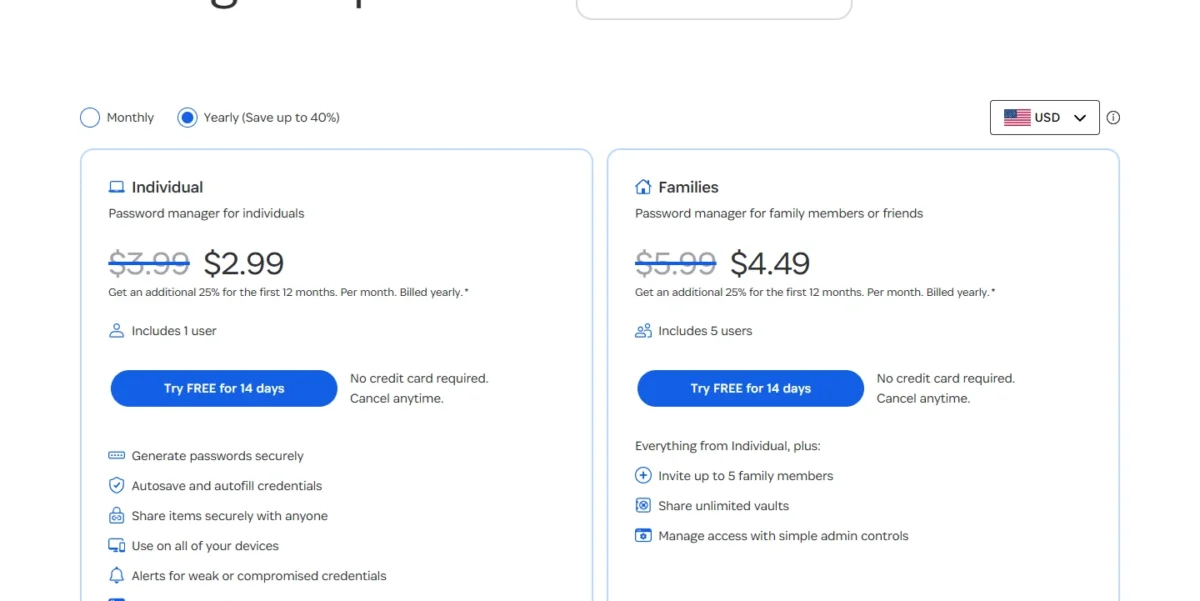
Monthly billing costs more: $4.99, $7.99, $2.99 per user (10-user minimum) and $10.99 per user. Individual at $2.99 and Families at $4.49 are first-year promotions, not the regular $3.99 and $5.99.
A 10-person team pays $299.40 a year on the pack, billed annually, against $8.99 x 10 x 12 = $1,078.80 on Business. I’d buy the pack for 3 to 20 people without an identity provider and Business for SSO or provisioning.
1Password lists no free plan, only a 14-day free trial, and a 21st user forces Business at $8.99 x 21 x 12 = $2,265.48 a year. Enterprise is quote-only. Checked November 2026.
In This Article (7 sections)
Real 1Password Cost for Teams of 5, 10, 25 and 50 Users
A team of up to 10 pays $299.40 a year for the Teams Starter Pack, extra seats up to 20 users cost $4.99 each per month, and any team above 20 pays Business at $8.99 per user per month. These are US list prices in USD on annual billing, checked in November 2026.
1Password team cost calculator
This calculator needs JavaScript. The scenario table below gives the same estimate for typical workloads.
Enter what you need. The calculator prices it on every plan at list prices and names the cheapest plan that covers it.
- List prices in USD from 1Password’s official pricing pages, checked Nov 20, 2026. Tax and regional prices are not included.
- 12-month figures are 12 times the monthly cost at the billing you choose.
- A planning estimate at list prices, not a quote.
Enter your head count and pick annual or monthly billing. The calculator compares the Teams Starter Pack and Business and names the cheapest plan that covers your team. It leaves out tax, regional prices and extra guests. On the Monthly setting it shows the pack at its annual rate, marked “Billed annually only”; for the pack billed monthly, use the $2.99 x 10 x 12 = $358.80 line below the table.
| Team size | Plan | Billing | Monthly equivalent | Annual total | Assumptions |
|---|---|---|---|---|---|
| 5 users | Teams Starter Pack | Annual | $24.95 for the pack | $24.95 x 12 = $299.40 | 10-user minimum billed as a flat price; Business: $8.99 x 5 x 12 = $539.40 |
| 10 users | Teams Starter Pack | Annual | $24.95 for the pack | $24.95 x 12 = $299.40 | 10-user minimum, fully used; Business: $8.99 x 10 x 12 = $1,078.80 |
| 20 users | Teams Starter Pack | Annual | $24.95 + $4.99 x 10 = $74.85 | $74.85 x 12 = $898.20 | An add-on of 10 extra seats, the plan’s cap |
| 25 users | Business | Annual | $8.99 x 25 = $224.75 | $224.75 x 12 = $2,697.00 | Per-user list price |
| 50 users | Business | Annual | $8.99 x 50 = $449.50 | $449.50 x 12 = $5,394.00 | Per-user list price |
Sources: 1Password business pricing page, Yearly view, checked Nov 2026.
Below 11 users, head count does not change the bill: a team of 3 pays the same $299.40 a year as a team of 10. Business costs less only for one or two users, at $8.99 x 2 x 12 = $215.76.
The 21st user changes the bill most. At 20 users the pack costs $24.95 + $4.99 x 10 = $74.85 a month, and $74.85 x 12 = $898.20 a year. One more person moves the whole team to Business at $8.99 x 21 x 12 = $2,265.48, which is $2,265.48 – $898.20 = $1,367.28 more for a single hire.
From there each hire adds $107.88 a year, which is how per-seat pricing compounds as a team grows.
Monthly billing raises each total: $2.99 x 10 x 12 = $358.80 for a 10-person pack and $10.99 x 25 x 12 = $3,297.00 for 25 Business users.
1Password Plans and Prices Compared
1Password publishes prices for four plans (Individual, Families, Teams Starter Pack and Business) and sells its Enterprise products by custom quote.
| Plan | Monthly billing | Annual billing (per month, billed yearly) | Best for | Main limitation |
|---|---|---|---|---|
| Individual | $4.99 per month | $3.99; $2.99 in the first year for new customers | One person | 1 user |
| Families | $7.99 per month | $5.99; $4.49 in the first year for new customers | A household of up to 5 | 5 users included |
| Teams Starter Pack | $2.99 per user per month, 10 users minimum | $24.95 for 10 members | 3 to 20 people, no identity provider | Up to 20 users; seats 11 to 20 cost $4.99 each per month |
| Business | $10.99 per user per month | $8.99 per user | SSO, provisioning or more than 20 users | Every user is billed |
| Enterprise | Custom quote | Custom quote | Privileged access, device trust, SaaS management | Request a quote per product |
Sources: 1Password personal pricing, 1Password business pricing and 1Password enterprise pricing, Monthly and Yearly views, checked Nov 2026.
Prices are in USD from the US pricing pages, checked in November 2026. Annual figures are monthly equivalents billed once a year; the personal plans show regular prices, with the first-year promotion beside them.
Business bills for each team member. The Teams Starter Pack adds a per-seat charge only from the 11th member, at $4.99 per seat per month on annual billing, and Families charges a prorated amount for each family member past the 5 included.
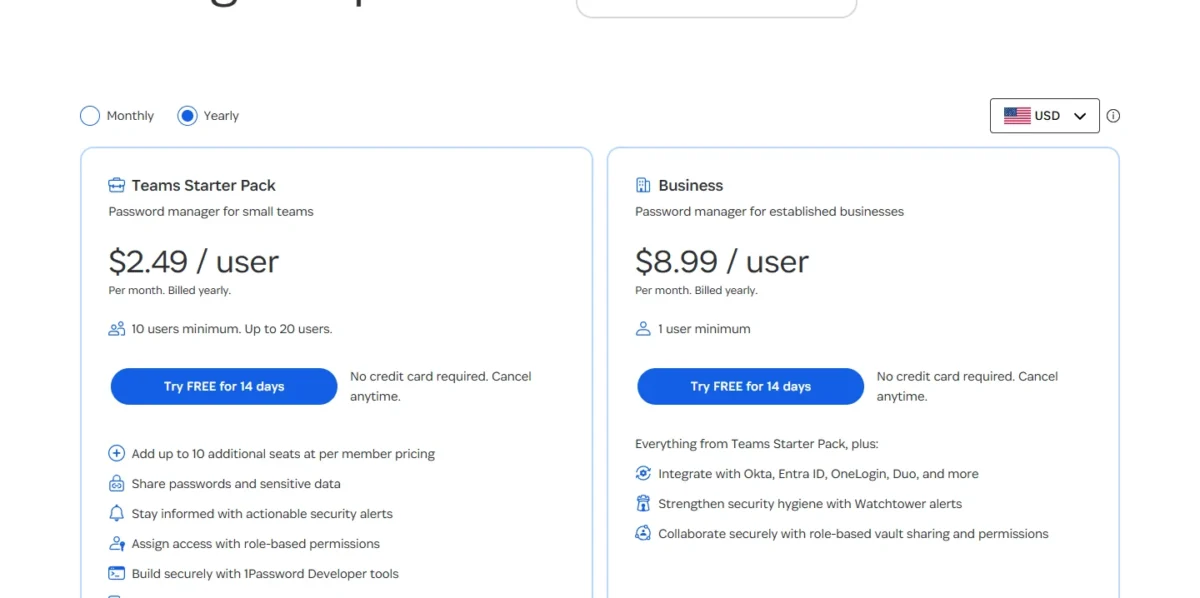
The card below prints the pack as $2.49 per user per month, billed yearly; budget from the $24.95 pack price.
What Each 1Password Plan Actually Gets You
The personal plans differ by head count, 1 user or 5. The team plans differ by size and identity tools: the Teams Starter Pack includes 10 members and lets you add up to 10 additional seats, while Business adds identity-provider integrations, automated provisioning and broader reporting.
Individual
Individual costs $3.99 per month billed yearly ($3.99 x 12 = $47.88 a year) for 1 user with 1GB of storage. New customers who subscribe on 1Password.com pay $2.99 per month in the first year, and month-to-month billing is $4.99.
It is a full password manager, not a trimmed tier: you can use it on all of your devices, with apps for macOS, iOS, watchOS, Windows, Android and Linux, autofill for logins, addresses and credit cards, and support for two-factor authentication and passkeys. My explainer on passkeys versus passwords covers what that last option changes.
Watchtower flags weak or reused passwords and breached websites, every account adds a Secret Key to the account password, and Travel Mode, included with every 1Password subscription, removes vaults you have not marked safe for travel.
The upgrade trigger is a second person: two Individual accounts cost $3.99 x 12 x 2 = $95.76 a year, more than the $5.99 x 12 = $71.88 one Families account costs for five people.
Families
Families costs $5.99 per month billed yearly for 5 users, $4.49 per month in the first year for new customers, or $7.99 billed monthly.
The account includes 5 family members and 5 guests, 1GB of storage per user, unlimited shared vaults and admin controls to add, remove or recover members. A sixth person does not force a second account: under 1Password’s billing policy, each additional family member who accepts an invitation is charged a prorated amount.
Check one thing first. Anyone on a 1Password Business team gets a complimentary Families membership that stays active while it is linked to the business account, so that household pays nothing.
Teams Starter Pack
On annual billing, the Teams Starter Pack is $24.95 a month, or $299.40 a year, for 10 members; 1Password calls it a flat monthly price for a small team. Extra seats cost $4.99 each per month on annual billing, up to 10 of them, so the plan stops at 20 users.
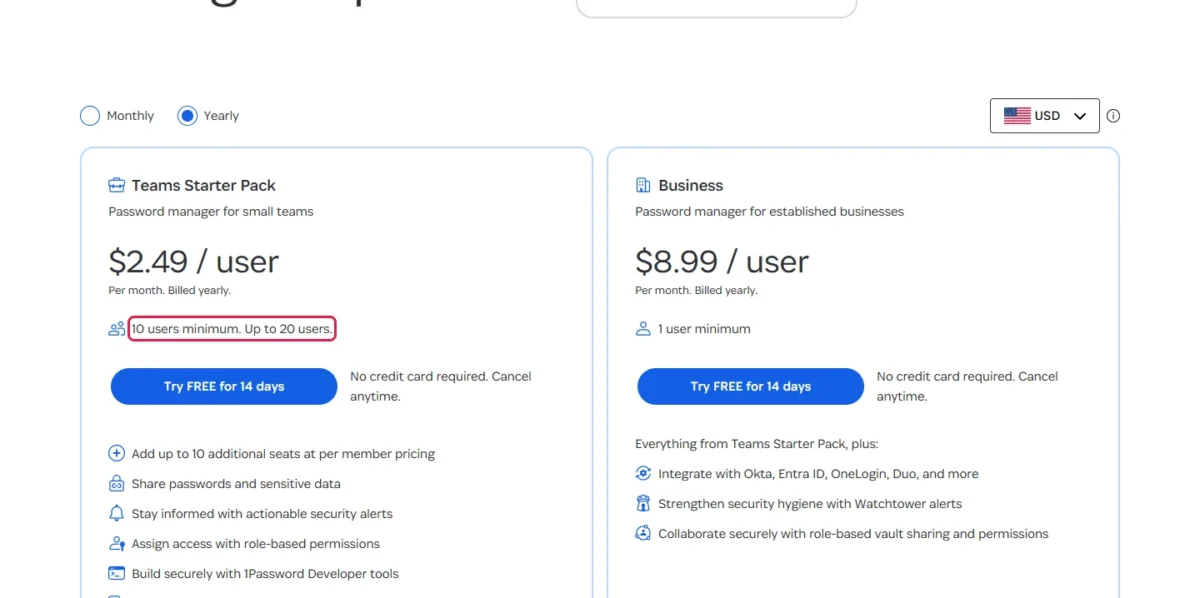
The pricing card prints $2.49 per user per month, billed yearly, while the same page’s FAQ states the bill as $24.95 per month for the pack: budget from the pack price. Billed monthly, the pack is $2.99 per user per month with a 10-user minimum.
A small team can share passwords and sensitive data, get security alerts and assign access with role-based permissions, and the subscription includes 5 guests. The free trial holds up to 10 team members; adding more means removing someone or contacting 1Password Support.
Four things move a team off the pack:
- a 21st user
- Unlock with SSO or automated provisioning, both documented for Business
- a guest list beyond the 5 included (Business includes 20)
- team policies or Events Reporting to a SIEM, both Business features
Business
Business costs $8.99 per user per month billed annually ($107.88 per user per year) or $10.99 billed monthly, with a 1-user minimum. The extra money buys identity and audit control.
Business integrates with Okta, Entra ID, OneLogin and Duo. Unlock with SSO lets team members sign in with their identity provider username and password instead of an account password and Secret Key. Automated provisioning suspends a team member in 1Password when you deprovision them in the identity provider.
If you still add and remove accounts by hand, an employee onboarding checklist is the stopgap until provisioning does it for you.
Business has five vault permissions and a usage report that shows who has access to a vault. Team policies set account password requirements and who items can be shared with. Events Reporting sends sign-in attempts, item usage and audit events to a SIEM.
The plan also includes 20 guests and a free Families plan for every user, and organizations with 101+ users get personalized training and a dedicated Customer Success Manager.
My take
I would treat Business as an identity purchase, not a size upgrade. A team of 12 with no identity provider or audit requirement pays for controls it will not switch on, while a team of 8 that runs on Okta or Entra ID should pay $8.99 x 8 x 12 = $863.04 from day one for automatic suspension.
Enterprise
Enterprise has no list price: Unified Access, Enterprise Password Manager, SaaS Manager, Privileged Access and Device Trust each show “Request a quote” on the enterprise pricing page.
Unified Access brings the other four together in one platform, and each can also be purchased separately or through AWS Marketplace.
1Password Free Trial and Monthly vs Annual Billing
1Password’s pricing pages list no free plan: each of the four priced plans starts with a 14-day free trial that requires no credit card. After the trial, annual billing is the lower list price on Individual, Families and Business, and on the Teams Starter Pack for teams of up to 10 ($24.95 against $2.99 x 10 = $29.90 a month).
The first invoice arrives within 48 hours after the trial ends, and you can change between monthly and annual billing at any time.
| Plan | Monthly billing | Annual billing | Saving over 12 months |
|---|---|---|---|
| Individual | $4.99 per month | $3.99 per month | ($4.99 – $3.99) x 12 = $12.00 |
| Families | $7.99 per month | $5.99 per month | ($7.99 – $5.99) x 12 = $24.00 |
| Teams Starter Pack, 10 users | $2.99 x 10 = $29.90 per month | $24.95 per month | ($29.90 – $24.95) x 12 = $59.40 |
| Business, per user | $10.99 per month | $8.99 per month | ($10.99 – $8.99) x 12 = $24.00 |
Sources: 1Password personal pricing and 1Password business pricing, Monthly and Yearly views, checked Nov 2026.
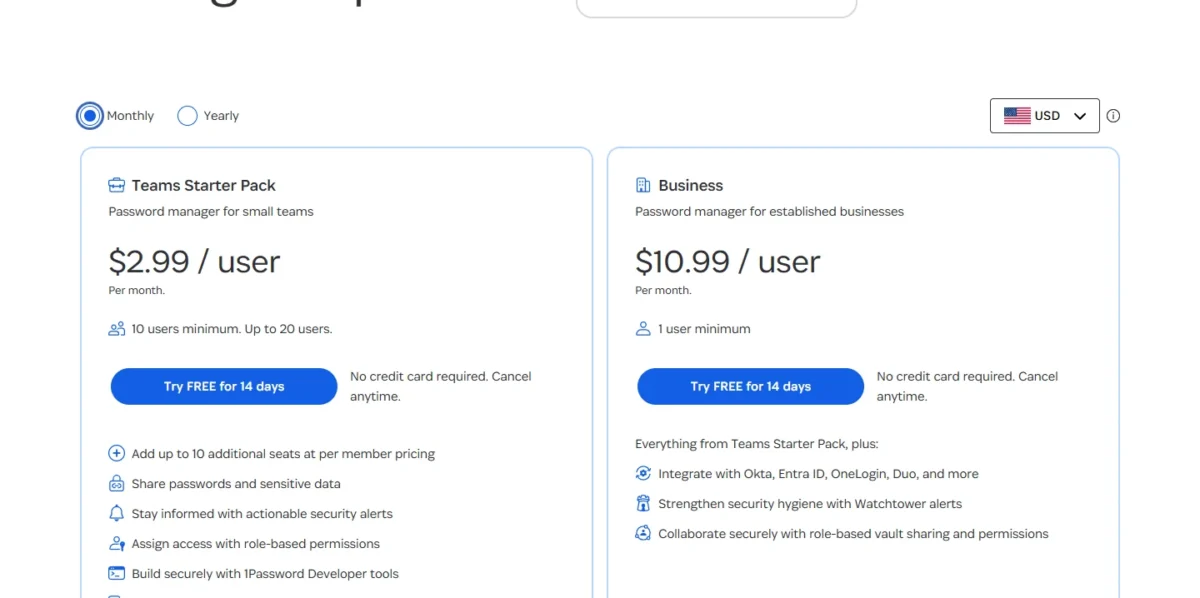
On Business, annual billing saves $10.99 – $8.99 = $2.00 per user per month, so that saving grows with every seat. If the team is still unsure when the 14 days end, pay monthly for now and move to annual billing later, since you can change your subscription frequency at any time.
First-year promotion and discounts
Individual’s $2.99 and Families’ $4.49 are first-year promotions for new 1Password customers who subscribe on 1Password.com with annual billing; a subscription bought in Google Play, the Apple App Store or another app store does not get them.
Year two bills at the regular price: ($3.99 – $2.99) x 12 = $12.00 more for Individual and ($5.99 – $4.49) x 12 = $18.00 more for Families.
Organizations can ask 1Password’s sales team about discounts for nonprofits and journalists and about volume-based pricing.
Adding, removing and canceling
Adding a person mid-cycle bills a prorated amount within 48 hours of the moment they accept the invitation.
Removing a team member or guest shows on the next invoice, and you can add another person in their place within the same billing period without changing the bill. Any amount already charged is nonrefundable, so offboard before the renewal date, not after it.
Cancel before the trial ends and you are not charged at all. After a later cancellation the account is frozen, but you can still sign in to view and export your data unless you delete the account.
Extra 1Password Costs to Consider
Four costs can sit above the plan price, and only extra Starter Pack seats have a fixed rate, which the 20-user scenario already includes.
| Cost type | When it applies | Pricing basis |
|---|---|---|
| Extra Teams Starter Pack seats | Members 11 to 20 | $4.99 per seat per month, annual billing |
| Additional Business guests | More than the 20 included | A prorated amount |
| Additional Families members | More than the 5 included | A prorated amount for each additional family member |
| Enterprise products | Privileged access, device trust, SaaS management | Custom quote |
Sources: 1Password subscription billing policy, 1Password business pricing and 1Password enterprise pricing, checked Nov 2026.
Which 1Password Plan Should You Buy, and Is the Pricing Worth It?
Buy the Teams Starter Pack for 3 to 20 people without an identity provider, Business once you need SSO, automated provisioning or a 21st user, and Families for a household. A Business user’s household buys nothing.
| Your needs | Plan to consider | Why | Main limitation |
|---|---|---|---|
| One person | Individual | Every app, autofill and Travel Mode for one user | A second person makes Families the lower bill |
| A household of 2 to 5 | Families | 5 users on one flat price | Additional family members are charged a prorated amount |
| 3 to 20 people, no identity provider | Teams Starter Pack | One flat price for 10 members, paid seats to 20 | Identity-provider integrations are a Business addition |
| One or two work users | Business | Per-user billing costs less than the flat pack | The bill grows with every user |
| SSO, automated provisioning or 21+ users | Business | Identity integrations, five vault permissions, team policies, Events Reporting | Every user is billed |
| Privileged access, device trust or SaaS spend control | Enterprise quote | Sold by quote | No list price to budget from |
| A home account for someone on a Business team | No purchase | Families is complimentary with Business | Active only while linked to the business account |
Sources: 1Password business pricing, checked Nov 2026.
Is 1Password worth paying for? For a team, yes, when shared vaults replace logins passed around in chat and when Business provisioning replaces manual offboarding. A team still choosing the manager itself should start from my password manager comparison for business buyers.
It is not worth it for a solo user who needs only basic password storage. A team that wants a shared list of logins but no role-based permissions, guests or security alerts should compare prices first, and my guide to NordPass pricing gives a second price list to hold the Starter Pack against.
Business is the wrong buy for 3 to 20 users unless SSO, provisioning or audit reporting is a requirement. When it is required and the per-user price still stings, my Bitwarden vs 1Password comparison for teams weighs the two plan for plan.
Cybernews‘s 1Password review, run between October 20 and October 29, 2026, reports that a reply from a support agent arrived 15 minutes after the chatbot registered a ticket. That is one support request, not a measure of team onboarding or SSO setup, so use the 14-day trial with your real team before you commit to a year.
My take
Pick the Teams Starter Pack on annual billing if you run a small business of 3 or more people: it covers up to 10 people and grows to 20 before the pricing model changes. Business is worth it when you connect an identity provider or hire the 21st person, not earlier.
- Skip it if:
- nobody on your team shares a login and there is no one to offboard.
How I Verified 1Password Pricing
I read 1Password’s personal, business and enterprise pricing pages in the Monthly and Yearly views on November 20, 2026, as a US visitor with USD selected, plus its billing policy and Business help pages.
Team totals were calculated from list prices (price x users x 12 months, or the pack price plus extra seats) and are estimates, not quotes. 1Password does not publish Enterprise prices; it quotes them on request. The one published test cited, Cybernews’s support timing, is named where it appears.
FAQ
How much does a 1Password subscription cost?
From $3.99 per month, billed yearly, for Individual; Families is $5.99. Billed monthly, they are $4.99 and $7.99. A team pays one flat pack price for up to 10 members or a per-user Business price. Payment is by ACH direct debit (eligible US bank accounts), credit card or 1Password gift card.
Is there anything better than 1Password?
For some buyers, yes. 1Password lists no free plan and bills Business per user, so look around if you want a free tier or a lower per-user price, and pick 1Password if the flat Starter Pack fits your team. My LastPass vs 1Password comparison sets one rival against it for teams.