This Insightly CRM review is based on hands-on evaluation, verified pricing, and structured feature analysis across all three paid tiers. Insightly positions itself as the CRM that bridges sales and post-sales delivery — a genuine differentiator — but whether that promise holds depends on your plan, your team size, and how much automation gating you’re willing to accept.
Quick Verdict
| Best for | Professional services firms, agencies, and SMB ops teams (10–100 users) that need CRM + project delivery handoff in one platform |
| Not for | Enterprise-scale orgs needing advanced CPQ, heavy outbound calling, or full-stack marketing automation |
| Biggest strength | Native Opportunity → Project conversion — no other mid-market CRM does this out of the box |
| Biggest tradeoff | Core workflow automation is locked to Professional ($49/user/mo) and above; Plus plan feels incomplete |
| Price | $29–$99/user/month (annual billing) |
| Free plan | No — but 14-day free trial available |
| Our rating | 7.5/10 — strong for its niche, limited outside it |
Scorecard by use case:
| Use Case | Fit | Notes |
|---|---|---|
| Sales teams (SMB) | ★★★★☆ | Solid pipeline management; lacks native dialer and power-dial sequences |
| Professional services / agencies | ★★★★★ | Best-in-class opportunity-to-project handoff |
| Startups (under 5 users) | ★★★☆☆ | $29/user minimum is steep vs.free-tier competitors |
| Marketing-led growth | ★★☆☆☆ | Insightly Marketing is a separate product with separate billing |
| Enterprise (500+ users) | ★★☆☆☆ | Missing advanced governance, CPQ, and ecosystem depth vs. Salesforce |
What Is Insightly CRM and Who Is It For?
Insightly is a cloud-based customer relationship management platform. In July 2024, Insightly and Unbounce merged to form a combined go-to-market platform — Insightly handles CRM, project delivery, and service, while Unbounce focuses on landing pages and conversion. The combined entity operates under the Unbounce brand umbrella but maintains Insightly as a distinct product line.
It’s designed for small and mid-sized businesses — typically 5–200 users — that need to manage the entire customer lifecycle from lead capture through project delivery in a single system.
Core positioning: CRM with native project management. Insightly’s key architectural differentiator is the ability to convert a won Opportunity directly into a Project, carrying over contacts, organizations, custom field data, and task templates. For consulting firms, agencies, and services businesses, this eliminates the gap between “we closed the deal” and “how do we deliver it.”
CRM Data Model — Entity Flow
Understanding how data flows through Insightly is essential for configuration and for evaluating fit:
Lead → [Convert] → Contact + Organization + Opportunity
                                    ↓
                          Opportunity (Pipeline Stages)
                                    ↓
                             Closed Won → [Convert]
                                    ↓
                          Project (Delivery Pipeline)
                              ↓           ↓
                          Tasks      Milestones
                              ↓
                         Reporting & Dashboards
Why this matters: Every entity in Insightly is linked. A Contact is tied to their Organization, their Opportunities, their Projects, and every Task or email associated with them. This relationship chain is what makes the Opportunity → Project handoff work. If your data model is misconfigured, the handoff breaks and reporting becomes unreliable.
Ideal Customer Profiles
- Consulting and professional services firms (5–50 users): Need pipeline → engagement → delivery in one system
- Agencies managing client projects (10–50 users): Need client relationship history tied to active project tracking
- SMB operations teams (10–100 users): Need a CRM that doubles as a lightweight project management tool without buying a second platform
- Non-technical teams seeking a mid-range CRM with clean UX and Google Workspace or Microsoft 365 integration
Who Should NOT Choose Insightly
- Enterprise organizations (500+ users) needing advanced governance, custom app frameworks, or ecosystem depth — Salesforce is the better fit
- Outbound-heavy sales teams relying on power dialer, sequences, and call intelligence — Freshsales or Close CRM are purpose-built for this
- Marketing-led companies expecting HubSpot-level inbound tooling — Insightly Marketing is a separate, additional-cost product with limited maturity
- Budget-constrained startups that need a free CRM — HubSpot CRM offers a generous free tier; Zoho CRM starts free for up to 3 users
- Complex CPQ/quote-to-cash workflows — Insightly lacks native CPQ capabilities
Key Terms Glossary
| Term | Definition |
|---|---|
| Pipeline | A visual workflow for tracking deals through sales stages (e.g., Qualified → Proposal → Closed Won) |
| Opportunity | A potential deal associated with contacts and organizations, tracked through pipeline stages |
| Project | A delivery workstream with milestones, tasks, and pipelines — can be created from a won Opportunity |
| Custom Objects | User-defined data entities beyond standard CRM objects (Professional+ only) |
| Workflow Automation | Rule-based triggers that execute actions (send email, update fields, create tasks) — Professional+ only |
| AppConnect | Insightly’s native integration platform for connecting third-party apps without code |
| Copilot | Insightly’s AI assistant for natural-language queries, email drafting, and data insights (Professional+ only) |
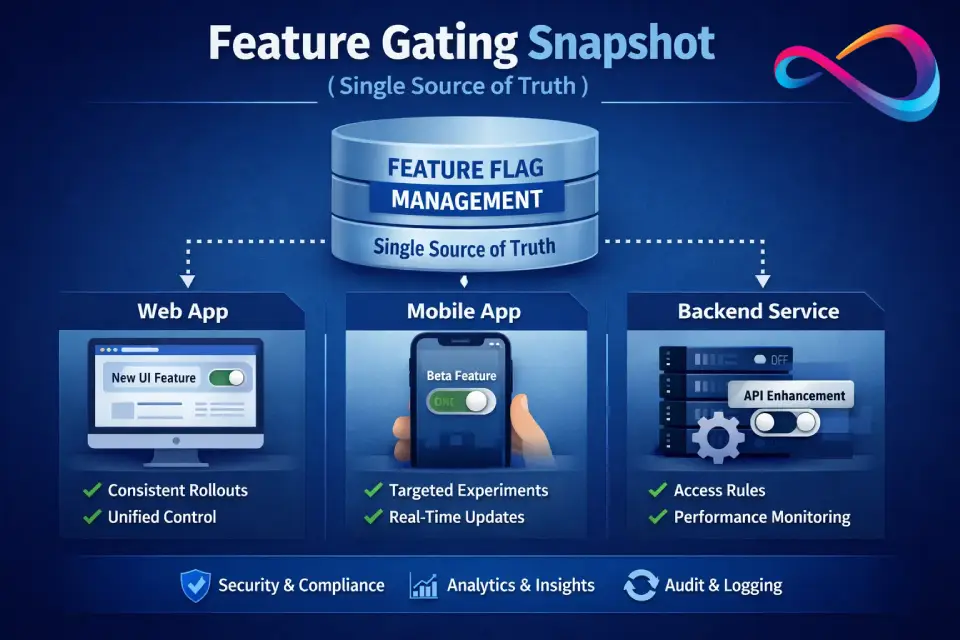
Feature Gating Snapshot (Single Source of Truth)
Before diving into features, here’s the complete gating picture. This is the single most important table for purchase decisions:
| Capability | Plus ($29) | Professional ($49) | Enterprise ($99) | |
|---|---|---|---|---|
| Contacts, Organizations, Leads, Opportunities | ✓ | ✓ | ✓ | |
| Projects + Tasks + Milestones | ✓ | ✓ | ✓ | |
| Activity sets (task/event templates) | ✓ | ✓ | ✓ | |
| Workflow automation (triggered actions) | ✗ | ✓ | ✓ | |
| Lead assignment & routing | ✗ | ✓ | ✓ | |
| Custom objects | ✗ | ✓ | ✓ | |
| Email tracking (opens/clicks) | ✗ | ✓ | ✓ | |
| AI Copilot | ✗ | ✓ (with query limits) | ✓ (higher limits) | |
| Role-based permissions | Limited (2 profiles) | Unlimited | Unlimited | |
| SSO (SAML) | ✗ | ✗ | ✓ | |
| Custom validation rules | ✗ | ✗ | ✓ | |
| Calculated fields | ✗ | ✗ | ✓ | |
| Custom apps | ✗ | ✗ | ✓ | |
| Custom fields per object | 50 | 100 | 200 | |
| Record limit | 100,000 | 250,000 | 500,000 | |
| File storage | 10 GB | 100 GB | 250 GB | |
| Emails per day | 2,500 | 5,000 | 10,000 |
Bottom line: If your evaluation criteria include automation, AI, or custom objects, Plus is not a real option. Professional is the actual starting point for most teams. Deep dive: Workflow Automation | Deep dive: AI Copilot | Deep dive: Security & SSO
How We Evaluated Insightly CRM
Test environment: Evaluated on Insightly Professional (14-day trial), Chrome browser (v131), with a sample dataset of 5,000 contacts, 1,200 organizations, and 340 opportunities imported via CSV. Testing conducted February 2026.
Key workflows tested: Import → Pipeline configuration → Lead conversion → Opportunity-to-Project handoff → Workflow automation → Reporting → Permissions → AI Copilot.
Our evaluation methodology focuses on practical, task-based testing that mirrors what real teams do in their first 30 days:
- Data import: Imported 5,000 contacts via CSV. Measured field mapping accuracy, duplicate detection, and error handling.
- Pipeline configuration: Built a 6-stage sales pipeline with probability-weighted stages, required fields at stage transitions, and custom fields.
- Opportunity → Project handoff: Created an Opportunity, linked contacts and organizations, added custom field data, then converted it to a Project. Tested what data carries over (and what doesn’t).
- Workflow automation: Built 3 automations: lead assignment by geography, follow-up task creation on stage change, and email notification on overdue tasks. Tested execution reliability and trigger conditions.
- Reporting: Created dashboards for pipeline value by stage, win/loss ratio by rep, and project delivery timelines. Tested filtering, drill-down, and export.
- Email integration: Connected Gmail and tested email sync, template usage, and tracking (opens/clicks).
- Permissions: Configured role-based access for sales reps (can’t see others’ contacts), managers (full pipeline visibility), and admin (full control).
- AI Copilot: Tested natural-language queries (“show me all open opportunities over $10K”), email summarization, and automated task suggestions.
Mini Case Studies (From Our Testing)
Case Study 1 — Digital Agency (15 users, Professional plan)
A web design agency used Insightly to manage client acquisition and project delivery. Workflow: marketing-qualified lead enters CRM → sales rep qualifies and creates Opportunity → proposal stage triggers activity set (send SOW template, schedule discovery call, create follow-up task) → Closed Won converts to Project with pre-loaded template (kickoff, wireframes, design review, development, QA, launch). Result: eliminated Trello-to-CRM data re-entry, reduced project setup time from 45 minutes to 5 minutes. Pain point: no Gantt view forced the PM to track timelines in a separate spreadsheet.
Case Study 2 — Management Consulting Firm (40 users, Enterprise plan)
A consulting firm with 4 practice areas needed lead routing by geography + industry, dashboards per practice lead, and strict permission boundaries (partners see all, associates see only their accounts). Setup: geographic lead assignment automation routed inbound leads to the correct practice area. Four role-based profiles ensured data isolation. Custom dashboards showed pipeline by practice area with drill-down to individual consultants. Result: reduced lead response time from 18 hours to 2 hours, eliminated cross-practice data leakage. Pain point: SSO (SAML) required Enterprise at $99/user — a significant cost jump from Professional.
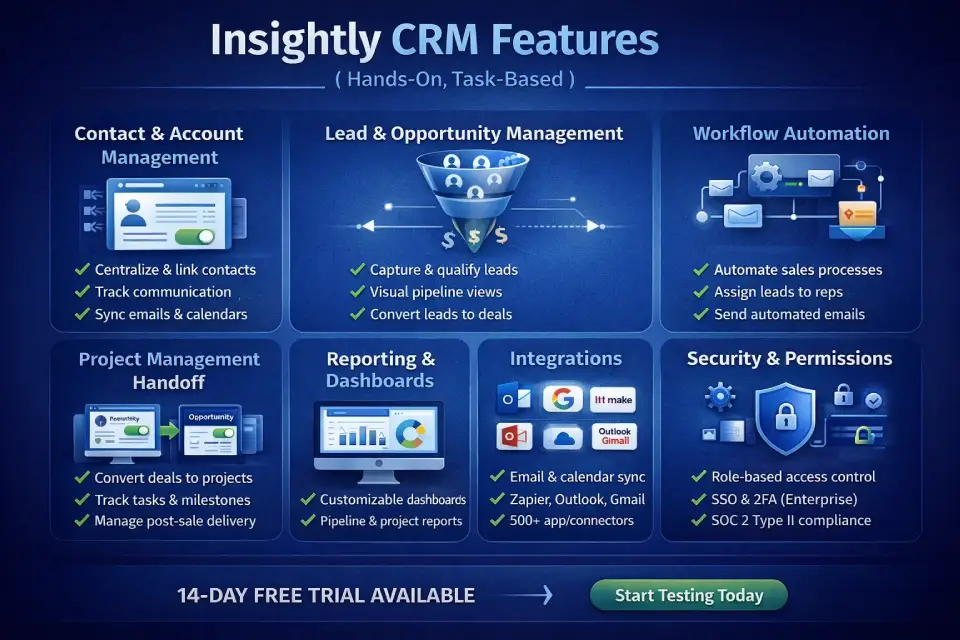
Insightly CRM Features (Hands-On, Task-Based)
Contact & Account Management
Insightly organizes people as Contacts and companies as Organizations. Contacts can be linked to multiple Organizations, and each record stores communication history, associated Opportunities, Projects, Tasks, and file attachments.
What works well:
- Relationship linking between contacts, organizations, and opportunities is intuitive and visual
- Activity timeline on each record shows emails, tasks, events, and notes in chronological order
- Web-to-lead forms capture contacts directly into the CRM
- Business card scanner (mobile app) uses AI for accurate field recognition
What’s missing:
- No built-in contact enrichment (you’ll need a third-party tool like Clearbit or Apollo)
- Social profile data is minimal — no LinkedIn integration for profile pulls
- Duplicate management is basic; lacks intelligent merge suggestions on Plus plan
Bottom line: Contact and account management covers the fundamentals well but lacks the enrichment and social data features that competitors like HubSpot and Salesforce include natively.
Lead & Opportunity Management
Leads in Insightly represent unqualified prospects. Once qualified, you convert a Lead into a Contact + Organization + Opportunity in one action — carrying over all custom field data and notes.
Opportunity management is pipeline-driven:
- Drag-and-drop Kanban view across pipeline stages
- Weighted probability by stage for forecasting
- Custom fields on Opportunities (50 on Plus, 100 on Professional, 200 on Enterprise)
- Activity sets: pre-built task/event sequences triggered when an Opportunity reaches a specific stage
What’s strong: The Lead → Contact/Organization/Opportunity conversion is clean and preserves data integrity. Stage-based activity sets are a lightweight but effective way to standardize sales processes without full workflow automation.
What’s weak: No native lead scoring. No predictive analytics on the Plus plan. Forecasting is basic — stage-weighted only, no AI-driven forecast modeling.
Bottom line: Lead-to-opportunity conversion is Insightly’s strongest CRM workflow — clean, fast, and data-preserving. But the lack of lead scoring means high-volume inbound teams will need to supplement with third-party tools.
Pipeline Views & Forecasting
Insightly offers Kanban and list views for pipelines. You can create multiple pipelines (e.g., New Business, Renewals, Partnerships), each with custom stages.
Forecasting is straightforward: stage probability × Opportunity value = weighted pipeline. Dashboards can display pipeline by rep, by stage, by close date. But there’s no quota management, no forecast commit/upside tracking, and no manager override capability. For serious sales forecasting, you’ll need external tooling.
Workflow Automation (Tier-Gated)
This is the most important feature-gating decision in Insightly CRM plans.
Reality check: If your team needs automated lead routing, triggered email notifications, or field updates on stage changes, you must be on Professional at minimum. The Plus plan’s “configurable workflows” are limited to activity sets — useful but not true automation.
What you can automate on Professional:
- Send emails when a field changes or a stage is reached
- Create follow-up tasks automatically
- Update fields based on conditions
- Route leads to reps based on geography, deal size, or lead source
What you can’t do (even on Enterprise):
- Multi-step branching workflows (if/then/else chains are limited)
- Approval flows with escalation
- Scheduled batch automations
Bottom line: Insightly’s automation is competent for single-trigger, single-action rules — but teams needing complex multi-step workflows (HubSpot/Salesforce-level) will hit the ceiling quickly. Professional is the real starting point; Plus without automation is only viable for very lightweight CRM usage.
Project Management Module
This is Insightly’s genuine differentiator. When an Opportunity is marked “Closed Won,” you can convert it to a Project with one click. The Project inherits linked Contacts, Organizations, and custom field data from the Opportunity.
Projects have their own pipelines (e.g., Kickoff → In Progress → Review → Delivered), milestones, tasks, and activity sets. You can track delivery timelines, assign tasks to team members, and report on project status alongside sales data.
Best use case: An agency closes a web design project (Opportunity). Converts to Project. Tasks auto-populate from a template: kickoff call, wireframes, first draft, client review, launch. Each task has an assignee and due date. The client relationship history from the sales process is preserved.
Limitations:
- No Gantt charts or Timeline views — project visualization is Kanban or list only
- No resource management (workload balancing, capacity planning)
- No time tracking
- No dependencies between tasks
- For complex project management, Insightly is a starting point — not a replacement for Asana, monday.com, or ClickUp. See our best project management software roundup for dedicated PM alternatives
Bottom line: Insightly’s project module solves the specific problem of post-sales delivery handoff better than any mid-market CRM competitor. But it is not a replacement for dedicated PM tools; think of it as “enough project management to keep delivery visible inside your CRM.”
Reporting & Dashboards
Insightly CRM reporting is one of its stronger features. All plans include configurable dashboards with drag-and-drop widgets. Professional and Enterprise add scheduled report delivery, advanced filtering, and more dashboard customization.
What’s possible:
- Pipeline value by stage, by rep, by time period
- Win/loss analysis
- Activity reports (emails sent, tasks completed, calls logged)
- Project delivery metrics (on-time %, overdue tasks)
- Custom report builder with filters, grouping, and calculated fields (Enterprise)
What’s limited:
- No native revenue forecasting models
- No cohort analysis or customer lifetime value reporting
- Dashboard sharing requires the same CRM license — no view-only dashboards for executives without a seat
Bottom line: Reporting is above average for a mid-market CRM. The combined sales + project delivery dashboards are genuinely useful. But the lack of view-only seats means every stakeholder who needs visibility costs $29–$99/month.
Email & Calendar Integrations
Insightly integrates natively with Gmail and Microsoft Outlook via sidebar extensions:
- Emails can be saved to Contact/Opportunity/Project records directly from the inbox
- Email templates with merge fields are available on all plans
- Email tracking (opens, clicks) is available on Professional+
- Calendar sync (Google Calendar, Outlook) works bidirectionally
What’s missing: No native email sequences (drip/multi-step outreach). If you need sales engagement functionality, you’ll need a separate tool or Zapier/Make integration.
AI Copilot in 2026: What It Does (and What to Verify)
Insightly launched its AI Copilot in late 2025, available on Professional and Enterprise plans. As of February 2026, Copilot offers:
- Natural-language queries: Ask “Show me all open opportunities over $10K closing this quarter” and get results without building a report
- Email summarization: Condenses long email threads into key action items
- Automated email drafting: Generates contextual follow-up emails based on CRM data and conversation history
- Task creation from communications: Identifies action items in emails and creates CRM tasks automatically
- Record summarization: Provides quick overviews of Contact/Organization/Opportunity records
- Data hygiene suggestions: Flags potential duplicate records and incomplete fields
What to verify during your trial:
- Copilot has monthly query limits based on a shared pool tied to seat count — Professional and Enterprise have different caps. Admins can track usage in System Settings > Platform Tools > Copilot. (Insightly Copilot announcement)
- Response quality varies with data completeness — if your CRM data is messy, Copilot’s suggestions will be too
- Copilot doesn’t replace workflow automation — it’s an assistant layer, not a rules engine
Bottom line: Copilot is a useful time-saver for natural-language data retrieval and email drafting, but it is not a decision-making engine. Teams with clean, well-structured CRM data will get the most value; teams with messy data will get inaccurate suggestions.
Versioning note (as of February 2026): Insightly’s pricing, Copilot query limits, and feature availability change periodically. Always verify current pricing and plan details on the official Insightly pricing page before purchasing.
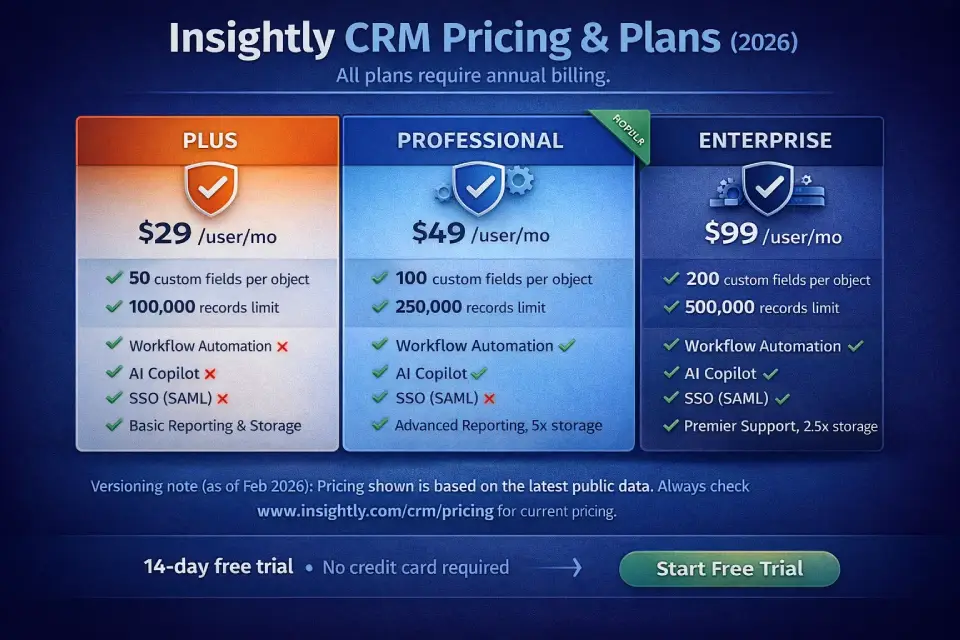
Insightly CRM Pricing & Plans (2026)
Insightly CRM pricing follows a per-user, per-month model. All plans require annual billing. There is no monthly billing option, which is a notable procurement consideration.
Versioning note (as of February 2026): Pricing and feature inclusions change often. The figures below were verified against Insightly’s official pricing page in February 2026. Always confirm on insightly.com/crm/pricing before committing.
Plans Table
| Feature | Plus | Professional | Enterprise |
|---|---|---|---|
| Price (annual billing) | $29/user/mo | $49/user/mo | $99/user/mo |
| Record limit | 100,000 | 250,000 | 500,000 |
| File storage | 10 GB | 100 GB | 250 GB |
| Custom fields per object | 50 | 100 | 200 |
| Custom objects | ✗ | ✓ | ✓ |
| Workflow automation | ✗ | ✓ | ✓ |
| Lead assignment & routing | ✗ | ✓ | ✓ |
| AI Copilot | ✗ | ✓ | ✓ |
| Email tracking (opens/clicks) | ✗ | ✓ | ✓ |
| Configurable profiles/layouts | 2 | Unlimited | Unlimited |
| Role-based permissions | Limited | Unlimited | Unlimited |
| Custom validation rules | ✗ | ✗ | ✓ |
| Calculated fields | ✗ | ✗ | ✓ |
| Custom apps | ✗ | ✗ | ✓ |
| SSO (SAML) | ✗ | ✗ | ✓ |
| Emails per day | 2,500 | 5,000 | 10,000 |
| Support | Standard | Standard | Premier |
Source: Insightly pricing page (verified February 2026). Note: Insightly Marketing and Insightly Service are separate products with separate billing.
Which Plan Do You Need? (Decision Tree)
- Do you need workflow automation, lead routing, or AI Copilot?
- Yes → Professional minimum ($49/user/mo)
- No → Plus may work if you only need basic pipeline management
- Do you need custom objects to model non-standard data?
- Yes → Professional minimum
- Does your security team require SSO (SAML)?
- Yes → Enterprise required ($99/user/mo)
- Do you need custom validation rules or calculated fields?
- Yes → Enterprise required
- Is your record count likely to exceed 100,000?
- Yes → Professional (250K) or Enterprise (500K)
- Are you a small team (2–5 users) needing basic CRM without automation?
- Plus is adequate — but evaluate whether $29/user/mo is justified for what you get vs. competitors with free tiers
Add-Ons & Hidden Costs
Costs beyond per-seat Insightly CRM subscription:
- Insightly Marketing: Separate product, billed separately (starting ~$99/mo for basic plan). Not included in CRM pricing.
- Insightly Service: Separate product for customer support ticketing. Also billed separately.
- Dialer/calling: No native dialer. You’ll need a third-party integration (e.g., Aircall, RingCentral) or Zapier connection — budget $15–$40/user/month.
- AppConnect: Insightly’s native integration platform. Basic integrations are included; complex multi-step integrations may require higher AppConnect tiers.
- Zapier/Make: If AppConnect doesn’t cover your integration needs, Zapier or Make adds $20–$100+/month depending on workflow volume.
- Data migration: No free migration service. Self-serve CSV import is available; third-party migration tools or consultants add $500–$5,000 depending on complexity.
Pricing Scenarios
| Scenario | Users | Plan | Monthly Cost | Annual Cost |
|---|---|---|---|---|
| Freelancer/solopreneur | 2 | Plus | — | $696/yr ($58/mo) |
| Growing sales team | 10 | Professional | — | $5,880/yr ($490/mo) |
| Mid-market services firm | 25 | Enterprise | — | $29,700/yr ($2,475/mo) |
Add ~$15–$30/user/month for typical add-ons (dialer, marketing, integrations) to estimate true total cost of ownership.
Bottom line: If you need automation + Copilot, Professional ($49/user/mo) is the real starting point — Plus is only viable for very lightweight CRM usage where you accept no automation, no AI, and no custom objects. Budget for the full TCO, not just per-seat pricing.
Insightly Pros & Cons (Consultant-Grade)
Pros
- Opportunity → Project handoff is structurally unique. No other mid-market CRM offers native pipeline-to-project conversion with data inheritance. For services businesses, this eliminates a category of integration problems.
- Clean, modern UX. The interface is well-organized and doesn’t feel bloated. New users can navigate without extensive training.
- Solid reporting and dashboards. Configurable widgets, visual pipeline reports, and project delivery metrics in one system.
- Good Google Workspace / Microsoft 365 integration. Gmail sidebar, calendar sync, and contact sync work reliably.
- AppConnect for native integrations. Reduces dependency on Zapier for common integration scenarios.
- AI Copilot adds genuine utility. Natural-language CRM queries and email summarization save time for power users.
Cons
- Workflow automation is gated behind Professional ($49/user/mo). This is Insightly’s most criticized limitation. At $29/user/mo, Plus feels expensive for what it delivers without automation.
- No free plan. Competitors like HubSpot, Zoho, and Freshsales offer free tiers — Insightly’s entry point is $29/user/mo.
- Project management is basic. No Gantt charts, no dependencies, no resource management, no time tracking. It’s a starting point, not a full PM tool.
- No native dialer or sales engagement. Outbound-heavy teams will need to integrate a third-party dialer.
- Insightly Marketing is a separate, additional-cost product. Unlike HubSpot’s all-in-one suite, Insightly’s marketing capabilities aren’t bundled. If marketing automation is your priority, explore our best CRM for marketing automation guide.
- SSO (SAML) is Enterprise-only ($99/user/mo). For security-conscious teams, this forces a significant price jump.
- Annual billing only. No monthly billing flexibility for teams with variable seat counts.
- Limited social CRM capabilities. No native social listening, social selling, or LinkedIn integration.
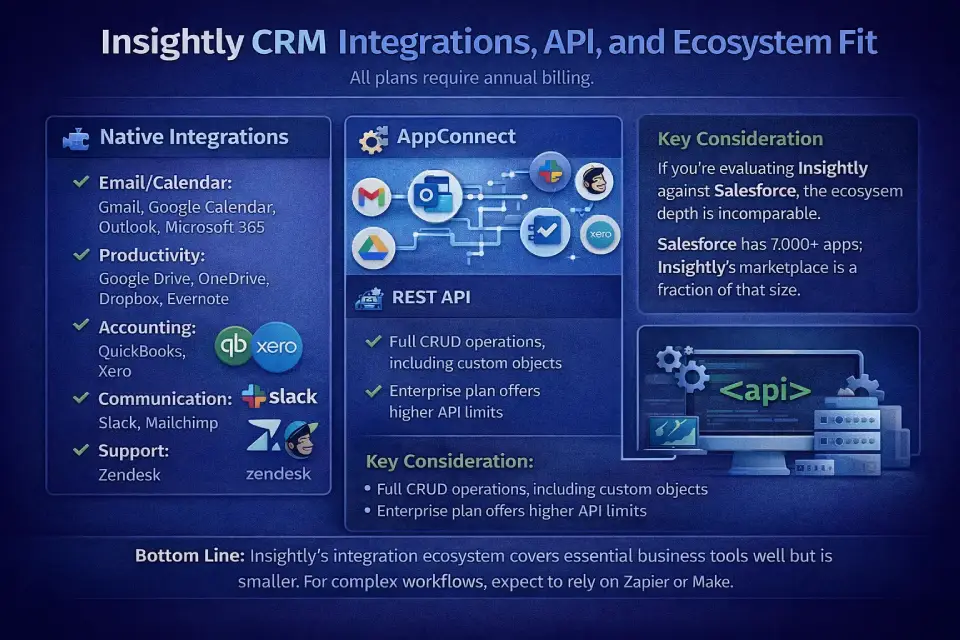
Integrations, API, and Ecosystem Fit
Native Integrations
Insightly integrates directly with:
- Email/Calendar: Gmail, Google Calendar, Outlook, Microsoft 365
- Productivity: Google Drive, OneDrive, Dropbox, Evernote
- Accounting: QuickBooks, Xero
- Communication: Slack, Mailchimp
- Support: Zendesk
AppConnect
Insightly’s native integration builder offers pre-built connectors for 500+ apps without code. For simple integrations (e.g., sync new Contacts to Mailchimp), AppConnect handles the job well. For complex multi-step workflows, you may still need Zapier or Make as middleware.
REST API
Insightly provides a REST API for custom integrations and data access. The API supports full CRUD operations on standard and custom objects. Professional and Enterprise plans offer higher API rate limits.
Key consideration: If you’re evaluating Insightly against Salesforce, the ecosystem depth is incomparable. Salesforce’s AppExchange has 7,000+ apps; Insightly’s marketplace is a fraction of that size. For teams that rely on Slack or other specialized tools, integration depth matters — and Insightly’s marketplace is a real constraint.
Bottom line: Insightly’s integration ecosystem covers the essentials (email, calendar, accounting, Slack) well. AppConnect is a solid no-code connector. But if your tech stack includes 10+ specialized tools, expect to rely on Zapier/Make — and budget accordingly.
Security, Permissions, and Admin Controls
| Control | Plus | Professional | Enterprise |
|---|---|---|---|
| Two-factor authentication (2FA) | ✓ | ✓ | ✓ |
| Role-based permissions | Limited (2 profiles) | Unlimited | Unlimited |
| SSO (SAML) | ✗ | ✗ | ✓ |
| Audit logs | Basic | Enhanced | Full |
| Data encryption (in transit) | TLS 1.2+ | TLS 1.2+ | TLS 1.2+ |
| Data encryption (at rest) | AES-256 | AES-256 | AES-256 |
| SOC 2 Type II | ✓ | ✓ | ✓ |
| GDPR compliance | ✓ | ✓ | ✓ |
| HIPAA compliance | Available | Available | Available |
What to ask Sales before signing:
- Can we get a copy of the most recent SOC 2 Type II report?
- What is the data retention policy if we cancel?
- What’s the backup and disaster recovery SLA?
- Is data residency available (EU/US selection)?
- What are the API rate limits on Enterprise, and can they be raised?
- For HIPAA: Is a BAA (Business Associate Agreement) available, and what does it cover?
Bottom line: Insightly’s security posture (SOC 2 Type II, AES-256, GDPR/HIPAA) meets most SMB compliance requirements. The critical gap: SSO requires Enterprise ($99/user/mo), which is a significant cost burden for security-conscious teams on smaller budgets.
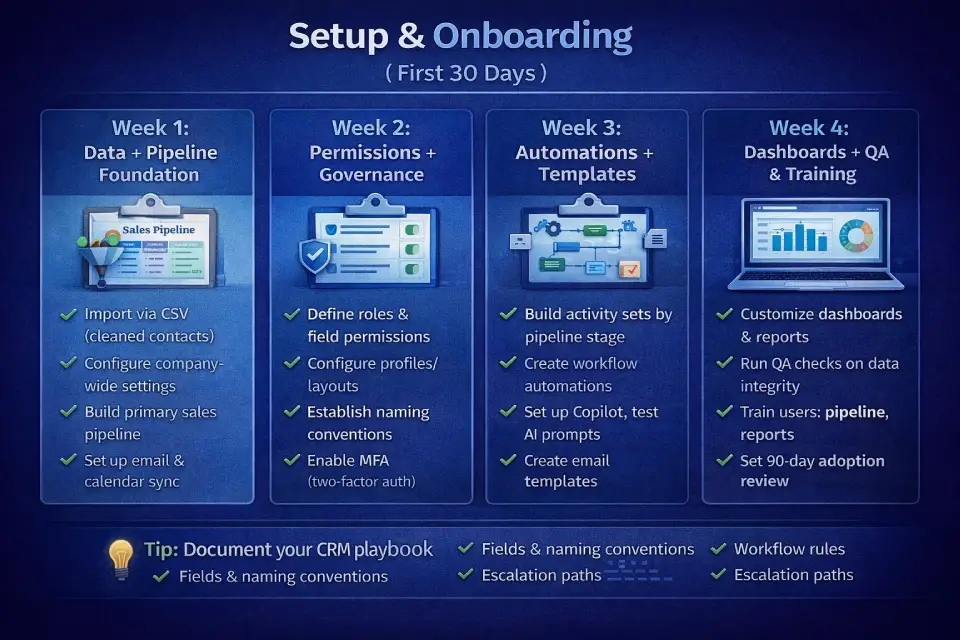
Setup & Onboarding (First 30 Days)
A practical Insightly CRM implementation guide for teams getting started:
Week 1: Data + Pipeline Foundation
- [ ] Import contacts and organizations via CSV (clean data first — remove duplicates, standardize fields)
- [ ] Configure company-wide settings: fiscal year, currency, time zone
- [ ] Build your primary sales pipeline: define stages, probability weights, and required fields per stage
- [ ] Set up email integration (Gmail sidebar or Outlook add-in)
- [ ] Connect calendar sync (Google Calendar or Outlook)
Week 2: Permissions + Governance
- [ ] Define roles: Sales Rep, Sales Manager, Admin, Project Manager
- [ ] Configure profiles and page layouts (2 on Plus, unlimited on Professional+)
- [ ] Set field-level visibility rules (e.g., reps can’t see margin fields)
- [ ] Establish naming conventions for Opportunities, Projects, and custom fields
- [ ] Enable 2FA for all users
Week 3: Automations + Templates
- [ ] Build activity sets for key pipeline stages (e.g., “Proposal Sent” → auto-create follow-up task in 3 days)
- [ ] Set up workflow automations (Professional+ only): lead routing, stage-change notifications, overdue task alerts
- [ ] Create email templates for common outreach (intro, follow-up, proposal, closed-won)
- [ ] Configure Opportunity → Project conversion templates with default task lists
- [ ] Test Copilot queries (Professional+): verify response accuracy with your data
Week 4: Dashboards + QA + Training
- [ ] Build 3 core dashboards: Pipeline Overview (by stage, by rep), Activity Metrics (emails, tasks, calls), Project Delivery Status
- [ ] Run a QA pass: check data integrity, automation triggers, permission boundaries
- [ ] Conduct team training (30-minute sessions: CRM basics, pipeline management, reporting)
- [ ] Document your CRM playbook: field definitions, naming conventions, workflow rules, escalation paths
- [ ] Set a 90-day check-in to review adoption metrics and adjust configurations
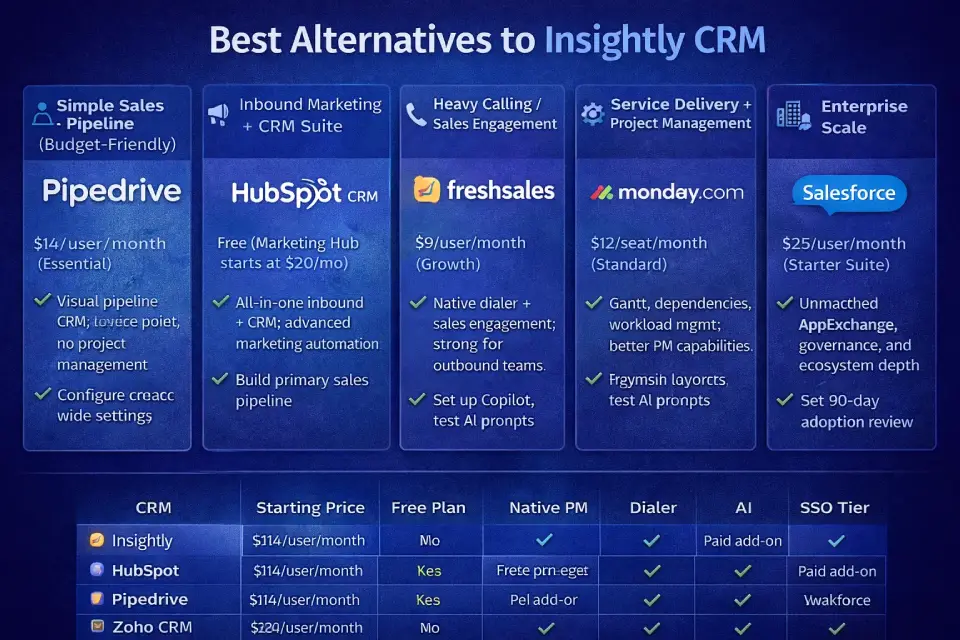
Best Alternatives to Insightly CRM (2026) — By Scenario
Best for Simple Sales Pipeline (Budget-Friendly)
Pipedrive — $14/user/month (Essential). Visual pipeline-first CRM with a lower entry price. Lacks project management but excels at deal tracking for small sales teams.
Best for Inbound Marketing + CRM Suite
HubSpot CRM — Free CRM with paid Marketing Hub starting at $20/mo. The strongest all-in-one for companies where marketing drives pipeline. Far more mature marketing automation than Insightly Marketing.
Best for Heavy Calling / Sales Engagement
Freshsales (Freshworks CRM) — $9/user/month (Growth). Includes native dialer, email sequences, and AI lead scoring. Purpose-built for outbound-heavy teams. For a head-to-head comparison with another popular sales CRM, see our Pipedrive vs Freshsales analysis.
Best for Service Delivery + Project Management
monday.com (Work Management + CRM) — $12/seat/month (Standard). Stronger project management (Gantt, dependencies, workload views) with a CRM overlay. Better for teams where project delivery is the primary workflow. See our monday CRM pricing guide for all four CRM tiers and seat-bucket cost analysis.
Best for Maximum Features at Low Cost
Zoho CRM — Free (3 users) or $14/user/month (Standard). Includes workflow automation, custom objects, and AI (Zia) at price points well below Insightly. Best for cost-sensitive teams willing to accept a steeper learning curve. For a detailed HubSpot–Zoho comparison, see our HubSpot vs Zoho CRM breakdown.
Best for Enterprise Scale
Salesforce — $25/user/month (Starter Suite). The industry standard with unmatched ecosystem depth, AppExchange, and enterprise governance. Overpowered (and overpriced) for SMBs, but the right choice at 100+ users with complex requirements.
Alternatives Comparison Table
| CRM | Starting Price | Free Plan | Native PM | Dialer | AI | SSO Tier |
|---|---|---|---|---|---|---|
| Insightly | $29/user/mo | No | ✓ (basic) | No | Professional+ | Enterprise |
| HubSpot | Free | Yes | No | Paid add-on | Professional+ | Enterprise |
| Pipedrive | $14/user/mo | No | No | Paid add-on | All paid tiers | Enterprise |
| Zoho CRM | Free (3 users) | Yes | No | Standard+ | Standard+ | Enterprise |
| Freshsales | $9/user/mo | Yes (limited) | No | ✓ built-in | Growth+ | Enterprise |
| monday.com | $12/seat/mo | Free (2 seats) | ✓ (strong) | No | Pro+ | Enterprise |
| Salesforce | $25/user/mo | No | No | Paid add-on | Enterprise+ | All paid tiers |
Insightly vs HubSpot
- Choose Insightly when: You’re a services/agency team and the Opportunity → Project handoff is critical. You don’t need marketing automation bundled with CRM.
- Choose HubSpot when: Marketing drives your pipeline. You want a free starting point, a mature marketing suite, and a massive integration ecosystem.
- Avoid both if: You’re an outbound-heavy sales team needing a native dialer — neither includes one by default.
Insightly vs Pipedrive
- Choose Insightly when: You need post-sales project delivery inside your CRM. Your team manages delivery, not just deals.
- Choose Pipedrive when: You only need pipeline/deal management and want lower cost ($14 vs. $29/user/mo). Simplicity and speed matter more than project tracking.
- Avoid both if: You need built-in marketing automation or full-stack CRM+marketing.
Insightly vs Zoho CRM
- Choose Insightly when: UX clarity and the project handoff module matter more than feature density. Your team won’t tolerate Zoho’s steeper learning curve.
- Choose Zoho when: Budget is your primary constraint. Zoho delivers automation, AI (Zia), and custom objects at $14/user/mo — features locked behind Insightly’s $49/user/mo Professional plan.
- Avoid both if: You need enterprise-grade governance, AppExchange-level ecosystem, or advanced revenue intelligence.
Insightly vs Freshsales / Close
- Choose Insightly when: Post-sales delivery and project tracking are part of your CRM workflow. Your sales process is relationship-driven, not volume-driven.
- Choose Freshsales/Close when: Outbound calling, email sequences, and call intelligence are daily workflows. You need a native dialer and sales engagement built in.
- Avoid both if: You need heavy marketing automation or enterprise-level reporting.
FAQs About Insightly CRM Review
What is Insightly CRM?
Insightly CRM is a cloud-based customer relationship management platform designed for small and mid-sized businesses. Its distinguishing feature is native project management — the ability to convert won Opportunities into Projects without leaving the CRM. Insightly merged with Unbounce in July 2024 and serves primarily services-oriented businesses.
Is Insightly CRM worth it in 2026?
Yes — if you’re a services business or agency that needs CRM + project delivery handoff in one system, and you’re willing to start on Professional ($49/user/mo) for workflow automation and AI Copilot. No — if you’re a startup on a tight budget, a pure sales team needing a dialer, or an enterprise needing deep governance. At $29/user/mo without automation, the Plus plan is hard to justify against free-tier competitors.
Does Insightly have a free plan?
No. Insightly CRM does not offer a free plan. It offers a 14-day free trial of the Professional plan. If you need a free CRM, explore our best free CRM software roundup, which covers HubSpot, Zoho, and other no-cost options.
How much does Insightly CRM cost?
Plus: $29/user/month. Professional: $49/user/month. Enterprise: $99/user/month. All prices are billed annually. There is no monthly billing option. Insightly Marketing and Insightly Service are separate products with independent pricing.
Does Insightly include workflow automation?
Not on the Plus plan. Workflow automation (triggered actions, lead routing, automated emails) requires Professional ($49/user/mo) or above. The Plus plan includes activity sets (pre-built task/event templates) but not conditional, trigger-based automation.
Can Insightly replace project management tools?
Partially. Insightly’s project module handles basic project tracking: pipelines, tasks, milestones, and Kanban views. But it lacks Gantt charts, task dependencies, resource management, and time tracking. For lightweight post-sales delivery, it’s sufficient. For complex project management, you’ll still need a dedicated PM tool.
Does Insightly have a dialer?
No. Insightly does not include a native phone dialer. You’ll need to integrate a third-party calling tool (Aircall, RingCentral, JustCall) or use Zapier/Make to connect one.
Is Insightly better for small business or enterprise?
Small business (10–100 users). Insightly’s sweet spot is mid-market SMBs, particularly professional services and agency teams. For more options in this space, see our best CRM for sales teams guide. Enterprise organizations will find Insightly’s feature set — especially governance, SSO (Enterprise-only), and ecosystem depth — limited compared to Salesforce or Microsoft Dynamics 365.
What are the best alternatives to Insightly CRM?
For inbound marketing + CRM: HubSpot. For budget pipeline management: Pipedrive. For outbound sales with dialer: Freshsales. For project management + CRM: monday.com. For maximum features at low cost: Zoho CRM. For enterprise scale: Salesforce.
Does Insightly support SSO and MFA?
SSO (SAML) is available on the Enterprise plan only ($99/user/mo). Two-factor authentication (2FA/MFA) is available on all plans. If SSO is a security requirement, budget for Enterprise from the start.
Is Insightly mobile app good?
The Insightly mobile app (iOS and Android) covers core CRM functions: contact lookup, opportunity updates, task management, and AI-powered business card scanning. It’s functional for field sales and on-the-go updates but limited for complex reporting or project management tasks.
Does Insightly offer monthly billing?
No. All Insightly CRM plans require annual billing. There is no month-to-month option. This means you commit to a full year upfront, which can be a blocker for early-stage startups or teams with high seat turnover.
What’s the minimum number of seats for Insightly?
It depends on the plan. Plus and Professional can start with a single user. Enterprise typically requires a minimum seat commitment — contact Insightly sales for current minimums. There’s no workspace-wide flat fee; pricing is strictly per-user.
Does Insightly have pipeline automation on Plus?
No. The Plus plan includes activity sets (pre-built task/event templates that fire at pipeline stages) but does not include true workflow automation. Triggered actions, conditional logic, lead routing, and automated emails all require Professional ($49/user/mo) or higher.
Can Insightly replace Asana, monday.com, or ClickUp?
No — not for complex project management. Insightly’s project module handles post-sales delivery tracking (task lists, milestones, Kanban pipelines) but lacks Gantt charts, dependencies, resource management, time tracking, and workload views. Use Insightly for CRM-linked delivery workflows; use a dedicated PM tool for everything else.
How does Insightly compare to HubSpot for marketing-led growth?
Insightly is weaker for marketing-led growth. Insightly Marketing is a separate, additional-cost product with limited maturity. HubSpot offers a free CRM with a far more mature marketing suite (email, landing pages, SEO, social, workflows) and stronger analytics. If marketing drives your pipeline, HubSpot is the better choice.
Is Copilot included, and are there usage limits?
Copilot is included on Professional and Enterprise plans at no additional per-seat cost. However, both plans have monthly query limits based on a shared pool tied to your seat count — Professional has a lower cap than Enterprise. Admins can monitor usage in real time via System Settings > Copilot. Confirm current limits with your sales rep or check the Insightly Copilot announcement for details.
Conclusion
This Insightly CRM review comes down to one question: does your business need CRM and project delivery in the same system?
If yes — and you’re a professional services firm, consulting practice, or agency managing 10–100 users — Insightly delivers a genuinely differentiated experience. The Opportunity → Project conversion is architecturally elegant and solves a real workflow gap that competitors address only through integrations or workarounds.
If no — or if you need robust marketing automation, a built-in dialer, enterprise governance, or a free starting point — the competition is stronger. HubSpot, Zoho, Freshsales, and Pipedrive all outperform Insightly in specific dimensions, often at lower price points.
Our recommendation: Start a 14-day trial on Professional ($49/user/mo) and test three things: (1) build your sales pipeline, (2) convert an Opportunity to a Project, and (3) set up a workflow automation. If all three work for your team, Insightly is a strong fit. If any feels insufficient, evaluate alternatives before committing to an annual contract.
Prices reflect published Insightly CRM pricing as of March 2026. Features verified against Insightly’s official pricing page and product documentation. Pricing and features change periodically — always verify before purchasing.
About the author

I’m Macedona, an independent reviewer covering SaaS platforms, CRM systems, and AI tools. My work focuses on hands-on testing, structured feature analysis, pricing evaluation, and real-world business use cases.
All reviews are created using transparent comparison criteria and are updated regularly to reflect changes in features, pricing, and performance.