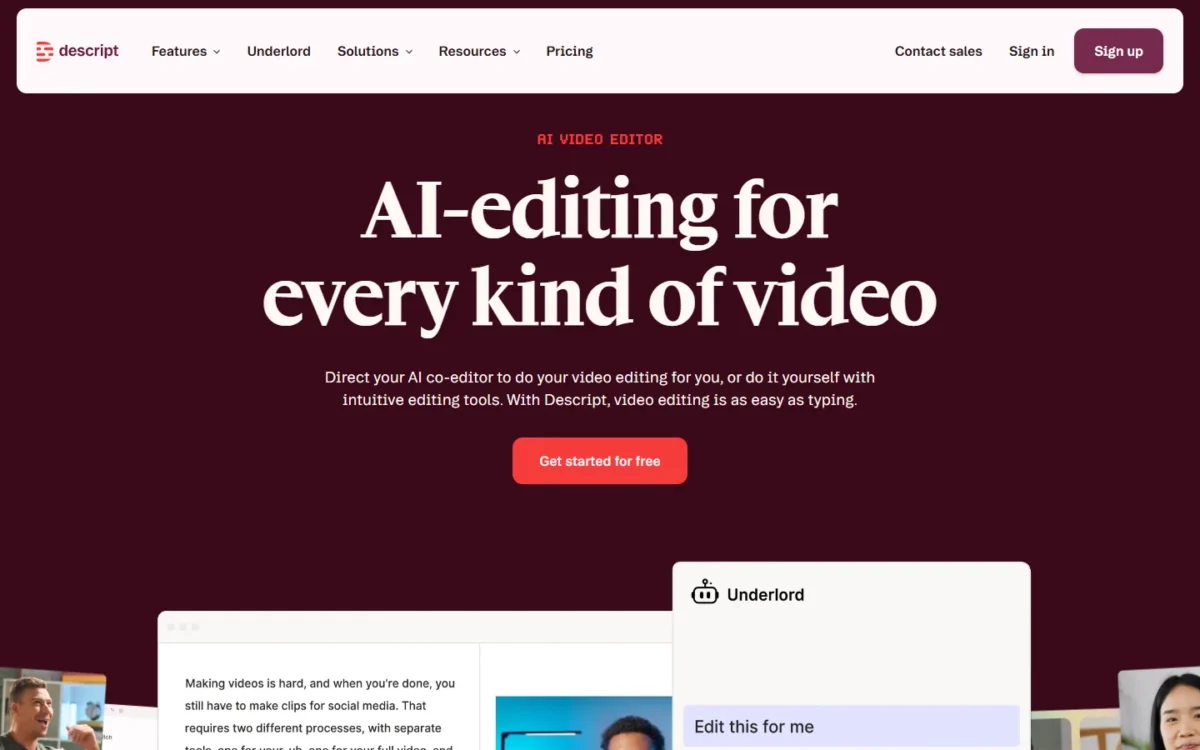
Descript is worth paying for when your videos are mostly people talking, such as podcasts, tutorials and webinars, because you edit the transcript instead of a timeline. For most weekly creators, this Descript review lands on Creator at $24 per editor per month billed annually ($35 billed monthly), the first plan with 4K export, 30 media hours a month and top ups.
The catch is metering. Every editor gets a monthly allowance of media minutes and AI credits, and Descript says its Underlord AI co-editor has no fixed credit price per action.
Quick verdict
- Descript is worth it for: podcasters, course makers and marketing teams of up to 5 editors who cut talk-led video by editing text
- Skip it if: your edits are motion-heavy, or you need a sixth editor without an Enterprise budget
- Main strength: transcript editing, Studio Sound, Rooms remote recording and a screen recorder in one app
- Biggest limit: media minutes and AI credits are per-editor allowances that do not roll over, and Underlord’s credit cost per request is not fixed
- Price basis: $16 to $50 per person per month billed annually, $24 to $65 billed monthly, Free at $0, Enterprise by quote, from the US pricing page read on November 1, 2026
In This Article (13 sections)
Descript at a Glance
Descript is an AI audio and video editor that transcribes what you record or upload, then lets you edit the media by editing that text.
- Category: AI audio and video editor with text-based editing, recording and publishing
- Best for: talk-led video and podcasts, edited by up to 5 editors on the Business plan
- Starting price: $16 per person per month billed annually, or $24 billed monthly (Hobbyist)
- Free plan: $0 with no credit card; 60 media minutes a month, 100 one-time AI credits, 720p export with a watermark
- Seats: paid Editors (1 on Hobbyist, 3 on Creator, 5 on Business) and free Viewers
- Main limitation: minutes and credits are per-editor allowances, and only Creator and Business can buy top ups
So yes, Descript is free to start, but one hour of media a month and a one-time pool of 100 AI credits make the Free plan a trial of the workflow, not a production plan.
Descript Pros and Cons
The strengths sit in the editing model and the recording tools; most of the cons come from how Descript meters usage.
Pros
- Deleting words in the transcript cuts the video, so podcasters and tutorial makers trim talk without timeline skills
- Studio Sound and Remove Filler Words cost at most 30 AI credits per application, so audio cleanup stays predictable on long files
- Rooms records each guest on their own machine in up to 4K, and a session spends media minutes once, not per participant
- Viewer seats are free and can comment, so clients and reviewers add no seat cost
- Timeline export to Adobe Premiere, Final Cut Pro and DaVinci Resolve lets an editor finish the cut elsewhere
Cons
- Underlord has no fixed credit price per request, and even a chat message spends credits, so AI-heavy months are hard to budget
- Hobbyist stops at 1 editor and 1080p export and cannot buy top ups, so a growing creator outgrows it
- Unused media minutes and AI credits do not roll over into the next billing cycle
- SSO, SCIM, audit logs and the AI-training opt-out are listed on the Enterprise plan, which agencies must price with sales
- Plan refunds close 48 hours after the invoice, and top ups are non-refundable
Descript Features
Five features decide whether Descript is worth paying for, and each has a plan gate; the rest of the AI list draws on the same credit pool.
Text-based editing and transcription
Descript transcribes every upload or recording in 25 languages, and you cut the video by deleting words in the transcript. Descript claims up to 95% transcription accuracy, which is its own figure.
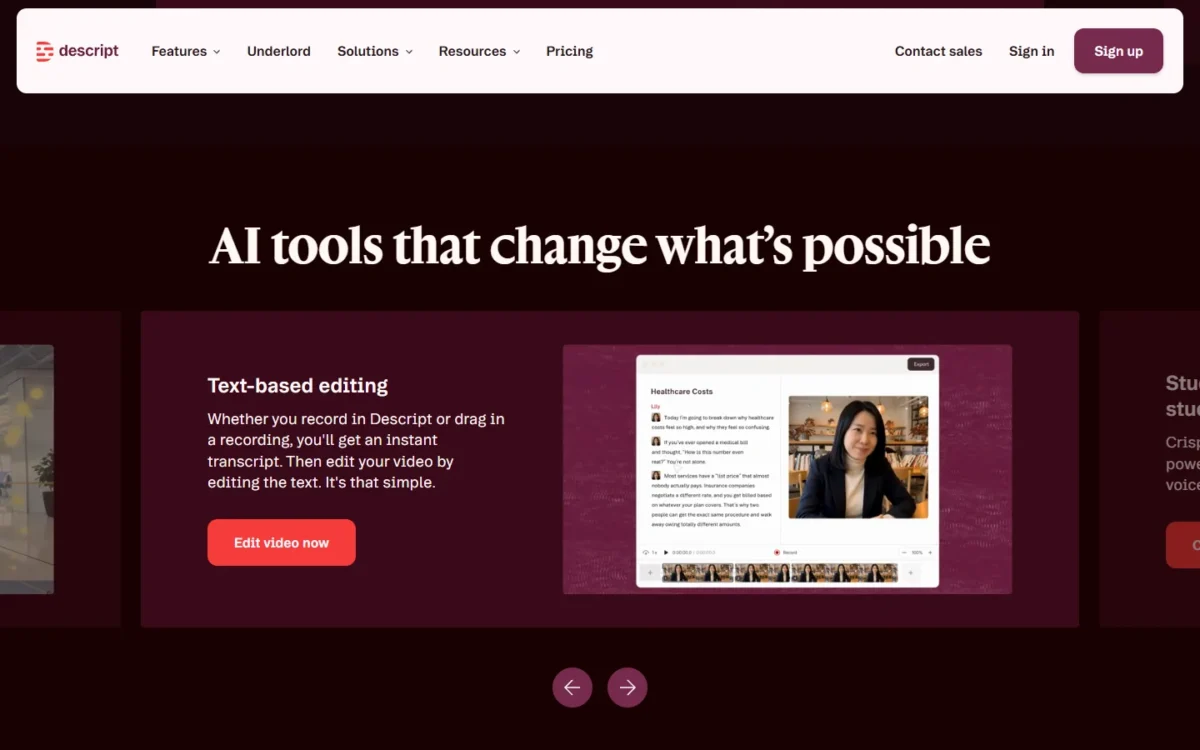
The pricing page adds speaker detection for 8+ speakers and multitrack transcription with each speaker on a separate track, so an interview show can clean one voice without touching the other. The model weakens where speech is not the backbone of the edit: a music video or B-roll montage gives the transcript little to cut, and you work on the timeline instead.
Underlord, the AI co-editor
Underlord is Descript’s AI co-editor: you describe an edit, a script or a set of clips in a prompt, and it does the work in your project. Free gets limited use, Hobbyist gets access, and Creator gets full access plus 20+ more AI tools.
Every request spends AI credits, chat messages included. Descript says two requests that look alike can cost different amounts, because Underlord routes each one to a model and charges for the work the task takes.
Eye Contact, Green Screen and Create Clips draw on the same credits. For a creator who hands most edits to Underlord, Hobbyist’s 400 credits a month leave no fallback, since Hobbyist cannot buy top ups.
Studio Sound and filler-word removal
Yes, Studio Sound can rescue bad audio without a re-record: it removes background noise and echo and enhances speech in any audio or video file you upload. It and Remove Filler Words cap at 30 AI credits per file and application, so Hobbyist’s 400 monthly credits cover 13 full runs (13 x 30 = 390).
That 30-credit cap makes audio cleanup an AI cost you can plan before you record.
AI Speech and voice cloning
AI Speech with custom voice clones starts on Hobbyist; Free gets a limited trial. Regenerate lets you fix a flubbed line by editing the script, in your own trained voice or a stock voice, so a host can patch one wrong word of their own without re-recording.
The catch is data. Descript’s security page says it uses the audio you share as Training Audio to improve its service and sends samples of a new voice to Amazon Mechanical Turk for human review. The speaker must also read a consent script, so an agency cloning a client’s voice needs that client on board.
For localization, the pricing page lists caption translation in 61 languages, and the Business plan card adds dubbing in 30+ languages with proofread. If you need voiceovers without an editor around them, my guide to dedicated AI voice generators compares tools built only for that.
Rooms remote recording and the screen recorder
Yes, you can record guests and your screen inside Descript: the screen recorder captures screen, webcam and mic on the Free plan, and Rooms records up to 10 participants in the browser. Each Rooms participant records locally in up to 4K with a cloud backup, so a shaky connection does not ruin the file.
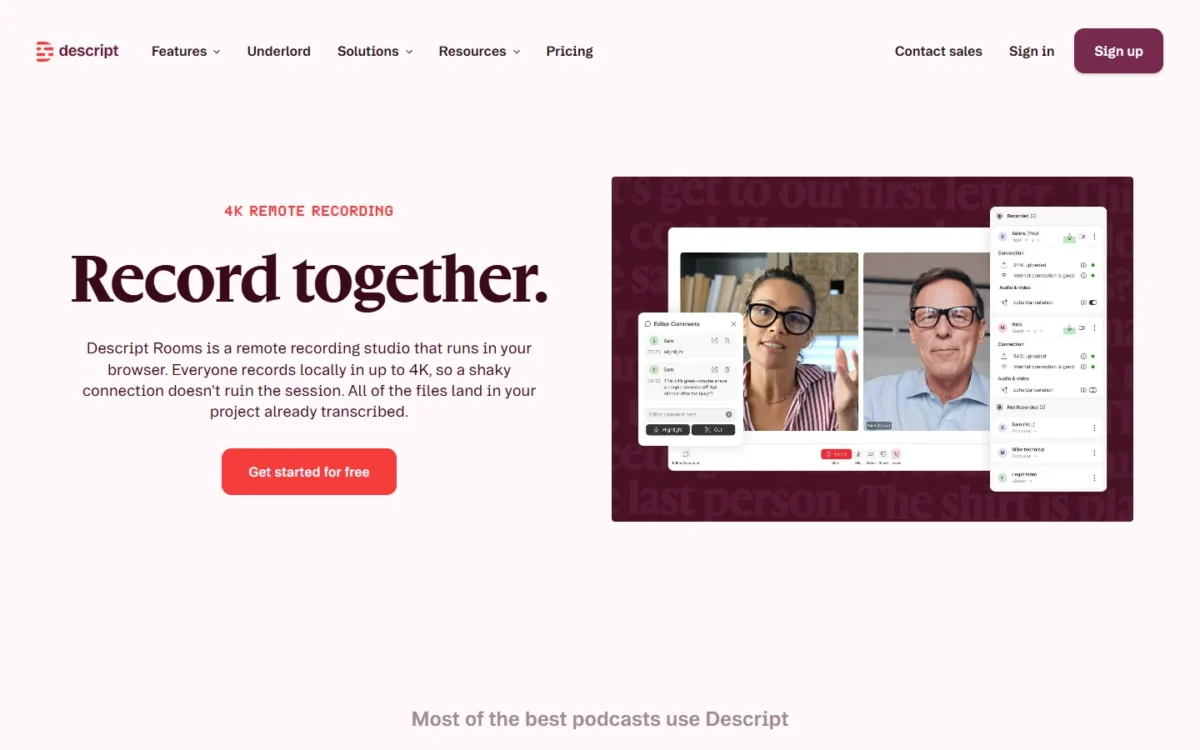
Rooms hours are counted per drive: 2 hours on Free, then 5, 15 and 25 hours a month on Hobbyist, Creator and Business. A session spends media minutes once, so a 1-hour session with 5 participants uses 60 minutes, not 300. A weekly one-hour interview needs 4 or 5 recording hours a month (4 or 5 sessions x 1 hour), which fills Hobbyist’s 5 hours with no room for a retake.
Control Room lets up to 10 producers run a session on Business and Enterprise, and async recording links, where each guest records alone, are available on Enterprise plans.
Descript Ease of Use
Editing in Descript works like editing a document: you select words in the transcript and delete, copy or move them, so a talk-led edit needs no timeline skills. The real effort is budgeting AI credits, and the Usage tab is where you track that.
The Usage tab in your settings shows minutes and credits per drive, and paid plans can export it to CSV; Free cannot. One billing rule trips freelancers: each drive has its own subscription, so your plan gives you no Editor rights in a client’s drive until the client adds you there.
The cheapest way to learn the workflow is one real recording. The Free plan needs no credit card, its 60 media minutes cover a one-hour episode, and the Usage tab then shows what Studio Sound and an Underlord pass cost on your footage.
Which Descript Plan Your Workflow Needs
Your workflow sets the minimum plan, and one limit per plan tells you when to move up.
| Your workflow | Minimum plan | The limit that decides it | Next upgrade trigger |
|---|---|---|---|
| Trying the editor on one recording | Free | 60 media minutes a month, 100 one-time AI credits, 720p with a watermark | Any watermark-free export |
| Solo monthly podcast in 1080p | Hobbyist | 10 media hours and 5 Rooms hours a month, 1 editor, no top ups | More footage, 4K or a second editor |
| Weekly YouTube or course videos in 4K | Creator | 4K export, 30 media hours a month, 3-hour web links, top ups | A fourth editor, team-wide Brand Studio or SLA support |
| Marketing team of 4 or 5 cutting webinars into clips | Business | 5 editors, 40 media hours each, 25 Rooms hours, Control Room producers | A sixth editor, SSO or SCIM |
| Agency or regulated team | Enterprise | SSO, SCIM, audit logs, training opt-out, custom retention | Quote from sales |
Sources: Descript pricing page, drive roles, top ups and Rooms pages, checked November 2026.
My call: a solo monthly podcaster starts on Hobbyist, a weekly 4K creator on Creator, and a team of four or five on Business. Allowances pool across the drive, so three Creator editors share 90 media hours and 2,400 AI credits a month (30 x 3 and 800 x 3).
For a solo YouTuber, the move to Creator is about export as much as footage: 4K local export and web-link pages longer than 1 hour both start there. Uploads cap at 10GB per file on Hobbyist, 20GB on Creator and 50GB on Business.
Descript Pricing
Hobbyist costs $16 per person per month billed annually. Business costs $50 per person per month billed annually. The table gives each plan’s monthly-billing price too. Free is $0 and Enterprise is priced by sales. The table uses both billing views of the US pricing page, read on November 1, 2026.
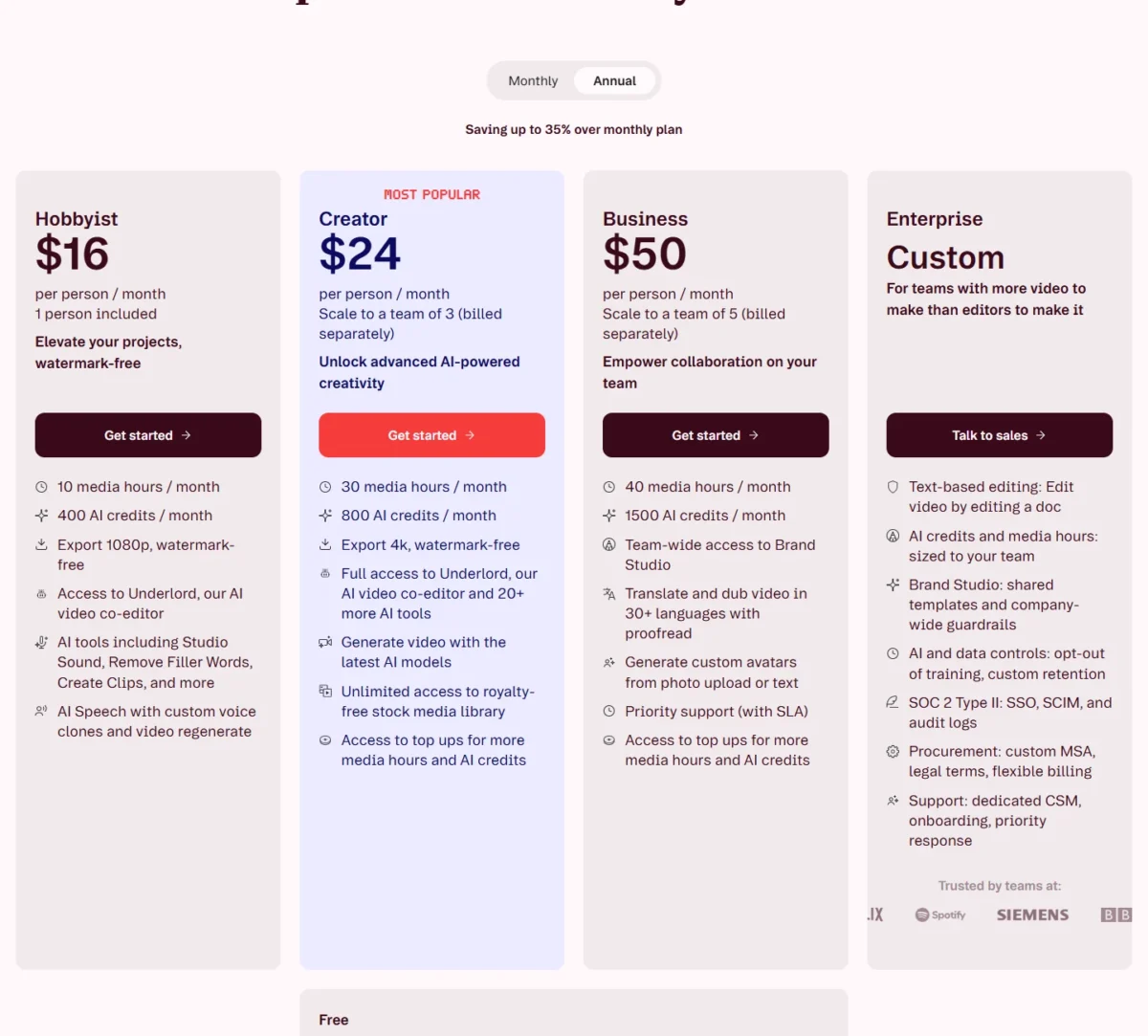
| Plan | Billed annually | Billed monthly | Editors | Key limit |
|---|---|---|---|---|
| Free | $0 | $0 | 1 | 60 media minutes a month, 720p with a watermark |
| Hobbyist | $16 per person per month | $24 per person per month | 1 | 10 media hours a month, 1080p, no top ups |
| Creator | $24 per person per month | $35 per person per month | Up to 3 | 30 media hours a month, 4K, top ups |
| Business | $50 per person per month | $65 per person per month | Up to 5 | 40 media hours a month, Brand Studio, SLA support |
| Enterprise | Custom | Custom | Custom | Talk to sales |
Sources: Descript pricing page, Annual and Monthly views, US dollars, checked November 2026.
What a team pays in a year:
- One Creator editor: $24 x 12 = $288 billed annually, against $35 x 12 = $420 billed monthly
- Three Creator editors: $24 x 3 x 12 = $864 billed annually, against $35 x 3 x 12 = $1,260 billed monthly
- Five Business editors: $50 x 5 x 12 = $3,000 billed annually, against $65 x 5 x 12 = $3,900 billed monthly
Annual billing is paid up front and is the cheaper way to pay at every size above. A plan refund closes 48 hours after the invoice, though, so I would start monthly and switch once a month of real usage proves the plan; a switch to annual takes effect at once, with the unused month credited.
Creator and Business can also buy top ups when a month runs over: 350 AI credits cost $35 and 5 media hours cost $25, shared across the drive and valid for 12 months. My full Descript pricing breakdown works through the plan-by-plan math and when a top up beats an upgrade.
Collaboration, Integrations and Security
Editors pay and Viewers are free: a Viewer can view and comment on projects but cannot edit, export or spend media minutes or AI credits. A client invited to one project as a collaborator needs no paid seat and sees nothing else in your drive. Adding an editor mid-cycle is prorated; in Descript’s example, a second Business editor added halfway through a monthly cycle costs $32.50 for that month.
Descript imports recordings from Riverside, Zoom, SquadCast, Ecamm and Restream and publishes to hosts such as YouTube, Wistia and Buzzsprout. Its integrations page also lists timeline export to Premiere, Final Cut Pro, Pro Tools, Logic, Audition, REAPER and DaVinci Resolve, the escape hatch for an editor who wants a timeline tool for the finish.
MCP assistants such as Claude and ChatGPT, Zapier and the Descript API can drive Descript too, spending the same minutes and credits as the app.
Descript states it is SOC 2 Type II compliant, follows GDPR and CCPA, and encrypts data with AES-256 at rest and TLS 1.2 in transit. SSO, SCIM, audit logs, the AI-training opt-out and custom retention come with Enterprise.
Support covers a knowledge base, email and in-app live chat Monday to Friday, 5:00 a.m. to 5:00 p.m. Pacific Time. Business adds priority support with an SLA, the plan to buy when a missed publish date costs money.
Who Should Use Descript?
Descript fits people whose videos are mostly speech and whose team stays at five editors or fewer; the cases below decide it either way.
Best for
- Weekly interview podcasters with remote guests, who get Rooms local recording and 15 recording hours a month on Creator
- Course and demo makers who record their screen, since screen, webcam and mic capture start on Free
- Marketing teams cutting webinars into clips: a team of 2 or 3 editors fits Creator, and Business starts at a fourth editor or when the team needs team-wide Brand Studio
- Creators who fix a flubbed line by typing, with AI Speech voice clones from Hobbyist
Not ideal for
- Motion-graphics or effects-heavy edits, where the transcript has little to cut and the timeline does the work
- Teams of 6 or more editors without an Enterprise budget, since Business stops at 5
- Heavy Underlord users on a fixed budget, who need a month of Usage tab data before they can predict credit spend
- Senders of quick async screen messages only, since every Descript recording spends media minutes
If short screen updates are all you record, my list of Loom alternatives covers recorders built for that job rather than for editing.
Descript vs Competitors
Descript’s difference is that it edits by transcript and records in the same app. The table names the job buyers weigh each tool for and shows what Descript itself offers for that job and what choosing it costs; my linked posts cover the rivals.
| Software | The job buyers weigh it for | What Descript offers for that job | Trade-off of choosing Descript |
|---|---|---|---|
| Descript | Talk-led video and podcasts edited as text | Transcript editing, Rooms and a screen recorder in one app | Minutes and credits metered per editor |
| Camtasia | Screen tutorials and software training | Screen, webcam and mic recording on Free, edited by transcript | 4K export starts on Creator |
| Loom | Quick async screen messages | A screen recorder that also edits and shares by link | Every recording spends media minutes; Free has 60 a month |
| Riverside | Recording-first remote interviews | Rooms with 10 participants recording locally in up to 4K | Rooms hours per drive: 5, 15 or 25 a month on paid plans |
| CapCut | Short social clips | A Free plan for trying the transcript workflow | Free exports at 720p with a watermark; 100 AI credits are one-time |
Sources: Descript pricing page, Rooms page and integrations page, checked November 2026.
Camtasia is the closer rival for screen tutorials, and my Camtasia review covers which of its plans fits which trainer.
For async updates, my Loom pricing guide covers Loom.
Riverside need not be an either-or: Descript imports Riverside recordings in one click, so recording there and editing in Descript is a workable split. On CapCut or Descript for social clips, the deciding Descript fact is its Free plan: a 720p, watermarked trial of transcript editing, so a clip you publish clean needs a paid plan. Pick Descript for long-form talk.
Descript Alternatives
Look past Descript when your job is one of the limits above: Camtasia for screen tutorials, Riverside for recording-first podcasts, Loom for quick async messages. My guide to the best screen recording software ranks the recorders by job and price.
If AI-first editing matters more than recording, my ranking of AI video editors covers editors built around generation and automated cuts.
How I Evaluated Descript
I built this review from Descript’s own pages, read on November 1, 2026: the pricing page in its Annual and Monthly views, the homepage and eight product pages, from transcription to security. I also read the help center articles on billing, top ups, usage, drive roles and refunds.
Plan fit, upgrade triggers and the team costs are my analysis of Descript’s own pages and help center, read on November 1, 2026. Descript does not publish a credit cost per Underlord request or an Enterprise price. Transcription accuracy and Studio Sound results depend on your own audio, so one hour of your footage on the Free plan settles both.
Descript FAQ
Do Descript’s AI credits roll over?
No. Unused media minutes and AI credits expire when the billing cycle renews. Top ups are the exception: bought on Creator or Business, they stay usable for up to 12 months from purchase and are spent only after the monthly allowance runs out.
Does Descript offer student or nonprofit pricing?
Yes. Descript’s pricing page says it offers special rates for students, educators and nonprofits through a form, but it does not publish the rate. Ask for the rate before you pay for an annual plan.
Can I cancel Descript and get a refund?
Only soon after you pay: a plan refund is available within 48 hours of the invoice date, and an added Editor seat can be refunded within 7 days of its invoice. Descript gives no prorated refund for unused time and does not refund top ups. You can cancel from your subscription page, and the plan stays active until the end of the term you paid for.
Descript Review: Final Verdict
Is Descript actually good? Yes, if your videos are mostly speech, and Creator is the plan I would start a weekly creator on: it adds 4K export, 30 media hours a month and top ups over Hobbyist. Hobbyist suits a solo monthly podcast that stays under 10 hours of footage and 1080p.
Skip it if your team needs more than the 5 editors Business allows, or if your AI budget cannot absorb Underlord’s unfixed credit costs; weigh Camtasia for screen tutorials and Riverside for recording-first shows.
Before paying, put one real recording through the Free plan and read the Usage tab: it shows what each AI run cost on your footage, the one number this review cannot give you.