Claude pricing starts at $0 (Free) and scales to custom Enterprise agreements — but the right plan depends on how you work, not just what you spend. This guide breaks down every Anthropic subscription tier (Free, Pro, Max, Team, Enterprise), the full API token-pricing matrix, and the hidden modifiers — batch discounts, prompt caching, data residency, web search, and code execution costs — that actually drive your bill.
Prices verified against claude.com/pricing and Anthropic API pricing docs. Always confirm at the official source before purchasing.
How we evaluated: We mapped every plan and API pricing variable from Anthropic’s official documentation, tested token-estimation workflows across real use cases (content generation, coding, document analysis), and built the cost-estimator formulas below from actual API responses. We did not independently audit Anthropic’s internal billing systems.
Quick Answer — How much does Claude cost?
Chat app: Free ($0), Pro ($20/mo), Max ($100 or $200/mo), Team Standard ($25/seat/mo) or Team Premium ($125/seat/mo), Enterprise (custom). Annual billing saves ~15–20%.
API: Pay-per-token. Haiku 4.5 starts at $1/MTok input, Sonnet 4.5/4.6 at $3/MTok, and Opus 4.5/4.6 at $5/MTok. Output tokens cost 5× input. The Batch API cuts those rates by 50%.
Key Takeaways
- Claude subscriptions range from $0 (Free) to $200/mo (Max 20×) for individuals, and $25–$125/seat for teams; Enterprise is custom-quoted.
- API costs are driven primarily by output tokens (5× input price); Haiku 4.5 is the cheapest current-gen model at $1/$5 per MTok.
- The Batch API halves your token costs on any model — the single biggest discount available.
- Prompt caching can cut repeated-context costs by up to 90% (cache reads = 0.1× base input).
- Most users over-provision their plan. Start with Pro; upgrade to Max only if you consistently hit usage limits.
- For teams, mix Standard and Premium seats to control per-user costs without over-provisioning.

Claude Pricing at a Glance (2026 Snapshot)
Subscription Plans
| Plan | Monthly Price | Annual Price | Best For |
|---|---|---|---|
| Free | $0 | — | Casual users, evaluation |
| Pro | $20/mo | ~$16.67/mo ($200/yr) | Daily individual users, professionals |
| Max 5× | $100/mo | — | Power users, long sessions |
| Max 20× | $200/mo | — | Heavy daily users, deep-work professionals |
| Team Standard | $25/seat/mo | $20/seat/mo | Collaboration teams, basic admin needs |
| Team Premium | $125/seat/mo | $100/seat/mo | Teams needing Max-level usage per seat |
| Enterprise | Custom | Custom | Regulated industries, large orgs, SSO/SCIM/HIPAA |
Prices in USD. Taxes may apply. Team plans require a minimum seat count.
Claude API Pricing per 1 Million Tokens
| Model | Input | Output | Cache Write (5m) | Cache Read | Batch Input | Batch Output |
|---|---|---|---|---|---|---|
| Opus 4.6 | $5.00 | $25.00 | $6.25 | $0.50 | $2.50 | $12.50 |
| Opus 4.5 | $5.00 | $25.00 | $6.25 | $0.50 | $2.50 | $12.50 |
| Sonnet 4.6 | $3.00 | $15.00 | $3.75 | $0.30 | $1.50 | $7.50 |
| Sonnet 4.5 | $3.00 | $15.00 | $3.75 | $0.30 | $1.50 | $7.50 |
| Sonnet 4 | $3.00 | $15.00 | $3.75 | $0.30 | $1.50 | $7.50 |
| Haiku 4.5 | $1.00 | $5.00 | $1.25 | $0.10 | $0.50 | $2.50 |
| Haiku 3.5 | $0.80 | $4.00 | $1.00 | $0.08 | $0.40 | $2.00 |
| Haiku 3 | $0.25 | $1.25 | $0.30 | $0.03 | $0.13 | $0.63 |
MTok = per million tokens. Batch pricing = 50% of standard rates. Legacy models (Opus 3, Sonnet 3.7) omitted — see full API pricing.
How to Choose the Right Claude Plan (Decision Framework)
Most pricing pages list features — few help you decide. Use this Plan Picker to match your situation to the right tier in under 60 seconds.
Plan Picker: 5 Questions
Q1. Are you building an app, or using Claude as a chat assistant?
- Building an app or integration → Skip to the API Pricing section.
- Using the chat interface → Continue to Q2.
Q2. How many people need access?
- Just me → Free, Pro, or Max. Go to Q3.
- 2–50 people → Team plan. Go to Q4.
- 50+ people, or regulated industry → Enterprise. Go to Q5.
Q3. How heavily do you use Claude each day?
- A few messages, casual research → Free is enough.
- Regular daily use, projects, Research mode, memory → Pro ($20/mo).
- Power user: long sessions, heavy output, hitting Pro limits → Max 5× ($100/mo).
- All-day intensive use, multiple deep-work sessions → Max 20× ($200/mo).
Q4. Do your team members need equal usage, or is it mixed?
- Most people are moderate users → Team Standard seats ($25/seat/mo).
- Some power users need Max-level limits → Team Premium seats ($125/seat/mo).
- Mix and match — assign Standard and Premium seats per user as needed.
Q5. Do you need SSO/SCIM, audit logs, HIPAA, or custom retention?
- SSO and centralized billing are enough → Team may suffice.
- You need SCIM, audit logs, compliance API, or HIPAA → Enterprise (self-serve or sales-assisted).
The 3 Decision Variables
- Usage intensity — Message volume, session length, and long-context needs. Free has tight limits; Pro adds substantial headroom; Max is for users who consistently hit Pro caps.
- Collaboration + admin needs — Once you need centralized billing, SSO, or shared projects across a team, you’re in Team or Enterprise territory.
- Build vs. buy — If your use case is programmatic (chatbots, pipelines, agents), the API is almost always more cost-effective than stacking Max subscriptions.
Escalation Path
Free → Pro → Max 5× → Max 20× → Team/Enterprise (or API)When to switch:
- Free → Pro: You need Projects, Research mode, memory, Claude Code/Cowork, or you’re hitting daily message caps regularly.
- Pro → Max: You’re frequently seeing “usage limit reached” mid-session, or you need priority access during peak hours.
- Max → Team: You need 2+ seats with centralized billing, SSO, or admin controls.
- Subscription → API: Your use case is programmatic, batch-oriented, or needs fine-grained cost control per token.
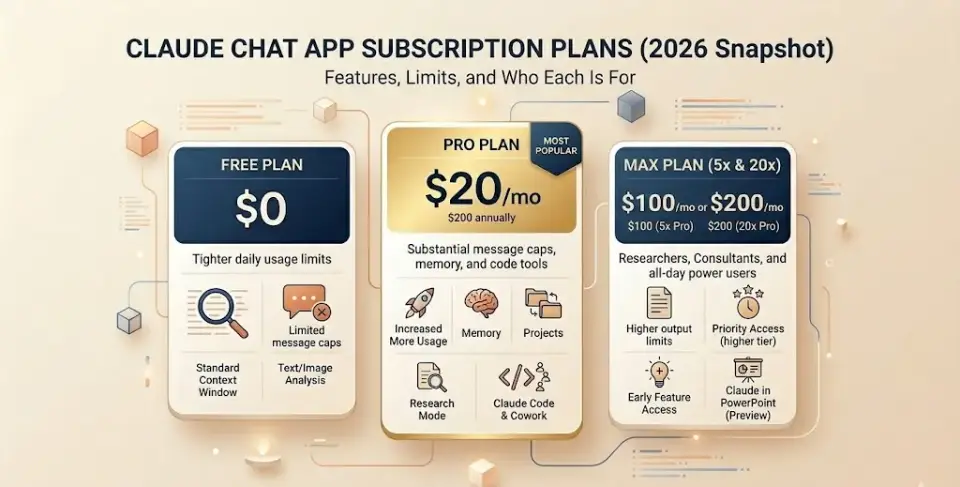
Claude Subscription Plans (Chat App): Features, Limits, and Who Each Is For
Anthropic offers five subscription tiers for the Claude chat app — Free, Pro, Max, Team, and Enterprise. Each tier unlocks progressively more usage, features, and admin controls. Below, we break down exactly what you get at every level, the constraints you’ll hit, and who each plan is designed for so you can match your workflow to the right price point without overpaying.
Claude Free Plan
Price: $0
What you get:
- Chat on web, iOS, Android, and desktop
- Text and image analysis
- Web search, code execution, and artifacts
- Extended thinking for complex work
- Desktop extensions and connectors (remote MCP)
- Connect Slack and Google Workspace
Typical constraints:
- Tight daily usage limits — expect message caps that reset on a session/daily basis
- No Projects, Research mode, or memory
- No Claude Code or Cowork
- Limited model selection
- Lower priority during high-traffic periods
Who should stay Free: Students exploring AI, occasional users who need quick answers a few times per week, anyone evaluating Claude before committing.
Claude Pro Pricing (2026)
Price: $20/month (monthly billing) · ~$16.67/month ($200 billed annually — saves ~17%)
Features that matter: (verified against the official Claude pricing page, March 2026)
- Substantially more usage than Free (higher message caps, longer sessions)
- Projects — organize chats and documents into persistent workspaces
- Research mode — deep, multi-step web research with citations
- Memory — Claude remembers context across conversations
- Claude Code and Cowork — collaborative coding and working tools
- Claude in Excel — spreadsheet integration
- Full model selection (Opus, Sonnet, Haiku)
- Extended thinking enabled
Pro is enough if:
- [X] You use Claude daily but aren’t in marathon sessions
- [X] You rarely see “usage limit reached” warnings
- [X] You work solo (no team billing needed)
- [X] You need Projects, Research, and memory
- [X] You want Claude Code for personal development work
- [X] Annual billing works for your budget ($200/yr = best per-month price)
Claude Max Pricing (5× vs 20×)
Two tiers:
| Max Tier | Monthly Price | Usage vs. Pro | Key Extras |
|---|---|---|---|
| Max 5× | $100/mo | 5× Pro usage | Higher output limits, priority access, early feature access |
| Max 20× | $200/mo | 20× Pro usage | Maximum usage ceiling, highest priority, Claude in PowerPoint (research preview) |
When Max is justified:
- You’re a researcher, consultant, or developer who works in Claude for hours daily
- You generate long-form output (reports, code, analysis) that exhausts Pro limits
- You need priority access during peak times — Max users get served first
- You want early access to new Claude features before general availability
Pro/con framing:
| Pros | Cons |
|---|---|
| Eliminates “usage cap” frustration | $100–$200/mo is steep for occasional users |
| Priority access = no slowdowns at peak | No team features — still single-user |
| Early access to advanced features | No annual discount available |
| Higher output limits for all tasks | For dev/API workloads, API may be cheaper |
ROI lens: If hitting Pro limits costs you even 2 hours of lost productivity per month, Max 5× pays for itself at a $50/hr billing rate.
Claude Team Pricing (Standard vs Premium Seats)
Two seat types — mix and match within the same organization:
| Seat Type | Monthly | Annual | Usage Level |
|---|---|---|---|
| Standard | $25/seat/mo | $20/seat/mo | Pro-equivalent usage per member |
| Premium | $125/seat/mo | $100/seat/mo | Max-equivalent usage per member |
Collaboration and admin features:
- Centralized billing
- Single sign-on (SSO) and domain capture
- Admin controls for remote and local connectors
- Enterprise deployment for the Claude desktop app
- Connect Microsoft 365, Slack, and more
- Enterprise search across your organization
- No model training on your content by default
When Premium seats pay off: Assign Premium seats to power users (analysts, engineers, researchers) who work in Claude all day. Keep Standard seats for moderate users (managers, marketers, occasional researchers). This lets you control costs at the per-seat level instead of over-provisioning the entire team. If you’re also evaluating broader collaboration platforms alongside Claude, our team collaboration tools guide covers 20 vetted options for distributed teams.
When Team is the right call:
- 2+ people need Claude access under one bill
- You need SSO and domain capture
- You want admin control over connectors and desktop app deployment
- Your team doesn’t require SCIM, audit logs, or HIPAA compliance
Claude Enterprise Pricing (Custom Plans)
Price: Custom — contact Anthropic sales or self-serve via the Enterprise setup flow.
Enterprise includes everything in Team, plus:
| Category | Capabilities |
|---|---|
| Identity & Access | SSO, SCIM provisioning, role-based access with fine-grained permissioning, domain capture |
| Security & Compliance | Audit logs, compliance API for monitoring, custom data retention controls, network-level access control, IP allowlisting, HIPAA-ready offering |
| Admin & Analytics | Usage analytics, organization-wide skills deployment, Google Docs cataloging |
| Context | Enhanced context window |
| Partnership | AWS Marketplace availability, consultation, tiered incentives on committed spend, trials, non-standard terms, MSA, customer success support at certain spend thresholds |
IT / CIO Procurement Checklist
Use this checklist when evaluating Enterprise vs. Team:
- [ ] SSO/SCIM — Do you need automated user provisioning and de-provisioning?
- [ ] Audit logs — Are you required to log all AI interactions for compliance?
- [ ] Compliance API — Do you need programmatic access to monitoring data?
- [ ] HIPAA — Are you handling protected health information?
- [ ] Custom data retention — Do you need retention controls beyond default policies?
- [ ] IP allowlisting — Must access be restricted to approved networks?
- [ ] Role-based access — Do different departments need different permission levels?
- [ ] MSA / PO / net terms — Does procurement require a Master Service Agreement or purchase orders?
- [ ] AWS Marketplace billing — Do you need to route spend through existing cloud commitments?
If you check 3+ boxes → Enterprise. Fewer? Team may be sufficient.
Procurement paths:
- Self-serve Enterprise — Set up immediately at claude.ai/create/enterprise. Best for orgs that need enterprise security features but want to move fast without a sales cycle.
- Sales-assisted Enterprise — Custom terms, MSA, volume commitments, product bundling. Contact Anthropic sales.
Billing, Payments, Refunds, and “Gotchas”
| Topic | Details |
|---|---|
| Annual discounts | Pro: ~17% off ($200/yr vs. $240). Team Standard: 20% off ($20 vs. $25/seat). Team Premium: 20% off ($100 vs. $125/seat). Max: no annual option currently. |
| Payment methods | Credit card (all plans). ACH (Team, Enterprise). Invoicing/net terms (Enterprise, sales-assisted). |
| Billing cycle | Monthly or annual. Annual billed up front. |
| Adding seats midterm | Team and Enterprise support adding seats during the billing cycle — prorated. |
| Taxes | Prices shown exclude applicable taxes. Tax rates vary by state/country. |
| Model training | Team and Enterprise: your content isnot used for model training by default. Free/Pro/Max: check current data usage policy. |
| Refunds | Not prominently documented. Contact Anthropic support for billing disputes. |
| US focus | Pricing is in USD. International users pay the same base rates; local taxes and payment-processing fees may differ. |
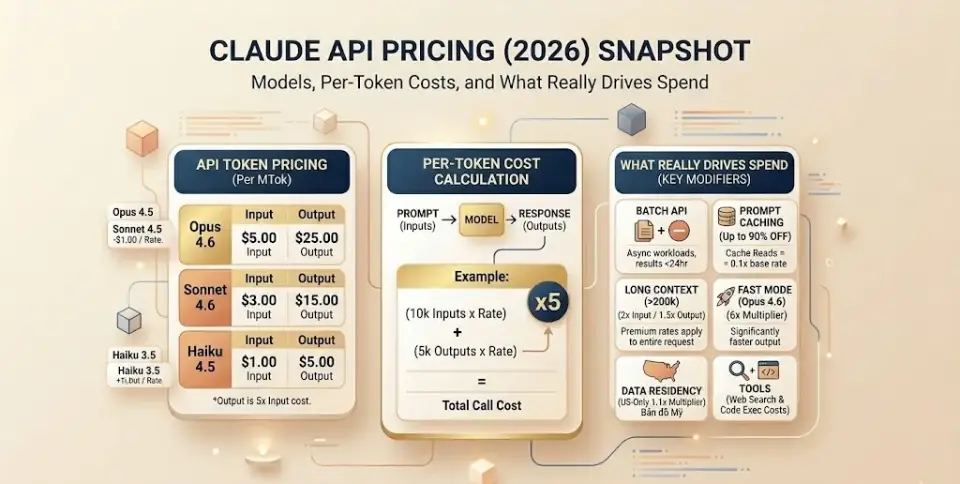
Claude API Pricing (2026): Models, Per-Token Costs, and What Really Drives Spend
API Pricing Basics
How token pricing works:
- You pay per token — a token is roughly 4 characters or 0.75 words in English.
- Pricing is quoted per MTok (million tokens).
- Input tokens (your prompt + context) and output tokens (Claude’s response) are priced separately. Output tokens always cost more — typically 5× the input price.
- The total cost of any API call =
(input tokens × input rate) + (output tokens × output rate).
Context window:
- Standard context: up to 200K tokens for all current models.
- Extended context: up to 1M tokens (beta, tier 4+ orgs) for Opus 4.6, Sonnet 4.6, Sonnet 4.5, and Sonnet 4 — with premium long-context pricing when input exceeds 200K tokens.
Quick estimation rules of thumb:
- 1 page of text ≈ 250–300 words ≈ 350–400 tokens
- A 10-page document ≈ 3,500–4,000 tokens
- A typical chat turn (prompt + response) ≈ 500–2,000 tokens total
- 1 million tokens ≈ 750,000 words ≈ ~3,000 pages
Model Lineup: Haiku vs. Sonnet vs. Opus
| Model | Input / MTok | Output / MTok | Speed | Reasoning | Best For |
|---|---|---|---|---|---|
| Haiku 4.5 | $1.00 | $5.00 | ⚡ Fastest | Good | Classification, extraction, quick Q&A, high-volume simple tasks |
| Haiku 3.5 | $0.80 | $4.00 | ⚡ Fastest | Basic | Legacy workloads, ultra-cost-sensitive pipelines |
| Sonnet 4.6 | $3.00 | $15.00 | Fast | Strong | General-purpose: coding, analysis, writing, most production workloads |
| Sonnet 4.5 | $3.00 | $15.00 | Fast | Strong | Balanced performance, multi-step tasks |
| Opus 4.6 | $5.00 | $25.00 | Moderate | Best | Complex reasoning, research, long-form synthesis, critical decisions |
| Opus 4.5 | $5.00 | $25.00 | Moderate | Excellent | Deep analysis, nuanced writing, multi-document reasoning |
Decision logic:
- Minimize cost → Haiku 4.5. Use it for anything that doesn’t require deep reasoning.
- Balance cost and quality → Sonnet 4.5 or 4.6. The workhorse for most production applications.
- Maximize quality → Opus 4.6. Use when accuracy or nuance is worth 5× Haiku’s price.
Hidden Multipliers and Discounts You Must Know
These modifiers can halve your bill or double it. Most “Claude pricing” articles miss at least two:
1. Batch API Pricing (50% Off)
The Batch API processes requests asynchronously and returns results within 24 hours. Every model gets a flat 50% discount on both input and output tokens.
| Model | Standard Input | Batch Input | Standard Output | Batch Output |
|---|---|---|---|---|
| Opus 4.6 | $5.00 | $2.50 | $25.00 | $12.50 |
| Sonnet 4.6 | $3.00 | $1.50 | $15.00 | $7.50 |
| Haiku 4.5 | $1.00 | $0.50 | $5.00 | $2.50 |
When to use Batch: Any workload that doesn’t need real-time responses — data extraction, content moderation, bulk summarization, nightly report generation.
2. Prompt Caching Pricing
Prompt caching lets you reuse large context blocks (system prompts, reference documents) without re-sending them every call. Anthropic offers two TTL options: (Source: Anthropic API pricing — prompt caching)
| Cache Duration | Write Cost | Read Cost |
|---|---|---|
| 5-minute TTL (default) | 1.25× base input price | 0.1× base input price |
| 1-hour TTL (extended) | 2× base input price | 0.1× base input price |
What this means in practice (Sonnet 4.6 example):
- Standard input: $3.00/MTok
- Cache write (5 min): $3.75/MTok (you pay this once)
- Cache read: $0.30/MTok (you pay this on every subsequent request hitting the cache)
Net effect: If you make 10 requests against the same cached context, you pay ~$3.75 + (9 × $0.30) = $6.45 instead of 10 × $3.00 = $30.00. That’s a 78% saving.
TTL strategy: Use 5-minute TTL for rapid iterative work (e.g., coding agents making multiple calls in quick succession). Use 1-hour TTL when requests are spaced out but still repetitive within an hour (e.g., customer support bots with a shared knowledge base).
3. Long-Context Pricing (>200K Input Tokens)
When input tokens exceed 200K (using the 1M context window beta), all tokens in the request are charged at premium rates: (Source: Anthropic API pricing — long context)
| Model | Standard Input | Long-Context Input | Standard Output | Long-Context Output |
|---|---|---|---|---|
| Opus 4.6 | $5.00 | $10.00 | $25.00 | $37.50 |
| Sonnet 4.6 | $3.00 | $6.00 | $15.00 | $22.50 |
| Sonnet 4.5 | $3.00 | $6.00 | $15.00 | $22.50 |
Input doubles; output increases by 1.5×. The threshold is based on input tokens only.
Important: If your request has 199K input tokens, standard rates apply. At 201K, all tokens (not just the excess) are charged at premium rates. Stay under 200K when possible.
4. Data Residency Multiplier (US-Only Inference)
For Claude Opus 4.6 and newer models, specifying inference_geo: "us" to guarantee US-only data processing incurs a 1.1× multiplier on all token categories (input, output, cache writes, cache reads). (Source: Anthropic API pricing — data residency)
Example: Opus 4.6 with US-only inference = $5.50/MTok input, $27.50/MTok output.
This applies to the Anthropic API (1P) only. AWS Bedrock and Google Vertex AI have their own regional endpoint pricing (10% premium for regional vs. global endpoints on Sonnet 4.5+ and Haiku 4.5+).
5. Tool Pricing: Web Search and Code Execution
| Tool | Cost | Notes |
|---|---|---|
| Web Search | $10 per 1,000 searches | Plus standard token costs for search-generated content. Each search = one charge, regardless of results returned. Failed searches are not billed. |
| Code Execution | $0.05/hr per container | 50 free hours daily per org (~1,500 hrs/month if used consistently). Minimum 5-minute billing increment. Free when usedwith web search or web fetch. |
| Web Fetch | Free | Only standard token costs for fetched content. |
| Text Editor, Bash, Computer Use | Standard token pricing | No additional per-use fees; billed as input/output tokens. |
(Source: Anthropic API pricing — specific tool pricing)
6. Fast Mode Pricing (Opus 4.6 Research Preview)
Fast mode provides significantly faster output at 6× standard rates:
- Opus 4.6 Fast: $30.00/MTok input, $150.00/MTok output
- Stacks with prompt caching and data residency multipliers
Use only when latency is critical and the cost premium is justified.
Cost Control Playbook (Engineering and Ops)
1. Set spend budgets and alerts
- Use the Claude Console to set organizational and user-level spend controls.
- Configure alerts at 50%, 75%, and 90% of your monthly budget.
2. Choose the right model for each task
- Route simple classification/extraction to Haiku 4.5 ($1/MTok) instead of Opus ($5/MTok) — 80% savings on input alone.
- Reserve Opus for tasks that genuinely need superior reasoning.
3. Implement prompt caching aggressively
- Cache system prompts, few-shot examples, and reference documents.
- A 10K-token system prompt used across 100 requests saves ~$2.70 with Sonnet 4.6 (vs. re-sending each time).
4. Batch everything that isn’t time-sensitive
- The Batch API’s 50% discount is the single easiest cost reduction available.
- Combine with prompt caching for compounding savings.
5. Optimize prompt design to reduce output tokens
- Output tokens cost 5× input. Instruct Claude to be concise when verbosity isn’t needed.
- Use structured output (JSON) to eliminate prose overhead.
6. Monitor and iterate
- Track per-request token counts, model selection, and cache hit rates.
- Use the usage object in API responses to audit actual consumption.
- Review weekly: identify requests with unexpectedly high token counts.

Real-World Cost Scenarios (With Mini Estimates)
Scenario A: Solo Creator / Researcher (Chat Plans)
Profile: Freelance writer, uses Claude daily for research, drafting, and editing. ~20–40 messages/day.
Recommendation: Claude Pro at $20/mo (or $16.67/mo annual).
Why: Pro covers daily professional use with Projects, Research mode, and memory. Unless you’re in extended multi-hour sessions regularly, Pro’s usage limits are sufficient. Upgrading to Max 5× ($100/mo) only makes sense if you’re consistently hitting limits. For workflow ideas, see our roundup of the best AI tools for content creation.
Annual savings: $40/yr by choosing annual billing ($200 vs. $240).
Scenario B: Freelance Developer (Max vs. API Break-Even)
Profile: Full-stack developer using Claude for code generation, debugging, and architecture review. Generates ~50,000 tokens of output per day.
Monthly API cost estimate (Sonnet 4.6):
- Input: ~25,000 tokens/day × 30 days = 750K tokens → 0.75 MTok × $3.00 = $2.25
- Output: ~50,000 tokens/day × 30 days = 1.5M tokens → 1.5 MTok × $15.00 = $22.50
- Total: ~$24.75/mo
Comparison:
- Claude Pro: $20/mo (with usage limits that may not be enough)
- Claude Max 5×: $100/mo (unlimited-feeling usage, no API complexity)
- API (Sonnet 4.6): ~$24.75/mo (exact control, no chat UI)
Verdict: If you need the chat interface with its UX features (Projects, memory, artifacts), Pro or Max is simpler. If you’re integrating Claude into your dev workflow via IDE or CLI, the API at ~$25/mo is comparable to Pro and gives you full control.
Scenario C: 10-Person Marketing Team
Profile: Agency with 10 staff. 7 moderate users (content, research), 3 power users (strategists doing deep analysis all day).
Team plan cost:
- 7 Standard seats × $25/mo = $175
- 3 Premium seats × $125/mo = $375
- Total: $550/mo (monthly billing)
With annual billing:
- 7 Standard × $20 = $140
- 3 Premium × $100 = $300
- Total: $440/mo (saving $1,320/yr)
Why not Enterprise? Unless the agency needs audit logs, SCIM, or HIPAA, Team provides SSO, centralized billing, and connector admin controls — which covers most agency needs.
Scenario D: Customer Support Automation (API + Batch + Caching)
Profile: SaaS company processing 10,000 support tickets/month via Claude API. Each ticket averages ~3,700 tokens (mixed input/output). Using a 5,000-token system prompt cached across all requests.
Without optimization (Sonnet 4.6):
- 37M tokens total × blended ~$9/MTok ≈ $333/mo
With prompt caching + Batch API:
- System prompt: 5K tokens × cache write once = negligible
- Cache reads: 5K tokens × 10,000 requests × $0.30/MTok = $15.00
- Remaining tokens via Batch: ~32M tokens × ~$4.50/MTok (blended batch rate) = $144.00
- Total: ~$159/mo — a 52% reduction
Additional savings lever: If batch processing works for your SLA (results within 24 hours), you save an extra 50%. If tickets must be answered in real-time, use standard API for live requests and batch for overnight reporting/analysis. Building a support stack? Our help desk software roundup covers 40 platforms to pair with Claude-powered automation.
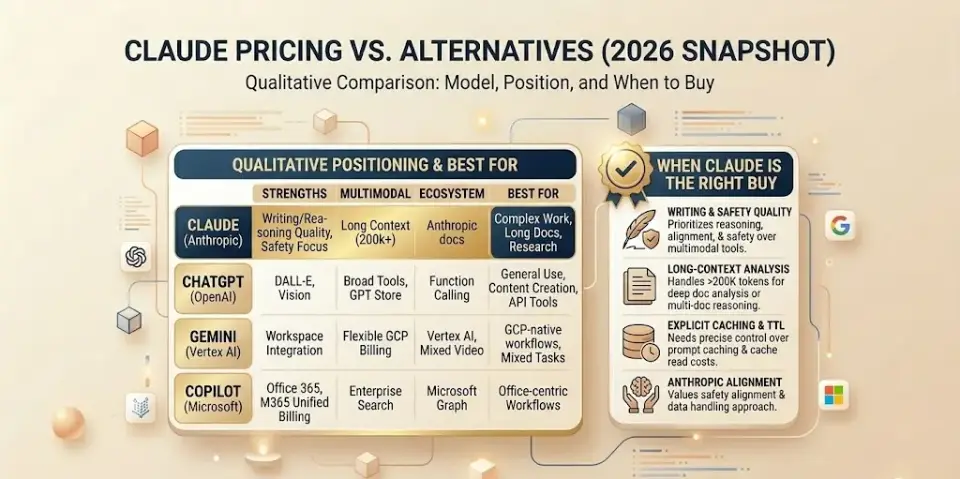
Claude Pricing vs. Alternatives: When Claude Is the Right Buy
We compare positioning — not line-item prices — because competitor pricing shifts frequently. For a side-by-side test of 20 leading AI assistants, see our AI chatbot comparison and buyer’s guide.
Chat Assistants
| Factor | Claude (Pro) | ChatGPT (Plus) | Gemini (Advanced) | Copilot (Pro) | Perplexity (Pro) |
|---|---|---|---|---|---|
| Price range | $20/mo | $20/mo | $20/mo | $20/mo | $20/mo |
| Differentiator | Projects, Research, strong writing, Claude Code | GPT-4o, DALL-E, browsing | Google ecosystem, 1M consumer context | Microsoft 365 integration | Search-first AI with citations |
| Best for | Writing, analysis, coding | Broad ecosystem, image gen | Google Workspace power users | Office-centric workflows | Research with source citations |
Chat assistant prices shown are approximate consumer-tier rates. Verify at each vendor’s official pricing page before purchasing.
Developer APIs (Qualitative Positioning)
API pricing across providers changes frequently and depends on model variant, region, and commitment tier. Rather than listing numbers that may be outdated by the time you read this, here’s how the major platforms position themselves:
- Claude API (Anthropic): Competitive mid-range pricing. Key differentiators are explicit prompt caching with TTL control, a flat 50% Batch API discount, and strong reasoning at extended context lengths (200K–1M tokens). Best for teams prioritizing writing quality, safety alignment, and long-document analysis.
- OpenAI API: Broad model lineup spanning lightweight to frontier. Strong function-calling ecosystem and wide third-party integration support. Pricing varies significantly by model generation and capability tier.
- Google Vertex AI (Gemini): Deep integration with Google Cloud. Flexible pricing with context caching and regional options. Strong multimodal capabilities. Best for GCP-native teams and applications needing vision + language.
- Amazon Bedrock: Offers Claude models alongside other providers. Useful for consolidating AI spend under existing AWS commitments with unified billing.
Always verify competitor API pricing at the official source: OpenAI pricing, Google Vertex AI pricing, AWS Bedrock pricing.
Choose Claude if:
- Writing quality, nuanced reasoning, and safety alignment matter most
- You need long-context document analysis (200K–1M tokens)
- You want prompt caching with explicit TTL control
- You value Anthropic’s approach to AI safety and data handling
Consider alternatives if:
- You need built-in image generation (→ ChatGPT, Gemini)
- Your stack is deeply integrated with Microsoft 365 (→ Copilot)
- You need Google Cloud-native billing and GCP integration (→ Vertex AI)
- You prioritize real-time web search as a primary use case (→ Perplexity)
Claude Pricing 2026 – FAQs
How much does Claude cost?
Claude is free at the basic tier. Paid plans start at $20/month for Pro. Max plans run $100–$200/month. Team seats start at $25/seat/month ($20 with annual billing). Enterprise pricing is custom. API pricing is pay-per-token, starting at $1/MTok input for Haiku 4.5.
Is Claude free?
Yes. Claude offers a free tier with access to chat on web, mobile, and desktop, plus web search, code execution, and extended thinking. Free users face tighter usage limits and can’t access Projects, Research, memory, or Claude Code.
What is the difference between Claude Pro and Max?
Pro costs $20/month and provides substantial daily usage. Max offers either 5× ($100/mo) or 20× ($200/mo) of Pro’s usage, plus priority access during peak times, higher output limits, and early access to advanced features. Choose Max only if you consistently hit Pro limits.
Is Claude Max worth it?
For power users who work in Claude for hours daily — researchers, consultants, developers — Max eliminates the frustration of usage caps. At $100/month, it’s worth it if hitting limits costs you more than $100 in lost productivity. Casual or moderate users should stick with Pro.
How much does Claude Team cost per user?
Team Standard seats cost $25/user/month ($20 with annual billing). Team Premium seats — which provide Max-level usage — cost$125/user/month ($100 annually). You can mix seat types within one organization.
What does Claude Enterprise include?
Enterprise adds SCIM provisioning, audit logs, compliance API, HIPAA-ready offering, custom data retention, role-based access, IP allowlisting, enhanced context windows, and AWS Marketplace availability. It includes everything in Team plus security and governance features required by regulated industries.
How is Claude API pricing calculated?
API pricing is per-token: multiply your input tokens by the model’s input rate and output tokens by the output rate (both quoted per million tokens). Output tokens typically cost 5× input. Additional charges apply for web search ($10/1K searches) and code execution ($0.05/hr beyond free allocation).
What is a token and how many tokens are in a word?
A token is approximately 4 characters or 0.75 words in English. So 1,000 words ≈ 1,333 tokens. One million tokens (1 MTok) ≈ 750,000 words ≈ ~3,000 pages. The exact count varies by language, formatting, and content type.
Which Claude model is cheapest?
Haiku 3 at $0.25/MTok input and $1.25/MTok output is the cheapest current model. Among latest-generation models, Haiku 4.5 at $1/MTok input and $5/MTok output offers the best cost-to-performance ratio for high-volume workloads.
How can I reduce Claude API costs?
Four main levers: (1) Use the Batch API for 50% off on async workloads. (2) Implement prompt caching — cache reads cost just 10% of base input price. (3) Route simple tasks to Haiku instead of Sonnet/Opus. (4) Optimize prompts to reduce output token count (output costs 5× input).
Does Claude charge for web search?
Yes. The Web Search tool costs $10 per 1,000 searches, plus standard token costs for the search-generated content that becomes part of the conversation context. Failed searches are not billed. This applies to API usage — web search in the chat app is included in your subscription.
What is prompt caching in Claude?
Prompt caching stores repetitive context (system prompts, reference docs) so subsequent requests read from cache instead of re-processing. Cache writes cost 1.25× (5-min TTL) or 2× (1-hour TTL) the base input price. Cache reads cost just 0.1× base input — a 90% discount on repeated context.
What is the Batch API discount?
The Batch API provides a flat 50% discount on both input and output token pricing for all models. Requests are processed asynchronously and results are returned within 24 hours. It’s ideal for non-real-time workloads like data extraction, content moderation, and bulk analysis.
Does long context cost more?
Yes. When input tokens exceed 200K (using the 1M context window beta), the entire request is charged at premium rates — typically 2× input and 1.5× output compared to standard pricing. Requests under 200K tokens use standard rates even if the 1M context window feature is enabled.
Should I use Claude Pro or the API?
Use Pro if you want a polished chat interface with Projects, memory, Research, and Claude Code at a flat $20/month. Use the API if you need programmatic access, per-token cost control, batch/caching optimizations, or you’re building an application. Many developers use both: Pro for daily work, API for production pipelines.
Pricing Change Log and Verification
How to Verify Current Pricing
Pricing changes without notice. Always confirm at these official sources before making purchasing decisions:
- Subscription plans: claude.com/pricing
- API token pricing: platform.claude.com/docs/en/about-claude/pricing
- Anthropic overview: anthropic.com/pricing
What Tends to Change
- Model availability — new models launch; older models get deprecated
- Usage limits — message caps and rate limits are adjusted periodically
- Feature-specific pricing — tool costs (web search, code execution) may be updated
- Prompt caching TTL options — caching durations and multipliers may evolve
- Batch API eligibility — model support for batch processing expands over time
Recent Pricing Milestones
| Date | Change |
|---|---|
| 2026 (current) | Opus 4.6 and Sonnet 4.6 launched at same price points as 4.5 predecessors. Fast mode (6× pricing) introduced for Opus 4.6 research preview. 1-hour cache TTL option added (2× write cost). Code execution free hours increased to 1,550/mo/org. Data residency 1.1× multiplier formalized for Opus 4.6+. |
| 2025 | Claude Sonnet 4.5, Haiku 4.5 launched. Team plan introduced with Standard/Premium seat types. Self-serve Enterprise onboarding added. Web Search tool launched at $10/1K searches. |
| 2024 | Claude 3 family (Haiku/Sonnet/Opus) established the current tiered-pricing structure. Pro plan launched at $20/mo. Prompt caching introduced. Batch API launched at 50% discount. |
This change log is maintained for reference. For the authoritative record, check Anthropic’s official documentation.
Conclusion
Claude pricing in 2026 is structured around two axes: how you access Claude (chat subscription vs. API) and how intensely you use it (Free → Pro → Max for individuals, Team → Enterprise for organizations).
Quick summary of who should pick each plan:
- Free: Evaluation and casual use
- Pro ($20/mo): The sweet spot for daily individual users
- Max ($100–$200/mo): Power users who consistently hit Pro limits
- Team ($25–$125/seat/mo): Collaborative teams needing centralized billing and SSO
- Enterprise (custom): Orgs with compliance, audit, HIPAA, or procurement requirements
- API (pay-per-token): Developers building applications — optimize with Batch (50% off), prompt caching (up to 90% off on repeated context), and model selection (Haiku for speed, Opus for quality)
The biggest mistake buyers make is over-provisioning: choosing Max when Pro suffices, or Enterprise when Team covers your admin needs. Use the Plan Picker above, estimate your actual usage with the cost formulas in this guide, and start with the lowest tier that fits — you can always upgrade.
About the author

I’m Macedona, an independent reviewer covering SaaS platforms, CRM systems, and AI tools. My work focuses on hands-on testing, structured feature analysis, pricing evaluation, and real-world business use cases.
All reviews are created using transparent comparison criteria and are updated regularly to reflect changes in features, pricing, and performance.