Capsule CRM is a lightweight customer relationship management platform designed for small and growing businesses that want clarity without complexity. In this Capsule CRM review, we take a close, practical look at its features, pricing, strengths, and limitations — based on real-world usage, not marketing claims.
You’ll learn how Capsule CRM handles contact management, sales pipelines, automation, and reporting, how it compares to competitors like HubSpot and Zoho CRM, and whether it’s a good fit for your team in 2026. This review is written for business owners, consultants, and sales teams looking for a CRM that balances usability, functionality, and cost.
Quick Summary – Capsule CRM Review (2026)
| Category | Summary |
|---|---|
| Product Name | Capsule CRM |
| Best For | Small businesses, startups, consultants, and sales teams needing a simple, reliable CRM |
| Core Strength | Clean interface, strong contact & pipeline management, low learning curve |
| Ease of Use | ⭐⭐⭐⭐☆ – Very intuitive, minimal onboarding required |
| Key Features | Contact management, customizable sales pipelines, task tracking, email integration, workflow automation (higher plans), reporting dashboards |
| Pricing | Free plan available; paid plans from $18/user/month (billed annually) |
| Free Plan | Yes – up to 2 users and 250 contacts |
| Automation | Available on Growth & Advanced plans |
| Reporting Depth | Moderate – useful for SMBs, limited for advanced analytics |
| Integrations | Gmail, Outlook, Zapier, Xero, Zendesk, API access |
| Mobile App | Yes – iOS & Android |
| Scalability | Good for small to mid-sized teams; not designed for enterprise complexity |
| Main Limitations | Contact limits per plan, automation not included in lower tiers |
| Top Alternatives | HubSpot CRM, Zoho CRM, Salesforce |
| Overall Rating | ⭐⭐⭐⭐☆ (4.2 / 5) |
| Verdict | A practical, cost-effective CRM for teams that value simplicity over heavy customization |
- Best CRM for Startups 2026: Expert Reviews & Comparisons
- Best CRM for Small Business 2026: Top Picks by Use Case + Honest Trade-offs
- Best CRM For Freelancers 2026: Expert Review & Comparison
- Best CRM Software Review 2026: (Expert Picks + Comparison)
Key Features of Capsule CRM
Capsule CRM is built to help small and medium-sized teams organize contacts, close deals consistently, and manage work without unnecessary complexity. Below, we break down the most important features and what they mean in practice — not just what they are.
1. Contact Management
At its core, Capsule CRM is a contact-centric CRM.
What it does:
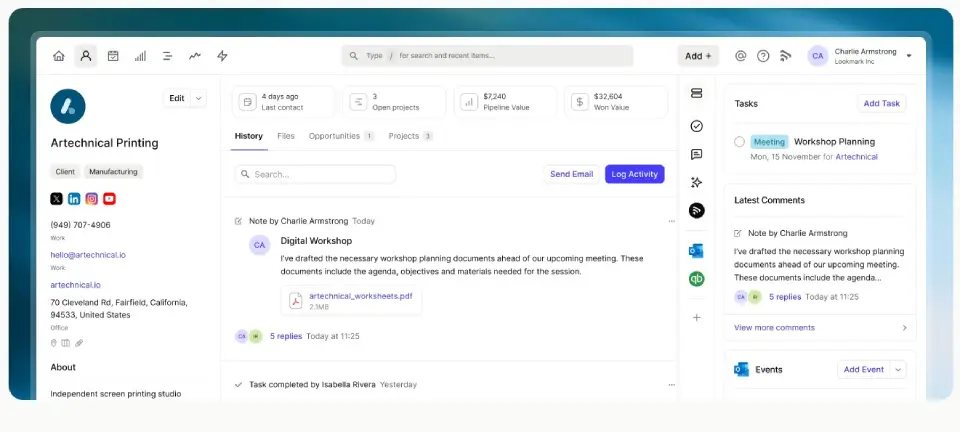
- Store and organize contact records with rich details (email, phone, social, notes)
- Track history of interactions, emails, meetings, and tasks
- Attach files and documents directly to contact profiles
Why it matters:
Good contact management keeps your sales conversations and customer history in one place — reducing context loss and preventing duplicate entries.
This is not a lightweight address book: Capsule’s contact records support activity timelines, custom fields, and segmentation, which are essential for teams that actually sell.
2. Sales Pipeline & Opportunity Tracking
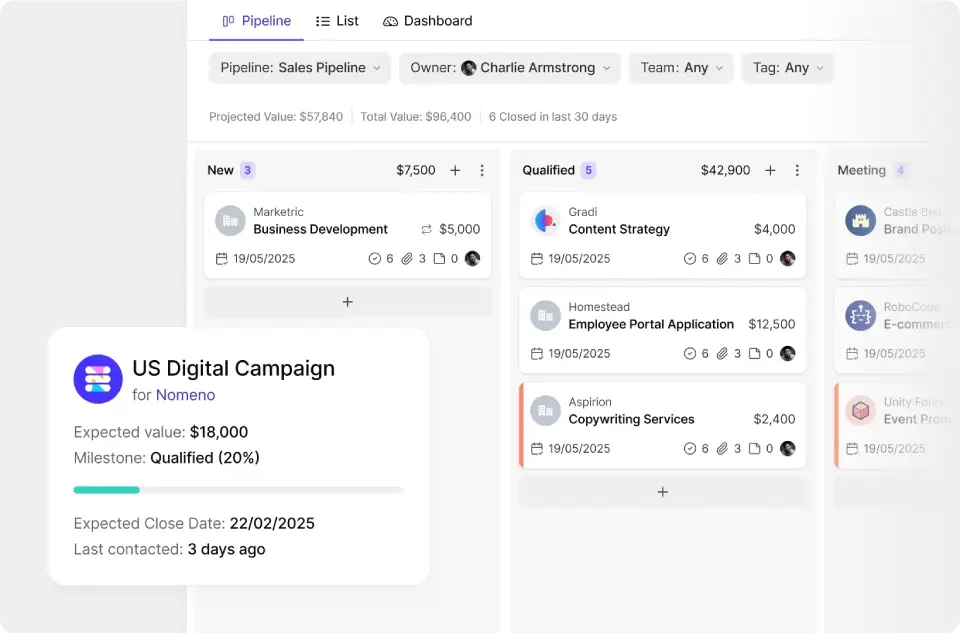
Capsule CRM helps you visualize and manage how deals move through stages.
Key capabilities:
- Customizable sales pipelines
- Drag-and-drop interface to move deals between stages
- Track deal value, expected close dates, and probability
- Forecasting insights without complexity
Practical advantage:
Many teams lose deals simply because they lack visibility. Capsule’s pipeline lets you see where opportunities are stuck and which require attention.
3. Task and Activity Management
Tasks in Capsule are more than reminders — they are action triggers tied to contacts and opportunities.
Included features:
- To-dos associated with contacts or deals
- Email reminders and notifications
- Calendar integration
Real-world benefit:
Sales and support workflows often rely on consistent follow-ups. Capsule helps teams keep tasks in context so nothing slips through the cracks.
4. Email Integration
Capsule integrates directly with your inbox — whether you use Gmail or Outlook.
Capabilities:
- Log emails automatically to contact records
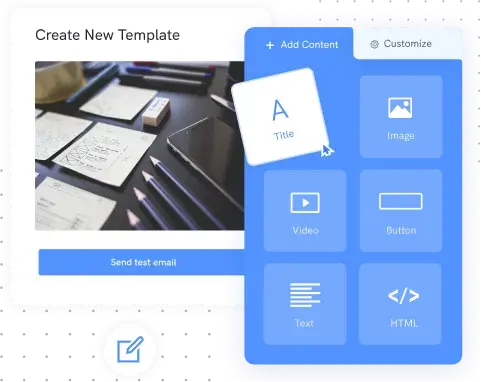
- Use templates to standardize common messages
- See email history inside the CRM
Why this matters:
No one likes switching between apps. When emails are automatically linked to CRM records, your team spends less time on admin and more time on selling.
5. Reporting and Dashboards
Capsule offers lightweight but practical reporting tools.
What’s available:
- Sales performance reports
- Activity reports (calls, meetings, tasks completed)
- Dashboard views of pipeline health and trends
User impact:
Instead of exporting spreadsheets or piecing together data manually, Capsule gives teams quick insights into performance without confusing BI tools.
6. Workflow Automations
Available in higher plans (Growth and above), automation lets teams eliminate repetitive tasks.
Examples:
- Trigger automatic tasks based on deal movement
- Send internal reminders or notifications
- Auto-assign follow-up tasks
Why this helps:
Automation removes busywork, standardizes sales processes, and ensures consistency — especially useful for teams with multiple salespeople.
7. Multiple Pipelines & Project Boards
For teams balancing sales and delivery, Capsule supports multiple pipelines and project boards.
Features:
- Separate boards for different pipelines (e.g., sales vs services)
- Kanban-style project boards for task management
- Visual overview of work in progress
Who benefits:
Consultancies, agencies, and service providers that need CRM + project tracking in one place.
8. Integrations and API
Capsule plays well with other business tools:
Common integrations:
- Gmail & Outlook
- Zapier (connects to hundreds of apps)
- Xero (accounting sync)
- Import2 (data import/exports)
API access is available for custom integrations and advanced workflows.
Real advantage:
Integrations reduce data silos and allow Capsule to become a centralized hub in your tech stack.
9. Mobile App & Accessibility
Capsule’s mobile app offers on-the-go access.
Includes:
- View contacts and pipelines from your phone
- Log activities and update opportunities
- Sync with desktop in real time
Use case:
Field sales, remote teams, and business owners who need CRM access outside the office.
Feature Summary Table
| Feature | Basic | Starter | Growth | Advanced |
|---|---|---|---|---|
| Contact Management | ✓ | ✓ | ✓ | ✓ |
| Sales Pipeline | ✓ | ✓ | ✓ | ✓ |
| Tasks & Activities | ✓ | ✓ | ✓ | ✓ |
| Email Integration | ✓ | ✓ | ✓ | ✓ |
| Reporting | Basic | Basic | Advanced | Advanced |
| Automation | ✓ | ✓ | ||
| Multiple Pipelines | ✓ | ✓ | ||
| Project Boards | ✓ | ✓ | ||
| Enrichment | ✓ | |||
| API & Integrations | ✓ | ✓ | ✓ | ✓ |
| Mobile App | ✓ | ✓ | ✓ | ✓ |
Capsule CRM Pricing Plans (2026 Overview)
One of the reasons Capsule CRM is often recommended for small businesses is its straightforward and predictable pricing. Unlike many CRM platforms that lock essential features behind expensive tiers, Capsule offers clear plans that scale gradually with team size and complexity.
Capsule CRM provides four pricing tiers, with discounts available when billed annually (saving up to ~14%).
| Plan | Price (Annual Billing) | Users | Contact Limit | Best For |
|---|---|---|---|---|
| Free | $0 | Up to 2 | 250 | Solo users, early-stage startups |
| Starter | $18 / user / month | 1–5 | 30,000 | Small teams needing email & reporting |
| Growth | $36 / user / month | Small teams | 60,000 | Sales-focused teams |
| Advanced | $54 / user / month | Larger teams | 120,000 | Growing sales organizations |
All paid plans include a 14-day free trial with no credit card required, which is useful for evaluating fit before committing.
Free Plan: Best for Getting Started
Capsule CRM’s Free plan is genuinely usable, not just a teaser. It covers core CRM fundamentals without forcing an immediate upgrade.
Key inclusions:
- Up to 2 users
- 250 contacts
- 1 sales pipeline
- Activity log & contact history
- Outlook & Gmail add-ins
- Mobile app access
Who it’s good for:
- Freelancers or solo consultants
- Founders testing basic CRM workflows
- Very small teams managing limited contacts
Limitations to note:
- Contact cap is restrictive
- Only one pipeline
- No automation or reporting depth
From practical use, the Free plan works well as a lightweight contact and opportunity tracker, but most businesses will outgrow it quickly.
Starter Plan: Practical CRM for Small Teams
The Starter plan is where Capsule CRM starts to feel like a serious business tool.
Pricing:
- $18 per user per month (billed annually)
What you get:
- 30,000 contacts
- Email templates
- AI email composer
- Shared mailbox support (e.g. sales@, support@)
- Basic reporting
- Premium integrations (Xero, Zendesk, Import2)
- Sales goals tracking
Best suited for:
- Small businesses (1–5 employees)
- Teams handling moderate email outreach
- Companies needing better visibility without heavy automation
In real-world usage, Starter is a solid balance of simplicity and control, especially for businesses that rely on email communication but don’t need advanced workflows yet.
Growth Plan: Designed for Sales Teams
The Growth plan is Capsule CRM’s most popular tier — and for good reason.
Pricing:
- $36 per user per month (billed annually)
Additional features include:
- 60,000 contacts
- Workflow automations
- Advanced sales reporting
- Custom reporting dashboards
- Multiple sales pipelines
- Project boards (kanban-style)
- Team access controls
- Business data enrichment
Best for:
- Small sales teams
- Service-based businesses managing delivery projects
- Teams that need pipeline forecasting and automation
From hands-on experience, this plan significantly improves sales consistency and visibility, especially once automations replace manual follow-ups.
Advanced Plan: Built for Scaling Teams
The Advanced plan targets organizations with larger databases and more structured sales processes.
Pricing:
- $54 per user per month (billed annually)
Includes everything in Growth, plus:
- 120,000 contacts
- Advanced contact enrichment
- Up to 50 project boards
- Deeper contact profiling (job titles, seniority, LinkedIn data)
Ideal for:
- Growing sales teams
- Businesses relying heavily on outbound prospecting
- Teams needing enriched lead data without external tools
At this level, Capsule CRM competes more directly with mid-market CRMs, while still maintaining a cleaner interface than many alternatives.
Ease of Use & User Experience
Interface and Navigation
Capsule CRM’s interface emphasizes simplicity and visual clarity. The left-hand navigation provides quick access to contacts, opportunities, tasks, and reports. The design aesthetic is clean without being sparse, using color coding and icons to enhance usability without creating visual clutter.
New users generally find the interface intuitive, with most core functions accessible within two clicks from the main navigation. The search functionality works effectively for quickly locating specific contacts or deals. However, some users note that the interface can feel somewhat dated compared to newer CRM platforms that leverage more modern design patterns and micro-interactions.
Onboarding and Learning Curve
The onboarding process for Capsule CRM is relatively straightforward. The platform provides guided setup that walks users through importing contacts, configuring their first sales pipeline, and connecting email accounts. Most users can complete basic configuration and begin productive use within a few hours.
The learning curve is gentle compared to enterprise CRM systems. Team members with minimal CRM experience can typically achieve competency within a week of regular use. However, organizations migrating from more feature-rich platforms may find the transition challenging, as they’ll need to adapt processes around Capsule’s more constrained feature set.
Customization and Flexibility
Capsule CRM allows reasonable customization through custom fields, tags, and configurable pipeline stages. Users can define their own data structure within contacts and opportunities, adapting the system to industry-specific terminology and workflows.
However, customization capabilities are limited compared to platforms like Zoho CRM or Salesforce. There’s no visual workflow builder for automation, limited ability to modify page layouts, and no option to create custom modules or objects. Organizations requiring extensive process automation or highly specialized data models may find Capsule insufficiently flexible.
Capsule CRM Pros and Cons
Here’s an honest assessment of Capsule CRM’s strengths and limitations based on firsthand experience and typical real-world use cases. This section helps readers quickly understand whether Capsule CRM fits their business needs.
⭐ Pros (Strengths)
✔ Simple, intuitive interface
Capsule CRM’s user interface is clean, uncluttered, and easy to navigate, which reduces training time and onboarding friction, especially for small teams or non-technical users.
✔ Strong contact management fundamentals
Capsule makes it easy to store, categorize, and track interactions with contacts, including email history and activity logs — essential for any growing business.
✔ Affordable and predictable pricing
Compared with many competitors, Capsule offers transparent pricing with a useful Free plan and scalable tiers, which is attractive for startups and small businesses.
✔ Flexible sales pipelines
Customizable pipelines allow teams to visualize deals and progress stages clearly. Multiple pipelines on higher plans help separate sales from project or service workflows.
✔ Workflow automations (Growth & above)
Automation features reduce manual follow-ups and ensure consistent process execution — a major productivity boost for sales teams.
✔ Useful reporting dashboards
Capsule’s reporting provides actionable insights—pipeline health, task completion, conversion rates—without overwhelming BI complexity.
✔ Integrations and API support
Native support for Gmail/Outlook, Zapier, Xero, Import2, and a public API means Capsule can fit into a larger tech stack without reinventing the wheel.
✔ Mobile accessibility
The mobile app makes it possible for sales reps or business owners to access CRM data on the go, which is helpful for remote teams.
✔ Scales with business needs
The tiers provide a logical progression of features: from essentials (contact mgmt) to automation and advanced reporting without large jumps in cost.
⚠ Cons (Limitations)
✘ Basic reporting compared to advanced tools
Capsule’s reporting, while practical, isn’t as comprehensive as enterprise tools like Salesforce or even some mid-tier CRM competitors. Heavy data analysts may find it limiting.
✘ Contact limits can be restrictive
Capsule restricts the number of contacts by plan. For data-heavy businesses (e.g., large prospect lists or integrated lead sources), this could become an extra cost pressure.
✘ Automation only at higher tiers
Basic plans lack automation, which means teams on Starter may still do repetitive work manually before upgrading.
✘ Some premium features require third-party tools
Advanced enrichment or specialized workflows often need integrations via Zapier or other external tools — adding more subscriptions and integration complexity.
✘ Limited built-in customer support content
While support exists, Capsule’s documentation and knowledge base can be lighter than those of larger CRM vendors, requiring some self-exploration.
✘ Not ideal for enterprise or complex sales
For businesses with highly specialized processes, multiple territories, or complex forecasting needs, Capsule may feel too lightweight.
Summary Table: Pros & Cons
| Pros | Cons |
|---|---|
| Easy to use & quick onboarding | Reporting is functional but not deep |
| Clean interface suitable for SMBs | Contact limits per plan |
| Transparent pricing & Free tier | Automation starts at Growth tier |
| Flexible pipelines | Advanced features sometimes require integrations |
| Useful dashboards | Support documentation could be stronger |
| Integrations & open API | Not built for complex enterprise needs |
| Mobile access |

Capsule CRM vs Competitors
Choosing the right CRM depends on your team’s size, workflows, and priorities. Below, we compare Capsule CRM against three common alternatives: HubSpot CRM, Zoho CRM, and Salesforce — focusing on factors that matter most to small and growing businesses.
Comparison Overview
| Feature / Category | Capsule CRM | HubSpot CRM | Zoho CRM | Salesforce |
|---|---|---|---|---|
| Ease of Use | ⭐⭐⭐⭐ | ⭐⭐⭐ | ⭐⭐⭐⭐ | ⭐⭐ |
| Contact Management | ⭐⭐⭐⭐ | ⭐⭐⭐⭐ | ⭐⭐⭐⭐ | ⭐⭐⭐⭐⭐ |
| Pipeline Customization | ⭐⭐⭐⭐ | ⭐⭐⭐⭐⭐ | ⭐⭐⭐⭐ | ⭐⭐⭐⭐⭐ |
| Automation | ⭐⭐⭐ | ⭐⭐⭐⭐⭐ | ⭐⭐⭐⭐⭐ | ⭐⭐⭐⭐⭐ |
| Reporting | ⭐⭐⭐ | ⭐⭐⭐⭐⭐ | ⭐⭐⭐⭐ | ⭐⭐⭐⭐⭐ |
| Pricing Predictability | ⭐⭐⭐⭐ | ⭐⭐ | ⭐⭐⭐⭐ | ⭐⭐ |
| Best for Small Teams | ✔️ | ✔️ | ✔️ | ❌ |
| Free Plan | ✔️ | ✔️ | ✔️ | Limited** |
| API / Integrations | Good | Excellent | Excellent | Excellent |
| Mobile App | Yes | Yes | Yes | Yes |
⭐ Ratings are relative within small business and mid-market CRM use cases.
Capsule CRM vs HubSpot CRM
Use Case Fit
- Capsule CRM excels when teams want simplicity, clarity, and low-friction workflows.
- HubSpot CRM is ideal for teams wanting advanced marketing, sales, and support tools in one ecosystem.
Key Differences
- Ease of Use: Capsule feels less complex than HubSpot, especially for small teams without a full-time CRM admin.
- Automation & Reporting: HubSpot’s automation and reporting depth are stronger, but also more expensive in paid tiers.
- Pricing: Capsule’s pricing is predictable and modular, while HubSpot can escalate quickly once you add Sales + Marketing hubs.
Real-world perspective
If your goal is to track opportunities and manage contact relationships without heavy configuration, Capsule wins. If you need multi-channel marketing and advanced lead scoring built in, HubSpot may justify the cost.
Capsule CRM vs Zoho CRM
Use Case Fit
- Capsule CRM offers a focused CRM experience with strong pipelines and practical usability.
- Zoho CRM provides a feature-rich suite that scales beyond basic CRM functions — sales, marketing, help desk, and analytics.
Key Differences
- Feature Breadth: Zoho delivers more modules out-of-the-box (e.g., Zia AI assistant, social integrations, advanced forecasting).
- Customization: Zoho wins in custom fields, workflow automation, and role permissions.
- Simplicity: Capsule holds an edge for teams that don’t want the complexity of a bigger suite.
Real-world perspective
If you prefer less training overhead and clear sales execution, Capsule fits well. If your business demands broad automation, territory rules, and deeper sales insights, Zoho may be a better long-term investment.
Capsule CRM vs Salesforce
Use Case Fit
- Salesforce is the market standard for enterprise CRM, advanced analytics, and large teams.
- Capsule CRM is positioned for small and mid-sized businesses, where simplicity and cost matter.
Key Differences
- Depth: Salesforce offers unmatched customization, reporting, AI-driven insights, and enterprise-grade workflows.
- Complexity & Cost: Salesforce implementation often requires admins or consultants. Capsule remains straightforward and lean.
- Deployment Speed: Capsule can be adopted in hours; Salesforce usually takes weeks or months for meaningful setup.
Real-world perspective
For most small sales teams, Salesforce is overkill — both in cost and complexity. Capsule strikes a balance between capability and usability that suits less complex sales processes.
When Capsule CRM Is the Better Choice
Capsule CRM represents the optimal choice for organizations that value simplicity over sophistication, particularly those already invested in Google Workspace. It suits businesses with relatively straightforward sales processes that don’t require complex automation or extensive customization.
The platform works well for teams that struggled with CRM adoption in the past due to system complexity. Its clean interface and gentle learning curve can finally establish CRM discipline in organizations where previous attempts failed due to user resistance.
Security, Privacy & Compliance
Capsule CRM is operated by Zestia Ltd, a UK-based company subject to British and European data protection regulations. The platform maintains GDPR compliance, providing users with data processing agreements and controls necessary for handling European personal data.
Data is encrypted in transit using TLS encryption and at rest using industry-standard encryption protocols. Capsule maintains regular security audits and penetration testing, though it does not currently hold ISO 27001 certification or SOC 2 attestation, which some enterprise buyers may require.
The platform provides user permission controls allowing administrators to restrict access to sensitive information based on team roles. Two-factor authentication is available to enhance account security. Data backup and disaster recovery procedures are in place, though the company’s business continuity documentation is less extensive than enterprise-focused CRM providers.
For most small businesses and startups, Capsule’s security practices are adequate. However, organizations in regulated industries or those handling particularly sensitive data should carefully review the platform’s security documentation and may need to consider enterprise-grade alternatives with more comprehensive compliance certifications.
Customer Support & Learning Resources
Capsule CRM provides customer support through email ticketing, with response times typically within 24 hours for standard inquiries. Higher-tier plans receive priority support with faster response commitments. Phone support is not available on any plan, which may be a limitation for organizations preferring voice communication.
The knowledge base includes articles covering common configuration tasks, feature explanations, and troubleshooting guidance. The documentation is generally clear and well-organized, though less comprehensive than the learning resources provided by larger CRM vendors.
Capsule offers limited formal training or certification programs compared to platforms like Salesforce or HubSpot. Organizations requiring extensive user training may need to develop their own materials or engage third-party consultants, though the platform’s simplicity reduces training requirements compared to more complex alternatives.
The company maintains an active blog with tips for CRM usage and sales best practices, and the user community, while not extensive, provides peer support through forums. Overall, the support ecosystem is adequate for small businesses with basic needs but may feel insufficient for organizations accustomed to enterprise-level service.
Final Verdict: Is Capsule CRM Worth It in 2026?
Capsule CRM successfully delivers on its core promise: providing small businesses with accessible, straightforward CRM functionality without overwhelming complexity or enterprise-level pricing. The platform excels at contact management, pipeline visualization, and Google Workspace integration, making it a sensible choice for organizations seeking to establish basic CRM discipline.
However, Capsule’s deliberate simplicity creates meaningful limitations. Organizations requiring sophisticated automation, advanced reporting, or extensive customization will quickly encounter the platform’s boundaries. The contact limits across pricing tiers can also create unexpected costs as businesses grow.
Who Should Choose Capsule CRM
Capsule CRM is ideal for small businesses with 5 to 50 employees that prioritize ease of use over feature depth. It suits organizations with straightforward sales processes that don’t require complex deal structures or lengthy enterprise sales cycles.
The platform works particularly well for Google Workspace users seeking seamless email integration and teams that have struggled with CRM adoption due to system complexity in the past. Consultancies, professional services firms, and small B2B companies often find Capsule’s feature set appropriately scaled to their needs.
Startups and early-stage companies can leverage the free plan to establish CRM practices before committing to paid software. Organizations valuing data privacy and GDPR compliance may appreciate Capsule’s UK-based operations and privacy-conscious approach.
Who Should Consider Alternatives
Growing businesses anticipating rapid scaling may outgrow Capsule’s capabilities and contact limits relatively quickly. Organizations requiring sophisticated marketing automation should consider integrated platforms like HubSpot that combine CRM and marketing functionality.
Companies with complex sales processes involving multiple stakeholders, lengthy deal cycles, or intricate approval workflows need more robust platforms like Salesforce or Microsoft Dynamics. Businesses requiring extensive customization or workflow automation will find Capsule insufficiently flexible.
Enterprises with strict compliance requirements may need vendors offering ISO 27001 certification or SOC 2 attestation. Organizations preferring phone support or requiring comprehensive training programs should evaluate alternatives with more extensive customer success resources.
In 2026, Capsule CRM remains a solid choice for its target market: small businesses seeking simplicity, affordability, and rapid deployment. It won’t satisfy every CRM use case, but for organizations that align with its design philosophy, it provides genuine value without unnecessary complexity.
FAQs
Is Capsule CRM free?
Yes, Capsule CRM offers a genuinely functional free plan that includes 2 users, 250 contacts, and 2 sales pipelines. This provides real utility for freelancers, very small teams, or organizations testing CRM adoption. However, most growing businesses will eventually need to upgrade to paid plans to access unlimited users and higher contact limits.
Is Capsule CRM good for small businesses?
Capsule CRM is specifically designed for small businesses and excels in this market segment. Its straightforward interface, reasonable pricing, and core feature set align well with small business needs. However, it’s most suitable for organizations with relatively simple sales processes that don’t require extensive automation or complex customization.
What are the main limitations of Capsule CRM?
The primary limitations include restricted automation capabilities, basic reporting functionality, contact limits across pricing tiers, and limited customization options. The platform also lacks built-in marketing automation and may not support complex enterprise sales processes effectively. Organizations requiring sophisticated business intelligence or extensive workflow automation should evaluate more feature-rich alternatives.
Does Capsule CRM integrate with Google Workspace?
Yes, Capsule CRM offers strong Google Workspace integration, including a Gmail sidebar plugin that displays contact information directly within email. The platform can automatically capture email correspondence and synchronize calendar events. This integration is one of Capsule’s key strengths and makes it particularly attractive for Google-centric organizations.
Is Capsule CRM better than HubSpot?
Neither platform is universally better; the optimal choice depends on organizational needs. HubSpot offers more features, particularly marketing automation, and provides unlimited contacts on its free tier. Capsule CRM offers a cleaner, more focused interface and more affordable paid plans. Organizations seeking a simple, dedicated CRM may prefer Capsule, while those wanting integrated marketing and sales capabilities should consider HubSpot.
About the author

I’m Macedona, an independent reviewer covering SaaS platforms, CRM systems, and AI tools. My work focuses on hands-on testing, structured feature analysis, pricing evaluation, and real-world business use cases.
All reviews are created using transparent comparison criteria and are updated regularly to reflect changes in features, pricing, and performance.