
Airtable sits in the middle ground between spreadsheets and full custom software: it gives teams a relational data model (linked records, rollups, views) plus no-code interfaces and automations to run real workflows.
This Airtable Review focuses on what matters in 2026: who actually gets ROI, where seat-based pricing becomes painful, how governance changes your plan choice, and which alternatives are better if you’re PM-first or docs-first.
The analysis reflects implementation patterns and buyer criteria used in operations teams (10–500 users), with plan/security details sourced from Airtable’s official documentation and user sentiment informed by a reputable review aggregator.
Airtable Review 2026 – Quick Verdict
Should you use Airtable in 2026? Yes, if you need flexible, relational databases for diverse workflows (project management, CRM, operations tracking) and can budget $20–$45/user/month. Airtable combines spreadsheet simplicity with database power—no SQL required—and delivers strong automation, custom interfaces, and visual data modeling.
Skip Airtable if you only need basic task management (ClickUp is simpler/cheaper), a wiki/knowledge base (Notion is better for docs), or you’re budget-constrained at scale (seat-based billing hurts beyond 50 users).
Quick Pricing Snapshot: Free plan works for solo users; Team plan at $20/user/month suits small teams (5–10 people); Business plan at $45/user/month is often the practical minimum for advanced governance (e.g., field-level permissions and admin controls); Enterprise Scale (custom pricing) for large orgs with compliance needs.
Best Alternative if Airtable Isn’t Right: Notion (for wiki + simple databases), Monday.com (for visual project management), or Baserow (for self-hosted, cost-conscious teams).
Best For / Not Best For
✅ Airtable Is Best For
- Operations teams building custom workflows (project tracking, event planning, inventory, applicant tracking)
- Cross-functional teams with diverse use cases that need one flexible platform (marketing calendar + CRM + product roadmap)
- Teams needing relational data without SQL — linked records, rollups, lookups in spreadsheet-like interface
- Mid-sized teams (10–500 users) valuing visual interfaces, no-code automation, and iterative development
- Organizations with moderate governance needs willing to pay for Business plan ($45/user) for field permissions and admin controls
❌ Airtable Is Not Best For
- Simple task/project management — Airtable is over-engineered if you just need task lists and Gantt charts (use Asana, ClickUp instead)
- Pure wiki/documentation needs — Notion or Confluence are better for knowledge bases and long-form docs
- Very large datasets — Many teams report performance friction as bases approach high record counts (often tens of thousands+), depending on schema complexity, views, and automations.
- Budget-constrained teams at scale — Seat-based pricing adds up fast (20 editors on Business plan = $10,800/year)
- Heavy reporting/BI needs — Limited native charts and pivot tables; dedicated BI tools (Tableau, Looker) are stronger
Read more: Best CRM For Freelancers 2026: Expert Review & Comparison
What Is Airtable?
Airtable is a low-code platform that combines the flexibility of a spreadsheet with the power of a relational database. Think of it as a visual, no-code way to build custom apps, workflows, and databases without writing SQL or hiring developers.
Core concept: You create “bases” (workspaces) containing “tables” (entities like Contacts, Projects, Tasks) with “fields” (attributes like Name, Due Date, Status) and “records” (rows of data). But unlike Excel or Google Sheets, Airtable lets you link tables together (e.g., link Contacts to Companies to Deals), roll up data across relationships, and automate workflows—all through a point-and-click interface.
Key differentiator: Airtable’s strength is flexibility. It’s not a rigid CRM or PM tool locked into one workflow. You can model project management, lightweight CRM, content calendars, event planning, inventory tracking, product roadmaps, or hiring pipelines in the same platform. This makes it ideal for teams juggling multiple interconnected use cases.
Mental model: Imagine Excel’s grid interface, combined with database relationships (like linking a Contact to their Company), plus Zapier-like automation, plus the ability to build custom dashboards—all without code. That’s Airtable.
What’s new in Airtable in 2026
In 2026, Airtable’s product direction is increasingly “app-first,” not spreadsheet-first. The biggest shift is Airtable’s expanded AI positioning (including Omni concepts shown in official materials) aimed at speeding up base creation, interface generation, and reporting from natural language—useful for onboarding, but still something you’ll want to validate with solid data modeling and governance. I
nterfaces also matter more than ever as teams try to reduce editor seat sprawl by giving stakeholders guided, role-based views. At the same time, buyers are more sensitive to seat-based pricing at scale, which makes permission design, interface strategy, and automation discipline part of the ROI equation—not just features.
Feature availability and limits can change by plan and region—confirm current details on Airtable’s Pricing page and Trust & Security page before purchase.

How We Evaluated Airtable
This review is based on implementation patterns and what consistently matters to buyers making tool decisions in real teams:
Evaluation criteria
- Time-to-value: Can a team build a useful workflow in days—not quarters?
- Adoption: Can non-technical users reliably do the work without breaking the system?
- Governance: Can admins control permissions, sprawl, and data handling?
- Scalability: What breaks at 20 editors vs 200 editors?
- Total cost of ownership: Seat-based pricing + “ops overhead” + tool sprawl risk.
- Integration surface area: Native integrations, automation flexibility, API options.
- Security/compliance fit: Whether Airtable’s published security posture aligns with buyer requirements.
Our lens: This review reflects implementation patterns with teams of 10–500 users, focusing on practical tradeoffs, hidden costs, and real-world edge cases. Pricing and compliance information is sourced directly from Airtable’s official documentation. User sentiment patterns are drawn from G2 reviews.
Airtable Core Features
Bases, Tables, Fields & Records
What it is: The foundation of Airtable. A base is a workspace (think “database”). A table is an entity (Contacts, Projects, Tasks). A field is an attribute (Name, Due Date, Status). A record is a row of data.
Why it matters: Airtable offers 30+ field types, making it far more powerful than Excel. You get single-line text, long text, attachments (images, PDFs), checkboxes, single/multiple select dropdowns, dates, numbers, currency, percent, duration, rating, formulas, rollups, lookups, linked records, barcodes, buttons, and more.
Practical example: Build a CRM base with three tables:
- Contacts (Name, Email, Phone, linked to Companies)
- Companies (Company Name, Industry, Revenue, linked to Contacts and Deals)
- Deals (Deal Name, Value, Stage, Close Date, linked to Companies and Contacts)
Link a Contact to their Company. Roll up total deal value by Company. Filter Deals by Stage to see your pipeline. This relational power—without SQL—is Airtable’s core strength.
Views: Grid, Kanban, Calendar, Gallery, Timeline, Gantt
What it is: Different ways to visualize the same data. Your table holds the records; views let you filter, sort, group, hide fields, and color-code without duplicating data.
Why it matters: One dataset, multiple perspectives. Your sales team sees deals as a Kanban board (by stage). Your exec sees deals on a calendar (by close date). Your ops team sees deals in a grid for bulk editing.
Practical example: Sales pipeline table with views:
- Kanban view grouped by Stage (Lead → Qualified → Proposal → Closed Won)
- Calendar view by Close Date (see which deals close this month)
- Grid view for bulk editing (update multiple deal values at once)
Pro tip: “Personal views” let individuals customize filters/sorts without affecting team views. “Locked views” (Business plan+) prevent users from editing view settings.
Interfaces: Custom Dashboards & Portals
What it is: Airtable’s no-code app builder. Create branded dashboards, client portals, executive reports, or record detail pages without writing code. Drag-and-drop layout builder with chart widgets, metric cards, lists, grids, timelines, calendars, and forms.
Why it matters: Turn raw data into stakeholder-ready views. Build an executive dashboard showing total revenue, deals by stage, and upcoming close dates. Or create a client portal where customers see only their projects (filtered by client name).
Practical example: Marketing dashboard with:
- Metric cards (Total Campaigns, Active Campaigns, Budget Spent)
- Bar chart (Campaigns by Status)
- Timeline (Campaign Schedule)
- Record list (Click a campaign to see details, attachments, tasks)
Plan note: Basic interfaces available on Team plan. Advanced features (custom branding, complex layouts, external sharing) require Business plan+.
Automations
What it is: Trigger-based workflows. When a record matches a condition, Airtable performs an action automatically. Think Zapier, but native to Airtable.
Why it matters: Reduce manual work. When a deal moves to “Closed Won,” automatically create an onboarding task, send a Slack notification to the team, and update a revenue rollup field.
Automation structure:
- Triggers: Record created, record updated, record matches conditions, scheduled time, button clicked, webhook received
- Actions: Update record, create record, send email, send Slack message, run script, call external API (via webhook)
Limits by plan (critical to know):
- Free: 100 automation runs/month
- Team: 25,000 runs/month
- Business: 100,000 runs/month
- Enterprise: 500,000 runs/month
Practical example: Deal automation:
- Trigger: When Deal.Stage = “Closed Won”
- Actions:
- Create record in Onboarding Tasks table
- Send Slack message to #sales-wins channel
- Update Company.Total_Revenue (rollup field)
Gotcha: If you have 1,000 deals closing per month, that’s 3,000 automation runs (3 actions × 1,000 triggers). On Team plan (25k limit), you’re fine. But high-volume workflows can hit limits fast.
Integrations & Sync
What it is: Native integrations with Slack, Google Drive, Jira, Salesforce, Box, Dropbox, and more. Plus support for Zapier, Make (Integromat), and Workato, unlocking 1,000+ apps. Sync is two-way data synchronization between Airtable bases or external sources (Google Sheets, Salesforce, etc.).
Why it matters: Connect Airtable to your existing stack. Send Slack notifications, sync data from Salesforce, attach files from Google Drive, create Jira issues from Airtable records.
API access: Available on all plans (including Free). Rate limits: 5 requests/second/base on standard plans; higher limits on Enterprise.
Practical note: Zapier/Make expand Airtable’s reach dramatically. If Airtable lacks a native integration, Zapier likely has it.
AI Capabilities (Airtable AI / Omni)
What it is: Airtable has announced AI capabilities (branded as “Omni”) designed to generate interfaces, tables, reports, and insights from natural language prompts.
Status as of 2026: Airtable has showcased AI features in official materials, including generating base structures, automations, and dashboards from text descriptions. Implementation is rolling out; check Airtable’s product updates for current availability.
Positioning: Aims to reduce time-to-build for non-technical users by auto-generating base schemas, interface layouts, and workflow automations from plain-English descriptions.
Our take: Promising for onboarding speed—potentially cuts setup time from hours to minutes. However, AI-generated structures still need human review for data modeling best practices and governance.
Governance & Permissions
What it is: Role-based access control, field-level permissions, locked views, admin panel, audit logs, and SSO/SAML authentication.
Why it matters: Without governance, Airtable bases become chaotic—anyone can edit anything. Governance ensures sensitive fields (like revenue, compensation) are locked, views can’t be accidentally broken, and admin has visibility into who changed what.
Plan gating (critical):
- Free/Team plans: Basic permissions only—creator, editor, commenter, read-only at base level
- Business plan: Field-level permissions (lock specific fields to specific users/roles), locked views (prevent editing view settings), interface permissions, admin panel
- Enterprise plan: SAML SSO, audit logs (track all changes), advanced admin controls, elevated API limits
Practical note: If you need governance—and you will once you hit 10+ users or handle sensitive data—you need the Business plan at $45/user. This is a hidden cost many buyers miss.
Airtable Pricing & Plans
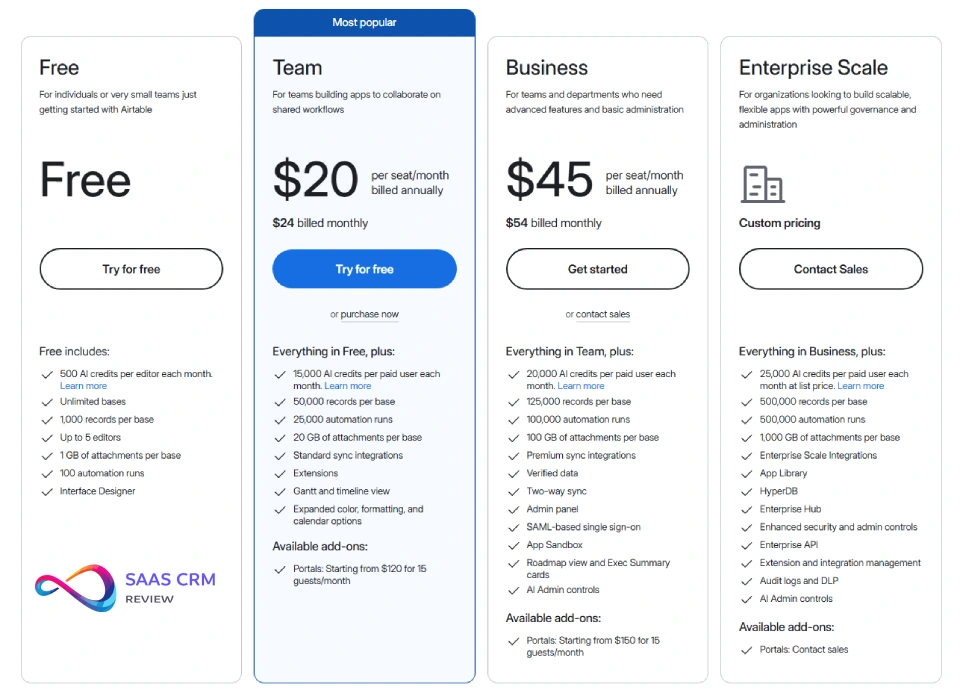
Airtable uses seat-based billing: you pay per user with edit permissions. According to Airtable’s official pricing page, the plans break down as follows:
| Plan | Price (Annual Billing) | Records/Base | Attachments | Automations/Month | Key Features |
|---|---|---|---|---|---|
| Free | $0 | 1,000 | 1 GB total | 100 | Unlimited bases, 2-week revision history, basic views |
| Team | $20/user/month | 50,000 | 20 GB/user | 25,000 | Standard integrations, Gantt/timeline views, 6-month revision history |
| Business | $45/user/month | 125,000 | 100 GB/user | 100,000 | Field permissions, admin panel, interface design, 3-year revision history |
| Enterprise Scale | Custom pricing | 500,000 | 1 TB/user | 500,000 | SAML SSO, audit logs, dedicated support, SLAs, enterprise API limits |
Source: Per Airtable’s official pricing page.
How Seat-Based Billing Works
You pay for users with edit permissions (“creators” or “editors”). According to Airtable’s pricing FAQ, seat billing applies to users with edit permissions; read-only collaborators, form submitters, and shared view/interface links generally aren’t charged.
Key distinction:
- Editors (paid seat): Can create, edit, delete records and fields
- Commenters (paid seat on some plans): Can comment on records, limited editing
- Read-only users (free): Can view records, but not edit
- Interface viewers (free): Can view published interfaces without base access
- Form submitters (free): Submit form responses without base access
Gotcha: Determining “who needs editor access” is harder than it sounds. You’ll likely need more editor seats than you initially estimate (budget for 20–30% growth).
Pricing Reality Check: What Will You Actually Pay?
List prices tell part of the story. Here’s what Airtable costs in real scenarios:
| Scenario | Users (Editors) | Plan | Monthly Cost (Annual) | Annual Total |
|---|---|---|---|---|
| Solo user, testing | 1 editor | Free | $0 | $0 |
| Small startup team | 5 editors | Team | $100 | $1,200 |
| Growing operations team | 15 editors | Team | $300 | $3,600 |
| Mid-size w/ governance needs | 15 editors | Business | $675 | $8,100 |
| Enterprise w/ SSO + compliance | 50 editors | Enterprise | Custom (~$1,500+/month) | Custom (~$18,000+) |
Prices vary by monthly vs annual billing. Verify current rates.
Hidden Costs & Scaling Friction
- Advanced governance often requires the Business plan
Field permissions, locked views, and admin panel are only available on Business plan at $45/user. If you’re on Team plan and need to restrict who can edit “Revenue” or “Compensation” fields, you must upgrade. For 10 users, that’s an extra $250/month ($3,000/year). - Seat Growth Is Inevitable
You start with 5 editors. Marketing wants access. Then sales. Then customer success. Soon you’re at 20 editors = 4x original cost. Budget for 20–30% more editor seats than your initial headcount. - Automation Run Limits
High-volume workflows hit automation caps fast. If you automate 1,000 deal updates/month with 3 actions each, that’s 3,000 runs. Team plan (25k limit) is fine, but growth could force Business plan upgrade (100k limit). - API Rate Limits
Airtable enforces per-base API rate limits on standard plans; confirm current limits in Airtable’s API documentation. - Attachment Storage
Team plan = 20 GB/user; Business = 100 GB/user. If your team uploads lots of images, PDFs, or videos, you’ll hit storage limits. Deleting old attachments is manual. - Training & Onboarding Time
Airtable’s learning curve is non-trivial. Budget 1–2 weeks for team proficiency and ongoing support for new users. This is a hidden cost in admin/power user time.
Recommendation: If you have >10 users or any governance needs, budget for Business plan ($45/user). Assume 20–30% more total editor seats than initial estimate. For a 15-person team with governance, expect $8,100–$10,000/year.

Airtable Pros & Cons
✅ Pros (Non-Generic)
- Unmatched Flexibility for Diverse Workflows
Airtable isn’t locked into “project management” or “CRM.” You can model project tracking, lightweight CRM, content calendars, event planning, inventory, applicant tracking, and product roadmaps in one platform. This flexibility reduces tool sprawl. - Relational Database Power Without SQL
Linked records, rollups, and lookups give you relational database capabilities (like joining tables in SQL) through a visual, spreadsheet-like interface. Non-technical users can build complex data models without writing code. - Visual Interfaces for Stakeholders
Build custom dashboards, client portals, and executive reports without developers. Drag-and-drop layout builder turns raw data into polished, stakeholder-ready views. - Strong Native Automation
Trigger-based workflows (similar to Zapier, but native) reduce manual work. Automate record creation, notifications, status updates, and API calls based on field changes—no third-party tool required. - Rich Field Types
30+ field types (attachments, barcodes, formulas, durations, ratings, linked records, rollups, lookups) mean fewer workarounds. You’re not hacking Excel formulas to simulate relationships. - Integration Ecosystem
Native integrations (Slack, Jira, Salesforce) plus Zapier/Make support unlock 1,000+ apps. API access on all plans (including Free) enables custom integrations. - Iterative, Low-Code Development
Start simple (a few tables and views), then add complexity as needs evolve (automations, interfaces, advanced formulas). You’re not locked into rigid workflows from day one.
❌ Cons (Non-Generic)
- Cost Adds Up Fast at Scale
Seat-based pricing hurts beyond 20 editors. A 50-person team on Business plan = $27,000/year. Budget-conscious teams find this prohibitive compared to per-base or flat-rate alternatives. - Learning Curve for Governance & Advanced Features
Building linked records, rollups, automations, and interfaces requires conceptual understanding (relational thinking, trigger logic, layout design). Non-technical admins need training—1–2 weeks for proficiency. - Performance Degrades with Large Datasets
Airtable slows down beyond 100,000 records per base. Loading views, running automations, and filtering large datasets can lag. It’s not built for big data or analytical warehouses. - Limited Native Reporting & Analytics
No pivot tables. Limited chart types (bar, line, pie). For heavy BI needs (multi-dimensional analysis, advanced visualizations), you need external tools (Tableau, Looker, Power BI) or Airtable extensions. - Seat Billing Creates Friction
Determining “who needs editor access” vs. “commenter” vs. “read-only” confuses buyers. Airtable’s pricing FAQ clarifies, but in practice, teams over-provision editor seats to avoid access issues. - Not Ideal for Simple Project Management
If you just need task lists, Gantt charts, and sprints, Airtable is over-engineered. Dedicated PM tools (Asana, ClickUp, Monday.com) are simpler and cheaper for pure PM use cases. - Vendor Lock-In Risk
Airtable is proprietary. Exporting bases with automations, interfaces, and linked records to another platform is non-trivial. You’re betting on Airtable’s long-term viability and pricing stability.
Read our full: Nuclino Review 2026: Features, Pricing, Pros & Cons
Security & Compliance
Airtable publishes enterprise-aligned security/compliance attestations; confirm fit against your specific regulatory and contractual requirements, making it viable for regulated industries (with caveats).
Certifications (per Airtable’s Trust & Security page):
- SOC 2 Type 2: Third-party audit of security controls
- ISO/IEC 27001:2022: International standard for information security management
- ISO/IEC 27701:2019: Privacy information management
- HIPAA: Airtable’s Trust & Security page references HIPAA; check documentation for Business Associate Agreement (BAA) availability if you’re handling protected health information (PHI)
Security features:
- Encryption at rest and in transit (TLS 1.2+)
- Two-factor authentication (2FA) for all users
- SSO/SAML authentication (Enterprise plan only)
- Audit logs (Enterprise plan only)
- Field-level permissions (Business plan+)
- IP allowlisting (Enterprise plan)
Governance controls:
- Role-based access (creator, editor, commenter, read-only)
- Field-level permissions (Business+): Restrict edit access to specific fields by user/role
- Locked views (Business+): Prevent users from editing view filters/sorts
- Admin panel (Business+): Centralized user management, base permissions, activity monitoring
Compliance considerations:
- GDPR: Airtable supports data processing agreements; you control data residency settings
- HIPAA: Verify BAA availability if you’re subject to HIPAA (typically requires Enterprise plan)
- Data residency: Check Airtable’s documentation for regional data storage options (US, EU)
Our take: Airtable’s certifications (SOC 2, ISO 27001/27701) satisfy most enterprise buyers. If you need HIPAA compliance, confirm BAA availability (likely Enterprise plan). For highly regulated environments (finance, healthcare), verify compliance requirements with Airtable’s sales/security teams before committing.
Common Mistakes & How to Avoid Them
Airtable’s flexibility is also its danger—teams over-engineer, ignore governance, or treat it like Excel. Here’s what goes wrong and how to avoid it:
- Over-Engineering Bases
Mistake: Trying to build a full ERP or data warehouse in Airtable. Creating 30 tables with complex automations for a use case that needs 5 tables.
Fix: Start small. Build 1–2 use cases first (e.g., project tracker + CRM). Add complexity only when you hit limitations. Airtable is iterative—don’t try to model everything upfront. - Ignoring Governance from Day One
Mistake: Letting everyone edit everything. No field permissions, no locked views, no naming conventions. Chaos ensues at scale.
Fix: Set governance early—even on Team plan. Establish naming conventions (e.g.,Contact_Name,Deal_Value). Use locked views to prevent accidental edits. Upgrade to Business plan once you need field permissions (≥10 users or sensitive data). - Poor Naming Conventions
Mistake: Using generic field names like “Name,” “Date,” “Status” across multiple tables → ambiguity when linking tables or building automations.
Fix: Use descriptive, prefixed names:Contact_Name,Company_Name,Deal_CloseDate,Project_Status. Future-you (and your teammates) will thank you. - Not Planning for Scale
Mistake: Designing for 5 users, then hitting governance/storage/automation limits when you reach 20 users.
Fix: Assume 2x user growth in first year. Choose Business plan if you’ll need field permissions, advanced interfaces, or higher automation limits. Design data models to handle 10x records (if you have 100 records today, plan for 1,000). - Treating Airtable Like Excel
Mistake: Building flat tables with duplicate data instead of using linked records. Missing the relational power that makes Airtable valuable.
Fix: Learn linked records early. Instead of repeating “Company Name” in every Contact record, create a Companies table and link Contacts → Companies. Use rollups to aggregate data (e.g., total deal value per company). - Skipping Training & Onboarding
Mistake: Assuming “it’s just a spreadsheet, anyone can use it.” Users make mistakes (delete fields, break views, create duplicate records) without training.
Fix: Run a 1-hour onboarding session. Cover: table structure, views, linked records, permissions. Create a “Getting Started” guide in your base. Designate power users for ongoing support. - Underestimating Automation Complexity
Mistake: Building complex trigger logic (“if Stage = X AND Close Date < Today AND Owner ≠ Y, then…”) without testing. Automations fire unexpectedly or fail silently.
Fix: Test automations on sample records before going live. Use Airtable’s automation run history to debug. Start with simple triggers (record created, field updated), then add conditional logic. - Mixing Unrelated Use Cases in One Base
Mistake: Cramming CRM + project management + inventory tracking into one base because “it’s one workspace.” Data models become tangled.
Fix: Separate unrelated use cases into separate bases. Use Airtable Sync if you need to share data across bases (e.g., sync Contacts from CRM base to Project base).
How to avoid these mistakes: Pilot Airtable with 1–2 use cases. Document workflows and data models. Train power users (base owners, admins) deeply—1–2 weeks of hands-on practice. Establish governance roles and naming conventions from day one. Review base health monthly (record counts, automation runs, user activity).
Implementation Checklist
If you decide to implement Airtable, follow this checklist to set yourself up for success:
Pre-Launch (Planning Phase)
- Define use case(s) and success metrics
What workflows are you replacing? How will you measure success (time saved, error reduction, user adoption)? - Map data model
What entities (tables) do you need? (Contacts, Companies, Deals, Projects, Tasks, etc.)
What relationships exist? (Contacts → Companies, Deals → Companies, Tasks → Projects)
What are the key fields? (Name, Email, Deal Value, Close Date, Status, etc.) - Identify roles and permissions
Who needs edit access (editors)? Who needs view-only (read-only)? Who are the base owners/admins? - Establish naming conventions
Define field naming rules (Contact_Name,Deal_CloseDate) and table naming rules (Contacts,Companies,Deals). - Choose the right plan
Free for solo users; Team ($20/user) for small teams (≤10); Business ($45/user) if you need advanced governance controls like field-level permissions and centralized admin tools.; Enterprise for SSO/audit logs/compliance.
Build Phase
- Create base structure
Build tables, add fields (use appropriate field types: single-line text, linked records, dates, formulas, etc.), add sample records for testing. - Set up linked records and relationships
Link Contacts to Companies, Deals to Companies/Contacts, Tasks to Projects. Test rollups (e.g., total deal value per company) and lookups (e.g., Company Industry from Contact record). - Build views
Create grid, kanban, calendar, timeline, Gantt views as needed. Configure filters, sorts, grouping, color-coding. Lock views (Business plan) if you want to prevent edits. - Design interfaces
Build dashboards (metric cards, charts, record lists), portals (client-facing views), or record detail pages. Test on desktop and mobile. - Configure automations
Identify trigger events (record created, field updated, scheduled time). Define actions (update record, send email, Slack notification, create related record). Test with sample data before enabling. - Set permissions
Assign users to roles (creator, editor, commenter, read-only). Configure field-level permissions (Business plan): lock sensitive fields (Revenue, Compensation). Set interface access controls.
Launch & Governance
- Train users
Run live demo (1 hour): show table structure, views, linked records, how to filter/sort, how to submit forms.
Create documentation (getting started guide, FAQs, video walkthroughs). Offer office hours for Q&A. - Pilot with core team
Run pilot for 2–4 weeks with 5–10 early adopters. Gather feedback: What’s confusing? What’s missing? What automations would help? - Iterate based on feedback
Adjust views, add fields, refine automations, improve interface layouts. Don’t try to be perfect upfront—Airtable is iterative. - Monitor usage
Track automation run counts (are you approaching limits?), record growth (will you hit 50k/base on Team plan?), seat expansion (how many new editors do you need?). - Establish support process
Who owns base maintenance? (Power user, admin, ops lead?)
How do users request new fields, views, or automations? (Slack channel, form, email?)
Who troubleshoots errors? (Broken automations, permission issues, data quality problems?) - Review quarterly
Are you outgrowing plan limits? (Records, automations, storage?)
Do you need Business plan for governance? Enterprise for SSO/compliance?
Are you paying for unused seats? Can you consolidate bases to reduce complexity?
Airtable Alternatives & Comparisons
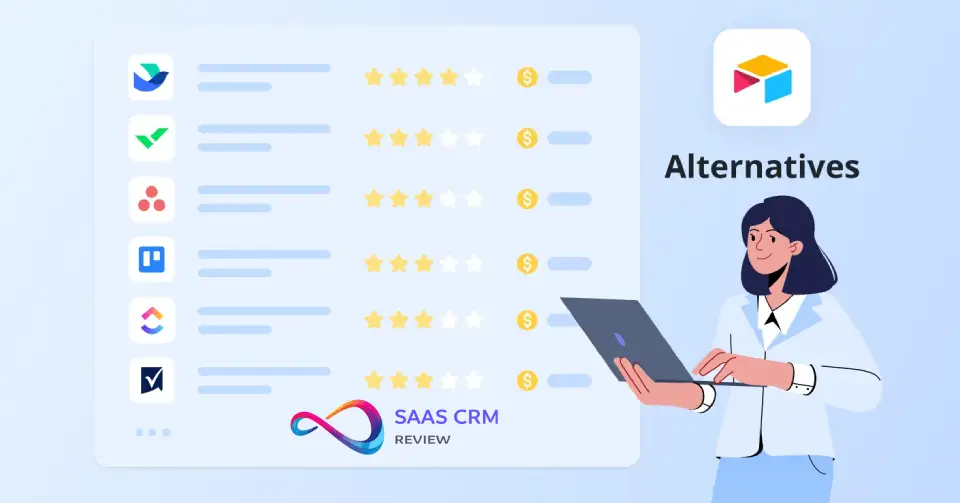
Airtable isn’t the only flexible database/workflow tool. Here’s how it stacks up against top alternatives:
Comparison Table
| Alternative | Starting Price | Primary Use Case | Best For | Skip If |
|---|---|---|---|---|
| Notion | Free; $10/user (Plus) | Wiki + lightweight databases | Document-heavy teams, knowledge management, simpler relational needs | You need advanced relational power, complex automations, or large datasets |
| Monday.com | $9/user (Basic) | Visual work OS, project management | PM-first teams, visual boards, timeline tracking, out-of-box templates | You need flexible data modeling beyond PM workflows |
| Smartsheet | $9/user (Pro) | Enterprise grid-based project management | Excel power users, enterprise PM with governance, resource management | You want modern UX, no-code simplicity, or doc-centric workflows |
| ClickUp | Free; $7/user (Unlimited) | All-in-one project management | Dedicated PM tool with tasks, docs, goals, sprints, time tracking | You need database flexibility, custom data models, or CRM-like use cases |
| Coda | Free; $12/user (Pro) | Docs + apps hybrid | Document-centric workflows with embedded apps/tables, writing-first teams | You prefer table-first over doc-first, or need mature automation ecosystem |
| Baserow | Free (self-hosted); $5/user (cloud) | Open-source Airtable alternative | Self-hosted needs, cost-conscious teams, developer-led orgs | You need enterprise support, mature integrations, or non-technical user simplicity |
| NocoDB | Free (self-hosted) | Open-source no-code database | Developer teams, self-hosted, MySQL/PostgreSQL front-end | You need SaaS simplicity, polished UX, or non-technical user onboarding |
When to Choose Each Alternative
Choose Notion if:
- Your primary need is a wiki/knowledge base, and databases are secondary
- Document collaboration (long-form docs, meeting notes, SOPs) is the core workflow
- Team is <50 users, budget-conscious ($10/user vs. Airtable’s $20/user)
- You value simplicity over relational complexity (Notion databases are less powerful but easier to learn)
- You want one tool for docs + lightweight project tracking
Why skip Notion: If you need advanced relational power (rollups, complex lookups, many-to-many relationships), robust automations (Notion’s are limited), or you’re managing 10,000+ records (Notion databases slow down), stick with Airtable.
- Project management is your core need, not general-purpose database flexibility
- Visual boards, timelines, Gantt charts, and resource management are critical
- You want PM-first UI with strong out-of-box templates (instead of building from scratch)
- You prefer visual work OS over spreadsheet-style data modeling
- Team is 10–200, focused on PM/operations
Why skip Monday.com: If you need flexible data models beyond PM (e.g., CRM, inventory, content calendars with custom schemas), or you need deep relational logic, Airtable is more flexible.
- Your team is Excel-native and wants familiar grid-based interface
- You need enterprise PM + program management with robust governance (resource management, portfolio views, reporting)
- Grid-based workflow is non-negotiable (you don’t want to rethink data modeling)
- Enterprise context: 100–10,000+ users, compliance, SSO, advanced admin controls
- You need strong MS Project / Excel migration path
Why skip Smartsheet: If you want modern UX, no-code interface building, or you’re a startup/SMB (Smartsheet skews enterprise), Airtable is more approachable and visually polished.
- You want an all-in-one PM tool (tasks, sprints, goals, docs, time tracking, dashboards) without needing multiple tools
- Dedicated PM features (Gantt, kanban, list, calendar, workload view) matter more than flexible data modeling
- You need cheaper pricing ($7/user Unlimited vs. Airtable’s $20/user Team)
- Pure PM use case—no need for CRM, inventory, or custom database schemas
- Team is 5–500, PM/product-focused
Why skip ClickUp: If you need flexible, relational databases for diverse use cases (CRM, ops tracking, content planning), or you want powerful custom interfaces, Airtable is more adaptable.
- Your workflows are document-centric: memos, reports, wikis with embedded tables/apps
- You prefer writing-first UX (docs with embedded data) over table-first (Airtable)
- You want docs + lightweight databases in one tool (like Notion, but with stronger automation)
- Team is <100, values collaboration on written content
- You need formula-driven apps (Coda’s formula language is powerful)
Why skip Coda: If your primary need is table-first relational databases (not docs with tables), or you need mature integrations/automation ecosystem, Airtable is more robust.
Choose Baserow or NocoDB if:
- You need self-hosted, open-source solution (data sovereignty, compliance, avoid vendor lock-in)
- Budget is extremely tight (self-hosted = free; cloud hosting = $5/user for Baserow)
- Developer-led team comfortable managing infrastructure (Docker, PostgreSQL, MySQL)
- You want Airtable-like features without paying Airtable prices
- You need to integrate with existing databases (NocoDB can front-end MySQL/PostgreSQL)
Why skip Baserow/NocoDB: If you need SaaS simplicity (no server management), polished UX (open-source tools lag in UI polish), enterprise support, or you’re non-technical, Airtable is more mature and user-friendly.
Stick with Airtable if:
- You need flexible, relational databases for diverse, interconnected workflows (PM, CRM, ops, content, etc.)
- No-code automation + custom interfaces are critical (reduce developer dependency)
- You value visual data modeling + spreadsheet UX (easier than SQL for non-technical users)
- Budget supports $20–$45/user/month (Team or Business plan)
- Team size is 10–500 (Airtable’s sweet spot—too complex for <10, too expensive for 500+)
- You want iterative development (start simple, add complexity as needs evolve)
Decision Framework: Is Airtable Right for You?
Use this scorecard to decide if Airtable fits your needs. Score each criterion 1–5 (1 = low/no, 5 = high/yes). Total >18 = Airtable likely fits; <12 = consider alternatives.
| Criteria | Your Score (1–5) | Guidance |
|---|---|---|
| Flexible data modeling needs | ___ | 5 = diverse use cases (CRM + PM + ops + content); 1 = single-purpose PM |
| Relational complexity required | ___ | 5 = need linked records, rollups, lookups, many-to-many relationships; 1 = flat data (simple lists) |
| Automation requirements | ___ | 5 = complex workflows (trigger-based actions, multi-step automations); 1 = manual processes are fine |
| Budget for $20–$45/user/month | ___ | 5 = yes, affordable and approved; 1 = budget-constrained, need cheaper or free options |
| Team tech-savviness | ___ | 5 = comfortable with low-code tools, relational thinking; 1 = prefer simple task lists (Asana-like) |
| Governance needs | ___ | 5 = field permissions, audit logs, locked views critical (sensitive data, compliance); 1 = open collaboration, no restrictions |
Interpretation:
- 20–30 points: Airtable is a strong fit. You need flexible, relational databases with automation and custom interfaces. Budget supports it. Team can learn it. Move forward with Team or Business plan (choose Business if governance = score 4–5).
- 12–19 points: Consider alternatives. You may be better served by:
- Monday.com if PM is primary use case (score high on PM, low on flexible data modeling)
- Notion if you need wiki/docs first, simpler databases (score low on relational complexity, high on budget constraints)
- Smartsheet if you’re Excel-native, enterprise PM context (score high on governance, low on modern UX)
- <12 points: Skip Airtable. Use simpler/cheaper tools:
- ClickUp or Asana for pure PM (if you scored low on flexible data modeling, relational needs)
- Google Sheets for flat data, simple tracking (if you scored low on automation, relational needs)
- Baserow for self-hosted, cost-conscious teams (if you scored low on budget, high on tech-savviness)
Alternative: Decision Tree
- Do you need flexible databases for multiple, diverse use cases?
- Yes → Continue
- No → Use dedicated tool (Monday.com for PM, Notion for wiki, ClickUp for all-in-one PM)
- Do you need relational data (linked records, rollups, lookups)?
- Yes → Continue
- No → Google Sheets or simple PM tool (Asana, Trello) may suffice
- Can you budget $20–$45/user/month?
- Yes → Continue
- No → Try Notion ($10/user, simpler), Baserow (self-hosted, free), or ClickUp ($7/user, PM-focused)
- Do you need governance (field permissions, locked views, admin controls)?
- Yes → Choose Business plan ($45/user) or consider Smartsheet (enterprise PM with strong governance)
- No → Team plan ($20/user) works
- Is your team comfortable with low-code tools (learning curve 1–2 weeks)?
- Yes → Airtable is a strong fit
- No → Consider simpler tools (Notion, Monday.com) or invest in Airtable training (1-hour onboarding + ongoing support)
Airtable Review 2026 – FAQ
Is Airtable worth it in 2026?
Answer: Yes, if you need flexible, relational databases for diverse workflows (project management, CRM, operations tracking) and can budget $20–$45/user/month. Skip if you need simple task management (ClickUp is simpler and cheaper) or are budget-constrained at scale.
Detail: Airtable’s strength is flexibility + relational power without SQL. It’s worth it for teams of 10–500 with multiple interconnected workflows (e.g., marketing calendar + CRM + product roadmap in one platform). Not worth it if you only need basic task lists, or you have <5 users and limited budget.
What is Airtable best used for?
Answer: Operations workflows, lightweight CRM, project tracking, content calendars, event planning, applicant tracking systems (ATS), product roadmaps, inventory management, and any use case needing relational data + custom views + workflow automation.
Detail: Airtable shines when you need to model relationships (e.g., Contacts → Companies → Deals), automate workflows (e.g., when Deal stage changes, trigger Slack notification + create onboarding task), and build custom dashboards for stakeholders. It’s ideal for ops-heavy teams needing more flexibility than rigid PM tools offer, but less complexity than building custom databases.
How much does Airtable cost for a team?
Answer: $20/user/month (Team plan, annual billing) or $45/user/month (Business plan, annual billing). A 10-person team pays $200–$450/month ($2,400–$5,400/year). Enterprise Scale is custom pricing.
Detail: Free plan works for solo users (1,000 records/base, 100 automations/month). Team plan ($20/user) suits small teams (5–15 users). Business plan ($45/user) required for governance (field permissions, admin panel, advanced interfaces). Read-only users and form submitters typically aren’t billed—only editors pay.
What are Airtable’s main competitors?
Answer: Notion (wiki + lightweight databases), Monday.com (visual work OS / PM), Smartsheet (enterprise grid-based PM), ClickUp (all-in-one PM), Coda (docs + apps hybrid), and open-source alternatives (Baserow, NocoDB).
Detail: Notion is closest for flexible workspaces but weaker on relational power and automations. Monday.com is PM-first (less flexible for custom data models). Smartsheet is enterprise PM (grid-based, Excel-like). ClickUp is dedicated PM tool (cheaper, but less database flexibility). Baserow/NocoDB are self-hosted Airtable clones (free, but require infrastructure management).
Is Airtable secure and compliant?
Answer: Yes—Airtable maintains SOC 2 Type 2, ISO/IEC 27001:2022, and ISO/IEC 27701:2019 certifications. Airtable’s Trust & Security page also references HIPAA information. Enterprise plan adds SAML SSO and audit logs.
Detail: Airtable meets standard enterprise security requirements: encryption at rest and in transit, two-factor authentication (2FA), role-based access control. Business plan adds field-level permissions and locked views. Enterprise plan adds SAML SSO, audit logs, and IP allowlisting. For HIPAA compliance, verify Business Associate Agreement (BAA) availability (typically Enterprise plan). Check Airtable’s documentation for data residency options (US, EU).
Source: Per Airtable’s Trust & Security page.
Can Airtable replace a CRM?
Answer: Yes, for lightweight CRM needs (SMBs, startups, <1,000 active contacts, simple sales pipelines). No, if you need advanced sales automation, revenue forecasting, lead scoring, or enterprise-grade analytics (use Salesforce, HubSpot, Pipedrive instead).
Detail: Airtable works well for contact management, deal pipelines, activity tracking, and custom CRM workflows (e.g., linking Contacts → Companies → Deals + automating follow-ups). It lacks native email sequencing, lead scoring, and revenue forecasting found in dedicated CRMs. Best for ops-heavy teams needing custom workflows beyond standard CRM templates.
Is Airtable better than Notion?
Answer: Airtable is better for relational databases, complex automations, and data modeling. Notion is better for wikis, long-form documents, and simpler databases. Choose based on primary need: database-first (Airtable) vs. doc-first (Notion).
Detail: Airtable = database platform with linked records, rollups, interfaces, robust automations. Notion = wiki/docs platform with lightweight databases. If relational power, automation, and visual data modeling matter, choose Airtable. If knowledge base + simple tables suffice, choose Notion (also cheaper: $10/user vs. Airtable’s $20/user).
Does Airtable have a free plan?
Answer: Yes—unlimited bases, 1,000 records/base, 1 GB attachments total, 100 automation runs/month, 2-week revision history. Good for solo users, testing, and small personal projects. Upgrade to Team ($20/user) for team collaboration and higher limits.
Detail: Free plan is generous for 1–2 users learning Airtable or managing personal projects (reading lists, wedding planning, small inventories). But it limits records (1,000/base), automations (100/month), and lacks advanced features (field permissions, custom interfaces, admin panel, extended revision history). For teams of 3+, Team plan is minimum.
What are the limitations of Airtable’s free plan?
Answer: 1,000 records/base, 1 GB attachments total (not per user), 100 automation runs/month, 2-week revision history, no field-level permissions, no advanced interfaces, no admin panel, no SSO.
Detail: Free plan works for solo users and small personal projects, but doesn’t scale for teams. Team plan ($20/user) raises limits to 50,000 records/base, 20 GB attachments/user, 25,000 automations/month, and 6-month revision history. Business plan ($45/user) adds governance (field permissions, locked views, admin panel) and advanced interfaces.
What is the learning curve for Airtable?
Answer: Moderate—1–2 hours to build basic tables and views; 1–2 weeks to master linked records, automations, and interfaces. More complex than spreadsheets (Excel, Google Sheets), but easier than SQL databases.
Detail: Non-technical users grasp Airtable basics quickly (grid view looks like Excel). Relational concepts (linked records, rollups, lookups), formula fields, automations (trigger logic, conditional actions), and interface design require conceptual learning. Budget 1–2 weeks for team proficiency. Power users (base owners, admins) need deeper training on data modeling and automation architecture.
Can non-technical users use Airtable?
Answer: Yes, with training. Grid view feels like Excel, so basic data entry is intuitive. But linked records, formulas, and automations require conceptual learning (relational thinking, trigger logic).
Detail: Marketing, operations, HR, and sales teams successfully use Airtable without coding. However, expect a 1–2 week learning curve for non-technical users. Power users (who design bases, build automations, create interfaces) need deeper training—hands-on practice with relational concepts, formula syntax, and automation debugging. Not as simple as Google Sheets, but more approachable than building SQL databases.
What are common Airtable mistakes?
Answer: Over-engineering bases, ignoring governance early, poor naming conventions, not planning for scale, treating Airtable like Excel (flat tables instead of linked records), skipping training, underestimating automation complexity, and mixing unrelated use cases in one base.
Detail: Avoid these by starting small (1–2 use cases), setting field permissions + locked views from day one, using consistent naming (Contact_Name, not Name), designing for 2x user growth, training users on relational concepts, testing automations before deploying, and separating unrelated workflows into distinct bases.
When should you not use Airtable?
Answer: Skip Airtable for simple task/project management (use Asana, ClickUp instead), pure wiki/documentation needs (Notion, Confluence are better), very large datasets (100,000+ records per base), heavy reporting/BI needs (use Tableau, Looker), or if you’re extremely budget-constrained at scale (50+ editors = $12,000–$27,000/year).
Detail: Airtable is over-engineered for basic task lists. It’s not a BI tool—limited chart types, no pivot tables. Performance degrades with 100k+ records in a single base. Seat-based pricing hurts at 50+ users (better to use flat-rate or per-base pricing tools). Choose specialized tools for those needs.
Does Airtable integrate with Slack and Zapier?
Answer: Yes—native Slack integration (send notifications, create records from Slack messages). Zapier, Make (Integromat), and Workato supported (connect to 1,000+ apps). API available on all plans (including Free).
Detail: Slack integration automates notifications (e.g., when a deal closes, send message to #sales channel) and record creation (create Airtable record from Slack form). Zapier/Make connect Airtable to Gmail, Google Sheets, HubSpot, Salesforce, Trello, etc. API enables custom integrations. API rate limits: 5 requests/second/base on standard plans; higher on Enterprise.
What is Airtable’s data limit?
Answer: Varies by plan—1,000 records/base (Free), 50,000 (Team), 125,000 (Business), 500,000 (Enterprise). Attachment storage: 1 GB total (Free), 20 GB/user (Team), 100 GB/user (Business), 1 TB/user (Enterprise).
Detail: Record limits are per base (not per workspace). If you have 5 bases on Team plan, you can store 50k records × 5 bases = 250k total records. Performance can degrade with 100,000+ records in a single base—views load slower, automations take longer. For very large datasets, consider external BI tools or proper databases (PostgreSQL, BigQuery).
Can Airtable handle large datasets?
Answer: Moderate datasets, yes (up to 50,000–100,000 records/base). Very large datasets (500,000+), performance suffers—views slow, automations lag. Airtable isn’t built for big data or heavy analytics.
Detail: Airtable works well up to 50–100k records/base. Beyond that, loading views, filtering, and running automations take longer. Enterprise plan allows 500k records/base, but performance still degrades. For big data (millions of records), analytical workloads, or complex reporting, use proper databases (PostgreSQL, MySQL) or BI platforms (Tableau, Looker, Power BI). Airtable is best for operational data (active projects, live CRM, current inventory), not historical data warehouses.
How does Airtable governance work?
Answer: Business plan adds field-level permissions (lock specific fields to specific users/roles), locked views (prevent editing view settings), interface permissions, and admin panel. Enterprise plan adds SAML SSO, audit logs, and advanced admin controls.
Detail: Free and Team plans offer basic permissions—creator, editor, commenter, read-only—at base level (all-or-nothing access). Business plan enables field-level permissions: lock “Revenue” field so only finance can edit; lock “Compensation” field so only HR can edit. Locked views prevent users from changing filters, sorts, or grouping. Admin panel provides centralized user management, base permissions, and activity monitoring. Enterprise plan adds audit logs (track who changed what, when) and SAML SSO for enterprise identity management.
What happens when you exceed Airtable API limits?
Answer: Requests are rate-limited at 5 requests/second/base on standard plans. Exceeding the limit returns a 429 error (Too Many Requests), and you must retry after a delay. Enterprise plans get higher API limits.
Detail: Standard API rate limit: 5 requests/second per base. High-volume integrations (e.g., syncing thousands of Salesforce records) can hit this limit. Implement request batching, caching, or exponential backoff retries to handle rate limits gracefully. Automation run limits also apply (25,000 runs/month on Team, 100,000 on Business). If you consistently exceed limits, upgrade to Business (higher automation limits) or Enterprise (higher API limits + dedicated support).
Final Verdict: Should You Choose Airtable?
This Airtable Review concludes that Airtable is worth it in 2026 when you need a flexible, relational system to run cross-functional workflows—especially if you control editor access and use interfaces for stakeholders.
You’ll get the best ROI when Airtable is treated as an internal operations platform (clean data model + governance), not a shared spreadsheet where everyone edits. If your team is PM-first, docs-first, or cost-sensitive at higher seat counts, you’ll likely get better value from monday.com, Notion, Smartsheet, or an open-source option like Baserow.
Next steps: Run a 2–4 week pilot with 5–10 editors, define success metrics, lock permissions early, build one interface per persona, and scale seats only after limits and governance needs are clear.
External Citations Used
- Airtable Pricing Page — For plan prices ($0 Free, $20 Team, $45 Business, custom Enterprise Scale), seat-based billing rules, and read-only/form/shared link exceptions. https://airtable.com/pricing
- Airtable Trust & Security Page — For SOC 2 Type 2, ISO/IEC 27001:2022, ISO/IEC 27701:2019, and HIPAA references. https://www.airtable.com/company/trust-and-security
- G2 Airtable Reviews — For user sentiment patterns (flexibility praised, learning curve noted, pricing concerns at scale, governance requirements). https://www.g2.com/products/airtable/reviews
About the author

I’m Macedona, an independent reviewer covering SaaS platforms, CRM systems, and AI tools. My work focuses on hands-on testing, structured feature analysis, pricing evaluation, and real-world business use cases.
All reviews are created using transparent comparison criteria and are updated regularly to reflect changes in features, pricing, and performance.





