Google Workspace pricing starts at $7.00 per user per month on the Annual/Fixed-Term Plan, or $8.40 per user per month if you want no commitment. That gap is the first budget decision, and most pricing pages skip it.
The plan most teams end up needing is Business Standard at $14.00 per user per month annual (or $16.80 flexible), because it adds 2 TB pooled storage per user, Meet recording, eSignature, and Workspace Migrate. The biggest gotcha is not the sticker price.
It is the annual contract: once you commit, you cannot reduce license count until renewal, and canceling early charges the remaining balance. This guide breaks down every plan, the feature gates behind each price, hidden costs, and real totals for teams from 1 to 300 users.
All prices below are standard US-market USD rates from Google’s official billing documentation, checked September 4, 2026. On that date Google’s own pricing page was also running a first-year promotion, covered in the price-table section, so what you see at checkout may be lower than list for twelve months and back at list in month thirteen.
Workspace competes for the same budget as the other best team collaboration tools, so the later sections anchor it against Microsoft 365, Zoho Workplace, and Lark.
In This Article (19 sections)
Choose Your Google Workspace Plan in 30 Seconds
Google Workspace is priced per user per month, and the same plan costs two different amounts depending on whether you commit for a year. Find your headcount, read one row, and the rest of this guide becomes verification rather than research.
| Your situation | Buy this plan | Billing basis | Contract risk | Feature gate that decides it |
|---|---|---|---|---|
| Solo founder, one seat | Business Starter | Flexible, $8.40 per user per month for Business Starter | Almost none. Cancel any month; the flexible premium over the annual rate is under seventeen dollars a year | 30 GB pooled storage, no Meet recording, no eSignature, no Workspace Migrate. Gemini arrives as the chat assistant in Gmail, not across Docs and Meet |
| Small team, five seats | Business Standard | Annual/ | Low if headcount is stable. Seats cannot be removed until renewal, and early cancellation is charged at the remaining contract balance with no refund | Meet recording, noise cancellation, eSignature, appointment booking and Workspace Migrate all begin at Standard. Starter blocks every one of them |
| Growing team, ten to twenty-five seats | Business Standard, annual for the stable core and flexible for churn-prone seats | Split: $14.00 per user per month for Business Standard annual, $16.80 flexible | Real and measurable. Five seats leaving in month three leave 630 dollars of dead licence running to renewal | 2 TB pooled per user and a 150-participant Meet cap. Vault, legal hold and eDiscovery are still locked at this tier |
| Company, one hundred seats and above | Business Standard unless a compliance gate applies, Business Plus when it does, Enterprise past three hundred seats | Annual/ | Highest. Ten seats leaving in month three carry 1,260 dollars of dead licence, and seat three hundred and one forces an Enterprise quote mid-cycle | Vault, eDiscovery, Secure LDAP, attendance tracking and 500-participant meetings begin at Plus. DLP, context-aware access, data regions and S/MIME are Enterprise only |
Sources: Google Workspace payment plans for both rate cards, the mid-term seat rule and the cancellation charge; Business editions documentation for the three-hundred-user cap and the plan gates. Checked September 4, 2026.
Three notes change how that table reads. Compliance, not headcount, is what moves you from Standard to Plus, so a hundred-seat company with no retention obligation stays on Standard and keeps 9,600 dollars a year that Plus would have taken.
Meeting length is 24 hours on every plan including Starter, so duration is never a reason to upgrade and only the participant cap is. And the flexible premium is a real hedge rather than a rounding error at scale: for twenty-five seats it costs 840 dollars a year, which only pays for itself once about seven people leave mid-term, not five. Plan capability beyond price is covered in the full Google Workspace review.
Google Workspace Pricing at a Glance
| Question | Answer (verified September 4, 2026) |
|---|---|
| Starting price | $7.00/ |
| Current promotion | Starter 50% off and Standard 40% off for the first 12 months, shown on Google’s pricing page |
| Free plan or trial | No free Business plan; Google’s pricing page offers a 14-day trial of Workspace |
| Best plan for most teams | Business Standard ($14.00/ |
| Plan to avoid | Business Starter for teams that record meetings or migrate data |
| Biggest hidden cost | Annual license lock-in: seats cannot be reduced until renewal |
| User cap | Business plans max out at 300 users; Enterprise has no stated limit |
| Best alternative if too expensive | Microsoft 365 Business Basic at $7.00/ |
The table answers the price question, but the billing model decides your real spend. A 25-person team pays $840 more per year on flexible billing than on annual for the exact same Business Standard plan.
That premium buys the right to drop seats any month. Whether that right is worth $840 depends on your hiring and churn picture, which is where this guide starts.
If You Are a Solo Founder or One-Person Business
Business Starter at $7.00 per month annual covers custom Gmail on your domain, 30 GB storage, and 100-participant Meet calls. For a one-person consultancy that mostly needs a professional email address, this is the right plan.
I would still pick the flexible plan at $8.40 here, not annual. The $1.40 monthly premium costs $16.80 per year, and it keeps a solo operator free to cancel if the business pivots.
One setup caveat matters before you pay. Google’s Business editions documentation states that some features stay unavailable if you sign up with only an email address, so verify your domain to get the full feature set.
If this is your first paid business suite, the primer on what SaaS software is explains per-user subscription billing in plain terms.
Solo verdict: Starter flexible, upgrade to Standard only when client file storage passes 30 GB.
If You Run a 5-Person Team
A 5-person agency or sales team fits Business Standard. The plan costs $70.00 per month on annual billing (840 dollars per year) or $84.00 flexible (1,008 dollars per year).
Standard is the practical tier because it adds what small client-facing teams use daily: 2 TB pooled storage per user, Meet recording with noise cancellation, appointment booking pages, and eSignature in Docs. Starter blocks all of those.
The Gemini gap matters too, and it is sharper than most guides state. Starter carries the Gemini assistant in Gmail; Standard is where Google’s own plan card puts Gemini “in Gmail, Docs, Meet, and more” alongside NotebookLM expanded access. Buying Starter for a team that expects AI drafting inside documents is buying the wrong tier.
Five-person verdict: Standard annual if headcount is stable, Standard flexible if you expect to shrink. The break-even math in the billing section below shows exactly when each wins.
If You Have 10 to 25 Users
This is the range where the annual lock-in starts costing real money. A 25-user team on Business Standard pays $350.00 per month annual (4,200 dollars per year) versus $420.00 flexible (5,040 dollars per year).
Here is the seat-churn scenario Google’s billing docs make possible but most pricing guides skip. If 5 of those 25 people leave in month three of an annual term, you keep paying for all 25 licenses until renewal.
Five unused Standard seats for the remaining nine months cost 630 dollars in dead spend. The flexible premium for the same team is 840 dollars per year, so five departures do not make flexible worth it. Divide the premium by the cost of one stranded seat-year fragment and the real break-even lands at about seven departures: below that, annual still wins even after the waste.
My rule for this range: choose annual only if you are confident headcount will hold or grow for 12 months, and price the hedge against seven or more expected leavers rather than a vague sense of churn. Adding licenses mid-term is allowed on annual plans; removing them is not.
If You Have 100 to 300 Users
At 100 users the plan decision is still Business Standard. What changes at this size is that compliance obligations become likely, not that headcount itself buys you anything, and this is the single most common place buyers overpay.
Business Plus runs $2,200.00 per month annual (26,400 dollars per year) or $2,640.00 flexible (31,680 dollars per year) at 100 seats. The same 100 seats on Standard cost $1,400.00 per month annual, or 16,800 dollars per year. The difference is 9,600 dollars a year, and it buys compliance tooling, not capacity.
Plus is where Google Vault, eDiscovery, Secure LDAP, advanced endpoint management, 500-participant meetings, and attendance tracking appear. If legal hold or retention policies are on your requirements list, Plus is the floor, not an upgrade. If they are not, a hundred-person company on Standard is correctly provisioned and 9,600 dollars better off.
At 300 users, Business Plus costs 79,200 dollars per year on annual billing, and Business Standard 50,400 dollars. Then the wall appears: Google’s pricing page caps every Business plan at 300 users.
The 301st user pushes you into Enterprise, which has no stated user minimum or maximum and no public price. Budget owners planning to cross 300 seats within a contract term need an Enterprise quote before renewal, not after.
| Team size | Practical plan | Monthly (annual billing) | Yearly total | Trigger to reconsider |
|---|---|---|---|---|
| 1 user | Starter | $7.00 | 84 dollars | Storage passes 30 GB |
| 5 users | Standard | $70.00 | 840 dollars | Compliance or Vault needs |
| 10 users | Standard | $140.00 | 1,680 dollars | Legal hold, LDAP, 500-person meetings |
| 20 users | Standard | $280.00 | 3,360 dollars | Same as above |
| 25 users | Standard | $350.00 | 4,200 dollars | Seat churn favors flexible |
| 100 users | Standard, or Plus only if compliance requires it | $1,400.00 Standard, $2,200.00 Plus | 16,800 or 26,400 dollars | Vault, DLP, or data-region requirement |
| 300 users | Standard, or Plus only if compliance requires it | $4,200.00 Standard, $6,600.00 Plus | 50,400 or 79,200 dollars | User 301 forces Enterprise |
Totals exclude taxes, add-ons, promotions, and reseller discounts. The pattern to notice: the plan decision is driven by feature gates and the 300-user cap, while the billing decision is driven by seat stability. Headcount alone never moves you up a tier.
Google Workspace Plans Compared: Full Price Table
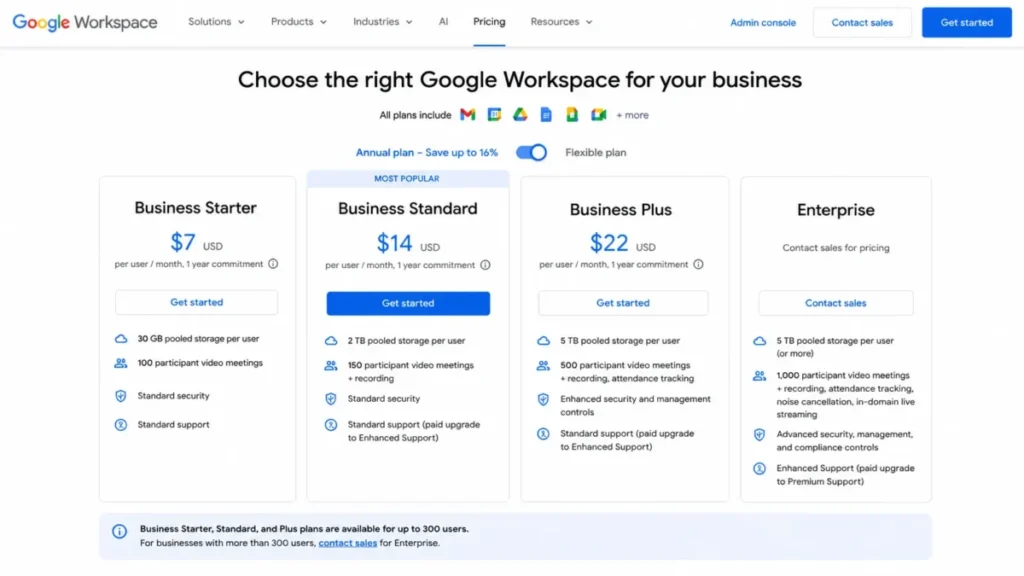
Google sells four tiers: Business Starter, Business Standard, Business Plus, and Enterprise. The first three have public USD prices; Enterprise is sales-led.
| Plan | Flexible (monthly) | Annual/ | Yearly total (annual) | Storage per user | Meet cap | User cap |
|---|---|---|---|---|---|---|
| Business Starter | $8.40/ | $7.00/ | $84.00/ | 30 GB pooled | 100 | 300 |
| Business Standard | $16.80/ | $14.00/ | $168.00/ | 2 TB pooled | 150 | 300 |
| Business Plus | $26.40/ | $22.00/ | $264.00/ | 5 TB pooled | 500 | 300 |
| Enterprise | Contact sales | Contact sales | Contact sales | 5 TB, can request more | 1,000 | No stated limit |
Source: the official Google Workspace pricing page for plan structure and caps, with the USD rate card from Google’s billing documentation. Checked September 4, 2026.
Every flexible price is exactly 20 percent higher than its annual counterpart. Stated from the other direction that is a saving of about 17 percent for committing, which Google’s own annual toggle rounds to “Save 16% with 1 year commitment.” Both numbers describe the same gap, and quoting the 20 percent figure as a discount overstates what the commitment actually saves you.
One live promotion belongs in your budget before you compare anything. On September 4, 2026 Google’s pricing page showed Business Starter at $3.50 under a “50% off for 12 months” label against its $7 list price, and Business Standard at $8.40 under “40% off for 12 months” against $14. Two things follow. Your year-two budget is the list price, not the promotional one, so model twelve months of discount and then the full rate. And the promotional Standard rate of $8.40 is numerically identical to the standard flexible Starter rate, which is a genuinely easy way to compare the wrong two numbers at checkout.
One freshness warning before you budget from another site. Several third-party profiles still show the old $6, $12, and $18 prices last updated in 2024; those numbers are stale, and the rates above are the current standard ones.
Business Starter: $7.00 to $8.40 Per User
Starter includes custom business email, 30 GB pooled storage per user, 100-participant Meet calls, basic security and management controls, and the Gemini assistant in Gmail. It is built for solo operators and very small teams with light file needs.
What it lacks is the daily-workflow layer: no Meet recording, no noise cancellation, no eSignature, no appointment booking pages, and no Workspace Migrate.
Avoid Starter if your team records client calls or is migrating data from another suite.
Mini verdict: right for 1 to 3 people with basic needs, wrong for anyone who will hit the storage or recording wall within a year.
Business Standard: $14.00 to $16.80 Per User
Standard is the practical tier for most 5-to-300-person teams without a compliance obligation. It adds 2 TB pooled storage per user, 150-participant meetings with recording and noise cancellation, eSignature with Docs and PDFs, appointment booking, custom layouts and mail merge, and Workspace Migrate.
It also moves Gemini out of Gmail alone and into Docs, Meet and the rest of the suite, with NotebookLM expanded access.
The missing pieces are compliance-grade: no Vault, no eDiscovery, no Secure LDAP, no advanced endpoint management, and no attendance tracking.
Mini verdict: buy Standard by default at any headcount up to the 300-user cap; skip it only if compliance requirements already point to Plus. Avoid it if legal hold is a day-one requirement, because a later upgrade migration is avoidable admin work.
Business Plus: $22.00 to $26.40 Per User
Plus exists for regulated or security-sensitive teams under 300 users. The $8 per-user jump over Standard buys Vault with eDiscovery, 5 TB pooled storage per user, 500-participant meetings with attendance tracking, Secure LDAP, and advanced endpoint management plus enhanced security controls.
For a 50-person team, that jump costs 4,800 dollars more per year on annual billing. For a team of one hundred it is 9,600 dollars.
Pay it only if retention, legal hold, LDAP-backed apps, or large meetings are real requirements, not aspirations.
Mini verdict: the correct plan when compliance is a requirement, an overpay when it is not. Avoid Plus if your only driver is storage; check whether Standard’s pooled 2 TB per user already covers you.
Enterprise: Contact Sales
Google does not publish a fixed public USD price for Enterprise; contact Google Sales or check Admin console checkout for a quote. The tier removes the 300-user cap and adds 1,000-participant meetings with in-domain live streaming, S/MIME encryption, data loss prevention, context-aware access, Enterprise data regions, Cloud Identity Premium, enterprise endpoint management, and AI Classification.
Enterprise storage starts at 5 TB per user with the ability to request more.
The pricing page also notes paid support upgrades: Standard to Enhanced Support, or Enhanced to Premium on Enterprise plans.
Mini verdict: mandatory above 300 users, and often mandatory earlier when DLP or data-region controls are non-negotiable. Enter the sales conversation with a seat forecast, because negotiation ranges are not public.
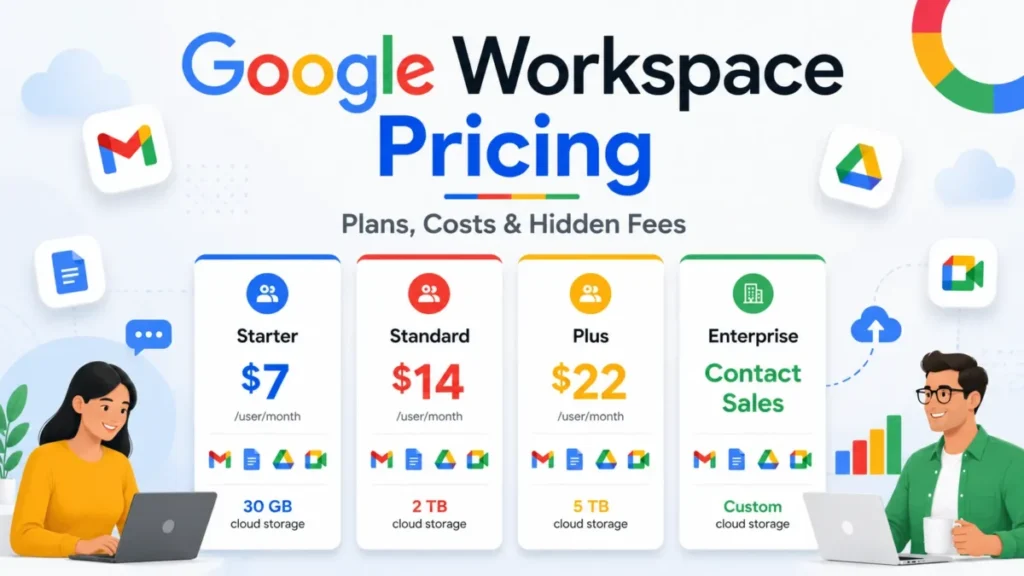
Google Workspace pricing plans compared by storage, Meet participant limits, and Enterprise contact-sales status.
Annual vs Flexible Billing: The Real Decision
The plan question gets the attention, but the billing question moves more money. Google’s billing documentation defines two payment systems for the same plans.
The Flexible Plan bills monthly per active license, lets you add or remove users any time, and carries the 20 percent premium. The Annual/Fixed-Term Plan bills at the lower rate, lets you add licenses mid-term, and only lets you reduce licenses at renewal.
| Billing question | Flexible Plan | Annual/ |
|---|---|---|
| Business Standard rate | $16.80/ | $14.00/ |
| Remove seats mid-term | Yes, any month | No, only at renewal |
| Add seats mid-term | Yes | Yes |
| Cancel early | Stop paying next cycle | Remaining contract balance charged, no refunds |
| Best for | Seasonal teams, uncertain headcount | Stable or growing teams |
The break-even is simple because the premium is a flat 20 percent. A seat you keep for 10 or more months costs less on annual; a seat you need for 9 months or fewer costs less on flexible.
Run that test per role, not per company. A stable 20-person core on annual plus a handful of contractor seats on flexible beats putting seasonal staff into a 12-month commitment.
The early-cancellation clause deserves its own line. Google’s billing docs state that canceling an Annual/Fixed-Term Plan before renewal charges the remaining contract balance with no refunds, so an annual commitment is a real liability on your books, not a discount coupon.
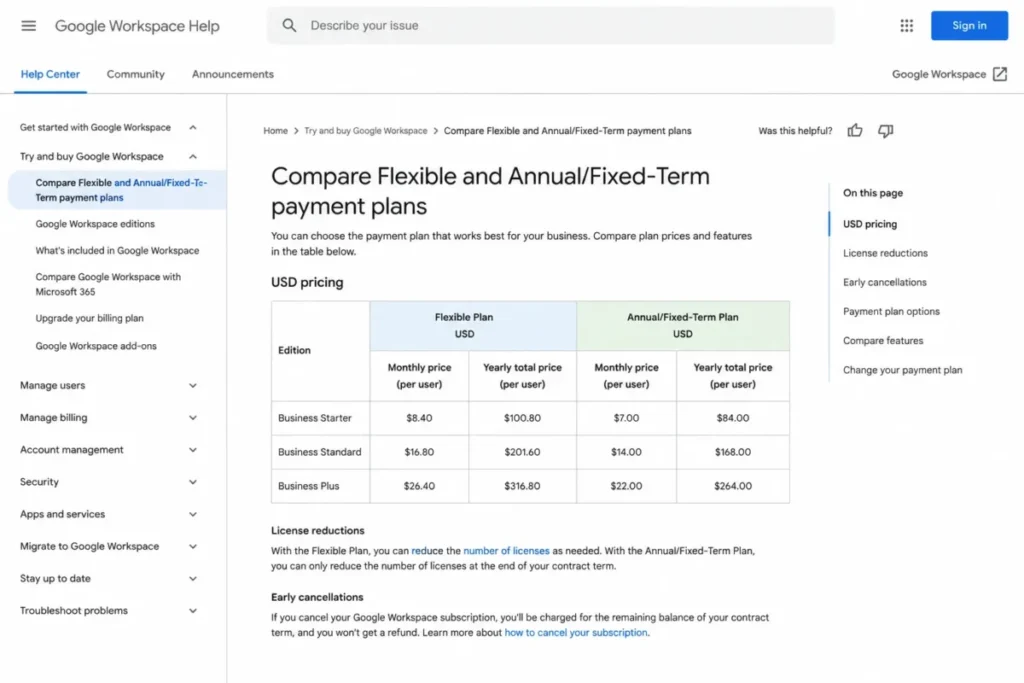
Google Workspace billing documentation compares Flexible and Annual/Fixed-Term pricing with monthly and yearly totals.
Feature Gates by Plan
Storage and Meet caps get quoted everywhere. The gates that change buying decisions sit one layer deeper.
| Capability | Starter | Standard | Plus | Enterprise |
|---|---|---|---|---|
| Pooled storage per user | 30 GB | 2 TB | 5 TB | 5 TB, can request more |
| Meet participants | 100 | 150 | 500 | 1,000 + in-domain live streaming |
| Maximum meeting length | 24 hours | 24 hours | 24 hours | 24 hours |
| Meet recording + noise cancellation | No | Yes | Yes | Yes |
| eSignature with Docs and PDFs | No | Yes | Yes | Yes |
| Workspace Migrate | No | Yes | Yes | Yes |
| Vault (retention + eDiscovery) | No | No | Yes | Yes |
| Attendance tracking | No | No | Yes | Yes |
| Secure LDAP | No | No | Yes | Yes |
| Endpoint management | Fundamental | Fundamental | Advanced | Enterprise |
| DLP + context-aware access | No | No | No | Yes |
| Data regions + Cloud Identity Premium + S/MIME | No | No | No | Yes |
| Gemini access | Gemini assistant in Gmail | Gemini in Gmail, Docs, Meet and more, plus NotebookLM expanded | Same as Standard | Included per edition |
Source: Google’s Business editions documentation for the per-edition gates and the meeting caps. Checked September 4, 2026.
Read this table bottom-up when budgeting. If any Enterprise-only row is a hard requirement, your real price is a sales quote, and the public Business prices are irrelevant to your case.
The meeting-length row is there to close an upgrade myth. Every tier including Starter allows a 24-hour meeting, so nobody needs to upgrade for a long session. Meeting size is the sneaky upgrade driver instead: a 40-person company that runs a 200-person client webinar once a quarter needs Plus for that one workflow, and teams comparing meeting stacks can weigh whether a separate video tool covers large events more cheaply.
Storage Limits and the $30 Staging Rule
Storage is pooled across the organization, which is friendlier than rigid per-user caps. A 5-person Standard team shares a 10 TB pool, so one video-heavy designer can consume more than 2 TB without anyone hitting a wall.
There is a staging rule buried in Google’s storage documentation for admins that surprises new admins.
Pooled storage is granted in stages. At the time of purchase you get part of your storage, and it increases to your total limit after you make a $30 USD payment for the subscription, with the increase taking up to 72 hours after that payment.
Plan the first big Drive migration for after that staging payment, not before. A day-one bulk upload into a partially provisioned pool is a support ticket you can avoid with scheduling.
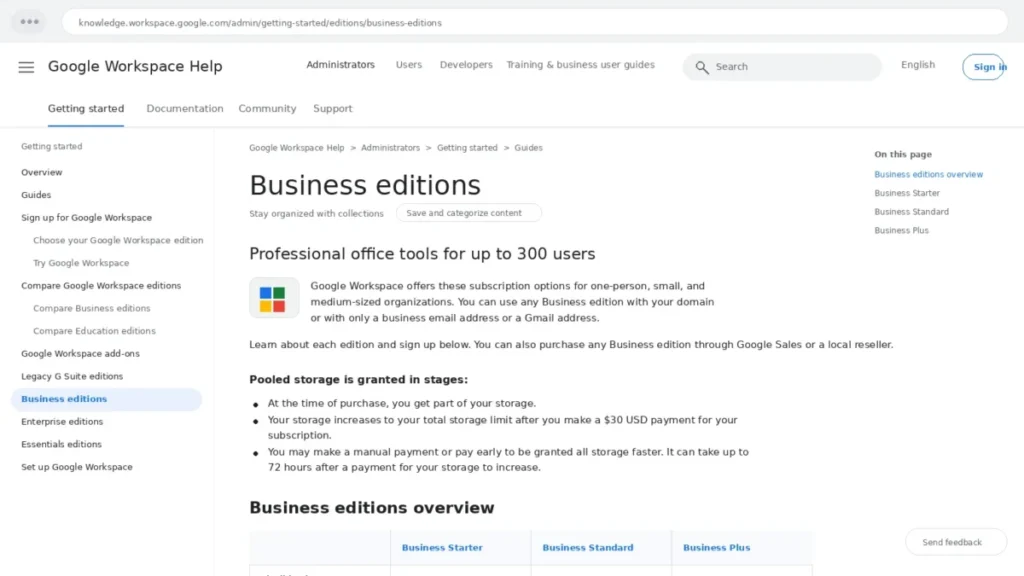
Screenshot-style mockup of the Google Workspace Business editions help page highlighting pooled storage staging, the $30 USD payment reference, and the 300-user cap.
Gemini and AI Access by Plan
Gemini is included in Google Workspace pricing now, which is a change from the old separate AI add-on era. In January 2025, Google folded AI features into Workspace while raising base prices, so today’s rates already carry the AI cost.
Included does not mean unlimited or uniform, and the gate is narrower than “limited versus broader” suggests.
Google’s plan cards put the Gemini assistant in Gmail on Starter, and Gemini in Gmail, Docs, Meet and more on Standard, together with NotebookLM expanded access. The practical reading: on Starter, AI helps you write email. From Standard up, AI works inside the documents and meetings where the actual work happens.
NotebookLM expanded access is a genuine Standard-tier perk for research-heavy teams. The NotebookLM review shows what the tool does before you weight it in a plan decision.
Google also lists an AI expanded-access add-on category in its services summary, so heavy AI users can face limits inside a plan. Budget for the plan’s included access and treat anything beyond it as a quote item, not a given.
If AI output quality is a deciding factor, read the standalone Gemini review before letting AI drive a plan upgrade.
The per-plan gate is real, but a $7-per-user jump justified only by AI access deserves a pilot first.
Hidden Costs, Add-ons, and Contract Risks
Here is the buyer risk ledger for Google Workspace pricing: every cost that does not appear in the headline per-user rate, with the trigger that activates it.
| Hidden cost | What it costs | What triggers it |
|---|---|---|
| Flexible billing premium | 20% over annual rates on every tier | Choosing no-commitment monthly billing |
| Annual license lock-in | Up to full remaining balance; seats fixed until renewal | Team shrinks or you cancel mid-term |
| Promotional price expiry | Starter and Standard revert to list price in month 13 | Signing up during the current 12-month promotion |
| Enterprise pricing | Not publicly disclosed; sales quote | User 301, or DLP/ |
| Enhanced or Premium Support | Contact sales | Needing 1-hour or 15-minute P1 response |
| Google Voice and SIP Link | Separate add-ons; verify current rates | Business telephony on top of Workspace |
| Meet Global Dial | Free to register, per-minute usage charges | International dial-in and dial-out |
| Workspace Additional Storage | Separate SKU; no verified public USD price | Outgrowing the pooled storage |
| AppSheet paid tiers | Core and Enterprise Plus upgrades | No-code apps beyond included access |
Two items on this list need extra caution because their prices are not public. Workspace Additional Storage is a real SKU in the Google Workspace services summary, but confirm the current price in Admin console checkout or with Google Sales before budgeting; the same applies to Voice.
The promotional row is the newest one and the easiest to under-model. A 25-person team signing up on Standard at the promotional rate pays about 2,520 dollars in year one and 4,200 dollars in year two for exactly the same thing, so a two-year budget built on the checkout number lands 1,680 dollars short.
Telephony is the one that catches operations teams. Workspace is not a phone system: Google Voice and SIP Link are add-ons in the services summary, so a sales or support team moving off a legacy PBX needs a separate line item.
The renewal question I would put on the calendar: 60 days before your annual term ends, reconcile actual active users against licensed seats. Renewal is the only moment the annual plan lets you shed dead seats, and missing it locks the overage in for another year.
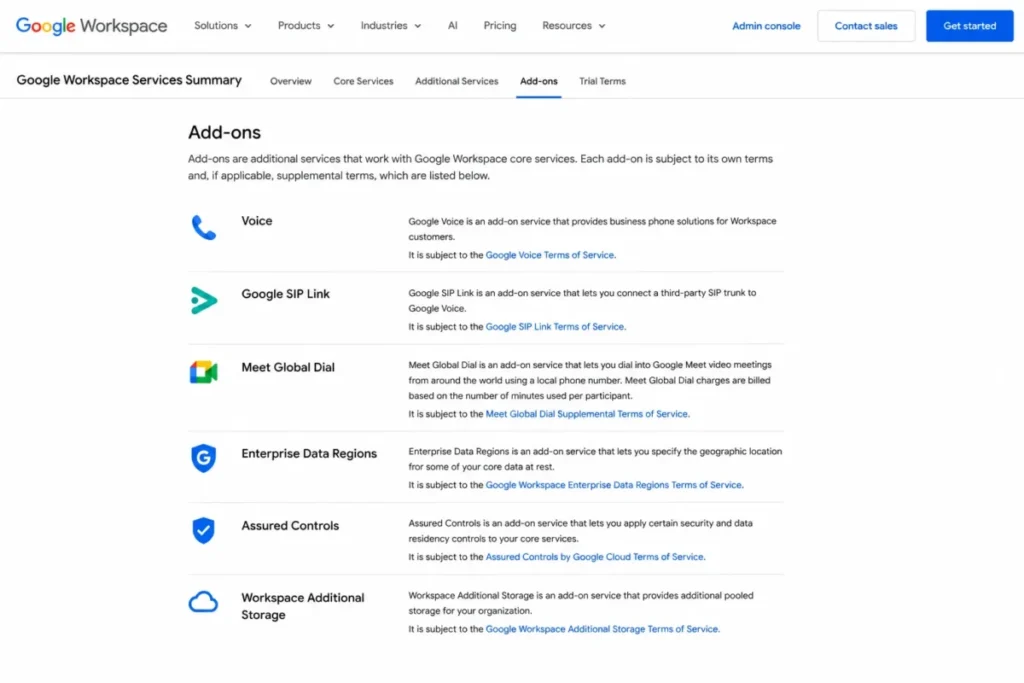
Google Workspace add-ons are listed as separate services, including Voice, Meet Global Dial, Data Regions, Assured Controls, and Additional Storage.
Support Costs and Response Objectives
Support tiers are a buying variable almost no Google Workspace pricing article compares, and they matter once email downtime equals revenue downtime. Google’s Workspace add-ons documentation defines three levels.
| Support tier | Price | P1 response objective |
|---|---|---|
| Standard Support | Included free | 4 hours |
| Enhanced Support | Contact sales | 1 hour |
| Premium Support | Contact sales | 15 minutes, plus technical account management |
A 4-hour P1 objective on included support is workable for most 5-to-50-person teams.
For a 200-person company where Gmail outage stops invoicing, the honest budget includes an Enhanced Support quote, and that number is sales-led rather than public.
Ask for the support quote in the same conversation as the Enterprise or renewal quote. Bundled negotiations are where support pricing has room to move, based on how Google structures these as paid upgrades on the pricing page.
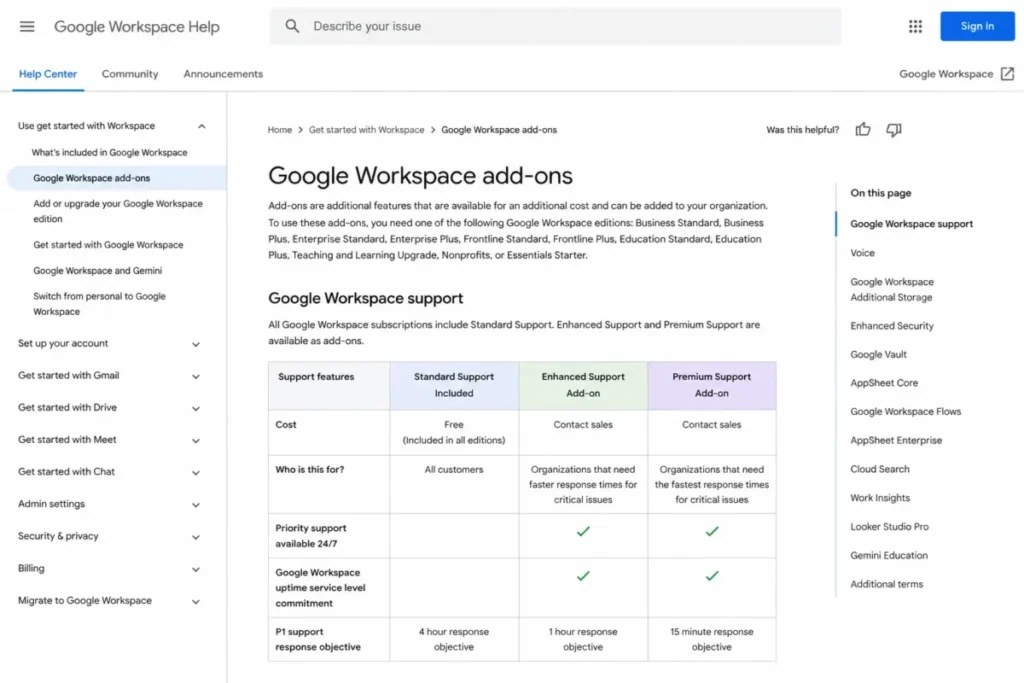
Google Workspace support tiers compared by cost status and P1 response objective.
Security and Compliance Gates: Vault, DLP, Data Regions
Compliance requirements set your Google Workspace price more directly than storage ever will, and more directly than headcount. The gates split cleanly into two thresholds.
The first threshold is Business Plus. Vault, eDiscovery, Secure LDAP, and advanced endpoint management all start there, so retention policies and legal hold cannot be met on Starter or Standard at any configuration.
The second threshold is Enterprise. Data loss prevention, context-aware access, Enterprise data regions, S/MIME, Cloud Identity Premium, and enterprise endpoint management sit behind the sales-led tier per the official pricing page.
There is a downgrade risk hidden in the Vault gate. A team that adopts Vault retention on Plus and later considers dropping to Standard is walking away from its compliance tooling, so treat the Plus decision as sticky once legal workflows depend on it.
Security-driven buyers should pressure-test the Enterprise line early. If your security team requires DLP in year one, the public $22 Business Plus rate was never your real price, and finance deserves that news before procurement starts.
Marketplace Apps and API Limits: The Governance Cost
Google Workspace pricing guides count integrations; admins pay for governing them. The Google Workspace Marketplace lists more than 5,000 third-party apps across business tools, document management, workflow, sales, and CRM categories.
Every installed app is a data-access decision. Google’s admin documentation lets admins install Marketplace apps for the organization and review each app’s data access requirements, and recent security research on workspace add-ons flags permission escalation as a real risk class in multi-user environments.
Treat Marketplace governance as an operating cost of the suite. A quarterly review of installed apps and their scopes is cheap; an unreviewed add-on with broad Drive access is how storage and compliance budgets meet incident response budgets.
Automation-heavy teams face a second, quieter limit. The Gmail API quota documentation lists per-minute project and per-user limits, and the Sheets API returns 429 errors past its per-minute quotas, so large migrations and CRM syncs need rate-limit handling rather than brute force.
Neither quota is a pricing line, but both shape implementation cost. A migration partner quoting a Workspace move should be able to explain their throttling plan; if the concept is unfamiliar, the primer on what an API is covers the basics.
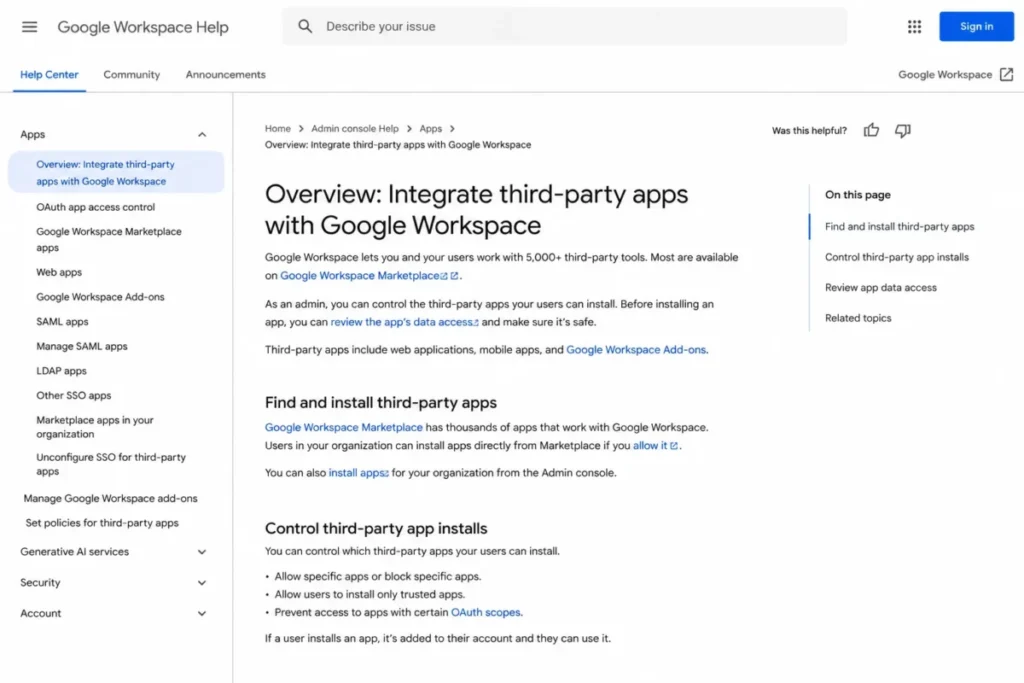
Google Workspace admin documentation shows how admins control third-party app installs and review app data access.
Which Google Workspace Plan Should You Choose?
Match the plan to the buyer profile, then match the billing model to seat stability. Here are the calls I would make from the verified plan data.
Solo founders and freelancers: Business Starter on flexible billing. The $16.80 yearly premium over annual is cheap insurance for a one-person operation, and 30 GB covers email-first work.
Client-facing teams of 5 to 300 with no compliance obligation: Business Standard, annual if headcount is stable. Recording, eSignature, booking pages, and the 2 TB pool are the features this cohort bills clients with, and there is no headcount at which Standard stops being the right answer on its own.
Teams migrating from Microsoft 365 or another suite: Business Standard minimum, because Workspace Migrate appears at the Standard tier on the pricing page. Migrating shared files and meeting workflows into Starter’s 30 GB and no-recording limits is a plan you would redo within a quarter.
Regulated teams of any size up to 300 (finance, legal, healthcare-adjacent): Business Plus for Vault, eDiscovery, Secure LDAP, and advanced endpoint management. Confirm whether DLP or data regions are required, because those needs skip Plus entirely and go to Enterprise.
Companies at or crossing 300 users: Enterprise, by rule rather than preference. Start the sales conversation a quarter before you expect user 301, and bring seat forecasts plus support-tier needs into one negotiation.
One pre-purchase step applies to everyone: verify your domain at signup. Google’s Business editions documentation states some features stay unavailable when you sign up with only an email address, and discovering that after paying wastes a setup week.
Which Plan Should You Avoid?
Business Starter is the plan to avoid for any team above roughly 3 people that touches client meetings or file collaboration daily. The 30 GB per-user pool, the missing Meet recording, and the absent eSignature and Workspace Migrate turn into a forced upgrade within months.
The exception is real, though. Email-first solo operators and 2-person partnerships with light storage get exactly what they pay for at $7, and upgrading later is a plan change rather than a migration.
The quieter mistake is buying Business Plus for storage alone, or for size alone. Standard’s pooled 2 TB per user already gives a 10-person team a 20 TB shared pool, so the $8 per-user Plus premium should be justified by Vault, LDAP, or 500-person meetings, not by Drive space and not by a headcount number.
The billing-model version of “avoid”: do not put seasonal or contractor seats on the Annual/Fixed-Term Plan. Those seats are the ones most likely to sit paid-but-empty until renewal.
Google Workspace Pricing vs Microsoft 365, Zoho, and Lark
Microsoft 365 is the anchor comparison, and its 2026 price changes make old comparison tables unreliable. The Microsoft 365 pricing page puts Business Basic at $7.00 and Business Standard at $14.00 per user per month, both paid yearly, after the July 1, 2026 update.
| Suite and plan | Price (paid yearly) | Comparison note (checked September 4, 2026) |
|---|---|---|
| Google Workspace Business Starter | $7.00/ | 30 GB pooled storage, 100-person Meet |
| Microsoft 365 Business Basic | $7.00/ | Web and mobile Office apps |
| Google Workspace Business Standard | $14.00/ | 2 TB pooled storage, recording, eSignature |
| Microsoft 365 Business Standard | $14.00/ | Desktop Office apps included |
| Microsoft 365 Apps for business | $10.00/ | Apps without the full suite services |
| Microsoft 365 Business Standard with Copilot | $23.50/ | AI bundled at a premium tier |
| Microsoft 365 Business Premium with Copilot | $32.00/ | Security plus AI bundle |
| Zoho Workplace Standard | $3.00/ | 30 GB mail plus 10 GB team drive per user |
| Zoho Workplace Professional | $6.00/ | 100 GB mail plus 100 GB team drive per user |
| Lark Basic | $6.00/ | 500 users max, 5 TB shared storage |
| Lark Pro | $12.00/ | 500 users max, 15 TB storage, 500-person meetings |
Sources: Zoho Workplace pricing for the Zoho rates and storage, and Lark pricing for the Lark tiers and caps. Microsoft rates come from the Microsoft page linked above. All checked September 4, 2026.
At the entry and mid tiers, Google and Microsoft now mirror each other at $7 and $14. The fork is philosophical: Google includes Gemini access in base Business pricing, while Microsoft prices Copilot into $23.50 and $32 bundles.
Zoho and Lark are where the price gap is real rather than rhetorical. Zoho Workplace Standard undercuts Google Workspace Business Starter by more than half at $3 per user per month billed annually, and Zoho’s free tier covers up to 5 users on one domain with 5 GB of mail each. Lark goes further still: its Starter tier is free for up to 20 users with 100 GB of shared storage, though video meetings there are one-to-one only, and Lark Pro at $12 per user per month billed annually caps out at 500 users with 15 TB. Both suites bill in the same shape Google does, with a yearly commitment discount, so compare committed rate to committed rate.
The honest read on those two: the storage and seat numbers look generous because the ecosystems are smaller. Migration tooling, admin depth, and third-party integration coverage are where the Google premium actually goes, and a suite comparison built on entry price alone is how procurement picks the wrong baseline.
The practical tie-breaker against Microsoft is desktop application depth versus web-first collaboration. Teams living in complex Excel models keep an edge on Microsoft’s side, and the Microsoft Teams review covers how that bundle’s chat and meeting layer compares. Teams built on shared docs and Meet-first communication get more from the Google stack. Companies that keep a dedicated chat tool anyway should read the Slack review and price that layer as a separate line item, and webinar-heavy teams weighing a dedicated video layer instead of a Plus upgrade will find the trade-off in the Zoom Workplace review.
Is Google Workspace Worth the Price?
For most 5-to-300-person teams that work web-first, yes: Business Standard at $14 per user is a defensible spend against its 2026 alternatives. Third-party review profiles run consistently positive on ease of use and integrated collaboration, though the rating counts on those sites move monthly and are worth reading on the source rather than quoting from a guide.
The sentiment pattern also carries honest caveats that match the pricing analysis above. Reviewers note that costs add up as teams scale storage and seats, and some report large Google Sheets slowing under heavy datasets, which matches the Excel-parity concern.
| Pros (pricing lens) | Cons (pricing lens) |
|---|---|
| $7 entry price matches Microsoft 365 Basic | Annual plan locks license count until renewal |
| Gemini access included in base Business pricing | Enterprise, support upgrades, and several add-ons are sales-led |
| Pooled storage stretches further than per-user caps | Full storage stages only after a $30 payment |
| Committing annually saves about 17 percent at every tier | Business plans hard-stop at 300 users |
| eSignature, recording, and Migrate bundled at $14 tier | Zoho and Lark undercut every Business tier substantially |
Worth it if: your team is 5 to 300 people, collaborates in shared docs and meetings, and can commit to annual seats for the roughly 17 percent saving. Also worth it if compliance needs map cleanly onto Plus’s Vault and eDiscovery.
Not worth it if: your finance team runs on deep Excel workflows, your security baseline requires DLP without sales-led pricing, or your headcount swings too much for annual commitments while the flexible premium erodes the value case. For a feature-level verdict beyond pricing, the full Google Workspace review covers adoption and workflow fit.
My self-score on the pricing case: 8/10. The plan lineup is priced fairly against 2026 competition; the deductions are the sales-led opacity above Business Plus and the annual lock-in mechanics.
How to Avoid Overpaying for Google Workspace
- Split billing by seat stability. Put the stable core on the Annual/Fixed-Term Plan for the roughly 17 percent saving and keep genuinely temporary seats on flexible, since annual seats cannot be reduced until renewal.
- Budget year two at list price. If you sign up during a promotional window, the discount runs 12 months and the renewal lands at the full rate, so the two-year number is what belongs in the plan.
- Calendar the renewal reconciliation. Sixty days before renewal, match licensed seats to active users, because renewal is the only chance to cut annual seat count.
- Buy Standard before Plus unless a compliance gate forces the jump. Vault, LDAP, and 500-person meetings justify the $8 premium; storage rarely does, and headcount never does on its own.
- Time the storage migration after the $30 staging payment. Full pooled storage stages in after that payment and can take 72 hours, so schedule bulk Drive imports accordingly.
- Get every sales-led number in one negotiation. Enterprise seats, Enhanced or Premium Support, data regions, and extra storage are all quote items, and bundling them is your only pricing leverage.
- Audit Marketplace apps quarterly. Third-party add-on scopes are a security and admin cost that compounds quietly next to the subscription line.
- Ignore any site still quoting $6, $12, and $18 plans. Those are pre-increase prices; budget from the $7, $14, and $22 annual rates verified on Google’s billing documentation.
FAQ
How much does Google Workspace cost in 2026?
Google Workspace costs $7.00, $14.00, or $22.00 per user per month for Business Starter, Standard, and Plus on the Annual/Fixed-Term Plan. Flexible monthly billing runs $8.40, $16.80, and $26.40 for the same plans.
Enterprise has no public price and requires a Google Sales quote. Rates were verified against Google’s official billing documentation on September 4, 2026, when the pricing page was also running a 12-month promotion on the two lower Business tiers.
Is Google Workspace billed monthly or annually?
Both options exist for the same plans. The Flexible Plan bills monthly with no commitment and lets you remove users any month.
The Annual/Fixed-Term Plan costs about 17 percent less per user, which is the same gap as the flexible rate being 20 percent higher and matches the “Save 16%” label on Google’s own annual toggle. It fixes your license count until renewal, and canceling early charges the remaining contract balance with no refunds.
What is the cheapest Google Workspace plan?
Business Starter is the cheapest plan at $7.00 per user per month on annual billing, or $8.40 on flexible monthly billing. It includes custom business email, 30 GB pooled storage per user, and 100-participant Meet calls.
It leaves out Meet recording, eSignature, Workspace Migrate, and the larger storage pools of higher tiers.
Does Google Workspace have a free trial?
Yes. Google’s pricing page offers a 14-day trial of Google Workspace, and each plan card carries its own trial link. There is no free Business plan, so the trial is the only way to use the suite without paying.
What is the difference between Business Starter and Business Standard?
Standard costs $7 more per user monthly and raises pooled storage from 30 GB to 2 TB per user. It also adds Meet recording with noise cancellation, 150-participant meetings, eSignature with Docs and PDFs, appointment booking pages, Workspace Migrate, and Gemini across Docs and Meet rather than Gmail alone, plus NotebookLM expanded access.
Starter suits solo email-first users; Standard suits working teams.
Which Google Workspace plan includes Vault?
Google Vault is included in Business Plus and the Enterprise tiers. Business Starter and Business Standard do not include it, according to Google’s services summary.
If your team needs retention rules, legal hold, archive search, or eDiscovery, Business Plus at $22.00 per user per month annual is the minimum plan that covers it.
Can I cancel a Google Workspace annual plan early?
You can cancel, but Google’s billing documentation states you are charged the remaining balance of the contract, and no refunds are issued. You also cannot reduce license count mid-term; seat reductions only happen at renewal.
Teams with uncertain headcount often accept the 20 percent flexible premium to keep that exit open.
What happens after 300 Google Workspace users?
Business Starter, Standard, and Plus can be purchased for a maximum of 300 users. User number 301 requires the Enterprise tier, which has no stated user minimum or maximum and no public price.
Growing companies near the cap need an Enterprise quote before their renewal date to avoid a rushed migration.
Is Gemini included in Google Workspace pricing?
Yes, Gemini access is included in current Google Workspace pricing rather than sold as the old separate AI add-on. Access differs by plan: Starter carries the Gemini assistant in Gmail, while Standard and Plus put Gemini in Gmail, Docs, Meet and more, plus NotebookLM expanded access.
Heavy usage beyond included limits falls under separate AI expanded-access add-ons.
Is Google Workspace cheaper than Microsoft 365?
At list price the suites now match: both start at $7.00 and hit $14.00 per user per month at their standard tiers, paid yearly, after Microsoft’s July 2026 update. The gap opens with AI, since Google bundles Gemini access into base plans while Microsoft prices Copilot bundles at $23.50 and $32.00.
Against Zoho and Lark the picture reverses, since Zoho Workplace Standard sits at $3.00 per user per month and Lark offers a free tier for small teams.
The Bottom Line
Google Workspace pricing in 2026 is honest at the plan level and risky at the contract level. The $7, $14, and $22 annual rates are competitive, and the real spend is decided by three things: your billing model, your compliance gates, and how close you sit to 300 users. Headcount by itself is not one of them.
Buy Business Standard annual if your seats are stable, keep volatile seats flexible, move to Plus only when a compliance requirement names the feature you need, and get every sales-led number in writing before you commit. Verify the live rates on the official pricing page before checkout, because promotions and regional currency can shift what you see.
Written by Macedona for SaaS CRM Review, based on official Google pricing, billing, editions, storage, add-ons, and services documentation, plus the Microsoft, Zoho, and Lark pricing pages, all checked September 4, 2026. No hands-on trial workflow was run for this guide; every price and feature gate above maps to an official source.