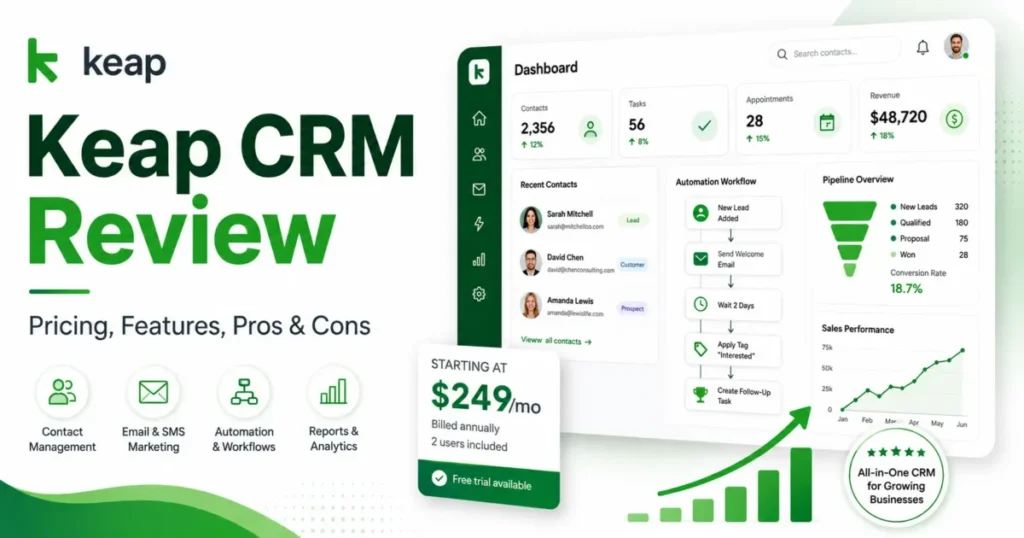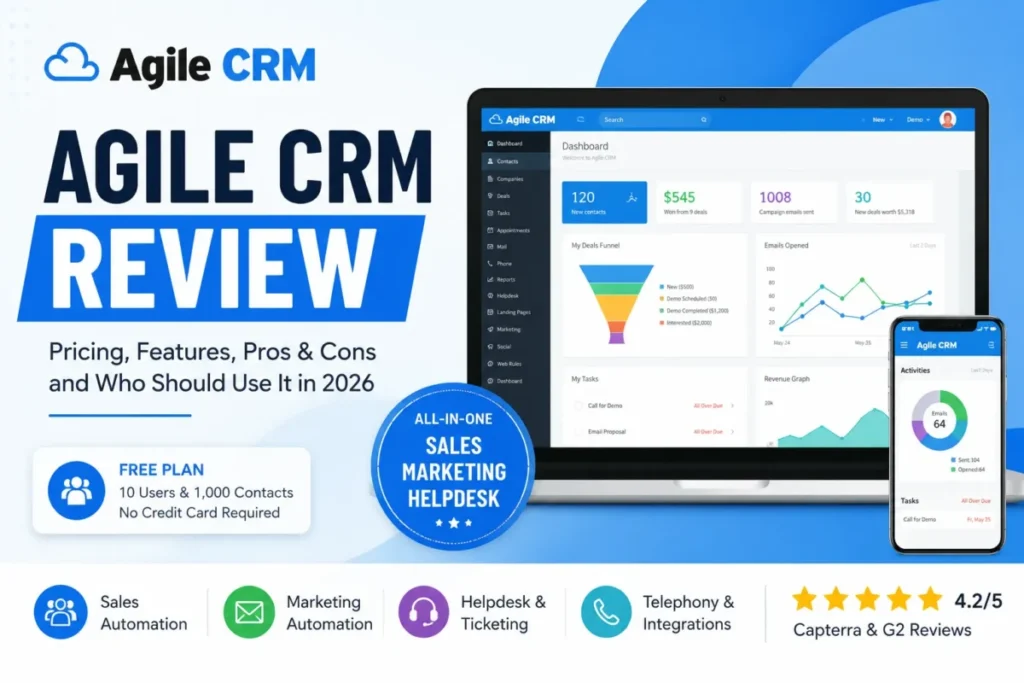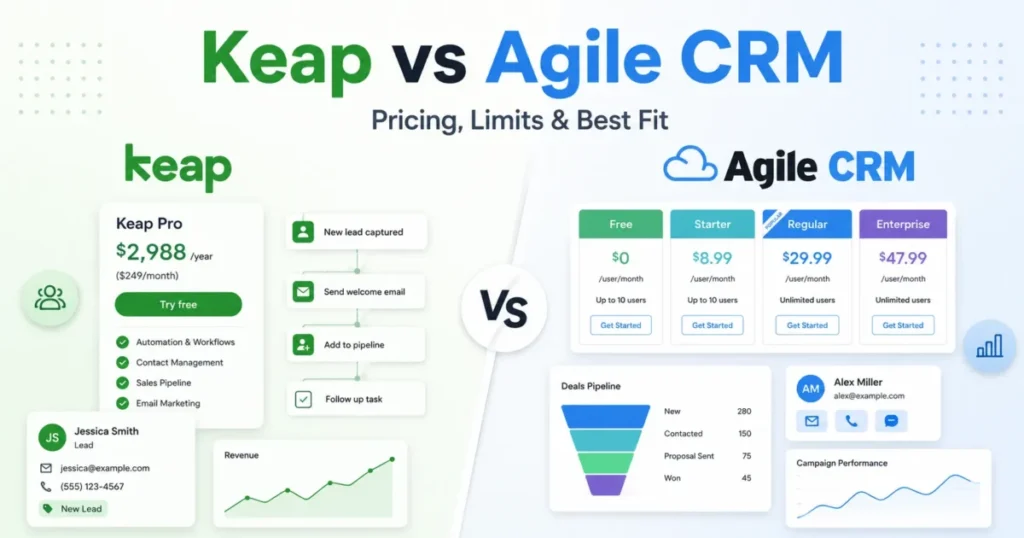
Keap CRM and Agile CRM sit on opposite ends of the small-business CRM market, and the price gap hides the real decision. Keap is a paid lifecycle platform that carries a lead from capture through follow-up, booking, invoicing, and payment. Agile CRM is a low-cost bundle that puts sales, marketing automation, and a helpdesk in one account, starting with a free plan for up to 10 users.
So the Keap CRM vs Agile CRM choice is not a feature count. Choose Keap if your business monetizes high-value leads through repeatable automated follow-up and needs invoicing and payments in the same system.
Choose Agile CRM if you are budget-constrained and need basic cross-functional coverage, including support ticketing, without a subscription commitment. Pick neither if you require verified enterprise governance, polished reporting, or fully documented migration.
That tension drives this comparison. Below I work through the switching logic, the plan limits most reviews skip, the true first-year cost on both sides, and the buyer scenarios where each product wins.
Pricing and plan limits were checked on the official pages on July 20, 2026.
In This Article (19 sections)
Quick Verdict: Keap vs Agile CRM
| Category | Winner | Why |
|---|---|---|
| Entry cost | Agile CRM | Free for up to 10 users; Keap starts at $2,988/ |
| Lead-to-payment automation | Keap | Automation, scheduling, invoicing, and payments run in one documented lifecycle |
| Built-in helpdesk | Agile CRM | Documented ticket priority, routing, and status workflows; Keap has no verified native helpdesk |
| Invoicing and payments | Keap | Native invoices, payment collection, and billing automation are in the platform |
| Implementation support | Keap | Required package includes mapping, two launched automations, and up to 15 migration hours |
| Published API ceiling | Keap | About 10,000 requests per minute per app vs 500 to 25,000 calls per day on Agile CRM |
| Free evaluation | Agile CRM | Free plan runs 10 users and 1,000 contacts; Keap’s trial caps email at 25 and blocks payments |
| Structured support access | Keap | Weekday US phone, 24/7 chat, and a dedicated success manager |
| Reporting confidence | Tie | Both draw recurring third-party complaints about depth and retroactive analysis |
Sources: Keap official pricing and Agile CRM official pricing, checked July 20, 2026.
Keap wins more rows, but row count is not the verdict. Agile CRM wins the three rows that decide most budget-limited purchases: entry cost, no-commitment evaluation, and an included helpdesk.
Keap wins the rows that matter once a lead is worth real money and the workflow has to end in a paid invoice.
Keap vs Agile CRM at a Glance
| Attribute | Keap | Agile CRM |
|---|---|---|
| Best for | 2 to 10-person service businesses with high-value leads and repeatable lead-to-payment workflows | 1 to 10-person budget teams needing CRM, marketing, and helpdesk in one account |
| Parent | Thryv, Inc. | Agile CRM by 500apps (legal ownership not independently verified) |
| Starting price | $2,988/ | Free; paid rates advertised as low as $8.99, $29.99, and $47.99 |
| Practical tier | The single Keap subscription plus required implementation | Regular for teams that want telephony and deeper automation |
| Free plan or trial | Free trial only, with a 25-email cap and no payments or texting | Free plan for up to 10 users and 1,000 contacts |
| Setup difficulty | Medium to high; assisted implementation is required | Medium; broad feature set but reported setup friction |
| Main strength | One platform from lead capture to payment | Low-cost cross-functional coverage including helpdesk |
| Main weakness | High fixed first-year cost and annual-contract exit fee | Plan-limited automation, dated interface, and support gaps |
Prices and plan facts: Keap official pricing and Agile CRM official pricing, checked July 20, 2026.
Two facts in this table drive most of the analysis that follows. Keap’s starting number is not the buy-in number, because implementation and extra users are separate line items.
Agile CRM’s lowest advertised rates are labeled “as low as,” and the accessible official page did not expose the billing commitment attached to them, so I treat them as advertised floors, not guaranteed month-to-month prices.
How We Compared
These findings are based on the official Keap pricing page, the Keap implementation page, the Agile CRM pricing page, official product and help documentation, developer resources, and labeled review patterns from G2, Capterra, TrustRadius, and recent independent reviews. Pricing and plan limits were checked on July 20, 2026.
Each product was assessed against the same buyer-focused criteria: total cost of ownership, plan and usage limits, automation depth, helpdesk versus payments architecture, support access, API scale, and migration evidence. Documented workflows are described as documented paths, not as actions performed inside an account.
Greater weight was given to factors that change a purchase decision: onboarding and setup fees, contract and exit terms, contact and workflow caps, API ceilings, and usage overages. Brand claims did not influence the verdicts.
Claims that could not be verified from official sources were excluded or labeled. Where the source exposed a rate but not its commitment term, a plan limit but not its overflow behavior, or a migration route but not its object coverage, that gap is stated rather than filled with an assumption.
Why Teams Switch Between Keap and Agile CRM
Buyers rarely compare these two because they are similar. They compare them because they are at a fork: pay for an operating layer that runs the whole revenue workflow, or pay very little for broad coverage and accept limits.
Teams move toward Keap when manual follow-up starts costing them booked revenue. The trigger is usually a service business where each lead is worth hundreds or thousands of dollars, follow-up is repeatable, and the same system needs to schedule the appointment and collect the payment.
Keap’s official pages document sales pipeline, appointment scheduling, invoices, payments, payment plans, and billing automation inside one platform. When those stages live in one place, the switch is about removing handoffs between a CRM, a scheduler, and a payment tool.
Teams move toward Agile CRM for the opposite reason: cost and breadth. The free plan supports up to 10 users with no credit card, and paid tiers bundle marketing automation, telephony on higher plans, and a built-in helpdesk. (Agile CRM official pricing)
A small team that wants to run sales, marketing campaigns, and support tickets from one inexpensive account has a hard time justifying Keap’s fixed cost before it has predictable revenue.
Here is the catch in both directions. Switching to Keap means budgeting for required implementation and extra-user fees before the platform earns anything.
Switching to Agile CRM means accepting plan-limited automation, an interface that recent reviews call dated, and recurring reports of slow performance and inconsistent support. The switch decision is at heart a choice about which constraint you would rather manage: Keap’s cost or Agile CRM’s ceilings.
The Keap CRM vs Agile CRM decision, then, is a switch-or-stay call before it is a feature call. If you are on spreadsheets and every lead is valuable, I would solve monetization first and look at Keap.
If you are on spreadsheets and cash is tight, I would solve coverage cheaply first and start on Agile CRM’s free plan.
Feature Comparison Matrix
| Dimension | Keap | Agile CRM | Winner |
|---|---|---|---|
| Contact and pipeline management | Contacts, tags, segmentation, sales pipeline | Contacts, companies, deals, pipeline | Tie |
| Marketing automation | Visual automation, lead scoring, landing pages, forms | Campaign workflows, capped by plan | Keap |
| Automation capacity | No published hard node or workflow cap on the paid plan | 1 to unlimited workflows; 5 to 50 nodes per campaign by plan | Keap |
| Invoicing and payments | Native invoices, payment collection, payment plans, billing automation | Not verified as native | Keap |
| Helpdesk and ticketing | No verified native helpdesk | Documented ticket priority, routing, and status | Agile CRM |
| Built-in telephony | One-to-one phone line (US and Canada) | Two-way telephony on Regular and above | Agile CRM |
| Appointment scheduling | Native scheduling in the platform | Calendar and events, mobile sync | Keap |
| Text and voice messaging | 500 messages and 100 voice minutes included, tiered above | Not a documented native tier structure | Keap |
| API capacity | About 10,000 requests per minute per app | 500 to 25,000 calls per day by plan | Keap |
| Mobile app | Contacts, appointments, tasks, invoices in 5 countries | Tasks, events, two-way Google Calendar sync | Keap |
| Reporting and analytics | Present, but reviewers flag complexity | Basic to team reporting by plan; forecasting limits reported | Tie |
Feature and limit facts: Keap official pricing and Agile CRM official pricing; reporting sentiment from TrustRadius and Capterra review patterns, checked July 20, 2026.
The matrix explains the price gap. Keap’s wins cluster around the money end of the funnel: automation depth, invoicing, payments, scheduling, and messaging in one system.
Agile CRM’s wins cluster around breadth for the price: a real helpdesk and telephony that Keap does not document as native equivalents. If your work ends at a support ticket, Agile CRM covers a workflow Keap does not.
If your work ends at a paid invoice, Keap covers a workflow Agile CRM does not verify.
One caution on the automation row. Keap winning on capacity does not mean Agile CRM cannot automate.
It means Agile CRM’s automation is metered, and the meter, not the feature, is what a growing team hits first. That is the subject of the plan-limit section below.
Agile CRM Plan Limits: The Part Most Comparisons Skip
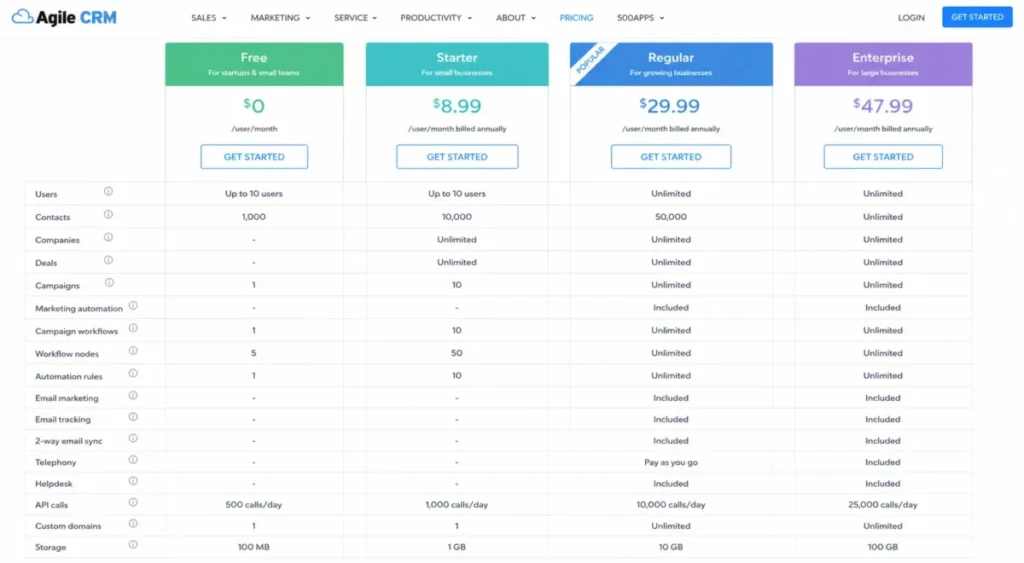
Agile CRM’s automation is present on paper and capped in practice. The official plan matrix meters four separate things, and a team can hit any one of them before it hits the contact ceiling.
| Limit | Free | Starter | Regular | Enterprise |
|---|---|---|---|---|
| Contacts and companies | 1,000 | 10,000 | 50,000 | Unlimited |
| Campaign workflows | 1 | 5 | 10 | Unlimited |
| Nodes per campaign | 5 | 10 | 25 | 50 |
| Automation rules | 1 | 5 | 10 | Unlimited |
| API calls per day | 500 | 5,000 | 10,000 | 25,000 |
Source: Agile CRM official pricing, checked July 20, 2026.
On mobile, this and the other wide comparison tables use horizontal scroll with a pinned label column so the first column stays visible.
Read this table as four different upgrade triggers, not one. A marketing team running many live nurture sequences hits the campaign-workflow cap first: one active workflow on Free and five on Starter forces consolidation fast.
A team building complex journeys hits the node cap first, because a single campaign is limited to 5 nodes on Free and 50 even on Enterprise, so branching, delays, and checks compete for room inside one campaign. An operations team automating many event-driven processes hits the automation-rule cap, which is one rule on Free.
A developer-led team hits the API ceiling, where Free allows 500 calls per day.
The practical consequence is that Agile CRM’s advertised low price and its usable price can differ. A team that looks like a Starter buyer on contact count can be a Regular buyer on workflow count.
I would map planned active workflows, campaign complexity, automation rules, and daily API calls against this table before selecting a tier, because the binding limit is often process complexity, not database size. The official page does not document what happens when a limit is reached, so treat overflow behavior as unknown and test it before you depend on it.
Pricing at Scale: Starting Price vs Practical Tier vs 10-User Cost
The headline numbers mislead in both directions. Keap looks expensive at a glance and is more expensive than that once you add setup and seats.
Agile CRM looks nearly free and can stay cheap, as long as the workload fits inside the plan limits above.
| Pricing element | Keap | Agile CRM |
|---|---|---|
| Starting price | $2,988/ | Free; paid as low as $8.99, $29.99, $47.99 |
| Users included | 2 | Up to 10 on Free |
| Extra user | $39 per user per month | Priced per user; unit qualified on official page |
| Required add-on | Implementation: $500 promotional, $1,500 list | None documented |
| Practical tier | Base subscription plus implementation | Regular for telephony and deeper automation |
| Hidden costs | Extra users, SMS tiers and overages, local number, payment processing | Email add-on (amount not verified), feature gates, API ceilings |
| Billing note | Annual contract with a $299 early-termination fee | Commitment term for advertised rates not exposed |
| Official source | keap.com/ | agilecrm.com/ |
Sources: Keap official pricing, Keap implementation services, and Agile CRM official pricing, checked July 20, 2026.
The Keap first-year cost stack
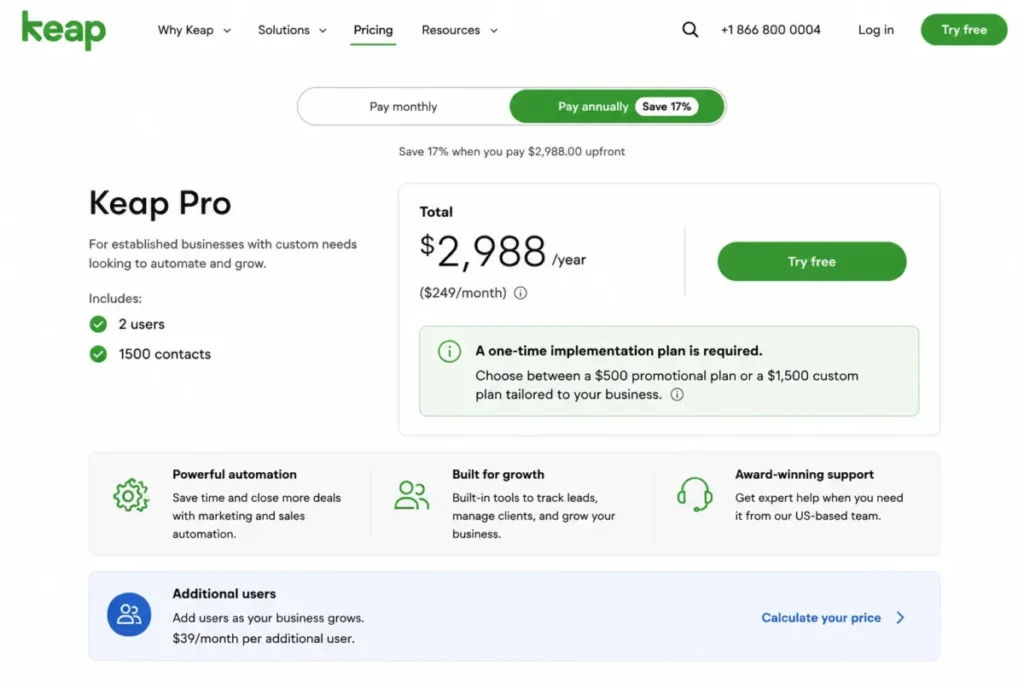
Keap’s real number is a stack, not a subscription. For a five-person team on annual billing, the components are:
- Annual subscription: $2,988 (includes two users).
- Three additional users: 3 x $39 x 12 = $1,404.
- Required implementation: $500 promotional, or $1,500 at list.
That puts the first-year floor near $4,892 at the promotional implementation price, before any SMS tiers, a local number, or payment-processing fees. At the list implementation price, it is closer to $5,892.
The starting price of $2,988 is a real number, but it is about 51% to 61% of the five-person team’s first-year cost, depending on whether the promotional or list implementation price applies, not the whole check.
The $500 implementation figure is a promotional rate, not the standard price. The standard price is the $1,500 list figure, and this promotion was re-verified on publish date: 2026-07-20. (Keap implementation services)
Scale that to 10 users and the Keap stack grows again: $2,988 base plus eight additional users at $39 for 12 months ($3,744) plus $500 implementation lands near $7,232 in year one, or about $8,232 at list implementation.
That is the number a 10-person service team should take to finance, not the $249 effective monthly figure.
Sources: Keap official pricing and Keap implementation services, checked July 20, 2026.
The Agile CRM cost picture
Agile CRM’s 10-user cost can genuinely be $0 on the free plan, provided the team stays inside 1,000 contacts, one campaign workflow, five nodes, one automation rule, and 500 API calls per day. That is the scenario Keap cannot match on price, and it stands out even among other free CRM software options that usually cap seats hard. (Agile CRM official pricing)
Above the free tier, the math shifts to per-user pricing at rates the official page labels as floors. At the Regular rate advertised as low as $29.99, a 10-user Agile CRM team runs about $3,598.80 across a year if that rate holds per user for 12 months (29.99 x 10 x 12). (Agile CRM official pricing)
That illustrative Agile CRM total sits close to Keap’s annual base subscription, before Keap’s implementation and additional-user costs.
Two cautions apply. The commitment term behind those advertised rates was not exposed on the accessible page, so the real annual figure could differ.
And an email add-on exists whose amount and included volume were not verified, and whose purchased inventory expires after one month.
The pricing verdict is conditional. Agile CRM wins on entry cost and wins decisively for any team that fits the free plan.
Keap is not competing on price and does not try to; its cost is defensible only when the lifecycle it automates carries enough revenue to absorb the stack.
Keap’s text-message cost ladder
SMS is where Keap’s price can quietly grow a second budget. The included allowance is 500 messages and 100 voice minutes; above that, six tiers and overage rates apply.
| Text tier | Monthly price | Included messages | Included voice minutes |
|---|---|---|---|
| Tier 1 | Included | 500 | 100 |
| Tier 2 | $24 | 1,000 | 300 |
| Tier 3 | $39 | 2,500 | 500 |
| Tier 4 | $79 | 5,000 | 800 |
| Tier 5 | $139 | 10,000 | 1,000 |
| Tier 6 | $279 | 25,000 | 2,000 |
Source: Keap official pricing, checked July 20, 2026.
Overages run $0.015 per message and $0.01 per voice minute. A 500-text add-on is $6 per month, and a local phone number is $10 per month.
For an SMS-heavy service business, this ladder can add more per month than an extra user seat, so I would model expected message and minute volume before treating text automation as a free feature. Text marketing is available to US subscribers, and the one-to-one phone line is limited to the US and Canada, which can disqualify the workflow for international teams.
The Real Cost of Switching
A full CRM migration is the part of the Keap CRM vs Agile CRM decision where both vendors leave gaps, and an unverified assumption can break reporting and rep context after the move.
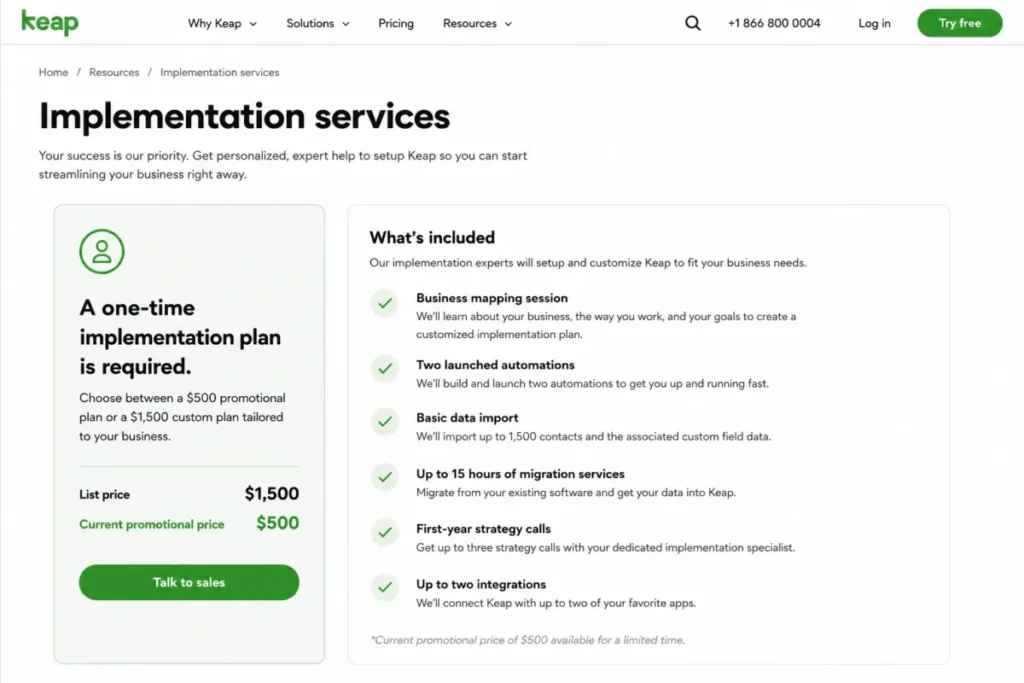
Keap addresses switching with paid help rather than a self-serve import alone. The required implementation package documents basic data import plus recreation or migration of email templates, landing pages, web forms, automations, and the sales pipeline, with up to 15 migration hours listed. (Keap implementation services)
That reframes implementation: it is a cost, but it is also a service that can reduce setup risk for a team replacing a CRM and a marketing stack at once. What the official page does not resolve is detailed object behavior.
Custom fields, activity history, attachments, owner and relationship mapping, deduplication, and rollback were not verified, so the 15-hour service should not be assumed to carry every historical object. I would get a written migration map and object scope before signing.
Agile CRM advertises a migration route through Data2CRM and file-based import, but complete object coverage was not verified. Contacts may move while activities, notes, attachments, owners, relationships, and automations require manual rebuilding. (Agile CRM product documentation)
Before a final cutover, run a sample migration and reconcile object counts, field values, owners, activities, and attachments against the source.
Treat migration as a controlled project on both sides, not a CSV upload. The honest position is that neither product publicly documents complete object, history, relationship, and rollback behavior, so the safe move is a sample migration with reconciliation before you commit live data.
Migration verification checklist
Before moving live data into either product, confirm each item in writing or through a test import:
- Custom fields map to the target without truncation.
- Activity history, notes, and attachments transfer, not just contact records.
- Record owners and contact-to-company relationships are preserved.
- Duplicate handling and validation rules are defined before import.
- A rollback or recovery path exists if the cutover fails.
- Automations and campaigns are rebuilt and tested, not assumed to carry over.
What You Gain and What You Lose
Switching is a trade in both directions, so name the trade before you make it.
Moving to Keap, you gain a single system that runs lead capture, automated follow-up, scheduling, invoicing, and payment collection, plus structured support and assisted setup. You lose budget flexibility.
The annual contract carries a $299 early-termination fee, cancellation should be requested at least 10 days before the next invoice, and the first-year stack is a real commitment. (Keap official pricing) You also inherit reporting that reviewers on TrustRadius and Capterra describe as complex, with retroactive analysis that can be hard until the user knows the system well.
Moving to Agile CRM, you gain a free or low-cost account that covers sales, marketing, telephony on higher plans, and a helpdesk, with a 10-user free ceiling that is unusual at the price. You lose polish and headroom.
Recent reviews report a dated, sometimes sluggish interface, and G2 and Capterra patterns cite slow performance, email flexibility limits, setup complexity, and inconsistent support alongside genuine praise for affordability and breadth. You also accept the plan meters on workflows, nodes, rules, and API calls.
Neither trade is strictly better. The gain you value more, revenue-workflow continuity or low-cost coverage, is the direction you should switch.
Ease of Use and Setup Difficulty
| Setup factor | Keap | Agile CRM |
|---|---|---|
| Overall difficulty | Medium to high | Medium |
| Onboarding model | Required assisted implementation | Self-serve, with reported friction |
| Data import | Basic import plus up to 15 migration hours | Data2CRM and file import, coverage unverified |
| Automation build | Advanced automation canvas, expertise helpful | Campaign builder within plan caps |
| Team training | Success manager and academy resources | Documentation, coach on Enterprise |
Sources: Keap implementation services for the Keap column and Agile CRM official pricing for the Agile CRM column; setup friction from G2 and Capterra review patterns, checked July 20, 2026.
Keap’s difficulty is front-loaded and paid down by the implementation service, and a structured CRM implementation plan is what reduces that early risk. The advanced-automation canvas supports multi-step process design, which suits a lifecycle workflow and is heavier for a team that only needs contacts and reminders.
That is the buyer exclusion worth stating plainly: if you only need a contact database with follow-up reminders, Keap makes you pay for and configure lifecycle machinery you will not use.
Agile CRM’s difficulty is spread across daily use. The feature breadth is wide for the price, but reviewers report that setup and the interface can slow a team without an internal CRM owner.
For a team with no dedicated admin, that troubleshooting time can offset part of the license saving, which is the real cost behind the low sticker.
A useful adoption test: after 30 days, a Keap buyer should have at least one live lead-to-follow-up automation running and a booking or invoice path configured; an Agile CRM buyer should have contacts imported, one campaign live, and the helpdesk routing tickets. After 90 days, the Keap buyer should be collecting payments through the platform, and the Agile CRM buyer should know whether the plan meters, not the features, are the constraint.
If those milestones slip, the problem is adoption, and no feature comparison fixes it.
Support, Security, and Admin Controls
Keap publishes the more structured support package: US-based phone support on weekdays, 24/7 chat, a dedicated Customer Success Manager, academy resources, and community access. (Keap official pricing) Agile CRM offers email support on Free, phone support on paid plans, and a dedicated account representative plus an onboarding coach at Enterprise. (Agile CRM official pricing)
For a team that expects to need help during setup, Keap’s included access is the stronger position.
On security and reliability, both vendors make limited public statements. Keap states that it maintains information-security risk-management policies.
Agile CRM states that data is isolated in a secure namespace and publishes a 99.5% uptime guarantee for paid plans, which is a vendor guarantee rather than an independently measured figure. (Agile CRM official pricing) Neither product’s enterprise governance controls, such as SSO, SCIM, audit logs, SOC 2 status, or data residency, were verified in this research.
An admin-heavy or security-governed buyer should treat those as open questions and require written confirmation before committing.
Integrations and API
Both products connect to common tools, and both publish an API. For any serious CRM integration plan, the ceilings are what a scaling team should read.
Keap runs a marketplace, syncs with Gmail and Outlook, and its developer portal publishes an initial gateway limit of about 10,000 requests per minute per application. (Keap developer documentation) Agile CRM offers plan-based plugin limits, Google sync, Shopify and Stripe sync on paid plans, more than 50 plugin slots on Regular and Enterprise, and a REST API, and Zapier connectivity broadens the reach for both products. (Agile CRM official pricing)
On API scale, Keap is the safer published choice, with an important caveat: the two ceilings are not measured the same way. Keap states an approximate per-minute, per-application gateway limit; Agile CRM publishes daily plan limits of 500, 5,000, 10,000, and 25,000 calls. (Keap developer documentation, Agile CRM official pricing)
That is not an apples-to-apples benchmark, so I would not treat Keap’s number as simply larger. For an API-heavy integration, Keap has more published headroom, but validate endpoint-specific controls with the vendor either way.
For Agile CRM, estimate daily calls before choosing a tier, since polling and integrations can exhaust a lower plan’s allowance.
Where Keap Wins
Keap wins wherever the CRM has to participate directly in earning money, not just recording it.
- Lifecycle continuity. Lead capture, automation, pipeline, scheduling, invoices, and payments live in one documented platform, which removes handoffs between separate scheduler and payment tools.
- Monetization workflow. Native invoicing, payment collection, payment plans, and billing automation let the same system continue after a lead becomes a paying customer.
- Messaging depth. Included text and voice allowances with defined tiers support SMS-led follow-up that Agile CRM does not document as a native equivalent.
- Published API headroom. About 10,000 requests per minute per application gives an integration-heavy team more stated room, subject to the non-equivalence caveat.
- Support structure. Weekday phone, 24/7 chat, and a dedicated success manager suit teams that expect setup help.
Keap: Pros and Cons
| Pros | Cons |
|---|---|
| Runs lead-to-payment in one platform, cutting tool handoffs for service businesses | First-year cost is a stack: $2,988 base, $39 per extra user monthly, plus implementation |
| Native invoicing, payments, and billing automation, not just CRM records | Annual contract carries a $299 early-termination fee and a 10-day cancellation notice |
| Required implementation includes up to 15 migration hours and a success manager | SMS tiers and overages can add a second monthly budget for text-heavy teams |
| Higher published API ceiling for integration-heavy workflows | Reviewers flag complex reporting and hard retroactive analysis |
Sources: Keap official pricing and Keap implementation services, with reporting feedback from TrustRadius and Capterra review patterns, checked July 20, 2026.
Where Agile CRM Wins
Agile CRM wins wherever breadth-for-the-price and no-commitment evaluation matter more than lifecycle polish.
- Entry cost. The free plan covers up to 10 users with no credit card, which Keap cannot match.
- Built-in helpdesk. Documented ticket priority, routing, and status workflows give support-led teams a function Keap does not document natively.
- Cross-functional coverage. Sales, marketing campaigns, telephony on higher plans, and support live in one inexpensive account.
- Low-risk evaluation. A team can validate real workflows on the free plan before spending, within the published limits.
- Telephony. Two-way telephony on Regular and above, with call recording and voicemail automation at Enterprise, suits phone-led sales.
Agile CRM: Pros and Cons
| Pros | Cons |
|---|---|
| Free plan for up to 10 users and 1,000 contacts, no credit card required | Automation is metered: 1 to unlimited workflows, 5 to 50 nodes, 1 to unlimited rules by plan |
| Built-in helpdesk with documented ticket routing and priority | Interface is reported as dated and sometimes slow in recent reviews |
| Broad sales, marketing, telephony, and support coverage at a low price | Daily API caps (500 on Free) can constrain integration-heavy teams |
| Uptime guarantee of 99.5% published for paid plans | Email flexibility limits and inconsistent support recur in G2 and Capterra patterns |
Sources: Agile CRM official pricing, with performance and support feedback from G2 and Capterra review patterns, checked July 20, 2026.
Who Should Choose Keap
Choose Keap if your business fits most of these conditions:
- You run a 2 to 10-person coaching, consulting, home-service, clinic, or professional-service business where each lead is worth real money.
- Your revenue depends on repeatable follow-up that ends in a booked appointment and a paid invoice, and you want that in one system.
- You can budget a first-year stack near $4,900 to $8,200 depending on team size, and you want assisted setup rather than a self-serve build.
- You need SMS-led follow-up and are willing to model text tiers and overages.
- You want structured support, including a dedicated success manager, during onboarding.
Who Should Choose Agile CRM
Choose Agile CRM if your situation matches most of these:
- You are a 1 to 10-person team, a startup, or a nonprofit that needs CRM, marketing, and support in one place before you have predictable revenue.
- Your planned workload fits the free or lower-paid limits: contacts, active campaign workflows, campaign nodes, automation rules, and daily API calls.
- An inexpensive built-in helpdesk matters more to you than native invoicing and payments.
- You want to validate a real workflow at no cost before committing budget.
- You accept a less polished interface and some support variability in exchange for the price.
Who Should Avoid Both
Neither product is the safe default for every buyer. Avoid both, and look at a third option, if:
- You require verified enterprise governance: SSO, SCIM, audit logs, SOC 2, or documented data residency. None of these was verified for either product, so a security-governed organization should not assume them.
- You need high-confidence, fully documented migration with rollback for a large or complex data set. Both products left detailed object and rollback behavior unverified.
- Reporting is central to the purchase. Keap’s reporting draws complexity complaints, and Agile CRM’s advanced reporting and forecasting have reported limits, so a reporting-led team should validate exact requirements first or choose a platform built around analytics.
- You want a modern, fast interface as a hard requirement. Agile CRM is reported as dated, and Keap carries a learning curve on automation and reporting.
Alternatives to Keap and Agile CRM
If the fit is not clean, three directions are worth a look, each for a specific reason.
| Alternative | Choose it if |
|---|---|
| HubSpot | You want a free CRM that scales into polished marketing and reporting, and you can manage per-seat cost growth at the paid tiers |
| Zoho CRM | You want low per-user pricing with deeper reporting and governance than Agile CRM, without Keap’s fixed lifecycle cost |
| Pipedrive | Your core need is a clean sales pipeline for a sales team, not lifecycle commerce or a helpdesk |
HubSpot is the strongest cross-over pick when you like Agile CRM’s breadth but need Keap-level polish and reporting, and a HubSpot vs Zoho CRM comparison is a useful next step if those two make your shortlist. Zoho CRM fits a budget-conscious team that has outgrown Agile CRM’s caps but cannot justify Keap.
Pipedrive fits when the real job is pipeline discipline, and the best CRM for sales teams roundup covers that lane in more depth.
Final Verdict
The Keap CRM vs Agile CRM decision resolves cleanly once you frame it by operating model rather than feature count.
Keap is the better choice for a small, high-value service business that monetizes leads through automated follow-up, scheduling, invoicing, and payments, and can absorb a first-year cost near $4,900 to $8,200. It is not a general-purpose CRM bargain, and it is hard to justify for a team that only needs contacts and reminders.
Agile CRM is the better choice for a budget-constrained team of up to 10 that needs sales, marketing, and support coverage in one inexpensive account, fits inside the plan meters, and accepts a less polished experience. For a three-person team with fewer than 1,000 contacts and one simple nurture workflow, the free plan is the clear cost winner, and Keap is not competitive there.
Choose neither if you need verified enterprise governance, assured migration with rollback, or analytics-grade reporting. In that case, the honest answer is to evaluate a platform built for those requirements rather than force one of these two.
Frequently Asked Questions
Is Keap better than Agile CRM?
Neither is better in the abstract. Keap is better for high-value service businesses that need lead-to-payment automation, invoicing, and structured support in one platform.
Agile CRM is better for budget teams that need CRM, marketing, and a helpdesk cheaply and fit inside its plan limits. The right pick depends on whether your workflow ends at a paid invoice or a support ticket.
Which is cheaper, Keap or Agile CRM?
Agile CRM is cheaper, and it is not close at the entry level. Its free plan covers up to 10 users at no cost, while Keap starts at $2,988 per year plus required implementation and $39 per extra user monthly. (Keap official pricing, Agile CRM official pricing)
Even on paid tiers, Agile CRM’s advertised rates sit far below Keap’s first-year stack, though the commitment term behind those rates was not exposed on the official page.
Does Agile CRM have a free plan?
Yes. Agile CRM offers a free plan for up to 10 users and 1,000 contacts with no credit card required. (Agile CRM official pricing)
It is genuinely usable, but it is metered: one campaign workflow, five nodes per campaign, one automation rule, and 500 API calls per day. A team that fits those limits can run at no cost; a team with several live workflows will hit the caps before the contact ceiling.
How much does Keap cost per month?
Keap lists $299 per month, or $2,988 per year ($249 effective monthly) on annual billing, with two users included. That is the subscription only. (Keap official pricing)
A realistic first-year budget for a five-person team lands near $4,900 with the promotional $500 implementation and three extra users, before any SMS tiers or payment-processing fees.
Does Keap charge an implementation fee?
Yes. Keap lists implementation as required, at a $500 promotional price against a $1,500 list price, checked July 20, 2026. (Keap implementation services)
The package documents business mapping, two launched automations, basic data import, up to 15 migration hours, first-year strategy calls, and up to two integrations. It is a real cost, but it also functions as an assisted-setup service.
Does Agile CRM include a helpdesk?
Yes. Agile CRM documents helpdesk workflows that set ticket priority, status, and routing, intended to help teams meet SLAs. (Agile CRM product documentation)
This is a function Keap does not document as a native helpdesk, so a support-led team gains a real capability from Agile CRM. Actual SLA performance and overflow behavior were not verified, so test ticket routing before rollout.
Can Keap process invoices and payments?
Yes. Keap’s official pages list sales pipeline, appointment scheduling, invoices, payments, payment plans, and billing automation inside the platform. (Keap official pricing)
That lets the same system carry a customer from lead to paid invoice. Payment processors charge their own transaction fees, which were not captured here, so confirm current processor rates before calculating total payment cost.
Can I cancel Keap at any time?
Not without conditions on annual contracts. Keap states that canceling an annual contract before its one-year term ends incurs a $299 early-termination fee, and that cancellation should be requested at least 10 days before the next invoice date. (Keap official pricing)
Monthly billing avoids the annual-term fee, but design your evaluation with these terms in mind before signing an annual contract.
Which CRM is better for a small service business?
For a service business with high-value leads, appointments, and invoices, Keap fits better because it runs the full lead-to-payment workflow in one platform. For a service business that mainly needs low-cost contact management and support ticketing, Agile CRM fits better.
The deciding factor is whether automated selling and payment collection are central to how the business earns.
Should I switch from Agile CRM to Keap?
Switch only if manual follow-up is costing you booked revenue and you can absorb Keap’s first-year cost. If your leads are valuable and your workflow needs scheduling, invoicing, and payments in one place, the switch can remove tool handoffs.
If cash is tight or your workload fits Agile CRM’s plan limits, stay put, because Keap’s fixed cost is hard to justify before predictable revenue.