Salesforce Sales Cloud starts at $25 per user per month, but that number decides almost nothing about your real bill. The figure that matters is the one you reach after API access, Premier Support, AI, security controls, and sales add-ons enter the quote.
This guide separates six official Salesforce editions of CRM software and prices every add-on that changes the total. It then models real cost at 2, 5, 15, 50, and 200 users.
Every price here comes from Salesforce’s public USD pricing pages and pricing PDFs checked on July 6, 2026. Salesforce marks its pricing as informational and subject to change, so treat these as planning numbers and confirm the final quote before you sign.
I read vendor pricing pages the way finance reads a contract. The starting price is the marketing; the add-on grid, the annual commitment, and the support percentage are the budget.
In This Article (22 sections)
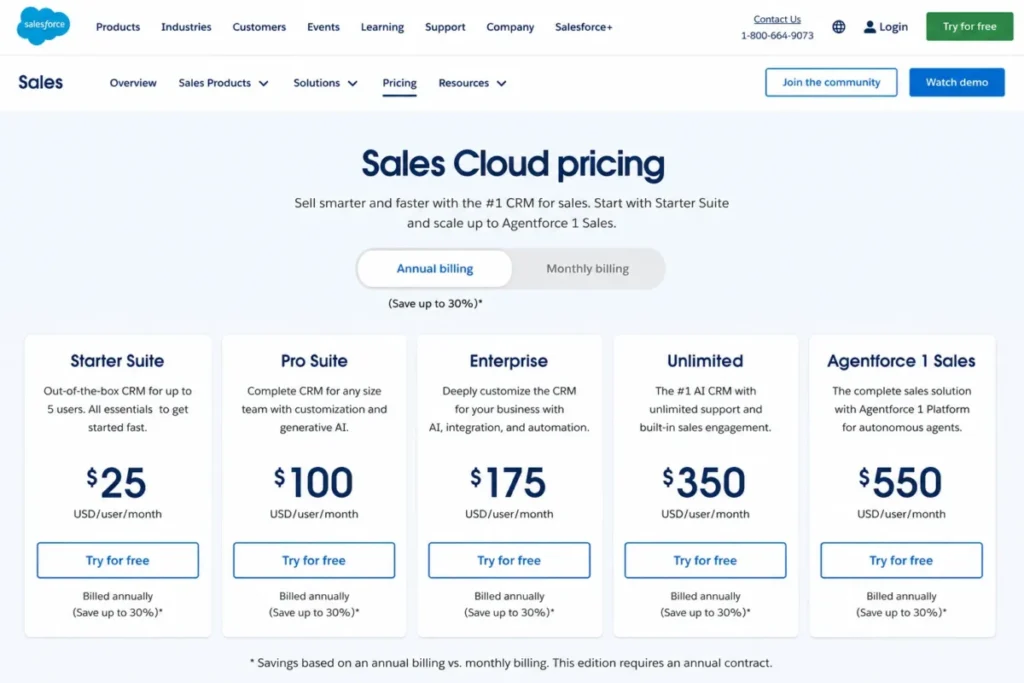
Salesforce Pricing at a Glance
| Question | Answer (checked July 6, 2026) |
|---|---|
| Starting price | Free Suite at $0 for up to 2 users; paid plans from $25/ |
| Free plan or trial | Both: a permanent 2-user Free Suite and a separate 30-day trial |
| Best plan for most sales teams | Enterprise at $175/ |
| Plan I would avoid buying blind | Pro Suite at $100/ |
| Biggest hidden cost | Premier Success Plan at 30% of net license fees, or Revenue Intelligence at $220/ |
| Best cheaper alternative | Pipedrive from $14/ |
| Billing basis | Pro and above are billed annually |
Read that table as a budget warning, not a spec sheet, and as a companion to our wider best CRM software research. The sticker price answers “what does Salesforce cost,” but the plan that fits a real sales team usually sits two tiers above the entry point once API access and forecasting matter.
How I Priced Salesforce Here
I did not test a live Salesforce org for this guide. Every number comes from official Salesforce sources: the CRM pricing page, the Sales pricing page, the Starter and Pro comparison PDF, the all-add-ons pricing PDF, and Salesforce’s compliance pages, all checked on July 6, 2026.
Competitor anchors come from official HubSpot, Microsoft, Pipedrive, and Zoho pricing pages checked the same day. Where a third-party review site showed a price that conflicted with Salesforce’s own page, I used Salesforce and flagged the conflict.
That keeps the language on documented ground. I can tell you what each plan and add-on lists for, but not your negotiated discount, because Salesforce does not publish it.
The Advertised Price vs the Real Price
Salesforce advertises “starts at $25,” and a functioning sales operation almost never lands there. Here is where the two numbers separate.
| Cost driver | What the ad implies | What the quote usually becomes |
|---|---|---|
| Plan tier | $25/ | $175/ |
| Billing | “$100 per month” for Pro | Billed annually, so a 12-month commitment up front |
| Support | Included | Standard included; Premier adds 30% of net license fees |
| API access | Assumed included | Web Services API is $25/ |
| Advanced analytics | “AI included” | Revenue Intelligence is a separate $220/ |
| Security controls | “Enterprise-grade” | Shield adds 30% of net spend on top of licenses |
The gap between column two and column three is the entire reason this guide exists. A team that budgets from $25 and lands on Enterprise plus Premier Support is off by roughly a factor of eight per seat before implementation.
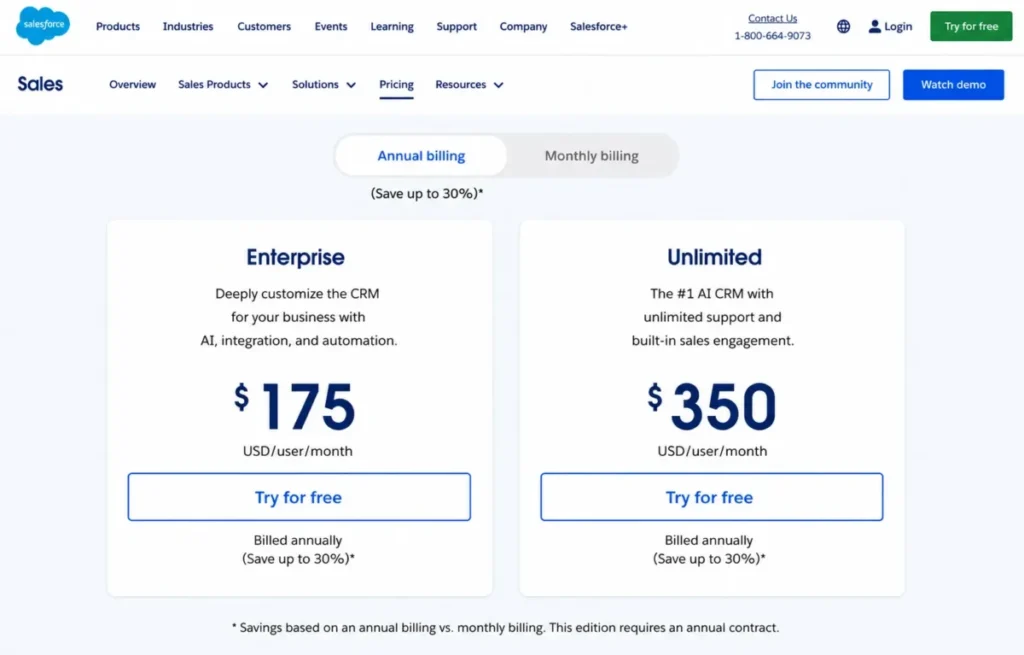
One correction is worth making early. Some third-party pages still list Salesforce Enterprise at $165 and Unlimited at $330, while Salesforce’s own Sales page checked July 6, 2026 shows $175 and $350, so treat the lower figures as stale unless you re-verify them.
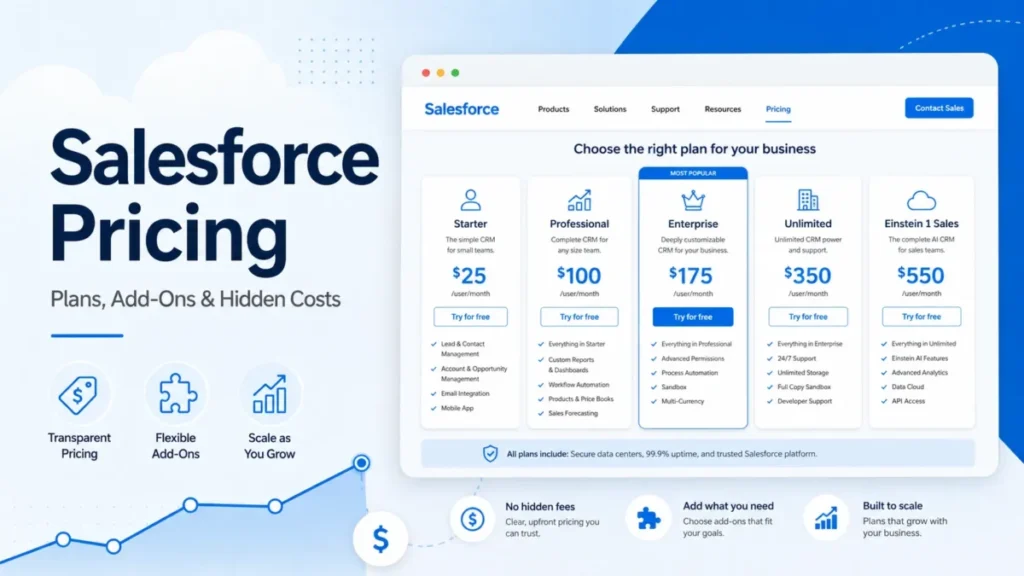
Salesforce Pricing Plans Compared
Six editions sit on the Sales Cloud line. Here is the full grid, with annualized cost per user so the real commitment is visible.
| Edition | Per user / month | Per user / year | Billing basis | Best for | Key limit |
|---|---|---|---|---|---|
| Free Suite | $0 | $0 | Free | A 2-person founding team testing basic CRM | Hard cap of 2 user licenses |
| Starter Suite | $25 | $300 | Monthly or annual | A small team wanting simple sales, service, and marketing | Lacks forecasting, quoting, sandbox, and AppExchange access |
| Pro Suite | $100 | $1,200 | Annual | A growing team needing quoting, forecasting, and automation | Web Services API often needs a paid add-on |
| Enterprise | $175 | $2,100 | Annual | A sales org needing web API and advanced pipeline features | Premier Support, most AI, and security are still add-ons |
| Unlimited | $350 | $4,200 | Annual | A team wanting Premier Support and predictive AI bundled | Full Agentforce and productivity stack still sits above it |
| Agentforce 1 Sales | $550 | $6,600 | Annual | An AI-heavy enterprise buying the full bundle | Priced as a bundle; overkill without AI and multi-product use |
The jump most teams underestimate is Starter to Pro, a 4x price move. The reason is not more seats; it is the feature gates that open at Pro, which I break down below.
Annual billing on Pro and above is the second surprise. A “$100 per month” plan is a 12-month commitment, so cash-flow planning and switching cost both change the moment you cross from Starter to Pro.
What Each Plan Includes
Free Suite. Zero dollars, capped at 2 user licenses, no contract or card required. It covers basic lead and opportunity management with simple email and Slack conversations.
I would treat Free Suite as a founder sandbox, not a growth plan, because a third hire forces a move to Starter.
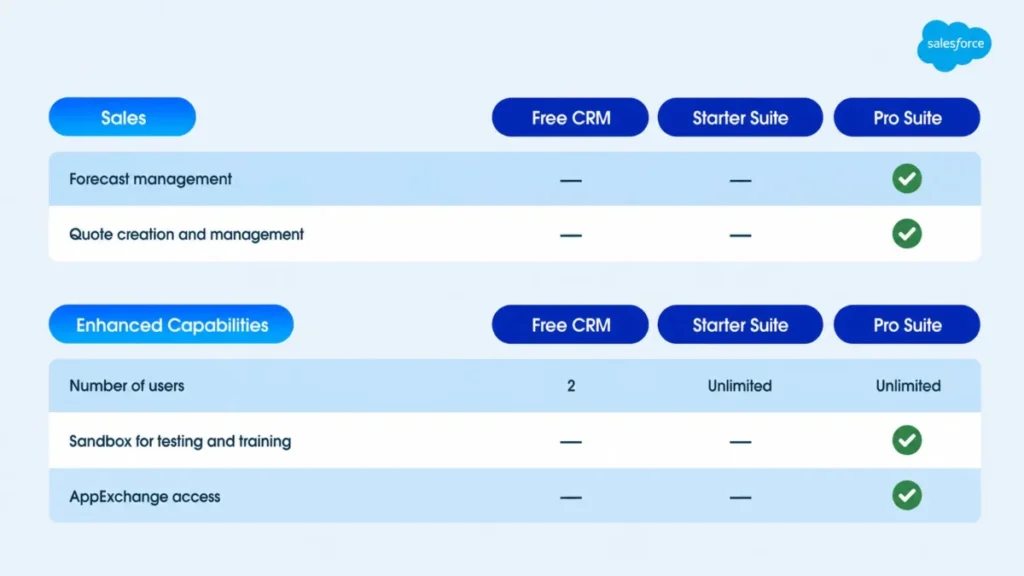
Starter Suite. At $25 per user per month, it bundles basic sales, service, marketing, and commerce tools with no published user cap. What it lacks is the sales machinery: forecast management, quote creation, sandbox, custom objects, and AppExchange access.
The comparison PDF confirms Starter has no user limit, so ignore any third-party claim that Starter tops out at five users.
Pro Suite. At $100 per user per month billed annually, Pro adds customization, automation, quoting, and forecasting. This is the first plan a real sales team can run a pipeline on.
The catch is API access, which frequently requires the $25 Web Services API add-on.
Enterprise. At $175 per user per month billed annually, Enterprise brings web API, advanced pipeline and deal insights, conversation intelligence, and Agentforce access. For most mid-market RevOps teams, this is the practical floor, not Pro.
Unlimited. At $350 per user per month billed annually, Unlimited bundles predictive AI, Conversation Intelligence, Sales Engagement, the Premier Success Plan, and a Full Sandbox. Its value depends entirely on whether you would have bought Premier Support and those AI features anyway.
Agentforce 1 Sales. At $550 per user per month billed annually, this is the top bundle: Unlimited plus the full AI suite, unmetered employee Agentforce usage, Slack Enterprise+, Spiff, Sales Planning, Sales Programs, Maps, Tableau Next, and org-level credits. I evaluate it as a package deal, not a tier, and cover that math later.
When the Free Suite Stops Working
Free Suite is a genuine $0 option that most guides skip. The reason to care is the ceiling: two user licenses, full stop.
That makes it viable for a solo founder or a two-person founding team running early deals. The day you hire a third person who needs CRM access, Free Suite is done and Starter begins at $25 per user per month.
Buyers also confuse three different “free” things. Here is what each actually means.
| “Free” thing | What it is | The catch |
|---|---|---|
| Free Suite | A permanent $0 plan | Capped at 2 users |
| Free trial | A 30-day trial of a paid edition | Reverts to paid after 30 days |
| Free Agentforce conversations | Limited Agentforce access via Foundations | Not the same as paid Agentforce Sales products |
If someone tells you “Salesforce is free,” ask which of these three they mean. Only the first is a plan you can run a business on, and only for two people.
Feature Gates: What You Actually Get by Plan
Price differences between editions are really feature-gate differences. This is where a cheap plan quietly disqualifies itself.
| Capability | Free | Starter | Pro | Enterprise | Unlimited |
|---|---|---|---|---|---|
| Basic lead and opportunity management | Yes | Yes | Yes | Yes | Yes |
| Forecast management | No | No | Yes | Yes | Yes |
| Quote creation | No | No | Yes | Yes | Yes |
| Sandbox for safe testing | No | No | Yes (limited) | Yes | Full Sandbox |
| AppExchange access | No | No | Yes | Yes | Yes |
| Custom objects and apps | No | No | Yes | Yes | Yes |
| Web Services API | No | No | Add-on | Included | Included |
| Conversation intelligence | No | No | No | Yes | Yes |
| Sales Engagement | No | No | No | No | Yes |
| Predictive AI | No | No | No | Limited | Yes |
| Premier Success Plan | No | No | No | Add-on | Included |
The gate most sales teams hit first is not AI. It is quote creation and forecast management, both of which live at Pro or above, so a team running spreadsheet forecasts today feels that gate long before it needs Einstein.
The second gate is API access. Pro can reach it with the $25 add-on, but Enterprise includes web API outright, which is why API-heavy teams often skip Pro entirely.
The Hidden Costs Nobody Puts in the Plan Cards
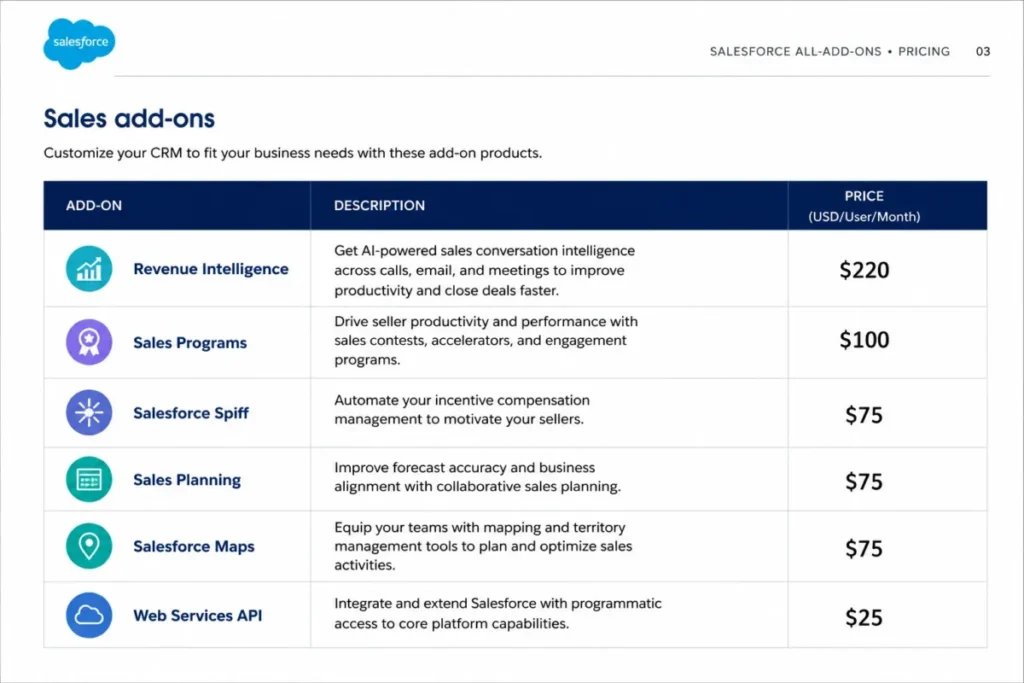
The plan cards show six prices; the all-add-ons PDF shows dozens more. These are the line items that turn a per-user quote into a real budget, ranked by how badly they surprise people.
| Add-on | Price | When it hits your quote |
|---|---|---|
| Revenue Intelligence | $220/ | Advanced revenue analytics needs |
| Sales Performance Management Suite | $200/ | Full sales performance tooling |
| Revenue Cloud Advanced | $200/ | Advanced revenue lifecycle needs |
| Agentforce for Sales | From $125/ | Adding Agentforce to an edition that lacks it |
| Sales Programs | $100/ | Programmatic seller coaching |
| Salesforce Maps | From $75/ | Field sales and territory routing |
| Salesforce Spiff | $75/ | Incentive compensation management |
| Sales Planning | $75/ | Sales planning workflows |
| Sales Cloud Einstein | $50/ | Einstein sales intelligence |
| Web Services API | $25/ | API access on Pro and lower |
| Additional API Calls | $25/ | High-volume integration traffic |
| Marketing Email Sends | $10 per 1,000 sends/ | Exceeding included marketing volume |
Notice the top of that list. Revenue Intelligence alone, at $220 per user per month, costs more than the entire Enterprise license, and across a 20-person team it becomes a six-figure annual line item on its own.
I would build any Salesforce budget from this table, not from the plan card. The plan card is the price of admission; this table is the price of using the product the way your pitch deck assumes.
The API break-even trap
Pro is $100 and Web Services API is $25, which puts Pro-plus-API at $125 per user per month. That is $50 under Enterprise at $175.
On paper, Pro-plus-API looks like the smart budget move. In practice, Enterprise buys more than API, because advanced pipeline management, conversation intelligence, and Agentforce access all come with it.
So the choice is not a clean break-even. It is whether you need only API, in which case Pro-plus-API saves money, or you also need Enterprise’s pipeline and AI features, in which case the $175 tier earns its price.
I would only stay on Pro-plus-API if API is the single Enterprise-grade feature the team needs. The moment conversation intelligence or advanced deal insights enter the requirement, Enterprise is the cleaner buy.
Premier Support is a 30% multiplier
Standard support is included in every license. Premier Success Plan is 30% of your net license fees, and it is bundled into Unlimited and Agentforce 1 in Salesforce’s cited pricing evidence.
Do the math on a 50-seat Enterprise deal: $175 x 50 x 12 is $105,000 a year in licenses, and Premier adds roughly $31,500 on top. That is a support line item larger than many teams’ entire first CRM budget.
This is why Unlimited at $350 is not simply “double Enterprise.” Unlimited already includes Premier Support, so part of that $175 gap is support you might have bought anyway.
Security add-ons are a percentage, not a flat fee
Regulated teams get surprised here. Salesforce’s security and privacy controls are priced as a percentage of net spend, so they scale with the size of your contract.
| Security add-on | Price |
|---|---|
| Salesforce Shield | 30% of net spend |
| Platform Encryption | 20% of net spend |
| Privacy Center | 15% of net spend |
| Event Monitoring | 10% of net spend |
| Data Mask | 10% of net spend |
| Security Center | 10% of net spend |
Shield on a $105,000 Enterprise contract adds roughly $31,500. On a larger org, the percentage model means security cost rises in lockstep with license spend, which is exactly when procurement scrutiny is highest.
One clarification saves painful meetings. Salesforce holds broad compliance certifications, including GDPR, HIPAA, ISO 27001/27017/27018, PCI DSS, SOC 1/2/3, and FedRAMP, but holding them is not the same as including every control.
Shield, encryption, and monitoring are still paid add-ons. A “Salesforce is HIPAA-compliant” claim does not mean the admin tooling your auditor wants is switched on for free.
AI and data credits need cautious math
Agentforce 1 Sales includes org-level credits: 1 million Flex Credits and 2.5 million Data Cloud Credits per org per year. Flex Credits list at $500 per 100,000 credits when purchased separately.
Credit consumption depends on your AI and data workload, and I will not estimate overage without a usage model, because that is where fake precision creeps in. The safe move is to treat “AI included” claims with suspicion and ask Salesforce to map your expected agent and data volume to credit consumption before you sign.
Marketing email sends can turn a flat plan into a usage bill
Starter and Pro include a set monthly marketing send allowance, and the comparison PDF puts Starter’s included sends well below what an active campaign calendar burns through. Once you pass the included volume, Salesforce lists $10 per 1,000 additional sends per month.
For a small team using Starter as a light marketing CRM, that overage is the line item that quietly turns a $25 flat plan into a usage-based bill. I would size expected monthly email volume before committing, because a Starter team running heavy nurture sequences can pay more in send overages than in licenses.
Enterprise vs Unlimited: Which One Earns Its Price
The sticker gap is $175 versus $350, a doubling, and comparing stickers is the wrong method. Unlimited includes the Premier Success Plan (worth roughly 30% of license on its own), predictive AI, Conversation Intelligence, Sales Engagement, and a Full Sandbox.
Enterprise includes none of those by default. Premier is a 30% add-on, and Sales Engagement is not available on Enterprise at all.
So the honest comparison is Enterprise plus the add-ons you would actually buy versus Unlimited as a bundle. If your team needs Premier Support, predictive AI, and Sales Engagement, Unlimited is often the cheaper path to the same capability.
I would choose Enterprise when the requirement is pipeline plus API and little else. I would choose Unlimited when Premier Support and Sales Engagement are already on the must-have list.
Agentforce 1 Sales: Bundle or Bloat
At $550 per user per month, Agentforce 1 Sales looks absurd next to Starter’s $25. Judged as a tier it is, but judged as a bundle the math changes.
It folds in items that otherwise list as separate add-ons: Sales Programs ($100), Maps (from $75), Spiff ($75), and Sales Planning ($75), plus Slack Enterprise+, Tableau Next, unmetered employee Agentforce usage, and org-level credits. Priced individually on top of Unlimited, several of those add-ons alone approach the Agentforce 1 premium.
The plan makes financial sense for an AI-heavy enterprise that would buy most of those add-ons anyway and wants unmetered employee Agentforce usage. It is bloat for a team that wants a CRM and a pipeline, because you are paying for a productivity and AI stack you have no plan to deploy.
My rule is simple. If you cannot name at least three of the bundled add-ons you would have purchased separately, you are not the buyer for this tier.
Real Cost Scenarios by Team Size
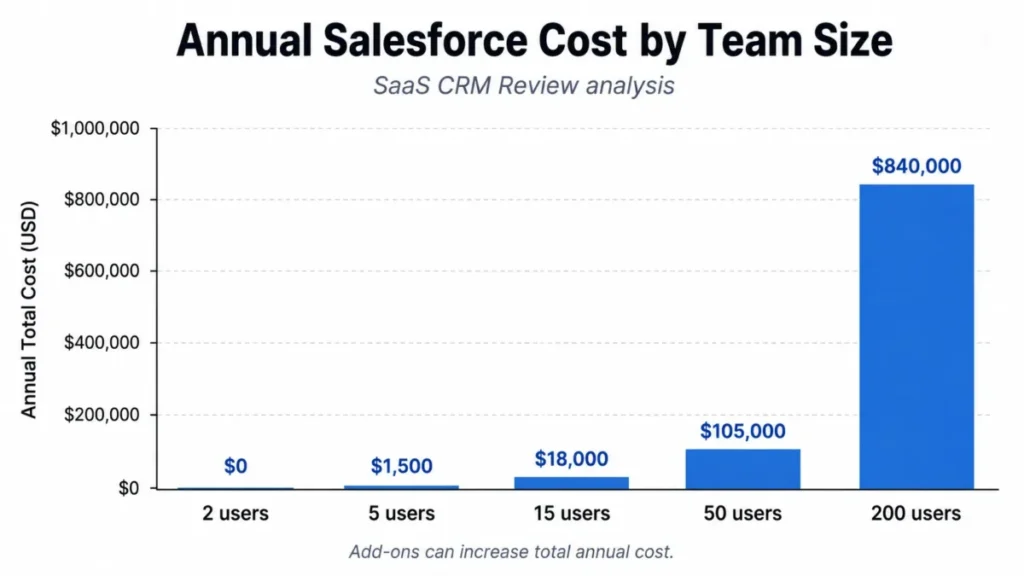
Per-user pricing hides the real number until you multiply. Here is the annual math at five team sizes, using public list prices before discounts, implementation, or taxes.
| Team size | Recommended plan | Monthly total | Annual total | Assumptions |
|---|---|---|---|---|
| 2 users | Free Suite | $0 | $0 | Within the 2-user cap, no add-ons |
| 5 users | Starter Suite | $125 | $1,500 | 5 x $25, no add-ons |
| 15 users | Pro Suite | $1,500 base; $1,875 with API | $18,000; $22,500 with API | 15 x $100; API adds 15 x $25 |
| 50 users | Enterprise | $8,750 base; $11,375 with Premier | $105,000; $136,500 with Premier | 50 x $175; Premier adds 30% |
| 200 users | Unlimited or Agentforce 1 | $70,000; $110,000 | $840,000; $1,320,000 | 200 x $350 or $550 |
The 15-user row is the one to sit with. A team that assumed “$100 a month” is looking at $18,000 a year before a single API add-on, and $22,500 with one, which is where the entry price stops describing the budget.
None of these totals include implementation, negotiated discounts, AI or security add-ons, or third-party AppExchange app fees. A real Enterprise deal at 50 seats lands above the $105,000 base once support and a few add-ons are included.
Monthly vs Annual Billing
Starter Suite can be billed monthly or annually. Pro Suite, Enterprise, Unlimited, and Agentforce 1 Sales are billed annually in Salesforce’s public pricing.
That detail changes more than cash flow. Annual billing means a 12-month commitment, so a mid-year decision that Salesforce is the wrong fit still carries the rest of the contract.
Salesforce does not publish a specific monthly-versus-annual discount for these tiers, so I will not invent one. If you are unsure Salesforce will stick, Starter’s monthly option is the only low-commitment on-ramp.
Which Plan Should You Choose
Match the plan to the team, not the marketing.
Solo founder or 2-person team. Free Suite, until you hire a third CRM user. It is a real $0 option inside the 2-user cap.
Small team, 3 to 10 users, simple needs. Starter Suite at $25, but only if you do not need forecasting or quoting yet, because those force Pro.
Growing team needing pipeline discipline. Pro Suite at $100, plus the $25 API add-on if you integrate other tools. This is the first plan a real sales process runs on.
Mid-market RevOps with integrations. Enterprise at $175, where web API is included alongside advanced pipeline and conversation intelligence. For most serious sales orgs and other CRM for sales teams at this scale, this is the practical floor.
Enterprise wanting bundled support and AI. Unlimited at $350 when Premier Support and Sales Engagement are already required; Agentforce 1 at $550 only when the full AI and productivity bundle will be deployed.
The upgrade trigger that catches teams off guard is workflow, not headcount. Quote creation and forecast management push a team to Pro, and API access plus conversation intelligence push it to Enterprise, regardless of seat count.
Which Plan Should You Avoid
I would avoid buying Pro Suite blind when the team already knows it needs API access and Enterprise-grade pipeline features. Pro at $100 plus the $25 API add-on is $125 per user, and it still lacks conversation intelligence and advanced deal insights.
A team certain it needs those is paying for a stepping-stone plan and will re-buy Enterprise within a year, eating the annual commitment. Pro is the right call for a genuinely growing team that needs quoting and forecasting but not deep API or AI yet.
Pro is the wrong call only as a way to save $50 a seat when the requirements already point at Enterprise.
Who Should Not Choose Salesforce
Salesforce is not the default answer for every team, and pretending otherwise is how buyers overpay. A 1-to-10-person team that wants a simple, plug-and-play pipeline with predictable month-to-month pricing is a poor fit.
Salesforce rewards admin capacity and process maturity. Without either, the annual commitment and add-on grid become a tax on a tool the team barely configures.
Teams with no dedicated admin, no integration needs, and no complex sales process get more value from a lighter option, and a shortlist of CRM built for small business will fit that profile better. Third-party review patterns on Capterra and G2 repeat the same theme: Sales Cloud is powerful, and cost rises fast once features, users, and integrations pile on.
If your sales motion is a shared inbox and a spreadsheet today, solve adoption with something simpler before you buy enterprise CRM.
Implementation and Admin Costs
License cost is only the visible part of the bill. Implementation is the part that varies most and the part no web page can quote you.
The drivers are consistent: data migration, custom objects, integrations, automation build, security configuration, and training. A clean migration for a small team is a different project than a multi-system integration with custom objects and regulated data.
I will not publish a universal implementation range, because the honest answer is that it depends on scope, and only a scoped quote is real. Sandboxes matter here more than most pricing guides admit.
Pro includes a limited sandbox and Unlimited includes a Full Sandbox, which lets an admin test customizations before pushing them live. For a team doing serious customization, sandbox access is a change-management safeguard, not a nice-to-have.
The 30- and 90-day adoption test is the one I would apply. After 30 days, users should be logging deals without being chased; after 90 days, forecasts should be trustworthy enough that finance uses them.
If either is failing, the problem is adoption and configuration, not the license, and more seats will not fix it.
Adoption also fails for a duller reason than configuration: nobody wants to type. A rep who has to chase down an email address, a phone number and a company size before a record is usable will quietly skip the record, and the forecast degrades from there. At Salesforce’s per-seat pricing, paying a rep to do that lookup is the most expensive way to buy data.
An enrichment layer that sits between lead capture and the CRM removes the task. Tools like LinkFinder AI keep CRM records enriched automatically, filling in missing emails, phone numbers and company data as new leads land. Price it against the admin hours it removes, and budget it as its own line item next to implementation. I have not run LinkFinder AI through my own testing process, so read this as a category pointer, not a recommendation.
Integrations and API Costs
Salesforce’s AppExchange ecosystem lists more than 7,000 apps and certified consulting organizations. That breadth is a real strength, and it is also where buyers assume “integration” means “free.”
It does not. Many AppExchange apps carry their own fees, integrations often consume API calls, and API access itself is gated.
Web Services API is a $25 per-user add-on on lower tiers, and Additional API Calls list at $25 per month for 10,000 daily calls when high-volume traffic exceeds the included allocation. Salesforce’s own documentation defines API request limits and storage allocations, but I could not fully verify those exact numbers in one session, so confirm your allocation against integration volume before signing.
The buyer question is simple. How many daily API calls will your integrations generate, and does your edition’s allocation cover them, or is another $25-per-block add-on coming.
Security and Compliance Costs
For regulated teams, security pricing is often the deciding line item, and it is percentage-based. The certifications are broad and included: GDPR, HIPAA, ISO 27001/27017/27018, PCI DSS, SOC 1/2/3, and FedRAMP among them.
What is not automatically included is the admin tooling. Shield runs 30% of net spend, Platform Encryption 20%, Privacy Center 15%, and Event Monitoring, Data Mask, and Security Center 10% each.
The consequence for procurement is direct. A regulated 50-seat Enterprise org that needs Shield is adding roughly $31,500 a year to a $105,000 license base, and that percentage scales up as the contract grows.
Budget security as a percentage of total spend, not as a flat add-on, or the finance review will stall.
Salesforce Pricing vs Competitors
Salesforce is rarely the cheapest CRM. The useful question is what you give up to pay less.
| CRM | Entry pricing (checked July 6, 2026) | Billing note |
|---|---|---|
| Salesforce Sales Cloud | Free Suite $0 (2 users); paid from $25; Enterprise $175 | Pro and above billed annually |
| HubSpot Sales Hub | Free plan; Sales Hub Enterprise $150/ | Enterprise carries a required onboarding fee |
| Microsoft Dynamics 365 Sales | Professional $65; Enterprise $105; Premium $150 | Paid yearly |
| Pipedrive | Lite $14; Growth $39; Premium $59; Ultimate $79 | Per seat, billed annually |
| Zoho CRM | Free plan for 3 users; paid USD needs re-verification | Official page showed local currency despite a USD selector |
Two anchors reframe Salesforce’s price. Pipedrive’s own pricing tops out at $79 per seat, below Salesforce Enterprise while covering core sales-CRM needs for smaller teams, and HubSpot’s free tier undercuts everything for very small teams, though its Enterprise onboarding fee closes some of the gap at scale.
If HubSpot is your main alternative, the deeper HubSpot versus Salesforce breakdown covers where each one wins beyond price alone.
I would read this table as a fit test, not a price race. Salesforce earns its premium when you need its depth, ecosystem, and AI, while a small team wanting a clean pipeline gets the same daily outcome from Pipedrive or HubSpot’s lower tiers for a fraction of the annual commitment.
Is Salesforce Worth the Price
Worth it depends on whether you will use what you are paying for. Salesforce is worth the price if you have RevOps or admin capacity, a complex sales process, integration and API needs, and a budget that can absorb add-ons and Premier Support.
At that profile, the ecosystem depth and AI roadmap justify the premium, and Enterprise or Unlimited becomes a reasonable spend. It is not worth the price if you are a small team that wants a simple pipeline, predictable monthly billing, and minimal admin work.
At that second profile you pay enterprise prices for a fraction of the platform, and one of the leaner Salesforce alternatives delivers the same day-to-day outcome. For the capability side of this decision rather than the cost side, the full Salesforce CRM review covers what the platform does well and where it strains.
The renewal question I would want answered before signing is whether, 12 months out, you can show that forecast accuracy, pipeline hygiene, and adoption improved enough to defend the license plus add-ons plus support.
If you cannot see how you would prove that, the switch-or-stay answer is stay on a cheaper tool and revisit when the process is ready.
How to Avoid Overpaying for Salesforce
- Budget from the add-on table, not the plan card. Revenue Intelligence at $220 and Premier Support at 30% distort the real total more than the base license does.
- Confirm whether you need API access before choosing Pro. If you do, price Pro-plus-API against Enterprise and let features, not the $50 gap, decide.
- Treat annual billing as a 12-month commitment, and only start on Starter’s monthly option if you are unsure Salesforce fits.
- Map your security needs early. Shield and encryption are percentage-based, so they grow with your contract and belong in the first budget, not a later surprise.
- Model AI and data credit consumption with Salesforce before assuming “AI included” means no overage.
- Verify current prices against Salesforce’s own pages. Third-party sites still show stale $165 and $330 figures that Salesforce now lists at $175 and $350.
- Get implementation scoped as its own quote, because it varies too much to fold into a per-user assumption.
FAQ
How much does Salesforce cost in 2026?
Sales Cloud runs from a $0 Free Suite (2 users) to $550 per user per month for Agentforce 1 Sales. The common tiers are $25 (Starter), $100 (Pro), $175 (Enterprise), and $350 (Unlimited), all checked on July 6, 2026.
Is Salesforce billed monthly or annually?
Starter can be billed monthly or annually. Pro, Enterprise, Unlimited, and Agentforce 1 Sales are billed annually in Salesforce’s public pricing.
Does Salesforce have a free plan?
Yes. Free Suite is a permanent $0 plan capped at 2 users, which is separate from the 30-day trial of paid editions.
What is the biggest hidden cost in Salesforce?
Premier Support at 30% of net license fees and Revenue Intelligence at $220 per user per month are the two that most often blow past the base license.
Which Salesforce plan includes API access?
Enterprise and above include web API. On Pro and lower, Web Services API is a $25 per-user-per-month add-on.
Does Salesforce charge extra for support?
Standard support is included. Premier Success Plan costs 30% of net license fees and is bundled into Unlimited and Agentforce 1.
Is Salesforce worth it for small businesses?
Only if the small team has admin capacity and real process complexity. A simple pipeline for a small team is usually better served by Pipedrive or HubSpot’s lower tiers.
How much would Salesforce cost for 50 users?
Enterprise at 50 seats is roughly $105,000 a year in licenses before add-ons. Adding Premier Support pushes it to about $136,500 before implementation.
Why do different sites show different Salesforce prices?
Some third-party pages still list older Enterprise ($165) and Unlimited ($330) prices. Salesforce’s own page shows $175 and $350 as of July 6, 2026, so trust the official figures.
Can I rely on these prices for a quote?
Use them for planning. Salesforce marks pricing as informational and subject to change, and final cost varies by contract, add-ons, region, discounts, and support, so confirm with Salesforce before you buy.