Keeper Password Manager is worth paying for if you run a 10 to 50 person team that needs enforced security policies and a way to recover a departing employee’s vault. Business is the plan most of those teams need: $4.00 per user per month, billed annually, or $4.00 x 10 x 12 = $480 a year for ten people. SSO and SCIM, the features an identity-provider shop needs, wait on Enterprise at $6.00, and Business Starter at $2.00 is listed for 5–10 users.
Quick verdict
- Worth it for: teams of 10 to 50 that want role-based policies and transferable vaults, both on Keeper Password Manager’s Business plan.
- Skip it if: you need SCIM at the lowest per-user price or a free plan that syncs across devices.
- Main strength: Account Transfer for offboarding; separately, SOC 2 Type 2 and ISO 27001 certifications for audit requests.
- Biggest limit: SSO, SCIM and AD/LDAP provisioning start on Enterprise.
- Price basis: $2.00, $4.00 or $6.00 per user per month, billed annually, checked November 2026.
In This Article (10 sections)
What Keeper Password Manager Is and Who It’s For
Keeper Password Manager is Keeper Security’s encrypted vault for passwords, passkeys and files, sold per user to businesses and at a flat yearly price to individuals and families. The business editions are Business Starter, Business and Enterprise; the consumer plans are Personal and Family.
This review covers the password manager only. KeeperPAM, Keeper Secrets Manager and Connection Manager are other Keeper lines with custom pricing, and they stay outside it. If you came looking for a tax or expense app, this is a different product.
- Category: password manager for businesses, individuals and families
- Best for: teams of 5 to 50 that need admin policies and offboarding control
- Starting price: $2.00 per user per month, billed annually (Business Starter); Business is $4.00
- Free plan or trial: a free trial on each business plan; Keeper Free runs on one device
- Main limitation: the identity tier (SSO, SCIM) is the top plan, Enterprise at $6.00
- Platforms: Windows 11+, macOS, Linux, iOS 14+, Android 9+
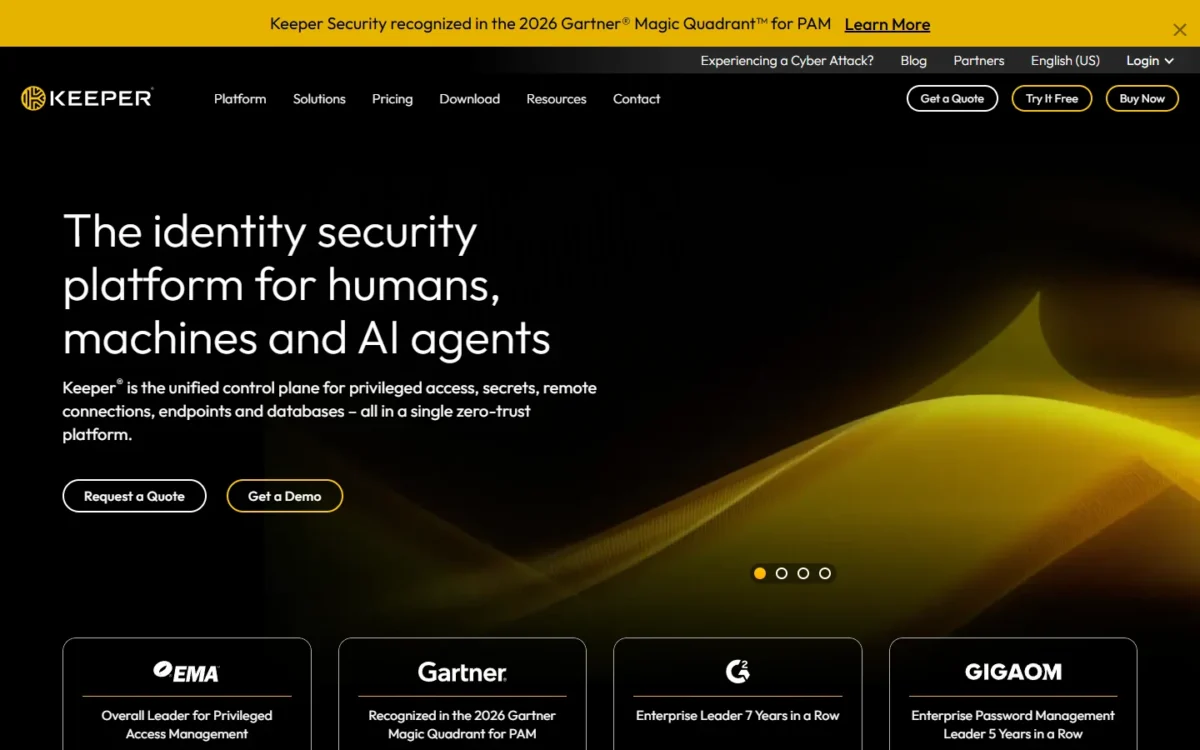
Keeper’s plan cards read as a ladder of what a team outgrows: shared structure first, then identity integration.
Keeper Features That Matter for Teams
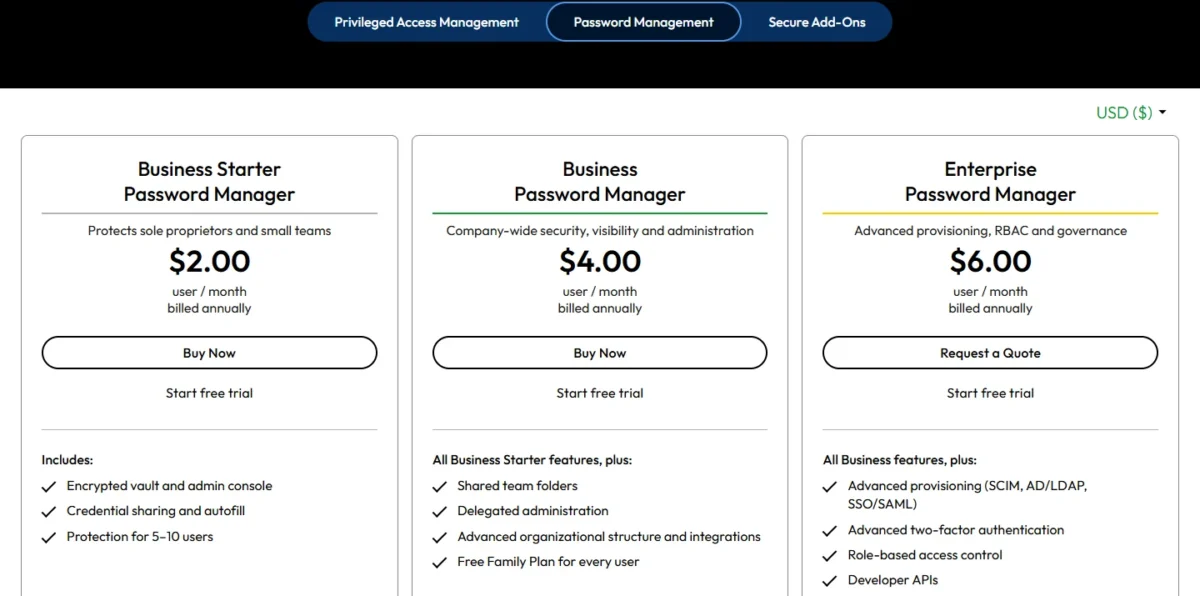
Five Keeper features decide a team purchase: sharing, roles and enforcement policies, SSO and SCIM provisioning, offboarding by Account Transfer, and security reporting. The table maps each admin job to the plan card that lists it.
| Admin job | Business Starter | Business | Enterprise |
|---|---|---|---|
| Share a credential with a coworker | Yes | Yes | Yes |
| Shared team folders | Not listed on the card | Yes | Yes |
| Delegated administration by department | Not listed on the card | Yes | Yes |
| Role-based enforcement policies | Not listed on the card | Role-based policies (pricing FAQ) | Role-based access control |
| Vault transfer for a departing employee (Account Transfer) | In the feature grid, not on the card | In the feature grid, not on the card | In the feature grid, not on the card |
| Free Family Plan for every user | Not listed on the card | Yes | Yes |
| SSO sign-in (SAML 2.0) | Not listed on the card | Not listed on the card | Yes |
| SCIM and AD/LDAP provisioning | Not listed on the card | Not listed on the card | Yes |
| DUO and RSA two-factor authentication | Not listed on the card | Not listed on the card | Yes |
| Custom reports, alerts and SIEM feeds (ARAM) | Add-on | Add-on | Add-on |
Sources: Keeper business pricing, checked Nov 2026.
My take
The first gate most teams hit is shared team folders, which start on Business. The second is identity: SSO, SCIM and directory sync start on Enterprise. I would budget Business for any team with departments, and Enterprise only when Okta, Entra ID or Google Workspace already controls who has an account.
Shared folders and record sharing
Business Starter covers credential sharing between users, shared team folders start on Business, and One-Time Share reaches a person who has no Keeper account. That split decides Starter against Business for most small offices.
A shared folder passes many records to a user or a team at once, with permissions set on the folder. Keeper’s newer Nested Shared Folders model supports hierarchies up to five levels deep, with independent sharing settings at every level. A marketing team’s social logins and a finance team’s bank portals can then live in separate branches.
One-Time Share gives time-limited access to a single record, and Keeper suggests it for contractors and for new employees during onboarding. Time-Limited Access revokes a share at a set time, so a freelancer’s access ends without anyone having to remove it.
Admin Console, roles and enforcement policies
Roles carry Keeper’s enforcement policies, and a user who sits in several roles typically ends up with the most restrictive setting.
Enforcement policies are grouped into areas that include login settings, two-factor authentication (2FA), platform restriction, creating and sharing, import and export, KeeperFill and an allow IP list. Every new tenant starts with two roles, Keeper Administrator and All Users, so an owner without IT staff can require 2FA for everyone by editing one default role.
Delegated administration, which hands onboarding or policy work to a sub-administrator for one department, starts on Business.
SSO, SCIM and directory provisioning
Accounts can follow your identity provider on Enterprise, where Keeper SSO Connect is included. It is a cloud SAML 2.0 service with just-in-time provisioning, and Keeper’s SCIM support works with Okta, Microsoft Entra ID, Google Workspace, Ping and OneLogin.
Through SCIM, the identity provider can create and deactivate Keeper accounts, create teams, and add or remove users from them. Teams with an on-premises Active Directory use the AD Bridge instead.
Smaller teams may not need any of it: Keeper’s own guidance says manual provisioning or a bulk upload may be sufficient for a small number of users. The question is whether your headcount changes often enough for automation to earn $2.00 more per user per month.
Onboarding and offboarding employees
Keeper can move a departing employee’s vault to a colleague, but only if Account Transfer was enabled and the employee accepted it before leaving. Deleting the user instead erases every record they own and leaves the records they shared “ownerless”.
Keeper offers the Account Transfer policy to business and enterprise customers. Its row in the pricing page’s feature grid is named Vault transfer, and no plan card includes it.
That makes offboarding a setup job, not an exit-day job. From Keeper’s Account Transfer documentation, the readiness list for a small team is:
- Confirm the Transfer Account permission on the Keeper Administrator role (enabled by default for new tenants), then turn on the Enable Account Transfer enforcement policy.
- Get every user to log in and accept the consent prompt. Users have 7 days to accept; after that they must accept to log in to their vault.
- Add a second person to the Keeper Administrator role, which Keeper strongly recommends in case one admin account is lost.
- When someone leaves, lock the account first, then run Transfer Account to a named recipient. The records arrive in a single folder labeled with the original owner’s email address, and the original account is permanently deleted.
- Keep Delete User for accounts with nothing in them. Keeper warns that the action cannot be undone.
The edge cases are where vaults get lost. A transfer requires that the user has logged in at least once, so an account that was invited but never opened cannot be transferred. Changing which admin role may run transfers triggers a fresh consent prompt for every user.

Because the consent step needs each person to log in, schedule it alongside the rest of your employee onboarding checklist.
Security Audit, BreachWatch and reporting
Security Audit, activity reporting and a Risk Management Dashboard sit in the plan grid, while dark web alerts and custom reports are paid add-ons. Security Audit monitors password strength and reuse across the organization, and the dashboard shows a vault health score per user.
BreachWatch is Keeper’s dark web monitoring. It checks passwords saved in employee vaults against known breach data, alerts the user, and shows admins which users have “At risk” or “Ignored” items. Custom reports, alerts and SIEM feeds belong to the Advanced Reporting & Alerts Module (ARAM); Business and Enterprise subscriptions carry the Recent Activity and All Security Events reports.
One limit to plan around: new events can take up to 15 minutes to appear in the reporting module. Treat the reports as an audit trail, not a live console.
Apps, browser extensions and platforms
Keeper runs on Windows 11 or later, the current macOS and the two versions before it, six Linux distributions (Fedora, Red Hat, CentOS, Debian, Ubuntu, Mint), iOS 14+ and Android 9+. Browser support covers Chrome, Safari, Firefox, Edge, Opera and Brave; Internet Explorer is not supported.
The KeeperFill browser extension autofills login credentials and manages passkeys. The plan grid also lists a password and passphrase generator. On an iPhone, the Personal plan lists fingerprint and Face ID login.
The Windows requirement is the one to check: a PC still on Windows 10 falls outside the desktop app’s system requirements. Keeper stores and shares passkeys and can sign users in with a device-bound passkey, which matters if you are weighing passkeys against passwords for your team.
Customer support by plan
Keeper lists support as available 24/7, with channels that depend on what you pay. Personal and Family users get email, live chat and phone support on paid plans. Business and Enterprise accounts get priority email, live chat, phone support and enterprise onboarding help.
The enterprise guide is more specific for business customers: support hours are 24×5 Monday through Friday and 8:30 a.m. to 5 p.m. on Saturday and Sunday, and a ticket gets a written acknowledgment within one business day. A team that works weekend nights should plan around those hours, not the around-the-clock headline.
A user on the free version is left with documentation and user guides, so budget a paid plan for anyone whose lockout would stop work.
Is Keeper Safe? Security, Certifications and Breach History
Keeper is safe to trust with company passwords on the evidence it publishes: a zero-knowledge design, AES 256-bit and elliptic-curve encryption performed on the user’s device, and independently audited certifications. The condition is that you hold the keys, not Keeper, and that cuts both ways.
On its security page, Keeper states that encryption and decryption always occur locally on the user’s device. It describes zero knowledge as stored information that no one else can access, not even Keeper employees.
For a user who logs in with a master password, the key is derived with PBKDF2 at 1,000,000 iterations. The transmission key is also wrapped with ML-KEM for quantum-resistant encryption. Those specifics are what a client’s or an auditor’s security questionnaire asks for, so save the page with your vendor file.
The certifications Keeper lists:
- SOC 2 Type 2 and SOC 3
- ISO 27001, 27017 and 27018
- FedRAMP High and GovRAMP Authorized, on GovCloud only
- FIPS 140-3 validation
- PCI DSS certification, HIPAA compliance and a TrustArc privacy certification
Basic two-factor authentication covers SMS, authenticator apps, smartwatch and security keys; Enterprise adds DUO and RSA.
The trade-off of zero knowledge is account recovery. A 24-word recovery phrase restores access if you forget the master password, but lose both and Keeper Support cannot help you regain access.
Business customers get one safety net: support can restore an accidentally deleted vault or shared folder to any point in time within 30 days. For a fee, support can assist in other recoveries, such as a user restore. The documentation still says Delete User cannot be undone, so transfer a leaver’s vault before you delete the account.
My take
For a regulated buyer, the SOC 2 Type 2 and ISO certifications are the reason to shortlist Keeper, because outside auditors stand behind them. Ask for the SOC 2 report during the trial. FedRAMP High only helps if you buy the GovCloud edition.
Has Keeper been breached? What its pages publish
The Keeper pages I read state no incident history, so they answer this question with neither a yes nor a no. What Keeper’s security page publishes on this question is its testing program. It describes quarterly penetration tests by outside firms such as NCC Group and CyberTest, and a vulnerability disclosure and bug bounty program run with Bugcrowd.
For anything dated, such as an incident notice or an audit report, use the channels Keeper names: the Trust Center, which its support page lists for security and compliance inquiries, the System Status page, and the Security Team email address in its enterprise guide. Check the first two before you sign.
Keeper Ease of Use and Setup
Rolling Keeper out to a small team takes eight setup jobs across Keeper’s trial page and its small-business guide, and none of them needs an identity provider.
- Pick the data center at trial sign-up: US, EU, AU, CA or JP. A wrong pick means asking support to delete the trial and start over.
- Choose the administrator’s master password and set a recovery phrase, because Keeper support cannot reset a forgotten master password.
- Upload your logo and customize the invitation email.
- Add a second Keeper Administrator.
- Enable Account Transfer.
- Create nodes and roles, or stay on the Root Node and the default All Users role, as smaller organizations may choose to.
- Require two-factor authentication in the role’s enforcement policy.
- Invite users one at a time or bulk-import them from a CSV file, then group them into teams.
Getting existing passwords in is a file job. Keeper lists importers for other password managers, including LastPass, Dashlane, RoboForm and KeePass, plus web browsers and text files (.csv, .xls, .tsv).
Daily login depends on the setup: a master password, biometrics such as Face ID or Touch ID, a device-bound passkey, or single sign-on with no master password on a business account that uses SSO.
My take
Keeper describes the trial as fully functional, so spend it on the two things no document settles for your team: whether KeeperFill fills the login pages your staff use every day, and whether your current manager’s export imports cleanly. I would add the backup administrator and enable Account Transfer before inviting anyone.
Setup effort is half the decision. The other half is what the plan costs each year.
Keeper Pricing
Keeper’s business plans cost $2.00, $4.00 or $6.00 per user per month, billed annually, and its consumer plans start at $42.99 a year.
Business plans and what a team pays per year
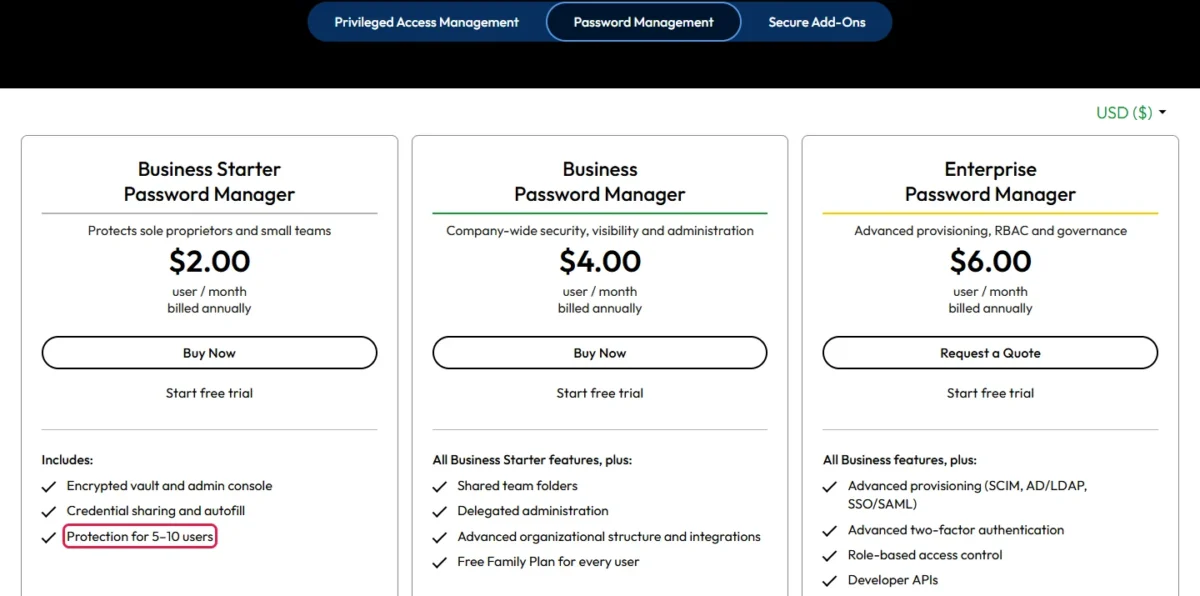
Business Starter is listed for 5–10 users. Business and Enterprise are priced per user, and the Enterprise card’s button reads Request a Quote instead of Buy Now.
| Plan | Price | Billing | Users | Key limit |
|---|---|---|---|---|
| Business Starter | $2.00 per user per month | Annual | 5–10 users | Shared team folders start on Business |
| Business | $4.00 per user per month | Annual | Billed per user | SSO and SCIM start on Enterprise |
| Enterprise | $6.00 per user per month | Annual | Billed per user | Request a Quote button |
| Personal | $3.58 a month ($42.99 billed annually) | Annual | Individual | BreachWatch is an add-on |
| Family | $7.67 a month ($91.99 billed annually) | Annual | 5 users | 10 GB Secure File Storage |
Sources: Keeper business pricing and Keeper personal and family pricing, USD, checked Nov 2026.
Here is the yearly bill at four team sizes, computed as price x users x 12 months.
| Team size | Business Starter | Business | Enterprise |
|---|---|---|---|
| 5 users | $2.00 x 5 x 12 = $120 | $4.00 x 5 x 12 = $240 | $6.00 x 5 x 12 = $360 |
| 10 users | $2.00 x 10 x 12 = $240 | $4.00 x 10 x 12 = $480 | $6.00 x 10 x 12 = $720 |
| 25 users | Listed for 5–10 users | $4.00 x 25 x 12 = $1,200 | $6.00 x 25 x 12 = $1,800 |
| 50 users | Listed for 5–10 users | $4.00 x 50 x 12 = $2,400 | $6.00 x 50 x 12 = $3,600 |
Sources: Keeper business pricing, checked Nov 2026. Assumptions: list prices before tax and add-ons.
The step from Starter to Business doubles the bill. A ten-person team goes from $240 to $480, which is $240 more a year for shared team folders, delegated administration and a free Family Plan for every user.
The step to Enterprise costs $1,800 – $1,200 = $600 a year at 25 users and $3,600 – $2,400 = $1,200 at 50. That is the price of SSO, SCIM and AD/LDAP provisioning, so pay it only if an identity provider already runs your company’s accounts.
The Starter card says it protects sole proprietors and small teams, yet lists protection for 5–10 users. A two-person firm should confirm at checkout whether it is billed for five seats, which would be $2.00 x 5 x 12 = $120 a year. That is the kind of seat minimum that raises a small team’s real cost.
Billing note
All three business prices are quoted per month but billed annually, so the first invoice covers the full year. Keeper’s pricing FAQ words the Business and Enterprise prices as “starts at”, so confirm the Enterprise figure with sales before you budget.
Three triggers force a move up the ladder: a headcount above the 5–10 users Business Starter lists, the first shared team folder, and the first SSO or SCIM requirement.
My take
I would put an office of 5 to 10 that shares logins person to person on Business Starter, a team with departments on Business, and only an Okta, Entra ID or Google Workspace shop on Enterprise. Business is the plan I would buy for most teams that have outgrown Starter and do not run an identity provider. Before choosing Starter, confirm in the trial that vault transfer and the two-factor enforcement policy work on it, because its card lists neither.
How much Keeper costs per month for one person or a family
Personal costs $3.58 a month, charged as $42.99 billed annually, and Family costs $7.67 a month, charged as $91.99 billed annually, for 5 users. Keeper’s pricing FAQ calls the Personal plan Keeper Unlimited; it includes unlimited password storage and unlimited devices and sync.
Family adds 10 GB of Secure File Storage and private vaults that family members cannot open for each other. Split five ways, the plan is $91.99 / 5 = $18.40 per person per year.
Employees on Business or Enterprise may need neither. Every user can create a free Family Plan for up to 5 family members, licensed with 10GB of secure file storage and BreachWatch for as long as the business account is active. For a ten-person team that perk has a list value of 10 x $91.99 = $919.90 a year.
Add-ons and what the price leaves out
Dark web monitoring, custom reporting and file storage are sold on top of the business plans, each with its own yearly price.
| Add-on | Price | What it adds |
|---|---|---|
| BreachWatch | $24 per user per year | Alerts when employee credentials are found on the dark web |
| Advanced Reporting & Alerts | $12 per user per year | Custom reports, notifications and SIEM integration |
| Compliance Reports | $12 per user per year | Reports on access permissions across the organization |
| Secure File Storage | Starting at $132 per year | Encrypted file storage and sharing |
| Professional Services | Starting at $270 per year | Training, configuration and implementation help |
Sources: Keeper business add-ons pricing, checked Nov 2026.
BreachWatch alone adds $24 a year to a Business seat that costs $4.00 x 12 = $48. Add Advanced Reporting & Alerts and the seat becomes $48 + $24 + $12 = $84 a year, so 25 users pay $84 x 25 = $2,100 against $1,200 for the bare plan. A compliance-led team should budget the $84 figure, not the $48 one.
File storage is sold in 100GB, 1TB and 10TB tiers, and a single file attachment can be up to 100MB.
On the consumer side, BreachWatch is $26.99 a year on the Personal view, which takes the plan to $42.99 + $26.99 = $69.98 a year. Secure File Storage starts at $13.99 a year, and a Concierge Service for setup help is $137.99 a year.
Free version and trials
Keeper Free runs on one device, and every business plan card carries a Start free trial link. Keeper’s personal pricing FAQ mentions a 30-day free trial of its paid consumer plans.
Keeper Free is where a business-linked Family license lands when an employee leaves the company. A solo user who wants a phone and a laptop in sync should treat the free version as a look at the app, not as a plan.
Keeper Pros and Cons
Keeper’s strengths sit in administration and audit paperwork; its limits sit in what the base price leaves to higher plans and add-ons.
Pros
- Account Transfer moves a departing employee’s vault to a colleague once the policy is enabled and accepted, which protects teams with turnover
- Every Business and Enterprise user can create a free Family Plan for up to 5 family members, a staff perk at no extra cost
- SOC 2 Type 2, SOC 3 and ISO 27001, 27017 and 27018 certifications give regulated buyers documents for an auditor, with FedRAMP High on GovCloud
- One-Time Share sends a record to someone without a Keeper account, which suits contractors and new hires
Cons
- SSO, SCIM and AD/LDAP provisioning start on Enterprise at $6.00 per user per month, which hits teams that run Okta or Entra ID
- Business Starter is listed for 5–10 users and its card does not list shared team folders, so a growing team moves to Business at twice the price
- BreachWatch ($24 per user per year) and Advanced Reporting & Alerts ($12) are add-ons, which raises the cost for compliance-led teams
- All three business prices are billed annually, so a cash-tight team pays the year up front
- Keeper Free runs on one device, so a solo user cannot sync a phone and a laptop without paying
Who Should Use Keeper (and Who Should Skip It)
Use Keeper if you are a 10 to 50 person team that wants enforced policies and vaults you can recover when someone leaves, or a regulated buyer who needs audit documents. Skip it if you need SCIM at the lowest per-user price, a month-to-month bill, or a free plan across devices.
Best for
- A 10 to 50 person team with departments: shared team folders and delegated administration start on Business at $4.00 per user per month, billed annually
- A team with regular turnover: Account Transfer moves a locked account’s records to a colleague once the policy is accepted
- A regulated buyer: SOC 2 Type 2, SOC 3 and ISO 27001, 27017 and 27018, with FedRAMP High on GovCloud
- An office of 5 to 10 that shares a few logins person to person: Business Starter at $2.00 per user per month, billed annually
Not ideal for
- A team that needs SCIM but not SSO: Bitwarden Teams lists SCIM at $4 per user per month, billed annually, against $6.00 on Keeper Enterprise
- A buyer who wants to pay month to month: all three business prices are billed annually
- A solo user who wants a free plan on a phone and a laptop: Keeper Free runs on one device
- A compliance-led team on a fixed budget: BreachWatch and Advanced Reporting & Alerts add $24 + $12 = $36 per user per year
If the first “not ideal” line describes you, my Bitwarden review is the next stop.
Keeper vs Competitors and Alternatives
Whether there is a better password manager than Keeper depends on the gate you hit first, and my password manager for business ranking sorts the options by team job. Bitwarden puts SCIM on its $4 Teams plan, so a 25-person team that needs SCIM pays $4 x 25 x 12 = $1,200 a year there against $1,800 on Keeper Enterprise, a $600 gap. At the SSO tier both list $6 per user per month, billed annually.
| Software | Best for | Starting price | Key difference | Main trade-off |
|---|---|---|---|---|
| Keeper | Teams that need policies and vault transfer | $2.00 per user per month, billed annually (Business Starter, 5–10 users) | Account Transfer and role enforcement policies | SSO and SCIM start on Enterprise at $6.00 |
| Bitwarden | Teams that want SCIM on the lower tier | $4 per user per month, billed annually (Teams) | SCIM and directory sync on Teams | Passwordless SSO integration and enterprise policies start on Enterprise at $6 |
| 1Password | Teams of 10 to 20 that want a starter pack | $2.49 per user per month, billed yearly (Teams Starter Pack, 10 users minimum) | The pack costs $24.95 per month billed annually and includes 10 members; up to 10 more seats cost $4.99 per seat per month | Okta and Entra ID integration is on Business at $8.99 |
| NordPass | Google Workspace teams on a small budget | $1.99 per user per month on the 1-year plan (Teams, 10 users pack only) | SSO login with Google Workspace on Teams | Entra ID and Okta SSO is on Enterprise at $5.99 |
Sources: Keeper business pricing, Bitwarden business pricing, 1Password business pricing and NordPass business plans, checked Nov 2026.
1Password charges more for the identity tier. Its Business plan lists Okta and Entra ID integration at $8.99 per user per month, billed yearly, which is $8.99 – $6.00 = $2.99 above Keeper Enterprise. Bitwarden’s Enterprise plan lists $6 per user per month, billed annually, and my comparison of Bitwarden and 1Password for teams sets those two side by side.
NordPass prices its identity tier a cent under Keeper’s: Enterprise is $5.99 per user per month on the 1-year plan, with Entra ID and Okta SSO and provisioning. My NordPass review covers its plan gates and seat rules.
If you are moving off LastPass, Keeper lists a LastPass importer, and my LastPass vs 1Password comparison weighs the other common destination.
If none of these four fits, the alternatives to NordPass page covers more business password managers.
FAQ
Can we export our data if we leave Keeper?
Yes. The Web Vault and Desktop application export to CSV, JSON, PDF and encrypted KeePass (.kdbx) files. Consumer accounts can export freely. On a business account the Keeper Administrator may restrict it, because role policies must allow export, so decide who holds that policy before you need an exit.
Is Keeper a good password manager for families?
Yes, for a household that wants separate vaults: Keeper Family covers 5 users, each with a private vault. Its Emergency Access feature lets you name up to five trusted contacts and set a waiting period of up to three months before access is granted. Keeper limits Emergency Access to consumer accounts.
Is Keeper open source?
No. Keeper’s source code is privately held in GitHub Enterprise, although much of the code for its Commander and Secrets Manager products is published in a public repository. Keeper says penetration testers from NCC Group and Cybertest get full source code access. Bitwarden, by contrast, lists open source security among its core features.
Can Keeper admins see employees’ passwords?
Not at will. Account Transfer moves a vault only after the account is locked, and the user is notified when it is locked, transferred and deleted. A Share Admin role does give elevated rights over shared folders and shared records. The employee’s linked personal vault stays private: the company has no access rights to it.
How I Evaluated Keeper
This review rests on Keeper’s US business, personal and add-on pricing pages, its security and support pages, and its enterprise and user documentation, plus the business pricing pages of the three rivals in the comparison table. All of them were read on November 20, 2026. Prices and plan gates are quoted from those pages; the team-size costs and plan picks are my analysis of them.
The pages I read state no business trial length, no record limit for Keeper Free and no incident history. Autofill on your own sites depends on those sites, and the free trial settles it.
Keeper Password Manager Review: The Final Verdict
Buy Keeper Business at $4.00 per user per month, billed annually, if you run a 10 to 50 person team and want policies you can enforce and vaults you can recover. Start on Business Starter only if you have 5 to 10 people and share logins person to person.
Move to Enterprise at $6.00 when SSO or SCIM is a requirement. If SCIM is the only identity feature you need, Bitwarden Teams lists it at $4, and if you want a free plan on every device, Keeper is the wrong tool. In that case, start from my list of NordPass alternatives instead.
Use the free trial to verify three things: the data center you picked at sign-up, an Account Transfer that one test user has accepted, and, on Enterprise, that your identity provider’s groups map to Keeper teams and roles. Then price BreachWatch and Advanced Reporting & Alerts before you sign.