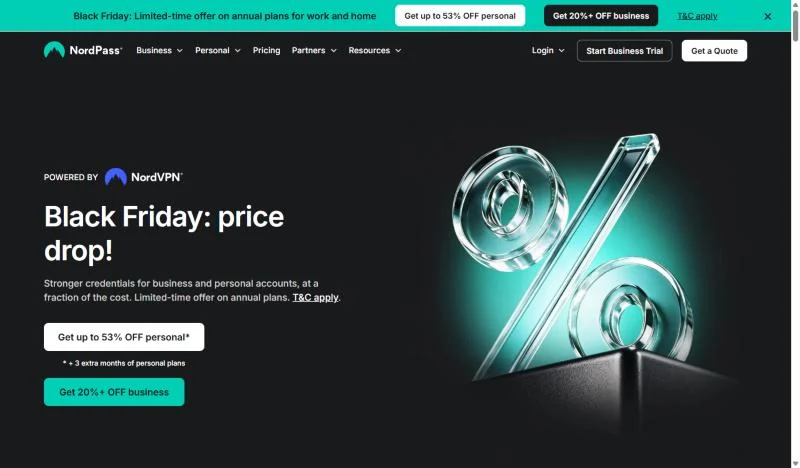
NordPass vs 1Password is a team choice between seat price and reach: NordPass costs less at each comparable business tier, while 1Password fits teams that give contractors guest accounts or provision from JumpCloud, OneLogin or Rippling.
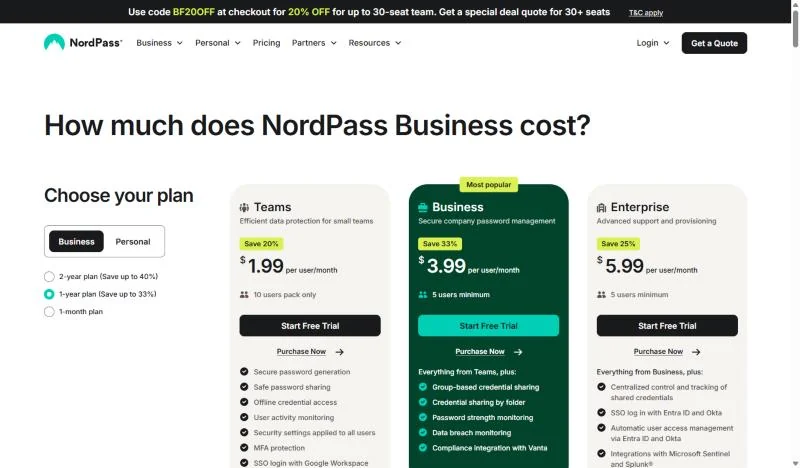
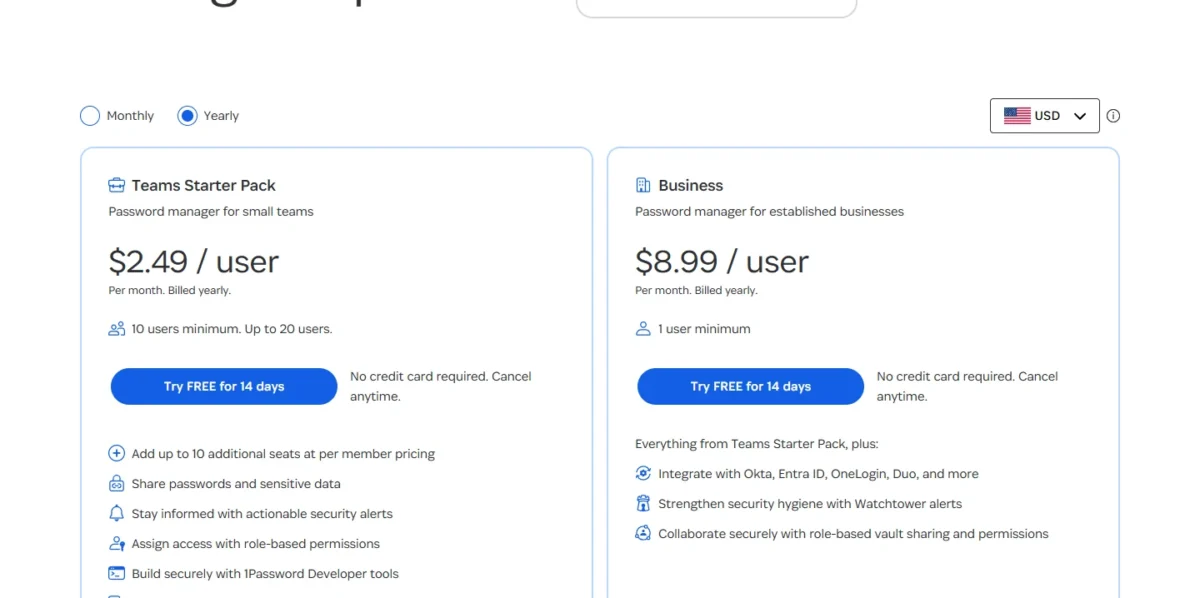
The deciding feature is identity-provider sign-in: Okta or Entra ID SSO with SCIM starts on NordPass Enterprise at $5.99 per user per month and on 1Password Business at $8.99 (USD, annual billing, checked November 20, 2026). At 25 users, 25 x $5.99 x 12 = $1,797.00 a year against 25 x $8.99 x 12 = $2,697.00.
Quick verdict
Pick NordPass for a Google Workspace team of up to 10 (Google SSO is on Teams) or for Okta and Entra ID at the lower seat price.
Pick 1Password if contractors need access (5 guest accounts on Teams Starter Pack, 20 on Business) or you provision from JumpCloud, OneLogin or Rippling.
The trade-off: NordPass Teams has no Shared Folders, so 10 to 20 people sharing by department pay less on 1Password’s pack.
In This Article (8 sections)
NordPass vs 1Password at a Glance
NordPass and 1Password split on where each puts shared folders or vaults and identity-provider sign-in, and on what that plan costs per user. My best password manager for business ranking shows where other picks land by team job.
| Attribute | NordPass | 1Password |
|---|---|---|
| Best for | Price-led teams; Google Workspace teams of up to 10 | Firms with contractors; teams that provision from JumpCloud, OneLogin or Rippling |
| Entry team plan | Teams: $1.99 per user per month on the 1-year plan, 10-user pack only | Teams Starter Pack: $24.95 per month billed annually ($299.40 a year), 10 members included, up to 20 |
| Plan with Okta or Entra ID SSO and SCIM | Enterprise: $5.99 per user per month on the 1-year plan, 5 users minimum | Business: $8.99 per user per month billed annually, 1 user minimum |
| Free plan or trial | Free personal plan; 14-day free trial, no credit card | Free plan not listed on the pricing page; 14-day free trial, no credit card |
| Main strength | Password Policy, Activity Log and Google Workspace SSO on all three business plans | Guest accounts (5 or 20) and provisioning from six identity providers |
| Main limitation | Shared Folders start on Business; Okta and Entra ID only on Enterprise | SSO, provisioning, custom policies and the audit log only on Business |
Sources: NordPass business plans, NordPass personal plans, 1Password business pricing and 1Password personal pricing, checked November 2026.
Key Differences: Features Compared
Five differences change how a team shares, signs in and offboards.
- Identity-provider gate: NordPass Enterprise; 1Password Business
- Sharing on the entry plan: Secure Sharing without Shared Folders on NordPass Teams; vaults on 1Password’s Teams Starter Pack
- Guest accounts: 5 or 20 on 1Password; not listed on NordPass’s plans table
- Policies and logs: on all three NordPass plans; on 1Password Business only
- Support: 24/7 live support on NordPass; 24/7 email, forum and social media on 1Password
A plan name in the matrix means the feature starts on that plan.
| Feature | NordPass | 1Password |
|---|---|---|
| Google Workspace SSO | Teams, Business, Enterprise | Business |
| Okta and Entra ID SSO | Enterprise | Business |
| User and group provisioning (SCIM) | Enterprise: Entra ID, Okta | Business: six identity providers |
| Shared folders or shared vaults | Business, Enterprise | Teams Starter Pack, Business |
| Groups | Business, Enterprise | Business (custom groups) |
| Guest accounts | Not listed on plans table | Limited: 5 on Teams Starter Pack, 20 on Business |
| Admin policies and activity or audit log | Teams, Business, Enterprise | Business |
| Item Transfer from deleted members | Teams, Business, Enterprise | Not listed on plans table |
| Breach monitoring | Data Breach Scanner, limited: 1 domain on Business, up to 10 on Enterprise | Breach and weak-password checks: Teams Starter Pack, Business |
| SIEM integrations | Enterprise: Splunk, Microsoft Sentinel | Business: Splunk, Elastic, Sumo Logic, Panther |
Sources: NordPass business plans, 1Password business pricing and 1Password’s audit log, checked November 2026.
SSO and provisioning: where each puts the identity-provider gate
NordPass includes Google Workspace SSO on all three business plans but holds Okta and Entra ID SSO and SCIM provisioning for Enterprise. 1Password puts every SSO and provisioning connection on Business.
Single sign-on (SSO) lets members open the vault with their identity-provider login, and SCIM lets that provider create and suspend accounts.
NordPass Enterprise lists provisioning from Entra ID and Okta. 1Password Business also provisions from Google Workspace, JumpCloud, OneLogin and Rippling, so a team that wants accounts created from one of those four needs 1Password. A Google Workspace team on NordPass still gets Google sign-in on every business plan, though NordPass does not list Google Workspace provisioning.
1Password’s Unlock with SSO has limits a small firm should know. It runs over OpenID Connect (OIDC) only, connects one identity provider, and excludes the Owners group, who keep an account password and Secret Key.
NordPass’s plans page listed MS ADFS for Enterprise SSO in the Internet Archive’s November 6, 2026 copy and names only Entra ID and Okta on November 20, so a team on AD FS should confirm support first.
Verdict: SSO and provisioning
Depends on plan and identity provider. NordPass fits a team on Okta or Entra ID that wants the lower seat price, or a Google Workspace team that needs sign-in only. 1Password fits a team that provisions from one of its four extra providers.
Sharing logins with a team: shared folders vs shared vaults
1Password’s entry plan already shares by vault, while NordPass does not share by folder until Business.
NordPass Teams includes Secure Sharing but not Shared Folders or Group Management, which start on Business; Shared Subfolders are Enterprise only. A Shared Folder is shared at its top level with one of four access levels (Can edit, Can share, Can view, Can autofill), and subfolders inherit it.
1Password shares through vaults on both plans. A team account sets three permissions per vault; Business sets five item permissions and adds custom groups.
For people outside the company, both 1Password plans share an item with anyone, even someone without 1Password, and include guest accounts limited to one vault each. That suits an agency whose freelancers need a few client logins.
Verdict: sharing
Depends on team size. Up to 20 people who share by department get vaults on 1Password’s pack, while NordPass needs Business for folders. Past 20 users, NordPass Business is the lower-priced way to share by group.
Admin controls, policies and audit trail
NordPass puts its policy and logging controls on the entry plan, and 1Password holds them for Business.
Password Policy, Granular Policies, Company-wide settings and the Activity Log are included on NordPass Teams, Business and Enterprise, so a 10-person firm gets an activity record without a plan upgrade. The plans page gives no retention period for that log.
On 1Password, custom policies, custom business reports and the audit log belong to Business. The audit log keeps 365 days of events, which gives an auditor a full year to review, and Business policies extend to firewall rules by country or IP address.
I would pick NordPass for controls on the lowest-priced plan and 1Password Business when an auditor needs a stated 365 days of events.
Offboarding: what happens when someone leaves
On NordPass, an Owner or Admin suspends or deletes the member in the Admin Panel, and after a deletion Item Transfer moves that person’s items to another member on any plan. On 1Password Business, deprovisioning the person in the identity provider suspends the account.
NordPass Item Transfer has three edges. Owners cannot see or pick individual items, the transfer is unavailable when the deleted member held more than 2,100 items, and untransferred items are deleted automatically after 730 days.
1Password recommends keeping a deprovisioned account suspended for a set time, such as a month, before deleting it. A team or business account can replace a removed member with another person in the same billing period at no change in billing.
So NordPass fits a team with no identity provider, because Item Transfer is on every plan, while 1Password’s suspension through deprovisioning needs Business and a connected identity provider.
Tie this step to the same employee onboarding checklist that granted the access in the first place.
Security model and certifications
NordPass and 1Password protect the vault with different designs, and their own pages state designs, not a measured difference, so I rate them comparable.
NordPass states a zero-knowledge architecture and an xChaCha20-encrypted vault on all three business plans. 1Password states end-to-end AES 256-bit encryption plus Two-Key Derivation, which combines the account password with a 128-bit Secret Key.
That Secret Key adds a setup step: a member needs it the first time they sign in on a new device, and it is stored on devices already used and in the Emergency Kit.
NordPass lists multi-factor authentication (MFA) and NordPass Authenticator on every business plan, and a 1Password Business policy can enforce two-factor authentication (2FA) with an authenticator app, a security key or Duo.
Certifications are vendor statements: NordPass lists ISO 27001, SOC 2 Type 2, Cure53 and HIPAA, and 1Password lists SOC 2 Type II and independent third-party security audits.
If the team is moving to passkeys, settle passkeys versus passwords for a team early, because NordPass passkeys cannot be exported to another password manager today.
Platform compatibility, autofill and extras
Platform compatibility is close: both cover Windows, macOS, Linux, iOS and Android and autofill through browser extensions for Chrome, Firefox, Safari and Edge. NordPass also lists Opera, a Web vault and a CLI; 1Password also lists Brave and watchOS.
Travel Mode, included with every 1Password subscription, removes vaults not marked safe for travel from a member’s apps, and Business admins can switch it on for staff who cross borders.
NordPass includes Email Masking, a Password Generator, NordPass Authenticator and Offline Mode on all three business plans. 1Password lists developer tools on both plans: SSH key signing, Git commit signing, a CLI and SDKs.
NordPass and 1Password Pricing Compared
NordPass lists the lower price at each comparable tier on monthly and yearly billing. The exception is a team of 10 to 20 that needs shared vaults or folders, where 1Password’s pack undercuts NordPass Business.
| Plan tier | NordPass | 1Password |
|---|---|---|
| Entry team plan | Teams, 10-user pack only: $2.49 monthly, $1.99 on the 1-year plan, $1.79 on the 2-year plan | Teams Starter Pack, 10 users minimum, up to 20: $2.99 monthly; billed yearly, $24.95 a month for 10 members ($299.40 a year) plus $4.99 per extra seat |
| Groups, shared folders and custom policies | Business, 5 users minimum: $5.99 monthly, $3.99 on the 1-year plan, $3.59 on the 2-year plan | Business, 1 user minimum: $10.99 monthly, $8.99 billed yearly |
| Okta or Entra ID SSO and SCIM | Enterprise, 5 users minimum: $7.99 monthly, $5.99 on the 1-year plan, $5.39 on the 2-year plan | Business: $10.99 monthly, $8.99 billed yearly |
Sources: NordPass business plans and 1Password business pricing, checked November 2026. US list prices in USD before tax: NordPass’s displayed prices do not include VAT, and discount terms and conditions apply to its 1-year and 2-year plans.
| Team and need | NordPass | 1Password |
|---|---|---|
| 3 users; groups and admin policies | Business, 5 users minimum: 5 x $3.99 x 12 = $239.40 | Business: 3 x $8.99 x 12 = $323.64 |
| 10 users; entry plan | Teams: 10 x $1.99 x 12 = $238.80 | Teams Starter Pack: $299.40 |
| 10 users; groups and custom policies | Business: 10 x $3.99 x 12 = $478.80 | Business: 10 x $8.99 x 12 = $1,078.80 |
| 20 users; shared folders or vaults | Business: 20 x $3.99 x 12 = $957.60 | Teams Starter Pack: $299.40 + 10 x $4.99 x 12 = $898.20 |
| 25 users; Okta or Entra ID SSO and SCIM | Enterprise: 25 x $5.99 x 12 = $1,797.00 | Business: 25 x $8.99 x 12 = $2,697.00 |
| 50 users; Okta or Entra ID SSO and SCIM | Enterprise: 50 x $5.99 x 12 = $3,594.00 | Business: 50 x $8.99 x 12 = $5,394.00 |
Sources: NordPass business plans and 1Password business pricing, checked November 2026. Assumptions: USD list prices, NordPass 1-year plans and 1Password yearly billing; tax and volume discounts excluded.
Watch the seat that breaks each entry plan. NordPass Teams is sold as a 10-user pack only, so a team under 10 still pays for the whole pack (10 x $1.99 x 12 = $238.80 a year), and an 11th user moves the team to Business. 1Password’s pack tops out at 20 members, so a 21st means Business for everyone: 21 x $8.99 x 12 = $2,265.48 a year.
NordPass Business and Enterprise bill a 5-user minimum, so a 3-person firm pays for two empty seats. On Business that firm still pays less than on 1Password Business, but on Enterprise it pays 5 x $5.99 x 12 = $359.40, more than 1Password Business. Teams can upgrade to Business at any time, but Business cannot be downgraded to Teams, and refunds are limited to 14 calendar days after the initial purchase.
One perk offsets part of the seat price: NordPass Business and Enterprise give every user a free Premium plan, and 1Password Business gives every user a free Families plan.
My take
For a team on Okta or Entra ID, I would buy NordPass Enterprise, which saves $900.00 a year at 25 users ($2,697.00 – $1,797.00). I would pay 1Password Business’s premium for more than the pack’s 5 guest accounts or for provisioning from JumpCloud, OneLogin, Rippling or Google Workspace.
I would take the pack for 10 to 20 people without an identity provider who want role-based permissions on what they share, or up to 5 guests in specific vaults: $299.40 a year for 10 members. If NordPass Teams’ Secure Sharing is enough, Teams costs $238.80, $60.60 less at any size up to 10. For groups, both vendors need Business: $478.80 a year at 10 users on NordPass, $1,078.80 on 1Password.
If NordPass is ahead after this table, NordPass’s full plan prices break down each plan and term.
A password manager is also one of many tools billed per seat, and the SaaS seat tax adds up across all of them.
Free plan, trials and personal plans
Both vendors let a business try the product for 14 days without a credit card, and NordPass alone lists a free plan: 1 user account with one active session on one device. That works for a solo look at the apps, not for a team.
For personal use, NordPass Premium is $1.99 a month on the 1-year plan ($23.88 for the first 12 months), and Family, with 6 user accounts, is $3.69 a month ($44.28 for the first 12 months). NordPass Premium carries a 30-day money-back guarantee.
1Password Individual is $2.99 a month billed yearly in the current promotion ($3.99 regular), and Families, with 5 users, is $4.49 ($5.99 regular).
Ease of Use, Integrations and Support
NordPass’s Google sign-in is one toggle, while Okta provisioning on NordPass and SSO on 1Password are multi-step projects with prerequisites.
Rollout and Setup
NordPass’s Google Workspace SSO takes three steps: an Owner or Admin logs in to the Admin Panel, opens Authentication, and turns on the Google Workspace toggle. Invited members then log in with their Google Workspace credentials.
Okta provisioning on NordPass is a longer job. It needs the Enterprise Admin Panel, Okta admin rights, and Okta Core Essentials or Okta Starter with the Lifecycle Management add-on; provisioning groups also requires deploying NordPass’s Encryption service.
1Password asks for planning first. Its SSO needs 1Password 8, and existing members must sign in once with their account password and Secret Key before they switch. 1Password’s provisioning best practices advise starting with a test user or group, not the whole organization.
My take
I would point a team without IT staff to NordPass with Google Workspace, because its documented setup is one toggle. An Okta or Entra ID rollout is a project on either product, so connect your identity provider and offboard one test account during the 14-day trial.
Integrations and customer support
For logs, NordPass sends to Splunk and Microsoft Sentinel on Enterprise and connects to Vanta from Business, while 1Password Business streams events to Splunk, Elastic, Sumo Logic and Panther. On both, SIEM export sits on the plan that holds the identity-provider gate.
Customer support options differ by channel. NordPass lists 24/7 live support on all three business plans, which matters to a team with no IT staff to ask. 1Password lists 24/7 support by email, forum and social media on both plans, and adds calls with its expert support team, Monday to Friday, 9 AM to 5 PM EST, on Business.
Cybernews‘s comparison, tested on November 12, 2026, reports an email reply from 1Password within 8 minutes on one contact and gives no response time for NordPass’s live chat.
One message is not a provisioning ticket, so send each vendor a real setup question during the trial and time the answer.
Who Should Pick NordPass, Who Should Pick 1Password
Pick NordPass when seat price, Google sign-in or entry-plan controls lead the list. Pick 1Password when contractors, a wider identity-provider list or vault sharing for 10 to 20 people do.
Pros
- Lower list price at each comparable tier: $1.99, $3.99 and $5.99 per user per month on 1-year plans
- Google Workspace SSO, Password Policy and the Activity Log on the 10-user Teams plan
- 24/7 live support and Item Transfer on all three business plans
Cons
- Okta and Entra ID need Enterprise, which hurts a 10-person team that already runs Okta
- Teams has no Shared Folders or groups and is sold only as a 10-user pack
- Guest accounts are not listed on the plans table, a gap for firms that bring in contractors
- Business bills 5 users minimum and cannot be downgraded to Teams
Skip NordPass if: contractors need their own limited access, or you provision from an identity provider other than Okta or Entra ID. In those cases, other NordPass alternatives for teams are the next shortlist.
Pros
- Guest accounts: 5 on Teams Starter Pack, 20 on Business
- Provisioning from six identity providers on Business
- Teams Starter Pack covers up to 20 members and shares by vault
- Travel Mode in every subscription, and a free Families plan for each Business user
Cons
- SSO, provisioning, custom policies and the audit log all sit on Business at $8.99 per user per month, billed annually
- SSO runs over OIDC only, with one identity provider, and Owners cannot use it
- The 21st member moves the whole team from the pack to Business
- A free plan is not listed, and neither is a 2-year term
Skip 1Password if: the team has outgrown 20 members and needs only shared folders, groups and a password policy, which NordPass Business covers at $3.99 per user per month on the 1-year plan. If neither price fits, weigh how 1Password compares with Bitwarden.
| Your priority | Better fit | Reason | Trade-off |
|---|---|---|---|
| Okta or Entra ID SSO and SCIM at the lowest seat price | NordPass | Enterprise is the lower-priced plan with this gate | Entra ID and Okta are the only providers listed |
| Provisioning from JumpCloud, OneLogin, Rippling or Google Workspace | 1Password | Business lists all four | Owners cannot use SSO |
| Contractors who need a few shared credentials | 1Password | Guest accounts on both plans | A guest reaches one vault only |
| Sharing logins by department without an identity provider, 10 to 20 people | 1Password | The pack lists sharing passwords and sensitive data with role-based permissions, and costs less than NordPass Business at 10 to 20 members; below 10 it still bills $299.40 a year, against $239.40 for NordPass Business at its 5-user minimum | Custom groups and the audit log wait for Business |
| Google Workspace SSO for a small team | NordPass | Google Workspace SSO is on Teams | Shared Folders start on Business |
| Which is more secure | Insufficient evidence | Two encryption designs, no measured difference | Decide on the plan gates instead |
Sources: NordPass business plans and 1Password business pricing, checked November 2026.
If two rows pull in different directions, let the identity-provider row decide, because it sets the plan and the plan sets the bill.
Switching Between NordPass and 1Password
Logins move in both directions through an export file. Folders or vaults, sharing, groups, policies and identity-provider connections are not part of either import guide, so plan to set them up again.
From 1Password to NordPass
- In 1Password 8 on a desktop, export the account as a 1PUX or CSV file. CSV carries Login and Password items only, so choose 1PUX to keep other item types.
- On 1Password Business, confirm your role has the Export Items permission for each shared vault.
- In the NordPass desktop app, open Settings, select Import items and choose 1Password; NordPass’s import guide accepts CSV and 1PUX.
From NordPass to 1Password
- In the NordPass desktop app or Web Vault, open Settings and export a .CSV file. An admin can restrict this through the “Item exporting” policy setting, so check that first.
- Import the CSV on 1Password.com, which takes Logins, Credit Cards and Secure Notes. NordPass is not among the apps that page names, so use the generic CSV import.
In both directions, delete the export file afterward, because it is not encrypted. Passkeys do not travel: NordPass cannot import or export them yet, and 1Password’s desktop export leaves them out, so create new passkeys on each site.
If LastPass is still on the shortlist, settle LastPass vs 1Password for teams before exporting anything.
FAQ
Is NordPass as good as 1Password?
For a team of up to 10 on Google Workspace, yes: NordPass Teams includes Google SSO, a password policy and an activity log for $1.99 per user per month on the 1-year plan. Pick 1Password if the team needs more than the pack’s 5 guest accounts or provisioning from JumpCloud, OneLogin, Rippling or Google Workspace. My NordPass review judges the product on its own.
What are the disadvantages of NordPass for a team?
The main ones are plan gates: Okta and Entra ID need Enterprise, Teams has no Shared Folders, and Business cannot be downgraded to Teams. They weigh most on a team already on Okta, which needs Enterprise from day one.
Has 1Password ever been compromised?
1Password disclosed an incident in 2023 and says no user data was accessed. On September 29, 2023, 1Password detected suspicious activity on a system it uses to manage employee-facing apps, terminated the activity and found no compromise of user data.
My take
I would not let the 2023 incident decide this choice: 1Password says no user data was accessed, and the plan gates above weigh more.
Is Bitwarden worth adding to the shortlist?
Add it when both identity-provider tiers here cost more than you want to pay per seat. My Bitwarden review is the place to check its plan gates against these two.
Final Verdict: NordPass or 1Password?
NordPass is the better buy if the seat price leads and your team signs in with Google Workspace, Okta or Entra ID. 1Password is the better fit if contractors need guest access, if you provision from JumpCloud, OneLogin or Rippling, or if 10 to 20 people without an identity provider want role-based permissions on what they share, which Teams Starter Pack lists at $299.40 a year for 10 members.
No overall winner follows from the plan tables: NordPass holds Okta and Entra ID for Enterprise, above Business, while 1Password holds SSO, custom policies and the audit log for Business, above the pack.
How I Compared NordPass and 1Password
I compared NordPass Teams, Business and Enterprise with 1Password Teams Starter Pack and Business on sign-in and provisioning, cost by seat count, sharing, guest access, admin controls, offboarding and support.
Every plan fact and price comes from official documentation, each vendor’s pricing pages and help-center articles, checked November 2026; the cost totals are my arithmetic on those list prices. One attributed third-party test is cited, Cybernews’ support contact, named where it appears. NordPass does not publish a renewal price or a retention period for the activity log on its plans page.
Choose NordPass if
- A team of up to 10 on Google Workspace wants SSO on the entry plan, $1.99 per user per month on the 1-year plan
- You need Okta or Entra ID SSO and SCIM at $5.99 per user per month on the 1-year plan
- You want a password policy, an activity log and 24/7 live support without moving past Teams
Choose 1Password if
- Contractors need access: 5 guest accounts come with Teams Starter Pack, 20 with Business
- You provision from Google Workspace, JumpCloud, OneLogin or Rippling, on Business at $8.99 per user per month, billed annually
- 10 to 20 people with no identity provider want role-based permissions on what they share, which Teams Starter Pack lists at $299.40 a year for 10 members