Smartsheet pricing starts with Pro at $9 per Member per month, billed yearly. Business costs $19 per Member per month, billed yearly, while Enterprise and Advanced Work Management are sold on custom pricing. Only Members reach the bill: Contributors are free on Pro, Business and Enterprise, and external Guests are free on Business and Enterprise.
Monthly billing raises Pro to $12 and Business to $24 per Member per month. Each plan also has a seat wall and a feature gate: Pro stops at 10 Members and 250 automations a month, while Business starts at 3 Members and adds unlimited automations and Timeline view. A five-person internal team on Pro pays $9 x 5 x 12 = $540 a year.
Pro suits small internal teams. A team that runs more than 250 automations a month belongs on Business, and so does a team whose client editors, each a paid Member on Pro, push Pro’s bill past Business’s; with two internal Members, that happens at the fifth client editor. The cost to watch is the Provisional Member, a free seat that one admin setting turns into a paid Member at the billing review. There is no free plan, only a 30-day trial with no credit card required.
Quick pricing answer
Checked in November 2026 on Smartsheet’s US-dollar pricing page:
- Pro and Business are self-serve; Enterprise and Advanced Work Management need a quote.
- Entry price: Pro at $9 per Member per month billed yearly ($108 a year per Member), or $12 billed monthly.
- Free option: no free plan, a 30-day trial without a card, and free Contributor seats on every paid plan.
- Up to 10 internal Members: Pro.
- More than 250 automations a month, or enough client editors that paying them as Pro Members costs more than Business (five for a two-Member team): Business at $19 per Member per month billed yearly, minimum 3 Members.
- Cost caveat: Provisional Members are free only until the billing review; with auto-upgrade on, they join the next bill.
In This Article (13 sections)
Smartsheet Pricing at a Glance
Smartsheet sells two plans with a published per-Member price and two plans priced by quote.
| Plan | Annual billing | Monthly billing | Members | Best for | Main limitation |
|---|---|---|---|---|---|
| Pro | $9 per Member per month, billed yearly | $12 per Member per month | 1-10 | Internal teams of up to 10 Members | 250 automations a month, no Guest seats |
| Business | $19 per Member per month, billed yearly | $24 per Member per month | 3 or more | Client work and heavy automation | Bills at least 3 Members |
| Enterprise | Custom pricing | Custom pricing | 10 or more | Rollouts where IT requires SAML SSO | Quote only |
| Advanced Work Management | Custom pricing | Custom pricing | Not published | Portfolio programs that need several premium apps | Quote only |
Sources: Smartsheet plans and prices page, Monthly pricing and Yearly pricing views, checked Nov 2026.
Prices are in US dollars from the US view of the page, read in November 2026. The page’s currency menu also offers euros, pounds, yen and other currencies, and it does not state whether prices include tax.
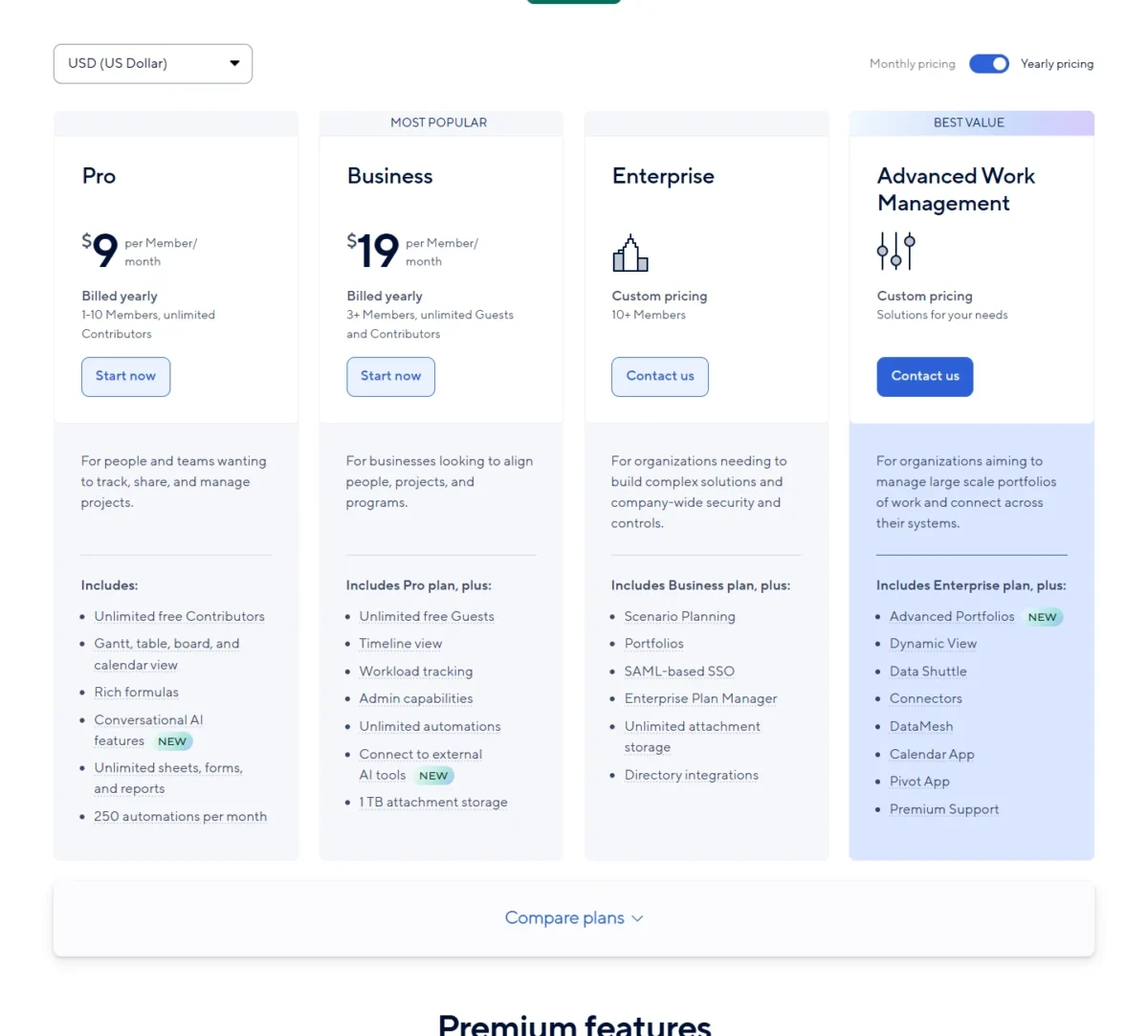
On yearly billing, Business’s $19 per Member per month is more than twice Pro’s $9, a difference of $19 – $9 = $10 per Member per month. That premium has to buy something your team will use: free client seats, unlimited automations or room past 10 Members. Which of those you need decides the plan.
Smartsheet Pricing Plans Explained
Pro covers a small internal team until it reaches 10 Members or 250 automations a month; Business removes both ceilings and adds free Guests; Enterprise adds identity and admin control; Advanced Work Management bundles the premium apps. This section covers only what changes the bill, and my Smartsheet review judges the product itself.
Pro: $9 per Member per month for Small Internal Teams
Pro costs $9 per Member per month billed yearly, or $12 per Member per month billed monthly, and it stops at 10 Members. Contributors on Pro are free and unlimited. The plan includes Gantt, table, board and calendar views, rich formulas, unlimited sheets, forms and reports, and 250 automations per month.
The limits that push teams off Pro sit in the plan comparison table:
- 20 GB of attachment storage, with a 30 MB cap per file
- 10 widgets per dashboard and 1 sheet per report
- no Timeline view, workload tracking, baselines, activity log, document builder or API calls
- no Guest seat type
The one-sheet report limit is the first I would test against your workflow. A manager who wants a single status report across five project sheets cannot build it on Pro, and that need alone justifies Business.
Pro is also closed to some buyers: the plan is only available to new customers. Upgrade when an 11th person needs to edit, when automation runs pass 250 a month, when reports must span several sheets, or when client editors on Member seats make Pro cost more than Business (the client-work math is in the team cost section below).
Business: $19 per Member per month, 3 Members minimum
Business costs $19 per Member per month billed yearly, or $24 billed monthly, with a minimum of 3 Members and no maximum listed. Over Pro it adds unlimited free Guests, Timeline view, workload tracking, admin capabilities, unlimited automations, connections to external AI tools and 1 TB of attachment storage with 250 MB per file.
The comparison table adds the reporting and admin pieces a growing team notices: unlimited widgets per dashboard and sheets per report, baselines, activity log, document builder, API calls, Power BI and Tableau, plus connectors for Anthropic’s Claude, OpenAI’s ChatGPT, Microsoft Copilot and Google Gemini Enterprise.
For an agency, the Guest seat changes the math more than any feature. On Pro, external users follow Member or Contributor rules, so a client who must edit takes a paid Member seat; on Business that client can be a free Guest with Editor permission. The trade-off is the floor: a two-person team pays for three Members.
Move from Business to Enterprise when IT asks for SAML sign-in or directory sync, not because the team grew, since Business has no Member ceiling.
Enterprise: custom pricing from 10 Members
Enterprise is custom-priced for 10 or more Members, and Smartsheet publishes no figure for it. It adds Scenario Planning, Portfolios, SAML-based SSO, Enterprise Plan Manager, unlimited attachment storage and directory integrations to Business.
The comparison table also puts user account provisioning, Safe Sharing, chargeback reports and integrations such as Workday and ServiceNow on Enterprise, and includes the Standard Support Package. Data retention policies, data egress, event reporting and customer managed encryption keys (CMEK) are add-ons even here.
Basic single sign-on appears on every plan in that table; SAML-based SSO is the Enterprise line. Ask sales for the quote only when your identity team requires SAML or directory provisioning, and ask which of the security add-ons the quote includes.
Advanced Work Management: custom pricing with premium apps bundled
Advanced Work Management is custom-priced and bundles Enterprise with Advanced Portfolios, Dynamic View, Data Shuttle, Connectors, DataMesh, Calendar App, Pivot App and Premium Support. The comparison table also lists DataTable only on this plan and includes Smartsheet University.
Dynamic View, from $125 a month, and Data Shuttle, from $100 a month, are the only bundled apps with published starting prices, so two of them start at $125 + $100 = $225 a month as add-ons. If you need one or two of these apps, price them as add-ons on Business or Enterprise before you request an Advanced Work Management quote.
Who You Pay For: Members, Contributors, Guests and Provisional Members
Only Members are billed: Contributors are free on Pro, Business and Enterprise, Guests are free on Business and Enterprise, and Provisional Members are free until the end of the billing cycle.
| Seat type | Cost | What they can do | Plans |
|---|---|---|---|
| Member | The plan’s per-Member price | Create, edit and delete sheets, reports, dashboards and workspaces; share; build automations | All plans |
| Provisional Member | Free until the end of the billing cycle | The same access as a Member | Pro, Business, Enterprise |
| Contributor | Free | View shared items; comment and add or delete attachments with Commenter permission; cannot create, edit or share | Pro, Business, Enterprise |
| Guest | Free | External users who view, comment or edit as their sharing permission allows; cannot create items | Business, Enterprise |
Sources: Smartsheet seat types help article and user model and provisional membership article, checked Nov 2026.
Take a 10-person team where 3 people build and update plans and 7 only follow progress: the bill is 3 Members, $9 x 3 x 12 = $324 a year on Pro with yearly billing. The risk sits in sharing. An internal Contributor shared to a sheet as Editor becomes a Provisional Member the moment they edit, and a Guest shared as Admin becomes one by creating a new item.
What happens next depends on one Admin Center setting. By default, a Provisional Member who was not upgraded drops back to a free seat at the end of the billing cycle. With auto-upgrade switched on, every remaining Provisional Member becomes a paid Member, and if no Member seats are free, the extra seats are added to the next auto-bill or invoice. Review periods run quarterly on annual plans and monthly on monthly plans, right before the bill. A user can be a Provisional Member only once.
Smartsheet announced this seat model in June 2024 and said it would apply to existing plans at their first renewal in 2025.
My take
I would leave the setting on the default downgrade and upgrade people by hand at each review. Auto-upgrade suits a team where everyone edits; on a plan with many occasional editors, it turns each one-off edit into a paid seat.
Does Smartsheet Have a Free Plan or Trial?
No: Smartsheet’s pricing page lists no free plan, only a 30-day free trial with no credit card required. The free part of Smartsheet is the seats around the paying Members: Contributors on every paid plan and Guests on Business and Enterprise.
That makes the trial a test of fit, not a way to run the team for free. If your team needs a permanent free plan, my list of free project management software covers those options; if Smartsheet fits, the next decision is how to pay for it.
Monthly vs Annual Smartsheet Pricing
Yearly billing saves $12 – $9 = $3 per Member per month on Pro and $24 – $19 = $5 on Business.
| Plan | Monthly billing | Annual billing | One year, billed monthly | One year, billed yearly | Saving per Member |
|---|---|---|---|---|---|
| Pro | $12 per Member per month | $9 per Member per month | $12 x 12 = $144 | $9 x 12 = $108 | $144 – $108 = $36 |
| Business | $24 per Member per month | $19 per Member per month | $24 x 12 = $288 | $19 x 12 = $228 | $288 – $228 = $60 |
Sources: Smartsheet plans and prices page, Monthly pricing and Yearly pricing views, checked Nov 2026.
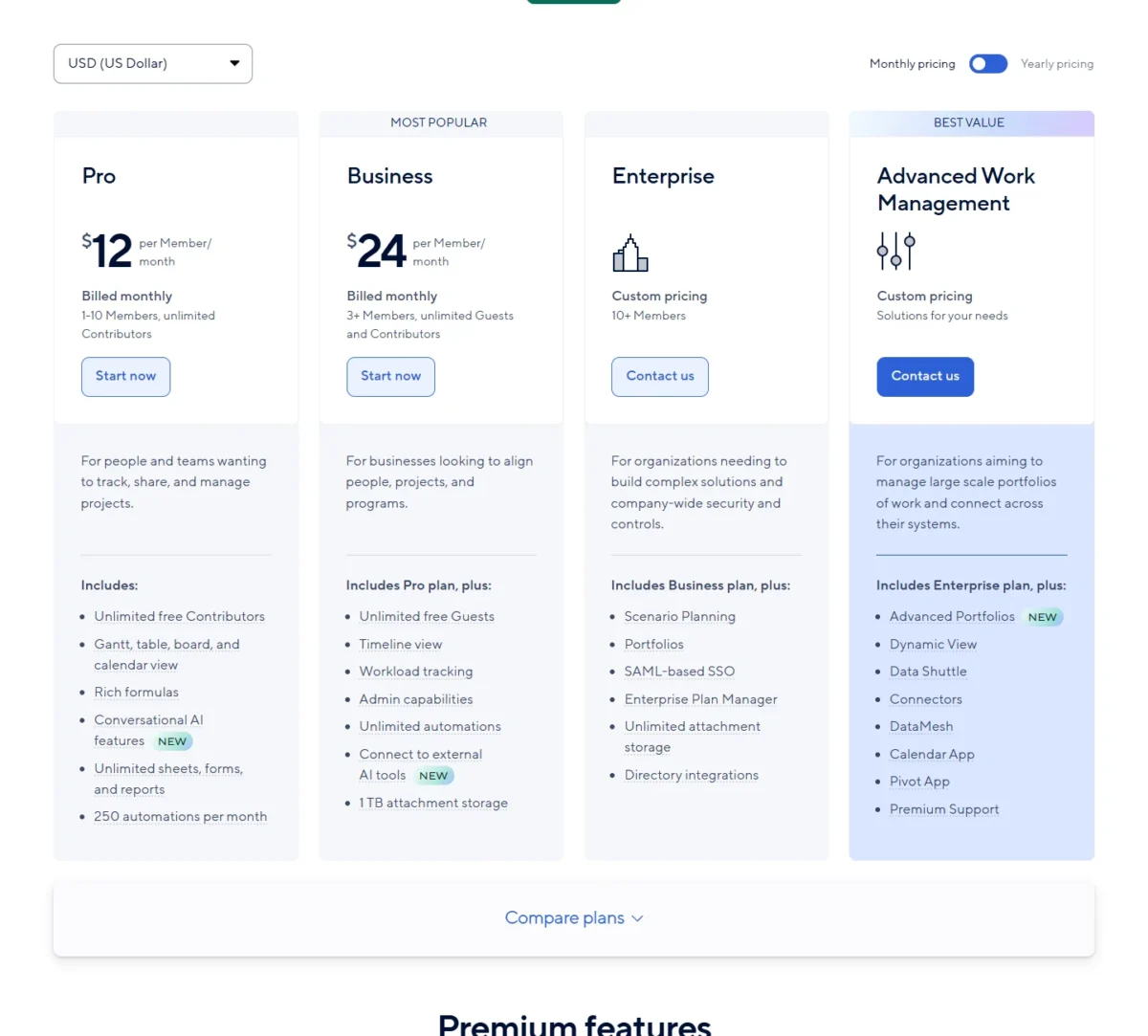
On Pro the yearly discount is $36 of $144, or 25%. For a five-person Pro team, monthly billing costs $12 x 5 x 12 = $720 a year against $540 on yearly billing, a $180 difference.
I would pay the monthly premium only for a short project that runs past the 30-day trial; for a team that will still use Smartsheet next year, yearly billing is the cheaper choice.
Additional Smartsheet Costs to Consider
Two add-ons have published starting prices, Dynamic View from $125 a month and Data Shuttle from $100 a month, both for Business and Enterprise; the other premium apps and the support packages are add-ons without a published price.
| Cost type | When it applies | Pricing basis | Notes |
|---|---|---|---|
| Dynamic View | Business, Enterprise | From $125 a month | Included in Advanced Work Management |
| Data Shuttle | Business, Enterprise | From $100 a month | Included in Advanced Work Management |
| Resource Management | Business, Enterprise | Not published (add-on) | Request a demo |
| Calendar App, Pivot App, DataMesh, Connectors | Business, Enterprise | Not published (add-on) | Included in Advanced Work Management |
| Brandfolder | All plans | Not published (add-on) | Digital asset management |
| Standard Support Package | Business | Not published (add-on) | Included on Enterprise and Advanced Work Management |
| Premium Support Package | Business, Enterprise | Not published (add-on) | Included in Advanced Work Management |
| Smartsheet University | Pro, Business, Enterprise | Not published (add-on) | Included in Advanced Work Management |
| Data retention, data egress, event reporting, CMEK | Enterprise, Advanced Work Management | Not published (add-on) | Security and compliance controls |
| Auto-upgraded Provisional Members | Any plan with auto-upgrade on | The plan’s per-Member price | Added to the next auto-bill or invoice |
Sources: Smartsheet plans page and plan comparison table, checked Nov 2026.
Both published add-on prices start with “from”, and the page does not say what raises them, so budget them as floors. Professional Services and Technical Account Managers are further add-ons on Business and above. For a small team, the line most likely to move the bill is the last one: it grows with every editor nobody downgraded.
How Much Does Smartsheet Cost for Your Team?
On yearly billing a team pays the per-Member price times its Members times 12: $9 x 5 x 12 = $540 for five Members on Pro, and $19 x 25 x 12 = $5,700 for 25 Members on Business.
The calculator below takes your number of Members, the billing period and the features you need (free Guests, more than 250 automations a month, Timeline view and workload tracking). It shows Pro and Business side by side and names the cheapest plan that covers the need. It leaves out tax, add-ons, Enterprise quotes and any Provisional Members an admin upgrades.
Smartsheet cost calculator
This calculator needs JavaScript. The scenario table below gives the same estimate for typical workloads.
Enter what you need. The calculator prices it on every plan at list prices and names the cheapest plan that covers it.
- List prices in USD from Smartsheet’s official pricing pages, checked November 2026. Tax and regional prices are not included.
- 12-month figures are 12 times the monthly cost at the billing you choose.
- A planning estimate at list prices, not a quote.
| Team size | Plan | Billing | Monthly equivalent | Annual total | Assumptions |
|---|---|---|---|---|---|
| 1 Member: solo planner | Pro | Yearly | $9 | $9 x 1 x 12 = $108 | Viewers join as free Contributors |
| 5 Members: internal team | Pro | Yearly | $9 x 5 = $45 | $9 x 5 x 12 = $540 | Fewer than 250 automations a month |
| 2 Members who need Guests: client work | Business | Yearly | $19 x 3 = $57 | $19 x 3 x 12 = $684 | Billed at the 3-Member minimum; clients join as free Guests |
| 11 Members: growing team | Business | Yearly | $19 x 11 = $209 | $19 x 11 x 12 = $2,508 | Pro stops at 10 Members |
| 25 Members: department | Business | Yearly | $19 x 25 = $475 | $19 x 25 x 12 = $5,700 | No SAML SSO requirement |
Sources: Smartsheet plans and prices page, Yearly pricing view, checked Nov 2026. Totals are estimates from list prices, not quotes, and exclude add-ons, support packages, tax and auto-upgraded Provisional Members.
Two edges in this table change real budgets. The first is the 11th editor: ten Members on Pro cost $9 x 10 x 12 = $1,080 a year and eleven on Business cost $19 x 11 x 12 = $2,508, a jump of $2,508 – $1,080 = $1,428 for one more person.
The second is client work, where Business is not automatically cheaper. On Pro each client who edits takes a Member seat at $9 x 12 = $108 a year. On Business clients join as free Guests, and only internal Members pay $19 x 12 = $228 a year, with at least 3 billed.
For a team of 2 internal Members, one client editor puts Pro at $9 x 3 x 12 = $324 a year, less than half of Business’s $19 x 3 x 12 = $684. That team stays cheaper on Pro up to four client editors ($9 x 6 x 12 = $648). At five, Pro costs $9 x 7 x 12 = $756, and the free Guests on Business win.
A team of 3 internal Members reaches that point one client sooner: four client editors cost $9 x 7 x 12 = $756 on Pro against $19 x 3 x 12 = $684 on Business. A client on a Pro Member seat can also create and share items, which some teams will not accept.
Which Smartsheet Plan Should You Choose?
Choose Pro for an internal team of up to 10 Members running fewer than 250 automations a month. Move to Business once automations pass 250, an 11th Member arrives, or client editors on Pro Member seats would cost more than Business (the fifth client for a 2-Member team, the fourth for a 3-Member team). Choose Enterprise when IT needs SAML SSO or directory integrations.
| Your needs | Plan to consider | Why | Main limitation |
|---|---|---|---|
| Up to 10 internal Members, fewer than 250 automations a month | Pro | $9 per Member per month billed yearly, viewers free as Contributors | 1 sheet per report, no Timeline view |
| More people need to view or comment, not edit | Stay on your plan and add Contributors | Contributors are free on Pro, Business and Enterprise | They cannot create, edit or share |
| Client editors who would cost more as Pro Members than Business does (5 or more for a 2-Member team, 4 or more for a 3-Member team) | Business | Guests are free and can edit what is shared with them | Bills at least 3 Members |
| More than 250 automations a month | Business | Automations are unlimited | $19 – $9 = $10 more per Member per month than Pro, billed yearly |
| An 11th editor | Business | Pro stops at 10 Members | $19 x 11 x 12 = $2,508 a year on yearly billing |
| SAML SSO, directory integrations or user provisioning | Enterprise | Business does not include them | Custom pricing, quote only; Enterprise starts at 10 Members |
| An existing customer changing plans | Business | Pro is only available to new customers | Bills at least 3 Members |
Sources: Smartsheet plans and prices page and seat types help article, checked Nov 2026.
My take
For a team under ten, I would start on Pro with yearly billing and treat three events as the upgrade signal: the 11th editor, the 251st automation run in a month, and the client editor who makes Pro cost more than Business (the fifth for a two-Member team, the fourth for a three-Member team). Until one of them happens, Business’s higher rate buys features the team is not using.
Is Smartsheet Worth the Price?
Smartsheet is worth its price for a team with a few editors and many people who only follow the work, because those followers cost nothing as Contributors. The disadvantages of Smartsheet’s pricing are concrete: no free plan, a 3-Member floor on Business and a 10-Member ceiling on Pro.
The value case rests on the ratio of editors to viewers: in the 10-person example under Who You Pay For, 3 editors carry the whole bill and the 7 followers ride free. When everyone on the team edits, that advantage disappears and the per-Member price is the whole bill, which is the point to compare an alternative such as Asana’s per-user plan costs.
Software teams that track issues should price Jira’s plans and limits against Business before committing.
If the attraction is Smartsheet’s spreadsheet-style grid, Airtable’s plan costs and seat rules are the competitor budget to check.
Skip Smartsheet if no one on the team will build or maintain sheets every week: you would pay for Members to edit work that a free tool could hold. For a wider shortlist, my ranking of project management software by team fit sets Smartsheet against the rest of the category.
Billing, Payment and Cancellation
Smartsheet accepts Visa, Mastercard, Discover and American Express cards and ACH direct debit, and Enterprise subscriptions that meet a minimum fee can be invoiced and paid by card, check, ACH or wire. Payment options may vary by billing country.
You can upgrade, add or remove users, buy more licenses or cancel at any time, subject to the terms of the Smartsheet User Agreement. Read the Smartsheet User Agreement the page links to before you sign a yearly plan; the pricing page does not publish refund or renewal terms.
Before a renewal, download the seat type report from Admin Center: it lists each user’s seat type and whether they are internal or external. Compare its Member count with the quote, and downgrade anyone who no longer edits before the review date.
How I Verified Smartsheet Pricing
I read the US view of smartsheet.com/pricing in November 2026 in both billing views, Monthly pricing and Yearly pricing, in US dollars, together with the plan comparison table on the same page and Smartsheet’s two help articles on seat types and provisional membership. The pricing region is the US and the currency is USD. The screenshots in this guide were captured from the same public pages in November 2026.
Published prices are Pro’s and Business’s per-Member rates and the starting prices of Dynamic View and Data Shuttle. Every annual total is my calculation, price x Members x 12, and every saving is the difference of two published prices. The plan recommendations and the worth-it verdict are my analysis of those numbers and of the plan limits.
Smartsheet does not publish prices for Enterprise, Advanced Work Management, the other add-ons or the support packages, and the pricing page does not state whether prices include tax.
Frequently Asked Questions
Is Smartsheet free with Office 365?
No. Microsoft Office 365, including Teams, Outlook and OneDrive, is an integration on all four Smartsheet plans, not a license to Smartsheet. Anyone who creates items in Smartsheet needs a Member seat on a paid plan once any free Provisional period ends, while people who only view or comment can be free Contributors.
How long does a Provisional Member stay free?
For a minimum of 30 days, as long as no System Admin moves the person to another seat type first. The free period ends at the next review, which falls quarterly on annual plans and monthly on monthly plans, just before the bill is issued.
Does Smartsheet offer an uptime guarantee?
Only on Enterprise plans, which Smartsheet covers with its Service Level Agreement. If guaranteed availability is a procurement requirement, that alone points the purchase toward an Enterprise quote.
Final Pricing Verdict
Start a five-person internal team on Pro with yearly billing, $9 x 5 x 12 = $540 a year, and add viewers as free Contributors.
Move to Business when an 11th Member joins, automation runs pass 250 a month, or client editors on Pro Member seats push Pro’s bill past Business’s, which for a 2-Member team happens at the fifth client editor. Below that point, a Pro Member seat for each client editor is the cheaper route.
Leave Enterprise to rollouts where IT requires SAML SSO or directory provisioning, and get that price from sales.
- Skip it if:
- your team needs a permanent free plan, or every person edits and you only need simple task lists.
Whatever plan you pick, check the Provisional Member setting before the first review, because it decides whether occasional editors reach your bill.