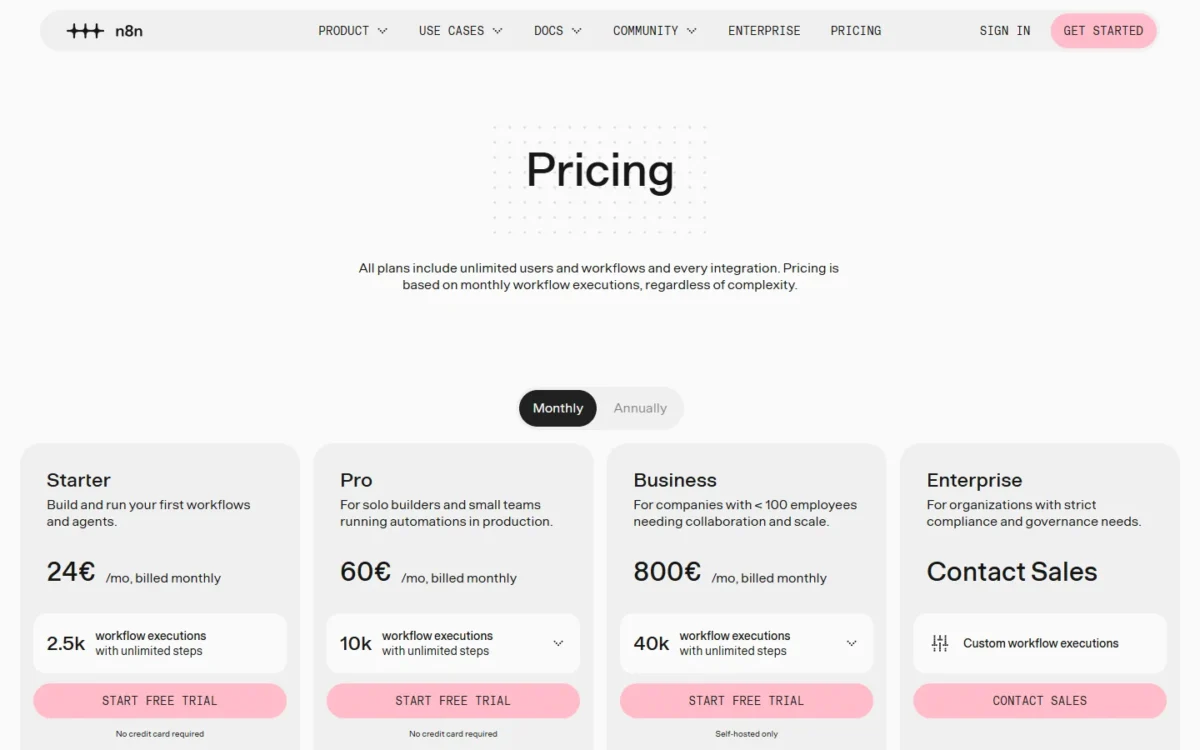
n8n pricing starts at 24€ a month billed monthly, or 20€ a month billed annually, for the Cloud Starter plan and its 2,500 workflow executions; the Pro plan costs 60€ or 50€ a month for 10,000, and the self-hosted Community Edition is free.
Every plan is priced by production workflow executions, one complete run of a workflow however many steps it has, and every plan includes unlimited users and workflows. Business is 800€ a month billed monthly or 667€ billed annually and runs only on your own server; Enterprise is a quote.
On annual billing, one euro buys 200 executions on Pro against 125 on Starter, and a single workflow scheduled every 5 minutes (about 8,600–8,900 runs a month, by n8n’s estimate) already needs Pro.
Cloud fits teams that do not want to run servers, Community Edition fits technical teams that already run one, and Business fits companies that need SSO or Git on their own infrastructure. The free edition moves the cost to hosting and upkeep and leaves out SSO, projects and workflow sharing.
Quick pricing answer
- Starter: 24€ a month billed monthly or 20€ a month billed annually, 2,500 executions, hosted by n8n
- Pro: 60€ or 50€ a month for 10,000 executions; 144€ or 120€ a month for 50,000
- Business: 667€ a month billed annually for 40,000 executions, self-hosted only; Enterprise is Contact sales
- Free options: the self-hosted Community Edition, or a 14-day n8n Cloud trial with no credit card
- My pick for a small production team: Pro billed annually, because executions, not users, set the tier
- Checked: November 2026, prices in euros

In This Article (14 sections)
n8n Pricing at a Glance
Every n8n plan is listed below with its monthly price, annual price and monthly execution allowance; Pro appears twice because its plan card sells 10,000 or 50,000 executions.
| Plan | Price billed monthly (per month) | Price billed annually (per month) | Executions per month | Best for | Main limitation |
|---|---|---|---|---|---|
| Starter | 24€ | 20€ | 2,500 | Solo builders with short, low-volume runs | 5-minute max run, 1 shared project |
| Pro 10k | 60€ | 50€ | 10,000 | Small teams running production workflows | No SSO or Git |
| Pro 50k | 144€ | 120€ | 50,000 | Busy Cloud teams that need no SSO | No SSO or Git |
| Business | 800€ | 667€ | 40,000 | Companies that need SSO, Git and environments | Self-hosted only, forum support |
| Enterprise | Contact sales | Contact sales | Custom | Compliance, SLA support, Cloud or self-hosted | Price only by quote |
| Community Edition | Free | Free | Quotas apply to paid plans only | Technical teams that self-host | No SSO, projects or sharing |
Sources: n8n’s plans and prices (Monthly and Annually views, Pro at 10k and 50k executions) and n8n’s edition comparison, checked November 2026.
Prices checked against n8n’s official pricing page, in euros (EUR), the currency it uses outside the US; US prices may differ. I checked them in November 2026. Annual prices are per month, billed annually.

Pricing note
n8n’s pricing page shows euros to visitors outside the US, so US prices may differ; this guide quotes the euro amounts exactly and converts nothing. Business is the one paid plan you cannot buy on n8n Cloud: it is self-hosted only, with a waitlist for a hosted version.
Those prices only make sense once you know what counts as one execution.
How n8n Pricing Works: What Counts as an Execution
One n8n execution is one complete run of a workflow, and only production runs count against your quota. The number of steps and the amount of data a run processes do not matter: a short workflow and a long one each count once per run.
Production executions are the runs that triggers, schedules or polling start automatically, in a development instance as much as in a production one. These never count:
- manual runs from the editor while you build or test
- sub-workflows called by a parent workflow (only the parent run counts)
- runs of a workflow set as an error workflow
- polls that return no new data
- webhook requests that fail before the workflow starts
Testing is therefore free on every plan, and splitting a large flow into sub-workflows does not multiply the bill. The trigger is what moves the count, which matters most for the scheduled and event-driven flows that marketing automation runs on.
How many executions will you use?
Count runs per trigger: a daily schedule is 30 or 31 executions a month, a schedule every 5 minutes is about 8,600–8,900, and a webhook workflow runs once per incoming event. A Schedule Trigger counts every time it fires, a polling trigger such as Google Drive counts only when it finds new data, and a webhook counts every inbound request, even one with an empty body.
The math gets tight fast. A schedule every 15 minutes is 4 x 24 x 30 = 2,880 runs in a 30-day month, already over Starter’s 2,500, and one 5-minute schedule leaves Pro 10k about 1,100 to 1,400 runs for everything else. For a chatbot, n8n suggests weekly conversations times average messages per conversation.
What happens when you hit the limit?
On Business and Enterprise, workflows keep running past the quota, but overage charges may apply unless you move to the next usage tier, and n8n’s sales team contacts you when you get close. Annual Business subscribers hear from n8n near 80% of the yearly quota.
For Starter and Pro, the plan comparison lists overage fees as “Capped” without explaining the mechanics, so check your production counts in Insights before a busy month, not after it. Saved-execution limits are different: reaching them never stops a workflow, and n8n removes the oldest history instead.
n8n Pricing Plans Explained
Each plan below opens with its price and the limit that pushes buyers to the next one. Whether n8n’s editor, AI agents and integrations suit your team at all is a question for my n8n review; this section covers which limit you hit first.
Starter
Starter costs 24€ a month billed monthly or 20€ a month billed annually for 2,500 executions, with 5 concurrent executions and a 5-minute cap on each run. It includes agents, MCP and AI nodes, 1,600 Assistant credits a month, 1 shared project and forum support.
The run cap matters more than the price: a workflow that waits on a slow API or loops through hundreds of records can hit 5 minutes long before the plan hits 2,500 runs. Starter also keeps only 2,500 saved executions for up to 7 days. It fits a handful of short workflows that run hourly or less often; move to Pro once any workflow runs every 15 minutes or needs more than 5 minutes.
Pro 10k
Pro at 10,000 executions costs 60€ a month billed monthly or 50€ a month billed annually. Over Starter it adds 3 shared projects, admin roles, 5 days of workflow history, global variables, search of executions by their data, 7 days of insights and 40-minute runs, with 25,000 saved executions kept up to 30 days.
Concurrency rises too. The Pro card shows up to 50 concurrent executions, against 5 on Starter and 200+ on Enterprise, and n8n’s plan comparison lists Pro at 20 / 50 concurrent executions without saying which size gets 20. A team that fires many webhooks at once should plan around 20 parallel runs, the lower of the two figures.
My take
Pro 10k billed annually is where I would start most small teams that run workflows in production: 50€ a month covers 10,000 runs, unlimited users and 40-minute runs. Skip it if you need SSO or Git, because no Pro size includes them.
Pro 50k
Pro at 50,000 executions costs 144€ a month billed monthly or 120€ a month billed annually, set with the executions selector on the Pro card, so the step up from Pro 10k is 70€ a month on annual billing (120€ minus 50€).
n8n’s Cloud docs give this size 1280MiB of RAM against 640MiB at 10k, and its card shows up to 9,600 Assistant credits a month. Concurrency reads the same as at 10k: the card says up to 50 concurrent executions, and the plan comparison lists Pro at 20 / 50, against 5 on Starter and 200+ on Enterprise.
Because a workflow that exceeds the memory limit can crash the instance, Pro 50k buys headroom as well as volume: it fits a team whose frequent schedules or heavy data runs outgrow 10,000.
Business
Business costs 800€ a month billed monthly or 667€ a month billed annually for 40,000 executions, and it runs only on self-hosted n8n. Aimed at companies with fewer than 100 employees, it adds 6 shared projects, SSO and LDAP, multiple environments, queue mode for scaling, version control using Git and 30 days of insights.
One license key works on unlimited instances, and their combined usage counts toward one quota. Support stays on the forum, because dedicated support with an SLA is Enterprise only. Business is a governance purchase: at 667€ a month billed annually it costs more than five times Pro 50k’s 120€ for fewer executions.
Enterprise
Enterprise is priced by quote (“Contact Sales”) with a custom execution volume, and it is the only paid plan n8n offers both hosted and self-hosted. It adds unlimited shared projects, 200+ concurrent executions, 365 days of insights, an external secret store, log streaming and dedicated support with an SLA.
A quote becomes unavoidable when a security team asks for audit logging, logs streamed to a tool such as Datadog, or a support SLA, because no published plan includes them.
Community Edition
Community Edition is free, self-hosted n8n with almost the complete feature set, and you can run it indefinitely. It leaves out SSO, projects, workflow and credential sharing, environments, Git, external secrets, log streaming and custom variables; registering it by email stays free and adds folders, debug in editor and custom execution data.
Sharing is the real limit: only the instance owner and the user who creates a workflow or credential can access it, which suits a solo developer and frustrates five people who edit each other’s work.
Business and Community both run on your server, which raises the next question.
n8n Cloud vs Self-Hosted: What You Actually Pay
The Cloud price includes hosting and maintenance; Community Edition costs no license fee, but you provide and maintain the server; and Business adds its license on top of that server. n8n does not publish what a server costs, so the table names each cost item instead of guessing amounts.
| Cost item | n8n Cloud (Starter, Pro) | Community Edition | Business (self-hosted) |
|---|---|---|---|
| Subscription or license | 20€ to 144€ a month | Free | 667€ or 800€ a month |
| Hosting and server | Included | Your own | Your own |
| Updates and maintenance | Handled by n8n | Your responsibility | Your responsibility |
| SSO, Git and environments | Not included | Not included | Included |
| n8n Assistant | Monthly credits, extra credits for sale | Bring your own key, no credit limits | Bring your own key, no credit limits |
Sources: n8n’s plans and prices and Choose how to use n8n, checked November 2026.
Self-hosting a paid plan does not take you off the meter: a Business or Enterprise license key must ping n8n’s license server daily, and the ping reports your production execution count.
My take
Pick Community Edition if someone on the team already runs servers and nobody needs SSO or shared workflows. Pick Cloud Pro if nobody does, because its price includes hosting and maintenance. Business is worth it only when SSO or Git is a requirement, since the server bill stays yours on top of the license.
Does n8n Have a Free Plan or Trial?
Yes: Community Edition is free indefinitely if you self-host, and n8n Cloud has a 14-day free trial that needs no credit card. On Cloud the free option is that trial, not a free plan.
- Cloud trial: 14 days of Pro features with 1,000 executions, 5 concurrent executions, a 180-second execution timeout and Starter’s computing power
- Business trial: full Business features for 14 days; the one trial that needs a credit card
- Enterprise trial: arranged through n8n’s sales team
- Community Edition: free, self-hosted, with no end date
If you do not upgrade, the Cloud trial expires and n8n deletes the instance, leaving you 90 days to download your workflows. The trial’s 180-second timeout is stricter than Starter’s 5-minute cap, so a workflow that times out in the trial can still fit a paid plan.
Monthly vs Annual n8n Pricing
Annual billing saves about 17% on every plan, the “Save 17%” n8n prints on its billing toggle, in exchange for a year’s commitment.
| Plan | Monthly billing, 12 months | Annual billing, 12 months | Saving |
|---|---|---|---|
| Starter | 24€ x 12 = 288€ | 20€ x 12 = 240€ | 48€ |
| Pro 10k | 60€ x 12 = 720€ | 50€ x 12 = 600€ | 120€ |
| Pro 50k | 144€ x 12 = 1,728€ | 120€ x 12 = 1,440€ | 288€ |
| Business | 800€ x 12 = 9,600€ | 800€ x 10 months = 8,000€ | 9,600€ minus 8,000€ = 1,600€ |
Sources: n8n’s plans and prices, Monthly and Annually views, checked November 2026.
Annual Business is priced as a yearly sum equal to 10 months of monthly billing (800€ x 10 = 8,000€), and the 667€ a month on its card is that sum spread over 12 months and rounded. For a company sure of its volume, that makes annual billing worth two free months on Business.
The commitment is the catch: n8n’s FAQ says an annual Business plan ends only at the end of its term, with no pro-rata refunds. Pay monthly for a month or two, read your production count, then take annual billing on the size you actually need.
Additional n8n Costs to Consider
Beyond the subscription, n8n can cost you AI usage, a server if you self-host, and overage on Business or Enterprise.
| Cost type | When it applies | Pricing basis | Notes |
|---|---|---|---|
| Extra Assistant credits | A Cloud plan’s monthly allowance runs out | Bought by the instance owner on a paid plan | Expire 12 months after purchase |
| Gateway credits | AI models used through n8n without your own API keys (Starter, Pro) | Prepaid balance, billed per request at n8n’s service rates | Top-ups expire after 12 months, no refunds except where law requires |
| Your own server | Community Edition, Business or self-hosted Enterprise | Your hosting provider’s price | n8n publishes no figure |
| Overage | Business or Enterprise over quota | Charges may apply unless you move up a usage tier | Starter and Pro list overage fees as “Capped” |
Sources: n8n Assistant credits and n8n Gateway credits, checked November 2026.
Included Assistant credits reset on the first day of each month and never roll over. When the Gateway balance reaches zero, nodes that use it stop until you add credit, while nodes on your own API keys keep working, so a team running AI agents daily keeps model costs on its provider’s bill by bringing its own keys. For a sense of per-token model costs on your own keys, DeepSeek token prices are one example.
How Much Does n8n Cost for Your Workflows?
A year of n8n costs 240€ on Starter, 600€ on Pro 10k and 1,440€ on Pro 50k with annual billing, and your monthly execution count decides which of those you pay. Enter your workload in the calculator, or read the scenarios below it.
n8n cost calculator
This calculator needs JavaScript. The scenario table below gives the same estimate for typical workloads.
Enter what you need. The calculator prices it on every plan at list prices and names the cheapest plan that covers it.
- List prices in EUR from n8n’s official pricing pages, checked Nov 7, 2026. Tax and regional prices are not included.
- 12-month figures are 12 times the monthly cost at the billing you choose.
- A planning estimate at list prices, not a quote.
The calculator takes your monthly production executions, the billing basis and whether you need SSO, Git or hosting by n8n, then shows Starter, both Pro sizes and Business side by side with the cheapest plan that covers the need. It leaves out tax, regional prices, AI credits, overage and servers; Community Edition is free and Enterprise has no published price.
Take five illustrative workloads, from a solo builder at 150 executions a month to a company that needs SSO at 30,000; the execution counts are invented, and the prices are n8n’s list prices.
| Team size | Plan | Billing | Monthly equivalent | Annual total | Assumptions |
|---|---|---|---|---|---|
| Solo builder: 150 executions a month | Starter | Annual | 20€ | 20€ x 12 months = 240€ | Usage tier, not seats: a few daily and event workflows |
| Monthly-billed freelancer: 2,000 executions | Starter | Monthly | 24€ | 24€ x 12 months = 288€ | Usage tier, not seats: runs under 5 minutes |
| Small team: 9,000 executions | Pro 10k | Annual | 50€ | 50€ x 12 months = 600€ | Usage tier, not seats: one 5-minute schedule plus webhooks |
| Growing team: 30,000 executions, no SSO | Pro 50k | Annual | 120€ | 120€ x 12 months = 1,440€ | Usage tier, not seats: hosted by n8n, unlimited users |
| Company needing SSO: 30,000 executions | Business | Annual | 667€ | 800€ x 10 months = 8,000€ | Usage tier, not seats: plus your own server |
Sources: n8n’s plans and prices, checked November 2026. Workloads are illustrative; totals cover the subscription only.
The same illustrative 30,000 executions cost 1,440€ a year on Pro 50k (120€ x 12) and 800€ x 10 months = 8,000€ on Business, a 6,560€ gap (8,000€ minus 1,440€) that pays for SSO, Git and environments before your server bill.
Dividing each allowance by its price shows where the value sits, if you use the full allowance:
| Plan | Monthly billing | Annual billing |
|---|---|---|
| Starter | 2,500 / 24€ = about 104 | 2,500 / 20€ = 125 |
| Pro 10k | 10,000 / 60€ = about 167 | 10,000 / 50€ = 200 |
| Pro 50k | 50,000 / 144€ = about 347 | 50,000 / 120€ = about 417 |
| Business | 40,000 / 800€ = 50 | 40,000 / 667€ = about 60 |
Sources: n8n’s plans and prices, checked November 2026; my arithmetic, rounded to whole executions.
Which n8n Plan Should You Choose?
Choose by monthly executions first and by governance needs second.
| Your needs | Plan to consider | Why | Main limitation |
|---|---|---|---|
| Under 2,500 runs a month, each under 5 minutes | Starter | The lowest price, 20€ a month billed annually | 5-minute run cap, 1 shared project |
| Production work up to 10,000 runs | Pro 10k | Admin roles and 40-minute runs for 50€ a month billed annually | No SSO or Git |
| 10,000 to 50,000 runs without SSO | Pro 50k | The most executions per euro and 1280MiB of memory | No SSO or Git |
| A developer comfortable with Docker who needs no paid features | Community Edition | Free with almost the complete feature set: no upgrade needed | No sharing or projects, and you run the server |
| An agency running client workflows | Community Edition | The license allows client work when clients receive outputs, not access | Clients must never build or edit workflows |
| SSO, Git or separate environments | Business (self-hosted) | The one plan with a published price that includes SSO and LDAP | 40,000 executions, your own server |
| Compliance, SLA or audit logging | Enterprise | Dedicated support with SLA, log streaming, Cloud or self-hosted | Price only by quote |
Sources: n8n’s plans and prices and the Sustainable Use License FAQ, checked November 2026.
The agency row needs care: under n8n’s Sustainable Use License you may run workflows for any number of clients on your own instance and charge consulting fees, as long as clients cannot build or edit workflows.
Is n8n Worth the Price?
n8n is worth its price for multi-step workflows, because a run costs the same however many steps it has, and it is a weak deal for a company that needs SSO but runs only a few thousand executions a month. Unlimited users add to the value: a 20-person team pays the same Pro price as one builder.
n8n’s pitch is “If it doesn’t run, you don’t pay”, set against tools that charge per step or per user. If you are weighing a per-action tool for the same job, my breakdown of Zapier’s plans and task tiers shows how that model scales.
My take
n8n is good value for a team that builds long, branching workflows on Cloud Pro. It is hard to justify for a company of 20 or more employees that wants SSO for only a few thousand runs a month: it pays the full Business license plus a server for a volume that Pro 10k covers on Cloud.
Billing, Discounts and Cancellation
Under n8n’s pricing FAQ, a monthly Business subscriber can cancel at any time and an annual one leaves at the end of the term, with no pro-rata refunds; besides the 17% annual saving, the one special discount program on the page is the Startup plan.
- Cancellation: a monthly commitment ends at the close of the current billing cycle; an annual one at the end of the annual term.
- Invoice and wire transfer: available for annual Business and for Enterprise.
- Startup plan: 50% off Business for companies under 20 employees that qualify.
- Switching plans: buying Business does not cancel an existing Starter or Pro subscription, so cancel it yourself.
How n8n Pricing Was Verified
I read n8n.io/pricing on November 7, 2026 in both its Monthly and Annually views, with the Pro card set to 10k and to 50k executions. The currency is euros (EUR) and the region is the view n8n shows outside the US. I also read n8n’s documentation on executions, editions, Cloud memory limits, the trial, Assistant and Gateway credits, and the license FAQ.
Plan prices are n8n’s list prices. I calculated every annual total as the per-month price x 12 months, except annual Business, a yearly sum of 800€ x 10 months = 8,000€, and every saving and executions-per-euro figure from the same list prices, so each is an estimate rather than a quote. n8n does not publish the Enterprise price, what a self-hosted server costs, or what “Capped” overage means for Starter and Pro, so budget those with n8n’s sales team or your hosting provider before you commit.
Frequently Asked Questions
Is there an n8n student discount?
n8n’s pricing page lists no student plan or student discount. Besides the 17% saving on annual billing, its one special discount program is the Startup plan, 50% off Business for companies under 20 employees that qualify, so a student who wants n8n without paying is better served by the free Community Edition.
Can I pay for n8n in US dollars?
For Starter and Pro on n8n Cloud, the pricing page shows euros outside the US and its US view can differ, so open n8n.io/pricing from your own location to see the currency it quotes you. For annual Business paid by invoice or wire transfer, n8n offers separate contract forms for euro and dollar payment, generated through a self-service DocuSign form.
Where does n8n Cloud store my data?
On n8n’s hosted plans, data is stored within the EU, on servers in Frankfurt, Germany. On a self-hosted edition it sits wherever you run n8n, so a team that must keep data outside the EU needs a self-hosted option rather than Starter or Pro.
Final Pricing Verdict
Start on the 14-day Cloud trial, measure your production executions, then buy Pro billed annually: 50€ a month for 10,000 runs fits most small teams with production workflows, and 120€ a month buys 50,000 when one frequent schedule eats the quota. Choose Community Edition instead when someone on the team runs servers and nobody needs SSO or shared workflows.
Pay for Business only when SSO, Git or environments are requirements, and budget it as an 8,000€ yearly license on annual billing (800€ x 10) plus your own server; a company under 20 employees may qualify for the Startup plan’s 50% off Business. Starter makes sense only for a handful of short, infrequent workflows.
- Skip it if:
- you need SSO for only a few thousand runs a month, because Business is the cheapest published route to SSO and its annual price stays the same at any volume up to 40,000.