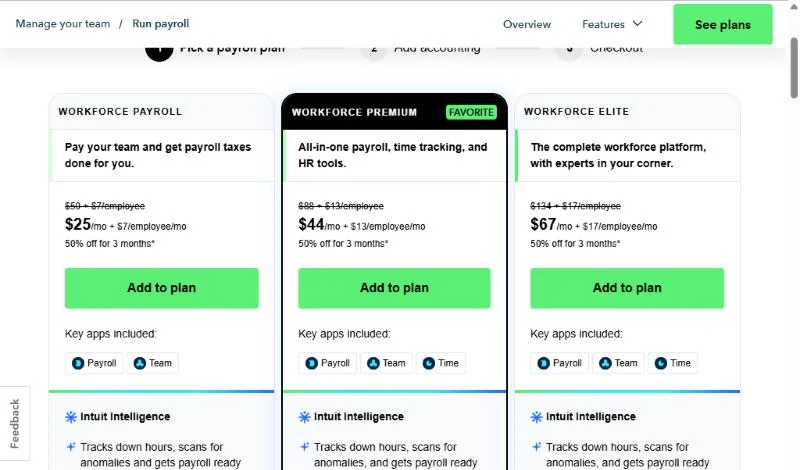
QuickBooks Payroll, now sold as QuickBooks Workforce, costs $50 a month plus $7 per employee on Workforce Payroll, $88 plus $13 on Workforce Premium and $134 plus $17 on Workforce Elite, billed monthly.
That two-part price is why QuickBooks payroll pricing is hard to read from the plan cards. One employee on Workforce Payroll costs $50 + $7 x 1 = $57 a month, billed monthly.
Below: what each plan adds, the offers, the extra fees and the bill at 1, 5, 10 and 25 employees.
Quick pricing answer
QuickBooks Payroll is sold as QuickBooks Workforce, in three plans, each a monthly base fee plus a monthly fee per employee: Workforce Payroll ($50 + $7), Workforce Premium ($88 + $13) and Workforce Elite ($134 + $17), billed monthly in US dollars.
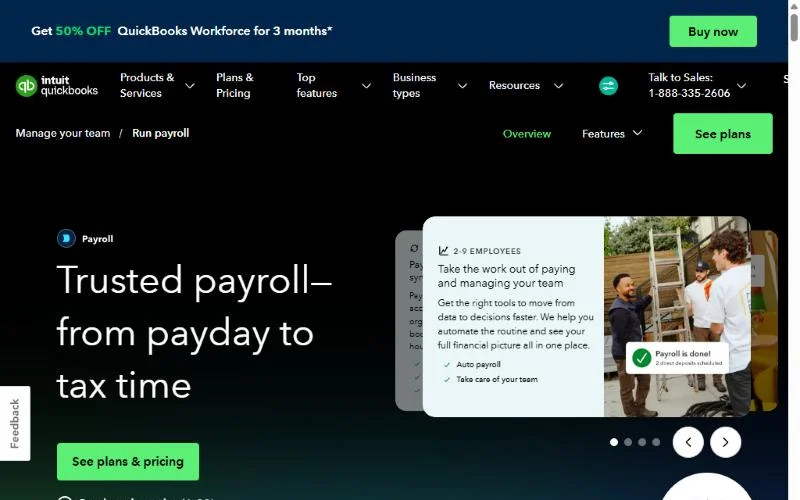
There is no free plan. New customers pick either a 30-day free trial or 50% off the base fee for 3 months, and the discount saves more.
A salaried team should start on Workforce Payroll; hourly staff who clock time need Premium.
The caveat: neither offer touches the per-employee fee, that fee drives the bill from about 8 employees, and it is the part the Firm of the Future page says is being updated. Prices checked October 2026.
In This Article (12 sections)
QuickBooks Payroll Pricing at a Glance
Each Workforce plan bills a monthly base fee plus a monthly fee per employee, from Workforce Payroll’s $50 + $7 to Elite’s $134 + $17. Contractor Payments, for 1099 workers only, is $25 a month for 20 contractors, billed monthly.
| Plan | Base fee | Per-person fee | Billing | Best for | Main limitation |
|---|---|---|---|---|---|
| Workforce Payroll | $50/mo | $7/mo per employee or contractor | Monthly | Salaried teams | No time tracking or same-day deposit |
| Workforce Premium | $88/mo | $13/mo per employee | Monthly | Hourly teams that clock time | 5 automated HR workflows; no expert setup |
| Workforce Elite | $134/mo | $17/mo per employee | Monthly | Owners who want setup and penalty cover done for them | Highest per-employee fee |
| Contractor Payments | $25/ | $2/mo per additional contractor | Monthly | Businesses paying only 1099 contractors | Pays no employees |
Sources: QuickBooks Contractor Payments plans and QuickBooks Time pricing with payroll, checked October 2026.
I read these prices on Intuit’s US pages on October 29, 2026, in US dollars. Every card prints a monthly price, and the offer terms bill “on a monthly basis thereafter” until you cancel; no annual price is listed.
With a per-head fee on top of the base, the plan name hides the bill, so the next question is what each step up buys.
QuickBooks Payroll Plans Explained
Workforce Payroll covers full-service payroll for a salaried team; Premium is the upgrade for hourly staff because it adds time tracking and same-day deposit; Elite buys expert setup and up to $25,000 a year of tax penalty cover.
The plan names changed with the rename. Intuit’s Firm of the Future update says QuickBooks Online Payroll is now QuickBooks Workforce: Payroll Core became Workforce Payroll, Payroll Premium became Workforce Premium and Payroll Elite became Workforce Elite.
Workforce Payroll (formerly Payroll Core)
Workforce Payroll is enough for a team on fixed salaries. For $50 a month plus $7 per employee or contractor, its card lists full-service payroll with automated taxes and forms, auto payroll, 1099 e-file, next-day direct deposit and an employee portal.
Tax filing is included: automated tax payments and filings cover federal and state taxes once tax setup is complete. Certain local taxes are a Premium and Elite feature, so a business in a city with its own payroll tax should check that line first.
The upgrade trigger is hourly work. Time tracking, same-day direct deposit, automated I-9s and weekend phone and chat support are Premium and Elite only; Workforce Payroll gets phone and chat during business hours.
Workforce Premium
Premium is worth paying for once hourly employees clock time. Its $88 base is $88 – $50 = $38 more than Workforce Payroll’s, and its $13 per-employee fee is $13 – $7 = $6 more.
For that, Premium adds QuickBooks Time, same-day direct deposit for employees, an expert review of your setup, 5 automated HR workflows, automated I-9s, hiring and onboarding, and time off management.
The per-head gap is what grows. Ten employees cost $50 + $7 x 10 = $120 a month on Workforce Payroll and $88 + $13 x 10 = $218 on Premium, so buy Premium for time tracking you will use, not for the HR extras alone.
Workforce Elite
Elite is the plan where Intuit takes on setup and penalty risk. For $134 a month plus $17 per employee, an expert completes your payroll setup, and tax penalty protection pays up to $25,000 in penalties and interest per year.
The cover has conditions. Full reimbursement needs the payroll tax notice sent within 15 days of the date printed on it. Errors made before your first Elite payroll are not covered, so switching to Elite after a mistake does not pay for it.
Elite also adds unlimited automated HR workflows, a personal HR advisor powered by Mineral, performance management, geofencing, mileage tracking and project estimates against actuals.
Contractor Payments
Contractor Payments costs $25 a month for up to 20 contractors and $2 for each one above that. It includes contractor payments, next-day direct deposit and unlimited 1099 e-filing, but it pays no employees.
For a business with only 1099 workers, the gap is large. Twenty contractors cost $25 a month here, while Workforce Payroll charges $50 + $7 x 20 = $190 because it bills contractors at the same $7 as employees.
Thirty contractors cost $25 + $2 x 10 = $45 a month, counting the 10 above the 20 included. Move to Workforce Payroll only when you hire your first W-2 employee.
Before you commit to any of these plans, Intuit lets you try the base fee free.
Does QuickBooks Payroll Have a Free Trial?
Yes, but only on the base fee: new customers on a monthly plan get a 30-day free trial of the monthly base price. The plan cards list no free plan.
The trial terms exclude per-employee fees, per-contractor fees and state tax filing fees, so a payroll run during the trial is still billed per head. You are charged automatically when the trial ends.
The trial and the 50% discount exclude each other: “Offers for the same product cannot be combined.” That makes the choice between them a money question.
Monthly Billing, Discounts and Cancellation
QuickBooks Workforce is billed monthly only; the 50% discount cuts the base fee for 3 months, worth one and a half months of base fee against the trial’s one month, so the discount wins on every plan.
| Plan | Base fee | Intro base fee, first 3 months | Saving over 3 months |
|---|---|---|---|
| Workforce Payroll | $50/mo | $25/mo | $25 x 3 = $75 |
| Workforce Premium | $88/mo | $44/mo | $44 x 3 = $132 |
| Workforce Elite | $134/mo | $67/mo | $67 x 3 = $201 |
| Contractor Payments | $25/mo | $12.50/mo | $12.50 x 3 = $37.50 |
Sources: QuickBooks Contractor Payments plans and QuickBooks Time pricing with payroll, checked October 2026.
Each saving equals the intro price because the intro price is half the base fee. Treating the 30-day trial as one free month, five employees on Workforce Payroll pay $25 x 3 + $50 x 9 + $7 x 5 x 12 = $945 in year one with the discount.
The trial route costs $50 x 11 + $7 x 5 x 12 = $970 for the same team.
Pricing note
The discount applies only to new customers who sign up for the monthly plan with the 3-month discount option. After 3 months you pay the then-current price each month until you cancel, and Intuit can change or end the offer at any time.
The per-employee fee is also the part of the price that the Firm of the Future page covers in its QuickBooks Payroll price-change update. The Firm of the Future update says the base subscription price is not changing and that the per-employee pricing is being updated, so recheck the per-head rate on the plan card before you budget.
The intro offers never reach that fee, and neither do the costs below.
Additional QuickBooks Payroll Costs to Consider
Beyond the plan fees, budget for state tax filing fees, Mineral HR experts below Elite, contractor next-day deposit, background checks from $29.99 a report, and benefits priced by their providers.
| Cost type | When it applies | Pricing basis | Notes |
|---|---|---|---|
| State tax filing fees | Named in the offer terms for QuickBooks Workforce | Not published on the plan cards | Excluded from the trial and the discount |
| Mineral HR experts | Workforce Payroll and Premium | Paid add-on, price not published | Included with Elite |
| Next-day direct deposit for contractors | Paying contractors on Workforce plans | Additional fee, not published | Same-day deposit is for employees only |
| Background checks via Checkr | Screening a new hire | Starting at $29.99 per report | Checkr’s terms and fees apply |
| Benefits administration | 20 or more employees | Sold separately | Benefit plan setup required |
| Health, 401(k), workers’ comp | Offering benefits | Allstate health plans sold separately; ERGO NEXT additional fees apply; 401(k) run by independent third parties | Workers’ comp not available in OH, ND, WA and WY |
Sources: QuickBooks Contractor Payments plans and terms, checked October 2026.
Guided Setup is free: new Workforce customers in their first 30 days who have not yet run payroll get a one-time 60-minute virtual session with a QuickBooks Workforce expert, without data migration. Expert setup, where the expert completes it for you, is an Elite feature. The plan cards list no setup fee.
Many buyers already pay for QuickBooks Online, which raises the bundling question.
How QuickBooks Payroll Pricing Combines With QuickBooks Online
Yes, you can buy QuickBooks payroll on its own: the three Workforce plans are sold without accounting.
The bundle cards add Simple Start: Workforce Payroll + Simple Start costs $88 a month plus $7 per employee, and Contractor Payments + Simple Start $63 a month with 20 contractors included.
Both bundles add the same amount for the books. Workforce Payroll + Simple Start is $88 – $50 = $38 more than Workforce Payroll alone, and Contractor Payments + Simple Start is $63 – $25 = $38 more than Contractor Payments alone.
The bundle cards I read pair payroll with Simple Start. For Essentials, Plus or Advanced, Intuit’s Workforce Premium and Elite pages invite you to “bundle with accounting”, so confirm the combined price at checkout against the QuickBooks Online plan prices for your tier.
Job costing changes the math. Allocating payroll costs by class or project needs Premium or Elite plus QuickBooks Online Plus, QuickBooks Online Advanced or Intuit Enterprise Suite, so a business tracking labor by job pays for two upper tiers.
If QuickBooks itself is still an open question, my QuickBooks Online review covers whether its books suit your business.
Teams not yet committed to an accounting system can compare accounting software for small businesses before bundling payroll with one.
How Much Does QuickBooks Payroll Cost for Your Team?
A 5-person salaried team pays $50 + $7 x 5 = $85 a month on Workforce Payroll, billed monthly. The table below prices 1, 5, 10 and 25 employees, and the calculator prices any headcount.
QuickBooks Payroll cost calculator
This calculator needs JavaScript. The scenario table below gives the same estimate for typical workloads.
Enter what you need. The calculator prices it on every plan at list prices and names the cheapest plan that covers it.
- List prices in USD from QuickBooks Payroll’s official pricing pages, checked Oct 29, 2026. Tax and regional prices are not included.
- 12-month figures are 12 times the monthly cost at the billing you choose.
- A planning estimate at list prices, not a quote.
Enter the number of employees you pay and tick the features you need, such as time tracking or tax penalty protection. The calculator shows Workforce Payroll, Premium and Elite side by side, monthly and over 12 months, and names the cheapest plan that covers the need at list price.
| Team size | Plan | Billing | Monthly cost | 12-month total | Assumptions |
|---|---|---|---|---|---|
| 1 employee | Workforce Payroll | Monthly | $50 + $7 x 1 = $57 | $57 x 12 = $684 | Salaried; no time tracking |
| 5 employees | Workforce Payroll | Monthly | $50 + $7 x 5 = $85 | $85 x 12 = $1,020 | Salaried; no time tracking |
| 10 employees with time tracking | Workforce Premium | Monthly | $88 + $13 x 10 = $218 | $218 x 12 = $2,616 | Hourly staff clocking time |
| 25 employees with tax penalty protection | Workforce Elite | Monthly | $134 + $17 x 25 = $559 | $559 x 12 = $6,708 | Expert setup and penalty cover wanted |
Sources: QuickBooks Contractor Payments plans and QuickBooks Time pricing with payroll, checked October 2026.
These totals, like the calculator, are list-price estimates, not quotes. They leave out the intro discount, state tax filing fees, benefits, add-ons, sales tax and wages.
The per-employee fee passes the base fee early: at 8 employees on Workforce Payroll ($7 x 8 = $56 against $50) and at 7 on Premium ($13 x 7 = $91 against $88). From there, the per-head rate decides what you pay, which is where the plan choice starts.
Which QuickBooks Payroll Plan Should You Choose?
Most salaried teams should stop at Workforce Payroll; hourly teams need Premium; Elite pays only when expert setup and penalty cover matter more than its $134 – $88 = $46 higher base and $17 – $13 = $4 higher fee per employee over Premium.
| Your needs | Plan to consider | Why | Main limitation |
|---|---|---|---|
| Salaried team, federal and state taxes only | Workforce Payroll | Full-service payroll and next-day deposit at the lowest base; no upgrade needed until you need time tracking or local taxes | No time tracking or same-day deposit |
| Hourly staff, same-day pay or local taxes | Workforce Premium | Time tracking, same-day deposit and certain local taxes start here | $13 per employee, almost double the entry fee |
| You want Intuit to set up payroll and carry penalty risk | Workforce Elite | Expert setup and up to $25,000 a year in penalty cover | Errors before the first Elite payroll are not covered |
| Only 1099 contractors | Contractor Payments | $25 a month covers 20 contractors | Pays no employees |
| Job costing by class or project in QuickBooks Online | Workforce Premium | Cost allocation needs Premium or Elite | Also needs QuickBooks Online Plus or Advanced |
| 20+ employees who want benefits administration | Workforce Premium or Elite | Benefits administration is on the Premium and Elite cards, sold separately to businesses with 20+ employees | Price not published; a dedicated HR system may compete |
Sources: QuickBooks Contractor Payments plans and terms, checked October 2026.
If Elite’s HR tools are the real draw, set them against a dedicated HR system; BambooHR’s pricing is the comparison to run before paying $17 per employee.
Is QuickBooks Payroll Worth the Price?
QuickBooks Payroll is worth its price for a small team that already keeps its books in QuickBooks Online and wants payroll in the same account. It is a harder sell once per-employee fees dominate the bill, or if you do not use QuickBooks for accounting. If you are still weighing other payroll providers, see my ADP payroll pricing guide.
Headcount shifts the value. At 5 employees on Workforce Payroll, the base fee is most of the bill; at 25 on Elite, per-employee fees of $17 x 25 = $425 a month are three times the base.
Elite’s case rests on the penalty cover. At 10 employees, Elite costs $134 + $17 x 10 = $304 a month against Premium’s $88 + $13 x 10 = $218. That gap, $134 – $88 = $46 more in base fee and $17 – $13 = $4 more per employee, buys expert setup and up to $25,000 a year in penalties and interest, on the 15-day notice rule.
Skip the Workforce plans if you pay only contractors, where Contractor Payments is the cheaper route. Skip it too if a payroll-first product’s per-person rate beats $7 to $17 at your headcount; Gusto’s plan prices are one rival to check.
For a wider field, see payroll software for small businesses compared by cost, states and contractors.
How I Verified QuickBooks Payroll Pricing
I read Intuit’s plan cards and offer terms for the United States on October 29, 2026, in US dollars, on monthly billing. The pages were the Contractor Payments page (both plan tabs), the QuickBooks Time pricing page with payroll, the payroll pricing page and the tax penalty protection page.
Prices are quoted as the cards print them. I calculated the team totals as base fee + per-employee fee x employees, and the 12-month total as the monthly cost x 12. The plan recommendations are my judgment.
Intuit does not publish an annual price, the state tax filing fee amount, the Mineral add-on price or the contractor next-day deposit fee on these pages.
Frequently Asked Questions
Is QuickBooks Payroll being discontinued?
No, it was renamed. Intuit’s Firm of the Future update says QuickBooks Online Payroll is now QuickBooks Workforce. Intuit’s own plan pages still carry titles such as “QuickBooks Payroll Elite” over the QuickBooks Workforce Elite name, so both names lead to the same plans.
Is QuickBooks Payroll Core still available?
Yes, as Workforce Payroll. Intuit’s Firm of the Future update lists Payroll Core becoming Workforce Payroll and says existing subscriptions update automatically, with no action required. The same update says base subscription prices are not changing while per-employee fees are.
Final Pricing Verdict
Start on Workforce Payroll if your team is salaried, and take the 3-month discount on the base fee rather than the trial. Choose Premium the day you add hourly staff, same-day pay or a local payroll tax.
Buy Elite only for done-for-you setup and penalty cover, knowing the cover starts with your first Elite payroll. A business paying only 1099 workers belongs on Contractor Payments. If you are down to two payroll-first rivals, compare them in my Gusto vs ADP comparison.
- Skip it if:
- your per-employee fees already exceed the base fee and a payroll-first rival charges less per person; that rate, not the $50 headline, is the number to beat.