

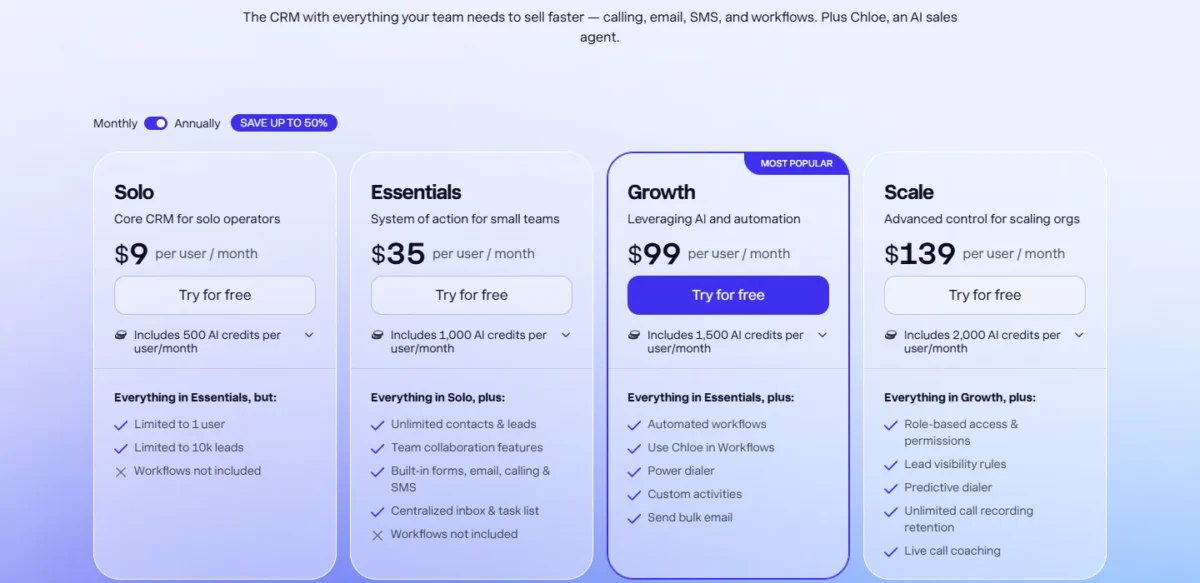
Close fits teams that sell by phone, and Salesflare fits B2B teams that sell through email and LinkedIn. Close builds calling and SMS into every plan and adds a power dialer on Growth, at $99 per user per month, billed annually.
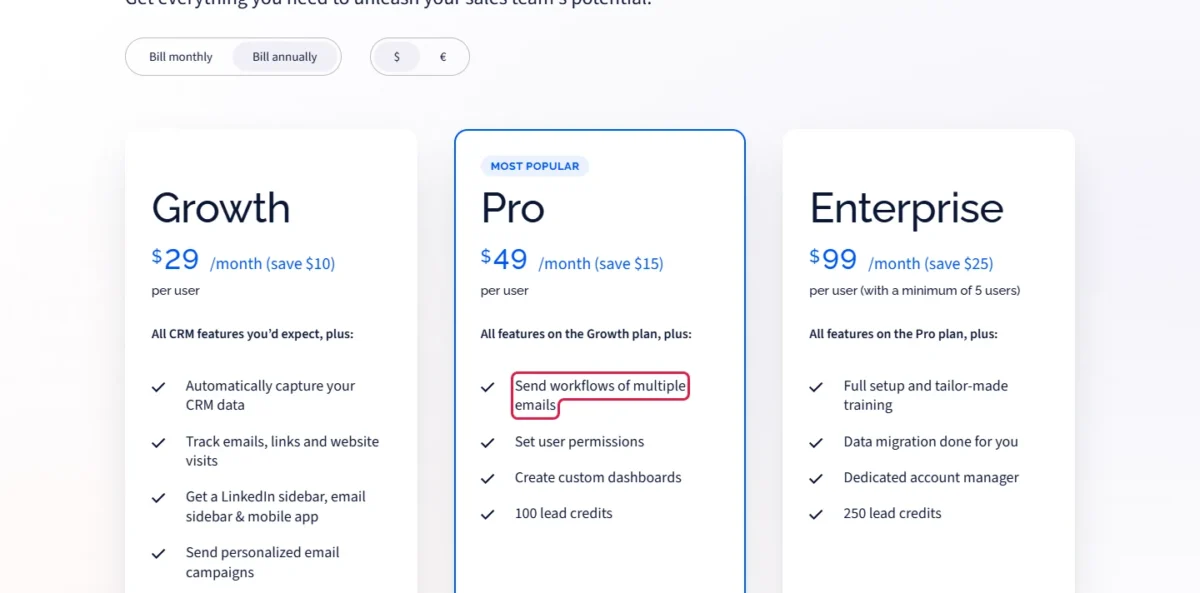
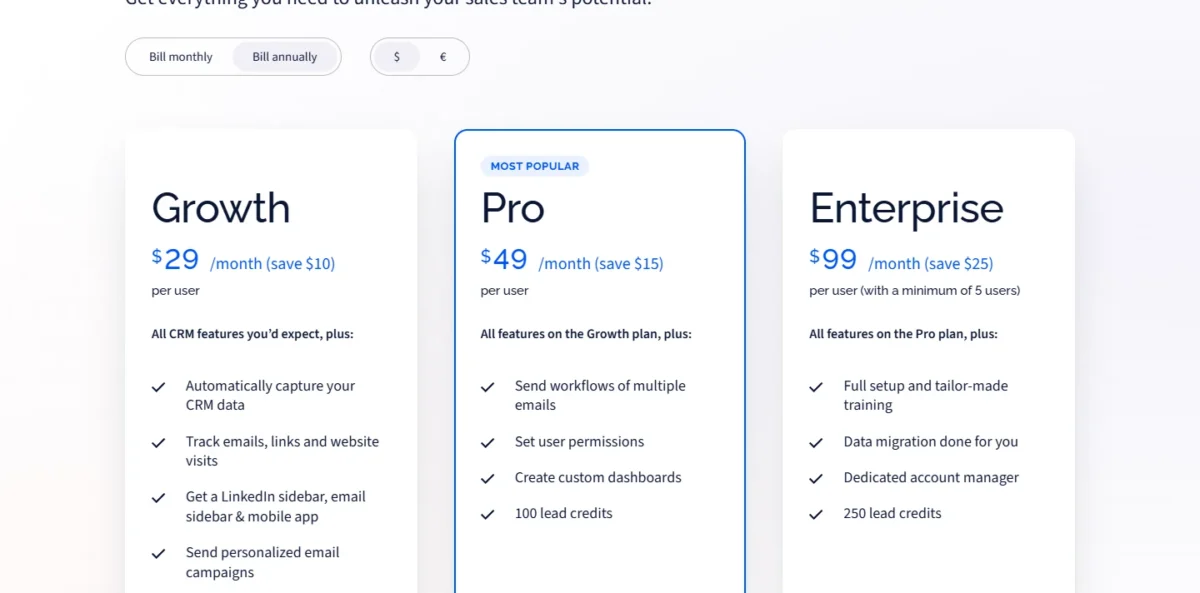
Salesflare fills records from emails, signatures and social profiles, and sends multi-step email follow-up from Pro at $49 per user per month, billed annually.
In a Close vs Salesflare decision, that gap sets the budget. Five sellers with automated follow-up pay $99 x 5 users x 12 months = $5,940 a year on Close. On Salesflare they pay $49 x 5 users x 12 months = $2,940.

Quick verdict
The deciding difference is where the work happens. Close keeps the phone, the text thread and the email in one CRM. Salesflare captures contact data from the inbox and LinkedIn, so reps type less and follow up by email.
Close fits phone-led outbound teams. Salesflare fits email- and relationship-led B2B teams that want sequences and user permissions on Pro.
The trade-off: Close’s automation starts at $99 per user per month, while Salesflare lists no dialer on its pricing page.
Choose Close if
- Reps make most first contacts by phone or text
- One seller wants calling built in for $9 per user per month on Solo
Choose Salesflare if
- Reps sell from Gmail, Outlook and LinkedIn
- Managers want permissions and email sequences on one mid plan
In This Article (10 sections)
Close vs Salesflare at a Glance
Both tools price per user in a similar band (Close $9 to $139, Salesflare $29 to $99 per month, billed annually), but they automate different selling motions.
| Attribute | Close | Salesflare |
|---|---|---|
| Best for | Phone-led outbound teams | Email- and LinkedIn-led B2B teams |
| Starting price, billed annually | Solo: $9 (1 user) | Growth: $29 |
| Same plan, billed monthly | Solo: $19 | Growth: $39 |
| Plan with automated follow-up | Growth: $99 annual, $109 monthly | Pro: $49 annual, $64 monthly |
| Calling | Built in on every plan, usage at cost | Device’s default calling app, logged |
| Free trial | 14 days, no credit card | 30 days, no credit card |
| Main limitation | Workflows and power dialer start on Growth | No dialer listed on the pricing page |
Sources: Close pricing page, Salesflare pricing page and Salesflare’s calling help page, checked October 2026.
The seat price does not decide; the plan each team needs does. A phone team lands on Close Growth or Scale, while an email-led team can stop at Salesflare Pro.
Key Differences Between Close and Salesflare
Four differences change how a rep works every day, and each favors a different team.
- Where calls happen: Close dials, records and logs calls and texts inside the CRM; Salesflare opens the device’s default calling app and logs the call.
- How records fill: Salesflare gathers contact and company details from emails, signatures and social profiles; Close syncs email both ways and imports email history.
- What automation sends: Close Growth workflows send email and SMS and queue calls; Salesflare Pro workflows send a series of emails.
- What managers control: Salesflare Pro restricts what reps see, edit or delete; Close keeps customizable roles and lead visibility rules for Scale.
A rep who dials through lists all day needs the dialer inside the CRM, which favors Close. A rep who lives in the inbox gains most from records that fill themselves, which favors Salesflare. Both gaps matter more than the shared basics of what a CRM does.
Close vs Salesflare: Features Compared
Automated follow-up starts on Close Growth and Salesflare Pro. Each product also misses one thing at every plan: Salesflare’s pricing page lists no dialer, and Close’s pricing matrix lists no LinkedIn sidebar or website-visit tracking.
| Feature | Close | Salesflare |
|---|---|---|
| Calling and SMS inside the CRM | All plans | Not listed on salesflare.com/ |
| Power dialer | Growth, Scale | Not listed on salesflare.com/ |
| Predictive dialer | Scale | Not listed on salesflare.com/ |
| Multi-step workflows | Growth, Scale (email, SMS, calls) | Pro, Enterprise (emails) |
| Bulk or mass email | Growth, Scale | All plans |
| Email open tracking | Essentials and up | All plans |
| LinkedIn sidebar | Not listed on close.com/ | All plans |
| Website-visit tracking | Not listed on close.com/ | All plans |
| Custom permissions | Scale | Pro, Enterprise |
| Custom reports or dashboards | Scale | Pro, Enterprise |
| API access | All plans | Not listed on salesflare.com/ |
Sources: Close pricing page (full plan matrix) and Salesflare pricing page, checked October 2026.
Close spends its higher plans on calling and control; Salesflare spends Pro on email automation and management.
Calling and dialing
Close lets reps call and text from the CRM on every plan; Salesflare logs calls that the device’s own calling app places. Close adds a power dialer on Growth, then a predictive dialer and call coaching on Scale.
Close passes calling and SMS usage through at cost: most outbound calls run about $0.02 a minute, and phone numbers start at about $1 a month.
Salesflare logs a call when a rep clicks a contact’s phone number, which opens the device’s default calling app. Its Android app logs matching calls automatically. On an iPhone, VoIP calls reach Salesflare through Zapier.
Verdict: Calling and dialing
Close fits phone-led teams: a Growth rep works a list in the power dialer, while a Salesflare rep needs a separate phone or VoIP app. The caveat: Close’s minutes and numbers bill on top of the seat.
Email follow-up and sequences
Salesflare Pro sends workflows of multiple emails; its Growth plan sends single personalized campaigns from any connected mailbox.
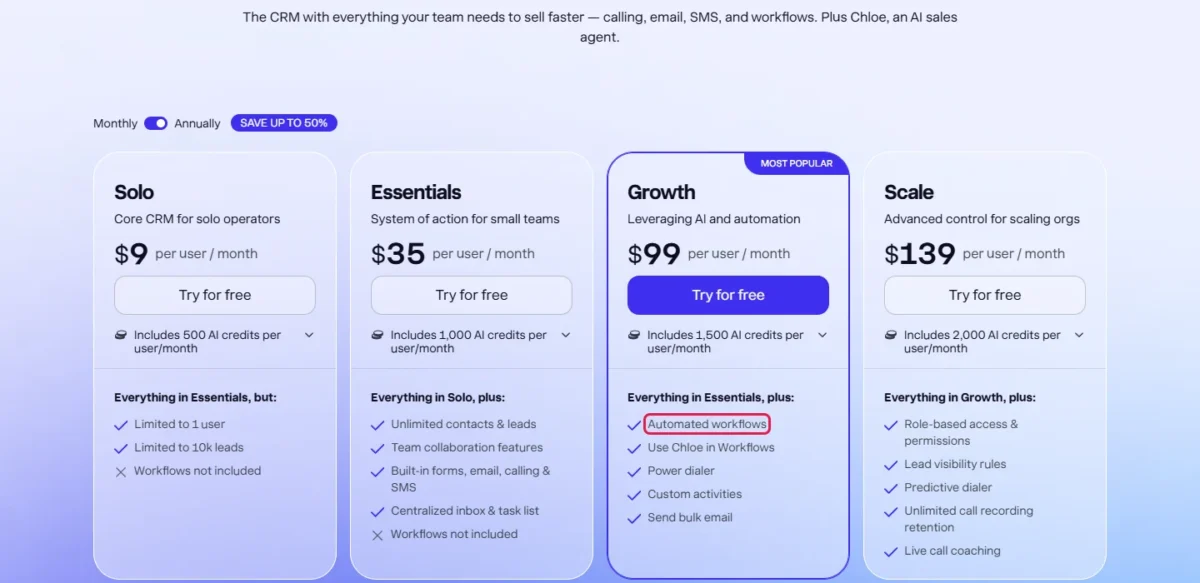
Close needs Growth for workflows, because its Solo and Essentials cards say “Workflows not included”. Growth workflows automate outreach by SMS, email and calls, and Growth adds bulk email and email scheduling.
Close also caps connected email accounts at 3 on Solo and Essentials and 10 on Growth and Scale.
Verdict: Email follow-up
Salesflare fits email-only sequences on a budget: Pro costs $50 less per user per month than Close Growth ($49 vs $99, billed annually). Close fits cadences that mix texts and queued calls with email.
Data capture, tracking and lead finding
Salesflare leaves reps less manual entry. On every plan it gathers contact and company details from emails, signatures and social profiles, logs meetings and calls, and tracks email opens, clicks and website visits.
Close covers the inbox through two-way email sync, historical email import and a notetaker for Zoom, Teams and Meet on every plan. LinkedIn capture comes from partner apps in Close’s integrations directory, such as LinkMatch and AddtoCRM.
Salesflare includes 5 lead credits on Growth, 100 on Pro and 250 on Enterprise; 250 extra credits cost $39 a month. Close lists Enrichment on every plan but no lead-search allowance.
Verdict: Data capture
Salesflare fits reps who work in Gmail, Outlook and LinkedIn. How much typing it saves depends on your inbox, so connect a real mailbox during the 30-day trial.
Permissions, reporting and AI
Salesflare Pro gives a manager user permissions and custom dashboards at $49 per user per month, billed annually. Pro restricts what reps see, edit or delete and limits access to specific pipelines.
Close keeps standard roles through Growth. Customizable roles, lead visibility settings, user groups and custom graphs need Scale at $139 per user per month, billed annually.
Verdict: Permissions and reporting
Salesflare fits a budget-minded manager, since Close reserves custom roles and custom graphs for Scale. A team that needs custom objects finds them on Close Scale.
Close includes 500 to 2,000 AI credits per user per month, by plan, and Chloe, its AI sales agent, on every plan; Chloe runs inside workflows from Growth. Salesflare’s homepage names AI suggestions, but its pricing page lists no AI allowance.
Close does not publish what one AI credit buys, so test Chloe on a real lead list during the trial.
Close vs Salesflare Pricing
Both vendors bill per user per month. Close runs $9 to $139 across four plans and Salesflare $29 to $99 across three, billed annually; the plan with automated follow-up costs $99 on Close and $49 on Salesflare.
| Tier | Close | Salesflare |
|---|---|---|
| One seller | Solo: $9 / $19 (1 user, 10,000 leads) | Growth: $29 / $39 |
| Small team, no multi-step automation | Essentials: $35 / $49 | Growth: $29 / $39 |
| First plan with automated follow-up | Growth: $99 / $109 | Pro: $49 / $64 |
| Top plan | Scale: $139 / $149 | Enterprise: $99 / $124 (minimum 5 users) |
Sources: Close pricing page and Salesflare pricing page, both billing views in US dollars, checked October 2026.
Close’s plans are Solo, Essentials, Growth and Scale; a “Growth $29 / Pro $49 / Enterprise $99” ladder is Salesflare’s. Neither pricing page lists a free plan. Close offers a 14-day trial plus a 30-day money-back guarantee, and Salesflare a 30-day trial, both without a credit card.
Monthly billing adds $10 per user per month on Close Growth ($109 vs $99) and $15 on Salesflare Pro ($64 vs $49).
Close’s Call Assistant add-on costs $50 a month plus $0.02 a minute, and each extra organization $50 a month (one free on Growth and Scale). My Close CRM review covers each plan’s limits. Salesflare charges nothing for onboarding and states “no hidden limits” on contacts, users, workflows or pipelines.
On Close, a second user or more than 10,000 leads moves a seller off Solo; workflows or a power dialer move a team to Growth. On Salesflare, follow-up beyond one email or a manager who needs permissions moves a team to Pro.
Close’s plan picker says Essentials “adds pipelines and team-level visibility”, while its feature matrix marks Pipelines as included on Solo too. A solo seller who needs several pipelines should confirm that in the trial.
What a 5- and 10-person team pays
A five-person team with automated follow-up pays about twice as much a year on Close Growth as on Salesflare Pro at annual list prices.
| Team and need | Close | Salesflare |
|---|---|---|
| One seller, entry plan | Solo: $9 x 12 months = $108 | Growth: $29 x 12 months = $348 |
| 5 users, entry team plan | Essentials: $35 x 5 users x 12 months = $2,100 | Growth: $29 x 5 users x 12 months = $1,740 |
| 5 users, automated follow-up | Growth: $99 x 5 users x 12 months = $5,940 | Pro: $49 x 5 users x 12 months = $2,940 |
| 10 users, automated follow-up | Growth: $99 x 10 users x 12 months = $11,880 | Pro: $49 x 10 users x 12 months = $5,880 |
| 5 users, top plan | Scale: $139 x 5 users x 12 months = $8,340 | Enterprise: $99 x 5 users x 12 months = $5,940 |
Sources: Close pricing page and Salesflare pricing page, checked October 2026.
Assumptions: annual billing at list prices per user; the totals leave out Close calling minutes and phone numbers, Close add-ons, extra Salesflare lead credits and tax.
Paying month to month, five follow-up seats cost $109 x 5 users x 12 months = $6,540 on Close Growth. On Salesflare Pro they cost $64 x 5 users x 12 months = $3,840. On annual billing, Salesflare Enterprise’s five-seat minimum and five Close Growth seats both come to $5,940 a year.
The cheaper bill is not always the better value. A phone-led team on Salesflare still pays for a calling app or VoIP service outside Salesflare, not counted here, while Close Growth includes the power dialer.
Integrations, Security and Data Location
Close lists more than 100 integrations plus API access on every plan, while Salesflare counts 11,304 apps reached natively or through Zapier and Make. The counts measure different things, so check your own tools.
Close’s directory lists Gmail, Microsoft 365, Calendly, Zoom and HubSpot, plus Zapier and Make, and its help center points to Zapier or the API for anything missing.
Salesflare connects natively to Gmail, Outlook, Google Calendar, ChatGPT and Claude (integrations directory); its pricing page lists no API access.
Close holds an independently audited SOC 2 Type II report, available on request, publishes GDPR and CCPA notices and encrypts data stores at rest.
Salesflare stores data on Google Cloud servers in St. Ghislain, Belgium. It encrypts data at rest and in transit, makes daily backups and holds CASA Tier 2 verification for its app. The SOC 1/2/3 and ISO/IEC 27001 compliance it names belongs to its server infrastructure.
Salesflare’s Terms of Service carry a GDPR provision, with a DPA on request.
Verdict: Security and data location
It depends on the review. A questionnaire that asks for the vendor’s own SOC 2 Type II report points to Close; a buyer who needs EU data residency points to Salesflare.
Close vs Salesflare: Pros and Cons
Close’s strengths sit in calling and API access, Salesflare’s in captured data and cheaper email automation.
Close
Pros
- Calling, SMS and call logging on every plan, so reps dial without a second app
- Solo gives one seller calling for $9 per user per month, billed annually
- API access and an event log on every plan
- An independently audited SOC 2 Type II report
Cons
- Workflows, bulk email and the power dialer wait for Growth at $99
- Customizable roles and lead visibility rules need Scale at $139
- Calling minutes bill on top of the seat
- Solo stops at 1 user and 10,000 leads
Salesflare
Pros
- Pro pairs email workflows with user permissions and custom dashboards
- Records fill from emails, signatures and social profiles on every plan
- LinkedIn and Gmail or Outlook sidebars plus website-visit tracking on Growth
- A 30-day trial and free onboarding
Cons
- No dialer on the pricing page; calls run through another app
- Growth includes 5 lead credits against Pro’s 100, so regular lead search on Growth means monthly packs (250 credits for $39) or a move to Pro
- Enterprise requires a minimum of 5 users
- Its SOC certifications belong to the server infrastructure, not the app
Who should skip each: Close is not for a team whose reps rarely call and need only email follow-up, and Salesflare is not for a team that needs a dialer inside the CRM.
Which Is Better for Your Needs?
Close is better for phone-led selling, API work and a vendor SOC 2 report; Salesflare is better for email and LinkedIn follow-up, permissions on a budget and EU data residency.
| Your priority | Better fit | Reason | Trade-off |
|---|---|---|---|
| Phone-led outbound | Close | Calling on every plan, power dialer on Growth | Workflows and dialer start at $99 per user per month |
| Email and LinkedIn follow-up | Salesflare | Captures contact data and works inside LinkedIn | Calls run in another app |
| Lowest cost with sequences, 5 users | Salesflare | Pro costs $49 per user per month against Close Growth’s $99 | Sequences send emails, not texts |
| Solo seller who calls | Close | Solo includes calling and SMS | No workflows; 1 user, 10,000 leads |
| Manager permissions under $50 a seat | Salesflare | Pro restricts what reps see, edit or delete | Close needs Scale at $139 |
| Vendor’s own SOC 2 report | Close | SOC 2 Type II report on request | Salesflare names infrastructure certifications |
| EU data residency | Salesflare | Data stored in St. Ghislain, Belgium | Close lists Amazon Web Services for hosting |
| Custom integrations through an API | Close | API access on every plan | Salesflare’s pricing page lists no API |
| AI agent that calls leads | Insufficient evidence | Close describes Chloe calling and qualifying leads | What one AI credit buys is not published |
Sources: Close pricing page and Salesflare pricing page, prices billed annually, checked October 2026.
A team that books meetings by phone should pick Close and budget for Growth; pick Salesflare if most first contacts start in email. A five-person team running email-only follow-up gets that job from Salesflare Pro for less, unless texts belong in the cadence.
A reader still deciding whether Close is the right base can open Salesforce vs Close next.
A pipeline-first team also weighing Pipedrive can compare its plan limits in my Pipedrive review.
If neither a dialer nor inbox capture matters, my list of other CRMs compared by price and fit is the wider shortlist.
Teams already shortlisting HubSpot should compare HubSpot vs Close before they choose.
Switching Between Close and Salesflare
Close’s CRM migration list does not include Salesflare, and Salesflare’s importer takes .csv files only, so both directions run through CSV exports.
From Salesflare to Close:
- Export accounts, contacts and opportunities as Excel or CSV from each page’s three-dot menu (Salesflare export help).
- Import them with Close’s Lead Importer, which takes CSV or XLSX files, up to 15MB per CSV.
- The Lead Importer does not import notes, calls, emails or SMS.
From Close to Salesflare:
- Export leads, contacts or opportunities as CSV or JSON (Close export help); only JSON carries all activities.
- Import the CSV files under Settings > Import Data, which covers accounts, contacts and opportunities (Salesflare import help).
- On Enterprise, Salesflare lists “data migration done for you”.
Both importers move records: leads, contacts and opportunities into Close, and accounts, contacts and opportunities into Salesflare. Close’s support tools export templates, notes and phone numbers to CSV with an API key, which gives a team leaving Close a record to rebuild from.
Anyone weighing another destination than Salesflare can see Freshsales vs Close first.
How I Compared Close and Salesflare
I compared Close and Salesflare from each vendor’s pricing page, help center, integrations directory and security pages, read on October 21, 2026. Close’s prices come from its US page in both billing views, with the full plan matrix expanded; Salesflare’s are the dollar view of a page that also shows euros.
I paired plans by the job they do: the first plan with multi-step follow-up, the small-team plan, the one-seller plan and the top plan. Every plan price is per user per month on both billing bases.
The criteria were calling, email follow-up, data capture, permissions, AI, integrations, security and switching. Not published: what one Close AI credit buys.
Final Verdict: Close or Salesflare?
Pick Close if your reps live on the phone, and Salesflare if they live in the inbox and LinkedIn and need sequences at about half Close’s automation price. Neither is the better CRM in general; the selling motion decides.
Choose Close if
- Reps work call lists daily and need a power dialer, which starts on Growth
- Cadences mix SMS, email and calls in one workflow
- A solo seller wants calling built in on the $9 Solo plan
- Security reviews ask for the vendor’s own SOC 2 Type II report
Choose Salesflare if
- Reps sell from Gmail or Outlook and LinkedIn and want records filled in
- The team needs email sequences on Pro at $49 per user per month
- A manager needs permissions without paying for a top plan
- The company wants its CRM data stored in Belgium
Close charges $99 per user per month, billed annually, before anything is automated, and bills calling minutes on top. Salesflare saves on seats but leaves the phone to another app.





